19. 应用练习 – 第 9 版
在此版本中,我们将按以下方式改进服务器:
- 目前,每次请求都会从数据库中检索税务管理数据。我们将使用会话机制:
- 当用户首次发起请求时,从数据库中检索税务管理数据并存入会话;
- 当同一用户后续请求时,将从会话中检索税务管理数据。由于数据库查询成本较高,预计可略微缩短执行时间;
- 服务器将把重要时刻记录到文本文件中:
- 身份验证成功或失败;
- 客户端发送的参数是否有效;
- 税款计算结果;
- 各种错误情况;
- 若发生致命错误,将向应用程序管理员发送一封邮件;
客户端也需进行修改,以处理我们将发送给它的会话cookie。
19.1. 服务器
我们关注的是应用程序的服务器端。
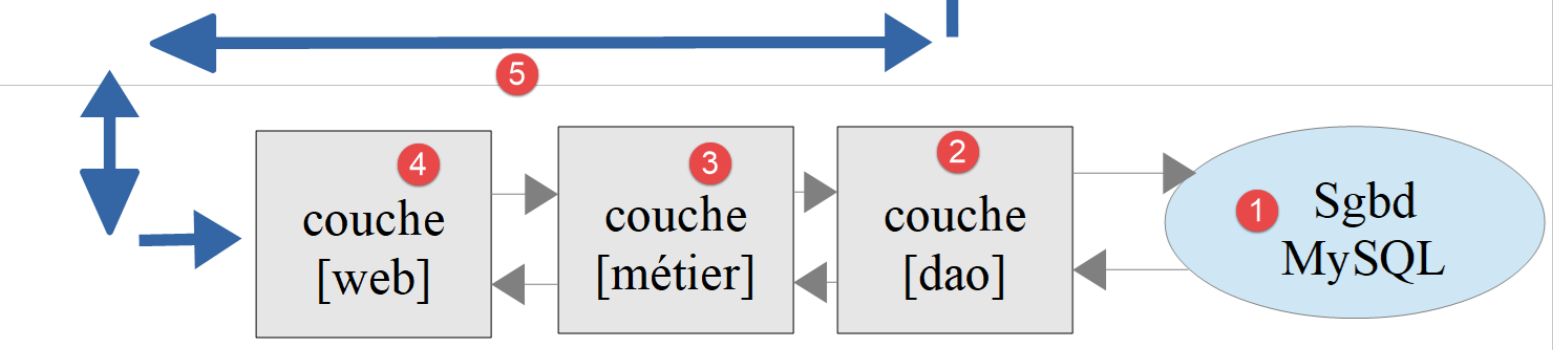
该架构将通过以下脚本实现:
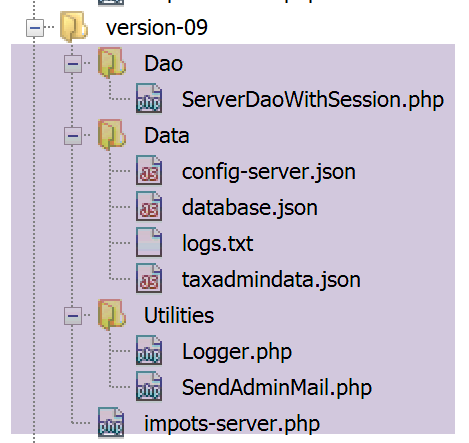
19.1.1. 实用工具
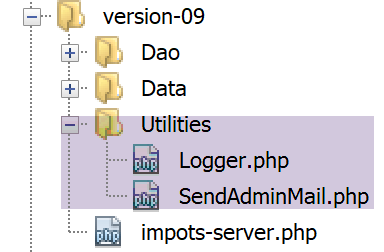
19.1.1.1. 类 [Logger]
类 [Logger] 将用于将日志写入文本文件:
<?php

namespace Application;

class Logger {
  // 属性
  private $resource;

  // 构造函数
  public function __construct(string $logsFilename) {
    // 打开文件
    $this->resource = fopen($logsFilename, "a");
    if (!$this->resource) {
      throw new ExceptionImpots("Echec lors de la création du fichier de logs [$logsFilename]");
    }
  }

  // 在日志中写入消息
  public function write(string $message) {
    fputs($this->resource, (new \DateTime())->format("d/m/y H:i:s:v") . " : $message");
  }

  // 关闭日志文件
  public function close() {
    fclose($this->resource);
  }

}
注释
- 第 7 行:日志文件的资源;
- 第 10 行:类构造函数接收日志文件名作为参数;
- 第 12 行:以追加模式 (a+) 打开文本文件:文件将被打开,其内容得以保留。写入操作将在当前内容之后进行;
- 第13-15行:若无法打开文件,则抛出异常;
- 第19-21行:方法[write]用于将消息[$message]写入日志文件,并在消息前添加日期和时间;
- 第24-16行:方法 [close] 用于关闭日志文件;
注:服务器应用程序可能同时为多个客户端提供服务。但所有客户端共用一个日志文件。因此,存在对该文件进行写入操作时的并发访问风险。因此,必须对写入操作进行同步,以避免数据混淆。 为此,PHP 提供了 [https://www.php.net/manual/fr/book.sem.php] 信号量。本文中我们将忽略写入操作的同步问题,但需时刻注意这一潜在风险。
19.1.1.2. [SendAdminMail] 类
[SendAdminMail] 类可在应用程序崩溃时向管理员发送邮件:
<?php

namespace Application;

class SendAdminMail {
  // 属性
  private $config;
  private $logger;

  // 构造函数
  public function __construct(array $config, Logger $logger = NULL) {
    $this->config = $config;
    $this->logger = $logger;
  }

  public function send() {
    // 将 $this->config['message'] 发送至 SMTP 服务器 $this->config['smtp-server'] 至端口 $infos[smt-port]
    // 如果 $this->config['tls'] 为真,则将使用 TLS 支持
    // 邮件由 $this->config['from'] 发送
    // 收件人为 $this->config['to']
    // 该邮件的主题为 $this->config['subject']
    // 将 $this->config['attachments'] 的附件附加到邮件中
    // 该方法的结果
    try {
      // 创建邮件
      $message = (new \Swift_Message())
        // 邮件主题
        ->setSubject($this->config["subject"])
        // 发件人
        ->setFrom($this->config["from"])
        // 使用字典的收件人(setTo/setCc/setBcc)
        ->setTo($this->config["to"])
        // 邮件正文
        ->setBody($this->config["message"])
      ;
      // 附件
      foreach ($this->config["attachments"] as $attachment) {
        // 附件路径
        $fileName = __DIR__ . $attachment;
        // 验证文件是否存在
        if (file_exists($fileName)) {
          // 将文档作为附件添加到消息中
          $message->attach(\Swift_Attachment::fromPath($fileName));
        } else {
          if ($this->logger !== NULL) {
            // 错误
            $this->logger->write("L'attachement [$fileName] n'existe pas\n");
          }
        }
      }
      // 协议 TLS ?
      if ($this->config["tls"] === "TRUE") {
        // TLS
        $transport = (new \Swift_SmtpTransport($this->config["smtp-server"], $this->config["smtp-port"], 'tls'))
          ->setUsername($this->config["user"])
          ->setPassword($this->config["password"]);
      } else {
        // 没有 TLS
        $transport = (new \Swift_SmtpTransport($this->config["smtp-server"], $this->config["smtp-port"]));
      }
      // 发送管理器
      $mailer = new \Swift_Mailer($transport);
      // 发送消息
      $mailer->send($message);
      // 结束
      if ($this->logger !== NULL) {
        $this->logger->write("Message [{$this->config["message"]}] envoyé à {$this->config["to"]}\n");
      }
    } catch (\Throwable $ex) {
      // 错误
      if ($this->logger !== NULL) {
        $this->logger->write("Erreur lors de l'envoi du message [{$this->config["message"]}] à {$this->config["to"]}\n");
      }
    }
  }

}
注释
- 第 11 行:构造函数接收两个参数:
- [$config]:一个关联数组,包含发送邮件所需的所有信息;
- [$logger]:一个日志器,用于记录邮件发送过程中的重要时刻;
该关联数组将采用以下形式:
- 第 16-76 行:方法 [send] 用于发送邮件。该代码已在链接段落中介绍并描述;
19.1.2. [dao] 层
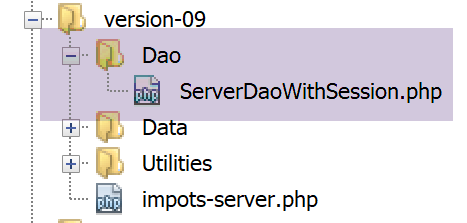
[ServeurDaoWithSession.php]脚本如下:
<?php

// 命名空间
namespace Application;

// 类定义ImpotsWithDataInDatabase
class ServerDaoWithSession extends ServerDao {

  // 构造函数
  public function __construct(string $databaseFilename = NULL, TaxAdminData $taxAdminData = NULL) {
    // 最简单的情况
    if ($taxAdminData !== NULL) {
      $this->taxAdminData = $taxAdminData;
    } else {
      // 将控制权交由父类
      parent::__construct($databaseFilename);
    }
  }

}
注释
- 第 7 行:09 版的 [ServerDaoWithSession] 类扩展了 08 版的 [ServerDao] 类。实际上,[ServerDao] 类已具备使用数据库的能力。 现在我们只需处理税务管理数据已获取的情况:
- 第 10 行:构造函数现在接收两个参数:
- [string $databaseFilename]:若税务部门数据尚未获取,则为包含数据库连接信息的文件名;否则为 NULL;
- [TaxAdminData $taxAdminData]:若税务部门数据已获取,则为该数据;否则为 NULL;
在启动Web会话时, 将使用一个非 NULL 类型的 [$databaseFilename] 对象和一个 [taxAdminData] 类型的 NULL 对象来构建 [dao] 层。 随后将从数据库中检索税务管理数据并存储在会话中。在同一会话的后续请求中, [dao]层将使用来自该会话的[databaseFilename]、NULL和[taxAdminData]对象构建,而非NULL。 因此不会进行数据库查询。
19.1.3. 服务器脚本
服务器脚本 [impots-server.php] 由以下文件 jSON [config-server.json] 配置:
{
    "rootDirectory": "C:/myprograms/laragon-lite/www/php7/scripts-web/impots/version-09",
    "databaseFilename": "Data/database.json",
    "relativeDependencies": [
        "/../version-08/Entities/BaseEntity.php",
        "/../version-08/Entities/ExceptionImpots.php",
        "/../version-08/Entities/TaxAdminData.php",
        "/../version-08/Entities/Database.php",
        "/../version-08/Dao/InterfaceServerDao.php",
        "/../version-08/Dao/ServerDao.php",
        "/Dao/ServerDaoWithSession.php",
        "/../version-08/Métier/InterfaceServerMetier.php",
        "/../version-08/Métier/ServerMetier.php",
        "/Utilities/Logger.php",
        "/Utilities/SendAdminMail.php"
    ],
    "absoluteDependencies": ["C:/myprograms/laragon-lite/www/vendor/autoload.php"],
    "users": [
        {
            "login": "admin",
            "passwd": "admin"
        }
    ],
    "adminMail": {
        "smtp-server": "localhost",
        "smtp-port": "25",
        "from": "guest@localhost",
        "to": "guest@localhost",
        "subject": "plantage du serveur de calcul d'impôts",
        "tls": "FALSE",
        "attachments": []
    },
    "logsFilename": "Data/logs.txt"
}
服务器脚本 [impots-server.php] 的演变如下:
<?php

// 严格遵守函数参数的声明类型
declare (strict_types=1);

// 命名空间
namespace Application;

// 通过 PHP 进行错误处理
ini_set("display_errors", "0");
//
// 配置文件路径
define("CONFIG_FILENAME", "Data/config-server.json");

// 获取配置
$config = \json_decode(file_get_contents(CONFIG_FILENAME), true);

// 引入脚本所需的依赖项
$rootDirectory = $config["rootDirectory"];
foreach ($config["relativeDependencies"] as $dependency) {
  require "$rootDirectory$dependency";
}
// 绝对依赖项(第三方库)
foreach ($config["absoluteDependencies"] as $dependency) {
  require "$dependency";
}
//
// Symfony 依赖项
use \Symfony\Component\HttpFoundation\Response;
use \Symfony\Component\HttpFoundation\Request;
use \Symfony\Component\HttpFoundation\Session\Session;

// 会话
$session = new Session();
$session->start();

// 准备服务器的响应 JSON
$response = new Response();
$response->headers->set("content-type", "application/json");
$response->setCharset("utf-8");

// 日志文件的创建
try {
  $logger = new Logger($config['logsFilename']);
} catch (ExceptionImpots $ex) {
  // 内部服务器错误
  doInternalServerError($ex->getMessage(), $response, NULL, $config['adminMail']);
  // 完成
  exit;
}

// 第一个日志
$logger->write("\n---nouvelle requête\n");

// 获取当前请求
$request = Request::createFromGlobals();
// 仅首次进行身份验证
if (!$session->has("user")) {
  // 日志
  $logger->write("Autentification en cours…\n");
  // 身份验证
  …
  }
  // 是否找到用户?
  if (!$trouvé) {
    // 未找到 - 代码 401 HTTP_UNAUTHORIZED
    sendResponse(
      $response,
      ["erreur" => "Echec de l'authentification [$requestUser, $requestPassword]"],
      Response::HTTP_UNAUTHORIZED,
      ["WWW-Authenticate" => "Basic realm=" . utf8_decode("\"Serveur de calcul d'impôts\"")],
      $logger
    );
    // 完成
    exit;
  } else {
    // 在会话中记录已验证用户
    $session->set("user", TRUE);
    // 日志
    $logger->write("Authentification réussie [$requestUser, $requestPassword]\n");
  }
} else {
  // 日志
  $logger->write("Authentification prise en session…\n");
}
// 用户有效 - 验证接收到的参数
$erreurs = [];
// 应有三个参数 GET
…

// 有错误吗?
if ($erreurs) {
// 向客户端发送 400 错误代码 HTTP_BAD_REQUEST
  sendResponse($response, ["erreurs" => $erreurs], Response::HTTP_BAD_REQUEST, [], $logger);
  // 完成
  exit;
} else {
  // 日志
  $logger->write("paramètres ['marié'=>$marié, 'enfants'=>$enfants, 'salaire'=>$salaire] valides\n");
}
// 已具备所有必要的工作条件
// 创建图层 [dao]
if (!$session->has("taxAdminData")) {
  // 数据从数据库中提取
  $logger->write("données fiscales prises en base de données\n");
  try {
    // 构建图层 [dao]
    $dao = new ServerDaoWithSession($config["databaseFilename"], NULL);
    // 将数据放入会话
    $session->set("taxAdminData", $dao->getTaxAdminData());
  } catch (\RuntimeException $ex) {
    // 记录错误
    doInternalServerError(utf8_encode($ex->getMessage()), $response, $logger, $config['adminMail']);
    // 完成
    exit;
  }
} else {
  // 从会话中获取数据
  $dao = new ServerDaoWithSession(NULL, $session->get("taxAdminData"));
  // 日志
  $logger->write("données fiscales prises en session\n");
}
// 创建图层 [métier]
$métier = new ServerMetier($dao);
// 计算税款
$result = $métier->calculerImpot($marié, (int) $enfants, (int) $salaire);
// 返回结果
sendResponse($response, $result, Response::HTTP_OK, [], $logger);
// 结束
exit;

function doInternalServerError(string $message, Response $response, Logger $logger = NULL, array $infos) {
  // 向管理员发送邮件
  // SendAdminMail 拦截所有异常并自行记录日志
  $infos['message'] = $message;
  $sendAdminMail = new SendAdminMail($infos, $logger);
  $sendAdminMail->send();
  // 向客户端发送 500 错误代码
  sendResponse($response, ["erreur" => $message], Response::HTTP_INTERNAL_SERVER_ERROR, [], $logger);
}

// 向客户端发送响应 HTTP 的函数
function sendResponse(Response $response, array $result, int $statusCode, array $headers, Logger $logger) {
  // $response:响应 HTTP
  // $result:结果表
  // $statusCode:响应状态 HTTP
  // $headers:应放入响应中的 HTTP 头部
  // $logger:应用程序日志记录器
  //
  // 状态 HTTTP
  $response->setStatusCode($statusCode);
  // 正文
  $body = \json_encode(["réponse" => $result], JSON_UNESCAPED_UNICODE);
  $response->setContent($body);
  // 头部
  $response->headers->add($headers);
  // 发送
  $response->send();
  // 日志
  if ($logger != NULL) {
    $logger->write("$body\n");
    $logger->close();
  }
}
注释
- 第 34-35 行:启动一个会话;
- 第38-40行:准备jSON响应;
- 第 42-50 行:尝试创建日志文件。若发生异常,则调用方法 [doInternalServer](第 132-140 行);
- 第 132 行:方法 [doInternalServer] 接受四个参数:
- [$message]:待记录的消息。必须采用 UTF-8 编码;
- [$response]:封装服务器对客户端响应的 [Response] 对象;
- [$logger]:用于生成日志的 [Logger] 对象;
- [$infos]:用于向应用程序管理员发送邮件的信息;
- 第 135-137 行:向应用程序管理员发送一封电子邮件;
- 第139行:向客户端发送响应:
- $response:响应 HTTP;
- $result:服务器发送数组 [‘réponse’=>["erreur" => $message]] 中的字符串 jSON;
- $statusCode:[Response::HTTP_INTERNAL_SERVER_ERROR],状态码 500;
- $headers:[],响应中无需添加 HTTP 头部;
- $logger:应用程序日志记录器;
- 第 58 行:借助已建立的会话,客户端认证仅需执行一次:
- 客户端通过身份验证后,将在会话中设置一个密钥 [user](第 78 行);
- 当同一客户端发起下一次请求时,第58行可避免重复进行已无必要的身份验证;
- 第103行:借助已建立的会话,数据库查询仅需执行一次:
- 首次请求时,将执行数据库查询(第108行)。随后,检索到的数据会被存入会话(第110行),并关联密钥 [taxAdminData];
- 在后续请求中,会从会话中检索到密钥 [taxAdminData](第 103 行),随后将磁盘数据直接传递给 [dao] 层(第 119 行);
- 第111-116行:数据库中的税务数据检索可能失败。在此情况下,向客户端发送代码[500 Internal Server Error];
- 第113行:驱动程序异常MySQL的错误消息编码为ISO 8859-1。将其转换为UTF-8以便正确记录;
- 其余代码与上一版本几乎完全相同;
- 第 143-164 行:函数 [sendResponse] 将所有响应发送给客户端;
- 第144-148行:参数说明;
- 第 153 行:响应始终是数组 [‘résultat’=>qqChose] 中的字符串 jSON;
- 第156行:有时需要在响应中添加HTTP头部。第71行即为这种情况;
- 第 158 行:发送响应;
- 第160-163行:响应被记录,日志器关闭;
19.1.4. 测试 [Codeception]
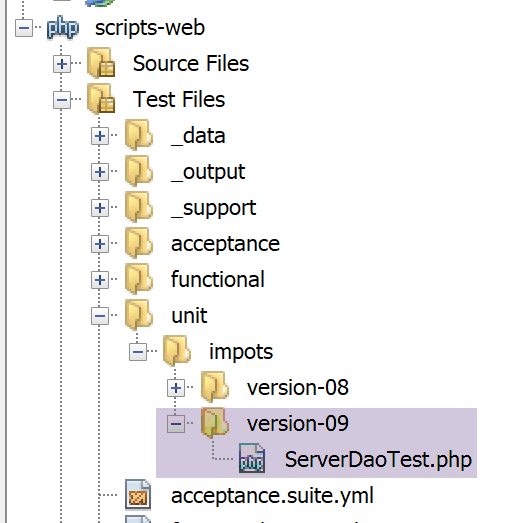
我们将仅测试[dao]层,因为这是唯一发生变化的层。
[ServerDaoTest]测试代码如下:
<?php

// 严格遵守函数参数的声明类型
declare (strict_types=1);

// 命名空间
namespace Application;

// 常量的定义
define("ROOT", "C:/myprograms/laragon-lite/www/php7/scripts-web/impots/version-09");
// 配置文件路径
define("CONFIG_FILENAME", ROOT . "/Data/config-server.json");

// 获取配置
$config = \json_decode(\file_get_contents(CONFIG_FILENAME), true);
// 引入脚本所需的依赖项
$rootDirectory = $config["rootDirectory"];
foreach ($config["relativeDependencies"] as $dependency) {
  require "$rootDirectory$dependency";
}
// 绝对依赖项(第三方库)
foreach ($config["absoluteDependencies"] as $dependency) {
  require "$dependency";
}

// 测试 -----------------------------------------------------

class ServerDaoTest extends \Codeception\Test\Unit {
  // TaxAdminData
  private $taxAdminData;

  public function __construct() {
    // 父级
    parent::__construct();
    // 获取配置
    $config = \json_decode(\file_get_contents(CONFIG_FILENAME), true);
    // 创建层[dao]
    $dao = new ServerDaoWithSession(ROOT . "/" . $config["databaseFilename"]);
    $this->taxAdminData = $dao->getTaxAdminData();
  }

  // 测试
  public function testTaxAdminData() {
    …
  }

}
- 第 9-24 行:创建一个与服务器脚本 [impots-server] 完全相同的运行环境;
- 第38行:为构建[dao]层,实例化类[ServerDaoWithSession];
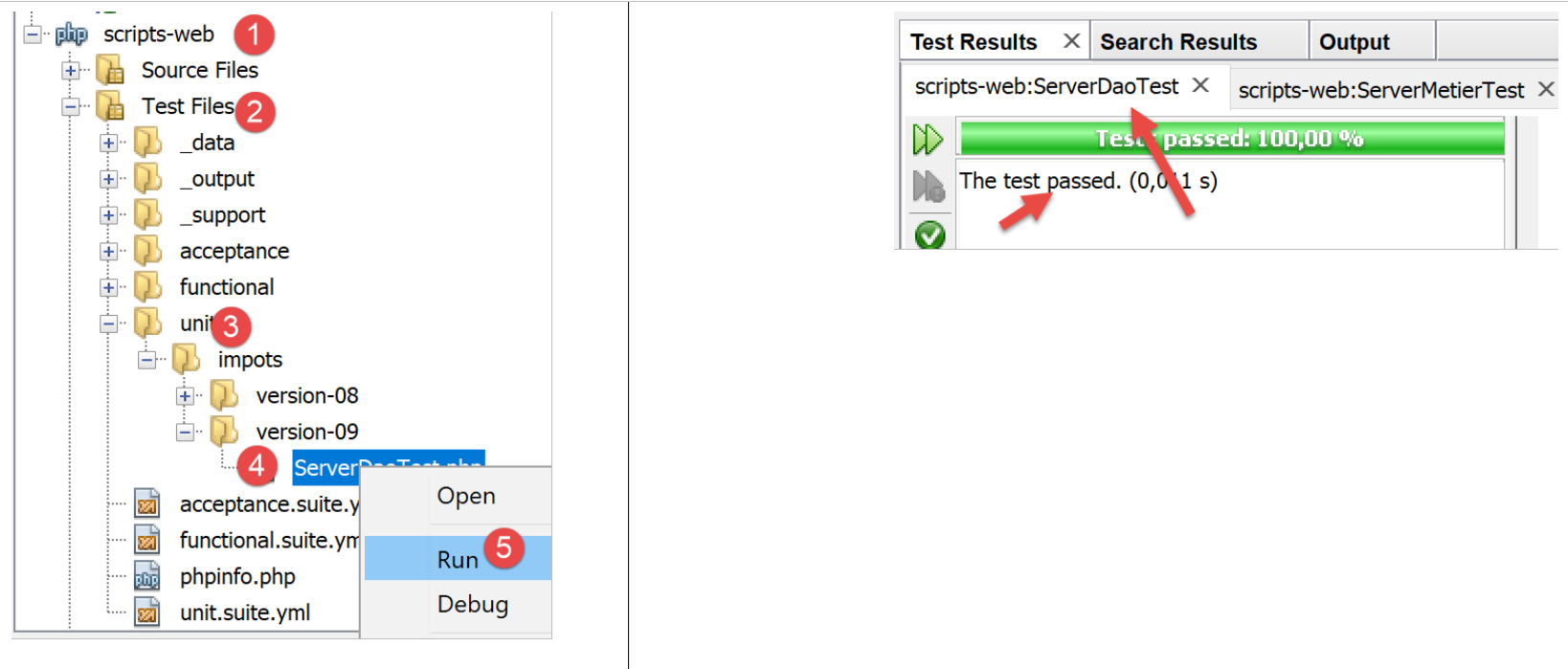
测试结果如下:
19.2. 客户端
我们关注应用程序的客户端部分。
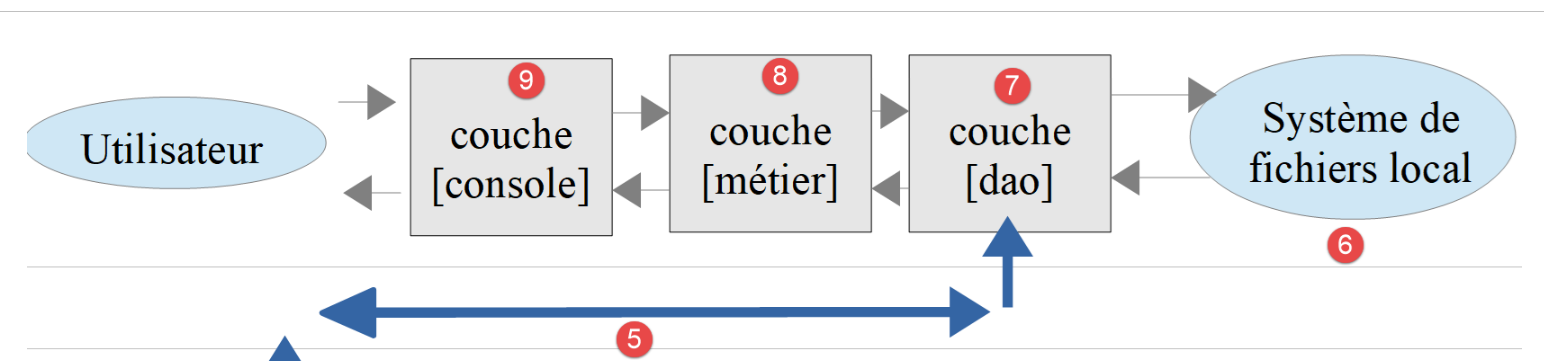
该架构将通过以下脚本实现:
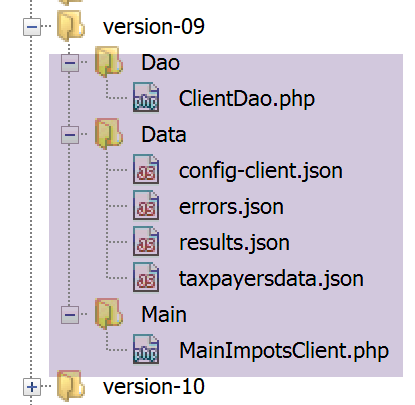
在新版本中,仅以下内容发生变更:
- 配置文件 [config-client.json];
- 客户端的 [dao] 层;
19.2.1. [dao] 层
[Dao]层的变化如下:
<?php

namespace Application;

// 依赖关系
use \Symfony\Component\HttpClient\HttpClient;

class ClientDao implements InterfaceClientDao {
  // 使用一个特征
  use TraitDao;
  // 属性
  private $urlServer;
  private $user;
  private $sessionCookie;

  // 构造函数
  public function __construct(string $urlServer, array $user) {
    $this->urlServer = $urlServer;
    $this->user = $user;
  }

  // 税款计算
  public function calculerImpot(string $marié, int $enfants, int $salaire): array {
    // 会话cookie?
    if (!$this->sessionCookie) {
      // 创建客户HTTP
      $httpClient = HttpClient::create([
          'auth_basic' => [$this->user["login"], $this->user["passwd"]],
          "verify_peer" => false
      ]);
      // 不使用会话cookie向服务器发送请求
      $response = $httpClient->request('GET', $this->urlServer,
        ["query" => [
            "marié" => $marié,
            "enfants" => $enfants,
            "salaire" => $salaire
          ]
      ]);
    } else {
      // 使用会话cookie向服务器发送请求
      // 创建客户端 HTTP
      $httpClient = HttpClient::create([
          "verify_peer" => false
      ]);
      $response = $httpClient->request('GET', $this->urlServer,
        ["query" => [
            "marié" => $marié,
            "enfants" => $enfants,
            "salaire" => $salaire
          ],
          "headers" => ["Cookie" => $this->sessionCookie]
      ]);
    }
    // 获取响应
    $json = $response->getContent(false);
    $array = \json_decode($json, true);
    $réponse = $array["réponse"];
    // 日志
    print "$json=json\n";
    // 获取响应状态
    $statusCode = $response->getStatusCode();
    // 错误?
    if ($statusCode !== 200) {
      // 出现错误 - 抛出异常
      $réponse = ["statut HTTP" => $statusCode] + $réponse;
      $message = \json_encode($réponse, JSON_UNESCAPED_UNICODE);
      throw new ExceptionImpots($message);
    }
    if (!$this->sessionCookie) {
      // 获取会话cookie
      $headers = $response->getHeaders();
      if (isset($headers["set-cookie"])) {
        // 会话cookie?
        foreach ($headers["set-cookie"] as $cookie) {
          $match = [];
          $match = preg_match("/^PHPSESSID=(.+?);/", $cookie, $champs);
          if ($match) {
            $this->sessionCookie = "PHPSESSID=" . $champs[1];
          }
        }
      }
    }
    // 返回响应
    return $réponse;
  }

}
注释
[dao] 层的修改在于现在开始管理会话:
- 第 14 行:会话 Cookie;
- 第 25-39 行:首次请求时该 Cookie 不存在:此时向服务器发送请求并附带身份验证信息(第 28 行);
- 第40-53行:后续请求中通常已持有会话cookie,因此不再发送身份验证信息(第42-44行);
- 第69-82行:服务器对首次请求的响应将包含一个会话cookie。我们将其获取。该代码已在“链接”段落中使用并解释过;
- 第 78 行:获取的会话 Cookie 被存储在类属性 [$sessionCookie] 中;
注:本可保留旧版 [dao] 层,并在每次请求时进行身份验证,因为其开销微乎其微。出于教学目的,我们特意重现了 HTTP 客户端如何管理会话。
19.2.2. 配置文件
配置文件 jSON 的变更如下:
{
    "rootDirectory": "C:/Data/st-2019/dev/php7/poly/scripts-console/impots/version-09",
    "taxPayersDataFileName": "Data/taxpayersdata.json",
    "resultsFileName": "Data/results.json",
    "errorsFileName": "Data/errors.json",
    "dependencies": [
        "/../version-08/Entities/BaseEntity.php",
        "/../version-08/Entities/TaxPayerData.php",
        "/../version-08/Entities/ExceptionImpots.php",
        "/../version-08/Utilities/Utilitaires.php",
        "/../version-08/Dao/InterfaceClientDao.php",
        "/../version-08/Dao/TraitDao.php",
        "/Dao/ClientDao.php",
        "/../version-08/Métier/InterfaceClientMetier.php",
        "/../version-08/Métier/ClientMetier.php"
    ],
    "absoluteDependencies": [
        "C:/myprograms/laragon-lite/www/vendor/autoload.php"
    ],
    "user": {
        "login": "admin",
        "passwd": "admin"
    },
    "urlServer": "https://localhost:443/php7/scripts-web/impots/version-09/impots-server.php"
}
仅第24行的URL发生了变化。
19.3. 一些测试
19.3.1. 测试 1
首先,我们在无错误的环境中运行客户端。结果与之前版本一致。但现在服务器端出现了一个名为 [logs.txt] 的日志文件:
04/07/19 13:16:08:523 :
---nouvelle requête
04/07/19 13:16:08:529 : Autentification en cours…
04/07/19 13:16:08:529 : Authentification réussie [admin, admin]
04/07/19 13:16:08:529 : paramètres ['marié'=>oui, 'enfants'=>2, 'salaire'=>55555] valides
04/07/19 13:16:08:529 : tranches d'impôts prises en base de données
04/07/19 13:16:08:534 : {"réponse":{"impôt":2814,"surcôte":0,"décôte":0,"réduction":0,"taux":0.14}}
04/07/19 13:16:08:643 :
---nouvelle requête
04/07/19 13:16:08:648 : Authentification prise en session…
04/07/19 13:16:08:648 : paramètres ['marié'=>oui, 'enfants'=>2, 'salaire'=>50000] valides
04/07/19 13:16:08:648 : tranches d'impôts prises en session
04/07/19 13:16:08:648 : {"réponse":{"impôt":1384,"surcôte":0,"décôte":384,"réduction":347,"taux":0.14}}
04/07/19 13:16:08:769 :
---nouvelle requête
04/07/19 13:16:08:775 : Authentification prise en session…
04/07/19 13:16:08:775 : paramètres ['marié'=>oui, 'enfants'=>3, 'salaire'=>50000] valides
04/07/19 13:16:08:775 : tranches d'impôts prises en session
04/07/19 13:16:08:775 : {"réponse":{"impôt":0,"surcôte":0,"décôte":720,"réduction":0,"taux":0.14}}
04/07/19 13:16:08:888 :
---nouvelle requête
…
- 第3-7行:首次请求时,会进行身份验证并查询数据库数据;
- 第9-14行:在后续请求中,不再进行身份验证,数据通过会话获取。此后各次请求(第15行及之后)均重复此过程;
19.3.2. 测试 2
现在关闭数据库 MySQL。客户端显示以下控制台结果:
L'erreur suivante s'est produite : {"statut HTTP":500,"erreur":"SQLSTATE[HY000] [2002] Aucune connexion n’a pu être établie car l’ordinateur cible l’a expressément refusée.\r\n"}
Terminé
在服务器端,我们看到以下日志:
04/07/19 13:19:52:396 :
---nouvelle requête
04/07/19 13:19:52:405 : Autentification en cours…
04/07/19 13:19:52:405 : Authentification réussie [admin, admin]
04/07/19 13:19:52:405 : paramètres ['marié'=>oui, 'enfants'=>2, 'salaire'=>55555] valides
04/07/19 13:19:52:405 : tranches d'impôts prises en base de données
04/07/19 13:19:54:461 : {"réponse":{"erreur":"SQLSTATE[HY000] [2002] Aucune connexion n’a pu être établie car l’ordinateur cible l’a expressément refusée.\r\n"}}
04/07/19 13:19:55:602 : Message [SQLSTATE[HY000] [2002] Aucune connexion n’a pu être établie car l’ordinateur cible l’a expressément refusée.
] envoyé à guest@localhost
04/07/19 13:19:55:706 :
---nouvelle requête
…
要获取应用程序管理员收到的邮件,需使用第X段落中与配置文件[config-imap-01.json]关联的脚本[imap-03.php]:
结果如下:
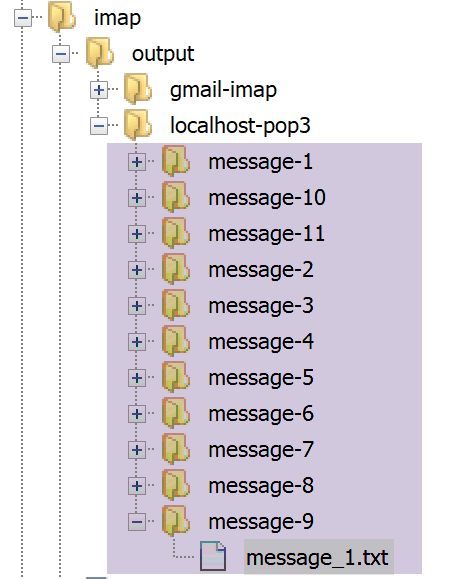
文件 [message_1.txt] 包含以下文本:
return-path: guest@localhost
received: from localhost (localhost [127.0.0.1]) by DESKTOP-528I5CU with ESMTP ; Thu, 4 Jul 2019 15:20:22 +0200
message-id: <c82d26df5fb352e10a51577cd1b9ed87@localhost>
date: Thu, 04 Jul 2019 13:20:20 +0000
subject: plantage du serveur de calcul d'impôts
from: guest@localhost
to: guest@localhost
mime-version: 1.0
content-type: text/plain; charset=utf-8
content-transfer-encoding: quoted-printable

SQLSTATE[HY000] [2002] Aucune connexion n’a pu être établie car l’ordinateur cible l’a expressément refusée.
19.3.3. 测试 3
现在让我们确保无法创建文件 [logs.txt]。为此,只需创建一个名为 [logs.txt] 的文件夹:
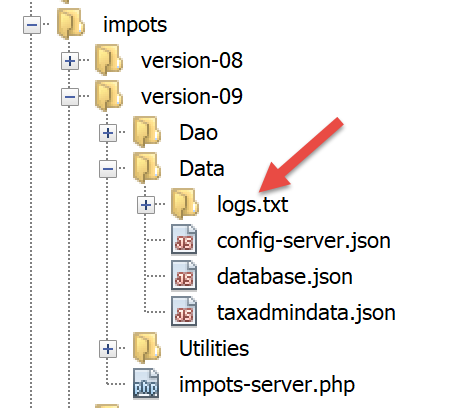
完成上述操作后,运行客户端。
在客户端,我们得到以下控制台输出:
L'erreur suivante s'est produite : {"statut HTTP":500,"erreur":"Echec lors de la création du fichier de logs [Data\/logs.txt]"}
Terminé
在服务器端,虽然没有日志,但管理员会收到以下邮件:
return-path: guest@localhost
received: from localhost (localhost [127.0.0.1]) by DESKTOP-528I5CU with ESMTP ; Thu, 4 Jul 2019 15:31:49 +0200
message-id: <b2cee274f3437952231d62152ba1cdb3@localhost>
date: Thu, 04 Jul 2019 13:31:48 +0000
subject: plantage du serveur de calcul d'impôts
from: guest@localhost
to: guest@localhost
mime-version: 1.0
content-type: text/plain; charset=utf-8
content-transfer-encoding: quoted-printable

Echec lors de la création du fichier de logs [Data/logs.txt]
19.3.4. 测试 4
这次,我们在客户端配置文件中为连接的客户端指定了错误的凭据。
客户端在控制台显示以下结果:
L'erreur suivante s'est produite : {"statut HTTP":401,"erreur":"Echec de l'authentification [x, x]"}
Terminé
在服务器端,会出现以下日志:
---nouvelle requête
04/07/19 13:36:05:789 : Autentification en cours…
04/07/19 13:36:05:789 : {"réponse":{"erreur":"Echec de l'authentification [x, x]"}}
19.3.5. 测试 5
将正确的用户 [admin, admin] 重新添加到客户端配置文件中。
现在,让我们直接在浏览器中访问服务器上的 URL [http://localhost/php7/scripts-web/impots/version-08/impots-server.php],而不传递任何参数:
在服务器的日志文件中,可以看到以下几行:
---nouvelle requête
04/07/19 13:37:33:711 : Autentification en cours…
04/07/19 13:37:33:711 : Authentification réussie [admin, admin]
04/07/19 13:37:33:711 : {"réponse":{"erreurs":["Méthode GET requise avec les seuls paramètres [marié, enfants, salaire]","paramètre marié manquant","paramètre enfants manquant","paramètre salaire manquant"]}}
19.4. [Codeception] 测试
与之前版本的做法一样,我们将为 09 版本编写测试用例 [Codeception]。
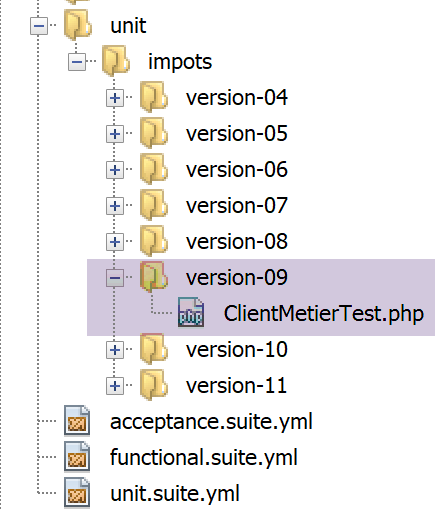
19.4.0.1. [métier] 层测试
[ClientMetierTest.php] 测试如下:
<?php

// 严格遵守函数参数的声明类型
declare (strict_types=1);

// 命名空间
namespace Application;

// 常量定义
define("ROOT", "C:/Data/st-2019/dev/php7/poly/scripts-console/impots/version-09");

// 配置文件路径
define("CONFIG_FILENAME", ROOT . "/Data/config-client.json");

// 获取配置
$config = \json_decode(file_get_contents(CONFIG_FILENAME), true);

// 引入脚本所需的依赖项
$rootDirectory = $config["rootDirectory"];
foreach ($config["dependencies"] as $dependency) {
  require "$rootDirectory/$dependency";
}
// 绝对依赖项(第三方库)
foreach ($config["absoluteDependencies"] as $dependency) {
  require "$dependency";
}
//
// 使用
use Codeception\Test\Unit;
use const CONFIG_FILENAME;
use const ROOT;

// 测试类
class ClientMetierTest extends Unit {
  …
}
注释
- 与08版测试类相比,仅第10行有所变化,该行指定了待测客户端的根目录;
测试结果如下:

查看服务器日志会很有趣:[logs.txt]:
04/07/19 13:48:48:525 :
---nouvelle requête
04/07/19 13:48:48:536 : Autentification en cours…
04/07/19 13:48:48:536 : Authentification réussie [admin, admin]
04/07/19 13:48:48:536 : paramètres ['marié'=>oui, 'enfants'=>2, 'salaire'=>55555] valides
04/07/19 13:48:48:536 : données fiscales prises en base de données
04/07/19 13:48:48:548 : {"réponse":{"impôt":2814,"surcôte":0,"décôte":0,"réduction":0,"taux":0.14}}
04/07/19 13:48:48:635 :
---nouvelle requête
04/07/19 13:48:48:645 : Autentification en cours…
04/07/19 13:48:48:645 : Authentification réussie [admin, admin]
04/07/19 13:48:48:645 : paramètres ['marié'=>oui, 'enfants'=>2, 'salaire'=>50000] valides
04/07/19 13:48:48:645 : données fiscales prises en base de données
04/07/19 13:48:48:655 : {"réponse":{"impôt":1384,"surcôte":0,"décôte":384,"réduction":347,"taux":0.14}}
04/07/19 13:48:48:751 :
---nouvelle requête
04/07/19 13:48:48:762 : Autentification en cours…
04/07/19 13:48:48:762 : Authentification réussie [admin, admin]
04/07/19 13:48:48:762 : paramètres ['marié'=>oui, 'enfants'=>3, 'salaire'=>50000] valides
04/07/19 13:48:48:762 : données fiscales prises en base de données
04/07/19 13:48:48:773 : {"réponse":{"impôt":0,"surcôte":0,"décôte":720,"réduction":0,"taux":0.14}}
04/07/19 13:48:48:865 :
---nouvelle requête
…
---nouvelle requête
04/07/19 13:48:49:546 : Autentification en cours…
04/07/19 13:48:49:546 : Authentification réussie [admin, admin]
04/07/19 13:48:49:546 : paramètres ['marié'=>oui, 'enfants'=>3, 'salaire'=>200000] valides
04/07/19 13:48:49:546 : données fiscales prises en base de données
04/07/19 13:48:49:551 : {"réponse":{"impôt":42842,"surcôte":17283,"décôte":0,"réduction":0,"taux":0.41}}
可以发现,税务管理数据始终是从数据库中获取的,从未在会话中获取。让我们回到已执行的测试代码:
<?php

// 严格遵守函数参数的声明类型
declare (strict_types=1);

// 命名空间
namespace Application;

…

// 测试类
class ClientMetierTest extends Unit {
  // 业务层
  private $métier;

  public function __construct() {
    parent::__construct();
    // 获取配置
    $config = \json_decode(\file_get_contents(CONFIG_FILENAME), true);
    // 创建 [dao] 层
    $clientDao = new ClientDao($config["urlServer"], $config["user"]);
    // 创建层[métier]
    $this->métier = new ClientMetier($clientDao);
  }

  // 测试
  public function test1() {
    …
  }

  public function test2() {
    …
  }

  public function test3() {
    …
  }

  …

}
在测试类 [Codeception] 中,构造函数会在每次测试时被调用。
- 第21行:因此,每个测试都会创建一个新的[ClientDao],并带有会话cookie NULL。这解释了为何该客户端无法利用任何会话;
此示例表明,会话并非存储税务管理数据的合适位置。实际上,这些数据对应用程序的所有用户都是通用的。然而在此处,它们却在每个用户的会话中被重复存储。
在Web编程中,共享数据通常分为三种可见性类型:
- 由Web应用程序所有用户共享的数据。这类数据通常为只读数据。PHP本身不具备此类存储功能;
- 同一客户端的请求共享的数据。这些数据存储在会话中。此时,我们称之为客户端会话,以指代客户端的内存。同一客户端的所有请求均可访问该会话,并在其中存储和读取信息。在之前的脚本中,该会话由 Symfony 对象 [HttpFoundation\Session\Session] 实现;
- 请求内存,或称请求上下文。用户的请求可能由多个连续的操作进行处理。 请求上下文允许操作 1 向操作 2 传递信息。在之前的脚本中,请求由 Symfony 对象 [HttpFoundation\Request] 实现,其内存由属性 [HttpFoundation\Request::attributes] 实现;
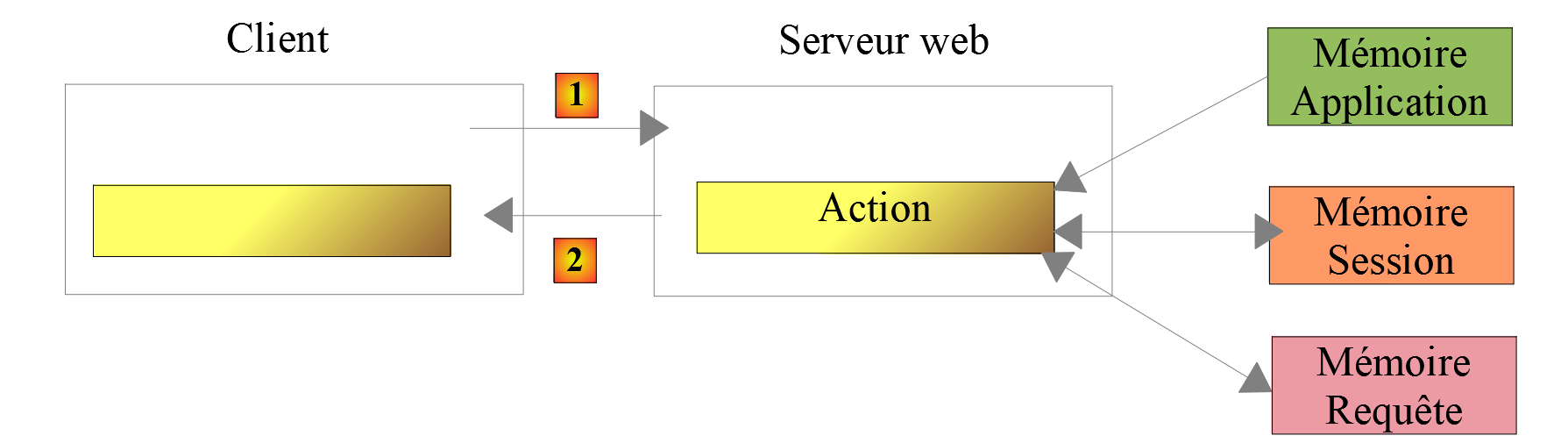
已有第三方库可为 PHP 提供应用程序内存。应用练习的新版本展示了其中一种库的使用方法。