18. 应用练习 – 第 8 版
我们将重新使用示例应用程序 – 版本 5(链接段落),并将其改造成一个客户端/服务器应用程序。
18.1. 简介
第 5 版的架构如下:
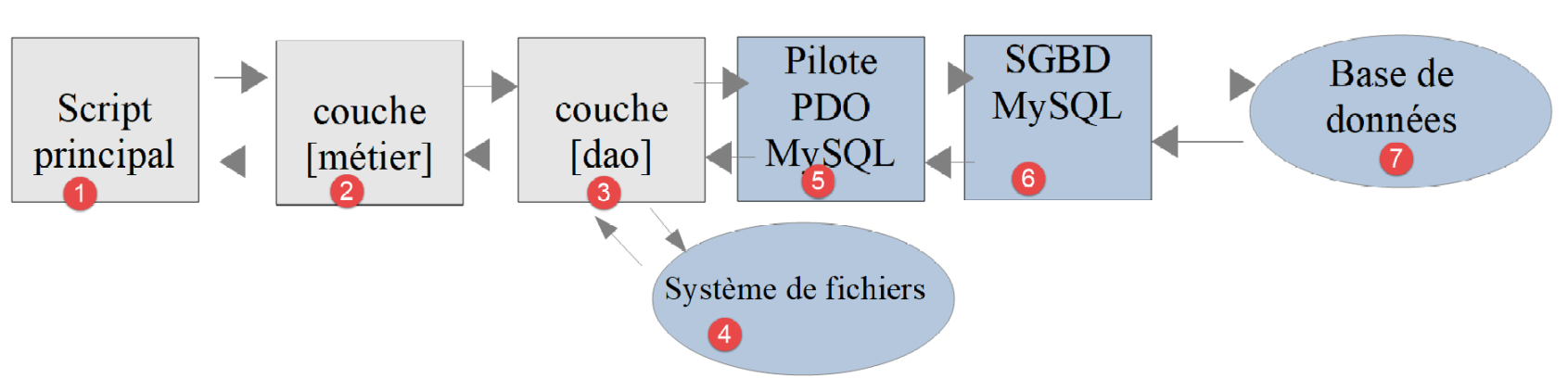
- 名为 [dao] 的层(数据访问对象)负责与数据库 MySQL 及本地文件系统进行交互;
- 名为 [métier] 的层负责计算税款;
- 主脚本是总指挥:它实例化 [dao] 和 [métier] 层,然后与 [métier] 层进行交互以完成所需任务;
我们将把该架构迁移至以下客户端/服务器架构:
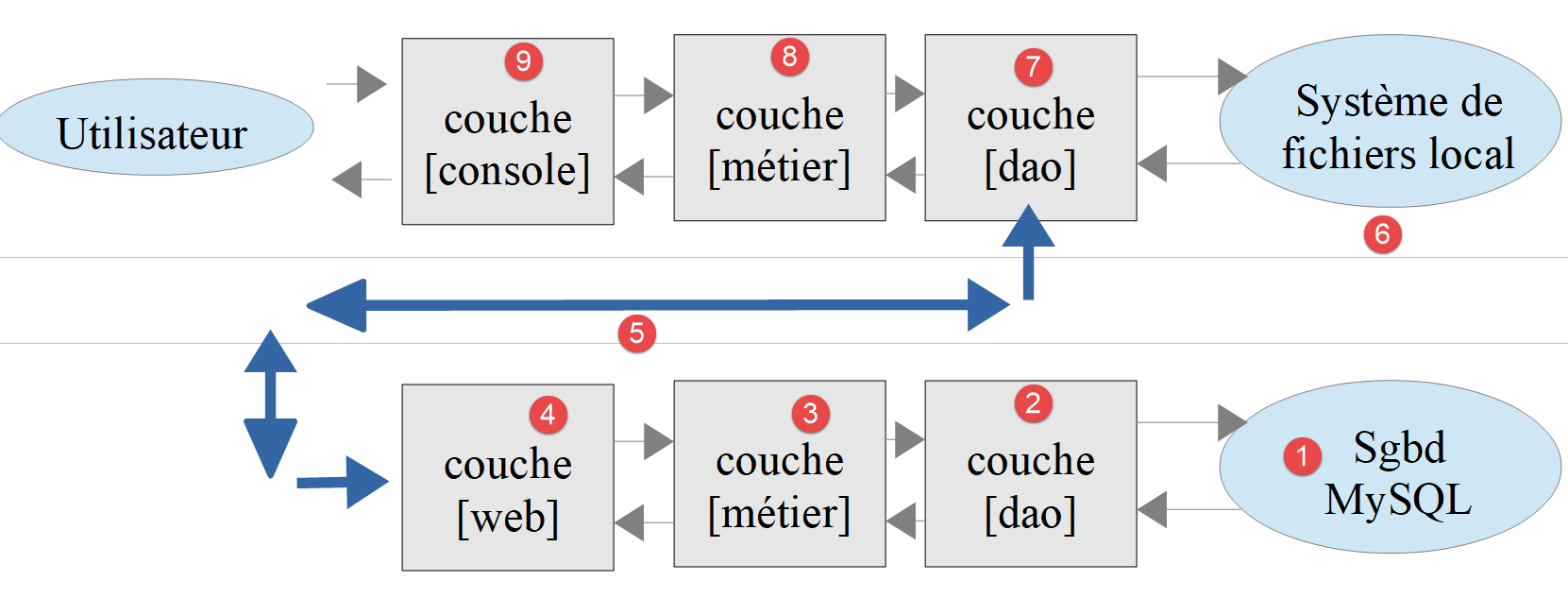
- 在 [2] 中,我们将沿用第 5 版的 [dao] 层,并移除其中访问本地文件系统的方法。 这些方法将迁移至客户端 [6, 7] 的 [dao] 层;
- 在 [3] 中, [métier]层将保留第5版的功能,但其[executeBatchImpôts, saveResults]方法将迁移至客户端的[dao]和[7]层;
- 在 [4] 中,需编写服务器脚本:其需:
- 创建 [métier]、[dao] 和 [3, 2] 层;
- 与客户端脚本 [5, 7] 进行交互;
- 在 [7] 中,需编写客户端层 [dao]:
- 它将成为服务器脚本 [4, 5] 的客户端 HTTP;
- 它将沿用第5版中[dao]层访问本地文件系统的方法;
- 在 [8] 中,客户端的 [métier] 层将遵循第 5 版的 [InterfaceMetier] 接口。但其实现方式将有所不同。 在第 5 版中,[métier] 层负责计算税款。在此,由服务器的 [métier] 层进行该计算。 因此,[métier]层将调用[dao]和[7]层,与服务器进行交互并请求其计算税款;
- 在 [9] 中,控制台脚本需要实例化客户端的 [dao, métier] 层并启动其执行;
18.2. 服务器
我们将重点关注应用程序的服务器端。
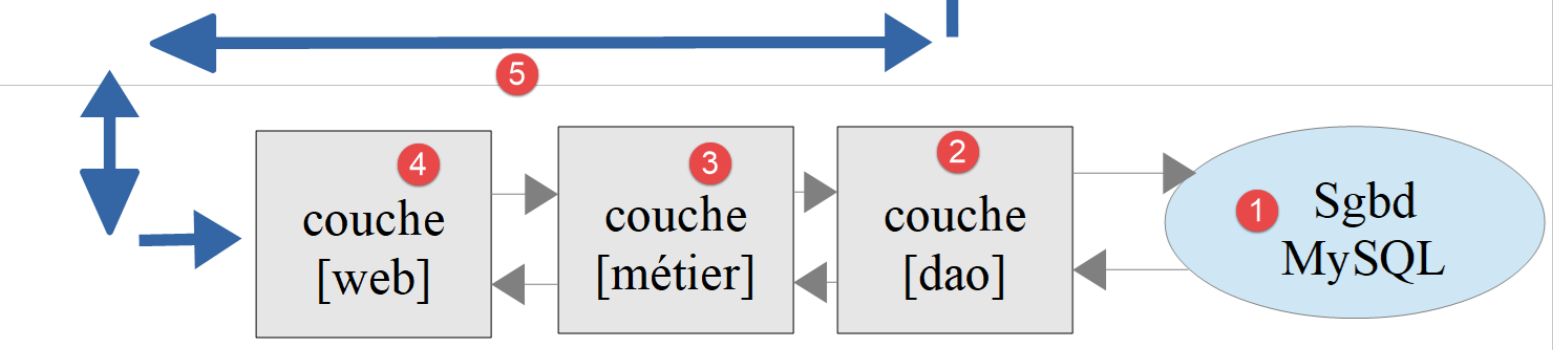
该架构将通过以下脚本实现:
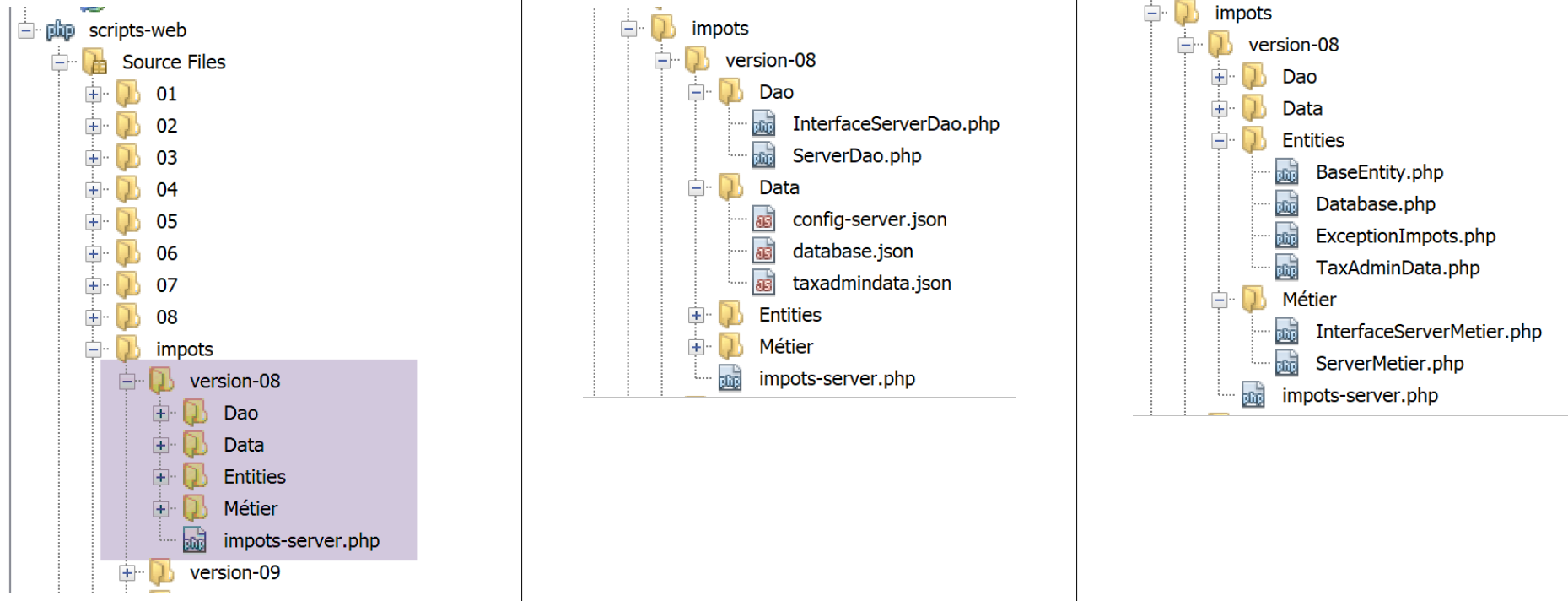
18.2.1. 各层之间交换的实体
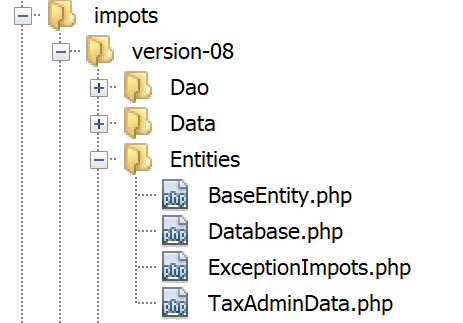
各层之间交换的实体即为“链接”段落中描述的第5版实体。
18.2.2. [dao]层
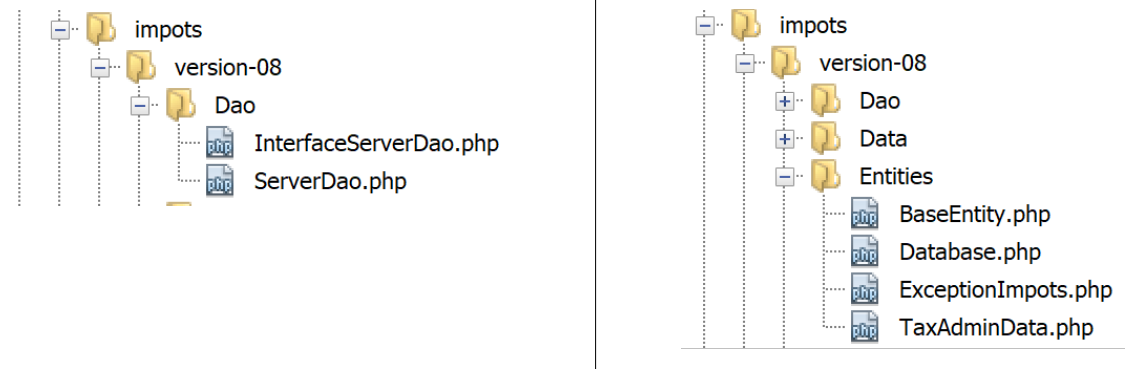
[dao] 层实现了以下 [InterfaceServerDao] 接口:
<?php

// 命名空间
namespace Application;

interface InterfaceServerDao {

  // 读取税务管理数据
  public function getTaxAdminData(): TaxAdminData;
}
- 第 9 行:方法 [getTaxAdminData] 将从数据库中检索税务管理部门的数据;
接口 [InterfaceServerDao] 由以下类 [ServerDao] 实现:
<?php

// 命名空间
namespace Application;

// 定义类 ImpotsWithDataInDatabase
class ServerDao implements InterfaceServerDao {
  // 类型为 TaxAdminData 的对象,其中包含税率区间数据
  private $taxAdminData;
  // 类型为 [Database] 的对象,其中包含 BD 的特征
  private $database;

  // 生成器
  public function __construct(string $databaseFilename) {
    // 将数据库配置 JSON 存储起来
    $this->database = (new Database())->setFromJsonFile($databaseFilename);
    // 准备属性
    $this->taxAdminData = new TaxAdminData();
    try {
      // 建立数据库连接
      $connexion = new \PDO($this->database->getDsn(), $this->database->getId(), $this->database->getPwd());
      // 要求每次 SGBD 发生错误时,均抛出异常
      $connexion->setAttribute(\PDO::ATTR_ERRMODE, \PDO::ERRMODE_EXCEPTION);
      // 启动事务
      $connexion->beginTransaction();
      // 填充税率区间表
      $this->getTranches($connexion);
      // 填充常量表
      $this->getConstantes($connexion);
      // 交易成功结束
      $connexion->commit();
    } catch (\PDOException $ex) {
      // 是否有正在进行的交易?
      if (isset($connexion) && $connexion->inTransaction()) {
        // 因失败结束事务
        $connexion->rollBack();
      }
      // 将异常上报给调用方
      throw new ExceptionImpots($ex->getMessage());
    } finally {
      // 关闭连接
      $connexion = NULL;
    }
  }

  // 读取数据库数据
  private function getTranches($connexion): void {
    …
  }

  // 读取常量表
  private function getConstantes($connexion): void {
    …
  }

  // 返回用于计算税款的数据
  public function getTaxAdminData(): TaxAdminData {
    return $this->taxAdminData;
  }

}
该代码已在“链接”一节中介绍。
18.2.3. [métier] 层
[métier] 层实现了以下 [InterfaceServerMetier] 接口:
<?php

// 命名空间
namespace Application;

interface InterfaceServerMetier {

  // 计算纳税人的税款
  public function calculerImpot(string $marié, int $enfants, int $salaire): array;
}
接口 [InterfaceServerMetier] 由以下类 [ServerMetier] 实现:
<?php

// 命名空间
namespace Application;

class ServerMetier implements InterfaceServerMetier {
  // Dao 层
  private $dao;
  // 税务管理数据
  private $taxAdminData;

  //---------------------------------------------
  // [dao] 层的设置器
  public function setDao(InterfaceServerDao $dao) {
    $this->dao = $dao;
    return $this;
  }

  public function __construct(InterfaceServerDao $dao) {
    // 在 [dao] 层中存储一个引用
    $this->dao = $dao;
    // 检索用于计算税款的数据
    // 方法 [getTaxAdminData] 可能抛出异常 ExceptionImpots
    // 随后将其回传至调用代码
    $this->taxAdminData = $this->dao->getTaxAdminData();
  }

// 计算税额
// --------------------------------------------------------------------------
  public function calculerImpot(string $marié, int $enfants, int $salaire): array {
    …
    // 结果
    return ["impôt" => floor($impot), "surcôte" => $surcôte, "décôte" => $décôte, "réduction" => $réduction, "taux" => $taux];
  }

// --------------------------------------------------------------------------
  private function calculerImpot2(string $marié, int $enfants, float $salaire): array {
    …
    // 结果
    return ["impôt" => $impôt, "surcôte" => $surcôte, "taux" => $coeffR[$i]];
  }

  // revenuImposable=年薪-免税额
  // 免税额有最低和最高限额
  private function getRevenuImposable(float $salaire): float {
    …
    // 结果
    return floor($revenuImposable);
  }

// 计算可能的折减
  private function getDecôte(string $marié, float $salaire, float $impots): float {
    …
    // 结果
    return ceil($décôte);
  }

// 计算可能的减免
  private function getRéduction(string $marié, float $salaire, int $enfants, float $impots): float {
    ..
    // 结果
    return ceil($réduction);
  }
}
该代码已在第 1 版的“链接”段落中出现并进行了说明。其基于数据库的对象版本已在“链接”段落中介绍。
18.2.4. 服务器脚本
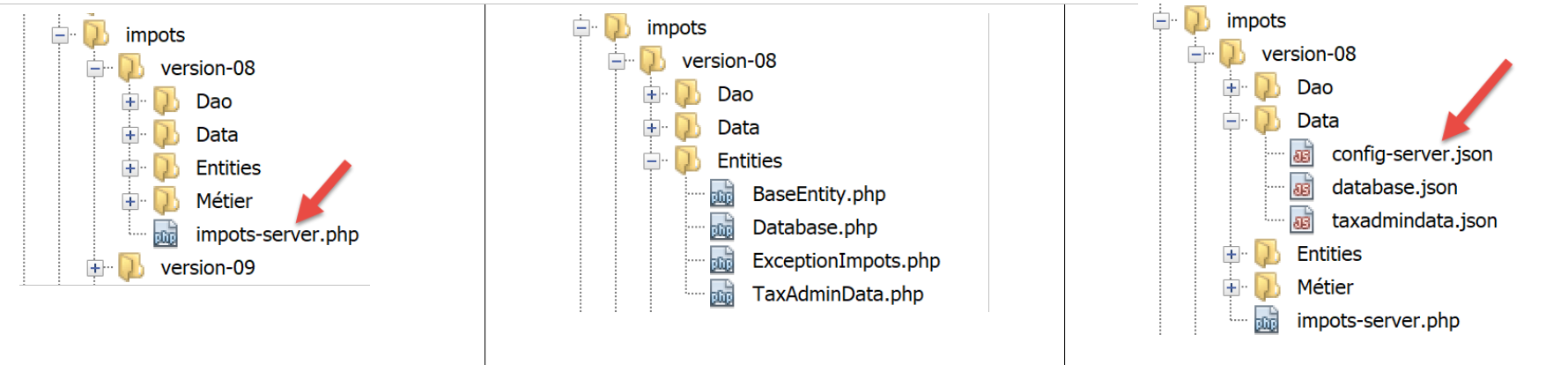
服务器脚本实现了 [web] [4] 层。脚本 [impots-server] 由以下文件 jSON [config-server.json] 进行配置:
{
    "rootDirectory": "C:/myprograms/laragon-lite/www/php7/scripts-web/impots/version-08",
    "databaseFilename": "Data/database.json",
    "taxAdminDataFileName": "Data/taxadmindata.json",
    "relativeDependencies": [
        "/Entities/BaseEntity.php",
        "/Entities/ExceptionImpots.php",
        "/Entities/TaxAdminData.php",
        "/Entities/Database.php",
        "/Dao/InterfaceServerDao.php",
        "/Dao/ServerDao.php",
        "/Métier/InterfaceServerMetier.php",
        "/Métier/ServerMetier.php"
    ],
    "absoluteDependencies": ["C:/myprograms/laragon-lite/www/vendor/autoload.php"],
    "users": [
        {
            "login": "admin",
            "passwd": "admin"
        }
    ]
}
- 第 1 行:作为文件路径基准的根目录;
- 第 2 行:jSON 数据库配置文件;
- 第 3 行:税务管理数据文件 jSON;
- 第 5-14 行:应用程序文件;
- 第 15 行:第三方库的必要依赖项,此处为 Symfony;
- 第16-20行:允许使用该应用程序的用户列表;
文件 jSON 和 [database.json, taxadmindata.json] 属于第 5 版,具体说明见“链接”一节。
脚本 [impots-server] 以如下方式实现 [web] 层:
<?php

// 严格遵守函数参数的声明类型
declare (strict_types=1);

// 命名空间
namespace Application;

// 通过 PHP 进行错误处理
//ini_set("display_errors", "0");
//
// 配置文件路径
define("CONFIG_FILENAME", "Data/config-server.json");

// 读取配置
$config = \json_decode(file_get_contents(CONFIG_FILENAME), true);

// 引入脚本所需的依赖项
$rootDirectory = $config["rootDirectory"];
foreach ($config["relativeDependencies"] as $dependency) {
  require "$rootDirectory$dependency";
}
// 绝对依赖项(第三方库)
foreach ($config["absoluteDependencies"] as $dependency) {
  require "$dependency";
}

// 常量定义
define("DATABASE_CONFIG_FILENAME", $config["databaseFilename"]);
//
// Symfony 依赖项
use \Symfony\Component\HttpFoundation\Response;
use \Symfony\Component\HttpFoundation\Request;

// 准备服务器的响应 JSON
$response = new Response();
$response->headers->set("content-type", "application/json");
$response->setCharset("utf-8");

// 获取当前请求
$request = Request::createFromGlobals();
// 身份验证
$requestUser = $request->headers->get('php-auth-user');
$requestPassword = $request->headers->get('php-auth-pw');
// 用户是否存在?
$users = $config["users"];
$i = 0;
$trouvé = FALSE;
while (!$trouvé && $i < count($users)) {
  $trouvé = ($requestUser === $users[$i]["login"] && $users[$i]["passwd"] === $requestPassword);
  $i++;
}
// 设置响应状态码
if (!$trouvé) {
  // 未找到 - 状态码 401
  $response->setStatusCode(Response::HTTP_UNAUTHORIZED);
  $response->headers->add(["WWW-Authenticate" => "Basic realm=" . utf8_decode("\"Serveur de calcul d'impôts\"")]);
  // 错误消息
  $response->setContent(\json_encode(["réponse" => ["erreur" => "Echec de l'authentification [$requestUser, $requestPassword]"]], JSON_UNESCAPED_UNICODE));
  $response->send();
  // 结束
  exit;
}
// 用户有效 - 验证接收的参数
$erreurs = [];
// 必须有三个参数 GET
$method = strtolower($request->getMethod());
$erreur = $method !== "get" || $request->query->count() != 3;
// 错误?
if ($erreur) {
  $erreurs[] = "Méthode GET requise avec les seuls paramètres [marié, enfants, salaire]";
}

// 获取婚姻状况
if (!$request->query->has("marié")) {
  $erreurs[] = "paramètre marié manquant";
} else {
  $marié = trim(strtolower($request->query->get("marié")));
  $erreur = $marié !== "oui" && $marié !== "non";
  // 错误?
  if ($erreur) {
    $erreurs[] = "paramètre marié [$marié] invalide";
  }
}

// 获取子女数量
if (!$request->query->has("enfants")) {
  $erreurs[] = "paramètre enfants manquant";
} else {
  $enfants = trim($request->query->get("enfants"));
  // 子女数量必须为 >=0 的整数
  $erreur = !preg_match("/^\d+$/", $enfants);
  // 错误?
  if ($erreur) {
    $erreurs[] = "paramètre enfants [$enfants] invalide";
  }
}

// 获取年薪
if (!$request->query->has("salaire")) {
  $erreurs[] = "paramètre salaire manquant";
} else {
  // 薪资必须为大于等于0的整数
  $salaire = trim($request->query->get("salaire"));
  $erreur = !preg_match("/^\d+$/", $salaire);
  // 错误?
  if ($erreur) {
    $erreurs[] = "paramètre salaire [$salaire] invalide";
  }
}

// 查询中还有其他参数?
foreach (\array_keys($request->query->all()) as $key) {
  // 参数有效吗?
  if (!\in_array($key, ["marié", "enfants", "salaire"])) {
    $erreurs[] = "paramètre [$key] invalide";}
}

// 错误?
if ($erreurs) {
  // 向客户端发送 400 错误代码
  $response->setStatusCode(Response::HTTP_BAD_REQUEST);
  $response->setContent(json_encode(["réponse" => ["erreurs" => $erreurs]], JSON_UNESCAPED_UNICODE));
  $response->send();
  exit;
}
// 已具备运行所需的一切条件
// 创建服务器架构
$msgErreur = "";
try {
  // 创建 [dao] 层
  $dao = new ServerDao($config["databaseFilename"]);
  // 创建 [métier] 层
  $métier = new ServerMetier($dao);
} catch (ExceptionImpots $ex) {
// 记录错误
  $msgErreur = utf8_encode($ex->getMessage());
}
// 错误?
if ($msgErreur) {
  // 向客户端发送 500 错误代码
  $response->setStatusCode(Response::HTTP_INTERNAL_SERVER_ERROR);
  $response->setContent(\json_encode(["réponse" => ["erreur" => $msgErreur]], JSON_UNESCAPED_UNICODE));
  $response->send();
  exit;
}
// 计算税款
$result = $métier->calculerImpot($marié, (int) $enfants, (int) $salaire);
// 返回响应
$response->setContent(json_encode(["réponse" => $result], JSON_UNESCAPED_UNICODE));
$response->send();
注释
- 第16行:加载配置文件;
- 第18-26行:加载所有依赖项;
- 第 29 行:文件名 [database.json];
- 第32-33行:声明将要使用的第三方库类;
- 第 36-38 行:准备响应 jSON;
- 第40-52行:验证发起请求的用户是否属于授权用户;
- 第54-63行:若非如此,则返回代码HTTP 401,表示拒绝访问。 收到此状态码及 HTTP [WWW-Authenticate => Basic realm=] 请求头后,大多数浏览器会弹出身份验证窗口,提示用户进行身份验证;
- 第59行:服务器的响应jSON解释了错误原因。所有服务器响应均为数组[‘réponse’=>’qq chose’]中的字符串jSON;
- 第64-117行:验证请求的有效性:
- 请求必须为 GET,且包含恰好三个参数;
- 参数 [marié] 的值必须为“是”或“否”;
- 参数 [enfants],其值必须为大于等于 0 的整数;
- 参数 [salaire] 的值必须为大于等于 0 的整数;
- 第 65 行:每次检测到错误时,都会向数组 [$erreurs] 中添加一条错误消息;
- 第120-126行:若发生错误,则向客户端发送代码HTTP [400 Bad Request](第122行);
- 第 123 行:服务器的响应 jSON 说明了错误原因;
- 从第132行开始,所有内容均已验证。此时可以实例化[dao, métier]层。此实例化操作会产生开销,因此仅在确信请求有效时才应执行;
- 第130-138行:构建服务器架构。[dao]层的构建可能抛出[ExceptionImpots]类型的异常。若发生此异常,则记录该错误;
- 第135-138行:若发生异常,则向客户端返回状态码HTTP 500。该代码表示服务器发生故障;
- 第 143 行:响应中说明了错误原因;
- 第148行 :税额计算委托给 [métier] 层;
- 第 150-151 行:发送响应;
让我们用浏览器测试这个脚本。请求安全版本的 URL(即 [https://localhost:443/php7/scripts-web/impots/version-08/impots-server.php?marié=oui&enfants=5&salaire=100000]):
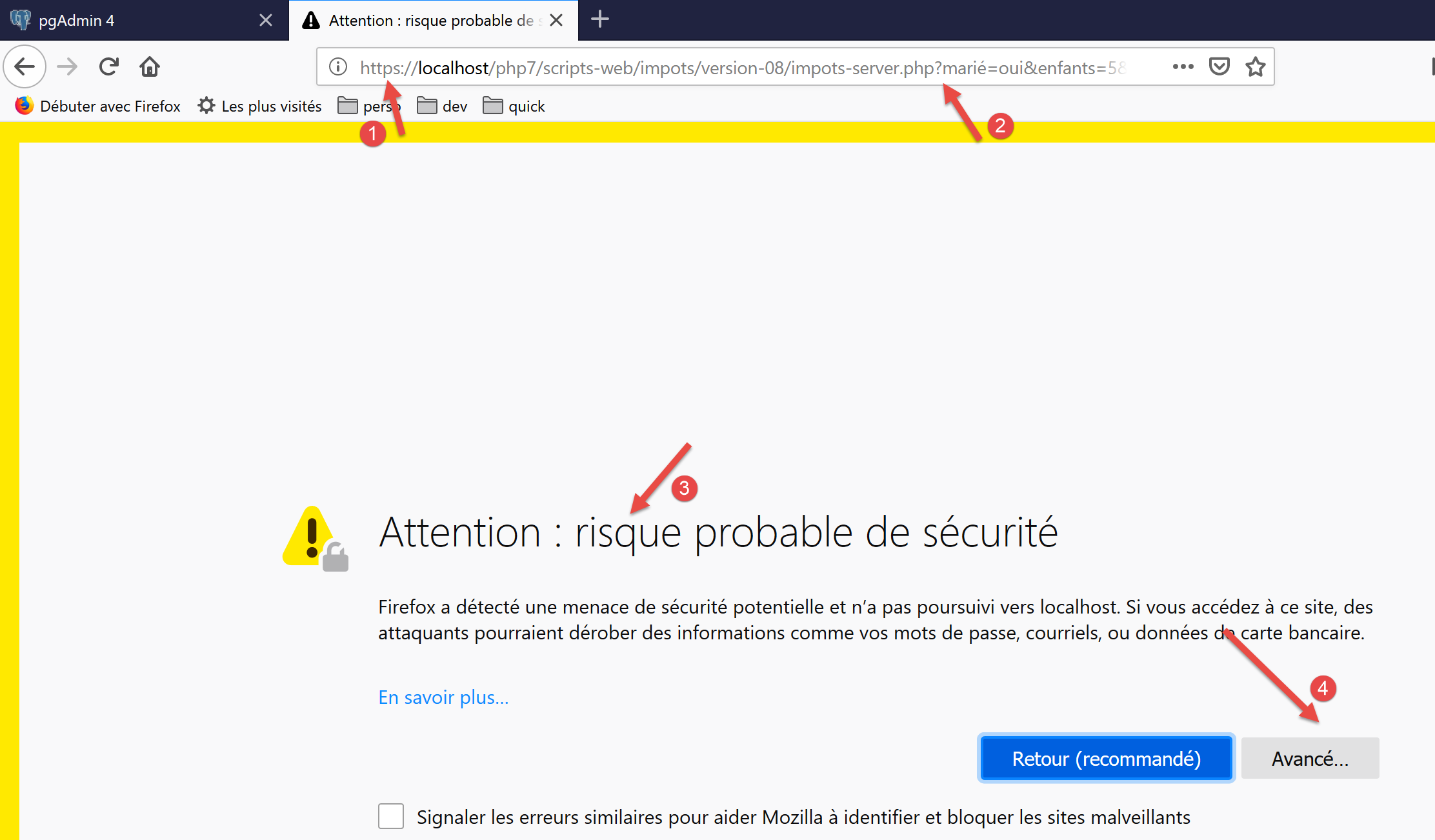
- 在 [1] 中,请求的加密 URL;
- 转换为 [2],即三个参数 [marié, enfants, salaire];
- 在 [3] 中,Laragon 的 Apache 服务器发送了一个自签名的证书 SSL。浏览器检测到该证书并显示安全警告:它认为该服务器的网站不可信;
- 在 [4] 处,继续;
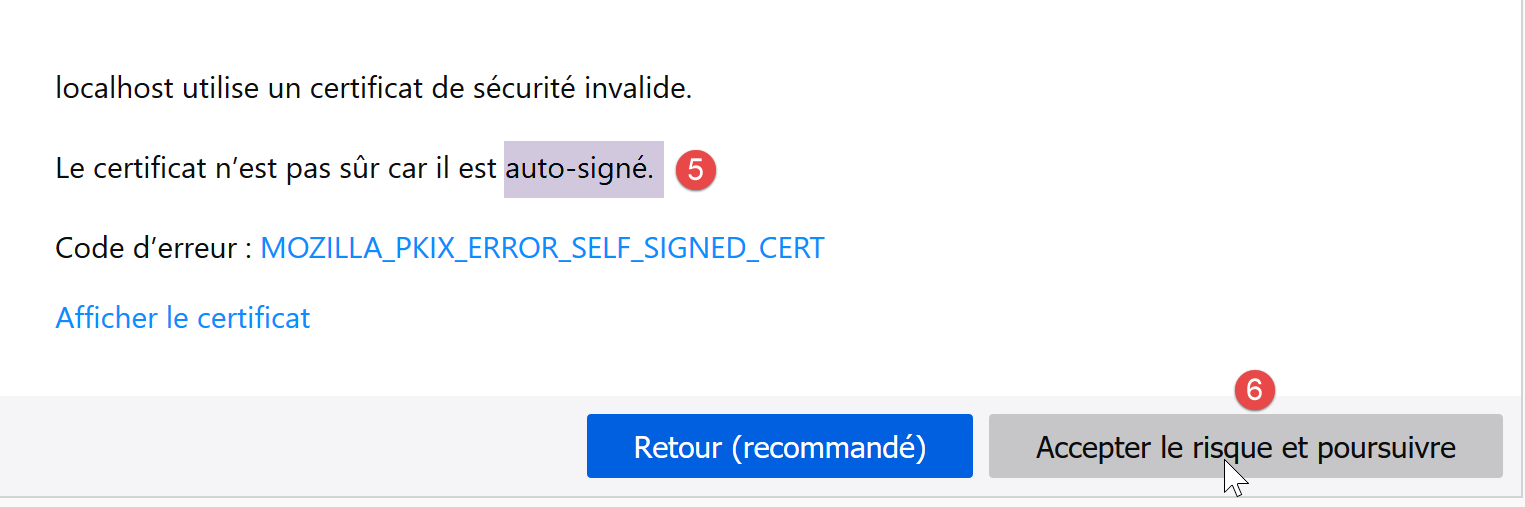
- 在 [6],继续;
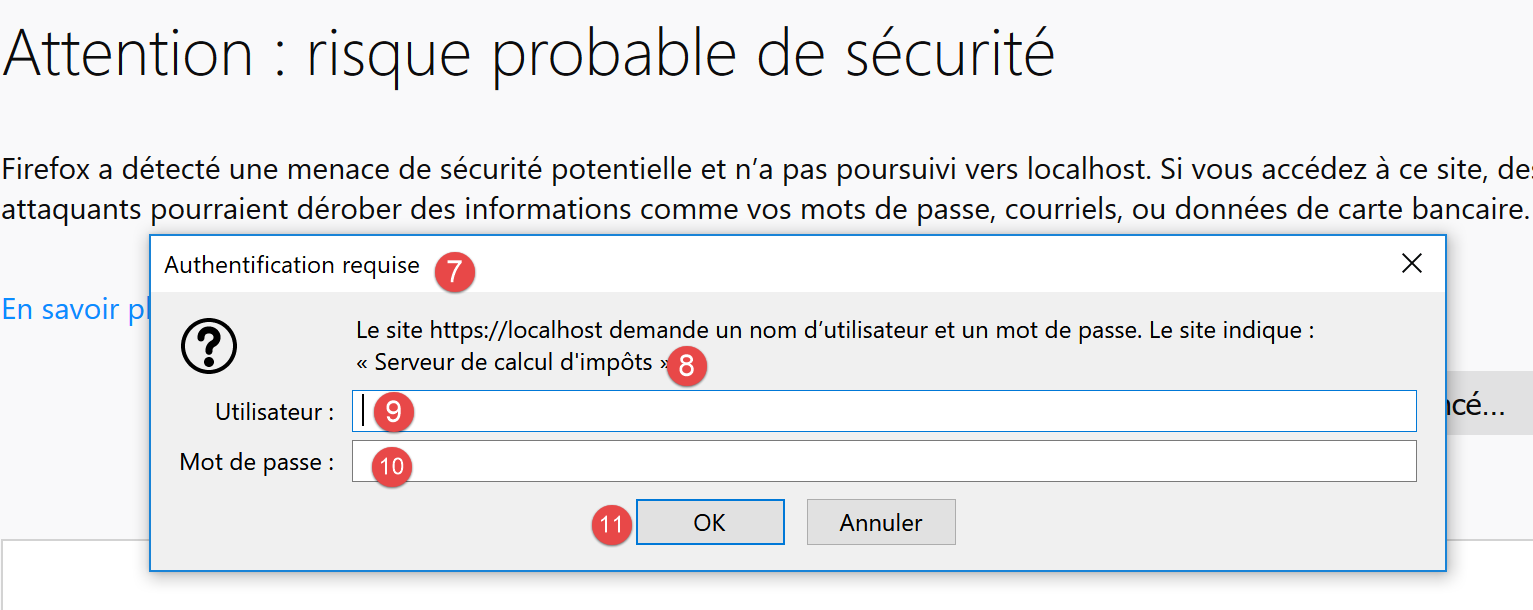
- 在 [7] 处,浏览器会弹出窗口供用户进行身份验证;
- 在 [9,10] 中,输入 [admin] 和 [admin];
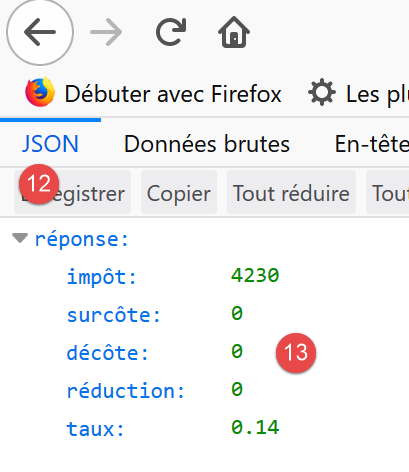
- 在 [13] 中,服务器返回 jSON;
进行一些错误测试:
请求 URL [https://localhost/php7/scripts-web/impots/version-08/impots-server.php?marié=x&enfants=x&salaire=x&w=x]
得到以下结果:
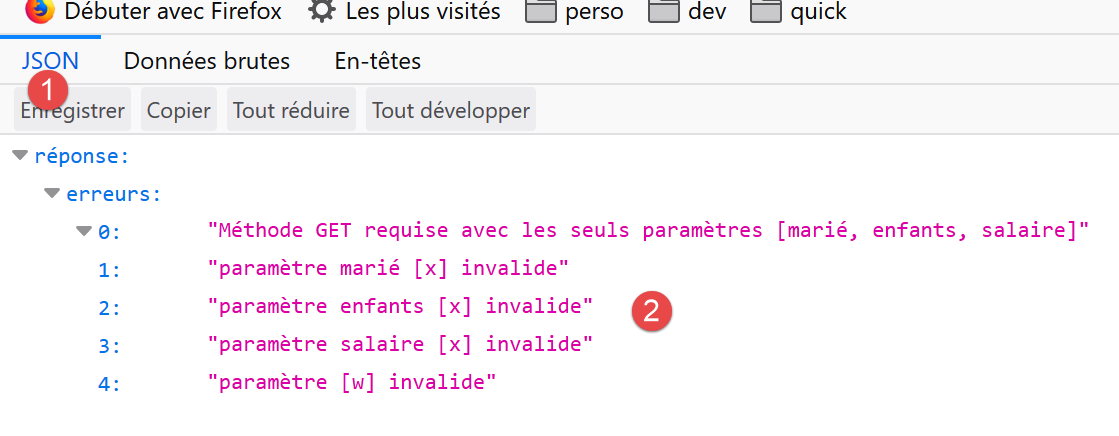
截断 SGBD MySQL,并请求 URL [https://localhost/php7/scripts-web/impots/version-08/impots-server.php?marié=oui&enfants=3&salaire=60000]:

18.2.5. 测试 [Codeception]
每次构建服务器的新版本时,我们将测试 [métier] 和 [dao] 层,这与自 04 版以来的做法一致(参见链接和链接中的段落)。
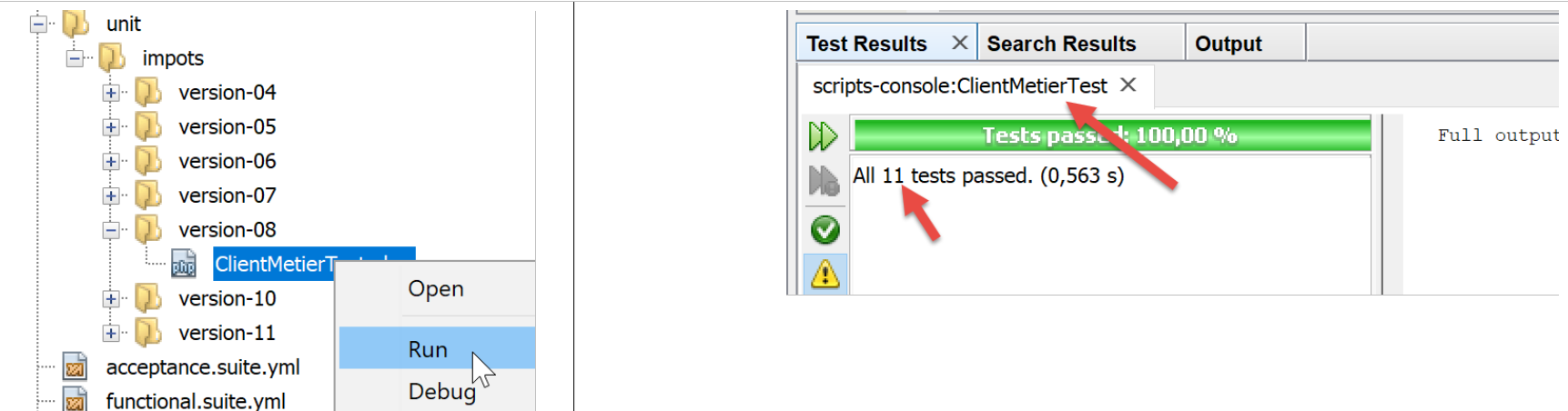
首先,我们将项目 [scripts-web] 与测试 [Codeception] 关联。为此,请按照链接段落中针对项目 [scripts-console] 所采用的相同步骤操作。 我们得到一个名为 [scripts-web] 的项目,其中包含一个名为 [Test Files] 的文件夹:
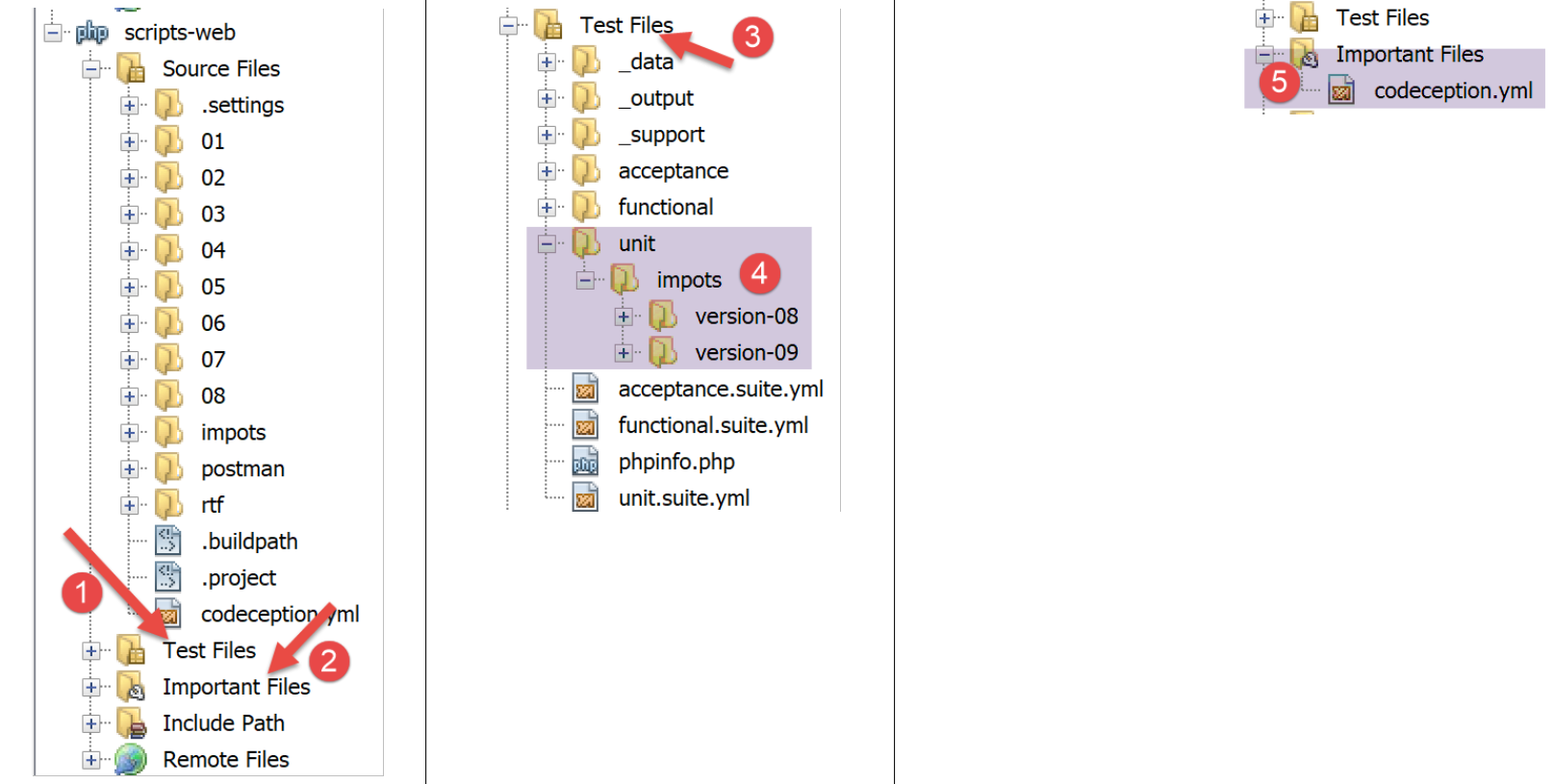
我们将为 [dao] 层创建一个测试,并为 [métier] 层创建一个测试。
18.2.5.1. [dao] 层的测试
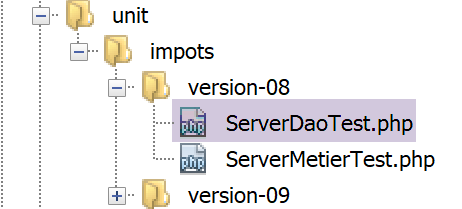
[ServerDaoTest] 的测试如下:
<?php

// 严格遵守函数参数的声明类型
declare (strict_types=1);

// 命名空间
namespace Application;

// 常量定义
define("ROOT", "C:/myprograms/laragon-lite/www/php7/scripts-web/impots/version-08");
// 配置文件路径
define("CONFIG_FILENAME", ROOT . "/Data/config-server.json");

// 获取配置
$config = \json_decode(\file_get_contents(CONFIG_FILENAME), true);
// 引入脚本所需的依赖项
$rootDirectory = $config["rootDirectory"];
foreach ($config["relativeDependencies"] as $dependency) {
  require "$rootDirectory$dependency";
}
// 绝对依赖项(第三方库)
foreach ($config["absoluteDependencies"] as $dependency) {
  require "$dependency";
}

// 测试 -----------------------------------------------------

class ServerDaoTest extends \Codeception\Test\Unit {
  // TaxAdminData
  private $taxAdminData;

  public function __construct() {
    // 父级
    parent::__construct();
    // 获取配置
    $config = \json_decode(\file_get_contents(CONFIG_FILENAME), true);
    // 创建层[dao]
    $dao = new ServerDao(ROOT . "/" . $config["databaseFilename"]);
    $this->taxAdminData = $dao->getTaxAdminData();
  }

  // 测试
  public function testTaxAdminData() {
    …
  }

}
注释
- 第 9-24 行:构建与 [impots-server.php] 服务器相同的工作环境。这通过第 9-12 行中定义环境所依赖的两个常量来实现;
- 第32-40行:构建待测试的[dao]层实例,操作方式与服务器脚本[impots-server.php]中一致;
- 从现在起,环境条件与服务器脚本 [impots-server.php] 相同:可以开始测试;
- 第43-45行:方法[testTaxAdminData]即链接段落中所述的方法;
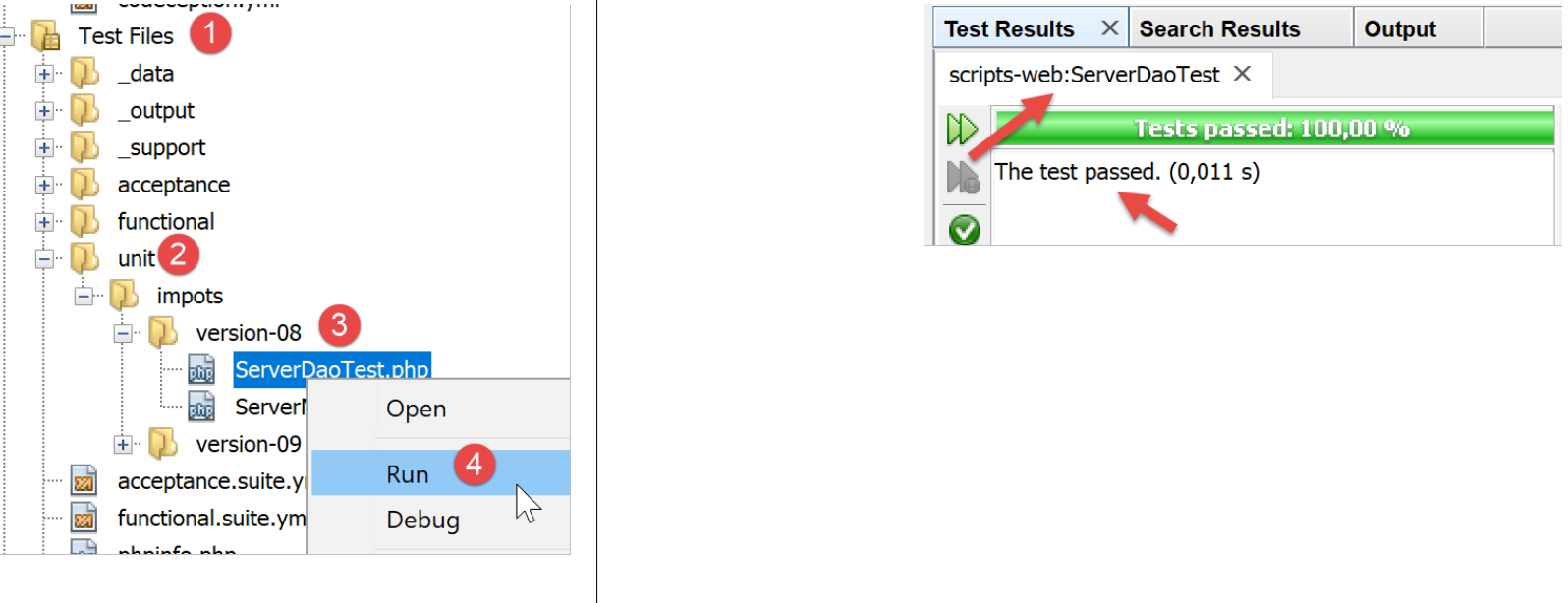
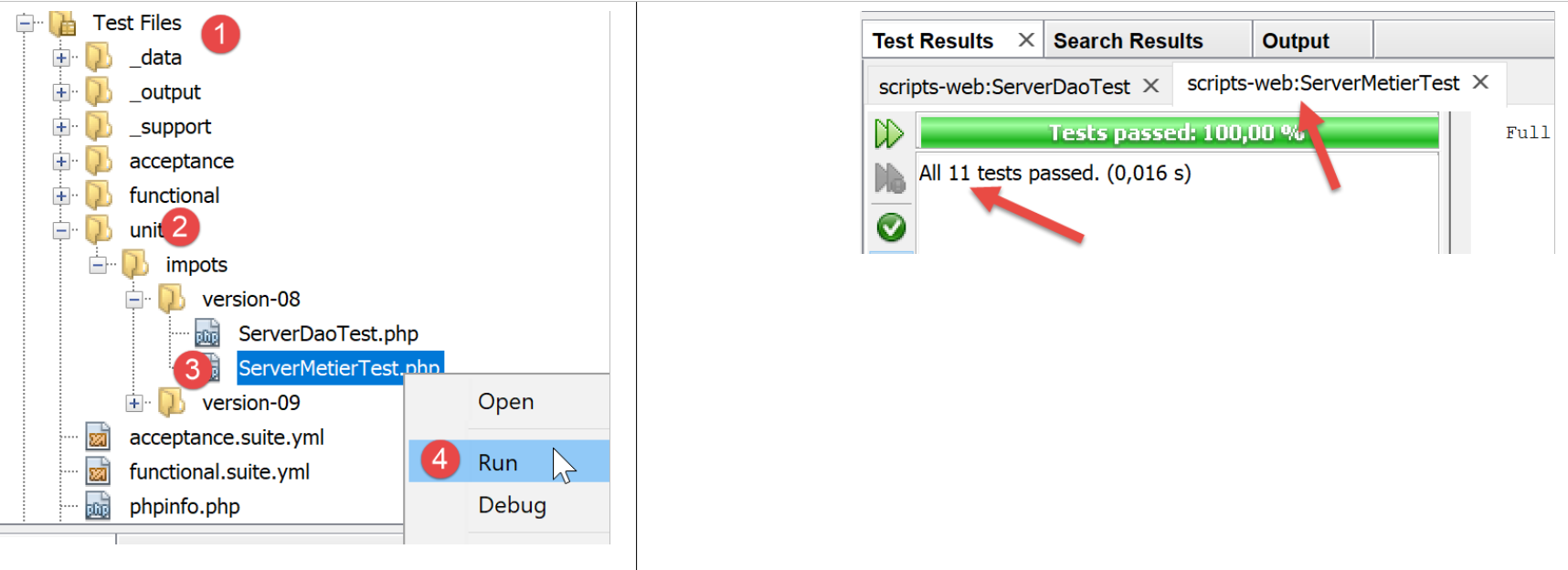
测试结果如下:
18.2.5.2. [métier] 层测试
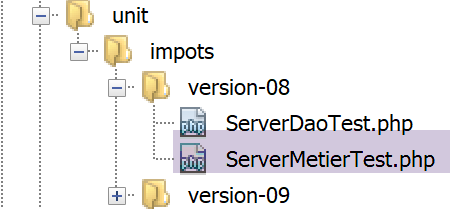
[ServerMetierTest] 测试将如下所示:
<?php

// 严格遵守函数参数的声明类型
declare (strict_types=1);

// 命名空间
namespace Application;

// 常量定义
define("ROOT", "C:/myprograms/laragon-lite/www/php7/scripts-web/impots/version-08");
// 配置文件路径
define("CONFIG_FILENAME", ROOT . "/Data/config-server.json");
// 获取配置
$config = \json_decode(\file_get_contents(CONFIG_FILENAME), true);
// 引入脚本所需的依赖项
$rootDirectory = $config["rootDirectory"];
foreach ($config["relativeDependencies"] as $dependency) {
  require "$rootDirectory$dependency";
}
// 绝对依赖项(第三方库)
foreach ($config["absoluteDependencies"] as $dependency) {
  require "$dependency";
}

// 测试类
class ServerMetierTest extends \Codeception\Test\Unit {
  // 业务层
  private $métier;

  public function __construct() {
    parent::__construct();
    // 获取配置
    $config = \json_decode(\file_get_contents(CONFIG_FILENAME), true);
    // 创建 [dao] 层
    $dao = new ServerDao(ROOT . "/" . $config["databaseFilename"]);
    // 创建层[métier]
    $this->métier = new ServerMetier($dao);
  }

  // 测试
  public function test1() {
   …
  }

  public function test2() {
    …
  }

  ..

  public function test11() {
    …
  }

}
注释
- 第 9-24 行:构建与 [impots-server.php] 服务器相同的工作环境。这通过第 9-12 行中定义环境所依赖的两个常量来实现;
- 第30-38行:构建待测试的[métier]层实例,操作方式与服务器脚本[impots-server.php]中的做法一致;
- 从现在起,环境条件与服务器脚本 [impots-server.php] 相同:可以开始测试;
- 第40-53行:[test1, test2…, test11]的方法与“链接”段落中描述的一致;
测试结果如下:
18.3. 客户端
我们关注应用程序的客户端部分。
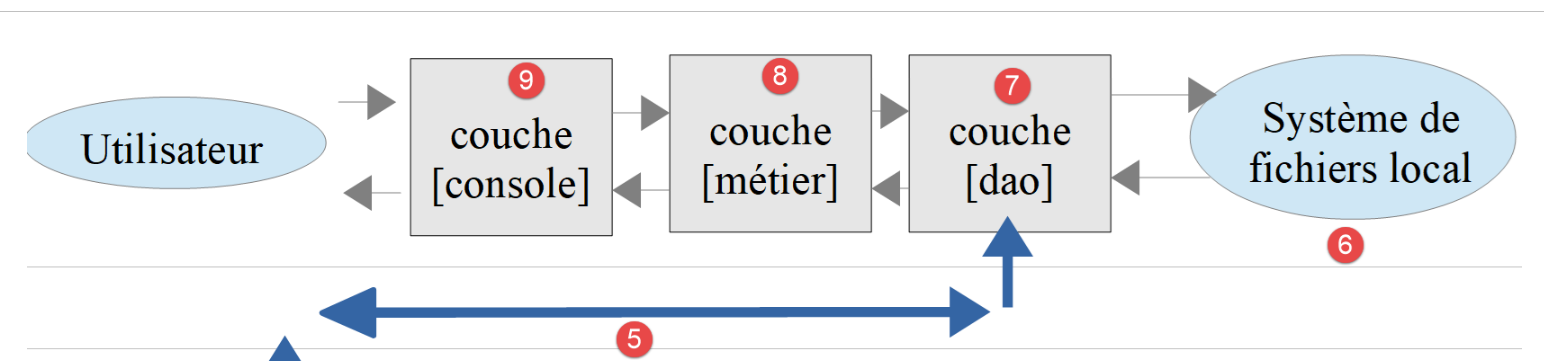
该架构将通过以下脚本实现:
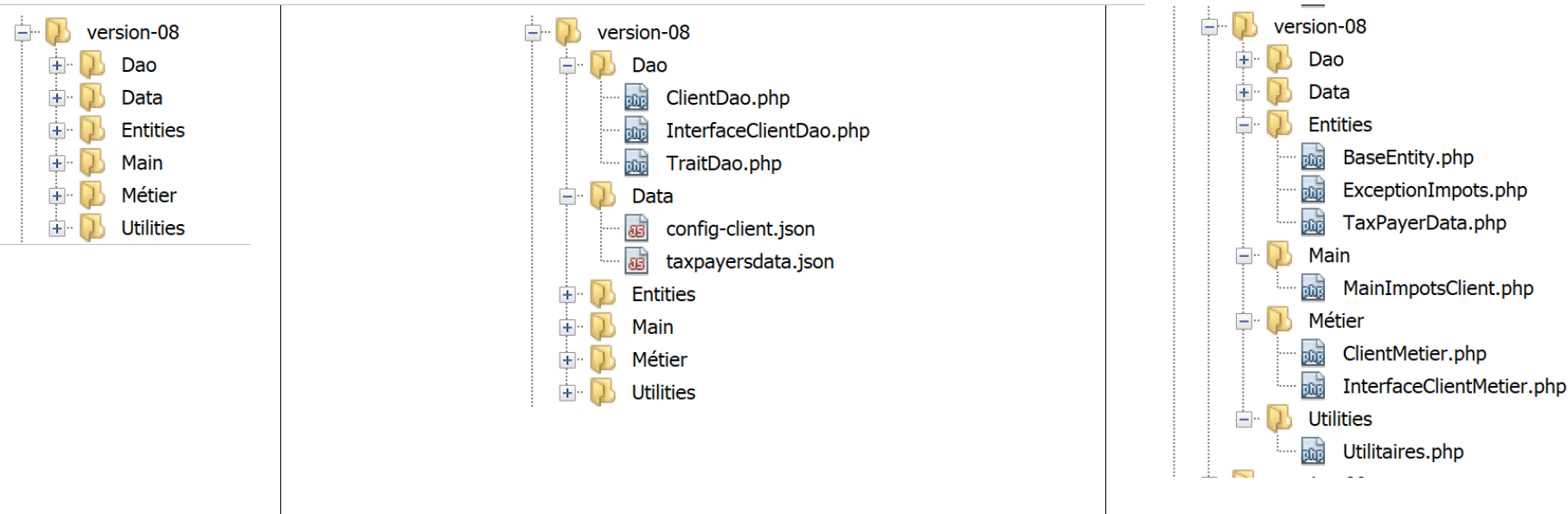
18.3.1. 在层之间交换的实体
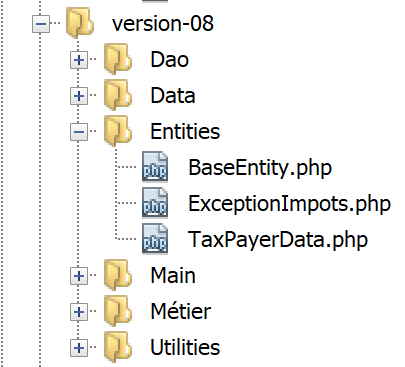
上述实体均已描述并被使用过:
18.3.2. [dao]图层
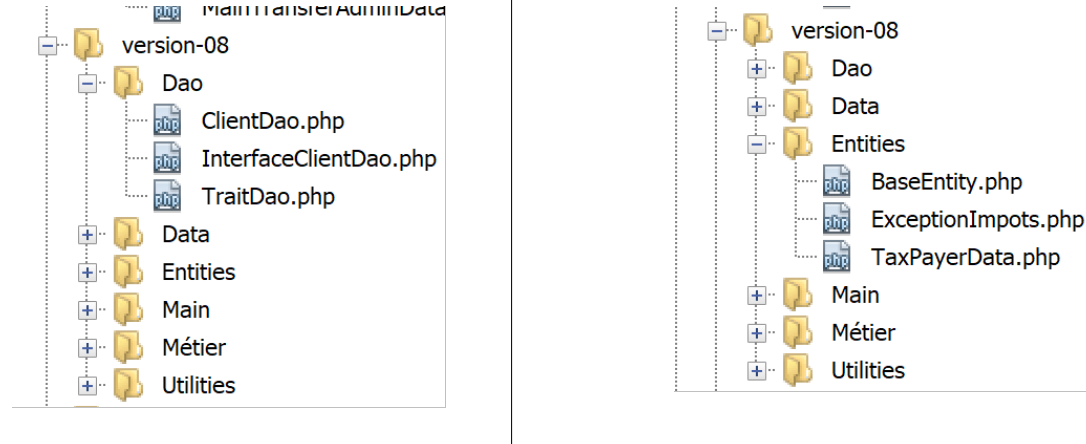
[dao] 层实现了以下 [InterfaceClientDao] 接口:
<?php

// 命名空间
namespace Application;

interface InterfaceClientDao {

  // 读取纳税人数据
  public function getTaxPayersData(string $taxPayersFilename, string $errorsFilename): array;

  // 计算纳税人的税款
  public function calculerImpot(string $marié, int $enfants, int $salaire): array;

  // 结果记录
  public function saveResults(string $resultsFilename, array $taxPayersData): void;
}
- 第 9 行:函数 [getTaxPayersData] 将文件 [$taxPayersFilename] 中的纳税人数据加载到内存中。如有错误,将记录在文件 [$errorsFilename] 中;
- 第12行:函数[calculerImpots]计算纳税人的税额;
- 第15行:函数[saveResults]将表[$taxPayersData]中的数据(代表多项税款计算结果)保存到文件[$resultsFilename]中;
接口 [InterfaceClientDao] 由以下类 [ClientDao] 实现:
<?php

namespace Application;

// 关联
use \Symfony\Component\HttpClient\HttpClient;

class ClientDao implements InterfaceClientDao {
  // 使用一个 Trait
  use TraitDao;
  // 属性
  private $urlServer;
  private $user;

  // 构造函数
  public function __construct(string $urlServer, array $user) {
    $this->urlServer = $urlServer;
    $this->user = $user;
  }

  // 税额计算
  public function calculerImpot(string $marié, int $enfants, int $salaire): array {
    // 创建客户HTTP
    $httpClient = HttpClient::create([
        'auth_basic' => [$this->user["login"], $this->user["passwd"]],
        "verify_peer" => false
    ]);
    // 向服务器发送请求
    $response = $httpClient->request('GET', $this->urlServer,
      ["query" => [
          "marié" => $marié,
          "enfants" => $enfants,
          "salaire" => $salaire
    ]]);
    // 获取响应
    $json = $response->getContent(false);
    $array = \json_decode($json, true);
    $réponse = $array["réponse"];
    // 日志
    // 打印 "$json=json\n";
    // 获取响应状态
    $statusCode = $response->getStatusCode();
    // 错误?
    if ($statusCode !== 200) {
      // 出现错误 - 抛出异常
      $réponse = ["statut HTTP" => $statusCode] + $réponse;
      $message = \json_encode($réponse, JSON_UNESCAPED_UNICODE);
      throw new ExceptionImpots($message);
    }
    // 返回响应
    return $réponse;
  }

}
注释
- 第 10 行:插入 [TraitDao](参见链接段落),该类实现了方法 [getTaxPayersData] 和 [saveResults]。 因此,仅剩 [calculerImpots] 方法需要实现。该方法在第 22-49 行中实现;
- 第16-19行:[ClientDao]类的构造函数接收两个参数:
- 来自税费计算服务器的 URL [$urlServer];
- 包含“login”和“passwd”键的数组 [$user],该数组定义了发起请求的用户;
- 第 22 行:方法 [calculerImpots] 接收这三个参数,并将其发送至税务计算服务器;
- 第24-27行:创建一个HTTP客户端,其中包含:
- 第25行:发起请求的用户凭证;
- 第 26 行:指定 HTTP 客户端不验证服务器发送的 SSL 证书有效性的选项;
- 第29-34行:使用服务器预期的三个参数向其发送请求;
- 第36行:获取来自服务器的响应jSON。 如果未将参数 [false] 传递给方法 [Response::getContent],那么当服务器响应状态处于 [3xx-5xx] 区间内(错误情况)时, 当尝试获取响应内容 [Response::getContent] 或其头部信息 HTTP、[Response::getHeaders] 时,对象 [Response] 会立即抛出异常。 在此,无论响应的状态(HTTP)如何,我们都希望能够访问其内容,哪怕只是为了将其记录到日志中(第40行);
- 第 37-38 行:服务器的响应是数组 [‘réponse’=>qqChose] 中的字符串 jSON。我们从中提取 [qqChose];
- 第 40 行:在开发模式下记录响应 jSON;
- 第 42 行:获取响应的状态码;
- 第44-49行:如果状态码HTTP不为200,则说明我们的服务器遇到了问题。 此时抛出类型为 [ExceptionImpots] 的异常,其消息内容为服务器响应 jSON 加上响应状态码 HTTP;
- 第51行:返回一个关联数组,其键为[impôt, surcôte, décôte, réduction, taux];
18.3.3. 层 [métier]
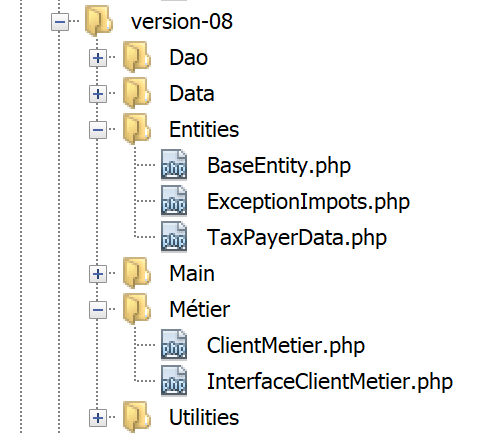
[métier] [8] 层实现了以下 [InterfaceClientMetier] 接口:
<?php

// 命名空间
namespace Application;

interface InterfaceClientMetier {

  // 计算纳税人的税款
  public function calculerImpot(string $marié, int $enfants, int $salaire): array;

  // 批处理模式下的税款计算
  public function executeBatchImpots(string $taxPayersFileName, string $resultsFileName, string $errorsFileName): void;
}
- 第 9 行:函数 [calculerImpots] 计算税额;
- 第 12 行: 函数 [executeBatchImpots] 计算数据存储在文件 [$taxPayersFileName] 中的纳税人的税额,将计算结果写入文件 [$resultsFileName],并将遇到的错误写入文件 [$errorsFileName];
接口 [InterfaceClientMetier] 由以下类 [ClientMetier] 实现:
<?php

// 命名空间
namespace Application;

class ClientMetier implements InterfaceClientMetier {
  // 属性
  private $clientDao;

  // 构造函数
  public function __construct(InterfaceClientDao $clientDao) {
    // 将引用存储在 [dao] 层中
    $this->clientDao = $clientDao;
  }

  // 计算税款
  public function calculerImpot(string $marié, int $enfants, int $salaire): array {
    return $this->clientDao->calculerImpot($marié, $enfants, $salaire);
  }

  // 批处理模式下的税款计算
  public function executeBatchImpots(string $taxPayersFileName, string $resultsFileName, string $errorsFileName): void {
    // 允许来自 [dao] 层的异常上报
    // 获取纳税人数据
    $taxPayersData = $this->clientDao->getTaxPayersData($taxPayersFileName, $errorsFileName);
    // 结果表
    $results = [];
    // 对结果进行处理
    foreach ($taxPayersData as $taxPayerData) {
      // 计算税款
      $result = $this->calculerImpot(
        $taxPayerData->getMarié(),
        $taxPayerData->getEnfants(),
        $taxPayerData->getSalaire());
      // 填写[$taxPayerData]
      $taxPayerData->setFromArrayOfAttributes($result);
      // 将结果填入结果表
      $results [] = $taxPayerData;
    }
    // 保存结果
    $this->clientDao->saveResults($resultsFileName, $results);
  }

}
注释
- 第 11-14 行:类 [ClientMetier] 的构造函数接收一个指向层 [dao] 的引用作为参数;
- 第17-19行:税额计算委托给[dao]层;
- 第20-38行:函数[executeBatchImpots]已在“链接”部分中描述;
18.3.4. 主脚本
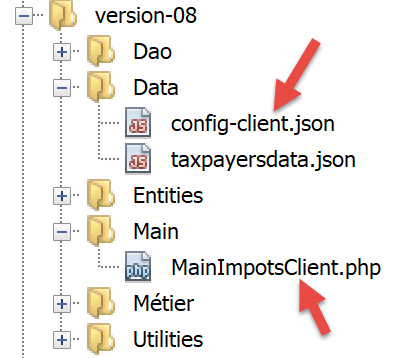
客户端脚本 [MainImpotsClient.php] 实现了 [console] 和 [9] 层。它由以下文件 jSON 和 [conf-client.json] 进行配置:
{
    "rootDirectory": "C:/Data/st-2019/dev/php7/poly/scripts-console/impots/version-08",
    "taxPayersDataFileName": "Data/taxpayersdata.json",
    "resultsFileName": "Data/results.json",
    "errorsFileName": "Data/errors.json",
    "dependencies": [
        "Entities/BaseEntity.php",
        "Entities/TaxPayerData.php",
        "Entities/ExceptionImpots.php",
        "Utilities/Utilitaires.php",
        "Dao/InterfaceClientDao.php",
        "Dao/TraitDao.php",
        "Dao/ClientDao.php",
        "Métier/InterfaceClientMetier.php",
        "Métier/ClientMetier.php"
    ],
    "absoluteDependencies": [
        "C:/myprograms/laragon-lite/www/vendor/autoload.php"
    ],
    "user": {
        "login": "admin",
        "passwd": "admin"
    },
    "urlServer": "https://localhost:443/php7/scripts-web/impots/version-08/impots-server.php"
}
- 第 1 行:客户的根目录;
- 第 2 行:纳税人数据文件 jSON;
- 第 3 行:结果文件 jSON;
- 第4行:错误文件jSON;
- 第6-19行:客户项目的各种依赖项;
- 第20-23行:向税务计算服务器发送请求的用户;
- 第24行:税务计算服务器的安全URL文件;
[MainImpotsClient.php]脚本代码如下:
<?php

// 严格遵守函数参数的声明类型
declare (strict_types=1);

// 命名空间
namespace Application;

// 通过 PHP 进行错误处理
//ini_set("display_errors", "0");
//
// 配置文件路径
define("CONFIG_FILENAME", "../Data/config-client.json");

// 读取配置
$config = \json_decode(file_get_contents(CONFIG_FILENAME), true);

// 引入脚本所需的依赖项
$rootDirectory = $config["rootDirectory"];
foreach ($config["dependencies"] as $dependency) {
  require "$rootDirectory/$dependency";
}
// 绝对依赖项(第三方库)
foreach ($config["absoluteDependencies"] as $dependency) {
  require "$dependency";
}

// 常量定义
define("TAXPAYERSDATA_FILENAME", "$rootDirectory/{$config["taxPayersDataFileName"]}");
define("RESULTS_FILENAME", "$rootDirectory/{$config["resultsFileName"]}");
define("ERRORS_FILENAME", "$rootDirectory/{$config["errorsFileName"]}");
//
// Symfony 依赖项
use Symfony\Component\HttpClient\HttpClient;

// 创建 [dao] 层
$clientDao = new ClientDao($config["urlServer"], $config["user"]);
// 创建 [métier] 层
$clientMetier = new ClientMetier($clientDao);

// 批处理模式下的税款计算
try {
  $clientMetier->executeBatchImpots(TAXPAYERSDATA_FILENAME, RESULTS_FILENAME, ERRORS_FILENAME);
} catch (\RuntimeException $ex) {
  // 显示错误
  print "L'erreur suivante s'est produite : " . $ex->getMessage() . "\n";
}
// 结束
print "Terminé\n";
exit;
注释
- 第13行:配置文件的路径;
- 第16行:解析配置文件;
- 第 18-26 行:加载依赖项;
- 第37行:创建[dao]图层。向图层构造函数传递其所需的两项信息:
- 税务计算服务器的 URL;
- 将执行查询的用户凭证;
- 第39行:创建[métier]层。向该层的构造函数传递一个指向刚创建的[dao]层的引用;
- 第43行:要求图层[métier]:
- 计算文件 $config["taxPayerDataFileName"] 中所有纳税人的税款;
- 将计算结果写入文件 $config["resultsFileName"];
- 将错误记录到文件 $config["errorsFileName"] 中;
- 第 43 行可能会引发异常;
- 第 46 行:显示异常的错误消息;
客户端的运行结果与之前版本相同。请检查以下文件:
- [Data/taxpayersdata.json]:用于计算税额的纳税人数据;
- [Data/results.json]:文件[Data/taxpayersdata.json]中各纳税人的计算结果;
- [Data/errors.json]:在处理文件 [Data/taxpayersdata.json] 时可能遇到的错误;
让我们来看一下可能出现的错误情况。首先,停止 Laragon 服务器。此时客户端控制台显示的结果如下:
Couldn't connect to server for"https://localhost/php7/scripts-web/impots/version-08/impots-server.php?mari%C3%A9=oui&enfants=2&salaire=55555".
Terminé
现在仅启动 Apache 服务器,而不启动 SGBD MySQL:
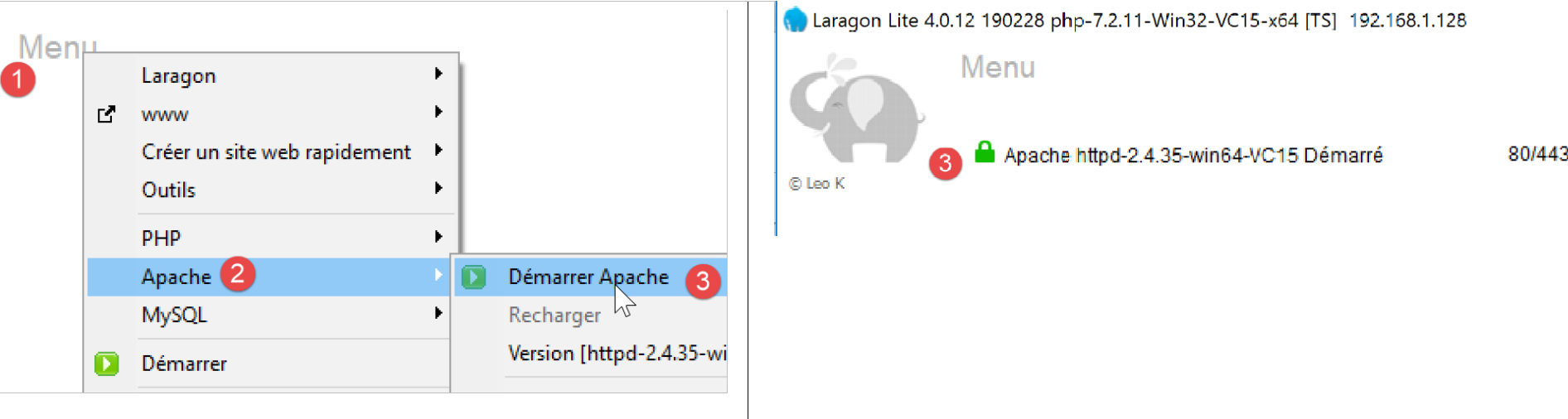
此时客户端控制台显示的结果如下:
L'erreur suivante s'est produite : {"statut HTTP":500,"erreur":"SQLSTATE[HY000] [2002] Aucune connexion n’a pu être établie car l’ordinateur cible l’a expressément refusée.\r\n"}
Terminé
现在,启动 MySQL,然后在 [config-client] 中修改登录用户:
此时客户端控制台显示的结果如下:
L'erreur suivante s'est produite : {"statut HTTP":401,"erreur":"Echec de l'authentification [x, x]"}
Terminé
18.3.5. [Codeception] 测试
与之前版本的做法一样,我们将为 08 版本编写 [Codeception] 测试。
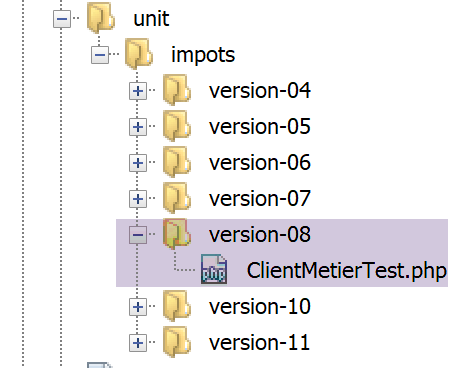
18.3.5.1. [métier] 层测试
[ClientMetierTest.php] 测试如下:
<?php

// 严格遵守函数参数的声明类型
declare (strict_types=1);

// 命名空间
namespace Application;

// 常量定义
define("ROOT", "C:/Data/st-2019/dev/php7/poly/scripts-console/impots/version-08");

// 配置文件路径
define("CONFIG_FILENAME", ROOT . "/Data/config-client.json");

// 读取配置
$config = \json_decode(file_get_contents(CONFIG_FILENAME), true);

// 引入脚本所需的依赖项
$rootDirectory = $config["rootDirectory"];
foreach ($config["dependencies"] as $dependency) {
  require "$rootDirectory/$dependency";
}
// 绝对依赖项(第三方库)
foreach ($config["absoluteDependencies"] as $dependency) {
  require "$dependency";
}
//
// 测试类
class ClientMetierTest extends \Codeception\Test\Unit {
  // 业务层
  private $métier;

  public function __construct() {
    parent::__construct();
    // 获取配置
    $config = \json_decode(\file_get_contents(CONFIG_FILENAME), true);
    // 创建 [dao] 层
    $clientDao = new ClientDao($config["urlServer"], $config["user"]);
    // 创建层[métier]
    $this->métier = new ClientMetier($clientDao);
  }

  // 测试
  public function test1() {
    …
  }

  -------------

  public function test11() {
    …
  }

}
注释
- 第10-26行:定义测试环境。我们使用与链接段落中描述的主脚本[MainImpotsClient]相同的环境;
- 第33-41行:构建[dao]和[métier]层;
- 第 40 行:[$this→métier] 属性引用 [métier] 图层;
- 第 44-51 行:[test1, test2…, test11] 方法即链接段落中所述的方法;
测试结果如下: