5. 常用 .NET 类
本文将介绍 .NET 平台中一些常用类。在此之前,我们将展示如何获取关于数百个可用类的详细信息。即使对于经验丰富的 C# 开发人员,这些帮助也是必不可少的。 帮助文档的质量(易于访问、结构清晰、信息相关性等)可能决定开发环境的成败。
5.1. 查找 .NET 类相关帮助
本文将提供一些使用 Visual Studio.NET 查找帮助的指引
5.1.1. 帮助/目录
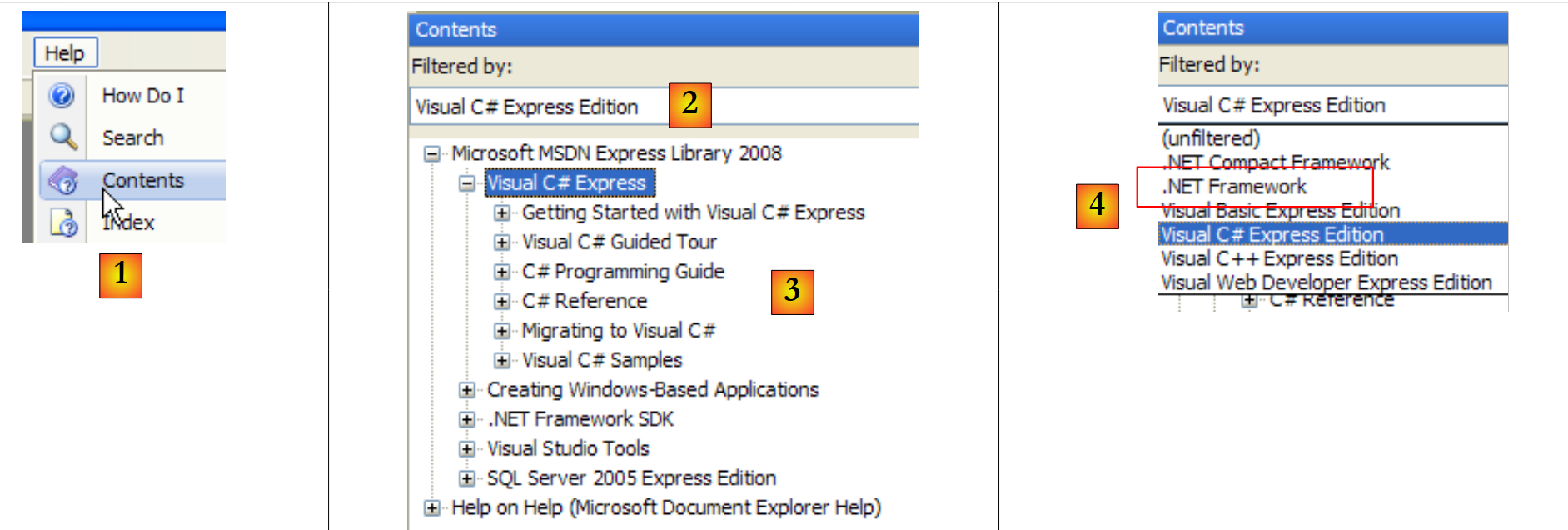 |
- 在 [1] 中,请选择菜单中的 Help/Contents 选项。
- 在 [2] 中,选择 Visual C# Express Edition
- 在 [3] 中,C# 帮助树
- 在 [4] 中,另一个有用的选项是 .NET Framework,它提供了对 .NET 框架中所有类的访问权限。
让我们浏览一下 C# 帮助中的章节标题:
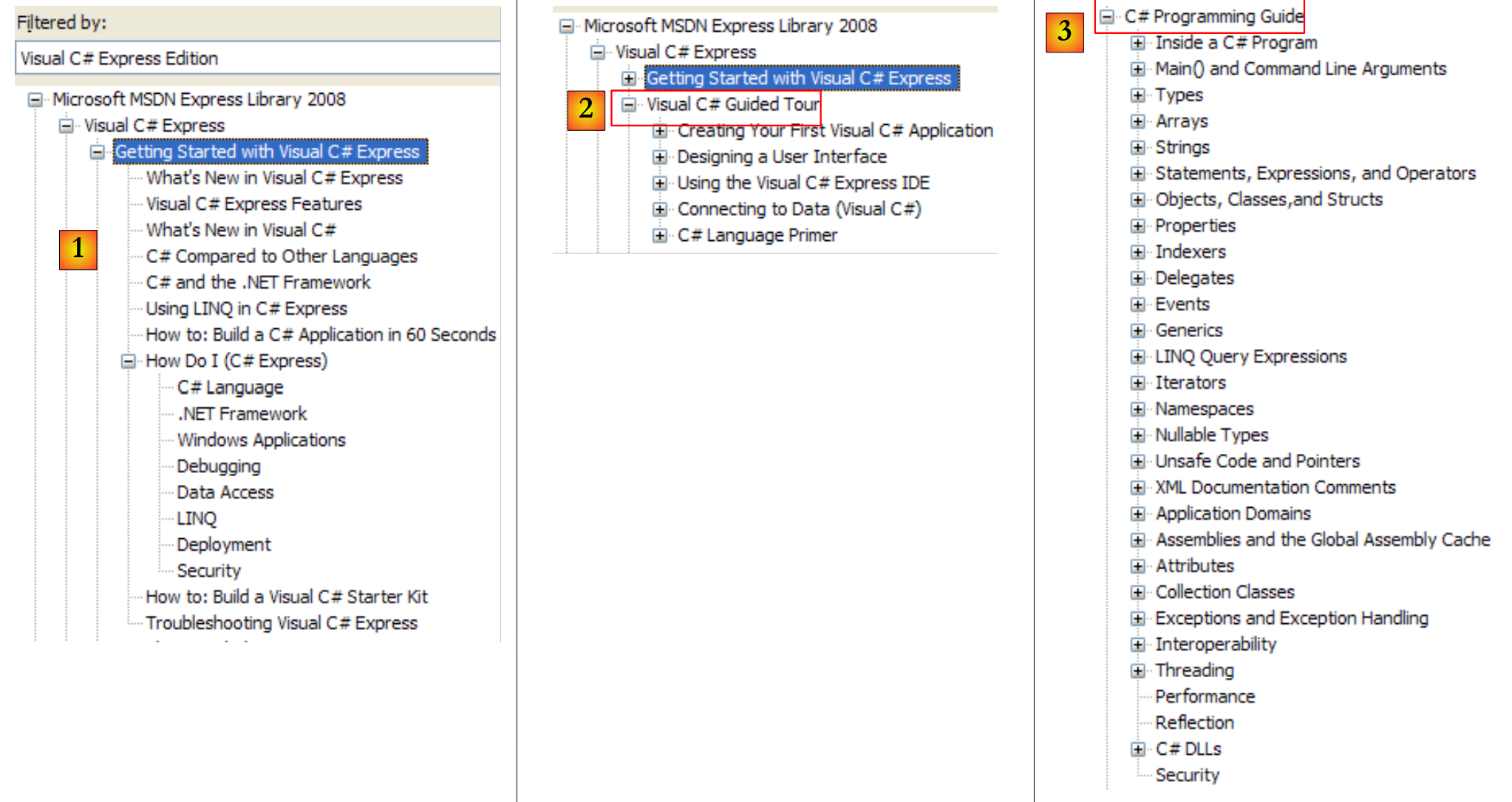 |
- [1]:C# 概览
- [2]:关于 C# 某些要点的系列示例
- [3]:C# 教程——或许可以很好地替代本文档……
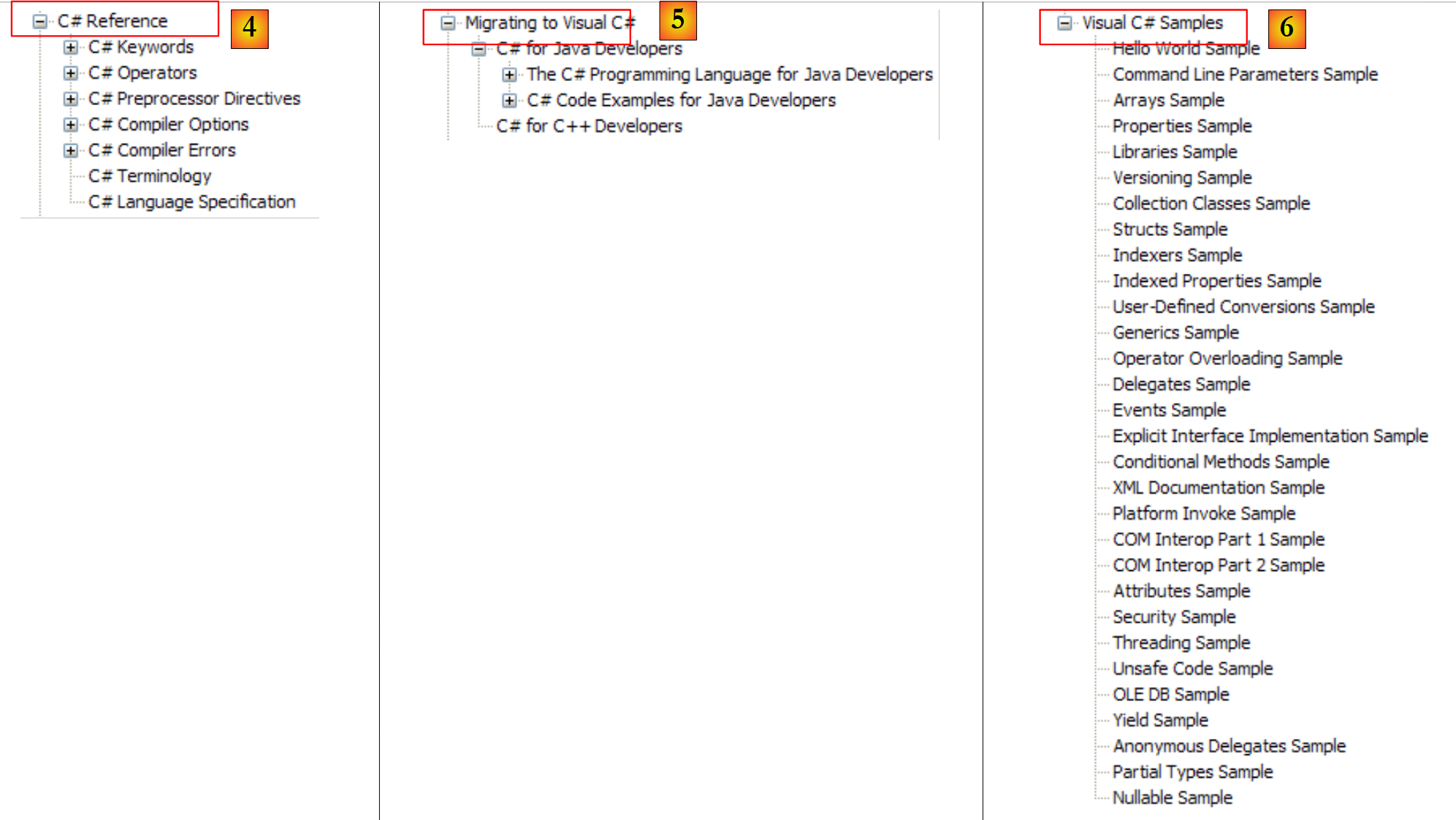 |
- [4]:深入探讨 C# 的细节
- [5]:对 C++ 或 Java 开发者很有帮助。可帮助避免一些陷阱。
- [6]:当您寻找示例时,可以从这里开始。
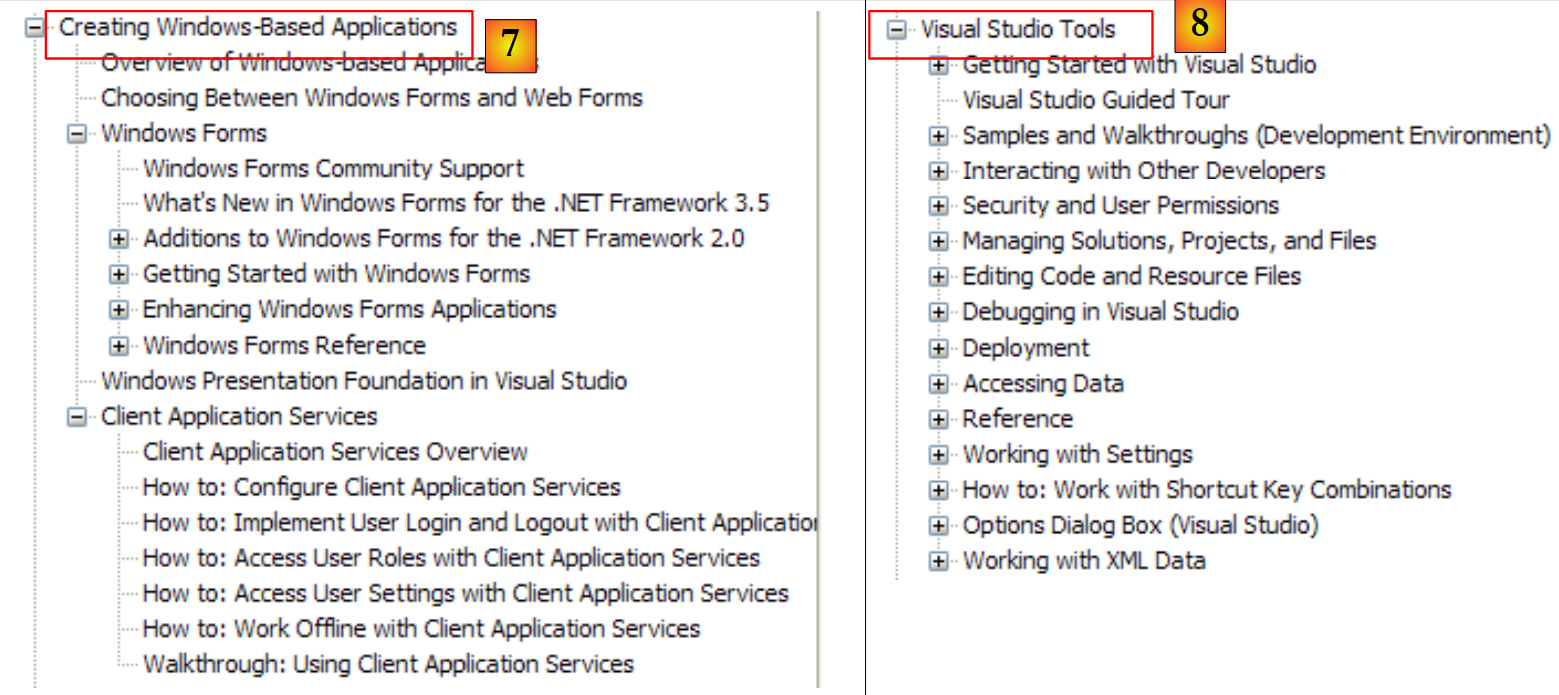 |
- [7]:创建图形用户界面的必备知识
- [8]:更好地使用 Visual Studio Express
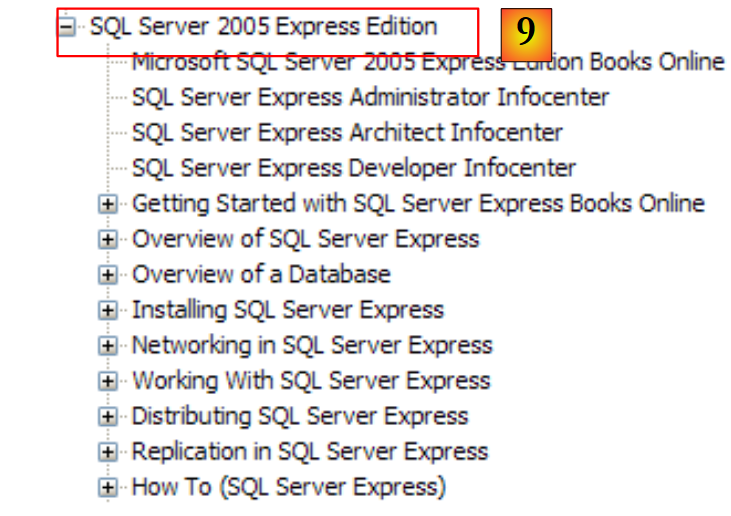 |
- [9]:SQL Server Express 2005 是一款免费提供的优质软件。本课程将使用该软件。
C# 帮助仅是开发人员所需内容的一部分。另一部分则是关于 .NET 框架中数百个类的帮助,这些类将极大简化开发工作。
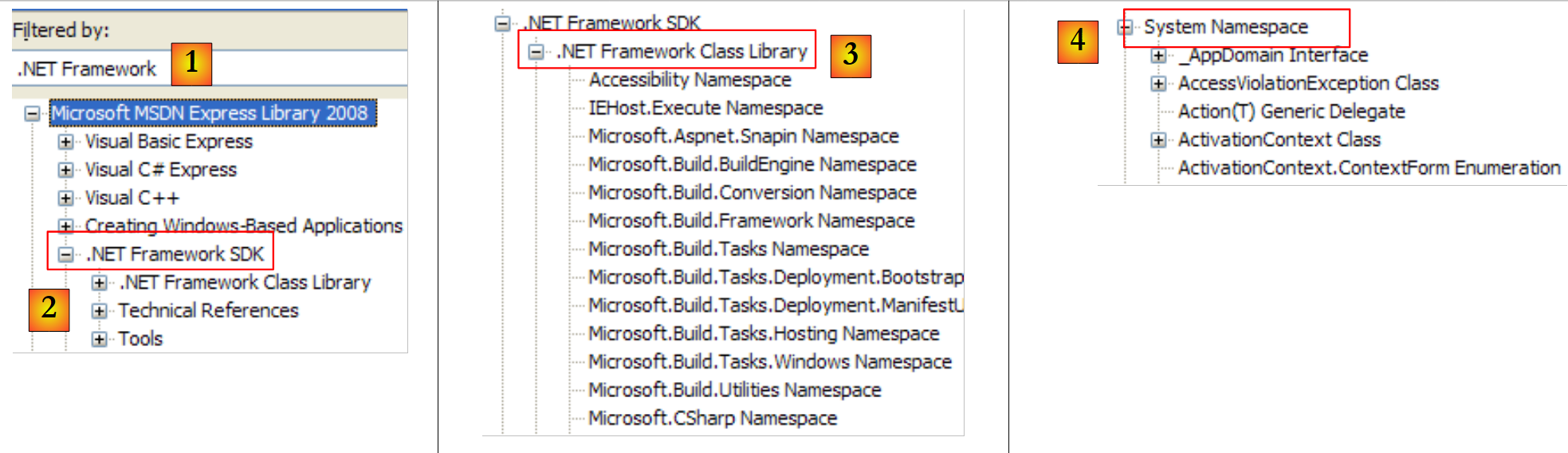 |
- [1]:选择 .NET 框架的帮助文档
- [2]:帮助位于 .NET Framework 分支下 SDK
- [3]:.NET Framework Class Library 分支按所属命名空间列出了所有类 .NET
- [4]:System 命名空间,该命名空间在前几章的示例中使用最为频繁
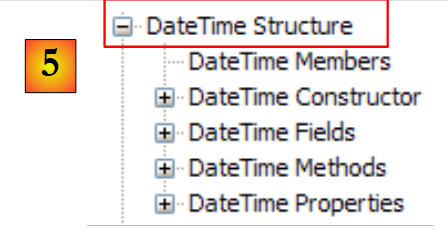 |
- [5]:位于命名空间 System 中,此处以结构 DateTime 为例
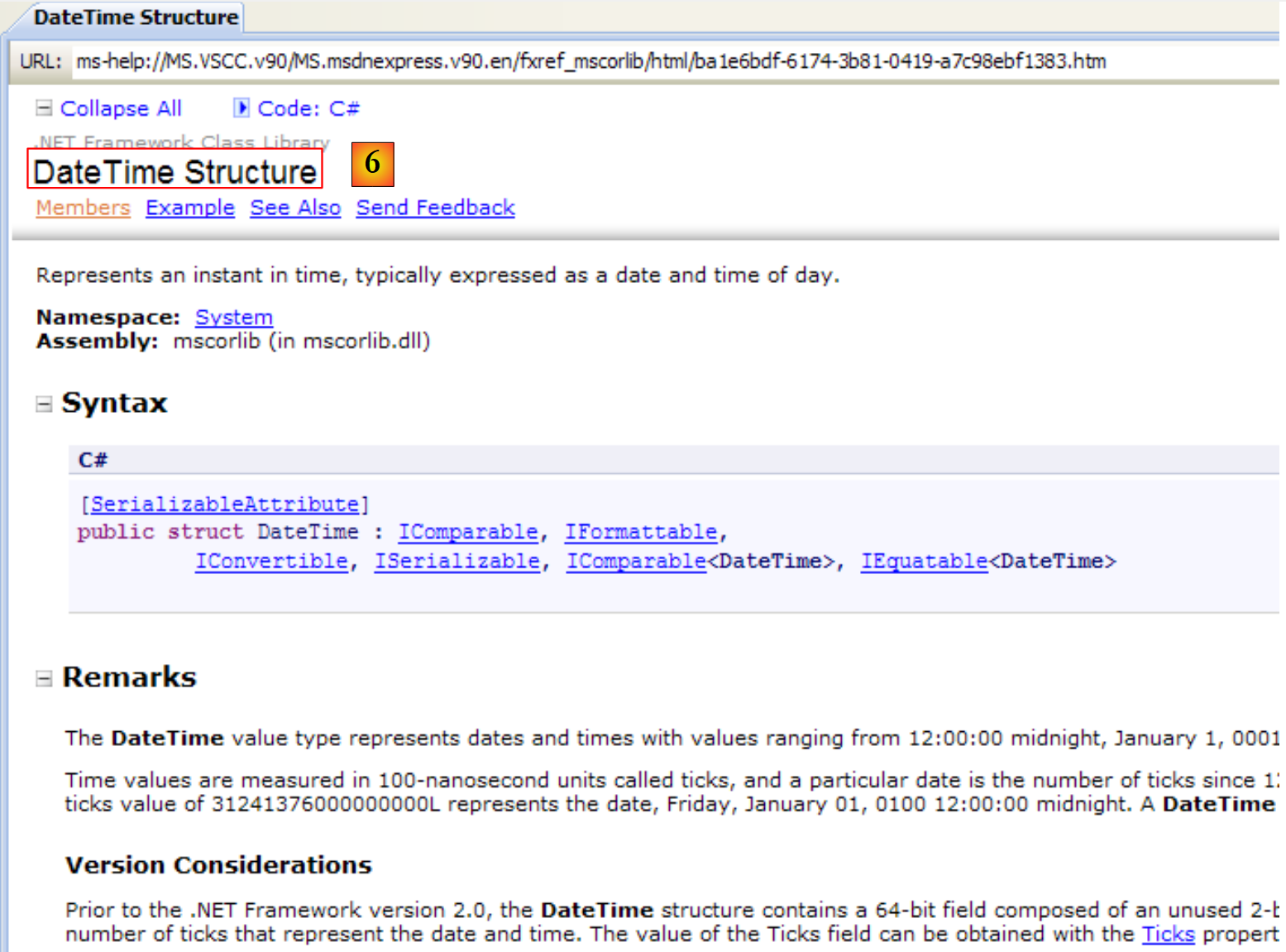 |
- [6]:关于结构 DateTime 的帮助
5.1.2. Help/Index/Search
MSDN提供的帮助内容极其庞大,用户可能不知从何处查找。此时可使用帮助索引:
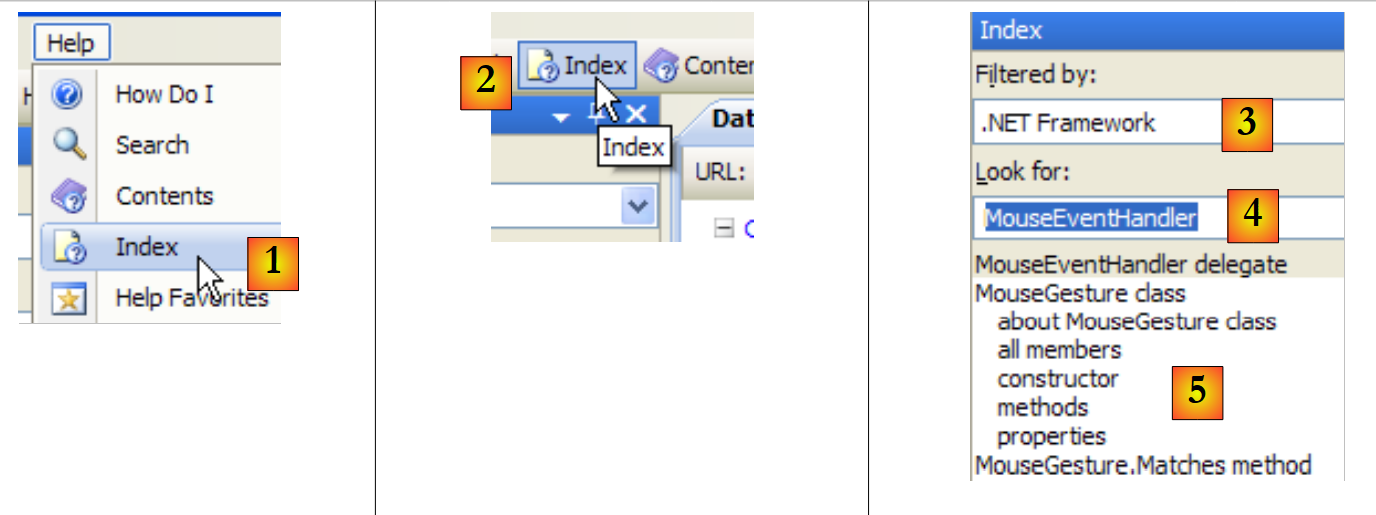 |
- 在 [1] 中,若帮助窗口尚未打开,请使用 [Help/Index] 选项;若已打开,则在现有帮助窗口中使用 [2]。
- 将 [3] 替换为 [4],并指定搜索范围
- 在 [4] 中,指定要搜索的内容,此处为一个类
- 在 [5] 中,显示结果
另一种寻求帮助的方式是使用帮助中的搜索功能:
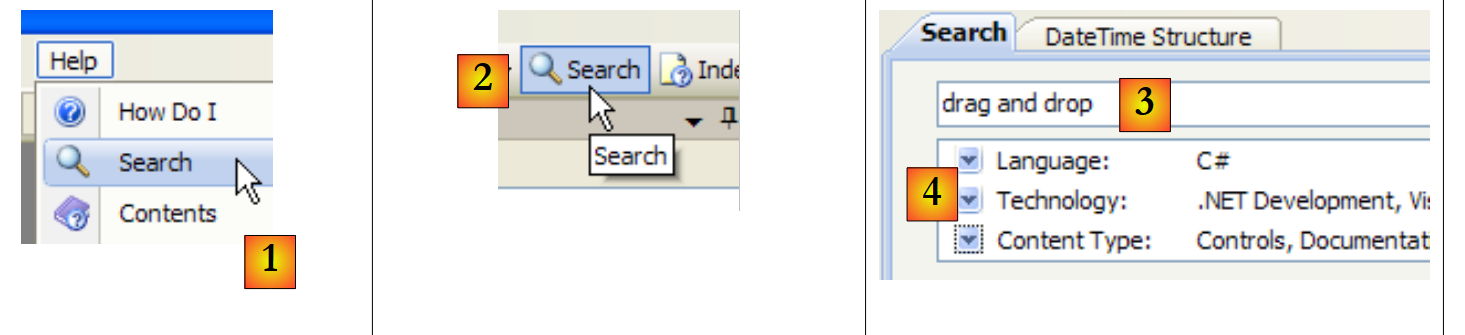 |
- 在 [1] 中,如果帮助窗口尚未打开,请使用选项 [Help/Search];否则,在已打开的帮助窗口中使用 [2]。
- 转换为 [3],明确搜索内容
- 在 [4] 中,筛选搜索范围
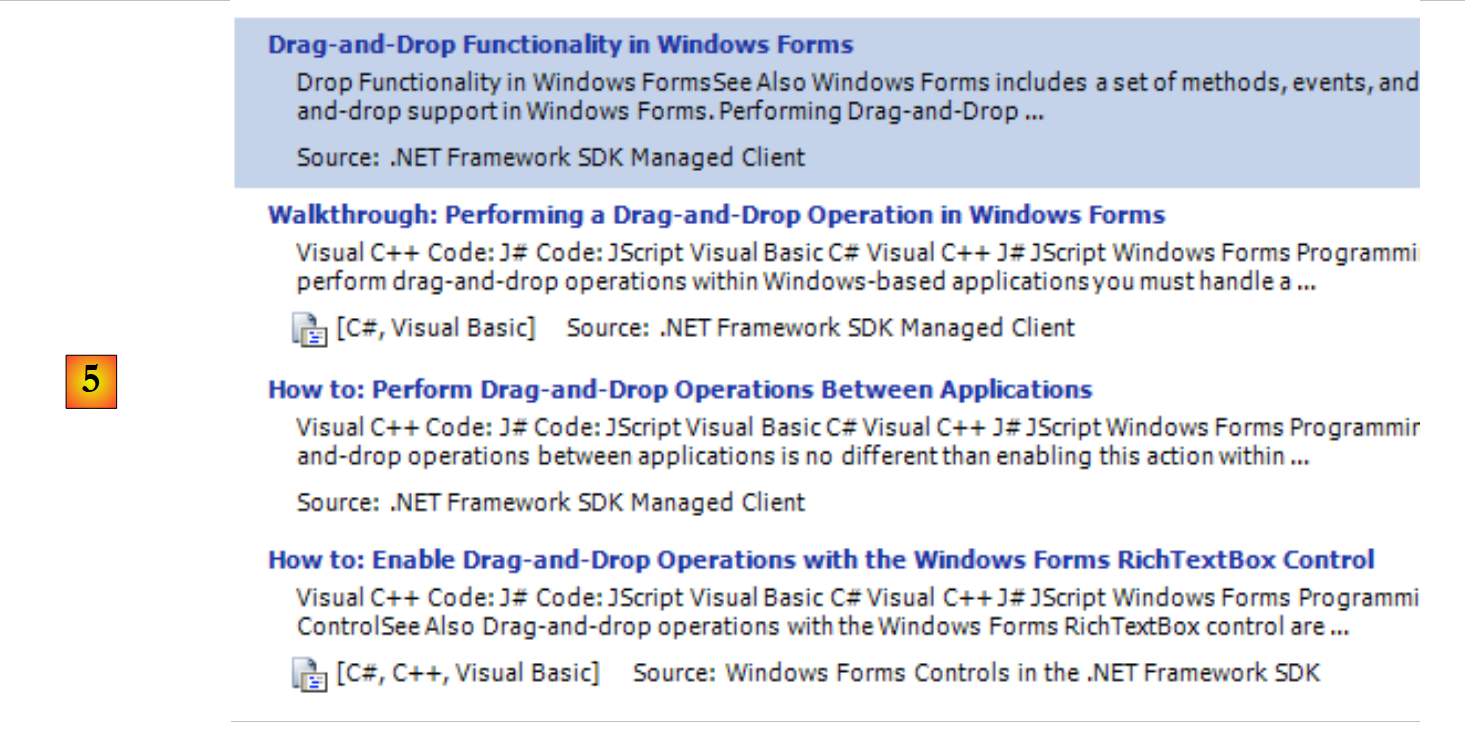 |
- 在 [5] 中,以不同主题的形式显示包含所搜寻文本的搜索结果。
5.2. 字符串
5.2.1. 类 System.String
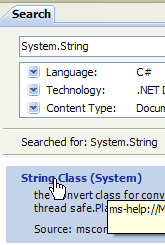 | 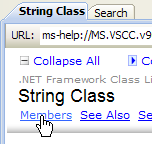 | 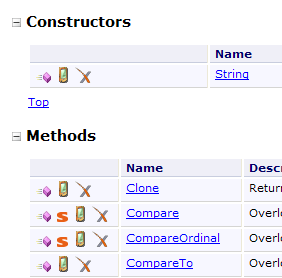 |
System.String 类与简单的 string 类型相同。它具有许多属性和方法。以下列举其中一些:
| |
| |
| |
| |
| |
| |
| |
| |
| |
| |
| |
| |
需要注意一个重要点:当一个方法返回一个字符串时,该字符串与应用该方法的原始字符串是不同的。 因此,S1.Trim() 返回的字符串是 S2,而 S1 和 S2 是两个不同的字符串。
字符串 C 可以被视为一个字符数组。因此
- C[i] 是字符串 C 的第 i 个字符
- C.Length 是 C 的字符数
请看以下示例:
using System;

namespace Chap3 {
    class Program {
        static void Main(string[] args) {
            string uneChaine = "l'oiseau vole au-dessus des nuages";
            affiche("uneChaine=" + uneChaine);
            affiche("uneChaine.Length=" + uneChaine.Length);
            affiche("chaine[10]=" + uneChaine[10]);
            affiche("uneChaine.IndexOf(\"vole\")=" + uneChaine.IndexOf("vole"));
            affiche("uneChaine.IndexOf(\"x\")=" + uneChaine.IndexOf("x"));
            affiche("uneChaine.LastIndexOf('a')=" + uneChaine.LastIndexOf('a'));
            affiche("uneChaine.LastIndexOf('x')=" + uneChaine.LastIndexOf('x'));
            affiche("uneChaine.Substring(4,7)=" + uneChaine.Substring(4, 7));
            affiche("uneChaine.ToUpper()=" + uneChaine.ToUpper());
            affiche("uneChaine.ToLower()=" + uneChaine.ToLower());
            affiche("uneChaine.Replace('a','A')=" + uneChaine.Replace('a', 'A'));
            string[] champs = uneChaine.Split(null);
            for (int i = 0; i < champs.Length; i++) {
                affiche("champs[" + i + "]=[" + champs[i] + "]");
            }//for
            affiche("Join(\":\",champs)=" + System.String.Join(":", champs));
            affiche("(\"  abc  \").Trim()=[" + "  abc  ".Trim() + "]");
        }//主程序

        public static void affiche(string msg) {
            // 显示消息
            Console.WriteLine(msg);
        }//显示
    }//类
}//命名空间
执行后得到以下结果:
再来看一个新示例:
using System;

namespace Chap3 {
    class Program {
        static void Main(string[] args) {
            // 待分析的行
            string ligne = "un:deux::trois:";
            // 字段分隔符
            char[] séparateurs = new char[] { ':' };
            // 拆分
            string[] champs = ligne.Split(séparateurs);
            for (int i = 0; i < champs.Length; i++) {
                Console.WriteLine("Champs[" + i + "]=" + champs[i]);
            }
            // 连接
            Console.WriteLine("join=[" + System.String.Join(":", champs) + "]");
        }
    }
}
以及运行结果:
String 类的 Split 方法可将字符串的各个元素放入数组中。此处使用的 Split 方法定义如下:
public string[] Split(char[] separator);
分隔符数组。这些字符用于分隔字符串中的各个字段。因此,如果字符串为“champ1, champ2, champ3"”,则可以使用 separator=new char[] {','}。 如果分隔符是一连串空格,则应使用 separator=null。 | |
字符串数组,其中数组的每个元素都是字符串的一个字段。 |
Join 方法是 String 类的静态方法:
public static string Join(string separator, string[] value);
字符串数组 | |
用作字段分隔符的字符串 | |
由数组 value 的元素连接而成,并以字符串 separator 分隔的字符串。 |
5.2.2. 类 System.Text.StringBuilder
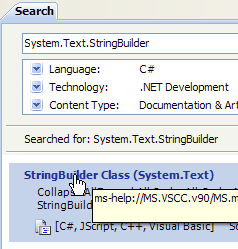 |  | 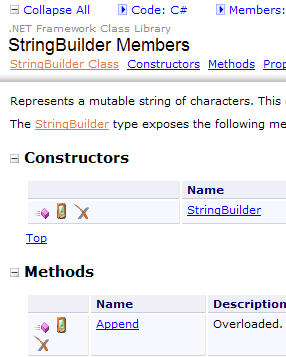 |
此前我们提到,String 类中适用于字符串 S1 的方法会返回另一个字符串 S2。 System.Text.StringBuilder 类允许直接操作 S1,而无需创建字符串 S2。这通过避免生成大量生命周期极短的字符串,从而提升了性能。
该类支持多种构造函数:
| |
|
一个 StringBuilder 对象使用 capacité 个字符块来存储底层字符串。默认情况下 capacité 的值为 16。上述第三个构造函数可用于指定块的容量。 存储字符串 S 所需的 capacité 字符块数量由 StringBuilder 类自动调整。 存在构造函数用于设定 StringBuilder 对象中的最大字符数。默认情况下,该最大容量为 2,147,483,647。
以下是一个说明 capacité 概念的示例:
using System.Text;
using System;
namespace Chap3 {
    class Program {
        static void Main(string[] args) {
            // 字符串
            StringBuilder str = new StringBuilder("test");
            Console.WriteLine("taille={0}, capacité={1}", str.Length, str.Capacity);
            for (int i = 0; i < 10; i++) {
                str.Append("test");
                Console.WriteLine("taille={0}, capacité={1}", str.Length, str.Capacity);
            }
            // str2
            StringBuilder str2 = new StringBuilder("test",10);
            Console.WriteLine("taille={0}, capacité={1}", str2.Length, str2.Capacity);
            for (int i = 0; i < 10; i++) {
                str2.Append("test");
                Console.WriteLine("taille={0}, capacité={1}", str2.Length, str2.Capacity);
            }
        }
    }
}
- 第 7 行:创建一个块大小为 16 个字符的 StringBuilder 对象
- 第 8 行:str.Length 是字符串 str 的当前字符数。 str.Capacity 是当前字符串 str 在重新分配新块之前所能存储的字符数。
- 第 10 行: str.Append(String S) 用于将类型为 String 的字符串 S 与类型为 StringBuilder 的字符串 str 进行拼接。
- 第 14 行:创建一个块容量为 10 个字符的 StringBuilder 对象
执行结果:
这些结果表明,当内存容量不足时,该类会遵循其特有的算法来分配新的内存块:
- 第 4-5 行:容量增加 16 个字符
- 第 8-9 行:将容量增加 32 个字符,而实际上增加 16 个字符就已足够。
以下是该类的一些方法:
| |
| |
| |
| |
|
以下是一个示例:
using System.Text;
using System;
namespace Chap3 {
    class Program {
        static void Main(string[] args) {
            // str3
            StringBuilder str3 = new StringBuilder("test");
            Console.WriteLine(str3.Append("abCD").Insert(2, "xyZT").Remove(0, 2).Replace("xy", "XY"));
        }
    }
}
及其结果:
5.3. 数组
数组继承自 Array 类:
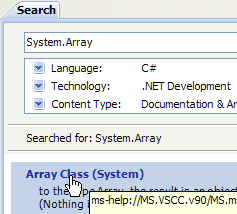 |  | 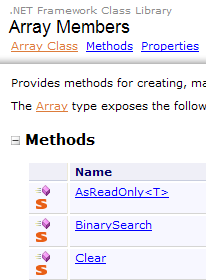 |
Array 类拥有多种方法,用于对数组进行排序、在数组中查找元素、调整数组大小等。我们将介绍该类的一些属性和方法。它们几乎都被重载了,c.a.d,因此存在多种变体。所有数组都继承了这些方法。
属性
方法
以下程序演示了 Array 类中某些方法的使用:
using System;

namespace Chap3 {
    class Program {
        // 搜索类型
        enum TypeRecherche { linéaire, dichotomique };

        // 主要方法
        static void Main(string[] args) {
            // 读取通过键盘输入的数组元素
            double[] éléments;
            Saisie(out éléments);
            // 显示未排序数组
            Affiche("Tableau non trié", éléments);
            // 在未排序数组中进行线性搜索
            Recherche(éléments, TypeRecherche.linéaire);
            // 数组排序
            Array.Sort(éléments);
            // 显示已排序数组
            Affiche("Tableau trié", éléments);
            // 在已排序数组中进行二分搜索
            Recherche(éléments, TypeRecherche.dichotomique);
        }

        // 输入数组元素的值
        // 元素:引用由该方法创建的数组
        static void Saisie(out double[] éléments) {
            bool terminé = false;
            string réponse;
            bool erreur;
            double élément = 0;
            int i = 0;
            // 初始时数组不存在
            éléments = null;
            // 数组元素输入循环
            while (!terminé) {
                // 问题
                Console.Write("Elément (réel) " + i + " du tableau (rien pour terminer) : ");
                // 读取回答
                réponse = Console.ReadLine().Trim();
                // 若字符串为空则结束输入
                if (réponse.Equals(""))
                    break;
                // 验证输入
                try {
                    élément = Double.Parse(réponse);
                    erreur = false;
                } catch {
                    Console.Error.WriteLine("Saisie incorrecte, recommencez");
                    erreur = true;
                }//try-catch
                // 若无错误
                if (!erreur) {
                    // 数组中增加一个元素
                    i += 1;
                    // 调整数组大小以容纳新元素
                    Array.Resize(ref éléments, i);
                    // 插入新元素
                    éléments[i - 1] = élément;
                }
            }//while
        }

        // 用于显示数组元素的通用方法
        static void Affiche<T>(string texte, T[] éléments) {
            Console.WriteLine(texte.PadRight(50, '-'));
            foreach (T élément in éléments) {
                Console.WriteLine(élément);
            }
        }

        // 在数组中查找元素
        // 元素:实数数组
        // TypeRecherche:二分法或线性
        static void Recherche(double[] éléments, TypeRecherche type) {
            // 搜索
            bool terminé = false;
            string réponse = null;
            double élément = 0;
            bool erreur = false;
            int i = 0;
            while (!terminé) {
                // 问题
                Console.WriteLine("Elément cherché (rien pour arrêter) : ");
                // 阅读并核对答案
                réponse = Console.ReadLine().Trim();
                // 结束了吗?
                if (réponse.Equals(""))
                    break;
                // 验证
                try {
                    élément = Double.Parse(réponse);
                    erreur = false;
                } catch {
                    Console.WriteLine("Erreur, recommencez...");
                    erreur = true;
                }//try-catch
                // 如果没有错误
                if (!erreur) {
                    // 在数组中查找元素
                    if (type == TypeRecherche.dichotomique)
                        // 二分搜索
                        i = Array.BinarySearch(éléments, élément);
                    else
                        // 线性搜索
                        i = Array.IndexOf(éléments, élément);
                    // 显示结果
                    if (i >= 0)
                        Console.WriteLine("Trouvé en position " + i);
                    else
                        Console.WriteLine("Pas dans le tableau");
                }//if
            }//while
        }
    }
}
- 第 27-62 行:方法 Saisie 用于将通过键盘输入的元素存入数组 éléments 中。由于无法预先确定数组的大小(其最终大小未知),因此必须在添加每个新元素时重新调整数组大小 (第57行)。更高效的算法本应是按N个元素为一组为数组分配空间。然而,数组本身并不适合进行动态调整大小。这种情况更适合使用列表(ArrayList, List<T>)来处理。
- 第75-113行:方法Recherche用于在数组éléments中搜索用户键入的元素。 搜索模式取决于数组是否已排序。对于未排序的数组,使用第106行的方法 IndexOf 进行线性搜索。对于已排序的数组,使用第103行的方法 BinarySearch 进行二分搜索。
- 第18行:对数组éléments进行排序。此处使用的是Sort的一个变体,该方法仅有一个参数:待排序的数组。 用于比较数组元素的排序关系即为这些元素的隐含关系。此处元素为数值类型,因此采用数字的自然排序顺序。
屏幕输出结果如下:
5.4. 泛型集合
除了数组之外,还有各种类用于存储元素集合。System.Collections.Generic 命名空间中提供了泛型版本,而 System.Collections 命名空间中则提供了非泛型版本。我们将介绍两种常用的泛型集合:列表和字典。
泛型集合列表如下:
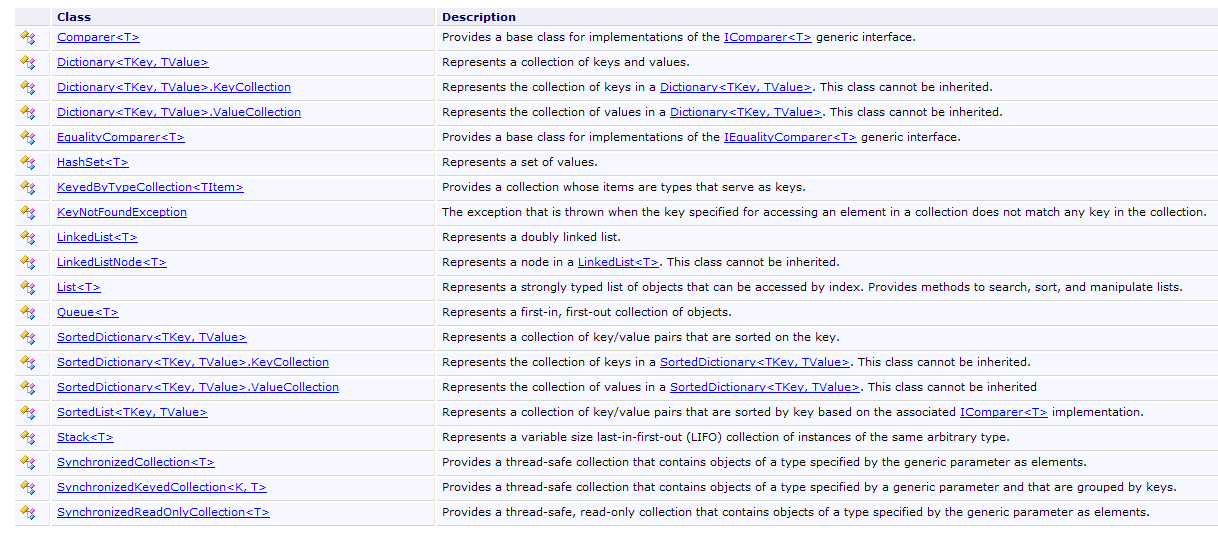
5.4.1. 泛型类 List<T>
System.Collections.Generic.List<T> 类允许实现由类型 T 的对象组成的集合,其大小在程序运行过程中会发生变化。 List<T> 类型的对象操作方式几乎与数组相同。因此,列表 l 的第 i 个元素记为 l[i]。
此外还存在一种非泛型列表类型:ArrayList,能够存储指向任意对象的引用。 ArrayList 在功能上等同于 List<Object>.一个 ArrayList 对象看起来像这样:
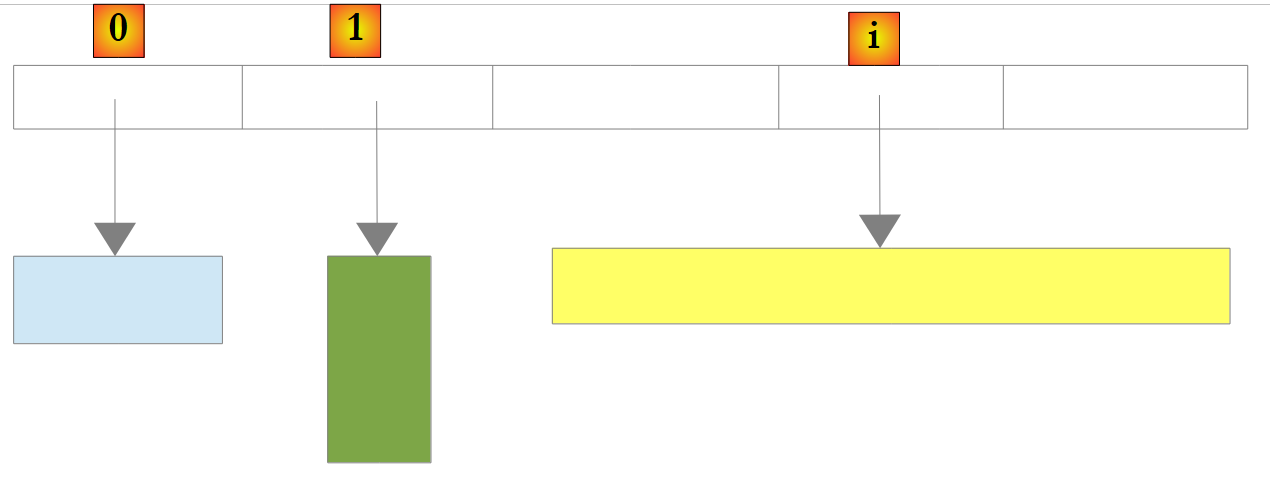 |
在上例中,列表中的元素 0、1 和 i 分别指向不同类型的对象。 必须先创建一个对象,然后才能将其引用添加到列表 ArrayList 中。尽管 ArrayList 存储对象引用,但也可以在其中存储数字。 这通过一种名为 Boxing 的机制实现:数字被封装在一个类型为 Object 的对象 O 中,而列表中存储的是对象 O 的引用。这对开发人员来说是一个透明的机制。因此可以这样编写:
这将产生以下结果:
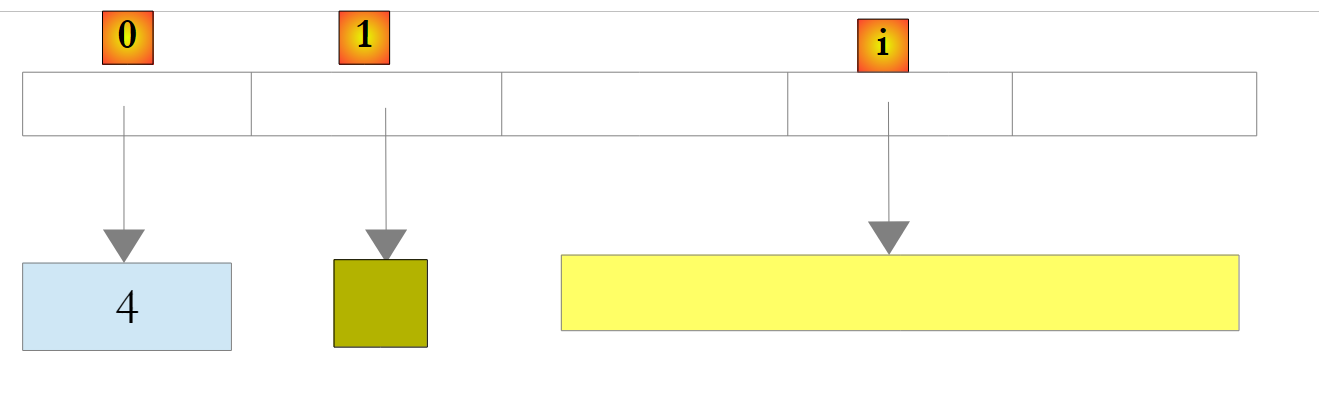 |
在上例中,数字 4 被封装在一个 O 对象中,而 O 引用被存储在列表中。要检索它,可以这样写:
int i = (int)liste[0];
操作 Object -> int 称为 Unboxing。如果一个列表完全由 int 类型组成,将其声明为 List<int> 可以提高性能。 因为这样,int类型的数值将直接存储在列表内部,而非存储在列表外部的Object类型中。因此不再需要进行装箱/拆箱操作。
 |
对于 List<T> 或 T 类型的对象(即类),列表同样存储 T 类型对象的引用:
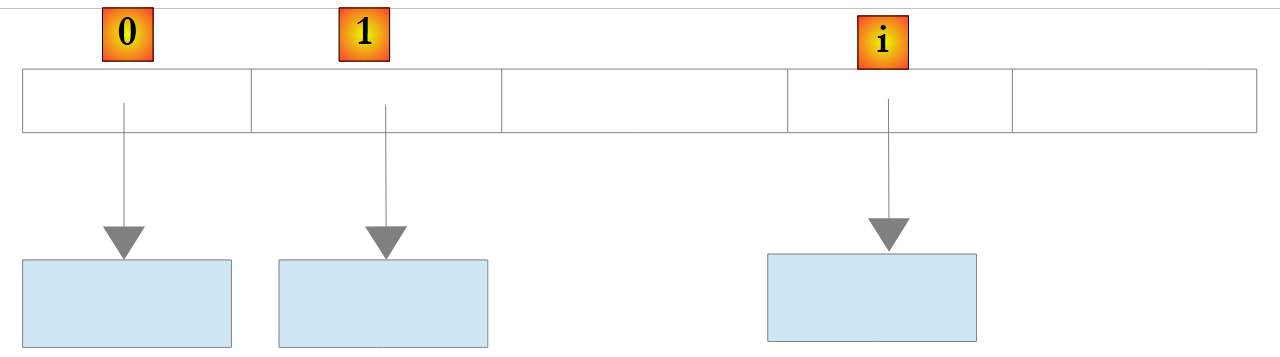 |
以下是泛型列表的一些属性和方法:
属性
方法
让我们重新审视之前处理过的示例,当时使用的对象类型为 Array,现在我们改用 List<T>. 类型的对象进行处理。由于列表是一种类似数组的对象,代码变化不大。我们仅列出显著的修改:
using System;
using System.Collections.Generic;

namespace Chap3 {
    class Program {
        // 搜索类型
        enum TypeRecherche { linéaire, dichotomique };

        // 主方法
        static void Main(string[] args) {
            // 读取通过键盘输入的列表项
            List<double> éléments;
            Saisie(out éléments);
            // 元素数量
            Console.WriteLine("La liste a {0} éléments et une capacité de {1} éléments", éléments.Count, éléments.Capacity);
            // 显示未排序列表
            Affiche("Liste non triée", éléments);
            // 在未排序列表中进行线性搜索
            Recherche(éléments, TypeRecherche.linéaire);
            // 列表排序
            éléments.Sort();
            // 显示已排序列表
            Affiche("Liste triée", éléments);
            // 在已排序列表中进行二分搜索
            Recherche(éléments, TypeRecherche.dichotomique);
        }

        // 输入元素列表的值
        // 元素:对由该方法创建的列表的引用
        static void Saisie(out List<double> éléments) {
...
            // 初始时列表为空
            éléments = new List<double>();
            // 列表元素输入循环
            while (!terminé) {
...
                // 若无错误
                if (!erreur) {
                    // 列表中增加一个元素
                    éléments.Add(élément);
                }
            }//while
        }

        // 用于显示可枚举对象元素的通用方法
        static void Affiche<T>(string texte, IEnumerable<T> éléments) {
            Console.WriteLine(texte.PadRight(50, '-'));
            foreach (T élément in éléments) {
                Console.WriteLine(élément);
            }
        }

        // 在列表中查找元素
        // 元素:实数列表
        // TypeRecherche:二分法或线性
        static void Recherche(List<double> éléments, TypeRecherche type) {
...
            while (!terminé) {
...
                // 若无错误
                if (!erreur) {
                    // 在列表中查找该元素
                    if (type == TypeRecherche.dichotomique)
                        // 二分搜索
                        i = éléments.BinarySearch(élément);
                    else
                        // 线性搜索
                        i = éléments.IndexOf(élément);
                    // 显示答案
...
                }//if
            }//while
        }
    }
}
- 第 46-51 行:通用方法 Affiche<T> 接受两个参数:
- 第一个参数是要写入的文本
- 第二个参数是实现泛型接口 IEnumerable<T> 的对象:
第 48 行中的 foreach( T 元素 in 元素列表) 结构,对所有实现 IEnumerable 接口的 éléments 对象均有效。 数组(Array)和列表(List<T>)都实现了接口 IEnumerable<T>。 因此,方法 Affiche 同样适用于显示表格和列表。
该程序的运行结果与使用类 Array 的示例相同。
5.4.2. 类 Dictionary<TKey,TValue>
类 System.Collections.Generic.Dictionary<TKey,TValue> 用于实现字典。可以将字典视为一个两列数组:
键 | 值 |
键1 | 值1 |
键2 | 值2 |
.. | ... |
在 Dictionary<TKey,TValue> 类中,键的类型为 Tkey,值的类型为 TValue。 键是唯一的,例如 c.a.d,因此不可能存在两个相同的键。如果类型 TKey 和 TValue 代表类,那么这样的字典可能如下所示:
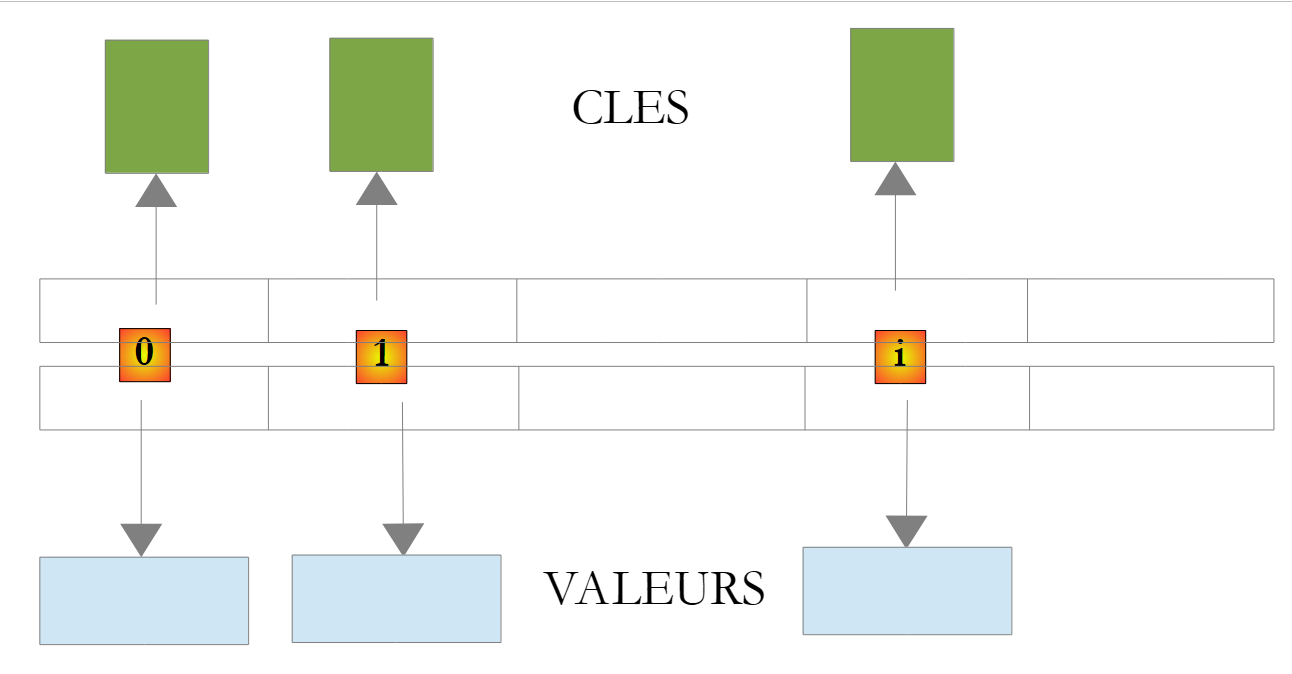 |
字典 D 中键 C 对应的值通过 D[C] 表示。该值支持读写操作。因此可以写入:
如果键 c 在字典 D 中不存在,则表示法 D[c] 将引发异常。
类 Dictionary<TKey,TValue> 的主要方法和属性如下:
构造函数
属性
方法
请看以下示例程序:
using System;
using System.Collections.Generic;

namespace Chap3 {
    class Program {
        static void Main(string[] args) {
            // 创建 <string,int> 字典
            string[] liste = { "jean:20", "paul:18", "mélanie:10", "violette:15" };
            string[] champs = null;
            char[] séparateurs = new char[] { ':' };
            Dictionary<string,int> dico = new Dictionary<string,int>();
            for (int i = 0; i <liste.Length; i++) {
                champs = liste[i].Split(séparateurs);
                dico[champs[0]]= int.Parse(champs[1]);
            }//for
            // 字典中的元素数量
            Console.WriteLine("Le dictionnaire a " + dico.Count + " éléments");
            // 键列表
            Affiche("[Liste des clés]",dico.Keys);
            // 值列表
            Affiche("[Liste des valeurs]", dico.Values);
            // 键值对列表
            Console.WriteLine("[Liste des clés & valeurs]");
            foreach (string clé in dico.Keys) {
                Console.WriteLine("clé=" + clé + " valeur=" + dico[clé]);
            }
            // 删除键“paul”
            Console.WriteLine("[Suppression d'une clé]");
            dico.Remove("paul");
            // 键值对列表
            Console.WriteLine("[Liste des clés & valeurs]");
            foreach (string clé in dico.Keys) {
                Console.WriteLine("clé=" + clé + " valeur=" + dico[clé]);
            }
            // 在字典中搜索
            String nomCherché = null;
            Console.Write("Nom recherché (rien pour arrêter) : ");
            nomCherché = Console.ReadLine().Trim();
            int value;
            while (!nomCherché.Equals("")) {
                dico.TryGetValue(nomCherché, out value);
                if (value!=0) {
                    Console.WriteLine(nomCherché + "," + value);
                } else {
                    Console.WriteLine("Nom " + nomCherché + " inconnu");
                }
                // 后续搜索
                Console.Out.Write("Nom recherché (rien pour arrêter) : ");
                nomCherché = Console.ReadLine().Trim();
            }//while
        }

        // 用于显示可枚举类型元素的通用方法
        static void Affiche<T>(string texte, IEnumerable<T> éléments) {
            Console.WriteLine(texte.PadRight(50, '-'));
            foreach (T élément in éléments) {
                Console.WriteLine(élément);
            }
        }

    }
}
- 第 8 行:一个 string 数组,用于初始化 <string,int> 字典
- 第 11 行:<string,int> 字典
- 第12-15行:基于第8行的string数组对其进行初始化
- 第17行:字典的条目数
- 第 19 行:字典的键
- 第 21 行:字典的值
- 第 29 行:从字典中删除一个条目
- 第41行:在字典中查找键。如果不存在,方法TryGetValue将向value赋值0,因为value是数值型。 此处之所以能使用该技术,是因为已知字典中不存在值 0。
执行结果如下:
5.5. 文本文件
5.5.1. StreamReader 类
System.IO.StreamReader 类用于读取文本文件的内容。实际上,它也能处理非文件流。以下是该类的一些属性和方法:
构造函数
属性
方法
以下是一个示例:
using System;
using System.IO;

namespace Chap3 {
    class Program {
        static void Main(string[] args) {
            // 运行目录
            Console.WriteLine("Répertoire d'exécution : "+Environment.CurrentDirectory);
            string ligne = null;
            StreamReader fluxInfos = null;
            // 读取文件内容infos.txt
            try {
                // 读取 1
                Console.WriteLine("Lecture 1----------------");
                using (fluxInfos = new StreamReader("infos.txt")) {
                    ligne = fluxInfos.ReadLine();
                    while (ligne != null) {
                        Console.WriteLine(ligne);
                        ligne = fluxInfos.ReadLine();
                    }
                }
                // 读取 2
                Console.WriteLine("Lecture 2----------------");
                using (fluxInfos = new StreamReader("infos.txt")) {
                    Console.WriteLine(fluxInfos.ReadToEnd());
                }
            } catch (Exception e) {
                Console.WriteLine("L'erreur suivante s'est produite : " + e.Message);
            }
        }
    }
}
- 第 8 行:显示执行目录的名称
- 第12、27行:用于处理可能出现的异常的try/catch语句。
- 第 15 行:using 语句的结构 flux=new StreamReader(...) 提供了一种便利,避免在流处理完成后必须显式关闭流。只要退出 using 的作用域,该流就会自动关闭。
- 第 15 行:读取的文件名为 infos.txt。由于这是一个相对路径,系统将根据第 8 行显示的执行目录进行查找。若该文件不存在,将抛出异常并由 try/catch 进行处理。
- 第16-20行:按行依次读取文件
- 第25行:一次性读取整个文件
文件 infos.txt 的内容如下:
并放置在 C# 项目的以下文件夹中:
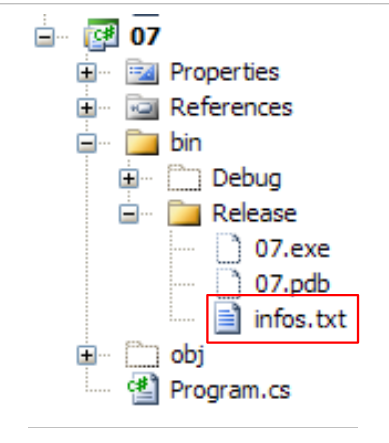 |
我们将发现,当通过 Ctrl-F5 运行项目时,bin/Release 即是运行文件夹。
运行后得到以下结果:
如果在第15行输入文件名 xx.txt,将得到以下结果:
5.5.2. 类 StreamWriter
类 System.IO.StreamReader 用于向文本文件写入数据。与类 StreamReader 一样,它实际上也能处理非文件流。以下是该类的一些属性和方法:
构造函数
属性
方法
请看以下示例:
using System;
using System.IO;

namespace Chap3 {
    class Program2 {
        static void Main(string[] args) {
            // 执行目录
            Console.WriteLine("Répertoire d'exécution : " + Environment.CurrentDirectory);
            string ligne = null;                        // 一行文本
            StreamWriter fluxInfos = null;    // 文本文件
            try {
                // 创建文本文件
                using (fluxInfos = new StreamWriter("infos2.txt")) {
                    Console.WriteLine("Mode AutoFlush : {0}", fluxInfos.AutoFlush);
                    // 读取键盘输入的行
                    Console.Write("ligne (rien pour arrêter) : ");
                    ligne = Console.ReadLine().Trim();
                    // 只要输入的行不为空就循环
                    while (ligne != "") {
                        // 将行写入文本文件
                        fluxInfos.WriteLine(ligne);
                        // 读取键盘输入的新行
                        Console.Write("ligne (rien pour arrêter) : ");
                        ligne = Console.ReadLine().Trim();
                    }//while
                }
            } catch (Exception e) {
                Console.WriteLine("L'erreur suivante s'est produite : " + e.Message);
            }
        }
    }
}
- 第 13 行:我们再次使用 using(flux) 语法,这样就无需通过 Close 操作显式关闭流。该关闭操作会在 using 结束时自动执行。
- 为什么第11行和第27行要使用try/catch?第13行,我们可以指定一个文件名,格式为 /rep1/rep2/ .../fichier 时,若路径 /rep1/rep2/... 不存在,将导致无法创建 fichier。此时会抛出异常。此外还可能存在其他异常情况(磁盘已满、权限不足等)
执行结果如下:
文件 infos2.txt 已创建在项目 bin/Release 的文件夹中:
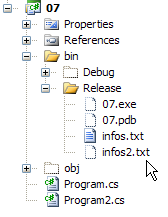 | 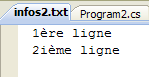 |
5.6. 二进制文件
类 System.IO.BinaryReader 和 System.IO.BinaryWriter 用于读取和写入二进制文件。
考虑以下应用程序:
// pg 语法 文本 二进制 日志
// 读取文本文件(text),并将内容存储到二进制文件(bin)中
// 该文本文件包含形式为“姓名:年龄”的行,我们将这些行存储在字符串和整数结构中
// (logs) 是一个日志文本文件
该文本文件的内容如下:
程序如下:
using System;
using System.IO;

// 语法:pg 文本 二进制 日志
// 读取文本文件(text),并将内容存储到二进制文件(bin)中
// 该文本文件包含形式为“姓名:年龄”的行,将这些行存储在字符串和整数结构中
// (logs) 是一个日志文本文件

namespace Chap3 {
    class Program {
        static void Main(string[] arguments) {
            // 需要 3 个参数
            if (arguments.Length != 3) {
                Console.WriteLine("syntaxe : pg texte binaire log");
                Environment.Exit(1);
            }//if

            // 变量
            string ligne=null;
            string nom=null;
            int age=0;
            int numLigne = 0;
            char[] séparateurs = new char[] { ':' };
            string[] champs=null;
            StreamReader input = null;
            BinaryWriter output = null;
            StreamWriter logs = null;
            bool erreur = false;
            // 读取文本文件 - 写入二进制文件
            try {
                // 以读取模式打开文本文件
                input = new StreamReader(arguments[0]);
                // 以写入模式打开二进制文件
                output = new BinaryWriter(new FileStream(arguments[1], FileMode.Create, FileAccess.Write));
                // 以写入模式打开日志文件
                logs = new StreamWriter(arguments[2]);
                // 处理文本文件
                while ((ligne = input.ReadLine()) != null) {
                    // 多一行
                    numLigne++;
                    // 空行?
                    if (ligne.Trim() == "") {
                        // 忽略
                        continue;
                    }
                    // 一行:姓名:年龄
                    champs = ligne.Split(séparateurs);
                    // 我们需要 2 个字段
                    if (champs.Length != 2) {
                        // 记录错误
                        logs.WriteLine("La ligne n° [{0}] du fichier [{1}] a un nombre de champs incorrect", numLigne, arguments[0]);
                        // 下一行
                        continue;
                    }//if
                    // 第一个字段不能为空
                    erreur = false;
                    nom = champs[0].Trim();
                    if (nom == "") {
                        // 记录错误
                        logs.WriteLine("La ligne n° [{0}] du fichier [{1}] a un nom vide", numLigne, arguments[0]);
                        erreur = true;
                    }
                    // 第二个字段必须为大于等于0的整数
                    if (!int.TryParse(champs[1],out age) || age<0) {
                        // 记录错误
                        logs.WriteLine("La ligne n° [{0}] du fichier [{1}] a un âge [{2}] incorrect", numLigne, arguments[0], champs[1].Trim());
                        erreur = true;
                    }//if
                    // 若无错误,将数据写入二进制文件
                    if (!erreur) {
                        output.Write(nom);
                        output.Write(age);
                    }
                    // 下一行
                }//while
            }catch(Exception e){
                Console.WriteLine("L'erreur suivante s'est produite : {0}", e.Message);
            } finally {
                // 关闭文件
                if(input!=null) input.Close();
                if(output!=null) output.Close();
                if(logs!=null) logs.Close();
            }
        }
    }
}
让我们重点关注与类 BinaryWriter 相关的操作:
- 第 34 行:操作打开了对象 BinaryWriter
output=new BinaryWriter(new FileStream(arguments[1],FileMode.Create,FileAccess.Write));
构造函数的参数必须是一个流(Stream)。这里是一个由文件(FileStream)构建的流,其内容如下:
- (续)
- 文件名
- 要执行的操作,此处为 FileMode.Create,用于创建文件
- 访问类型,此处为 FileAccess.Write,表示对文件的写入访问
- 第70-73行:写入操作
类 BinaryWriter 提供了多种重载方法 Write,用于写入不同类型的简单数据
- 第 81 行:关闭数据流的操作
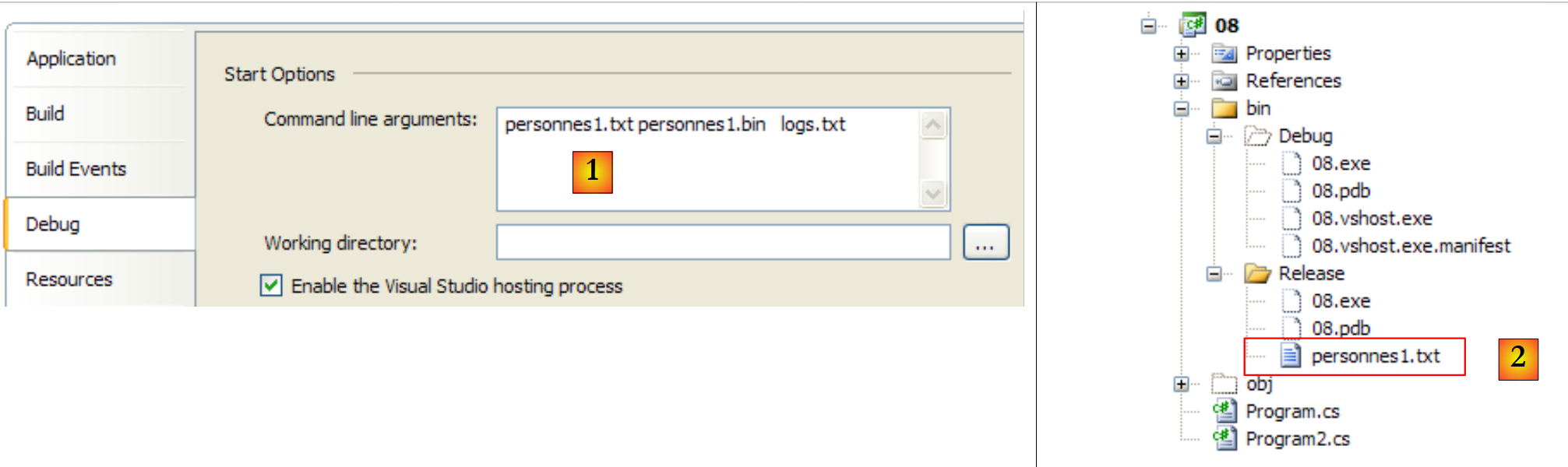
方法 Main 的三个参数通过项目属性传递给 [1],待处理的文本文件位于 bin/Release 文件夹中 [2]:
 |
以及以下文件 [personnes1.txt]:
执行结果如下:
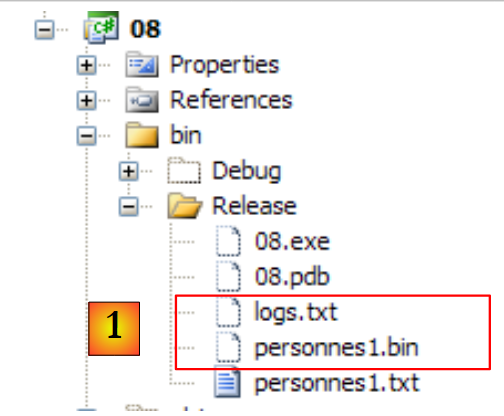 |
- 在 [1] 中,生成了二进制文件 [personnes1.bin] 以及日志文件 [logs.txt]。该日志文件内容如下:
二进制文件 [personnes1.bin] 的内容将由以下程序生成。该程序同样接受三个参数:
// 语法 pg bin 文本 日志
// 读取二进制文件 bin 并将内容保存到文本文件(文本)中
// 二进制文件具有字符串、整数结构
// 文本文件中的行格式为 姓名 : 年龄
// logs 是一个日志文本文件
因此,我们进行反向操作。读取二进制文件以生成文本文件。如果生成的文本文件与原始文件完全一致,则说明文本→二进制→文本的转换过程已成功完成。代码如下:
using System;
using System.IO;

// 语法:pg bin 文本 logs
// 读取二进制文件 bin 并将内容保存到文本文件(文本)中
// 二进制文件具有字符串、整数结构
// 文本文件中的行格式为:姓名 : 年龄
// logs 是一个日志文本文件

namespace Chap3 {
    class Program2 {
        static void Main(string[] arguments) {
            // 需要 3 个参数
            if (arguments.Length != 3) {
                Console.WriteLine("syntaxe : pg binaire texte log");
                Environment.Exit(1);
            }//if

            // 变量
            string nom = null;
            int age = 0;
            int numPersonne = 1;
            BinaryReader input = null;
            StreamWriter output = null;
            StreamWriter logs = null;
            bool fini;
            // 读取二进制文件 - 写入文本文件
            try {
                // 以读取模式打开二进制文件
                input = new BinaryReader(new FileStream(arguments[0], FileMode.Open, FileAccess.Read));
                // 以写入模式打开文本文件
                output = new StreamWriter(arguments[1]);
                // 以写入模式打开日志文件
                logs = new StreamWriter(arguments[2]);
                // 二进制文件处理
                fini = false;
                while (!fini) {
                    try {
                        // 读取名称
                        nom = input.ReadString().Trim();
                        // 读取年龄
                        age = input.ReadInt32();
                        // 向文本文件写入
                        output.WriteLine(nom + ":" + age);
                        // 下一位
                        numPersonne++;
                    } catch (EndOfStreamException) {
                        fini = true;
                    } catch (Exception e) {
                        logs.WriteLine("L'erreur suivante s'est produite à la lecture de la personne n° {0} : {1}", numPersonne, e.Message);
                    }
                }//while
            } catch (Exception e) {
                Console.WriteLine("L'erreur suivante s'est produite : {0}", e.Message);
            } finally {
                // 关闭文件
                if (input != null)
                    input.Close();
                if (output != null)
                    output.Close();
                if (logs != null)
                    logs.Close();
            }
        }
    }
}
让我们重点关注与类 BinaryReader 相关的操作:
- 第30行:通过操作
input=new BinaryReader(new FileStream(arguments[0],FileMode.Open,FileAccess.Read));
构造函数的参数必须是一个流(Stream)。此处是一个由文件(FileStream)构建的流,其内容如下:
- (续)
- 名称
- 要执行的操作,此处为 FileMode.Open,用于打开现有文件
- 访问类型,此处为 FileAccess.Read,表示对文件的读取访问
- 第40、42行:读取操作
类 BinaryReader 提供了多种方法 ReadXX 用于读取不同类型的简单数据
- 第 60 行:关闭流的操作
如果按顺序执行这两个程序,将 personnes1.txt 转换为 personnes1.bin,然后将 personnes1.bin 转换为 personnes2.txt2,将得到以下结果:
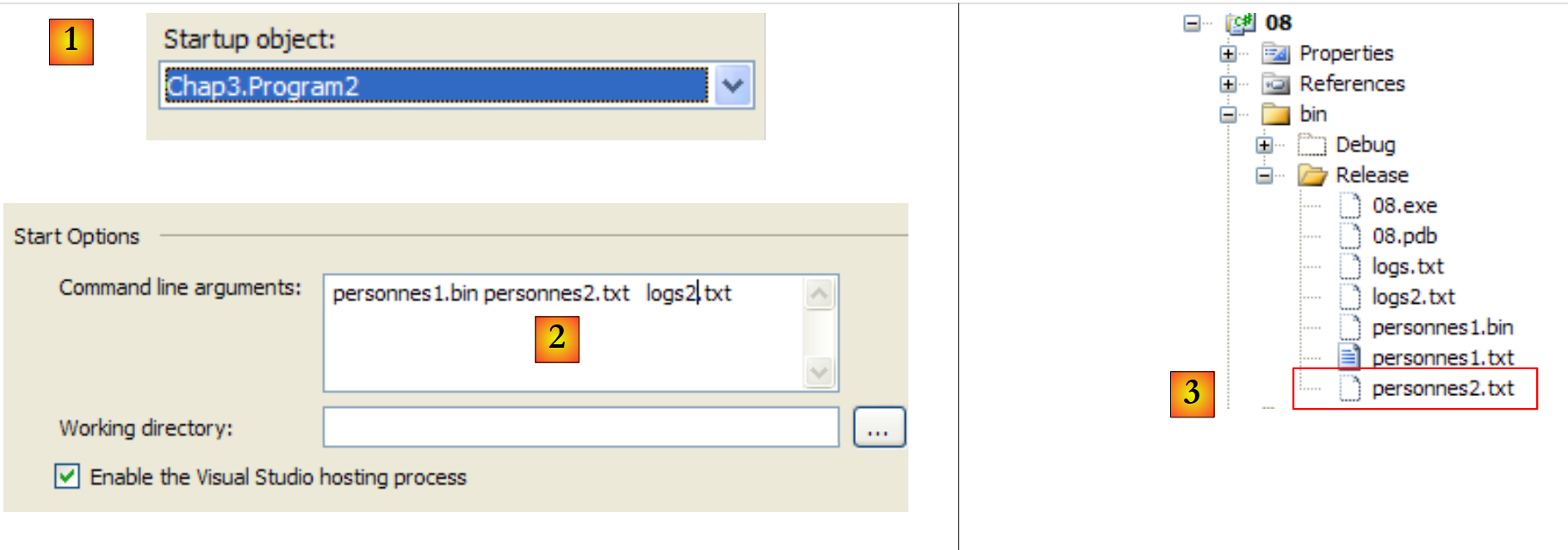 |
- 在 [1] 中,该项目配置为运行第二个应用程序
- 在 [2] 中,传递给 Main 的参数
- 在 [3] 中,是应用程序运行生成的文件。
[personnes2.txt] 的内容如下:
5.7. 正则表达式
类 System.Text.RegularExpressions.Regex 支持使用正则表达式。这些表达式可用于验证字符串的格式。因此,我们可以验证表示日期的字符串是否确实采用 dd/mm/yy 格式。为此,我们使用一个模式并将字符串与该模式进行比较。因此,在此示例中,j、m 和 a 必须是数字。 因此,有效的日期格式模式为“\d\d/\d\d/\d\d”,其中符号 \d 表示数字。模式中可使用的符号如下:
描述 | |
将下一个字符标记为特殊字符或字面字符。例如,"n" 表示字符 "n"。"\n" 表示换行符。字符序列 "\\" 表示 "\",而 "\(" 表示 "("。 | |
表示输入的开头。 | |
表示输入结束。 | |
表示前一个字符零次或多次出现。因此,“zo*”表示“z”或“zoo”。 | |
匹配前一个字符一次或多次。因此,“zo+”匹配“zoo”,但不匹配“z”。 | |
匹配前一个字符零次或一次。例如,“a?ve?”匹配“lever”中的“ve”。 | |
匹配除换行符以外的任何单个字符。 | |
搜索 modèle 并记录匹配结果。 可以通过 Item [0]...[n] 从获得的 Matches 集合中提取匹配的子字符串。要查找包含括号 ( ) 内的字符的匹配项,请使用 "\(" 或 "\)"。 | |
匹配 x 或 y。例如,“z|foot”匹配“z”或“foot”。“(z|f)oo”匹配“zoo”或“foo”。 | |
n 是一个非负整数。精确匹配 n 倍的该字符。例如,“o{2}”不匹配“Bob”中的“o”,而是匹配“fooooot”中的前两个“o”。 | |
n 是一个非负整数。匹配该字符至少 n 次。 例如,“o{2,}”不匹配“Bob”中的“o”,而是匹配“fooooot”中的所有“o”。“o{1,}”等同于“o+”,而“o{0,}”等同于“o*”。 | |
m 和 n 是非负整数。 表示该字符出现次数不少于 n 次,且不超过 m 次。例如,“o{1,3}”匹配“foooooot”中的前三个“o”,而“o{0,1}”等同于“o?”。 | |
字符集。匹配所列出的任意一个字符。例如,“[abc]”匹配“plat”中的“a”。 | |
否定字符集。匹配所有未列出的字符。例如,“[^abc]”匹配“plat”中的“p”。 | |
字符范围。匹配指定字符序列中的任何字符。例如,“[a-z]”匹配“a”到“z”之间的所有小写字母。 | |
负字符集。匹配指定字符集中的所有非字符。例如,“[^m-z]”匹配“m”和“z”之间的所有非字符。 | |
匹配表示单词的边界,即单词与空格之间的位置。例如,“er\b”匹配“lever”中的“er”,但不匹配“verbe”中的“er”。 | |
对应不代表单词的边界。“en*t\B”对应“bien entendu”中的“ent”。 | |
匹配代表数字的字符。等同于 [0-9]。 | |
对应于不代表数字的字符。等同于 [^0-9]。 | |
对应于换行符。 | |
对应换行符。 | |
对应回车符。 | |
对应所有空白字符,包括空格、制表符、换行符等。等同于“[ \f\n\r\t\v]”。 | |
匹配所有非空白字符。等同于“[^ \f\n\r\t\v]”。 | |
对应一个制表符。 | |
对应垂直制表符。 | |
对应于任何代表单词且包含下划线的字符。等同于“[A-Za-z0-9_]”。 | |
对应于任何不代表单词的字符。等同于“[^A-Za-z0-9_]”。 | |
对应于 num,其中 num 是一个正整数。指代存储的映射关系。例如,"(.)\1" 对应于两个连续的相同字符。 | |
对应于 n,其中 n 是一个八进制转义值。八进制转义值必须包含 1、2 或 3 个数字。例如,"\11" 和 "\011" 都表示一个制表符。 "\0011" 等同于 "\001" & "1"。八进制转义值不得超过 256。如果超过,则表达式中仅考虑前两位数字。允许在正则表达式中使用 ASCII 代码。 | |
对应于 n,其中 n 是一个十六进制转义值。 十六进制转义值必须包含两个数字。例如,“\x41”对应“A”。“\x041”等同于“\x04”和“1”。允许在正则表达式中使用代码 ASCII。 |
模板中的一个元素可以出现一次或多次。下面通过几个关于 \d 符号的示例来说明,该符号代表 1 个数字:
模板 | 含义 |
\d | 一个数字 |
\d? | 0 或 1 个数字 |
\d* | 0 个或更多数字 |
\d+ | 1 个或多个数字 |
\d{2} | 2个数字 |
\d{3,} | 至少 3 个数字 |
\d{5,7} | 5 到 7 位数字 |
现在设想一个能够描述字符串预期格式的模式:
要查找的字符串 | 模式 |
日期格式为 dd/mm/yy | \d{2}/\d{2}/\d{2} |
时长格式为 hh:mm:ss | \d{2}:\d{2}:\d{2} |
一个无符号整数 | \d+ |
一个可能为空的空格序列 | \s* |
一个无符号整数,其前后可能有空格 | \s*\d+\s* |
一个可能带符号的整数,其前后可能有空格 | \s*[+|-]?\s*\d+\s* |
一个无符号实数,其前后可能有空格 | \s*\d+(.\d*)?\s* |
一个可能带符号且前后带有空格的实数 | \s*[+|]?\s*\d+(.\d*)?\s* |
包含字符串 juste 的字符串 | \bjuste\b |
可以指定在字符串中搜索模式的位置:
模式 | 含义 |
^模式 | 模式位于字符串开头 |
模式$ | 模式结束字符串 |
^模式$ | 模式开头和结尾 |
模式 | 从字符串开头开始,在整个字符串中搜索该模式。 |
要搜索的字符串 | 模式 |
以感叹号结尾的字符串 | !$ |
以句点结尾的字符串 | \.$ |
以 // 序列开头的字符串 | ^// |
仅包含一个单词(前后可能有空格)的字符串 | ^\s*\w+\s*$ |
一个字符串,包含两个单词,前后可能有空格 | ^\s*\w+\s*\w+\s*$ |
包含单词 secret 的字符串 | \bsecret\b |
模式的子集可以被“提取”。因此,我们不仅可以验证一个字符串是否符合特定模式,还可以从该字符串中提取那些用圆括号括起的、与模式子集对应的元素。 因此,如果要分析包含日期格式 dd/mm/yy 的字符串,并希望从中提取日期中的 dd、mm、yy 这三个元素,则应使用正则表达式 (\d\d)/(\d\d)/(\d\d)。
5.7.1. 验证字符串是否符合给定模式
Regex 类型的对象构建方式如下:
构建好正则表达式模板后,可以使用 IsMatch 方法将其与字符串进行比较:
以下是一个示例:
using System;
using System.Text.RegularExpressions;

namespace Chap3 {
    class Program {
        static void Main(string[] args) {
            // 正则表达式模式
            string modèle1 = @"^\s*\d+\s*$";
            Regex regex1 = new Regex(modèle1);
            // 将实例与模式进行比较
            string exemplaire1 = "  123  ";
            if (regex1.IsMatch(exemplaire1)) {
                Console.WriteLine("[{0}] correspond au modèle [{1}]", exemplaire1, modèle1);
            } else {
                Console.WriteLine("[{0}] ne correspond pas au modèle [{1}]", exemplaire1, modèle1);
            }//if
            string exemplaire2 = "  123a  ";
            if (regex1.IsMatch(exemplaire2)) {
                Console.WriteLine("[{0}] correspond au modèle [{1}]", exemplaire2, modèle1);
            } else {
                Console.WriteLine("[{0}] ne correspond pas au modèle [{1}]", exemplaire2, modèle1);
            }//if
        }

    }
}
以及执行结果:
5.7.2. 在字符串中查找某模式的所有出现位置
Matches 方法可用于检索字符串中与模式匹配的元素:
类 MatchCollection 具有一个 Count 属性,该属性表示集合中的元素数量。 如果 résultats 是一个 MatchCollection 对象,则 results[i] 是该集合中的第 i 个元素,且类型为 Match。Match 类具有多种属性,包括以下内容:
- Value:对象 Match, 的值,即与该模型匹配的元素
- Index:该元素在遍历的字符串中被找到的位置
让我们来看以下示例:
using System;
using System.Text.RegularExpressions;

namespace Chap3 {
    class Program2 {
        static void Main(string[] args) {
            // 正文中包含多个模式匹配项
            string modèle2 = @"\d+";
            Regex regex2 = new Regex(modèle2);
            string exemplaire3 = "  123  456  789 ";
            MatchCollection résultats = regex2.Matches(exemplaire3);
            Console.WriteLine("Modèle=[{0}],exemplaire=[{1}]", modèle2, exemplaire3);
            Console.WriteLine("Il y a {0} occurrences du modèle dans l'exemplaire ", résultats.Count);
            for (int i = 0; i < résultats.Count; i++) {
                Console.WriteLine("[{0}] trouvé en position {1}", résultats[i].Value, résultats[i].Index);
            }//for
        }
    }
}
- 第 8 行:要查找的模式是一串数字
- 第 10 行:包含该模式的字符串
- 第 11 行:提取 exemplaire3 中所有符合模式 modèle2 的元素
- 第14-16行:显示这些元素
程序执行结果如下:
5.7.3. 提取模板的子集
可以“提取”模式的子集。因此,我们不仅可以验证字符串是否符合特定模式,还可以从该字符串中提取模式中用圆括号括起的子集对应的元素。 例如,若要分析包含日期格式 jj/mm/aa 的字符串,并提取其中的 jj、mm、aa 元素,可使用模式 (\d\d)/(\d\d)/(\d\d)。
让我们来看以下示例:
using System;
using System.Text.RegularExpressions;

namespace Chap3 {
    class Program3 {
        static void Main(string[] args) {
            // 从模板中提取元素
            string modèle3 = @"(\d\d):(\d\d):(\d\d)";
            Regex regex3 = new Regex(modèle3);
            string exemplaire4 = "Il est 18:05:49";
            // 模板验证
            Match résultat = regex3.Match(exemplaire4);
            if (résultat.Success) {
                // 实例与模板匹配
                Console.WriteLine("L'exemplaire [{0}] correspond au modèle [{1}]",exemplaire4,modèle3);
                // 显示括号组
                for (int i = 0; i < résultat.Groups.Count; i++) {
                    Console.WriteLine("groupes[{0}]=[{1}] trouvé en position {2}",i, résultat.Groups[i].Value,résultat.Groups[i].Index);
                }//for
            } else {
                // 实例与模板不匹配
                Console.WriteLine("L'exemplaire[{0}] ne correspond pas au modèle [{1}]", exemplaire4, modèle3);
            }
        }
    }
}
执行该程序将产生以下结果:
新内容位于第 12-19 行:
- 第 12 行:字符串 exemplaire4 通过方法 Match 与模板 regex3 进行比较。该方法返回了一个此前已介绍过的 Match 对象。 此处我们使用了该类的两个新属性:
- Success(第13行):指示是否匹配成功
- Groups(第 17、18 行):集合,其中
- Groups[0] 对应于字符串中与模板
- Groups[i](i>=1)对应第 i 号括号组
如果 résultat 的类型为 Match, 则 résultats.Groups 的类型为 GroupCollection,而 résultats.Groups[i] 的类型为 Group。 Group 类有两个属性,我们在此使用的是:
- Value(第 18 行):对象 Group 的值,该对象是括号内容对应的元素
- Index(第18行):该元素在遍历字符串中被找到的位置
5.7.4. 一个练习程序
寻找能够验证字符串是否符合特定模式的正则表达式,有时是一项真正的挑战。以下程序可用于练习。它需要一个模式和一个字符串,并指出该字符串是否符合该模式。
using System;
using System.Text.RegularExpressions;

namespace Chap3 {
    class Program4 {
        static void Main(string[] args) {
            // 数据
            string modèle, chaine;
            Regex regex = null;
            MatchCollection résultats;
            // 系统要求用户指定与该实例进行比较的模板和实例
            while (true) {
                // 要求提供模板
                Console.Write("Tapez le modèle à tester ou rien pour arrêter :");
                modèle = Console.In.ReadLine();
                // 完成了吗?
                if (modèle.Trim() == "")
                    break;
                // 创建正则表达式
                try {
                    regex = new Regex(modèle);
                } catch (Exception ex) {
                    Console.WriteLine("Erreur : " + ex.Message);
                    continue;
                }
                // 询问用户需要与模板进行比对的副本
                while (true) {
                    Console.Write("Tapez la chaîne à comparer au modèle [{0}] ou rien pour arrêter :", modèle);
                    chaine = Console.ReadLine();
                    // 完成?
                    if (chaine.Trim() == "")
                        break;
                    // 进行比较
                    résultats = regex.Matches(chaine);
                    // 成功了吗?
                    if (résultats.Count == 0) {
                        Console.WriteLine("Je n'ai pas trouvé de correspondances");
                        continue;
                    }//if
                    // 显示与模板匹配的元素
                    for (int i = 0; i < résultats.Count; i++) {
                        Console.WriteLine("J'ai trouvé la correspondance [{0}] en position [{1}]", résultats[i].Value, résultats[i].Index);
                        // 子元素
                        if (résultats[i].Groups.Count != 1) {
                            for (int j = 1; j < résultats[i].Groups.Count; j++) {
                                Console.WriteLine("\tsous-élément [{0}] en position [{1}]", résultats[i].Groups[j].Value, résultats[i].Groups[j].Index);
                            }
                        }
                    }
                }
            }
        }
    }
}
以下是一个运行示例:
5.7.5. Split方法
我们在课程 String 中已经接触过这种方法:
|
Regex 类中的 Split 方法允许我们根据模板来指定分隔符:
|
例如,假设某个文本文件中包含形式为字段1、字段2、……、字段n的行。字段之间用逗号分隔,但逗号前后可能有空格。 此时,类 string 中的方法 Split 并不适用。方法 RegEx 则提供了解决方案。如果 ligne 是读取的行,则可通过以下方式获取字段:
获取字段,如下例所示:
using System;
using System.Text.RegularExpressions;

namespace Chap3 {
    class Program5 {
        static void Main(string[] args) {
            // 一行
            string ligne = "abc  , def  , ghi";
            // 一个模板
            Regex modèle = new Regex(@"\s*,\s*");
            // 将行拆分为字段
            string[] champs = modèle.Split(ligne);
            // 显示
            for (int i = 0; i < champs.Length; i++) {
                Console.WriteLine("champs[{0}]=[{1}]", i, champs[i]);
            }
        }
    }
}
执行结果:
5.8. 示例应用程序 - V3
我们继续探讨第 3.6 节(版本 1)和第 4.10 节(版本 2)中分析过的应用程序。
在研究的最新版本中,税额计算是在抽象类 AbstractImpot 中进行的:
namespace Chap2 {
    abstract class AbstractImpot : IImpot {

        // 计算税款所需的税率区间
        // 来自外部来源

        protected TrancheImpot[] tranchesImpot;

        // 税额计算
        public int calculer(bool marié, int nbEnfants, int salaire) {
            // 份额数量计算
            decimal nbParts;
            if (marié) nbParts = (decimal)nbEnfants / 2 + 2;
            else nbParts = (decimal)nbEnfants / 2 + 1;
            if (nbEnfants >= 3) nbParts += 0.5M;
            // 应税收入及家庭系数计算
            decimal revenu = 0.72M * salaire;
            decimal QF = revenu / nbParts;
            // 税额计算
            tranchesImpot[tranchesImpot.Length - 1].Limite = QF + 1;
            int i = 0;
            while (QF > tranchesImpot[i].Limite) i++;
            // 返回结果
            return (int)(revenu * tranchesImpot[i].CoeffR - nbParts * tranchesImpot[i].CoeffN);
        }//计算
    }//分类

}
第 38 行中的方法 calculer 使用了第 35 行中的数组 tranchesImpot,而该数组并未由类 AbstractImpot 进行初始化。 因此该方法为抽象方法,必须通过派生类实现才能生效。该初始化操作由派生类 HardwiredImpot 完成:
using System;

namespace Chap2 {
    class HardwiredImpot : AbstractImpot {

        // 计算税额所需的数据表
        decimal[] limites = { 4962M, 8382M, 14753M, 23888M, 38868M, 47932M, 0M };
        decimal[] coeffR = { 0M, 0.068M, 0.191M, 0.283M, 0.374M, 0.426M, 0.481M };
        decimal[] coeffN = { 0M, 291.09M, 1322.92M, 2668.39M, 4846.98M, 6883.66M, 9505.54M };

        public HardwiredImpot() {
                // 创建税率表
            tranchesImpot = new TrancheImpot[limites.Length];
                // 填充
            for (int i = 0; i < tranchesImpot.Length; i++) {
                tranchesImpot[i] = new TrancheImpot { Limite = limites[i], CoeffR = coeffR[i], CoeffN = coeffN[i] };
                }
        }
    }// 类
}// 命名空间
在上文中,计算税款所需的数据被“硬编码”在类代码中。示例的新版本将其放置在文本文件中:
4962:0:0
8382:0,068:291,09
14753:0,191:1322,92
23888:0,283:2668,39
38868:0,374:4846,98
47932:0,426:6883,66
0:0,481:9505,54
由于处理此文件可能会引发异常,因此我们创建了一个专门的类来处理这些异常:
using System;

namespace Chap3 {
    class FileImpotException : Exception {
        // 错误代码
        [Flags]
        public enum CodeErreurs { Acces = 1, Ligne = 2, Champ1 = 4, Champ2 = 8, Champ3 = 16 };

        // 错误代码
        public CodeErreurs Code { get; set; }

        // 构造函数
        public FileImpotException() {
        }
        public FileImpotException(string message)
            : base(message) {
        }
        public FileImpotException(string message, Exception e)
            : base(message,e) {
        }
    }
}
- 第 4 行:类 FileImpotException 继承自类 Exception。它将用于记录在处理数据文本文件时发生的任何错误。
- 第 7 行:一个表示错误代码的枚举:
- Acces:访问数据文本文件时发生错误
- Ligne:行中缺少预期的三个字段
- Champ1:第 1 字段有误
- Champ2:第 2 个字段有误
- Champ3:字段 3 错误
其中某些错误可能同时出现(Champ1、Champ2、Champ3)。 因此,枚举 CodeErreurs 被标注了属性 [Flags],这意味着该枚举的各个值必须是 2 的幂。 因此,第 1 和第 2 字段的错误将导致错误代码 Champ1 | Champ2。
- 第 10 行:自动属性 Code 将存储错误代码。
- 第15行:一个构造函数,用于通过传递错误消息作为参数来创建 FileImpotException 对象。
- 第18行:一个构造函数,用于通过传入错误消息和引发该错误的异常作为参数来创建一个FileImpotException对象。
初始化类 AbstractImpot 中数组 tranchesImpot 的类现为:
using System;
using System.Collections.Generic;
using System.IO;
using System.Text.RegularExpressions;

namespace Chap3 {
    class FileImpot : AbstractImpot {

        public FileImpot(string fileName) {
            // 数据
            List<TrancheImpot> listTranchesImpot = new List<TrancheImpot>();
            int numLigne = 1;
            // 异常
            FileImpotException fe = null;
            // 逐行读取文件 fileName 的内容
            Regex pattern = new Regex(@"s*:\s*");
            // 起初没有错误
            FileImpotException.CodeErreurs code = 0;
            try {
                using (StreamReader input = new StreamReader(fileName)) {
                    while (!input.EndOfStream && code == 0) {
                        // 当前行
                        string ligne = input.ReadLine().Trim();
                        // 忽略空行
                        if (ligne == "") continue;
                        // 行被拆分为三个字段,由以下符号分隔:
                        string[] champsLigne = pattern.Split(ligne);
                        // 是否有 3 个字段?
                        if (champsLigne.Length != 3) {
                            code = FileImpotException.CodeErreurs.Ligne;
                        }
                        // 3个字段的转换
                        decimal limite = 0, coeffR = 0, coeffN = 0;
                        if (code == 0) {
                            if (!Decimal.TryParse(champsLigne[0], out limite)) code = FileImpotException.CodeErreurs.Champ1;
                            if (!Decimal.TryParse(champsLigne[1], out coeffR)) code |= FileImpotException.CodeErreurs.Champ2;
                            if (!Decimal.TryParse(champsLigne[2], out coeffN)) code |= FileImpotException.CodeErreurs.Champ3; ;
                        }
                        // 错误?
                        if (code != 0) {
                            // 记录错误
                            fe = new FileImpotException(String.Format("Ligne n° {0} incorrecte", numLigne)) { Code = code };
                        } else {
                            // 记录新的税率区间
                            listTranchesImpot.Add(new TrancheImpot() { Limite = limite, CoeffR = coeffR, CoeffN = coeffN });
                            // 下一行
                            numLigne++;
                        }
                    }
                }
                // 将列表 listImpot 传输到数组 tranchesImpot
                if (code == 0) {
                    // 将列表 listImpot 转移到数组 tranchesImpot
                    tranchesImpot = listTranchesImpot.ToArray();
                }
            } catch (Exception e) {
                // 记录错误
                fe= new FileImpotException(String.Format("Erreur lors de la lecture du fichier {0}", fileName), e) { Code = FileImpotException.CodeErreurs.Acces };
            }
            // 需要报告错误吗?
            if (fe != null) throw fe;
        }
    }
}
- 第 7 行:类 FileImpot 继承自类 AbstractImpot,这与版本 2 中类 HardwiredImpot 的继承关系相同。
- 第 9 行:类 FileImpot 的构造函数用于初始化其基类 AbstractImpot 的字段 trancheImpot。该构造函数接受一个参数,即包含数据的文本文件名。
- 第11行:基类AbstractImpot的字段tranchesImpot是一个数组,需使用作为参数传递的文件filename中的数据进行填充。文本文件的读取是顺序进行的。 只有在读取完整个文件后,才能知道行数。因此无法预先确定数组 tranchesImpot 的大小。我们将暂时将数据存储在通用列表 listTranchesImpot 中。
需要提醒的是,类型 TrancheImpot 是一个结构体:
namespace Chap3 {
    // 一个税级
    struct TrancheImpot {
        public decimal Limite { get; set; }
        public decimal CoeffR { get; set; }
        public decimal CoeffN { get; set; }
    }
}
- 第 14 行:类型为 FileImpotException 的 fe 用于封装文本文件处理过程中可能出现的错误。
- 第16行:文本文件中champ1:champ2:champ3行中字段分隔符的正则表达式。字段由字符:分隔,该字符前后可跟随任意数量的空格。
- 第 18 行:发生错误时的错误代码
- 第 20 行:使用 StreamReader 处理文本文件
- 第 21 行:只要还有待读取的行且未发生错误,就循环处理
- 第 27 行:利用第 16 行的正则表达式将读取的行拆分为字段
- 第29-31行:验证该行是否确实包含三个字段——记录可能出现的错误
- 第33-38行:将三个字符串转换为三个十进制数——记录可能出现的错误
- 第40-43行:若出现错误,则抛出类型为FileImpotException的异常。
- 第44-47行:若无错误,在保存当前行数据后,继续读取文本文件的下一行。
- 第 52-55 行: 当 while 输出时,通用列表 listTranchesImpot 中的数据会被复制到基类 AbstractImpot 的数组 tranchesImpot 中。 需要指出的是,这正是构造函数的设计目的。
- 第 56-59 行:处理可能发生的异常。该异常被封装在一个类型为 FileImpotException 的对象中。
- 第 61 行:如果第 18 行中的 fe 异常已被初始化,则触发该异常。
整个 C# 项目如下:
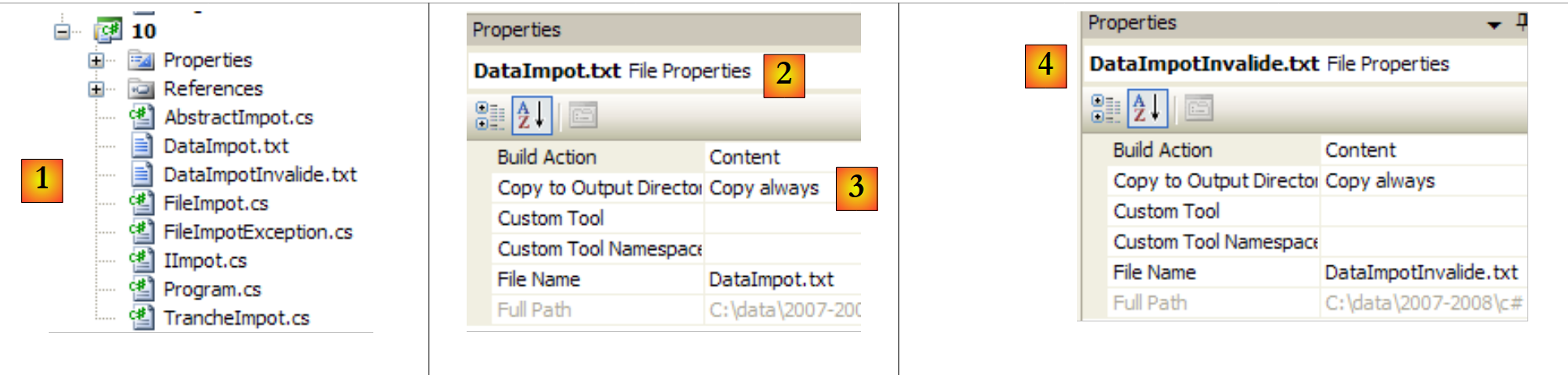 |
- 在 [1] 中:整个项目
- 在 [2,3] 中:[DataImpot.txt] 和 [2] 文件的属性。[Copy to Output Directory] 和 [3] 的属性被设置为 always。 这意味着每次运行时,文件 [DataImpot.txt] 都会被复制到文件夹 bin/Release(Release 模式)或 bin/Debug(Debug 模式)中。可执行文件会在此处查找该文件。
- 在 [4] 中:对文件 [DataImpotInvalide.txt] 也进行同样的操作。
[DataImpot.txt] 的内容如下:
4962:0:0
8382:0,068:291,09
14753:0,191:1322,92
23888:0,283:2668,39
38868:0,374:4846,98
47932:0,426:6883,66
0:0,481:9505,54
[DataImpotInvalide.txt] 的内容如下:
测试程序 [Program.cs] 未作更改:其内容与第 2 版第 4.10 节中的内容一致,仅有一处差异:
using System;

namespace Chap3 {
    class Program {
        static void Main() {
...
             // 创建对象 IImpot
            IImpot impot = null;
            try {
                // 创建对象 IImpot
                impot = new FileImpot("DataImpot.txt");
            } catch (FileImpotException e) {
                // 显示错误
                string msg = e.InnerException == null ? null : String.Format(", Exception d'origine : {0}", e.InnerException.Message);
                Console.WriteLine("L'erreur suivante s'est produite : [Code={0},Message={1}{2}]", e.Code, e.Message, msg == null ? "" : msg);
                // 程序停止
                Environment.Exit(1);
            }

            // 无限循环
            while (true) {
...
            }//while
        }
    }
}
- 第 8 行:类型为 IImpot 接口的 impot 对象
- 第 11 行:使用类型为 FileImpot 的对象实例化 impot 对象。此操作可能会引发异常,该异常由第 9、12 和 18 行的 try/catch 语句进行处理。
以下是执行示例:
使用文件 [DataImpot.txt]
使用不存在的文件 [xx]
使用文件 [DataImpotInvalide.txt]