7. 请求的生命周期
从请求到达到操作执行之间,[ASP.NET Core] 会涉及几种类型的对象,各自承担特定的角色。我们已经遇到过其中一些:中间件([UseStaticFiles]、[UseRequestLocalization]、示例 23 中的中间件),以及模型绑定([IModelBinder],示例 12)。MVC 组件增加了在操作前后运行的过滤器 。案例研究用到了其中的每一种:
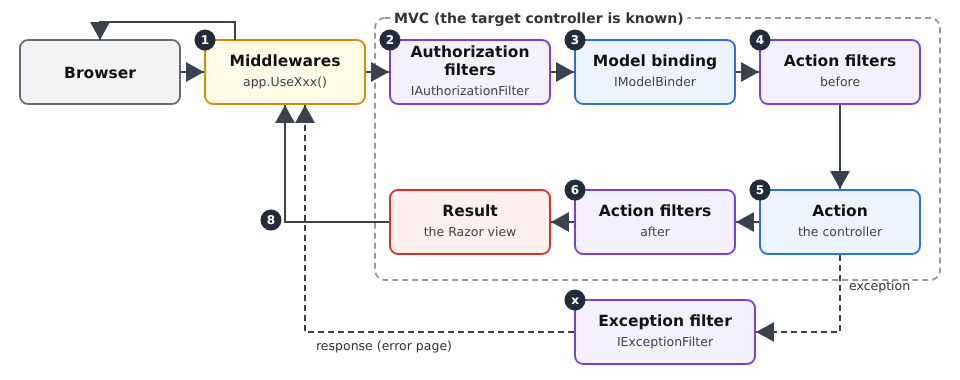
对象 | 角色 | 在案例研究中 |
中间件 | 准备请求;尚不知道操作是什么 | 静态文件、语言、身份验证(读取令牌)、错误页面 |
授权过滤器 | 允许或拒绝访问操作 | [[Authorize]]、[[Authorize(Roles = ...)]] |
模型绑定 | 转换并验证参数 | 表单、[ModelState] |
操作过滤器 | 在操作之前和之后运行的代码 | (未使用:服务和视图父类已经足够) |
异常过滤器 | 将异常转换为响应 | 会话过期:重定向到 /login |
7.1. 示例 24:处理请求的各个步骤
示例 24 包含一个计算数字平方的操作,以及每种类型的一个对象。每个对象都向控制台写一行输出,因此我们可以看到它们的执行顺序。
| 24-lifecycle/
├── Controllers/
│ ├── CalcController.cs
│ └── ErrorController.cs
├── Filters/
│ ├── BlockAttribute.cs
│ ├── ErrorPageFilter.cs
│ ├── IntegerBinder.cs
│ ├── LoggerMiddleware.cs
│ └── TimingAttribute.cs
├── Views/
│ ├── Calc/
│ │ └── Result.cshtml
│ ├── Shared/
│ │ ├── _Layout.cshtml
│ │ └── Error.cshtml
│ └── _ViewStart.cshtml
├── appsettings.json
├── Example24.csproj
└── Program.cs
|
文件 [Filters/LoggerMiddleware.cs]:
| namespace Example24.Filters;
// 以类形式编写的中间件:它在构造函数中接收管道的其余部分
// (next),并在 InvokeAsync 中处理每个请求
public class LoggerMiddleware(RequestDelegate next)
{
public async Task InvokeAsync(HttpContext context)
{
Console.WriteLine();
Console.WriteLine($"--- {context.Request.Method} {context.Request.Path}{context.Request.QueryString}");
Console.WriteLine("1. middleware (before)");
await next(context); // 其余的一切:路由、过滤器、操作、视图
Console.WriteLine($"8. middleware (after: code {context.Response.StatusCode})");
}
}
|
- 第 5 行:中间件可以是一个类。它的构造函数接收一个 [RequestDelegate]:即管道的其余部分(后续的中间件,然后是 MVC);
- 第 7 行:每个请求都会调用 [InvokeAsync] 方法;
- 第 12 行:中间件调用管道的其余部分并等待其完成。如果它不调用,请求就会在此终止(那样它就必须自己生成响应)。放在该调用之前的代码在请求向外传递时执行,放在其后的代码在返回时执行:中间件“包裹”着其他所有部分,并能看到响应最终的状态码。
文件 [Filters/BlockAttribute.cs]:
| using Microsoft.AspNetCore.Mvc;
using Microsoft.AspNetCore.Mvc.Controllers;
using Microsoft.AspNetCore.Mvc.Filters;
namespace Example24.Filters;
// 授权过滤器:决定操作是否可以执行。
// 它同时也是一个特性:可设置在控制器或操作上。
public class BlockAttribute : Attribute, IAuthorizationFilter
{
public void OnAuthorization(AuthorizationFilterContext context)
{
// 与中间件不同,过滤器知道目标操作
var action = (ControllerActionDescriptor)context.ActionDescriptor;
Console.WriteLine($"2. authorization filter (targeted action: {action.ActionName})");
if (context.HttpContext.Request.Query.ContainsKey("block"))
{
// 设置 Result 会使其余部分短路:不进行绑定,不执行操作
context.Result = new StatusCodeResult(StatusCodes.Status403Forbidden);
}
}
}
|
- 第 9 行:授权过滤器实现 [IAuthorizationFilter]。该类还派生自 [Attribute]:因此可以用方括号将它应用于控制器或操作;
- 第 14–15 行:与中间件不同,过滤器知道目标操作([ActionDescriptor])。这使得 [[Authorize(Roles = "ADMIN")]] 特性(见下一章)能够只保护某些操作;
- 第 16–19 行:过滤器通过设置 [context.Result] 来拒绝请求:后续序列(绑定、操作)不会执行,而这个结果成为响应。这里是一个没有内容的 403 响应(拒绝访问)。
文件 [Filters/IntegerBinder.cs]:
| using Microsoft.AspNetCore.Mvc.ModelBinding;
namespace Example24.Filters;
// 整数参数的模型绑定(见示例 12)
public class IntegerBinder : IModelBinder
{
public Task BindModelAsync(ModelBindingContext context)
{
var value = context.ValueProvider.GetValue(context.ModelName).FirstValue;
Console.WriteLine($"3. model binding (received value: \"{value}\")");
if (int.TryParse(value, out var integer))
{
context.Result = ModelBindingResult.Success(integer);
}
else
{
context.ModelState.AddModelError(context.ModelName, $"\"{value}\" is not an integer.");
}
return Task.CompletedTask;
}
}
|
一个自定义模型绑定,与示例 12 中的类似。无效值不会中止任何流程:错误被记录在 [ModelState] 中,由操作决定结果(第 18 行)。
文件 [Filters/TimingAttribute.cs]:
| using System.Diagnostics;
using Microsoft.AspNetCore.Mvc.Filters;
namespace Example24.Filters;
// 操作过滤器:在操作之前和之后执行的代码。
// ActionFilterAttribute:框架类,我们重写其有用的方法
public class TimingAttribute : ActionFilterAttribute
{
private const string Key = "timing";
public override void OnActionExecuting(ActionExecutingContext context)
{
// 操作参数已经绑定:过滤器可以读取它们
Console.WriteLine($"4. action filter (before; parameters: {string.Join(", ", context.ActionArguments.Values)})");
context.HttpContext.Items[Key] = Stopwatch.StartNew();
}
public override void OnActionExecuted(ActionExecutedContext context)
{
var timer = (Stopwatch)context.HttpContext.Items[Key]!;
// context.Exception:操作可能抛出的异常
var outcome = context.Exception is null ? "" : $", exception {context.Exception.GetType().Name}";
Console.WriteLine($"6. action filter (after, {timer.ElapsedMilliseconds} ms{outcome})");
}
}
|
- 第 8 行:一个操作过滤器。[ActionFilterAttribute] 是框架中的一个类,已经实现了必要的接口:我们重写([override])相关的方法;
- 第 12–16 行:[OnActionExecuting] 在操作之前运行。模型绑定已经完成:操作参数可用([ActionArguments])。启动一个计时器([Stopwatch]),存储在 [HttpContext.Items] 中(请求作用域;见第 6 章);
- 第 19–24 行:[OnActionExecuted] 在操作之后运行。如果操作抛出了异常,可以在 [context.Exception] 中获得。操作过滤器还可以覆盖操作的结果([context.Result])。
文件 [Filters/ErrorPageFilter.cs]:
| using Microsoft.AspNetCore.Mvc;
using Microsoft.AspNetCore.Mvc.Filters;
using Microsoft.AspNetCore.Mvc.ModelBinding;
using Microsoft.AspNetCore.Mvc.ViewFeatures;
namespace Example24.Filters;
// 异常过滤器:将异常转换为响应
public class ErrorPageFilter(IModelMetadataProvider metadata) : IExceptionFilter
{
public void OnException(ExceptionContext context)
{
Console.WriteLine($"x. exception filter ({context.Exception.GetType().Name}: {context.Exception.Message})");
// 不使用默认错误页面,而是使用我们的 Error 视图,状态码为 500
context.Result = new ViewResult
{
ViewName = "Error",
StatusCode = StatusCodes.Status500InternalServerError,
ViewData = new ViewDataDictionary(metadata, context.ModelState) { Model = 500 },
};
context.ExceptionHandled = true; // 异常已被处理:不再向外传播
}
}
|
- 第 9 行:异常过滤器实现 [IExceptionFilter]。它接收模型绑定、操作过滤器和操作抛出的异常。它是一个服务:通过注入接收 [IModelMetadataProvider] 对象,构造视图的 [ViewData] 字典时需要它;
- 第 15–20 行:过滤器不使用默认的错误页面,而是生成一个 HTML 页面:[Error] 视图,状态码为 500。这正是控制器的 [View] 方法所做的事情,这里是手工编写的;
- 第 21 行:异常被标记为已处理;它不会继续向上传播。
文件 [Program.cs]:
| using System.Text.Encodings.Web;
using System.Text.Unicode;
using Example24.Filters;
using Microsoft.Extensions.FileProviders;
var builder = WebApplication.CreateBuilder(args);
builder.Services.AddControllersWithViews(options =>
{
// 全局过滤器:应用于应用程序的所有操作
options.Filters.Add<ErrorPageFilter>();
});
builder.Services.AddSingleton(HtmlEncoder.Create(UnicodeRanges.All));
var app = builder.Build();
// 中间件按添加的顺序运行
app.UseMiddleware<LoggerMiddleware>();
// 没有内容的错误响应(400、403、404……):请求会
// 以 /error/{code} 地址重新执行,由它构建一个页面
app.UseStatusCodePagesWithReExecute("/error/{0}");
app.UseStaticFiles(new StaticFileOptions
{
FileProvider = new PhysicalFileProvider(Path.GetFullPath(Path.Combine(builder.Environment.ContentRootPath, "..", "common", "bootstrap"))),
RequestPath = "/bootstrap",
});
app.MapControllers();
app.Run();
|
- 第 10 行:一个全局过滤器应用于应用程序中的所有操作。它被添加到 MVC 的选项中;
- 第 17 行:通过 [UseMiddleware] 添加基于类的中间件。中间件按添加的顺序执行:这个排在第一位,因此它处理所有请求;
- 第 20 行:一个框架中间件。当错误响应(状态码 400–599)没有内容时,它使用地址 [/error/{code}](其中 [{0}] 被替换为状态码)重新执行该请求,并在保留错误码的同时返回得到的页面。授权过滤器产生的 403 响应、操作产生的 400 响应以及路由产生的 404 响应,就是这样变成 HTML 页面的。
文件 [Controllers/CalcController.cs]:
| using Example24.Filters;
using Microsoft.AspNetCore.Mvc;
namespace Example24.Controllers;
// 设置在控制器上的两个过滤器:它们应用于其所有操作
[Block]
[Timing]
public class CalcController : Controller
{
[HttpGet("square/{n}")]
public IActionResult Square([ModelBinder(typeof(IntegerBinder))] int n)
{
Console.WriteLine($"5. action Square({n}); valid model: {ModelState.IsValid}");
if (!ModelState.IsValid)
{
return BadRequest(); // 没有内容的 400:见 UseStatusCodePagesWithReExecute
}
if (n == 13)
{
throw new InvalidOperationException("13 brings bad luck"); // 一个“预期外”的错误
}
return View("Result", n * n);
}
}
|
- 第 7–8 行:应用于控制器的两个过滤器;它们适用于该控制器的所有操作(也可以只应用于单个操作);
- 第 12 行:自定义参数绑定;
- 第 15–17 行:无效参数:没有内容的 400 响应;
- 第 19–21 行:一个“意外”错误,用于观察异常过滤器的运作。
文件 [Controllers/ErrorController.cs]:
| using Microsoft.AspNetCore.Mvc;
namespace Example24.Controllers;
public class ErrorController : Controller
{
// 不带 HTTP 方法的 [Route]:重新执行的请求保留其原始方法
[Route("error/{code:int}")]
public IActionResult Display(int code)
{
Console.WriteLine($"7. error page {code} (re-executed request)");
Response.StatusCode = code; // 页面保留错误状态码
return View("Error", code);
}
}
|
- 第 8 行:错误页面的操作。[[Route]]不带方法;HTTP 方法不限,接受所有方法:重新执行的 POST 请求仍然是 POST 请求;
- 第 12 行:该页面保留原始的错误码。
文件 [Views/Shared/Error.cshtml]:
| @* the error page; its model: the error code *@
@model int
@{
var message = Model switch
{
400 => "Bad request.",
403 => "Access denied.",
404 => "Page not found.",
_ => "Internal server error.",
};
}
<div class="alert alert-danger">
<h1 class="h4">Error @Model</h1>
<p class="mb-0">@message</p>
</div>
|
- 第 4–10 行:一个 switch 表达式 [C#]:它返回第一个其模式与模板匹配的分支的值。[_] 对应其他所有情况。该视图位于 [Views/Shared] 中:无论是哪个控制器都能找到它(异常过滤器对应 [CalcController],其他情况对应 [ErrorController])。
五个请求:一次正常的计算(http://localhost:5000/square/7)、一个无效参数([/square/abc])、一个被授权过滤器阻止的请求([/square/7?block=1])、一个意外错误([/square/13]),以及一个未知地址([/unknown])。服务器控制台:
| --- GET /square/7
1. middleware (before)
2. authorization filter (targeted action: Square)
3. model binding (received value: "7")
4. action filter (before; parameters: 7)
5. action Square(7); valid model: True
6. action filter (after, 0 ms)
8. middleware (after: code 200)
--- GET /square/abc
1. middleware (before)
2. authorization filter (targeted action: Square)
3. model binding (received value: "abc")
4. action filter (before; parameters: )
5. action Square(0); valid model: False
6. action filter (after, 0 ms)
7. error page 400 (re-executed request)
8. middleware (after: code 400)
--- GET /square/7?block=1
1. middleware (before)
2. authorization filter (targeted action: Square)
7. error page 403 (re-executed request)
8. middleware (after: code 403)
--- GET /square/13
1. middleware (before)
2. authorization filter (targeted action: Square)
3. model binding (received value: "13")
4. action filter (before; parameters: 13)
5. action Square(13); valid model: True
6. action filter (after, 0 ms, exception InvalidOperationException)
x. exception filter (InvalidOperationException: 13 brings bad luck)
8. middleware (after: code 500)
--- GET /unknown
1. middleware (before)
7. error page 404 (re-executed request)
8. middleware (after: code 404)
|
该日志显示:
- 各步骤的顺序:中间件、授权过滤器、模型绑定、操作过滤器(之前)、操作、操作过滤器(之后),然后又回到中间件,它看到的是最终的响应码;
- 拒绝请求的授权过滤器会绕过 MVC 的其余部分(没有绑定,没有操作);
- 无效参数并不会阻止操作执行:由操作本身根据 [ModelState] 来决定(见示例 09);
- 操作抛出的异常由异常过滤器处理,由它生成响应;
- 空的错误响应(400、403、404)通过重新执行请求被转换为页面(第 7 步)。对于未知地址,MVC 甚至根本不会介入:没有任何路由匹配。
生成的页面:

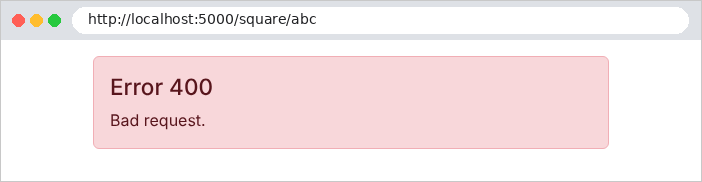
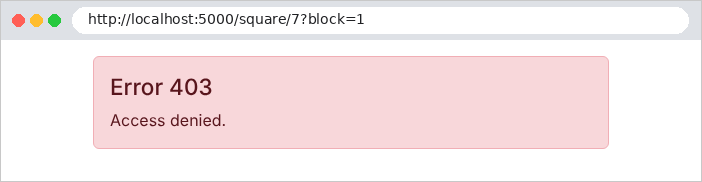
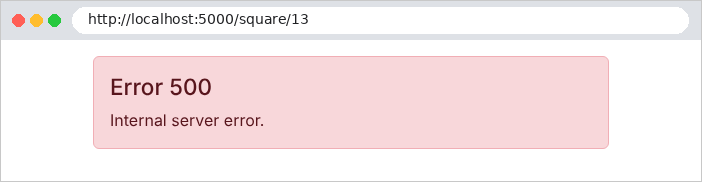
让我们检查错误码是否被保留:
| curl -i http://localhost:5000/square/7?block=1
|
| HTTP/1.1 403 Forbidden
Content-Type: text/html; charset=utf-8
<!doctype html>
<html lang="en">
<head>
<meta charset="utf-8">
<title>Lifecycle</title>
<link rel="stylesheet" href="/bootstrap/css/bootstrap.min.css">
</head>
<body>
<div class="container py-3">
<div class="alert alert-danger">
<h1 class="h4">Error 403</h1>
<p class="mb-0">Access denied.</p>
</div>
</div>
</body>
</html>
|
案例研究结合了这些机制:[UseStatusCodePagesWithReExecute("/error/{0}")] 和一个控制器([ErrorController]) 用于 400、403 和 404 页面;[UseExceptionHandler("/error/500")] 中间件,它同样会重新执行任何以未处理异常结束的请求;以及一个用于特定情形的异常过滤器([Web/HtmlExceptionFilter.cs]):会话过期时不显示错误页面,而是重定向到登录页面。