3. 操作模型
操作需要浏览器发送的信息:URL 中的参数([?name=martin&age=42])、表单字段和路由参数。原版课程将所有这些信息统称 为操作模型。本章展示 [ASP.NET Core] 如何把这些信息提供给操作、将其转换为正确的类型并加以验证。这个过程称为 模型绑定 ([model binding])。
3.1. 示例 07:URL 参数
文件 [Controllers/ParametersController.cs]:
| using Microsoft.AspNetCore.Mvc;
namespace Example07.Controllers;
[Route("parameters")]
public class ParametersController : Controller
{
// /parameters/action01?name=martin:URL 参数 [name] -> 操作参数 [name]
[HttpGet("action01")]
public string Action01(string? name)
{
return $"name = [{name}], of type {name?.GetType().Name ?? "null"}";
}
// /parameters/action02?age=42:值会被转换为参数的类型
[HttpGet("action02")]
public string Action02(int age)
{
return $"age = [{age}], of type {age.GetType().Name}, ModelState.IsValid = {ModelState.IsValid}";
}
// /parameters/action03?age=42:int? 可以区分缺失的参数(null)与零
[HttpGet("action03")]
public string Action03(int? age)
{
return $"age = [{age?.ToString() ?? "null"}], ModelState.IsValid = {ModelState.IsValid}";
}
// /parameters/action04?page=2:参数缺失时使用默认值
[HttpGet("action04")]
public string Action04(int page = 1)
{
return $"page = [{page}]";
}
// /parameters/action05?q=nest:名称不同时使用 [FromQuery(Name = ...)]
[HttpGet("action05")]
public string Action05([FromQuery(Name = "q")] string? search)
{
return $"search = [{search}]";
}
// /parameters/action06?name=martin&age=42:一次获取所有参数
[HttpGet("action06")]
public Dictionary<string, string> Action06()
{
return Request.Query.ToDictionary(p => p.Key, p => p.Value.ToString());
}
}
|
我们来逐段分析这段代码:
- 第 10–12 行:模型绑定 按名称 将操作的参数与请求数据关联起来:操作的参数 [name] 接收 URL 中参数 [name] 的值(即 [?] 之后的部分,称为查询字符串,即 [query string])。[string?] 类型表示该值可能缺失;缺失时它为 [null]。[name?.GetType().Name ?? "null"]:值的类型名,或者字符串 ["null"] (当该值为 [null] 时)(运算符 [??] 提供替代值);
- 第 17–19 行:参数声明为类型 [int]:模型绑定会 将 收到的字符串(["42"])转换为数字。如果转换失败([?age=abc]),操作仍会执行,使用该类型的默认值([int] 为 0),并且失败信息会记录在 [ModelState] 中;模型绑定的状态——[ModelState.IsValid]——随后变为 [false];
- 第 24–26 行:使用类型 [int?] (“可为 null”的整数)时,缺失的参数表示为 [null],而不是 0:这样就可以区分“没有年龄”和“年龄为 0”;
- 第 31–33 行:[C#] 的默认值取代缺失的参数;
- 第 38–40 行:特性 [[FromQuery(Name = "q")]] 指定 去哪里 查找值(在 URL 中)以及 使用什么名称:操作的 [search] 参数接收 URL 中的 [q] 参数;
- 第 45–47 行:[Request.Query] 提供对 URL 所有参数的访问,没有任何映射或转换。[ToDictionary] ([LINQ])据此创建一个字典,并序列化为 JSON。
结果:
| curl -i "http://localhost:5000/parameters/action01?name=martin"
|
| HTTP/1.1 200 OK
Content-Type: text/plain; charset=utf-8
name = [martin], of type String
|
| curl -i "http://localhost:5000/parameters/action01"
|
| HTTP/1.1 200 OK
Content-Type: text/plain; charset=utf-8
name = [], of type null
|
| curl -i "http://localhost:5000/parameters/action02?age=42"
|
| HTTP/1.1 200 OK
Content-Type: text/plain; charset=utf-8
age = [42], of type Int32, ModelState.IsValid = True
|
| curl -i "http://localhost:5000/parameters/action02?age=abc"
|
| HTTP/1.1 200 OK
Content-Type: text/plain; charset=utf-8
age = [0], of type Int32, ModelState.IsValid = False
|
| curl -i "http://localhost:5000/parameters/action02"
|
| HTTP/1.1 200 OK
Content-Type: text/plain; charset=utf-8
age = [0], of type Int32, ModelState.IsValid = True
|
| curl -i "http://localhost:5000/parameters/action03?age=42"
|
| HTTP/1.1 200 OK
Content-Type: text/plain; charset=utf-8
age = [42], ModelState.IsValid = True
|
| curl -i "http://localhost:5000/parameters/action03"
|
| HTTP/1.1 200 OK
Content-Type: text/plain; charset=utf-8
age = [null], ModelState.IsValid = True
|
| curl -i "http://localhost:5000/parameters/action03?age=abc"
|
| HTTP/1.1 200 OK
Content-Type: text/plain; charset=utf-8
age = [null], ModelState.IsValid = False
|
| curl -i "http://localhost:5000/parameters/action04"
|
| HTTP/1.1 200 OK
Content-Type: text/plain; charset=utf-8
page = [1]
|
| curl -i "http://localhost:5000/parameters/action04?page=2"
|
| HTTP/1.1 200 OK
Content-Type: text/plain; charset=utf-8
page = [2]
|
| curl -i "http://localhost:5000/parameters/action05?q=aspnet"
|
| HTTP/1.1 200 OK
Content-Type: text/plain; charset=utf-8
search = [aspnet]
|
| curl -i "http://localhost:5000/parameters/action06?name=martin&age=42"
|
| HTTP/1.1 200 OK
Content-Type: application/json; charset=utf-8
{"name":"martin","age":"42"}
|
当 URL 包含字符 [&] 时,必须给 URL 加上引号,因为该字符对控制台有特殊含义。请注意:
- 参数按名称绑定,不区分大小写([?NAME=martin] 同样有效);
- 它的值会被 转换 为声明的类型。这是与 [NestJS] 的一个重要区别:在那里,参数的类型只是一个声明([TypeScript]),在编译时就被移除了;
- 无法完成的转换不会引发错误:操作会以默认值执行,由操作自己负责检查 [ModelState.IsValid]。“可为 null”的类型([int?])可以避免把缺失或无效的值与 0 混淆。
带重音的字符和空格在 URL 中会被编码([%C3%A9] 表示 [é],等等):[ASP.NET Core] 会在绑定之前对它们解码。

3.2. 示例 08:由类描述的操作模型
当操作有多个参数时,可以用一个类来描述它们。类的每个属性都带有 验证特性 ,这些特性由标准命名空间 [System.ComponentModel.DataAnnotations] 提供。这相当于 [class-validator] 库中的装饰器,该库属于 [NestJS]。
[Models/PersonModel.cs] 文件:
| using System.ComponentModel.DataAnnotations;
namespace Example08.Models;
// 操作模型:每个属性都带有其约束的类
public class PersonModel
{
[Required(ErrorMessage = "the name is required")]
[StringLength(20, MinimumLength = 2, ErrorMessage = "the name must have 2 to 20 characters")]
public string? Name { get; set; }
[Required(ErrorMessage = "the age is required")]
[Range(0, 150, ErrorMessage = "the age must be between 0 and 150")]
public int? Age { get; set; }
[Required(ErrorMessage = "the title is required")]
[AllowedValues("Mr", "Mme", "Melle", ErrorMessage = "unknown title")]
public string? Title { get; set; }
// 可选:没有 [Required]
[EmailAddress(ErrorMessage = "invalid email address")]
public string? Email { get; set; }
}
|
我们来讲解这段代码:
- 第 1 行:验证特性所在的命名空间;
- 第 10 行:每个预期的参数都是一个公共 属性 ([{ get; set; }]:可读可写)。模型绑定会创建一个 [PersonModel] 对象,然后用同名参数填充每个属性;
- 第 8–9 行:姓名是必填的([[Required]]),长度必须在 2 到 20 个字符之间([[StringLength]])。每个特性都接受自定义错误消息([ErrorMessage])。这些属性被声明为“可为 null”([string?]、[int?]):请求中可以省略某个参数,而 [[Required]] 则强制要求提供它;
- 第 12–14 行:年龄被转换为整数,它是必填的,并且必须在 0 到 150 之间([[Range]]);
- 第 17 行:称谓必须属于某个值列表([[AllowedValues]],随 [.NET] 8 引入);
- 第 21 行:电子邮件地址是可选的(没有 [[Required]]);如果提供,则必须有效。
[Controllers/PersonsController.cs] 文件:
| using Example08.Models;
using Microsoft.AspNetCore.Mvc;
namespace Example08.Controllers;
// [ApiController]:模型无效的请求会被自动拒绝
// (400 错误),甚至在操作运行之前
[ApiController]
[Route("persons")]
public class PersonsController : Controller
{
// /persons/action01?name=martin&age=42&title=Mr
[HttpGet("action01")]
public object Action01([FromQuery] PersonModel person)
{
return new { person, ageType = person.Age?.GetType().Name };
}
}
|
- 第 6 行:[[ApiController]] 特性把该控制器定为一个 JSON 服务器 (一个 API)。它会改变若干行为,包括这一个:模型无效的请求会在操作执行之前被 自动以 400 错误拒绝。这相当于 [NestJS] 中全局的 [ValidationPipe];
- 第 14 行:操作接收一个 [PersonModel],由 URL 的参数填充。使用 [[ApiController]] 时,类类型的参数默认在请求 正文 (JSON 格式)中查找:[[FromQuery]] 指定应在 URL 中查找它;
- 第 16 行:操作返回收到的人员及其年龄的类型。
一个有效的请求,带有一个与任何属性都不对应的 [pirate] 参数:
| curl -i "http://localhost:5000/persons/action01?name=martin&age=42&title=Mr&pirate=1"
|
| HTTP/1.1 200 OK
Content-Type: application/json; charset=utf-8
{"person":{"name":"martin","age":42,"title":"Mr","email":null},"ageType":"Int32"}
|
年龄确实是一个数字,而参数 [pirate] 被忽略了:绑定只填充类的属性。一个无效的请求(响应的 JSON 已经过格式化以便阅读):
| curl -i "http://localhost:5000/persons/action01?name=m&age=abc&title=Dr&email=xx"
|
| HTTP/1.1 400 Bad Request
Content-Type: application/problem+json; charset=utf-8
{
"type": "https://tools.ietf.org/html/rfc9110#section-15.5.1",
"title": "One or more validation errors occurred.",
"status": 400,
"errors": {
"Age": [
"The value 'abc' is not valid for Age."
],
"Name": [
"the name must have 2 to 20 characters"
],
"Email": [
"invalid email address"
],
"Title": [
"unknown title"
]
},
"traceId": "00-ea340e76f456fbefae537611139be71b-2db7a84085adc345-00"
}
|
[[ApiController]] 以 400 错误拒绝了该请求;其正文为 JSON,采用标准格式 [Problem Details] (RFC 9110),按字段列出错误。操作没有被执行。年龄转换错误的消息是英文的,由 [ASP.NET Core] 提供;我们稍后会看到如何替换它。没有任何参数时情况也一样:
| curl -i http://localhost:5000/persons/action01
|
| HTTP/1.1 400 Bad Request
Content-Type: application/problem+json; charset=utf-8
{
"type": "https://tools.ietf.org/html/rfc9110#section-15.5.1",
"title": "One or more validation errors occurred.",
"status": 400,
"errors": {
"Age": [
"the age is required"
],
"Name": [
"the name is required"
],
"Title": [
"the title is required",
"unknown title"
]
},
"traceId": "00-af1f22e662507d8f360028f71752ded1-4ff5a136398590da-00"
}
|
这种行为适合 JSON 服务器,由以自己的方式显示错误的 [JavaScript] 客户端来查询它。对于 HTML 应用程序,像 JSON 这样的错误代码毫无意义:我们希望重新显示表单及其错误。下面的示例展示如何接管控制权。
3.3. 示例 09:由操作执行的验证
示例 09 不使用 [[ApiController]]。[PersonModel] 类是相同的;只有控制器发生了变化。[Controllers/PersonsController.cs] 文件:
| using System.Net;
using Example09.Models;
using Microsoft.AspNetCore.Mvc;
namespace Example09.Controllers;
// 没有 [ApiController]:操作总是会被执行,由操作自己
// 决定如何处理无效的模型
[Route("persons")]
public class PersonsController : Controller
{
[HttpGet("action01")]
public ContentResult Action01(PersonModel person)
{
// ModelState:模型绑定和模型验证的结果
if (ModelState.IsValid)
{
return Page($"<p>Welcome {person.Title} {person.Name} ({person.Age} years old)</p>");
}
// 错误,按字段列出
var items = ModelState
.Where(field => field.Value!.Errors.Count > 0)
.Select(field => $"<li>{field.Key}: {string.Join(", ", field.Value!.Errors.Select(e => e.ErrorMessage))}</li>");
return Page($"<p>The form contains errors:</p><ul>{string.Join("", items)}</ul>");
}
// 一个 HTML 页面(两种情况下状态码都是 200)
private ContentResult Page(string html) => Content(html, "text/html; charset=utf-8");
}
|
我们来讲解这段代码:
- 第 9 行:没有 [[ApiController]] 时,无论模型是否有效,操作都 总是 会执行。类类型的参数会在所有地方查找:URL、表单字段和路由;
- 第 13 行:模型绑定 和 验证在操作执行之前已经完成:[person] 对象已被填充,并且 [ModelState] 包含可能存在的错误;
- 第 16–18 行:没有错误:返回一个欢迎页面;
- 第 21–23 行:否则,返回错误列表。[ModelState] 是一个字典,其中每个键是字段的名称([Name]、[Age]……),每个值是该字段的状态及其错误列表([Errors])。[LINQ] 的方法 [Where] (筛选)和 [Select] (转换)保留有错误的字段,并为每个字段生成一行 HTML。[!] 告知编译器某个值不是 [null];
- 第 24 行:一个列出错误的页面;
- 第 28 行:两种情况下,响应都是一个 HTML 页面,状态码为 200。

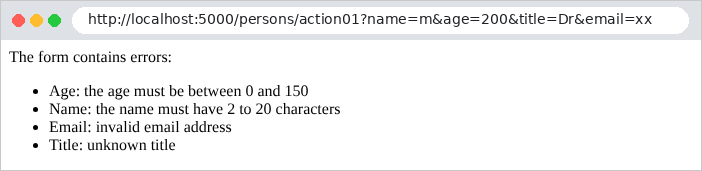
转换错误在 [ModelState] 中表现为验证错误:
| curl -i "http://localhost:5000/persons/action01?name=martin&age=abc&title=Mr"
|
| HTTP/1.1 200 OK
Content-Length: 92
Content-Type: text/html; charset=utf-8
<p>The form contains errors:</p><ul><li>Age: The value 'abc' is not valid for Age.</li></ul>
|
这就是案例研究中所有表单都将使用的技术(见示例 19):操作检查 [ModelState.IsValid] ,如果有错误就重新显示表单。
3.4. 示例 10:多值参数
同一个参数可以在请求中多次出现:表单上的复选框或多选列表就是这种情况([?color=red&color=green])。
[Controllers/ArraysController.cs] 文件:
| using Example10.Models;
using Microsoft.AspNetCore.Mvc;
namespace Example10.Controllers;
[Route("arrays")]
public class ArraysController : Controller
{
// /arrays/action01?color=red&color=green:一个简单参数
[HttpGet("action01")]
public object Action01(string? color)
{
return new { color };
}
// /arrays/action02?color=red&color=green:一个数组
[HttpGet("action02")]
public object Action02(string[] color)
{
return new { color, count = color.Length };
}
// /arrays/action03?color=red:一个列表,由 ChoiceModel 验证
[HttpGet("action03")]
public object Action03(ChoiceModel choice)
{
return new
{
colors = choice.Color,
valid = ModelState.IsValid,
errors = ModelState.Values.SelectMany(v => v.Errors).Select(e => e.ErrorMessage),
};
}
}
|
操作 [Action01](第 11–13 行)展示单个参数会收到什么:
| curl -i "http://localhost:5000/arrays/action01?color=red"
|
| HTTP/1.1 200 OK
Content-Type: application/json; charset=utf-8
{"color":"red"}
|
| curl -i "http://localhost:5000/arrays/action01?color=red&color=green"
|
| HTTP/1.1 200 OK
Content-Type: application/json; charset=utf-8
{"color":"red"}
|
[string] 类型的参数只接收第一个值。数组类型的参数([Action02],第 18–20 行)则接收所有的值,无论是零个、一个还是多个:
| curl -i "http://localhost:5000/arrays/action02?color=red"
|
| HTTP/1.1 200 OK
Content-Type: application/json; charset=utf-8
{"color":["red"],"count":1}
|
| curl -i "http://localhost:5000/arrays/action02?color=red&color=green"
|
| HTTP/1.1 200 OK
Content-Type: application/json; charset=utf-8
{"color":["red","green"],"count":2}
|
| curl -i "http://localhost:5000/arrays/action02"
|
| HTTP/1.1 200 OK
Content-Type: application/json; charset=utf-8
{"color":[],"count":0}
|
[ASP.NET Core] 因此避免了 [NestJS] ([Express])中常见的陷阱:同一个变量在只有一个值时是字符串,有多个值时是数组。列表仍然需要验证。文件 [Models/ChoiceModel.cs]:
| using System.ComponentModel.DataAnnotations;
namespace Example10.Models;
// IValidatableObject:用 C# 编写的验证,用于特性
// 无法表达的情况(此处为:列表的每个元素)
public class ChoiceModel : IValidatableObject
{
private static readonly string[] Colors = ["red", "green", "blue"];
[MinLength(1, ErrorMessage = "choose at least one color")]
public List<string> Color { get; set; } = [];
public IEnumerable<ValidationResult> Validate(ValidationContext context)
{
foreach (var color in Color.Where(c => !Colors.Contains(c)))
{
// yield return:方法逐个返回错误
yield return new ValidationResult($"unknown color: {color}", [nameof(Color)]);
}
}
}
|
我们来讲解这段代码:
- 第 7 行:该类实现 [IValidatableObject] 接口:用 [C#] 编写验证,处理特性无法表达的规则;
- 第 11 行:[[MinLength(1)]]:列表必须至少有一个元素;
- 第 14–18 行:方法 [Validate] 由验证过程在特性 之后 调用,用于检查每种颜色。对每个未知的颜色,它返回一个错误([ValidationResult]),并指明相关字段。[yield return] 逐个返回错误,而无需创建列表。
控制器的 [Action03] 操作接收一个 [ChoiceModel] ,并返回其内容以及验证状态:
| curl -i "http://localhost:5000/arrays/action03?color=red&color=green"
|
| HTTP/1.1 200 OK
Content-Type: application/json; charset=utf-8
{"colors":["red","green"],"valid":true,"errors":[]}
|
| curl -i "http://localhost:5000/arrays/action03?color=red&color=black"
|
| HTTP/1.1 200 OK
Content-Type: application/json; charset=utf-8
{"colors":["red","black"],"valid":false,"errors":["unknown color: black"]}
|
| curl -i "http://localhost:5000/arrays/action03"
|
| HTTP/1.1 200 OK
Content-Type: application/json; charset=utf-8
{"colors":[],"valid":false,"errors":["choose at least one color"]}
|
3.5. 示例 11:POST 请求的参数
使用 POST 方法发送的 HTML 表单会把其字段放在请求 正文中,而不是 URL 中。[Controllers/PostController.cs] 文件:
| using System.Text.Json;
using Example11.Models;
using Microsoft.AspNetCore.Mvc;
namespace Example11.Controllers;
[Route("post")]
public class PostController : Controller
{
// HTML 表单的字段(application/x-www-form-urlencoded 正文)
[HttpPost("action01")]
public object Action01()
{
return new
{
receivedType = Request.ContentType,
fields = Request.Form.ToDictionary(c => c.Key, c => c.Value.ToString()),
};
}
// JSON 正文:[FromBody] 对其进行反序列化
[HttpPost("action02")]
public object Action02([FromBody] JsonElement body)
{
return new { receivedType = Request.ContentType, body };
}
// 表单的单个字段:[FromForm]
[HttpPost("action03")]
public string Action03([FromForm] string? name)
{
return $"name = [{name}]";
}
// 表单字段,由 PersonModel 类绑定并验证
[HttpPost("action04")]
public object Action04([FromForm] PersonModel person)
{
return new
{
person,
valid = ModelState.IsValid,
errors = ModelState.Values.SelectMany(v => v.Errors).Select(e => e.ErrorMessage),
};
}
}
|
我们来逐段分析这段代码:
- 第 12–17 行:[Request.Form] 包含 HTML 表单的字段(正文类型为 [application/x-www-form-urlencoded]),不做任何绑定或转换。[Request.ContentType] 是正文的类型;
- 第 23–25 行:[[FromBody]] 指示系统将请求正文作为 JSON 文档读取(这是 [JavaScript] 客户端发送的内容)。[JsonElement] 表示任意 JSON 文档;也可以声明一个类;
- 第 30–32 行:[[FromForm]]:表单中的一个字段;
- 第 37–43 行:整个表单,由示例 08 中的 [PersonModel] 类绑定并验证。
[-d] 选项(属于 [curl] )发送一个 POST 请求,其正文采用 HTML 表单的格式([application/x-www-form-urlencoded]):
| curl -i -d "name=martin&age=42" http://localhost:5000/post/action01
|
| HTTP/1.1 200 OK
Content-Type: application/json; charset=utf-8
{"receivedType":"application/x-www-form-urlencoded","fields":{"name":"martin","age":"42"}}
|
相同的内容,采用 JSON 格式:
| curl -i -H "Content-Type: application/json" -d '{"name":"martin","age":42}' http://localhost:5000/post/action02
|
| HTTP/1.1 200 OK
Content-Type: application/json; charset=utf-8
{"receivedType":"application/json","body":{"name":"martin","age":42}}
|
(在 [Windows] 的命令提示符下,请输入 [-d "{\"name\":\"martin\",\"age\":42}"])。第一种情况下年龄是字符串(HTML 表单只携带文本),第二种情况下是数字。[[FromBody]] 操作会拒绝非 JSON 格式的正文,并返回 415 错误([Unsupported Media Type]):
| curl -i -d "name=martin&age=42" http://localhost:5000/post/action02
|
| HTTP/1.1 415 Unsupported Media Type
Content-Length: 0
|
另外两个操作:
| curl -i -d "name=martin&age=42" http://localhost:5000/post/action03
|
| HTTP/1.1 200 OK
Content-Type: text/plain; charset=utf-8
name = [martin]
|
| curl -i -d "name=martin&age=42&title=Mme" http://localhost:5000/post/action04
|
| HTTP/1.1 200 OK
Content-Type: application/json; charset=utf-8
{"person":{"name":"martin","age":42,"title":"Mme","email":null},"valid":true,"errors":[]}
|
| curl -i -d "name=martin&age=200" http://localhost:5000/post/action04
|
| HTTP/1.1 200 OK
Content-Type: application/json; charset=utf-8
{"person":{"name":"martin","age":200,"title":null,"email":null},"valid":false,"errors":["the age must be between 0 and 150","the title is required","unknown title"]}
|
POST 操作与 GET 操作一样返回 200 状态码(而 [NestJS] 默认返回 201)。对于 HTML 应用程序,POST 操作要么用页面响应(重新显示表单),要么用重定向响应(见示例 20)。
3.6. 示例 12:自定义绑定与验证
可以扩展模型绑定和验证。案例研究只适度地使用了这些功能,但理解它们有助于你掌握 [ASP.NET Core] 的工作原理。
| 12-custom-binding/
├── Binding/
│ ├── DateFrBinder.cs
│ ├── LanguageBinder.cs
│ └── NoSpaceAttribute.cs
├── Controllers/
│ └── ExamplesController.cs
├── appsettings.json
├── Example12.csproj
└── Program.cs
|
3.6.1. 模型绑定器:DateFrBinder
模型绑定器 是根据请求构造参数值的对象。[ASP.NET Core] 为所有常见类型都提供了模型绑定器;你也可以编写自己的。文件 [Binding/DateFrBinder.cs]:
| using System.Globalization;
using Microsoft.AspNetCore.Mvc.ModelBinding;
namespace Example12.Binding;
// “模型绑定器”:将法语日期 "23/09/2026" 转换为 DateOnly
public class DateFrBinder : IModelBinder
{
public Task BindModelAsync(ModelBindingContext context)
{
// 原始值,可能来自 URL、表单、路由……
var raw = context.ValueProvider.GetValue(context.ModelName).FirstValue;
if (DateOnly.TryParseExact(raw, "dd/MM/yyyy", CultureInfo.InvariantCulture, DateTimeStyles.None, out var date))
{
// 成功:操作将接收到的值
context.Result = ModelBindingResult.Success(date);
}
else
{
// 失败:ModelState 中的一个错误("31/02/2026" 同样会被拒绝)
context.ModelState.AddModelError(context.ModelName, $"[{raw}] is not a valid dd/mm/yyyy date");
}
return Task.CompletedTask;
}
}
|
- 第 7 行:模型绑定器实现 [IModelBinder] 接口;
- 第 9 行:它的 [BindModelAsync] 方法接收绑定上下文:参数名([ModelName])、值的来源([ValueProvider]:URL、表单、路由……)、[ModelState]……;
- 第 12 行:参数的原始值([FirstValue]:如果有多个值,取第一个);
- 第 13–16 行:[DateOnly.TryParseExact] 将 [dd/mm/yyyy] 格式的字符串转换为 [DateOnly](不含时间的日期),如果无法转换(包括不存在的日期,如 31/02/2026),则返回 [false] 。如果成功,[ModelBindingResult.Success(date)] 提供操作将接收到的值;
- 第 21 行:如果操作失败,就向 [ModelState] 添加一个错误;
- 第 23 行:该方法本质上是异步的([Task]),但没有什么需要等待:它返回一个已经完成的任务。
3.6.2. 第二个模型绑定器:LanguageBinder
参数可能来自 URL 或表单之外的地方。文件 [Binding/LanguageBinder.cs]:
| using Microsoft.AspNetCore.Mvc.ModelBinding;
namespace Example12.Binding;
// 浏览器的首选语言,从标头中读取
// "Accept-Language: fr-FR,fr;q=0.9,en;q=0.8" -> "fr"
public class LanguageBinder : IModelBinder
{
public Task BindModelAsync(ModelBindingContext context)
{
var header = context.HttpContext.Request.Headers.AcceptLanguage.ToString();
var first = header.Split(',')[0].Trim();
var language = first.Length >= 2 ? first[..2].ToLowerInvariant() : "fr";
context.Result = ModelBindingResult.Success(language);
return Task.CompletedTask;
}
}
|
- 第 11 行:[Accept-Language] 头,它指定用户偏好的语言;
- 第 12–13 行:第一种语言的前两个字母。[first[..2]] 是一个 范围 ([range]):即索引为 0 和 1 的字符。
3.6.3. 验证特性:[NoSpace]
文件 [Binding/NoSpaceAttribute.cs]:
| using System.ComponentModel.DataAnnotations;
namespace Example12.Binding;
// “自制”的验证特性:[NoSpace]
public class NoSpaceAttribute : ValidationAttribute
{
public NoSpaceAttribute() : base("the {0} field must not contain any space")
{
}
public override bool IsValid(object? value)
{
// 接受 null:要求必填是 [Required] 的职责
return value is not string text || !text.Contains(' ');
}
}
|
- 第 6 行:验证特性继承自 [ValidationAttribute]。按照惯例,特性类的名称以 [Attribute] 结尾,在实际使用中可以省略它:[[NoSpace]];
- 第 8 行:默认错误消息,传递给父类。[{0}] 将被替换为字段名;
- 第 12–15 行:规则。[value is not string text]:如果值不是字符串(例如 [null]),则接受它;否则,把它赋给变量 [text],该变量不得包含任何空格。案例研究中有一个这种类型的特性:[[OneOf]]。
3.6.4. 控制器
文件 [Controllers/ExamplesController.cs]:
| using Example12.Binding;
using Microsoft.AspNetCore.Mvc;
namespace Example12.Controllers;
[Route("examples")]
public class ExamplesController : Controller
{
// /examples/schedule?day=23/09/2026:自定义模型绑定器
[HttpGet("schedule")]
public IActionResult Schedule([ModelBinder(typeof(DateFrBinder))] DateOnly day)
{
if (!ModelState.IsValid)
{
return BadRequest(ModelState[nameof(day)]!.Errors[0].ErrorMessage);
}
return Ok($"schedule for the day [{day:yyyy-MM-dd}]");
}
// /examples/hello:一个不来自 URL 而来自标头的参数
[HttpGet("hello")]
public string Hello([ModelBinder(typeof(LanguageBinder))] string language)
{
return language == "en" ? "Hello!" : "Bonjour !";
}
// /examples/search?keyword=aspnet:自定义验证特性
[HttpGet("search")]
public IActionResult Search([NoSpace] string? keyword)
{
if (!ModelState.IsValid)
{
return BadRequest(ModelState[nameof(keyword)]!.Errors[0].ErrorMessage);
}
return Ok($"search for [{keyword}]");
}
}
|
- 第 11 行:特性 [[ModelBinder]] 指定该参数要使用的模型绑定器;
- 第 15 行:无效的日期会导致 400 错误,消息来自模型绑定器;
- 第 22 行:参数 [language] 由第二个模型绑定器提供;
- 第 29 行:验证特性也可以直接应用于操作的参数。
结果:
| curl -i "http://localhost:5000/examples/schedule?day=23/09/2026"
|
| HTTP/1.1 200 OK
Content-Type: text/plain; charset=utf-8
schedule for the day [2026-09-23]
|
| curl -i "http://localhost:5000/examples/schedule?day=2026-09-23"
|
| HTTP/1.1 400 Bad Request
Content-Type: text/plain; charset=utf-8
[2026-09-23] is not a valid dd/mm/yyyy date
|
| curl -i "http://localhost:5000/examples/schedule?day=31/02/2026"
|
| HTTP/1.1 400 Bad Request
Content-Type: text/plain; charset=utf-8
[31/02/2026] is not a valid dd/mm/yyyy date
|
| curl -i -H "Accept-Language: fr-FR,fr;q=0.9" http://localhost:5000/examples/hello
|
| HTTP/1.1 200 OK
Content-Type: text/plain; charset=utf-8
Bonjour !
|
| curl -i -H "Accept-Language: en-US,en;q=0.9" http://localhost:5000/examples/hello
|
| HTTP/1.1 200 OK
Content-Type: text/plain; charset=utf-8
Hello!
|
([-H] 选项(属于 [curl] )向请求添加一个头)
| curl -i "http://localhost:5000/examples/search?keyword=aspnet"
|
| HTTP/1.1 200 OK
Content-Type: text/plain; charset=utf-8
search for [aspnet]
|
| curl -i "http://localhost:5000/examples/search?keyword=asp%20net"
|
| HTTP/1.1 400 Bad Request
Content-Type: text/plain; charset=utf-8
the keyword field must not contain any space
|
([%20] 在 URL 中编码一个空格)
3.6.5. 结论
操作模型由模型绑定根据请求构造:路由参数、URL、表单字段、JSON 正文和头。这些值被转换为参数的类型,然后依据特性进行验证。这两个步骤的结果存储在 [ModelState] 中。对于 JSON 服务器,[[ApiController]] 会自动拒绝无效的模型;对于 HTML 应用程序,则由操作自己测试 [ModelState.IsValid] (示例 09),以便重新显示表单。这正是下一章的主题。