4. 视图及其模型
到目前为止,操作都是自己生成响应。在 MVC 应用程序中,这是 视图的职责:视图是一个描述 HTML 页面的文件,其中为操作传给它的数据预留了占位符——即 视图的模型。[ASP.NET Core MVC] 使用 [Razor] 视图引擎:视图是一个 [.cshtml] 文件,由 HTML 衍生而来,其中插入了 [C#] 代码,前面带有字符 [@]。[Razor] 是框架的一部分:无需安装任何东西。
4.1. 示例 13:第一个视图
[Program.cs] 文件:
| var builder = WebApplication.CreateBuilder(args);
// MVC 服务:控制器和 Razor 视图
builder.Services.AddControllersWithViews();
var app = builder.Build();
app.MapControllers();
app.Run();
|
- 第 4 行:[AddControllersWithViews] 取代了前面示例中的 [AddControllers] 。它在控制器服务之外添加了视图服务:[Razor] 引擎、视图文件的查找,以及 Tag Helper(示例 15)。
视图的模型是一个简单的类。文件 [Models/PageModel.cs]:
| namespace Example13.Models;
// 视图模型:操作传递给视图的数据
public record PageModel(string Title, string Message, string Time);
|
- 第 4 行:[record] 是一个由构造函数设置属性的类;这里是三个字符串:[Title]、[Message] 和 [Time]。这是定义单纯携带数据的类的一种简洁方式。
文件 [Controllers/ViewsController.cs]:
| using Example13.Models;
using Microsoft.AspNetCore.Mvc;
namespace Example13.Controllers;
public class ViewsController : Controller
{
// View(model):以操作名称命名的视图(Views/Views/Index.cshtml)
[HttpGet("/")]
public IActionResult Index()
{
var model = new PageModel(
"My first view",
"This page was built by Razor, on the server.",
DateTime.Now.ToString("HH:mm:ss"));
return View(model);
}
// View(name, model):由操作选择视图
[HttpGet("hello/{name}")]
public IActionResult Hello(string name)
{
if (name == "unknown")
{
Response.StatusCode = 404;
return View("Unknown", name);
}
var model = new PageModel(
$"Hello {name}",
"This time, the action designated the view by its name.",
DateTime.Now.ToString("HH:mm:ss"));
return View("Index", model);
}
}
|
我们来讲解这段代码:
- 第 6 行:控制器派生自 [Controller] 类,而不是 [ControllerBase]:[Controller] 在 [ControllerBase] 的基础上添加了与视图相关的一切(方法 [View]、[ViewData]、[TempData]等);
- 第 12–15 行:操作生成视图的模型:一个标题、一条消息和当前时间;
- 第 16 行:[View(model)] 返回一个 [ViewResult]:操作不再生成响应,而是指定一个视图并向它传递一个模型。如果没有指定视图名称,就使用与操作 同名的 视图 :[Index];
- 第 23–26 行:当视图取决于请求时,由操作选择视图。这里,名称 [unknown] 会显示视图 [Unknown],状态码为 404。该视图的模型是一个简单的字符串;
- 第 32 行:操作 [Hello] 按名称显式指定视图 [Index] :两个操作共用同一个视图,但模型不同。
[ASP.NET Core] 到哪里查找操作 [ViewsController.Index] 的视图 [Index]?按照惯例,依次在两个文件夹中查找:
- [Views/Views/Index.cshtml]:以控制器命名的文件夹(不带后缀 [Controller]);
- [Views/Shared/Index.cshtml]:包含所有控制器共享的视图的文件夹(见示例 15)。
如果在任何地方都找不到视图,就会抛出一个异常,列出已检查过的路径。项目文件:
| 13-first-view/
├── Controllers/
│ └── ViewsController.cs
├── Models/
│ └── PageModel.cs
├── Views/
│ ├── Views/
│ │ ├── Index.cshtml
│ │ └── Unknown.cshtml
│ └── _ViewImports.cshtml
├── appsettings.json
├── Example13.csproj
└── Program.cs
|
文件 [Views/_ViewImports.cshtml]:
| @* the "using" directives shared by all the views of the Views folder *@
@using Example13.Models
|
- 第 1 行:[@* ... *@] 是一个 [Razor] 注释:它不会出现在生成的页面上(与 HTML 注释 [<!-- -->] 不同);
- 第 2 行:[_ViewImports.cshtml] 文件中的指令适用于其文件夹及子文件夹中的所有视图。[@using Example13.Models] 使你可以在视图中写 [PageModel] 而不必写 [Example13.Models.PageModel] 。
[Views/Views/Index.cshtml] 文件:
| @* the type of the model of this view *@
@model PageModel
<!doctype html>
<html lang="en">
<head>
<meta charset="utf-8">
<title>@Model.Title</title>
</head>
<body>
<h1>@Model.Title</h1>
<p>@Model.Message</p>
<p>Page built at @Model.Time.</p>
</body>
</html>
|
- 第 2 行:指令 [@model] 声明视图模型的 类型 。在视图中,属性 [Model] 的类型就是 [PageModel],编译器会验证 [Model.Title] 是否存在;
- 第 7–12 行:每个表达式 [@Model.Title] 都会被模型中对应的值替换。[Razor] 能自行识别表达式的结尾:在 [@Model.Time.] 中,句点后面跟着一个标签,因此它不是属性访问。
视图其实是伪装的 [C#] 文件:编译项目时([dotnet build]),每个 [.cshtml] 文件都会被翻译成一个 [C#] 类,与应用程序的其余部分一起编译。因此,视图中的错误([@Model.Titl])会在编译期间报告。结果,在 URL http://localhost:5000/ 中:
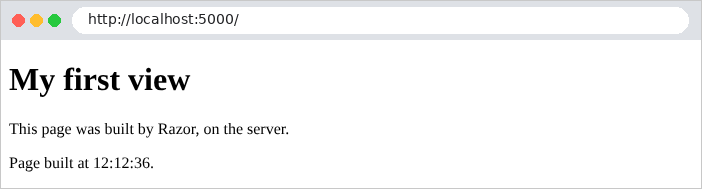
浏览器收到的页面源代码中不再有任何 [Razor] 的痕迹:
| curl http://localhost:5000/
|
| <!doctype html>
<html lang="en">
<head>
<meta charset="utf-8">
<title>My first view</title>
</head>
<body>
<h1>My first view</h1>
<p>This page was built by Razor, on the server.</p>
<p>Page built at 12:12:36.</p>
</body>
</html>
|
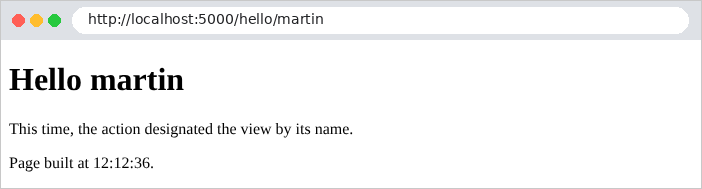
请注意,由 [@] 表达式插入的带重音字符会被编码(此页面不含这样的字符):像 [Ma première vue] 这样的法语标题会被发送为 [Ma première vue],其中 [è] 是字符 [è] 的代码,而直接键入视图中的带重音文本则保持不变。 浏览器能正确显示这两种情况,但 HTML 代码很难阅读。我们将在示例 15 中看到如何避免这个问题。URL http://localhost:5000/hello/martin 使用不同的模型显示同一个视图:
而 http://localhost:5000/hello/unknown 则显示另一个视图:
| curl -i http://localhost:5000/hello/unknown
|
| HTTP/1.1 404 Not Found
Content-Type: text/html; charset=utf-8
<!doctype html>
<html lang="en">
<head>
<meta charset="utf-8">
<title>Unknown</title>
</head>
<body>
<h1>Nobody is called [unknown] here.</h1>
</body>
</html>
|
文件 [Views/Views/Unknown.cshtml]:
| @* the model of this view is a simple string: the requested name *@
@model string
<!doctype html>
<html lang="en">
<head>
<meta charset="utf-8">
<title>Unknown</title>
</head>
<body>
<h1>Nobody is called [@Model] here.</h1>
</body>
</html>
|
- 第 2 行:该视图的模型是一个字符串;
- 第 10 行:[@Model] 就是这个字符串本身。
4.2. 示例 14:Razor 语言
[Razor] 不是像 [Handlebars] 那样“无逻辑”的模板语言:你可以在视图中编写 [C#] 代码(条件、循环、变量、方法调用)。这种自由需要自律:视图必须只负责格式化;计算和决策属于操作和服务。示例 14 概述了这些语法。模型,文件 [Models/BasicsModel.cs]:
| namespace Example14.Models;
public record Product(string Name, decimal Price, bool InStock);
public record Address(string Street, string City);
public class BasicsModel
{
public string Title { get; set; } = "";
public string Name { get; set; } = "";
public string? Nickname { get; set; }
public string Html { get; set; } = "";
public bool LoggedIn { get; set; }
public string Currency { get; set; } = "";
public List<Product> Products { get; set; } = [];
public List<Product> Cart { get; set; } = [];
public Address Address { get; set; } = new("", "");
}
|
文件 [Controllers/BasicsController.cs]:
| using Example14.Models;
using Microsoft.AspNetCore.Mvc;
namespace Example14.Controllers;
public class BasicsController : Controller
{
[HttpGet("/")]
public IActionResult Index()
{
var model = new BasicsModel
{
Title = "Razor basics",
Name = "Martin",
Nickname = null,
Html = "<b>this is HTML</b>",
LoggedIn = true,
Currency = "€",
Products =
[
new Product("Keyboard", 25m, true),
new Product("Mouse", 12.5m, false),
new Product("Screen", 149m, true),
],
Cart = [],
Address = new Address("12 rue des Lilas", "Angers"),
};
return View(model);
}
}
|
- 第 11–26 行:操作填充模型:几个字符串、一个布尔值、一个包含三个产品的列表、一个空购物车和一个地址。[Nickname] 被有意设为 [null]。
视图,文件 [Views/Basics/Index.cshtml]:
| @model BasicsModel
@* a C# code block: it produces nothing in the page *@
@{
var total = Model.Products.Sum(p => p.Price);
var count = Model.Products.Count;
}
<!doctype html>
<html lang="en">
<head>
<meta charset="utf-8">
<title>@Model.Title</title>
</head>
<body>
<h1>@Model.Title</h1>
@* 1. display a value of the model; a null value displays nothing *@
<p>1. Name: @Model.Name - nickname: [@Model.Nickname]</p>
@* 2. @ escapes HTML, @Html.Raw inserts it as is *@
<p>2a. @Model.Html</p>
<p>2b. @Html.Raw(Model.Html)</p>
@* 3. a condition *@
@if (Model.LoggedIn)
{
<p>3. You are logged in.</p>
}
else
{
<p>3. You are not logged in.</p>
}
@* 4. a loop; the loop variables are C# variables *@
<p>4. Our products:</p>
<ul>
@for (var i = 0; i < Model.Products.Count; i++)
{
var product = Model.Products[i];
<li>no. @i: @product.Name, @product.Price @Model.Currency
@(product.InStock ? "(in stock)" : "(sold out)")
@if (i == 0) { <text>- the first one</text> }
@if (i == Model.Products.Count - 1) { @:- the last one, seen by @Model.Name
}
</li>
}
</ul>
@* 5. the empty list *@
<p>5. Your cart:
@if (Model.Cart.Count == 0)
{
<text>it is empty.</text>
}
else
{
foreach (var p in Model.Cart) { <span>@p.Name</span> }
}
</p>
@* 6. an explicit expression @( ... ), and the variables of the @{ } block *@
<p>6. @count products, for a total of @(total) @Model.Currency; average price: @((total / count).ToString("0.00")) @Model.Currency</p>
<p>7. Address: @Model.Address.Street, @Model.Address.City.ToUpper()</p>
<p>8. An email address: contact@example.com</p>
</body>
</html>
|
我们来讲解这段代码:
- 第 2–5 行:一个 代码块 [@{ ... }] 包含 [C#] 指令。它不会在页面上产生任何输出。它声明的变量([total]、[count])可以在视图的后面使用;
- 第 16 行:值为 [null] ([@Model.Nickname])时不显示任何内容,也不会出错;
- 第 18–19 行:表达式 [@...] 会对 HTML 中的特殊字符进行 转义([<] 变成 [<]……):文本会按原样显示。[@Html.Raw(...)] 则不转义地插入它:它会被解释为 HTML。[Html.Raw] 只用于由应用程序生成的 HTML,绝不能用于用户输入的数据:用户可能向页面注入 HTML,甚至 [JavaScript](这种攻击称为 [XSS],即 [cross-site scripting],跨站脚本);
- 第 21–27 行:一个条件。在 [@if (...)] 之后,花括号内的内容是 HTML:[Razor] 能识别标签的开始,并回到 HTML 模式。我们通过 [@] 回到 [C#] ;
- 第 32–40 行:一个 [for] 循环,使用 [C#] 编写。[var product = ...] 是一条 [C#] 指令,[<li>] 则是 HTML:[Razor] 在两者之间切换,无需任何特定标记;
- 第 36 行:一个 显式表达式 [@( ... )]。只要表达式包含空格或运算符(这里是条件运算符 [? :]),就必须使用圆括号;
- 第 37 行:要在 [C#] 块中写入未格式化的文本,请用特殊标签 [<text>] 将其括起来,该标签不会出现在页面上;
- 第 38 行:[@:] 对该行的其余部分起同样的作用;
- 第 45–51 行:空列表就是简单的 [if]。在 [else] 块中,已经处于 [C#] 模式,[foreach] 不带 [@] 书写;
- 第 55 行:[@{ }] 块的变量和显式表达式,包括一次方法调用:[ToString("0.00")] 将数字格式化为两位小数;
- 第 56 行:一个用点连接的路径 [@Model.Address.Street],以及一次方法调用 [ToUpper()];
- 第 57 行:[Razor] 能识别出位于两个字母数字字符之间的 [@] 不是代码:[contact@example.com] 是一个电子邮件地址。要写出一个有歧义的 [@] ,需要把它写两遍:[@@]。
结果,URL 为 http://localhost:5000/:
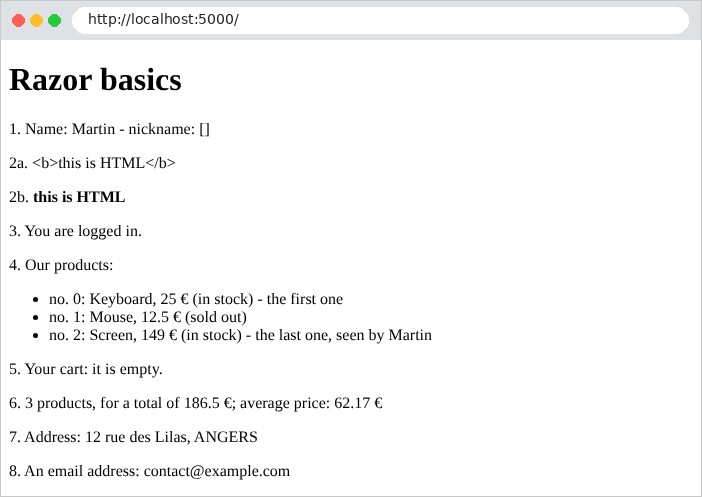
生成的 HTML 代码:
| curl http://localhost:5000/
|
| <!doctype html>
<html lang="en">
<head>
<meta charset="utf-8">
<title>Razor basics</title>
</head>
<body>
<h1>Razor basics</h1>
<p>1. Name: Martin - nickname: []</p>
<p>2a. <b>this is HTML</b></p>
<p>2b. <b>this is HTML</b></p>
<p>3. You are logged in.</p>
<p>4. Our products:</p>
<ul>
<li>no. 0: Keyboard, 25 €
(in stock)
- the first one </li>
<li>no. 1: Mouse, 12.5 €
(sold out)
</li>
<li>no. 2: Screen, 149 €
(in stock)
- the last one, seen by Martin
</li>
</ul>
<p>5. Your cart:
it is empty. </p>
<p>6. 3 products, for a total of 186.5 €; average price: 62.17 €</p>
<p>7. Address: 12 rue des Lilas, ANGERS</p>
<p>8. An email address: contact@example.com</p>
</body>
</html>
|
请注意 [C#] 指令留下的空格和空行:它们对显示没有影响。我们还看到了由表达式产生的带重音字符的编码([€] 表示 [€]),这一点会在下一个示例中得到纠正。
4.3. 示例 15:布局、分部视图、静态文件
网站的各个页面共享一个通用的模板(页眉、导航栏、页脚)。[Razor] 将这个模板称为 “布局(layout)”:每个视图都会插入其中。可重用的页面组件是 分部视图。最后,页面还需要 静态文件(样式表、图像、脚本),它们按原样提供,不经过控制器。示例中的文件:
| 15-layout/
├── Controllers/
│ └── PagesController.cs
├── Views/
│ ├── Pages/
│ │ ├── Home.cshtml
│ │ ├── Raw.cshtml
│ │ └── Team.cshtml
│ ├── Shared/
│ │ ├── _Card.cshtml
│ │ ├── _Layout.cshtml
│ │ └── _Navbar.cshtml
│ ├── _ViewImports.cshtml
│ └── _ViewStart.cshtml
├── wwwroot/
│ └── css/
│ └── styles.css
├── appsettings.json
├── Example15.csproj
└── Program.cs
|
文件 [Program.cs]:
| using System.Text.Encodings.Web;
using System.Text.Unicode;
using Microsoft.Extensions.FileProviders;
var builder = WebApplication.CreateBuilder(args);
builder.Services.AddControllersWithViews();
// Razor 原样输出带重音的字符(而不是 "é");
// < > & " ' 仍会被转义
builder.Services.AddSingleton(HtmlEncoder.Create(UnicodeRanges.All));
var app = builder.Build();
// 1. wwwroot 文件夹的静态文件:wwwroot/css/styles.css 以 /css/styles.css 提供
app.UseStaticFiles();
// 2. 各示例共享的 Bootstrap:examples/common/bootstrap 文件夹在 /bootstrap 下提供
app.UseStaticFiles(new StaticFileOptions
{
FileProvider = new PhysicalFileProvider(Path.GetFullPath(Path.Combine(builder.Environment.ContentRootPath, "..", "common", "bootstrap"))),
RequestPath = "/bootstrap",
});
app.MapControllers();
app.Run();
|
我们来讲解这段代码:
- 第 9 行:[HtmlEncoder] 服务是 [Razor] 用来对 [@] 中的表达式进行转义的服务。默认情况下,它只允许基本拉丁字母表中的字符原样通过:这就是 [é] 被编码为 [é](以及 [€] 被编码为 [€])的原因。我们把这个服务替换为允许所有字符通过的编码器([UnicodeRanges.All])。危险字符([<]、[>]、[&]、["]、['])仍然会被转义:针对 HTML 注入的保护依然完好。后面所有的示例以及案例研究都包含这一行;
- 第 14 行:一个 中间件组件 (见第 7 章),用于提供项目 [wwwroot] 文件夹中的文件:文件 [wwwroot/css/styles.css] 会在 URL [/css/styles.css] 处提供。如果文件不存在,请求会继续传递给控制器;
- 第 16–19 行:第二个静态文件服务。CSS 框架 [Bootstrap] 为所有示例所共用:它只存放一次,位于 [examples/common/bootstrap] 文件夹中,并以前缀 [/bootstrap] 提供。[PhysicalFileProvider] 指向磁盘上的一个文件夹;[ContentRootPath] 是项目文件夹。因此,[examples/common/bootstrap/css/bootstrap.min.css] 会在 URL [/bootstrap/css/bootstrap.min.css] 处提供。而案例研究则把 [Bootstrap] 放在它自己的 [wwwroot] 文件夹中。
我们来验证一下:
| curl -i http://localhost:5000/css/styles.css
|
| HTTP/1.1 200 OK
Content-Length: 430
Content-Type: text/css
/* a few settings on top of Bootstrap */
body {
background-color: #f5f7fa;
}
/* the footer of the layout */
.footer {
margin-top: 2rem;
font-size: 0.85rem;
color: #6c757d;
}
/* the error messages, at the bottom of the page, on a light pink background */
.error-area {
margin-top: 1.5rem;
padding: 0.75rem 1rem;
background-color: #fdecef;
border: 1px solid #f5c2c7;
border-radius: 0.375rem;
color: #842029;
}
|
文件 [Views/_ViewStart.cshtml]:
| @* executed before every view: all the views use the _Layout layout *@
@{
Layout = "_Layout";
}
|
- 第 3 行:文件 [_ViewStart.cshtml] 会在其文件夹及子文件夹中的每个视图之前执行。它设置 [Layout] 属性:所有视图都使用 [_Layout] 布局,该布局先在视图所在的文件夹中查找,然后在 [Views/Shared] 中查找。
文件 [Views/_ViewImports.cshtml]:
| @* the ASP.NET Core Tag Helpers: "enriched" HTML tags, such as <partial> *@
@addTagHelper *, Microsoft.AspNetCore.Mvc.TagHelpers
@using Example15.Controllers
|
- 第 2 行:启用 Tag Helper ,由 [ASP.NET Core] 提供:由服务器处理的 HTML 标签或属性。[<partial>] 标签就是一个例子。[*] 表示“程序集中的所有 Tag Helper” [Microsoft.AspNetCore.Mvc.TagHelpers];
- 第 3 行:类型 [Member] 在控制器命名空间中声明。
文件 [Views/Shared/_Layout.cshtml]:
| <!doctype html>
<html lang="en">
<head>
<meta charset="utf-8">
<meta name="viewport" content="width=device-width, initial-scale=1">
@* ViewData["Title"]: a value set by the view, read by the layout *@
<title>@ViewData["Title"] - My site</title>
<link rel="stylesheet" href="/bootstrap/css/bootstrap.min.css">
<link rel="stylesheet" href="/css/styles.css">
</head>
<body>
<div class="container py-3">
<partial name="_Navbar" />
@* the view requested by the action is inserted here *@
@RenderBody()
@* Context: the current request (HttpContext), available to every view *@
<footer class="footer">Page [@Context.Request.Path] - © @DateTime.Now.Year</footer>
</div>
</body>
</html>
|
- 第 7 行:[ViewData] 是视图与其布局共享的字典(操作也可以在其中存放值)。视图在其中存放自己的标题,布局负责显示它;
- 第 8–9 行:样式表,由 [UseStaticFiles] 提供;
- 第 13 行:插入分部视图 [_Navbar],它先在视图所在的文件夹中查找,然后在 [Views/Shared] 中查找;
- 第 15 行:[Razor] 插入操作所请求的视图的位置;
- 第 17 行:[Context] 是当前请求的 [HttpContext] 对象(见示例 05),任何视图都可以访问它:布局显示所请求的路径,而无需每个操作都把它传递过来。
文件 [Views/Shared/_Navbar.cshtml]:
| <nav class="navbar navbar-expand bg-light rounded mb-3 px-3">
<span class="navbar-brand">My site</span>
<div class="navbar-nav">
<a class="nav-link" href="/">Home</a>
<a class="nav-link" href="/team">Team</a>
<a class="nav-link" href="/raw">Page without layout</a>
</div>
</nav>
|
文件 [Views/Shared/_Card.cshtml]:
| @* a Bootstrap "card"; its model: a Member (name, role) *@
@model Member
<div class="card">
<div class="card-body">
<h5 class="card-title">@Model.Name</h5>
<p class="card-text">@Model.Role</p>
</div>
</div>
|
按照惯例,分部视图或布局的名称以 [_] 开头:它们不是完整的页面。分部视图 [_Card] 有它自己的模型(第 2 行):包含姓名和角色。类型 [Member] 在控制器中声明。文件 [Controllers/PagesController.cs]:
| using Microsoft.AspNetCore.Mvc;
namespace Example15.Controllers;
public record Member(string Name, string Role);
public class PagesController : Controller
{
[HttpGet("/")]
public IActionResult Home()
{
return View();
}
[HttpGet("team")]
public IActionResult Team()
{
List<Member> members =
[
new Member("Marie Pélissier", "Director"),
new Member("Jacques Bromard", "Developer"),
new Member("Philippe Jandot", "Graphic designer"),
];
return View(members);
}
[HttpGet("raw")]
public IActionResult Raw()
{
return View();
}
}
|
- 第 5 行:团队成员的类型;
- 第 12 行:操作 [Home] 没有模型:[View()] 不带参数;
- 第 18–24 行:操作 [Team] 传递一个成员列表。
分部视图有两种使用方式。文件 [Views/Pages/Home.cshtml]:
| @{
ViewData["Title"] = "Home";
}
<h1>Welcome</h1>
<p>This page only contains its own content: the header, the navigation
bar and the footer come from the <code>_Layout.cshtml</code> layout.</p>
<partial name="_Card" model='new Member("A partial view", "inserted with a model built on the spot")' />
|
- 第 2 行:视图把它的标题放入 [ViewData],供布局使用;
- 第 7 行:[model] 属性(用于 [<partial>] 标签)为分部视图提供模型:此处是一个即时创建的对象。这是一个 [C#] 表达式:它被括在单引号中,以便在其中使用双引号。
文件 [Views/Pages/Team.cshtml]:
| @model List<Member>
@{
ViewData["Title"] = "Our team";
}
<h1>Our team</h1>
<div class="row g-3">
@foreach (var member in Model)
{
<div class="col-md-4">
@* the partial view receives the current member as its model *@
<partial name="_Card" model="member" />
</div>
}
</div>
|
- 第 11 行:分部视图把当前循环迭代的元素作为它的模型来接收。
文件 [Views/Pages/Raw.cshtml]:
| @* Layout = null: this view does not use the layout, it is a complete page *@
@{
Layout = null;
}
<!doctype html>
<html lang="en">
<head>
<meta charset="utf-8">
<title>Raw page</title>
</head>
<body>
<p>This page does not use the layout: no Bootstrap, no navigation bar.</p>
<p><a href="/">Back to home</a></p>
</body>
</html>
|
- 第 3 行:在视图中把 [Layout] 设为 [null] 会取消 [_ViewStart.cshtml] 所作的选择:视图 [Raw] 是一个完整的 HTML 页面。你也可以指定另一个布局([Layout = "_Other"])。
得到的页面,URL 分别为 http://localhost:5000/, http://localhost:5000/team, 和 http://localhost:5000/raw:
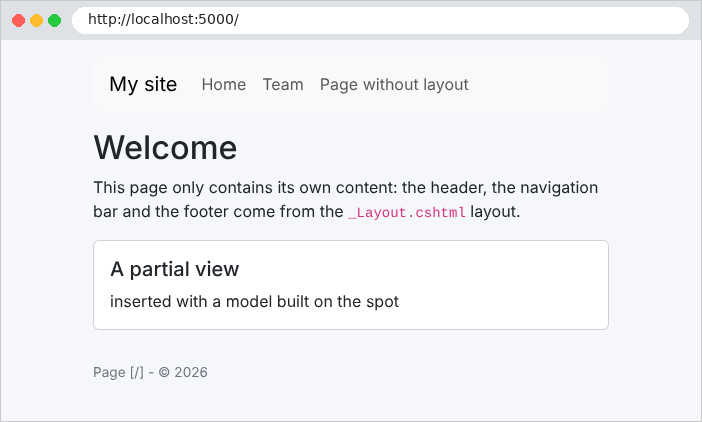
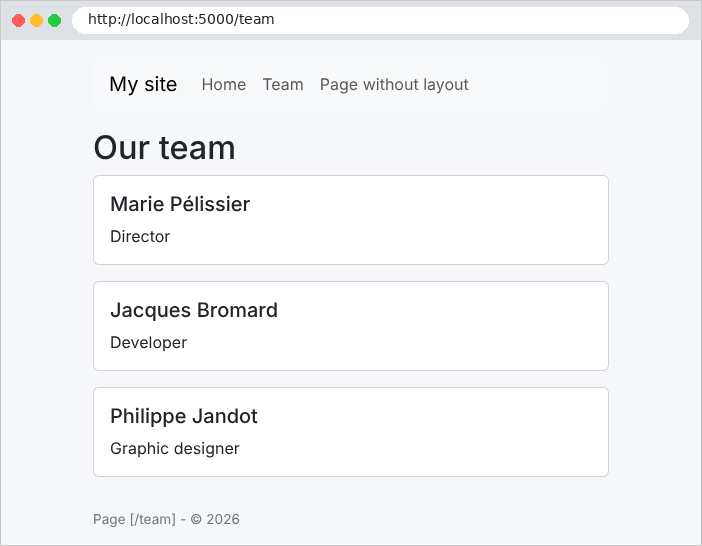

布局、分部视图和 [ViewData] 正是案例研究所使用的:一个 [_Layout.cshtml] 布局,以及用于导航栏、消息和确认窗口的分部视图。
4.4. 示例 16:辅助方法
视图常常需要一些小的格式化函数:格式化日期或价格、将文本大写、创建 HTML 徽章……在 [Razor] 中,这些都是简单的 [C#] 方法,在 [@] 表达式中调用。[ASP.NET Core] 还提供 Tag Helper:在渲染页面时作用于 HTML 标签的 [C#] 代码。
[Helpers/Formats.cs] 文件:
| using System.Globalization;
using System.Text.Encodings.Web;
using Microsoft.AspNetCore.Html;
namespace Example16.Helpers;
// 普通的 C# 函数,可在视图中调用:@Formats.Money(...)
public static class Formats
{
// "keyboard" -> "KEYBOARD"
public static string Uppercase(string? text) => (text ?? "").ToUpperInvariant();
// 以当前语言(CultureInfo.CurrentCulture)的格式表示的货币金额
// "C" = 货币;NumberFormatInfo 对象设置货币符号
public static string Money(decimal amount, string currency = "EUR")
{
var format = (NumberFormatInfo)CultureInfo.CurrentCulture.NumberFormat.Clone();
format.CurrencySymbol = currency == "USD" ? "$" : "€";
return amount.ToString("C", format);
}
// 以当前语言完整文字表示的日期:"Wednesday, September 23, 2026"
public static string Date(DateTime when) => when.ToString("D", CultureInfo.CurrentCulture);
// 构建 HTML 的辅助方法:返回 IHtmlContent,Razor 不会对其转义。
// 因此由辅助方法负责转义它插入的数据(HtmlEncoder)
public static IHtmlContent Badge(int stock)
{
var cssClass = stock > 0 ? "text-bg-success" : "text-bg-danger";
var text = HtmlEncoder.Default.Encode(stock > 0 ? $"{stock} in stock" : "sold out");
return new HtmlString($"<span class=\"badge {cssClass}\">{text}</span>");
}
}
|
我们来逐段分析这段代码:
- 第 8 行:一个静态类——它的方法无需创建对象即可调用,如 [Formats.Uppercase(...)];
- 第 11 行:大写转换。[ToUpperInvariant] 与用户的语言无关;
- 第 15–19 行:以某种货币表示的金额。格式 ["C"] ([currency])按照当前的 区域设置 ([CultureInfo.CurrentCulture])来格式化金额:小数分隔符、千位分隔符和货币符号的位置。为了更改货币符号,需要复制区域设置规则([Clone]);
- 第 23 行:完整写出的日期(格式 ["D"]),使用当前区域性的语言;
- 第 27–31 行:一个生成 HTML 的辅助方法。[@] 表达式的输出会被转义,除非它是 [IHtmlContent]:预先生成的 HTML。[HtmlString] 是它最简单的实现。这样,辅助方法就必须自己对插入其 HTML 的数据进行转义([HtmlEncoder.Default.Encode])。
[TagHelpers/ActiveTagHelper.cs] 文件:
| using System.Text.Encodings.Web;
using Microsoft.AspNetCore.Mvc.TagHelpers;
using Microsoft.AspNetCore.Razor.TagHelpers;
namespace Example16.TagHelpers;
// 标记帮助程序(Tag Helper):应用于带有 "active-path" 属性的 <a> 标签
// <a href="/products" active-path="/products"> 在
// 当前页面位于此路径下时获得 "active" 类
[HtmlTargetElement("a", Attributes = "active-path")]
public class ActiveTagHelper(IHttpContextAccessor accessor) : TagHelper
{
// active-path="..." 属性的值
public string ActivePath { get; set; } = "";
public override void Process(TagHelperContext context, TagHelperOutput output)
{
var path = accessor.HttpContext?.Request.Path.Value ?? "/";
var isActive = ActivePath == "/" ? path == "/" : path.StartsWith(ActivePath, StringComparison.Ordinal);
if (isActive)
{
output.AddClass("active", HtmlEncoder.Default); // 将该类添加到 class 属性中
}
}
}
|
我们来逐段分析这段代码:
- 第 10 行:该 Tag Helper 应用于带有 [<a>] 标签且具有 [active-path] 属性的元素;
- 第 11 行:Tag Helper 派生自 [TagHelper] 类。它是一个服务:它通过注入接收一个 [IHttpContextAccessor],用来访问当前请求;
- 第 14 行:属性 [active-path="..."] 的值被赋给同名的属性([ActivePath]);
- 第 16–22 行:[Process] 方法会针对每个相关标签调用。如果页面路径以该属性的值开头,就会给标签添加 CSS 类 [active]([AddClass])。[active-path] 属性本身不会出现在生成的页面中:Tag Helper 已将其消耗掉。
文件 [Program.cs]:
| using System.Globalization;
using System.Text.Encodings.Web;
using System.Text.Unicode;
using Microsoft.Extensions.FileProviders;
var builder = WebApplication.CreateBuilder(args);
builder.Services.AddControllersWithViews();
builder.Services.AddSingleton(HtmlEncoder.Create(UnicodeRanges.All));
// IHttpContextAccessor:提供对当前请求的访问(由 ActiveTagHelper 使用)
builder.Services.AddHttpContextAccessor();
var app = builder.Build();
// 中间件:格式化语言来自 URL 的 ?lang=fr 参数
app.Use(async (context, next) =>
{
var language = context.Request.Query["lang"] == "fr" ? "fr-FR" : "en-US";
CultureInfo.CurrentCulture = new CultureInfo(language);
await next(context); // 交给下一个中间件
});
app.UseStaticFiles();
app.UseStaticFiles(new StaticFileOptions
{
FileProvider = new PhysicalFileProvider(Path.GetFullPath(Path.Combine(builder.Environment.ContentRootPath, "..", "common", "bootstrap"))),
RequestPath = "/bootstrap",
});
app.MapControllers();
app.Run();
|
- 第 10 行:注册 [IHttpContextAccessor] 服务,供 Tag Helper 使用;
- 第 15–19 行:直接写在 [Program.cs] 中的中间件,每个请求都会执行。它根据 URL 中的 [lang] 参数选择区域性,然后把控制权传给下一个中间件([next])。这是一种简单的测试方式;下一章会更好地讲解它。
[Views/_ViewImports.cshtml] 文件:
| @addTagHelper *, Microsoft.AspNetCore.Mvc.TagHelpers
@* our own Tag Helpers, those of the Example16 assembly *@
@addTagHelper *, Example16
@using Example16.Helpers
@using Example16.Controllers
|
- 第 3 行:我们为自己的项目启用 Tag Helper([Example16] 程序集);
- 第 4 行:视图可以写 [Formats.Money(...)]。
[Views/Shared/_Navbar.cshtml] 文件:
| <nav class="navbar navbar-expand bg-light rounded mb-3 px-3">
<span class="navbar-brand">Helpers</span>
<div class="navbar-nav">
@* 1. a condition written in the view *@
<a class="nav-link @(Context.Request.Path == "/" ? "active" : "")" href="/">Home</a>
@* 2. our Tag Helper: the active-path="..." attribute *@
<a class="nav-link" href="/products" active-path="/products">Products</a>
@* 3. an ASP.NET Tag Helper: asp-action builds the URL of the action *@
<a class="nav-link" asp-controller="Pages" asp-action="Products" asp-route-lang="fr">Produits (fr)</a>
</div>
</nav>
|
- 第 4–5 行:突出显示当前页面链接的第一种方式:写在视图中的条件;
- 第 7 行:第二种更简洁的方式:我们自己的 Tag Helper。案例研究使用的就是这一种;
- 第 9 行:一个用于 [ASP.NET Core] 的 Tag Helper。属性 [asp-controller] 和 [asp-action] 指明一个操作;Tag Helper 根据路由计算其 URL(这里是 [/products]),并将其写入 [href] 属性。[asp-route-lang="fr"] 添加一个参数,该参数被放在 URL 中([?lang=fr]),因为路由中不包含 [lang] 参数。如果操作的 URL 发生变化,链接也会随之变化。
导航栏的 HTML 代码,来自 URL [/products]:
| <nav class="navbar navbar-expand bg-light rounded mb-3 px-3">
<span class="navbar-brand">Helpers</span>
<div class="navbar-nav">
<a class="nav-link " href="/">Home</a>
<a class="nav-link active" href="/products">Products</a>
<a class="nav-link" href="/products?lang=fr">Produits (fr)</a>
</div>
</nav>
|
文件 [Views/Pages/Products.cshtml]:
| @model List<Product>
@{
ViewData["Title"] = "Products";
}
<h1>Products</h1>
<table class="table table-sm w-auto">
<thead><tr><th>Product</th><th>Price</th><th>Price in dollars</th><th>Stock</th></tr></thead>
<tbody>
@foreach (var product in Model)
{
<tr>
<td>@Formats.Uppercase(product.Name)</td>
<td>@Formats.Money(product.Price)</td>
<td>@Formats.Money(product.Price, "USD")</td>
<td>@Formats.Badge(product.Stock)</td>
</tr>
}
</tbody>
</table>
|
- 第 12–15 行:辅助方法在 [@] 表达式中调用。[Badge] 返回 HTML,不经转义直接插入。
得到的页面,先是英语(http://localhost:5000/、http://localhost:5000/products),然后是法语(http://localhost:5000/products?lang=fr):
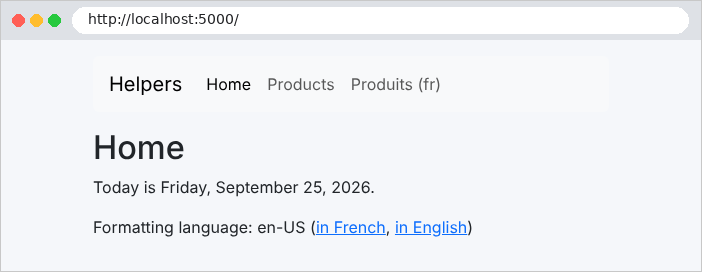
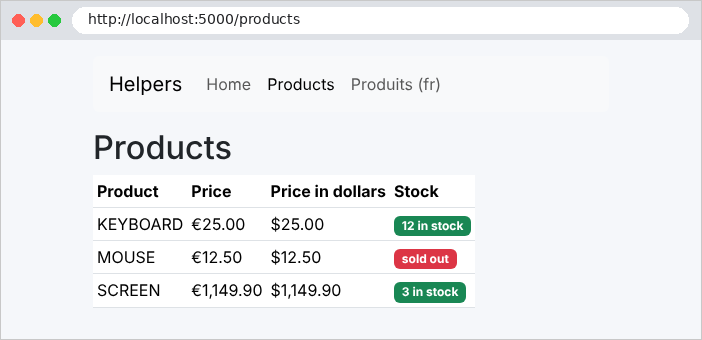
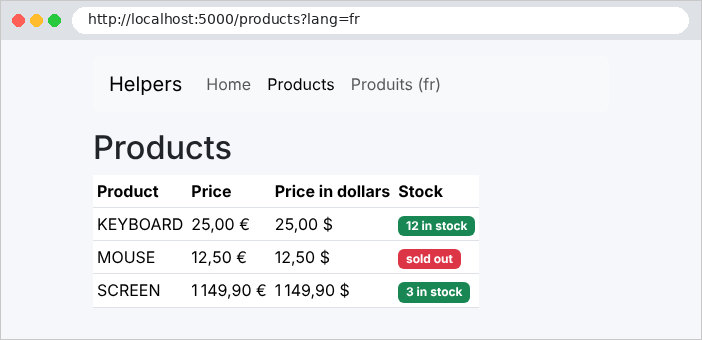
价格的格式随语言而变化:法语为 [1 149,90 €] ,英语为 [€1,149.90]。
4.5. 示例 17:GET 表单
使用 GET 方法提交的 HTML 表单会把其字段放在 URL 中。这是搜索的合适方法:它不修改任何内容,得到的 URL 可以加入书签或分享。案例研究用它来选择医生和日期。
[Models/Book.cs] 文件:
| namespace Example17.Models;
public record Book(string Title, string Author, string Genre);
// 视图模型:输入(用于再次显示)、类型列表、结果
public record SearchModel(string Keyword, string Genre, string[] Genres, List<Book> Results);
|
- 第 6 行:视图的模型包含输入的值([Keyword]、[Genre]),以便表单可以重新显示它们,同时显示类别列表和搜索结果。
文件 [Controllers/BooksController.cs]:
| using Example17.Models;
using Microsoft.AspNetCore.Mvc;
namespace Example17.Controllers;
public class BooksController : Controller
{
private static readonly List<Book> Books =
[
new Book("Le Rouge et le Noir", "Stendhal", "novel"),
new Book("Les Fleurs du mal", "Baudelaire", "poetry"),
new Book("Madame Bovary", "Flaubert", "novel"),
new Book("Alcools", "Apollinaire", "poetry"),
new Book("Le Cid", "Corneille", "drama"),
];
private static readonly string[] Genres = ["novel", "poetry", "drama"];
// GET / 和 GET /search?keyword=...&genre=...:表单及其结果
[HttpGet("/")]
[HttpGet("search")]
public IActionResult Search(string? keyword, string? genre)
{
var word = (keyword ?? "").Trim().ToLower();
var results = Books
.Where(b => word == "" || b.Title.ToLower().Contains(word) || b.Author.ToLower().Contains(word))
.Where(b => string.IsNullOrEmpty(genre) || b.Genre == genre)
.ToList();
return View(new SearchModel(keyword ?? "", genre ?? "", Genres, results));
}
}
|
- 第 8–14 行:图书,存放在内存中;
- 第 20–21 行:两个路由特性:该操作处理 [GET /] 和 [GET /search];
- 第 22 行:参数 [keyword] 和 [genre] 与 URL 中的同名参数相关联。首次访问时,表单尚未提交:它们的值为 [null];
- 第 25–28 行:使用 [LINQ] 筛选。空关键字或空类别不进行任何筛选;
- 第 29 行:视图的模型。
文件 [Views/Books/Search.cshtml]:
| @model SearchModel
<h1 class="h3">Book search</h1>
@* method="get": the fields are sent in the URL (?keyword=...&genre=...) *@
<form method="get" action="/search" class="row g-2 align-items-end mb-3">
<div class="col-auto">
<label class="form-label" for="keyword">Title or author</label>
@* value="@Model.Keyword": the field displays again what was typed *@
<input class="form-control" id="keyword" name="keyword" value="@Model.Keyword">
</div>
<div class="col-auto">
<label class="form-label" for="genre">Genre</label>
<select class="form-select" id="genre" name="genre">
<option value="">(all)</option>
@foreach (var genre in Model.Genres)
{
@* a boolean attribute: written if the condition is true, omitted otherwise *@
<option value="@genre" selected="@(genre == Model.Genre)">@genre</option>
}
</select>
</div>
<div class="col-auto">
<button class="btn btn-primary" type="submit">Search</button>
</div>
</form>
<p>@Model.Results.Count book(s) found.</p>
<ul>
@foreach (var book in Model.Results)
{
<li><i>@book.Title</i>, @book.Author (@book.Genre)</li>
}
</ul>
|
- 第 4 行:[method="get"] 和 [action="/search"]:提交表单就是一个 [GET /search?keyword=...&genre=...] 请求。参数名就是每个字段的 [name] 属性;
- 第 8 行:[value] 属性用于重新显示输入;
- 第 17 行:在下拉列表中,与所选类别对应的选项会被赋予属性 [selected]。[Razor] 以特殊方式处理布尔属性:如果值为 [true],它会写出 [selected="selected"];如果值为 [false],它 则完全不写出该属性。这正是 HTML 所要求的:在 HTML 中,只要出现属性 [selected] 就足以选中该选项。
首次显示时(http://localhost:5000/),以及搜索之后:
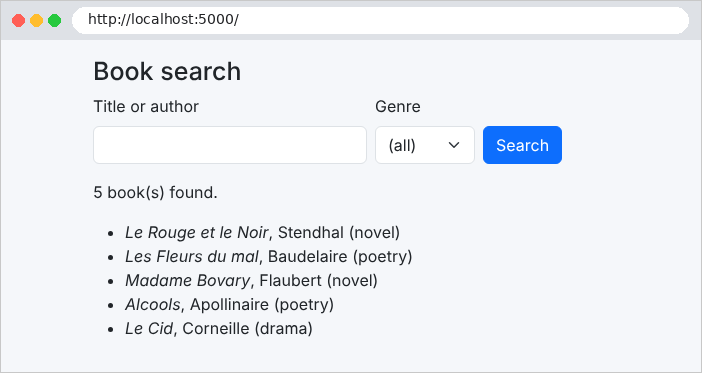
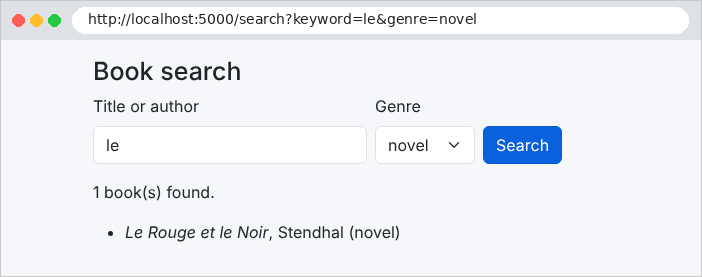
地址栏显示了发送的参数。带重音的字符和空格在其中被编码([%C3%A9]……):这就是 URL 编码,[ASP.NET Core] 会在模型绑定之前对其解码。
4.6. 示例 18:表单字段
示例 18 包含所有类型的 HTML 字段:文本、密码、日期、单选按钮、复选框、下拉列表、多选列表、文本框和隐藏字段。它展示服务器如何接收这些字段,以及视图如何显示它们。
[Services/ListsService.cs] 文件:
| namespace Example18.Services;
public record Country(string Code, string Name);
// 表单提供的列表。在真实的应用程序中,它们会
// 来自数据库:我们会在启动时只读取一次,
// 因为所有用户的列表都相同
public class ListsService
{
public string[] Titles { get; } = ["Mr", "Mme", "Melle"];
public Country[] Countries { get; } =
[
new Country("fr", "France"),
new Country("be", "Belgium"),
new Country("ch", "Switzerland"),
new Country("ca", "Canada"),
];
public string[] Hobbies { get; } = ["reading", "music", "sport", "cinema"];
public string[] Languages { get; } = ["French", "English", "Spanish", "German"];
}
|
表单提供的列表由一个服务提供。它们对所有用户都相同:只实例化一次的服务(即 单例;见第 6 章)是存放它们的自然之处。它在 [Program.cs] 中注册:
| using System.Text.Encodings.Web;
using System.Text.Unicode;
using Example18.Services;
using Microsoft.Extensions.FileProviders;
var builder = WebApplication.CreateBuilder(args);
builder.Services.AddControllersWithViews();
// Razor 原样输出带重音的字符(而不是 "é");
// < > & " ' 仍会被转义
builder.Services.AddSingleton(HtmlEncoder.Create(UnicodeRanges.All));
// 表单的列表:对所有人相同,单个对象(单例)
builder.Services.AddSingleton<ListsService>();
var app = builder.Build();
// 1. wwwroot 文件夹的静态文件:wwwroot/css/styles.css 以 /css/styles.css 提供
app.UseStaticFiles();
// 2. 各示例共享的 Bootstrap:examples/common/bootstrap 文件夹在 /bootstrap 下提供
app.UseStaticFiles(new StaticFileOptions
{
FileProvider = new PhysicalFileProvider(Path.GetFullPath(Path.Combine(builder.Environment.ContentRootPath, "..", "common", "bootstrap"))),
RequestPath = "/bootstrap",
});
app.MapControllers();
app.Run();
|
- 第 12 行:[ListsService] 的单个实例,由所有请求共享。
文件 [Models/Input.cs]:
| namespace Example18.Models;
// 用户输入的内容:模型绑定将每个属性
// 填充为同名字段的值(数组接收所有选中的值)
public class Input
{
public string? Name { get; set; }
public string? Password { get; set; }
public string? Comment { get; set; }
public string? Title { get; set; }
public string[] Hobbies { get; set; } = [];
public string? Country { get; set; }
public string[] Languages { get; set; } = [];
public DateOnly? BirthDate { get; set; }
public string? Token { get; set; }
}
// 列表的一个选项及其状态(选中 / 选定)
public record Option(string Value, string Label, bool Chosen);
// 视图模型
public class FormModel
{
public required Input Input { get; init; }
public required List<Option> Titles { get; init; }
public required List<Option> Hobbies { get; init; }
public required List<Option> Countries { get; init; }
public required List<Option> Languages { get; init; }
public string? Received { get; init; } // 服务器收到的内容,用于显示
}
|
我们来讲解这段代码:
- 第 5–15 行:输入。模型绑定用同名字段填充每个属性。复选框和下拉列表是数组([string[]]):它们接收发送的所有值(见示例 10)。出生日期被转换为 [DateOnly];
- 第 19 行:列表中的一个选项:它的值、它的标签,以及一个表示它是否被选中的布尔值;
- 第 22–29 行:视图的模型。关键字 [required] 要求在创建对象时必须提供该属性;[init] 则禁止之后修改它。
[Controllers/FormController.cs] 文件:
| using Example18.Models;
using Example18.Services;
using Microsoft.AspNetCore.Mvc;
namespace Example18.Controllers;
[Route("form")]
public class FormController(ListsService lists) : Controller
{
// GET:带初始值的表单
[HttpGet("")]
public IActionResult Display()
{
var initial = new Input { Title = "Mme", Country = "fr", Languages = ["French"], Token = "A7X2" };
return View("Form", Model(initial, null));
}
// POST:模型绑定填充 [input];我们再次显示表单
[HttpPost("")]
public IActionResult Process(Input input)
{
// 浏览器实际发送的内容,逐字段列出
var received = string.Join("\n", Request.Form.Select(c => $"{c.Key} = [{string.Join(", ", c.Value.ToArray())}]"));
return View("Form", Model(input, received));
}
// 视图模型:列表,每个选项根据输入标记为选中 /
// 选定。视图只需测试一个布尔值。
private FormModel Model(Input input, string? received) => new()
{
Input = input,
Titles = lists.Titles.Select(t => new Option(t, t, t == input.Title)).ToList(),
Hobbies = lists.Hobbies.Select(h => new Option(h, h, input.Hobbies.Contains(h))).ToList(),
Countries = lists.Countries.Select(c => new Option(c.Code, c.Name, c.Code == input.Country)).ToList(),
Languages = lists.Languages.Select(l => new Option(l, l, input.Languages.Contains(l))).ToList(),
Received = received,
};
}
|
我们来讲解这段代码:
- 第 8 行:注入列表服务;
- 第 11–15 行:[GET /form] 显示带有初始值的表单;
- 第 19–24 行:[POST /form] 接收用户的输入——由模型绑定填充——并重新绘制表单。[Request.Form] 还提供对字段 提交时原样内容的访问:把它们转换为文本,每个字段一行,用于显示;
- 第 29–36 行:视图的模型。对于每个列表,操作会计算哪些选项应被选中:这样视图只需测试一个布尔值。
文件 [Views/Form/Form.cshtml]:
| @model FormModel
<h1 class="h3">A complete form</h1>
<form method="post" action="/form" style="max-width: 40rem">
@* hidden field: sent with the form, but invisible *@
<input type="hidden" name="token" value="@Model.Input.Token">
<div class="mb-2">
<span class="form-label me-3">Title</span>
@foreach (var title in Model.Titles)
{
@* radio buttons: same [name], a single value sent *@
<div class="form-check form-check-inline">
<input class="form-check-input" type="radio" name="title" id="title-@title.Value"
value="@title.Value" checked="@title.Chosen">
<label class="form-check-label" for="title-@title.Value">@title.Label</label>
</div>
}
</div>
<div class="row g-2 mb-2">
<div class="col">
<label class="form-label" for="name">Name</label>
<input class="form-control" type="text" id="name" name="name" value="@Model.Input.Name">
</div>
<div class="col">
<label class="form-label" for="password">Password</label>
@* a password is NEVER sent back in the page *@
<input class="form-control" type="password" id="password" name="password">
</div>
<div class="col">
<label class="form-label" for="birthDate">Date of birth</label>
@* a date field exchanges its values in the yyyy-mm-dd format *@
<input class="form-control" type="date" id="birthDate" name="birthDate"
value="@Model.Input.BirthDate?.ToString("yyyy-MM-dd")">
</div>
</div>
<div class="mb-2">
<span class="form-label me-3">Hobbies</span>
@for (var i = 0; i < Model.Hobbies.Count; i++)
{
var hobby = Model.Hobbies[i];
@* checkboxes: same [name], several possible values *@
<div class="form-check form-check-inline">
<input class="form-check-input" type="checkbox" name="hobbies" id="hobby-@i"
value="@hobby.Value" checked="@hobby.Chosen">
<label class="form-check-label" for="hobby-@i">@hobby.Label</label>
</div>
}
</div>
<div class="row g-2 mb-2">
<div class="col">
<label class="form-label" for="country">Country</label>
<select class="form-select" id="country" name="country">
@foreach (var country in Model.Countries)
{
<option value="@country.Value" selected="@country.Chosen">@country.Label</option>
}
</select>
</div>
<div class="col">
<label class="form-label" for="languages">Spoken languages</label>
@* multiple-selection list: several possible values *@
<select class="form-select" id="languages" name="languages" multiple size="4">
@foreach (var language in Model.Languages)
{
<option value="@language.Value" selected="@language.Chosen">@language.Label</option>
}
</select>
</div>
</div>
<div class="mb-2">
<label class="form-label" for="comment">Comment</label>
@* a text area: the value is BETWEEN the tags *@
<textarea class="form-control" id="comment" name="comment" rows="2">@Model.Input.Comment</textarea>
</div>
<button class="btn btn-primary" type="submit">Send</button>
</form>
@if (Model.Received is not null)
{
<h2 class="h5 mt-3">What the server received</h2>
<pre class="bg-light p-2 border">@Model.Received</pre>
}
|
我们来讲解这段代码:
- 第 3 行:表单通过 POST 提交:其字段包含在请求正文中;
- 第 5 行:隐藏字段随表单一起发送,但不显示。它用于把信息从一个页面传递到下一个页面(例如在案例研究中,它包含记录的版本)。注意:用户可以修改它;
- 第 9–15 行:单选按钮共用同一个 [name];只能选中一个,也只发送一个值。布尔属性 [checked="@title.Chosen"] 用于选中按钮(参见示例 17 中的 [selected]);
- 第 28 行:密码绝不会在页面中回传:该字段没有 [value] 属性;
- 第 33–34 行:日期字段。浏览器按用户的格式显示日期,但发送和接收的始终是 [yyyy-mm-dd];
- 第 40–46 行:具有相同 [name] 属性的复选框:每个被勾选的框都会发送它的值;因此该参数会重复出现;
- 第 55–60 行:下拉列表。被选中的选项带有属性 [selected];
- 第 65 行:[multiple] 属性允许选择多个选项;
- 第 77 行:文本框的值包含在其标签之间,而不是放在 [value] 属性中;
- 第 83–86 行:服务器收到的内容,显示在 [<pre>] 标签中,该标签会保留换行。
初始表单(http://localhost:5000/form),然后是提交之后:
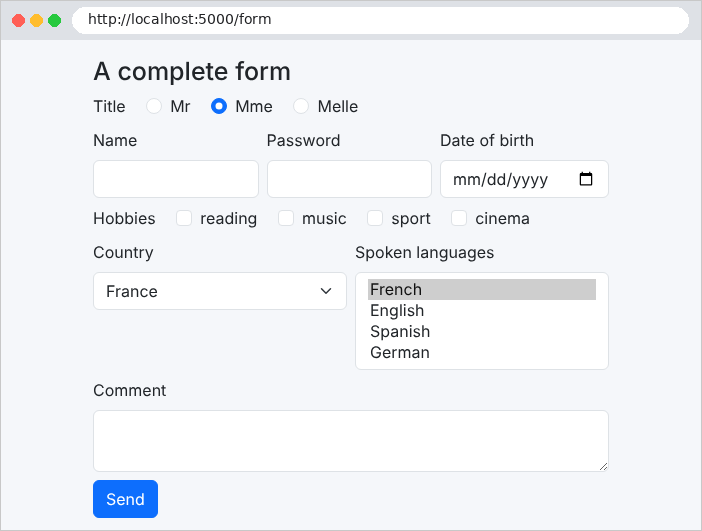
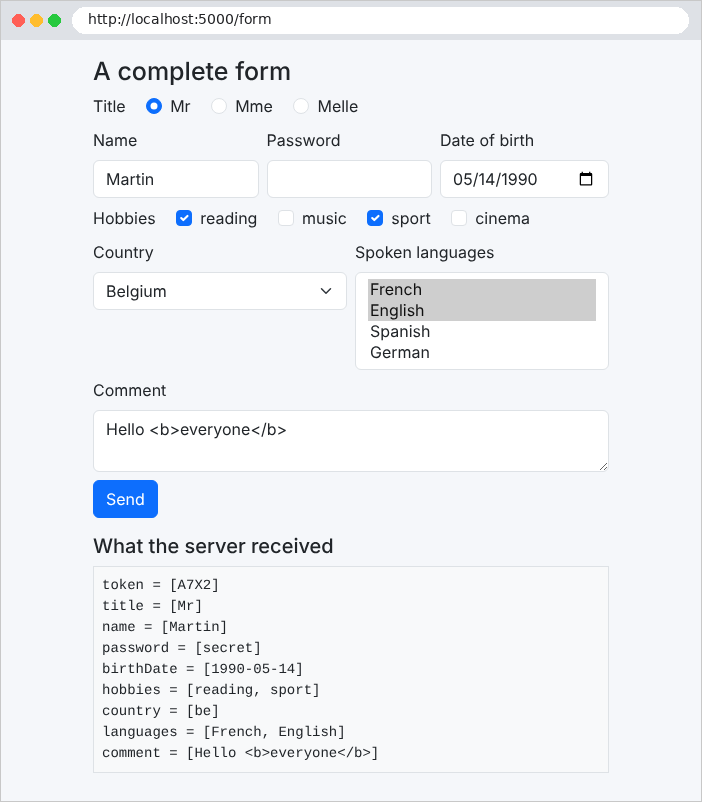
请注意,文本字段把 [Hello <b>everyone</b>] 原样重新显示了出来:由于 [@] 表达式会被转义,输入的标签不会被解释。密码已收到,但不显示。使用 [curl],我们可以看到勾选一个复选框时的差别:
| curl -d "token=A7X2&title=Mr&name=Martin&hobbies=sport" http://localhost:5000/form
|
| token = [A7X2]
title = [Mr]
name = [Martin]
hobbies = [sport]
|
以及勾选两个复选框时:
| curl -d "token=A7X2&title=Mr&name=Martin&hobbies=sport&hobbies=music" http://localhost:5000/form
|
| token = [A7X2]
title = [Mr]
name = [Martin]
hobbies = [sport, music]
|
(这里只重现页面上 [<pre>] 标签的内容,即浏览器显示的内容)。未勾选的复选框根本不会发送:[Request.Form] 不包含该字段,输入对象的 [Hobbies] 属性保持其初始值——空数组。
4.7. 示例 19:表单验证
无效的表单必须重新显示,并显示已输入的值,以及在每个有错误的字段下方显示一条消息。示例 19 将示例 09 的技术(由操作使用 [ModelState] 执行验证)应用于一个注册表单。
[Models/RegistrationModel.cs] 文件:
| using System.ComponentModel.DataAnnotations;
namespace Example19.Models;
// 表单字段及其约束
public class RegistrationModel
{
// 去除输入中多余的空格("setter" 由模型绑定调用)
private string? name;
[Required(ErrorMessage = "The name is required.")]
[MaxLength(20, ErrorMessage = "The name must not exceed 20 characters.")]
public string? Name
{
get => name;
set => name = value?.Trim();
}
[Required(ErrorMessage = "The email address is required.")]
[EmailAddress(ErrorMessage = "Invalid email address.")]
public string? Email { get; set; }
// 来自表单的一切都是字符串:"42" -> 42
[Required(ErrorMessage = "The age is required.")]
[Range(18, 120, ErrorMessage = "The age must be between 18 and 120 years.")]
public int? Age { get; set; }
[Required(ErrorMessage = "The password is required.")]
[MinLength(6, ErrorMessage = "The password must have at least 6 characters.")]
public string? Password { get; set; }
// 涉及两个字段的规则:[Compare] 与 Password 进行比较
[Compare(nameof(Password), ErrorMessage = "The confirmation does not match the password.")]
public string? Confirmation { get; set; }
}
// 视图模型:要再次显示的值,按字段列出的错误
public class RegistrationForm
{
public RegistrationModel Values { get; init; } = new();
public Dictionary<string, string> Errors { get; init; } = new(StringComparer.OrdinalIgnoreCase);
public bool Html5 { get; init; }
}
// 局部视图 _Field 的模型:一个输入字段
public record FieldModel(string Name, string Label, string Type, string? Value, string? Error, string Attributes);
|
我们来讲解这段代码:
- 第 9–16 行:带有私有字段的属性。它的访问器 [set]——由模型绑定调用——会去掉输入中多余的空格:[" Martin "] 变成 ["Martin"]。只包含空格的姓名会被模型绑定本身转换为 [null] ,并被 [[Required]] 拒绝;
- 第 12 行:[[MaxLength]] 限制字符串的长度,与 [[StringLength]] 一样;
- 第 25–26 行:年龄被转换为整数,然后接受验证;
- 第 29 行:至少 6 个字符;
- 第 33 行:规则“确认密码与密码一致”涉及两个字段。[[Compare]] 特性把它所修饰的属性与另一个按名称指定的属性进行比较([nameof(Password)]:属性名,由编译器验证);
- 第 38–42 行:视图的模型:要重新显示的值、按字段整理的错误(一个键不区分大小写的字典),以及一个稍后说明的布尔值;
- 第 46 行:显示字段的分部视图的模型。
文件 [Controllers/RegistrationController.cs]:
| using Example19.Models;
using Microsoft.AspNetCore.Mvc;
namespace Example19.Controllers;
[Route("register")]
public class RegistrationController : Controller
{
// ?html5=1:由浏览器在发送前验证表单
[HttpGet("")]
public IActionResult Display(bool html5)
{
return View("Registration", new RegistrationForm { Html5 = html5 });
}
[HttpPost("")]
public IActionResult Register(RegistrationModel input, [FromQuery] bool html5)
{
if (!ModelState.IsValid)
{
// 按字段列出的错误,在各字段下方显示每条消息
var errors = ModelState
.Where(c => c.Value!.Errors.Count > 0)
.ToDictionary(c => c.Key, c => c.Value!.Errors[0].ErrorMessage, StringComparer.OrdinalIgnoreCase);
// 我们再次显示表单:已输入的值(密码除外),
// 以及每个无效字段下方的消息
input.Password = input.Confirmation = null;
ViewData["Error"] = "The form contains errors.";
return View("Registration", new RegistrationForm { Values = input, Errors = errors, Html5 = html5 });
}
return View("Welcome", input);
}
}
|
我们来讲解这段代码:
- 第 11–13 行:空表单。参数 [html5] 将在后面解释;
- 第 17 行:模型绑定使用表单字段填充 [input] 并对其进行验证。[[FromQuery]] 从 URL 中获取 [html5] ;
- 第 19–24 行:如果有错误,就按字段整理它们。一个字段可能违反多个约束:只保留第一条错误消息([Errors[0]]);
- 第 27–29 行:重新显示表单:已输入的值(密码除外)、按字段列出的错误,以及一条通用消息,该消息存放在 [ViewData] 中,供布局使用;
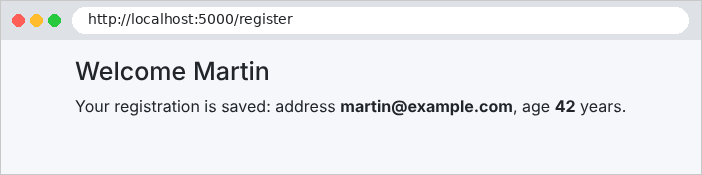
- 第 31 行:否则显示欢迎页面,其中包含转换后的值(年龄是数字,姓名已经过清理)。
转换错误(例如年龄为 [abc])默认会生成英文消息:[The value 'abc' is not valid for Age.] (见示例 08)。文件 [Program.cs] 会将其替换:
| using System.Text.Encodings.Web;
using System.Text.Unicode;
using Microsoft.Extensions.FileProviders;
var builder = WebApplication.CreateBuilder(args);
builder.Services.AddControllersWithViews(options =>
{
// 转换错误(例如年龄 "abc")的消息,用于替换默认消息
var messages = options.ModelBindingMessageProvider;
messages.SetAttemptedValueIsInvalidAccessor((value, field) => $"The value [{value}] is not valid.");
messages.SetValueMustNotBeNullAccessor(field => "This field is required.");
});
// Razor 原样输出带重音的字符(而不是 "é");
// < > & " ' 仍会被转义
builder.Services.AddSingleton(HtmlEncoder.Create(UnicodeRanges.All));
var app = builder.Build();
// 1. wwwroot 文件夹的静态文件:wwwroot/css/styles.css 以 /css/styles.css 提供
app.UseStaticFiles();
// 2. 各示例共享的 Bootstrap:examples/common/bootstrap 文件夹在 /bootstrap 下提供
app.UseStaticFiles(new StaticFileOptions
{
FileProvider = new PhysicalFileProvider(Path.GetFullPath(Path.Combine(builder.Environment.ContentRootPath, "..", "common", "bootstrap"))),
RequestPath = "/bootstrap",
});
app.MapControllers();
app.Run();
|
- 第 6–11 行:模板绑定错误的消息由 MVC 选项中的 [ModelBindingMessageProvider] 对象提供。[Set...Accessor] 中的每个方法都用一个生成消息的函数替换其中一条消息。[SetAttemptedValueIsInvalidAccessor] 处理无法转换的值;它接收该值和字段名称。案例研究因此替换了所有这些消息。
所有字段都使用同一个模板构建:由局部视图将它们提取出来。文件 [Views/Shared/_Field.cshtml]:
| @* an input field; its model: name, label, type, value, error, and the
HTML5 validation attributes (required, maxlength...) *@
@model FieldModel
<div class="mb-2">
<label class="form-label" for="@Model.Name">@Model.Label</label>
<input class="form-control @(Model.Error is null ? "" : "is-invalid")" id="@Model.Name" name="@Model.Name"
type="@Model.Type" value="@Model.Value" @Html.Raw(Model.Attributes)>
@if (Model.Error is not null)
{
<div class="invalid-feedback">@Model.Error</div>
}
</div>
|
- 第 6 行:类 [Bootstrap] [is-invalid] 将无效字段以红色突出显示;
- 第 7 行:HTML5 验证特性作为参数传入,并且不经转义直接插入([Html.Raw]):它们由开发人员编写,而不是由用户输入;
- 第 10 行:错误消息,位于字段下方(类 [Bootstrap] [invalid-feedback])。
文件 [Views/Registration/Registration.cshtml]:
| @model RegistrationForm
@{
// 字段的错误,或 null
string? Error(string field) => Model.Errors.GetValueOrDefault(field);
}
<h1 class="h3">Registration</h1>
@if (Model.Html5)
{
<p>Browser validation <b>enabled</b> - <a href="/register">disable it</a></p>
}
else
{
<p>Browser validation <b>disabled</b> - <a href="/register?html5=true">enable it</a></p>
}
@* novalidate: the browser ignores the required, min... attributes and
sends the form as is; only the server validates *@
<form method="post" action="/register@(Model.Html5 ? "?html5=true" : "")" novalidate="@(!Model.Html5)">
<partial name="_Field" model='new FieldModel("name", "Name", "text", Model.Values.Name, Error("name"), "required maxlength=\"20\"")' />
<partial name="_Field" model='new FieldModel("email", "Email address", "email", Model.Values.Email, Error("email"), "required")' />
<partial name="_Field" model='new FieldModel("age", "Age", "number", Model.Values.Age?.ToString(), Error("age"), "required min=\"18\" max=\"120\"")' />
<partial name="_Field" model='new FieldModel("password", "Password", "password", null, Error("password"), "required minlength=\"6\"")' />
<partial name="_Field" model='new FieldModel("confirmation", "Confirmation", "password", null, Error("confirmation"), "required")' />
<button class="btn btn-primary" type="submit">Register</button>
</form>
|
- 第 4 行:一个 局部函数 [C#],声明在代码块 [@{ }] 中:它返回某个字段的错误,或者返回 [null];
- 第 17 行:当 [novalidate] 为 false 时,设置布尔特性 [Html5] ;
- 第 18–22 行:每个字段都是从局部视图插入的,使用即时生成的模板。
文件 [Views/Shared/_Layout.cshtml]:
| <!doctype html>
<html lang="en">
<head>
<meta charset="utf-8">
<title>Registration</title>
<link rel="stylesheet" href="/bootstrap/css/bootstrap.min.css">
<link rel="stylesheet" href="/css/styles.css">
</head>
<body>
<div class="container py-3" style="max-width: 36rem">
@RenderBody()
@* the global error, at the bottom of the page, on a light pink background;
ViewData["Error"] is set by the action *@
@if (ViewData["Error"] is string error)
{
<div class="error-area" role="alert">@error</div>
}
</div>
</body>
</html>
|
- 第 14–16 行:全局消息显示在页面底部,背景为浅粉色(类 [error-area] 源自 [wwwroot/css/styles.css]),与案例研究相同。[is string error] 检查值的类型并将其存入变量。
让我们提交表单(http://localhost:5000/register),故意填入若干错误:
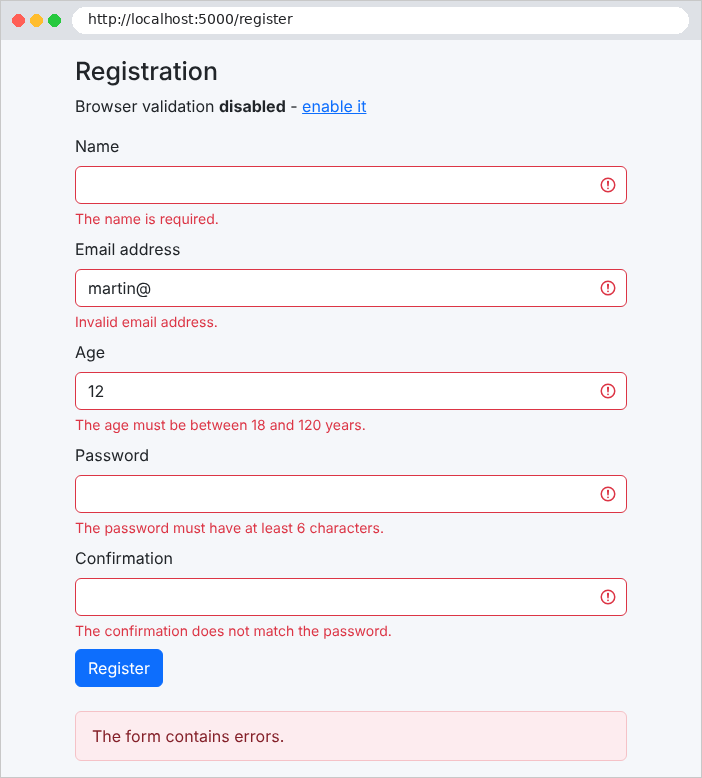
然后正确填写(姓名两侧带有空格):
再看年龄不是数字的情形,通过 [curl] 提交(浏览器会在 [type="number"] 字段中拒绝它):
| curl -i -d "name=Martin&email=xx&age=abc" http://localhost:5000/register
|
| HTTP/1.1 200 OK
Content-Type: text/html; charset=utf-8
<!doctype html>
<html lang="en">
<head>
<meta charset="utf-8">
<title>Registration</title>
<link rel="stylesheet" href="/bootstrap/css/bootstrap.min.css">
<link rel="stylesheet" href="/css/styles.css">
</head>
<body>
<div class="container py-3" style="max-width: 36rem">
<h1 class="h3">Registration</h1>
<p>Browser validation <b>disabled</b> - <a href="/register?html5=true">enable it</a></p>
<form method="post" action="/register" novalidate="novalidate">
<div class="mb-2">
<label class="form-label" for="name">Name</label>
<input class="form-control " id="name" name="name"
type="text" value="Martin" required maxlength="20">
</div>
<div class="mb-2">
<label class="form-label" for="email">Email address</label>
<input class="form-control is-invalid" id="email" name="email"
type="email" value="xx" required>
<div class="invalid-feedback">Invalid email address.</div>
</div>
<div class="mb-2">
<label class="form-label" for="age">Age</label>
<input class="form-control is-invalid" id="age" name="age"
type="number" required min="18" max="120">
<div class="invalid-feedback">The value [abc] is not valid.</div>
</div>
<div class="mb-2">
<label class="form-label" for="password">Password</label>
<input class="form-control is-invalid" id="password" name="password"
type="password" required minlength="6">
<div class="invalid-feedback">The password is required.</div>
</div>
<div class="mb-2">
<label class="form-label" for="confirmation">Confirmation</label>
<input class="form-control " id="confirmation" name="confirmation"
type="password" required>
</div>
<button class="btn btn-primary" type="submit">Register</button>
</form>
<div class="error-area" role="alert">The form contains errors.</div>
</div>
</body>
</html>
|
4.7.1. 浏览器验证
特性 [required]、[maxlength]、[min]、[max]、[type="email"]…… 指示浏览器在提交之前验证表单:用户会立即通过提示框收到通知,无需与服务器进行任何往返通信。点击“启用”链接(http://localhost:5000/register?html5=true)即可得到这一行为,该链接会移除表单上的 [novalidate] 特性。
这种验证只是一种便利,而不是安全措施:只需使用浏览器的开发人员工具移除 [required] 特性,或者使用 [curl] 发送请求,就可以绕过它。服务器端验证仍然必不可少。这就是示例默认禁用浏览器验证的原因:为了演示服务器是如何工作的。不过,案例研究两者兼用:HTML5 特性用于提供便利,服务器端验证用于保证安全。
4.8. 示例 20:Post/Redirect/Get 模式
当 POST 表单提交成功时,操作可以直接显示一个页面。问题出现在用户随后刷新该页面时(F5 键):浏览器会重新提交表单,操作被执行第二次(订单下了两次、预约做了两次……)。Post / Redirect / Get 模式(PRG)可以避免这个问题:成功的 POST 操作不生成页面,而是重定向到一个 GET 页面。重新加载该页面只会再次触发一次 GET,不会产生任何影响。
还有一个细节:GET 页面必须显示一条消息(“任务已添加”),而这条消息是由 POST 操作在另一个请求中生成的。为解决这个问题,[ASP.NET Core] 提供了 [TempData]:一个字典,其内容会保留到下一个请求,并在被读取后立即消失。它是一种闪现消息。默认情况下,[TempData] 存储在由服务器加密的 Cookie 中。
文件 [Services/TasksService.cs]:
| namespace Example20.Services;
// 任务列表,在内存中,由所有人共享(单例)
public class TasksService
{
private readonly List<string> tasks = ["Read chapter 3"];
public IReadOnlyList<string> List() => tasks;
public void Add(string label) => tasks.Add(label);
}
|
文件 [Controllers/TasksController.cs]:
| using Example20.Services;
using Microsoft.AspNetCore.Mvc;
namespace Example20.Controllers;
[Route("tasks")]
public class TasksController(TasksService tasks) : Controller
{
// GET /tasks:列表和添加表单
[HttpGet("")]
public IActionResult Display()
{
return View("Tasks", tasks.List());
}
// POST /tasks:Post / Redirect / Get 模式
[HttpPost("")]
public IActionResult Add(string? label)
{
var text = (label ?? "").Trim();
if (text == "" || text.Length > 40)
{
// 输入无效:不重定向,直接再次显示页面
ViewData["Label"] = label;
ViewData["Error"] = "The label must have 1 to 40 characters.";
return View("Tasks", tasks.List());
}
tasks.Add(text);
// TempData:一条能在重定向后保留、供下一个请求使用的消息
TempData["Flash"] = $"The task [{text}] has been added.";
// 不返回页面:重定向到 GET 页面
return RedirectToAction(nameof(Display));
}
// POST /tasks/without-prg:反例(对 POST 直接返回页面)
[HttpPost("without-prg")]
public IActionResult AddWithoutPrg(string? label)
{
tasks.Add(string.IsNullOrWhiteSpace(label) ? "(untitled)" : label.Trim());
ViewData["WithoutPrg"] = true;
return View("Tasks", tasks.List());
}
}
|
让我们分析这段代码:
- 第 11–13 行:列表页面;
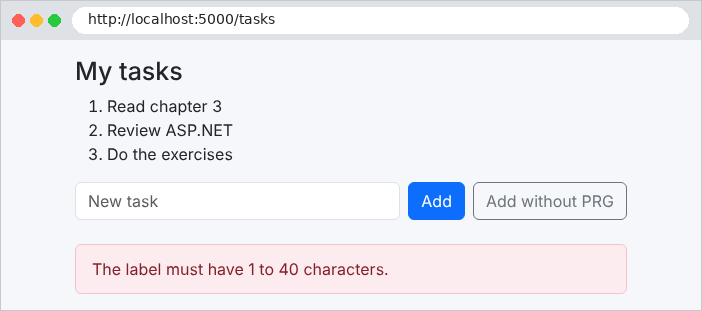
- 第 21–26 行:无效输入:重新加载页面(不重定向——必须保留输入内容和错误消息);
- 第 28–32 行:有效输入:执行操作,消息被闪现存入 [TempData],然后以 302 重定向到 [Display] 操作。[RedirectToAction] 根据路由计算该操作的 URL(见示例 04)。[nameof(Display)] 是方法名,由编译器验证;
- 第 36–41 行:反例,用于对比。
文件 [Views/Tasks/Tasks.cshtml]:
| @model IReadOnlyList<string>
<h1 class="h3">My tasks</h1>
<ol>
@foreach (var task in Model)
{
<li>@task</li>
}
</ol>
<form method="post" action="/tasks" class="d-flex gap-2">
<input class="form-control" name="label" value="@ViewData["Label"]" placeholder="New task">
<button class="btn btn-primary text-nowrap" type="submit">Add</button>
@* formaction: this button sends the SAME form to another address *@
<button class="btn btn-outline-secondary text-nowrap" type="submit" formaction="/tasks/without-prg">Add without PRG</button>
</form>
@if (ViewData["WithoutPrg"] is true)
{
<p class="text-danger mt-2">Page displayed in response to a POST: press F5 and the task will be added a second time.</p>
}
|
- 第 13 行:按钮的 [formaction] 特性会把表单提交到与表单的 [action] 特性所指定地址不同的地址。因此该表单有两个按钮,分别触发两个不同的操作。案例研究在其登录页面中使用了这种方式。
文件 [Views/Shared/_Layout.cshtml]:
| <!doctype html>
<html lang="en">
<head>
<meta charset="utf-8">
<title>Tasks</title>
<link rel="stylesheet" href="/bootstrap/css/bootstrap.min.css">
<link rel="stylesheet" href="/css/styles.css">
</head>
<body>
<div class="container py-3" style="max-width: 36rem">
@* the flash message, at the top of the page: READING it removes it from TempData *@
@if (TempData["Flash"] is string flash)
{
<div class="alert alert-success" role="status">@flash</div>
}
@RenderBody()
@if (ViewData["Error"] is string error)
{
<div class="error-area" role="alert">@error</div>
}
</div>
</body>
</html>
|
闪现消息显示在页面顶部(第 12–14 行),错误消息显示在底部(第 17–19 行)。读取 [TempData["Flash"]] 会将该值标记为已使用:它在请求结束时被清除。
下面是表单提交成功时 [curl] 所看到的内容。选项 [-c file] 保存收到的 Cookie,[-b file] 将它们发回;[--data-urlencode] 对字段中的空格和重音字符进行编码:
| curl -i -c cookies.txt -b cookies.txt --data-urlencode "label=Review ASP.NET" http://localhost:5000/tasks
|
| HTTP/1.1 302 Found
Content-Length: 0
Location: /tasks
Set-Cookie: .AspNetCore.Mvc.CookieTempDataProvider=CfDJ8Mr17zLSwO9AhYlPOJdkD8mjtY...; path=/; samesite=lax; httponly
|
响应是一个重定向,并带有 Cookie [.AspNetCore.Mvc.CookieTempDataProvider],其中包含加密后的闪现消息(其值很长,已被截断)。下一个请求会发送该 Cookie;响应将其删除(过期日期在过去):
| curl -i -c cookies.txt -b cookies.txt http://localhost:5000/tasks
|
| HTTP/1.1 200 OK
Content-Type: text/html; charset=utf-8
Set-Cookie: .AspNetCore.Mvc.CookieTempDataProvider=; expires=Thu, 01 Jan 1970 00:00:00 GMT; path=/; samesite=lax; httponly
<!doctype html>
<html lang="en">
<head>
<meta charset="utf-8">
<title>Tasks</title>
<link rel="stylesheet" href="/bootstrap/css/bootstrap.min.css">
<link rel="stylesheet" href="/css/styles.css">
</head>
<body>
<div class="container py-3" style="max-width: 36rem">
<div class="alert alert-success" role="status">The task [Review ASP.NET] has been added.</div>
<h1 class="h3">My tasks</h1>
<ol>
<li>Read chapter 3</li>
<li>Review ASP.NET</li>
</ol>
<form method="post" action="/tasks" class="d-flex gap-2">
<input class="form-control" name="label" placeholder="New task">
<button class="btn btn-primary text-nowrap" type="submit">Add</button>
<button class="btn btn-outline-secondary text-nowrap" type="submit" formaction="/tasks/without-prg">Add without PRG</button>
</form>
</div>
</body>
</html>
|
在浏览器中(http://localhost:5000/tasks),添加任务之后:
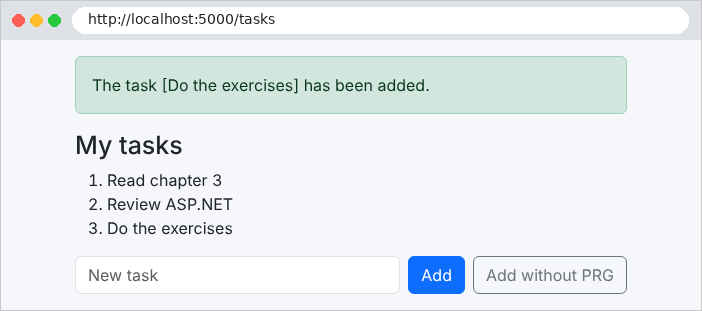
地址栏显示 [/tasks]:这是 GET 页面。你可以放心地重新加载它;消息会消失。空输入的情形:
再看反例:
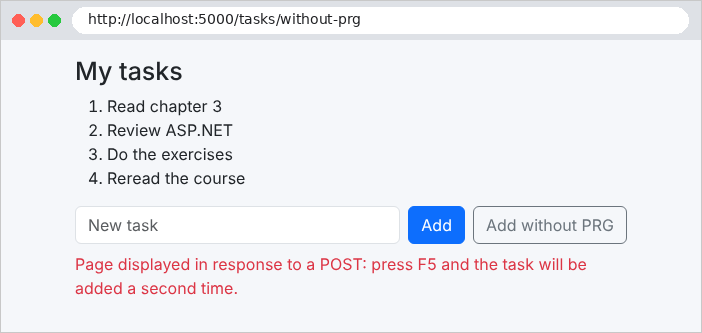
在这里,重新加载页面会触发浏览器警告(“确认重新提交表单”),然后第二次添加该任务。案例研究中所有的 POST 表单都遵循 PRG 模式。
4.9. 示例 21:链接、按钮与确认
一条简单的规则指导我们在链接和按钮之间做出选择:
- 链接([<a href>])会生成 GET 请求。GET 请求不得修改任何内容:浏览器、搜索引擎和杀毒程序可能会自行访问链接,以预取或分析页面;
- 修改数据的操作(添加、编辑、删除、注销)是 POST 表单中的按钮。
示例 21 管理一个联系人列表:可以通过点击链接查看联系人,也可以通过点击按钮删除联系人,点击后会打开一个确认窗口。该示例的文件如下:
| 21-links-buttons/
├── Controllers/
│ └── ContactsController.cs
├── Services/
│ └── ContactsService.cs
├── Views/
│ ├── Contacts/
│ │ ├── Details.cshtml
│ │ └── List.cshtml
│ ├── Shared/
│ │ ├── _Confirmation.cshtml
│ │ └── _Layout.cshtml
│ ├── _ViewImports.cshtml
│ └── _ViewStart.cshtml
├── wwwroot/
│ ├── css/
│ │ └── styles.css
│ └── js/
│ └── app.js
├── appsettings.json
├── Example21.csproj
└── Program.cs
|
文件 [Services/ContactsService.cs]:
| namespace Example21.Services;
// 一个联系人:标识符、姓名、电话号码
public record Contact(int Id, string Name, string Phone);
// 联系人,在内存中,由所有人共享(单例)
public class ContactsService
{
private readonly List<Contact> contacts =
[
new(1, "Marie Durand", "01 23 45 67 89"),
new(2, "Paul Martin", "06 12 34 56 78"),
new(3, "Philippe Jandot", "02 98 76 54 32"),
];
private int lastId = 3;
public IReadOnlyList<Contact> List() => contacts;
// 联系人不存在时为 null
public Contact? Read(int id) => contacts.Find(c => c.Id == id);
public Contact? Edit(int id, string name, string phone)
{
var index = contacts.FindIndex(c => c.Id == id);
if (index < 0) return null;
// record 是不可变的:我们用修改后的副本替换它(with)
contacts[index] = contacts[index] with { Name = name, Phone = phone };
return contacts[index];
}
public Contact Add(string name, string phone)
{
var contact = new Contact(++lastId, name, phone);
contacts.Add(contact);
return contact;
}
public Contact? Delete(int id)
{
var contact = Read(id);
if (contact is not null) contacts.Remove(contact);
return contact;
}
}
|
- 第 4 行:一个联系人;
- 第 20 行:如果没有联系人具有该 ID,[Find] 返回 [null] ;
- 第 22–28 行:[record] 是不可变的:它的属性不会被修改,而是被一个修改后的副本所替换。表达式 [with { ... }] 用于创建这个副本;
- 第 31–35 行:[++lastId] 先递增计数器再使用它:因此标识符是 4、5……
文件 [Controllers/ContactsController.cs]:
| using Example21.Services;
using Microsoft.AspNetCore.Mvc;
namespace Example21.Controllers;
[Route("contacts")]
public class ContactsController(ContactsService contacts) : Controller
{
// 一个链接(<a href>):GET 请求,不修改任何内容
[HttpGet("")]
public IActionResult List()
{
return View(contacts.List());
}
[HttpGet("{id:int}")]
public IActionResult Details(int id)
{
var contact = contacts.Read(id);
return contact is null ? NotFound() : View(contact);
}
// POST 表单中的一个按钮:修改数据的请求
[HttpPost("{id:int}")]
public IActionResult Save(int id, string name, string phone)
{
var contact = contacts.Edit(id, name, phone);
if (contact is null) return NotFound();
TempData["Flash"] = $"The contact [{contact.Name}] has been edited.";
return RedirectToAction(nameof(List));
}
// 同一个表单,另一个按钮(formaction 属性):另一个操作
[HttpPost("{id:int}/duplicate")]
public IActionResult Duplicate(int id, string name, string phone)
{
var copy = contacts.Add($"{name} (copy)", phone);
TempData["Flash"] = $"The contact [{copy.Name}] has been created.";
return RedirectToAction(nameof(List));
}
[HttpPost("{id:int}/delete")]
public IActionResult Delete(int id)
{
var contact = contacts.Delete(id);
if (contact is null) return NotFound();
TempData["Flash"] = $"The contact [{contact.Name}] has been deleted.";
return RedirectToAction(nameof(List));
}
}
|
让我们对这段代码做些说明:
- 第 11–20 行:两个页面:列表页和联系人详情页。路由约束 [:int] (见示例 02)只接受整数标识符;不存在的联系人会导致 404 错误;
- 第 24–30 行:保存记录,使用 PRG;
- 第 34–39 行:复制,由同一表单上的第二个按钮触发(特性 [formaction]);
- 第 42–48 行:删除,使用 POST。
文件 [Views/Contacts/List.cshtml]:
| @model IReadOnlyList<Contact>
<h1 class="h3">Contacts</h1>
<table class="table align-middle">
<tbody>
@foreach (var contact in Model)
{
<tr>
<td>@contact.Name</td>
<td>@contact.Phone</td>
<td class="text-end">
@* view: a simple link *@
<a class="btn btn-sm btn-outline-primary" href="/contacts/@contact.Id">View</a>
@* delete: a POST form, whose submission will be confirmed *@
<form method="post" action="/contacts/@contact.Id/delete" class="d-inline"
data-confirmation="Delete the contact @contact.Name?">
<button class="btn btn-sm btn-outline-danger" type="submit">Delete</button>
</form>
</td>
</tr>
}
</tbody>
</table>
|
- 第 12 行:查看:一个链接,由 [Bootstrap] 显示为按钮;
- 第 14–17 行:删除:一个小表单(POST),只剩下它的按钮。[data-confirmation] 特性包含提交前要询问的问题。[data-*] 特性是可选的:HTML 会忽略它们,而页面上的 [JavaScript] 可以读取它们。
文件 [Views/Contacts/Details.cshtml]:
| @model Contact
<h1 class="h3">Contact no. @Model.Id</h1>
<form method="post" action="/contacts/@Model.Id">
<div class="mb-2">
<label class="form-label" for="name">Name</label>
<input class="form-control" id="name" name="name" value="@Model.Name">
</div>
<div class="mb-3">
<label class="form-label" for="phone">Phone</label>
<input class="form-control" id="phone" name="phone" value="@Model.Phone">
</div>
@* two submit buttons for the same form *@
<button class="btn btn-primary" type="submit">Save</button>
<button class="btn btn-outline-primary" type="submit" formaction="/contacts/@Model.Id/duplicate">Duplicate</button>
<a class="btn btn-link" href="/contacts">Back to the list</a>
</form>
|
4.9.1. 确认窗口
浏览器的对话框([window.confirm])无法设置样式,也无法翻译:它的按钮保持浏览器的语言。因此用一个 [Bootstrap] 窗口取而代之,它嵌入在页面中,需要时才显示。文件 [Views/Shared/_Confirmation.cshtml]:
| @* a single window for the whole page, hidden (d-none) at first *@
<div id="confirmation-modal" class="d-none">
<div class="modal-backdrop fade show"></div>
<div class="modal fade show d-block" tabindex="-1" role="alertdialog" aria-modal="true">
<div class="modal-dialog modal-dialog-centered">
<div class="modal-content">
<div class="modal-header">
<h5 class="modal-title">Confirmation</h5>
</div>
<div class="modal-body">
<p class="mb-0" id="confirmation-modal-message"></p>
</div>
<div class="modal-footer">
<button type="button" class="btn btn-secondary" data-action="no">No, go back</button>
<button type="button" class="btn btn-danger" data-action="yes">Yes, confirm</button>
</div>
</div>
</div>
</div>
</div>
|
- 第 2 行:类 [d-none] 隐藏窗口;
- 第 3 行:灰色背景;
- 第 11 行:问题的位置;
- 第 14–15 行:两个按钮,由 [data-action] 特性标识。
文件 [Views/Shared/_Layout.cshtml]:
| <!doctype html>
<html lang="en">
<head>
<meta charset="utf-8">
<title>Contacts</title>
<link rel="stylesheet" href="/bootstrap/css/bootstrap.min.css">
<link rel="stylesheet" href="/css/styles.css">
</head>
<body>
<div class="container py-3" style="max-width: 40rem">
@if (TempData["Flash"] is string flash)
{
<div class="alert alert-success" role="status">@flash</div>
}
@RenderBody()
</div>
@* the confirmation window, present in every page *@
<partial name="_Confirmation" />
@* the script, at the end of the page: the elements it looks for already exist *@
<script src="/js/app.js"></script>
</body>
</html>
|
- 第 18 行:该窗口出现在所有页面上;
- 第 20 行:脚本在页面底部加载;它运行时,所要查找的元素已经存在。它由 [UseStaticFiles] 从 [wwwroot/js/app.js]提供。
一小段 [JavaScript] 代码将表单与窗口关联起来。文件 [wwwroot/js/app.js]:
| // 确认带有 data-confirmation="..." 属性的表单
// 没有 JavaScript 时,这些表单会直接发送而不确认。
(() => {
const modal = document.getElementById('confirmation-modal');
const message = document.getElementById('confirmation-modal-message');
let pending = null; // 用户确认后要发送的表单
// 1. 我们拦截需要确认的表单的提交
document.querySelectorAll('form[data-confirmation]').forEach((form) => {
form.addEventListener('submit', (event) => {
event.preventDefault(); // 提交被挂起
pending = form;
message.textContent = form.dataset.confirmation;
modal.classList.remove('d-none'); // 弹出窗口出现
});
});
// 2. 窗口的两个按钮
modal.addEventListener('click', (event) => {
const action = event.target.dataset.action;
if (action === 'yes') {
pending.submit(); // 提交,且不再次触发 'submit' 事件
} else if (action === 'no') {
modal.classList.add('d-none');
pending = null;
}
});
})();
|
- 第 3 行:代码被包裹在一个立即执行的函数中,以避免创建全局变量;
- 第 9–14 行:拦截每个带有 [data-confirmation] 特性的表单的提交。[preventDefault()] 暂停提交;表单被保存起来,问题被放入窗口中(使用 [textContent],而不是 [innerHTML]:问题作为文本显示,绝不会被解释为 HTML),然后显示窗口;
- 第 19–25 行:“是”提交已缓存的表单。表单的 [submit()] 方法提交表单时不会触发 [submit] 事件:因此不会再次出现确认提示。“否”则隐藏窗口。
如果禁用了 [JavaScript] ,表单将直接提交而没有确认:应用程序仍然可以工作。这就是渐进增强的原则:[JavaScript] 增添便利,但并非必不可少。案例研究遵循这一原则(它的脚本 [wwwroot/js/app.js]添加了键盘处理:Esc 键和焦点)。由 http://localhost:5000/contacts生成的页面如下:列表、确认提示、删除后的列表,以及某个联系人的资料页:
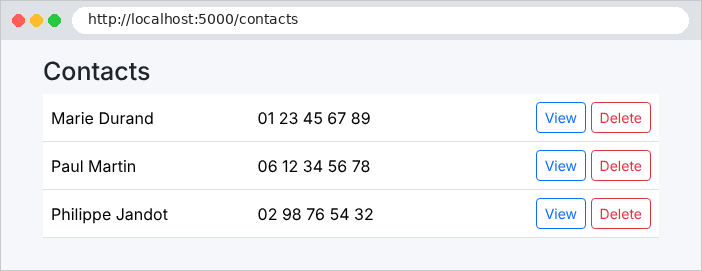
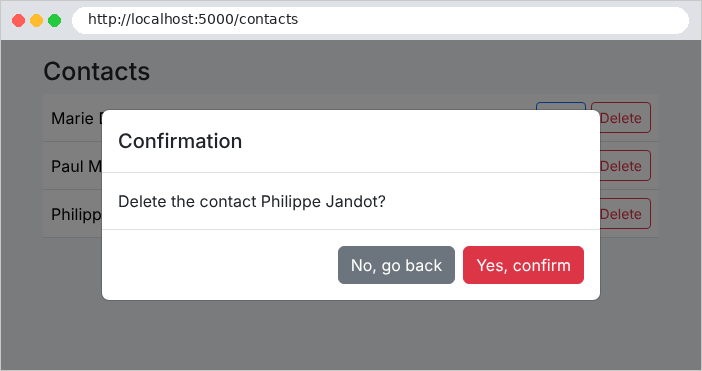
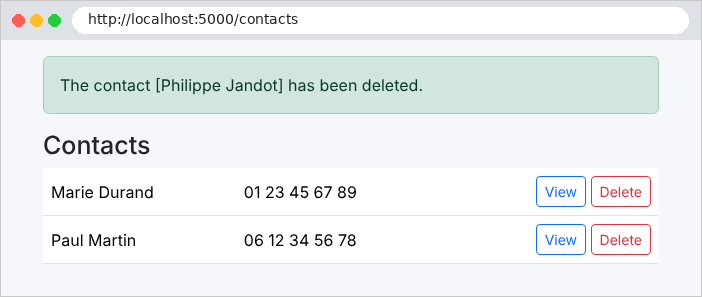
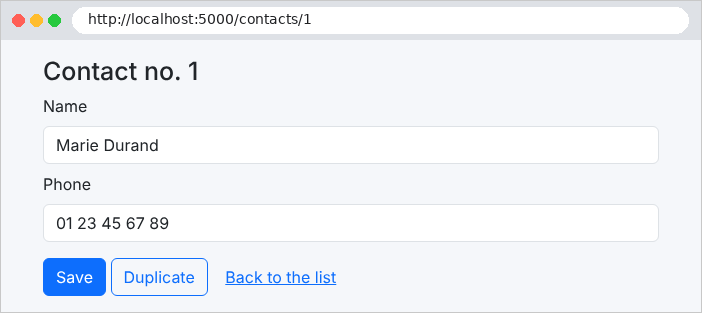
最后,我们验证删除不能通过 GET 查询触发:
| curl -i http://localhost:5000/contacts/2/delete
|
| HTTP/1.1 405 Method Not Allowed
Content-Length: 0
Allow: POST
|
该路径存在,但不支持 GET 方法:[ASP.NET Core] 返回 [405 Method Not Allowed],并且 [Allow] 头指明了可接受的方法。使用 POST 时:
| curl -i -X POST http://localhost:5000/contacts/2/delete
|
| HTTP/1.1 302 Found
Content-Length: 0
Location: /contacts
Set-Cookie: .AspNetCore.Mvc.CookieTempDataProvider=CfDJ8Mr17zLSwO9AhYlPOJdkD8nJg8...; path=/; samesite=lax; httponly
|