9. Utilizzo del DBMS MySQL
 |
9.1. Installazione del modulo MySQLdb
Scriveremo degli script utilizzando un database MySQL:
 |
Le funzioni Python per la gestione di un database MySQL sono incapsulate in un modulo MySQLdb che non è incluso nella distribuzione iniziale di Python. È quindi necessario scaricare e installare il modulo. Ecco un modo per farlo:
 |
- Nel menu Programmi, selezionare [1] il gestore dei pacchetti Python. Apparirà quindi la finestra di comando [2].
Cerca la parola chiave mysql nei pacchetti:
C:\Documents and Settings\st>pypm search mysql
Get: [pypm-be.activestate.com] :repository-index:
Get: [pypm-free.activestate.com] :repository-index:
autosync: synced 2 repositories
  chartio                    Setup wizard and connection client for connecting
  chartio-setup              Setup wizard and connection client for connecting
  cns.recipe.zmysqlda        Recipe for installing ZMySQLDA
  collective.recipe.zmysqlda Recipe for installing ZMySQLDA
  django-mysql-manager       DESCRIPTION_DESCRIPTION_DESCRIPTION
  jaraco.mysql               MySQLDB-compatible MySQL wrapper by Jason R. Coomb
  lovely.testlayers          mysql, postgres nginx, memcached cassandra test la
  mtstat-mysql               MySQL Plugins for mtstat
  mysql-autodoc              Generate HTML documentation from a mysql database
  mysql-python               Python interface to MySQL
  mysqldbda                  MySQL Database adapter
  products.zmysqlda          MySQL Zope2 adapter.
  pymysql                    Pure Python MySQL Driver
  pymysql-sa                 PyMySQL dialect for SQLAlchemy.
  pymysql3                   Pure Python MySQL Driver
  sa-mysql-dt                Alternative implementation of DateTime column for
  schemaobject               Iterate over a MySQL database schema as a Python o
  schemasync                 A MySQL Schema Synchronization Utility
  simplestore                A datastore layer built on top of MySQL in Python.
  sqlbean                    A auto maping ORM for MYSQL and can bind with memc
  sqlwitch                   sqlwitch offers idiomatic SQL generation on top of
  tiddlywebplugins.mysql     MySQL-based store for tiddlyweb
  tiddlywebplugins.mysql2    MySQL-based store for tiddlyweb
zest.recipe.mysql          A Buildout recipe to setup a MySQL database.
Sono stati elencati tutti i moduli il cui nome o descrizione contiene la parola chiave "mysql". Quello che ci interessa è [mysql-python], riga 14. Installiamolo:
C:\Documents and Settings\st>pypm install mysql-python
The following packages will be installed into "%APPDATA%\Python" (2.7):
 mysql-python-1.2.3
Hit: [pypm-free.activestate.com] mysql-python 1.2.3
Installing mysql-python-1.2.3

C:\Documents and Settings\st>echo %APPDATA%
C:\Documents and Settings\st\Application Data
- Riga 5: Il pacchetto mysql-python-1.2.3 è stato installato nella cartella "%APPDATA%\Python", dove APPDATA è la cartella specificata alla riga 8.
Questa operazione potrebbe non riuscire se:
- l'interprete Python utilizzato è una versione a 64 bit;
- il percorso %APPDATA% contiene caratteri accentati.
9.2. Installazione di MySQL
Esistono vari modi per installare il DBMS MySQL. In questo caso abbiamo utilizzato WampServer, un pacchetto che combina diversi componenti software:
- un server web Apache. Lo useremo per scrivere script web in Python;
- il sistema di gestione di database MySQL;
- il linguaggio di scripting PHP;
- uno strumento di amministrazione del database MySQL scritto in PHP: phpMyAdmin.
WampServer può essere scaricato (giugno 2011) al seguente indirizzo:
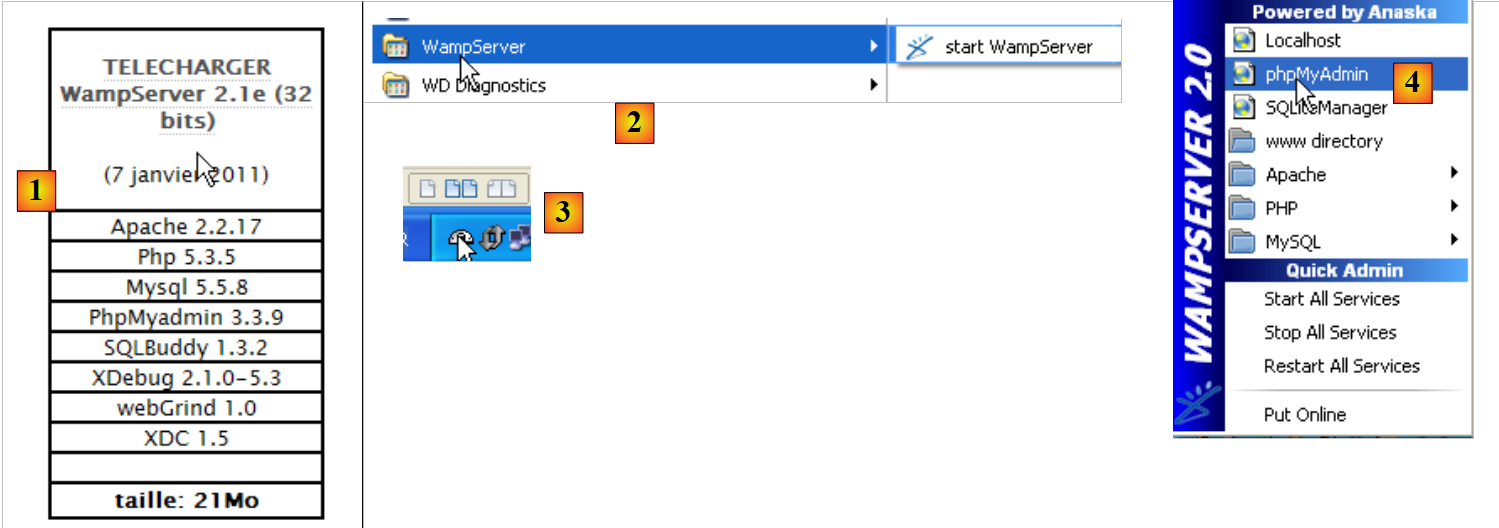 |
- In [1], scarica la versione appropriata di WampServer;
- in [2], una volta installato, avvialo. Questo avvierà il server web Apache e il sistema di gestione del database MySQL;
- in [3], una volta avviato, WampServer può essere gestito tramite un'icona [3] situata in basso a destra sulla barra delle applicazioni;
- In [4], avvia lo strumento di amministrazione di MySQL.
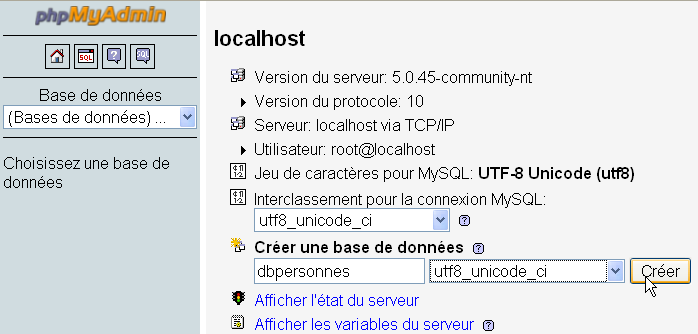
Creare un database [dbpersonnes]:
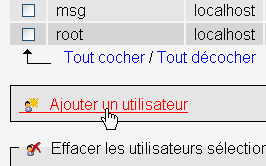
Creare un utente [admpersonnes] con la password [nobody]:
 |  |
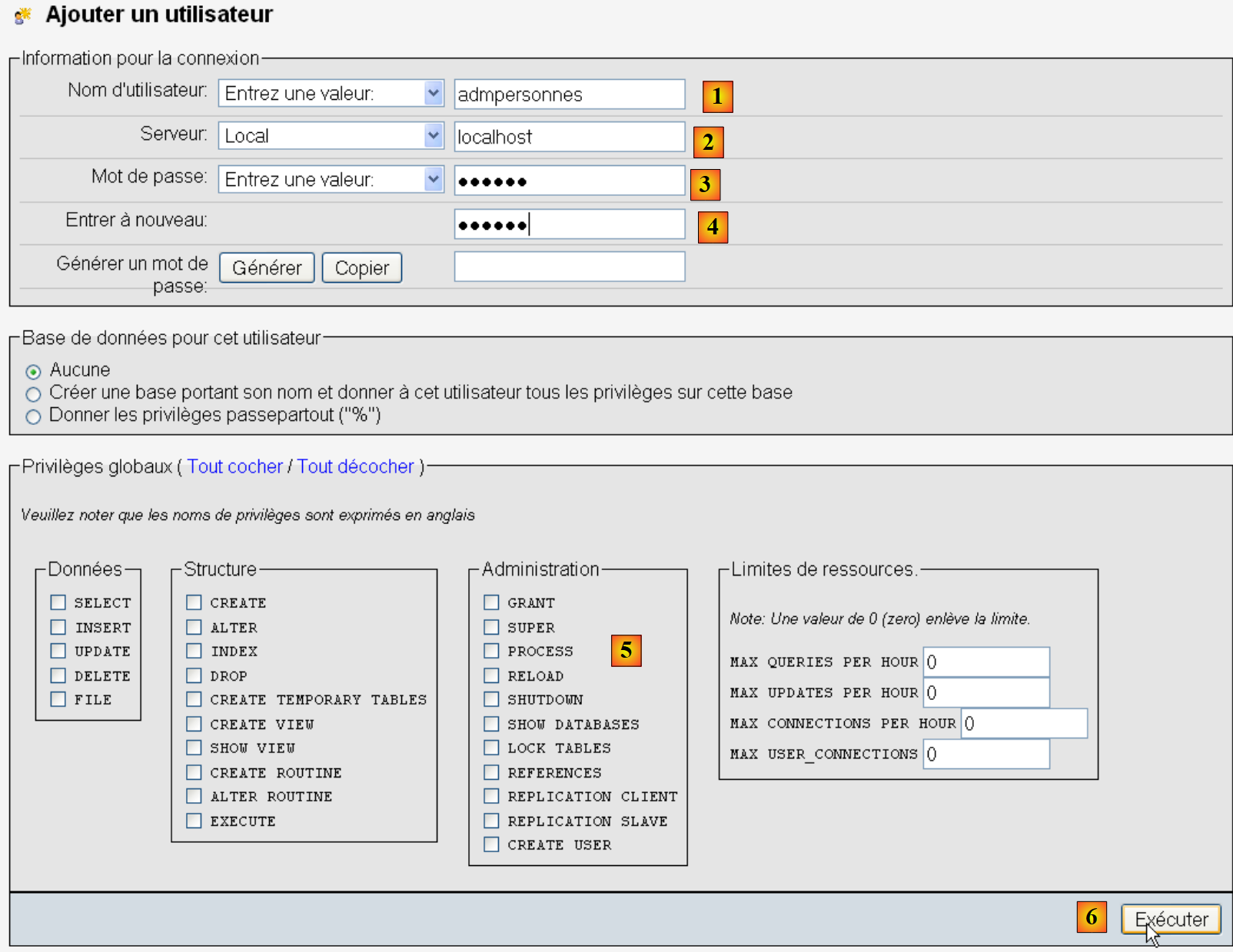 |
- in [1], il nome utente;
- in [2], il server DBMS su cui concedere le autorizzazioni;
- in [3], la loro password [nobody];
- in [4], come sopra;
- in [5], non concediamo alcun privilegio a questo utente;
- in [6], creare l'utente.
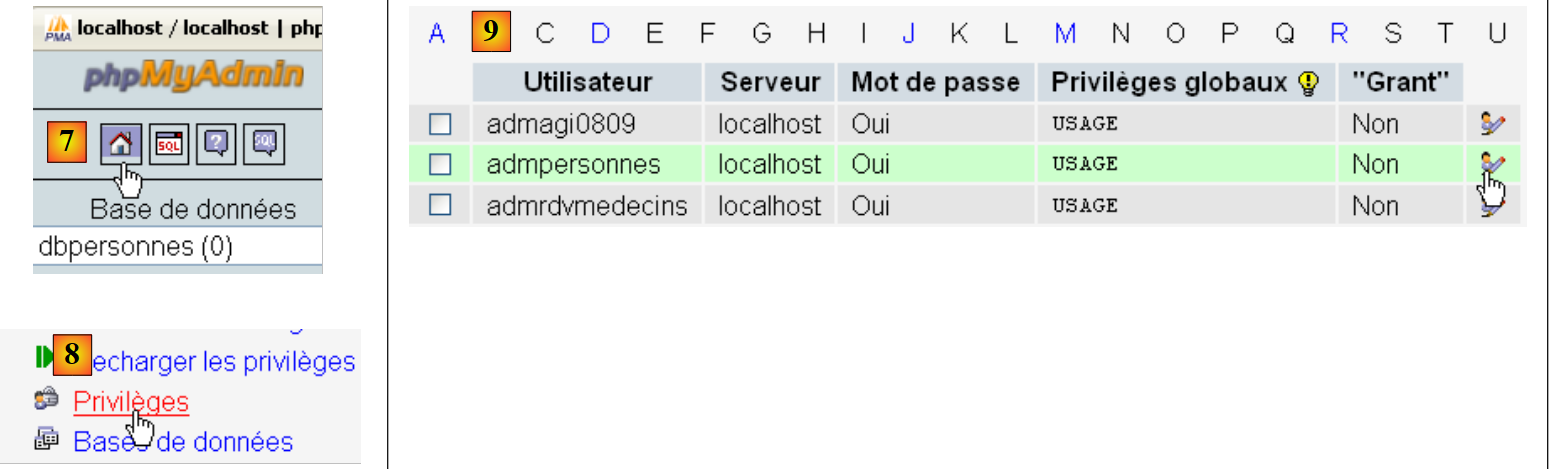 |
- in [7], tornare alla pagina iniziale di phpMyAdmin;
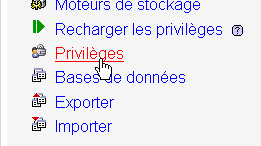
- in [8], utilizzare il link [Privilegi] in questa pagina per modificare i privilegi dell'utente [admpersonnes] [9].
 |
- in [10], specificare che si desidera concedere all'utente [admpersonnes] i diritti sul database [dbpersonnes];
- In [11], confermare la selezione.
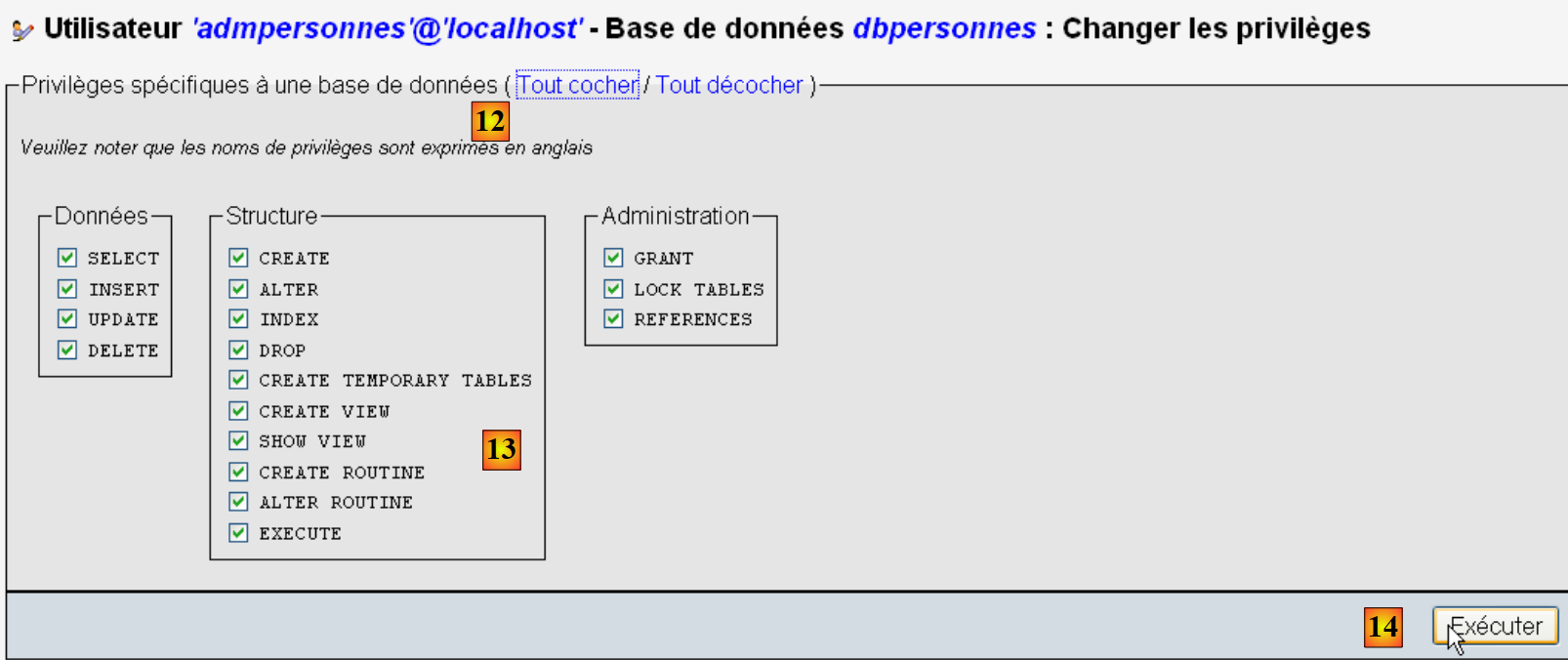 |
- Utilizzando il link [12] [Seleziona tutto], concedere all'utente [admpersonnes] tutti i diritti sul database [dbpersonnes] [13];
- Confermiamo in [14].
Ora abbiamo:
- un database MySQL [dbpersonnes];
- un utente [admpersonnes / nobody] che ha pieno accesso a questo database.
Scriveremo degli script Python per lavorare con il database.
9.3. Connessione a un database MySQL - 1
# import du module MySQLdb
import sys
sys.path.append("D:\Programs\ActivePython\site-packages")
import MySQLdb

# connexion à une base MySQL
....
Note:
- Righe 2–4: Gli script contenenti operazioni con il DBMS MySQL devono importare il modulo MySQLdb. Ricordiamo che abbiamo installato questo modulo nella cartella [%APPDATA%\Python]. La cartella [%APPDATA%\Python] viene cercata automaticamente quando uno script Python richiede un modulo. Infatti, vengono cercate tutte le cartelle elencate in sys.path. Ecco un esempio che mostra queste cartelle:
L'output sullo schermo è il seguente:
Riga 8, la cartella [site-packages] in cui era originariamente installato MySQLdb. Stiamo spostando la cartella [site-packages], dove l'utilità pypm installa i moduli Python. Per aggiungere una nuova cartella in cui Python cercherà i moduli, la aggiungiamo all'elenco sys.path:
# import du module MySQLdb
import sys
sys.path.append("D:\Programs\ActivePython\site-packages")
import MySQLdb
# connexion à une base MySQL
....
Alla riga 3, aggiungiamo la cartella in cui è stato spostato il modulo MySQLdb.
Il codice completo dell'esempio è il seguente:
# import du module MySQLdb
import sys
sys.path.append("D:\Programs\ActivePython\site-packages")
import MySQLdb
# connexion à une base MySQL
# l'identité de l'utilisateur est (admpersonnes,nobody)
user="admpersonnes"
pwd="nobody"
host="localhost"
connexion=None
try:
print "connexion..."
# connexion
connexion=MySQLdb.connect(host=host,user=user,passwd=pwd)
# suivi
print "Connexion a MySQL reussie sous l'identite host={0},user={1},passwd={2}".format(host,user,pwd)
except MySQLdb.OperationalError,message:
print "Erreur : {0}".format(message)
finally:
try:
connexion.close()
except:
pass
- righe 8–11: lo script connetterà (riga 15) l'utente [admpersonnes / nobody] al database MySQL sulla macchina [localhost]. Non si connette a un database specifico;
- righe 12–24: la connessione potrebbe fallire. Pertanto, è racchiusa in un blocco try/except/finally;
- riga 15: il metodo connect del modulo MySQLdb accetta vari parametri denominati:
- user: l'utente titolare della connessione [admpersonnes];
- pwd: la password dell'utente [nobody];
- host: la macchina su cui è in esecuzione il DBMS MySQL [localhost];
- db: il database a cui connettersi. Opzionale.
- riga 18: se viene generata un'eccezione, questa è di tipo [MySQLdb.OperationalError] e il messaggio di errore associato si troverà nella variabile [message];
- righe 20–23: nella clausola [finally], la connessione viene chiusa. Se si verifica un'eccezione, questa viene intercettata (riga 23) ma non viene intrapresa alcuna azione (riga 24).
connexion...
Connexion a MySQL reussie sous l'identite host=localhost,user=admpersonnes,passwd=nobody
9.4. Connessione a un database MySQL - 2
Note:
- righe 7–15: una funzione che tenta di connettere e poi disconnettere un utente da un DBMS MySQL. Visualizza il risultato;
- righe 18–34: programma principale – chiama due volte il metodo testConnection e visualizza eventuali eccezioni.
9.5. Creazione di una tabella MySQL
Ora che sappiamo come stabilire una connessione con un DBMS MySQL, inizieremo a eseguire comandi SQL tramite questa connessione. Per farlo, ci collegheremo al database creato [dbpersonnes] e useremo la connessione per creare una tabella nel database.
# import du module MySQLdb
import sys
sys.path.append("D:\Programs\ActivePython\site-packages")
import MySQLdb
# ---------------------------------------------------------------------------------
def executeSQL(connexion,update):
# exécute une requête update de mise à jour sur la connexion
# on demande un curseur
curseur=connexion.cursor()
# exécute la requête sql sur la connexion
try:
curseur.execute(update)
connexion.commit()
except Exception, erreur:
connexion.rollback()
raise
finally:
curseur.close()
# ---------------------------------------------- main
# connexion à la base MySQL
# l'identité de l'utilisateur
ID="admpersonnes"
PWD="nobody"
# la machine hôte du sgbd
HOTE="localhost"
# identité de la base
BASE="dbpersonnes"
# connexion
try:
connexion=MySQLdb.connect(host=HOTE,user=ID,passwd=PWD,db=BASE)
except MySQLdb.OperationalError,message:
print message
sys.exit()
# suppression de la table personnes si elle existe
# si elle n'existe pas une erreur se produira
# on l'ignore
requete="drop table personnes"
try:
executeSQL(connexion,requete)
except:
pass
# création de la table personnes
requete="create table personnes (prenom varchar(30) NOT NULL, nom varchar(30) NOT NULL, age integer NOT NULL, primary key(nom,prenom))"
try:
executeSQL(connexion,requete)
except MySQLdb.OperationalError,message:
print message
sys.exit()
# on se deconnecte et on quitte
try:
connexion.close()
except MySQLdb.OperationalError,message:
print message
sys.exit()
Note:
- riga 7: la funzione executeSQL esegue una query SQL su una connessione aperta;
- riga 10: le operazioni SQL sulla connessione vengono eseguite tramite uno speciale oggetto chiamato cursore;
- Riga 10: Ottenere un cursore;
- riga 13: eseguire la query SQL;
- riga 14: la transazione corrente viene confermata;
- riga 15: se si verifica un'eccezione, il messaggio di errore viene memorizzato nella variabile error;
- riga 16: la transazione corrente viene annullata;
- riga 17: l'eccezione viene rilanciata;
- riga 19: indipendentemente dalla presenza o meno di un errore, il cursore viene chiuso. Ciò libera le risorse ad esso associate.
create table personnes (prenom varchar(30) NOT NULL, nom varchar(30) NOT NULL, age integer NOT NULL, primary key(nom,prenom)) : requete reussie
Verifica con phpMyAdmin:
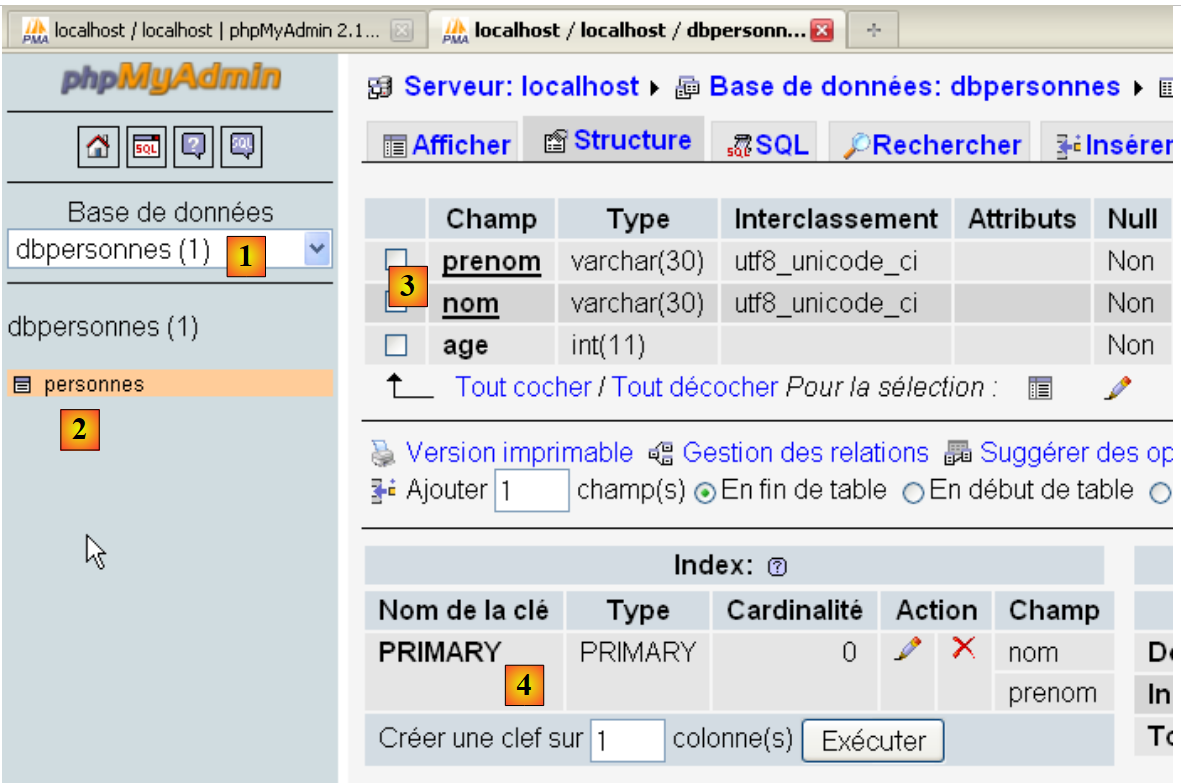 |
- Il database [dbpersonnes] [1] contiene una tabella [personnes] [2] con la struttura [3] e la chiave primaria [4].
9.6. Compilazione della tabella [people]
Dopo aver creato in precedenza la tabella [people], ora la popoliamo.
Il file sql.txt:
Nella riga 5 è stato inserito intenzionalmente un errore.
Risultati sullo schermo:
drop table personnes : Execution reussie
create table personnes (prenom varchar(30) not null, nom varchar(30) not null, age integer not null, primary key (nom,prenom)) : Execution reussie
insert into personnes values('Paul','Langevin',48) : Execution reussie
insert into personnes values ('Sylvie','Lefur',70) : Execution reussie
xx : Erreur ((1064, "You have an error in your SQL syntax; check the manual that corresponds to your MySQL server version for the right syntax to use near 'xx' at
line 1"))
insert into personnes values ('Pierre','Nicazou',35) : Execution reussie
insert into personnes values ('Geraldine','Colou',26) : Execution reussie
insert into personnes values ('Paulette','Girond',56) : Execution reussie
il y a eu 1 erreur(s)
xx : Erreur ((1064, "You have an error in your SQL syntax; check the manual that corresponds to your MySQL server version for the right syntax to use near 'xx' at line 1"))
Verifica con phpMyAdmin:
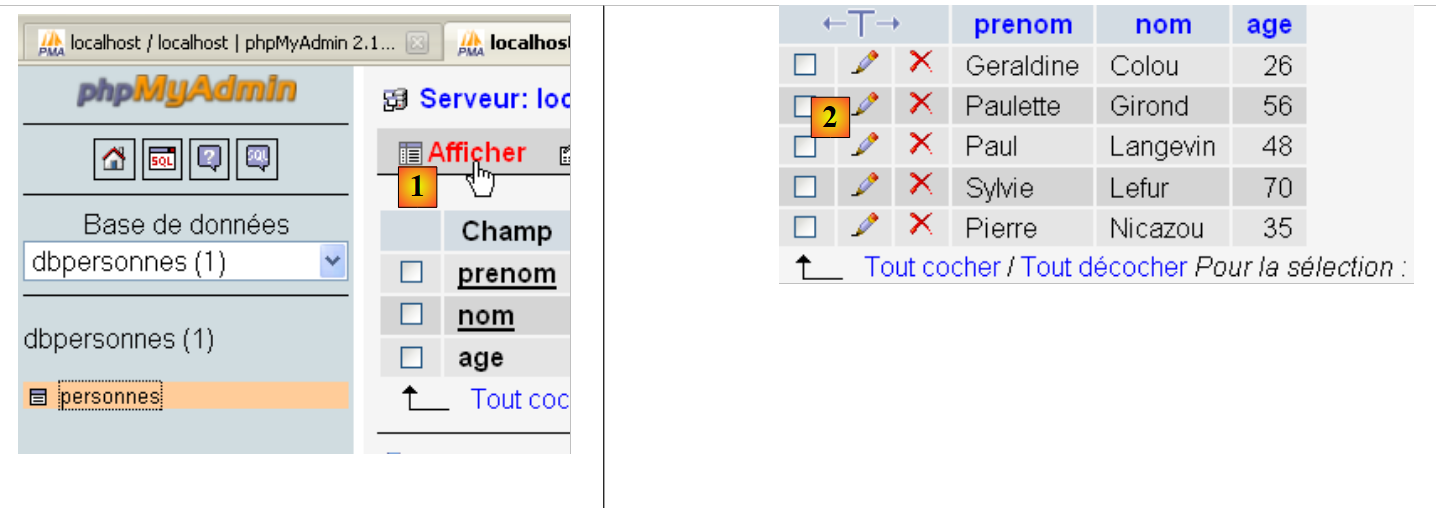
- In [1], il link [Visualizza] consente di visualizzare il contenuto della tabella [people] [2].
9.7. Esecuzione di query SQL arbitrarie
Il seguente script consente di eseguire un file di comandi SQL e visualizzare il risultato di ciascuno:
- il risultato del SELECT se il comando è un SELECT;
- il numero di righe modificate se il comando è INSERT, UPDATE o DELETE.
1 2 3 4 5 6 7 8 9 10 11 12 13 14 15 16 17 18 19 20 21 22 23 24 25 26 27 28 29 30 31 32 33 34 35 36 37 38 39 40 41 42 43 44 45 46 47 48 49 50 51 52 53 54 55 56 57 58 59 60 61 62 63 64 65 66 67 68 69 70 71 72 73 74 75 76 77 78 79 80 81 82 83 84 85 86 87 88 89 90 91 92 93 94 95 96 97 98 99 100 101 102 103 104 105 106 107 108 109 110 111 112 113 114 115 116 117 118 119 120 121 122 123 124 125 126 127 128 129 130 131 132 133 134 135 136 137 | |
Note:
- La nuova funzionalità si trova alla riga 100 dello script: dopo aver eseguito un'istruzione SQL, richiediamo informazioni sul cursore utilizzato da quella query. Queste informazioni sono fornite dalla funzione displayInfo alle righe 16–40;
- Righe 19 e 39: se la query SQL eseguita era un SELECT, l'attributo [cursor.description] è un array in cui l'elemento i descrive il campo i del risultato SELECT. Altrimenti, l'attributo [cursor.rowcount] (riga 39) è il numero di righe modificate dalla query INSERT, UPDATE o DELETE;
- righe 32 e 36: il metodo [cursor.fetchone] recupera la riga corrente del SELECT. Esiste un metodo [cursor.fetchall] che recupera tutte le righe in una volta sola.
Il file delle query eseguite:
Risultati sullo schermo:
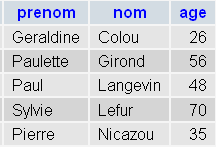
Verifica PhpMyAdmin:
 |