18. Scrivere codice indipendente dal DBMS
Abbiamo visto in precedenza che in alcuni casi era possibile migrare facilmente il codice Python scritto per il DBMS MySQL verso il codice scritto per il DBMS PostgreSQL. In questo capitolo mostriamo come sistematizzare questo approccio. L'architettura proposta è la seguente:
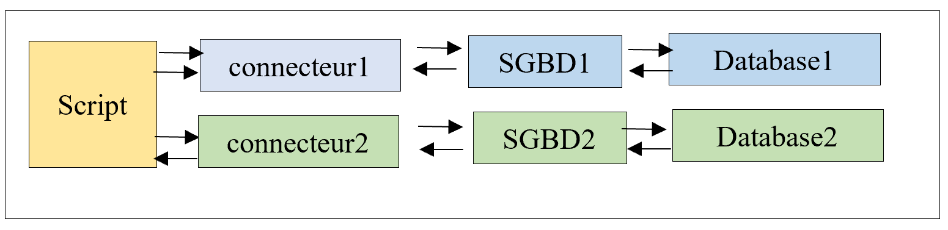
Vogliamo che la scelta del connettore — e quindi del DBMS — avvenga tramite configurazione e non richieda la riscrittura dello script. Si noti che ciò è possibile solo nei casi in cui lo script non utilizzi estensioni proprietarie del DBMS.
La struttura della directory dello script sarà la seguente:
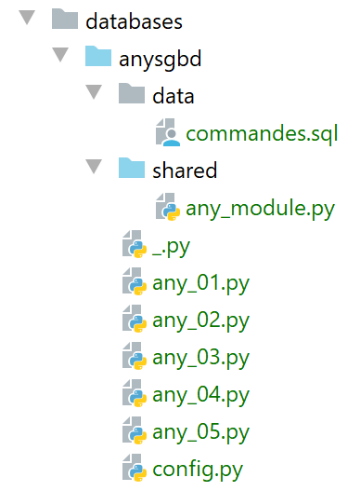
Gli script [any_xx] si basano sugli script già trattati per i DBMS MySQL e PostgreSQL. Non li esamineremo tutti. Ci concentreremo sullo script [any_04], che è il più complesso. Si noti che questo script esegue i comandi SQL dal seguente file [data/commandes.sql]:
# suppression de la table [personnes]
drop table if exists personnes
# création de la table personnes
create table personnes (id int primary key, prenom varchar(30) not null, nom varchar(30) not null, age integer not null, unique (nom,prenom))
# insertion de deux personnes
insert into personnes(id, prenom, nom, age) values(1, 'Paul','Langevin',48)
insert into personnes(id, prenom, nom, age) values (2, 'Sylvie','Lefur',70)
# affichage de la table
select prenom, nom, age from personnes
# erreur volontaire
xx
# insertion de trois personnes
insert into personnes(id, prenom, nom, age) values (3, 'Pierre','Nicazou',35)
insert into personnes(id, prenom, nom, age) values (4, 'Geraldine','Colou',26)
insert into personnes(id, prenom, nom, age) values (5, 'Paulette','Girond',56)
# affichage de la table
select prenom, nom, age from personnes
# liste des personnes par ordre alphabétique des noms et à nom égal par ordre alphabétique des prénoms
select nom,prenom from personnes order by nom asc, prenom desc
# liste des personnes ayant un âge dans l'intervalle [20,40] par ordre décroissant de l'âge
# puis à âge égal par ordre alphabétique des noms et à nom égal par ordre alphabétique des prénoms
select nom,prenom,age from personnes where age between 20 and 40 order by age desc, nom asc, prenom asc
# insertion de mme Bruneau
insert into personnes(id, prenom, nom, age) values(6, 'Josette','Bruneau',46)
# mise à jour de son âge
update personnes set age=47 where nom='Bruneau'
# liste des personnes ayant Bruneau pour nom
select nom,prenom,age from personnes where nom='Bruneau'
# suppression de Mme Bruneau
delete from personnes where nom='Bruneau'
# liste des personnes ayant Bruneau pour nom
select nom,prenom,age from personnes where nom='Bruneau'
Abbiamo modificato la riga 2 in modo che il comando si comporti allo stesso modo sia per il DBMS MySQL che per quello PostgreSQL se la tabella [people] non esiste.
Lo script [any_04] è configurato dal seguente script [config.py]:
Le nuove modifiche si trovano alle righe 18–43:
- riga 20: [sgbds] è un dizionario con due chiavi: [mysql] alla riga 21 e [postgresql] alla riga 32;
- il valore associato a queste chiavi è un dizionario contenente gli elementi necessari per connettersi a un DBMS:
- righe 21–32: gli elementi per connettersi al DBMS MySQL;
- riga 23: il connettore Python da utilizzare;
- riga 25: il modulo contenente le funzioni condivise;
- righe 26–30: le credenziali di connessione;
- righe 32–41: gli stessi elementi per una connessione al DBMS PostgreSQL;
Lo script [any_04] che esegue il file di comandi SQL [data/commandes.sql] è il seguente:
Commenti
- righe 1-4: recupero della configurazione dell'applicazione [config];
- righe 10-21: lo script viene chiamato con due parametri [db_name with_transaction]:
- [db_name]: il nome del sistema di gestione del database da utilizzare;
- [with_transaction]: True se si desidera eseguire lo script SQL all'interno di una transazione, False in caso contrario;
- righe 10–25: i parametri vengono recuperati e verificati;
- riga 28: configurazione del DBMS selezionato;
- riga 30: viene importato il connettore per il DBMS selezionato. A tal fine, viene utilizzata la libreria [importlib] (riga 7), che consente di importare un modulo il cui nome è memorizzato in una variabile. Il risultato dell'operazione [importlib.import_module] è un modulo. Pertanto, dopo la riga 30, tutto procede come se l'istruzione eseguita fosse stata:
Questo ci permette di scrivere [sgbd_connector.connect] alla riga 52, dove usiamo la funzione [connect] del modulo [sgbd_connector]. È importante ricordare qui che [sgbd_connector] è o [mysql.connector] o [psycopg2]. Entrambi questi moduli hanno la funzione [connect]. Allo stesso modo, alla riga 60, possiamo scrivere [sgbd_connector.InterfaceError, sgbd_connector.DatabaseError].
- Riga 32: importiamo il modulo contenente le funzioni utilizzate dallo script;
- Riga 58: Viene chiamata la funzione [execute_file_of_commands] dal modulo contenente le funzioni utilizzate dallo script. Rispetto alle versioni precedenti, la firma di questa funzione ha un parametro in più: il primo. Passiamo il connettore Python [sgbd_connector] alla funzione affinché lo utilizzi;
- A parte questi punti, lo script [any_04] rimane invariato rispetto alle versioni precedenti;
La libreria di funzioni [any_module] è la seguente:
Il parametro [sgbd_connector] è stato utilizzato alla riga 31 per specificare il tipo di eccezioni intercettate.
L'esecuzione dello script [any_04] con i parametri [mysql false] produce i seguenti risultati:
C:\Data\st-2020\dev\python\cours-2020\python3-flask-2020\venv\Scripts\python.exe C:/Data/st-2020/dev/python/cours-2020/python3-flask-2020/databases/anysgbd/any_04.py mysql false
--------------------------------------------------------------------
Exécution du fichier SQL C:\Data\st-2020\dev\python\cours-2020\python3-flask-2020\databases\anysgbd/data/commandes.sql sans transaction
--------------------------------------------------------------------
[drop table if exists personnes] : Exécution réussie
nombre de lignes modifiées : 0
[create table personnes (id int primary key, prenom varchar(30) not null, nom varchar(30) not null, age integer not null, unique (nom,prenom))] : Exécution réussie
nombre de lignes modifiées : 0
[insert into personnes(id, prenom, nom, age) values(1, 'Paul','Langevin',48)] : Exécution réussie
nombre de lignes modifiées : 1
[insert into personnes(id, prenom, nom, age) values (2, 'Sylvie','Lefur',70)] : Exécution réussie
nombre de lignes modifiées : 1
[select prenom, nom, age from personnes] : Exécution réussie
prenom, nom, age,
*****************
('Paul', 'Langevin', 48)
('Sylvie', 'Lefur', 70)
*****************
xx : Erreur (1064 (42000): You have an error in your SQL syntax; check the manual that corresponds to your MySQL server version for the right syntax to use near 'xx' at line 1)
[insert into personnes(id, prenom, nom, age) values (3, 'Pierre','Nicazou',35)] : Exécution réussie
nombre de lignes modifiées : 1
[insert into personnes(id, prenom, nom, age) values (4, 'Geraldine','Colou',26)] : Exécution réussie
nombre de lignes modifiées : 1
[insert into personnes(id, prenom, nom, age) values (5, 'Paulette','Girond',56)] : Exécution réussie
nombre de lignes modifiées : 1
[select prenom, nom, age from personnes] : Exécution réussie
prenom, nom, age,
*****************
('Paul', 'Langevin', 48)
('Sylvie', 'Lefur', 70)
('Pierre', 'Nicazou', 35)
('Geraldine', 'Colou', 26)
('Paulette', 'Girond', 56)
*****************
[select nom,prenom from personnes order by nom asc, prenom desc] : Exécution réussie
nom, prenom,
************
('Colou', 'Geraldine')
('Girond', 'Paulette')
('Langevin', 'Paul')
('Lefur', 'Sylvie')
('Nicazou', 'Pierre')
************
[select nom,prenom,age from personnes where age between 20 and 40 order by age desc, nom asc, prenom asc] : Exécution réussie
nom, prenom, age,
*****************
('Nicazou', 'Pierre', 35)
('Colou', 'Geraldine', 26)
*****************
[insert into personnes(id, prenom, nom, age) values(6, 'Josette','Bruneau',46)] : Exécution réussie
nombre de lignes modifiées : 1
[update personnes set age=47 where nom='Bruneau'] : Exécution réussie
nombre de lignes modifiées : 1
[select nom,prenom,age from personnes where nom='Bruneau'] : Exécution réussie
nom, prenom, age,
*****************
('Bruneau', 'Josette', 47)
*****************
[delete from personnes where nom='Bruneau'] : Exécution réussie
nombre de lignes modifiées : 1
[select nom,prenom,age from personnes where nom='Bruneau'] : Exécution réussie
nom, prenom, age,
*****************
*****************
--------------------------------------------------------------------
Exécution terminée
--------------------------------------------------------------------
Il y a eu 1 erreur(s)
xx : Erreur (1064 (42000): You have an error in your SQL syntax; check the manual that corresponds to your MySQL server version for the right syntax to use near 'xx' at line 1)

Process finished with exit code 0