3. The Basics of VBSCRIPT Programming
After describing the possible execution contexts for a vbscript script, we will now discuss the language itself. For the remainder of this section, we will assume the following conditions:
- the script container is WSH
- The script is saved in a file with the .vbs extension
To introduce a concept, we generally proceed as follows:
- we introduce the concept if necessary
- we present an illustrative program along with its results
- we comment on the results and the program if necessary
The vbscript containers are not case-sensitive (upper/lowercase) in the script text. Therefore, you can write either wscript.echo "hello" or WSCRIPT.ECHO "hello".
The programs presented below perform a lot of screen output, so we will revisit the writing methods of the wscript object.
3.1. Displaying Information
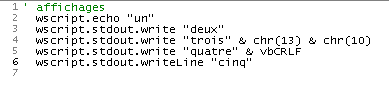
We have already used the wscript object’s echo method, but it has other methods for writing to the screen, as shown in the following script:
Program | Results |
 |
Note the following points:
- Any text placed after an apostrophe is considered a comment in the script and is not interpreted by WSH (line 1).
- The echo method prints its arguments and moves to the next line, as does the writeLine method (lines 2 and 6)
- The write method writes its arguments and does not move to the next line (line 3)
- A line break is represented by the sequence of two characters with codes ASCII 13 and 10. Thus, line 4 is represented by the expression chr(13) & chr(10), where chr(i) is the character with code ASCII i and & is the string concatenation operator. Thus, "chat" & "eau" is the string "chateau".
- The end-of-line character can be represented more easily by the constant vbCRLF (line 5)
3.2. E Writing instructions in a script Vbscript
By default, one instruction is written per line. However, multiple instructions can be written on a single line by separating them with the character :, as in inst1:inst2:inst3. If a line is too long, it can be split into parts. In this case, the different parts of the instruction must be terminated by the two characters (space)_. Let’s revisit the previous example by rewriting the instructions differently:
Program | Results |
 |
3.3. Writing with the msgBox function
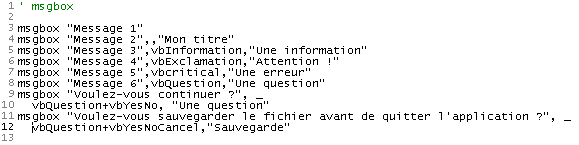
While in this document we use the wscript object almost exclusively to write to the screen, there is a more sophisticated function for displaying information in a window. This is the msgbox function, which is generally used with three parameters:
msgbox message, icons+buttons, title
- message is the text of the message to be displayed
- icons+buttons (optional) is actually a number that specifies the type of icon and the buttons to place in the message window. This number is most often the sum of two numbers: the first determines the icon, the second the buttons
- title is the text to be placed in the title bar of the message window
The values to use to specify the icon and buttons in the display window are as follows:
Constant | Value | Description |
vbOKOnly | 0 | Displays only the OK button. |
vbOKCancel | 1 | Displays the OK and Cancel buttons. |
vbAbortRetryIgnore | 2 | Displays the Abort, Retry, and Skip buttons. |
vbYesNoCancel | 3 | Displays the Yes, No, and Cancel buttons. |
vbYesNo | 4 | Displays the Yes and No buttons. |
vbRetryCancel | 5 | Displays the Retry and Cancel buttons. |
vbCritical | 16 | Displays the Critical Message icon. |
vbQuestion | 32 | Displays the Warning Request icon. |
vbExclamation | 48 | Displays the Warning Message icon. |
vbInformation | 64 | Displays the Information Message icon. |
vbDefaultButton1 | 0 | The first button is the default button. |
vbDefaultButton2 | 256 | The second button is the default button. |
vbDefaultButton3 | 512 | The third button is the default button. |
vbDefaultButton4 | 768 | The fourth button is the default button. |
vbApplicationModal | 0 | Modal application; the user must respond to the message before continuing to work in the current application. |
vbSystemModal | 4096 | Modal system; all applications are suspended until the user responds to the message. |
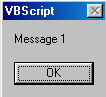
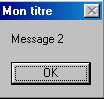
Here are some examples:
Program | ||||||||||||||||||||||||
 | ||||||||||||||||||||||||
Results | ||||||||||||||||||||||||
| ||||||||||||||||||||||||
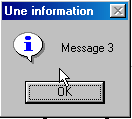
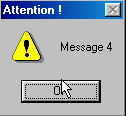
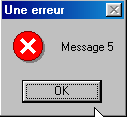
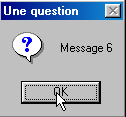
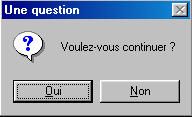
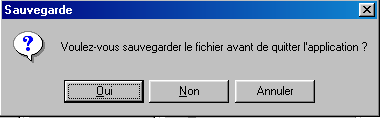
In some cases, an information window is displayed that also serves as an input window. If a question is asked, for example, we want to know whether the user clicked the Yes button or the No button. The function msgBox returns a result that we did not use in the previous program. This result is an integer representing the button used by the user to close the display window:
Constant | Value | Selected button |
vbOK | 1 | OK |
vbCancel | 2 | Cancel |
vbAbort | 3 | Withdrawal |
vbRetry | 4 | Try again |
vbIgnore | 5 | Skip |
vbYes | 6 | Yes |
vbNo | 7 | No |
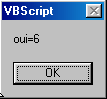
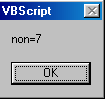
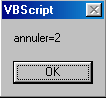
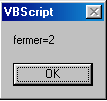
The following program demonstrates the use of the result of the msgBox function. A window with Yes, No, and Cancel buttons is displayed four times. The user responds as follows:
- Click Yes
- Click No
- Click Cancel
- close the window without using any button. The program shows that this is equivalent to using the Cancel button.
Program | ||||
 | ||||
Results | ||||
|
3.4. The " " data usable in Vbscript
VBscript recognizes only one data type: the variant. The value of a variant can be a number (4, 10.2), a string ("hello"), a Boolean (true/false), a date (#01/01/2002#), the address of an object, or a collection of all these data types placed in a structure called an array.
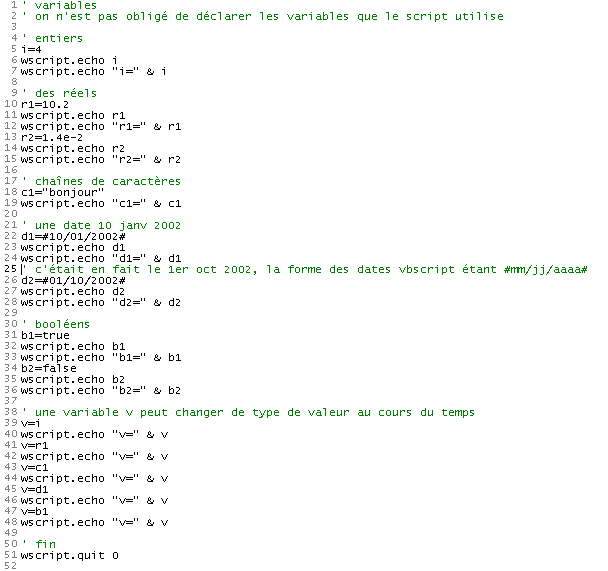
Let’s examine the following program and its results:
Program | Results |
 |
Comments:
- A number of programming languages (C, C++, Pascal, Java, C#, etc.) require that a variable be declared before it is used. This declaration involves specifying the variable’s name and the data type it can hold (integer, floating-point, string, date, boolean, etc.). Declaring variables allows you to:
- determining the memory space required for the variable, since different data types require different amounts of memory
- to verify the program’s consistency. For example, if `i` is an integer and `c` is a string, multiplying `i` by `c` makes no sense. If the types of variables `i` and `c` have been declared by the programmer, the program responsible for analyzing the code before execution can flag such an inconsistency.
Like most single-data-type scripting languages (Perl, Python, Javascript, ...), Vbscript allows variables to be omitted. This is what was done in the example above.
- Note the syntax of different data types
- 10.2 on line 10 (decimal point, not a comma). Note that 10.2 is displayed.
- 1.4e-2 on line 13 (scientific notation). On the display, the number 0.014 is shown
- [#01/10/2002#] (line 26) to represent the date January 10, 2002. vbscript therefore uses the format #mm/dd/yyyy# to represent the date dd of the month mm of the year yyyy
- the Booleans true and false in lines 31 and 34. These two values are represented respectively by the integers -1 and 0, as shown in lines 32 and 35. When a Boolean is concatenated with a string, these values become the strings "True" and "False," respectively, as shown in lines 33 and 36. Note that the concatenation operator & can be used to concatenate more than just strings.
- Since a variable v has no assigned type, it can successively hold values of different types over time.
3.5. L : Subtypes of the Variant Type
Here is what the official documentation says about the different data types a variant can contain:
Beyond the simple number/string distinction, a Variant can distinguish between different types of numeric information. For example, some numeric information represents a date or a time. When this information is used with other date or time data, the result is always expressed as a date or a time. You also have other types of numerical information, ranging from Boolean values to large floating-point numbers. These different categories of information that can be contained in a Variant are subtypes. In most cases, you simply place your data in a Variant, and it behaves in the most appropriate way based on that data.
The following table lists the different subtypes that can be contained within a Variant.
Subtype | Description |
Empty | The Variant is not initialized. Its value is zero for numeric variables and a null string ("") for string variables. |
Null | The Variant intentionally contains incorrect data. |
Boolean | |
Byte | Contains an integer from 0 to 255. |
Integer | Contains an integer from -32,768 to 32,767. |
Currency | -922,337,203,685,477.5808 to 922,337,203,685,477.5807. |
Long | Contains an integer from -2,147,483,648 to 2,147,483,647. |
Single | Contains a single-precision floating-point number ranging from -3.402823E38 to -1.401298E-45 for negative values; from 1.401298E-45 to 3.402823E38 for positive values. |
Double | Contains a double-precision floating-point number ranging from -1.79769313486232E308 to -4.94065645841247E-324 for negative values; from 4.94065645841247E-324 to 1.79769313486232E308 for positive values. |
Date (Time) | Contains a number representing a date between January 1, 100 and December 31, 9999. |
String | Contains a variable-length string limited to approximately 2 billion characters. |
Object | Contains an object. |
Error | Contains an error number. |
3.6. C Knowing the exact type of data contained in a variant
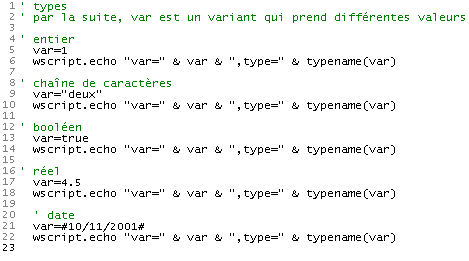
A variant-type variable can contain data of various types. Sometimes we need to know the exact nature of this data. If in a program we write product = number1 * number2, we assume that number1 and number2 are two numerical values. Sometimes we are not sure because these values may come from keyboard input, a file, or some external source. We must then verify the nature of the data stored in number1 and number2. The typename(var) function allows us to determine the data type contained in the variable var. Here are some examples:
Program | Results |
 |
Another possible function is vartype(var), which returns a number representing the type of the data contained in the variable var:
Constant | Value | Description |
vbEmpty | 0 | Empty (uninitialized) |
vbNull | 1 | Null (no valid data) |
vbInteger | 2 | Integer |
vbLong | 3 | Integer long |
vbSingle | 4 | Single-precision floating-point number |
vbDouble | 5 | Double-precision floating-point number |
vbCurrency | 6 | Currency |
vbDate | 7 | Date |
vbString | 8 | String |
vbObject | 9 | Automation Object |
vbError | 10 | Error |
vbBoolean | 11 | Boolean |
vbVariant | 12 | Variant (used only with Variant arrays) |
vbDataObject | 13 | Non-Automation Object |
vbByte | 17 | Byte |
vbArray | 8192 | Table |
Note These constants are specified by VBScript. Consequently, the names can be used anywhere in your code in place of the actual values.
The information above is taken from the documentation for VBscript. This documentation is sometimes incorrect, likely due to copy-pasting from the documentation for VB. The vartype function in VBScript performs only part of what is described above.
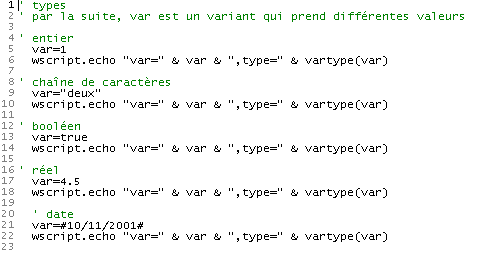
The previous program, rewritten for vartype, yields the following results:
Program | Results |
 |
3.7. D Declaring variables used by the script
We have noted that it is not mandatory to declare the variables used by the script. In this case, if we write:
1) somme=4
...
2) somme=smme+10
with a typo—using "smme" instead of "somme" in line 2—vbscript will not report any errors. It will assume that "smme" is a new variable. It will create it and, in the context of line 2, use it by initializing it to 0.
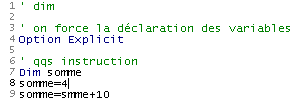
This type of error can be very difficult to find. Therefore, it is recommended to enforce variable declaration using the option explicit directive placed at the beginning of the script. Then, every variable must be declared with a dim statement before its first use:
option explicit
...
dim somme
1) somme=4
...
2) somme=smme+10
In this example, vbscript will indicate that there is an undeclared variable smme in 2), as shown in the following example:
Program | Results |
 |
While variables are mostly undeclared in the short examples in this document, we will enforce their declaration as soon as we write the first meaningful scripts. The Option explicit directive will then be used systematically.
3.8. 's conversion functions
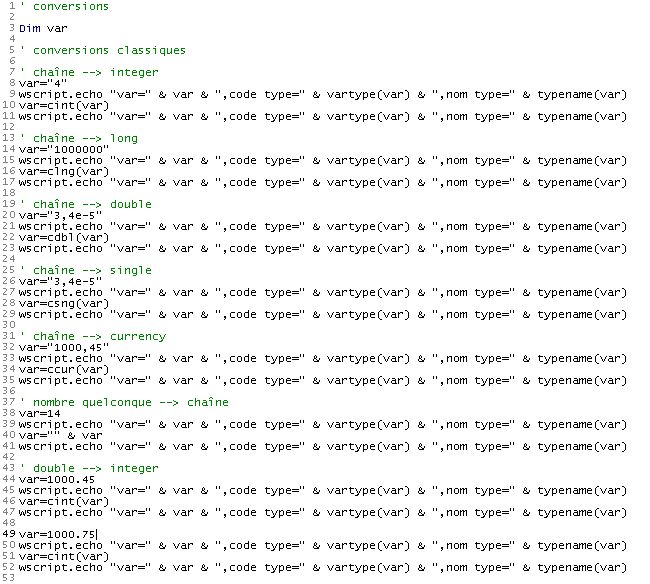
Vbscript converts variant data into strings, numbers, Booleans, etc., depending on the context. Most of the time, this works well, but sometimes it leads to a few surprises, as we will see later. You may then want to “force” the variant’s data type. VBscript has conversion functions that transform an expression into various data types. Here are a few of them:
Cint (expression) | converts expression to a short integer |
Clng (expression) | converts expression to a long integer (long) |
Cdbl (expression) | converts expression to a double |
Csng (expression) | converts expression to single-precision real (single) |
Ccur (expression) | converts expression to currency |
Here are a few examples:
Program |
 |
Results |
|
3.9. L s data typed on the keyboard
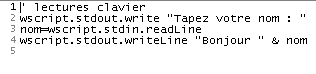
The wscript object allows a script to retrieve data entered via the keyboard. The wscript.stdin.readLine method reads a line of text entered via the keyboard and confirmed by pressing the "Enter" key. This read line can be assigned to a variable.
Program | Results |
 | |
Comments:
- In the results column and in the row [Tapez votre nom : st], "st" is the text entered by the user.
If the text typed on the keyboard represents a number, it is still treated primarily as a string of characters, as shown in the example below:
Program | Results |
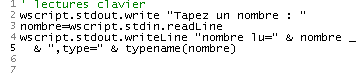 |
If this number is used in an arithmetic operation, VBscript will automatically convert the string to a number, but not always. Let's look at the following example:
Program | Results |
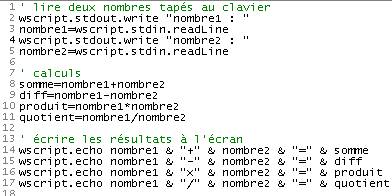 |
In the results, we see that line 8 of the script did not run as expected, because (unfortunately) in vbscript the + operator has two meanings: addition of two numbers or concatenation of two strings (the two strings are joined together). We saw earlier that numbers typed on the keyboard were read as character strings and that vbscript converted these into numbers as needed. It did this correctly for the operations -, *, /, which can only involve numbers, but not for the + operator, which can also involve strings. Here, it assumed that we wanted to concatenate strings.
A simple solution to this problem is to convert the strings into numbers as soon as they are read, as shown in the following improvement to the previous program:
Program | Results |
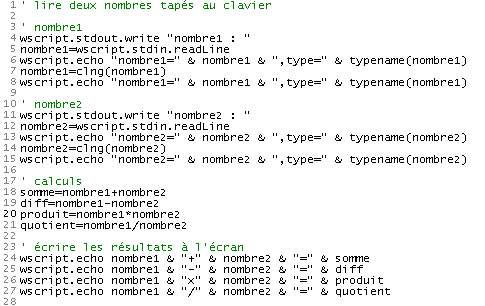 |
3.10. S Entering data with the inputbox function
You may want to enter data via a graphical interface rather than the keyboard. In that case, use the inputBox function. This function accepts many parameters, but only the first two are frequently used:
response=inputBox(message,title)
- message: the question you ask the user
- title (optional): the title you give to the input window
- response: the text typed by the user. If the user closed the window without answering, response is an empty string.
Here is an example where we ask for a person’s name and age. For the name, we provide information and call OK. For the age, we also provide information but call Cancel.
Program | ||||
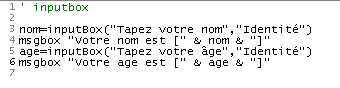 | ||||
Results | ||||
|
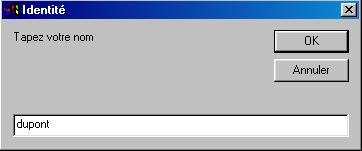
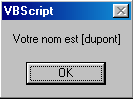
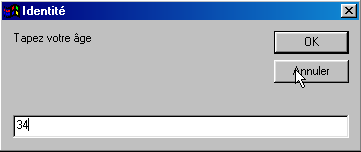
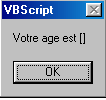
3.11. U sing structured objects
It is possible to create objects with methods and properties using vbscript. To keep things simple, we will present here an object with properties but no methods. Consider a person. They have many properties that characterize them: height, weight, skin color, eye color, hair color, ... We will focus on just two: their name and age. Before we can use objects, we must create the template that will allow us to build them. This is done in vbscript using a class. The Person class could be defined as follows:
class personne
    Dim nom,age
End class
It is the [Dim nom,age] statement that defines the two properties of the Person class. To create copies (known as instances) of the Person class, we write:
Why not write
Because a variant cannot contain an object. It can only contain the object’s address. When you write set person1 = new person, the following sequence of events occurs:
- A Person object is created. This means that memory is allocated to it.
- The address of this person object is assigned to the person1 variable
We then have the following memory layout for the variables person1 and person2:
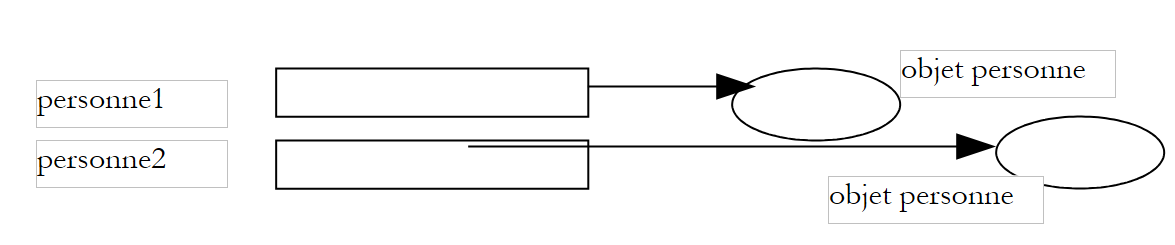 |
Strictly speaking, we could say that person1 is a person object. We can accept this loose usage if we remember that person1 is actually the address of a person object, not the person object itself.
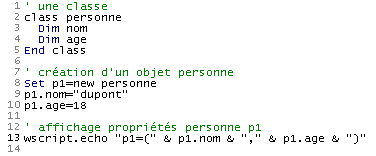
We said that a person object has two properties: name and age. How do we access these properties? Using the notation objet.propriété, as explained earlier. Thus
personne1.nom refers to the name of person 1 and personne1.age to their age. Here is a short program to illustrate this:
Program | Results |
 |
The previous program could be modified as follows:
Program | Results |
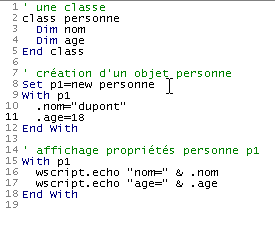 |
Here we used the with ... end with structure, which allows us to "factor out" object names in expressions. The structure with p1 ... end with in lines 9–12 and 15–18 allows us to use the syntax .name instead of p1.nom and .age instead of p1.age. This simplifies the writing of instructions where the same object name is used repeatedly.
3.12. Assigning a value to a variable
There are two statements for assigning a value to a variable:
- variable=expression
- set variable=expression
Form 2 is reserved for expressions whose result is an object reference. For all other types of expressions, form 1 is appropriate. The difference between the two forms is as follows:
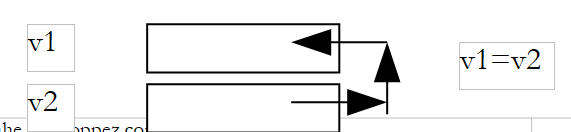
- In the statement variable=expression, variable receives a value. If v1 and v2 are two variables, writing v1=v2 assigns the value of v1 to v2. This results in the duplication of a value in two different locations. If the value of v2 is subsequently modified, the value of v1 remains unchanged.
 |
- In the statement `set variable=expression`, `variable` is assigned the address of an object. If `v1` and `v2` are two variables and `v2` is the address of an object `obj2`, writing `set v1=v2` assigns the value of `v1` to `v2`, i.e., the address of the object `obj2`. When the script subsequently manipulates v1 and v2, it is not the "values" of v1 and v2 that are being manipulated, but rather the objects "pointed to" by v1 and v2—in this case, the same object. We say that v1 and v2 are two references to the same object, and manipulating it via v1 or v2 makes no difference. In other words, modifying the object referenced by v2 modifies the one referenced by v1.
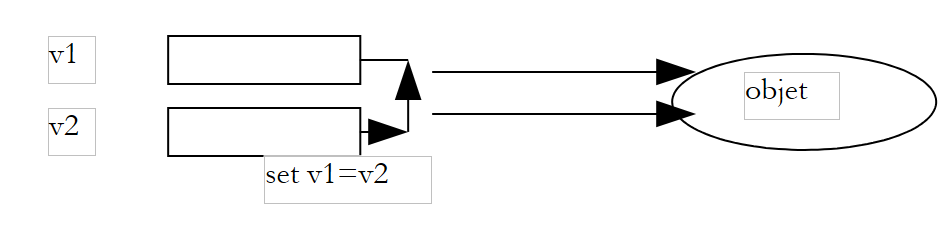 |
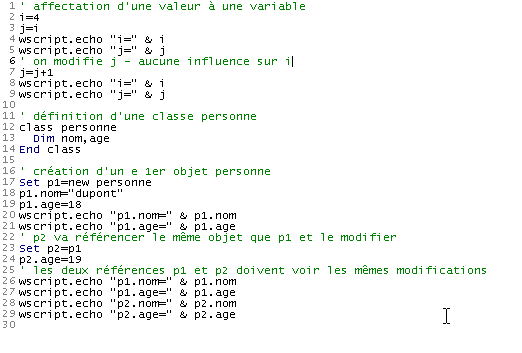
Here is an example:
Program | Results |
 |
3.13. E valuating expressions
The main operators used to evaluate expressions are as follows:
Type of operators | Operators | Example |
Arithmetic | +,-,*,/ | |
Comparison | <, <= >, >= =,<> | a<>b is true if a is not equal to b a=b is true if a is equal to b a and b can both be numbers or both be strings. In the latter case, string1<string2 if string1 comes before string2 in alphabetical order. In string comparison, uppercase letters come before lowercase letters in alphabetical order. |
Logic | and, or, not, xor | All operands here are Boolean. bool1 or bool2 is true if bool1 or bool2 is true bool1 and bool2 is true if both bool1 and bool2 are true not bool1 is true if bool1 is false, and vice versa bool1 xor bool2 is true if only one of the Booleans bool1 or bool2 is true |
Concatenation | &, + | It is not recommended to use the + operator to concatenate two strings due to the potential confusion with the addition of two numbers. Therefore, the & operator should be used exclusively. |
3.14. C : Controlling Program Execution
3.14.1. E xecute actions conditionally
The vbscript statement, which allows you to perform actions based on whether a condition is true or false, is as follows:
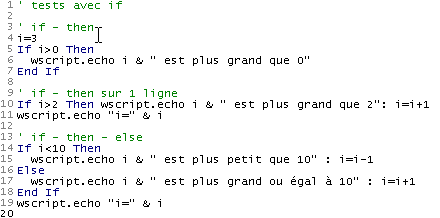
The expression is evaluated first. This expression must have a Boolean value. If it evaluates to true, the actions in the then block are executed; otherwise, the actions in the else block are executed, if present. |
Here is a program demonstrating different variations of the if-then-else statement:
Program | Results |
 |
Comments:
- In vbscript, you can write instruction1:instruction2:... : instructionn instead of writing one instruction per line. This feature is used in line 10, for example.
3.14.2. E xecute actions repeatedly
Loop with a known number of iterations |
You can exit a for loop at any time using the exit for statement. |
Loop with an unknown number of iterations |
You can exit a do-while loop at any time using the exit do statement. |
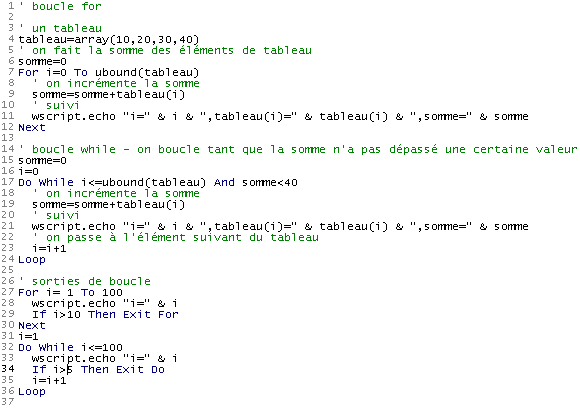
The program below illustrates these points:
Program |
 |
Results |
Note: During the development phase of a program, it is not uncommon for a program to "loop," c.a.d, meaning it never stops. Generally, the program executes a loop whose exit condition cannot be verified, as in the following example:
' infinite loop
i=0
Do While 1=1
  i=i+1
  wscript.echo i
Loop

' another of the same kind
i=0
Do While true
  i=i+1
  wscript.echo i
Loop
If you run the previous program, the first loop will never stop on its own. You can force it to stop by pressing CTRL-C on the keyboard (hold down the CTRL and C keys at the same time).
3.14.3. Ending program execution
The wscript.quit n statement terminates program execution by returning an error code equal to n. In DOS, this error code can be tested with the instruction if ERRORLEVEL n, which is true if the error code returned by the last executed program is >=n. Consider the following program and its results:
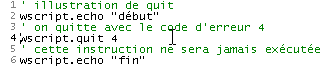 |
Immediately after the program runs, the following three DOS commands are issued:
The command DOS 1 checks whether the error code returned by the program is >=5. If so, it displays (echo) 5; otherwise, it displays nothing.
The command DOS 3 checks whether the error code returned by the program is >=4. If so, it displays 4; otherwise, it displays nothing.
The command DOS 5 checks whether the error code returned by the program is >=3. If so, it displays 3; otherwise, it displays nothing.
From the displayed results, we can deduce that the error code returned by the program was 4.
3.15. L ing data arrays in a variant
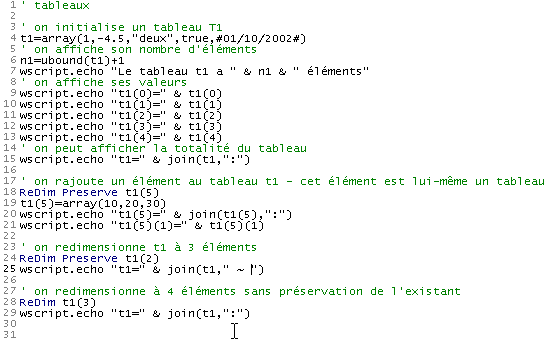
A variant T can contain a list of values. We then say that it is an array. An array T has various properties:
- We access element i of array T using the syntax T(i), where i is an integer called an index between 0 and n-1 if T has n elements.
- The index of the last element of array T can be determined using the expression ubound(T). The number of elements in array T is then ubound(T)+1. This number is often referred to as the size of the array.
- A variant T can be initialized with an empty array using the syntax T=array() or with a sequence of elements using the syntax T=array(element0, element1, ...., elementn)
- Elements can be added to an array T that has already been created. To do this, use the statement redim preserve T(N), where N is the new index of the last element of array T. This operation is called resizing (redim). The keyword preserve indicates that during this resizing, the current contents of the array must be preserved. In the absence of this keyword, T is resized and its elements are cleared.
- An element T(i) of array T is of type variant and can therefore contain any value, including another array. In this case, the notation T(i)(j) refers to element j of array T(i).
These various properties of arrays are illustrated by the following program:
Program | Results |
 |
Comments
- Here we used a function called join, which is explained in more detail below.
3.16. L s array variables
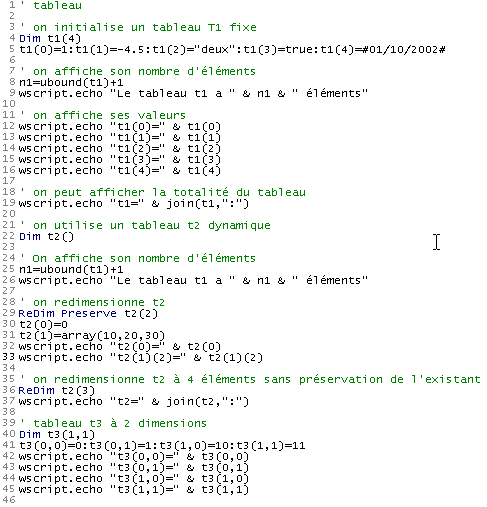
In vbscript, there is another way to use an array: by using an array variable. Unlike scalar variables, such a variable must be declared using a dim statement. Various declarations are possible:
- dim array(n) declares a static array of n+1 elements numbered from 0 to n. This type of array cannot be resized
- dim array() declares an empty dynamic array. It must be resized to be used via the redim statement, in the same way as for a variant containing an array
- dim array(n,m) declares a 2-dimensional array of (n+1)*(m+1) elements. The element (i,j) of the array is denoted as array(i,j). Note the difference from a variant, where the same element would have been denoted as array(i)(j).
Why are there two types of arrays that are ultimately very similar? The vbscript documentation does not mention this and does not indicate whether one is more efficient than the other. Moving forward, we will use the array within a variant almost exclusively in our examples. However, it is worth noting that VBscript is derived from the Visual Basic language, which itself contains typed data (integer, double, boolean, ...). In this case, if we need to use an array of real numbers, for example, the array variable will perform better than the variant variable. We would then declare something like *dim array(1000) as double to declare an array of real numbers, or simply *dim array() as double if the array is dynamic.
Here is an example illustrating the use of array variables:
Program | Results |
 |
3.17. L : the split and join functions
The split and join functions allow you to convert a string into an array and vice versa:
- If T is an array and car is a string, join(T,car) is a string formed by concatenating all the elements of array T, each separated from the next by the string car. Thus, join(array(1,2,3),"abcd") will yield the string "1abcd2abcd3"
- If C is a string consisting of a sequence of fields separated by the string car, the function split(C,car) returns an array whose elements are the individual parts of the string C. Thus, split("1abcd2abcd3", "abcd") will return the array (1,2,3)
Here is an example:
Program | Results |
| |
3.18. Dictionaries
We can access an element of an array T when we know its index i. It is then accessible using the notation T(i). There are arrays whose elements are accessed not by an index but by a string. A typical example of this type of array is a dictionary. When looking up the meaning of a word in "Larousse" or "Le petit Robert," we access it by the word itself. We could represent this dictionary as a two-column array:
word1 | description1 |
word2 | description2 |
word3 | description3 |
.... |
We could then write things like:
dictionary("word1") = "description1"
dictionary("word2") = "description2"
...
This is similar to how an array works, except that the array indices are not integers but strings. This type of array is called a dictionary (or associative array, hashtable), and the string indices are called the dictionary keys. Dictionaries are used extremely frequently in the world of computing. We all have a social security card with a number on it. This number uniquely identifies us and provides access to information about us. In the dictionary model ("key")="information," "key" would be the social security number, and "information" would be all the information stored about us on the social security computers.
In Windows, there is an ActiveX object called "Scripting.Dictionary" that allows you to create and manage dictionaries. An ActiveX object is a software component that exposes an interface usable by programs written in various languages, as long as they comply with the ActiveX object standard. The Scripting.dictionary object can therefore be used by Windows programming languages: javascript, Perl, Python, C, C++, VB, VBA, etc., and not just by vbscript.
1 | A Scripting.Dictionary object is created by a statement set dico=wscript.CreateObject("Scripting.Dictionary") or simply set dico=CreateObject("Scripting.Dictionary") CreateObject is a method of the WScript object that allows you to create instances of ActiveX objects. version 2 shows that wscript can be an implicit object. When a method cannot be "mapped" to an object, the WSH container will attempt to map it to the wscript object. |
2 | Once the dictionary is created, we can add elements to it using the add method: dico.add "key",value will create a new entry in the dictionary associated with the key "key". The associated value is a variant containing any data. |
3 | To retrieve the value associated with a given key, we use the dictionary's item method: var=dico.item("key") or set var=dico.item("key") if the value associated with the key is an object. |
4 | All the keys in the dictionary can be retrieved in a variable array using the `keys` method: keys=dico.keys keys is an array whose elements can be iterated over. |
5 | All the values in the dictionary can be retrieved into a variable array using the items method: values = dic.items items is an array whose elements can be iterated over. |
6 | The existence of a key can be tested using the exists method: dico.exists("key") is true if the key "key" exists in the dictionary |
7 | An entry (key+value) can be removed from the dictionary using the remove method: dico.remove("key") removes the entry from the dictionary associated with the key "key". dico.removeall removes all keys; c.a.d clears the dictionary. |
The following program uses these various options:
Program
' creating and using a dictionary
Set dico=CreateObject("Scripting.Dictionary")

' dico filling
dico.add "clé1","valeur1"
dico.add "clé2","valeur2"
dico.add "clé3","valeur3"

' number of elements
wscript.echo "Le dictionnaire a " & dico.count & " éléments"

' kEY LIST
wscript.echo "liste des clés"
cles=dico.keys
For i=0 To ubound(cles)
  wscript.echo cles(i)
Next

' list of values
wscript.echo "liste des valeurs"
valeurs=dico.items
For i=0 To ubound(valeurs)
  wscript.echo valeurs(i)
Next

' list of keys and values
wscript.echo "liste des clés et valeurs"
cles=dico.keys
For i=0 To ubound(cles)
  wscript.echo "dico(" & cles(i) & ")=" & dico.item(cles(i))
Next

' item search
' key1
If dico.exists("clé1") Then
    wscript.echo "La clé clé1 existe dans le dictionnaire et la valeur associée est " & dico.item("clé1")
  Else
    wscript.echo "La clé clé1  n'existe pas dans le dictionnaire"
  End If
' key4
If dico.exists("clé4") Then
    wscript.echo "La clé clé4 existe dans le dictionnaire et la valeur associée est " & dico.item("clé4")
  Else
    wscript.echo "La clé clé4  n'existe pas dans le dictionnaire"
  End If

' remove key 1
dico.remove("clé1")

' list of keys and values
wscript.echo "liste des clés et valeurs après suppression de clé1"
cles=dico.keys
For i=0 To ubound(cles)
  wscript.echo "dico(" & cles(i) & ")=" & dico.item(cles(i))
Next

' we do away with everything
dico.removeall

' list of keys and values
wscript.echo "liste des clés et valeurs après suppression de tous les éléments"
cles=dico.keys
For i=0 To ubound(cles)
  wscript.echo "dico(" & cles(i) & ")=" & dico.item(cles(i))
Next

' end
wscript.quit 0
Results
Le dictionnaire a 3 éléments
liste des clés
clé1
clé2
clé3
liste des valeurs
valeur1
valeur2
valeur3
liste des clés et valeurs
dico(clé1)=valeur1
dico(clé2)=valeur2
dico(clé3)=valeur3
La clé clé1 existe dans le dictionnaire et la valeur associée est valeur1
La clé clé4  n'existe pas dans le dictionnaire
liste des clés et valeurs après suppression de clé1
dico(clé2)=valeur2
dico(clé3)=valeur3
liste des clés et valeurs après suppression de tous les éléments
3.19. Sorting an array or a dictionary
It is common to want to sort an array or a dictionary in ascending or descending order by its values or, for a dictionary, by its keys. While most languages have sorting functions, there do not appear to be any in vbscript. This is a shortcoming.
3.20. Program arguments
It is possible to call a vbscript program by passing it parameters, as in:
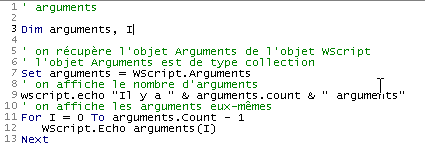
This allows the user to pass information to the program. How does the program retrieve this information? Let’s look at the following program:
Program | Results |
 |
Comments
- WScript.Arguments is the collection of arguments passed to the script
- A C collection is an object that has
- a count property that is the number of elements in the collection
- a method C(i) that returns the i-th element of the collection
3.21. A first application: IMPOTS
We aim to write a program to calculate a taxpayer’s tax. We consider the simplified case of a taxpayer who has only their salary to report:
- we calculate the number of shares for the employee nbParts = nbEnfants/2 + 1 if they are unmarried, nbEnfants/2+2 if they are married, where nbEnfants is the number of children.
- We calculate his taxable income R = 0.72 * S, where S is his annual salary
- we calculate his family coefficient Q = R/N
we calculate his tax I based on the following data
12620.0 | 0 | 0 |
13,190 | 0.05 | 631 |
15,640 | 0.1 | 1,290.5 |
24,740 | 0.15 | 2,072.5 |
31,810 | 0.2 | 3,309.5 |
39,970 | 0.25 | 4900 |
48,360 | 0.3 | 6898.5 |
55,790 | 0.35 | 9,316.5 |
92,970 | 0.4 | 12,106 |
127,860 | 0.45 | 16,754.5 |
151,250 | 0.50 | 23,147.5 |
172,040 | 0.55 | 30,710 |
195,000 | 0.60 | 39,312 |
0 | 0.65 | 49,062 |
Each row has 3 fields. To calculate tax I, we look for the first row where QF <= field1. For example, if QF = 30000, we will find the row
Tax I is then equal to 0.15*R - 2072.5*nbParts. If QF is such that the relationship QF<=field1 is never satisfied, then the coefficients from the last line are used. Here:
which gives the tax I=0.65*R - 49062*nbParts.
The program is as follows:
Program
' calculating a taxpayer's tax liability
' the program must be called with three parameters: married children salary
' married: character Y if married, N if unmarried
' children: number of children
' salary: annual salary without cents

' no verification of data validity is performed, but we do
' check that there are three of them

' mandatory variable declaration
Option Explicit

' we check that there are 3 arguments
Dim nbArguments
nbArguments=wscript.arguments.count
If nbArguments<>3 Then
    wscript.echo "Syntaxe : pg marié enfants salaire"
    wscript.echo "marié : caractère O si marié, N si non marié"
    wscript.echo "enfants : nombre d'enfants"
    wscript.echo "salaire : salaire annuel sans les centimes"
    ' stop with error code 1
    wscript.quit 1
End If

' retrieve arguments without checking their validity
Dim marie, enfants, salaire
If wscript.arguments(0) = "O" Or wscript.arguments(0)="o" Then
    marie=true
Else
    marie=false
End If
' children is an integer
enfants=cint(wscript.arguments(1))
' salary is an integer long
salaire=clng(wscript.arguments(2))

' we define the data needed to calculate the tax in 3 tables
Dim limites, coeffn, coeffr
limites=array(12620,13190,15640,24740,31810,39970,48360, _
55790,92970,127860,151250,172040,195000,0)
coeffr=array(0,0.05,0.1,0.15,0.2,0.25,0.3,0.35,0.4,0.45, _
0.5,0.55,0.6,0.65)
coeffn=array(0,631,1290.5,2072.5,3309.5,4900,6898.5,9316.5, _
12106,16754.5,23147.5,30710,39312,49062)

' the number of shares is calculated
Dim nbParts
If marie=true Then
    nbParts=(enfants/2)+2
Else
    nbParts=(enfants/2)+1
End If
If enfants>=3 Then nbParts=nbParts+0.5

' we calculate the family quotient and taxable income
Dim revenu, qf
revenu=0.72*salaire
qf=revenu/nbParts

' tax calculation
Dim i, impot
i=0
Do While i<ubound(limites) And qf>limites(i)
    i=i+1
Loop
impot=int(revenu*coeffr(i)-nbParts*coeffn(i))

' the result is displayed
wscript.echo "impôt=" & impot

' leave without error
wscript.quit 0
Results
Comments:
- The program uses what was covered previously (variable declarations, arguments, type conversions, tests, loops, array in a variant)
- It does not check the validity of the data, which would be unusual in a real program
- Only the while loop presents a challenge. It seeks to determine the index i of the limits array for which limits(i) > qf, and this for i < ubound(limits) (c.a.d. Here, i < 13) because the last element of the limits array is not significant. It was added solely so that the test [Do While i<ubound(limites) And qf>limites(i)] could be performed for i=13. The test is then 13<13 and qf>limits(13), and it must therefore (in vbscript) be the case that limits(13) exists. When exiting the while loop, the last calculated value of i is used to calculate the tax: [impot=int(revenu*coeffr(i)-nbParts*coeffn(i))].