5. Functions and Procedures
5.1. The predefined functions of vbscript
The richness of a language derives largely from its function library, as these functions can be encapsulated in objects under the name of methods. In this regard, vbscript can be considered rather limited.
The following table lists the functions of VBScript excluding objects. We will not go into detail about them. Their names generally indicate their purpose. Readers should consult the documentation for details on a specific function.
Abs | Array | Asc | Atn |
CBool | CByte | CCur | CDate |
CDbl | Chr | CInt | CLng |
Conversions | Cos | CreateObject | CSng |
Date | DateAdd | DateDiff | DatePart |
DateSerial | DateValue | Day | Derived Maths |
Eval | Exp | Filter | FormatCurrency |
FormatDateTime | FormatNumber | FormatPercent | GetLocale |
GetObject | GetRef | Hex | Hour |
InputBox | InStr | InStrRev | Int, Fixs |
IsArray | IsDate | IsEmpty | IsNull |
IsNumeric | IsObject | Join | LBound |
LCase | Left | Len | LoadPicture |
Log | LTrim; RTrim; and Trims | Maths | Mid |
Minute | Month | MonthName | MsgBox |
Now | Oct | Replace | RGB |
Right | Rnd | Round | ScriptEngine |
ScriptEngineBuildVersion | ScriptEngineMajorVersion | ScriptEngineMinorVersion | Second |
SetLocale | Sgn | Sin | Space |
Split | Sqr | StrComp | String |
Tan | Time | Timer | TimeSerial |
TimeValue | TypeName | UBound | UCase |
VarType | Weekday | WeekdayName | Year |
5.2. Modular Programming
Describing the programmed solution to a problem means describing the sequence of basic operations that can be executed by the computer and are capable of solving the problem. Depending on the programming language, these basic operations vary in sophistication. Examples include:
- reading data from the keyboard or disk
- writing data to the screen, a printer, a disk, etc.
- calculating expressions
- navigating through a file
- ...
Describing a complex problem may require several thousand of these basic instructions or more. It is therefore very difficult for the human mind to grasp the big picture of a program. Faced with this difficulty in grasping the problem as a whole, we break it down into subproblems that are easier to solve. Consider the following problem: Sort a list of numerical values entered via the keyboard and display the sorted list on the screen.
We can initially describe the solution in the following form:
  début
        lire les valeurs et les mettre dans un tableau T
        trier le tableau T
        écrire les valeurs triées du tableau T à l'écran
  fin
We have broken the problem down into 3 subproblems, which are easier to solve. The algorithmic notation is often more formalized than the previous one, and the algorithm would be written as follows:
where T represents an array. The operations
are non-elementary operations that must in turn be described by elementary operations. This is done in what are called modules. The data T is called a module parameter. It is information that the calling program passes to the called module (input parameter) or receives from the called module (output parameter). The parameters of a module are therefore the information exchanged between the calling program and the called module.
module lire_tableau(T) | 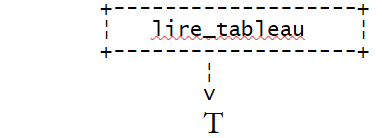 |
module trier_tableau(T) | 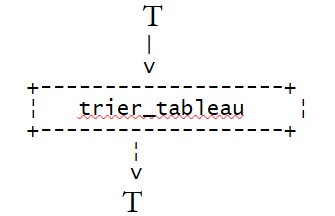 |
module écrire_tableau(T) | 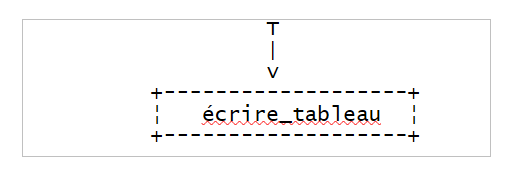 |
The module lire_tableau(T) could be described as follows:
début
    écrire "Tapez la suite de valeurs à trier sous la forme val1 val2 ... : "
    lire valeurs
    construire tableau T à partir de la chaîne valeurs
fin
Here, we have sufficiently described the lire_tableau module. Indeed, the three necessary actions have an immediate translation into vbscript. The last one will require the use of the split function. If vbscript did not have this function, action 3 would in turn have to be broken down into elementary actions having an immediate equivalent in vbscript.
The module écrire_tableau(T) could be described as follows:
début
    construire chaîne texte "valeur1,valeur2,...." à partir du tableau T
    écrire texte
fin
The module écrire_tableau(T) could be described as follows (assuming that the indices of the elements in T start at 0):
début
      N<-- index last element of array T
      pour IFIN variant de N à 1
      faire
           //we search for the IMAX index of the largest element in T
           // IFIN is the index of the last element in T

          chercher_max(T, IFIN, IMAX)

           // exchange the largest element of T with the last element of T

          échanger (T, IMAX, IFIN)

      finfaire
FIN
Here, the algorithm again uses non-elementary actions:
 . chercher_max(T, IFIN, IMAX)
 . échanger(T, IMAX, IFIN)
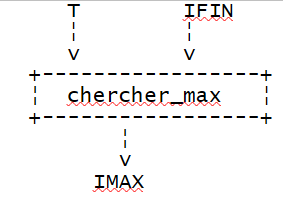
chercher_max(T, IFIN, IMAX) returns the index IMAX of the largest element in array T whose last element has index IFIN.
 |
swap(T, IMAX, IFIN) swaps two elements of the array T, those with indices IMAX and IFIN.
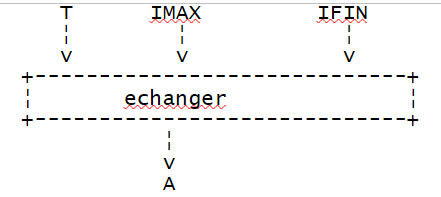 |
We must therefore describe the new non-elementary operations.
module chercher_max(A, IFIN, IMAX) | |
module exchange(T IMAX, IFIN) |
The initial problem has been fully described using elementary operations vbscript and can therefore now be translated into this language. Note that elementary actions may differ from one language to another, and therefore the analysis of a problem must at some point take into account the programming language used. An object that exists in one language may not exist in another, thereby altering the algorithm used. Thus, if a language had a sorting function, it would be absurd not to use it here.
The principle applied here is known as top-down analysis. If we represent the framework of the solution, we have the following:
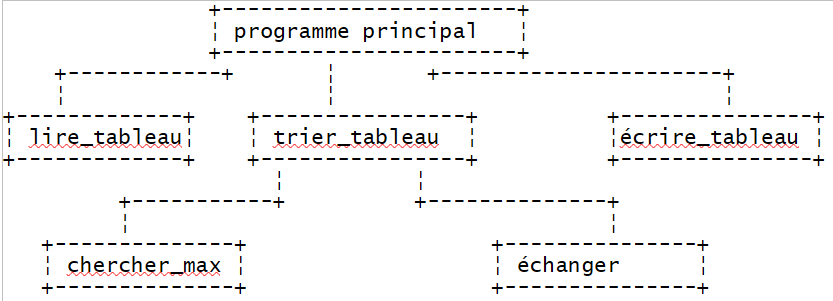 |
We have a tree structure.
5.3. The functions and procedures vbscript
Once the modular analysis has been performed, the programmer can translate the modules of their algorithm into functions or procedures vbscript. Both functions and procedures accept input/output parameters, but a function returns a result that allows it to be used in expressions, whereas a procedure does not.
5.3.1. Declaration of Functions and Procedures vbscript
The declaration of a procedure vbscript is as follows
and that of a function
To return its result, the function must include an assignment statement that assigns the result to a variable with the same name as the function:
functionName=result
The execution of a function or procedure ends in two ways:
- upon encountering the end function or end sub statement
- upon encountering the exit function or exit sub statement
For a function, note that the result must have been assigned to a variable with the function’s name before the function ends with an end function or exit function.
5.3.2. Methods for passing parameters to a function or procedure
In the declaration of the input-output parameters of a function or procedure, the mode (byRef, byVal) of parameter transmission from the calling program to the called program is specified:
sub nomProcédure([Byref/Byval] param1, [Byref/Byval] param2, ...)

function nomFonction([Byref/Byval] param1, [Byref/Byval] param2, ...)
If the transmission mode byRef or byVal is not specified, the byRef mode is used.
Actual parameters, formal parameters
Consider a function vbscript defined by
The parameters parmamFormi used in the definition of the function or procedure are called formal parameters. The preceding function can be called from the main program or another module using a statement such as:
The parameters parmamEffi used in the call to the function or procedure are called actual parameters. When the execution of the function nomFonction begins, the formal parameters receive the values of the corresponding actual parameters. The keywords byRef and byVal determine the mode of transmission for these values.
Pass-by-value mode (byVal)
When a formal parameter specifies this transmission mode, the formal parameter and the actual parameter are two different variables. The value of the actual parameter is copied into the formal parameter before the function or procedure is executed. If the function or procedure modifies the value of the formal parameter during execution, this does not affect the value of the corresponding actual parameter. This transmission mode is well-suited for the input parameters of the function or procedure.
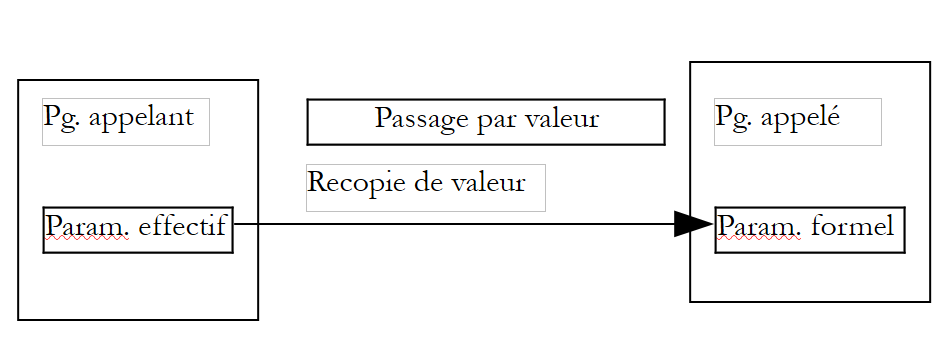 |
Pass-by-reference mode (byRef)
This transfer mode is the default if no parameter transfer mode is specified. When a formal parameter specifies this transfer mode, the formal parameter and the corresponding actual parameter are one and the same variable. Thus, if the function modifies the formal parameter, the actual parameter is also modified. This transfer mode is well suited for:
- output parameters, since their values must be passed back to the calling program
- input parameters that are cumbersome to copy, such as arrays
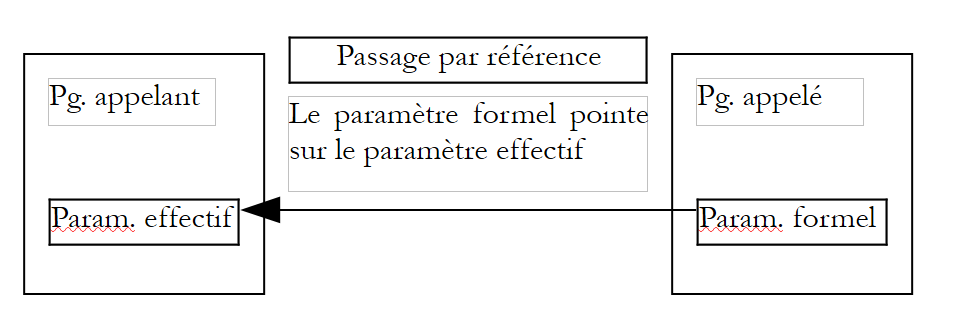 |
The following program shows examples of parameter passing:
Program
Sub proc1(byval i, ByRef j, k)
  ' i is passed by value (byval) - the effective parameter and the formal parameter are then different
  ' j is passed by value (byref) - the effective parameter and the formal parameter are then identical
  ' the k passage mode is not specified. The default is by reference
  i=i+1
  j=j+1
  k=k+1
  affiche "dans proc1",i,j,k
End Sub

 Sub affiche(byval msg, ByVal i, ByVal j, ByVal k)
  ' displays the values of i and j and k
  wscript.echo msg & " i=" & i & " j=" & j & " k=" & k
End Sub


' ------------- calls to functions and procedures

' init i and j
  i=4:j=5 : k=6

' check
  affiche "dans programme principal, avant l'appel à proc1 :",i,j,k

' call proc1 procedure
  proc1 i,j,k

' check
  affiche "dans programme principal, après l'appel à proc1 :",i,j,k

' end
  wscript.quit 0
Results
dans programme principal, avant l'appel à proc1 : i=4 j=5 k=6
dans proc1 i=5 j=6 k=7
dans programme principal, après l'appel à proc1 : i=4 j=6 k=7
Comments
- In a vbscript script, there is no specific location for functions and procedures. They can appear anywhere in the source text. Generally, they are grouped either at the beginning or at the end, and the main program is structured as a continuous block.
5.3.3. Syntax for calling functions and procedures
Let p be a procedure that accepts formal parameters pf1, pf2, ...
- the procedure p is called in the form
without parentheses around the parameters
- if the procedure p has no parameters, one can use either the call p or p() and the declaration sub p or sub p()
Let f be a function that accepts formal parameters pf1, pf2, ...
- The function f is called in the form
Parentheses around the parameters are mandatory. If the function f takes no parameters, one can use either the call f or f() and the declaration function f or function f().
- The result of function f may be ignored by the calling program. Function f is then considered a procedure and follows the rules for calling procedures. We then write f pe1, pe2, ... (without parentheses) to call function f.
If the function or procedure is an object method, the rules appear to be somewhat different and inconsistent.
- Thus, one can write MyFile.WriteLine "This is a test." or MyFile.WriteLine("This is a test.")
- but while we can write wscript.echo 4, we cannot write wscript.echo(4).
We will adhere to the following rules:
- no parentheses around the parameters of a procedure or a function used as a procedure
- parentheses around the parameters of a function
5.3.4. Some examples of functions
Below are some examples of function definitions and uses:
Program
 Function plusgrandque(byval i, ByVal j)
  ' returns boolean true if i>j, boolean false otherwise

  ' data verification
  If isnumeric(i) And isnumeric(j) Then
    If i>j Then
      plusgrandque=true
    Else
      plusgrandque=false
    End If
  Else
    wscript.echo "Arguments (" & i & "," & j & ") erronés"
    plusgrandque=false
  End If
  Exit Function
End Function

 Function rendUnTableau(byval n)
  ' makes an array of n elements
  tableau=array()
  ' check validity of parameter n
  If isnumeric(n) And n>=1 Then
    ReDim Preserve tableau(n)
    For i= 0 To n-1
      tableau(i)=i
    Next
  Else
    wscript.echo "Argument [" & n & "] erroné"
  End If
  ' we return the result
  rendUnTableau=tableau
End Function

 Function argumentsVariables(byref arguments)
  ' arguments is an array of numbers whose sum is returned
  somme=0
  For i=0 To ubound(arguments)
    somme=somme+arguments(i)
  Next
  argumentsVariables=somme
End Function

  ' two parameter-free functions declared in 2 different ways
  Function sansParametres1
    sansParametres=4
  End Function

  Function sansParametres2()
    sansParametres=4
  End Function


' ------------- calls to functions and procedures

' calls function plusgrandque
  wscript.echo "plusgrandque(10,6)=" & plusgrandque(10,6)
  wscript.echo "plusgrandque(6,10)=" & plusgrandque(6,10)
  wscript.echo "plusgrandque(6,6)=" & plusgrandque(6,6)
  wscript.echo "plusgrandque(6,'a')=" & plusgrandque(6,"a")

' calls to the rendUnTableau function
  monTableau=rendUnTableau(10)
  For i=0 To ubound(monTableau)
    wscript.echo monTableau(i)
  Next
  monTableau=rendUnTableau(-6)
  For i=0 To ubound(monTableau)
    wscript.echo monTableau(i)
  Next

' calls to the argumentsVariables function
  wscript.echo "somme=" & argumentsVariables(array(-1,2,7,8))
  wscript.echo "somme=" & argumentsVariables(array(-1,10,12))

' function calls without parameters
  res=sansParametres1
  res=sansParametres1()
  sansParametres1
  sansParametres1()

  res=sansParametres2
  res=sansParametres2()
  sansParametres2
  sansParametres2()

' end
  wscript.quit 0
Results
plusgrandque(10,6)=Vrai
plusgrandque(6,10)=Faux
plusgrandque(6,6)=Faux
Arguments (6,a) erronés
plusgrandque(6,'a')=Faux
0
1
2
3
4
5
6
7
8
9

Argument [-6] erroné
somme=16
somme=21
somme=10
Comments
- The function rendUnTableau demonstrates that a function can return multiple results rather than just one. All it needs to do is place them in an array variant and return that variant as the result.
- Conversely, the function argumentsVariables demonstrates that you can write a function that accepts a variable number of arguments. Here, too, you simply need to place them in an array variant and make this variant a function parameter.
5.3.5. Output parameter or function result
Suppose that the analysis of an application has shown the need for a module M with input parameters Ei and output parameters Sj. Recall that input parameters are information that the calling program provides to the called program, and conversely, output parameters are information that the called program provides to the calling program. In vbscript, there are several solutions for output parameters:
- if there is only one output parameter, it can be made the result of a function. There is then no longer an output parameter, but simply a function result.
- If there are n output parameters, one of them can serve as the function result, with the remaining n-1 being output parameters. One can also use a procedure with n output parameters instead of a function. Alternatively, one can use a function that returns an array containing the n values to be returned to the calling program. Recall that the called program returns its results to the calling program by value. This copying is avoided when output parameters are passed by reference. This latter solution therefore saves time.
5.4. The Vbscript program for sorting values
We began our discussion of modular programming with an algorithmic study of sorting numerical values entered via the keyboard. Here is the VBScript translation that could be made of it:
Program
' main program
Option Explicit

Dim T        ' the table of values to be sorted

' reading values
T=lire_tableau

' value sorting
trier_tableau T

' display of sorted values
ecrire_tableau T

' end
wscript.quit 0

' ---------- functions & procedures

' -------- lire_tableau
Function lire_tableau
    ' values are requested
    wscript.stdout.write "Tapez les valeurs à trier sous la forme val1 val2  ... valn : "
    ' we read them
    Dim valeurs
    valeurs=wscript.stdin.readLine
    ' we put them in a table
    lire_tableau=split(valeurs," ")
End Function

' -------- ecrire_tableau
Sub ecrire_tableau(byref T)
    ' displays the contents of table T
    wscript.echo join(T," ")
End Sub

' -------- trier_tableau
Sub trier_tableau (byref T)
    ' sorts array T in ascending order

    ' find the imax index of the T[0..ifin] array
    ' to exchange T[imax] with the last element of array T[0..ifin]
    ' then start again with an array with 1 fewer element

    Dim ifin, imax, temp
    For ifin=ubound(T) To 1 Step -1
        ' find the imax index of the T[0..ifin] array
        imax=chercher_max(T,ifin)
        ' exchange the max with the last element of the T[0..ifin] array
        temp=T(ifin):T(ifin)=T(imax):T(imax)=temp
    Next
End Sub

' -------- chercher_max
Function chercher_max(byRef T, ByVal ifin)
    ' find the imax index of the T[0..ifin] array
    Dim i, imax
    imax=0
    For i=1 To ifin
        If cdbl(T(i))>cdbl(T(imax)) Then imax=i
    Next

    ' We return the result
    chercher_max=imax
End Function
Results
Comments:
- The swap module identified in the initial algorithm was not implemented as a separate module in vbscript because it was deemed too simple to warrant its own module.
5.5. The IMPOTS program in modular form
We revisit the tax calculation program, this time written in modular form
Program
' calculating a taxpayer's tax liability
' the program must be called with three parameters: married children salary
' married: character Y if married, N if unmarried
' children: number of children
' salary: annual salary without cents

' mandatory variable declaration
Option Explicit
Dim erreur

' retrieve arguments and check their validity
Dim marie, enfants, salaire
erreur=getArguments(marie,enfants,salaire)
' mistake?
If erreur(0)<>0 Then wscript.echo erreur(1) : wscript.quit erreur(0)

' retrieve the data needed to calculate taxes
Dim limites, coeffR, coeffN
getData limites,coeffR,coeffN

' the result is displayed
wscript.echo "impôt=" & calculerImpot(marie,enfants,salaire,limites,coeffR,coeffN)

' leave without error
wscript.quit 0

' ------------ functions and procedures

' ----------- getArguments
Function getArguments(byref marie, ByRef enfants, ByRef salaire)
    ' must retrieve three values passed as arguments to the main program
    ' an argument is passed to the program without spaces in front and behind it
    ' use regular expressions to check data validity

    ' returns an error array variant with 2 values
    ' error(0): error code, 0 if no error
    ' error(1): error message if error otherwise empty string

    Dim syntaxe
    syntaxe= _
    "Syntaxe : pg marié enfants salaire" & vbCRLF & _
    "marié : caractère O si marié, N si non marié" & vbCRLF & _
    "enfants : nombre d'enfants (entier >=0)" & vbCRLF & _
    "salaire : salaire annuel sans les centimes (entier >=0)"

    ' we check that there are 3 arguments
    Dim nbArguments
    nbArguments=wscript.arguments.count
    If nbArguments<>3 Then
        ' error msg
        getArguments= array(1,syntaxe & vbCRLF & vbCRLF & "erreur : nombre d'arguments incorrect")
        ' end
        Exit Function
    End If

    Dim modele, correspondances
    Set modele=new regexp

    ' marital status must be among the characters oOnN
    modele.pattern="^[oOnN]$"
    Set correspondances=modele.execute(wscript.arguments(0))
    If correspondances.count=0 Then
        ' error msg
        getArguments=array(2,syntaxe & vbCRLF & vbCRLF & "erreur : argument marie incorrect")
        ' we leave
        Exit Function
    End If
    ' the value
    If lcase(wscript.arguments(0)) = "o"Then
        marie=true
    Else
        marie=false
    End If

    ' children must be an integer >=0
    modele.pattern="^\d{1,2}$"
    Set correspondances=modele.execute(wscript.arguments(1))
    If correspondances.count=0 Then
        ' error
        getArguments= array(3,syntaxe & vbCRLF & vbCRLF & "erreur : argument enfants incorrect")
        ' we leave
        Exit Function
    End If
    ' the value
    enfants=cint(wscript.arguments(1))

    ' salary must be an integer >=0
    modele.pattern="^\d{1,9}$"
    Set correspondances=modele.execute(wscript.arguments(2))
    If correspondances.count=0 Then
        ' error
        getArguments= array(4,syntaxe & vbCRLF & vbCRLF & "erreur : argument salaire incorrect")
        ' we leave
        Exit Function
    End If
    ' the value
    salaire=clng(wscript.arguments(2))

    ' finished without error
    getArguments=array(0,"")
End Function

' ----------- getData
Sub getData(byref limites, ByRef coeffR, ByRef coeffN)
    ' we define the data needed to calculate the tax in 3 tables
    limites=array(12620,13190,15640,24740,31810,39970,48360, _
    55790,92970,127860,151250,172040,195000,0)
    coeffr=array(0,0.05,0.1,0.15,0.2,0.25,0.3,0.35,0.4,0.45, _
    0.5,0.55,0.6,0.65)
    coeffn=array(0,631,1290.5,2072.5,3309.5,4900,6898.5,9316.5, _
    12106,16754.5,23147.5,30710,39312,49062)
End Sub

' ----------- calculerImpot
Function calculerImpot(byval marie,ByVal enfants,ByVal salaire, ByRef limites, ByRef coeffR, ByRef coeffN)

    ' the number of shares is calculated
    Dim nbParts
    If marie=true Then
        nbParts=(enfants/2)+2
    Else
        nbParts=(enfants/2)+1
    End If
    If enfants>=3 Then nbParts=nbParts+0.5

    ' we calculate the family quotient and taxable income
    Dim revenu, qf
    revenu=0.72*salaire
    qf=revenu/nbParts

    ' tax calculation
    Dim i, impot
    i=0
    Do While i<ubound(limites) And qf>limites(i)
        i=i+1
    Loop
    calculerImpot=int(revenu*coeffr(i)-nbParts*coeffn(i))
End Function
Comments
- The getArguments function retrieves the taxpayer's information (spouse, children, income). Here, this information is passed as arguments to the vbscript program. If this were to change—for example, if these arguments came from a graphical user interface—only the getArguments procedure would need to be rewritten, not the others.
- The function getArguments can detect errors in the arguments. When this occurs, one could have decided to stop the program’s execution in the function getArguments using an instruction in wscript.quit. This should never be done within a function or procedure. If a function or procedure detects an error, it must report it in some way to the calling program. It is up to the calling program to decide whether to stop execution or not, not the procedure. In our example, the calling program could decide to ask the user to re-enter the incorrect data via the keyboard rather than stopping execution.
- Here, the function getArguments returns an array variant where the first element is an error code (0 if no error) and the second is an error message if an error occurred. By checking the result, the calling program can determine whether an error occurred or not.
- The procedure getData retrieves the data needed to calculate the tax. Here, this data is defined directly in the getData procedure. If this data were to come from another source—such as a file or a database—only the getData procedure would need to be rewritten, not the others.
- The function calculerImpot calculates the tax once all the data has been obtained, regardless of how it was obtained.
- It should therefore be noted that modular programming allows for the (re)use of certain modules in different contexts. This concept has been heavily developed over the past twenty years within the concept of objects.