6. Text files
A text file is a file containing lines of text. Let’s examine the creation and use of such files using examples.
6.1. Creation and use
Program |
 |
Results |
|
Comments
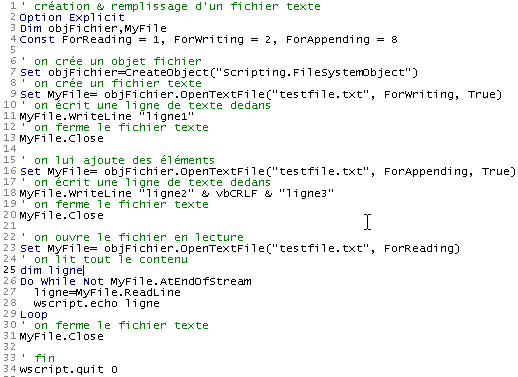
- Line 7 creates a file object of type "Scripting.FileSystemObject" using the function CreateObject("Scripting.FileSystemObject"). Such an object allows access to any file on the system, not just text files.
- Line 9 creates a "TextStream" object. The creation of this object is associated with the creation of the file testfile.txt. This file is not designated by an absolute name such as c:\dir1\dir2\....\testfile.txt but by a relative name testfile.txt. It will then be created in the directory from which the command to execute the file is launched.
- The Windows file system does not recognize concepts such as text files or non-text files. It only recognizes files. It is therefore up to the program that uses this file to determine whether to treat it as a text file or not.
- Line 9 creates an object using the SET command for assignment. Creating a text file object involves creating two objects:
- the creation of a Scripting.FileSystemObject object (line 7)
- followed by the creation of a "TextStream" object (text file) via the OpenTextFile method of the Scripting.FileSystemObject object, which accepts several parameters:
- the name of the file to be processed (required)
- the file usage mode. This is an integer with 3 possible values:
- 1: read-only file access
- 2: write mode. If the file does not already exist and if the third parameter is present and has the value true, it is created; otherwise, it is not. If it already exists, it is overwritten.
- 8: append mode, c.a.d. Write to the end of the file. If the file does not already exist and if the third parameter is present and has the value true, it is created; otherwise, it is not.
- Line 11 writes a line of text using the WriteLine method of the created TextStream object.
- Line 13 "closes" the file. It is then no longer possible to write to or read from it.
- Line 16 creates a new object "TextStream" to work with the same file as before, but this time in "append" mode. The lines to be written will be appended to the existing lines.
- Line 18 writes two new lines, noting that the constant vbCRLF is the end-of-line marker for text files.
- Line 20 closes the file again
- Line 23 reopens it in "read" mode: we are going to read the file's contents.
- Line 27 reads a line of text using the ReadLine method of the TextStream object. When the file has just been "opened," the cursor is positioned on its first line of text. Once this line has been read by the ReadLine method, the cursor moves to the second line. Thus, the Readline method not only reads the current line but also automatically "moves" to the next line.
- To read all lines of text, the ReadLine method must be applied repeatedly in a loop. This loop (line 26) ends when the AtEndOfStream attribute of the TextStream object has the value true. This means that there are no more lines to read in the file.
6.2. Error Cases
There are two common error cases:
- opening a file for reading that does not exist
- opening a nonexistent file for writing or appending to it with the third parameter set to false in the call to the OpenTextFile method.
The following program shows how to detect these errors:
Program
' creating & filling a text file
Option Explicit
Dim objFichier,MyFile
Const ForReading = 1, ForWriting = 2, ForAppending = 8
Dim codeErreur

' create a file object
Set objFichier=CreateObject("Scripting.FileSystemObject")

' open a text file that should exist in read-only mode
On Error Resume Next
Set MyFile= objFichier.OpenTextFile("abcd", ForReading)
codeErreur=err.number
On Error GoTo 0
If codeErreur<>0 Then
    ' file does not exist
    wscript.echo "Le fichier [abcd] n'existe pas"
Else
    ' close the text file
    MyFile.Close
End If


' open a text file that must be writable
On Error Resume Next
Set MyFile= objFichier.OpenTextFile("abcd", ForWriting, False)
codeErreur=err.number
On Error GoTo 0
If codeErreur<>0 Then
    wscript.echo "Le fichier [abcd] n'existe pas"
Else
    ' close the text file
    MyFile.Close
End If

' open a text file that should exist as an addition
On Error Resume Next
Set MyFile= objFichier.OpenTextFile("abcd", ForAppending, False)
codeErreur=err.number
On Error GoTo 0
If codeErreur<>0 Then
    wscript.echo "Le fichier [abcd] n'existe pas"
Else
    ' close the text file
    MyFile.Close
End If

' end
wscript.quit 0
Results
6.3. The IMPOTS application with a text file
We return to the tax calculation application, assuming that the data needed to calculate the tax is in a text file named data.txt:
12620 13190 15640 24740 31810 39970 48360 55790 92970 127860 151250 172040 195000 0
0 0,05 0,1 0,15 0,2 0,25 0,3 0,35 0,4 0,45 0,5 0,55 0,6 0,65
0 631 1290,5 2072,5 3309,5 4900 6898,5 9316,5 12106 16754,5 23147,5 30710 39312 49062
The three lines contain, respectively, the data from the application’s limit tables, coeffR and coeffN. Thanks to the modular design of our application, the changes are primarily made in procedure getData, which is responsible for constructing the three tables. The new program is as follows:
Program
' calculating a taxpayer's tax liability
' the program must be called with three parameters: married children salary
' married: character Y if married, N if unmarried
' children: number of children
' salary: annual salary without cents

' mandatory variable declaration
Option Explicit
Dim erreur

' retrieve arguments and check their validity
Dim marie, enfants, salaire
erreur=getArguments(marie,enfants,salaire)
' mistake?
If erreur(0)<>0 Then wscript.echo erreur(1) : wscript.quit erreur(0)

' retrieve the data needed to calculate taxes
Dim limites, coeffR, coeffN
erreur=getData(limites,coeffR,coeffN)
' mistake?
If erreur(0)<>0 Then wscript.echo erreur(1) : wscript.quit 5

' the result is displayed
wscript.echo "impôt=" & calculerImpot(marie,enfants,salaire,limites,coeffR,coeffN)

' leave without error
wscript.quit 0

' ------------ functions and procedures

' ----------- getArguments
Function getArguments(byref marie, ByRef enfants, ByRef salaire)
    ' must retrieve three values passed as arguments to the main program
    ' an argument is passed to the program without spaces in front and behind it
    ' use regular expressions to check data validity

    ' returns an error array variant with 2 values
    ' error(0): error code, 0 if no error
    ' error(1): error message if error otherwise empty string

    Dim syntaxe
    syntaxe= _
    "Syntaxe : pg marié enfants salaire" & vbCRLF & _
    "marié : caractère O si marié, N si non marié" & vbCRLF & _
    "enfants : nombre d'enfants (entier >=0)" & vbCRLF & _
    "salaire : salaire annuel sans les centimes (entier >=0)"

    ' we check that there are 3 arguments
    Dim nbArguments
    nbArguments=wscript.arguments.count
    If nbArguments<>3 Then
        ' error msg
        getArguments= array(1,syntaxe & vbCRLF & vbCRLF & "erreur : nombre d'arguments incorrect")
        ' end
        Exit Function
    End If

    Dim modele, correspondances
    Set modele=new regexp

    ' marital status must be among the characters oOnN
    modele.pattern="^[oOnN]$"
    Set correspondances=modele.execute(wscript.arguments(0))
    If correspondances.count=0 Then
        ' error msg
        getArguments=array(2,syntaxe & vbCRLF & vbCRLF & "erreur : argument marie incorrect")
        ' we leave
        Exit Function
    End If
    ' the value
    If lcase(wscript.arguments(0)) = "o"Then
        marie=true
    Else
        marie=false
    End If

    ' children must be an integer >=0
    modele.pattern="^\d{1,2}$"
    Set correspondances=modele.execute(wscript.arguments(1))
    If correspondances.count=0 Then
        ' error
        getArguments= array(3,syntaxe & vbCRLF & vbCRLF & "erreur : argument enfants incorrect")
        ' we leave
        Exit Function
    End If
    ' the value
    enfants=cint(wscript.arguments(1))

    ' salary must be an integer >=0
    modele.pattern="^\d{1,9}$"
    Set correspondances=modele.execute(wscript.arguments(2))
    If correspondances.count=0 Then
        ' error
        getArguments= array(4,syntaxe & vbCRLF & vbCRLF & "erreur : argument salaire incorrect")
        ' we leave
        Exit Function
    End If
    ' the value
    salaire=clng(wscript.arguments(2))

    ' finished without error
    getArguments=array(0,"")
End Function

' ----------- getData
Function getData(byref limites, ByRef coeffR, ByRef coeffN)
    ' the data of the three limit tables, coeffR, coeffN are in a text file
    ' called data.txt. Each array occupies a line in the form val1 val2 ... valn
    ' we find, in limit order, coeffR, coeffN

    ' renders a 2-element array error variant to handle possible errors
    ' error(0): 0 if no error, an integer >0 otherwise
    ' error(1): error message if error

    Dim objFichier,MyFile,codeErreur
    Const ForReading = 1, dataFileName="data.txt"

    ' create a file object
    Set objFichier=CreateObject("Scripting.FileSystemObject")
    ' open the data.txt file in read mode
    On Error Resume Next
    Set MyFile= objFichier.OpenTextFile(dataFileName, ForReading)
    ' mistake?
    codeErreur=err.number
    On Error GoTo 0
    If codeErreur<>0 Then
        ' there has been an error - it is noted
        getData=array(1,"Impossible d'ouvrir le fichier des données [" & dataFileName & "] en lecture")
        ' we're back
        Exit Function
    End If

    ' we now assume that the content is correct and do no verification
    ' read the 3 lines

    ' limits
    Dim ligne, i
    ligne=MyFile.ReadLine
    getDataFromLine ligne,limites

    ' coeffR
    ligne=MyFile.ReadLine
    getDataFromLine ligne,coeffR


    ' coeffN
    ligne=MyFile.ReadLine
    coeffN=split(ligne," ")
    getDataFromLine ligne,coeffN

    ' close the file
    MyFile.close

    ' finished without error
    getData=array(0,"")
End Function

' ----------- getDataFromLine
Sub getDataFromLine(byref ligne, ByRef tableau)
    ' places the numerical values contained in line
    ' these are separated by one or more spaces

    ' initially the table is empty
    tableau=array()
    ' we define a model for the
    Dim modele, correspondances
    Set modele= New RegExP
    With modele
        .pattern="\d+,\d+|\d+"    ' 140.5 or 140
        .global=true              ' all values
    End With

    ' we analyze the line
    Set correspondances=modele.execute(ligne)
    Dim i
    For i=0 To correspondances.count-1
        ' resize the table
        ReDim Preserve tableau(i)
        ' assign a value to the new element
        tableau(i)=cdbl(correspondances(i).value)
    Next

    'end
End Sub


' ----------- calculerImpot
Function calculerImpot(byval marie,ByVal enfants,ByVal salaire, ByRef limites, ByRef coeffR, ByRef coeffN)

    ' the number of shares is calculated
    Dim nbParts
    If marie=true Then
        nbParts=(enfants/2)+2
    Else
        nbParts=(enfants/2)+1
    End If
    If enfants>=3 Then nbParts=nbParts+0.5

    ' we calculate the family quotient and taxable income
    Dim revenu, qf
    revenu=0.72*salaire
    qf=revenu/nbParts

    ' tax calculation
    Dim i, impot
    i=0
    Do While i<ubound(limites) And qf>limites(i)
        i=i+1
    Loop
    calculerImpot=int(revenu*coeffr(i)-nbParts*coeffn(i))
End Function
Comments:
- In the text file data.txt, values may be separated by one or more spaces, making it impossible to use the split function to retrieve the values from the line. A regular expression had to be used
- The getData function returns, in addition to the three limit arrays (coeffR, coeffN), a result indicating whether an error occurred or not. This result is a Variant array of two elements. The first element is an error code (0 if no error), and the second is the error message if an error occurred.
- The function getData does not check the validity of the values found in the file data.txt. In a real-world scenario, it should do so.