4. Examples
4.1. Tax Application: Introduction
Here we introduce the application IMPOTS, which will be used many times in the future. This application calculates a taxpayer’s tax liability. We consider the simplified case of a taxpayer who has only a single salary to report:
- we calculate the number of shares for the employee nbParts=nbEnfants/2 +1 if they are unmarried, nbEnfants/2+2 if they are married, where nbEnfants is the number of children.
- if he has at least three children, he has an additional half-share
- his taxable income is calculated as R=0.72*S, where S is his annual salary
- we calculate his family coefficient QF = R / nbParts
- We calculate his tax I. Consider the following table:
12,620.0 | 0 | 0 |
13,190 | 0.05 | 631 |
15,640 | 0.1 | 1,290.5 |
24,740 | 0.15 | 2,072.5 |
31,810 | 0.2 | 3,309.5 |
39,970 | 0.25 | 4900 |
48,360 | 0.3 | 6898.5 |
55,790 | 0.35 | 9,316.5 |
92,970 | 0.4 | 12,106 |
127860 | 0.45 | 16,754.5 |
151,250 | 0.50 | 23,147.5 |
172,040 | 0.55 | 30,710 |
195,000 | 0.60 | 39,312 |
0 | 0.65 | 49,062 |
Each row has 3 fields. To calculate tax I, we look for the first row where QF <= field1. For example, if QF = 23000, we will find the row
Tax I is then equal to 0.15*R - 2072.5*nbParts. If QF is such that the relation QF<=field1 is never satisfied, then the coefficients of the last line are used. Here:
which gives the tax I=0.65*R - 49062*nbParts.
The data defining the various tax brackets is stored in an ODBC database named MySQL. MySQL is a public-domain SGBD file that can be used on various platforms, including Windows and Linux. With this SGBD, a database named dbimpots has been created, containing a single table called impots. Access to the database is controlled by a username/password, in this case admimpots/mdpimpots. The following screenshot shows how to use the dbimpots database with MySQL:
C:\Program Files\EasyPHP\mysql\bin>mysql -u admimpots -p
Enter password: *********
Welcome to the MySQL monitor.  Commands end with ; or \g.
Your MySQL connection id is 18 to server version: 3.23.49-max-nt

Type 'help;' or '\h' for help. Type '\c' to clear the buffer.

mysql> use dbimpots;
Database changed

mysql> show tables;
+--------------------+
| Tables_in_dbimpots |
+--------------------+
| impots             |
+--------------------+
1 row in set (0.00 sec)

mysql> describe impots;
+---------+--------+------+-----+---------+-------+
| Field   | Type   | Null | Key | Default | Extra |
+---------+--------+------+-----+---------+-------+
| limites | double | YES  |     | NULL    |       |
| coeffR  | double | YES  |     | NULL    |       |
| coeffN  | double | YES  |     | NULL    |       |
+---------+--------+------+-----+---------+-------+
3 rows in set (0.02 sec)

mysql> select * from impots;
+---------+--------+---------+
| limites | coeffR | coeffN  |
+---------+--------+---------+
|   12620 |      0 |       0 |
|   13190 |   0.05 |     631 |
|   15640 |    0.1 |  1290.5 |
|   24740 |   0.15 |  2072.5 |
|   31810 |    0.2 |  3309.5 |
|   39970 |   0.25 |    4900 |
|   48360 |    0.3 |    6898 |
|   55790 |   0.35 |  9316.5 |
|   92970 |    0.4 |   12106 |
|  127860 |   0.45 |   16754 |
|  151250 |    0.5 | 23147.5 |
|  172040 |   0.55 |   30710 |
|  195000 |    0.6 |   39312 |
|       0 |   0.65 |   49062 |
+---------+--------+---------+
14 rows in set (0.00 sec)

mysql>quit
The dbimpots database is converted into the ODBC data source as follows:
- Launch the 32-bit ODBC data source manager
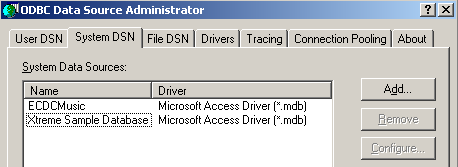
- Use the [Add] button to add a new ODBC data source
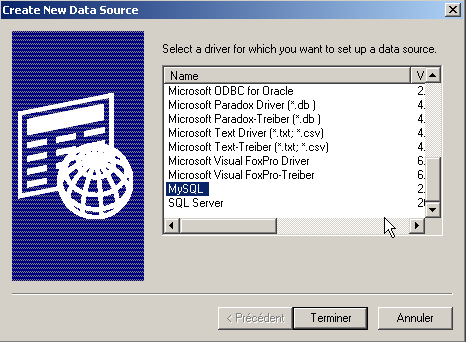
- Select the driver MySQL and click [Terminer]
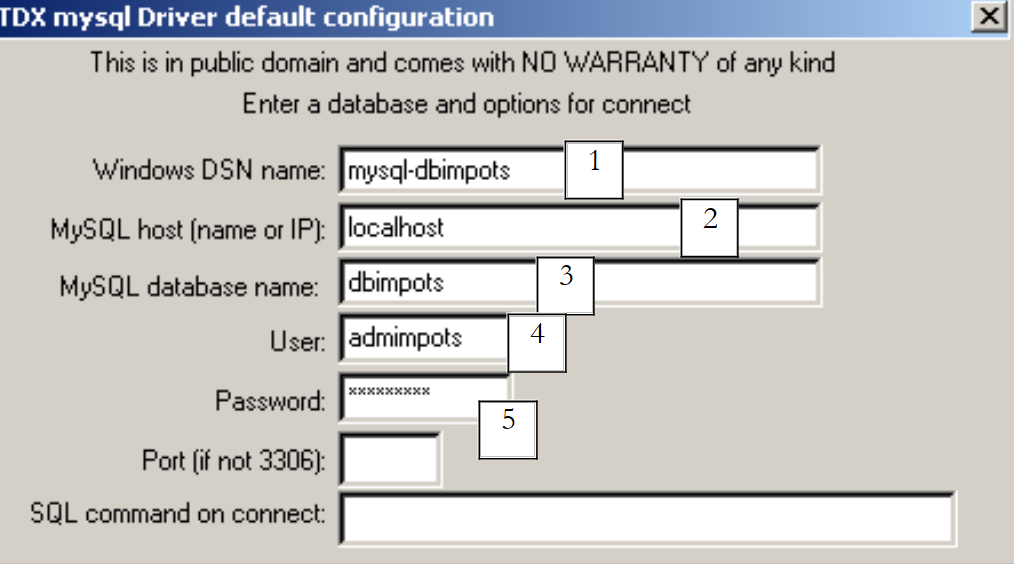 |
- The driver MySQL requests certain information:
1 | the name DSN to be given to the data source ODBC - can be anything |
2 | the machine on which SGBD runs—in this case, localhost. It is worth noting that the database could be a remote database. Local applications using the ODBC data source would not notice this. This would be the case, in particular, for our PHP application. |
3 | the database MySQL to be used. MySQL is a SGBD that manages relational databases, which are sets of tables linked together by relationships. Here, we specify the name of the managed database. |
4 | the name of a user with access rights to this database |
5 | his password |
4.2. Tax Application: the ImpotsDSN class
Our application will be based on the class PHP ImpotsDSN, which will have the following attributes, constructor, and method:
<?php
...
     // attributes
    var $limites;        // table of limits
    var $coeffR;        // coeffR table
    var $coeffN;        // coeffN table
    var $erreurs;        // error table
- We saw in the problem statement that we needed three sets of data
12620.0 | 0 | 0 |
13190 | 0.05 | 631 |
15,640 | 0.1 | 1,290.5 |
24,740 | 0.15 | 2,072.5 |
31,810 | 0.2 | 3,309.5 |
39,970 | 0.25 | 4900 |
48,360 | 0.3 | 6898.5 |
55,790 | 0.35 | 9,316.5 |
92,970 | 0.4 | 12,106 |
127,860 | 0.45 | 16,754.5 |
151,250 | 0.50 | 23,147.5 |
172,040 | 0.55 | 30,710 |
195,000 | 0.60 | 39,312 |
0 | 0.65 | 49,062 |
The first column will be placed in the $limites attribute of the ImotsDSN class, the second in the $coeffR attribute, and the third in the $coeffN attribute. These three attributes are initialized by the class constructor. The constructor retrieves the data from a data source named ODBC. Various errors may occur during object construction. These errors are reported in the $erreurs attribute in the form of an array of error messages.
- The constructor receives a $impots dictionary as a parameter with the following fields:
// dsn: name DSN of data source ODBC containing values from limit tables, coeffR, coeffN
// user: name of a user with read access to the source ODBC
// pwd: password
// table: name of table containing values (limits, coeffR, coeffN)
// limits: name of the column containing the limit values
// coeffR: name of column containing coeffR values
// coeffN: name of column containing coeffN values
The constructor parameter provides all the information needed to read data from the ODBC data source
- Once the ImpotsDSN object is created, users of the class can call the calculerImpots method of the object. This method takes a $personne dictionary as a parameter:
       // $personne["married"]: yes, no
       // $personne["children"] : number of children
       // $personne["salary"]: annual salary
The complete class is as follows:
<?php
   // definition of a objImpots class
  class ImpotsDSN{

     // attributes: the 3 data tables
    var $limites;        // table of limits
    var $coeffR;        // coeffR table
    var $coeffN;        // coeffN table
    var $erreurs;        // error table

     // manufacturer
    function ImpotsDSN($impots){
       // $impots: dictionary containing the following fields
       // dsn: name DSN of data source ODBC containing values from limit tables, coeffR, coeffN
       // user : name of a user with read rights on the source ODBC
       // pwd: password
       // table: name of table containing values (limits, coeffR, coeffN)
       // limits: name of the column containing the limit values
       // coeffR: name of column containing coeffR values
       // coeffN: name of column containing coeffN values

       // initially no errors
      $this->erreurs=array();

             // call verification
      if (! isset($impots[dsn]) || ! isset($impots[user]) ||! isset($impots[pwd]) ||! isset($impots[table]) ||
          ! isset($impots[limites]) ||! isset($impots[coeffR]) ||! isset($impots[coeffN])){
         // error
        $this->erreurs[]="Appel incorrect";
         // end
        return;
      }//if

       // database opening DSN
      $connexion=odbc_connect($impots[dsn],$impots[user],$impots[pwd]);
       // mistake?
      if(! $connexion){
         // error
        $this->erreurs[]="Impossible d'ouvrir la base DSN [$impots[dsn]] (".odbc_error().")";
         // end
        return;
      }//if

             // issue a query on the
      $requête=odbc_prepare($connexion,"select $impots[limites],$impots[coeffR],$impots[coeffN] from $impots[table]");
            if(! odbc_execute($requête)){
         // error
        $this->erreurs[]="Impossible d'expoiter la base DSN [$impots[dsn]] (".odbc_error().")";
         // end
        odbc_close($connexion);
        return;
      }//if

       // use of query results
      $this->limites=array();
      $this->coeffR=array();
      $this->coeffN=array();
      while(odbc_fetch_row($requête)){
          // one more line
        $this->limites[]=odbc_result($requête,$impots[limites]);
        $this->coeffR[]=odbc_result($requête,$impots[coeffR]);
        $this->coeffN[]=odbc_result($requête,$impots[coeffN]);
      }//while

       // base closure
      odbc_close($connexion);
    }//manufacturer

    // --------------------------------------------------------------------------
    function calculer($personne){
       // $personne["married"]: yes, no
       // $personne["children"] : number of children
       // $personne["salary"]: annual salary

       // is the item in good condition?
      if (! is_array($this->erreurs) || count($this->erreurs)!=0) return -1;

            // call verification
      if (! isset($personne[marié]) || ! isset($personne[enfants]) ||! isset($personne[salaire])){
         // error
        $this->erreurs[]="Appel incorrect";
         // end
        return -1;
      }//if

       // are the parameters correct?
      $personne[marié]=strtolower($personne[marié]);
      if($personne[marié]!=oui && $personne[marié]!=non){
           // error
        $this->erreurs[]="Statut marital [$personne[marié]] incorrect";
      }//if
      if(! preg_match("/^\s*\d{1,3}\s*$/",$personne[enfants])){
          // error
        $this->erreurs[]="Nombre d'enfants [$personne[enfants]] incorrect";
      }//if
      if(! preg_match("/^\s*\d+\s*$/",$personne[salaire])){
          // error
        $this->erreurs[]="salaire [$personne[salaire]] incorrect";
      }//if
       // mistakes?
      if(count($this->erreurs)!=0) return -1;

      // number of shares
      if($personne[marié]==oui) $nbParts=$personne[enfants]/2+2;
        else $nbParts=$personne[enfants]/2+1;
       // an additional 1/2 share if at least 3 children
      if($personne[enfants]>=3) $nbParts+=0.5;
       // taxable income
      $revenuImposable=0.72*$personne[salaire];
       // family quotient
      $quotient=$revenuImposable/$nbParts;
       // is set at the end of the limit table to stop the following loop
      $this->limites[$this->nbLimites]=$quotient;
       // tAX CALCULATION
      $i=0;
      while($quotient>$this->limites[$i]) $i++;
      // because $quotient has been placed at the end of the $limites array, the previous loop
       // cannot exceed the table $limites
       // now we can calculate the tax
      return floor($revenuImposable*$this->coeffR[$i]-$nbParts*$this->coeffN[$i]);
    }//calculImpots
  }//tax class
?>
A test program could look like this:
<?php
     // libraries
  include "ImpotsDSN.php";

     // creation of an impots object
  $conf=array(dsn=>"mysql-dbimpots",user=>admimpots,pwd=>mdpimpots,
      table=>impots,limites=>limites,coeffR=>coeffR,coeffN=>coeffN);

  $objImpots=new ImpotsDSN($conf);

  // mistakes?
  if(count($objImpots->erreurs)!=0){
       // msg
    echo "Les erreurs suivantes se sont produites :\n";
    $erreurs=$objImpots->erreurs;
    for($i=0;$i<count($erreurs);$i++){
        echo "$erreurs[$i]\n";
    }//for
    // end
    exit(1);
  }//if

   // testing
  calculerImpots($objImpots,oui,2,200000);
  calculerImpots($objImpots,non,2,200000);
  calculerImpots($objImpots,oui,3,200000);
  calculerImpots($objImpots,non,3,200000);
  calculerImpots($objImpots,array(),array(),array());

  // end
  exit(0);

  // -----------------------------------------------------------
  function calculerImpots($objImpots,$marié,$enfants,$salaire){
       // echo
        echo "impots($marié,$enfants,$salaire)\n";

       // tAX CALCULATION
    $personne=array(marié=>$marié,enfants=>$enfants,salaire=>$salaire);
      $montant=$objImpots->calculer($personne);
     // mistakes?
    if(count($objImpots->erreurs)!=0){
         // msg
      echo "Les erreurs suivantes se sont produites :\n";
      $erreurs=$objImpots->erreurs;
      for($i=0;$i<count($erreurs);$i++){
          echo "$erreurs[$i]\n";
      }//for
    }else echo "montant=$montant\n";
  }//calculerImp
- The test program makes sure to "include" the file containing the ImpotsDSN class
- then creates a objImpots object of the ImpotsDSN class by passing the necessary information to the object’s constructor
- Once this object is created, its calculate method will be called five times
The results obtained are as follows:
dos>e:\php43\php.exe test.php
impots(oui,2,200000)
montant=22504
impots(non,2,200000)
montant=33388
impots(oui,3,200000)
montant=16400
impots(non,3,200000)
montant=22504
impots(Array,Array,Array)
Les erreurs suivantes se sont produites :
Statut marital [array] incorrect
Nombre d'children [Array] incorrect
salaire [Array] incorrect
We will now use the class ImpotsDSN without redefining it.
4.3. Taxes Application: version 1
We now present version 1 from the IMPOTS application. We are in the context of a web application that would present a HTML interface to a user in order to obtain the three parameters necessary for calculating the tax:
- marital status (married or not)
- number of children
- annual income
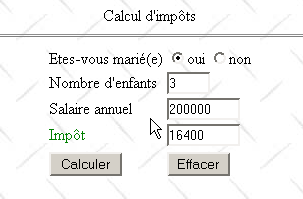
The form is displayed by the following PHP page:
<?php //tax form ?>

<html>
    <head>
      <title>impots</title>
    <script language="JavaScript" type="text/javascript">
        function effacer(){
           // raz du formulaire
        with(document.frmImpots){
            optMarie[0].checked=false;
          optMarie[1].checked=true;
          txtEnfants.value="";
          txtSalaire.value="";
          txtImpots.value="";
        }//with
      }//delete
        </script>
  </head>

  <body background="/poly/impots/images/standard.jpg">
      <center>
        Calcul d'impôts
        <hr>
      <form name="frmImpots" method="POST">
          <table>
            <tr>
              <td>Etes-vous marié(e)</td>
            <td>
                <input type="radio" name="optMarie" value="oui" <?php echo $requête->chkoui ?>>oui
              <input type="radio" name="optMarie" value="non" <?php echo $requête->chknon ?>>non
            </td>
          </tr>
          <tr>
              <td>Nombre d'enfants</td>
            <td><input type="text" size="5" name="txtEnfants" value="<?php echo $requête->enfants ?>"></td>
          </tr>
          <tr>
              <td>Salaire annuel</td>
            <td><input type="text" size="10" name="txtSalaire" value="<?php echo $requête->salaire ?>"></td>
          </tr>
          <tr>
              <td><font color="green">Impôt</font></td>
            <td><input type="text" size="10" name="txtImpots" value="<?php echo $requête->impots ?>" readonly></td>
          </tr>
          <tr></tr>
          <tr>
              <td><input type="submit" value="Calculer"></td>
            <td><input type="button" value="Effacer" onclick="effacer()"></td>
          </tr>
        </table>
      </form>
    </center>
    <?php
         // are there any mistakes?
      if(count($requête->erreurs)!=0){
           // error display
        echo "<hr>\n<font color=\"red\">\n";
        echo "Les erreurs suivantes se sont produites<br>";
        echo "<ul>";
        for($i=0;$i<count($requête->erreurs);$i++){
            echo "<li>".$requête->erreurs[$i]."</li>\n";
        }
        echo "</ul>\n</font>\n";
      }//if
   ?>
 </body>
</html>
The PHP page simply displays information passed to it by the application's main program in the $requête variable, which is an object with the following fields:
radio button attributes yes, no - possible values are "checked" or "" to enable or disable the corresponding radio button | |
the taxpayer's number of children | |
their annual salary | |
the amount of tax due | |
a list of any errors—may be empty. |
The page sent to the client contains a javascript script containing a clear function associated with the "Clear" button, whose role is to reset the form to its initial state: unchecked button, empty input fields. Note that this result could not be achieved with a HTML button of the "reset" type. Indeed, when this type of button is used, the browser resets the form to the state in which it received it. However, in our application, the browser receives forms that may not be empty.
The application that processes the previous form is as follows:
<?php
     // processes the tax form

     // libraries
  include "ImpotsDSN.php";

  // application configuration
  ini_set("register_globals","off");
  ini_set("display_errors","off");
  $formulaireImpots="impots_form.php";
  $erreursImpots="impots_erreurs.php";
  $bdImpots=array(dsn=>"mysql-dbimpots",user=>admimpots,pwd=>mdpimpots,
      table=>impots,limites=>limites,coeffR=>coeffR,coeffN=>coeffN);

   // parameters are retrieved
  $requête->marié=$_POST["optMarie"];
  $requête->enfants=$_POST["txtEnfants"];
  $requête->salaire=$_POST["txtSalaire"];

   // do we have all the parameters?
  if(! isset($requête->marié) || ! isset($requête->enfants) || ! isset($requête->salaire)){
       // empty form preparation
    $requête->chkoui="";
    $requête->chknon="checked";
    $requête->enfants="";
    $requête->salaire="";
    $requête->impots="";
    $requête->erreurs=array();
     // form display
    include $formulaireImpots;
     // end
    exit(0);
  }//if

   // checking parameters
  $requête=vérifier($requête);

   // mistakes?
  if(count($requête->erreurs)!=0){
       // form display
    include "$formulaireImpots";
     // end
    exit(0);
  }//if

   // calculation of response
  $requête=calculerImpots($bdImpots,$requête);

   // mistakes?
  if(count($requête->erreurs)!=0){
       // error form display
    include "$erreursImpots";
     // end
    exit(0);
  }//if

   // form display
  include "$formulaireImpots";
   // end
  exit(0);

  // --------------------------------------------------------
  function vérifier($requête){
       // checks the validity of query parameters

     // initially no errors
    $requête->erreurs=array();

     // valid status?
    $requête->marié=strtolower($requête->marié);
    if($requête->marié!="oui" && $requête->marié!="non"){
         // an error
      $requête->erreurs[]="Statut marital [$requête->marié] incorrect";
    }

     // number of valid children?
    if(! preg_match("/^\s*\d+\s*$/",$requête->enfants)){
        // an error
      $requête->erreurs[]="Nombre d'enfants [$requête->enfants] incorrect";
    }

     // valid salary?
    if(! preg_match("/^\s*\d+\s*$/",$requête->salaire)){
        // an error
      $requête->erreurs[]="Salaire [$requête->salaire] incorrect";
    }

     // radio button status
    if($requête->marié=="oui"){
        $requête->chkoui="checked";
      $requête->chknon="";
    }else{
        $requête->chknon="checked";
      $requête->chkoui="";
    }

     // we return the request
    return $requête;
  }//check

  // --------------------------------------------------------
  function calculerImpots($bdImpots,$requête){
       // calculates tax amount

     // $bdImpots: dictionary containing the information needed to read the ODBC data source
     // $requête: query containing taxpayer information

     // build a ImpotsDSN object
    $objImpots=new ImpotsDSN($bdImpots);

    // mistakes?
    if(count($objImpots->erreurs)!=0){
         // put the errors in the query
      $requête->erreurs=$objImpots->erreurs;
      // finish
      return $requête;
    }//if

    // tAX CALCULATION
    $personne=array(marié=>"$requête->marié",enfants=>"$requête->enfants",salaire=>"$requête->salaire");
        $requête->impots=$objImpots->calculer($personne);

     // we return the result
    return $requête;
  }//calculerImpots
Comments:
- First, the ImpotsDSN class is included. This class forms the basis of the tax calculation and hides database access from us
- A number of initializations are performed to facilitate application maintenance. If parameters change, their values will be updated in this section. Generally, these configuration values are stored in a file or a database.
- We retrieve the three form parameters corresponding to the fields HTML, optMarie, txtEnfants, and txtSalaire.
- These parameters may be completely or partially missing. This will be the case, in particular, during the initial request for the form. In this case, we simply send an empty form.
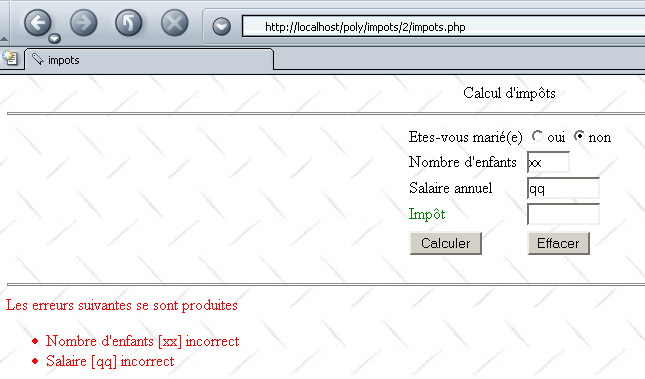
- Next, the validity of the three retrieved parameters is checked. If they are found to be incorrect, the form is returned as entered but with an additional list of errors.
- Once the validity of the three parameters has been verified, the tax can be calculated. This is calculated by the function calculerImpots. This function creates an object of type ImpotsDSN and uses the calculate method of this object.
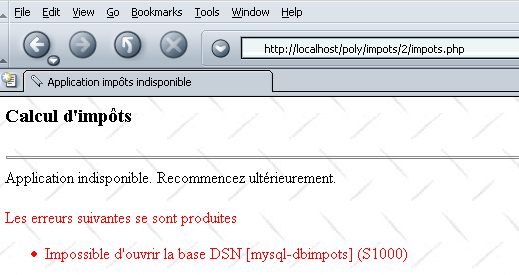
- The creation of the ImpotsDSN object may fail if the database is unavailable. In this case, the application displays a specific error page listing the errors that occurred.
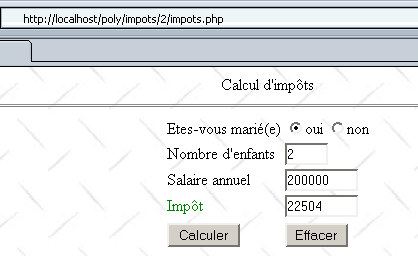
- If everything went well, the form is returned as entered but with the amount of tax due added.
The error page is as follows:
<?php    // error page ?>
<html>
    <head>
      <title>Application impôts indisponible</title>
  </head>
  <body background="/poly/impots/images/standard.jpg">
      <h3>Calcul d'impôts</h3>
    <hr>
    Application indisponible. Recommencez ultérieurement.<br><br>
    <font color="red">
           Les erreurs suivantes se sont produites<br>
        <ul>
      <?php
           // error display
        for($i=0;$i<count($requête->erreurs);$i++){
            echo "<li>".$requête->erreurs[$i]."</li>\n";
        }
      ?>
        </ul>
    </font>
  </body>
</html>
Here are a few examples of errors. First, an incorrect password is entered in the database:
Incorrect data is entered in the form:
Finally, correct values are entered:
4.4. Tax Application: version 2
In the previous example, the server verifies the validity of the form parameters txtEnfants and txtSalaire. Here, we propose verifying them using a script Javascript included in the form page. The browser then performs the parameter validation. The server is only contacted if the parameters are valid. This saves "bandwidth." The display page impots-form.php becomes the following:
<?php //tax form ?>

<html>
    <head>
      <title>impots</title>
    <script language="JavaScript" type="text/javascript">
        function effacer(){
........
      }//delete

      //------------------------------
      function calculer(){
           // check parameters before sending them to the server
        with(document.frmImpots){
          //no. of children
          champs=/^\s*(\d+)\s*$/.exec(txtEnfants.value);
          if(champs==null){
            // the model is not verified
            alert("Le nombre d'enfants n'a pas été donné ou est incorrect");
            nbEnfants.focus();
            return;
          }//if
           //salary
          champs=/^\s*(\d+)\s*$/.exec(txtSalaire.value);
          if(champs==null){
            // the model is not verified
            alert("Le salaire n'a pas été donné ou est incorrect");
            salaire.focus();
            return;
          }//if
          // that's it - we send the form to the server
          submit();
        }//with
      }//calculate
        </script>
  </head>

  <body background="/poly/impots/images/standard.jpg">
............
              <td><input type="button" value="Calculer" onclick="calculer()"></td>
            <td><input type="button" value="Effacer" onclick="effacer()"></td>
........
 </body>
</html>
Note the following changes:
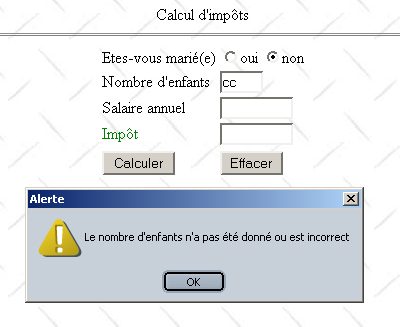
- The Calculate button is no longer of type submit but is now a button associated with a function named calculate. This function will analyze the fields txtEnfants and txTsalaire. If they are correct, the form values will be sent to the server (submit); otherwise, an error message will be displayed.
Here is an example of what is displayed in the event of an error:
4.5. Tax Application: version 3
We will slightly modify the application to introduce the concept of a session. We will now consider the application to be a tax calculation simulation tool. A user can then simulate different taxpayer "scenarios" and see the tax liability for each one. The web page below provides an example of what could be achieved:
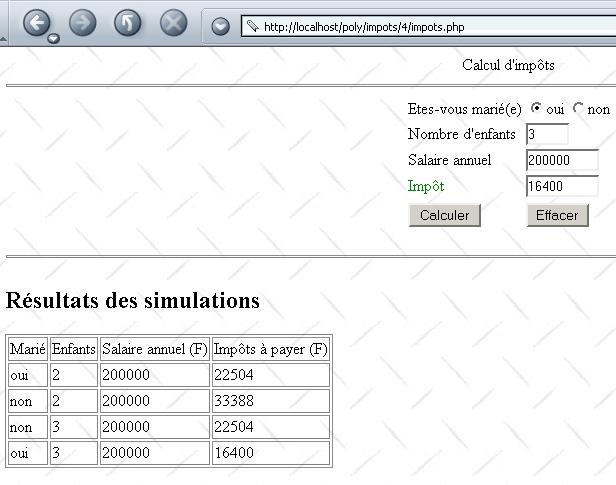
The program to display the page above is as follows:
<?php //tax form ?>

<html>
    <head>
      <title>impots</title>
    <script language="JavaScript" type="text/javascript">
        function effacer(){
...
      }//delete

      //------------------------------
      function calculer(){
...
      }//calculate
        </script>
  </head>

  <body background="/poly/impots/images/standard.jpg">
      <center>
        Calcul d'impôts
        <hr>
      <form name="frmImpots" method="POST">
          <table>
            <tr>
              <td>Etes-vous marié(e)</td>
            <td>
                <input type="radio" name="optMarie" value="oui" <?php echo $requête[chkoui] ?>>oui
              <input type="radio" name="optMarie" value="non" <?php echo $requête[chknon] ?>>non
            </td>
          </tr>
          <tr>
              <td>Nombre d'enfants</td>
            <td><input type="text" size="5" name="txtEnfants" value="<?php echo $requête[enfants] ?>"></td>
          </tr>
          <tr>
              <td>Salaire annuel</td>
            <td><input type="text" size="10" name="txtSalaire" value="<?php echo $requête[salaire] ?>"></td>
          </tr>
          <tr>
              <td><font color="green">Impôt</font></td>
            <td><input type="text" size="10" name="txtImpots" value="<?php echo $requête[impots] ?>" readonly></td>
          </tr>
          <tr></tr>
          <tr>
              <td><input type="button" value="Calculer" onclick="calculer()"></td>
            <td><input type="button" value="Effacer" onclick="effacer()"></td>
          </tr>
        </table>
      </form>
    </center>
    <?php
         // are there any mistakes?
      if(count($requête[erreurs])!=0){
           // error display
        echo "<hr>\n<font color=\"red\">\n";
        echo "Les erreurs suivantes se sont produites<br>";
        echo "<ul>";
        for($i=0;$i<count($requête[erreurs]);$i++){
            echo "<li>".$requête[erreurs][$i]."</li>\n";
        }
        echo "</ul>\n</font>\n";
      }//if
         // are there any simulations?
      else if(count($requête[simulations])!=0){
          // simulation display
        echo "<hr>\n<h2>Résultats des simulations</h2>\n";
        echo "<table border=\"1\">\n";
        echo "<tr><td>Marié</td><td>Enfants</td><td>Salaire annuel (F)</td><td>Impôts à payer (F)</td></tr>\n";
        for($i=0;$i<count($requête[simulations]);$i++){
            echo "<tr>".
              "<td>".$requête[simulations][$i][0]."</td>".
              "<td>".$requête[simulations][$i][1]."</td>".
              "<td>".$requête[simulations][$i][2]."</td>".
              "<td>".$requête[simulations][$i][3]."</td>".
            "</tr>\n";
        }//for
        echo "</table>\n";
      }//if
   ?>
 </body>
</html>
The display program has minor differences from its previous version, version:
- the dictionary receives a $requête dictionary instead of a $requête object. We therefore write $requête[enfants] and not $requête->children.
- This dictionary has a simulations field, which is a two-dimensional array. $requête[simulations][i] is simulation #i. This is itself an array of four character strings: marital status, number of children, annual salary, tax payable.
The main program has undergone more significant changes:
<?php
     // processes the tax form

     // libraries
  include "ImpotsDSN.php";

   // session start
  session_start();

   // application configuration
  ini_set("register_globals","off");
  ini_set("display_errors","off");
  $formulaireImpots="impots_form.php";
  $erreursImpots="impots_erreurs.php";
  $bdImpots=array(dsn=>"mysql-dbimpots",user=>admimpots,pwd=>mdpimpots,
      table=>impots,limites=>limites,coeffR=>coeffR,coeffN=>coeffN);

     // retrieve session parameters
  $session=$_SESSION["session"];
   // valid session?
  if(! isset($session) || ! isset($session[objImpots]) || ! isset($session[simulations])){
       // start a new session
    $session=array(objImpots=>new ImpotsDSN($bdImpots),simulations=>array());
    // mistakes?
    if(count($session[objImpots]->erreurs)!=0){
      $requête=array(erreurs=>$session[objImpots]->erreurs);
         // error page display
        include $erreursImpots;
       // end
      $session=array();
      terminerSession($session);
    }//if
  }//if

  // retrieve the parameters of the current exchange
  $requête[marié]=$_POST["optMarie"];
  $requête[enfants]=$_POST["txtEnfants"];
  $requête[salaire]=$_POST["txtSalaire"];

   // do we have all the parameters?
  if(! isset($requête[marié]) || ! isset($requête[enfants]) || ! isset($requête[salaire])){
       // empty form display
    $requête=array(chkoui=>"",chknon=>"checked",enfants=>"",salaire=>"",impots=>"",
            erreurs=>array(),simulations=>array());
    include $formulaireImpots;
     // end
    terminerSession($session);
  }//if

   // checking parameters
  $requête=vérifier($requête);

   // mistakes?
  if(count($requête[erreurs])!=0){
       // form display
    include "$formulaireImpots";
     // end
    terminerSession($session);
  }//if

   // calculation of tax payable
  $requête[impots]=$session[objImpots]->calculer(array(marié=>$requête[marié],
        enfants=>$requête[enfants],salaire=>$requête[salaire]));

   // one more simulation
  $session[simulations][]=array($requête[marié],$requête[enfants],$requête[salaire],$requête[impots]);
  $requête[simulations]=$session[simulations];

   // form display
  include "$formulaireImpots";

   // end
  terminerSession($session);

  // --------------------------------------------------------
  function vérifier($requête){
       // checks the validity of query parameters

     // initially no errors
    $requête[erreurs]=array();

     // valid status?
    $requête[marié]=strtolower($requête[marié]);
    if($requête[marié]!="oui" && $requête[marié]!="non"){
         // an error
      $requête[erreurs][]="Statut marital [$requête[marié]] incorrect";
    }

     // number of valid children?
    if(! preg_match("/^\s*\d+\s*$/",$requête[enfants])){
        // an error
      $requête[erreurs][]="Nombre d'enfants [$requête[enfants]] incorrect";
    }

     // valid salary?
    if(! preg_match("/^\s*\d+\s*$/",$requête[salaire])){
        // an error
      $requête[erreurs][]="Salaire [$requête[salaire]] incorrect";
    }

     // radio button status
    if($requête[marié]=="oui"){
        $requête[chkoui]="checked";
      $requête[chknon]="";
    }else{
        $requête[chknon]="checked";
      $requête[chkoui]="";
    }

     // we return the request
    return $requête;
  }//check

  // --------------------------------------------------------
  function terminerSession($session){
       // save the session
    $_SESSION[session]=$session;
     // end script
    exit(0);
  }//terminerSession
- First of all, this application manages a session. We therefore start a session at the beginning of the script:
- The session stores a single variable: the dictionary $session. This dictionary has two fields:
- objImpots: a ImpotsDSN object. We store this object in the client’s session to avoid unnecessary repeated accesses to the ODBC database.
- simulations: the simulation table to recall simulations from previous exchanges between exchanges.
- Once the session has started, the variable $session is retrieved. If it does not yet exist, the session is starting. An object ImpotsDSN and an empty simulation array are then created. If necessary, errors are reported.
<?php
...
     // retrieve session parameters
  $session=$_SESSION["session"];
   // valid session?
  if(! isset($session) || ! isset($session[objImpots]) || ! isset($session[simulations])){
       // start a new session
    $session=array(objImpots=>new ImpotsDSN($bdImpots),simulations=>array());
    // mistakes?
    if(count($session[objImpots]->erreurs)!=0){
      $requête=array(erreurs=>$session[objImpots]->erreurs);
         // error page display
        include $erreursImpots;
       // end
      $session=array();
      terminerSession($session);
    }//if
  }//if
- Once the session is properly initialized, the exchange parameters are retrieved. If not all expected parameters are present, an empty form is sent.
<?php
...
   // retrieve the parameters of the current exchange
  $requête[marié]=$_POST["optMarie"];
  $requête[enfants]=$_POST["txtEnfants"];
  $requête[salaire]=$_POST["txtSalaire"];

   // do we have all the parameters?
  if(! isset($requête[marié]) || ! isset($requête[enfants]) || ! isset($requête[salaire])){
       // empty form display
    $requête=array(chkoui=>"",chknon=>"checked",enfants=>"",salaire=>"",impots=>"",
            erreurs=>array(),simulations=>array());
    include $formulaireImpots;
     // end
    terminerSession($session);
  }//if
- if all parameters are present, they are checked. If there are errors, they are reported:
<?php
...
   // checking parameters
  $requête=vérifier($requête);

   // mistakes?
  if(count($requête[erreurs])!=0){
       // form display
    include "$formulaireImpots";
     // end
    terminerSession($session);
  }//if
- if the parameters are correct, the tax is calculated:
<?php
...
   // calculation of tax payable
  $requête[impots]=$session[objImpots]->calculer(array(marié=>$requête[marié],
        enfants=>$requête[enfants],salaire=>$requête[salaire]));
- The current simulation is added to the simulation array, which is then sent to the client along with the form:
<?php
...
   // one more simulation
  $session[simulations][]=array($requête[marié],$requête[enfants],$requête[salaire],$requête[impots]);
  $requête[simulations]=$session[simulations];

   // form display
  include "$formulaireImpots";

   // end
  terminerSession($session);
- In any case, the script ends by saving the variable $session to the session. This is done in the procedure terminerSession.
<?php
...

  function terminerSession($session){
       // save the session
    $_SESSION[session]=$session;
     // end script
    exit(0);
  }//terminerSession
Let’s conclude by presenting the program that displays database access errors (impots-erreurs.php):
<?php    // error page ?>
<html>
    <head>
      <title>Application impôts indisponible</title>
  </head>
  <body background="/poly/impots/images/standard.jpg">
      <h3>Calcul d'impôts</h3>
    <hr>
    Application indisponible. Recommencez ultérieurement.<br><br>
    <font color="red">
           Les erreurs suivantes se sont produites<br>
        <ul>
      <?php
           // error display
        for($i=0;$i<count($requête[erreurs]);$i++){
            echo "<li>".$requête[erreurs][$i]."</li>\n";
        }
      ?>
        </ul>
    </font>
  </body>
</html>
Here as well, the object $requête has been replaced by a dictionary $requête.
4.6. Taxes Application: version 4
We will now create a standalone application that will act as a web client for the previous Taxes web application. The application will be a console application launched from a DOS window:
dos>e:\php43\php.exe cltImpots.php
Syntaxe cltImpots.php urlImpots marié enfants salaire [jeton]
The parameters for the cltImpots web client are as follows:
     // syntax $0 urlImpots married children salary token
   // customer of a tax service operating on urlImpots
   // sends three pieces of information to this service: married, children, salary
   // possibly with the session token if this has been passed
   // displays the session simulation table
Here are a few usage examples. First, an example without a session token.
dos>e:\php43\php.exe cltImpots.php http://localhost/poly/impots/6/impots.php yes 2 200000

Jeton de session=[a6297317667bc981c462120987b8dd18]

Simulations :
[Marié,Enfants,Salaire annuel (F),Impôts à payer (F)]
[oui,2,200000,22504]
We successfully retrieved the amount of tax due (22,504 F). We also retrieved the session token. We can now use it for a second query:
dos>e:\php43\php.exe cltImpots.php http://localhost/poly/impots/6/impots.php yes 3 200000 a6297317667bc981c462120987b8dd18

Jeton de session=[a6297317667bc981c462120987b8dd18]

Simulations :
[Marié,Enfants,Salaire annuel (F),Impôts à payer (F)]
[oui,2,200000,22504]
[oui,3,200000,16400]
We successfully receive the table of simulations sent by the web server. The retrieved token remains the same, of course. If we query the web service while the database has not been started, we get the following result:
dos>e:\php43\php.exe cltImpots2.php http://localhost/poly/impots/6/impots.php yes 3 200000

Jeton de session=[8369014d5053212bc42f64bbdfb152ee]

Les erreurs suivantes se sont produites :
Impossible d'open database DSN [mysql-dbimpots] (S1000)
When writing a web client application, it is necessary to know exactly what the server sends in response to the various possible requests from a client. The server sends a set of lines HTML containing useful information and other data that is only there for layout purposes HTML. Regular expressions can help us find the useful information within the stream of lines sent by the server. To do this, we need to know the exact format of the server’s various responses. To determine this, we can query the web service using a browser and examine the source code that was sent. Note that this method does not allow us to determine the headers of the web server’s response. It is sometimes useful to know these. We can then use one of the two generic web requests seen in the previous chapter.
If we repeat the previous examples, here is the code received by the browser for the simulation table:
<h2>Résultats des simulations</h2>
<table border="1">
<tr><td>Marié</td><td>Enfants</td><td>Salaire annuel (F)</td><td>Impôts à payer (F)</td></tr>
<tr><td>oui</td><td>2</td><td>200000</td><td>22504</td></tr>
<tr><td>oui</td><td>3</td><td>200000</td><td>16400</td></tr>
</table>
This is a table named HTML, the only one in the document sent. Therefore, the regular expression "|<tr>\s*<td>(.+?)</td>\s*<td>(.+?)</td>\s*<td>(.+?)</td>\s*<td>(.+?)</td>\s*</tr>|" should allow us to find the various simulations received in the document. When the database is unavailable, the following message is displayed:
    Application indisponible. Recommencez ultérieurement.<br><br>
    <font color="red">
           Les erreurs suivantes se sont produites<br>
        <ul>
      <li>Impossible d'open database DSN [mysql-dbimpots] (S1000)</li>
        </ul>
    </font>
To retrieve the error, the web client must search the web server's response for lines matching the pattern: "|<li>(.+?)</li>|".
We now have the guidelines for what to do when the user requests a tax calculation from the previous console client:
- verify that all parameters are valid and report any errors.
- connect to the URL provided as the first parameter. To do this, we will follow the pattern of the generic web client already presented and discussed
- in the server response stream, use regular expressions to either:
- find the error messages
- find the simulation results
The client code cltImpots.php is as follows:
<?php
     // syntax $0 urlImpots married children salary token
   // customer of a tax service operating on urlImpots
   // sends three pieces of information to this service: married, children, salary
   // possibly with the session token if this has been passed
   // displays the session simulation table

   // verification no. of arguments
  if(count($argv)!=5 && count($argv)!=6){
       // error
    fwrite(STDERR,"Syntaxe $argv[0] urlImpots marié enfants salaire [jeton]\n");
     // end
    exit(1);
  }//if

   // we note the URL
  $urlImpots=analyseURL($argv[1]);
  if(isset($urlImpots[erreur])){
       // error
    fwrite(STDERR,"$urlImpots[erreur]\n");
     // end
    exit(1);
  }//if

   // analysis of user demand
  $demande=analyseDemande("$argv[2],$argv[3],$argv[4]");
   // mistakes?
  if($demande[erreur]){
       // msg
    echo "$demande[erreur]\n";
     // it's over
    exit(1);
  }//if

   // you can make the request - you use the session token
  $impots=getImpots($urlImpots,$demande,$argv[5]);

   // displays the session token
  echo "Jeton de session=[$impots[jeton]]\n";

   // mistakes?
  if(count($impots[erreurs])!=0){
       //error msg
    echo "Les erreurs suivantes se sont produites :\n";
    for($i=0;$i<count($impots[erreurs]);$i++){
        echo $impots[erreurs][$i]."\n";
    }//for
  }else{
       // no errors - simulation display
    echo "Simulations :\n";
    for($i=0;$i<count($impots[simulations]);$i++){
        echo "[".implode(",",$impots[simulations][$i])."]\n";
      }//for
  }//if

   // end of program
  exit(0);

  // --------------------------------------------------------------
  function analyseURL($URL){
       // analyzes the validity of URL $URL
    $url=parse_url($URL);
    // the protocol
    if(strtolower($url[scheme])!="http"){
        $url[erreur]="l'URL [$URL] n'est pas au format http://machine[:port][/chemin]";
      return $url;
    }//if
     // the machine
    if(! isset($url[host])){
        $url[erreur]="l'URL [$URL] n'est pas au format http://machine[:port][/chemin]";
      return $url;
    }//if
     // the port
    if(! isset($url[port])) $url[port]=80;
     // the request
    if(isset($url["query"])){
        $url[erreur]="l'URL [$URL] n'est pas au format http://machine[:port][/chemin]";
      return $url;
    }//if
     // return
    return $url;
  }//analyseURL

  // -----------------------------------------------------------
  function analyseDemande($demande){
       // $demande: string to be analyzed
     // must be of the form married, children, salary
    // valid format
    if(! preg_match("/^\s*(oui|non)\s*,\s*(\d{1,3})\s*,\s*(\d+)\s*$/i",$demande,$champs)){
        // invalid format
      return(array(erreur=>"Format (marié, enfants, salaire) invalide."));
    }
     // it's good
    $marié=strtolower($champs[1]);
    return array(marié=>$marié,enfants=>$champs[2],salaire=>$champs[3]);
  }//analyseDemande

  // --------------------------------------------------------------
  function getImpots($urlImpots,$demande,$jeton){
       // $urlImpots : URL to query
     // $demande: dictionary containing husband, children, salary fields
     // $jeton: a possible session token

     // opens a connection on the $urlImpots[port] port of $urlImpots[host]
    $connexion=fsockopen($urlImpots[host],$urlImpots[port],&$errno,&$erreur);
     // return if error
    if(! $connexion){
      return array(erreurs=>array("Echec de la connexion au site ($urlImpots[host],$urlImpots[port]) : $erreur"));
    }//if

         // send HTTP to the server
    POST($connexion,$urlImpots,$jeton,
            array(optMarie=>$demande[marié],txtEnfants=>$demande[enfants],txtSalaire=>$demande[salaire]));

         // we read the server response - first the HTTP headers
     // the first line
    $ligne=fgets($connexion,10000);

    // URL found?
    if(! preg_match("/^(.+?) 200 OK\s*$/",$ligne)){
        // URL inaccessible - return with error
      return array(erreurs=>array("L'URL $urlImpots[path] n'a pu être trouvée"));
    }//if

     // other headers are read HTTP
    while(($ligne=fgets($connexion,10000)) && (($ligne=rtrim($ligne))!="")){
       // search for the token if it hasn't already been found
      if(! $jeton){
           // search for set-cookie line
        if(preg_match("/^Set-Cookie: PHPSESSID=(.*?);/i",$ligne,$champs)){
            // the token is found - it is memorized
          $jeton=$champs[1];
        }//if
      }//if
    }//next line

     // we read the following document
    $document="";
    while($ligne=fread($connexion,10000)){
        $document.=$ligne;
    }//while

     // close the connection
    fclose($connexion);

     // document analysis
    $impots=getInfos($document);

     // we return the result
    return array(jeton=>$jeton,erreurs=>$impots[erreurs],simulations=>$impots[simulations]);
    }//getImpots

  // --------------------------------------------------------------
  function POST($connexion,$url,$jeton,$paramètres){
       // $connexion: connection to web server
     // $url: the URL to be queried
     // $paramètres: dictionary of parameters to be posted

     // we prepare the POST
    $post="";
    while(list($paramètre,$valeur)=each($paramètres)){
        $post.=$paramètre."=".urlencode($valeur)."&";
    }//while
     // remove the last character
    $post=substr($post,0,-1);

     // prepare query HTTP in HTTP/1.0 format
    $HTTP="POST $url[path] HTTP/1.0\n";
    $HTTP.="Content-type: application/x-www-form-urlencoded\n";
    $HTTP.="Content-length: ".strlen($post)."\n";
    $HTTP.="Connection: close\n";
    if($jeton) $HTTP.="Cookie: PHPSESSID=$jeton\n";
    $HTTP.="\n";
    $HTTP.=$post;

    // we send the HTTP request
    fwrite($connexion,$HTTP);
    }//POST

  // --------------------------------------------------------------
  function getInfos($document){
       // $document : document HTML
     // search for either the list of errors
     // or the simulation table

     // preparing the result
    $impots[erreurs]=array();
    $impots[simulations]=array();

     // is there a mistake?
     // error line model
    $modErreur="|<li>(.+?)</li>|";
     // document search
    if(preg_match_all($modErreur,$document,$champs,PREG_SET_ORDER)){
        // error recovery
      for($i=0;$i<count($champs);$i++){
          $impots[erreurs][]=$champs[$i][1];
      }//for
       // finish
      return $impots;
    }//if

     // simulation table line model
     // <tr><td>yes</td><td>2</td><td>200000</td><td>22504</td></tr>
    $modSimulation="|<tr>\s*<td>(.+?)</td>\s*<td>(.+?)</td>\s*<td>(.+?)</td>\s*<td>(.+?)</td>\s*</tr>|";
    // document search
    if(preg_match_all($modSimulation,$document,$champs,PREG_SET_ORDER)){
         // simulation recovery
      for($i=0;$i<count($champs);$i++){
          $impots[simulations][]=array($champs[$i][1],$champs[$i][2],$champs[$i][3],$champs[$i][4]);
      }//for
       // return result
      return $impots;
    }//if

    // not normal to get there
    return $impots;
    }//getInfos
?>
Comments:
- The program begins by checking the validity of the parameters it has received. To do this, it uses two functions: analyseURL, which checks the validity of URL, and analyseDemande, which checks the other parameters.
- The tax calculation is performed by the getImpots function:
- The function getImpots is declared as follows:
<?php
...
  // --------------------------------------------------------------
  function getImpots($urlImpots,$demande,$jeton){
       // $urlImpots : URL to query
     // $demande: dictionary containing husband, children, salary fields
     // $jeton: a possible session token
- (continued)
- $urlImpots is a dictionary containing the following fields:
- host: machine where the web service resides
- port: its service port
- path: the path of the requested resource
- $demande is a dictionary containing the following fields:
- married: yes/no: marital status
- children: number of children
- salary: annual salary
- $jeton is the session token.
- $urlImpots is a dictionary containing the following fields:
The function returns a dictionary with the following fields:
- errors: array of error messages
- simulations: array of simulations, where each simulation is itself an array of four elements (married, children, salary, tax)
- token: the session token
- Once the result of getImpots is obtained, the program displays the results and terminates:
<?php
...

   // displays the session token
  echo "Jeton de session=[$impots[jeton]]\n";

   // mistakes?
  if(count($impots[erreurs])!=0){
       //error msg
    echo "Les erreurs suivantes se sont produites :\n";
    for($i=0;$i<count($impots[erreurs]);$i++){
        echo $impots[erreurs][$i]."\n";
    }//for
  }else{
       // no errors - simulation display
    echo "Simulations :\n";
    for($i=0;$i<count($impots[simulations]);$i++){
        echo "[".implode(",",$impots[simulations][$i])."]\n";
      }//for
  }//if

   // end of program
  exit(0);
- Let's now analyze the function getImpots($urlImpots,$demande,$jeton), which is supposed to
- create a connection TCP-IP on port $urlImpots[port] of the machine $urlImpots[host]
- send the headers HTTP to the web server, including the session token if there is one
- send a request to the web server with the parameters contained in the dictionary
- Analyze the web server's response to find either a list of errors or a table of simulations.
- The headers HTTP are sent using a function POST:
<?php
...
         // send HTTP to the server
    POST($connexion,$urlImpots,$jeton,
            array(optMarie=>$demande[marié],txtEnfants=>$demande[enfants],txtSalaire=>$demande[salaire]));
- Once the HTTP headers have been sent, the getImpots function reads the entire server response and stores it in $document. The response is read without being parsed, except for the first line, which tells us whether or not the web server found the URL we requested. Indeed, if the URL was found, the web server responds with HTTP/1.X 200 OK, where X depends on the version or HTTP used.
<?php
...
    // URL found?
    if(! preg_match("/^(.+?) 200 OK\s*$/",$ligne)){
 <?php
...
       // URL inaccessible - return with error
      return array(erreurs=>array("L'URL $urlImpots[path] n'a pu être trouvée"));
    }//if
- the document is parsed using the getInfos function:
- The result returned is a dictionary with two fields:
- errors: list of errors—may be empty
- simulations: list of simulations - may be empty
- Once this is done, the getImpots function can return its result in the form of a dictionary.
<?php
...
     // we return the result
    return array(jeton=>$jeton,erreurs=>$impots[erreurs],simulations=>$impots[simulations]);
- Now let's analyze the POST function:
<?php
...
  // --------------------------------------------------------------
  function POST($connexion,$url,$jeton,$paramètres){
       // $connexion: connection to web server
     // $url: the URL to be queried
     // $paramètres: dictionary of parameters to be posted

     // we prepare the POST
    $post="";
    while(list($paramètre,$valeur)=each($paramètres)){
        $post.=$paramètre."=".urlencode($valeur)."&";
    }//while
     // remove the last character
    $post=substr($post,0,-1);

     // prepare query HTTP in HTTP/1.0 format
    $HTTP="POST $url[path] HTTP/1.0\n";
    $HTTP.="Content-type: application/x-www-form-urlencoded\n";
    $HTTP.="Content-length: ".strlen($post)."\n";
    $HTTP.="Connection: close\n";
    if($jeton) $HTTP.="Cookie: PHPSESSID=$jeton\n";
    $HTTP.="\n";
    $HTTP.=$post;

    // we send the HTTP request
    fwrite($connexion,$HTTP);
    }//POST
While we have previously had the opportunity to request a web resource using a GET, we have not yet had the opportunity to do so with a POST. The POST differs from the GET in how it sends parameters to the server. It must send the following HTTP headers:
where
- path: path to the requested web resource, here $url[path]
- HTTP/1.X: the desired HTTP protocol. Here, we have chosen HTTP/1.0 to receive the response in a single chunk. HTTP/1.1 allows the response to be sent in multiple chunks (chunked).
- N denotes the number of characters the client is about to send to the server
The N characters constituting the request parameters are sent immediately after the blank line that terminates the HTTP headers sent to the server. These parameters are in the form param1=val1¶m2=val2&... where param1 is the parameter name and val1 is its value. The values vali may contain "problematic" characters such as spaces, the & character, the = character, etc. These characters must be replaced by a string %XX where XX is their hexadecimal code. The PHP urlencode function performs this task. The reverse operation is performed by urldecode.
Finally, note that if there is a token, it is sent with a header HTTP Cookie: PHPSESSID=token.
- We still need to examine the function that parses the server’s response:
<?php
...
  // --------------------------------------------------------------
  function getInfos($document){
       // $document : document HTML
     // we look for either the list of errors
     // or the simulation table

     // preparing the result
    $impots[erreurs]=array();
    $impots[simulations]=array();
- Note that errors are sent by the server in the format <li>error message</li>. The regular expression "|<li>(.+?)</li>|" should retrieve this information. Here, we used the | character to delimit the regular expression rather than the / character, since the latter also appears within the regular expression itself. The function preg_match_all ($modèle, $document, $champs, PREG_SET_ORDER) retrieves all occurrences of $modèle found in $document. These are placed in the array $champs. Thus, $champs[i] represents the i-th occurrence of $modèle in $document. In $champs[$i][0], the string corresponding to the template is placed. If the template contained parentheses, the string corresponding to the first parenthesis is placed in $champs[$i][1], the second in $champs[$i][2], and so on. The code to retrieve the errors will therefore be as follows:
<?php
...

     // is there a mistake?
     // error line model
    $modErreur="|<li>(.+?)</li>|";
     // document search
    if(preg_match_all($modErreur,$document,$champs,PREG_SET_ORDER)){
        // error recovery
      for($i=0;$i<count($champs);$i++){
          $impots[erreurs][]=$champs[$i][1];
      }//for
       // finish
      return $impots;
    }//if
4.7. Tax Application: Conclusion
We have shown different versions of our client-server tax calculation application:
- version 1: the service is provided by a set of programs PHP; the client is a browser. It performs a single simulation and does not retain any history of previous ones.
- version 2: We add some browser-side capabilities by placing javascript scripts in the HTML document loaded by the browser. It checks the validity of the form parameters.
- version 3: We allow the service to remember the various simulations performed by a client by managing a session. The HTML interface is modified accordingly to display these.
- version 4: The client is now a standalone console application. This allows us to revisit the implementation of the clients web components.
At this point, a few observations can be made:
- Versions 1 through 3 support browsers with no capabilities other than the ability to execute javascript scripts. Note that a user always has the option to disable the execution of these scripts. The application will then function only partially in version 1 (the "Clear" option will not work) and not at all in versions 2 and 3 (the "Clear" and "Calculate" options will not work). It might be worth providing a version version of the service that does not use javascript scripts.
When writing a web service, you need to ask yourself what types of clients you are targeting. If you want to target the largest number of clients, you will write an application that sends only HTML to browsers (no javascript or applets). If you are working within an intranet and have control over the configuration of its workstations, you can then afford to be more demanding on the client side.
version 4 is a web client that retrieves the information it needs from the HTML stream sent by the server. Very often, we do not control this stream. This is the case when we have written a client for an existing web service on the network that is managed by someone else. Let’s take an example. Suppose our tax calculation simulation service was written by Company X. Currently, the service sends the simulations in a HTML table, and our client uses this fact to retrieve them. It thus compares each line of the server’s response to the regular expression:
     // simulation table line model
     // <tr><td>yes</td><td>2</td><td>200000</td><td>22504</td></tr>
    $modSimulation="|<tr>\s*<td>(.+?)</td>\s*<td>(.+?)</td>\s*<td>(.+?)</td>\s*<td>(.+?)</td>\s*</tr>|";
Now suppose the application developer changes the visual appearance of the response by placing the simulations not in an array but in a list in the following format:
In this case, our web client will need to be rewritten. This is the constant threat facing web applications that we do not control ourselves. clients can provide a solution to this problem:
- instead of generating HTML, the simulation service will generate XML. In our example, this could be
<simulations>
    <entetes marie="marié" enfants="enfants" salaire="salaire" impot="impôt"/>
  <simulation marie="oui" enfants="2" salaire="200000" impot="22504" />
  <simulation marie="non" enfants="2" salaire="200000" impot="33388" />
</simulations>
- A stylesheet could be associated with this response, instructing browsers on the visual format to apply to this response XML
- Web applications would ignore this style sheet and retrieve the information directly from the response stream
If the service designer wishes to modify the visual presentation of the results provided, they will modify the style sheet rather than the XML. Thanks to the style sheet, browsers will display the new visual format, and the programmed web clients will not need to be modified.