7. Using the MySQL DBMS
We will write PHP scripts using a MySQL database:
 |
The MySQL DBMS is included in the WampServer package (see section 2.1.1). We will show how to create a database and a MySQL user.
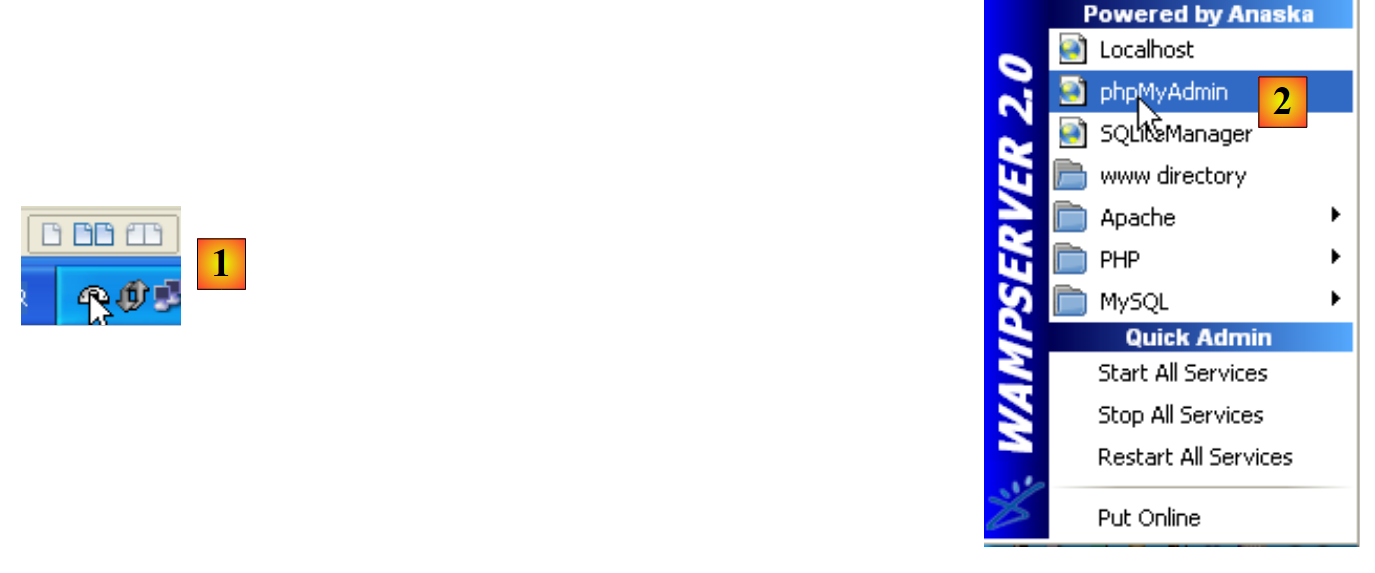 |
- Once launched, WampServer can be managed via an icon [1] located at the bottom right of the taskbar.
- In [2], launch the MySQL administration tool
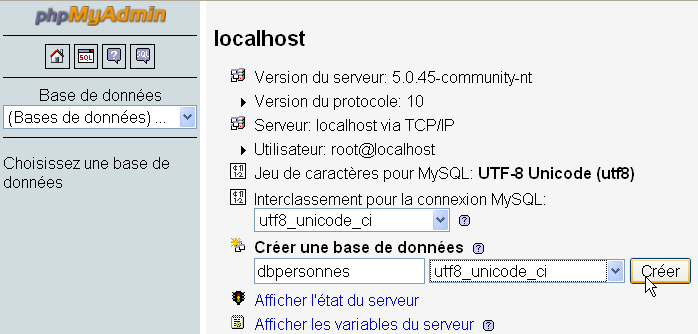
Create a database [dbpersonnes]:
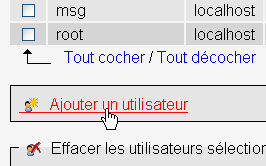
Create a user [admpersonnes] with the password [nobody]:
 |  |
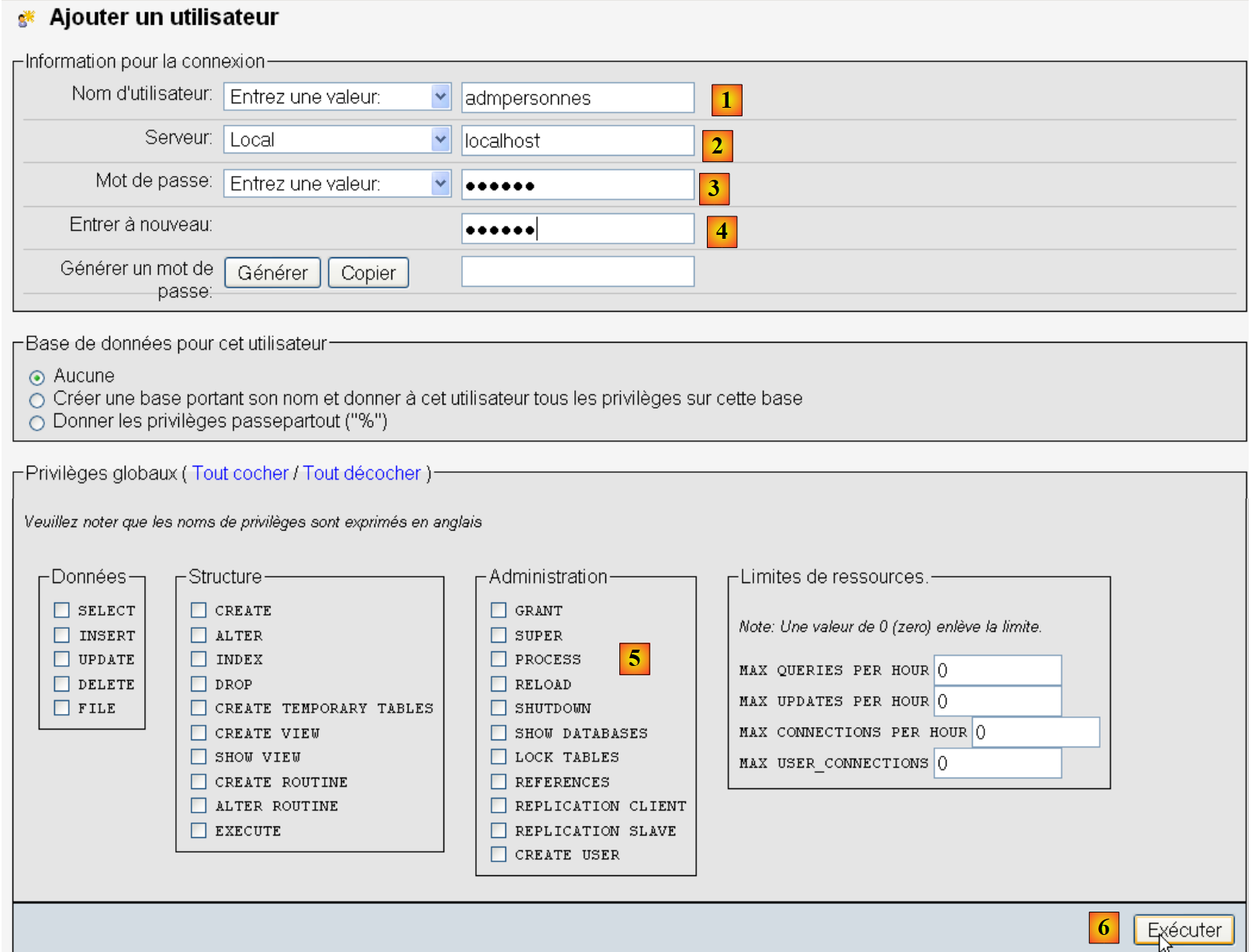 |
- In [1], the user name
- At [2], the DBMS server on which you grant permissions
- in [3], their password
- in [4], same as above
- in [5], we do not grant any rights to this user
- in [6], create the user
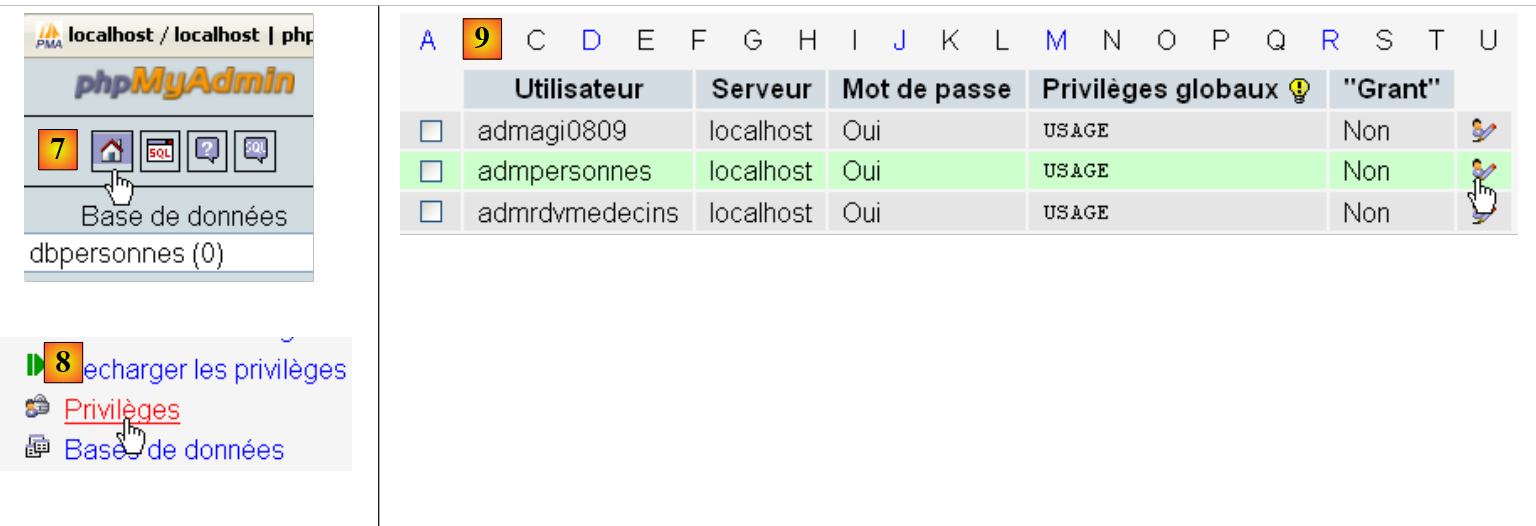 |
- in [7], return to the phpMyAdmin home page
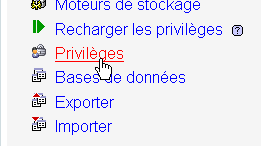
- in [8], use the [Privileges] link on this page to modify the privileges for the user [admpersonnes] [9].
 |

- In [10], specify that you want to grant the user [admpersonnes] rights to the [dbpersonnes] database
- In [11], confirm the selection
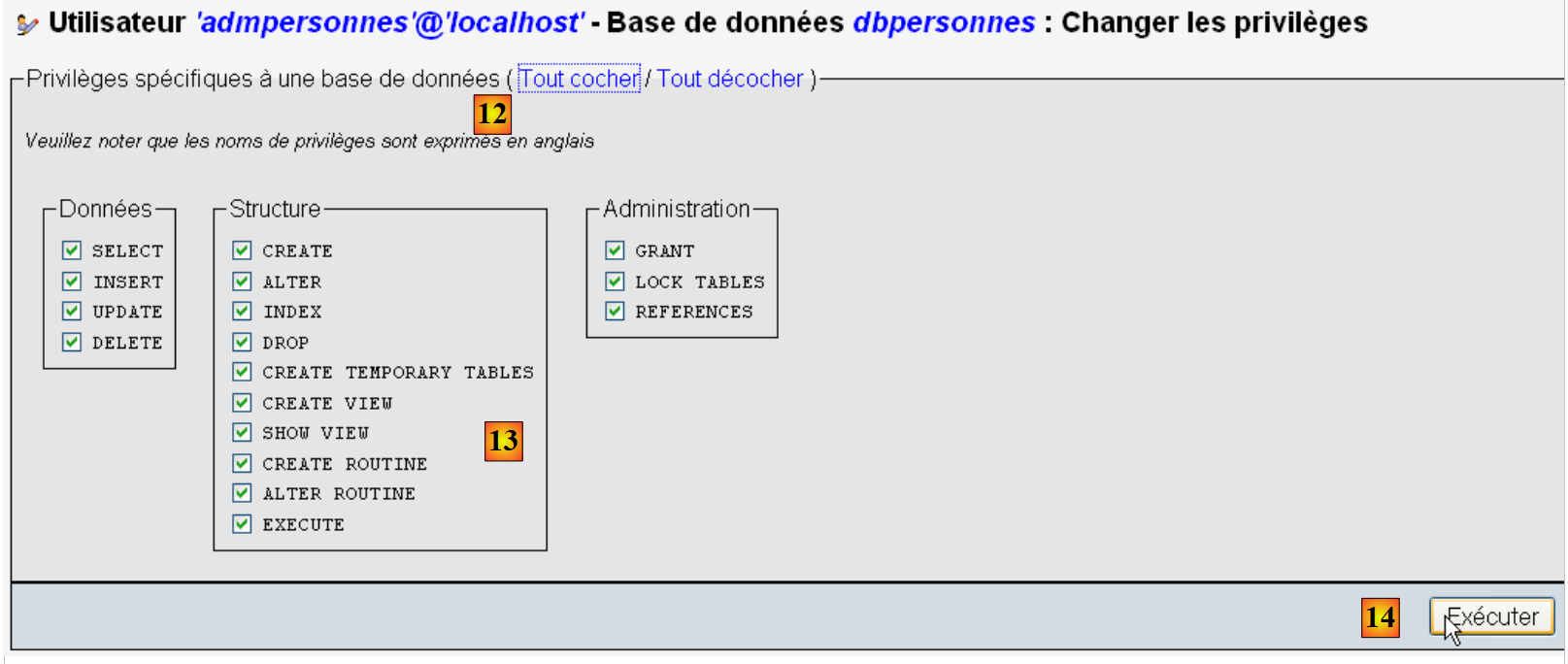 |
- using the [12] [Select All] link, grant the user [admpersonnes] all rights to the [dbpersonnes] database [13]
- Confirm in [14]
Now we have:
- a MySQL database [dbpersonnes]
- a user [admpersonnes / nobody] who has full access to this database
We will write PHP scripts to work with the database. PHP has various libraries for managing databases. We will use the PDO (PHP Data Objects) library, which acts as an interface between the PHP code and the DBMS:
 |
The PDO library allows the PHP script to abstract itself from the exact nature of the DBMS being used. Thus, as shown above, the MySQL DBMS can be replaced by the Postgres DBMS with minimal impact on the PHP script code. This library is not available by default. You can check its availability as follows:
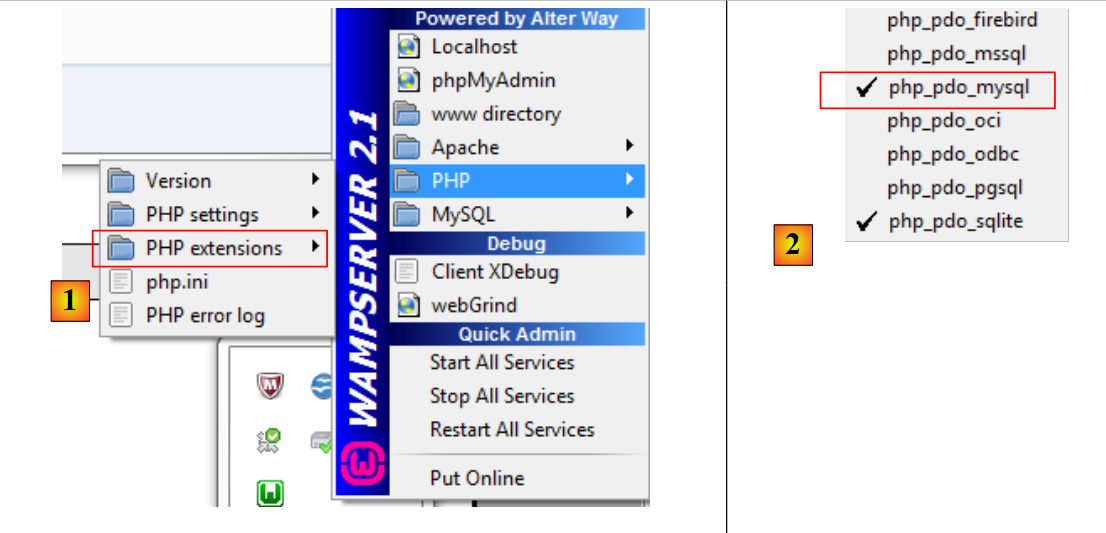 |
- 1: From the WampServer administration icon, select the [PHP / PHP extensions] option
- 2: You will see the various available PDO extensions and those that are active: [PHP_pdo_mysql] for the MySQL DBMS, [PHP_pdo_sqlite] for the SQLite DBMS. To enable an extension, simply click on it. The PHP interpreter is then restarted with the new extension enabled.
7.1. Connecting to a MySQL database – 1 (mysql_01)
Connecting to a DBMS is done by creating a PDO object. The constructor accepts various parameters:
The parameters have the following meanings:
$dsn | (Data Source Name) is a string specifying the type of DBMS and its location on the internet. The string "mysql:host=localhost" indicates that we are dealing with a MySQL DBMS running on the local server. This string may include other parameters, such as the DBMS listening port and the name of the database to you want to connect to: "mysql:host=localhost:port=3306:dbname=dbpersonnes". |
$user | username of the user logging in |
$passwd | their password |
$driver_options | an array of options for the DBMS driver |
Only the first parameter is required. The object created in this way will then serve as the vehicle for all operations performed on the database to which you have connected. If the PDO object could not be created, a PDOException is thrown.
Here is an example of a connection:
<?php

// connection to a MySql database
// user identity is (admpersonnes,nobody)
$ID = "admpersonnes";
$PWD = "nobody";
$HOTE = "localhost";

try {
  // connection
  $dbh = new PDO("mysql:host=$HOTE", $ID, $PWD);
  print "Connexion réussie\n";
  // closure
  $dbh = null;
} catch (PDOException $e) {
  print "Erreur : " . $e->getMessage() . "\n";
  exit();
}
Results:
Comments
- Line 11: The connection to a DBMS is established by creating a PDO object. The constructor is used here with the following parameters:
- a string specifying the type of DBMS and its location on the internet. The string "mysql:host=localhost" indicates that we are dealing with a MySQL DBMS running on the local server. The port has not been specified. Port 3306 is therefore used by default. The database name is not specified either. A connection will then be established to the MySQL DBMS, with the selection of a specific database to be made later.
- a user ID
- its password
- Line 14: The connection is closed by destroying the PDO object created initially.
- Line 15: The connection to a DBMS may fail. In this case, a PDOException is thrown.
7.2. Creating a MySQL table (mysql_02)
<?php

// connection to the MySql database
// user identity
$ID = "admpersonnes";
$PWD = "nobody";
// base identity
$DSN = "mysql:host=localhost;dbname=dbpersonnes";

// connection
list($erreur, $connexion) = connecte($DSN, $ID, $PWD);
if ($erreur) {
  print "Erreur lors de la connexion à la base [$DSN] sous l'identité ($ID,$PWD) : $erreur\n";
  exit;
}

// delete the people table if it exists
$requête = "drop table personnes";
$erreur = exécuteRequête($connexion, $requête);
//was there a mistake?
if ($erreur)
  print "$requête : Erreur ($erreur)\n";
else
  print "$requête: Exécution réussie\n";
// create people table
$requête = "create table personnes (prenom varchar(30) NOT NULL, nom varchar(30) NOT NULL, age integer NOT NULL, primary key(nom,prenom))";
$erreur = exécuteRequête($connexion, $requête);
//was there a mistake?
if ($erreur)
  print "$requête : Erreur ($erreur)\n";
else
  print "$requête: Exécution réussie\n";
// disconnect and exit
déconnecte($connexion);
exit;

// ---------------------------------------------------------------------------------
function connecte($dsn, $login, $pwd) {
  // connects ($login,$pwd) to base $dsn
  // returns the connection id and an error code
  try {
    // connection
    $dbh = new PDO($dsn, $login, $pwd);
    // error-free return
    return array("", $dbh);
  } catch (PDOException $e) {
    // return with error
    return array($e->getMessage(), null);
  }
}

// ---------------------------------------------------------------------------------
function déconnecte($connexion) {
  // closes the connection identified by $connexion
  $connexion = null;
}

// ---------------------------------------------------------------------------------
function exécuteRequête($connexion, $sql) {
  // executes the $sql request on the $connexion connection
  try {
    $connexion->exec($sql);
    // error-free return
    return "";
  } catch (PDOException $e) {
    // return with error
    return $e->getMessage();
  }
}
Results:
drop table personnes: Exécution réussie
create table personnes (prenom varchar(30) NOT NULL, nom varchar(30) NOT NULL, age integer NOT NULL, primary key(nom,prenom)): Exécution réussie
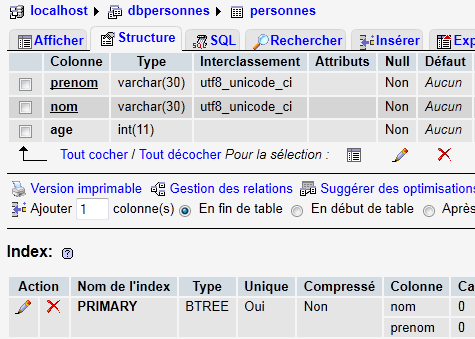
In PHPMyAdmin, you can see that the table exists:
 |
Comments
- Lines 38–50: The
connectfunction establishes a connection to a database management system (DBMS). It returns an array ($error, $connection*) where$connection*is the established connection ornullif the connection could not be established. In the latter case,$errorcontains an error message. - Lines 53–56: The
*disconnect* function closes a connection - Line 59: The
*executeQueryfunction allows you to execute an SQL statement on a connection. The connection is a PDO object. The method used to execute an SQL statement on a PDO object is the exec* method (line 63). Executing the query may throw a PDOException. Therefore, this is handled. The function returns an error message if an error occurs, an empty string otherwise.
7.3. Populating the people table (mysql_03)
The following script executes SQL statements found in the following text file [creation.txt]:
drop table personnes
create table personnes (prenom varchar(30) not null, nom varchar(30) not null, age integer not null, primary key (nom,prenom))
insert into personnes values('Paul','Langevin',48)
insert into personnes values ('Sylvie','Lefur',70)
insert into personnes values ('Pierre','Nicazou',35)
insert into personnes values ('Geraldine','Colou',26)
insert into personnes values ('Paulette','Girond',56)
<?php

// connection to the MySql database
// user identity
$ID = "admpersonnes";
$PWD = "nobody";
// base identity
$DSN = "mysql:host=localhost;dbname=dbpersonnes";
// identity of the SQL command text file to be executed
$TEXTE = "creation.txt";

// connection
list($erreur, $connexion) = connecte($DSN, $ID, $PWD);
if ($erreur) {
  print "Erreur lors de la connexion à la base [$DSN] sous l'identité ($ID,$PWD) : $erreur\n";
  exit;
}

// table creation and filling
$erreurs = exécuterCommandes($connexion, $TEXTE, 1, 0);
//display number of errors
print "il y a eu $erreurs[0] erreurs\n";
for ($i = 1; $i < count($erreurs); $i++)
  print "$erreurs[$i]\n";

// disconnect and exit
déconnecte($connexion);
exit;

// ---------------------------------------------------------------------------------
function connecte($dsn, $login, $pwd) {
...
}

// ---------------------------------------------------------------------------------
function déconnecte($connexion) {
 ...
}

// ---------------------------------------------------------------------------------
function exécuteRequête($connexion, $sql) {
  // executes the $sql request on the $connexion connection
  // returns 1 error msg if error, empty string otherwise
  ...
}

// ---------------------------------------------------------------------------------
function exécuterCommandes($connexion, $SQL, $suivi=0, $arrêt=1) {
  // uses the $connexion connection
  // executes the SQL commands contained in the $SQL text file
  // this is a file of SQL commands to be executed one per line
  // if $suivi=1 then each execution of a SQL order is displayed as a success or failure
  // if $arrêt=1, the function stops on the 1st error encountered, otherwise it executes all sql commands
  // the function returns an array (nb of errors, error1, error2, ...)

  // check for the presence of the $SQL file
  if (! file_exists($SQL))
    return array(1, "Le fichier $SQL n'existe pas");

  // execution of SQL queries contained in $SQL
  // we put them in a table
  $requêtes = file($SQL);
  // we run them - initially no errors
  $erreurs = array(0);
  for ($i = 0; $i < count($requêtes); $i++) {
    //do we have an empty query
    if (preg_match("/^\s*$/", $requêtes[$i]))
      continue;
    // execute query $i
    $erreur = exécuteRequête($connexion, $requêtes[$i]);
    //was there a mistake?
    if ($erreur) {
      // one more mistake
      $erreurs[0]++;
      // error msg
      $msg = "$requêtes[$i] : Erreur ($erreur)\n";
      $erreurs[] = $msg;
      // screen tracking or not?
      if ($suivi)
        print "$msg\n";
      // shall we stop?
      if ($arrêt)
        return $erreurs;
    } else
    if ($suivi)
      print "$requêtes[$i] : Exécution réussie\n";
  }//for
  // return
  return $erreurs;
}
Screen results:
drop table personnes : Exécution réussie
create table personnes (prenom varchar(30) not null, nom varchar(30) not null, age integer not null, primary key (nom,prenom)) : Exécution réussie
insert into personnes values('Paul','Langevin',48) : Exécution réussie
insert into personnes values ('Sylvie','Lefur',70) : Exécution réussie
insert into personnes values ('Pierre','Nicazou',35) : Exécution réussie
insert into personnes values ('Geraldine','Colou',26) : Exécution réussie
insert into personnes values ('Paulette','Girond',56) : Exécution réussie
il y a eu 0 erreurs
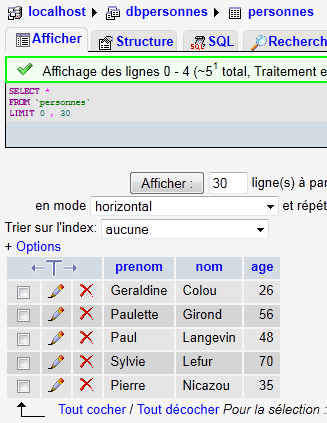
The insertions made are visible in phpMyAdmin:
 |
Comments
The new feature is the executeCommands function in lines 48–90. This function executes the SQL commands found in the text file named $SQL on the $connection. It returns an error array ($nbErrors, $msg1, $msg2, …) where $nbErrors is the number of errors, and $msg1 is error message number i. If there are no errors, the returned array is array(0).
7.4. Executing arbitrary SQL queries (mysql_04)
The following script demonstrates the execution of SQL commands from the following text file [sql.txt]:
select * from personnes
select nom,prenom from personnes order by nom asc, prenom desc
select * from personnes where age between 20 and 40 order by age desc, nom asc, prenom asc
insert into personnes values('Josette','Bruneau',46)
update personnes set age=47 where nom='Bruneau'
select * from personnes where nom='Bruneau'
delete from personnes where nom='Bruneau'
select * from personnes where nom='Bruneau'
xselect * from personnes where nom='Bruneau'
Among these SQL statements, there is the SELECT statement, which returns results from the database; the INSERT, UPDATE, and DELETE statements, which modify the database without returning results; and finally, invalid statements such as the last one (xselect).
<?php

// connection to the MySql database
// user identity
$ID = "admpersonnes";
$PWD = "nobody";
// base identity
$DSN = "mysql:host=localhost;dbname=dbpersonnes";
// identity of the SQL command text file to be executed
$TEXTE = "sql.txt";

// connection
list($erreur, $connexion) = connecte($DSN, $ID, $PWD);
if ($erreur) {
  print "Erreur lors de la connexion à la base [$DSN] sous l'identité ($ID,$PWD) : $erreur\n";
  exit;
}

// order execution SQL
$erreurs = exécuterCommandes($connexion, $TEXTE, 1, 0);
//display number of errors
print "il y a eu $erreurs[0] erreur(s)\n";
for ($i = 1; $i < count($erreurs); $i++)
  print "$erreurs[$i]\n";

// disconnect and exit
déconnecte($connexion);
exit;

// ---------------------------------------------------------------------------------
function connecte($dsn, $login, $pwd) {
  // connects ($login,$pwd) to base $dsn
  // returns the connection id and an error msg
  ...
}

// ---------------------------------------------------------------------------------
function déconnecte($connexion) {
  ...
}

// ---------------------------------------------------------------------------------
function exécuteRequête($connexion, $sql) {
  // executes the $sql request on the $connexion connection
  // returns an array of 2 elements ($erreur,$résultat)

  // determine whether it's a select or not
  $commande = "";
  if (preg_match("/^\s*(\S+)/", $sql, $champs)) {
    $commande = $champs[0];
  }
  // order processing
  try {
    if (strtolower($commande) == "select") {
      $res = $connexion->query($sql);
    } else {
      $res = $connexion->exec($sql);
      if($res===FALSE){
        $info=$connexion->errorInfo();
        return array($info[2],null);
      }
    }
    // error-free return
    return array("", $res);
  } catch (PDOException $e) {
    // return with error
    return array($e->getMessage(), null);
  }
}

// ---------------------------------------------------------------------------------
function exécuterCommandes($connexion, $SQL, $suivi=0, $arrêt=1) {
  // uses the $connexion connection
  // executes the SQL commands contained in the $SQL text file
  // this is a file of SQL commands to be executed one per line
  // if $suivi=1 then each execution of a SQL order is displayed as a success or failure
  // if $arrêt=1, the function stops on the 1st error encountered, otherwise it executes all sql commands
  // the function returns an array (nb of errors, error1, error2, ...)
  // check for the presence of the $SQL file
  if (!file_exists($SQL))
    return array(1, "Le fichier $SQL n'existe pas");

  // execution of SQL queries contained in $TEXTE
  // we put them in a table
  $requêtes = file($SQL);
  // we run them - initially no errors
  $erreurs = array(0);
  for ($i = 0; $i < count($requêtes); $i++) {
    //do we have an empty query
    if (preg_match("/^\s*$/", $requêtes[$i]))
      continue;
    // execute query $i
    list($erreur, $res) = exécuteRequête($connexion, $requêtes[$i]);
    //was there a mistake?
    if ($erreur) {
      // one more mistake
      $erreurs[0]++;
      // error msg
      $msg = "$requêtes[$i] : Erreur ($erreur)\n";
      $erreurs[] = $msg;
      // screen tracking or not?
      if ($suivi)
        print "$msg\n";
      // shall we stop?
      if ($arrêt)
        return $erreurs;
    } else
    if ($suivi) {
      print "$requêtes[$i] : Exécution réussie\n";
      // information on the result of the query
      afficherInfos($res);
    }
  }//for
  // return
  return $erreurs;
}

// ---------------------------------------------------------------------------------
function afficherInfos($résultat) {
  // displays the $résultat result of an sql query
  // was it a select?
  if ($résultat instanceof PDOStatement) {
    // displays field names
    $titre = "";
    $nbColonnes = $résultat->columnCount();
    for ($i = 0; $i < $nbColonnes; $i++) {
      $infos = $résultat->getColumnMeta($i);
      $titre.=$infos['name'] . ",";
    }
    // remove the last character ,
    $titre = substr($titre, 0, strlen($titre) - 1);
    // displays the list of fields
    print "$titre\n";
    // dividing line
    $séparateurs = "";
    for ($i = 0; $i < strlen($titre); $i++) {
      $séparateurs.="-";
    }
    print "$séparateurs\n";
    // data
    foreach ($résultat as $ligne) {
      $data = "";
      for ($i = 0; $i < $nbColonnes; $i++) {
        $data.=$ligne[$i] . ",";
      }

      // remove the last character ,
      $data = substr($data, 0, strlen($data) - 1);
      // on affiche
      print "$data\n";
    }
  } else {
    // it wasn't a select
    print " $résultat lignes(s) a (ont) été modifiée(s)\n";
  }
}
Screen results:
select * from personnes
 : Exécution réussie
prenom,nom,age
--------------
Geraldine,Colou,26
Paulette,Girond,56
Paul,Langevin,48
Sylvie,Lefur,70
Pierre,Nicazou,35
select nom,prenom from personnes order by nom asc, prenom desc : Exécution réussie
nom,prenom
----------
Colou,Geraldine
Girond,Paulette
Langevin,Paul
Lefur,Sylvie
Nicazou,Pierre
select * from personnes where age between 20 and 40 order by age desc, nom asc, prenom asc : Exécution réussie
prenom,nom,age
--------------
Pierre,Nicazou,35
Geraldine,Colou,26
insert into personnes values('Josette','Bruneau',46) : Exécution réussie
 1 lignes(s) a (ont) été modifiée(s)
update personnes set age=47 where nom='Bruneau' : Exécution réussie
 1 lignes(s) a (ont) été modifiée(s)
select * from personnes where nom='Bruneau' : Exécution réussie
prenom,nom,age
--------------
Josette,Bruneau,47
delete from personnes where nom='Bruneau' : Exécution réussie
 1 lignes(s) a (ont) été modifiée(s)
select * from personnes where nom='Bruneau' : Exécution réussie
prenom,nom,age
--------------
xselect * from personnes where nom='Bruneau' : Erreur (You have an error in your SQL syntax; check the manual that corresponds to your MySQL server version for the right syntax to use near 'xselect * from personnes where nom='Bruneau'' at line 1)

il y a eu 1 erreur(s)
xselect * from personnes where nom='Bruneau' : Erreur (You have an error in your SQL syntax; check the manual that corresponds to your MySQL server version for the right syntax to use near 'xselect * from personnes where nom='Bruneau'' at line 1)
Comments
Each command in the text file [sql.txt] is executed by the exécuteRequête function on line 43.
- Line 43: The two parameters of the function are the connection ($connexion) on which the SQL commands are to be executed and the SQL command ($sql) to be executed. The function returns an array of two values ($erreur, $résultat) where
- $error is an error message, which may be empty if no error occurred
- $result: the result returned by executing the SQL statement. This result varies depending on whether the statement is a SELECT statement or an INSERT, UPDATE, or DELETE statement.
- Lines 48–51: We retrieve the first element of the SQL statement to determine whether it is a SELECT statement or an INSERT, UPDATE, or DELETE statement.
- line 55: in the case of a SELECT statement, it is executed using the [PDO]->query("SELECT statement") method. The returned result is a PDOStatement object.
- Line 57: In the case of an INSERT, UPDATE, or DELETE statement, it is executed using the [PDO]->exec("SQL statement") method. The result returned is the number of rows modified by the SQL statement. Thus, if a DELETE SQL statement deletes two rows, the returned result is the integer 2. If an error occurs during execution, the returned result is the boolean false. In this case, the [PDO]->errorinfo() method provides information about the error in the form of an array of values. The element at index 2 of this array is the error message.
- lines 58–60: handling of any errors from the [PDO]->exec("SQL statement") operation.
- lines 65–68: Handling any exceptions
- Line 72: The
executeCommandsfunction executes the SQL commands stored in the text file*$SQL*on the connection*$connection*. This is code we've already seen, with one minor difference: line 111. - Line 111: The
executeQueryfunction returned an array (*$error*, *$result*), where$result*is the result of executing an SQL command. This result varies depending on whether the SQL command was aSELECT*statement or anINSERT*,UPDATE*, orDELETE*statement. ThedisplayInfo* function displays information about this result. - Line 122: If the SQL statement was a SELECT statement, the result is of type PDOStatement. This type represents a table consisting of rows and columns.
- line 125: the method [PDOStatement]->getColumnCount() returns the number of columns in the table resulting from the SELECT
- Line 127: The [PDOStatement]->getMeta(i) method returns a dictionary of information about column i of the SELECT result table. In this dictionary, the value associated with the 'name' key is the column name.
- Lines 127–129: The column names from the SELECT result table are concatenated into a string.
- Lines 141–145: A PDOStatement object can be iterated over using a foreach loop. At each iteration, the returned element is a row from the SELECT result table in the form of an array of values representing the values of the row’s various columns. We display all these values using a for loop.
- Line 154: The result of executing an INSERT, UPDATE, or DELETE statement is the number of rows modified by the statement.