8. Tax Calculation Exercise with MySQL
We have already written three versions of this exercise. The latest version used a tax calculation class. This class retrieved the data needed for the calculation from a text file. It will now retrieve it from a database. To do this, we write an initial code that will transfer the data from the text file into a database.
The text file impots.txt is as follows:
12620:13190:15640:24740:31810:39970:48360:55790:92970:127860:151250:172040:195000:0
0:0.05:0.1:0.15:0.2:0.25:0.3:0.35:0.4:0.45:0.5:0.55:0.6:0.65
0:631:1290.5:272.5:3309.5:4900:6898.5:9316.5:12106:16754.5:23147.5:30710:39312:49062
The database to be created is as follows:
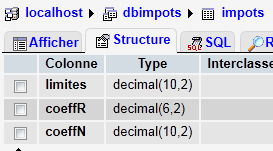 | 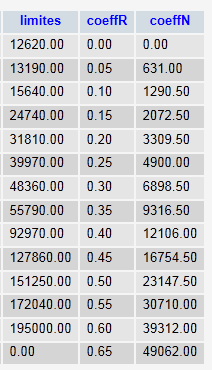 |
The database is named [dbimpots] and has a single table [impots]. It is accessed by the user [root] without a password.
8.1. Importing a text file into a MySQL table (txt2mysql)
<?php

// transfers the text file containing the data needed to calculate taxes
// in a mysql table
// the data
$IMPOTS = "impots.txt";
$BASE = "dbimpots";
$TABLE = "impots";
$USER = "root";
$PWD = "";
$HOTE = "localhost";

// the data required to calculate the tax has been placed in the $IMPOTS file
// one line per table in the form
// val1:val2:val3,...
list($erreur, $limites, $coeffR, $coeffN) = getTables($IMPOTS);
// was there a mistake?
if ($erreur) {
  print "$erreur\n";
  exit;
}//if
// transfer these tables to a mysql table
$erreur = copyToMysql($limites, $coeffR, $coeffN, $HOTE, $USER, $PWD, $BASE, $TABLE);
if ($erreur)
  print "$erreur\n";
else
  print "Transfert opéré\n";
// end
exit;

// --------------------------------------------------------------------------
function copyToMysql($limites, $coeffR, $coeffN, $HOTE, $USER, $PWD, $BASE, $TABLE) {
  // copy the 3 numerical tables $limites, $coeffR, $coeffN
  // in table $TABLE of mysql database $BASE
  // the mysql database is on machine $HOTE
  // the user is identified by $USER and $PWD
  // connection
  list($erreur, $connexion) = connecte("mysql:host=$HOTE;dbname=$BASE", $USER, $PWD);
  if ($erreur)
    return "Erreur lors de la connexion à MySql sous l'identité ($HOTE,$USER,$PWD) : $erreur\n";
  // table deletion
  $requête = "drop table $TABLE";
  exécuteRequête($connexion, $requête);
  // table creation
  $requête = "create table $TABLE (limites decimal(10,2), coeffR decimal(6,2), coeffN decimal(10,2))";
  list($erreur, $res) = exécuteRequête($connexion, $requête);
  if ($erreur)
    return "$requête : erreur ($erreur)";
  // filling
  for ($i = 0; $i < count($limites); $i++) {
    // insertion request
    $requête = "insert into $TABLE (limites,coeffR,coeffN) values ($limites[$i],$coeffR[$i],$coeffN[$i])";
    // query execution
    list($erreur, $res) = exécuteRequête($connexion, $requête);
    // return if error
    if ($erreur)
      return "$requête : erreur ($erreur)";
  }//for
  // it's over - log off
  déconnecte($connexion);
  // error-free return
  return "";
}
// --------------------------------------------------------------------------
function getTables($IMPOTS) {
  // $IMPOTS: name of the file containing data from tables $limites, $coeffR, $coeffN
  ...
  // end
  return array("", $limites, $coeffR, $coeffN);
}
// --------------------------------------------------------------------------
function cutNewLinechar($ligne) {
  // delete the end-of-line mark from $ligne if it exists
  ...
  // end
  return($ligne);
}
// ---------------------------------------------------------------------------------
function connecte($dsn, $login, $pwd) {
  // connects ($login,$pwd) to base $dsn
  // returns the connection id and an error msg
  ...
}

//connect
// ---------------------------------------------------------------------------------
function déconnecte($connexion) {
  // closes the connection identified by $connexion
  ...
}

// ---------------------------------------------------------------------------------
function exécuteRequête($connexion, $sql) {
  // executes the $sql request on the $connexion connection
  // returns an array of 2 elements ($erreur,$résultat)
 ...
}
Screen results:
8.2. The tax calculation program ( impots_04)
This version uses an Impôts class that retrieves the values needed to calculate the tax from a database. Here we introduce a new concept: the prepared statement. The execution of an SQL statement by a DBMS occurs in two stages:
- The query is prepared: the DBMS prepares an optimized execution plan for the query. The goal is to execute it as efficiently as possible.
- the query is executed.
If the same query is executed N times, the two previous steps are performed N times. However, it is possible to prepare the query once and execute it N times. To do this, you must use prepared queries. If $query is the SQL statement to be executed and $connection is the PDO object representing the connection:
- $statement = $connection->prepare($query) prepares a query and returns the "prepared" query
- $statement->execute() executes the prepared query.
If the prepared query is a SELECT statement, then
- $statement->fetchAll() returns all rows from the result table of the SELECT query as an array T, where T[i,j] is the value of column j in row i of the table
- $statement->fetch() returns the current row of the table as an array T, where T[j] is the value of column j in row
Prepared statements offer advantages beyond just improved efficiency. In particular, they provide greater security. Therefore, they should be used systematically.
<?php

// test -----------------------------------------------------
// definition of constants
$DATA = "data.txt";
$RESULTATS = "resultats.txt";
$TABLE = "impots";
$BASE = "dbimpots";
$USER = "root";
$PWD = "";
$HOTE="localhost";

// the data required to calculate the tax has been placed in table mysqL $TABLE
// belonging to the $BASE database. The table has the following structure
// limits decimal(10,2), coeffR decimal(6,2), coeffN decimal(10,2)
// taxable person parameters (marital status, number of children, annual salary)
// were placed in the $DATA text file, one line for each taxpayer
// the results (marital status, number of children, annual salary, tax payable) are placed in the
// the $RESULTATS text file, with one result per line

// create a Tax object
$I = new Impôts($HOTE, $USER, $PWD, $BASE, $TABLE);
// was there a mistake?
$erreur=$I->getErreur();
if ($erreur) {
  print "$I->erreur\n";
  exit;
}//if
// create a utilities object
$u = new Utilitaires();

// opening taxpayer data files
$data = fopen($DATA, "r");
if (!$data) {
  print "Impossible d'ouvrir en lecture le fichier des données [$DATA]\n";
  exit;
}

// open results file
$résultats = fopen($RESULTATS, "w");
if (!$résultats) {
  print "Impossible de créer le fichier des résultats [$RESULTATS]\n";
  exit;
}

// the current line of the taxpayer data file is used
while ($ligne = fgets($data, 100)) {
  // remove any end-of-line marker
  $ligne = $u->cutNewLineChar($ligne);
  // we retrieve the 3 fields married,children,salary which form $ligne
  list($marié, $enfants, $salaire) = explode(",", $ligne);
  // tax calculation
  $impôt = $I->calculer($marié, $enfants, $salaire);
  // enter the result
  fputs($résultats, "$marié:$enfants:$salaire:$impôt\n");
  // following data
}
// close files
fclose($data);
fclose($résultats);

// end
exit;

// ---------------------------------------------------------------------------------
// definition of a Tax class
class Impôts {

  // attributes: the 3 data tables
  private $limites;
  private $coeffR;
  private $coeffN;
  private $erreur;
  private $nbLimites;

  // getter
  public function getErreur(){
    return $this->erreur;
  }
  // manufacturer

  function __construct($HOTE, $USER, $PWD, $BASE, $TABLE) {
    // initializes $limites, $coeffR, $coeffN attributes
    // the data required to calculate the tax has been placed in the mysql table $TABLE
    // belonging to the $BASE database. The table has the following structure
    // limits decimal(10,2), coeffR decimal(6,2), coeffN decimal(10,2)
    // connection to the mysql database on machine $HOTE is made as ($USER,$PWD)
    // initializes the $erreur field with a possible error
    // empty if no error
    //
    // connection to mysql database
    $DSN = "mysql:host=$HOTE;dbname=$BASE";
    list($erreur, $connexion) = connecte($DSN, $USER, $PWD);
    if ($erreur) {
      $this->erreur = "Erreur lors de la connexion à MySql sous l'identité ($HOTE,$USER,$PWD) : $erreur\n";
      return;
    }
    // read table $TABLE
    $requête = "select limites,coeffR,coeffN from $TABLE";
    // executes the $requête request on the $connexion connection
    try {
      $statement = $connexion->prepare($requête);
      $statement->execute();
      // query result evaluation
      while ($colonnes = $statement->fetch()) {
        $this->limites[] = $colonnes[0];
        $this->coeffR[] = $colonnes[1];
        $this->coeffN[] = $colonnes[2];
      }
      // no error
      $this->erreur = "";
      // number of elements in the limit table
      $this->nbLimites = count($this->limites);
    } catch (PDOException $e) {
      $this->erreur = $e->getMessage();
    }
     // disconnect
    déconnecte($connexion);
  }
  // --------------------------------------------------------------------------
  function calculer($marié, $enfants, $salaire) {
    // $marié : yes, no
    // $enfants : number of children
    // $salaire: annual salary

  // is the item in good condition?
    if ($this->erreur)
      return -1;

    // number of shares
    ...
  }

}

// ---------------------------------------------------------------------------------
// a class of utility functions
class Utilitaires {

  function cutNewLinechar($ligne) {
    // delete the end-of-line mark from $ligne if it exists
    ...
  }

}
// ---------------------------------------------------------------------------------
function connecte($dsn, $login, $pwd) {
  // connects ($login,$pwd) to base $dsn
  // returns the connection id and an error msg
  ...
}

//connect
// ---------------------------------------------------------------------------------
function déconnecte($connexion) {
  // closes the connection identified by $connexion
  ...
}
Results: the same as with previous versions.
Comments
The new features are lines 98–109:
- line 99: the SQL SELECT statement that retrieves the data needed to calculate the tax.
- Line 102: Preparation of the SQL SELECT statement
- Line 103: Execution of the prepared statement
- Lines 105–109: processing the result table of the SELECT statement line by line