9. PHP Network Functions
We will now discuss PHP’s network functions, which allow us to perform TCP/IP (Transmission Control Protocol/Internet Protocol) programming.
9.1. Retrieving the name or IP address of a machine on the Internet (inet_01)
<?php

// functions machine name <--> address IP machine
ini_set("display_errors", "off");
// constants
$HOTES = array("istia.univ-angers.fr", "www.univ-angers.fr", "www.ibm.com", "localhost", "", "xx");
// IP addresses of $HOTES machines
for ($i = 0; $i < count($HOTES); $i++) {
  getIPandName($HOTES[$i]);
}
// end
exit;

//------------------------------------------------
function getIPandName($nomMachine) {
//$nomMachine: name of the machine whose address is required IP: name of the machine whose address is required IP: name of the machine whose address is required
// nomMachine-->adresse IP
  $ip = gethostbyname($nomMachine);
  if ($ip != $nomMachine) {
    print "ip[$nomMachine]=$ip\n";
// address IP --> nomMachine
    $name = gethostbyaddr($ip);
    if ($name != $ip) {
      print "name[$ip]=$name\n";
    } else {
      print "Erreur, machine[$ip] non trouvée\n";
    }
  } else {
    print "Erreur, machine[$nomMachine] non trouvée\n";
  }
}
Results:
ip[istia.univ-angers.fr]=193.49.146.171
name[193.49.146.171]=istia.istia.univ-angers.fr
ip[www.univ-angers.fr]=193.49.144.40
name[193.49.144.40]=ametys-fo.univ-angers.fr
ip[www.ibm.com]=129.42.56.216
Erreur, machine[129.42.56.216] non trouvée
ip[localhost]=127.0.0.1
name[127.0.0.1]=localhost127.0.0.1
ip[]=192.168.1.11
name[192.168.1.11]=st-PC.home
Erreur, machine[xx] non trouvée
Comments
- Line 4: We instruct the system not to display runtime errors.
PHP's network functions are used in the getIpandName function on line 15.
- Line 18: The gethostbyname($name) function retrieves the IP address "ip3.ip2.ip1.ip0" of the machine named $name. If the machine $name does not exist, the function returns $name as the result.
- Line 22: The gethostbyaddr($ip) function retrieves the hostname of the machine with the IP address $ip in the format "ip3.ip2.ip1.ip0". If the machine $ip does not exist, the function returns $ip as the result.
9.2. A web client ( inet_02)
A script to retrieve the content of a website's index page.
<?php

// error management
ini_set("display_errors","off");
// otain the text HTML from URL
// list of websites
$SITES = array("istia.univ-angers.fr", "www.univ-angers.fr", "www.ibm.com", "xx");
// reading the index pages of the sites in the $SITES table
for ($i = 0; $i < count($SITES); $i++) {
// read site index page $SITES[$i]
  $résultat = getIndex($SITES[$i]);
// result display
  print "$résultat\n";
}//for
// end
exit;

//-----------------------------------------------------------------------
function getIndex($site) {
// reads the URL $site/ and stores it in the $site.html file
// create file $site.html
  $html = fopen("$site.html", "w");
  if (!$html)
    return "Erreur lors de la création du fichier $site.html";

// open a connection on port 80 of $site
  $connexion = fsockopen($site, 80);
// return if error
  if (!$connexion)
    return "Echec de la connexion au site ($site,80) : $erreur";
// $connexion represents a bidirectional communication flow
// between the client (this program) and the contacted web server
// this channel is used for the exchange of orders and information
// the dialog protocol is HTTP
// the customer sends the get command to request URL /
// syntaxe get URL HTTP/1.0
// protocol HTTP headers must end with an empty line
  fputs($connexion, "GET / HTTP/1.0\n\n");
// the server will now respond on channel $connexion. It will send all
// then close the channel. The client therefore reads everything that arrives from $connexion
// until the channel closes
  while ($ligne = fgets($connexion, 1000))
    fputs($html, $ligne);
// the customer in turn closes the connection
  fclose($connexion);
// close file $html
  fclose($html);
// return
  return "Transfert réussi de la page index du site $site";
}
Results: for example, the file received for the site [www.ibm.com]:
- Lines 1–11 are the HTTP headers of the server’s response
- line 1: the server instructs the client to redirect to the URL specified in line 8
- line 2: date and time of the response
- line 3: web server identity
- Line 4: Content sent by the server. Here, an HTML page that begins on line 13
- Line 12: The empty line that ends the HTTP headers
- Lines 13–19: The HTML page sent by the web server.
Code comments:
- line 7: the list of URLs for the websites whose index pages we want. These will be stored in the text file [sitename.html].
- Line 11: The getIndex function does the work
- line 19: the getIndex($site) function downloads the root page (or index page) of the $site website and stores it in the text file $site.html.
- line 27: the fsockopen($site,$port) function creates a connection with a TCP/IP service running on port $port of the $site machine. Once the client/server connection is open, many TCP/IP services exchange lines of text. This is the case here with the HTTP (HyperText Transfer Protocol). The data stream from the server to the client can then be treated as a text file. The same applies to the data stream from the client to the server.
- Line 38: The fputs function allows the client to send data to the server. Here, the text line sent has the following meaning: "I want (GET) the root page (/) of the website I am connected to. I am using HTTP version 1.0." The current version of this protocol is 1.1.
- Line 42: The text lines of the server’s response can be read line by line using a while loop and saved to the text file [$site.html]. Once the web server has sent the requested page, it closes its connection with the client. On the client side, this will be detected as an end-of-file.
9.3. An SMTP client (inet_03)
Among TCP/IP protocols, SMTP (Simple Mail Transfer Protocol) is the communication protocol for the mail delivery service.
Notes:
- On a Windows machine with antivirus software, the antivirus will likely prevent the PHP script from connecting to port 25 of an SMTP server. You must therefore disable the antivirus. For McAfee, for example, you can do this:
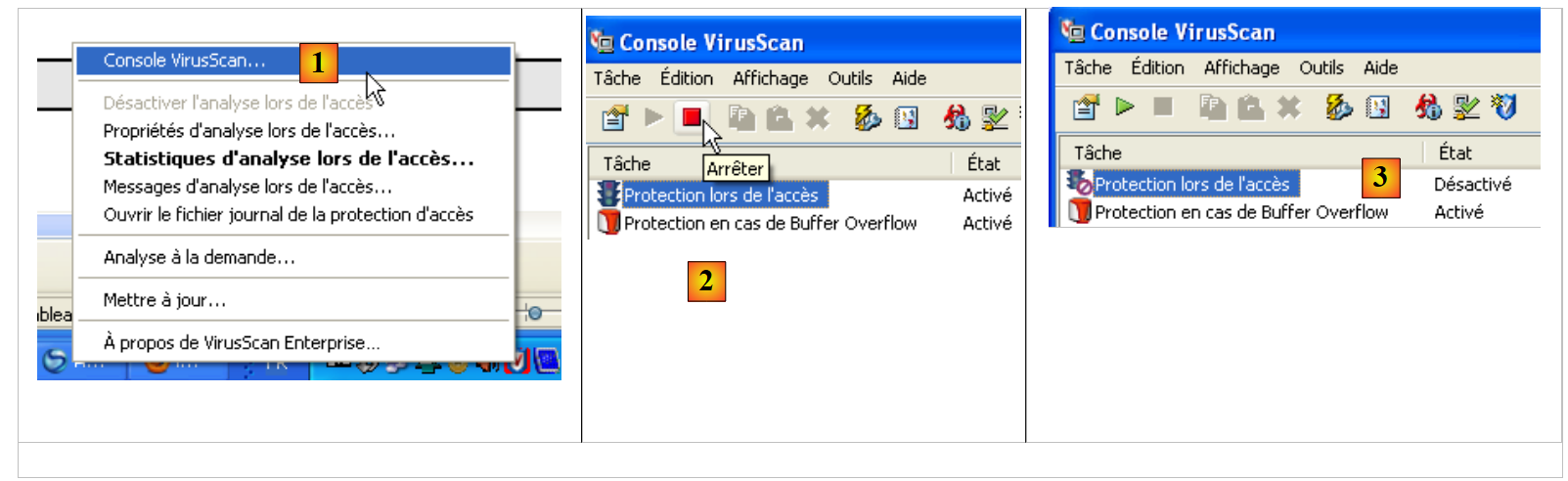 |
- In [1], open the VirusScan console
- In [2], stop the [On-Access Protection] service
- in [3], it is stopped
The script:
<?php

// client SMTP (SendMail Transfer Protocol) for sending a message
// information is taken from a $INFOS file containing the following lines
// line 1: smtp, sender, recipient
// next lines: message text
// sender: email sender
// recipient: email recipient
// smtp: name of smtp server to use
// communication protocol SMTP client-server
// -> client connects to smtp server port 25
// <- server sends him a welcome message
// -> customer sends command EHLO: machine name
// <- server responds OK or not
// -> customer sends mail order from: <sender>
// <- server responds OK or not
// -> client sends the rcpt to command: <recipient>
// <- server responds OK or not
// -> customer sends data order
// <- server responds OK or not
// -> client sends all the lines of its message and ends with a line containing the
// single character .
// <- server responds OK or not
// -> customer sends quit order
// <- server responds OK or not
// server responses have the form xxx text where xxx is a 3-digit number. Any number xxx >=500
// indicates an error. The answer may consist of several lines all beginning with xxx except the last one
// of the form xxx(space)
// exchanged text lines must end with the characters RC(#13) and LF(#10)

// data
$INFOS = "mail.txt"; // mail settings
// retrieve mail parameters
list($erreur, $smtpServer, $expéditeur, $destinataire, $message) = getInfos($INFOS);
// mistake?
if ($erreur) {
  print "$erreur\n";
  exit;
}
print "Envoi du message [$smtpServer,$expéditeur,$destinataire]\n";
// sending mail in verbose mode
$résultat = sendmail($smtpServer, $expéditeur, $destinataire, $message, 1);
print "Résultat de l'envoi : $résultat\n";
// end
exit;

//-----------------------------------------------------------------------
function getInfos($fichier) {
// returns information ($smtp,$expéditeur,$destinataire,$message) taken from text file $fichier
// line 1: smtp, sender, recipient
// next lines: message text

// opening of $fichier
  $infos = fopen($fichier, "r");
// does the $fichier file exist?
  if (!$infos)
    return array("Le fichier $fichier n'a pu être ouvert en lecture");
// read the 1st line
  $ligne = fgets($infos, 1000);
// delete end-of-line mark
  $ligne = cutNewLineChar($ligne);
// retrieving smtp, sender and recipient fields
  $champs = explode(",", $ligne);
// do we have the right number of fields?
  if (count($champs) != 3)
    return "La ligne 1 du fichier $fichier (serveur smtp, expéditeur, destinataire) a un
nombre de champs incorrect";
// "processing" the recovered information
  for ($i = 0; $i < count($champs); $i++)
    $champs[$i] = trim($champs[$i]);
// field recovery
  list($smtpServer, $expéditeur, $destinataire) = $champs;
// read message
  $message = "";
  while ($ligne = fgets($infos, 1000))
    $message.=$ligne;
  fclose($infos);
// return
  return array("", $smtpServer, $expéditeur, $destinataire, $message);
}

//-----------------------------------------------------------------------

function sendmail($smtpServer, $expéditeur, $destinataire, $message, $verbose) {
// sends $message to smtp server $smtpserver from $expéditeur
// for $destinataire. If $verbose=1, tracks client-server exchanges
// retrieve the customer's name
  $client = gethostbyaddr(gethostbyname(""));
// open a connection on port 25 of $smtpServer
  $connexion = fsockopen($smtpServer, 25);
// return if error
  if (!$connexion)
    return "Echec de la connexion au site ($smtpServer,25)";
// $connexion represents a bidirectional communication flow
// between the client (this program) and the smtp server contacted
// this channel is used for the exchange of orders and information

// after connection, the server sends a welcome message which is read as follows
  $erreur = sendCommand($connexion, "", $verbose, 1);
  if ($erreur) {
    fclose($connexion);
    return $erreur;
  }

// cmde ehlo:
  $erreur = sendCommand($connexion, "EHLO $client", $verbose, 1);
  if ($erreur) {
    fclose($connexion);
    return $erreur;
  }

// cmde mail from:
  $erreur = sendCommand($connexion, "MAIL FROM: <$expéditeur>", $verbose, 1);
  if ($erreur) {
    fclose($connexion);
    return $erreur;
  }

// cmde rcpt to:
  $erreur = sendCommand($connexion, "RCPT TO: <$destinataire>", $verbose, 1);
  if ($erreur) {
    fclose($connexion);
    return $erreur;
  }

// cmde data
  $erreur = sendCommand($connexion, "DATA", $verbose, 1);
  if ($erreur) {
    fclose($connexion);
    return $erreur;
  }

// prepare message to send
  // it must contain the lines
  // From: expéditeur
  // To: recipient
  // blank line
  // Message
  // .
  $data = "From: $expéditeur\r\nTo: $destinataire\r\n$message\r\n.\r\n";
  $erreur = sendCommand($connexion, $data, $verbose, 0);
  if ($erreur) {
    fclose($connexion);
    return $erreur;
  }

// cmde quit
  $erreur = sendCommand($connexion, "QUIT", $verbose, 1);
  if ($erreur) {
    fclose($connexion);
    return $erreur;
  }

// end
  fclose($connexion);
  return "Message envoyé";
}

// --------------------------------------------------------------------------

function sendCommand($connexion, $commande, $verbose, $withRCLF) {
// sends $commande to the $connexion channel
// verbose mode if $verbose=1
// if $withRCLF=1, adds sequence RCLF to exchange

// data
  if ($withRCLF)
    $RCLF = "\r\n"; else
    $RCLF="";

// send cmde if $commande not empty
  if ($commande) {
    fputs($connexion, "$commande$RCLF");

// possible echo
    if ($verbose)
      affiche($commande, 1);
  }////if

// reading response
  $réponse = fgets($connexion, 1000);

// possible echo
  if ($verbose)
    affiche($réponse, 2);

// error code recovery
  $codeErreur = substr($réponse, 0, 3);

// last line of the answer?
  while (substr($réponse, 3, 1) == "-") {

     // reading response
    $réponse = fgets($connexion, 1000);

     // possible echo
    if ($verbose)
      affiche($réponse, 2);
  }////while
// answer completed

// error returned by the server?
  if ($codeErreur >= 500)
    return substr($réponse, 4);

// error-free return
  return "";
}

// --------------------------------------------------------------------------

function affiche($échange, $sens) {
// displays $échange on screen
// if $sens=1 displays -->$echange
// if $sens=2 displays <-- $échange without the last 2 characters RCLF
  switch ($sens) {
    case 1:
      print "--> [$échange]\n";
      return;
    case 2:
      $L = strlen($échange);
      print "<-- [" . substr($échange, 0, $L - 2) . "]\n";
      return;
  }////switch
}

// --------------------------------------------------------------------------

function cutNewLinechar($ligne) {
// delete the end-of-line mark from $ligne if it exists
  ...
}
The infos.txt file:
- line 1: [smtp.orange.fr] the server used to send the email, [serge.tahe@univ-angers.fr] the sender's address, [serge.tahe@istia.univ-angers.fr] the recipient's address
- line 2: message headers. Here there is only one, the message subject.
- line 3: the blank line ends the message headers
- lines 4–7: the message body
Screen results:
- line 1: script execution tracking message
- line 2: first response from the SMTP server. This follows the client's connection to port 25 of the SMTP server. Server responses are lines in the form [xxx message] or [xxx-message]. The first syntax indicates that the response is complete. xxx is a status code. A value greater than or equal to 500 indicates an error. The second syntax indicates that the response is not complete and that another line will follow.
- Line 2: The SMTP server indicates that it is ready to receive commands
- line 3: the client sends the command [EHLO machineName], where machineName is the hostname of the machine on which the client is running
- Lines 4–10: Response from the SMTP server
- line 11: the client sends the command [MAIL FROM: <sender>], which specifies the sender’s email address.
- Line 12: The SMTP server indicates that it accepts this address. It could have rejected it if the syntax had been incorrect. That said, it does not verify that the email address actually exists.
- line 13: the client sends the command [RCPT TO: <recipient>], which specifies the email address of the message’s recipient.
- Line 14: The SMTP server responds that it accepts this address. Again, a syntax check is performed.
- Line 15: The client sends the [DATA] command, which indicates to the user that the lines that follow are the body of the message.
- Line 16: The server responds that the message can be sent. The message is a sequence of text lines that must end with a single-character line: a period.
- Lines 17–25: The message sent by the client
- Lines 17–19: The message headers [From:, To:, Subject:] indicate the sender, recipient, and subject of the message, respectively.
- Line 20: An empty line indicating the end of the headers
- Lines 21–23: the body of the message
- line 24: the line consisting of a single period that signals the end of the message.
- Line 26: The SMTP server responds that it accepts the message
- line 27: the client sends the [QUIT] command to indicate that it is finished
- Line 28: The SMTP server responds that it will close the connection to the client
Code Comments
We will not go into much detail about the script code since it has been extensively commented.
- Lines 48–80: The function that processes the [infos.txt] file, which contains the message to be sent along with the necessary information for sending it. It returns an array ($error, $smtpServer, $sender, $recipient, $message) with:
- $error: a possible error message; empty otherwise.
- $smtpServer: the name of the SMTP server to connect to
- $sender: the sender's email address
- $recipient: the recipient's email address
- $message: the message to be sent. In addition to the message body, there may be headers.
- lines 84-157: the sendMail function is responsible for sending the message. Its parameters are as follows:
- $smtpServer: the name of the SMTP server to connect to
- $sender: the sender's email address
- $recipient: the recipient's email address
- $message: the message to be sent.
- $verbose: set to 1 indicates that communication with the SMTP server should be logged to the console.
The sendMail function returns an error message; it returns an empty string if there were no errors.
- Line 88: retrieves the Windows name of a computer running the Windows OS.
- line 99: we have seen that the client/server dialogue follows this pattern:
- the client sends a command on a single line
- server response on one or more lines
- Lines 161–208: The `sendCommand` function accepts the following parameters:
- $connection: the TCP/IP channel connecting the client to the server
- $command: the command to be sent over this channel. The server’s response to this command will be read.
- $verbose: set to 1 indicates that exchanges with the SMTP server should be displayed on the console.
- $withRCLF: set to 1 indicates that the end-of-line marker "\r\n" must be added to the end of the command
- line 173: the client sends the command
- line 181: reading the first line of the SMTP server’s response in the form xxx text or xxx-text. The latter case indicates that the server has another line to send. xxx is the error code sent by the server.
- line 188 – retrieving the error code from the response
- lines 191–199: reading the other lines of the response
- lines 203–204: if the error code is >=500, then the SMTP server is reporting an error.
9.4. A second program for sending email (inet_04)
This script has the same functionality as the previous one: sending an email. We use modules from the PEAR library for this. This library contains dozens of modules covering various fields. We will use the following:
- Net/SMTP: a module for communicating with an SMTP server
- Mail: a module for managing email sending using various protocols.
- Mail/Mime: a module for creating a message that can include attached documents.
To use these modules, you must first install them on the machine running the PHP script. Installing the WampServer software package installed a PHP interpreter. Within its directory structure, you can install PEAR modules.
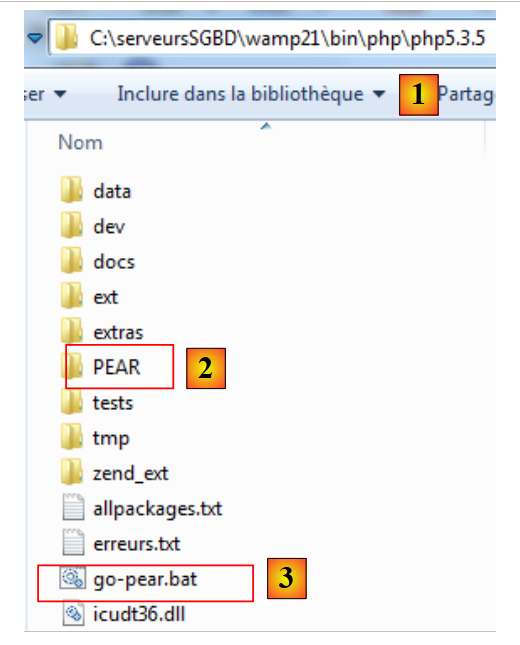 |
- in [1], the PHP interpreter installation directory
- in [2], the PEAR folder that will contain the PEAR modules to be installed
- [3] is the [go-pear.bat] batch file that initializes the PEAR library
To initialize the PEAR library, open a DOS window and run the [go-pear.bat] file. This script will connect to the PEAR library website. An internet connection is therefore required.
Once connected to the PEAR library website, the script will download a number of items. Among these is a new script [pear.bat]. We will use this script to install the various PEAR modules we need. This script is called with arguments. Among these, the [help] argument provides a list of commands accepted by the script:
C:\serveursSGBD\wamp21\bin\PHP\php5.3.5>pear help
Commands:
build                  Build an Extension From C Source
bundle                 Unpacks a Pecl Package
channel-add            Add a Channel
channel-alias          Specify an alias to a channel name
channel-delete         Remove a Channel From the List
channel-discover       Initialize a Channel from its server
channel-info           Retrieve Information on a Channel
channel-login          Connects and authenticates to remote channel server
channel-logout         Logs out from the remote channel server
channel-update         Update an Existing Channel
clear-cache            Clear Web Services Cache
config-create          Create a Default configuration file
config-get             Show One Setting
config-help            Show Information About Setting
config-set             Change Setting
config-show            Show All Settings
convert                Convert a package.xml 1.0 to package.xml 2.0 format
cvsdiff                Run a "cvs diff" for all files in a package
cvstag                 Set CVS Release Tag
download               Download Package
download-all           Downloads each available package from the default channel

info                   Display information about a package
install                Install Package
list                   List Installed Packages In The Default Channel
list-all               List All Packages
list-channels          List Available Channels
list-files             List Files In Installed Package
list-upgrades          List Available Upgrades
login                  Connects and authenticates to remote server [Deprecated i
n favor of channel-login]
logout                 Logs out from the remote server [Deprecated in favor of c
hannel-logout]
makerpm                Builds an RPM spec file from a PEAR package
package                Build Package
package-dependencies   Show package dependencies
package-validate       Validate Package Consistency
pickle                 Build PECL Package
remote-info            Information About Remote Packages
remote-list            List Remote Packages
run-scripts            Run Post-Install Scripts bundled with a package
run-tests              Run Regression Tests
search                 Search remote package database
shell-test             Shell Script Test
sign                   Sign a package distribution file
svntag                 Set SVN Release Tag
uninstall              Un-install Package
update-channels        Update the Channel List
upgrade                Upgrade Package
upgrade-all            Upgrade All Packages [Deprecated in favor of calling upgr
ade with no parameters]
Usage: pear [options] command [command-options] <parameters>
Type "pear help options" to list all options.
Type "pear help shortcuts" to list all command shortcuts.
Type "pear help <command>" to get the help for the specified command.
The [install] command is used to install PEAR modules. You can get help on the [install] command:
C:\serveursSGBD\wamp21\bin\PHP\php5.3.5>pear help install
pear install [options] [channel/]<package> ...
Installs one or more PEAR packages.  You can specify a package to install in four ways:

"Package-1.0.tgz" : installs from a local file

"http://example.com/Package-1.0.tgz" : installs from anywhere on the net.

"package.xml" : installs the package described in package.xml.  Useful for testing, or for wrapping a PEAR package in another package manager such as RPM.

"Package[-version/state][.tar]" : queries your default channel's server(pear.php.net) and downloads the newest package with the preferred quality/state (stable).

To retrieve Package version 1.1, use "Package-1.1," to retrieve Package state beta, use "Package-beta."  To retrieve an uncompressed file, append .tar (make sure there is no file by the same name first)

To download a package from another channel, prefix with the channel name like "channel/Package"

More than one package may be specified at once.  It is ok to mix these four ways of specifying packages.

Options:
  -f, --force
        will overwrite newer installed packages
  -l, --loose
        do not check for recommended dependency version
  -n, --nodeps
        ignore dependencies, install anyway
  -r, --register-only
        do not install files, only register the package as installed
  -s, --soft
        soft install, fail silently, or upgrade if already installed
  -B, --nobuild
        don't build C extensions
  -Z, --nocompress
        request uncompressed files when downloading
  -R DIR, --installroot=DIR
        root directory used when installing files (ala PHP's INSTALL_ROOT), use packagingroot for RPM
  -P DIR, --packagingroot=DIR
        root directory used when packaging files, like RPM packaging
  --ignore-errors
        force install even if there were errors
  -a, --alldeps
        install all required and optional dependencies
  -o, --onlyreqdeps
        install all required dependencies
  -O, --offline
        do not attempt to download any urls or contact channels
  -p, --pretend
        Only list the packages that would be downloaded
The PEAR modules to install are: [Mail], [Mail_Mime], [Net_SMTP]. In the Command Prompt window, enter the following commands one after another:
<PHP_installDir>pear install Mail
...
<PHP_installDir>pear install Mail_Mime
…
<PHP_installDir>pear install Net_SMTP
…
where <PHP_installDir> is the installation directory of the PHP interpreter (C:\serveursSGBD\wamp21\bin\PHP\php5.3.5 in this example)
You can view the installed modules:
C:\serveursSGBD\wamp21\bin\PHP\php5.3.5>pear list
INSTALLED PACKAGES, CHANNEL PEAR.php.NET:
=========================================
PACKAGE          VERSION STATE
Archive_Tar      1.3.7   stable
Console_Getopt   1.3.1   stable
Mail             1.2.0   stable
Mail_Mime        1.8.1   stable
Net_SMTP         1.6.0   stable
Net_Socket       1.0.10  stable
PEAR             1.9.4   stable
PHPUnit          1.3.2   stable
Structures_Graph 1.0.4   stable
XML_Util         1.2.1   stable
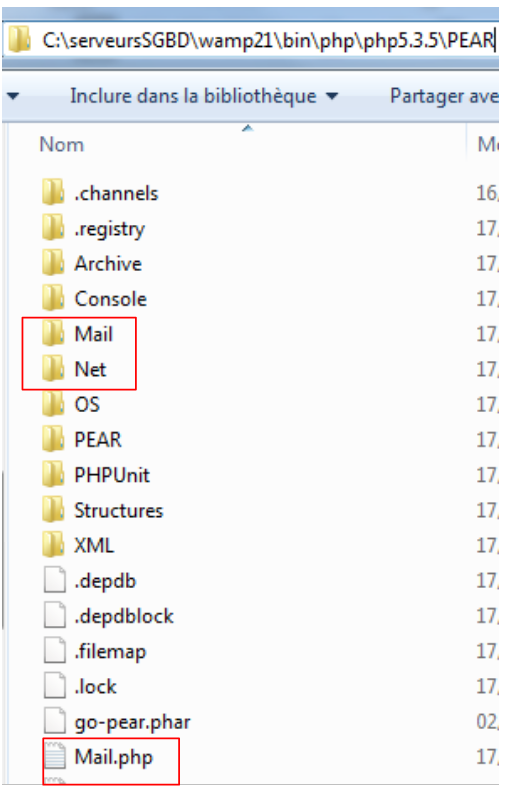
The modules are installed in the <PHP_installDir>/PEAR folder:
 |
With the PEAR modules installed, the PHP script for sending email looks like this:
<?php

// error management
ini_set("display_errors", "off");
// modules
ini_set("include_path", ".;C:\serveursSGBD\wamp21\bin\PHP\php5.3.5\PEAR");
require_once "Mail.php";
require_once "Mail/Mime.php";
require_once "Net/SMTP.php";


// client SMTP (SendMail Transfer Protocol) for sending a message
// information is taken from a $INFOS file containing the following lines
// line 1: smtp, sender, recipient, attachment
// next lines: message text
// sender:email sender
// recipient: email recipient
// smtp: name of smtp server to use
// attachment: name of the document to be attached
//
// data
$INFOS = "mail2.txt"; // mail settings
// retrieve mail parameters
list($erreur, $smtpServer, $expéditeur, $destinataire, $message, $sujet, $attachement) = getInfos($INFOS);
// mistake?
if ($erreur) {
  print "$erreur\n";
  exit;
}
print "Envoi du message [$smtpServer,$expéditeur,$destinataire,$sujet, $attachement]\n";
// sending mail in verbose mode
$résultat = sendmail($smtpServer, $expéditeur, $destinataire, $message, $sujet, $attachement);
print "Résultat de l'envoi : $résultat\n";
// end
exit;

//-----------------------------------------------------------------------
function getInfos($fichier) {
// returns information ($smtp,$expéditeur,$destinataire,$message, $sujet, $attachement) taken from text file $fichier
// line 1: smtp, sender, recipient, subject, attachment
// next lines: message text
...
// return
  return array("", $smtpServer, $expéditeur, $destinataire, $message, $sujet, $attachement);
}

//getInfos
//-----------------------------------------------------------------------

function sendmail($smtpServer, $expéditeur, $destinataire, $message, $sujet, $attachement) {
// sends $message to smtp server $smtpserver from $expéditeur
// for $destinataire. Document $attachement is attached to the message
// message has subject $sujet
//
  // message
  $msg = new Mail_Mime();
  $msg->setTXTBody($message);
  $msg->addAttachment($attachement);
  $headers = $msg->headers(array("From" => $expéditeur, "To" => $destinataire, "Subject" => $sujet));
  // shipping
  $mailer = &Mail::factory("smtp", array("host" => $smtpServer, "port" => 25));
  $envoi = $mailer->send($expéditeur, $headers, $msg->get());
  if ($envoi === TRUE) {
    return "Message envoyé";
  } else {
    return $envoi;
  }
}

// --------------------------------------------------------------------------

function cutNewLinechar($ligne) {
// delete the end-of-line mark from $ligne if it exists
  …
}
The [mail2.txt] file:
- line 1: in order, the SMTP server, the sender's address, the recipient's address, the message subject, the document to attach.
- lines 2-4: the message text
Screen results
Envoi du message [smtp.orange.fr,serge.tahe@univ-angers.fr,serge.tahe@univ-angers.fr,test, document.pdf]
Résultat de l'envoi : Message envoyé
Comments
This script differs from the previous one only in its use of the sendmail function. We describe this function below:
- Line 6: The PHP scripts for the PEAR modules have been installed in a directory that the PHP interpreter does not search by default. To ensure that the interpreter can find the PEAR modules, we manually specify the directories it should search. It is possible to modify certain configuration parameters of the PHP interpreter at runtime. This modification is visible only to the script that makes it and only for the duration of its execution. The default configuration of the PHP interpreter can be found in the file <PHP_installdir>/PHP.ini. This file contains lines of the form
The value of the key can be modified at runtime using the function ini_set(key, new_value). The key used to specify the search path for PHP functions and classes referenced by the script is 'include_path'. Here, we add both the script directory (.) and the PEAR directory within the PHP interpreter installation directory to the search path.
- Lines 7–9: The PHP scripts for sending email are loaded.
- line 50: the sendmail function, which handles sending the email. Its parameters are as follows:
- $smtpServer: the name of the SMTP server to connect to
- $sender: the sender’s email address
- $recipient: the recipient's email address
- $message: the message to be sent.
- $subject: the subject of the message
- $attachment: the name of the document to attach to the message
The sendMail function returns an error message; it is empty if no error occurred.
- Line 56: creation of a Mail_Mime message. This message consists of headers (From, To, Subject) and a body (the message itself)
- Line 57: The body of the Mail_Mime message is set.
- line 58: attaching a document to the message
- line 59: Set the headers (From, To, Subject) of the Mail_Mime message
- line 61: creates the class responsible for sending the Mail_Mime message. The first parameter of the method is the name of the protocol to use, in this case the SMTP protocol. The second parameter is an array specifying the name and port of the SMTP service to use
- line 62: sending the message. The send method takes three parameters: the sender’s address, the Mail_Mime message headers, and the Mail_Mime message body. The send function returns the boolean TRUE if the message was sent successfully, or an error message otherwise.