5. The HTTP functions in Dart
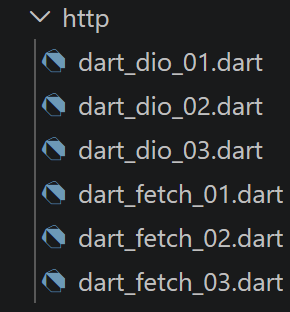
Unlike JavaScript/TypeScript, which provides a [fetch] NATIVE function (both in the browser and in Node.js), Dart does NOT provide a high-level client in its standard library ([dart:io] exposes only a low-level [HttpClient], which is cumbersome to use directly). Two external packages together cover exactly the same ground as [fetch] and [axios] in the TypeScript course:
- [package:http] (pub.dev/packages/http), maintained by the Dart team itself: a simple, low-level API, with no global configuration or interceptors—the role of [fetch].
- [package:dio] (pub.dev/packages/dio): global configuration ([baseUrl], [timeout]), interceptors, enhanced error handling ([DioException.response])—the role of [axios].
5.2. The Tax Calculation Server
All scripts in this chapter target the NestJS server installed in the previous chapter, at the address [http://localhost:3000/main.php]. Before testing the following scripts, verify that your NestJS server is running. For it to work, the Laragon tool must also be running.
5.2.1. [dart_fetch_01] script
| // dart_fetch_01.dart
// Ports fetch-01.ts.
// Choice of HTTP tools in Dart: the [http] package (pub.dev/packages/http),
// maintained by the Dart team itself, plays the role of the native [fetch] of
// Node.js/the browser - a simple, low-level API, without
// global configuration or interceptors (unlike the [dio] package,
// which plays the role of [axios] - see dart_dio_01.dart).
import 'dart:convert';
import 'package:http/http.dart' as http;
// base URL of the tax calculation server (see the chapter
// "Installing a NestJS server")
const String baseUrl = 'http://localhost:3000/main.php';
// init session
Future<dynamic> initSession() async {
// [difference with TypeScript] the [http] package has no
// [timeout] option on the request itself: we limit the waiting time by
// wrapping the Future with the [.timeout(...)] extension of dart:async,
// which works on ANY Future (not only HTTP
// requests) - a more general mechanism than fetch's
// AbortSignal.timeout(), specific to the native fetch.
final uri = Uri.parse(baseUrl).replace(queryParameters: {
'action': 'init-session',
'type': 'json',
});
try {
// asynchronous request - http.get() returns a Future<http.Response>
final stopwatch = Stopwatch()..start();
final response = await http.get(uri).timeout(const Duration(seconds: 2));
// [response] is the whole HTTP response of the server (HTTP
// headers + body) - we display it to see its structure
print("http response in Dart (duration=${stopwatch.elapsedMilliseconds}ms) : "
"statusCode=${response.statusCode}");
// we can access the HTTP headers
print("response headers=${response.headers}");
// [difference with TypeScript] unlike fetch, where response.json()
// is a separate ASYNCHRONOUS method (a new Future), the body of the
// http.Response is already fully available
// SYNCHRONOUSLY (response.body, a String): http.get() has already waited for
// the whole body before returning its result. jsonDecode() is therefore
// not an asynchronous operation here.
final object = jsonDecode(response.body);
print("json response=$object, type=${object.runtimeType}");
return object;
} catch (error) {
// we are here because the server responded with an error code, or
// because the http client threw an exception (network unreachable,
// timeout exceeded...)
print("fetch error in Dart=${error.runtimeType}, $error");
// we rethrow the error
rethrow;
}
}
// the main function runs the asynchronous function [initSession]
Future<void> main() async {
try {
print("HTTP request to the server in progress "
"---------------------------------------------");
final response = await initSession();
print("success ---------------------------------------------");
print("response=$response ${response.runtimeType}");
} catch (error) {
print("error ---------------------------------------------");
print("error=$error");
}
}
|
Let’s comment on this code:
- line 30: [http.get(uri).timeout(const Duration(seconds: 2))]: the [http] package does not have a [timeout] option on the request itself - We limit the wait time by wrapping [Future] with the [.timeout(...)] method of dart:async, which works on ANY [Future], not just HTTP requests.
- Line 43: [jsonDecode(response.body)]: Unlike [fetch], where [response.json()] is a separate ASYNCHRONOUS method, the body of a [http.Response] is already fully available SYNCHRONOUSLY ([response.body], a [String]): [http.get()] has already waited for the entire body before returning its result.
The result of the execution is as follows:
| HTTP request to the server in progress ---------------------------------------------
http response in Dart (duration=73ms) : statusCode=200
response headers={x-powered-by: Express, connection: keep-alive, keep-alive: timeout=5, set-cookie: connect.sid=s%3AWxLD5aAAWVIL6pinZyP75L4COQi837LW.NmwJehFDFeCvZ0p6CKHV9ybz9xNUvndTB7TYlKgp7s4; Path=/; HttpOnly; SameSite=Lax, date: Sun, 20 Sep 2026 09:47:30 GMT, content-length: 84, etag: W/"54-sE02l73cr4dRIJSanYxwhuhm21c", content-type: application/json; charset=utf-8}
json response={action: init-session, status: 700, response: session started with type [json]}, type=_Map<String, dynamic>
success ---------------------------------------------
response={action: init-session, status: 700, response: session started with type [json]} _Map<String, dynamic>
|
5.2.2. script [dart_fetch_02]
| // dart_fetch_02.dart
// Ports fetch-02.ts: "concise" version of dart_fetch_01.dart, without the
// intermediate displays.
import 'dart:convert';
import 'package:http/http.dart' as http;
const String baseUrl = 'http://localhost:3000/main.php';
// init session
Future<dynamic> initSession() async {
final uri = Uri.parse(baseUrl).replace(queryParameters: {
'action': 'init-session',
'type': 'json',
});
final response = await http.get(uri).timeout(const Duration(seconds: 2));
// result received in jSON
return jsonDecode(response.body);
}
// the main function runs the asynchronous function [initSession]
Future<void> main() async {
try {
print("HTTP request to the server in progress "
"---------------------------------------------");
final response = await initSession();
print("success ---------------------------------------------");
print("response=$response");
} catch (error) {
print("error ---------------------------------------------");
print("error=$error");
}
}
|
Let’s comment on this code:
- A concise version of dart_fetch_01.dart, without the intermediate outputs—the structure remains the same: construct [Uri], call [http.get], decode JSON.
The result of the execution is as follows:
| HTTP request to the server in progress ---------------------------------------------
success ---------------------------------------------
response={action: init-session, status: 700, response: session started with type [json]}
|
5.2.3. script [dart_fetch_03]
| // dart_fetch_03.dart
// Ports fetch-03.ts: maximum delay and manual cancellation of an HTTP
// request.
import 'package:http/http.dart' as http;
// base URL of the tax calculation server (see http/README, the
// historical PHP server of the original course; here we directly target the
// NestJS server - see the chapter "Installing a NestJS server")
const String baseUrl = 'http://localhost:3000/main.php';
// example 1: request with a maximum delay, thanks to [.timeout(...)]
// (dart:async extension on any Future - see dart_fetch_01.dart)
Future<void> requestWithMaximumDelay() async {
print("--- request with .timeout() ---");
try {
final response = await http
.get(Uri.parse('$baseUrl?action=init-session&type=json'))
// beyond 2 seconds, [.timeout] completes the Future with an error
// with a [TimeoutException] - the Dart equivalent of
// fetch's AbortSignal.timeout()
.timeout(const Duration(seconds: 2));
print("response = ${response.body}");
} catch (error) {
// if the server does not exist (a likely case in this exercise), or if
// the delay is exceeded, [error] is a [TimeoutException] or a
// [SocketException]/[ClientException] depending on the case
print("error.runtimeType = ${error.runtimeType}, message = $error");
}
}
// example 2: manual cancellation of a request, for example because
// the user changed their mind (e.g.: they retype in a search
// field).
//
// [WARNING, fundamental difference with TypeScript] the [http] package has no
// PER-REQUEST cancellation signal, like fetch's AbortSignal: the
// only way to cancel is to CLOSE THE CLIENT (http.Client.close()) as a
// whole, which cancels ALL the requests in progress on this client - you
// therefore need to create a client DEDICATED to the request you want to be able to cancel
// individually, rather than a client shared by the whole application.
Future<void> manuallyCancellableRequest() async {
print("--- request cancelled manually ---");
final client = http.Client();
// we schedule a "business" cancellation after 10 ms (in a real
// application, this would for example be a click on a "cancel" button)
Future.delayed(const Duration(milliseconds: 10), () {
print("manual cancellation triggered");
client.close();
});
try {
final response = await client.get(Uri.parse('$baseUrl?action=init-session&type=json'));
print("response = ${response.body}");
} catch (error) {
// closing the client during a request in progress makes it fail with
// a [ClientException]
print("error.runtimeType = ${error.runtimeType}, message = $error");
}
}
Future<void> main() async {
await requestWithMaximumDelay();
await manuallyCancellableRequest();
}
|
Let’s break down this code:
- Line 21: [.timeout(const Duration(seconds: 2))] completes the failed [Future] with a [TimeoutException] that exceeded the time limit - the Dart equivalent of [AbortSignal.timeout()] for [fetch].
- Line 35: [WARNING, key difference]—the [http] package has NO PER-REQUEST cancellation signal like [AbortController] for [fetch]: the only way to cancel is to CLOSE THE CLIENT ([http.Client.close()]) in its entirety, which cancels ALL pending requests on that client—hence the need to create a DEDICATED client for the request you want to be able to cancel individually.
The result of the execution is as follows:
| --- request with .timeout() ---
response = {"action":"init-session","status":700,"response":"session started with type [json]"}
--- request cancelled manually ---
response = {"action":"init-session","status":700,"response":"session started with type [json]"}
manual cancellation triggered
|
5.2.4. script [dart_dio_01]
| // dart_dio_01.dart
// Ports axios-01.ts and axios-02.ts.
// Choice of HTTP tools in Dart: the [dio] package (pub.dev/packages/dio)
// plays the role of [axios] - a global configuration (baseUrl, timeout),
// interceptors, enriched error handling (error.response, like
// axios): everything that the [http] package, closer to fetch, leaves to the
// calling code (see dart_fetch_01.dart).
import 'package:dio/dio.dart';
// a Dio instance configured once and for all, reused by all
// the calls - exactly the role of "axios.defaults" in TypeScript
final Dio dio = Dio(BaseOptions(
baseUrl: 'http://localhost:3000/',
connectTimeout: const Duration(seconds: 2),
receiveTimeout: const Duration(seconds: 2),
));
// init session
Future<dynamic> initSession({required String type}) async {
try {
// asynchronous request - dio.get() directly accepts
// queryParameters, like axios.request({params: ...})
final response = await dio.get('main.php', queryParameters: {
'action': 'init-session',
'type': type,
});
// the server's response is in [response.data] (already decoded into
// Map/List by Dio if the Content-Type is JSON), exactly like
// response.data in axios
return response.data;
} on DioException catch (error) {
// the parameter [error] is a [DioException] - we display it to
// see its structure (equivalent of the "console.log(axios error)"
// commented out in axios-01.ts)
if (error.response != null) {
// the server signalled an error in the HTTP status but it
// also sent a response: it is in [error.response!.data],
// exactly like [error.response.data] in axios
return error.response!.data;
} else {
// no response at all (network unreachable, timeout...) - we
// rethrow the error
rethrow;
}
}
}
Future<void> main() async {
try {
// 1st attempt, deliberately invalid (type='x' instead of 'json'),
// to observe how the server - then dio - signal the error:
// the server still responds (with a business error status), so
// error.response.data is indeed filled, as in axios-01.ts
print("HTTP request (invalid type) to the server in progress "
"---------------------------------------------");
final invalidResponse = await initSession(type: 'x');
print("response=$invalidResponse ${invalidResponse.runtimeType}");
// 2nd attempt, corrected (type='json'), like axios-02.ts
print("HTTP request (corrected type) to the server in progress "
"---------------------------------------------");
final response = await initSession(type: 'json');
print("success ---------------------------------------------");
print("response=$response ${response.runtimeType}");
} catch (error) {
print("error ---------------------------------------------");
print("error=$error");
}
}
|
Let’s break down this code:
- Lines 12–15: [Dio(BaseOptions(baseUrl: ..., connectTimeout: ..., receiveTimeout: ...))]: a [Dio] instance configured once and for all, reused by all calls—exactly the role of [axios.defaults] in TypeScript.
- [response.data]: the server’s response, which was already DECODED into [Map]/[List] by Dio if [Content-Type] is JSON, exactly like [response.data] in axios.
- Lines 30–31: [on DioException catch (error) { if (error.response != null) ... }]: the same distinction as [error.response] in Axios between an error WITH a server response (business error status) and an error WITHOUT a response (network unreachable, timeout).
The result of the execution is as follows:
| HTTP request (invalid type) to the server in progress ---------------------------------------------
response={action: init-session, status: 703, response: invalid parameter type=[x]} _Map<String, dynamic>
HTTP request (corrected type) to the server in progress ---------------------------------------------
success ---------------------------------------------
response={action: init-session, status: 700, response: session started with type [json]} _Map<String, dynamic>
|
5.2.5. script [dart_dio_02]
| // dart_dio_02.dart
// Ports axios-03.ts: chaining two HTTP requests - init-session, then
// authenticate-user (a POST with a body encoded as
// x-www-form-urlencoded).
import 'package:dio/dio.dart';
final Dio dio = Dio(BaseOptions(
baseUrl: 'http://localhost:3000/',
connectTimeout: const Duration(seconds: 2),
receiveTimeout: const Duration(seconds: 2),
));
Future<dynamic> initSession() async {
try {
final response = await dio.get('main.php', queryParameters: {
'action': 'init-session',
'type': 'json',
});
return response.data;
} on DioException catch (error) {
if (error.response != null) {
return error.response!.data;
}
rethrow;
}
}
Future<dynamic> authenticateUser(String user, String password) async {
try {
// POST request with an x-www-form-urlencoded body - Dio automatically
// encodes a Map as x-www-form-urlencoded if the
// Content-Type is specified in the [Options], exactly like qs.stringify(...)
// + the manual header of axios-03.ts
final response = await dio.post(
'main.php',
queryParameters: {'action': 'authenticate-user'},
data: {'user': user, 'password': password},
options: Options(contentType: Headers.formUrlEncodedContentType),
);
return response.data;
} on DioException catch (error) {
if (error.response != null) {
return error.response!.data;
}
rethrow;
}
}
// the main function runs the asynchronous functions one by one
Future<void> main() async {
try {
// init-session
print("init-session action in progress "
"---------------------------------------------");
final response1 = await initSession();
print("success ---------------------------------------------");
print("response=$response1");
// authenticate-user - [NOTE, as in the original TypeScript
// course] this call starts from a new HTTP request, WITHOUT
// automatically sharing the session cookie set by the server at
// the previous step (neither Dio nor axios do it automatically on the
// Node/Dart side): manual tracking of the session cookie is precisely the
// subject of dart_dio_03.dart, which ports axios-04.ts.
print("authenticate-user action in progress "
"---------------------------------------------");
final response2 = await authenticateUser('admin', 'admin');
print("success ---------------------------------------------");
print("response=$response2");
} catch (error) {
print("error ---------------------------------------------");
print("error=$error");
}
}
|
Let’s break down this code:
- line 38: [Options(contentType: Headers.formUrlEncodedContentType)]: Dio automatically encodes the [Map] passed to [data] into [x-www-form-urlencoded] as soon as this [Content-Type] is specified - the equivalent of [qs.stringify(...)] combined with the manual Axios header.
- This call is a new HTTP request that does NOT automatically share the session cookie set by the server in the previous step—neither Dio nor axios does this automatically on the Dart/Node side: manual cookie tracking is the subject of the following script.
The result of the execution is as follows:
| init-session action in progress ---------------------------------------------
success ---------------------------------------------
response={action: init-session, status: 700, response: session started with type [json]}
authenticate-user action in progress ---------------------------------------------
success ---------------------------------------------
response={action: authenticate-user, status: 103, response: [no session in progress. Start with action [init-session]]}
|
5.2.6. script [dart_dio_03]
| // dart_dio_03.dart
// Ports axios-04.ts: manual tracking of the session cookie between two requests.
import 'package:dio/dio.dart';
final Dio dio = Dio(BaseOptions(
baseUrl: 'http://localhost:3000/',
connectTimeout: const Duration(seconds: 2),
receiveTimeout: const Duration(seconds: 2),
// we disable the default validation of the HTTP status to be able to
// inspect an error response ourselves (like error.response in
// axios), without systematically going through a catch block
validateStatus: (_) => true,
));
// session cookie
const String sessionCookieName = "connect.sid";
String sessionCookie = '';
Future<dynamic> getRemoteData(String path, {
required String method,
Map<String, dynamic>? queryParameters,
Object? data,
Options? options,
}) async {
// for the session cookie - we add it ourselves to the headers of
// each request, exactly like axios-04.ts
final opts = (options ?? Options(method: method)).copyWith(
method: method,
headers: {
...?options?.headers,
'Cookie': sessionCookie,
},
);
// execution of the HTTP request
final response = await dio.request(
path,
queryParameters: queryParameters,
data: data,
options: opts,
);
// we retrieve the session cookie if it exists - response.headers is a
// Dio [Headers] object (not a simple Map like response.headers in
// axios); response.headers['set-cookie'] returns a List<String>?
final setCookie = response.headers['set-cookie'];
if (setCookie != null) {
// we look for the session cookie in this list
for (final header in setCookie) {
final result = RegExp('^($sessionCookieName.+?);').firstMatch(header);
if (result != null) {
// we store the session cookie
sessionCookie = result.group(1)!;
break;
}
}
}
// the server's response is in [response.data]
return response.data;
}
Future<dynamic> initSession() {
return getRemoteData(
'main.php',
method: 'GET',
queryParameters: {'action': 'init-session', 'type': 'json'},
);
}
Future<dynamic> authenticateUser(String user, String password) {
return getRemoteData(
'main.php',
method: 'POST',
queryParameters: {'action': 'authenticate-user'},
data: {'user': user, 'password': password},
options: Options(contentType: Headers.formUrlEncodedContentType),
);
}
// the main function runs the asynchronous functions one by one
Future<void> main() async {
try {
print("init-session action in progress ----------------");
final response1 = await initSession();
print("success --------------------------");
print("response=$response1");
print("authenticate-user action in progress ---------");
final response2 = await authenticateUser('admin', 'admin');
print("success -------------------");
print("response=$response2");
} catch (error) {
print("error ------------------");
print("error=$error");
}
}
|
Let’s break down this code:
- Line 12: [validateStatus: (_) => true]: disables the default validation of status HTTP, so you can inspect an error response yourself without always having to go through a [catch] block—the same choice as axios-04.ts.
- [response.headers['set-cookie']] returns a [List<String>?]: unlike [response.headers] in Axios (a simple object), Dio’s [response.headers] is a dedicated [Headers] object, whose indexing always returns a list.
- Line 48: [RegExp('^($sessionCookieName.+?);').firstMatch(header)]: the session cookie is retrieved and stored manually, then reinserted into the [Cookie] header of each subsequent request—exactly the same pattern as axios-04.ts, adapted for Dio’s API.
The result of the execution is as follows:
| init-session action in progress ----------------
success --------------------------
response={action: init-session, status: 700, response: session started with type [json]}
authenticate-user action in progress ---------
success -------------------
response={action: authenticate-user, status: 200, response: Authentication successful [admin, admin]}
|
5.2.7. Conclusion
[package:http] and [package:dio] together cover the entire scope of [fetch] and [axios]: a low-level API close to the protocol, and a feature-rich API with global configuration and enhanced error handling. The specific differences ([timeout] being generic per [Future] rather than per request, lack of individual cancellation, lack of automatic cookie management) will be reflected, in concrete form, in the HTTP clients in the following chapter.