7. Database Access
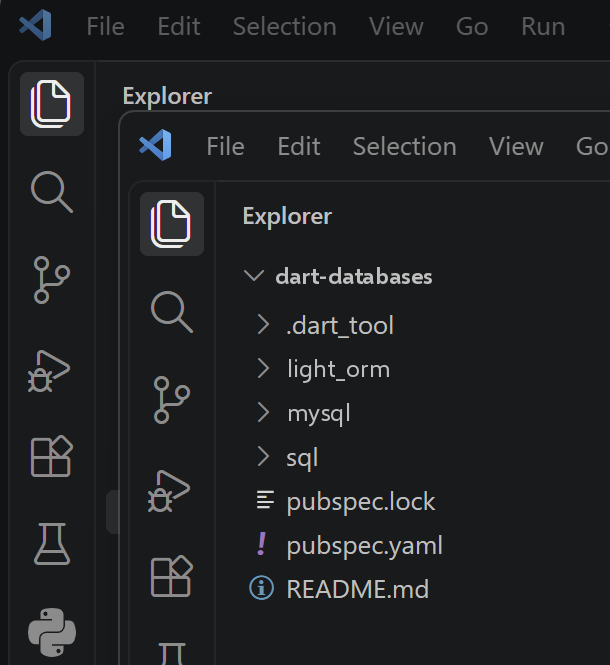
The TypeScript course devotes three chapters to accessing a MySQL database: the native driver [mysql2], followed by two ORM ([TypeORM] and [Prisma]), using the same example—two databases, [dbpersons] (a single table) and [dbschool] (four related tables: classes, students, subjects, and grades). This chapter is identical to the first one, then combines the two ORM chapters into a single one: Dart has no mature equivalent of [TypeORM] or [Prisma] for MySQL (see the sidebar at the end of the chapter), and rather than forcing an artificial correspondence with either one, we construct a “lightweight ORM” that demonstrates what a ORM actually does, by writing it ourselves.
7.1. Direct access to the database
The TypeScript [mysql2] package has no equivalent maintained by the MySQL team itself on the Dart side. An early version of this chapter used [package:mysql1] (pub.dev/packages/mysql1), a widely used pure Dart driver—MySQL—but it turned out to be incompatible with MySQL 8.4 (the version shipped with Laragon): even a query as simple as “select 1” consistently failed with the protocol error “Got packets out of order,” a known and unresolved bug in the package (issues GitHub adamlofts/mysql1_dart #112 and #161). We are therefore now using [package:mysql_client_plus] (pub.dev/packages/mysql_client_plus), an actively maintained fork that has been tested with MySQL 8.x, and whose API — [MySQLConnection.createConnection], [connection.connect], [connection.execute], [connection.close] — remains very similar to that of [mysql2].
7.1.1. Preparing the [dbpersons] database
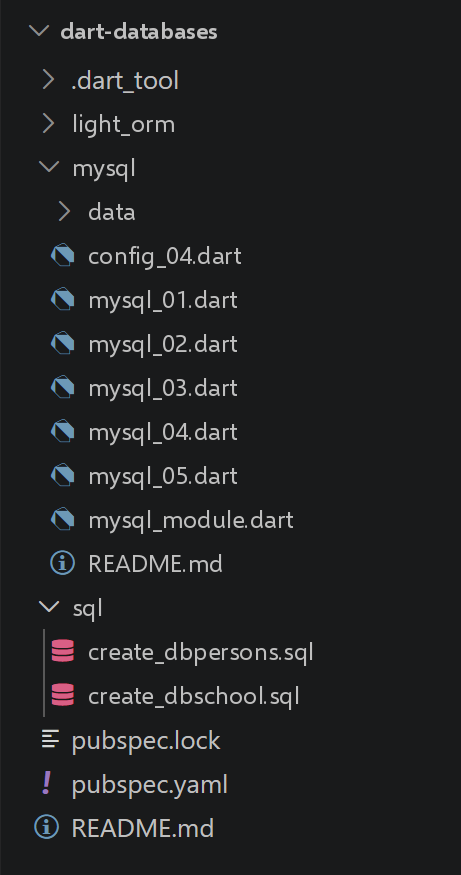
The dbpersons database contains only one table, persons, which uses the same schema as the one used in the Python course (columns id, first\_name, last\_name, age, with a uniqueness constraint on the pair (last\_name, first\_name)). The script sql/create_dbpersons.sql below creates the database, the application user, and the table, then inserts five arbitrary people into it:
-- create_dbpersons.sql
-- Recreates the [dbpersons] database used by the chapter "Accessing MySQL with the
-- native [mysql2] driver", with arbitrary data (the originals of the 2020
-- Python/Flask course being no longer available).
--
-- Usage:
--   mysql -u root -p < create_dbpersons.sql
--
-- Creates the database, the application user [admpersons/nobody] (same
-- credentials as the original course) and the [persons] table.

DROP DATABASE IF EXISTS dbpersons;
CREATE DATABASE dbpersons CHARACTER SET utf8mb4 COLLATE utf8mb4_unicode_ci;

CREATE USER IF NOT EXISTS 'admpersons'@'localhost' IDENTIFIED BY 'nobody';
GRANT ALL PRIVILEGES ON dbpersons.* TO 'admpersons'@'localhost';
FLUSH PRIVILEGES;

USE dbpersons;

CREATE TABLE persons (
  id         INT PRIMARY KEY,
  first_name VARCHAR(30) NOT NULL,
  last_name  VARCHAR(30) NOT NULL,
  age        INTEGER NOT NULL,
  UNIQUE (last_name, first_name)
);

-- arbitrary data (same persons as the examples of the original course)
INSERT INTO persons (id, first_name, last_name, age) VALUES
  (1, 'Paul',     'Langevin', 48),
  (2, 'Sylvie',   'Lefur',    70),
  (3, 'Pierre',   'Nicazou',  35),
  (4, 'Geraldine','Colou',    26),
  (5, 'Paulette', 'Girond',   56);
To create this database (MySQL), you can use Laragon’s [HeidiSQL] tool. We’ve already used it.
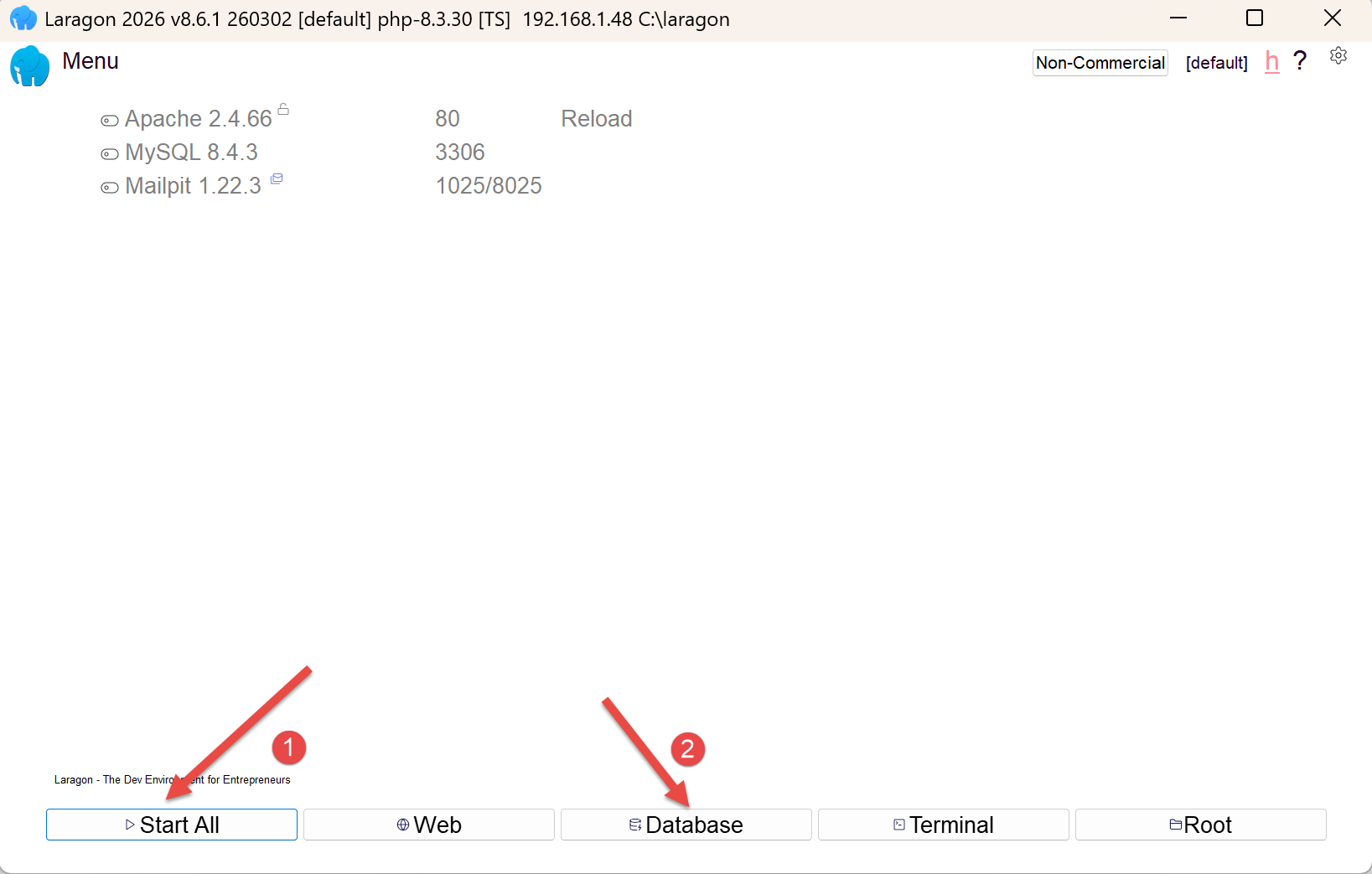
- In [1], start all Laragon services. This will start the MySQL DBMS;
- in [2], access the [HeidiSQL] database management tool;
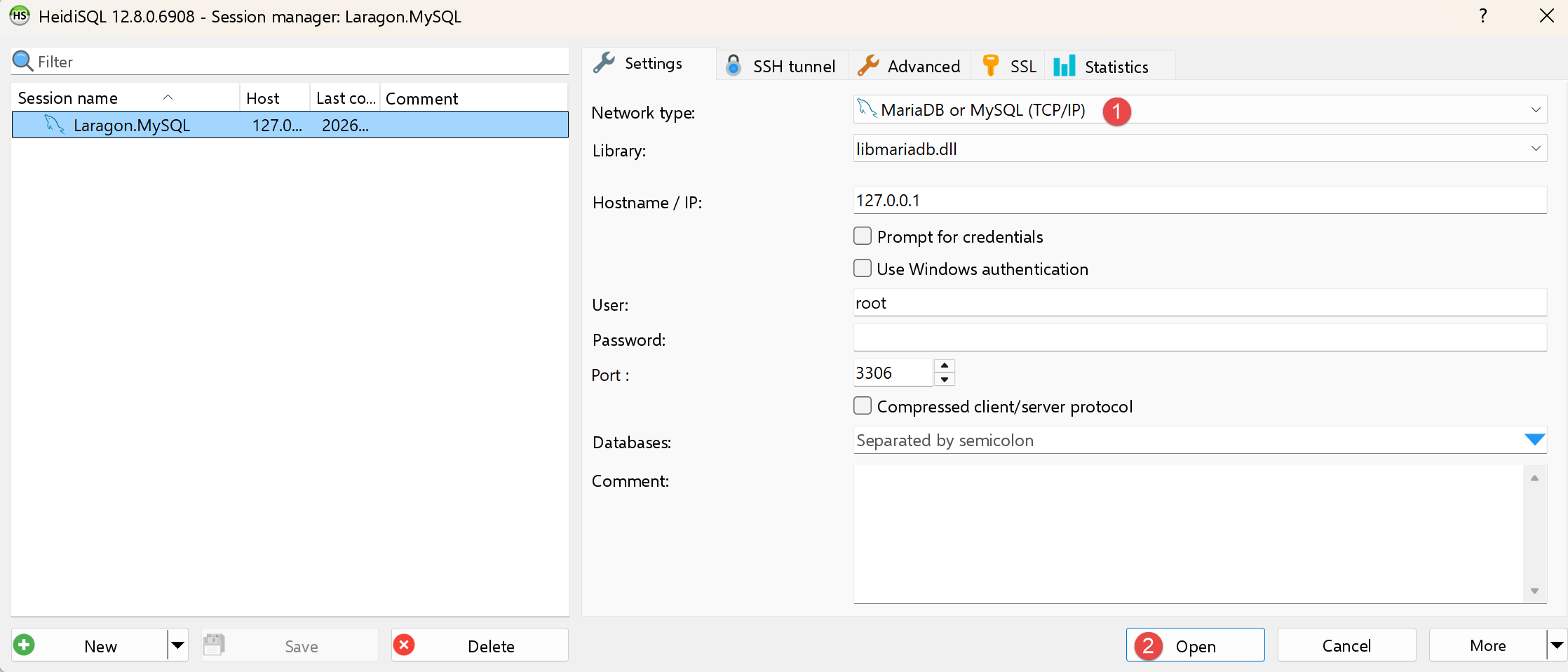
- In [1-2], log in to MySQL;
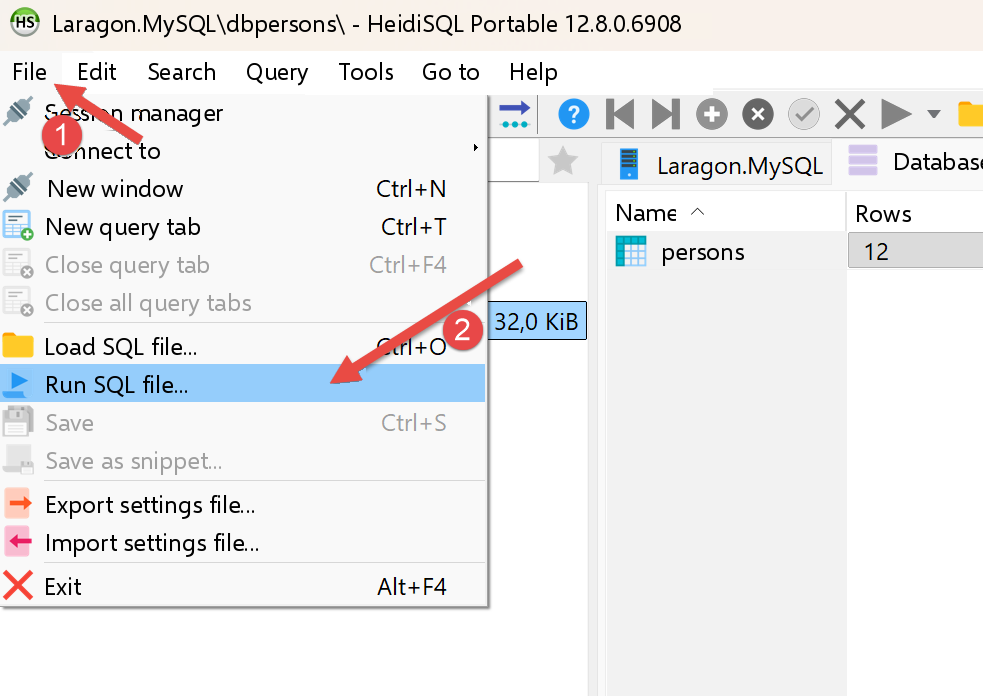
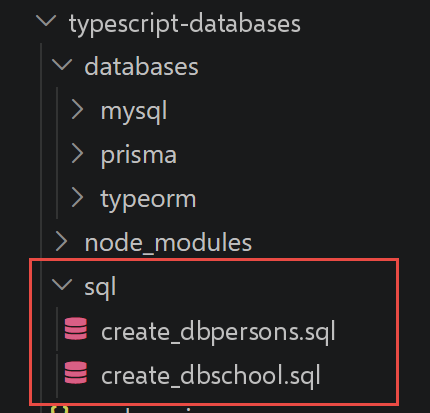
Using [1-2], run the two SQL files in the project one after the other:
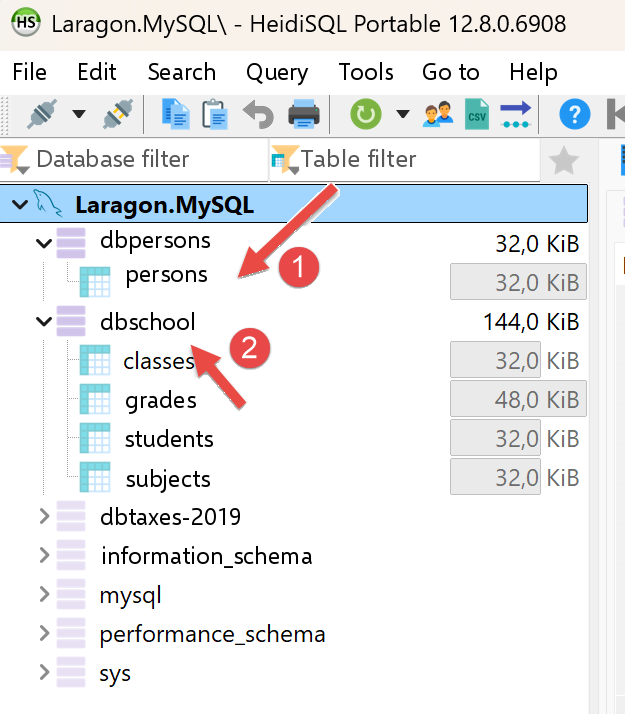
While still in [HeidiSQL], run F5 to refresh the display:
We are now ready to use these two databases.
7.1.2. [mysql_01] script
| // mysql_01.dart
// Ports databases/mysql/mysql-01.ts.
//
// First step: connect to the MySQL database [dbpersons] then
// disconnect.
//
// [technical choice] the TypeScript package [mysql2] has no direct
// Dart-side equivalent maintained by the MySQL team itself. A first
// version of this chapter used [package:mysql1] (pub.dev/packages/
// mysql1), a widely used pure Dart MySQL driver - but which turned out
// to be incompatible with MySQL 8.4 (shipped with Laragon): even a query
// as trivial as "select 1" systematically failed with the
// protocol error "Got packets out of order" (known, unresolved bug of the
// package). So here we use [package:mysql_client_plus]
// (pub.dev/packages/mysql_client_plus), an actively maintained fork
// tested with MySQL 8.x, whose API - [MySQLConnection.createConnection],
// [connection.connect], [connection.execute], [connection.close] - stays very
// close to that of [mysql2].
import 'package:mysql_client_plus/mysql_client_plus.dart';
// connection to the MySQL database [dbpersons]
// the user's identity is (admpersons, nobody)
const String user = 'admpersons';
const String pwd = 'nobody';
const String host = 'localhost';
const int port = 3306;
const String database = 'dbpersons';
Future<void> main() async {
// [difference with TypeScript] no union type "MySqlConnection |
// undefined" here: a nullable field ([MySQLConnection?]) plays the same
// role - "not connected yet" is represented by [null], exactly
// as "not connected yet" was represented by [undefined] on the TS side.
MySQLConnection? connection;
try {
print('Connecting to the MySQL DBMS...');
// [difference with TypeScript] unlike mysql1 (and mysql2),
// [mysql_client_plus] separates the CREATION of the connection object
// ([createConnection], which does no network exchange yet) from
// the actual establishment of the connection ([connect], which negotiates
// the protocol with the server) - two quite distinct steps, where
// mysql1 merged them into a single call [MySqlConnection.connect].
// We only assign [connection] (the nullable variable of the [finally] block)
// once [connect] has succeeded: if [connect] fails, [connection]
// stays [null] and the [finally] will not try to close a connection
// that was never really opened.
final newConnection = await MySQLConnection.createConnection(
host: host,
port: port,
userName: user,
password: pwd,
databaseName: database,
);
await newConnection.connect();
connection = newConnection;
// follow-up
print(
"Successful MySQL connection to database=$database, host=$host as user=$user, passwd=$pwd",
);
} catch (error) {
// display the error
print("The following error occurred: $error");
} finally {
// close the connection if it was opened
if (connection != null) {
await connection.close();
}
}
}
|
Let’s comment on this code:
- line 19: [import 'package:mysql_client_plus/mysql_client_plus.dart';]: the new MySQL driver written entirely in Dart, replacing [package:mysql1]—which is incompatible with MySQL 8.4 (included with Laragon): even a query as trivial as “select 1” would consistently fail with the protocol error “Got packets out of order,” a known and unresolved bug in the package (see the comment at the top of the file).
- Line 34: [MySQLConnection? connection;]: a NULLABLE field serves exactly the same purpose as the union type [MySqlConnection | undefined] of TypeScript - [null] represents “not yet connected,” just like [undefined] relative to TS.
- Lines 47–55: [final newConnection = await MySQLConnection.createConnection(...); await newConnection.connect(); connection = newConnection;]: [mysql_client_plus] separates the CREATION of the connection object ([createConnection], which is not yet exchanging any network traffic) to the actual establishment of the connection ([connect], which negotiates the protocol with the server)—two distinct stages, whereas [mysql1] (like [mysql2] on the TypeScript side) combined them into a single call. [connection] (the nullable variable from [finally]) is assigned only after [connect] succeeds, so that [finally] never closes a connection that was never actually opened.
- [try] / [catch] / [finally]: structure identical to the previous version—the connection is always closed in [finally], regardless of whether an error occurred.
The result of the execution is as follows:
| Connecting to the MySQL DBMS...
Successful MySQL connection to database=dbpersons, host=localhost as user=admpersons, passwd=nobody
|
7.1.3. [mysql_02] script
| // mysql_02.dart
// Ports databases/mysql/mysql-02.ts.
//
// In this new script, the database connection is isolated in a
// function.
import 'package:mysql_client_plus/mysql_client_plus.dart';
// connects then disconnects (login, pwd) from database [database] on server
// [host]; throws an exception if there is a problem
Future<void> connect(String host, int port, String database, String login, String pwd) async {
MySQLConnection? cnx;
try {
// connection - [createConnection] creates the object, [connect] really
// negotiates with the server (see the comment in mysql_01.dart); we
// only assign [cnx] after a successful [connect], so that the [finally]
// never closes a connection that did not succeed
final newConnection = await MySQLConnection.createConnection(
host: host,
port: port,
userName: login,
password: pwd,
databaseName: database,
);
await newConnection.connect();
cnx = newConnection;
print(
"Successful connection to database=$database, host=$host as user=$login, passwd=$pwd",
);
} finally {
// close the connection if it was opened
if (cnx != null) {
await cnx.close();
print('Successful disconnection\n');
}
}
}
// ---------------------------------------------- main
// connection credentials
const String user = 'admpersons';
const String passwd = 'nobody';
const String host = 'localhost';
const int port = 3306;
const String database = 'dbpersons';
Future<void> main() async {
// connection of an existing user
try {
await connect(host, port, database, user, passwd);
} catch (error) {
// display the error
print('$error');
}
// connection of a non-existent user
try {
await connect(host, port, database, 'xx', 'xx');
} catch (error) {
// display the error
print('$error');
}
}
|
Let’s comment on this code:
- Lines 10–36: [Future<void> connect(String host, int port, String database, String login, String pwd) async { ... }]: The connection is encapsulated in a reusable function, which throws an exception in case of failure rather than catching it itself—it’s up to the caller to decide what to do with it. It reuses the “creation + [connect()]” pattern from [mysql_01.dart]: [cnx] is only assigned after a successful [connect].
- Line 43: [const int port = 3306;]: [mysql_client_plus] requires an EXPLICIT port ([createConnection]), whereas [ConnectionSettings] derived the default port on its own from [mysql1] (3306).
- [main] calls this function twice, in two separate blocks, [try] and [catch]: once with valid identifiers and once with invalid identifiers, to illustrate both paths.
The result of the execution is as follows:
| Successful connection to database=dbpersons, host=localhost as user=admpersons, passwd=nobody
Successful disconnection
MySQLServerException [1045]: Access denied for user 'xx'@'localhost' (using password: YES)
|
7.1.4. script [mysql_03]
| // mysql_03.dart
// Ports databases/mysql/mysql-03.ts.
//
// Now that we know how to connect, we issue SQL statements on the
// connection: we (re)create the [persons] table of the [dbpersons] database.
import 'dart:io';
import 'package:mysql_client_plus/mysql_client_plus.dart';
// executes an update query on the connection
Future<void> executeSql(MySQLConnection connection, String query) async {
await connection.execute(query);
}
// ---------------------------------------------- main
// connection credentials
const String id = 'admpersons';
const String pwd = 'nobody';
const String host = 'localhost';
const int port = 3306;
const String database = 'dbpersons';
Future<void> main() async {
// we go step by step
late final MySQLConnection connection;
try {
// connection - [package:mysql_client_plus], like mysql1 before it,
// executes by default each query in its own auto-committed
// transaction (equivalent of AUTOCOMMIT=True on the Python side)
connection = await MySQLConnection.createConnection(
host: host,
port: port,
userName: id,
password: pwd,
databaseName: database,
);
await connection.connect();
} catch (error) {
print("The following error occurred: $error");
// [difference with TypeScript] `process.exit(1)` becomes `exit(1)`
// (dart:io) - same semantics, same process exit code
exit(1);
}
// deletion of the persons table if it exists
// if it does not exist an error will occur - we ignore it
try {
await executeSql(connection, 'drop table persons');
} catch (_) {
// ignored - the [_] says we do not care about the exception's value
}
// creation of the persons table
const query = 'create table persons (id int PRIMARY KEY, first_name varchar(30) NOT NULL, last_name varchar(30) NOT NULL, '
'age integer NOT NULL, unique(last_name,first_name))';
try {
await executeSql(connection, query);
print('$query: query succeeded');
} catch (error) {
print("The following error occurred: $error");
} finally {
await connection.close();
}
}
|
Let’s comment on this code:
- Lines 10–12: [Future<void> executeSql(MySQLConnection connection, String query) async { await connection.execute(query); }]: a utility function to execute a SQL update command (here, a DROP TABLE followed by a CREATE TABLE) - [connection.execute(...)] replaces [connection.query(...)] from [mysql1] (same role, new method name on the [mysql_client_plus] side).
- Line 41: [exit(1);] (from [dart:io]): equivalent to [process.exit(1)]—same semantics, same process exit code in the event of a connection failure.
- Line 47: [try { await executeSql(connection, 'drop table persons'); } catch (_) {}]: The fact that [_] is passed as a parameter to [catch] indicates that the exception value is being ignored—the table may simply not exist yet.
The result of the execution is as follows:
| create table persons (id int PRIMARY KEY, first_name varchar(30) NOT NULL, last_name varchar(30) NOT NULL, age integer NOT NULL, unique(last_name,first_name)): query succeeded
|
7.1.5. script [config_04]
| // config_04.dart
// Ports databases/mysql/config-04.ts.
//
// Configuration of the [mysql_04] script: path of the SQL commands file
// and connection credentials for the [dbpersons] database.
//
// [difference with TypeScript] config-04.ts finds the script's folder
// with `dirname(fileURLToPath(import.meta.url))`. Dart has a direct and
// shorter equivalent: [Platform.script] (dart:io) is already the
// URI of the running script - we just resolve a relative path
// against it with [.resolve(...)], without string handling. Nuance:
// [Platform.script] designates the MAIN script launched by `dart run`
// (mysql_04.dart), not this file - unlike `import.meta.url`,
// specific to each file. The result is identical here since
// config_04.dart and mysql_04.dart live in the same folder.
import 'dart:io';
class Config {
final String commandsFilename;
final String host;
// [mysql_client_plus migration] unlike mysql1, whose
// [ConnectionSettings] deduced the default port (3306) by itself,
// [MySQLConnection.createConnection] requires an EXPLICIT port - so we
// add it here to the configuration.
final int port;
final String database;
final String user;
final String password;
const Config({
required this.commandsFilename,
required this.host,
required this.port,
required this.database,
required this.user,
required this.password,
});
}
Config configure() {
return Config(
// file of SQL commands, resolved relative to THIS file
commandsFilename: Platform.script.resolve('data/commands.sql').toFilePath(),
// database connection credentials
host: 'localhost',
port: 3306,
database: 'dbpersons',
user: 'admpersons',
password: 'nobody',
);
}
|
Let’s break down this code:
- line 43: [Platform.script.resolve('data/commands.sql').toFilePath()] (from [dart:io]): the direct and shorter equivalent of [dirname(fileURLToPath(import.meta.url))] relative to TypeScript - [Platform.script] is already the URI of the currently running script; all that’s needed is to resolve a relative path within it.
- Important note: [Platform.script] refers to the MAIN script launched by [dart run] (in this case, [mysql_04.dart]), not necessarily the file where the expression is written—unlike [import.meta.url], which is unique to each file. The result is still correct here since [config_04.dart] and [mysql_04.dart] reside in the same folder.
- lines 18–28: [class Config { final String commandsFilename; ...; final int port; ...; const Config({required this... }); }]: an immutable class to group the configuration, like the [Config] interface of version TypeScript — with an additional [port] field, explicitly required by [MySQLConnection.createConnection] (whereas [ConnectionSettings] from [mysql1] automatically inferred the default port, 3306).
7.1.6. script [mysql_module]
| // mysql_module.dart
// Ports databases/mysql/mysql-module.ts: reusable functions to
// execute a list (or a file) of SQL commands on an open MySQL
// connection.
//
// [migration] this file initially used [package:mysql1], which turned out
// to be incompatible with MySQL 8.4 (see the comment in pubspec.yaml). It has
// been ported to [package:mysql_client_plus] - see below the difference
// this makes for transaction handling.
import 'dart:io';
import 'package:mysql_client_plus/mysql_client_plus.dart';
// displays the result of an SQL command (result of an execute() of
// mysql_client_plus)
// - if [results.cols] is not empty, it was a SELECT: we display the
// columns then the rows;
// - otherwise, it was an update statement (INSERT/UPDATE/DELETE/DDL): we
// display the number of modified rows ([results.affectedRows],
// equivalent of a cursor's [rowcount]).
void _displayInfo(IResultSet results) {
if (results.cols.isNotEmpty) {
// it was a SELECT - [cols] describes the requested columns
final titles = results.cols.map((c) => c.name).toList();
final header = titles.join(', ');
print(header);
print('*' * header.length);
for (final row in results.rows) {
print(titles.map((t) => row.colByName(t)).toList());
}
print('*' * header.length);
} else {
// no columns described - update statement
print('number of modified rows: ${results.affectedRows}');
}
}
// uses the open connection [connection]
// executes on this connection the SQL commands contained in the list
// [sqlCommands] (one command per element; empty lines or lines
// starting with # are ignored)
// - if verbose=true, each execution of an SQL statement is followed by a
// display indicating its success or failure;
// - if stop=true, the function stops at the 1st error encountered,
// otherwise it executes all the commands;
// - if withTransaction=true, any error cancels all the SQL statements
// executed before (rollback); otherwise each command is committed
// independently (default behaviour of MySQL, in AUTOCOMMIT);
// the function returns a list [error1, error2, ...]
//
// [difference with TypeScript] mysql2 directly exposes
// `connection.beginTransaction()/commit()/rollback()`. [package:mysql1]
// (used in a first version of this file) did not expose these
// methods one by one: the transaction had to be driven "by hand", by
// sending the SQL statements [START TRANSACTION], [COMMIT] and
// [ROLLBACK] ourselves. [package:mysql_client_plus] finally brings the direct equivalent
// of mysql2: `connection.transactional<T>((cnx) async { ... })` executes the
// callback in a transaction, commits (COMMIT) automatically if it
// ends normally, and cancels (ROLLBACK) automatically if it throws an
// exception - no more transaction-control SQL statements to write
// ourselves.
Future<List<String>> executeListOfCommands(
MySQLConnection connection,
List<String> sqlCommands, {
bool verbose = false,
bool stop = true,
bool withTransaction = true,
}) async {
final errors = <String>[];
// actually executes the commands on the supplied connection [cnx]: it is
// either [connection] itself (no transaction), or the "working"
// connection that [transactional] gives its callback (with
// transaction) - the loop is written only once for both cases
Future<void> executeCommands(MySQLConnection cnx) async {
for (final rawCommand in sqlCommands) {
// remove the leading and trailing blanks of the current command
final command = rawCommand.trim();
// empty command or comment? move on to the next one
if (command == '' || command[0] == '#') {
continue;
}
// execution of the current command
try {
final results = await cnx.execute(command);
// no error
if (verbose) {
print('[$command]: Successful execution');
}
_displayInfo(results);
} catch (error) {
final msg = '$command: Error ($error)';
errors.add(msg);
if (verbose) {
print(msg);
}
// do we stop?
if (withTransaction || stop) {
// with transaction: we rethrow the error so that
// [connection.transactional] triggers the ROLLBACK - with
// [package:mysql_client_plus], it is the EXCEPTION that drives
// the cancellation, not a mere loop exit as with the
// manual ROLLBACK of the mysql1 version
if (withTransaction) rethrow;
return;
}
}
}
}
if (withTransaction) {
try {
await connection.transactional((cnx) => executeCommands(cnx));
} catch (_) {
// the error has already been recorded in [errors] above; we
// swallow it here to return the list of errors normally to
// the caller, exactly as the mysql1 version did (which never
// let an exception escape from this function)
}
} else {
await executeCommands(connection);
}
return errors;
}
// uses the open connection [connection]
// executes on this connection the SQL commands contained in the
// text file [sqlFilename] (one command per line)
Future<List<String>> executeFileOfCommands(
MySQLConnection connection,
String sqlFilename, {
bool verbose = false,
bool stop = true,
bool withTransaction = true,
}) async {
try {
final content = await File(sqlFilename).readAsString();
return await executeListOfCommands(
connection,
content.split('\n'),
verbose: verbose,
stop: stop,
withTransaction: withTransaction,
);
} catch (error) {
return ["The file $sqlFilename could not be processed: $error"];
}
}
|
Let's comment on this code:
- line 20: [void _displayInfo(IResultSet results)]: distinguishes a SELECT ([results.cols] describes the requested columns) from an update statement ([results.affectedRows], equivalent to the [rowcount] for a cursor) - [results.cols]/[results.rows] replace [results.fields] from [mysql1], and [row.colByName(t)] replaces the [row.fields[t]] entry.
- Lines 61–67: [Future<List<String>> executeListOfCommands(MySQLConnection connection, List<String> sqlCommands, {bool verbose = false, bool stop = true, bool withTransaction = true}) async { ... }]: NAMED PARAMETERS with default values, unchanged since version [mysql1]—exactly like the optional parameters of the TypeScript configuration object.
- Lines 74–108: [Future<void> executeCommands(MySQLConnection cnx) async { ... }]: a (nested) LOCAL function, reused for both the “with transaction” case (in which it receives the working connection that [transactional] provides to its callback) and the “without transaction” case (in which case it receives [connection] directly)—thus, the command execution loop is written only once. With a transaction, it is a re-launched EXCEPTION ([rethrow]) that triggers the ROLLBACK, rather than a simple loop termination as with the manual ROLLBACK in version [mysql1].
- Lines 110–118: [if (withTransaction) { try { await connection.transactional((cnx) => executeCommands(cnx)); } catch (_) { ... } }]: [mysql2] directly exposes [connection.beginTransaction()]/[commit()]/[rollback()]. [package:mysql1] did not expose these methods one by one: you had to control the transaction “manually” by sending the commands SQL, [START TRANSACTION], [COMMIT], and [ROLLBACK] yourself. [package:mysql_client_plus] finally provides the direct equivalent of [mysql2]: [connection.transactional((cnx) async { ... })] executes the callback within a transaction, automatically commits (COMMIT) if it completes normally, and automatically rolls back (ROLLBACK) if it throws an exception—no more need to write your own SQL transaction control statements.
- Lines 128–134: [Future<List<String>> executeFileOfCommands(...) async { ... }]: reads a file ([File(sqlFilename).readAsString()]) and then delegates to [executeListOfCommands]—unchanged since version [mysql1], same structure as in TypeScript.
7.1.7. script [mysql_04]
This main script coordinates the two previous scripts to execute the file [data/commands.sql] (identical to the TypeScript course), with or without a transaction depending on the command-line argument provided.
| // mysql_04.dart
// Ports databases/mysql/mysql-04.ts.
//
// Main script: executes the SQL commands file
// [data/commands.sql], with or without a transaction depending on the argument passed
// on the command line.
// dart run mysql_04.dart true (with transaction)
// dart run mysql_04.dart false (without transaction)
import 'dart:io';
import 'package:mysql_client_plus/mysql_client_plus.dart';
import 'config_04.dart';
import 'mysql_module.dart';
Future<void> main(List<String> arguments) async {
final config = configure();
// ---------------------------------------------- main
// checking the call syntax
bool error = arguments.length != 1;
String withTransactionText = '';
if (!error) {
withTransactionText = arguments[0].toLowerCase();
error = withTransactionText != 'true' && withTransactionText != 'false';
}
if (error) {
print('syntax: dart run mysql_04.dart true / false');
exit(1);
}
// computing a text
final withTransaction = withTransactionText == 'true';
final text = withTransaction ? 'with transaction' : 'without transaction';
// screen logs
print('--------------------------------------------------------------------');
print('Executing the SQL file ${config.commandsFilename} $text');
print('--------------------------------------------------------------------');
// execution of the SQL statements of the file
MySQLConnection? connection;
List<String> errors = [];
try {
// connection to the database - we only assign [connection] once [connect]
// has succeeded (see the comment in mysql_01.dart)
final newConnection = await MySQLConnection.createConnection(
host: config.host,
port: config.port,
userName: config.user,
password: config.password,
databaseName: config.database,
);
await newConnection.connect();
connection = newConnection;
// execution of the SQL commands file
errors = await executeFileOfCommands(
connection,
config.commandsFilename,
verbose: true,
stop: false,
withTransaction: withTransaction,
);
} catch (fatalError) {
print("The following fatal error occurred: $fatalError");
exit(1);
} finally {
if (connection != null) {
await connection.close();
}
}
// display of the number of errors
print('--------------------------------------------------------------------');
print('Execution completed');
print('--------------------------------------------------------------------');
print('There were ${errors.length} error(s)');
for (final currentError in errors) {
print(currentError);
}
}
|
Let’s comment on this code:
- Lines 14–28: [Future<void> main(List<String> arguments) async { ... }]: [arguments] receives parameters from the command line, just like [process.argv.slice(2)] on the Node side—here, a single argument is expected: [true] or [false].
- Lines 45–53: [final newConnection = await MySQLConnection.createConnection(...); await newConnection.connect(); connection = newConnection;]: The connection uses the same creation pattern as [connect()], as shown in [mysql_01.dart], with parameters taken from [config] (including the new field [port]).
- Lines 55–61: [executeFileOfCommands(connection, config.commandsFilename, verbose: true, stop: false, withTransaction: withTransaction)]: Executes [data/commands.sql], with or without a transaction depending on the argument—[dart run mysql_04.dart true] or [dart run mysql_04.dart false].
Here are two possible executions:
dart run mysql_04.dart true
| [insert into persons(first_name, last_name, age) values ('Sylvie','Lefur',70)]: Successful execution
number of modified rows: 1
[select first_name, last_name, age from persons]: Successful execution
first_name, last_name, age
**************************
[Paul, Langevin, 48]
[Sylvie, Lefur, 70]
**************************
xx: Error (MySQLServerException [1064]: You have an error in your SQL syntax; check the manual that corresponds to your MySQL server version for the right syntax to use near 'xx' at line 1)
--------------------------------------------------------------------
Execution completed
--------------------------------------------------------------------
There were 1 error(s)
xx: Error (MySQLServerException [1064]: You have an error in your SQL syntax; check the manual that corresponds to your MySQL server version for the right syntax to use near 'xx' at line 1)
|
dart run mysql_04.dart false
| Executing the SQL file C:\Data\st-2026\dev\dart-sept-2026-scripts\dart-databases\mysql\data\commands.sql without transaction
--------------------------------------------------------------------
[drop table persons]: Successful execution
number of modified rows: 0
[create table persons (first_name varchar(30) not null, last_name varchar(30) not null, age integer not null, primary key (last_name,first_name))]: Successful execution
number of modified rows: 0
[insert into persons(first_name, last_name, age) values('Paul','Langevin',48)]: Successful execution
number of modified rows: 1
[insert into persons(first_name, last_name, age) values ('Sylvie','Lefur',70)]: Successful execution
number of modified rows: 1
[select first_name, last_name, age from persons]: Successful execution
first_name, last_name, age
**************************
[Paul, Langevin, 48]
[Sylvie, Lefur, 70]
**************************
xx: Error (MySQLServerException [1064]: You have an error in your SQL syntax; check the manual that corresponds to your MySQL server version for the right syntax to use near 'xx' at line 1)
[insert into persons(first_name, last_name, age) values ('Pierre','Nicazou',35)]: Successful execution
number of modified rows: 1
[insert into persons(first_name, last_name, age) values ('Geraldine','Colou',26)]: Successful execution
number of modified rows: 1
[insert into persons(first_name, last_name, age) values ('Paulette','Girond',56)]: Successful execution
number of modified rows: 1
[select first_name, last_name, age from persons]: Successful execution
first_name, last_name, age
**************************
[Geraldine, Colou, 26]
[Paulette, Girond, 56]
[Paul, Langevin, 48]
[Sylvie, Lefur, 70]
[Pierre, Nicazou, 35]
**************************
[select last_name,first_name from persons order by last_name asc, first_name desc]: Successful execution
last_name, first_name
*********************
[Colou, Geraldine]
[Girond, Paulette]
[Langevin, Paul]
[Lefur, Sylvie]
[Nicazou, Pierre]
*********************
[select last_name,first_name,age from persons where age between 20 and 40 order by age desc, last_name asc, first_name asc]: Successful execution
last_name, first_name, age
**************************
[Nicazou, Pierre, 35]
[Colou, Geraldine, 26]
**************************
[insert into persons(first_name, last_name, age) values('Josette','Bruneau',46)]: Successful execution
number of modified rows: 1
[update persons set age=47 where last_name='Bruneau']: Successful execution
number of modified rows: 1
[select last_name,first_name,age from persons where last_name='Bruneau']: Successful execution
last_name, first_name, age
**************************
[Bruneau, Josette, 47]
**************************
[delete from persons where last_name='Bruneau']: Successful execution
number of modified rows: 1
[select last_name,first_name,age from persons where last_name='Bruneau']: Successful execution
last_name, first_name, age
**************************
**************************
--------------------------------------------------------------------
Execution completed
--------------------------------------------------------------------
There were 1 error(s)
xx: Error (MySQLServerException [1064]: You have an error in your SQL syntax; check the manual that corresponds to your MySQL server version for the right syntax to use near 'xx' at line 1)
|
7.1.8. script [mysql_05]
| // mysql_05.dart
// Ports databases/mysql/mysql-05.ts.
//
// Parameterized queries: single prepared insertion, then bulk
// insertion. Here we recreate the [persons] table with the [id]-column schema
// (as in script mysql_03), so that this script is independent of
// the state left by mysql_04.
import 'package:mysql_client_plus/mysql_client_plus.dart';
// the user's identity
const String id = 'admpersons';
const String pwd = 'nobody';
// the DBMS host machine
const String host = 'localhost';
const int port = 3306;
// identity of the database
const String database = 'dbpersons';
// [difference with TypeScript] `type Person = [id: number, lastName: string,
// firstName: string, age: number]` (a TypeScript tuple, named but still
// a plain array at runtime) becomes here a Dart 3 POSITIONAL RECORD
// (see dart-fundamentals/dart3/dart3_01_records.dart): same idea of a
// "small group of typed values, with no class to write", but a real
// type in its own right, distinct from a [List].
typedef Person = (int id, String lastName, String firstName, int age);
Future<void> main() async {
// list of persons (id, lastName, firstName, age)
final persons = <Person>[
for (var i = 0; i < 5; i++) (i, 'l0$i', 'f0$i', i + 10),
(40, "d'Aboot", "Y'éna", 18),
];
// another list of persons
final otherPersons = <Person>[
for (var i = 0; i < 5; i++) (i + 100, 'l1$i', 'f1$i', i + 20),
(200, "d'Aboot", "F'ilhem", 34),
];
// access to the DBMS
MySQLConnection? connection;
try {
// connection - we only assign [connection] once [connect] has succeeded
// (see the comment in mysql_01.dart)
final newConnection = await MySQLConnection.createConnection(
host: host,
port: port,
userName: id,
password: pwd,
databaseName: database,
);
await newConnection.connect();
connection = newConnection;
// (re)creation of the table with the [id]-column schema (see mysql_03)
await connection.execute('drop table if exists persons');
await connection.execute(
'create table persons (id int PRIMARY KEY, first_name varchar(30) NOT NULL, last_name varchar(30) NOT NULL, '
'age integer NOT NULL, unique(last_name,first_name))',
);
// deletion of the existing records
await connection.execute('delete from persons');
// person-by-person insertions with a parameterized query -
// destructuring of the positional record [person] directly in
// the for header (see dart-fundamentals/dart3/dart3_02_patterns.dart)
//
// [difference with TypeScript and with mysql1] mysql2 (and mysql1, in
// a first version of this script) use POSITIONAL
// PLACEHOLDERS ("?", associated with a LIST of values in the same
// order). [package:mysql_client_plus] works differently: the
// placeholders are NAMED (":id", ":last_name"...) and associated with a [Map]
// (placeholder name -> value) - more verbose to write here, but it
// makes each query independent of the ORDER of the parameters.
for (final (idP, lastName, firstName, age) in persons) {
await connection.execute(
'insert into persons(id,last_name,first_name,age) values(:id,:last_name,:first_name,:age)',
{'id': idP, 'last_name': lastName, 'first_name': firstName, 'age': age},
);
}
// [difference with TypeScript] mysql2 offers
// `connection.query('insert ... values ?', [[[...],[...],...]])`, which
// builds by itself a single multi-row query from an
// array of arrays. [package:mysql_client_plus] has no such
// equivalent (like mysql1 before it): so we build the SQL text
// ourselves, with a group of NAMED placeholders per row (":id0",
// ":last_name0"... ":id1", ":last_name1"...) since named placeholders
// cannot be repeated in the same query - a single network
// round trip, like the TypeScript version.
final placeholderGroups = <String>[];
final values = <String, Object?>{};
for (var i = 0; i < otherPersons.length; i++) {
final (idP, lastName, firstName, age) = otherPersons[i];
placeholderGroups.add('(:id$i,:last_name$i,:first_name$i,:age$i)');
values['id$i'] = idP;
values['last_name$i'] = lastName;
values['first_name$i'] = firstName;
values['age$i'] = age;
}
await connection.execute(
'insert into persons(id,last_name,first_name,age) values ${placeholderGroups.join(',')}',
values,
);
// committing the transaction - here each query has already been
// auto-committed (MySQL is in AUTOCOMMIT mode by default, like the default
// mode mentioned in script mysql_03); so there is nothing to commit
// explicitly
print('${persons.length + otherPersons.length} persons inserted.');
} catch (error) {
print("The following error occurred: $error");
} finally {
if (connection != null) {
await connection.close();
}
}
}
|
Let's comment on this code:
- line 25: [typedef Person = (int id, String lastName, String firstName, int age);]: the TypeScript tuple, named [type Person = [id: number, lastName: string, firstName: string, age: number]] (a simple array at runtime) becomes a POSITIONAL RECORD in Dart 3—a fully-fledged type in its own right, distinct from a [List].
- Lines 75–80: [for (final (idP, lastName, firstName, age) in persons) { await connection.execute('insert into persons(id,last_name,first_name,age) values(:id,:last_name,:first_name,:age)', {'id': idP, 'last_name': lastName, 'first_name': firstName, 'age': age}); }]: each prepared insertion directly deconstructs the positional record in the [for] header (see the chapter “What’s New in Dart” 3.x)—with NAMED placeholders ([:id], [:last_name]...) associated with a [Map], instead of the POSITIONAL ones ([?] + list of values) for [mysql1] and [mysql2].
- Lines 90–99: [final placeholderGroups = <String>[]; final values = <String, Object?>{}; for (...) { placeholderGroups.add('(:id$i,:last_name$i,:first_name$i,:age$i)'); ... }]: [mysql2] directly supports bulk insertion from an array of arrays ([values ?] with [[[...],[...]]]). [package:mysql_client_plus] does not have this equivalent (like [mysql1] before it): so you must construct the text for SQL yourself, but with a group of placeholders—NAMED and NUMBERED—per line ([:id0], [:last_name0]... [:id1], [:last_name1]...), since named placeholders cannot be repeated within the same request—a single network round trip, like the TypeScript version.
- Line 93: [final (idP, lastName, firstName, age) = otherPersons[i];]: again, a positional record decomposition—necessary here to individually name each placeholder ([:id0], [:last_name0]...) based on the record’s four fields, since [mysql_client_plus] does not provide direct positional access like [p.$1, p.$2...], which was used in the previous version of this script.
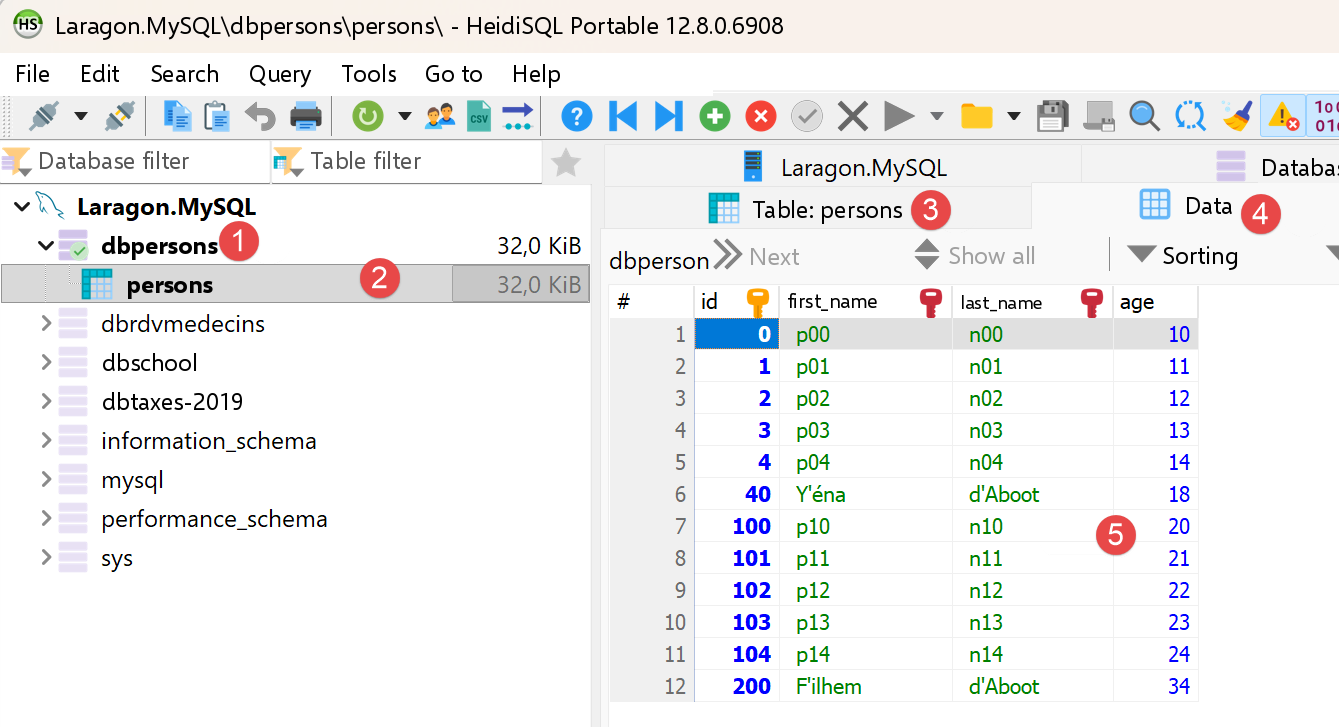
The result of the execution is as follows:
You can verify the result with Laragon’s HeidiSQL:
7.1.9. Conclusion
The port of the native driver is faithful to the original TypeScript. After an initial attempt with [package:mysql1]—which was abandoned due to incompatibility with MySQL 8.4— [package:mysql_client_plus] ultimately provides a API that is even closer to [mysql2] than [mysql1] was: [connection.transactional(...)] is the direct equivalent of [beginTransaction()]/[commit()]/[rollback()], whereas [mysql1] would have required manually managing the transaction using the commands SQL, [START TRANSACTION], [COMMIT], and [ROLLBACK]. One difference remains, albeit a more subtle one: the columns DECIMAL ([subjects.coefficient], [grades.value] in the [dbschool] database) require an explicit conversion using a small helper [_decimal] ([typedColByName<String>(...)] then [num.parse(...)]), since direct conversion to [num] or [double] is not supported by the driver for this SQL type.
7.2. The lightweight ORM
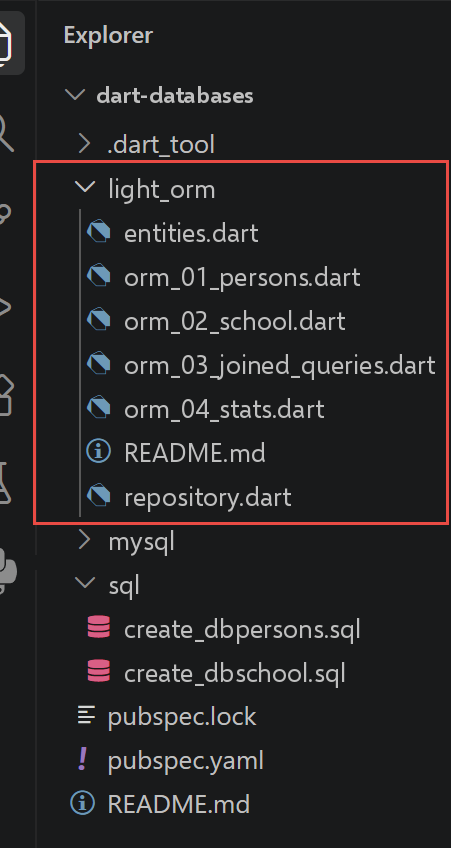
The TypeScript course devotes two separate chapters to accessing databases via a ORM ([Object-Relational Mapping]): [TypeORM], followed by [Prisma], using the same example schema. Both are based on a common principle: describe the schema once (using TypeORM decorators on classes, or a [.prisma] file for Prisma), then letting the tool generate, at startup or during compilation, all the code that translates object reads/writes into SQL—including the loading of relationships between tables.
Dart does not have a mature and widely adopted equivalent to these two tools for MySQL: there are Dart ORM libraries, but they are primarily designed for Flutter/SQLite ([Drift], [Floor]) or for different architectures - Prisma itself does not offer a Dart client. Rather than forcing an artificial mapping such as “such-and-such Dart package = TypeORM” or “such-and-such package = Prisma,” this chapter takes a different approach, one that is more educationally sound: showing what a ORM actually does by writing it yourself in a deliberately minimal version—hence the name [light ORM].
7.2.1. The entities: the [entities.dart] file
| // entities.dart
// Ports the TypeORM entities (databases/typeorm/entities/*.entity.ts):
// Person (database [dbpersons]), and SchoolClass / Student / Subject / Grade (database
// [dbschool]).
//
// [fundamental difference with TypeScript] TypeORM entities are ordinary
// DECORATED classes (`@Entity`, `@Column`, `@ManyToOne`...):
// it is TypeORM, at startup, that READS these decorators (a form of
// reflection/metaprogramming) to know how to read/write each
// field in SQL, and how to load a relationship on demand. Dart has
// no usable equivalent of reflection here (`dart:mirrors` is
// abandoned for web/AOT compilation): so these classes are just
// plain mutable "bags of fields", without any annotation - it is the
// whole light_orm folder (repository.dart in particular) which,
// written by hand, plays the role reflection plays for TypeORM. See
// the README.md of this folder for the full discussion.
class Person {
int id;
String lastName;
String firstName;
int age;
Person({required this.id, required this.lastName, required this.firstName, required this.age});
@override
String toString() => 'Person($id, $firstName $lastName, $age years old)';
}
class SchoolClass {
int id;
String name;
// inverse relationship (backref of Student.schoolClass) - NOT loaded
// automatically: stays empty as long as we do not explicitly call
// a query that fills it (see orm_03_joined_queries.dart)
List<Student> students = [];
SchoolClass({required this.id, required this.name});
@override
String toString() => 'SchoolClass($id, $name)';
}
class Student {
int id;
String lastName;
String firstName;
int classId;
// N-1 relationship to SchoolClass - null as long as it has not been loaded
// explicitly (the equivalent of TypeORM's `relations: { schoolClass: true }`
// option, but made visible here as an ordinary nullable field)
SchoolClass? schoolClass;
List<Grade> grades = [];
Student({
required this.id,
required this.lastName,
required this.firstName,
required this.classId,
this.schoolClass,
});
@override
String toString() => 'Student($id, $firstName $lastName)';
}
class Subject {
int id;
String name;
num coefficient;
List<Grade> grades = [];
Subject({required this.id, required this.name, required this.coefficient});
@override
String toString() => 'Subject($id, $name, coefficient $coefficient)';
}
class Grade {
int id;
num value;
int studentId;
int subjectId;
Student? student;
Subject? subject;
Grade({
required this.id,
required this.value,
required this.studentId,
required this.subjectId,
this.student,
this.subject,
});
@override
String toString() => 'Grade($id, $value)';
}
|
Let’s comment on this code:
- The TypeORM entities are ordinary DECORATED classes ([@Entity], [@Column], [@ManyToOne]...): It is TypeORM that, at startup, reads these decorators (a form of reflection) to determine how to read/write each field in SQL, and to load a relationship on demand. Dart has no equivalent of reflection that can be used here ([dart:mirrors] is deprecated for web compilation/AOT): these classes are therefore simply mutable “bags of fields,” without any annotations.
- line 29: [class SchoolClass { ...; List<Student> students = []; }], [class Student { ...; SchoolClass? schoolClass; List<Grade> grades = []; }] (line 43): the relationships are simple fields (empty collection or nullable reference) that are never loaded automatically—it is [repository.dart], written by hand, that plays the role that reflection plays for TypeORM.
7.2.2. The generic repository: the [repository.dart] file
| // repository.dart
// A hand-written "light ORM": a generic [Repository] class strongly
// inspired by TypeORM's Repository (`AppDataSource.getRepository(...)`,
// `.find()`, `.findOneBy()`, `.save()`, `.delete()`), but built on
// a single table, with no decorators nor automatic loading of
// relationships - see README.md for the full discussion of this choice.
//
// [migration] this file initially used [package:mysql1]; it has been
// ported to [package:mysql_client_plus] (see the comment in
// pubspec.yaml). The most visible change for the caller is the
// style of the parameterized queries: mysql1 used POSITIONAL
// placeholders ("?" + list of values in order), whereas
// [mysql_client_plus] uses NAMED placeholders (":column" + a
// [Map] column name -> value) - which, here, fits rather well
// since this repository already handles [Map<String, Object?>] of
// columns.
import 'package:mysql_client_plus/mysql_client_plus.dart';
// [T]: the type of the entity managed by this repository (Person, SchoolClass...)
class Repository<T> {
final MySQLConnection connection;
// name of the SQL table
final String table;
// name of the primary key column
final String keyColumn;
// builds a [T] entity from an SQL result row
final T Function(ResultSetRow row) fromRow;
// returns the SQL columns (column name -> value) of a [T] entity,
// primary key INCLUDED (useful for insertion as well as for
// update)
final Map<String, Object?> Function(T entity) toColumns;
// extracts the primary key value of a [T] entity
final Object? Function(T entity) key;
Repository(
this.connection, {
required this.table,
required this.keyColumn,
required this.fromRow,
required this.toColumns,
required this.key,
});
// equivalent of `repo.find({ order: { column: 'ASC' } })`
Future<List<T>> findAll({String? orderBy}) async {
final sql = 'select * from $table${orderBy != null ? ' order by $orderBy' : ''}';
final results = await connection.execute(sql);
return results.rows.map(fromRow).toList();
}
// equivalent of `repo.findOneBy({ column: value })` - [conditions] is
// an "AND" equality on each supplied column; the keys of [conditions]
// serve both as SQL column name and as NAMED placeholder
// name (":column") - so they are reused as is as
// query parameters
Future<T?> findOneBy(Map<String, Object?> conditions) async {
final where = conditions.keys.map((c) => '$c = :$c').join(' and ');
final results = await connection.execute(
'select * from $table where $where limit 1',
conditions,
);
if (results.rows.isEmpty) return null;
return fromRow(results.rows.first);
}
// equivalent of `repo.findOneByOrFail(...)` / `findOneOrFail(...)`
Future<T> findOneByOrFail(Map<String, Object?> conditions) async {
final found = await findOneBy(conditions);
if (found == null) {
throw StateError('No row found in [$table] for $conditions');
}
return found;
}
// equivalent of `repo.save(entity)`: insertion if the key does not exist
// yet, update otherwise - exactly the "upsert" behaviour of
// `save()` on the TypeORM side
Future<void> save(T entity) async {
final columns = toColumns(entity);
final currentKey = key(entity);
final alreadyExists = await findOneBy({keyColumn: currentKey}) != null;
if (alreadyExists) {
final toUpdate = columns.keys.where((c) => c != keyColumn);
final assignments = toUpdate.map((c) => '$c = :$c').join(', ');
// the columns to update, PLUS the key (under the same placeholder
// name as in the WHERE clause) - no collision possible
// since [keyColumn] has precisely been excluded from [toUpdate]
final values = <String, Object?>{
for (final c in toUpdate) c: columns[c],
keyColumn: currentKey,
};
await connection.execute('update $table set $assignments where $keyColumn = :$keyColumn', values);
} else {
final names = columns.keys.join(',');
final placeholders = columns.keys.map((c) => ':$c').join(',');
await connection.execute('insert into $table ($names) values ($placeholders)', columns);
}
}
// equivalent of `repo.delete({ column: value })`
Future<void> delete(Map<String, Object?> conditions) async {
final where = conditions.keys.map((c) => '$c = :$c').join(' and ');
await connection.execute('delete from $table where $where', conditions);
}
}
|
Let’s comment on this code:
- Lines 20–33: [class Repository<T> { ...; final T Function(ResultSetRow row) fromRow; final Map<String, Object?> Function(T entity) toColumns; final Object? Function(T entity) key; ... }]: a GENERIC class, configured by the [T] entity type, built around THREE FUNCTIONS provided by the caller—how to read a SQL row, how to write it, and what its primary key is. That is the entirety of “object-relational mapping,” stripped down to the essentials; only the type of the first function has changed since version [mysql1] ([ResultSetRow] instead of [ResultRow]).
- Line 57: [final where = conditions.keys.map((c) => '$c = :$c').join(' and ');]: The keys from [conditions] serve as both the column name for SQL and the name of the NAMED PLACEHOLDER ([:column]) - unlike [mysql1], which used POSITIONAL placeholders ([?] plus a LIST of values in order), [mysql_client_plus] expects a [Map] (placeholder name → value), which works out rather well since this repository already handles [Map<String, Object?>] for columns.
- Lines 45–63: [Future<List<T>> findAll({String? orderBy}) async { ... }], [Future<T?> findOneBy(Map<String, Object?> conditions) async { ... }]: the direct equivalents of [repo.find(...)] and [repo.findOneBy(...)] for TypeORM - [execute()] replaces [query()], and [results.rows] contains the result rows (instead of the list returned directly by [mysql1]).
- Lines 78–96: [Future<void> save(T entity) async { ...; final alreadyExists = await findOneBy(...) != null; if (alreadyExists) { ... update ... } else { ... insert ... } }]: the “upsert” behavior of [repo.save(...)]—insert if the key does not yet exist, update otherwise—remains unchanged since version [mysql1], except for the style of the placeholders.
7.2.3. script [orm_01_persons]
| // orm_01_persons.dart
// Ports databases/typeorm/typeorm-01.ts.
//
// First use of the "light ORM": open the connection, then read
// and write in the [persons] table through the [Repository<Person>],
// without writing a single line of SQL in THIS file (all the SQL is
// in repository.dart, written once and for all for all the entities).
import 'package:mysql_client_plus/mysql_client_plus.dart';
import 'entities.dart';
import 'repository.dart';
Future<void> main() async {
final connection = await MySQLConnection.createConnection(
host: 'localhost',
port: 3306,
userName: 'admpersons',
password: 'nobody',
databaseName: 'dbpersons',
);
await connection.connect();
print('Connection to [dbpersons] established.');
try {
final repo = Repository<Person>(
connection,
table: 'persons',
keyColumn: 'id',
// [mysql_client_plus migration] mysql1 already decoded each column
// into the expected native Dart type ([row.fields['id'] as int]
// worked directly). [package:mysql_client_plus] requires an explicit
// TYPED access per column - [typedColByName<T>(name)] - which
// handles the conversion itself; the [!] is safe here since
// these columns are NOT NULL in the SQL schema.
fromRow: (row) => Person(
id: row.typedColByName<int>('id')!,
lastName: row.typedColByName<String>('last_name')!,
firstName: row.typedColByName<String>('first_name')!,
age: row.typedColByName<int>('age')!,
),
toColumns: (p) => {'id': p.id, 'last_name': p.lastName, 'first_name': p.firstName, 'age': p.age},
key: (p) => p.id,
);
// all the persons, sorted by last name
final all = await repo.findAll(orderBy: 'last_name asc');
print('Persons in the database:');
for (final p in all) {
print(' ${p.id} ${p.firstName} ${p.lastName} (${p.age} years old)');
}
// a person by their primary key
final paul = await repo.findOneBy({'id': 1});
print('Person id=1: ${paul != null ? '${paul.firstName} ${paul.lastName}' : 'not found'}');
// insertion of a new person (the entity is a plain class:
// the constructor is enough, no need for a special factory)
final newPerson = Person(id: 99, firstName: 'Ada', lastName: 'Lovelace', age: 36);
await repo.save(newPerson);
print('Person 99 inserted.');
// update
newPerson.age = 37;
await repo.save(newPerson);
print('After update, age=${(await repo.findOneBy({'id': 99}))?.age}');
// deletion - we put the database back in the state we found it in
await repo.delete({'id': 99});
print('Person 99 deleted.');
} finally {
await connection.close();
}
}
|
Let’s comment on this code:
- Lines 24–42: [final repo = Repository<Person>(connection, table: 'persons', keyColumn: 'id', fromRow: (row) => Person(...), toColumns: (p) => {...}, key: (p) => p.id);]: builds a repository for the [Person] entity, providing it with the three expected functions—the only place in the file that “knows” the details of the SQL columns. [mysql1] already decoded each column into the expected native Dart type ([row.fields['id'] as int] worked directly); [mysql_client_plus] requests explicit TYPED column-by-column access—[typedColByName<T>(name)]—which handles the conversion itself.
- The rest of the script ([repo.findAll], [repo.findOneBy], [repo.save], [repo.delete]) no longer contains any lines from SQL—exactly the same experience provided by TypeORM on a daily basis, unchanged by the migration.
The result of the execution is as follows:
| Connection to [dbpersons] established.
Persons in the database:
40 Y'éna d'Aboot (18 years old)
200 F'ilhem d'Aboot (34 years old)
0 f00 l00 (10 years old)
1 f01 l01 (11 years old)
2 f02 l02 (12 years old)
3 f03 l03 (13 years old)
4 f04 l04 (14 years old)
100 f10 l10 (20 years old)
101 f11 l11 (21 years old)
102 f12 l12 (22 years old)
103 f13 l13 (23 years old)
104 f14 l14 (24 years old)
Person id=1: f01 l01
Person 99 inserted.
After update, age=37
Person 99 deleted.
|
7.2.4. script [orm_02_school]
| // orm_02_school.dart
// Ports databases/typeorm/typeorm-02.ts.
//
// Mapping of three entities of the [dbschool] database (SchoolClass, Student, Subject)
// and basic manipulations (CRUD) through their repositories.
import 'package:mysql_client_plus/mysql_client_plus.dart';
import 'entities.dart';
import 'repository.dart';
// reads an SQL DECIMAL/NUMERIC column (here [subjects.coefficient]) as a
// [num]. [package:mysql_client_plus] can convert a DECIMAL to
// [String] (any SQL type can be read as [String]), but NOT
// directly to [num] or [double] - `typedColByName<num>(...)` then throws
// "Cannot convert MySQL type 246 to requested type num" (246 =
// NEWDECIMAL, the internal MySQL type of DECIMAL columns). So we read the
// column as a [String], then convert it ourselves.
num _decimal(ResultSetRow row, String column) => num.parse(row.typedColByName<String>(column)!);
Repository<SchoolClass> _classRepo(MySQLConnection cnx) => Repository<SchoolClass>(
cnx,
table: 'classes',
keyColumn: 'id',
fromRow: (r) => SchoolClass(
id: r.typedColByName<int>('id')!,
name: r.typedColByName<String>('name')!,
),
toColumns: (c) => {'id': c.id, 'name': c.name},
key: (c) => c.id,
);
Repository<Student> _studentRepo(MySQLConnection cnx) => Repository<Student>(
cnx,
table: 'students',
keyColumn: 'id',
fromRow: (r) => Student(
id: r.typedColByName<int>('id')!,
lastName: r.typedColByName<String>('last_name')!,
firstName: r.typedColByName<String>('first_name')!,
classId: r.typedColByName<int>('class_id')!,
),
toColumns: (s) => {'id': s.id, 'last_name': s.lastName, 'first_name': s.firstName, 'class_id': s.classId},
key: (s) => s.id,
);
Repository<Subject> _subjectRepo(MySQLConnection cnx) => Repository<Subject>(
cnx,
table: 'subjects',
keyColumn: 'id',
fromRow: (r) => Subject(
id: r.typedColByName<int>('id')!,
name: r.typedColByName<String>('name')!,
coefficient: _decimal(r, 'coefficient'),
),
toColumns: (s) => {'id': s.id, 'name': s.name, 'coefficient': s.coefficient},
key: (s) => s.id,
);
Future<void> main() async {
final connection = await MySQLConnection.createConnection(
host: 'localhost',
port: 3306,
userName: 'admschool',
password: 'pwdschool',
databaseName: 'dbschool',
);
await connection.connect();
print('Connection to [dbschool] established.');
try {
final classRepo = _classRepo(connection);
final studentRepo = _studentRepo(connection);
final subjectRepo = _subjectRepo(connection);
// all the classes
print('Classes:');
for (final c in await classRepo.findAll(orderBy: 'name asc')) {
print(' ${c.id} ${c.name}');
}
// all the subjects, with their coefficient
print('Subjects:');
for (final s in await subjectRepo.findAll(orderBy: 'name asc')) {
print(' ${s.id} ${s.name} (coefficient ${s.coefficient})');
}
// addition of a new student in [class1]
final class1 = await classRepo.findOneByOrFail({'name': 'class1'});
final newStudent = Student(id: 999, lastName: 'Curie', firstName: 'Marie', classId: class1.id);
await studentRepo.save(newStudent);
print('Student ${newStudent.firstName} ${newStudent.lastName} added to ${class1.name}.');
// re-reading - [difference with TypeScript] typeorm-02.ts specifies
// `relations: { schoolClass: true }` to load the associated class at
// the same time as the student. [Repository.findOneBy] can load ONLY
// the [students] table (no automatic join): so we fetch
// the class ourselves, with a second explicit query -
// exactly the extra query TypeORM triggers for
// us behind `relations: { schoolClass: true }`, but VISIBLE here.
final reread = await studentRepo.findOneByOrFail({'id': 999});
reread.schoolClass = await classRepo.findOneByOrFail({'id': reread.classId});
print('Re-read: ${reread.firstName} ${reread.lastName}, class=${reread.schoolClass!.name}');
// deletion - we put the database back in the state we found it in
await studentRepo.delete({'id': 999});
print('Student 999 deleted.');
} finally {
await connection.close();
}
}
|
Let’s break down this code:
- Lines 10–17: [num _decimal(ResultSetRow row, String column) => num.parse(row.typedColByName<String>(column)!);]: [mysql_client_plus] can convert a column SQL DECIMAL (here [subjects.coefficient]) to [String] (any type, such as SQL, can be read as [String]), but it cannot convert it directly to [num] or [double] - [typedColByName<num>(...)] then yields [MySQLProtocolException: Cannot convert MySQL type 246 to requested type num] (246 = NEWDECIMAL, the internal type MySQL of the columns DECIMAL). The column is therefore read as [String], and then converted manually.
- Three private functions—[_classRepo], [_studentRepo], and [_subjectRepo]—each construct a [Repository] for one of the three entities in [dbschool]; only [_subjectRepo] uses [_decimal] for the [coefficient] column.
- Lines 99–100: [final reread = await studentRepo.findOneByOrFail({'id': 999}); reread.schoolClass = await classRepo.findOneByOrFail({'id': reread.classId});]: whereas [typeorm-02.ts] specifies [relations: { schoolClass: true }] to load the associated class along with the student, [Repository.findOneBy] can only load from the [students] table (no automatic join)—so we retrieve the class ourselves, using a second explicit query: exactly the additional query that TypeORM triggers behind the scenes, but rendered as VISIBLE here.
The result of the execution is as follows:
| Connection to [dbschool] established.
Classes:
1 class1
2 class2
Subjects:
1 subject1 (coefficient 1.0)
2 subject2 (coefficient 2.0)
Student Marie Curie added to class1.
Re-read: Marie Curie, class=class1
Student 999 deleted.
|
7.2.5. script [orm_03_joined_queries]
| // orm_03_joined_queries.dart
// Ports databases/typeorm/typeorm-03-joined-queries.ts.
//
// Highlights the SQL queries that must be written to fetch
// information spread over several tables - what TypeORM
// triggers for you behind the `relations` option, via an SQL JOIN
// (`JOIN`). Unlike orm_02_school.dart (which simulated loading a
// relationship with TWO separate queries, to keep it simple), this file
// writes the REAL SQL joins - exactly what TypeORM does behind
// the scenes, but made entirely visible.
//
// [fundamental difference with TypeScript] TypeORM (like SQLAlchemy, used
// by the original Python course) does NOT do lazy loading by default
// on "classic" entities: the relationships to load must be requested
// explicitly, with the `relations` option. Our "light ORM"
// pushes this principle even further, since here there is NEITHER lazy
// loading NOR "magic" relationship loading: each join is
// SQL written by hand, line by line - the price to pay for depending
// on no object-relational mapping library.
//
// [mysql_client_plus migration] as in repository.dart, the
// positional placeholders ("?") of mysql1 become NAMED
// placeholders (":id", ":name"...), and access to the columns of a
// result row ([row.fields['x']] with mysql1) becomes a typed call
// ([row.typedColByName<T>('x')]).
import 'package:mysql_client_plus/mysql_client_plus.dart';
import 'entities.dart';
// reads an SQL DECIMAL/NUMERIC column (here [grades.value] and
// [subjects.coefficient]) as a [num]. [package:mysql_client_plus] can
// convert a DECIMAL to [String] (any SQL type can be read
// as [String]), but NOT directly to [num] or [double] -
// `typedColByName<num>(...)` then throws "Cannot convert MySQL type 246 to
// requested type num" (246 = NEWDECIMAL, the internal MySQL type of
// DECIMAL columns). So we read the column as a [String], then
// convert it ourselves.
num _decimal(ResultSetRow row, String column) => num.parse(row.typedColByName<String>(column)!);
// student by id, with their class (JOIN students/classes)
Future<Student> _studentWithClass(MySQLConnection cnx, int id) async {
final results = await cnx.execute(
'select s.id as s_id, s.last_name as s_last_name, s.first_name as s_first_name, s.class_id as s_class_id, '
'c.id as c_id, c.name as c_name '
'from students s join classes c on s.class_id = c.id where s.id = :id',
{'id': id},
);
final row = results.rows.first;
return Student(
id: row.typedColByName<int>('s_id')!,
lastName: row.typedColByName<String>('s_last_name')!,
firstName: row.typedColByName<String>('s_first_name')!,
classId: row.typedColByName<int>('s_class_id')!,
schoolClass: SchoolClass(id: row.typedColByName<int>('c_id')!, name: row.typedColByName<String>('c_name')!),
);
}
// class by id, with the list of its students (JOIN classes/students)
Future<SchoolClass> _classWithStudents(MySQLConnection cnx, int id) async {
final results = await cnx.execute(
'select c.id as c_id, c.name as c_name, s.id as s_id, s.last_name as s_last_name, s.first_name as s_first_name '
'from classes c left join students s on s.class_id = c.id where c.id = :id',
{'id': id},
);
final firstRow = results.rows.first;
final schoolClass = SchoolClass(id: firstRow.typedColByName<int>('c_id')!, name: firstRow.typedColByName<String>('c_name')!);
schoolClass.students = [
for (final row in results.rows)
Student(
id: row.typedColByName<int>('s_id')!,
lastName: row.typedColByName<String>('s_last_name')!,
firstName: row.typedColByName<String>('s_first_name')!,
classId: schoolClass.id,
),
];
return schoolClass;
}
// class by NAME, with the list of its students
Future<SchoolClass> _classWithStudentsByName(MySQLConnection cnx, String name) async {
final results = await cnx.execute(
'select c.id as c_id, c.name as c_name, s.id as s_id, s.last_name as s_last_name, s.first_name as s_first_name '
'from classes c left join students s on s.class_id = c.id where c.name = :name',
{'name': name},
);
final firstRow = results.rows.first;
final schoolClass = SchoolClass(id: firstRow.typedColByName<int>('c_id')!, name: firstRow.typedColByName<String>('c_name')!);
schoolClass.students = [
for (final row in results.rows)
Student(
id: row.typedColByName<int>('s_id')!,
lastName: row.typedColByName<String>('s_last_name')!,
firstName: row.typedColByName<String>('s_first_name')!,
classId: schoolClass.id,
),
];
return schoolClass;
}
// student by LAST NAME, with their class
Future<Student> _studentByLastNameWithClass(MySQLConnection cnx, String lastName) async {
final results = await cnx.execute(
'select s.id as s_id, s.last_name as s_last_name, s.first_name as s_first_name, s.class_id as s_class_id, '
'c.id as c_id, c.name as c_name '
'from students s join classes c on s.class_id = c.id where s.last_name = :last_name',
{'last_name': lastName},
);
final row = results.rows.first;
return Student(
id: row.typedColByName<int>('s_id')!,
lastName: row.typedColByName<String>('s_last_name')!,
firstName: row.typedColByName<String>('s_first_name')!,
classId: row.typedColByName<int>('s_class_id')!,
schoolClass: SchoolClass(id: row.typedColByName<int>('c_id')!, name: row.typedColByName<String>('c_name')!),
);
}
// grades of a student, with the subject of each grade (double JOIN)
Future<Student> _studentWithGradesAndSubject(MySQLConnection cnx, int id) async {
final studentRow = (await cnx.execute('select id, last_name, first_name, class_id from students where id = :id', {'id': id})).rows.first;
final student = Student(
id: studentRow.typedColByName<int>('id')!,
lastName: studentRow.typedColByName<String>('last_name')!,
firstName: studentRow.typedColByName<String>('first_name')!,
classId: studentRow.typedColByName<int>('class_id')!,
);
final results = await cnx.execute(
'select g.id as g_id, g.value as g_value, sub.id as sub_id, sub.name as sub_name, sub.coefficient as sub_coefficient '
'from grades g join subjects sub on g.subject_id = sub.id where g.student_id = :id',
{'id': id},
);
student.grades = [
for (final row in results.rows)
Grade(
id: row.typedColByName<int>('g_id')!,
value: _decimal(row, 'g_value'),
studentId: student.id,
subjectId: row.typedColByName<int>('sub_id')!,
subject: Subject(
id: row.typedColByName<int>('sub_id')!,
name: row.typedColByName<String>('sub_name')!,
coefficient: _decimal(row, 'sub_coefficient'),
),
),
];
return student;
}
// subject by NAME, with the list of its grades
Future<Subject> _subjectWithGradesByName(MySQLConnection cnx, String name) async {
final results = await cnx.execute(
'select sub.id as sub_id, sub.name as sub_name, sub.coefficient as sub_coefficient, g.id as g_id, g.value as g_value '
'from subjects sub left join grades g on g.subject_id = sub.id where sub.name = :name',
{'name': name},
);
final firstRow = results.rows.first;
final subject = Subject(
id: firstRow.typedColByName<int>('sub_id')!,
name: firstRow.typedColByName<String>('sub_name')!,
coefficient: _decimal(firstRow, 'sub_coefficient'),
);
subject.grades = [
for (final row in results.rows)
Grade(
id: row.typedColByName<int>('g_id')!,
value: _decimal(row, 'g_value'),
studentId: 0,
subjectId: subject.id,
),
];
return subject;
}
Future<void> main() async {
final connection = await MySQLConnection.createConnection(
host: 'localhost',
port: 3306,
userName: 'admschool',
password: 'pwdschool',
databaseName: 'dbschool',
);
await connection.connect();
try {
// student by id, with their class (explicit join)
print('student id=11 -----------');
final student11 = await _studentWithClass(connection, 11);
print('student={"id":${student11.id},"lastName":"${student11.lastName}","firstName":"${student11.firstName}"}');
print('student\'s class: {"id":${student11.schoolClass!.id},"name":"${student11.schoolClass!.name}"}');
// the students of the same class (new query, with its own
// join)
print('students in the same class:');
final studentsClass = await _classWithStudents(connection, student11.schoolClass!.id);
for (final s in studentsClass.students) {
print('student={"id":${s.id},"lastName":"${s.lastName}","firstName":"${s.firstName}"}');
}
// a student by their last name
print("student lastName='lastname2' -----------");
final byName = await _studentByLastNameWithClass(connection, 'lastname2');
print('student={"id":${byName.id},"lastName":"${byName.lastName}","firstName":"${byName.firstName}"}');
print('student\'s class: {"id":${byName.schoolClass!.id},"name":"${byName.schoolClass!.name}"}');
// a student's grades, with the subject of each grade
print('grades of student id=11 -----------');
final studentWithGrades = await _studentWithGradesAndSubject(connection, 11);
for (final grade in studentWithGrades.grades) {
print('grade={"id":${grade.id},"value":${grade.value}}, subject={"name":"${grade.subject!.name}"}');
}
// the students of a class, by class name
for (final className in ['class1', 'class2']) {
print("students of class name='$className' -----------");
final schoolClass = await _classWithStudentsByName(connection, className);
for (final s in schoolClass.students) {
print('{"id":${s.id},"lastName":"${s.lastName}","firstName":"${s.firstName}"}');
}
}
// the grades in a subject, by subject name
for (final subjectName in ['subject1', 'subject2']) {
print("subject with name='$subjectName' -----------");
final subject = await _subjectWithGradesByName(connection, subjectName);
print('subject={"name":"${subject.name}","coefficient":${subject.coefficient}}');
print('Grades in the subject: ');
for (final grade in subject.grades) {
print('{"id":${grade.id},"value":${grade.value}}');
}
}
} finally {
await connection.close();
}
}
|
Let’s break down this code:
- Unlike [orm_02_school.dart] (two separate requests), this file writes the REAL SQL joins—exactly what TypeORM does behind the scenes via the [relations] option, but made fully visible.
- Lines 44–61: [from students s join classes c on s.class_id = c.id where s.id = :id], [from classes c left join students s on s.class_id = c.id where c.id = :id]: JOIN (required relationship) and LEFT JOIN (optional relationship; a class may have no students) - the distinction that TypeORM selects for you based on the declared optionality of the relationship. The positional placeholders ([?]) from [mysql1] become NAMED ([:id]) placeholders, and access to the columns of a row ([row['x']] or [row.fields['x']] with [mysql1]) becomes a typed call ([row.typedColByName<T>('x')]).
- Line 135: [value: _decimal(row, 'g_value')], [coefficient: _decimal(row, 'sub_coefficient')]: same helper [_decimal] as in [orm_02_school.dart], required here for the two DECIMAL columns, [grades.value] and [subjects.coefficient].
- TypeORM (like SQLAlchemy) does not perform lazy loading by default on “standard” entities: you must explicitly request the relationships using the [relations] option. The lightweight ORM takes this principle even further, since there is no lazy loading here—no “magical” relation loading: each join is hand-written—the price to pay for not depending on any object-relational mapping library.
The result of the execution is as follows:
| student id=11 -----------
student={"id":11,"lastName":"lastname1","firstName":"firstname1"}
student's class: {"id":1,"name":"class1"}
students in the same class:
student={"id":11,"lastName":"lastname1","firstName":"firstname1"}
student={"id":21,"lastName":"lastname2","firstName":"firstname2"}
student lastName='lastname2' -----------
student={"id":21,"lastName":"lastname2","firstName":"firstname2"}
student's class: {"id":1,"name":"class1"}
grades of student id=11 -----------
grade={"id":1,"value":10.0}, subject={"name":"subject1"}
grade={"id":5,"value":6.0}, subject={"name":"subject2"}
students of class name='class1' -----------
{"id":11,"lastName":"lastname1","firstName":"firstname1"}
{"id":21,"lastName":"lastname2","firstName":"firstname2"}
students of class name='class2' -----------
{"id":32,"lastName":"lastname3","firstName":"firstname3"}
{"id":42,"lastName":"lastname4","firstName":"firstname4"}
subject with name='subject1' -----------
subject={"name":"subject1","coefficient":1.0}
Grades in the subject:
{"id":1,"value":10.0}
{"id":2,"value":12.0}
{"id":3,"value":14.0}
{"id":4,"value":16.0}
subject with name='subject2' -----------
subject={"name":"subject2","coefficient":2.0}
Grades in the subject:
{"id":5,"value":6.0}
{"id":6,"value":8.0}
{"id":7,"value":10.0}
{"id":8,"value":12.0}
|
7.2.6. [orm_04_stats] script
| // orm_04_stats.dart
// Ports databases/typeorm/typeorm-04-stats.ts.
//
// Computes, for a given student, their average weighted by the coefficients
// of the subjects, as well as their min and max grade.
//
// [difference with TypeScript] typeorm-04-stats.ts warned that the
// MySQL `decimal` columns (here grade.value and subject.coefficient)
// are returned by the mysql2 driver as CHARACTER
// STRINGS at runtime (so as not to lose precision), despite their
// declared type `number` - a classic TypeScript pitfall, where the
// static type can lie about the real value at runtime. On the Dart side,
// [package:mysql_client_plus] has a similar pitfall, but made VISIBLE by the
// compiler rather than hidden at runtime: typed access
// (`typedColByName<T>(...)`) can convert a DECIMAL column
// (internal SQL type 246, "NEWDECIMAL") neither to [num] nor to [double] - it
// throws `MySQLProtocolException: Cannot convert MySQL type 246 to requested
// type num`. The only conversion guaranteed for ANY SQL type is
// [String]; so we read the DECIMAL columns as [String] with
// `typedColByName<String>(...)`, then convert them ourselves with
// [num.parse] - see [_decimal] below.
import 'package:mysql_client_plus/mysql_client_plus.dart';
// reads an SQL DECIMAL/NUMERIC column as a [num] (see the comment at the
// top of the file)
num _decimal(ResultSetRow row, String column) => num.parse(row.typedColByName<String>(column)!);
// computes the statistics (weighted average, min, max) of a student
Future<void> _studentStats(MySQLConnection cnx, int studentId) async {
final studentRow = (await cnx.execute('select id, last_name, first_name from students where id = :id', {'id': studentId})).rows.first;
print(
'Statistics of student {"id":${studentRow.typedColByName<int>('id')},"lastName":"${studentRow.typedColByName<String>('last_name')}","firstName":"${studentRow.typedColByName<String>('first_name')}"}',
);
final grades = await cnx.execute(
'select g.value as value, sub.name as subject_name, sub.coefficient as coefficient '
'from grades g join subjects sub on g.subject_id = sub.id where g.student_id = :id',
{'id': studentId},
);
if (grades.rows.isEmpty) {
print(' no grades.');
return;
}
num weightedSum = 0;
num coefficientsSum = 0;
num min = double.infinity;
num max = double.negativeInfinity;
for (final row in grades.rows) {
// explicit conversion via [_decimal] (see the note at the top of the file):
// [value] and [coefficient] are thus real [num]s, not strings
final value = _decimal(row, 'value');
final coefficient = _decimal(row, 'coefficient');
weightedSum += value * coefficient;
coefficientsSum += coefficient;
if (value < min) min = value;
if (value > max) max = value;
print(
' grade=${value.toStringAsFixed(2)} subject="${row.typedColByName<String>('subject_name')}" '
'(coefficient ${coefficient.toStringAsFixed(2)})',
);
}
final average = weightedSum / coefficientsSum;
print(' weighted average=${average.toStringAsFixed(2)}, min=${min.toStringAsFixed(2)}, max=${max.toStringAsFixed(2)}');
}
Future<void> main() async {
final connection = await MySQLConnection.createConnection(
host: 'localhost',
port: 3306,
userName: 'admschool',
password: 'pwdschool',
databaseName: 'dbschool',
);
await connection.connect();
try {
// student id=11: grades subject1=10 (coef 1.0), subject2=6 (coef 2.0)
// weighted average = (10*1.0 + 6*2.0) / (1.0+2.0) = 22/3 = 7.33
await _studentStats(connection, 11);
print('');
// student id=21: grades subject1=12 (coef 1.0), subject2=8 (coef 2.0)
await _studentStats(connection, 21);
print('');
// student id=32: grades subject1=14 (coef 1.0), subject2=10 (coef 2.0)
await _studentStats(connection, 32);
print('');
// student id=42: grades subject1=16 (coef 1.0), subject2=12 (coef 2.0)
await _studentStats(connection, 42);
} finally {
await connection.close();
}
}
|
Let’s comment on this code:
- [typeorm-04-stats.ts] indicated that the columns [decimal] from MySQL (in this case, [grade.value] and [subject.coefficient]) are returned by [mysql2] as CHARACTER STRINGS at runtime (to avoid losing precision), despite their declared type being [number]—a classic pitfall of TypeScript, where the static type may not reflect the actual value at runtime.
- Line 26: [num _decimal(ResultSetRow row, String column) => num.parse(row.typedColByName<String>(column)!);]: on the Dart side, [package:mysql_client_plus] has a pitfall similar to that of TypeScript, but is rendered as VISIBLE by the compiler rather than hidden at runtime: the typed access ([typedColByName<T>(...)]) cannot convert a column DECIMAL to either [num] or [double] - it raises [MySQLProtocolException: Cannot convert MySQL type 246 to requested type num]. The only guaranteed conversion for any SQL type is to [String]; so the columns labeled DECIMAL are read as [String], and then converted manually to [num.parse].
- Line 67: [final average = weightedSum / coefficientsSum;]: The weighted average calculation itself is identical to the TypeScript version and the [mysql1] version—only the READING of the DECIMAL columns has changed.
The result of the execution is as follows:
| Statistics of student {"id":11,"lastName":"lastname1","firstName":"firstname1"}
grade=10.00 subject="subject1" (coefficient 1.00)
grade=6.00 subject="subject2" (coefficient 2.00)
weighted average=7.33, min=6.00, max=10.00
Statistics of student {"id":21,"lastName":"lastname2","firstName":"firstname2"}
grade=12.00 subject="subject1" (coefficient 1.00)
grade=8.00 subject="subject2" (coefficient 2.00)
weighted average=9.33, min=8.00, max=12.00
Statistics of student {"id":32,"lastName":"lastname3","firstName":"firstname3"}
grade=14.00 subject="subject1" (coefficient 1.00)
grade=10.00 subject="subject2" (coefficient 2.00)
weighted average=11.33, min=10.00, max=14.00
Statistics of student {"id":42,"lastName":"lastname4","firstName":"firstname4"}
grade=16.00 subject="subject1" (coefficient 1.00)
grade=12.00 subject="subject2" (coefficient 2.00)
weighted average=13.33, min=12.00, max=16.00
|
7.2.7. What the lightweight ORM does not do
Unlike TypeORM/Prisma: no schema generation ([synchronize]/migrations), no decorators, no lazy loading or identity cache, no query builder ([QueryBuilder]), and loading a relationship is ALWAYS a second query or a hand-written join—never automatic. This is a deliberate compromise: enough to illustrate the repository pattern using the example from the course, without claiming to replace a real repository in production.