18. كتابة كود مستقل عن أنظمة إدارة قواعد البيانات
رأينا سابقًا أنه في بعض الحالات كان من الممكن بسهولة ترحيل كود Python المكتوب لنظام إدارة قواعد البيانات MySQL إلى كود مكتوب لنظام إدارة قواعد البيانات PostgreSQL. في هذا الفصل، نعرض كيفية تنظيم هذا النهج. البنية المقترحة هي كما يلي:
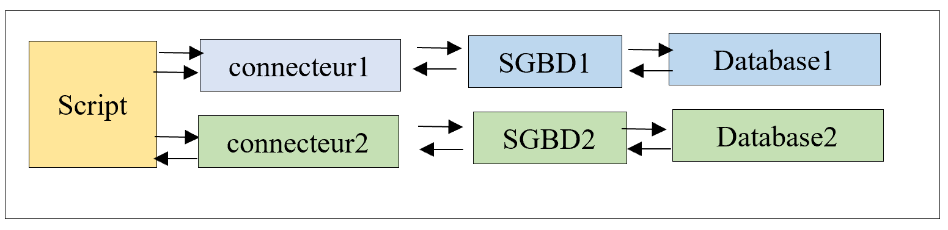
نريد أن يتم اختيار الموصل — وبالتالي نظام إدارة قواعد البيانات — من خلال التكوين دون الحاجة إلى إعادة كتابة البرنامج النصي. لاحظ أن هذا ممكن فقط في الحالات التي لا يستخدم فيها البرنامج النصي امتدادات نظام إدارة قواعد البيانات الخاصة.
ستكون بنية دليل البرنامج النصي كما يلي:
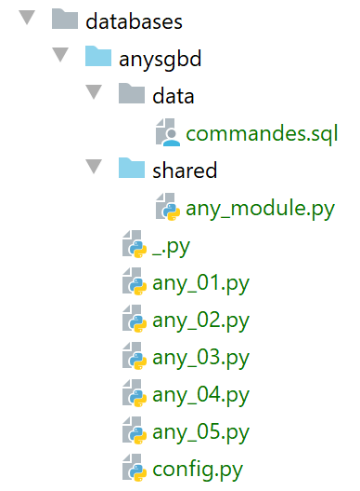
تستند البرامج النصية [any_xx] إلى البرامج النصية التي تمت تغطيتها بالفعل لنظامي إدارة قواعد البيانات MySQL و PostgreSQL. لن نستعرضها جميعًا. سنركز على البرنامج النصي [any_04]، وهو الأكثر تعقيدًا. لاحظ أن هذا البرنامج النصي ينفذ أوامر SQL من الملف [data/commandes.sql] التالي:
# suppression de la table [personnes]
drop table if exists personnes
# création de la table personnes
create table personnes (id int primary key, prenom varchar(30) not null, nom varchar(30) not null, age integer not null, unique (nom,prenom))
# insertion de deux personnes
insert into personnes(id, prenom, nom, age) values(1, 'Paul','Langevin',48)
insert into personnes(id, prenom, nom, age) values (2, 'Sylvie','Lefur',70)
# affichage de la table
select prenom, nom, age from personnes
# erreur volontaire
xx
# insertion de trois personnes
insert into personnes(id, prenom, nom, age) values (3, 'Pierre','Nicazou',35)
insert into personnes(id, prenom, nom, age) values (4, 'Geraldine','Colou',26)
insert into personnes(id, prenom, nom, age) values (5, 'Paulette','Girond',56)
# affichage de la table
select prenom, nom, age from personnes
# liste des personnes par ordre alphabétique des noms et à nom égal par ordre alphabétique des prénoms
select nom,prenom from personnes order by nom asc, prenom desc
# liste des personnes ayant un âge dans l'intervalle [20,40] par ordre décroissant de l'âge
# puis à âge égal par ordre alphabétique des noms et à nom égal par ordre alphabétique des prénoms
select nom,prenom,age from personnes where age between 20 and 40 order by age desc, nom asc, prenom asc
# insertion de mme Bruneau
insert into personnes(id, prenom, nom, age) values(6, 'Josette','Bruneau',46)
# mise à jour de son âge
update personnes set age=47 where nom='Bruneau'
# liste des personnes ayant Bruneau pour nom
select nom,prenom,age from personnes where nom='Bruneau'
# suppression de Mme Bruneau
delete from personnes where nom='Bruneau'
# liste des personnes ayant Bruneau pour nom
select nom,prenom,age from personnes where nom='Bruneau'
قمنا بتعديل السطر 2 بحيث يعمل الأمر بنفس الطريقة لكل من أنظمة إدارة قواعد البيانات MySQL و PostgreSQL في حالة عدم وجود جدول [people].
يتم تكوين البرنامج النصي [any_04] بواسطة البرنامج النصي [config.py] التالي:
التغييرات الجديدة موجودة في الأسطر 18–43:
- السطر 20: [sgbds] هو قاموس يحتوي على مفتاحين: [mysql] في السطر 21 و[postgresql] في السطر 32؛
- القيمة المرتبطة بهذه المفاتيح هي قاموس يحتوي على العناصر اللازمة للاتصال بنظام إدارة قواعد البيانات (DBMS):
- الأسطر 21–32: العناصر اللازمة للاتصال بنظام إدارة قواعد البيانات MySQL؛
- السطر 23: موصل Python المطلوب استخدامه؛
- السطر 25: الوحدة النمطية التي تحتوي على الوظائف المشتركة؛
- الأسطر 26–30: بيانات اعتماد الاتصال؛
- الأسطر 32–41: نفس العناصر للاتصال بنظام إدارة قواعد البيانات PostgreSQL؛
النص البرمجي [any_04] الذي ينفذ ملف أوامر SQL [data/commandes.sql] هو كما يلي:
تعليقات
- الأسطر 1-4: استرداد تكوين التطبيق [config]؛
- الأسطر 10-21: يتم استدعاء البرنامج النصي بمعلمتين [db_name with_transaction]:
- [db_name]: اسم نظام إدارة قاعدة البيانات المراد استخدامه؛
- [with_transaction]: True إذا كنت تريد تنفيذ البرنامج النصي SQL ضمن معاملة، وإلا فـ False؛
- الأسطر 10–25: يتم استرداد المعلمات والتحقق منها؛
- السطر 28: تكوين نظام إدارة قواعد البيانات المحدد؛
- السطر 30: يتم استيراد الموصل لنظام إدارة قواعد البيانات المحدد. للقيام بذلك، يتم استخدام مكتبة [importlib] (السطر 7)، والتي تسمح باستيراد وحدة نمطية يتم تخزين اسمها في متغير. نتيجة عملية [importlib.import_module] هي وحدة نمطية. وبالتالي، بعد السطر 30، يسير كل شيء كما لو أن العبارة المنفذة كانت:
وهذا يسمح لنا بكتابة [sgbd_connector.connect] في السطر 52، حيث نستخدم دالة [connect] الخاصة بوحدة [sgbd_connector]. من المهم أن نتذكر هنا أن [sgbd_connector] هي إما [mysql.connector] أو [psycopg2]. تحتوي كلتا الوحدتين على دالة [connect]. وبالمثل، في السطر 60، يمكننا كتابة [sgbd_connector.InterfaceError, sgbd_connector.DatabaseError].
- السطر 32: نقوم باستيراد الوحدة النمطية التي تحتوي على الدالات التي يستخدمها البرنامج النصي؛
- السطر 58: يتم استدعاء الدالة [execute_file_of_commands] من الوحدة النمطية التي تحتوي على الدوال المستخدمة في البرنامج النصي. مقارنة بالإصدارات السابقة، تحتوي توقيع هذه الدالة على معلمة إضافية واحدة — وهي المعلمة الأولى. نمرر موصل Python [sgbd_connector] إلى الدالة لتستخدمه؛
- بصرف النظر عن هذه النقاط، يظل البرنامج النصي [any_04] دون تغيير عن الإصدارات السابقة؛
مكتبة وظائف [any_module] هي كما يلي:
تم استخدام المعلمة [sgbd_connector] في السطر 31 لتحديد نوع الاستثناءات التي تم اعتراضها.
يؤدي تشغيل البرنامج النصي [any_04] باستخدام المعلمات [mysql false] إلى النتائج التالية:
C:\Data\st-2020\dev\python\cours-2020\python3-flask-2020\venv\Scripts\python.exe C:/Data/st-2020/dev/python/cours-2020/python3-flask-2020/databases/anysgbd/any_04.py mysql false
--------------------------------------------------------------------
Exécution du fichier SQL C:\Data\st-2020\dev\python\cours-2020\python3-flask-2020\databases\anysgbd/data/commandes.sql sans transaction
--------------------------------------------------------------------
[drop table if exists personnes] : Exécution réussie
nombre de lignes modifiées : 0
[create table personnes (id int primary key, prenom varchar(30) not null, nom varchar(30) not null, age integer not null, unique (nom,prenom))] : Exécution réussie
nombre de lignes modifiées : 0
[insert into personnes(id, prenom, nom, age) values(1, 'Paul','Langevin',48)] : Exécution réussie
nombre de lignes modifiées : 1
[insert into personnes(id, prenom, nom, age) values (2, 'Sylvie','Lefur',70)] : Exécution réussie
nombre de lignes modifiées : 1
[select prenom, nom, age from personnes] : Exécution réussie
prenom, nom, age,
*****************
('Paul', 'Langevin', 48)
('Sylvie', 'Lefur', 70)
*****************
xx : Erreur (1064 (42000): You have an error in your SQL syntax; check the manual that corresponds to your MySQL server version for the right syntax to use near 'xx' at line 1)
[insert into personnes(id, prenom, nom, age) values (3, 'Pierre','Nicazou',35)] : Exécution réussie
nombre de lignes modifiées : 1
[insert into personnes(id, prenom, nom, age) values (4, 'Geraldine','Colou',26)] : Exécution réussie
nombre de lignes modifiées : 1
[insert into personnes(id, prenom, nom, age) values (5, 'Paulette','Girond',56)] : Exécution réussie
nombre de lignes modifiées : 1
[select prenom, nom, age from personnes] : Exécution réussie
prenom, nom, age,
*****************
('Paul', 'Langevin', 48)
('Sylvie', 'Lefur', 70)
('Pierre', 'Nicazou', 35)
('Geraldine', 'Colou', 26)
('Paulette', 'Girond', 56)
*****************
[select nom,prenom from personnes order by nom asc, prenom desc] : Exécution réussie
nom, prenom,
************
('Colou', 'Geraldine')
('Girond', 'Paulette')
('Langevin', 'Paul')
('Lefur', 'Sylvie')
('Nicazou', 'Pierre')
************
[select nom,prenom,age from personnes where age between 20 and 40 order by age desc, nom asc, prenom asc] : Exécution réussie
nom, prenom, age,
*****************
('Nicazou', 'Pierre', 35)
('Colou', 'Geraldine', 26)
*****************
[insert into personnes(id, prenom, nom, age) values(6, 'Josette','Bruneau',46)] : Exécution réussie
nombre de lignes modifiées : 1
[update personnes set age=47 where nom='Bruneau'] : Exécution réussie
nombre de lignes modifiées : 1
[select nom,prenom,age from personnes where nom='Bruneau'] : Exécution réussie
nom, prenom, age,
*****************
('Bruneau', 'Josette', 47)
*****************
[delete from personnes where nom='Bruneau'] : Exécution réussie
nombre de lignes modifiées : 1
[select nom,prenom,age from personnes where nom='Bruneau'] : Exécution réussie
nom, prenom, age,
*****************
*****************
--------------------------------------------------------------------
Exécution terminée
--------------------------------------------------------------------
Il y a eu 1 erreur(s)
xx : Erreur (1064 (42000): You have an error in your SQL syntax; check the manual that corresponds to your MySQL server version for the right syntax to use near 'xx' at line 1)

Process finished with exit code 0