10. Web服务
10.1. 简介
我们在上一章介绍了多种 TCP/IP 客户端-服务器应用程序。由于客户端和服务器之间交换的是文本行,因此它们可以使用任何编程语言编写。客户端只需了解服务器所期望的通信协议即可。Web 服务是具有以下特征的 TCP/IP 服务器应用程序:
- 它们由Web服务器托管,因此客户端与服务器之间的通信协议是HTTP(HyperText传输协议),该协议构建在TCP-IP之上。
- 无论提供何种服务,Web服务均采用标准交互协议。一个Web服务提供多种服务,如S1、S2、……、Sn。每项服务都等待客户端提供的参数,并向客户端返回结果。对于每项服务,客户端需要知道:
- 服务的确切名称(如果
- 需提供的参数列表及其类型
- 服务返回的结果类型
一旦掌握了这些信息,无论调用哪个Web服务,客户端与服务器的交互都将遵循相同的格式。因此,客户端的编写得以标准化。
- 出于防范互联网攻击的安全考虑,许多组织都拥有私有网络,且仅向互联网开放服务器上的特定端口:主要是Web服务的80端口。 所有其他端口均被锁定。因此,如前一章所述的客户端-服务器应用程序是在私有网络(内网)中构建的,通常无法从外部访问。将服务托管在Web服务器上,则使其对整个互联网社区开放。
- Web服务可以被建模为一个远程对象。此时,所提供的服务便成为该对象的方法。客户端可以像访问本地对象一样访问该远程对象。这隐藏了所有的网络通信部分,并允许构建一个独立于该层的客户端。如果该层发生变化,客户端无需修改。这是巨大的优势,也是Web服务的主要优势。
- 与上一章介绍的 TCP/IP 客户端-服务器应用程序类似,客户端和服务器可以使用任何编程语言编写。它们通过文本行进行通信。这些文本行包含两部分:
- HTTP协议所需的头部
- 消息正文。对于服务器对客户端的响应,其格式为 XML(eXtensible 标记语言)。对于客户端向服务器的请求,消息正文可以有多种形式,其中包括 XML。 客户端的 XML 请求可能采用一种称为 SOAP(简单对象访问协议)的特殊格式。在此情况下,服务器的响应也遵循 SOAP 格式。
10.2. 浏览器与 XML
Web服务会向其客户端发送XML。浏览器在接收此XML数据流时可能做出不同的反应。Internet Explorer有一个预定义的样式表,可以显示该数据流。 Netscape Communicator 则没有该样式表,因此不会显示收到的 XML 代码。必须查看接收页面的源代码才能访问 XML。以下是一个示例,针对以下 XML 代码:
<?xml version="1.0" encoding="utf-8"?>
<string xmlns="st.istia.univ-angers.fr">bonjour de nouveau !</string>
Internet Explorer 将显示以下页面:

而 Netscape Navigator 将显示:

如果查看 Netscape 接收到的页面源代码,会得到:

Netscape 确实接收到了与 Internet Explorer 相同的内容,但显示方式却不同。接下来,我们将使用 Internet Explorer 进行屏幕截图。
10.3. 首个 Web 服务
我们将通过一个非常简单的示例(分为三个版本)来了解Web服务。
10.3.1. 版本 1
在第一个版本中,我们将使用 VS.NET,其优势在于能够生成一个可立即运行的 Web 服务框架。一旦理解了这种架构,我们就可以开始独立开发了。这将是后续版本的内容。
使用 VS.NET,通过 [Fichier/Nouveau/Projet] 选项构建一个新项目:
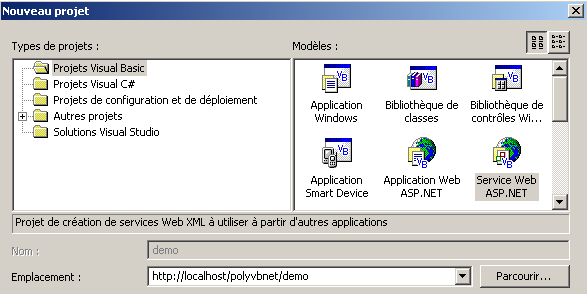
请注意以下几点:
- 项目类型为 Visual Basic(左侧窗格)
- 项目模板为 Web 服务 ASP.NET(右侧窗格)
- 该位置为空。在此,Web 服务将由本地 Web 服务器 IIS 托管。因此,其地址将为 http://localhost/[chemin],其中 [chemin] 需自行定义。 在此,我们选择路径 http://localhost/polyvbnet/demo。VS.NET 将为此项目创建一个文件夹。 在哪里?服务器 IIS 拥有其所提供的网页文档树的根目录。我们将该根目录命名为 <IISroot>。它对应于 URL http://localhost。 由此可推断,URL http://localhost/polyvbnet/demo 将与文件夹 <IISroot>/polyvbnet/demo 相关联。 <IISroot>通常位于安装了IIS的磁盘上的\inetpub\wwwroot文件夹中。 在本例中,该磁盘为 E 盘。因此,由 VS.NET 创建的文件夹即为 e:\inetpub\wwwroot\polyvbnet\demo:
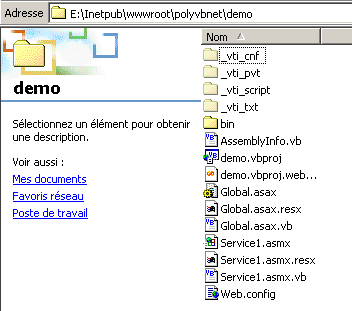
一如既往,生成的文件夹数量过多。其中并非所有文件夹都具有实际用途。我们将仅针对当前所需的文件夹进行说明。VS.NET 创建了一个项目:
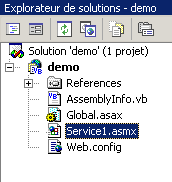
我们发现其中包含项目物理文件夹中的一些文件。 对我们来说最有趣的是后缀为 asmx 的文件。这是 Web 服务的后缀。VS.NET 将 Web 服务作为 Windows 应用程序(c.a.d)进行管理,该应用程序具有图形用户界面以及用于管理它的代码。因此,我们有一个设计窗口:
Web 服务通常没有图形界面。它代表一个可以远程调用的对象。它拥有方法,而应用程序会调用这些方法。 因此,我们将它视为一个经典的对象,其特殊之处在于可以通过网络远程实例化。此外,我们将不使用 VS.NET 提供的设计窗口。相反,让我们通过“视图/代码”选项来关注服务代码:

有几点需要注意:
- 该文件名为 Service1.asmx.vb,而非 Service1.asmx。关于 Service1.asmx 文件的内容,我们稍后会再讨论。
- 这里出现了一个与使用 VS.NET 构建 Windows 应用程序时类似的代码窗口
VS.NET生成的代码如下:
Imports System.Web.Services

<System.Web.Services.WebService(Namespace := "http://tempuri.org/demo/Service1")> _
Public Class Service1
    Inherits System.Web.Services.WebService

#区域“Web 服务设计器生成的代码”

    Public Sub New()
        MyBase.New()

        '此调用由 Web 服务设计器要求。
        InitializeComponent()

        '请在调用 InitializeComponent() 之后添加您的初始化代码

    End Sub

    'Web 服务设计器要求
    Private components As System.ComponentModel.IContainer

    'REMARQUE:Web 服务设计器需要执行以下过程
    '该过程可通过 Web 服务设计器进行修改。
    '请勿使用代码编辑器对其进行修改。
    <System.Diagnostics.DebuggerStepThrough()> Private Sub InitializeComponent()
        components = New System.ComponentModel.Container()
    End Sub

    Protected Overloads Overrides Sub Dispose(ByVal disposing As Boolean)
        'CODEGEN:Web 服务设计器要求执行此过程
        '请勿使用代码编辑器对其进行修改。
        If disposing Then
            If Not (components Is Nothing) Then
                components.Dispose()
            End If
        End If
        MyBase.Dispose(disposing)
    End Sub

#结束区域

    ' EXEMPLE DE SERVICE WEB
    ' 服务示例 HelloWorld() 返回字符串 Hello World。
    ' 要生成,请不要注释掉以下几行,然后保存并生成项目。
    ' 要测试此 Web 服务,请确保 .asmx 文件是起始页面
    ' 并点击 F5。
    '
    '<WebMethod()> Public Function HelloWorld() As String
    '    HelloWorld = "Hello World"
    ' End Function

End Class
首先,请注意这里有一个类,即从类 WebService 派生的 Service1 类:
这要求我们导入命名空间 System.Web.Services:
Imports System.Web.Services
类声明前需添加一个编译属性:
<System.Web.Services.WebService(Namespace := "http://tempuri.org/demo/Service1")> _
Public Class Service1
    Inherits System.Web.Services.WebService
属性 System.Web.Services.WebService() 表示其后的类是一个Web服务。该属性支持多种参数,其中一个名为 NameSpace。它用于将Web服务置于命名空间中。事实上,可以设想全球范围内存在多个名为 meteo 的Web服务。 我们需要一种方法来区分它们。命名空间正是为此而设。一个可以命名为 [espacenom1].meteo,另一个则命名为 [espacenom2].meteo。 这与类命名空间的概念类似。VS.NET自动生成了代码,并将其放入源代码的某个区域:
观察这段代码,我们会发现它与开发人员在构建 Windows 应用程序时生成的代码如出一辙。如果没有图形用户界面,我们可以直接删除这段代码,而对于 Web 服务而言,情况正是如此。
本节最后给出了一个Web服务的示例:
#End Region

    ' EXEMPLE DE SERVICE WEB
    ' 服务示例 HelloWorld() 返回字符串 Hello World。
    ' 要生成,请不要注释掉以下几行,然后保存并生成项目。
    ' 要测试此 Web 服务,请确保 .asmx 文件是起始页面
    ' 并点击 F5。
    '
    '<WebMethod()> Public Function HelloWorld() As String
    '    HelloWorld = "Hello World"
    ' End Function
基于上述内容,我们将代码整理如下:
Imports System.Web.Services

<System.Web.Services.WebService(Namespace:="st.istia.univ-angers.fr")> _
Public Class Bonjour
    Inherits System.Web.Services.WebService

    <WebMethod()> Public Function Bonjour() As String
        Return "bonjour !"
    End Function
End Class
这样就清晰多了。
- Web 服务是一个从类 WebService 派生的类
- 该类通过属性 <System.Web.Services.WebService(Namespace:="st.istia.univ-angers.fr")> 进行限定。因此,我们将该服务置于命名空间 st.istia.univ-angers.fr 中。
- 该类的方法通过 <WebMethod()> 属性进行限定,表明这是一个可通过网络远程调用的方法
因此,提供我们 Web 服务的类名为 Bonjour,且仅有一个同名方法 Bonjour,该方法返回一个字符串。现在我们可以进行首次测试了。
- 如果尚未启动,请启动 Web 服务器 IIS
- 请使用“调试/不调试运行”选项。VS.NET
VS.NET 将编译整个应用程序,启动浏览器(如果安装了 Internet Explorer,通常会使用它),并显示网址 http://localhost/polyvbnet/demo/Service1.asmx:
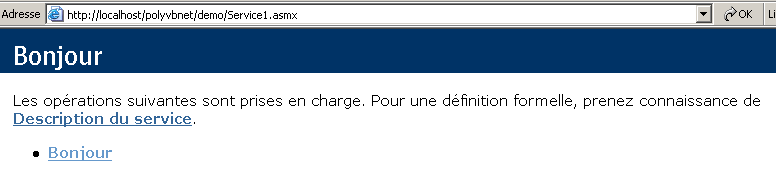
为什么是 http://localhost/polyvbnet/demo/Service1.asmx 这个 URL?因为这是项目中唯一的 .asmx 文件:
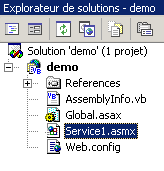
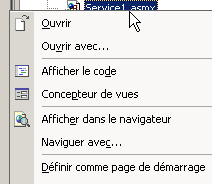
如果存在多个 .asmx 文件,我们需要指定哪个文件应优先执行。操作方法是右键单击相应的 .asmx 文件,并选择 [Définir comme page de démarrage] 选项。
大家可能想知道 service1.asmx 文件中包含什么内容。 事实上,使用 VS.NET 时,我们处理的是 service1.asmx.vb 文件,而非 service1.asmx 文件。该文件位于项目文件夹中:
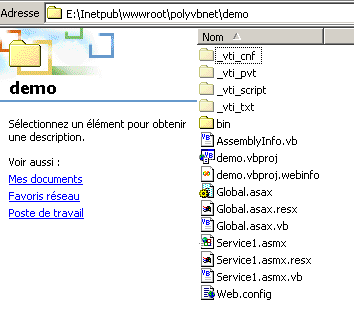
用文本编辑器(记事本或其他)打开该文件,内容如下:
该文件包含一条针对服务器 IIS 的简单指令,表明:
- 这是一个 Web 服务(关键字 WebService)
- 该服务的类语言为 Visual Basic(Language="vb")
- 该类的源代码位于文件 Service1.asmx.vb 中(Codebehind="Service1.asmx.vb")
- 实现该服务的类名为 demo.Bonjour(Class="demo.Bonjour")。值得注意的是,VS.NET 将 Bonjour 类放置在 demo 命名空间中,该命名空间也是项目的名称。
让我们回到通过 URL http://localhost/polyvbnet/demo/Service1.asmx 访问到的页面:
上面页面的代码 HTML 是谁写的?不是我们,这一点我们很清楚。是 IIS,它以标准方式展示了 Web 服务。该页面提供了两个链接。我们点击第一个 [Description du service]:
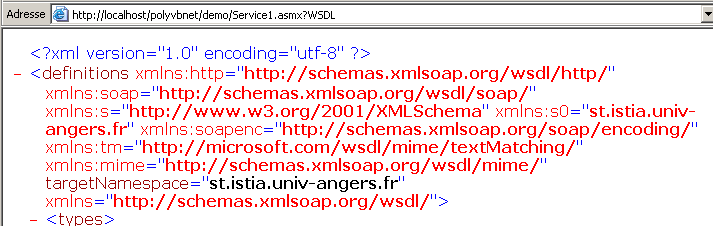
哎呀……这可是相当晦涩的XML。不过还是要注意一下URL
http://localhost/polyvbnet/demo/Service1.asmx?WSDL。打开浏览器,直接输入这个网址。你会得到与之前相同的结果。 因此,请记住,URL http://serviceweb?WSDL 指向的是 Web 服务的描述 XML。让我们回到起始页面,点击链接 [Bonjour]。 请记住,Bonjour是Web服务的一个方法。如果存在多个方法,它们都会在此处列出。我们将看到以下新页面:
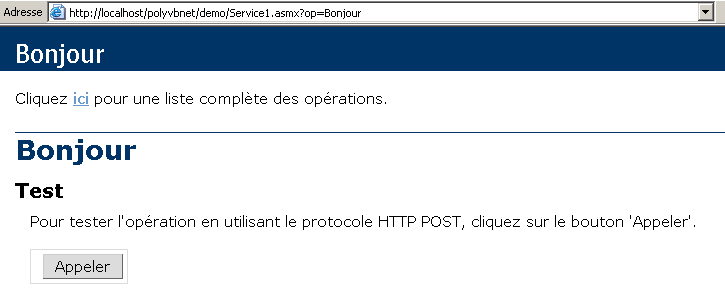
为了简化演示,我们特意截取了部分页面内容。请再次注意生成的 URL:
如果我们直接在浏览器中输入这个网址,会得到与上面相同的结果。系统提示我们使用按钮 [Appeler]。那就试试吧。我们得到了一页新内容:

这又是一个 XML。其中包含我们 Web 服务中曾出现过的两项信息:
- 我们服务的命名空间 st.istia.univ-angers.fr
<System.Web.Services.WebService(Namespace:="st.istia.univ-angers.fr")>
- 由 Bonjour 方法返回的值:
Return "bonjour !"
我们学到了什么?
- 如何编写一个 S 风格的 Web 服务
- 如何调用它
现在,我们将探讨如何在不借助 VS.NET 的情况下编写 Web 服务。
10.3.2. 版本 2
在之前的示例中,VS.NET 独自完成了许多工作。是否可以在没有该工具的情况下构建 Web 服务?答案是肯定的,现在我们就来演示一下。使用文本编辑器,我们构建如下 Web 服务:
Imports System.Web.Services

<System.Web.Services.WebService(Namespace:="st.istia.univ-angers.fr")> _
Public Class Bonjour2
    Inherits System.Web.Services.WebService

    <WebMethod()> Public Function getBonjour() As String
        Return "bonjour de nouveau !"
    End Function
End Class
该类名为 Bonjour2,并包含一个名为 getBonjour 的方法。 该类被放置在文件 demo2.vb 中,该文件位于服务器目录 IIS 下的文件夹 E:\Inetpub\wwwroot\polyvbnet\demo2 中。 这是一个典型的 VB.NET 类,因此可以编译:
dos>vbc /out:demo2 /t:library /r:system.dll /r:system.web.services.dll demo2.vb

dos>dir
02/03/2004  18:04                  286 demo2.vb
02/03/2004  18:10                   77 demo2.asmx
02/03/2004  18:12                3 072 demo2.dll
我们将 demo2.dll 程序包放入一个名为 bin 的文件夹中(此名称必须保留):
现在我们创建文件 demo2.asmx。该文件将由 Web 客户端调用。其内容如下:
我们之前已经遇到过这条指令。它表示:
- Web 服务的类名为 Bonjour2,位于程序集 demo2.dll 中。IIS 将在不同位置(特别是 Web 服务的 bin 文件夹中)搜索该程序集。 因此,我们已将程序集 demo2.dll 放置于此。
现在我们可以进行各种测试。确认 IIS 处于活动状态,然后使用浏览器访问网址 http://localhost/polyvbnet/demo2/demo2.asmx:
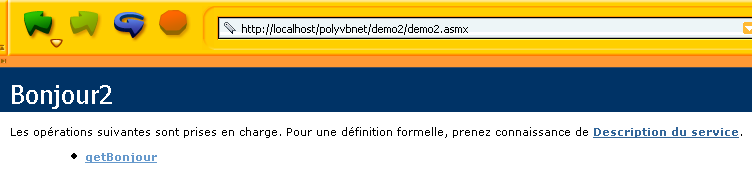
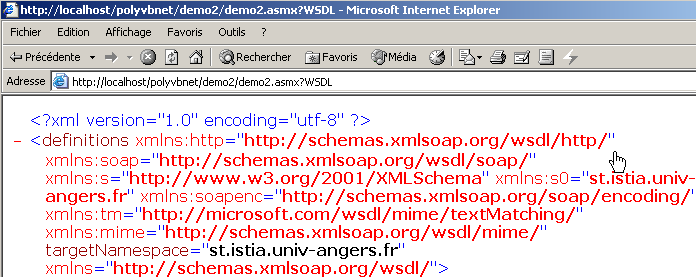
接着访问网址 http://localhost/polyvbnet/demo2/demo2.asmx?WSDL
接着是 URL http://localhost/polyvbnet/demo2/demo2.asmx?op=getBonjour,其中 getBonjour 是我们 Web 服务的唯一方法名称:
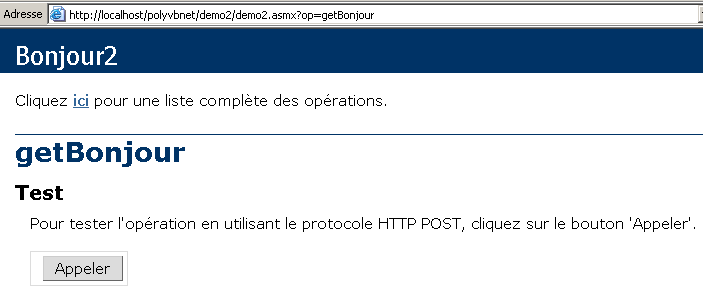
我们使用上面的 [Appeler] 按钮:

我们确实获得了调用 Web 服务方法 getBonjour 的结果。现在我们已经知道如何在不使用 vs.net 的情况下构建 Web 服务。接下来我们将忽略 Web 服务的具体构建方式,仅关注基础文件。
10.3.3. 版本 3
[Bonjour] Web 服务的两个前两个版本使用了两个文件:
- 一个 .asmx 文件,作为 Web 服务的入口点
- 一个 .vb 文件,即 Web 服务的源代码
本文将展示,仅使用 .asmx 文件即可满足需求。demo3.asmx 服务的代码如下:
我们注意到,该服务的源代码现在直接位于 demo3.asmx 文件的源文件中。指令
不再引用外部程序集中的类,而是引用位于同一源文件中的类。我们将该文件放置在 <IISroot>\polyvbnet\demo3 文件夹中:
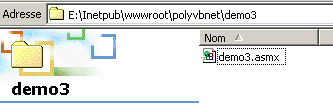
运行 IIS 并请求网址 http://localhost/polyvbnet/demo3/demo3.asmx:
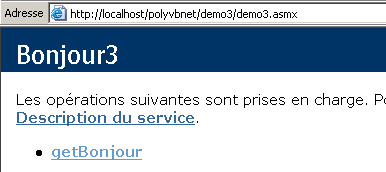
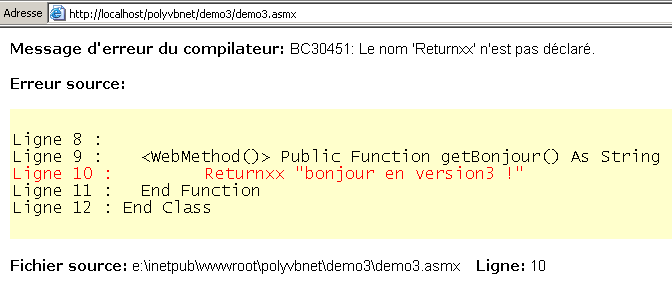
我们发现与上一版本相比有一个显著差异:我们无需编译该服务的 VB 代码。IIS 通过安装在同一台机器上的 VB.NET 编译器自行完成了此编译。 随后它便生成了页面。如果出现编译错误,IIS 会报告该错误:
10.3.4. 版本 4
本文将重点介绍服务器 IIS 的配置。 迄今为止,我们一直将Web服务放置在服务器IIS的根目录<IISroot>下,即此处的[e:\inetpub\wwwroot]。 本文将演示如何将Web服务放置在任意位置。这通过IIS服务器的虚拟目录实现。我们将服务放置在以下目录中:
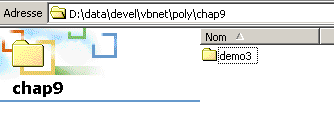
文件夹 [D:\data\devel\vbnet\poly\chap9\demo3] 并不位于服务器 IIS 的目录树中。 我们需要通过创建一个名为 IIS 的虚拟文件夹来告知服务器。启动 IIS 并选择下方的 [Avancé] 选项:
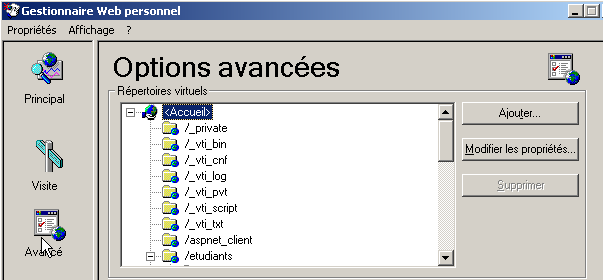
此时会显示一个虚拟目录列表。我们不再赘述。通过上方的 [Ajouter] 按钮创建一个新的虚拟目录:
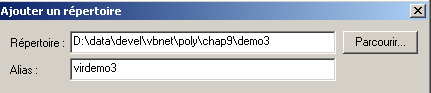
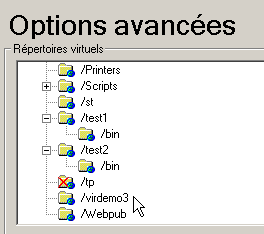
通过点击按钮 [Parcourir],我们指定了包含 Web 服务的物理文件夹,此处为文件夹 [D:\data\devel\vbnet\poly\chap9\demo3]。 为该文件夹指定一个逻辑(虚拟)名称:[virdemo3]。这意味着物理文件夹 [D:\data\devel\vbnet\poly\chap9\demo3] 内的文档将可通过 URL [http://<machine>/virdemo3] 在网络上访问。 上图所示的对话框中还有其他参数,我们保持默认设置。点击“确定”按钮。新的虚拟文件夹将出现在 IIS 的虚拟文件夹列表中:
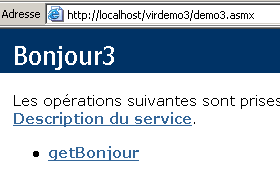
现在,我们打开浏览器并访问 URL [http://localhost/virdemo3/demo3.asmx]。结果与之前相同:
10.3.5. 结论
我们展示了创建 Web 服务的多种方法。后续我们将采用第 3 种方法创建服务,并使用第 4 种方法进行定位。 这样我们便无需使用 VS.NET。不过,值得注意的是,VS.NET 在调试方面提供了极大帮助,因此仍具有使用价值。 目前有免费的Web应用开发工具,特别是微软赞助的WebMatrix产品,可在URL [http://www.asp.net/webmatrix]处找到。这是一款出色的工具,无需前期投入即可开始Web编程。
10.4. 一个操作类Web服务
我们考虑一个提供五项功能的Web服务:
- add(a,b),返回 a+b
- 减法(a,b),返回 a-b
- 乘法(a,b),返回 a*b
- 除(a,b),返回 a/b
- all(a,b),返回数组 [a+b,a-b,a*b,a/b]
该服务的代码 VB.NET 如下:
<%@ WebService language="VB" class=operations %>

imports system.web.services

<WebService(Namespace:="st.istia.univ-angers.fr")> _
   Public Class operations
      Inherits WebService

      <WebMethod>  _
      Function ajouter(a As Double, b As Double) As Double
         Return a + b
      End Function

      <WebMethod>  _
      Function soustraire(a As Double, b As Double) As Double
         Return a - b
      End Function

      <WebMethod>  _
      Function multiplier(a As Double, b As Double) As Double
         Return a * b
      End Function

      <WebMethod>  _
      Function diviser(a As Double, b As Double) As Double
         Return a / b
      End Function

      <WebMethod>  _
      Function toutfaire(a As Double, b As Double) As Double()
         Return New Double() {a + b, a - b, a * b, a / b}
      End Function
   End Class
在此我们重述一些已给出的说明,但这些内容值得再次强调或补充。类 operations 与类 VB.NET 相似,但有几点需要注意:
- 方法前缀带有 <WebMethod()> 属性,该属性告知编译器哪些方法需要“发布”(c.a.d),即向客户端提供。 未带此属性的方法对远程客户端不可见。这可能是其他方法使用的内部方法,但不打算对外公开。
- 该类继承自命名空间 System.Web.Services 中定义的类 WebService。这种继承并非总是必需的。特别是在本例中,可以省略它。
- 该类本身前缀有一个 <WebService(Namespace="st.istia.univ-angers.fr")> 属性,用于为 Web 服务指定命名空间。 类供应商会为其类分配命名空间,以便赋予类唯一的名称,从而避免与其他供应商可能使用相同名称的类发生冲突。对于 Web 服务也是如此。每个 Web 服务都必须能够通过一个唯一的名称来识别,此处即为 st.istia.univ-angers.fr。
- 我们未定义构造函数,因此将隐式使用父类的构造函数。
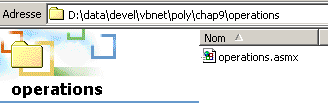
上述源代码并非直接针对编译器 VB.NET,而是针对 Web 服务器 IIS。它必须带有后缀 .asmx,并保存在 Web 服务器的目录树中。 在此,我们将它以 operations.asmx 的名称保存到 <IISroot>\polyvbnet\operations 文件夹中:
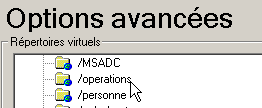
我们将虚拟文件夹 IIS [operations] 与该物理文件夹关联:
 |  |
使用浏览器访问该服务。需要请求的URl是[http://localhost/operations/operations.asmx]:
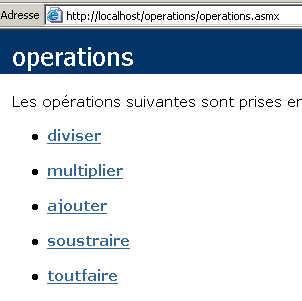
我们获得了一个网页文档,其中包含 operations Web 服务中定义的每个方法的链接。点击 ajouter 链接:
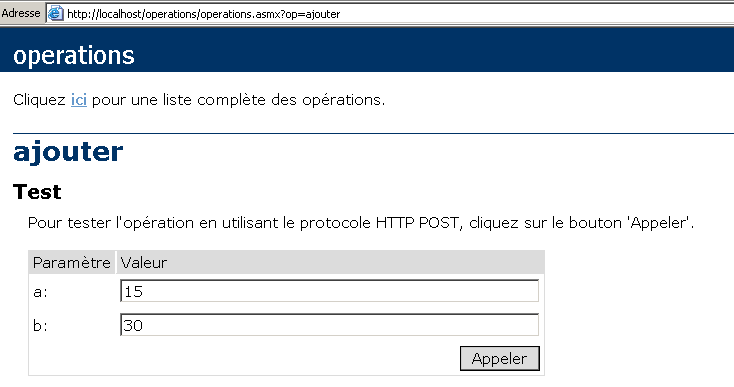
生成的页面提示我们测试方法 ajouter,并为其提供所需的两个参数 a 和 b。回顾方法 ajouter 的定义:
请注意,该页面采用了方法定义中使用的参数名称 a 和 b。点击按钮 Appeler 后,浏览器会在一个独立窗口中显示以下响应:

如果在上文中执行 [Affichage/Source],则会得到以下代码:

现在我们再对方法 [toutfaire] 进行一次操作:
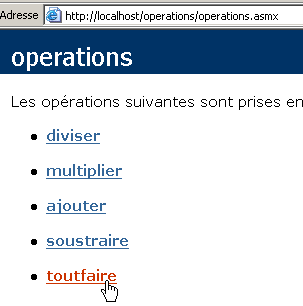
我们得到以下页面:
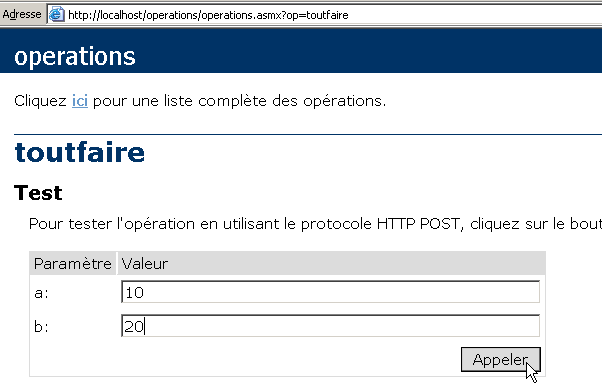
使用上方的 [Appeler] 按钮:
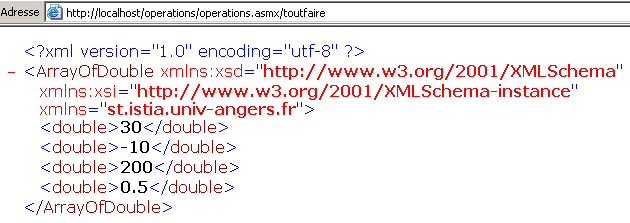
无论哪种情况,服务器的响应格式均为:
- 响应格式为 XML
- 第 1 行是标准行,在响应中始终存在
- 后续行取决于结果类型(双精度,如 ArrayOfDouble)、结果数量以及 Web 服务的命名空间(此处为 st.istia.univ-angers.fr)。
查询Web服务并获取响应有多种方法。让我们回到该服务的URL:
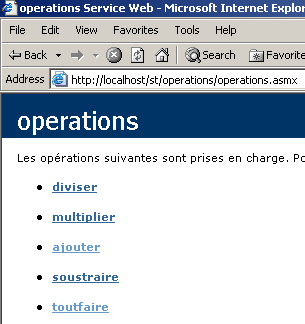
并点击链接 [ajouter]。在显示的页面中,列出了两种调用该 Web 服务函数 [ajouter] 的方法:
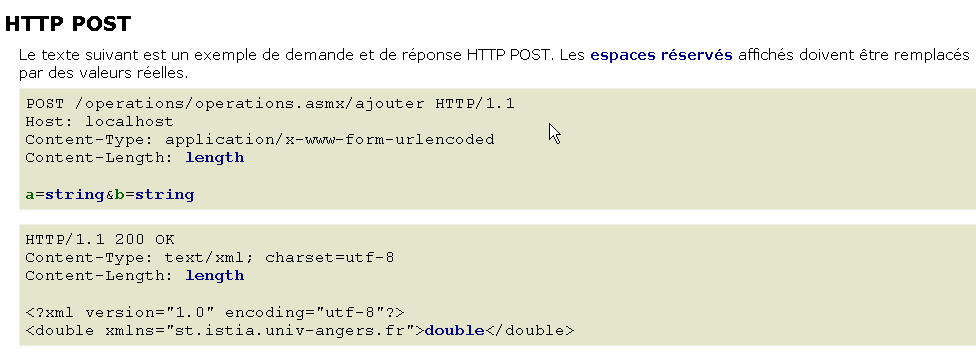
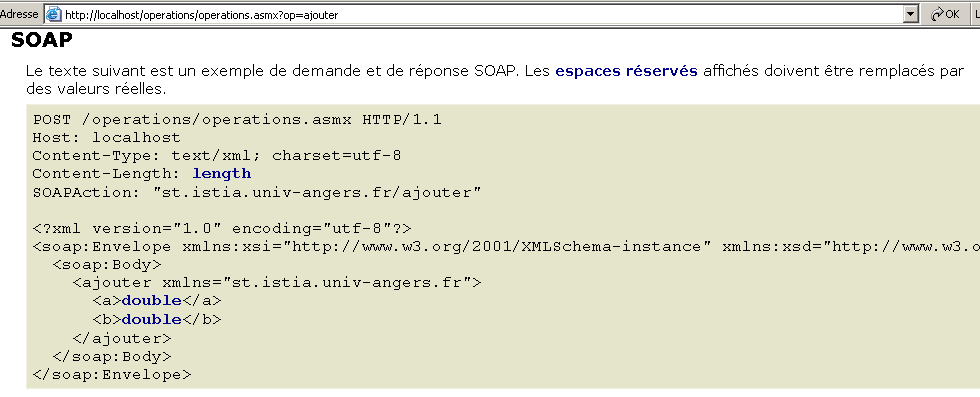
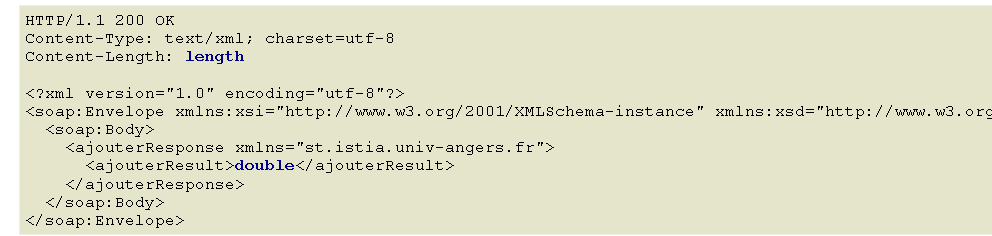
这两种访问Web服务功能的方法分别称为:HTTP-POST和SOAP。现在我们将依次进行分析。
注:在 VS.NET 的早期版本中,曾存在一种名为 HTTP-GET 的第三种方法。 截至本文撰写之时(2004年3月),该方法似乎已不可用。这意味着由 VS.NET 生成的 Web 服务不接受 GET 请求。 但这并不意味着无法编写接受 GET 请求的 Web 服务,特别是使用 VS.NET 以外的其他工具,或者直接手动编写。
10.5. 一个 HTTP-POST 客户端
我们遵循 Web 服务建议的方法:
让我们逐一说明。首先,Web客户端必须发送以下HTTP请求头:
Web客户端根据HTTP 1.1版协议,向URL /operations/operations.asmx/ajouter 发起请求 | |
指定请求的目标机器。此处为 localhost。根据 HTTP 协议 1.1 版,此标头已成为必填项 | |
此处说明在 HTTP 头部之后,将发送采用 URL 编码格式的附加参数。该格式会将某些字符替换为相应的十六进制代码。 | |
这是在 HTTP 头部之后将发送的参数字符串的字符长度。 |
HTTP 头部之后紧跟一行空行,随后是长度为 POST 至 [Content-Length] 个字符的参数字符串,格式为 a=XX&b=YY,其中 XX 和 YY 是参数 a 和 b 值的“URL 编码”字符串。 我们已经掌握了足够的信息,可以使用在 TCP/IP 编程章节中已经用过的通用 TCP 客户端来重现上述内容:
- 我们启动 IIS
- 该服务可通过 URL [http://localhost/operations/operations.asmx] 访问
- 我们在一个窗口中使用通用 TCP 客户端 DOS
dos>clttcpgenerique localhost 80
Commandes :
POST /operations/operations.asmx/ajouter HTTP/1.1
HOST: localhost
Connection: close
Content-Type: application/x-www-form-urlencoded
Content-length: 7
<-- HTTP/1.1 100 Continue
<-- Server: Microsoft-IIS/5.0
<-- Date: Wed, 03 Mar 2004 13:55:17 GMT
<-- X-Powered-By: ASP.NET
<--
a=2&b=3
<-- HTTP/1.1 200 OK
<-- Server: Microsoft-IIS/5.0
<-- Date: Wed, 03 Mar 2004 13:55:26 GMT
<-- X-Powered-By: ASP.NET
<-- Connection: close
<-- X-AspNet-Version: 1.1.4322
<-- Cache-Control: private, max-age=0
<-- Content-Type: text/xml; charset=utf-8
<-- Content-Length: 90
<--
<-- <?xml version="1.0" encoding="utf-8"?>
<-- <double xmlns="st.istia.univ-angers.fr">5</double>
[fin du thread de lecture des réponses du serveur]
fin
[fin du thread d'envoi des commandes au serveur]
首先需要注意的是,我们添加了 [Connection: close] 头部,用于要求服务器在发送响应后关闭连接。此处必须这样做。如果不进行此设置,默认情况下服务器会保持连接打开。 然而,服务器的响应是一系列文本行,其中最后一行并未以换行符结尾。恰巧,我们的通用客户端 TCP 会使用 ReadLine 方法读取以换行符结尾的文本行。 如果服务器在发送最后一行后未关闭连接,客户端就会因等待未到的换行符而陷入阻塞状态。如果服务器关闭了连接,客户端的 ReadLine 方法便会结束,客户端也就不会被阻塞。
在收到表示头部结束的空行 HTTP 后,服务器 IIS 立即发送第一个响应:
<-- HTTP/1.1 100 Continue
<-- Server: Microsoft-IIS/5.0
<-- Date: Wed, 03 Mar 2004 13:55:17 GMT
<-- X-Powered-By: ASP.NET
<--
该响应仅由HTTP头部组成,告知客户可以发送其表示要发送的7个字符。我们的操作如下:
需要注意的是,我们的TCP客户端发送的字符数超过了7个,因为它附带了一个换行符(WriteLine)。 这不会影响服务器,因为服务器只会从接收到的字符中提取前7个,且随后连接会被关闭(Connection: close)。如果连接保持打开状态,这些多余的字符可能会造成干扰,因为它们会被视为来自客户端的下一条命令。收到参数后,服务器发送响应:
<-- HTTP/1.1 200 OK
<-- Server: Microsoft-IIS/5.0
<-- Date: Wed, 03 Mar 2004 13:55:26 GMT
<-- X-Powered-By: ASP.NET
<-- Connection: close
<-- X-AspNet-Version: 1.1.4322
<-- Cache-Control: private, max-age=0
<-- Content-Type: text/xml; charset=utf-8
<-- Content-Length: 90
<--
<-- <?xml version="1.0" encoding="utf-8"?>
<-- <double xmlns="st.istia.univ-angers.fr">5</double>
现在我们已经具备了编写Web服务客户端所需的要素。这是一个名为httpPost2的控制台客户端,使用方法如下:
dos>httpPost2 http://localhost/operations/operations.asmx
Tapez vos commandes au format : [ajouter|soustraire|multiplier|diviser] a b
ajouter 6 7
--> POST /operations/operations.asmx/ajouter HTTP/1.1
--> Host: localhost:80
--> Content-Type: application/x-www-form-urlencoded
--> Content-Length: 7
--> Connection: Keep-Alive
-->
<-- HTTP/1.1 100 Continue
<-- Server: Microsoft-IIS/5.0
<-- Date: Wed, 03 Mar 2004 14:56:38 GMT
<-- X-Powered-By: ASP.NET
<--
--> a=6&b=7
<-- HTTP/1.1 200 OK
<-- Server: Microsoft-IIS/5.0
<-- Date: Wed, 03 Mar 2004 14:56:38 GMT
<-- X-Powered-By: ASP.NET
<-- X-AspNet-Version: 1.1.4322
<-- Cache-Control: private, max-age=0
<-- Content-Type: text/xml; charset=utf-8
<-- Content-Length: 91
<--
<-- <?xml version="1.0" encoding="utf-8"?>
<-- <double xmlns="st.istia.univ-angers.fr">13</double>
[résultat=13]
soustraire 8 9
--> POST /operations/operations.asmx/soustraire HTTP/1.1
--> Host: localhost:80
--> Content-Type: application/x-www-form-urlencoded
--> Content-Length: 7
--> Connection: Keep-Alive
-->
<-- HTTP/1.1 100 Continue
<-- Server: Microsoft-IIS/5.0
<-- Date: Wed, 03 Mar 2004 14:56:47 GMT
<-- X-Powered-By: ASP.NET
<--
--> a=8&b=9
<-- HTTP/1.1 200 OK
<-- Server: Microsoft-IIS/5.0
<-- Date: Wed, 03 Mar 2004 14:56:47 GMT
<-- X-Powered-By: ASP.NET
<-- X-AspNet-Version: 1.1.4322
<-- Cache-Control: private, max-age=0
<-- Content-Type: text/xml; charset=utf-8
<-- Content-Length: 91
<--
<-- <?xml version="1.0" encoding="utf-8"?>
<-- <double xmlns="st.istia.univ-angers.fr">-1</double>
[résultat=-1]
fin
dos>
通过传递Web服务的URL来调用客户端:
随后,客户端读取键盘输入的命令并执行。这些命令的格式为:
其中 function 表示被调用的 Web 服务函数(加、减、乘、除),a 和 b 则是该函数将要运算的数值。例如:
基于此,客户端将向Web服务器发出必要的请求 HTTP 并获取响应。为便于理解该过程,客户端与服务器的交互内容将在屏幕上显示如下:
ajouter 6 7
--> POST /operations/operations.asmx/ajouter HTTP/1.1
--> Host: localhost:80
--> Content-Type: application/x-www-form-urlencoded
--> Content-Length: 7
--> Connection: Keep-Alive
-->
<-- HTTP/1.1 100 Continue
<-- Server: Microsoft-IIS/5.0
<-- Date: Wed, 03 Mar 2004 14:56:38 GMT
<-- X-Powered-By: ASP.NET
<--
--> a=6&b=7
<-- HTTP/1.1 200 OK
<-- Server: Microsoft-IIS/5.0
<-- Date: Wed, 03 Mar 2004 14:56:38 GMT
<-- X-Powered-By: ASP.NET
<-- X-AspNet-Version: 1.1.4322
<-- Cache-Control: private, max-age=0
<-- Content-Type: text/xml; charset=utf-8
<-- Content-Length: 91
<--
<-- <?xml version="1.0" encoding="utf-8"?>
<-- <double xmlns="st.istia.univ-angers.fr">13</double>
[résultat=13]
上文中的通信过程与之前提到的通用 TCP 客户端的通信类似,但有一处不同:HTTP 报头中的 Connection: Keep-Alive 字段要求服务器不要关闭连接。因此,该连接将保持打开状态,以便客户端进行后续操作,从而无需重新连接到服务器。 但这迫使客户端必须使用 ReadLine() 以外的其他方法来读取服务器的响应,因为我们知道该响应是一系列行,且最后一行并未以换行符结尾。获取到服务器的完整响应后,客户端会对其进行解析,以找出所请求操作的结果并将其显示出来:
让我们来看看客户端的代码:
' 命名空间
Imports System
Imports System.Net.Sockets
Imports System.IO
Imports System.Text.RegularExpressions
Imports System.Collections
Imports Microsoft.VisualBasic
Imports System.Web
' Web 服务 operations 的客户端
Public Module clientPOST
Public Sub Main(ByVal args() As String)
' 语法
Const syntaxe As String = "pg URI"
Dim fonctions As String() = {"ajouter", "soustraire", "multiplier", "diviser"}
' 参数数量
If args.Length <> 1 Then
erreur(syntaxe, 1)
End If
' 记录所请求的 URI
Dim URIstring As String = args(0)
' 连接到服务器
Dim uri As Uri = Nothing ' l'URI du service web
Dim client As TcpClient = Nothing ' la liaison tcp du client avec le serveur
Dim [IN] As StreamReader = Nothing ' le flux de lecture du client
Dim OUT As StreamWriter = Nothing ' le flux d'écriture du client
Try
' 连接到服务器
uri = New Uri(URIstring)
client = New TcpClient(uri.Host, uri.Port)
' 创建客户端的输入-输出流 TCP
[IN] = New StreamReader(client.GetStream())
OUT = New StreamWriter(client.GetStream())
OUT.AutoFlush = True
Catch ex As Exception
' URI 错误或存在其他问题
erreur("L'erreur suivante s'est produite : " + ex.Message, 2)
End Try
' 创建 Web 服务函数字典
Dim dicoFonctions As New Hashtable
Dim i As Integer
For i = 0 To fonctions.Length - 1
dicoFonctions.Add(fonctions(i), True)
Next i
' 用户请求通过键盘输入
' 采用 a b 函数的形式
' 请求以 end 命令结尾
Dim commande As String = Nothing ' commande tapée au clavier
Dim champs As String() = Nothing ' champs d'une ligne de commande
Dim fonction As String = Nothing ' nom d'une fonction du service web
Dim a, b As String ' les arguments des fonctions du service web
' 向用户发出提示
Console.Out.WriteLine("Tapez vos commandes au format : [ajouter|soustraire|multiplier|diviser] a b")
' 错误处理
Dim erreurCommande As Boolean
Try
' 键盘输入命令的循环
While True
' 初始阶段无错误
erreurCommande = False
' 读取命令
commande = Console.In.ReadLine().Trim().ToLower()
' 结束了吗?
If commande Is Nothing Or commande = "fin" Then
Exit While
End If
' 将命令拆分为字段
champs = Regex.Split(commande, "\s+")
Try
' 需要三个字段
If champs.Length <> 3 Then
Throw New Exception
End If
' 字段 0 必须是已识别的函数
fonction = champs(0)
If Not dicoFonctions.ContainsKey(fonction) Then
Throw New Exception
End If
' 字段 1 必须是有效的数字
a = champs(1)
Double.Parse(a)
' 字段 2 必须是有效的数字
b = champs(2)
Double.Parse(b)
Catch
' 命令无效
Console.Out.WriteLine("syntaxe : [ajouter|soustraire|multiplier|diviser] a b")
erreurCommande = True
End Try
' 正在向 Web 服务发起请求
If Not erreurCommande Then executeFonction([IN], OUT, uri, fonction, a, b)
End While
Catch e As Exception
Console.Out.WriteLine(("L'erreur suivante s'est produite : " + e.Message))
End Try
' 客户端与服务器连接结束
Try
[IN].Close()
OUT.Close()
client.Close()
Catch
End Try
End Sub
...........
' 显示错误
Public Sub erreur(ByVal msg As String, ByVal exitCode As Integer)
' 显示错误
System.Console.Error.WriteLine(msg)
' 因错误停止
Environment.Exit(exitCode)
End Sub
End Module
这里包含了一些我们已经多次见过的内容,无需特别说明。现在让我们来查看方法 executeFonction 的代码,其中包含了一些新内容:
' executeFonction
Public Sub executeFonction(ByVal [IN] As StreamReader, ByVal OUT As StreamWriter, ByVal uri As Uri, ByVal fonction As String, ByVal a As String, ByVal b As String)
' 在 URI URI 的 Web 服务上执行函数(a,b)
' 客户端与服务端之间的通信通过 IN 和 OUT 流进行
' 函数的结果位于该行
' <double xmlns="st.istia.univ-angers.fr">double</double>
' 由服务器发送
' 构建查询字符串
Dim requête As String = "a=" + HttpUtility.UrlEncode(a) + "&b=" + HttpUtility.UrlEncode(b)
Dim nbChars As Integer = requête.Length
' 构建待发送的 HTTP 头部数组
Dim entetes(5) As String
entetes(0) = "POST " + uri.AbsolutePath + "/" + fonction + " HTTP/1.1"
entetes(1) = "Host: " & uri.Host & ":" & uri.Port
entetes(2) = "Content-Type: application/x-www-form-urlencoded"
entetes(3) = "Content-Length: " & nbChars
entetes(4) = "Connection: Keep-Alive"
entetes(5) = ""
' 将 HTTP 头部发送至服务器
Dim i As Integer
For i = 0 To entetes.Length - 1
' 发送至服务器
OUT.WriteLine(entetes(i))
' 屏幕回显
Console.Out.WriteLine(("--> " + entetes(i)))
Next i
' 读取 Web 服务器的第一个响应 HTTP/1.1 100
Dim ligne As String = Nothing
' 读取流中的一行
ligne = [IN].ReadLine()
While ligne <> ""
'回显
Console.Out.WriteLine(("<-- " + ligne))
' 下一行
ligne = [IN].ReadLine()
End While
'回显最后一行
Console.Out.WriteLine(("<-- " + ligne))
' 发送请求参数
OUT.Write(requête)
' 回显
Console.Out.WriteLine(("--> " + requête))
' 构建用于获取响应大小的正则表达式 XML
' 在 Web 服务器响应流中
Dim modèleLength As String = "^Content-Length: (.+?)\s*$"
Dim RegexLength As New Regex(modèleLength) '
Dim MatchLength As Match = Nothing
Dim longueur As Integer = 0
' 发送请求后读取 Web 服务器的第二个响应
' 保存 Content-Length 行的值
ligne = [IN].ReadLine()
While ligne <> ""
' 屏幕回显
Console.Out.WriteLine(("<-- " + ligne))
' Content-Length?
MatchLength = RegexLength.Match(ligne)
If MatchLength.Success Then
longueur = Integer.Parse(MatchLength.Groups(1).Value)
End If
' 下一行
ligne = [IN].ReadLine()
End While
' 输出最后一行
Console.Out.WriteLine("<--")
' 构建用于检索结果的正则表达式
' 在 Web 服务器响应流中
Dim modèle As String = "<double xmlns=""st.istia.univ-angers.fr"">(.+?)</double>"
Dim ModèleRésultat As New Regex(modèle)
Dim MatchRésultat As Match = Nothing
' 读取 Web 服务器响应的其余部分
Dim chrRéponse(longueur) As Char
[IN].Read(chrRéponse, 0, longueur)
Dim strRéponse As String = New [String](chrRéponse)
' 将响应拆分为文本行
Dim lignes As String() = Regex.Split(strRéponse, ControlChars.Lf)
' 遍历文本行以查找结果
Dim strRésultat As String = "?" ' résultat de la fonction
For i = 0 To lignes.Length - 1
' 后续
Console.Out.WriteLine(("<-- " + lignes(i)))
' 将当前行与模板进行比对
MatchRésultat = ModèleRésultat.Match(lignes(i))
' 是否找到?
If MatchRésultat.Success Then
' 记录结果
strRésultat = MatchRésultat.Groups(1).Value
End If
Next i
' 显示结果
Console.Out.WriteLine(("[résultat=" + strRésultat + "]" + ControlChars.Lf))
End Sub
首先,客户端 HTTP-POST 会以 POST 格式发送请求:
' 构建查询字符串
Dim requête As String = "a=" + HttpUtility.UrlEncode(a) + "&b=" + HttpUtility.UrlEncode(b)
Dim nbChars As Integer = requête.Length
' 构建待发送的 HTTP 头部表
Dim entetes(5) As String
entetes(0) = "POST " + uri.AbsolutePath + "/" + fonction + " HTTP/1.1"
entetes(1) = "Host: " & uri.Host & ":" & uri.Port
entetes(2) = "Content-Type: application/x-www-form-urlencoded"
entetes(3) = "Content-Length: " & nbChars
entetes(4) = "Connection: Keep-Alive"
entetes(5) = ""
' 将 HTTP 头部发送至服务器
Dim i As Integer
For i = 0 To entetes.Length - 1
' 发送至服务器
OUT.WriteLine(entetes(i))
' 屏幕回显
Console.Out.WriteLine(("--> " + entetes(i)))
Next i
在请求头中
中,必须指定客户端将在 HTTP 头部之后发送的参数大小:
为此,请使用以下代码:
' 构建请求字符串
Dim requête As String = "a=" + HttpUtility.UrlEncode(a) + "&b=" + HttpUtility.UrlEncode(b)
Dim nbChars As Integer = requête.Length
方法 HttpUtility.UrlEncode(字符串)将 chaîne 中的某些字符转换为 %n1n2,其中 n1n2 是被转换字符的代码 ASCII。 此转换所针对的字符是所有在 POST 查询中具有特殊含义的字符(空格、等号、& 符号等)。 在此,方法 HttpUtility.UrlEncode 通常是多余的,因为 a 和 b 是数字,不包含任何此类特殊字符。此处仅将其作为示例使用。 该方法需要命名空间 System.Web。一旦客户端发送了其 HTTP 头部:
--> POST /operations/operations.asmx/ajouter HTTP/1.1
--> Host: localhost:80
--> Content-Type: application/x-www-form-urlencoded
--> Content-Length: 7
--> Connection: Keep-Alive
-->
服务器返回 HTTP 100 Continue 头部:
<-- HTTP/1.1 100 Continue
<-- Server: Microsoft-IIS/5.0
<-- Date: Wed, 03 Mar 2004 14:56:47 GMT
<-- X-Powered-By: ASP.NET
<--
该代码仅读取并显示屏幕上的第一个响应:
' 读取Web服务器的第一个响应 HTTP/1.1 100
Dim ligne As String = Nothing
' 读取流中的一行
ligne = [IN].ReadLine()
While ligne <> ""
'回显
Console.Out.WriteLine(("<-- " + ligne))
' 下一行
ligne = [IN].ReadLine()
End While
'回显最后一行
Console.Out.WriteLine(("<-- " + ligne))
阅读完此初始响应后,客户端需发送其参数:
客户端使用以下代码进行发送:
随后服务器将发送响应。该响应由两部分组成:
- 以空行结尾的 HTTP 头部
- XML格式的响应
<-- HTTP/1.1 200 OK
<-- Server: Microsoft-IIS/5.0
<-- Date: Wed, 03 Mar 2004 14:56:38 GMT
<-- X-Powered-By: ASP.NET
<-- X-AspNet-Version: 1.1.4322
<-- Cache-Control: private, max-age=0
<-- Content-Type: text/xml; charset=utf-8
<-- Content-Length: 91
<--
<-- <?xml version="1.0" encoding="utf-8"?>
<-- <double xmlns="st.istia.univ-angers.fr">13</double>
首先,客户端读取 HTTP 头部信息,从中查找 Content-Length 这一行,并获取响应大小 XML(此处为 90)。该值是通过正则表达式获取的。 其实也可以采用其他方法,而且可能更高效。
' 构建用于获取响应大小的正则表达式 XML
' 在 Web 服务器响应流中
Dim modèleLength As String = "^Content-Length: (.+?)\s*$"
Dim RegexLength As New Regex(modèleLength) '
Dim MatchLength As Match = Nothing
Dim longueur As Integer = 0
' 发送请求后读取 Web 服务器的第二个响应
' 保存 Content-Length 行的值
ligne = [IN].ReadLine()
While ligne <> ""
' 屏幕回显
Console.Out.WriteLine(("<-- " + ligne))
' Content-Length?
MatchLength = RegexLength.Match(ligne)
If MatchLength.Success Then
longueur = Integer.Parse(MatchLength.Groups(1).Value)
End If
' 下一行
ligne = [IN].ReadLine()
End While
' 输出最后一行
Console.Out.WriteLine("<--")
一旦获得了响应 XML 的长度 N,只需从服务器响应流 IN 中读取 N 个字符即可。这串 N 个字符的字符串会被拆分为文本行,以便进行屏幕监控。在这些行中,我们需要查找结果行:
。找到结果后,将其显示出来。
客户端代码的结尾如下:
' 构建用于检索结果的正则表达式
' 在 Web 服务器响应流中
Dim modèle As String = "<double xmlns=""st.istia.univ-angers.fr"">(.+?)</double>"
Dim ModèleRésultat As New Regex(modèle)
Dim MatchRésultat As Match = Nothing
' 读取 Web 服务器响应的其余部分
Dim chrRéponse(longueur) As Char
[IN].Read(chrRéponse, 0, longueur)
Dim strRéponse As String = New [String](chrRéponse)
' 将响应拆分为文本行
Dim lignes As String() = Regex.Split(strRéponse, ControlChars.Lf)
' 遍历文本行以查找结果
Dim strRésultat As String = "?" ' résultat de la fonction
For i = 0 To lignes.Length - 1
' 后续
Console.Out.WriteLine(("<-- " + lignes(i)))
' 将当前行与模板进行比对
MatchRésultat = ModèleRésultat.Match(lignes(i))
' 是否找到?
If MatchRésultat.Success Then
' 记录结果
strRésultat = MatchRésultat.Groups(1).Value
End If
Next i
' 显示结果
Console.Out.WriteLine(("[résultat=" + strRésultat + "]" + ControlChars.Lf))
End Sub
10.6. 一个 SOAP 客户端
这里我们研究第二个客户端,它将使用 SOAP 类型的客户端-服务器对话(简单对象访问协议)。以下是 ajouter 函数的对话示例:
客户端的请求是 POST。 因此,我们将看到与前一个客户端类似的机制。主要区别在于:虽然客户端 HTTP-POST 以前如下形式发送参数 a 和 b
的形式发送参数,而客户端 SOAP 则采用更复杂的 XML 格式发送:
POST /operations/operations.asmx HTTP/1.1
Host: localhost
Content-Type: text/xml; charset=utf-8
Content-Length: length
SOAPAction: "st.istia.univ-angers.fr/ajouter"
<?xml version="1.0" encoding="utf-8"?>
<soap:Envelope xmlns:xsi="http://www.w3.org/2001/XMLSchema-instance" xmlns:xsd="http://www.w3.org/2001/XMLSchema" xmlns:soap="http://schemas.xmlsoap.org/soap/envelope/">
<soap:Body>
<ajouter xmlns="st.istia.univ-angers.fr">
<a>double</a>
<b>double</b>
</ajouter>
</soap:Body>
</soap:Envelope>
他收到的响应是 XML,该响应也比之前看到的响应更为复杂:
HTTP/1.1 200 OK
Content-Type: text/xml; charset=utf-8
Content-Length: length
<?xml version="1.0" encoding="utf-8"?>
<soap:Envelope xmlns:xsi="http://www.w3.org/2001/XMLSchema-instance" xmlns:xsd="http://www.w3.org/2001/XMLSchema" xmlns:soap="http://schemas.xmlsoap.org/soap/envelope/">
<soap:Body>
<ajouterResponse xmlns="st.istia.univ-angers.fr">
<ajouterResult>double</ajouterResult>
</ajouterResponse>
</soap:Body>
</soap:Envelope>
尽管请求和响应更为复杂,但这确实与客户端 HTTP-POST 采用的是相同的机制 HTTP。 因此,客户端 SOAP 的编写可以参照客户端 HTTP-POST 的方式。以下是一个执行示例:
dos>clientsoap1 http://localhost/operations/operations.asmx
Tapez vos commandes au format : [ajouter|soustraire|multiplier|diviser] a b
ajouter 3 4
--> POST /operations/operations.asmx HTTP/1.1
--> Host: localhost:80
--> Content-Type: text/xml; charset=utf-8
--> Content-Length: 321
--> Connection: Keep-Alive
--> SOAPAction: "st.istia.univ-angers.fr/ajouter"
-->
<-- HTTP/1.1 100 Continue
<-- Server: Microsoft-IIS/5.0
<-- Date: Thu, 04 Mar 2004 07:28:29 GMT
<-- X-Powered-By: ASP.NET
<--
--> <?xml version="1.0" encoding="utf-8"?>
<soap:Envelope xmlns:xsi="http://www.w3.org/2001/XMLSchema-instance" xmlns:xsd="http://www.w3.org/2001/XMLSchema" xmlns:soap="http://schemas.xmlsoap.org/soap/envelope/">
<soap:Body>
<ajouter xmlns="st.istia.univ-angers.fr">
<a>3</a>
<b>4</b>
</ajouter>
</soap:Body>
</soap:Envelope>
<-- HTTP/1.1 200 OK
<-- Server: Microsoft-IIS/5.0
<-- Date: Thu, 04 Mar 2004 07:28:33 GMT
<-- X-Powered-By: ASP.NET
<-- X-AspNet-Version: 1.1.4322
<-- Cache-Control: private, max-age=0
<-- Content-Type: text/xml; charset=utf-8
<-- Content-Length: 345
<--
<-- <?xml version="1.0" encoding="utf-8"?><soap:Envelope xmlns:soap="http://schemas.xmlsoap.org/soap/envelope/" xmlns:xsi="http://www.w3.org/2001/XMLSchema-inst
ance" xmlns:xsd="http://www.w3.org/2001/XMLSchema"><soap:Body><ajouterResponse xmlns="st.istia.univ-angers.fr"><ajouterResult>7</ajouterResult></ajouterResponse
></soap:Body></soap:Envelope>
[résultat=7]
只有 executeFonction 方法发生了变化。客户端 SOAP 发送了其请求的 HTTP 头部。它们只是比 HTTP-POST 的头部稍复杂一些:
ajouter 3 4
--> POST /operations/operations.asmx HTTP/1.1
--> Host: localhost:80
--> Content-Type: text/xml; charset=utf-8
--> Content-Length: 321
--> Connection: Keep-Alive
--> SOAPAction: "st.istia.univ-angers.fr/ajouter"
-->
生成这些代码的代码:
' executeFonction
Public Sub executeFonction(ByVal [IN] As StreamReader, ByVal OUT As StreamWriter, ByVal uri As Uri, ByVal fonction As String, ByVal a As String, ByVal b As String)
' 在 URI URI 的 Web 服务上执行函数(a,b)
' 客户端与服务器的通信通过 IN 和 OUT 数据流进行
' 函数的结果位于该行
' <double xmlns="st.istia.univ-angers.fr">double</double>
' 由服务器发送
' 构建查询字符串 SOAP
Dim requêteSOAP As String = "<?xml version=" + """1.0"" encoding=""utf-8""?>" + ControlChars.Lf
requêteSOAP += "<soap:Envelope xmlns:xsi=""http://www.w3.org/2001/XMLSchema-instance"" xmlns:xsd=""http://www.w3.org/2001/XMLSchema"" xmlns:soap=""http://schemas.xmlsoap.org/soap/envelope/"">" + ControlChars.Lf
requêteSOAP += "<soap:Body>" + ControlChars.Lf
requêteSOAP += "<" + fonction + " xmlns=""st.istia.univ-angers.fr"">" + ControlChars.Lf
requêteSOAP += "<a>" + a + "</a>" + ControlChars.Lf
requêteSOAP += "<b>" + b + "</b>" + ControlChars.Lf
requêteSOAP += "</" + fonction + ">" + ControlChars.Lf
requêteSOAP += "</soap:Body>" + ControlChars.Lf
requêteSOAP += "</soap:Envelope>"
Dim nbCharsSOAP As Integer = requêteSOAP.Length
' 构建待发送的 HTTP 头部数组
Dim entetes(6) As String
entetes(0) = "POST " + uri.AbsolutePath + " HTTP/1.1"
entetes(1) = "Host: " & uri.Host & ":" & uri.Port
entetes(2) = "Content-Type: text/xml; charset=utf-8"
entetes(3) = "Content-Length: " & nbCharsSOAP
entetes(4) = "Connection: Keep-Alive"
entetes(5) = "SOAPAction: ""st.istia.univ-angers.fr/" + fonction + """"
entetes(6) = ""
' 将 HTTP 头部发送至服务器
Dim i As Integer
For i = 0 To entetes.Length - 1
' 发送至服务器
OUT.WriteLine(entetes(i))
' 屏幕回显
Console.Out.WriteLine(("--> " + entetes(i)))
Next i
收到此请求后,服务器发送其首个响应,客户端将其显示出来:
<-- HTTP/1.1 100 Continue
<-- Server: Microsoft-IIS/5.0
<-- Date: Thu, 04 Mar 2004 07:28:29 GMT
<-- X-Powered-By: ASP.NET
<--
此第一条回复的代码如下:
' 读取 Web 服务器的第一个响应 HTTP/1.1 100
Dim ligne As String = Nothing
' 读取流中的一行
ligne = [IN].ReadLine()
While ligne <> ""
'回显
Console.Out.WriteLine(("<-- " + ligne))
' 下一行
ligne = [IN].ReadLine()
End While 'while
'回显最后一行
Console.Out.WriteLine(("<-- " + ligne))
客户端现在将以 XML 格式将参数封装在所谓的 SOAP 信封中发送:
--> <?xml version="1.0" encoding="utf-8"?>
<soap:Envelope xmlns:xsi="http://www.w3.org/2001/XMLSchema-instance" xmlns:xsd="http://www.w3.org/2001/XMLSchema" xmlns:soap="http://schemas.xmlsoap.org/soap/envelope/">
<soap:Body>
<ajouter xmlns="st.istia.univ-angers.fr">
<a>3</a>
<b>4</b>
</ajouter>
</soap:Body>
</soap:Envelope>
代码:
服务器随后将发送最终响应:
<-- HTTP/1.1 200 OK
<-- Server: Microsoft-IIS/5.0
<-- Date: Thu, 04 Mar 2004 07:28:33 GMT
<-- X-Powered-By: ASP.NET
<-- X-AspNet-Version: 1.1.4322
<-- Cache-Control: private, max-age=0
<-- Content-Type: text/xml; charset=utf-8
<-- Content-Length: 345
<--
<-- <?xml version="1.0" encoding="utf-8"?><soap:Envelope xmlns:soap="http://schemas.xmlsoap.org/soap/envelope/" xmlns:xsi="http://www.w3.org/2001/XMLSchema-inst
ance" xmlns:xsd="http://www.w3.org/2001/XMLSchema"><soap:Body><ajouterResponse xmlns="st.istia.univ-angers.fr"><ajouterResult>7</ajouterResult></ajouterResponse
></soap:Body></soap:Envelope>
客户端在屏幕上显示收到的 HTTP 表头,同时搜索 Content-Length 这一行:
' 构建用于获取响应大小的正则表达式 XML
' 在 Web 服务器响应流中
Dim modèleLength As String = "^Content-Length: (.+?)\s*$"
Dim RegexLength As New Regex(modèleLength) '
Dim MatchLength As Match = Nothing
Dim longueur As Integer = 0
' 发送请求后读取 Web 服务器的第二个响应
' 保存 Content-Length 行的值
ligne = [IN].ReadLine()
While ligne <> ""
' 屏幕回显
Console.Out.WriteLine(("<-- " + ligne))
' Content-Length?
MatchLength = RegexLength.Match(ligne)
If MatchLength.Success Then
longueur = Integer.Parse(MatchLength.Groups(1).Value)
End If
' 下一行
ligne = [IN].ReadLine()
End While 'while
' 输出最后一行
Console.Out.WriteLine("<--")
一旦得知响应 XML 的大小 N,客户端便从服务器响应流中读取 N 个字符,将获取的字符串拆分为文本行以在屏幕上显示,并在其中查找结果中的标签 XML: <ajouterResult>7</ajouterResult> 并显示该值:
' 构建用于检索结果的正则表达式
' 在 Web 服务器响应流中
Dim modèle As String = "<" + fonction + "Result>(.+?)</" + fonction + "Result>"
Dim ModèleRésultat As New Regex(modèle)
Dim MatchRésultat As Match = Nothing
' 读取 Web 服务器响应的其余部分
Dim chrRéponse(longueur) As Char
[IN].Read(chrRéponse, 0, longueur)
Dim strRéponse As String = New [String](chrRéponse)
' 将响应拆分为文本行
Dim lignes As String() = Regex.Split(strRéponse, ControlChars.Lf)
' 遍历文本行以查找结果
Dim strRésultat As String = "?" ' résultat de la fonction
For i = 0 To lignes.Length - 1
' 后续
Console.Out.WriteLine(("<-- " + lignes(i)))
' 将当前行与模板进行比对
MatchRésultat = ModèleRésultat.Match(lignes(i))
' 是否找到?
If MatchRésultat.Success Then
' 记录结果
strRésultat = MatchRésultat.Groups(1).Value
End If
'下一行
Next i
' 显示结果
Console.Out.WriteLine(("[résultat=" + strRésultat + "]" + ControlChars.Lf))
End Sub
10.7. 客户端与服务器端交互的封装
假设我们的 Web 服务 operations 被各种应用程序所使用。如果能为这些应用程序提供一个类,使其在客户端应用程序与 Web 服务之间充当接口,并隐藏大部分网络交互(这对大多数开发人员来说并非易事),那将非常有意义。这样,我们就会得到以下架构:
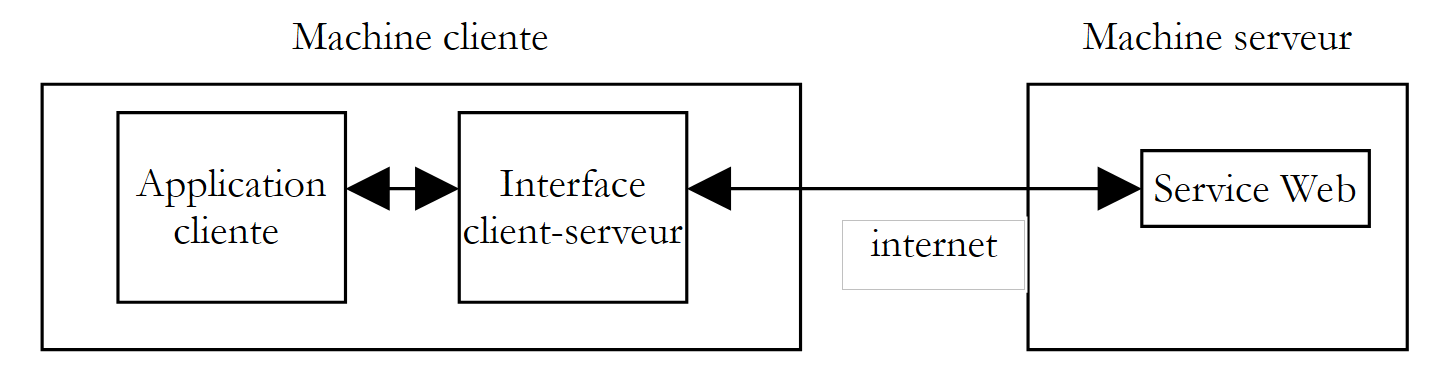 |
客户端应用程序将通过客户端-服务器接口向 Web 服务发起请求。该接口将负责与服务器进行所有必要的网络交互,并将获得的结果返回给客户端应用程序。客户端应用程序无需再处理与服务器的交互,这将极大简化其编写工作。
10.7.1. 封装类
通过前文的讨论,我们现已充分了解客户端与服务器之间的网络交互机制,甚至已掌握了三种方法。我们选择封装方法 SOAP。该类定义如下:
' 命名空间
Imports System
Imports System.Net.Sockets
Imports System.IO
Imports System.Text.RegularExpressions
Imports System.Collections
Imports System.Web
Imports Microsoft.VisualBasic
' Web 服务 operations 中的 clientSOAP
Public Class clientSOAP
' 实例变量
Private uri As uri = Nothing ' l'URI du service web
Private client As TcpClient = Nothing ' la liaison tcp du client avec le serveur
Private [IN] As StreamReader = Nothing ' le flux de lecture du client
Private OUT As StreamWriter = Nothing ' le flux d'écriture du client
' 函数字典
Private dicoFonctions As New Hashtable
' 函数列表
Private fonctions As String() = {"ajouter", "soustraire", "multiplier", "diviser"}
' 详细输出
Private verbose As Boolean = False ' à vrai, affiche à l'écran les échanges client-serveur
' 构造函数
Public Sub New(ByVal uriString As String, ByVal verbose As Boolean)
' 详细输出
Me.verbose = verbose
' 连接服务器
uri = New Uri(uriString)
client = New TcpClient(uri.Host, uri.Port)
' 创建客户端的输入/输出流 TCP
[IN] = New StreamReader(client.GetStream())
OUT = New StreamWriter(client.GetStream())
OUT.AutoFlush = True
' 创建 Web 服务函数字典
Dim i As Integer
For i = 0 To fonctions.Length - 1
dicoFonctions.Add(fonctions(i), True)
Next i
End Sub
' 关闭与服务器的连接
Public Sub Close()
' 结束客户端与服务器的连接
[IN].Close()
OUT.Close()
client.Close()
End Sub
' executeFonction
Public Function executeFonction(ByVal fonction As String, ByVal a As String, ByVal b As String) As String
' 在 URI URI 的 Web 服务上执行函数(a,b)
' 客户端与服务器的通信通过 IN 和 OUT 数据流进行
' 函数的结果位于该行
' <double xmlns="st.istia.univ-angers.fr">double</double>
' 由服务器发送
' 函数有效吗?
fonction = fonction.Trim().ToLower()
If Not dicoFonctions.ContainsKey(fonction) Then
Return "[fonction [" + fonction + "] indisponible : (ajouter, soustraire,multiplier,diviser)]"
End If
' 参数 a 和 b 有效吗?
Dim doubleA As Double = 0
Try
doubleA = Double.Parse(a)
Catch
Return "[argument [" + a + "] incorrect (double)]"
End Try
Dim doubleB As Double = 0
Try
doubleB = Double.Parse(b)
Catch
Return "[argument [" + b + "] incorrect (double)]"
End Try
' 除以零?
If fonction = "diviser" And doubleB = 0 Then
Return "[division par zéro]"
End If
' 构建查询字符串 SOAP
Dim requêteSOAP As String = "<?xml version=" + """1.0"" encoding=""utf-8""?>" + ControlChars.Lf
requêteSOAP += "<soap:Envelope xmlns:xsi=""http://www.w3.org/2001/XMLSchema-instance"" xmlns:xsd=""http://www.w3.org/2001/XMLSchema"" xmlns:soap=""http://schemas.xmlsoap.org/soap/envelope/"">" + ControlChars.Lf
requêteSOAP += "<soap:Body>" + ControlChars.Lf
requêteSOAP += "<" + fonction + " xmlns=""st.istia.univ-angers.fr"">" + ControlChars.Lf
requêteSOAP += "<a>" + a + "</a>" + ControlChars.Lf
requêteSOAP += "<b>" + b + "</b>" + ControlChars.Lf
requêteSOAP += "</" + fonction + ">" + ControlChars.Lf
requêteSOAP += "</soap:Body>" + ControlChars.Lf
requêteSOAP += "</soap:Envelope>"
Dim nbCharsSOAP As Integer = requêteSOAP.Length
' 构建待发送的 HTTP 头部数组
Dim entetes(6) As String
entetes(0) = "POST " + uri.AbsolutePath + " HTTP/1.1"
entetes(1) = "Host: " + uri.Host + ":" + uri.Port.ToString
entetes(2) = "Content-Type: text/xml; charset=utf-8"
entetes(3) = "Content-Length: " + nbCharsSOAP.ToString
entetes(4) = "Connection: Keep-Alive"
entetes(5) = "SOAPAction: ""st.istia.univ-angers.fr/" + fonction + """"
entetes(6) = ""
' 将 HTTP 头信息发送至服务器
Dim i As Integer
For i = 0 To entetes.Length - 1
' 发送至服务器
OUT.WriteLine(entetes(i))
' 屏幕回显
If verbose Then
Console.Out.WriteLine(("--> " + entetes(i)))
End If
Next i
' 读取 Web 服务器的第一个响应 HTTP/1.1 100
Dim ligne As String = Nothing
' 读取流中的一行
ligne = [IN].ReadLine()
While ligne <> ""
'回显
If verbose Then
Console.Out.WriteLine(("<-- " + ligne))
End If
' 下一行
ligne = [IN].ReadLine()
End While
'回显最后一行
If verbose Then
Console.Out.WriteLine(("<-- " + ligne))
End If
' 发送请求参数
OUT.Write(requêteSOAP)
' 回显
If verbose Then
Console.Out.WriteLine(("--> " + requêteSOAP))
End If
' 构建用于获取响应大小的正则表达式 XML
' 在 Web 服务器响应流中
Dim modèleLength As String = "^Content-Length: (.+?)\s*$"
Dim RegexLength As New Regex(modèleLength) '
Dim MatchLength As Match = Nothing
Dim longueur As Integer = 0
' 发送请求后读取 Web 服务器的第二个响应
' 保存 Content-Length 字段的值
ligne = [IN].ReadLine()
While ligne <> ""
' 屏幕回显
If verbose Then
Console.Out.WriteLine(("<-- " + ligne))
End If
' Content-Length?
MatchLength = RegexLength.Match(ligne)
If MatchLength.Success Then
longueur = Integer.Parse(MatchLength.Groups(1).Value)
End If
' 下一行
ligne = [IN].ReadLine()
End While
' 输出最后一行
If verbose Then
Console.Out.WriteLine("<--")
End If
' 构建用于检索结果的正则表达式
' 在 Web 服务器响应流中
Dim modèle As String = "<" + fonction + "Result>(.+?)</" + fonction + "Result>"
Dim ModèleRésultat As New Regex(modèle)
Dim MatchRésultat As Match = Nothing
' 读取 Web 服务器响应的其余部分
Dim chrRéponse(longueur) As Char
[IN].Read(chrRéponse, 0, longueur)
Dim strRéponse As String = New [String](chrRéponse)
' 将响应拆分为文本行
Dim lignes As String() = Regex.Split(strRéponse, ControlChars.Lf)
' 遍历文本行以查找结果
Dim strRésultat As String = "?" ' résultat de la fonction
For i = 0 To lignes.Length - 1
' 后续
If verbose Then
Console.Out.WriteLine(("<-- " + lignes(i)))
End If ' comparaison ligne courante au modèle
MatchRésultat = ModèleRésultat.Match(lignes(i))
' 是否已找到?
If MatchRésultat.Success Then
' 记录结果
strRésultat = MatchRésultat.Groups(1).Value
End If
Next i
' 返回结果
Return strRésultat
End Function
End Class
与之前所见的内容相比,这里并没有什么新内容。我们只是重新使用了之前分析过的客户代码SOAP,并对其进行了一些调整,将其改造成了一个类。该类有一个构造函数和两个方法:
' 生成器
Public Sub New(ByVal uriString As String, ByVal verbose As Boolean)
' executeFonction
Public Function executeFonction(ByVal fonction As String, ByVal a As String, ByVal b As String) As String
' 关闭与服务器的连接
Public Sub Close()
并具有以下属性:
' 实例变量
Private uri As Uri = Nothing ' l'URI du service web
Private client As TcpClient = Nothing ' la liaison tcp du client avec le serveur
Private [IN] As StreamReader = Nothing ' le flux de lecture du client
Private OUT As StreamWriter = Nothing ' le flux d'écriture du client
' 函数字典
Private dicoFonctions As New Hashtable
' 函数列表
Private fonctions As String() = {"ajouter", "soustraire", "multiplier", "diviser"}
' 详细输出
Private verbose As Boolean = False ' à vrai, affiche à l'écran les échanges client-serveur
向构造函数传递两个参数:
- 它需要连接的Web服务的URI
- 一个布尔值 verbose,实际上该参数用于要求将网络通信显示在屏幕上,否则将不会显示。
在构造过程中,会生成网络读取流 IN、网络写入流 OUT,以及由该服务管理的函数字典。 对象构建完成后,将建立客户端与服务器的连接,其数据流 IN 和 OUT 即可使用。
方法 Close 用于关闭与服务器的连接。
方法 ExecuteFonction 就是我们为所研究的客户端 SOAP 编写的,只是细节上略有不同:
- 参数 uri、IN 和 OUT 此前作为参数传递给该方法,现在已无需如此,因为它们现已成为实例属性,该实例的所有方法均可访问
- 此前返回类型为 void 并将函数结果显示在屏幕上的方法 ExecuteFonction,现在返回该结果,因此类型变为 string。
通常,客户端会以如下方式使用 clientSOAP 类:
- 创建一个 clientSOAP 对象,该对象将建立与 Web 服务的连接
- 反复调用方法 executeFonction
- 通过方法 Close 关闭与 Web 服务的连接。
让我们先研究一个客户端。
10.7.2. 一个控制台客户端
这里我们重新使用之前在 clientSOAP 类尚未存在时研究过的 SOAP 客户端,并对其进行重构,使其现在能够使用该类:
' 命名空间
Imports System
Imports System.IO
Imports System.Text.RegularExpressions
Imports Microsoft.VisualBasic
Public Module testClientSoap
' 请求 Web 服务 operations 的 URI
' 交互式执行键盘输入的命令
Public Sub Main(ByVal args() As String)
' 语法
Const syntaxe As String = "pg URI [verbose]"
' 参数数量
If args.Length <> 1 And args.Length <> 2 Then
erreur(syntaxe, 1)
End If
' 详细输出?
Dim verbose As Boolean = False
If args.Length = 2 Then
verbose = args(1).ToLower() = "verbose"
End If
' 连接到 Web 服务
Dim client As clientSOAP = Nothing
Try
client = New clientSOAP(args(0), verbose)
Catch ex As Exception
' 连接错误
erreur("L'erreur suivante s'est produite lors de la connexion au service web : " + ex.Message, 2)
End Try
' 用户请求通过键盘输入
' 采用 a b 函数的形式——以结束命令结尾
Dim commande As String = Nothing ' commande tapée au clavier
Dim champs As String() = Nothing ' champs d'une ligne de commande
' 用户提示
Console.Out.WriteLine("Tapez vos commandes au format : [ajouter|soustraire|multiplier|diviser] a b" + ControlChars.Lf)
' 错误处理
Dim erreurCommande As Boolean
Try
' 键盘输入命令的循环
While True
' 初始状态无错误
erreurCommande = False
' 读取命令
commande = Console.In.ReadLine().Trim().ToLower()
' 结束了吗?
If commande Is Nothing Or commande = "fin" Then
Exit While
End If
' 将命令拆分为字段
champs = Regex.Split(commande, "\s+")
' 需要三个字段
If champs.Length <> 3 Then
Console.Out.WriteLine("syntaxe : [ajouter|soustraire|multiplier|diviser] a b")
' 记录错误
erreurCommande = True
End If
' 向Web服务发起请求
If Not erreurCommande Then Console.Out.WriteLine(("résultat=" + client.executeFonction(champs(0).Trim().ToLower(), champs(1).Trim(), champs(2).Trim())))
' 下一个请求
End While
Catch e As Exception
Console.Out.WriteLine(("L'erreur suivante s'est produite : " + e.Message))
End Try
' 客户端-服务器连接结束
Try
client.Close()
Catch
End Try
End Sub
' 显示错误
Public Sub erreur(ByVal msg As String, ByVal exitCode As Integer)
' 显示错误
System.Console.Error.WriteLine(msg)
' 因错误停止
Environment.Exit(exitCode)
End Sub
End Module
该客户端现在变得简单得多,且不再包含任何网络通信。该客户端支持两个参数:
- Web 服务 operations 的 URI
- 可选关键字 verbose。若存在该参数,网络通信内容将显示在屏幕上。
这两个参数用于构建 clientSOAP 对象,该对象将负责与 Web 服务进行交互。
' 正在连接Web服务
Dim client As clientSOAP = Nothing
Try
client = New clientSOAP(args(0), verbose)
Catch ex As Exception
' 连接错误
erreur("L'erreur suivante s'est produite lors de la connexion au service web : " + ex.Message, 2)
End Try
一旦与Web服务建立连接,客户端即可发送请求。这些请求通过键盘输入,经过解析后,通过调用对象clientSOAP的executeFonction方法发送至服务器。
' 向Web服务发起请求
If Not erreurCommande Then Console.Out.WriteLine(("résultat=" + client.executeFonction(champs(0).Trim().ToLower(), champs(1).Trim(), champs(2).Trim())))
类 clientSOAP 被编译为一个“程序集”:
dos>vbc /r:clientSOAP.dll testClientSOAP.vb
dos>dir
04/03/2004 08:46 6 913 clientSOAP.vb
04/03/2004 09:07 7 168 clientSOAP.dll
随后,客户端应用程序 testClientSoap 由以下程序编译:
dos>vbc /r:clientSOAP.dll /r:system.dll testClientSOAP.vb
dos>dir
04/03/2004 09:08 2 711 testClientSOAP.vb
04/03/2004 09:08 4 608 testClientSOAP.exe
以下是一个非冗长执行示例:
dos>testclientsoap http://localhost/st/operations/operations.asmx
Tapez vos commandes au format : [ajouter|soustraire|multiplier|diviser] a b
ajouter 1 3
résultat=4
soustraire 6 7
résultat=-1
multiplier 4 5
résultat=20
diviser 1 2
résultat=0.5
x
syntaxe : [ajouter|soustraire|multiplier|diviser] a b
x 1 2
résultat=[fonction [x] indisponible : (ajouter, soustraire,multiplier,diviser)]
ajouter a b
résultat=[argument [a] incorrect (double)]
ajouter 1 b
résultat=[argument [b] incorrect (double)]
diviser 1 0
résultat=[division par zéro]
fin
可以通过请求“详细”执行来跟踪网络通信:
dos>testClientSOAP http://localhost/operations/operations.asmx 详细模式
Tapez vos commandes au format : [ajouter|soustraire|multiplier|diviser] a b
ajouter 4 8
--> POST /operations/operations.asmx HTTP/1.1
--> Host: localhost:80
--> Content-Type: text/xml; charset=utf-8
--> Content-Length: 321
--> Connection: Keep-Alive
--> SOAPAction: "st.istia.univ-angers.fr/ajouter"
-->
<-- HTTP/1.1 100 Continue
<-- Server: Microsoft-IIS/5.0
<-- Date: Thu, 04 Mar 2004 08:15:25 GMT
<-- X-Powered-By: ASP.NET
<--
--> <?xml version="1.0" encoding="utf-8"?>
<soap:Envelope xmlns:xsi="http://www.w3.org/2001/XMLSchema-instance" xmlns:xsd="http://www.w3.org/2001/XMLSchema" xmlns:soap="http://schemas.xmlsoap.org/soap/envelope/">
<soap:Body>
<ajouter xmlns="st.istia.univ-angers.fr">
<a>4</a>
<b>8</b>
</ajouter>
</soap:Body>
</soap:Envelope>
<-- HTTP/1.1 200 OK
<-- Server: Microsoft-IIS/5.0
<-- Date: Thu, 04 Mar 2004 08:15:25 GMT
<-- X-Powered-By: ASP.NET
<-- X-AspNet-Version: 1.1.4322
<-- Cache-Control: private, max-age=0
<-- Content-Type: text/xml; charset=utf-8
<-- Content-Length: 346
<--
<-- <?xml version="1.0" encoding="utf-8"?><soap:Envelope xmlns:soap="http://schemas.xmlsoap.org/soap/envelope/" xmlns:xsi="http://www.w3.org/2001/XMLSchema-inst
ance" xmlns:xsd="http://www.w3.org/2001/XMLSchema"><soap:Body><ajouterResponse xmlns="st.istia.univ-angers.fr"><ajouterResult>12</ajouterResult></ajouterResponse></soap:Body></soap:Envelope>
résultat=12
fin
现在我们来构建一个图形客户端。
10.7.3. Windows图形客户端
接下来,我们将使用一个图形客户端来调用我们的Web服务,该客户端同样会使用类clientSOAP。图形界面如下所示:
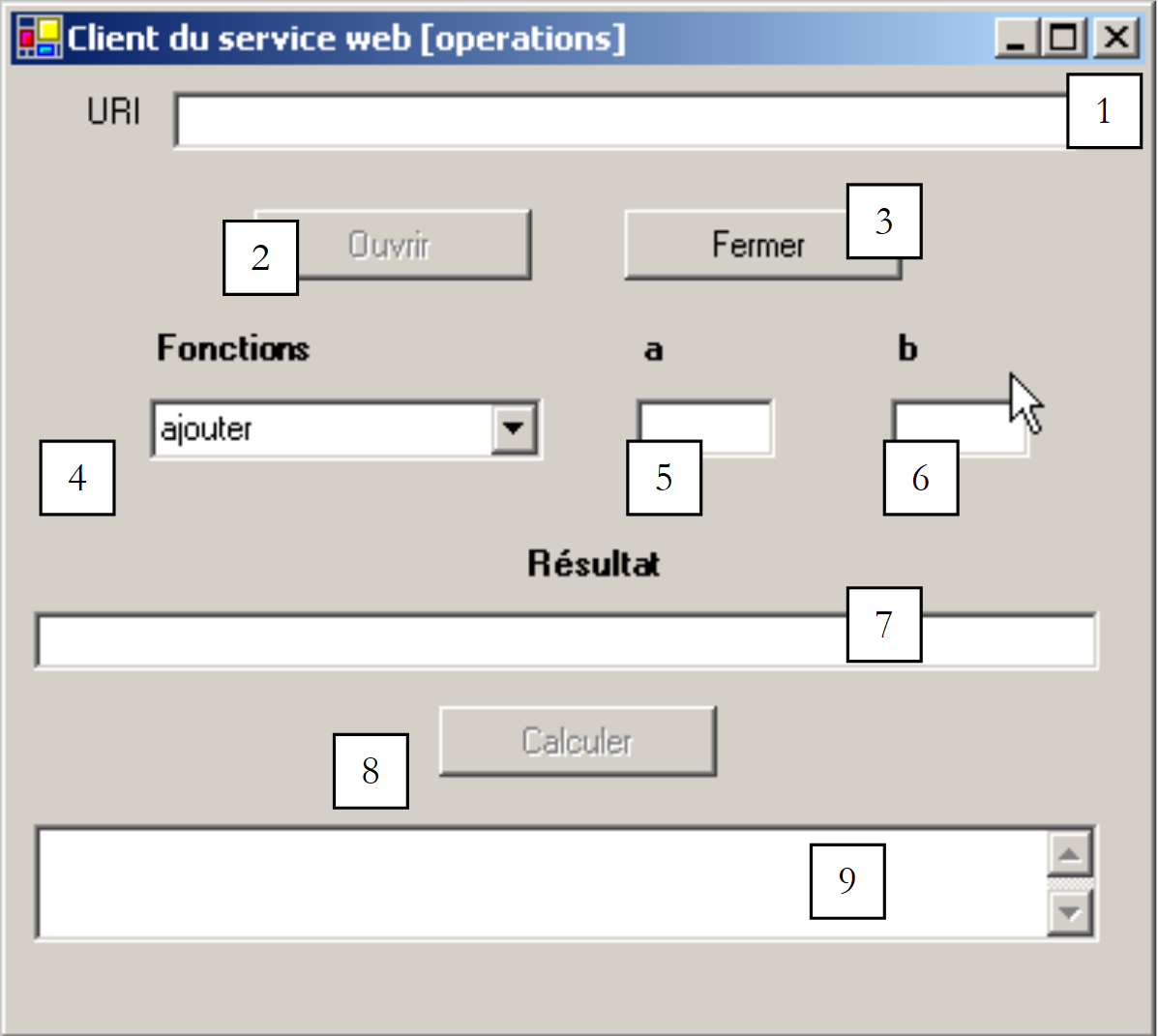 |
控件如下:
编号 | 类型 | 名称 | 角色 |
TextBox | txtURI | Web Operations 服务的 URI | |
按钮 | btnOuvrir | 建立与Web服务的连接 | |
按钮 | btnFermer | 关闭与 Web 服务的连接 | |
ComboBox | cmbFonctions | 运算符列表(加、减、乘、除) | |
TextBox | txtA | 函数的参数 | |
TextBox | txtB | 函数的b参数 | |
TextBox | txtRésultat | 函数(a,b)的结果 | |
按钮 | btnCalculer | 启动函数(a,b)的计算 | |
TextBox | txtErreur | 显示连接状态消息 |
存在以下操作限制:
- 只有当字段 txtURI 不为空且尚未打开连接时,按钮 btnOuvrir 才处于活动状态
- btnFermer 按钮仅在已建立与 Web 服务的连接时才处于活动状态
- 按钮 btnCalculer 仅在已建立连接且字段 txtA 和 txtB 不为空时才处于活动状态
- 字段 txtRésultat 和 txtErreur 的属性 ReadOnly 设置为 true
客户端首先通过按钮 [Ouvrir] 与 Web 服务建立连接:
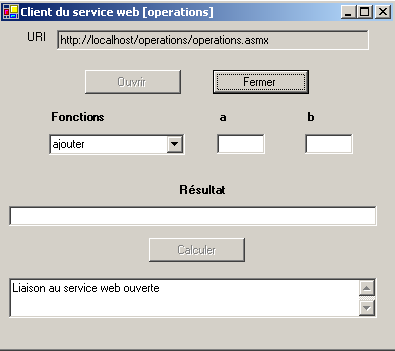
随后,用户可以选择一个函数以及 a 和 b 的值:
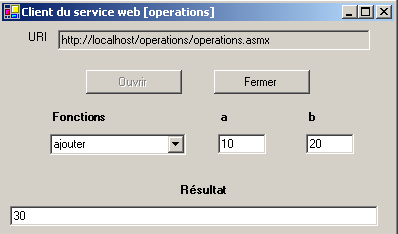
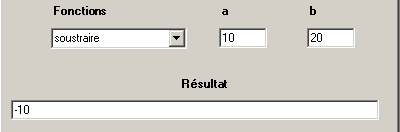
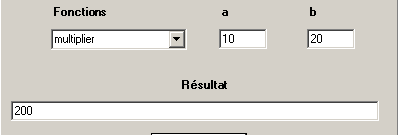
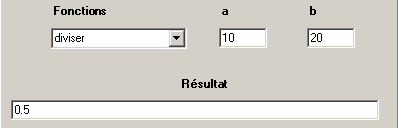
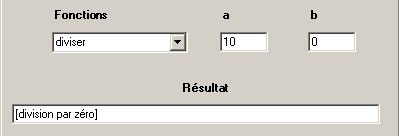
应用程序代码如下。我们省略了表单代码,因为此处与主题无关。
'命名空间
Imports System
Imports System.Windows.Forms
' 表单类
Public Class FormClientSOAP
Inherits System.Windows.Forms.Form
' 实例属性
Dim client As clientSOAP ' client SOAP du service web operations
#区域“由 Windows Form 设计器生成的代码”
Public Sub New()
MyBase.New()
'Windows Form 设计器需要此调用。
InitializeComponent()
' 其他初始化
myInit()
End Sub
'该方法调用窗体的 Dispose 方法以清理组件列表。
Protected Overloads Overrides Sub Dispose(ByVal disposing As Boolean)
....
End Sub
...
Private Sub InitializeComponent()
....
End Sub
#结束区域
Private Sub myInit()
' 表单初始化
cmbFonctions.SelectedIndex = 0
btnOuvrir.Enabled = False
btnFermer.Enabled = True
btnCalculer.Enabled = False
End Sub
Private Sub txtURI_TextChanged(ByVal sender As Object, ByVal e As System.EventArgs) Handles txtURI.TextChanged
' 输入字段内容已更改 - 设置“打开”按钮的状态
btnOuvrir.Enabled = txtURI.Text.Trim <> ""
End Sub
Private Sub btnOuvrir_Click(ByVal sender As Object, ByVal e As System.EventArgs) Handles btnOuvrir.Click
' 请求与Web服务建立连接
Try
' 创建类型为 [clientSOAP] 的对象
client = New clientSOAP(txtURI.Text.Trim, False)
' 按钮状态
btnOuvrir.Enabled = False
btnFermer.Enabled = True
' URI 无法再被修改
txtURI.ReadOnly = True
' 客户状态
txtErreur.Text = "Liaison au service web ouverte"
Catch ex As Exception
' 发生错误 - 显示该错误
txtErreur.Text = ex.Message
End Try
End Sub
Private Sub btnFermer_Click(ByVal sender As Object, ByVal e As System.EventArgs) Handles btnFermer.Click
' 关闭与 Web 服务的连接
client.Close()
' 按钮状态
btnOuvrir.Enabled = True
btnFermer.Enabled = False
' URI
txtURI.ReadOnly = False
' 客户状态
txtErreur.Text = "Liaison au service web fermée"
End Sub
Private Sub btnCalculer_Click(ByVal sender As Object, ByVal e As System.EventArgs) Handles btnCalculer.Click
' 计算函数 f(a,b)
' 清除上一次计算结果
txtRésultat.Text = ""
Try
txtRésultat.Text = client.executeFonction(cmbFonctions.Text, txtA.Text.Trim, txtB.Text.Trim)
Catch ex As Exception
' 发生网络错误
txtErreur.Text = ex.Message
' 关闭连接
btnFermer_Click(Nothing, Nothing)
End Try
End Sub
Private Sub txtA_TextChanged(ByVal sender As Object, ByVal e As System.EventArgs) Handles txtA.TextChanged
' A的值已更改
btnCalculer.Enabled = txtA.Text.Trim <> "" And txtB.Text.Trim <> ""
End Sub
Private Sub txtB_TextChanged(ByVal sender As Object, ByVal e As System.EventArgs) Handles txtB.TextChanged
' B的值已更改
txtA_TextChanged(Nothing, Nothing)
End Sub
' 主方法
Public Shared Sub main()
Application.Run(New FormClientSOAP)
End Sub
End Class
同样,类 clientSOAP 隐藏了应用程序的所有网络相关部分。该应用程序的构建方式如下:
- 包含类 clientSOAP 的程序集 clientSOAP.dll 已放置在项目文件夹中
- 图形界面 clientsoapgui.vb 通过 VS.NET 构建,随后在 DOS 窗口中编译:
dos>vbc /r:system.dll /r:system.windows.forms.dll /r:system.drawing.dll /r:clientSOAP.dll clientsoapgui.vb
dos>dir
04/03/2004 09:13 7 168 clientSOAP.dll
04/03/2004 16:44 9 866 clientsoapgui.vb
04/03/2004 16:44 11 264 clientsoapgui.exe
随后通过以下命令启动了图形界面:
10.8. 一个代理客户端
回顾一下刚才的操作。我们创建了一个中间类,用于封装客户端与Web服务之间的网络通信,具体结构如下图所示:
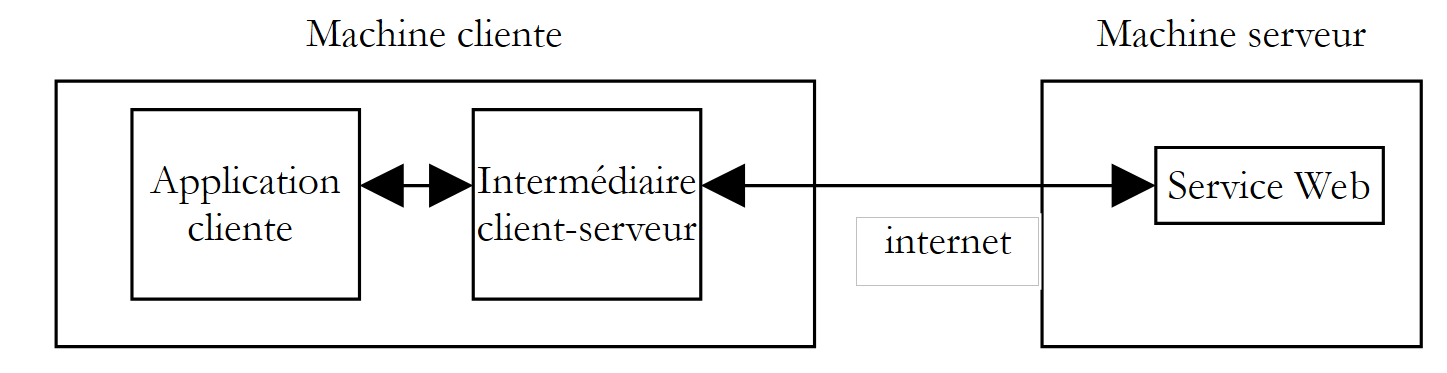 |
.NET 平台将这一逻辑进一步深化。一旦确定了要访问的 Web 服务,我们就能自动生成一个中间类,该类将作为中介来调用 Web 服务的各项功能,并隐藏所有网络层面的操作。我们称这个类为该 Web 服务的代理。
如何生成 Web 服务的代理类?Web 服务总是附带一个 XML 格式的描述文件。如果我们的 operations Web 服务的 URI 文件是 http://localhost/operations/operations.asmx, 其描述文件可通过 URL http://localhost/operations/operations.asmx?wsdl 访问,如下图所示:

这里有一个名为 XML 的文件,详细描述了 Web 服务的所有功能,包括每项功能的参数类型和数量以及结果类型。 该文件被称为该服务的 WSDL 文件,因为它使用了 WSDL(Web 服务描述语言)格式。基于此文件,可以使用 wsdl 工具生成一个代理类:
dos>wsdl http://localhost/operations/operations.asmx?wsdl /language=vb
Microsoft (R) Web Services Description Language Utility
[Microsoft (R) .NET Framework, Version 1.1.4322.573]
Copyright (C) Microsoft Corporation 1998-2002. All rights reserved.
Écriture du fichier 'D:\data\devel\vbnet\poly\chap9\clientproxy\operations.vb'.
dos>dir
04/03/2004 17:17 6 663 operations.vb
工具 wsdl 会生成一个名为 VB.NET(选项 /language=vb)的源文件,该文件以实现 Web 服务的类命名,此处为 operations。让我们查看部分生成的代码:
'------------------------------------------------------------------------------
' <自动生成>
' 此代码由工具生成。
' 运行时版本:1.1.4322.573
'
' 对该文件的更改可能会导致行为异常,并且如果
' 代码重新生成时,这些更改将会丢失。
' </autogenerated>
'------------------------------------------------------------------------------
Option Strict Off
Option Explicit On
Imports System
Imports System.ComponentModel
Imports System.Diagnostics
Imports System.Web.Services
Imports System.Web.Services.Protocols
Imports System.Xml.Serialization
'
'此源代码由 wsdl 自动生成, 版本=1.1.4322.573.
'
'<remarks/>
<System.Diagnostics.DebuggerStepThroughAttribute(), _
System.ComponentModel.DesignerCategoryAttribute("code"), _
System.Web.Services.WebServiceBindingAttribute(Name:="operationsSoap", [Namespace]:="st.istia.univ-angers.fr")> _
Public Class operations
Inherits System.Web.Services.Protocols.SoapHttpClientProtocol
'<remarks/>
Public Sub New()
MyBase.New
Me.Url = "http://localhost/operations/operations.asmx"
End Sub
'<备注/>
<System.Web.Services.Protocols.SoapDocumentMethodAttribute("st.istia.univ-angers.fr/ajouter", RequestNamespace:="st.istia.univ-angers.fr", ResponseNamespace:="st.istia.univ-angers.fr", Use:=System.Web.Services.Description.SoapBindingUse.Literal, ParameterStyle:=System.Web.Services.Protocols.SoapParameterStyle.Wrapped)> _
Public Function ajouter(ByVal a As Double, ByVal b As Double) As Double
Dim results() As Object = Me.Invoke("ajouter", New Object() {a, b})
Return CType(results(0),Double)
End Function
'<备注/>
Public Function Beginajouter(ByVal a As Double, ByVal b As Double, ByVal callback As System.AsyncCallback, ByVal asyncState As Object) As System.IAsyncResult
Return Me.BeginInvoke("ajouter", New Object() {a, b}, callback, asyncState)
End Function
'<备注/>
Public Function Endajouter(ByVal asyncResult As System.IAsyncResult) As Double
Dim results() As Object = Me.EndInvoke(asyncResult)
Return CType(results(0),Double)
End Function
....
乍一看,这段代码有些复杂。但我们无需理解其中的细节也能使用它。首先,让我们看看类的声明:
该类采用了其所构建的 Web 服务名称 operations。它继承自类 SoapHttpClientProtocol:
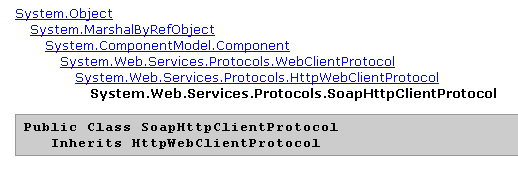
我们的代理类有一个唯一的构造函数:
该构造函数将代理关联的 Web 服务中的 URL 赋值给 url 属性。上文提到的 operations 类本身并未定义 url 属性。 该属性是从代理派生的类 System.Web.Services.Protocols.SoapHttpClientProtocol 继承而来的。现在让我们看看与方法 ajouter 相关的内容:
Public Function ajouter(ByVal a As Double, ByVal b As Double) As Double
Dim results() As Object = Me.Invoke("ajouter", New Object() {a, b})
Return CType(results(0),Double)
End Function
可以看出,它的签名与 Web 服务 operations 中的签名相同,该服务中对其定义如下:
      <WebMethod>  _
      Function ajouter(a As Double, b As Double) As Double
         Return a + b
End Function 'ajouter
该类与 Web 服务交互的方式在此处并未体现。这种交互完全由父类 System.Web.Services.Protocols.SoapHttpClientProtocol 负责。代理中仅包含使其区别于其他代理的内容:
- 关联Web服务的URL
- 关联服务的接口定义。
要使用 Web 服务 operations 的方法,客户端只需使用之前生成的代理类 operations。我们将该类编译为文件 assembly:
现在编写一个控制台客户端。该程序不带参数调用,并执行用户通过键盘输入的请求:
dos>testclientproxy
Tapez vos commandes au format : [ajouter|soustraire|multiplier|diviser|toutfaire] a b
ajouter 4 5
résultat=9
soustraire 9 8
résultat=1
multiplier 10 4
résultat=40
diviser 6 7
résultat=0,857142857142857
toutfaire 10 20
résultats=[30,-10,200,0,5]
diviser 5 0
résultat=+Infini
fin
客户代码如下:
' 命名空间
Imports System
Imports System.IO
Imports System.Text.RegularExpressions
Imports System.Collections
Imports Microsoft.VisualBasic
Public Module testClientProxy
' 交互式执行键盘输入的命令
' 并将它们发送至 operations Web 服务
Public Sub Main()
' 不再需要参数——因为Web服务的URL已在代理中硬编码
' 创建Web服务函数字典
Dim fonctions As String() = {"ajouter", "soustraire", "multiplier", "diviser", "toutfaire"}
Dim dicoFonctions As New Hashtable
Dim i As Integer
For i = 0 To fonctions.Length - 1
dicoFonctions.Add(fonctions(i), True)
Next i
' 创建一个 operations 代理对象
Dim myOperations As operations = Nothing
Try
myOperations = New operations
Catch ex As Exception
' 连接错误
erreur("L'erreur suivante s'est produite lors de la connexion au proxy dy service web : " + ex.Message, 2)
End Try
' 用户请求通过键盘输入
' 采用 a b 函数的形式——以 end 命令结束
Dim commande As String = Nothing ' commande tapée au clavier
Dim champs As String() = Nothing ' champs d'une ligne de commande
' 用户提示
Console.Out.WriteLine("Tapez vos commandes au format : [ajouter|soustraire|multiplier|diviser|toutfaire] a b" + ControlChars.Lf)
' 某些本地数据
Dim erreurCommande As Boolean
Dim fonction As String
Dim a, b As Double
' 键盘输入命令的循环
While True
' 起初没有错误
erreurCommande = False
' 读取命令
commande = Console.In.ReadLine().Trim().ToLower()
' 结束了吗?
If commande Is Nothing Or commande = "fin" Then
Exit While
End If
' 将命令拆分为字段
champs = Regex.Split(commande, "\s+")
Try
' 需要三个字段
If champs.Length <> 3 Then
Throw New Exception
End If
' 字段 0 必须是已识别的函数
fonction = champs(0)
If Not dicoFonctions.ContainsKey(fonction) Then
Throw New Exception
End If
' 字段 1 必须是有效的数字
a = Double.Parse(champs(1))
' 字段 2 必须是有效的数字
b = Double.Parse(champs(2))
Catch
' 命令无效
Console.Out.WriteLine("syntaxe : [ajouter|soustraire|multiplier|diviser] a b")
erreurCommande = True
End Try
' 向 Web 服务发起请求
If Not erreurCommande Then
Try
Dim résultat As Double
Dim résultats() As Double
If fonction = "ajouter" Then
résultat = myOperations.ajouter(a, b)
Console.Out.WriteLine(("résultat=" + résultat.ToString))
End If
If fonction = "soustraire" Then
résultat = myOperations.soustraire(a, b)
Console.Out.WriteLine(("résultat=" + résultat.ToString))
End If
If fonction = "multiplier" Then
résultat = myOperations.multiplier(a, b)
Console.Out.WriteLine(("résultat=" + résultat.ToString))
End If
If fonction = "diviser" Then
résultat = myOperations.diviser(a, b)
Console.Out.WriteLine(("résultat=" + résultat.ToString))
End If
If fonction = "toutfaire" Then
résultats = myOperations.toutfaire(a, b)
Console.Out.WriteLine(("résultats=[" + résultats(0).ToString + "," + résultats(1).ToString + "," + _
résultats(2).ToString + "," + résultats(3).ToString + "]"))
End If
Catch e As Exception
Console.Out.WriteLine(("L'erreur suivante s'est produite : " + e.Message))
End Try
End If
End While
End Sub
' 显示错误
Public Sub erreur(ByVal msg As String, ByVal exitCode As Integer)
' 显示错误
System.Console.Error.WriteLine(msg)
' 因错误终止
Environment.Exit(exitCode)
End Sub
End Module
我们仅关注代理类使用相关的代码。首先创建了一个代理对象 operations:
' 创建代理操作对象
Dim myOperations As operations = Nothing
Try
myOperations = New operations
Catch ex As Exception
' 连接错误
erreur("L'erreur suivante s'est produite lors de la connexion au proxy dy service web : " + ex.Message, 2)
End Try
通过键盘输入了函数 a 和 b 的代码行。基于这些信息,调用代理的相应方法:
' 向 Web 服务发送请求
If Not erreurCommande Then
Try
Dim résultat As Double
Dim résultats() As Double
If fonction = "ajouter" Then
résultat = myOperations.ajouter(a, b)
Console.Out.WriteLine(("résultat=" + résultat.ToString))
End If
If fonction = "soustraire" Then
résultat = myOperations.soustraire(a, b)
Console.Out.WriteLine(("résultat=" + résultat.ToString))
End If
If fonction = "multiplier" Then
résultat = myOperations.multiplier(a, b)
Console.Out.WriteLine(("résultat=" + résultat.ToString))
End If
If fonction = "diviser" Then
résultat = myOperations.diviser(a, b)
Console.Out.WriteLine(("résultat=" + résultat.ToString))
End If
If fonction = "toutfaire" Then
résultats = myOperations.toutfaire(a, b)
Console.Out.WriteLine(("résultats=[" + résultats(0).ToString + "," + résultats(1).ToString + "," + _
résultats(2).ToString + "," + résultats(3).ToString + "]"))
End If
Catch e As Exception
Console.Out.WriteLine(("L'erreur suivante s'est produite : " + e.Message))
End Try
这里首次处理了执行四项运算的操作 toutfaire。 此前一直忽略该操作,因为它会发送一个封装在 XML 封装中的数字数组,其处理复杂度高于其他函数的简单响应(XML),后者仅返回单一结果。 可以看出,借助代理类,使用 toutfaire 方法并不比使用其他方法更复杂。该应用程序已在 DOS 窗口中按以下方式编译:
dos>vbc /r:operations.dll /r:system.dll /r:system.web.services.dll testClientProxy.vb
dos>dir
04/03/2004  17:17                6 663 operations.vb
04/03/2004  17:24                7 680 operations.dll
04/03/2004 17:41 4 099 testClientProxy.vb
04/03/2004 17:41 5 632 testClientProxy.exe
10.9. 配置 Web 服务
Web 服务可能需要配置信息才能正确初始化。对于 IIS 服务器,这些信息可以保存在名为 web.config 的文件中,该文件位于与 Web 服务相同的文件夹内。 假设我们要创建一个需要两项信息才能初始化的 Web 服务:姓名和年龄。这两项信息可以以下列形式保存在 web.config 文件中:
<?xml version="1.0" encoding="UTF-8" ?>
<configuration>
  <appSettings>
    <add key="nom" value="tintin"/>
    <add key="age" value="27"/>
  </appSettings>
</configuration>
初始化参数位于信封 XML 中:
将通过以下语句声明一个名为 P 的初始化参数,其值为 V:
<add key="P" value="V"/>
Web 服务如何获取这些信息?当 IIS 加载 Web 服务时,它会检查同一文件夹中是否存在名为 web.config 的文件。如果存在,则读取该文件。参数 P 的值 V 可通过以下语句获取:
其中 ConfigurationSettings 是命名空间 System.Configuration 中的一个类。
让我们在以下 Web 服务上验证此技术:
<%@ WebService language="VB" class=personne %>

Imports System.Web.Services
imports System.Configuration

<WebService([Namespace] := "st.istia.univ-angers.fr")> _
Public Class personne
   Inherits WebService

   ' 属性
   Private nom As String
   Private age As Integer

   ' 构造函数
   Public Sub New()
      ' 初始化属性
      nom = ConfigurationSettings.AppSettings("nom")
      age = Integer.Parse(ConfigurationSettings.AppSettings("age"))
   End Sub

   <WebMethod>  _
   Function id() As String
      Return "[" + nom + "," + age.ToString + "]"
   End Function

End Class
Web 服务 personne 具有两个属性 nom 和 age,它们在其无参构造函数中,根据从服务 web.config 的配置文件 personne 中读取的值进行初始化HTMLP002666ZQX服务的配置文件web.config中读取的值进行初始化。该文件内容如下:
<configuration>
    <appSettings>
        <add key="nom" value="tintin"/>
        <add key="age" value="27"/>
    </appSettings>
</configuration>
此外,该 Web 服务还拥有一个无参数的 <WebMethod> ID,其作用仅是返回 nom 和 age 属性。 该服务已记录在源文件 personne.asmx 中,该文件与其配置文件一同存放在 c:\inetpub\wwwroot\st\personne 文件夹内:
将虚拟文件夹 IIS/config 映射到上述物理文件夹。运行 IIS,然后使用浏览器访问 personne 服务的 URL http://localhost/config/personne.asmx:
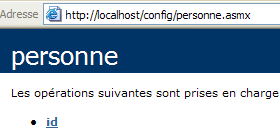
点击唯一方法 ID 的链接:
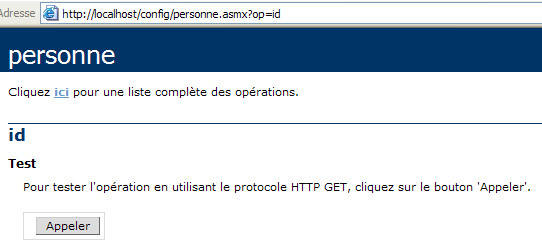
方法 id 没有参数。使用按钮 Appeler:
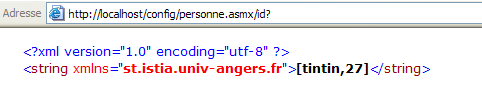
我们已成功获取了服务中 web.config 文件中的信息。
10.10. Web 服务 IMPOTS
现在我们继续使用大家已经熟悉的 IMPOTS 应用程序。上次我们使用它时,将其构建成了一个可通过互联网调用的远程服务器。现在我们将它改造成一个 Web 服务。
10.10.1. Web 服务
我们将基于在数据库章节中创建的 impôt 类,该类基于 ODBC 数据库中的信息构建:
' 选项
Option Strict On
Option Explicit On

' 命名空间
Imports System
Imports System.Data
Imports Microsoft.Data.Odbc
Imports System.Collections

Public Class impôt
    ' 计算税款所需的数据
    ' 来自外部来源
    Private limites(), coeffR(), coeffN() As Decimal

    ' 生成器
    Public Sub New(ByVal LIMITES() As Decimal, ByVal COEFFR() As Decimal, ByVal COEFFN() As Decimal)
        ' 验证这 3 个表是否大小相同
        Dim OK As Boolean = LIMITES.Length = COEFFR.Length And LIMITES.Length = COEFFN.Length
        If Not OK Then
            Throw New Exception("Les 3 tableaux fournis n'ont pas la même taille(" & LIMITES.Length & "," & COEFFR.Length & "," & COEFFN.Length & ")")
        End If
        ' 没问题
        Me.limites = LIMITES
        Me.coeffR = COEFFR
        Me.coeffN = COEFFN
    End Sub

    ' 构造函数 2
    Public Sub New(ByVal DSNimpots As String, ByVal Timpots As String, ByVal colLimites As String, ByVal colCoeffR As String, ByVal colCoeffN As String)
        ' 根据
        ' 来自数据库 ODBC DSNimpots 的 Timpots 表内容
        ' colLimites、colCoeffR、colCoeffN 是该表的三个列
        '可能会引发异常
        Dim connectString As String = "DSN=" + DSNimpots + ";"        ' chaîne de connexion à la base
        Dim impotsConn As OdbcConnection = Nothing        ' la connexion
        Dim sqlCommand As OdbcCommand = Nothing        ' la commande SQL
        ' 查询 SELECT
        Dim selectCommand As String = "select " + colLimites + "," + colCoeffR + "," + colCoeffN + " from " + Timpots
        ' 用于检索数据的表
        Dim tLimites As New ArrayList
        Dim tCoeffR As New ArrayList
        Dim tCoeffN As New ArrayList

        ' 尝试访问数据库
        impotsConn = New OdbcConnection(connectString)
        impotsConn.Open()
        ' 正在创建一个命令对象
        sqlCommand = New OdbcCommand(selectCommand, impotsConn)
        ' 正在执行查询
        Dim myReader As OdbcDataReader = sqlCommand.ExecuteReader()
        ' 对检索到的表进行处理
        While myReader.Read()
            ' 当前行数据被放入数组中
            tLimites.Add(myReader(colLimites))
            tCoeffR.Add(myReader(colCoeffR))
            tCoeffN.Add(myReader(colCoeffN))
        End While
        ' 释放资源
        myReader.Close()
        impotsConn.Close()

        ' 将动态数组转换为静态数组
        Me.limites = New Decimal(tLimites.Count) {}
        Me.coeffR = New Decimal(tLimites.Count) {}
        Me.coeffN = New Decimal(tLimites.Count) {}
        Dim i As Integer
        For i = 0 To tLimites.Count - 1
            limites(i) = Decimal.Parse(tLimites(i).ToString())
            coeffR(i) = Decimal.Parse(tCoeffR(i).ToString())
            coeffN(i) = Decimal.Parse(tCoeffN(i).ToString())
        Next i
    End Sub

    ' 计算税额
    Public Function calculer(ByVal marié As Boolean, ByVal nbEnfants As Integer, ByVal salaire As Integer) As Long
        ' 计算份额数
        Dim nbParts As Decimal
        If marié Then
            nbParts = CDec(nbEnfants) / 2 + 2
        Else
            nbParts = CDec(nbEnfants) / 2 + 1
        End If
        If nbEnfants >= 3 Then
            nbParts += 0.5D
        End If
        ' 应税收入及家庭商计算
        Dim revenu As Decimal = 0.72D * salaire
        Dim QF As Decimal = revenu / nbParts
        ' 税额计算
        limites((limites.Length - 1)) = QF + 1
        Dim i As Integer = 0
        While QF > limites(i)
            i += 1
        End While
        ' 返回结果
        Return CLng(revenu * coeffR(i) - nbParts * coeffN(i))
    End Function
End Class
在 Web 服务中,只能使用无参数的构造函数。因此,该类的构造函数将变为如下形式:
    ' 生成器
    Public Sub New()
        ' 根据
        ' 来自数据库 ODBC DSNimpots 的 Timpots 表内容
        ' colLimites、colCoeffR、colCoeffN 是该表的三个列
        '可能引发异常

        ' 用于获取服务的配置参数
        Dim DSNimpots As String = ConfigurationSettings.AppSettings("DSN")
        Dim Timpots As String = ConfigurationSettings.AppSettings("TABLE")
        Dim colLimites As String = ConfigurationSettings.AppSettings("COL_LIMITES")
        Dim colCoeffR As String = ConfigurationSettings.AppSettings("COL_COEFFR")
        Dim colCoeffN As String = ConfigurationSettings.AppSettings("COL_COEFFN")

        ' 调用数据库
        Dim connectString As String = "DSN=" + DSNimpots + ";"     ' chaîne de connexion à la base
前一个类构造函数的五个参数现在从服务的 web.config 文件中读取。源文件 impots.asmx 的代码如下。它保留了先前代码的大部分内容。我们仅将 Web 服务特有的代码部分用括号标出:
<%@ WebService language="VB" class=impots %>

' 创建税务Web服务
Imports System
Imports System.Data
Imports Microsoft.Data.Odbc
Imports System.Collections
Imports System.Configuration
Imports System.Web.Services

<WebService([Namespace]:="st.istia.univ-angers.fr")> _
Public Class impôt
    Inherits WebService

    ' 计算税款所需的数据
    ' 来自外部数据源
    Private limites(), coeffR(), coeffN() As Decimal
    Private OK As Boolean = False
    Private errMessage As String = ""


    ' 构造函数
    Public Sub New()
        ' 根据
        ' 来自数据库 ODBC DSNimpots 的 Timpots 表内容
        ' colLimites、colCoeffR、colCoeffN 是该表的三个列
        '可能引发异常

        ' 用于获取服务的配置参数
        Dim DSNimpots As String = ConfigurationSettings.AppSettings("DSN")
        Dim Timpots As String = ConfigurationSettings.AppSettings("TABLE")
        Dim colLimites As String = ConfigurationSettings.AppSettings("COL_LIMITES")
        Dim colCoeffR As String = ConfigurationSettings.AppSettings("COL_COEFFR")
        Dim colCoeffN As String = ConfigurationSettings.AppSettings("COL_COEFFN")

        ' 调用数据库
        Dim connectString As String = "DSN=" + DSNimpots + ";"     ' chaîne de connexion à la base
        Dim impotsConn As OdbcConnection = Nothing     ' la connexion
        Dim sqlCommand As OdbcCommand = Nothing     ' la commande SQL
        Dim myReader As OdbcDataReader     ' lecteur de données Odbc

        ' 查询 SELECT
        Dim selectCommand As String = "select " + colLimites + "," + colCoeffR + "," + colCoeffN + " from " + Timpots

        ' 表以检索数据
        Dim tLimites As New ArrayList
        Dim tCoeffR As New ArrayList
        Dim tCoeffN As New ArrayList

        ' 尝试访问数据库
        Try
            impotsConn = New OdbcConnection(connectString)
            impotsConn.Open()
            ' 创建命令对象
            sqlCommand = New OdbcCommand(selectCommand, impotsConn)
            ' 正在执行查询
            myReader = sqlCommand.ExecuteReader()
            ' 对检索到的表进行处理
            While myReader.Read()
                ' 将当前行数据放入数组
                tLimites.Add(myReader(colLimites))
                tCoeffR.Add(myReader(colCoeffR))
                tCoeffN.Add(myReader(colCoeffN))
            End While
            ' 释放资源
            myReader.Close()
            impotsConn.Close()

            ' 将动态数组转换为静态数组
            Me.limites = New Decimal(tLimites.Count) {}
            Me.coeffR = New Decimal(tLimites.Count) {}
            Me.coeffN = New Decimal(tLimites.Count) {}
            Dim i As Integer
            For i = 0 To tLimites.Count - 1
                limites(i) = Decimal.Parse(tLimites(i).ToString())
                coeffR(i) = Decimal.Parse(tCoeffR(i).ToString())
                coeffN(i) = Decimal.Parse(tCoeffN(i).ToString())
            Next i
            ' 完成
            OK = True
            errMessage = ""
        Catch ex As Exception
            ' 错误
            OK = False
            errMessage += "[" + ex.Message + "]"
        End Try
    End Sub

    ' 计算税款
    <WebMethod()> _
    Function calculer(ByVal marié As Boolean, ByVal nbEnfants As Integer, ByVal salaire As Integer) As Long
        ' 份额数量计算
        Dim nbParts As Decimal
        If marié Then
            nbParts = CDec(nbEnfants) / 2 + 2
        Else
            nbParts = CDec(nbEnfants) / 2 + 1
        End If
        If nbEnfants >= 3 Then
            nbParts += 0.5D
        End If
        ' 应税收入及家庭系数计算
        Dim revenu As Decimal = 0.72D * salaire
        Dim QF As Decimal = revenu / nbParts
        ' 税额计算
        limites((limites.Length - 1)) = QF + 1
        Dim i As Integer = 0
        While QF > limites(i)
            i += 1
        End While
        ' 返回结果
        Return CLng(revenu * coeffR(i) - nbParts * coeffN(i))
    End Function

    ' ID
    <WebMethod()> _
    Function id() As String
        ' 用于检查是否一切正常 OK
        Return "[" + OK + "," + errMessage + "]"
    End Function
End Class
下面解释一下对类 impots 进行的若干修改(除将其转换为 Web 服务所需的修改外):
- 在构造函数中读取数据库可能会失败。因此,我们在类中添加了两个属性及一个方法:
- 布尔值 OK 在成功读取数据库时设为 vrai,否则设为 faux
- 字符串 errMessage 包含一条错误信息,用于表示无法读取数据库。
- 无参数的 id 方法可用于获取这两个属性的值。
- 为处理可能出现的数据库访问错误,构造函数中涉及此访问的代码部分已被包裹在 try-catch 中。
服务配置文件 web.config 内容如下:
<configuration>
    <appSettings>
        <add key="DSN" value="mysql-impots" />
        <add key="TABLE" value="timpots" />
        <add key="COL_LIMITES" value="limites" />
        <add key="COL_COEFFR" value="coeffr" />
        <add key="COL_COEFFN" value="coeffn" />
    </appSettings>
</configuration>
在首次尝试加载服务 impots 时,编译器报告称无法找到指令中使用的命名空间 Microsoft.Data.Odbc:
查阅文档后
- 已在 web.config 中添加了一条编译指令,以说明应使用 Microsoft.Data.odbc 程序集
- 文件 microsoft.data.odbc.dll 的副本已被放置在项目中的 bin 文件夹内。当 Web 服务编译器搜索“程序集”时,会系统地扫描该文件夹。
虽然似乎还有其他解决方案,但本文未作深入探讨。因此,配置文件最终变为:
<configuration>
    <appSettings>
        <add key="DSN" value="mysql-impots" />
        <add key="TABLE" value="timpots" />
        <add key="COL_LIMITES" value="limites" />
        <add key="COL_COEFFR" value="coeffr" />
        <add key="COL_COEFFN" value="coeffn" />
    </appSettings>
    <system.web>
        <compilation>
            <assemblies>
                <add assembly="Microsoft.Data.Odbc" />
            </assemblies>
        </compilation>
    </system.web>
</configuration>
文件夹 impots\bin 的内容:
该服务及其配置文件已放置在 impots 中:
Web服务的物理文件夹已与IIS中的虚拟文件夹/impots关联。因此,该服务的页面如下:
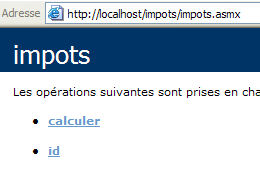
若点击链接 id:
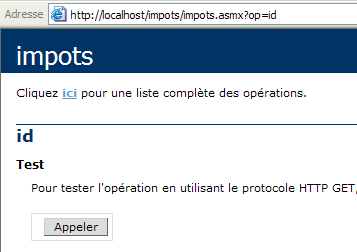
若使用按钮 Appeler:
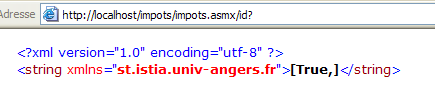
上一个结果显示了 OK(true)和 errMessage("")属性的值。在此示例中,数据库已成功加载。 但并非总是如此,因此我们添加了 id 方法以获取错误信息。 错误在于数据库名称 DSN 被定义为用户 DSN,而实际上应将其定义为系统 DSN。 在 32 位源管理器 ODBC 中,这一区分如下:
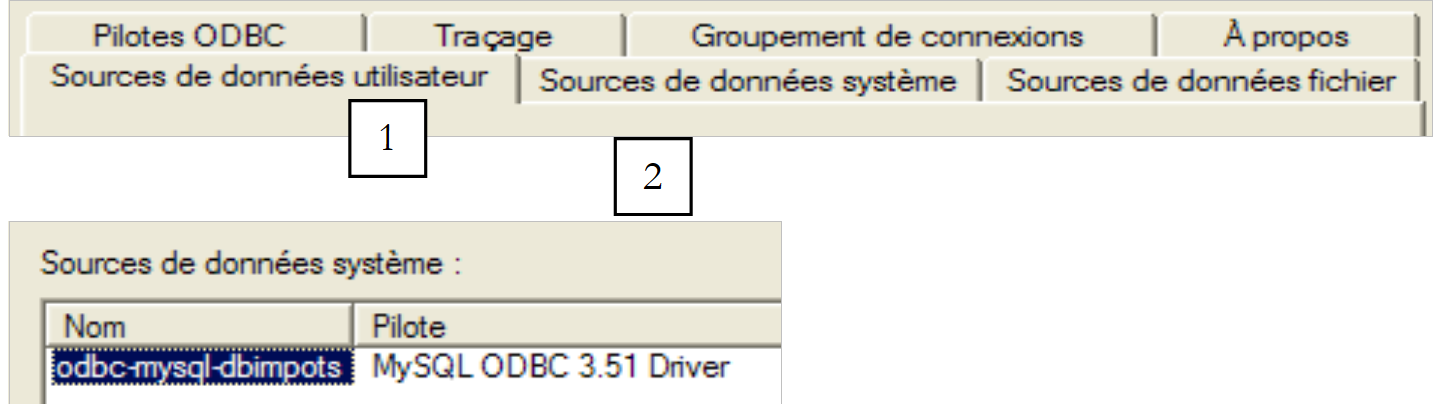 |
让我们回到服务页面:
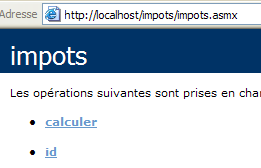
点击链接 calculer:
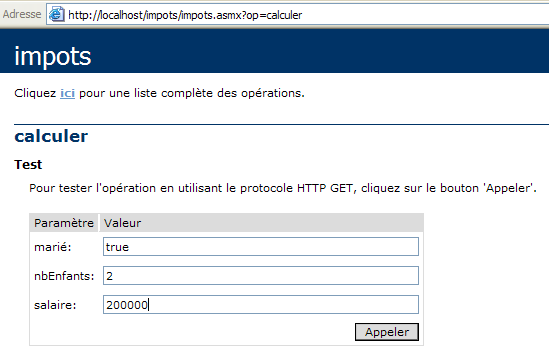
我们定义调用参数并执行该调用:

结果正确。
10.10.2. 生成 impots 服务的代理
现在我们已经有一个可运行的 Web 服务 impots,可以生成其代理类。需要说明的是,该代理类将被客户端应用程序用于透明地访问 Web 服务 impots。 首先使用工具 wsdl 生成代理类的源文件,然后将其编译为 DLL。
dos>wsdl /language=vb http://localhost/impots/impots.asmx
Microsoft (R) Web Services Description Language Utility
[Microsoft (R) .NET Framework, Version 1.1.4322.573]
Copyright (C) Microsoft Corporation 1998-2002. All rights reserved.

Écriture du fichier 'D:\data\serge\devel\vbnet\poly\chap9\impots\impots.vb'.

D:\data\serge\devel\vbnet\poly\chap9\impots>dir
09/03/2004  10:20    <REP>          bin
09/03/2004  10:58             4 651 impots.asmx
09/03/2004  11:05             3 364 impots.vb
09/03/2004  10:19               431 web.config

dos>vbc /t:library /r:system.dll /r:system.web.services.dll /r:system.xml.dll impots.vb
Compilateur Microsoft (R) Visual Basic .NET version 7.10.3052.4
pour Microsoft (R) .NET Framework version 1.1.4322.573
Copyright (C) Microsoft Corporation 1987-2002. Tous droits réservés.

dos>dir
09/03/2004  10:20    <REP>          bin
09/03/2004  10:58             4 651 impots.asmx
09/03/2004  11:09             5 120 impots.dll
09/03/2004  11:05             3 364 impots.vb
09/03/2004  10:19               431 web.config
10.10.3. 使用代理与客户端
在数据库章节中,我们创建了一个用于计算税款的控制台应用程序:
dos>dir
27/02/2004  16:56             5 120 impots.dll
27/02/2004  17:12             3 586 impots.vb
27/02/2004  17:08             6 144 testimpots.exe
27/02/2004  17:18             3 328 testimpots.vb

dos>testimpots
pg DSNimpots tabImpots colLimites colCoeffR colCoeffN

dos>testimpots odbc-mysql-dbimpots impots limites coeffr coeffn
Paramètres du calcul de l'impôt au format marié nbEnfants salaire ou rien pour arrêter :o 2 200000
impôt=22504 F
当时,程序 testimpots 使用的是经典类 impôt,该类包含在文件 impots.dll 中。程序 testimpots.vb 的代码如下:
Option Explicit On
Option Strict On

' 命名空间
Imports System
Imports Microsoft.VisualBasic

' 测试页面
Module testimpots
    Sub Main(ByVal arguments() As String)
        ' 交互式税款计算程序
        ' 用户通过键盘输入三项数据:已婚 nbEnfants 工资
        ' 程序随后显示应缴税额
        Const syntaxe1 As String = "pg DSNimpots tabImpots colLimites colCoeffR colCoeffN"
        Const syntaxe2 As String = "syntaxe : marié nbEnfants salaire" + ControlChars.Lf + "marié : o pour marié, n pour non marié" + ControlChars.Lf + "nbEnfants : nombre d'enfants" + ControlChars.Lf + "salaire : salaire annuel en F"

        ' 程序参数验证
        If arguments.Length <> 5 Then
            ' 错误信息
            Console.Error.WriteLine(syntaxe1)
            ' 结束
            Environment.Exit(1)
        End If        'if
        ' 获取参数
        Dim DSNimpots As String = arguments(0)
        Dim tabImpots As String = arguments(1)
        Dim colLimites As String = arguments(2)
        Dim colCoeffR As String = arguments(3)
        Dim colCoeffN As String = arguments(4)

        ' 创建税款对象
        Dim objImpôt As impôt = Nothing
        Try
            objImpôt = New impôt(DSNimpots, tabImpots, colLimites, colCoeffR, colCoeffN)
        Catch ex As Exception
            Console.Error.WriteLine(("L'erreur suivante s'est produite : " + ex.Message))
            Environment.Exit(2)
        End Try

        ' 无限循环
        While True
            ' 初始时无错误
            Dim erreur As Boolean = False

            ' 请求税费计算参数
            Console.Out.Write("Paramètres du calcul de l'impôt au format marié nbEnfants salaire ou rien pour arrêter :")
            Dim paramètres As String = Console.In.ReadLine().Trim()

            ' 需要做什么?
            If paramètres Is Nothing Or paramètres = "" Then
                Exit While
            End If

            ' 验证输入行中的参数数量
            Dim args As String() = paramètres.Split(Nothing)
            Dim nbParamètres As Integer = args.Length
            If nbParamètres <> 3 Then
                Console.Error.WriteLine(syntaxe2)
                erreur = True
            End If
            Dim marié As String
            Dim nbEnfants As Integer
            Dim salaire As Integer
            If Not erreur Then
                ' 正在验证参数的有效性
                ' 已婚
                marié = args(0).ToLower()
                If marié <> "o" And marié <> "n" Then
                    Console.Error.WriteLine((syntaxe2 + ControlChars.Lf + "Argument marié incorrect : tapez o ou n"))
                    erreur = True
                End If
                ' nbEnfants
                nbEnfants = 0
                Try
                    nbEnfants = Integer.Parse(args(1))
                    If nbEnfants < 0 Then
                        Throw New Exception
                    End If
                Catch
                    Console.Error.WriteLine(syntaxe2 + "\nArgument nbEnfants incorrect : tapez un entier positif ou nul")
                    erreur = True
                End Try
                ' 工资
                salaire = 0
                Try
                    salaire = Integer.Parse(args(2))
                    If salaire < 0 Then
                        Throw New Exception
                    End If
                Catch
                    Console.Error.WriteLine(syntaxe2 + "\nArgument salaire incorrect : tapez un entier positif ou nul")
                    erreur = True
                End Try
            End If
            If Not erreur Then
                ' 参数正确 - 计算税款
                Console.Out.WriteLine(("impôt=" & objImpôt.calculer(marié = "o", nbEnfants, salaire).ToString + " F"))
            End If
        End While
    End Sub
End Module
我们沿用该程序,使其通过之前创建的代理类 impots 调用 Web 服务 impots。为此,我们不得不对代码进行一些修改:
- 虽然原始的 impôt 类具有一个带五个参数的构造函数,但代理类 impots 的构造函数不带参数。正如我们所见,这五个参数现在已固定在 Web 服务的配置文件中。
- 因此,测试程序中不再需要将这五个参数作为参数传递
新代码如下:
Imports System
Imports Microsoft.VisualBasic

' 测试页面
Module testimpots

    Public Sub Main(ByVal arguments() As String)
        ' 交互式税款计算程序
        ' 用户通过键盘输入三项数据:已婚 nbEnfants 工资
        ' 程序随后显示应缴税额
        Const syntaxe2 As String = "syntaxe : marié nbEnfants salaire" + ControlChars.Lf + "marié : o pour marié, n pour non marié" + ControlChars.Lf + "nbEnfants : nombre d'enfants" + ControlChars.Lf + "salaire : salaire annuel en F"

        ' 创建一个税款对象
        Dim objImpôt As impôt = Nothing
        Try
            objImpôt = New impôt
        Catch ex As Exception
            Console.Error.WriteLine(("L'erreur suivante s'est produite : " + ex.Message))
            Environment.Exit(2)
        End Try

        ' 无限循环
        Dim erreur As Boolean
        While True
            ' 起初没有错误
            erreur = False
            ' 要求输入税款计算参数
            Console.Out.Write("Paramètres du calcul de l'impôt au format marié nbEnfants salaire ou rien pour arrêter :")
            Dim paramètres As String = Console.In.ReadLine().Trim()
            ' 需要采取什么措施?
            If paramètres Is Nothing Or paramètres = "" Then
                Exit While
            End If
            ' 验证输入行中的参数数量
            Dim args As String() = paramètres.Split(Nothing)
            Dim nbParamètres As Integer = args.Length
            If nbParamètres <> 3 Then
                Console.Error.WriteLine(syntaxe2)
                erreur = True
            End If
            If Not erreur Then
                ' 正在验证参数的有效性
                ' 已婚
                Dim marié As String = args(0).ToLower()
                If marié <> "o" And marié <> "n" Then
                    Console.Error.WriteLine((syntaxe2 + ControlChars.Lf + "Argument marié incorrect : tapez o ou n"))
                    erreur = True
                End If
                ' nbEnfants
                Dim nbEnfants As Integer = 0
                Try
                    nbEnfants = Integer.Parse(args(1))
                    If nbEnfants < 0 Then
                        Throw New Exception
                    End If
                Catch
                    Console.Error.WriteLine((syntaxe2 + ControlChars.Lf + "Argument nbEnfants incorrect : tapez un entier positif ou nul"))
                    erreur = True
                End Try
                ' 工资
                Dim salaire As Integer = 0
                Try
                    salaire = Integer.Parse(args(2))
                    If salaire < 0 Then
                        Throw New Exception
                    End If
                Catch
                    Console.Error.WriteLine((syntaxe2 + ControlChars.Lf + "Argument salaire incorrect : tapez un entier positif ou nul"))
                    erreur = True
                End Try
                ' 如果参数正确,则计算税款
                If Not erreur Then Console.Out.WriteLine(("impôt=" + objImpôt.calculer(marié = "o", nbEnfants, salaire).ToString + " F"))
            End If
        End While
    End Sub
End Module
代理类 impots.dll 和源代码 testimpots 位于同一文件夹中。
dos>dir
09/03/2004  11:28    <REP>          bin
09/03/2004  11:09             5 120 impots.dll
09/03/2004  11:34             3 396 testimpots.vb
09/03/2004  10:19               431 web.config
我们编译源代码 testimpots.vb:
dos>vbc /r:impots.dll /r:microsoft.visualbasic.dll /r:system.web.services.dll /r:system.dll testimpots.vb
dos>dir
09/03/2004  11:28    <REP>          bin
09/03/2004  11:09             5 120 impots.dll
09/03/2004  11:05             3 364 impots.vb
09/03/2004  11:35             5 632 testimpots.exe
09/03/2004  11:34             3 396 testimpots.vb
09/03/2004  10:19               431 web.config
然后执行它:
dos>testimpots
Paramètres du calcul de l'impôt au format marié nbEnfants salaire ou rien pour arrêter :o 2 200000
impôt=22504 F
我们确实得到了预期的结果。