6. 数据作用域
Web 应用程序同时为许多用户提供服务,而每个用户都会发出大量请求。因此,数据可以在三个层级上共享,称为其作用域:
- 应用程序作用域:数据在服务器的整个生命周期内由所有用户共享(例如医生列表);
- 请求作用域:数据只在一次请求期间存在(视图的模型);
- 客户端作用域:数据专属于某个用户,并且必须在一次请求到下一次请求之间保持(所选语言、已登录的用户)。
对于最后这种作用域,Web 应用程序长期以来使用会话:这是由服务器维护的、专属于每个浏览器的内存空间,通过标识 Cookie 找回([JSESSIONID] 在 [Java] 中)。[Spring MVC] 默认仍将它用于闪现属性(示例 20)。然而,案例研究没有使用它,本文档中的示例也没有使用它(少数示例中的闪现属性除外,例如示例 20 和 21):客户端数据由浏览器存储在 Cookie 中。服务器在同一用户的两次请求之间不存储任何内容:我们说它是无状态的 ([stateless])。例如,这使得在负载均衡器之后运行多个相同的服务器成为可能。代价是:Cookie 受用户控制,用户可以读取和修改它。因此,那里只存储非敏感数据,或者由服务器签名或加密的数据(这样服务器就能检测到任何修改):身份验证令牌就是这种情况(第 8 章)。
在服务器端,应用程序作用域和请求作用域对应于 Bean 的作用域,即 [Spring] 中的 Bean(参见示例 06)。Bean 由 [Spring] 创建和维护;其作用域指定创建多少个实例以及它们存活多久。其中有三种与我们相关:
注解 | 作用域 | 每个实例…… |
(无) | singleton | 在应用程序的整个生命周期内存在,由所有请求共享。这是默认作用域 |
[@RequestScope] | request | 每个 HTTP 请求一个,在该请求期间由所有请求它的对象共享 |
[@Scope("prototype")] | prototype | 每次从 [Spring] 请求该 Bean 时:两次请求,两个实例 |
这些对应于 [Singleton]、[Scoped]、和 [Transient] 这些 [ASP.NET Core] 的生命周期。此外还有会话作用域([@SessionScope]),我们不会使用它。
6.1. 示例 23:三种作用域
| 23-scopes/
├── src/main/java/example23/
│ ├── config/
│ │ ├── StartFilter.java
│ │ └── WebConfig.java
│ ├── controllers/
│ │ └── ScopesController.java
│ ├── services/
│ │ ├── CounterService.java
│ │ ├── ToolService.java
│ │ └── RequestService.java
│ └── Example23Application.java
├── src/main/resources/
│ ├── templates/scopes/
│ │ └── scopes.html
│ └── application.properties
└── pom.xml
|
文件 [pom.xml]、[application.properties]、[Example23Application.java]、以及 [WebConfig.java] (它只是提供来自 [Bootstrap] 的文件)与之前示例中的相同。
6.1.1. 三个 Bean
[services/CounterService.java] 文件:
| package example23.services;
import java.util.concurrent.atomic.AtomicInteger;
import org.springframework.stereotype.Service;
// 应用作用域(单例,Bean 的默认作用域):只有一个
// 实例,由所有用户的所有请求共享
@Service
public class CounterService {
// 多个请求可以同时运行:AtomicInteger
// 保证两个同时发生的递增不会丢失
private final AtomicInteger total = new AtomicInteger();
public int increment() {
return total.incrementAndGet();
}
}
|
- 第 9 行:一个 Bean,没有任何进一步的说明:它是单例。因此它的字段 [total] 属于应用程序作用域;
- 第 14–18 行:Web 服务器在多个线程([threads])上同时处理多个请求。如果两个请求同时执行 [total++] ,它们可能读到相同的值,从而丢失一次递增。[AtomicInteger] 是一个整数,[incrementAndGet] 方法在一次不可分割的操作中完成读取、加一和写回。单例 Bean 必须始终提防这类并发访问。
文件 [services/RequestService.java]:
| package example23.services;
import java.util.concurrent.atomic.AtomicInteger;
import org.springframework.stereotype.Service;
import org.springframework.web.context.annotation.RequestScope;
// 请求作用域(@RequestScope):每个 HTTP 请求一个新实例,
// 由在该请求期间请求它的所有对象共享
@Service
@RequestScope
public class RequestService {
// static:由所有实例共享的计数器
private static final AtomicInteger CREATED_INSTANCES = new AtomicInteger();
private final int number = CREATED_INSTANCES.incrementAndGet();
public int getNumber() {
return number;
}
}
|
- 第 11 行:注解 [@RequestScope] 赋予该 Bean “request” 作用域;
- 第 15 行:[static] 字段 属于类,而不属于某个实例;它由所有实例共享。它统计已创建的实例数量;
- 第 17 行:每个实例在创建时被分配一个编号。由于该 Bean 具有请求作用域,因此编号随每个请求而变化。
文件 [services/ToolService.java]:
| package example23.services;
import java.util.concurrent.atomic.AtomicInteger;
import org.springframework.context.annotation.Scope;
import org.springframework.stereotype.Service;
// 原型作用域:每次向 Spring 请求该 Bean 时都会创建一个新实例
@Service
@Scope("prototype")
public class ToolService {
private static final AtomicInteger CREATED_INSTANCES = new AtomicInteger();
private final int number = CREATED_INSTANCES.incrementAndGet();
public int getNumber() {
return number;
}
}
|
同样的实例计数器,用于作用域为 [prototype] 的 Bean(第 10 行)。
6.1.2. 请求作用域的数据:请求属性
文件 [config/StartFilter.java]:
| package example23.config;
import java.io.IOException;
import java.time.LocalTime;
import java.time.format.DateTimeFormatter;
import org.springframework.stereotype.Component;
import org.springframework.web.filter.OncePerRequestFilter;
import jakarta.servlet.FilterChain;
import jakarta.servlet.ServletException;
import jakarta.servlet.http.HttpServletRequest;
import jakarta.servlet.http.HttpServletResponse;
// 一个过滤器(参见第 7 章):对每个请求运行,早于 Spring MVC。
// 请求作用域:请求的属性随请求而生,随请求而灭。
@Component
public class StartFilter extends OncePerRequestFilter {
@Override
protected void doFilterInternal(HttpServletRequest request, HttpServletResponse response, FilterChain next)
throws ServletException, IOException {
request.setAttribute("start", LocalTime.now().format(DateTimeFormatter.ofPattern("HH:mm:ss.SSS")));
next.doFilter(request, response); // 我们把请求交给后续部分
}
}
|
- 第 17–18 行:一个 Servlet 过滤器 (下一章将详细介绍它们)。它在 [Spring MVC] 之前处理每个请求。[OncePerRequestFilter] 类来自 [Spring] ,确保每个请求只执行一次;[@Component] 注解就足以让 [Spring Boot] 将其添加到过滤器链中;
- 第 23 行:过滤器把请求的接收时间存储在一个请求属性中。[HttpServletRequest] 对象包含一个属性字典,它随请求一起创建和销毁:处理该请求的任何对象(过滤器、控制器、视图)都可以读取和写入它。这相当于 [HttpContext.Items] ,后者来自 [ASP.NET Core];
- 第 24 行:过滤器把控制权交给下一步:先是其他过滤器,然后是 [Spring MVC]。
6.1.3. 控制器
文件 [controllers/ScopesController.java]:
| package example23.controllers;
import org.springframework.beans.factory.ObjectProvider;
import org.springframework.http.HttpHeaders;
import org.springframework.http.ResponseCookie;
import org.springframework.stereotype.Controller;
import org.springframework.ui.Model;
import org.springframework.web.bind.annotation.CookieValue;
import org.springframework.web.bind.annotation.GetMapping;
import example23.services.CounterService;
import example23.services.ToolService;
import example23.services.RequestService;
import jakarta.servlet.http.HttpServletResponse;
// 控制器本身是单例 Bean:它只创建一次
@Controller
public class ScopesController {
private final CounterService counter;
// 注入到单例中的请求作用域 Bean:Spring 注入的是一个
// “代理”,它把每次调用转发给当前请求的实例
private final RequestService request;
// 注入到单例中的原型:随控制器一起只创建一次
private final ToolService injectedTool;
// 要每次获得一个新的原型:向 Spring 请求它
private final ObjectProvider<ToolService> tools;
public ScopesController(CounterService counter, RequestService request, ToolService injectedTool,
ObjectProvider<ToolService> tools) {
this.counter = counter;
this.request = request;
this.injectedTool = injectedTool;
this.tools = tools;
}
public record ScopesModel(int total, int instance, int injectedTool, int requestedTool, int myVisits) {
}
@GetMapping("/")
public String scopes(@CookieValue(name = "myVisits", required = false) String cookie,
HttpServletResponse response, Model model) {
// 客户端作用域:由浏览器保存的一份数据(Cookie),
// 每次请求都会回送给服务器
int myVisits = toInteger(cookie) + 1;
ResponseCookie newCookie = ResponseCookie.from("myVisits", String.valueOf(myVisits))
.path("/").httpOnly(true).sameSite("Lax").build();
response.addHeader(HttpHeaders.SET_COOKIE, newCookie.toString());
model.addAttribute("model", new ScopesModel(counter.increment(), request.getNumber(),
injectedTool.getNumber(), tools.getObject().getNumber(), myVisits));
return "scopes/scopes";
}
// "41" -> 41;null 或 "abc" -> 0
private static int toInteger(String text) {
try {
return Integer.parseInt(text);
} catch (NumberFormatException e) {
return 0;
}
}
}
|
我们来解释这段代码:
- 第 16–17 行:控制器本身就是一个 Bean,因此是单例:[Spring] 只创建它一次,并在那一刻一次性注入其依赖(第 29–35 行)。有意思的地方就在这里;
- 第 20 行:将单例注入到单例中——没有什么特别之处;
- 第 23 行:将请求作用域的 Bean 注入到单例中。启动时没有活动的请求,因此没有 [RequestService] 的实例可注入。于是,[Spring] 注入的是一个代理 (中间人):这个对象拥有与 [RequestService] 相同的方法,并把每次调用转发给当前请求的实例(按需创建)。这就是 [@RequestScope] 所做的事;
- 第 25 行:将 prototype Bean 注入到单例中。[Spring] 创建一个实例……仅此一个,就在注入时。控制器会在整个生命周期内保留它:这个字段永远不会改变。这就是 prototype 作用域的陷阱 :它只会在每次向 [Spring] 容器请求 时才创建新实例,而单例只会请求其依赖一次;
- 第 27 行:为了每次都获得新实例,控制器接收一个 [ObjectProvider<ToolService>]——这个对象能够在需要时请求一个 [ToolService] 实例,方式是向 [Spring] 调用其 [getObject()] 方法(第 50 行);
- 第 37 行:视图模型,一个 record(参见示例 03);
- 第 41 行:客户端作用域,一个存储在 Cookie 中的计数器。注解 [@CookieValue] 将参数与浏览器发送的 Cookie [myVisits] 关联;[required = false]:如果 Cookie 缺失(首次访问时),参数被设置为 [null] ;
- 第 45 行:浏览器计数器加 1。方法 [toInteger] (第 55–61 行)将 Cookie 文本转换为整数;[Integer.parseInt] 在文本不是整数时抛出 [NumberFormatException] ,文本等于 [null]时同样如此:计数器随后重置为 0;
- 第 46–48 行:用新值重新设置 Cookie。[ResponseCookie] 是 [Spring] 中的一个类,用于生成 [Set-Cookie] 标头的值:设置其特性(路径、[HttpOnly]、[SameSite])的方法被依次调用,然后 [build()] 创建该对象。该标头由 [response.addHeader] 添加到响应中;
- 第 49–50 行:将值传递给视图:应用程序计数器、当前请求的 [RequestService] 实例编号、被注入的 prototype 的实例编号、此刻请求的 prototype 的实例编号,以及客户端计数器。
6.1.4. 视图
文件 [templates/scopes/scopes.html]:
| <!doctype html>
<html lang="en" xmlns:th="http://www.thymeleaf.org">
<head>
<meta charset="utf-8">
<title>Scopes</title>
<link rel="stylesheet" href="/bootstrap/css/bootstrap.min.css">
</head>
<body>
<div class="container py-3" th:object="${model}">
<h1 class="h3">The scopes of data</h1>
<!--/* @requestService、@toolService:视图也向 Spring 请求这些 Bean,
during the SAME request */-->
<ul>
<li>application: [[*{total}]] visit(s) to the site, all browsers combined</li>
<li>request: instance no. [[*{instance}]] of RequestService (no. [[${@requestService.number}]] in the view),
request received at [[${start}]]</li>
<li>prototype: instance no. [[*{injectedTool}]] (injected into the controller),
no. [[*{requestedTool}]] (requested by the controller), no. [[${@toolService.number}]] (requested by the view)</li>
<li>client: [[*{myVisits}]] visit(s) from this browser</li>
</ul>
</div>
</body>
</html>
|
- 第 9 行:[th:object] (参见示例 18 和 19)引用对象 [model];子标签中的表达式 [*{...}] 引用它的属性:[*{total}] 等于 [${model.total}];
- 第 14 行:[[[...]]] 将表达式的值转义后插入文本中,就像 [th:text] 一样(参见示例 14);
- 第 15 行和第 18 行:表达式 [${@name}] 引用具有该名称的 Bean(参见示例 16)。视图则在与动作相同的请求期间向 [requestService] and [toolService] 请求 Bean,从 [Spring] 获取:这样我们就可以比较控制器和视图所收到的实例;
- 第 16 行:由过滤器设置的请求属性。对于 [Thymeleaf],请求属性与任何其他变量一样都是变量。
6.1.5. 运行
一个页面,位于 URLhttp://localhost:5000/:
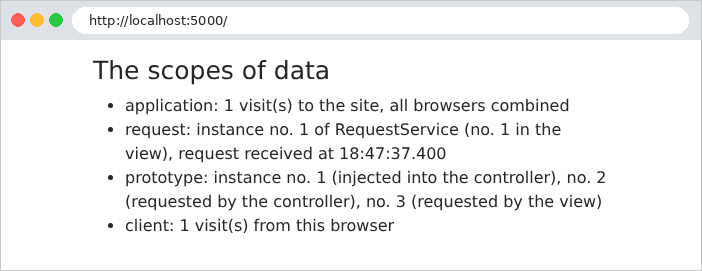
让我们使用 [curl] 和两个 Cookie 文件 [a.txt] 与 [b.txt] 来模拟两个浏览器:[-b] 选项发送文件中的 Cookie,而 [-c] 选项将服务器设置的 Cookie 保存到文件中。浏览器 A 发出两次请求,然后浏览器 B 发出一次,之后 A 又发出最后一次请求(服务器刚刚重启过):
| curl -c a.txt -b a.txt http://localhost:5000/
curl -c a.txt -b a.txt http://localhost:5000/
curl -c b.txt -b b.txt http://localhost:5000/
curl -c a.txt -b a.txt http://localhost:5000/
|
| browser A:
<li>application: 1 visit(s) to the site, all browsers combined</li>
<li>request: instance no. 1 of RequestService (no. 1 in the view),
request received at 18:47:52.627</li>
<li>prototype: instance no. 1 (injected into the controller),
no. 2 (requested by the controller), no. 3 (requested by the view)</li>
<li>client: 1 visit(s) from this browser</li>
browser A:
<li>application: 2 visit(s) to the site, all browsers combined</li>
<li>request: instance no. 2 of RequestService (no. 2 in the view),
request received at 18:47:53.015</li>
<li>prototype: instance no. 1 (injected into the controller),
no. 4 (requested by the controller), no. 5 (requested by the view)</li>
<li>client: 2 visit(s) from this browser</li>
browser B:
<li>application: 3 visit(s) to the site, all browsers combined</li>
<li>request: instance no. 3 of RequestService (no. 3 in the view),
request received at 18:47:53.099</li>
<li>prototype: instance no. 1 (injected into the controller),
no. 6 (requested by the controller), no. 7 (requested by the view)</li>
<li>client: 1 visit(s) from this browser</li>
browser A:
<li>application: 4 visit(s) to the site, all browsers combined</li>
<li>request: instance no. 4 of RequestService (no. 4 in the view),
request received at 18:47:53.133</li>
<li>prototype: instance no. 1 (injected into the controller),
no. 8 (requested by the controller), no. 9 (requested by the view)</li>
<li>client: 3 visit(s) from this browser</li>
|
(只显示列表中的项目)。我们观察到:
- 应用程序计数器统计所有访问:1、2、3、4;
- 每个请求都有自己的 [RequestService] 实例:1、2、3、4。在一次请求期间,控制器(通过其代理)和视图访问的是同一个实例;
- 注入到控制器中的 prototype 始终是 1 号:它在启动时随控制器一同创建,永远不会被替换。而请求的 prototype 每次都是新的:控制器和视图收到两个不同的实例,每个请求都会创建两个新的实例;
- 客户端计数器对每个浏览器是唯一的:A 有 3 次访问,B 有 1 次。
文件 [a.txt],由 [curl]维护,包含浏览器 A 的 Cookie:
| # Netscape HTTP Cookie File
# https://curl.se/docs/http-cookies.html
# This file was generated by libcurl! Edit at your own risk.
#HttpOnly_localhost FALSE / FALSE 0 myVisits 3
|
这个 Cookie 由客户端控制,客户端可以发送它想要的任何值:
| curl -i -b "myVisits=41" http://localhost:5000/
|
| HTTP/1.1 200
Set-Cookie: myVisits=42; Path=/; HttpOnly; SameSite=Lax
Content-Type: text/html;charset=UTF-8
<!doctype html>
<html lang="en">
<head>
<meta charset="utf-8">
<title>Scopes</title>
<link rel="stylesheet" href="/bootstrap/css/bootstrap.min.css">
</head>
<body>
<div class="container py-3">
<h1 class="h3">The scopes of data</h1>
<ul>
<li>application: 5 visit(s) to the site, all browsers combined</li>
<li>request: instance no. 5 of RequestService (no. 5 in the view),
request received at 18:47:53.178</li>
<li>prototype: instance no. 1 (injected into the controller),
no. 10 (requested by the controller), no. 11 (requested by the view)</li>
<li>client: 42 visit(s) from this browser</li>
</ul>
</div>
</body>
</html>
|
对于访问者计数器来说,这无关紧要。对于敏感数据(用户的身份、角色),服务器必须能够检测到篡改:第 8 章将展示如何做到这一点。
由这些作用域可以得出一条规则:Bean 不得持有作用域更短的 Bean。直接接收请求作用域实例的单例会无限期地持有它,远远超出该实例为之创建的那个请求。[ASP.NET Core] 在开发模式下于启动时检查这条规则,如果违反就拒绝启动。[Spring] 采取不同的做法:对于请求作用域,[@RequestScope] 会注入一个代理,使注入变得安全;对于 prototype 作用域,它不做任何检查,我们刚刚已经看到了结果:一个表现得像单例的“prototype”。当确实需要新实例时,要通过 [Spring] 借助 [ObjectProvider] 来请求。
在案例研究中:
作用域 | 数据 | 位置 |
应用程序 | 医生和客户列表、字典、待处理的验证码、尝试次数计数器 | 单例 Bean([ApplicationModel]、[Translator]、[CaptchaService]、[AttemptLimiterService]……);业务层和数据访问层同样是无状态的单例 |
请求 | 视图模型、已登录的用户 | 模型([Model]),由 [CommonModel] 补充;来自 [Spring Security] 的安全上下文 |
客户端 | 身份验证令牌、语言、闪现消息 | Cookie |