9. SGBD 的使用MySQL
 |
9.1. 安装 MySQLdb 模块
我们将编写使用数据库的脚本 MySQL:
 |
用于管理数据库的 Python 函数 MySQL 封装在一个名为 MySQLdb 的模块中,该模块未包含在 Python 的初始发行版中。因此,需要下载并安装该模块。以下是一种操作方法:
 |
- 在程序菜单中,选择 [1] 作为 Python 包管理器。此时将弹出命令窗口 [2]。
在软件包中搜索关键词 mysql:
C:\Documents and Settings\st>pypm search mysql
Get: [pypm-be.activestate.com] :repository-index:
Get: [pypm-free.activestate.com] :repository-index:
autosync: synced 2 repositories
  chartio                    Setup wizard and connection client for connecting
  chartio-setup              Setup wizard and connection client for connecting
  cns.recipe.zmysqlda        Recipe for installing ZMySQLDA
  collective.recipe.zmysqlda Recipe for installing ZMySQLDA
  django-mysql-manager       DESCRIPTION_DESCRIPTION_DESCRIPTION
  jaraco.mysql               MySQLDB-compatible MySQL wrapper by Jason R. Coomb
  lovely.testlayers          mysql, postgres nginx, memcached cassandra test la
  mtstat-mysql               MySQL Plugins for mtstat
  mysql-autodoc              Generate HTML documentation from a mysql database
  mysql-python               Python interface to MySQL
  mysqldbda                  MySQL Database adapter
  products.zmysqlda          MySQL Zope2 adapter.
  pymysql                    Pure Python MySQL Driver
  pymysql-sa                 PyMySQL dialect for SQLAlchemy.
  pymysql3                   Pure Python MySQL Driver
  sa-mysql-dt                Alternative implementation of DateTime column for
  schemaobject               Iterate over a MySQL database schema as a Python o
  schemasync                 A MySQL Schema Synchronization Utility
  simplestore                A datastore layer built on top of MySQL in Python.
  sqlbean                    A auto maping ORM for MYSQL and can bind with memc
  sqlwitch                   sqlwitch offers idiomatic SQL generation on top of
  tiddlywebplugins.mysql     MySQL-based store for tiddlyweb
  tiddlywebplugins.mysql2    MySQL-based store for tiddlyweb
zest.recipe.mysql          A Buildout recipe to setup a MySQL database.
系统列出了所有名称或描述中包含关键词 mysql 的模块。我们需要的是第 14 行中的 [mysql-python]。安装它:
C:\Documents and Settings\st>pypm install mysql-python
The following packages will be installed into "%APPDATA%\Python" (2.7):
 mysql-python-1.2.3
Hit: [pypm-free.activestate.com] mysql-python 1.2.3
Installing mysql-python-1.2.3

C:\Documents and Settings\st>echo %APPDATA%
C:\Documents and Settings\st\Application Data
- 第 5 行:mysql-python-1.2.3 软件包已安装在“%APPDATA%\Python”文件夹中,其中 APPDATA 是第 8 行指定的文件夹。
如果出现以下情况,此操作可能会失败:
- 使用的 Python 解释器是 64 位版本;
- 路径 %APPDATA% 中包含带重音的字符。
9.2. 安装 MySQL
安装 SGBD MySQL 有多种方法。这里我们使用了 WampServer,这是一个包含多款软件的软件包:
- Apache Web 服务器。我们将利用它来编写 Python Web 脚本;
- SGBD MySQL;
- 脚本语言 PHP;
- 一个用 PHP 编写的 SGBD MySQL 管理工具:phpMyAdmin。
WampServer 可于 2011 年 6 月从以下地址下载:
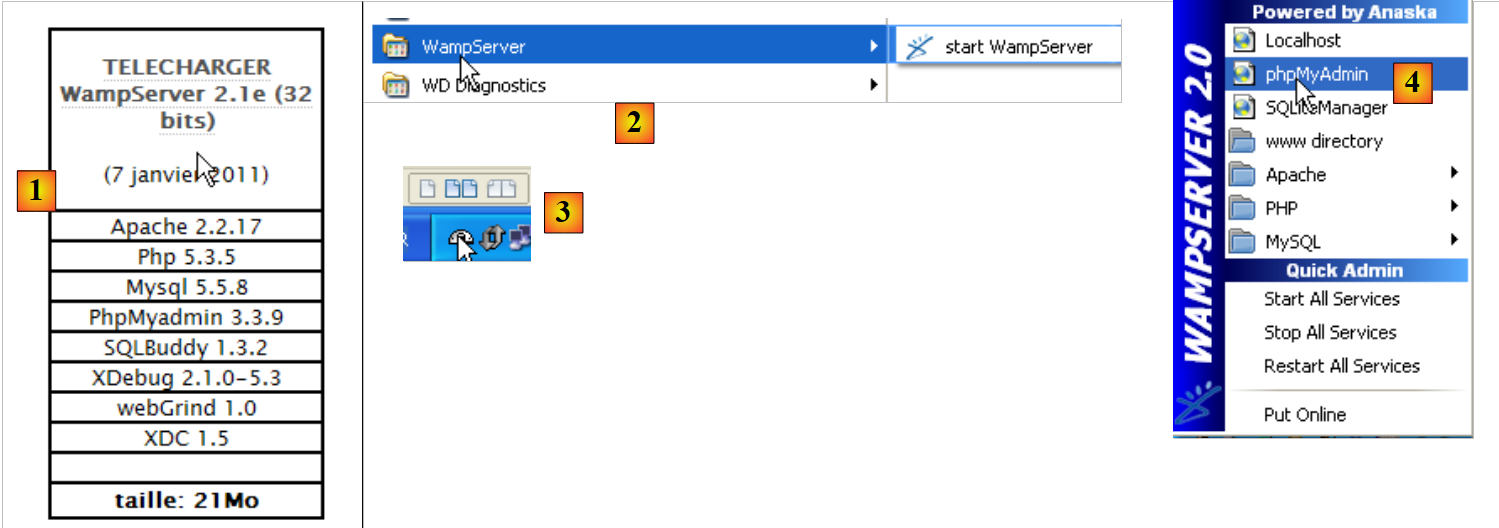 |
- 在 [1] 中,请下载正确的 WampServer 版本;
- 对于 [2],安装完成后请直接运行。这将启动 Apache Web 服务器以及 SGBD 和 MySQL;
- 在 [3] 中,启动后,可通过任务栏右下角的 [3] 图标管理 WampServer;
- 在 [4] 中,启动 MySQL 的管理工具。
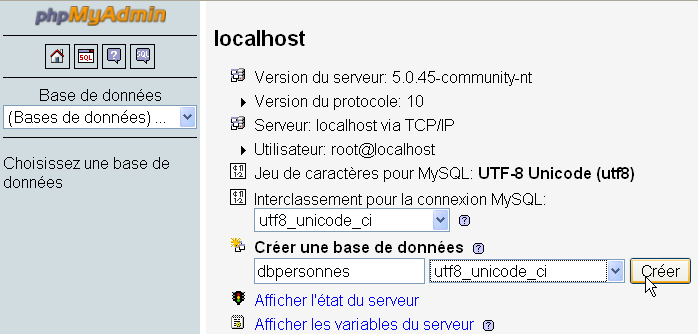
创建 [dbpersonnes] 数据库:
创建用户 [admpersonnes],密码为 [nobody]:
 | 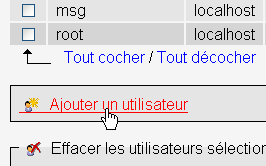 |
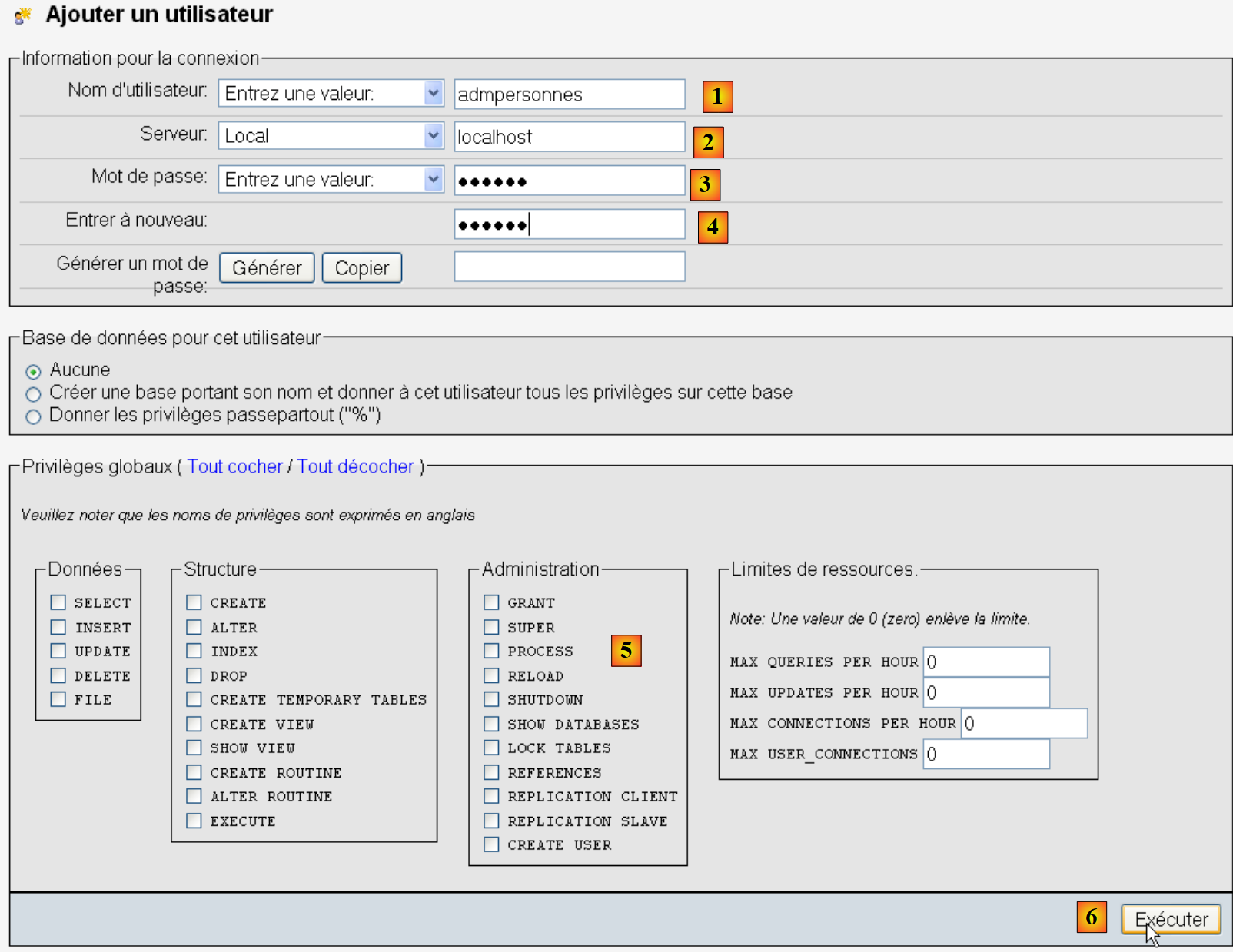 |
- 将用户名改为 [1];
- [2] 代表 SGBD 这台机器,用户在此机器上被授予权限;
- 在 [3] 中,其密码为 [nobody];
- [4],同上;
- 在 [5] 中,未向该用户授予任何权限;
- 在 [6] 中,创建该用户。
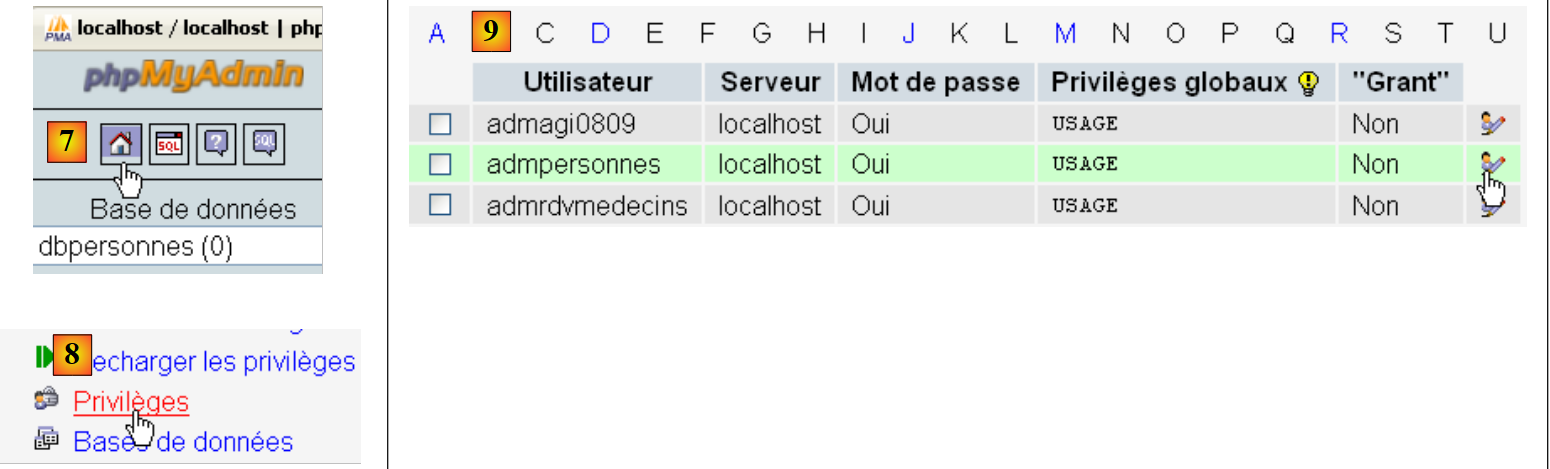 |
- 在 [7] 中,返回 phpMyAdmin 的首页;
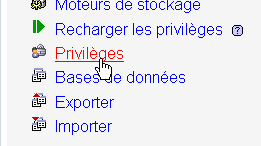
- 在 [8] 中,使用该页面的 [Privileges] 链接,前往修改用户 [admpersonnes] 和 [9] 的设置。
 |
- 在 [10] 中,指定要授予用户 [admpersonnes] 对数据库 [dbpersonnes] 的权限;
- 在 [11] 中,确认该选择。
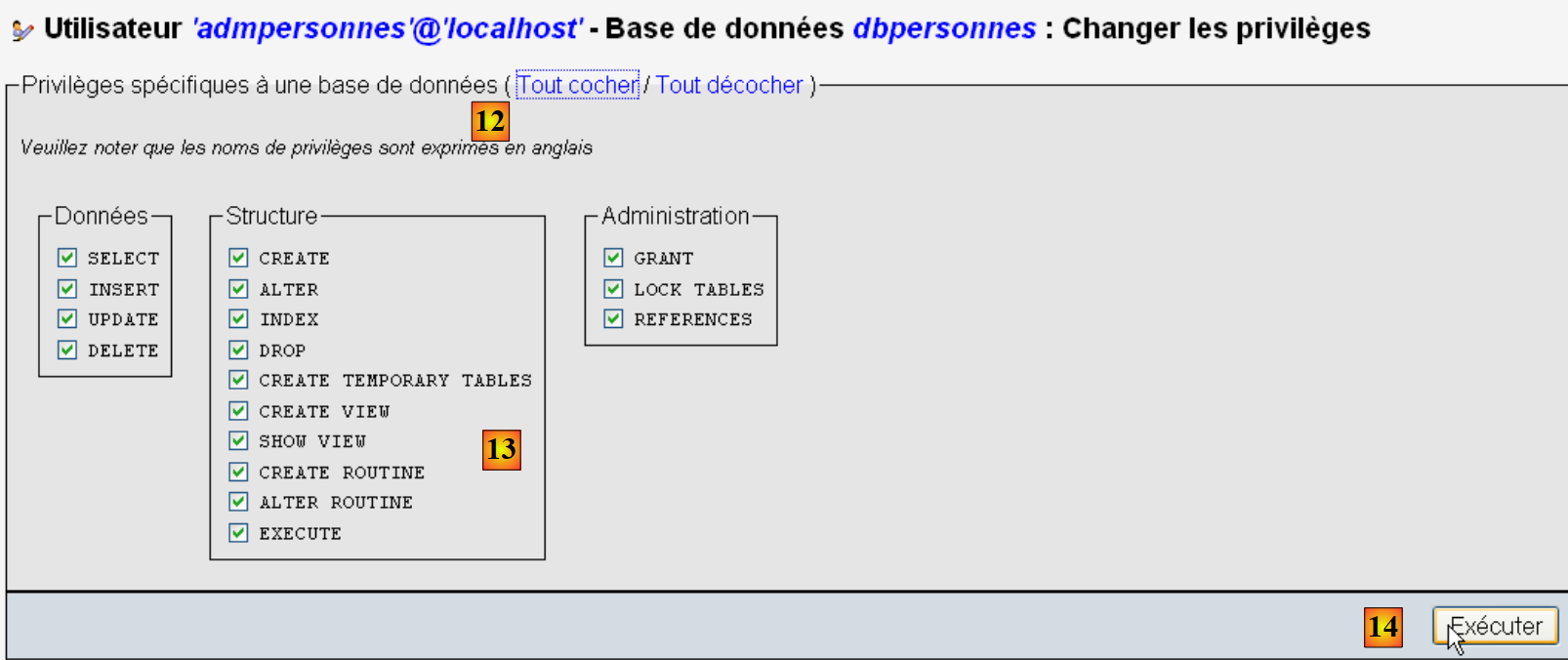 |
- 通过链接 [12] [Tout cocher], 授予用户 [admpersonnes] 对数据库 [dbpersonnes] [13] 的所有权限;
- 在 [14] 中进行确认。
现在我们有:
- 数据库 MySQL 和 [dbpersonnes];
- 一个用户 [admpersonnes / nobody],该用户对该数据库拥有所有权限。
我们将编写 Python 脚本来利用该数据库。
9.3. 连接数据库 MySQL - 1
# 导入模块 MySQLdb
import sys
sys.path.append("D:\Programs\ActivePython\site-packages")
import MySQLdb

# 连接数据库 MySQL
....
注:
- 第 2-4 行:包含 SGBD 和 MySQL 操作的脚本必须导入 MySQLdb 模块。请注意,我们已将该模块安装在 [%APPDATA%\Python] 文件夹中。 当 Python 代码调用模块时,系统会自动遍历 [%APPDATA%\Python] 文件夹。实际上,系统会遍历 sys.path 中声明的所有文件夹。以下是一个显示这些文件夹的示例:
# -*- coding=utf-8 -*-

import sys

# 显示文件夹 sys.path
for dossier in sys.path:
    print dossier
屏幕显示如下:
第 8 行显示的是 [site-packages] 文件夹,MySQLdb 最初安装于此。 我们将文件夹 [site-packages] 移至此处,该文件夹是实用程序 pypm 安装 Python 模块的位置。若要添加一个 Python 将用于搜索模块的新文件夹,需将其添加到列表 sys.path 中:
# 导入模块 MySQLdb
import sys
sys.path.append("D:\Programs\ActivePython\site-packages")
import MySQLdb

# 连接数据库 MySQL
....
在第 3 行,添加已移动 MySQLdb 模块的文件夹。
示例的完整代码如下:
# 导入模块 MySQLdb
import sys
sys.path.append("D:\Programs\ActivePython\site-packages")
import MySQLdb

# 连接数据库 MySQL
# 用户身份为 (admpersonnes,nobody)
user="admpersonnes"
pwd="nobody"
host="localhost"
connexion=None
try:
    print "connexion..."
    # 登录
    connexion=MySQLdb.connect(host=host,user=user,passwd=pwd)
    # 跟踪
    print "Connexion a MySQL reussie sous l'identite host={0},user={1},passwd={2}".format(host,user,pwd)
except MySQLdb.OperationalError,message:
    print "Erreur : {0}".format(message)
finally:
    try:
        connexion.close()
    except:
        pass
- 第 8-11 行:脚本将(第 15 行)将用户 [admpersonnes / nobody] 连接到 SGBD MySQL 机器上的 [localhost]。 不会将其连接到特定的数据库;
- 第12-24行:连接可能失败。因此,该操作被封装在try/except/finally语句块中;
- 第15行:模块MySQLdb中的方法connect支持多种命名参数:
- user:连接所有者用户 [admpersonnes];
- pwd:用户 [nobody] 的密码;
- host:MySQL [localhost] 数据库管理系统所在的机器;
- db:要连接的数据库。可选。
- 第 18 行:若抛出异常,其类型为 [ MySQLdb.OperationalError],相关错误信息将存储在变量 [message] 中;
- 第20-23行:在[finally]子句中,关闭连接。若发生异常,则进行捕获(第23行),但不进行任何处理(第24行)。
connexion...
Connexion a MySQL reussie sous l'identite host=localhost,user=admpersonnes,passwd=nobody
9.4. 连接到数据库 MySQL - 2
# 导入模块 MySQLdb
import sys
sys.path.append("D:\Programs\ActivePython\site-packages")
import MySQLdb

# ---------------------------------------------------------------------------------
def testeConnexion(hote,login,pwd):
    # 连接并断开(登录名、密码)主机服务器上的 MySQL 数据库管理系统
    # 触发异常 MySQLdb.operationalError
    # 连接
    connexion=MySQLdb.connect(host=hote,user=login,passwd=pwd)
    print "Connexion a MySQL reussie sous l'identite (%s,%s,%s)" % (hote,login,passwd)
    # 关闭连接
    connexion.close()
    print "Fermeture connexion MySQL reussie\n"


# ---------------------------------------------- 主程序
# 连接到数据库 MySQL
# 用户身份
user="admpersonnes"
passwd="nobody"
host="localhost"
# 连接测试
try:
    testeConnexion(host,user,passwd)
except MySQLdb.OperationalError,message:
    print message
# 使用不存在的用户
try:
    testeConnexion(host,"xx","xx")
except MySQLdb.OperationalError,message:
    print message
注:
- 第 7-15 行:一个函数,尝试将用户连接到 SGBD MySQL,然后断开连接。显示结果;
- 第 18-34 行:主程序——调用两次 testeConnexion 方法,并显示可能出现的异常。
9.5. 创建表 MySQL
既然已经知道如何与 SGBD MySQL 建立连接,我们就开始通过该连接发出 SQL 命令。 为此,我们将连接到已创建的数据库 [dbpersonnes],并利用该连接在数据库中创建一个表。
# 导入模块 MySQLdb
import sys
sys.path.append("D:\Programs\ActivePython\site-packages")
import MySQLdb

# ---------------------------------------------------------------------------------
def executeSQL(connexion,update):
    # 在连接上执行更新查询
    # 请求游标
    curseur=connexion.cursor()
    # 在连接上执行 SQL 查询
    try:
        curseur.execute(update)
        connexion.commit()
    except Exception, erreur:
        connexion.rollback()
        raise
    finally:
        curseur.close()

# ---------------------------------------------- main
# 连接到数据库 MySQL
# 用户身份
ID="admpersonnes"
PWD="nobody"
# DBMS 主机
HOTE="localhost"
# 数据库标识
BASE="dbpersonnes"
# 连接
try:
    connexion=MySQLdb.connect(host=HOTE,user=ID,passwd=PWD,db=BASE)
except MySQLdb.OperationalError,message:
    print message
    sys.exit()

# 如果存在“people”表,则将其删除
# 若该表不存在,则会发生错误
# 忽略该错误
requete="drop table personnes"
try:
    executeSQL(connexion,requete)
except:
    pass
# 创建“personnes”表
requete="create table personnes (prenom varchar(30) NOT NULL, nom varchar(30) NOT NULL, age integer NOT NULL, primary key(nom,prenom))"
try:
    executeSQL(connexion,requete)
except MySQLdb.OperationalError,message:
    print message
    sys.exit()
# 注销并退出
try:
    connexion.close()
except MySQLdb.OperationalError,message:
    print message
sys.exit()
注:
- 第 7 行:函数 executeSQL 在已打开的连接上执行查询 SQL;
- 第 10 行:连接上的 SQL 操作是通过一个名为游标的特定对象进行的;
- 第 10 行:获取游标;
- 第 13 行:执行 SQL 查询;
- 第 14 行:当前事务已提交;
- 第 15 行:若发生异常,错误消息将存储在错误变量中;
- 第 16 行:当前事务被回滚;
- 第 17 行:重新抛出异常;
- 第 19 行:无论是否发生错误,都关闭游标。这将释放与其关联的资源。
create table personnes (prenom varchar(30) NOT NULL, nom varchar(30) NOT NULL, age integer NOT NULL, primary key(nom,prenom)) : requete reussie
使用 phpMyAdmin 进行验证:
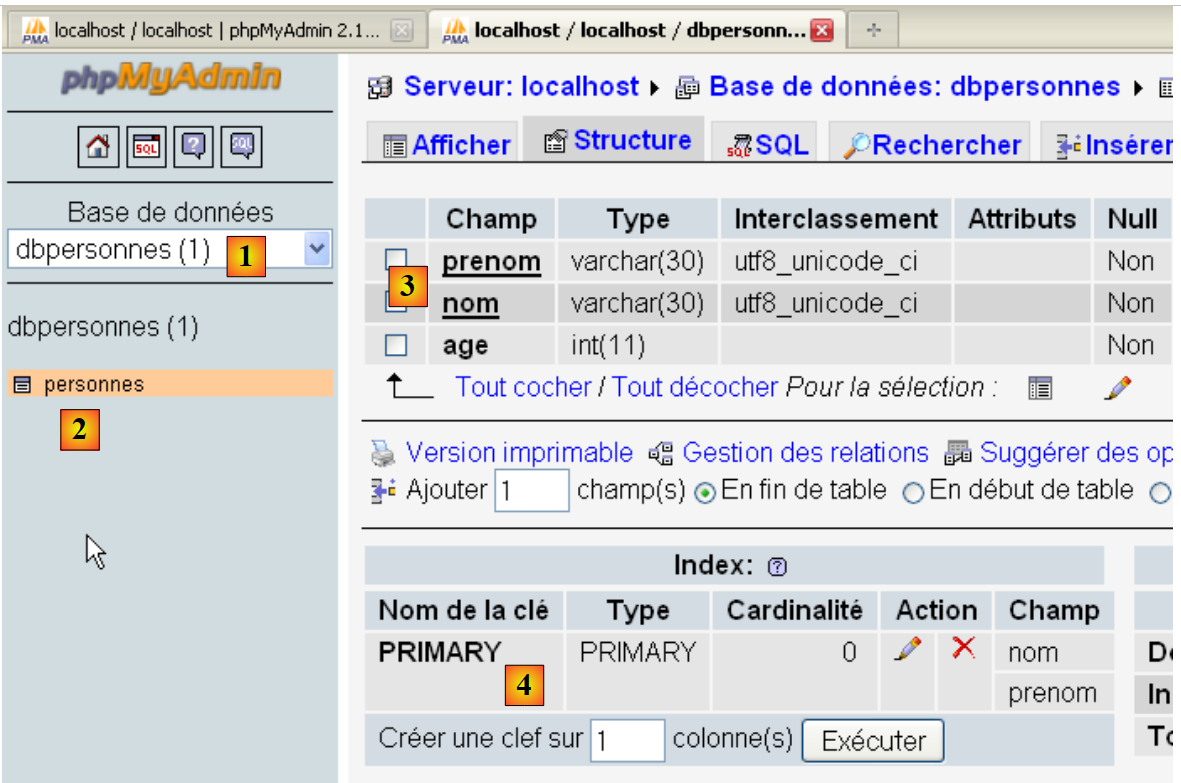 |
- 数据库 [dbpersonnes] [1] 包含表 [personnes] [2],该表具有结构 [3] 及主键 [4]。
9.6. 填充表 [personnes]
在之前创建了表 [personnes] 之后,现在我们对其进行数据填充。
# 导入模块 MySQLdb
import sys
sys.path.append("D:\Programs\ActivePython\site-packages")
import MySQLdb
# 其他模块
import re

# ---------------------------------------------------------------------------------
def executerCommandes(HOTE,ID,PWD,BASE,SQL,suivi=False,arret=True):
    # 使用连接(HOTE,ID,PWD,BASE)
    # 在此连接上执行文本文件 SQL 中包含的命令 SQL
    # 该文件是一个命令文件,其中每行包含一个待执行的 SQL 命令
    # 如果跟踪=True,则每次执行 SQL 命令时,都会显示其成功或失败的状态
    # 如果停止=True,则函数在遇到第一个错误时停止;否则执行所有 SQL 命令
    # 该函数返回一个列表(错误数量、错误1、错误2、...)

    # 检查文件是否存在 SQL
    data=None
    try:
        data=open(SQL,"r")
    except:
        return [1,"Le fichier %s n'existe pas" % (SQL)]

    # 连接
    try:
        connexion=MySQLdb.connect(host=HOTE,user=ID,passwd=PWD,db=BASE)
    except MySQLdb.OperationalError,erreur:
        return [1,"Erreur lors de la connexion a MySQL sous l'identite (%s,%s,%s,%s) : %s" % (HOTE, ID, PWD, BASE, erreur)]

    # 请求游标
    curseur=connexion.cursor()
    # 执行文件 SQL 中包含的 SQL 查询
    # 将其放入数组
    requetes=data.readlines()
    # 逐个执行——起初没有错误
    erreurs=[0]
    for i in range(len(requetes)):
        # 保存当前请求
        requete=requetes[i]
        # 查询是否为空?如果是,则转到下一个查询
        if re.match(r"^\s*$",requete):
            continue
        # 执行查询 i
        erreur=""
        try:
            curseur.execute(requete)
        except Exception, erreur:
            pass
        #是否发生错误?
        if erreur:
            # 又一个错误
            erreurs[0]+=1
            # 错误信息
            msg="%s : Erreur (%s)" % (requete,erreur)
            erreurs.append(msg)
            # 是否显示屏幕?
            if suivi:
                print msg
            # 停止吗?
            if arret:
                return erreurs
        else:
            if suivi:
                print "%s : Execution reussie" % (requete)
    # 关闭连接并释放资源
    curseur.close()
    connexion.commit()
    # 正在断开连接
    try:
        connexion.close()
    except MySQLdb.OperationalError,erreur:
        # 又一个错误
        erreurs[0]+=1
        # 错误信息
        msg="%s : Erreur (%s)" % (requete,erreur)
        erreurs.append(msg)

    # 返回
    return erreurs


# ---------------------------------------------- 主程序
# 连接数据库 MySQL
# 用户身份
ID="admpersonnes"
PWD="nobody"
# DBMS 主机
HOTE="localhost"
# 数据库标识
BASE="dbpersonnes"
# 待执行的 SQL 命令文本文件的标识
TEXTE="sql.txt";

# 创建并填充表
erreurs=executerCommandes(HOTE,ID,PWD,BASE,TEXTE,True,False)
#显示错误数量
print "il y a eu %s erreur(s)" % (erreurs[0])
for i in range(1,len(erreurs)):
    print erreurs[i]
文件 sql.txt:
第 5 行中故意插入了一个错误。
屏幕显示结果:
drop table personnes : Execution reussie
create table personnes (prenom varchar(30) not null, nom varchar(30) not null, age integer not null, primary key (nom,prenom)) : Execution reussie
insert into personnes values('Paul','Langevin',48) : Execution reussie
insert into personnes values ('Sylvie','Lefur',70) : Execution reussie
xx : Erreur ((1064, "You have an error in your SQL syntax; check the manual that corresponds to your MySQL server version for the right syntax to use near 'xx' at
 line 1"))
insert into personnes values ('Pierre','Nicazou',35) : Execution reussie
insert into personnes values ('Geraldine','Colou',26) : Execution reussie
insert into personnes values ('Paulette','Girond',56) : Execution reussie
il y a eu 1 erreur(s)
xx : Erreur ((1064, "You have an error in your SQL syntax; check the manual that corresponds to your MySQL server version for the right syntax to use near 'xx' at line 1"))
使用 phpMyAdmin 进行验证:
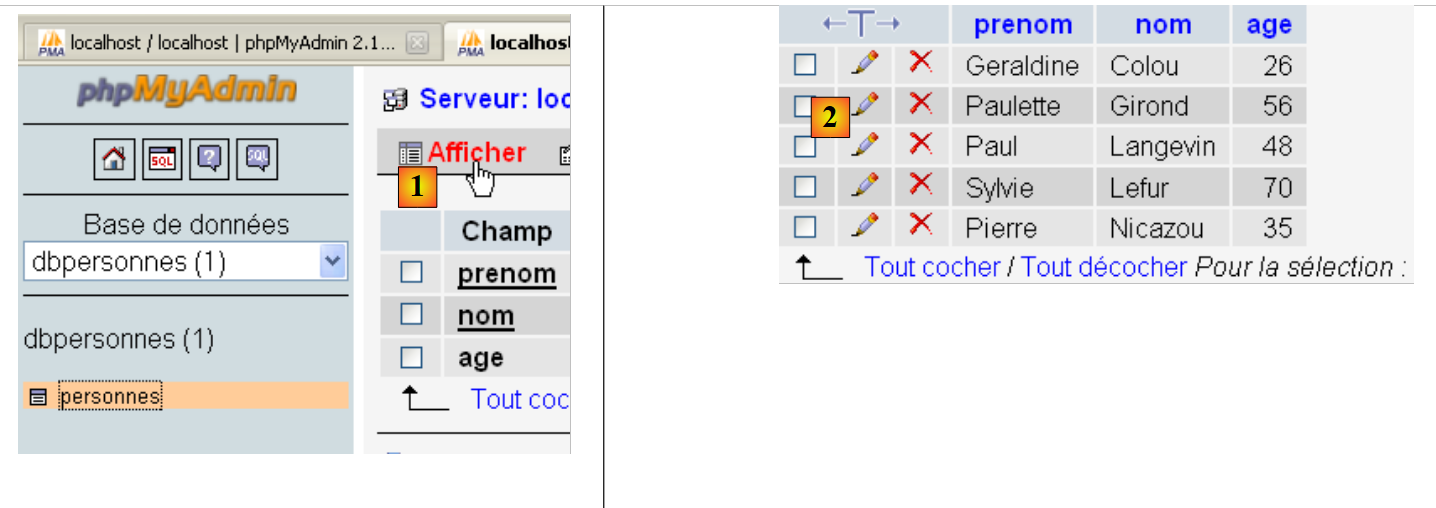
- 在 [1] 中,链接 [Afficher] 可获取表 [personnes] 和 [2] 的内容。
9.7. 执行任意 SQL 查询
以下脚本可执行批处理文件 SQL,并显示每条命令的执行结果:
- 如果命令为 SELECT,则显示 SELECT 的结果;
- 若命令为 INSERT、UPDATE 或 DELETE,则显示修改的行数。
# 导入模块 MySQLdb
import sys
sys.path.append("D:\Programs\ActivePython\site-packages")
import MySQLdb
# 其他模块
import re

def cutNewLineChar(ligne):
    # 如果存在,则删除 [ligne] 中的换行符
    l=len(ligne)
    while(ligne[l-1]=="\n" or ligne[l-1]=="\r"):
        l-=1
    return(ligne[0:l])

# ---------------------------------------------------------------------------------
def afficherInfos(curseur):
    # 显示 SQL 查询结果
    # 这是个 SELECT 语句吗?
    if curseur.description:
        # 有描述——因此是SELECT语句
        # description[i] 是 SELECT 语句中第 i 列的描述
        # 描述QZXW2HTMLBW2ldZQXQZXW2HTMLBWzBdZQX 是下拉列表中第 i 列的名称
        # 显示字段名称
        titre=""
        for i in range(len(curseur.description)):
            titre+=curseur.description[i][0]+","
        # 显示字段列表,不包含结尾逗号
        print titre[0:len(titre)-1]
        # 分隔行
        print "-"*(len(titre)-1)
        # 显示当前行
        ligne=curseur.fetchone()
        while ligne:
            print ligne
            # 下选单行
            ligne=curseur.fetchone()
    else:
        # 没有字段——这不是一个下拉列表
        print "%s lignes(s) a (ont) ete modifiee(s)" % (curseur.rowcount)


# ---------------------------------------------------------------------------------
def executerCommandes(HOTE,ID,PWD,BASE,SQL,suivi=False,arret=True):
    # 使用连接 (HOTE,ID,PWD,BASE)
    # 在此连接上执行文本文件 SQL 中包含的 SQL 命令
    # 该文件是一个命令文件,其中每行包含一个待执行的 SQL 命令
    # 如果跟踪=1,则每次执行 SQL 命令时,都会显示其成功或失败的状态
    # 若停止=1,则函数在遇到第一个错误时停止;否则执行所有 SQL 命令
    # 该函数返回一个数组(错误数量、错误1、错误2、...)

    # 检查文件是否存在 SQL
    data=None
    try:
        data=open(SQL,"r")
    except:
        return [1,"Le fichier %s n'existe pas" % (SQL)]

    # 连接
    try:
        connexion=MySQLdb.connect(host=HOTE,user=ID,passwd=PWD,db=BASE)
    except MySQLdb.OperationalError,erreur:
        return [1,"Erreur lors de la connexion a MySQL sous l'identite (%s,%s,%s,%s) : %s" % (HOTE, ID, PWD, BASE, erreur)]

    # 请求游标
    curseur=connexion.cursor()
    # 执行文件 SQL 中包含的 SQL 查询
    # 将其放入数组
    requetes=data.readlines()
    # 逐个执行它们——起初没有错误
    erreurs=[0]
    for i in range(len(requetes)):
        # 保存当前请求
        requete=requetes[i]
        # 查询是否为空?如果是,则转到下一个查询
        if re.match(r"^\s*$",requete):
            continue
        # 执行第 i 个查询
        erreur=""
        try:
            curseur.execute(requete)
        except Exception, erreur:
            pass
        #是否发生错误?
        if erreur:
            # 又一个错误
            erreurs[0]+=1
            # 错误信息
            msg="%s : Erreur (%s)" % (requete,erreur)
            erreurs.append(msg)
            # 是否显示屏幕?
            if suivi:
                print msg
            # 停止吗?
            if arret:
                return erreurs
        else:
            if suivi:
                print "%s : Execution reussie" % (requete)
                # 关于已执行查询结果的信息
                afficherInfos(curseur)

    # 关闭连接并释放资源
    curseur.close()
    connexion.commit()
    # 正在断开连接
    try:
        connexion.close()
    except MySQLdb.OperationalError,erreur:
        # 又一个错误
        erreurs[0]+=1
        # 错误消息
        msg="%s : Erreur (%s)" % (requete,erreur)
        erreurs.append(msg)

    # 返回
    return erreurs


# ---------------------------------------------- 主程序
# 连接数据库 MySQL
# 用户身份
ID="admpersonnes"
PWD="nobody"
# DBMS 主机
HOTE="localhost"
# 数据库标识
BASE="dbpersonnes"
# 待执行的命令文本文件标识SQL
TEXTE="sql2.txt"


# 创建并填充表
erreurs=executerCommandes(HOTE,ID,PWD,BASE,TEXTE,True,False)
#显示错误数量
print "il y a eu %s erreur(s)" % (erreurs[0])
for i in range(1,len(erreurs)):
    print erreurs[i]
注:
- 脚本第100行新增内容:执行命令SQL后,将查询该请求所使用的游标信息。这些信息由第16至40行的函数afficheInfos提供;
- 第19行和第39行: 如果执行的查询 SQL 实际上是 SELECT,则属性 [curseur.description] 是一个数组,其中第 i 个元素描述 SELECT 结果中的第 i 个字段。 否则,属性 [curseur.rowcount](第 39 行)即为由查询 INSERT、UPDATE 或 DELETE 修改的行数;
- 第32行和第36行:方法[curseur.fetchone]用于获取SELECT中的当前行。另有方法[curseur.fetchall]可一次性获取所有行。
已执行查询的文件:
屏幕结果:
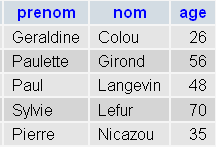
PhpMyadmin 验证:
 |