3. 基础知识
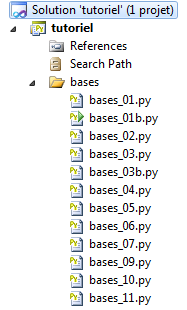 |
3.1. Python 程序示例
下面是一个展示 Python 基本特性的程序。
该程序(bases_01)
# -*- coding=utf-8 -*-

# ----------------------------------
def affiche(chaine):
    # 显示字符串
    print "chaine=%s" % (chaine)


# ----------------------------------
def afficheType(variable):
    # 显示变量类型
    print "type[%s]=%s" % (variable,type(variable))

# ----------------------------------
def f1(param):
    # 将 10 加到参数上
    return param+10

# ----------------------------------
def f2():
    # 返回 3 个值
    return ("un",0,100);


# -------------------------------- 主程序 ------------------------------------
# 这是一条注释
# 未声明即使用的变量
nom="dupont"

# 屏幕显示
print "nom=%s" % (nom)

# 包含不同类型元素的列表
liste=["un","deux",3,4]

# 其元素个数
n=len(liste)

# 一个循环
for i in range(n):
  print "liste[%d]=%s" % (i,liste[i])

# 使用元组初始化两个变量
(chaine1,chaine2)=("chaine1","chaine2")

# 两个字符串的拼接
chaine3=chaine1+chaine2

# 显示结果
print "[%s,%s,%s]" % (chaine1,chaine2,chaine3)

# 使用函数
affiche(chaine1)

# 变量的类型可以是已知的
afficheType(n)
afficheType(chaine1)
afficheType(liste)

# 变量的类型在运行时可能会改变
n="a change"
afficheType(n)

# 函数可以返回结果
res1=f1(4)
print "res1=%s" % (res1)

# 函数可以返回一组值
(res1,res2,res3)=f2()
print "(res1,res2,res3)=[%s,%s,%s]" % (res1,res2,res3)

# 这些值本可以存入一个变量中
liste=f2()
for i in range(len(liste)):
    print "liste[%s]=%s" % (i, liste[i])

# 测试
for i in range(len(liste)):
    # 仅显示字符串
    if (type(liste[i])=="str"):
        print "liste[%s]=%s" % (i,liste[i])

# 其他测试
for i in range(len(liste)):
    # 仅显示大于10的整数
    if (type(liste[i])=="int" and liste[i]>10):
        print "liste[%s]=%s" % (i,liste[i])

# 一个 while 循环
liste=(8,5,0,-2,3,4)
i=0
somme=0
while(i<len(liste) and liste[i]>0):
    print "liste[%s]=%s" % (i,liste[i])
    somme+=liste[i] #总和=总和+t[i]
    i+=1 #i=i+1
print "somme=%s" % (somme)
# 程序结束
注意:
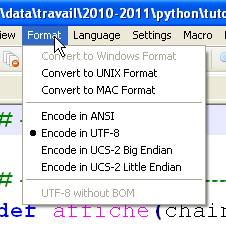
- 第 1 行:一个用于声明脚本编码类型的特殊注释,此处为 UTF-8。这取决于所使用的文本编辑器。此处使用 Notepad++:
 |
- 第 4 行:关键字 def 定义了一个函数;
- 第5-6行:函数体内容。其向右缩进一个制表符。正是这种缩进,结合指令 def 中的冒号(:),共同界定了函数体内容。此规则适用于所有包含内容的指令:if、else、while、for、try、except;
- 第 12 行:Python 内部管理变量的类型。可以通过函数 type(variable) 获取变量的类型,该函数返回类型为 'type' 的变量。表达式 '%s' % (type(variable)) 是一个字符串,表示变量的类型;
- 第25行:主程序。该程序位于脚本中所有函数定义之后。其内容不进行缩进;
- 第 28 行:在 Python 中,无需声明变量。Python 区分大小写。变量 Nom 与变量 nom 是不同的。 字符串可以用双引号 " 或单引号 ' 包围。因此可以写成 'dupont' 或 "dupont";
- 第31行:表达式“xxxx%syyyy%szzzz” % (100, 200) 生成的字符串为 "xxxx100yyy200szzzz",其中每个 %s 都被元组中的一个元素替换。%s 是字符串的显示格式。还有其他格式;
- 第 34 行:元组 (1,2,3)(注意圆括号)与列表 [1,2,3](注意方括号)之间存在区别。 元组是不可变的,而列表是可变的。在两种情况下,第 i 个元素都表示为 [i];
- 第 40 行:range(n) 是元组 (0,1,2,...,n-1);
- 第 74 行:len(var) 是集合 var(元组、列表、字典等)的元素个数;
- 第 86 行:其他布尔运算符是 or 和 not。
屏幕输出结果如下:
3.2. 类型转换
这里关注的是涉及 str(字符串)、int(整数)、float(浮点数)、bool(布尔值)类型数据的类型转换。
程序(bases_01b)
# -*- coding=utf-8 -*-

# 类型转换
# int --> str, float, bool
x=4
print x, type(x)
x=str(4)
print x, type(x)
x=float(4)
print x, type(x)
x=bool(4)
print x, type(x)

# bool --> int, float, str
x=True
print x, type(x)
x=int(True)
print x, type(x)
x=float(True)
print x, type(x)
x=str(True)
print x, type(x)

# str --> int, float, bool
x="4"
print x, type(x)
x=int("4")
print x, type(x)
x=float("4")
print x, type(x)
x=bool("4")
print x, type(x)

# float 转 str、int、bool
x=4.32
print x, type(x)
x=str(4.32)
print x, type(x)
x=int(4.32)
print x, type(x)
x=bool(4.32)
print x, type(x)

# 类型转换错误处理
try:
    x=int("abc")
    print x, type(x)
except ValueError, erreur:
    print erreur

# 布尔值的各种情况
x=bool("abc")
print x, type(x)
x=bool("")
print x, type(x)
x=bool(0)
print x, type(x)
x=None
print x, type(x)
x=bool(None)
print x, type(x)
可能存在多种类型转换。其中某些转换可能会失败,例如第45至49行试图将字符串'abc'转换为整数。我们通过结构体try / except处理了该错误。该结构体的通用形式如下:
try:
    actions
except Exception, Message:
    actions
finally:
    actions
如果 try 块中的任一操作抛出异常(报告错误),程序将立即跳转到 except 子句。如果 try 块中的操作未抛出异常,则忽略 except 子句。 指令 except 的属性 Exception 和 Message 是可选的。 当这些属性存在时,Exception 指定由 except 语句捕获的异常类型,而 Message 包含与该异常相关的错误消息。 如果要在同一个 try 中处理不同类型的异常,可以使用多个 except 指令。
finally 语句是可选的。如果存在该语句,无论是否发生异常,finally 中的操作都会始终执行。
我们稍后将再次讨论异常。
第 52-61 行展示了将 str、int、float、NoneType 类型的数据转换为布尔值的多种尝试。这始终是可行的。 规则如下:
- 当 i 等于 0 时,bool(int i) 的值为 False,其他情况下均为 True;
- bool(float f) 的值为:若 f 等于 0.0,则为 False;其他所有情况下,均为 True;
- bool(str 字符串) 的返回值为 False(若字符串长度为 0),其他情况下返回 True;
- bool(None) 的值为 False。None 是一个特殊值,表示该变量存在但没有值。
屏幕显示结果如下:
3.3. 变量的作用域
程序 (bases_02)
# -*- coding=utf-8 -*-

# 变量的作用域
def f1():
    # 使用全局变量 i
    global i
    i+=1
    j=10
    print "f1[i,j]=[%s,%s]" % (i,j)

def f2():
    # 使用全局变量 i
    global i
    i+=1
    j=20
    print "f2[i,j]=[%s,%s]" % (i,j)

def f3():
    # 使用了局部变量 i
    i=1
    j=30
    print "f3[i,j]=[%s,%s]" % (i,j)

# 测试
i=0
j=0 # 函数 f 无法识别这两个变量
    # 除非该函数通过 global 语句显式声明
    # 才知晓
f1()
f2()
f3()
print "test[i,j]=[%s,%s]" % (i,j)
结果
注:
- 该脚本展示了变量 i 的用法,该变量在函数 f1 和 f2 中被声明为全局变量。在此情况下,主程序与函数 f1 和 f2 共享同一个变量 i。
3.4. 列表、元组和字典
3.4.1. 一维列表
程序 (bases_03)
# -*- coding=utf-8 -*-

# 一维数组
# 初始化
list1=[0,1,2,3,4,5]

# 遍历 - 1
print "list1 a %s elements" % (len(list1))
for i in range(len(list1)):
    print "list1[%s]=%s" % (i, list1[i])

list1[1]=10;
# 遍历 - 2
print "list1 a %s elements" % (len(list1))
for element in list1:
    print element

# 添加两个元素
list1[len(list1):]=[10,11]
print ("%s") % (list1)

# 删除最后两个元素
list1[len(list1)-2:]=[]
print ("%s") % (list1)

# 在列表开头添加一个元组
list1[:0]=[-10, -11, -12]
print ("%s") % (list1)

# 在列表中间插入两个元素
list1[3:3]=[100,101]
print ("%s") % (list1)

# 删除列表中间的两个元素
list1[3:4]=[]
print ("%s") % (list1)
注:
- 表示法 tableau[i:j] 表示数组中的第 i 到 j-1 个元素;
- 符号 [i:] 表示数组的第 i 个元素及后续元素;
- 符号 [:i] 表示数组的第 0 到 i-1 个元素;
- 第 20 行:print (%s) % (list1) 显示字符串: "[ list1[0], list1[2], ..., list1[n-1]]"。
结果
通过使用列表的某些方法,上述代码可以写成另一种形式(bases_03b):
# -*- coding=utf-8 -*-

# 一维列表

# 初始化
list1=[0,1,2,3,4,5]

# 遍历 - 1
print "list1 a %s elements" % (len(list1))
for i in range(len(list1)):
    print "list1[%s]=%s" % (i, list1[i])

list1[1]=10
# 遍历 - 2
print "list1 a %s elements" % (len(list1))
for element in list1:
    print element

# 添加两个元素
list1.extend([10,11])
print ("%s") % (list1)

# 删除最后两个元素
del list1[len(list1)-2:]
print ("%s") % (list1)

# 在列表开头添加一个元组
for i in (-12, -11, -10):
    list1.insert(0,i)
print ("%s") % (list1)

# 在列表中间插入
for i in (101,100):
    list1.insert(3,i)
print ("%s") % (list1)

# 从列表中间删除
del list1[3:4]
print ("%s") % (list1)
所得结果与前一版本相同。
3.4.2. 字典
程序 (bases_04)
# -*- coding=utf-8 -*-

def existe(conjoints,mari):
    # 检查键 mari 是否存在于配偶字典中
    if(conjoints.has_key(mari)):
        print "La cle [%s] existe associee a la valeur [%s]" % (mari, conjoints[mari])
    else:
        print "La cle [%s] n'existe pas" % (mari)


# ----------------------------- 主程序
# 字典
conjoints={"Pierre":"Gisele", "Paul":"Virginie", "Jacques":"Lucette","Jean":""}

# 遍历 - 1
print "Nombre d'elements du dictionnaire : %s " % (len(conjoints))
for (cle,valeur) in conjoints.items():
    print "conjoints[%s]=%s" % (cle,valeur)

# 字典键列表
print "liste des cles-------------"
cles=conjoints.keys()
print ("%s") % (cles)

# 字典值列表
print "liste des valeurs------------"
valeurs=conjoints.values()
print ("%s") % (valeurs)

# 查找键
existe(conjoints,"Jacques")
existe(conjoints,"Lucette")
existe(conjoints,"Jean")

# 删除键值对
del (conjoints["Jean"])
print "Nombre d'elements du dictionnaire : %s " % (len(conjoints))
print ("%s") % (conjoints)
注:
- 第 17 行:conjoints.items() 将字典中 (键,值) 对的列表转换为联合体;
- 第 22 行:conjoints.keys() 返回关联字典的键;
- 第 27 行:conjoints.values() 返回“配偶”字典的值;
- 第 7 行:conjoints.has_key(mari) 返回 True,如果键 mari 存在于字典 conjoints 中, 否则返回 False;
- 第38行:字典可以显示为单行。
结果
3.4.3. 元组
程序 (bases_05)
# -*- coding=utf-8 -*-

# 元组
# 初始化
tab1=(0,1,2,3,4,5)

# 遍历 - 1
print "tab1 a %s elements" % (len(tab1))
for i in range(len(tab1)):
    print "tab1[%s]=%s" % (i, tab1[i])

# 遍历 - 2
print "tab1 a %s elements" % (len(tab1))
for element in tab1:
    print element

# 修改一个元素
tab1[0]=-1
结果
注:
- 结果的第15-18行:表明元组无法被修改。
3.4.4. 多维列表
程序 (bases_06)
# -*- coding=utf-8 -*-

# 多维列表

# 初始化
multi=[[0,1,2], [10,11,12,13], [20,21,22,23,24]]

# 遍历
for i1 in range(len(multi)):
    for i2 in range(len(multi[i1])):
        print "multi[%s][%s]=%s" % (i1,i2,multi[i1][i2])

# 多维字典
# 初始化
multi={"zero":[0,1], "un":[10,11,12,13], "deux":[20,21,22,23,24]}

# 遍历
for (cle,valeur) in multi.items():
    for i2 in range(len(multi[cle])):
        print "multi[%s][%s]=%s" % (cle,i2,multi[cle][i2])
结果
3.4.5. 字符串与列表之间的关联
程序 (bases_07)
# -*- coding=Utf-8 -*-

# 字符串转列表
chaine='1:2:3:4'
tab=chaine.split(':')
print type(tab)

# 列表显示
print "tab a %s elements" % (len(tab))
print ("%s") % (tab)

# 列表转字符串
chaine2=":".join(tab)
print "chaine2=%s" % (chaine2)

# 添加一个空字段
chaine+=":"
print "chaine=%s" % (chaine)
tab=chaine.split(":")

# 列表显示
print "tab a %s elements" % (len(tab))
print ("%s") % (tab)

# 再次添加一个空字段
chaine+=":"
print "chaine=%s" % (chaine)
tab=chaine.split(":")

# 显示列表
print "tab a %s elements" % (len(tab))
print ("%s") % (tab)
注:
- 第5行:方法 chaine.split(分隔符) 将字符串 chaine 分割为以 séparateur 为分隔符的独立元素,并以列表形式返回。 因此,表达式 '1:2:3:4'.split(":") 的值为列表 ('1','2','3','4');
- 第 13 行:'separateur'.join(liste) 的值为字符串 '列表[0]+分隔符+列表[1]+分隔符+...'。
结果
3.5. 正则表达式
程序 (bases_09)
# -*- coding=utf-8 -*-

import re

# --------------------------------------------------------------------------
def compare(modele,chaine):
    # 将字符串 chaîne 与模板 modele 进行比较
    # 显示结果
    print "\nResultats(%s,%s)" % (chaine,modele)
    match=re.match(modele,chaine)
    if match:
        print match.groups()
    else:
        print "La chaine [%s] ne correspond pas au modele [%s]" % (chaine,modele)


# Python 正则表达式
# 提取字符串中的各个字段
# 模式:由任意字符包围的一串数字
# 我们只想提取数字序列
modele=r"^.*?(\d+).*?$"

# 将字符串与模式进行匹配
compare(modele,"xyz1234abcd")
compare(modele,"12 34")
compare(modele,"abcd")

# 模式:由任意字符包围的一串数字
# 需要提取数字序列及其前后相邻的字段
modele=r"^(.*?)(\d+)(.*?)$"

# 将字符串与模式进行匹配
compare(modele,"xyz1234abcd")
compare(modele,"12 34")
compare(modele,"abcd")

# 模式:日期格式为 dd/mm/yy
modele=r"^\s*(\d\d)\/(\d\d)\/(\d\d)\s*$"
compare(modele,"10/05/97")
compare(modele," 04/04/01 ")
compare(modele,"5/1/01")

# 模式——一个十进制数
modele=r"^\s*([+|-]?)\s*(\d+\.\d*|\.\d+|\d+)\s*$"
compare(modele,"187.8")
compare(modele,"-0.6")
compare(modele,"4")
compare(modele,".6")
compare(modele,"4.")
compare(modele," + 4")
# 结束
注:
- 请注意第3行导入的模块。该模块包含正则表达式管理函数;
- 第10行:将字符串与正则表达式(模式)进行比较,若字符串匹配模式则返回布尔值True,否则返回False;
- 第12行:match.groups()是一个元组,其元素是字符串中与正则表达式中括号包围的部分相匹配的部分。在模式中:
- ^.*?(\d+).*?,match.groups() 将是一个单元素元组;
- ^(.*?)(\d+)(.*?)$,match.groups() 将是一个包含 3 个元素的元组。
结果
3.6. 函数参数传递方式
程序 (bases_10)
# -*- coding=utf-8 -*-

def f1(a):
    a=2

def f2(a,b):
    a=2
    b=3
    return (a,b)

# ------------------------ 主程序
x=1
f1(x)
print "x=%s" % (x)
(x,y)=(-1,-1)
(x,y)=f2(x,y)
print "x=%s, y=%s" % (x,y)
结果
注:
- 在 Python 中,一切皆为对象。某些对象被称为“不可变”对象:无法对其进行修改。数字、字符串和元组均属于此类。当 Python 对象作为参数传递给函数时,传递的是对象的引用,除非这些对象是“不可变”的,在这种情况下,传递的是对象的值;
- 函数 f1(第 3 行)和 f2(第 6 行)旨在演示输出参数的传递。我们希望函数的实际参数能被该函数修改;
- 第3-4行:函数f1修改了其形式参数a。我们想知道实际参数是否也会被修改。
- 第12-13行:实际参数是x=1。第1行的结果表明,实际参数并未被修改。因此,实际参数x和形式参数a是两个不同的对象;
- 第6-9行:函数f2修改了其形式参数a和b,并将它们作为结果返回;
- 第15-16行:将实际参数(x,y)传递给f2,并将f2的结果赋值给(x,y)。结果的第2行显示,实际参数(x,y)已被修改。
由此可得出结论:当“不可变”对象作为输出参数时,它们必须作为函数返回的结果的一部分。
3.7. 文本文件
程序 (bases_11)
# -*- coding=utf-8 -*-

import sys

# 文本文件的顺序处理
# 该文件由多行组成,每行格式为 login:pwd:uid:gid:infos:dir:shell
# 每行都被放入字典中,格式为 login => [uid,gid,infos,dir,shell]

# --------------------------------------------------------------------------
def afficheInfos(dico,cle):
    # 如果字典中存在该键,则显示其关联值
    valeur=None
    if dico.has_key(cle):
        valeur=dico[cle]
    if 'list' in str(type(valeur)):
        print "[{0},{1}]".format(cle,":".join(valeur))
    else:
        # 该键不在字典 dico 中
        print "la cle [{0}] n'existe pas".format(cle)


def cutNewLineChar(ligne):
    # 如果存在,则删除该行的行尾标记
    l=len(ligne);
    while(ligne[l-1]=="\n" or ligne[l-1]=="\r"):
        l-=1
    return(ligne[0:l]);

# 设置文件名
INFOS="infos.txt"

# 以新建方式打开
try:
    fic=open(INFOS,"w")
except:
    print "Erreur d'ouverture du fichier INFOS en écriture\n"
    sys.exit()

# 生成任意内容
for i in range(1,101):
    ligne="login%s:pwd%s:uid%s:gid%s:infos%s:dir%s:shell%s" % (i,i,i,i,i,i,i)
    fic.write(ligne+"\n")

# 关闭文件
fic.close()

# 以只读模式打开
try:
    fic=open(INFOS,"r")
except:
    print "Erreur d'ouverture du fichier INFOS en écriture\n"
    sys.exit()

# 初始词典为空
dico={}

# 读取一行
ligne=fic.readline()
while(ligne!=''):
    # 移除换行符
    ligne=cutNewLineChar(ligne)

    # 将该行放入数组
    infos=ligne.split(":")

    # 获取登录名
    login=infos[0]

    # 删除前两个元素 [login,pwd]
    infos[0:2]=[]

    # 在字典中创建条目
    dico[login]=infos

    # 读取一行
    ligne=fic.readline()

# 关闭文件
fic.close()

# 处理字典
afficheInfos(dico,"login10")
afficheInfos(dico,"X")
注:
- 第 37 行:用于在代码中间结束脚本。
结果
文件 infos.txt:
login0:pwd0:uid0:gid0:infos0:dir0:shell0
login1:pwd1:uid1:gid1:infos1:dir1:shell1
login2:pwd2:uid2:gid2:infos2:dir2:shell2
...
login98:pwd98:uid98:gid98:infos98:dir98:shell98
login99:pwd99:uid99:gid99:infos99:dir99:shell99
屏幕显示结果: