9. 使用 MySQL 数据库管理系统
9.1. 安装 MySQLdb 模块
我们将编写使用 MySQL 数据库的脚本:
用于管理 MySQL 数据库的 Python 函数封装在 MySQLdb 模块中,该模块未包含在 Python 的初始发行版中。因此,您必须下载并安装该模块。以下是一种操作方法:
- 在“程序”菜单中,选择 [1] Python 软件包管理器。随后将出现命令窗口 [2]。
在软件包中搜索关键词 mysql:
C:\Documents and Settings\st>pypm search mysql
Get: [pypm-be.activestate.com] :repository-index:
Get: [pypm-free.activestate.com] :repository-index:
autosync: synced 2 repositories
  chartio                    Setup wizard and connection client for connecting
  chartio-setup              Setup wizard and connection client for connecting
  cns.recipe.zmysqlda        Recipe for installing ZMySQLDA
  collective.recipe.zmysqlda Recipe for installing ZMySQLDA
  django-mysql-manager       DESCRIPTION_DESCRIPTION_DESCRIPTION
  jaraco.mysql               MySQLDB-compatible MySQL wrapper by Jason R. Coomb
  lovely.testlayers          mysql, postgres nginx, memcached cassandra test la
  mtstat-mysql               MySQL Plugins for mtstat
  mysql-autodoc              Generate HTML documentation from a mysql database
  mysql-python               Python interface to MySQL
  mysqldbda                  MySQL Database adapter
  products.zmysqlda          MySQL Zope2 adapter.
  pymysql                    Pure Python MySQL Driver
  pymysql-sa                 PyMySQL dialect for SQLAlchemy.
  pymysql3                   Pure Python MySQL Driver
  sa-mysql-dt                Alternative implementation of DateTime column for
  schemaobject               Iterate over a MySQL database schema as a Python o
  schemasync                 A MySQL Schema Synchronization Utility
  simplestore                A datastore layer built on top of MySQL in Python.
  sqlbean                    A auto maping ORM for MYSQL and can bind with memc
  sqlwitch                   sqlwitch offers idiomatic SQL generation on top of
  tiddlywebplugins.mysql     MySQL-based store for tiddlyweb
  tiddlywebplugins.mysql2    MySQL-based store for tiddlyweb
zest.recipe.mysql          A Buildout recipe to setup a MySQL database.
所有名称或描述中包含关键词“mysql”的模块均已列出。我们感兴趣的是第 14 行中的 [mysql-python]。让我们安装它:
C:\Documents and Settings\st>pypm install mysql-python
The following packages will be installed into "%APPDATA%\Python" (2.7):
 mysql-python-1.2.3
Hit: [pypm-free.activestate.com] mysql-python 1.2.3
Installing mysql-python-1.2.3

C:\Documents and Settings\st>echo %APPDATA%
C:\Documents and Settings\st\Application Data
- 第 5 行:mysql-python-1.2.3 软件包安装在“%APPDATA%\Python”文件夹中,其中 APPDATA 是第 8 行指定的文件夹。
如果出现以下情况,此操作可能会失败:
- 使用的 Python 解释器是 64 位版本;
- %APPDATA% 路径中包含带重音的字符。
9.2. 安装 MySQL
安装 MySQL 数据库管理系统(DBMS)的方法多种多样。在此,我们使用了 WampServer,这是一个集成了多个软件组件的软件包:
- Apache Web 服务器。我们将利用它编写 Python 语言的 Web 脚本;
- MySQL 数据库管理系统;
- PHP脚本语言;
- 一个用 PHP 编写的 MySQL 数据库管理工具:phpMyAdmin。
WampServer 可于以下地址下载(2011年6月):
http://www.wampserver.com/download.php
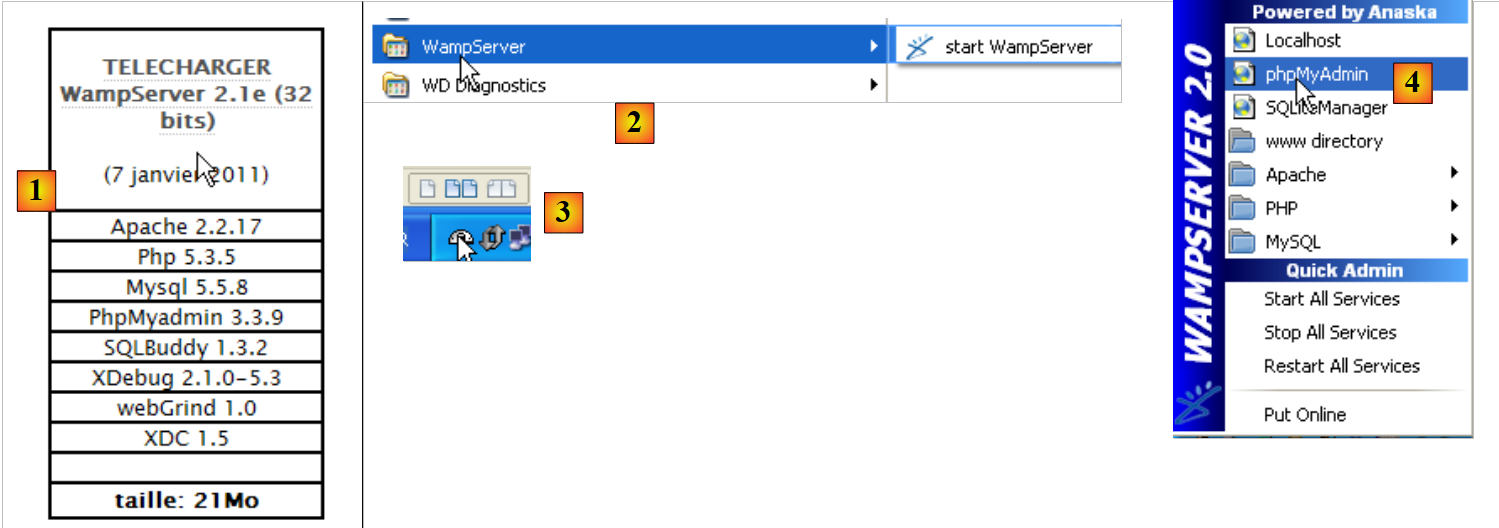
- 在 [1] 中,下载适合的 WampServer 版本;
- 在 [2] 中,安装完成后启动它。这将启动 Apache Web 服务器和 MySQL 数据库管理系统;
- 在[3]中,启动后,可通过任务栏右下角的图标[3]管理WampServer;
- 在 [4],启动 MySQL 管理工具。
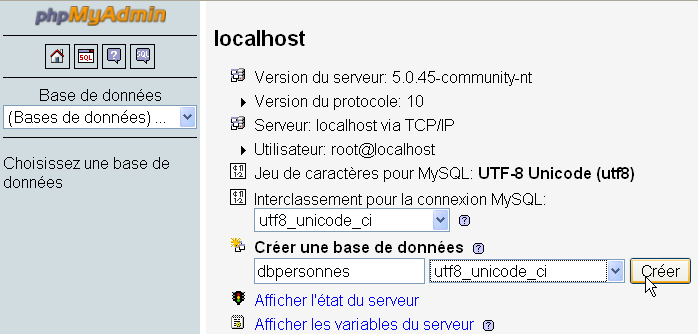
创建一个名为 [dbpersonnes] 的数据库:
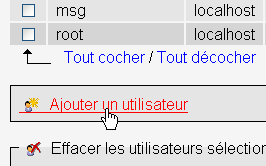
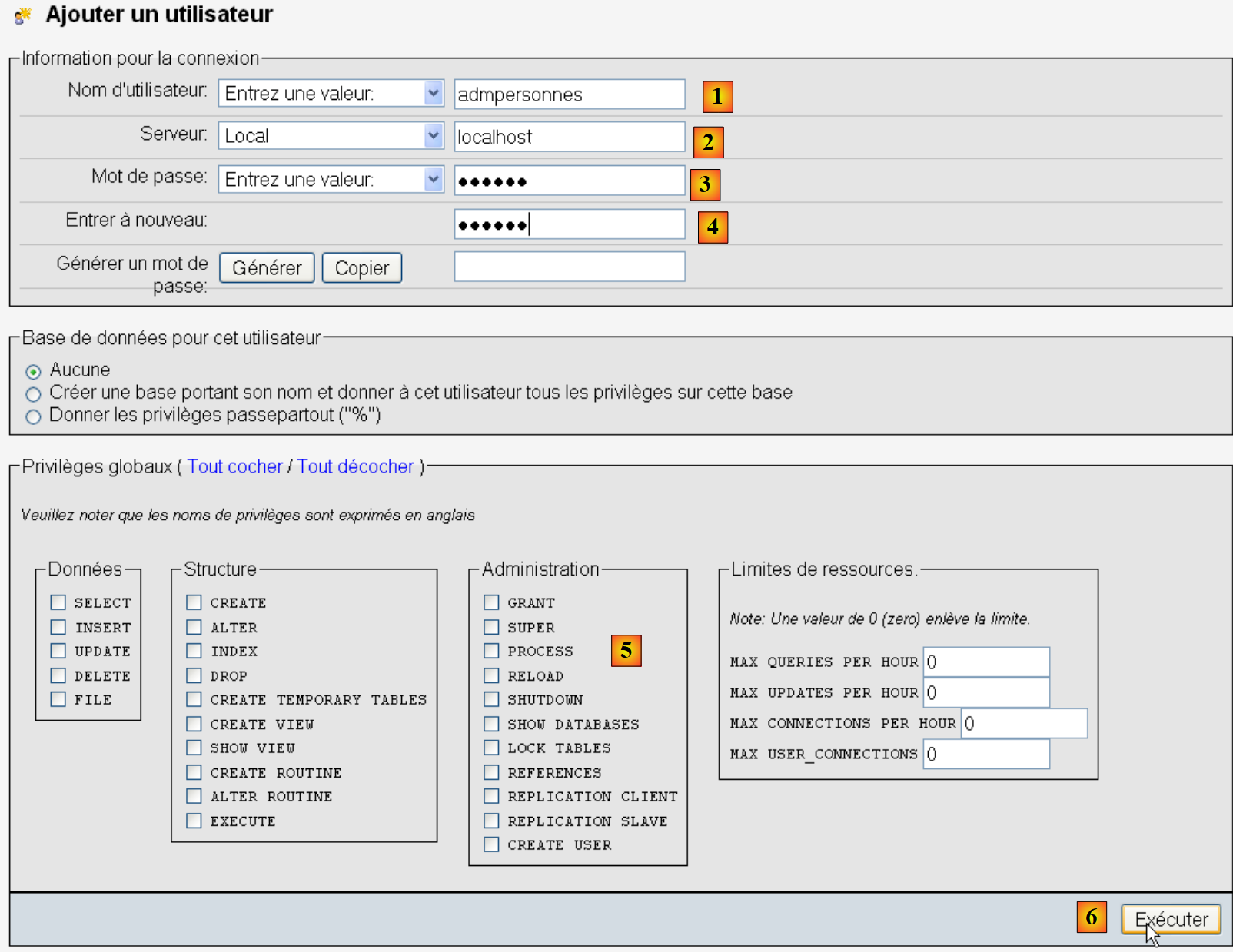
创建用户 [admpersonnes],密码为 [nobody]:
- 在 [1] 中,用户名;
- 在 [2] 中,授予其权限的数据库管理系统 (DBMS) 服务器;
- 在 [3] 中,输入其密码 [nobody];
- 在 [4] 中,与上述相同;
- 在 [5] 中,我们不向该用户授予任何权限;
- 在 [6] 中,创建该用户。
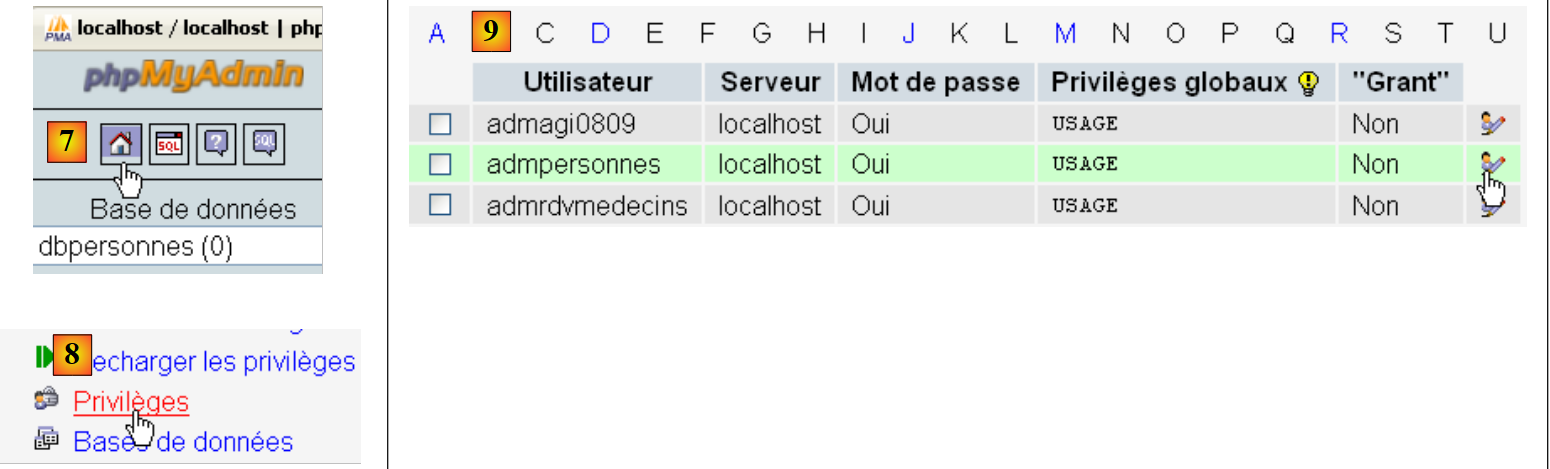
- 在 [7] 中,返回 phpMyAdmin 主页;
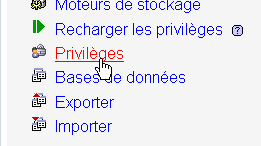
- 在 [8] 中,使用本页面的 [权限] 链接来修改用户 [admpersonnes] 的权限 [9]。
- 在 [10] 中,指定要授予用户 [admpersonnes] 对 [dbpersonnes] 数据库的权限;
- 在 [11] 中,确认选择。
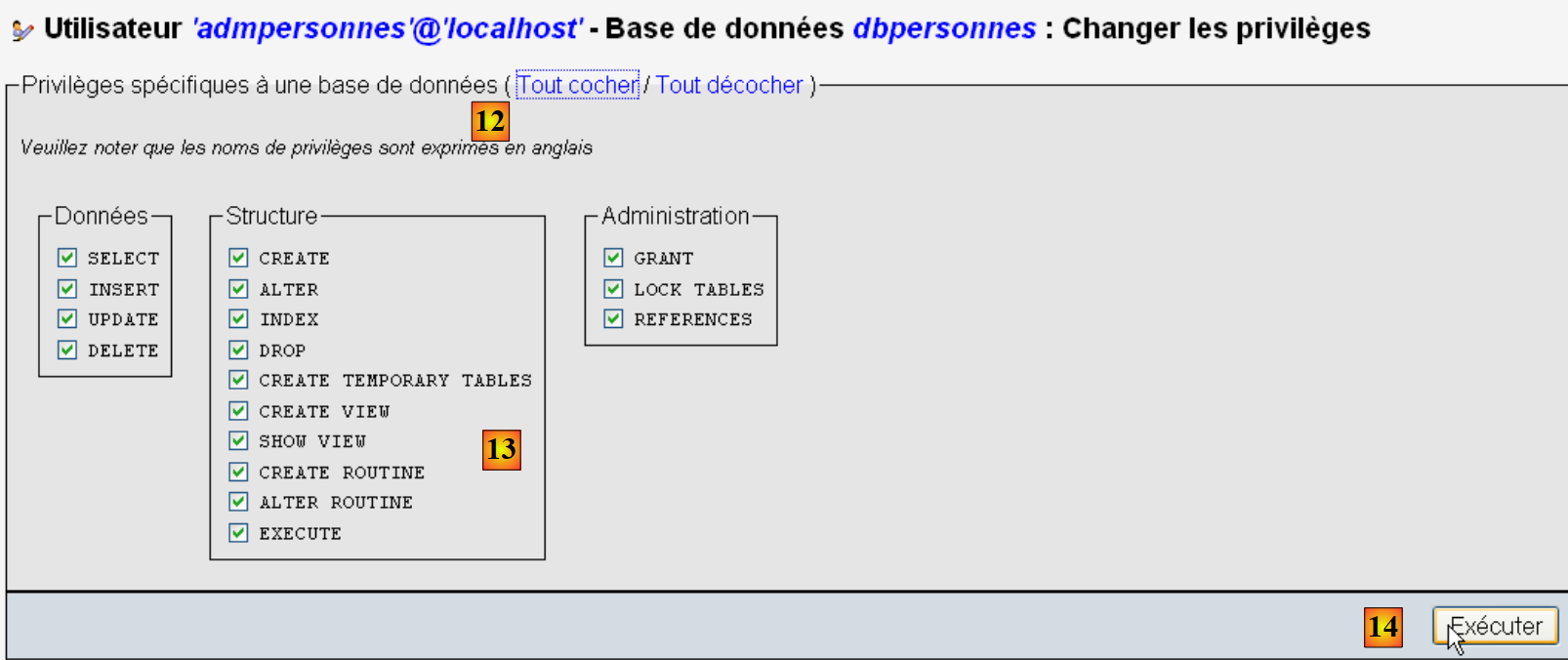
- 使用 [12] 中的 [全选] 链接,授予用户 [admpersonnes] 对 [dbpersonnes] 数据库的所有权限 [13];
- 我们在 [14] 中确认。
现在我们拥有:
- 一个 MySQL 数据库 [dbpersonnes];
- 一个用户 [admpersonnes / nobody],该用户对该数据库拥有完全访问权限。
我们将编写 Python 脚本来操作该数据库。
9.3. 连接到 MySQL 数据库 - 1
程序 (mysqldb_01)
# import du module MySQLdb
import sys
sys.path.append("D:\Programs\ActivePython\site-packages")
import MySQLdb

# connexion à une base MySQL
....
注:
- 第 2–4 行:包含 MySQL 数据库管理系统(DBMS)操作的脚本必须导入 MySQLdb 模块。请注意,我们已将该模块安装在 [%APPDATA%\Python] 文件夹中。当 Python 脚本请求模块时,系统会自动搜索 [%APPDATA%\Python] 文件夹。实际上,系统会搜索 sys.path 中列出的所有文件夹。以下是一个显示这些文件夹的示例:
| # -*- coding=utf-8 -*-
import sys
# display of sys.path files
for dossier in sys.path:
print dossier
|
屏幕输出如下:
| D:\data\istia-1112\python\tutoriel
C:\Windows\system32\python27.zip
D:\Programs\ActivePython\Python2.7.2\DLLs
D:\Programs\ActivePython\Python2.7.2\lib
D:\Programs\ActivePython\Python2.7.2\lib\plat-win
D:\Programs\ActivePython\Python2.7.2\lib\lib-tk
D:\Programs\ActivePython\Python2.7.2
C:\Users\Serge TahÚ\AppData\Roaming\Python\Python27\site-packages
D:\Programs\ActivePython\Python2.7.2\lib\site-packages
D:\Programs\ActivePython\Python2.7.2\lib\site-packages\win32
D:\Programs\ActivePython\Python2.7.2\lib\site-packages\win32\lib
D:\Programs\ActivePython\Python2.7.2\lib\site-packages\Pythonwin
D:\Programs\ActivePython\Python2.7.2\lib\site-packages\setuptools-0.6c11-py2.7.egg-info
|
第 8 行,即 MySQLdb 最初安装的 [site-packages] 文件夹。我们将移动 [site-packages] 文件夹,该文件夹是 pypm 工具安装 Python 模块的位置。要添加一个 Python 将用于搜索模块的新文件夹,我们需要将其添加到 sys.path 列表中:
# import du module MySQLdb
import sys
sys.path.append("D:\Programs\ActivePython\site-packages")
import MySQLdb

# connexion à une base MySQL
....
在第 3 行,我们添加了 MySQLdb 模块被移动到的文件夹。
该示例的完整代码如下:
# import du module MySQLdb
import sys
sys.path.append("D:\Programs\ActivePython\site-packages")
import MySQLdb

# connexion à une base MySQL
# l'identité de l'utilisateur est (admpersonnes,nobody)
user="admpersonnes"
pwd="nobody"
host="localhost"
connexion=None
try:
    print "connexion..."
    # connexion
    connexion=MySQLdb.connect(host=host,user=user,passwd=pwd)
    # suivi
    print "Connexion a MySQL reussie sous l'identite host={0},user={1},passwd={2}".format(host,user,pwd)
except MySQLdb.OperationalError,message:
    print "Erreur : {0}".format(message)
finally:
    try:
        connexion.close()
    except:
        pass
- 第 8–11 行:脚本将(第 15 行)使用用户 [admpersonnes / nobody] 连接到 [localhost] 机器上的 MySQL 数据库。它不会连接到特定的数据库;
- 第 12–24 行:连接可能会失败。因此,该操作被包裹在 try/except/finally 代码块中;
- 第 15 行:MySQLdb 模块的 connect 方法接受多种命名参数:
- user:连接所属的用户 [admpersonnes];
- pwd:用户的密码 [nobody];
- host:运行 MySQL 数据库管理系统的主机 [localhost];
- db:要连接的数据库。可选。
- 第 18 行:若抛出异常,其类型为 [MySQLdb.OperationalError],相关错误信息将存储在 [message] 变量中;
- 第 20–23 行:在 [finally] 子句中,关闭连接。如果发生异常,则捕获该异常(第 23 行),但不执行任何操作(第 24 行)。
结果
connexion...
Connexion a MySQL reussie sous l'identite host=localhost,user=admpersonnes,passwd=nobody
9.4. 连接到 MySQL 数据库 - 2
程序 (mysqldb_02)
| # import module MySQLdb
import sys
sys.path.append("D:\Programs\ActivePython\site-packages")
import MySQLdb
# ---------------------------------------------------------------------------------
def testeConnexion(hote,login,pwd):
# connect then disconnect (login,pwd) mysql sgbd from host server
# launches eception MySQLdb.operationalError
# connection
connexion=MySQLdb.connect(host=hote,user=login,passwd=pwd)
print "Connexion a MySQL reussie sous l'identite (%s,%s,%s)" % (hote,login,passwd)
# close the connection
connexion.close()
print "Fermeture connexion MySQL reussie\n"
# ---------------------------------------------- main
# connection to the MySQL database
# user identity
user="admpersonnes"
passwd="nobody"
host="localhost"
# test connection
try:
testeConnexion(host,user,passwd)
except MySQLdb.OperationalError,message:
print message
# with a non-existent user
try:
testeConnexion(host,"xx","xx")
except MySQLdb.OperationalError,message:
print message
|
注:
- 第 7–15 行:一个函数,用于尝试将用户连接到 MySQL 数据库管理系统,然后断开连接。显示结果;
- 第18–34行:主程序——调用testConnection方法两次,并显示任何异常。
结果
| Connexion a MySQL reussie sous l'identite (localhost,admpersonnes,nobody)
Fermeture connexion MySQL reussie
Echec de la connexion a MySQL : (1045, "Access denied for user 'xx'@'localhost'(using password: YES)")
|
9.5. 创建 MySQL 表
既然我们已经知道如何与 MySQL 数据库管理系统建立连接,接下来我们将通过此连接执行 SQL 命令。为此,我们将连接到已创建的数据库 [dbpersonnes],并利用该连接在数据库中创建一个表。
程序 (mysqldb_03)
# import du module MySQLdb
import sys
sys.path.append("D:\Programs\ActivePython\site-packages")
import MySQLdb

# ---------------------------------------------------------------------------------
def executeSQL(connexion,update):
    # exécute une requête update de mise à jour sur la connexion
    # on demande un curseur
    curseur=connexion.cursor()
    # exécute la requête sql sur la connexion
    try:
        curseur.execute(update)
        connexion.commit()
    except Exception, erreur:
        connexion.rollback()
        raise
    finally:
        curseur.close()

# ---------------------------------------------- main
# connexion à la base MySQL
# l'identité de l'utilisateur
ID="admpersonnes"
PWD="nobody"
# la machine hôte du sgbd
HOTE="localhost"
# identité de la base
BASE="dbpersonnes"
# connexion
try:
    connexion=MySQLdb.connect(host=HOTE,user=ID,passwd=PWD,db=BASE)
except MySQLdb.OperationalError,message:
    print message
    sys.exit()

# suppression de la table personnes si elle existe
# si elle n'existe pas une erreur se produira
# on l'ignore
requete="drop table personnes"
try:
    executeSQL(connexion,requete)
except:
    pass
# création de la table personnes
requete="create table personnes (prenom varchar(30) NOT NULL, nom varchar(30) NOT NULL, age integer NOT NULL, primary key(nom,prenom))"
try:
    executeSQL(connexion,requete)
except MySQLdb.OperationalError,message:
    print message
    sys.exit()
# on se deconnecte et on quitte
try:
    connexion.close()
except MySQLdb.OperationalError,message:
    print message
sys.exit()
注:
- 第 7 行:executeSQL 函数在已打开的连接上执行 SQL 查询;
- 第 10 行:连接上的 SQL 操作是通过一个名为游标的特殊对象来执行的;
- 第 10 行:获取游标;
- 第 13 行:执行 SQL 查询;
- 第 14 行:提交当前事务;
- 第 15 行:如果发生异常,错误消息将存储在 error 变量中;
- 第 16 行:回滚当前事务;
- 第 17 行:重新抛出异常;
- 第 19 行:无论是否发生错误,都关闭游标。这将释放与其关联的资源。
结果
create table personnes (prenom varchar(30) NOT NULL, nom varchar(30) NOT NULL, age integer NOT NULL, primary key(nom,prenom)) : requete reussie
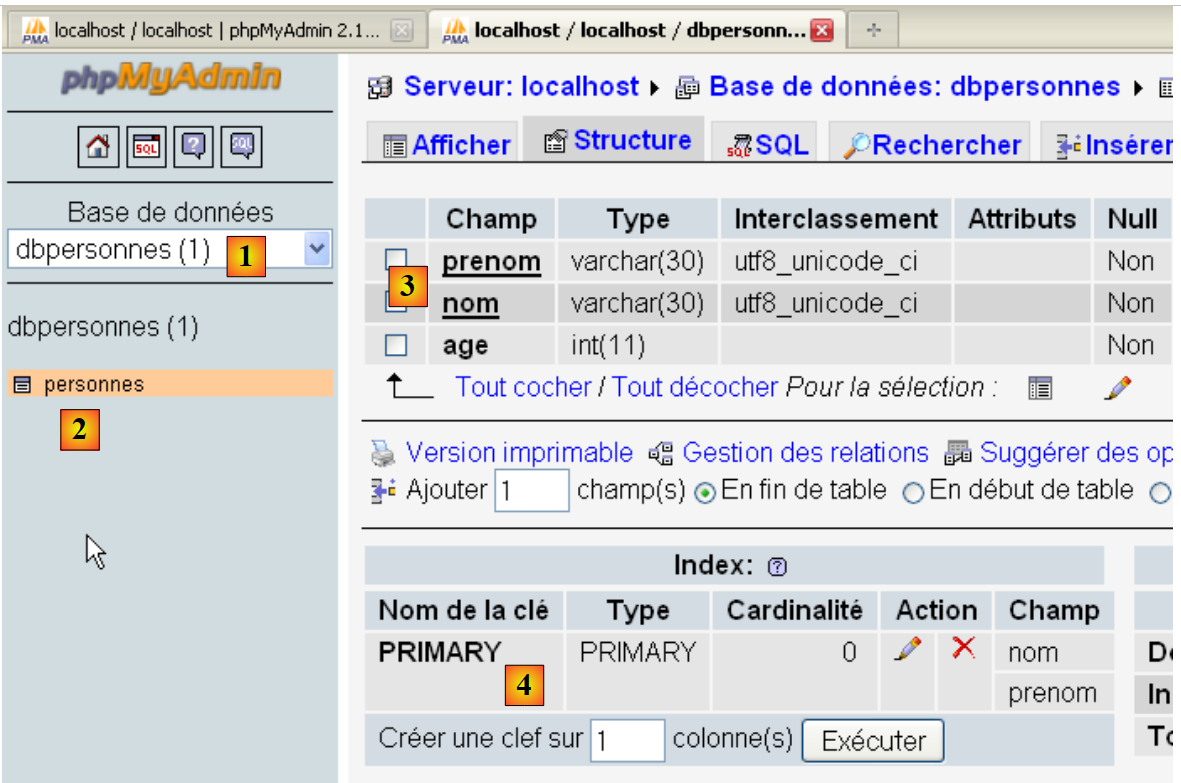
使用 phpMyAdmin 进行验证:
- 数据库 [dbpersonnes] [1] 包含一个名为 [personnes] [2] 的表,其结构 [3] 及主键 [4] 如下。
9.6. 填充 [people] 表
在之前创建了 [people] 表之后,我们现在对其进行数据填充。
程序 (mysqldb_04)
| # import module MySQLdb
import sys
sys.path.append("D:\Programs\ActivePython\site-packages")
import MySQLdb
# other modules
import re
# ---------------------------------------------------------------------------------
def executerCommandes(HOTE,ID,PWD,BASE,SQL,suivi=False,arret=True):
# uses connection (HOTE,ID,PWD,BASE)
# executes the SQL commands contained in the SQL text file on this connection
# this is a file of SQL commands to be executed one per line
# if followed=True then each execution of a SQL order is displayed, indicating success or failure
# if arret=True, the function stops on the 1st error encountered, otherwise it executes all sql commands
# the function returns a list (no. of errors, error1, error2, ...)
# check for the presence of the SQL file
data=None
try:
data=open(SQL,"r")
except:
return [1,"Le fichier %s n'existe pas" % (SQL)]
# connection
try:
connexion=MySQLdb.connect(host=HOTE,user=ID,passwd=PWD,db=BASE)
except MySQLdb.OperationalError,erreur:
return [1,"Erreur lors de la connexion a MySQL sous l'identite (%s,%s,%s,%s) : %s" % (HOTE, ID, PWD, BASE, erreur)]
# a cursor is requested
curseur=connexion.cursor()
# execution of SQL queries contained in the SQL file
# we put them in a table
requetes=data.readlines()
# run them one by one - initially no errors
erreurs=[0]
for i in range(len(requetes)):
# store the current query
requete=requetes[i]
# do we have an empty query? If so, move on to the next query
if re.match(r"^\s*$",requete):
continue
# query execution i
erreur=""
try:
curseur.execute(requete)
except Exception, erreur:
pass
# was there a mistake?
if erreur:
# one more mistake
erreurs[0]+=1
# error msg
msg="%s : Erreur (%s)" % (requete,erreur)
erreurs.append(msg)
# screen tracking or not?
if suivi:
print msg
# shall we stop?
if arret:
return erreurs
else:
if suivi:
print "%s : Execution reussie" % (requete)
# close connection and release resources
curseur.close()
connexion.commit()
# we disconnect
try:
connexion.close()
except MySQLdb.OperationalError,erreur:
# one more mistake
erreurs[0]+=1
# error msg
msg="%s : Erreur (%s)" % (requete,erreur)
erreurs.append(msg)
# return
return erreurs
# ---------------------------------------------- main
# connection to the MySQL database
# user identity
ID="admpersonnes"
PWD="nobody"
# the sgbd host machine
HOTE="localhost"
# base identity
BASE="dbpersonnes"
# identity of the SQL command text file to be executed
TEXTE="sql.txt";
# table creation and filling
erreurs=executerCommandes(HOTE,ID,PWD,BASE,TEXTE,True,False)
# display number of errors
print "il y a eu %s erreur(s)" % (erreurs[0])
for i in range(1,len(erreurs)):
print erreurs[i]
|
结果
sql.txt 文件:
| drop table personnes
create table personnes (prenom varchar(30) not null, nom varchar(30) not null, age integer not null, primary key (nom,prenom))
insert into personnes values('Paul','Langevin',48)
insert into personnes values ('Sylvie','Lefur',70)
xx
insert into personnes values ('Pierre','Nicazou',35)
insert into personnes values ('Geraldine','Colou',26)
insert into personnes values ('Paulette','Girond',56)
|
第 5 行中故意插入了一个错误。
屏幕显示结果:
drop table personnes : Execution reussie
create table personnes (prenom varchar(30) not null, nom varchar(30) not null, age integer not null, primary key (nom,prenom)) : Execution reussie
insert into personnes values('Paul','Langevin',48) : Execution reussie
insert into personnes values ('Sylvie','Lefur',70) : Execution reussie
xx : Erreur ((1064, "You have an error in your SQL syntax; check the manual that corresponds to your MySQL server version for the right syntax to use near 'xx' at
 line 1"))
insert into personnes values ('Pierre','Nicazou',35) : Execution reussie
insert into personnes values ('Geraldine','Colou',26) : Execution reussie
insert into personnes values ('Paulette','Girond',56) : Execution reussie
il y a eu 1 erreur(s)
xx : Erreur ((1064, "You have an error in your SQL syntax; check the manual that corresponds to your MySQL server version for the right syntax to use near 'xx' at line 1"))
使用 phpMyAdmin 验证:
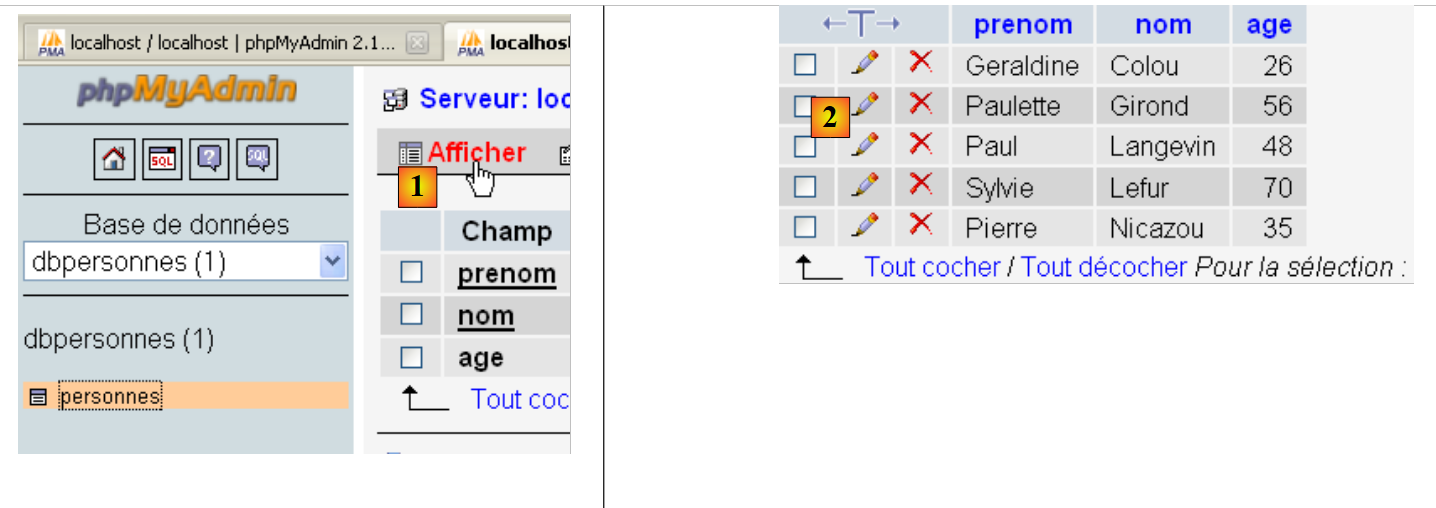
- 在 [1] 中,[查看] 链接可让您查看 [people] 表的内容 [2]。
9.7. 执行任意 SQL 查询
以下脚本允许您执行一个 SQL 命令文件,并显示每个命令的结果:
- 若命令为 SELECT,则显示 SELECT 的结果;
- 若命令为 INSERT、UPDATE 或 DELETE,则显示修改的行数。
程序 (mysqldb_05)
| # import module MySQLdb
import sys
sys.path.append("D:\Programs\ActivePython\site-packages")
import MySQLdb
# other modules
import re
def cutNewLineChar(ligne):
# delete the [line] end-of-line mark if it exists
l=len(ligne)
while(ligne[l-1]=="\n" or ligne[l-1]=="\r"):
l-=1
return(ligne[0:l])
# ---------------------------------------------------------------------------------
def afficherInfos(curseur):
# displays the result of an sql query
# was it a select?
if curseur.description:
# there's a description - so it's a select
# description[i] is the description of column no. i in the select
# description[i][0] is the name of column no. i in the select
# displays field names
titre=""
for i in range(len(curseur.description)):
titre+=curseur.description[i][0]+","
# displays the list of fields without the trailing comma
print titre[0:len(titre)-1]
# dividing line
print "-"*(len(titre)-1)
# current select line
ligne=curseur.fetchone()
while ligne:
print ligne
# next line of the select
ligne=curseur.fetchone()
else:
# there are no fields - it wasn't a select
print "%s lignes(s) a (ont) ete modifiee(s)" % (curseur.rowcount)
# ---------------------------------------------------------------------------------
def executerCommandes(HOTE,ID,PWD,BASE,SQL,suivi=False,arret=True):
# uses connection (HOTE,ID,PWD,BASE)
# executes the SQL commands contained in the SQL text file on this connection
# this is a file of SQL commands to be executed one per line
# if followed=1 then each execution of a SQL order is displayed, indicating success or failure
# if arret=1, the function stops on the 1st error encountered, otherwise it executes all sql commands
# the function returns an array (nb of errors, error1, error2, ...)
# check for the presence of the SQL file
data=None
try:
data=open(SQL,"r")
except:
return [1,"Le fichier %s n'existe pas" % (SQL)]
# connection
try:
connexion=MySQLdb.connect(host=HOTE,user=ID,passwd=PWD,db=BASE)
except MySQLdb.OperationalError,erreur:
return [1,"Erreur lors de la connexion a MySQL sous l'identite (%s,%s,%s,%s) : %s" % (HOTE, ID, PWD, BASE, erreur)]
# a cursor is requested
curseur=connexion.cursor()
# execution of SQL queries contained in the SQL file
# we put them in a table
requetes=data.readlines()
# run them one by one - initially no errors
erreurs=[0]
for i in range(len(requetes)):
# store the current query
requete=requetes[i]
# do we have an empty query? If so, move on to the next query
if re.match(r"^\s*$",requete):
continue
# query execution i
erreur=""
try:
curseur.execute(requete)
except Exception, erreur:
pass
# was there a mistake?
if erreur:
# one more mistake
erreurs[0]+=1
# error msg
msg="%s : Erreur (%s)" % (requete,erreur)
erreurs.append(msg)
# screen tracking or not?
if suivi:
print msg
# shall we stop?
if arret:
return erreurs
else:
if suivi:
print "%s : Execution reussie" % (requete)
# information on the result of the query
afficherInfos(curseur)
# close connection and release resources
curseur.close()
connexion.commit()
# we disconnect
try:
connexion.close()
except MySQLdb.OperationalError,erreur:
# one more mistake
erreurs[0]+=1
# error msg
msg="%s : Erreur (%s)" % (requete,erreur)
erreurs.append(msg)
# return
return erreurs
# ---------------------------------------------- main
# connection to the MySQL database
# user identity
ID="admpersonnes"
PWD="nobody"
# the sgbd host machine
HOTE="localhost"
# base identity
BASE="dbpersonnes"
# identity of the SQL command text file to be executed
TEXTE="sql2.txt"
# table creation and filling
erreurs=executerCommandes(HOTE,ID,PWD,BASE,TEXTE,True,False)
# display number of errors
print "il y a eu %s erreur(s)" % (erreurs[0])
for i in range(1,len(erreurs)):
print erreurs[i]
|
注:
- 脚本的第 100 行是新功能:在执行 SQL 语句后,我们会请求该查询所用游标的相关信息。这些信息由第 16–40 行中的 displayInfo 函数提供;
- 第 19 行和第 39 行:如果执行的 SQL 查询是 SELECT 语句,则 [cursor.description] 属性是一个数组,其中第 i 个元素描述 SELECT 结果中的第 i 个字段。否则,[cursor.rowcount] 属性(第 39 行)表示 INSERT、UPDATE 或 DELETE 查询修改的行数;
- 第 32 行和第 36 行:[cursor.fetchone] 方法用于检索 SELECT 语句的当前行。此外还有 [cursor.fetchall] 方法,可一次性检索所有行。
结果
已执行查询的文件:
| select * from personnes
select nom,prenom from personnes order by nom asc, prenom desc
select * from personnes where age between 20 and 40 order by age desc, nom asc, prenom asc
insert into personnes values('Josette','Bruneau',46)
update personnes set age=47 where nom='Bruneau'
select * from personnes where nom='Bruneau'
delete from personnes where nom='Bruneau'
select * from personnes where nom='Bruneau'
xselect * from personnes where nom='Bruneau'
|
屏幕结果:
| select * from personnes : Execution reussie
prenom,nom,age
---------------
('Geraldine', 'Colou', 26L)
('Paulette', 'Girond', 56L)
('Paul', 'Langevin', 48L)
('Sylvie', 'Lefur', 70L)
('Pierre', 'Nicazou', 35L)
select nom,prenom from personnes order by nom asc, prenom desc : Execution reussie
nom,prenom
-----------
('Colou', 'Geraldine')
('Girond', 'Paulette')
('Langevin', 'Paul')
('Lefur', 'Sylvie')
('Nicazou', 'Pierre')
select * from personnes where age between 20 and 40 order by age desc, nom asc,prenom asc : Execution reussie
prenom,nom,age
---------------
('Pierre', 'Nicazou', 35L)
('Geraldine', 'Colou', 26L)
insert into personnes values('Josette','Bruneau',46) : Execution reussie
1 lignes(s) a (ont) ete modifiee(s)
update personnes set age=47 where nom='Bruneau' : Execution reussie
1 lignes(s) a (ont) ete modifiee(s)
select * from personnes where nom='Bruneau' : Execution reussie
prenom,nom,age
---------------
('Josette', 'Bruneau', 47L)
delete from personnes where nom='Bruneau' : Execution reussie
1 lignes(s) a (ont) ete modifiee(s)
select * from personnes where nom='Bruneau' : Execution reussie
prenom,nom,age
---------------
xselect * from personnes where nom='Bruneau' : Erreur ((1064, "You have an error in your SQL syntax; check the manual that corresponds to your MySQL server version for the right syntax to use near 'xselect * from personnes where nom='Bruneau'' at line 1"))
|
PhpMyAdmin 验证: