Skip to content

12. Web 应用程序 MVC [personne] – 版本 7

12.1. 引言

在此版本中,我们假设可能存在某些客户端浏览器已禁用:

  1. 服务器发送的Cookie的回传
  2. 阻止在显示的 HTML 页面中执行嵌入的 JavaScript 代码

但我们仍希望此类浏览器能够使用我们的应用程序。第2点将我们带回了应用程序的第2版,因为JavaScript是从第3版开始使用的。第2版可以在不使用JavaScript的情况下运行应用程序,因此第2点已解决。

第1点可能难以处理,也可能并非如此。我们应用程序的第6版在不使用Cookie的情况下也能运行。通过合并第2版和第6版,我们得到了所需的结果。我们将增加一个额外的要求:应用程序必须支持会话管理。这并非毫无意义的要求。 在需要用户认证的应用程序中,服务器必须记住用户的用户名/密码组合,以避免用户在请求每个页面时都需重新认证。

到目前为止,我们已经使用了三种解决方案来在客户端/服务器交互过程中存储信息:

  1. 会话
  2. Cookie
  3. 隐藏字段

方案2可以排除,因为客户端浏览器可能已禁用Cookie功能。

方案3即之前探讨过的第6版方案。出于安全考虑,该方案不可行。如果登录名/密码对被封装在发送给浏览器的每一页中,这意味着它们会在每次客户端/服务器交互时通过网络传输。这对应用程序的安全性不利。 因此,可以考虑使用HTTPS协议来加密客户端与服务器之间的通信。但如果对应用程序的每一页都使用该协议,将会增加服务器的负载。

我们可能希望排除方案 1,因为它同样基于 Cookie。在首次客户端/服务器交互时,服务器会向客户端发送一个会话令牌,客户端将在每次新请求时将其发回给服务器。借助该令牌,服务器能够识别其客户端,并为其分配在先前交互中存储的信息。 会话令牌由服务器封装在 Cookie 中发送。 未禁用Cookie的浏览器可在后续请求中将该Cookie发回给服务器。若已禁用Cookie,则有另一种解决方案:可在请求的URL中包含会话令牌。现在我们重新研究第4版中的文件[index.jsp],即可看到这一情况:


<%@ page language="java" contentType="text/html; charset=ISO-8859-1"
    pageEncoding="ISO-8859-1"%>
<%@ taglib uri="/WEB-INF/c.tld" prefix="c" %>

<c:redirect url="/main"/>

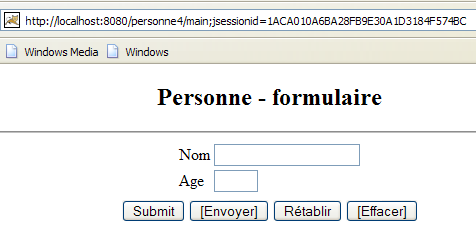
需要指出的是,上文第5行将客户端重定向至URL [/personne4/main?jsessionid=XX],其中 XX 即为会话令牌,如下图所示——该截图是在请求 URL [http://localhost:8080/personne4] 后获取的:
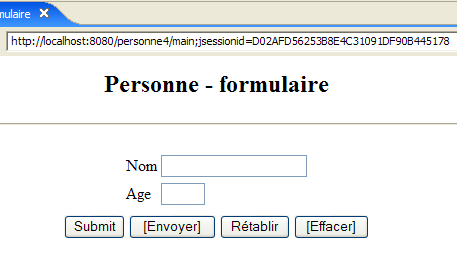
Image

让我们更深入地探讨一下 <c:redirect> 标签在会话令牌方面的运作机制。假设使用的是允许 Cookie 的浏览器。下面我们将 Firefox 浏览器进行配置:
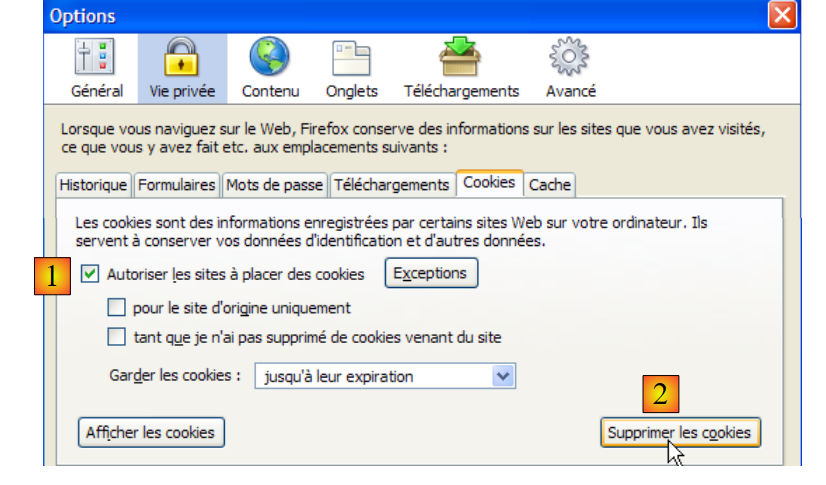
Image

在 [1] 中,我们启用 Cookie;在 [2] 中,我们清除现有 Cookie 以建立已知环境。随后我们请求 URL [http://localhost:8080/personne4]。我们得到以下响应:
Image

客户端的初始请求 HTTP 如下:

1
2
3
4
5
6
7
8
9
GET /personne4/ HTTP/1.1
Host: localhost:8080
User-Agent: Mozilla/5.0 (Windows; U; Windows NT 5.1; fr; rv:1.8.0.3) Gecko/20060426 Firefox/1.5.0.3
Accept: text/xml,application/xml,application/xhtml+xml,text/html;q=0.9,text/plain;q=0.8,image/png,*/*;q=0.5
Accept-Language: fr-fr,fr;q=0.8,en;q=0.6,en-us;q=0.4,de;q=0.2
Accept-Encoding: gzip,deflate
Accept-Charset: ISO-8859-1,utf-8;q=0.7,*;q=0.7
Keep-Alive: 300
Connection: keep-alive

需注意的是,客户端并未发送会话cookie。服务器返回的响应HTTP如下:

1
2
3
4
5
6
7
HTTP/1.x 302 Déplacé Temporairement
Server: Apache-Coyote/1.1
Set-Cookie: JSESSIONID=1ACA010A6BA28FB9E30A1D3184F574BC; Path=/personne4
Location: http://localhost:8080/personne4/main;jsessionid=1ACA010A6BA28FB9E30A1D3184F574BC
Content-Type: text/html;charset=ISO-8859-1
Content-Length: 0
Date: Tue, 23 May 2006 09:10:05 GMT
  • 第 1 行:服务器要求客户端重定向
  • 第 3 行:服务器发送了一个与 [JSESSIONID] 属性关联的会话令牌
  • 第 4 行:重定向 URL 包含会话令牌。由于客户端未发送会话 Cookie,因此由 <c:redirect> 标签将其放置于此。

被要求重定向的浏览器随后发出了以下请求:

GET /personne4/main;jsessionid=1ACA010A6BA28FB9E30A1D3184F574BC HTTP/1.1
Host: localhost:8080
User-Agent: Mozilla/5.0 (Windows; U; Windows NT 5.1; fr; rv:1.8.0.3) Gecko/20060426 Firefox/1.5.0.3
Accept: text/xml,application/xml,application/xhtml+xml,text/html;q=0.9,text/plain;q=0.8,image/png,*/*;q=0.5
Accept-Language: fr-fr,fr;q=0.8,en;q=0.6,en-us;q=0.4,de;q=0.2
Accept-Encoding: gzip,deflate
Accept-Charset: ISO-8859-1,utf-8;q=0.7,*;q=0.7
Keep-Alive: 300
Connection: keep-alive
Cookie: JSESSIONID=1ACA010A6BA28FB9E30A1D3184F574BC
  • 第 1 行:它请求包含会话令牌的重定向 URL。这就是为什么在屏幕截图中,浏览器显示了该 URL。
  • 第10行:浏览器将服务器在先前交互中发送的会话令牌发回。这是当客户端浏览器允许Cookie时,Cookie的正常工作方式。如果不允许,收到的Cookie将不会被发回。

服务器对该第二次请求作出了如下响应:

1
2
3
4
5
HTTP/1.x 200 OK
Server: Apache-Coyote/1.1
Content-Type: text/html;charset=ISO-8859-1
Content-Length: 2376
Date: Tue, 23 May 2006 09:10:05 GMT

服务器已找到所请求的页面并将其发送。请注意,它不再发送会话令牌。这是会话令牌的正常工作原理:服务器仅以 Cookie 形式向浏览器发送一次,随后浏览器会在每次请求时将其发回以供识别。

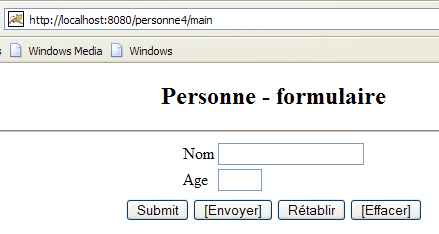
现在,使用同一浏览器,通过手动输入 URL [http://localhost:8080/personne4] 再次请求该页面。此时将获得以下页面:
Image

可以看到,浏览器显示的 URL 中不再包含会话令牌。让我们看看第一次客户端/服务器交互:

浏览器发出了以下请求:

GET /personne4 HTTP/1.1
Host: localhost:8080
User-Agent: Mozilla/5.0 (Windows; U; Windows NT 5.1; fr; rv:1.8.0.3) Gecko/20060426 Firefox/1.5.0.3
Accept: text/xml,application/xml,application/xhtml+xml,text/html;q=0.9,text/plain;q=0.8,image/png,*/*;q=0.5
Accept-Language: fr-fr,fr;q=0.8,en;q=0.6,en-us;q=0.4,de;q=0.2
Accept-Encoding: gzip,deflate
Accept-Charset: ISO-8859-1,utf-8;q=0.7,*;q=0.7
Keep-Alive: 300
Connection: keep-alive
Cookie: JSESSIONID=1ACA010A6BA28FB9E30A1D3184F574BC

这与上次的请求完全相同,但有一个区别:第10行,浏览器返回了它在首次交互中收到的会话令牌。再次强调,如果浏览器的Cookie功能处于启用状态,这是正常的行为。

服务器发送了以下响应:

1
2
3
4
5
HTTP/1.x 302 Déplacé Temporairement
Server: Apache-Coyote/1.1
Location: http://localhost:8080/personne4/
Transfer-Encoding: chunked
Date: Tue, 23 May 2006 09:24:39 GMT

它要求客户端进行重定向。由于已收到客户端的会话令牌,因此会继续使用该会话,而不会发送新的会话令牌。 出于同样的原因,<c:redirect> 标签不会将该会话令牌包含在重定向 URL 中。这就是为什么上图所示的 URL 中没有会话令牌。

由此可得出以下规则:只有当客户端未发送 HTTP 标头时,<c:redirect> 标签才会将会话令牌包含在重定向 URL 中:

Cookie: JSESSIONID=1ACA010A6BA28FB9E30A1D3184F574BC

这一规则同样适用于我们稍后将要遇到的 <c:url> 标签。

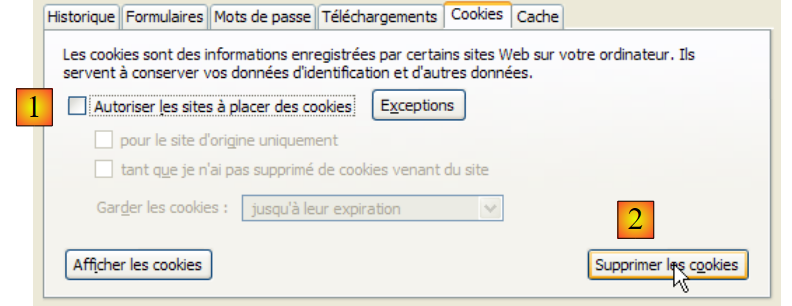
如果浏览器禁用了 Cookie 会发生什么?让我们试一试。首先,我们重置浏览器:
Image

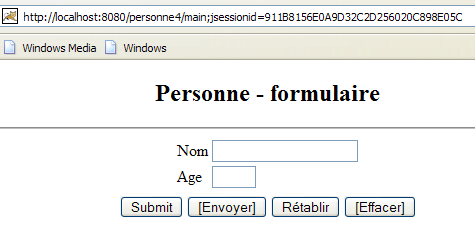
在 [1] 中,我们禁用 Cookie;在 [2] 中,我们清除已存在的 Cookie,以便从已知状态开始测试。随后我们请求 URL [http://localhost:8080/personne4]。我们得到以下响应:
Image

我们得到了与之前相同的结果。然而,HTTP的交互内容却并不完全相同:

GET /personne4/ HTTP/1.1
Host: localhost:8080
User-Agent: Mozilla/5.0 (Windows; U; Windows NT 5.1; fr; rv:1.8.0.3) Gecko/20060426 Firefox/1.5.0.3
Accept: text/xml,application/xml,application/xhtml+xml,text/html;q=0.9,text/plain;q=0.8,image/png,*/*;q=0.5
Accept-Language: fr-fr,fr;q=0.8,en;q=0.6,en-us;q=0.4,de;q=0.2
Accept-Encoding: gzip,deflate
Accept-Charset: ISO-8859-1,utf-8;q=0.7,*;q=0.7
Keep-Alive: 300
Connection: keep-alive

HTTP/1.x 302 Déplacé Temporairement
Server: Apache-Coyote/1.1
Set-Cookie: JSESSIONID=911B8156E0A9D32C2D256020C898E05C; Path=/personne4
Location: http://localhost:8080/personne4/main;jsessionid=911B8156E0A9D32C2D256020C898E05C
Content-Type: text/html;charset=ISO-8859-1
Content-Length: 0
Date: Tue, 23 May 2006 09:39:55 GMT

GET /personne4/main;jsessionid=911B8156E0A9D32C2D256020C898E05C HTTP/1.1
Host: localhost:8080
User-Agent: Mozilla/5.0 (Windows; U; Windows NT 5.1; fr; rv:1.8.0.3) Gecko/20060426 Firefox/1.5.0.3
Accept: text/xml,application/xml,application/xhtml+xml,text/html;q=0.9,text/plain;q=0.8,image/png,*/*;q=0.5
Accept-Language: fr-fr,fr;q=0.8,en;q=0.6,en-us;q=0.4,de;q=0.2
Accept-Encoding: gzip,deflate
Accept-Charset: ISO-8859-1,utf-8;q=0.7,*;q=0.7
Keep-Alive: 300
Connection: keep-alive

HTTP/1.x 200 OK
Server: Apache-Coyote/1.1
Content-Type: text/html;charset=ISO-8859-1
Content-Length: 2376
Date: Tue, 23 May 2006 09:39:55 GMT
  • 第1-9行:浏览器的第1次请求。它未发送会话cookie。
  • 第11-17行:服务器的响应,要求浏览器重定向到另一个URL。该响应发送了一个会话Cookie第13行:<c:redirect>标签将令牌包含在重定向URL中(第14行)。
  • 第19-27行:浏览器的第2次请求。由于其Cookie功能已被禁用,因此未返回服务器刚刚发送的会话Cookie。
  • 第29-33行:服务器的响应。可以看出,尽管浏览器未发送会话cookie,但服务器并未如预期那样重新启动一个新会话。 这体现在服务器并未像第13行那样发送HTTP [Set-Cookie]这个头部。这意味着它延续了之前的会话。它能够通过第19行浏览器请求的URL中包含的会话令牌来识别该会话。

需要注意的是,服务器通过获取客户端发送的会话令牌来跟踪会话,主要有两种方式:

  • 在客户端发送的 HTTP [Set-Cookie] 请求头中
  • 客户端请求的 URL 中

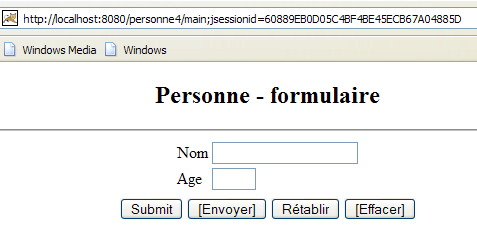
现在,使用同一浏览器,像之前允许Cookie时那样,手动输入URL [http://localhost:8080/personne4] 再次进行请求。此时将显示以下页面:
Image

该结果与允许Cookie时不同:会话令牌出现在浏览器显示的URL中。我们无需分析发生的HTTP数据交换,直接解释这一结果:

[cookies autorisés]

  • 在第二次请求 URL [http://localhost:8080/personne4] 时,客户端浏览器回传了其在首次请求该 URL 时从服务器接收的会话 Cookie。因此,<c:redirect> 标签并未将会话令牌包含在重定向地址中。

[cookies inhibés]

  • 在对 URL [http://localhost:8080/personne4] 的第二次请求中,由于客户端浏览器已禁用 Cookie,因此未发送其在对该 URL 的首次请求中从服务器接收的会话 Cookie。 因此,<c:redirect> 标签会在重定向地址中包含会话令牌。这就是为什么我们在上面的屏幕截图中看到了它。

<c:redirect><c:url> 标签允许将会话令牌包含在 URL 中。这就是本文提出的解决方案。

12.2. Eclipse 项目

要创建 Web 应用程序 [/personne7] 的 Eclipse 项目 [mvc-personne-07],需按照第 6.2 节所述步骤复制项目 [mvc-personne-06]。
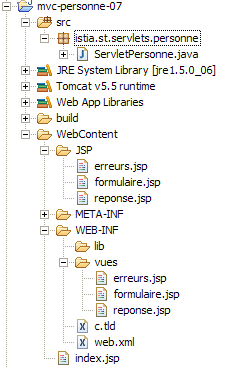
12.3. Web 应用程序 [personne7] 的配置

应用程序 /personne7 的文件 web.xml 如下:


<?xml version="1.0" encoding="UTF-8"?>
...
    <display-name>mvc-personne-07</display-name>
...

该文件与上一版本完全相同,仅第 3 行有所变化,其中 Web 应用程序的显示名称已更改为 [mvc-personne-07]。主页 [index.jsp] 保持不变。


...
<c:redirect url="/do/formulaire"/>

12.4. 视图代码

视图 [formulaire, réponse, erreurs] 恢复为第 2 版中的状态,即 c.a.d,不含 JavaScript。但它们保留了最新版本中的 JSTL 标签。

12.4.1. 视图 [formulaire]
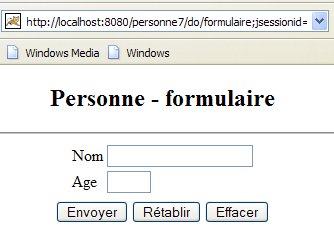
Image

已移除与 JavaScript 代码相关的按钮。

[formulaire.jsp]:


<%@ page language="java" contentType="text/html; charset=ISO-8859-1"
  pageEncoding="ISO-8859-1"%>
<!DOCTYPE HTML PUBLIC "-//W3C//DTD HTML 4.01 Transitional//EN">
<%@ taglib uri="/WEB-INF/c.tld" prefix="c" %>

<html>
  <head>
    <title>Personne - formulaire</title>
  </head>
  <body>
    <center>
      <h2>Personne - formulaire</h2>
      <hr>
      <form name="frmPersonne" action="<c:url value="validationFormulaire"/>" method="post">
        <table>
          <tr>
            <td>Nom</td>
            <td><input name="txtNom" value="${nom}" type="text" size="20"></td>
          </tr>
          <tr>
            <td>Age</td>
            <td><input name="txtAge" value="${age}" type="text" size="3"></td>
          </tr>
          <tr>
        </table>
        <table>
          <tr>
            <td><input type="submit" name="bouton" value="Envoyer"></td>
            <td><input type="reset" value="Rétablir"></td>
            <td><input type="submit" name="bouton" value="Effacer"></td>
          </tr>
        </table>
      </form>
    </center>
  </body>
</html>
  • 第 14 行:POST 的目标 URL 使用 <c:url> 标签编写,以便在客户端是不会发送 HTTP [Cookie] 标头的浏览器时,会话令牌仍能包含其中。
  • 表单中有两个类型为 [submit] 的按钮:[Envoyer](第 28 行)和 [Effacer](第 30 行)。这两个按钮名称相同:bouton。 当点击 POST 时,浏览器将发送参数:
  • button=Submit(若 POST 请求由 [Submit] 按钮触发)
  • 如果 POST 请求是由 [清除] 按钮触发的,则发送:button=清除

正是这个参数帮助我们确定了应执行的确切操作,URL [/do/validationFormulaire] 现在对应两项不同的操作。

12.4.2. 视图 [réponse]
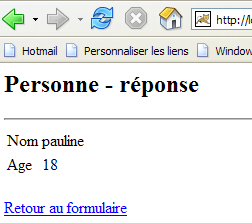
Image

[réponse.jsp]:


<%@ page language="java" contentType="text/html; charset=ISO-8859-1"
    pageEncoding="ISO-8859-1"%>
<!DOCTYPE HTML PUBLIC "-//W3C//DTD HTML 4.01 Transitional//EN">
<%@ taglib uri="/WEB-INF/c.tld" prefix="c" %>

<html>
    <head>
      <title>Personne</title>
  </head>
  <body>
      <h2>Personne - réponse</h2>
    <hr>
    <table>
        <tr>
          <td>Nom</td>
        <td>${nom}</td>
      </tr>
        <tr>
          <td>Age</td>
        <td>${age}</td>
      </tr>
    </table>      
    <br>
    <a href="<c:url value="retourFormulaire"/>">${lienRetourFormulaire}</a>
  </body>
</html>

  • 第 24 行:HREF 的目标 URL 使用 <c:url> 标签进行编写,以便在客户端是未发送 HTTP [Cookie] 标头的浏览器时,其中包含会话令牌。

12.4.3. 视图 [erreurs]
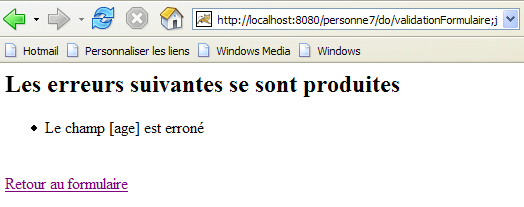
Image

[erreurs.jsp]:


<%@ page language="java" contentType="text/html; charset=ISO-8859-1"
    pageEncoding="ISO-8859-1"%>
<!DOCTYPE HTML PUBLIC "-//W3C//DTD HTML 4.01 Transitional//EN">
<%@ taglib uri="/WEB-INF/c.tld" prefix="c" %>

<html>
    <head>
      <title>Personne</title>
  </head>
  <body>
      <h2>Les erreurs suivantes se sont produites</h2>
    <ul>
            <c:forEach var="erreur" items="${erreurs}">
                <li>${erreur}</li>
            </c:forEach>
    </ul>
    <br>
    <a href="<c:url value="retourFormulaire"/>">${lienRetourFormulaire}</a>
  </body>
</html>

  • 第 18 行:HREF 的目标 URL 使用 <c:url> 标签编写,以便在客户端是不会发送 HTTP [Cookie] 标头的浏览器时,其中包含会话令牌。

建议读者按照之前版本中的原则测试这些新视图。

12.5. 控制器 [ServletPersonne]

Web 应用程序 [/personne7] 的控制器 [ServletPersonne] 如下所示:

package istia.st.servlets.personne;

...

@SuppressWarnings("serial")
public class ServletPersonne extends HttpServlet {
    // 实例参数
    private String urlErreurs = null;
    private ArrayList erreursInitialisation = new ArrayList<String>();
    private String[] paramètres={"urlFormulaire","urlReponse","lienRetourFormulaire"};
    private Map params=new HashMap<String,String>();

    // 初始化
    @SuppressWarnings("unchecked")
    public void init() throws ServletException {
...
    }

    // GET
    @SuppressWarnings("unchecked")
    public void doGet(HttpServletRequest request, HttpServletResponse response)
            throws IOException, ServletException {

...
        // 获取请求发送方法
        String méthode=request.getMethod().toLowerCase();
        // 获取待执行的操作
        String action=request.getPathInfo();
...
        if(méthode.equals("post") && action.equals("/validationFormulaire")){
            // 验证输入表单
            doValidationFormulaire(request,response);
            return;
        }
        if(méthode.equals("get") && action.equals("/retourFormulaire")){
            // 返回输入表单
            doRetourFormulaire(request,response);
            return;
        }
        // 其他情况
        doInit(request,response);
    }

    // 显示空表单
    void doInit(HttpServletRequest request, HttpServletResponse response) throws ServletException, IOException{
...
    }

    // 显示预填表单
    void doRetourFormulaire(HttpServletRequest request, HttpServletResponse response) throws ServletException, IOException{
        // 显示表单
        getServletContext().getRequestDispatcher((String)params.get("urlFormulaire")).forward(
                request, response);
        return;
    }

    // 显示空表单
    void doEffacer(HttpServletRequest request, HttpServletResponse response) throws ServletException, IOException{
        // 正在准备表单模板
        HttpSession session = request.getSession(true);        
        session.setAttribute("nom", "");
        session.setAttribute("age", "");
        // 显示表单
        getServletContext().getRequestDispatcher((String)params.get("urlFormulaire")).forward(
                request, response);
        return;
    }

    // 表单验证
    void doValidationFormulaire(HttpServletRequest request,
            HttpServletResponse response) throws ServletException, IOException{
        // 获取触发 POST 的按钮
        String bouton = request.getParameter("bouton").toLowerCase();
        // 根据触发 POST 的按钮进行处理
        if(bouton==null){
            doInit(request,response);
            return;
        }
        if("envoyer".equals(bouton)){
            doEnvoyer(request,response);
            return;
        }
        if("effacer".equals(bouton)){
            doEffacer(request,response);
            return;
        }
    }

    // 表单验证
    void doEnvoyer(HttpServletRequest request,
            HttpServletResponse response) throws ServletException, IOException{
        // 获取参数
        String nom = request.getParameter("txtNom");
        String age = request.getParameter("txtAge");
        // 将参数存储在会话中
        HttpSession session = request.getSession(true);        
        session.setAttribute("nom", nom);
        session.setAttribute("age", age);
        // 将返回表单的链接放入视图模板中 [réponse, erreurs]
        request.setAttribute("lienRetourFormulaire", (String)params.get("lienRetourFormulaire"));    
        // 验证参数
        ArrayList<String> erreursAppel = new ArrayList<String>();
    ...
        // 参数中是否有错误?
        if (erreursAppel.size() != 0) {
            // 发送错误页面
            request.setAttribute("erreurs", erreursAppel);
            getServletContext().getRequestDispatcher(urlErreurs).forward(
                    request, response);
            return;
        }
        // 参数正确 - 发送响应页面
        getServletContext().getRequestDispatcher((String)params.get("urlReponse")).forward(request,
                response);
        return;
    }

    // 提交
    public void doPost(HttpServletRequest request, HttpServletResponse response)
            throws IOException, ServletException {
...
    }
}
  • 第 35 行:操作 [/retourFormulaire] 由 GET 执行,而非像前一版本那样由 POST 执行。
  • 第 70-87 行:操作 [/validationFormulaire] 由 POST 触发,该操作由点击[formulaire]视图中的[Envoyer]或[Effacer]按钮之一所触发的POST方法。[doValidationFormulaire]方法通过两个不同的方法分别处理这两种情况。
  • 第 90-103 行:方法 [doEnvoyer] 对应于上一版本中的方法 [doValidationFormulaire]。输入的数据被放入会话中(第 96-98 行),而在上一版本中,这些数据被放入查询中。
  • 第 58-67 行:新方法 [doEffacer] 需显示一个空表单。可调用已实现此功能的方法 [doInit]。 在此,我们顺便将 [nom, age] 的元素从会话中清除,以确保会话能持续反映表单的最新状态。
  • 第 50-55 行:请求显示视图 [formulaire],但未显式初始化该视图的模型。该模型实际上由会话中已存在的 [nom, age] 元素构成。无需进行其他操作。

12.6. 测试

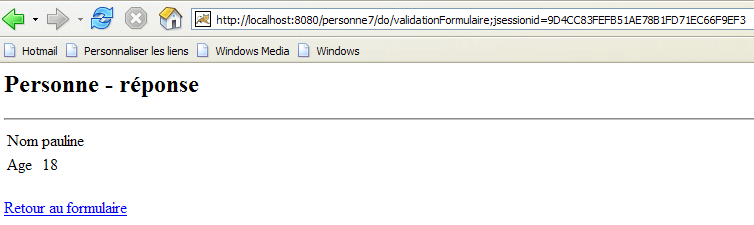
将 Eclipse 项目 [personne-mvc-07] 集成到 Tomcat 后,启动或重启 Tomcat,然后使用已禁用 Cookie 并清除了现有 Cookie 的浏览器访问 URL [http://localhost:8080/personne7]。将获得以下响应:
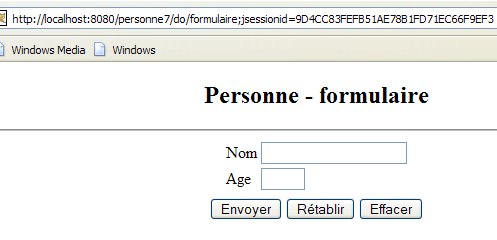
Image

浏览器接收到的源代码如下:

1
2
3
<form name="frmPersonne" action="validationFormulaire;jsessionid=9D4CC83FEFB51AE78B1FD71EC66F9EF3" method="post">
...
</form>

第1行,会话令牌位于POST的目标URL中。

填写表格并提交:

Image

浏览器收到的源代码如下:

1
2
3
4
...
    <br>
    <a href="retourFormulaire;jsessionid=9D4CC83FEFB51AE78B1FD71EC66F9EF3">Retour au formulaire</a>
  </body>

第3行,会话令牌位于链接的目标URL中。