11. MVC Web 应用程序 [person] – 版本 6
11.1. 简介
在此版本中,我们进行了以下更改:
上一版本未使用会话(sessions)来存储客户端与服务器交互间的数据。它使用了 Cookie,这意味着待存储的数据由服务器发送给客户端,以便客户端在下次交互时将其发回。在此新版本中,我们采用了一种类似的技术:表单中的隐藏字段。这两种技术之间存在差异:
Cookie | 隐藏字段 |
- 服务器将待存储的项目放置在 HTML 文档之前的 HTTP 数据流中。 | - 服务器将待存储的元素放置在 HTML 文档内部。 |
- 该技术要求浏览器接受 Cookie,以便在执行 GET 或 POST 请求时将其发回给服务器。 | - 该技术要求客户端向服务器发送的所有请求均为 POST 请求,以便将隐藏字段发送给服务器。 |
- 用户可以通过查看浏览器接收的 Cookie 来访问存储的项目。大多数浏览器都提供此选项。 | - 用户可以通过查看接收到的 HTML 文档的源代码来访问存储的数据。 |
由于所有客户端请求均为 POST 请求,因此此处可采用隐藏字段技术。
11.2. Eclipse 项目
要为 Web 应用程序 [/personne6] 创建 Eclipse 项目 [mvc-personne-06],请按照第 6.2 节所述的步骤复制项目 [mvc-personne-05]。
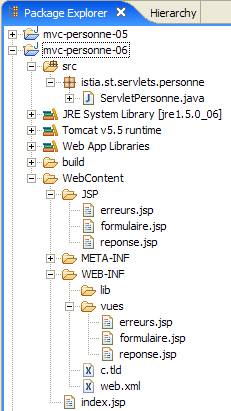 | 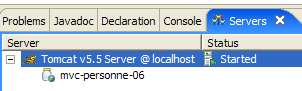 |
11.3. 配置 [personne6] Web 应用程序
/personne6 应用程序的 web.xml 文件如下:
<?xml version="1.0" encoding="UTF-8"?>
<web-app id="WebApp_ID" version="2.4"
    xmlns="http://java.sun.com/xml/ns/j2ee"
    xmlns:xsi="http://www.w3.org/2001/XMLSchema-instance"
    xsi:schemaLocation="http://java.sun.com/xml/ns/j2ee http://java.sun.com/xml/ns/j2ee/web-app_2_4.xsd">
    <display-name>mvc-personne-06</display-name>
...
除了一些细节外,此文件与上一版本中的文件完全相同:
- 第 6 行:Web 应用程序的显示名称已更改为 [mvc-personne-06]
主页 [index.jsp] 与 [/personne5] 应用程序的主页完全相同:
<%@ page language="java" contentType="text/html; charset=ISO-8859-1"
    pageEncoding="ISO-8859-1"%>
<%@ taglib uri="/WEB-INF/c.tld" prefix="c" %>

<c:redirect url="/do/formulaire"/>
11.4. 视图代码
仅 [response, errors] 视图发生了变化。它们现在在各自的表单中包含了隐藏字段,而在之前的版本中,这些表单并未提交任何参数。
[response.jsp]:
...
<html>
...
  <body>
...
    <form name="frmPersonne" action="retourFormulaire" method="post">
      <input type="hidden" name="nom" value="${nom}">
      <input type="hidden" name="age" value="${age}">
    </form>
    <a href="javascript:document.frmPersonne.submit();">
      ${lienRetourFormulaire}
    </a>
  </body>
</html>
- 第6–9行:点击第10–12行中的链接时将提交至服务器的表单
- 第 6 行:POST 目标为 [/do/retourFormulaire]
- 第 7–8 行:将提交隐藏字段 [name] 和 [age]。其值 ${name} 和 ${age} 将由显示 [response.jsp] 的控制器设置。这些值即为表单中输入的内容。
[errors.jsp]:
...
<html>
...
  <body>
...
    <form name="frmPersonne" action="retourFormulaire" method="post">
      <input type="hidden" name="nom" value="${nom}">
      <input type="hidden" name="age" value="${age}">
    </form>
    <a href="javascript:document.frmPersonne.submit();">
      ${lienRetourFormulaire}
    </a>
  </body>
</html>
这些更改和说明与 [response.jsp] 视图相同。请注意,[errors] 视图模板已扩展,增加了两个新元素 [name, age],它们被添加到现有的两个元素 [errors, returnToFormLink] 中。
欢迎读者按照之前版本中采用的方法测试这些新视图。
11.5. [ServletPersonne] 控制器
[/personne6] Web 应用程序的 [ServletPersonne] 控制器与上一版本非常相似。这些更改源于 [errors] 视图的模型发生了变化。必须添加两个新元素:[name, age]。仅显示此视图的方法受到影响,即 [doGet] 和 [doValidateForm] 方法。
11.5.1. [doGet] 方法
[doGet] 的代码如下:
实际上,这段代码与之前完全相同。在之前的版本中,[name, age] 元素并未包含在 [errors] 视图模板中。如果我们继续省略它们,[errors.jsp] 中的变量 ${name} 和 ${age} 将被替换为空字符串。这对我们来说是可行的,因为在此特定情况下,[返回表单] 链接不会显示给用户。 实际上,我们也没有在模板中包含 [formBackLink] 元素。[errors.jsp] 中的变量 ${lienRetourFormulaire} 将被空字符串替换。因此,页面上不会出现链接,也就无法提交 [errors.jsp] 表单中的隐藏字段 [name, age]。因此,这些字段的值可以是空字符串。
11.5.2. [doValidationFormulaire] 方法
其代码如下:
第 8–10 行:我们将元素 [name, age, formReturnLink] 传递给模型。我们知道该方法会显示视图 [response] 或 [errors] 之一。因此,后者在其模型中将包含元素 [name, age]。
11.6. 测试
将 Eclipse 项目 [person-mvc-06] 集成到 Tomcat 后,启动或重启 Tomcat,然后请求 URL [http://localhost:8080/personne6]。