14. [TD]:[metier] 层的 Web 暴露
关键词:多层架构、Spring、依赖注入、Web服务 / jSON、客户端/服务器。
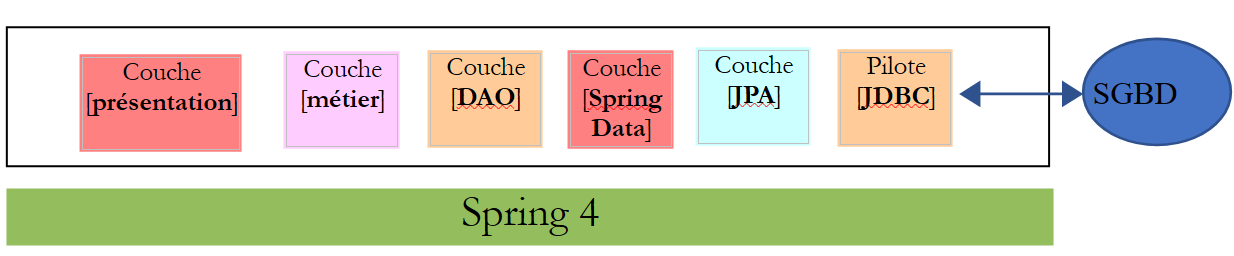
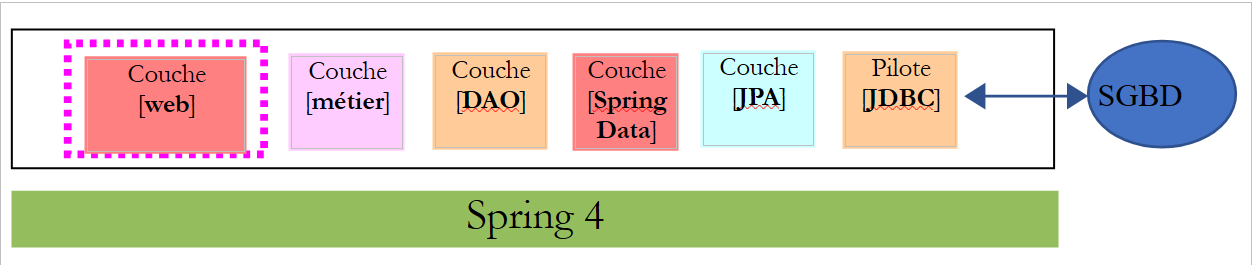
让我们回到 TD 应用程序的当前架构:
 |
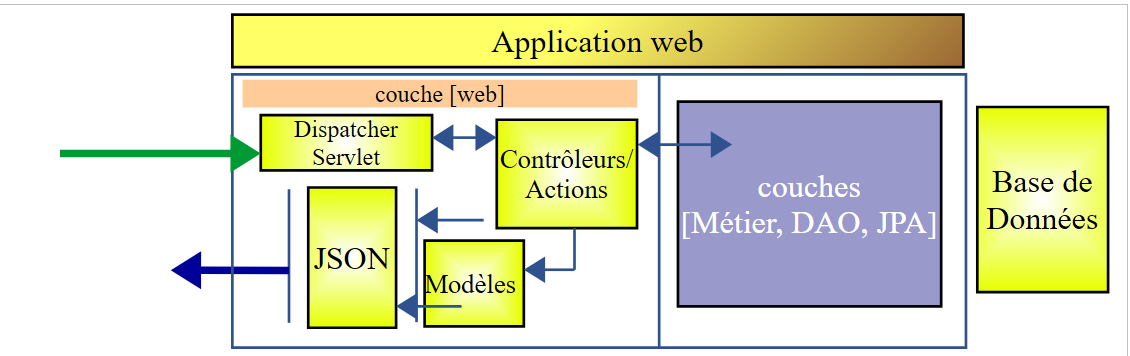
我们将把该架构演进为以下形式:
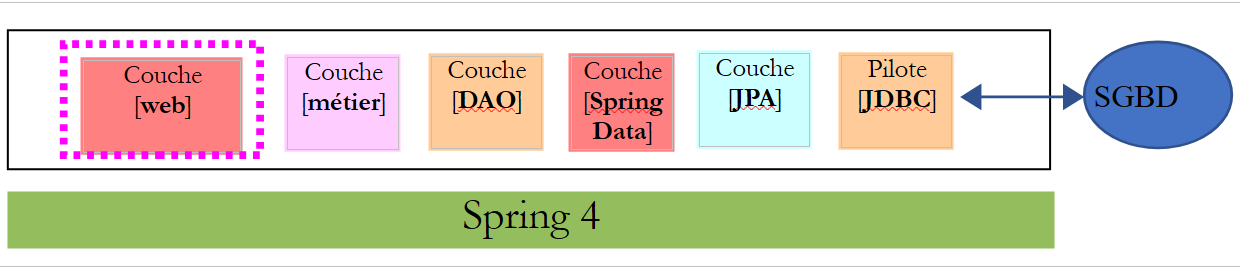 |
以便将业务层的 [IMetier] 接口暴露在 Web 上。为此,我们将遵循第 13.5 节中描述的方法论。
14.1. Support
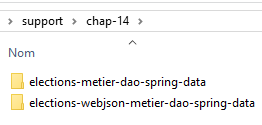 |
本章的项目位于文件夹 [support / chap-14] 中。
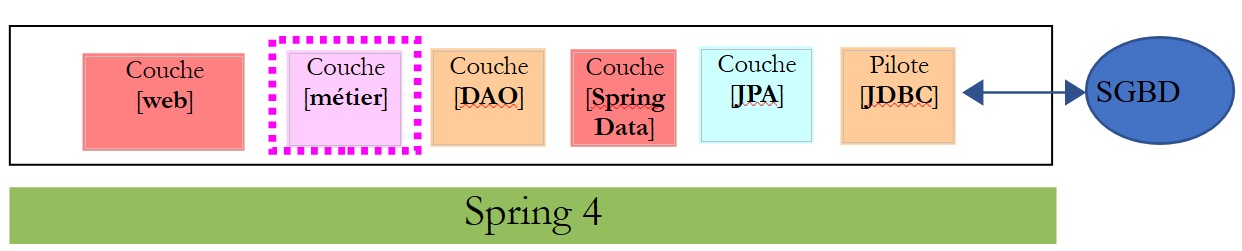
14.2. [métier] 层的 Eclipse 项目
 |
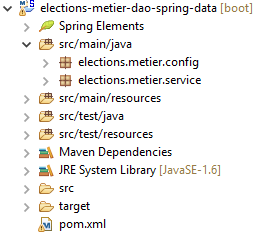 |
14.2.1. Maven 配置
[métier] 层项目是一个由以下 [pom.xml] 文件配置的 Maven 项目:
<?xml version="1.0" encoding="UTF-8"?>
<project xmlns="http://maven.apache.org/POM/4.0.0"
    xsi:schemaLocation="http://maven.apache.org/POM/4.0.0 http://maven.apache.org/maven-v4_0_0.xsd"
    xmlns:xsi="http://www.w3.org/2001/XMLSchema-instance">
    <modelVersion>4.0.0</modelVersion>
    <groupId>istia.st.elections</groupId>
    <artifactId>elections-metier-dao-spring-data</artifactId>
    <version>0.1.0</version>

    <!-- 依赖关系 -->
    <parent>
        <groupId>org.springframework.boot</groupId>
        <artifactId>spring-boot-starter-parent</artifactId>
        <version>1.2.7.RELEASE</version>
    </parent>
    <dependencies>
        <!-- 层[DAO] -->
        <dependency>
            <groupId>istia.st.elections</groupId>
            <artifactId>elections-dao-spring-data-01</artifactId>
            <version>0.0.1-SNAPSHOT</version>
        </dependency>
        <!-- Spring Boot -->
        <dependency>
            <groupId>org.springframework.boot</groupId>
            <artifactId>spring-boot</artifactId>
            <scope>test</scope>
        </dependency>
        <!-- Spring Boot 测试 -->
        <dependency>
            <groupId>org.springframework.boot</groupId>
            <artifactId>spring-boot-starter-test</artifactId>
            <scope>test</scope>
        </dependency>
    </dependencies>

    <properties>
        <!-- 一切皆用 UTF-8 -->
        <project.build.sourceEncoding>UTF-8</project.build.sourceEncoding>
        <java.version>1.8</java.version>
    </properties>

    <build>
        <plugins>
            <plugin>
                <groupId>org.apache.maven.plugins</groupId>
                <artifactId>maven-surefire-plugin</artifactId>
                <version>2.18.1</version>
            </plugin>
        </plugins>
    </build>
</project>
- 第 18-22 行:对第 12 节中构建的 [DAO] 层的依赖;
- 第 23-34 行:测试所需的依赖项;
14.2.2. Spring 配置
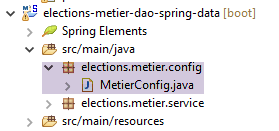 |
[métier] 层的项目是一个 Spring 项目,由以下 [MetierConfig] 文件配置:
package elections.metier.config;

import org.springframework.context.annotation.ComponentScan;
import org.springframework.context.annotation.Import;

import elections.dao.config.DaoConfig;

@Import({ DaoConfig.class })
@ComponentScan({ "elections.metier.service" })
public class MetierConfig {
}
- 此处未使用 [@Configuration] 这种将类定义为 Spring 配置类的标记。只要存在 [@Import, @ComponentScan] 注解,该类便自动成为配置类;
- 第8行:导入[DAO]层的配置文件。这样,该文件中定义的所有Bean都将可用;
- 第 9 行:其他 Spring Bean 位于 [elections.metier.service] 文件夹中;
14.2.3. [métier] 层的实现
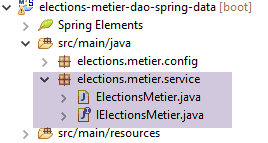 |
[métier] 层的实现即第 8.5 节中定义的内容。
14.2.4. [métier] 层的测试
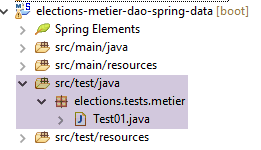 |
测试类即第 8.6 节中描述的那个。
待完成工作:实现 [métier] 层的项目并通过其单元测试。在本地 Maven 仓库中生成该层的归档(run as/ Maven / install)。
14.3. [web] 层的 Eclipse 项目
 |
Web 层是一个 Spring 层 MVC:
 |
Eclipse 项目的结构如下:
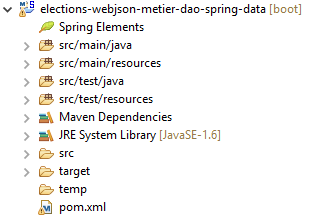 | 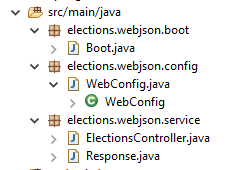 |
- [Boot.java] 是启动 Web 服务的类;
- [WebConfig.java] 是 Web 服务的配置类;
- [Response.java] 是 Web 服务中各个 URL 类生成的响应;
- [ElectionsController] 是 Web 服务的实现类;
14.4. Maven 配置
该项目是一个由以下 [pom.xml] 文件配置的 Maven 项目:
<project xmlns="http://maven.apache.org/POM/4.0.0" xmlns:xsi="http://www.w3.org/2001/XMLSchema-instance"
    xsi:schemaLocation="http://maven.apache.org/POM/4.0.0 http://maven.apache.org/xsd/maven-4.0.0.xsd">
    <modelVersion>4.0.0</modelVersion>
    <groupId>istia.st.elections</groupId>
    <artifactId>elections-webjson-metier-dao-spring-data</artifactId>
    <version>0.0.1-SNAPSHOT</version>

    <name>elections-webjson-metier-dao-spring-data</name>
    <description>couche métier exposée comme un service web / jSON</description>

    <parent>
        <groupId>org.springframework.boot</groupId>
        <artifactId>spring-boot-starter-parent</artifactId>
        <version>1.2.7.RELEASE</version>
    </parent>

    <dependencies>
        <!-- 业务层 -->
        <dependency>
            <groupId>istia.st.elections</groupId>
            <artifactId>elections-metier-dao-spring-data</artifactId>
            <version>0.1.0</version>
        </dependency>
        <!-- MVC 层 -->
        <dependency>
            <groupId>org.springframework.boot</groupId>
            <artifactId>spring-boot-starter-web</artifactId>
        </dependency>
    </dependencies>

    <properties>
        <project.build.sourceEncoding>UTF-8</project.build.sourceEncoding>
        <java.version>1.8</java.version>
    </properties>

    <build>
        <plugins>
            <plugin>
                <groupId>org.apache.maven.plugins</groupId>
                <artifactId>maven-surefire-plugin</artifactId>
                <version>2.18.1</version>
            </plugin>
        </plugins>
    </build>

</project>
- 第 19-23 行:对 [métier] 层归档文件的依赖。这就是我们在第 14 段中创建的;
- 第 25-28 行:用于获取 Spring 应用程序 MVC 的依赖;
14.5. Spring配置
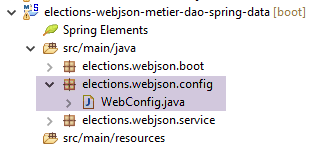 |
类 [WebConfig] 配置 Web 服务:
package elections.webjson.config;

import org.springframework.beans.factory.annotation.Autowired;
import org.springframework.beans.factory.config.ConfigurableBeanFactory;
import org.springframework.boot.context.embedded.EmbeddedServletContainerFactory;
import org.springframework.boot.context.embedded.ServletRegistrationBean;
import org.springframework.boot.context.embedded.tomcat.TomcatEmbeddedServletContainerFactory;
import org.springframework.context.ApplicationContext;
import org.springframework.context.annotation.Bean;
import org.springframework.context.annotation.ComponentScan;
import org.springframework.context.annotation.Import;
import org.springframework.context.annotation.Scope;
import org.springframework.web.context.WebApplicationContext;
import org.springframework.web.servlet.DispatcherServlet;
import org.springframework.web.servlet.config.annotation.EnableWebMvc;

import com.fasterxml.jackson.databind.ObjectMapper;

import elections.metier.config.MetierConfig;

@EnableWebMvc
@Import({ MetierConfig.class })
@ComponentScan({ "elections.webjson.service" })
public class WebConfig {
    // -------------------------------- [web] 层配置
    @Autowired
    private ApplicationContext context;

    @Bean
    public DispatcherServlet dispatcherServlet() {
        DispatcherServlet servlet = new DispatcherServlet((WebApplicationContext) context);
        return servlet;
    }

    @Bean
    public ServletRegistrationBean servletRegistrationBean(DispatcherServlet dispatcherServlet) {
        return new ServletRegistrationBean(dispatcherServlet, "/*");
    }

    @Bean
    public EmbeddedServletContainerFactory embeddedServletContainerFactory() {
        return new TomcatEmbeddedServletContainerFactory("", 8080);
    }
    // 映射器 jSON
    @Bean
    @Scope(value = ConfigurableBeanFactory.SCOPE_PROTOTYPE)
    public ObjectMapper jsonMapper() {
        return new ObjectMapper();
    }

}
- 该配置的含义已在第 13.5.3.1 节中说明。此处仅解释新增内容:
- 第 22 行:导入 [métier] 层的配置文件,以便使用其中的所有 Bean;
- 第 23 行:指定其他 Bean 将位于文件夹 [elections.webjson.server.service] 中;
14.6. Web 服务的启动类
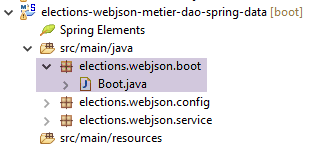 |
类 [Boot] 通过以下方式启动 Web 服务:
package elections.webjson.boot;

import org.springframework.boot.SpringApplication;

import elections.webjson.config.WebConfig;

public class Boot {

    public static void main(String[] args) {
        SpringApplication.run(WebConfig.class, args);
    }
}
- 第 10 行:静态方法 [SpringApplication.run] 将使用配置文件 [WebConfig]。由于注解 [@EnableAutoConfiguration],Spring Boot 将启动 Tomcat 服务器并在其上部署 Web 服务;
14.7. Web 服务的 URL 响应
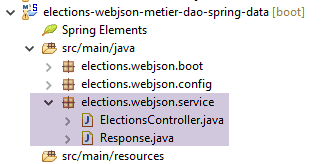 |
Web 服务的所有 URL / jSON 请求均返回相同类型的响应:
package elections.webjson.service;

import java.util.List;

public class Response<T> {

    // ----------------- 属性
    // 操作状态
    private int status;
    // 可能的错误消息
    private List<String> messages;
    // 响应正文
    private T body;

    // 构造函数
    public Response() {

    }

    public Response(int status, List<String> messages, T body) {
        this.status = status;
        this.messages = messages;
        this.body = body;
    }

    // getter 和 setter
...
}
该类已在第 13.5.5.3 节中介绍并进行了研究。
14.8. Web服务 / jSON
|
Web 服务 / jSON 由以下类 [ElectionsController] 实现:
package elections.webjson.service;

import java.util.ArrayList;
import java.util.List;

import javax.servlet.http.HttpServletRequest;

import org.springframework.beans.factory.annotation.Autowired;
import org.springframework.stereotype.Controller;
import org.springframework.web.bind.annotation.RequestMapping;
import org.springframework.web.bind.annotation.RequestMethod;
import org.springframework.web.bind.annotation.ResponseBody;

import com.fasterxml.jackson.core.JsonProcessingException;
import com.fasterxml.jackson.databind.ObjectMapper;

import elections.dao.entities.ElectionsConfig;
import elections.dao.entities.ElectionsException;
import elections.metier.service.IElectionsMetier;

@Controller
public class ElectionsController {

    // Spring 依赖
    @Autowired
    private ObjectMapper jsonMapper;

    @Autowired
    private IElectionsMetier metier;

    @RequestMapping(value = "/getElectionsConfig", method = RequestMethod.GET, produces = "application/json; charset=UTF-8")
    @ResponseBody
    public String getElectionsConfig() throws JsonProcessingException {
        // 响应
        Response<ElectionsConfig> response;
        try {
            response = new Response<>(0, null,
                    new ElectionsConfig(metier.getNbSiegesAPourvoir(), metier.getSeuilElectoral()));
        } catch (ElectionsException e1) {
            response = new Response<>(e1.getCode(), e1.getErreurs(), null);
        } catch (RuntimeException e2) {
            response = new Response<>(1000, getErreursForException(e2), null);
        }
        // 响应
        return jsonMapper.writeValueAsString(response);
    }

    @RequestMapping(value = "/getListesElectorales", method = RequestMethod.GET, produces = "application/json; charset=UTF-8")
    @ResponseBody
    public String getListesElectorales() throws JsonProcessingException {
        throw new UnsupportedOperationException("Not supported yet");
    }

    @RequestMapping(value = "/setListesElectorales", method = RequestMethod.POST, consumes = "application/json; charset=UTF-8", produces = "application/json; charset=UTF-8")
    @ResponseBody
    public String setListesElectorales(HttpServletRequest request) throws JsonProcessingException {
        throw new UnsupportedOperationException("Not supported yet");
    }

    @RequestMapping(value = "/calculerSieges", method = RequestMethod.POST, consumes = "application/json; charset=UTF-8", produces = "application/json; charset=UTF-8")
    @ResponseBody
    public String calculerSieges(HttpServletRequest request) throws JsonProcessingException {
        throw new UnsupportedOperationException("Not supported yet");
    }

    // 私有方法 -----------------------------
    // RuntimeException 的错误消息列表
    private List<String> getErreursForException(Exception e) {
        // 获取异常的错误消息列表
        Throwable cause = e;
        List<String> erreurs = new ArrayList<>();
        while (cause != null) {
            // 仅当消息不为空且不为空字符串时才获取消息
            String message = cause.getMessage();
            if (message != null) {
                message = message.trim();
                if (message.length() != 0) {
                    erreurs.add(message);
                }
            }
            // 后续原因
            cause = cause.getCause();
        }
        return erreurs;
    }

}
待完成任务:参照第 13.5.5 节中的做法,补全类 [ElectionsController] 的代码。
注:
- 此处没有 jSON 过滤器,因为表 [CONF] 和 [LISTES] 之间没有外键关系,这大大简化了 Web 服务的代码;
- 请勿遗漏所需的各种 Spring 注解;
- 将 URL 命名为相关方法的名称;
- 调用 [setListeElectorales] 方法时需配合 [POST] 操作。 提交的值是竞争列表数组(类型为 ListeElectorale[]),其中包含需写入数据库的 [sieges, voix, elimine] 属性。 如果未发生错误,该方法返回类型为 [Response<Void>] 且包含字段 [status=0] 的对象,否则返回其他值;
- 调用 [calculerSieges] 方法时,需传入 [POST] 操作。提交的值是候选名单数组(类型为 ListeElectorale[]),包含其 [nom, voix] 属性。 该方法返回类型为 [Response<ListeElectorale[]>],其主体包含选民名册及其已初始化的字段 [sieges, elimine];
14.9. Tests
在启动Web服务后,请使用工具[Advanced Rest Client]执行以下测试,以确保Web服务运行正常:
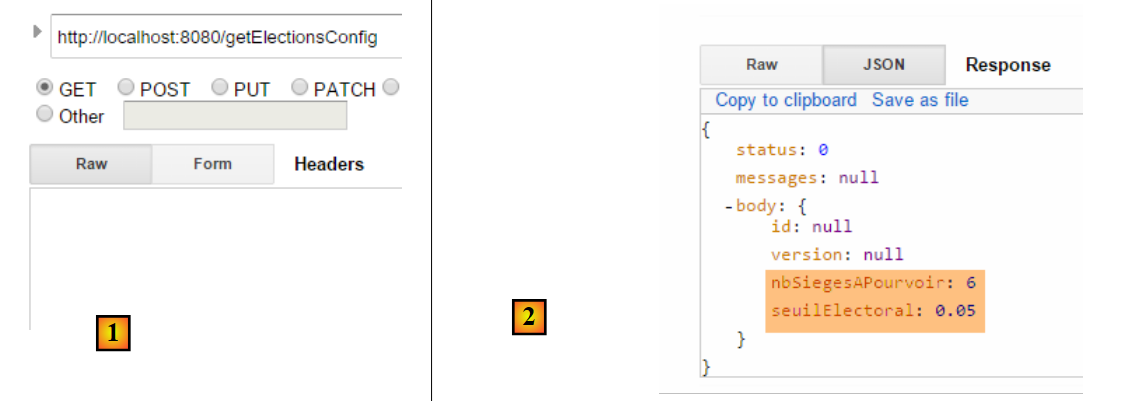 |
对前一个请求 [1] 的响应 jSON 如下:
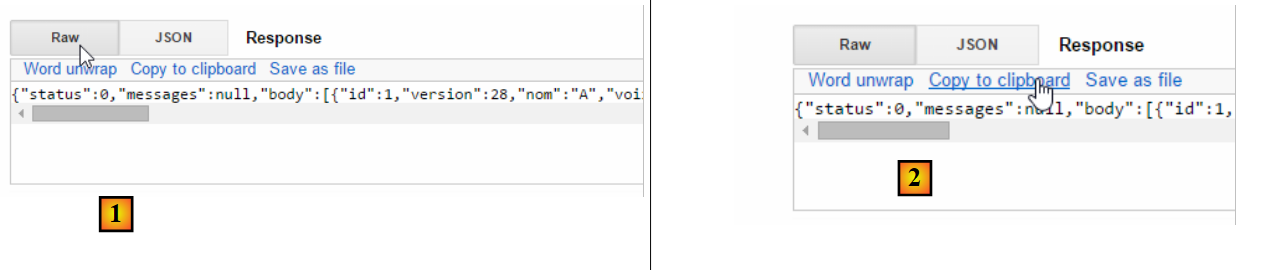 |
1 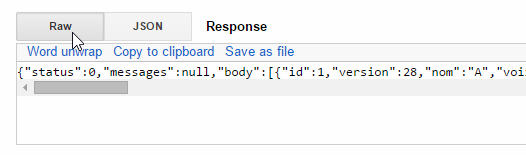 | 2 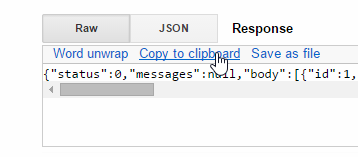 |
在 [2] 中,将响应复制到剪贴板,然后将其粘贴到任意文本编辑器中 [3]:
 |
提取字段 [body] 的值,并修改列表中的票数。如下所示 [4],我们将所有列表的票数改为 100:
 |
请确认您的字符串 jSON 以 [ et se termine par ] 开头。这些字符用于界定一个数组 jSON。 在 [5] 中,粘贴上述字符串 jSON。这将成为下一个 URL 的发布值。 为此,需选择方法 HTTP [POST] [7]。
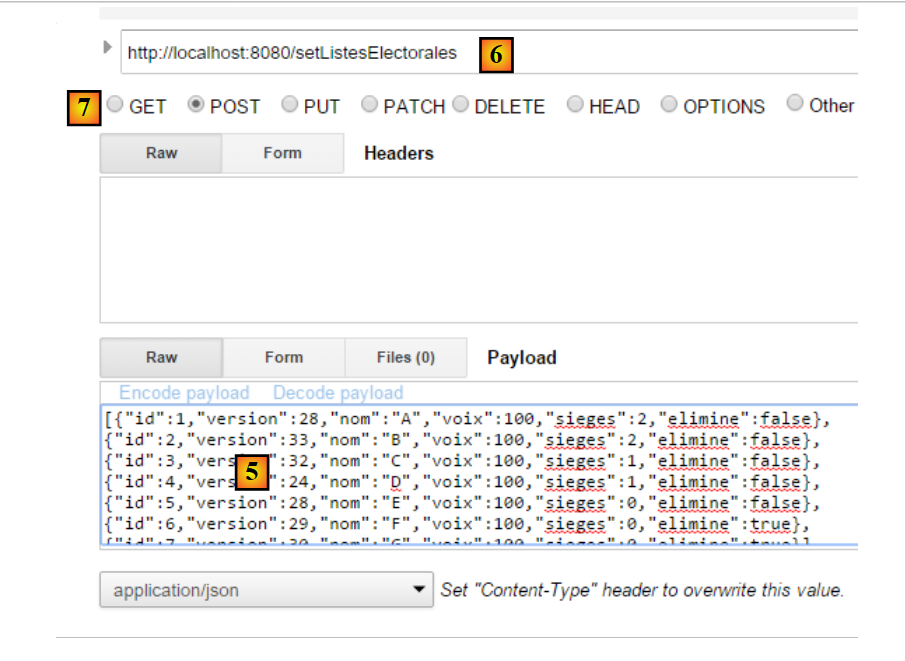 |
- 在 [6] 中,请调用 URL [setListesElectorales]。该 URL 需通过 POST 进行调用。 已发布的值是jSON表格,其中列出了需要将结果录入数据库的参赛名单;
得到以下结果:
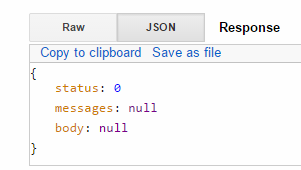 |
字段 [status=0] 表明未发生错误。为验证此结果,请重新请求竞赛名单,并确认您对名单所做的修改已被采纳:
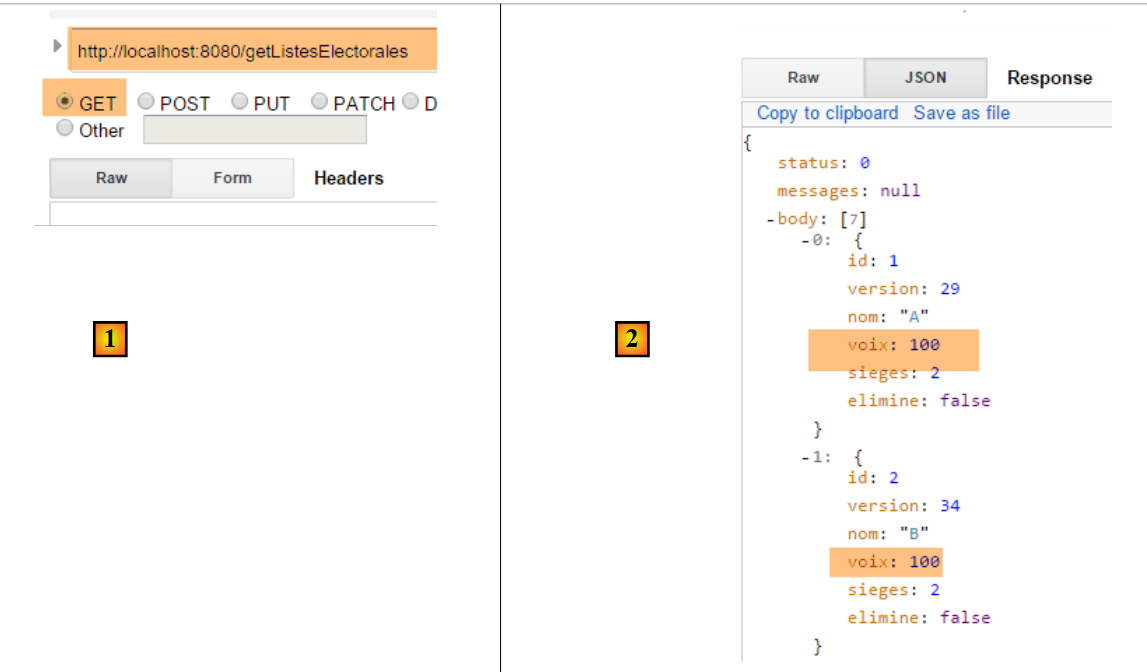 |
再次运行 [POST] 以计算各名单获得的席位:
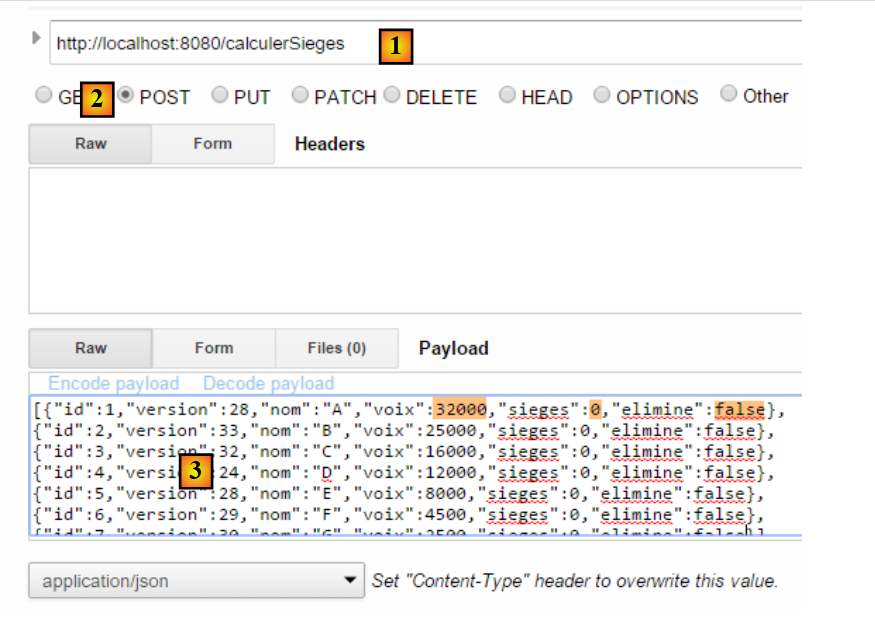 |
- 在 [1] 中:用于计算席位的 URL;
- 生成 [2]:生成 [POST];
- 在 [3] 中:竞争名单。 将TD的值赋给[voix]字段,所有[sieges]设为0,所有[elimine]字段设为false;
所得结果如下:
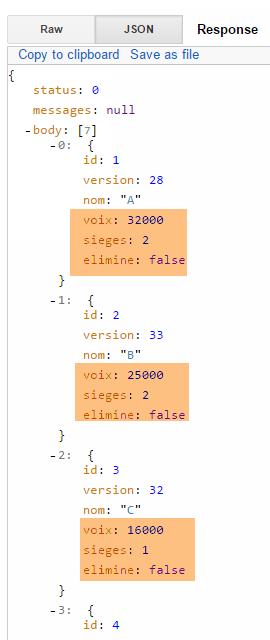 |