13. [Cours]:使用 Spring 将数据库暴露在 Web 上 MVC
关键词:多层架构、Spring、依赖注入、Web服务 / jSON、客户端/服务器
13.1. Support
 |  |
本章的项目位于文件夹 [support / chap-13] 中。脚本 SQL [dbintrospringdata.sql] 可用于创建测试所需的 MySQL 数据库。
13.2. Spring MVC在Web应用中的定位
让我们将 Spring MVC 置于 Web 应用程序的开发背景中。通常,该应用程序将基于如下所示的多层架构构建:
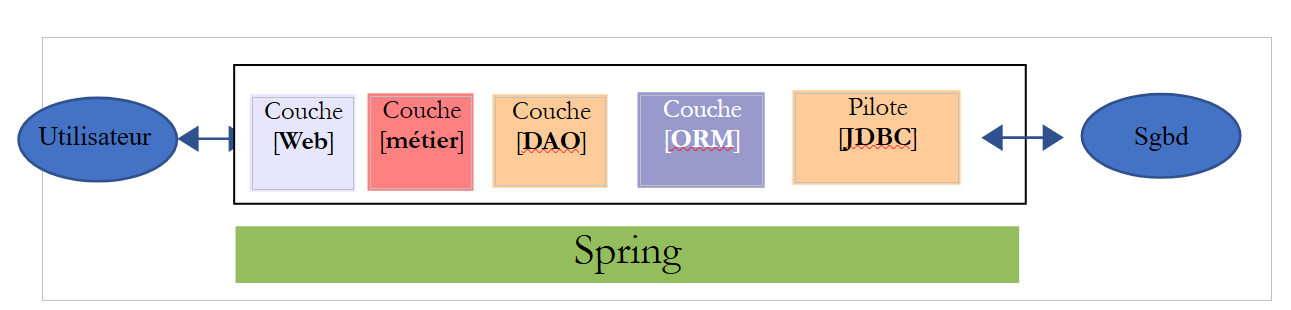 |
- 层是与Web应用程序用户接触的层。用户通过浏览器显示的网页与Web应用程序进行交互。Spring MVC就位于这一层,且仅位于这一层;
- [métier]层实现应用程序的管理规则,例如工资或发票的计算。 该层通过 [Web] 层使用来自用户的数据,并通过 [DAO] 层使用来自 SGBD 的数据;
- [DAO] 层(数据访问对象)、[ORM] 层(对象关系映射器)以及 JDBC 驱动程序负责管理对 SGBD 层数据的访问。 [ORM] 层在 [DAO] 层处理的对象与关系型数据库表中的行和列之间架起了一座桥梁。 JPA 规范(Java Persistence API)允许抽象化所使用的 ORM,前提是后者实现了这些规范。 本例中即属此情况,因此我们将 ORM 层称为 JPA 层;
- 各层的集成由Spring框架完成;
13.3. Spring MVC 开发模型
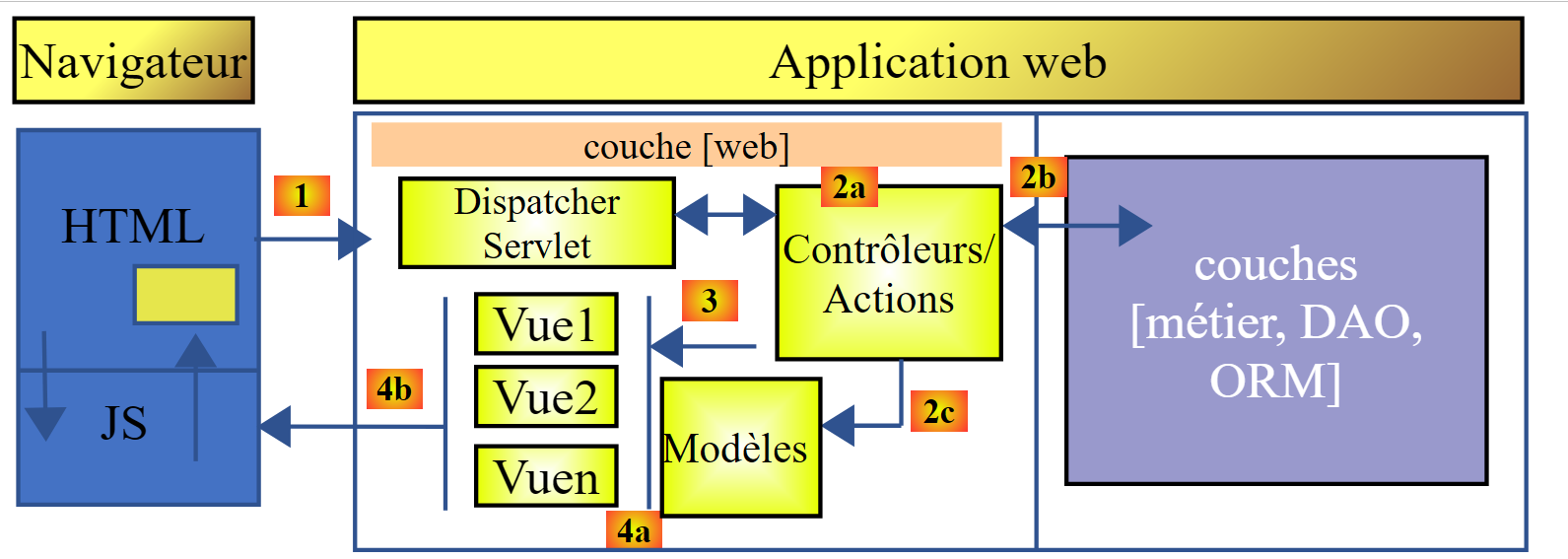
Spring MVC 通过以下方式实现了所谓的 MVC 架构模型(模型 – 视图 – 控制器):
 |
客户端请求的处理流程如下:
- 请求 - 请求的 URL 采用 http://machine:port/contexte/Action/param1/param2/....?p1=v1&p2=v2&... 格式。[Front Controller] 通过配置文件或 Java 注解将请求“路由”至正确的控制器及其内部的相应操作。 为此,它会使用 URL 中的 [Action] 字段。URL 和 [/param1/param2/...] 的其余部分由可选参数组成,这些参数将传递给操作。 此处的MVC的C字段即为字符串[Front Controller, Contrôleur, Action]。若无任何控制器能处理所请求的操作,Web服务器将返回“未找到所请求的URL”的响应。
- 处理
- 所选操作可以利用 parami 传递给它的参数。这些参数可能来自多个来源:
- URL的路径[/param1/param2/...],
- 来自 URL 的 [p1=v1&p2=v2] 参数,来自 ,
- 浏览器随请求发送的参数;
- 在处理用户请求时,该操作可能需要 [métier] 和 [2b] 层。一旦处理了客户端的请求,该操作可能会触发各种响应。一个典型的例子是:
- 如果请求无法正确处理,则返回错误页面
- 否则显示确认页面
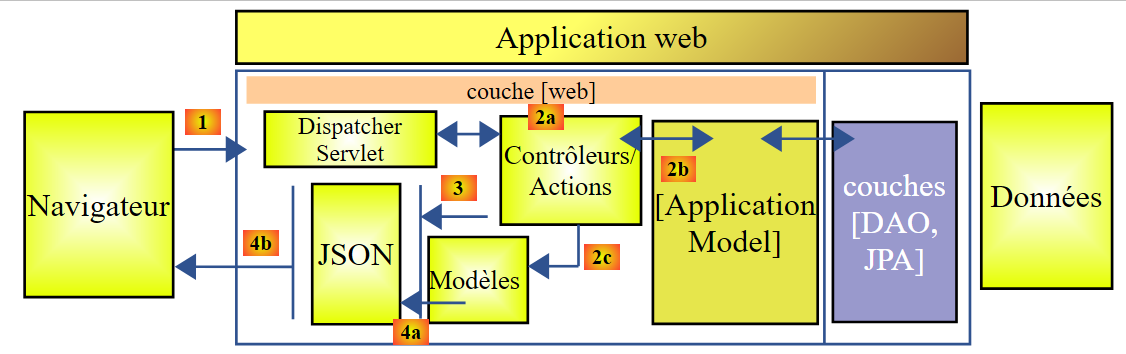
- 该操作会要求显示某个视图 [3]。该视图将显示被称为视图模型的数据。这就是 MVC 中的 M。 该操作将创建视图模型 M [2c],并要求显示视图 V [3];
- 响应——选定的视图 V 使用操作生成的模型 M 来初始化响应 HTML 的动态部分(该响应需发送给客户端),随后发送此响应。
对于 Web 服务 / jSON,上述架构稍作修改:
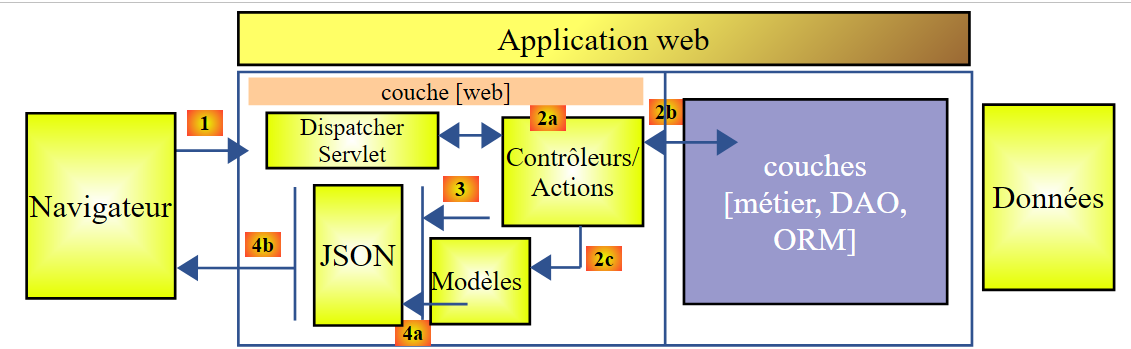 |
- 在 [4a] 中,作为 Java 类的模型通过 jSON 库转换为字符串 jSON;
- 在 [4b] 中,该字符串 jSON 被发送至浏览器;
现在,让我们明确MVC Web架构与分层架构之间的关系。根据对该模型的定义,这两个概念可能相关,也可能无关。以一个单层的Spring Web应用程序MVC为例:
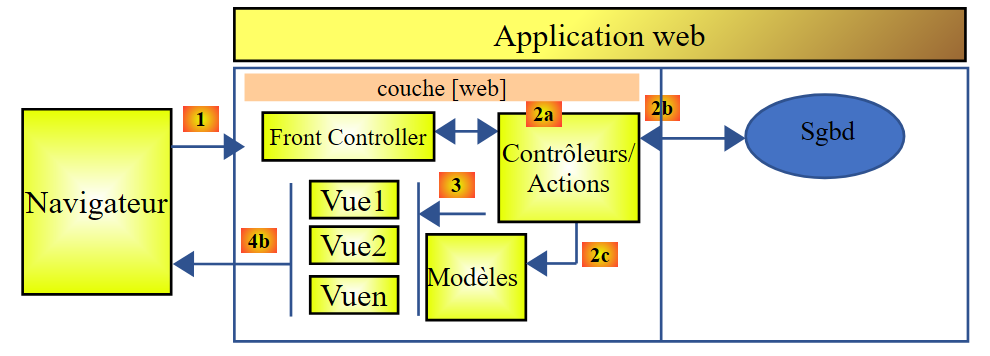 |
如果我们使用 Spring MVC 实现 [Web] 层,那么虽然确实形成了一个 MVC Web 架构,但这并非多层架构。 在此情况下,[web]层将负责所有工作:展示、业务逻辑、数据访问。这些工作将由Action类来完成。
现在,让我们考虑一种多层Web架构:
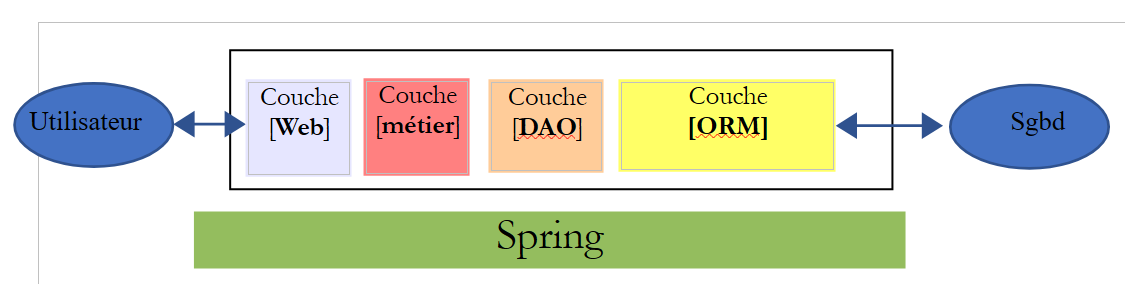 |
[Web]层可以在不使用框架且不遵循MVC模型的情况下实现。这样虽然确实形成了一个多层架构,但Web层并未实现MVC模型。
例如,在 .NET 环境中,上述 [Web] 层可以通过 ASP.NET 和 MVC 来实现,从而形成一种分层架构,其中 [Web] 层属于 MVC 类型。 完成上述操作后,可以将该 ASP.NET MVC 层替换为经典的 ASP.NET 层(WebForms),同时保持其余部分 (业务层、DAO、ORM)保持不变。 此时便形成了一个分层架构,其中 [Web] 层不再属于 MVC 类型。
在 MVC 中,我们提到模型 M 即视图 V(c.a.d)所展示的数据集合。这里给出 MVC 模型 M 的另一种定义:
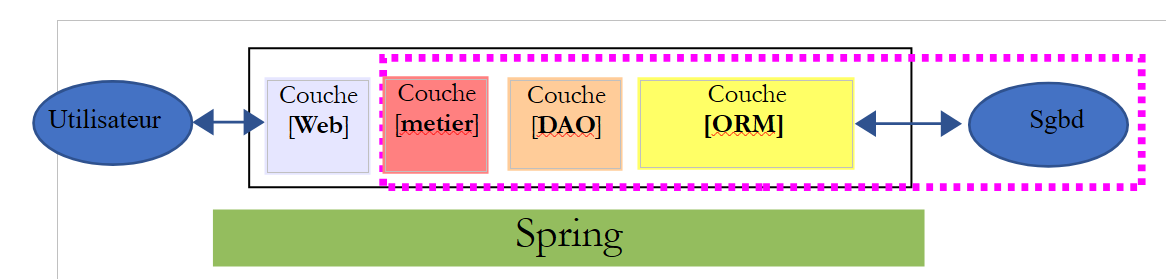 |
许多作者认为,位于 [Web] 层右侧的内容构成了 MVC 的模型 M。为避免歧义,我们可以这样表述:
- 领域模型(指 [Web] 层右侧的所有内容)
- 指视图V所显示的数据时,称为“视图模型”
下文中,“M模型”一词将专指视图V的模型。
13.4. 基于 Spring 的 Web 项目 / jSON
[http://spring.io/guides] 网站提供了入门教程,帮助您了解 Spring 生态系统。我们将参考其中一个教程,了解 Spring 项目 MVC 所需的 Maven 配置。
13.4.1. 演示项目
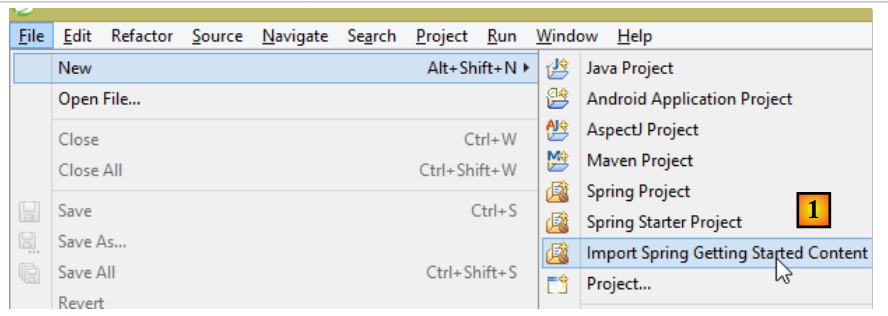 |
- 在 [1] 中,我们导入了一个 Spring 指南;
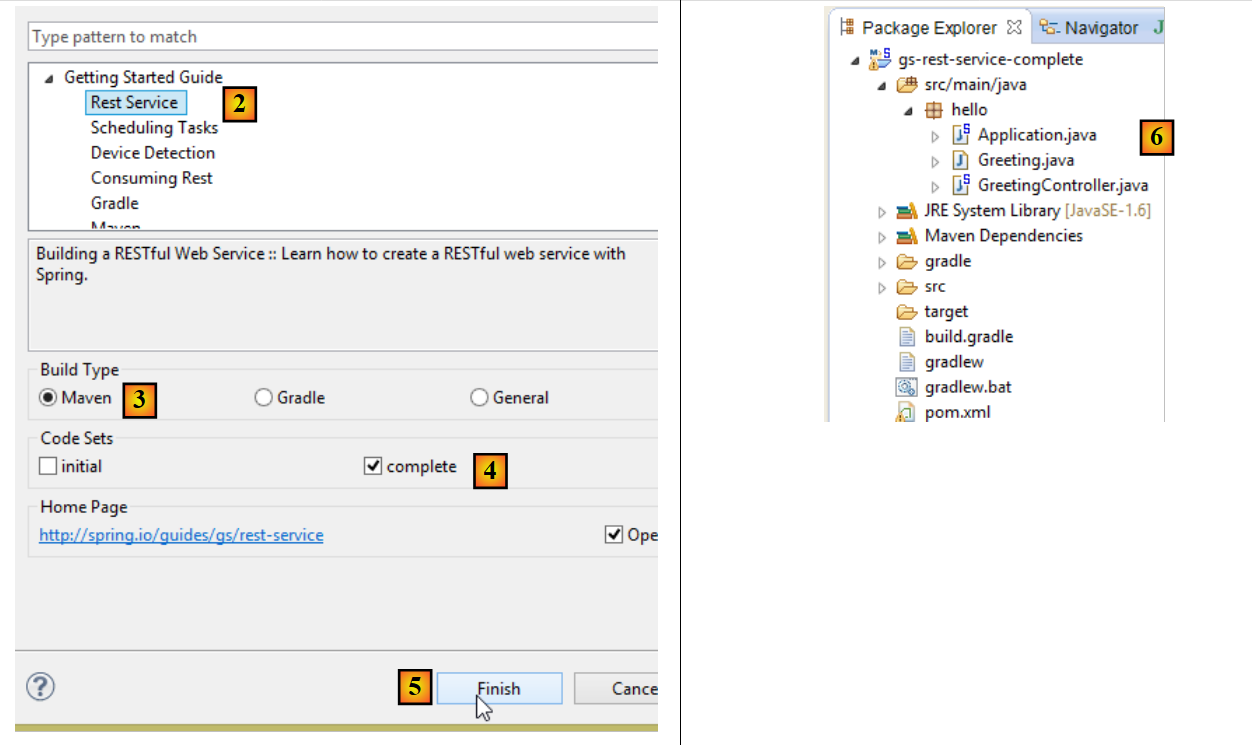 |
- 在 [2] 中,我们选择示例 [Rest Service];
- 在 [3] 中,我们选择 Maven 项目;
- 在 [4] 中,我们选用指南的最终版本;
- 在 [5] 中,进行确认;
- 在 [6] 中,导入该项目;
通过标准 URL 访问且返回 jSON 文本的 Web 服务通常被称为 REST 服务(REpresentational 状态传递)。 如果一个服务遵守某些规则,则被称为 Restful 服务。
现在让我们来查看导入的项目,首先是其Maven配置。
13.4.2. Maven 配置
[pom.xml] 文件内容如下:
<?xml version="1.0" encoding="UTF-8"?>
<project xmlns="http://maven.apache.org/POM/4.0.0" xmlns:xsi="http://www.w3.org/2001/XMLSchema-instance"
    xsi:schemaLocation="http://maven.apache.org/POM/4.0.0 http://maven.apache.org/xsd/maven-4.0.0.xsd">
    <modelVersion>4.0.0</modelVersion>

    <groupId>org.springframework</groupId>
    <artifactId>gs-rest-service</artifactId>
    <version>0.1.0</version>

    <parent>
        <groupId>org.springframework.boot</groupId>
        <artifactId>spring-boot-starter-parent</artifactId>
        <version>1.2.2.RELEASE</version>
    </parent>

    <dependencies>
        <dependency>
            <groupId>org.springframework.boot</groupId>
            <artifactId>spring-boot-starter-web</artifactId>
        </dependency>
    </dependencies>

    <properties>
        <start-class>hello.Application</start-class>
    </properties>

    <build>
        <plugins>
            <plugin>
                <groupId>org.springframework.boot</groupId>
                <artifactId>spring-boot-maven-plugin</artifactId>
            </plugin>
        </plugins>
    </build>

    <repositories>
        <repository>
            <id>spring-releases</id>
            <url>https://repo.spring.io/libs-release</url>
        </repository>
    </repositories>
    <pluginRepositories>
        <pluginRepository>
            <id>spring-releases</id>
            <url>https://repo.spring.io/libs-release</url>
        </pluginRepository>
    </pluginRepositories>
</project>
- 第 6-8 行:Maven 项目的属性。缺少一个 [<packaging>] 标签,该标签用于指定 Maven 编译生成的文件类型。若未指定,则默认使用 [jar] 类型。 因此,该应用程序是一个控制台类型的可执行应用程序,而非 Web 应用程序(如果是 Web 应用程序,其打包类型应为 [war]);
- 第10-14行:该Maven项目有一个父项目[spring-boot-starter-parent]。该项目定义了项目的大部分依赖项。如果这些依赖项已足够,则无需添加;否则,需补充缺失的依赖项;
- 第17-20行:[spring-boot-starter-web]构建产物包含Spring项目MVC所需的库,该项目属于Web服务类型,其中不包含生成的视图。 该工件随附了大量库,其中包括嵌入式 Tomcat 服务器的相关库。应用程序将在该服务器上运行;
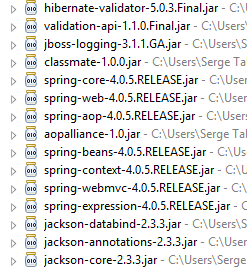
此配置包含的库非常多:
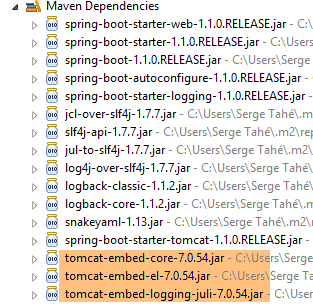 |  |
上图显示了 Tomcat 服务器的三个归档文件。
13.4.3. Spring [web / jSON]服务的架构
对于 Web 服务 / jSON,Spring MVC 通过以下方式实现 MVC 模型:
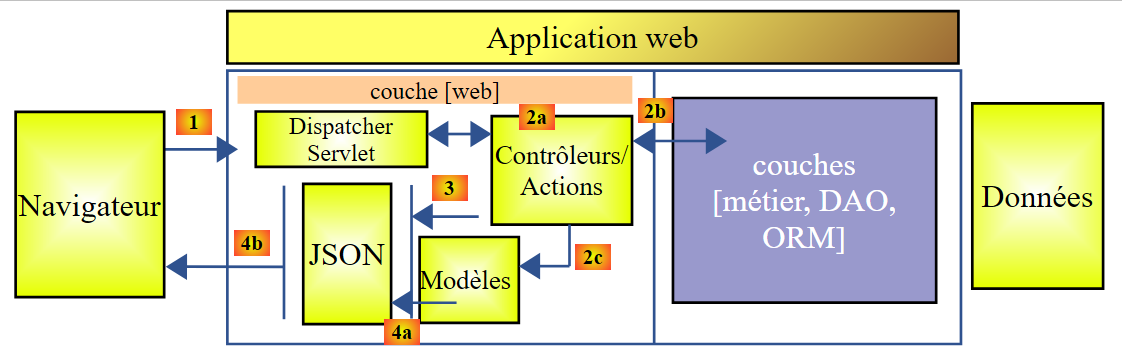 |
- 在 [4a] 中,该模型(作为 Java 类)通过 jSON 库转换为字符串 jSON;
- 在 [4b] 中,该字符串 jSON 被发送至浏览器;
13.4.4. 控制器 C
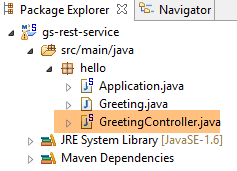 |
导入的应用程序具有以下控制器:
package hello;

import java.util.concurrent.atomic.AtomicLong;
import org.springframework.web.bind.annotation.RequestMapping;
import org.springframework.web.bind.annotation.RequestParam;
import org.springframework.web.bind.annotation.RestController;

@RestController
public class GreetingController {

    private static final String template = "Hello, %s!";
    private final AtomicLong counter = new AtomicLong();

    @RequestMapping("/greeting")
    public Greeting greeting(@RequestParam(value = "name", defaultValue = "World") String name) {
        return new Greeting(counter.incrementAndGet(), String.format(template, name));
    }
}
- 第 9 行:注解 [@RestController] 将类 [GreetingController] 注册为 Spring 控制器,即其方法被注册为处理 URL。 我们之前见过类似的注解 [@Controller]。该控制器方法的返回类型是 [String],即待显示视图的名称。而这里的情况有所不同。 类型为 [@RestController] 的控制器方法会返回对象,这些对象会被序列化后发送至浏览器。所采用的序列化类型取决于 Spring 的配置 MVC。 在此,它们将被序列化为 jSON。这是因为项目依赖中存在 jSON 库,导致 Spring Boot 通过自动配置以这种方式配置项目;
- 第 14 行:注解 [@RequestMapping] 指明了该方法处理的 URL,即此处的 URL [/greeting];
- 第15行:我们已经解释过注解[@RequestParam]。该方法返回的值是一个类型为[Greeting]的对象。
- 第 12 行:一个原子类型的长整型。这意味着它支持并发访问。多个线程可能希望同时递增变量 [counter]。这将安全地进行。只有当正在修改计数器的线程完成修改后,其他线程才能读取该计数器的值。
13.4.5. M 模型
由前一种方法生成的 M 模型是以下 [Greeting] 对象:
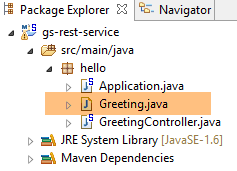 |
package hello;

public class Greeting {

    private final long id;
    private final String content;

    public Greeting(long id, String content) {
        this.id = id;
        this.content = content;
    }

    public long getId() {
        return id;
    }

    public String getContent() {
        return content;
    }
}
该对象的 jSON 转换将生成字符串 {"id":n,"content":"文本"}。最终,控制器方法生成的 jSON 字符串将呈现如下形式:
或
13.4.6. 执行
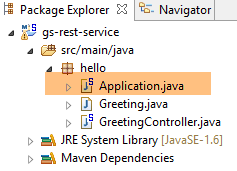 |
类 [Application.java] 是该项目的可执行类。其代码如下:
package hello;

import org.springframework.boot.autoconfigure.EnableAutoConfiguration;
import org.springframework.boot.SpringApplication;
import org.springframework.context.annotation.ComponentScan;

@ComponentScan
@EnableAutoConfiguration
public class Application {

    public static void main(String[] args) {
        SpringApplication.run(Application.class, args);
    }

}
我们在前面的示例中已经遇到并解释过这段代码。
13.4.7. 项目运行
现在运行该项目:
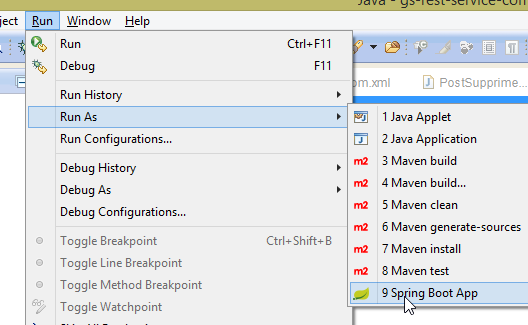 |
我们将获得以下控制台日志:
- 第 13 行:Tomcat 服务器在 8080 端口上启动(第 12 行);
- 第 17 行:存在 [DispatcherServlet] Servlet;
- 第 20 行:已发现方法 [GreetingController.greeting];
为测试该Web应用程序,请求URL [http://localhost:8080/greeting]:
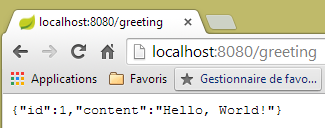 | 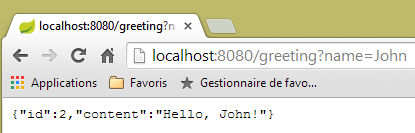 |
确实收到了预期的字符串 jSON。查看服务器发送的 HTTP 头部信息可能会很有趣。 为此,我们将使用名为 [Advanced Rest Client] 的 Chrome 扩展程序(Chrome / Ctrl-T / 菜单 [Applications] / [Advanced Rest Client] - 参见附录第 22.5 节):
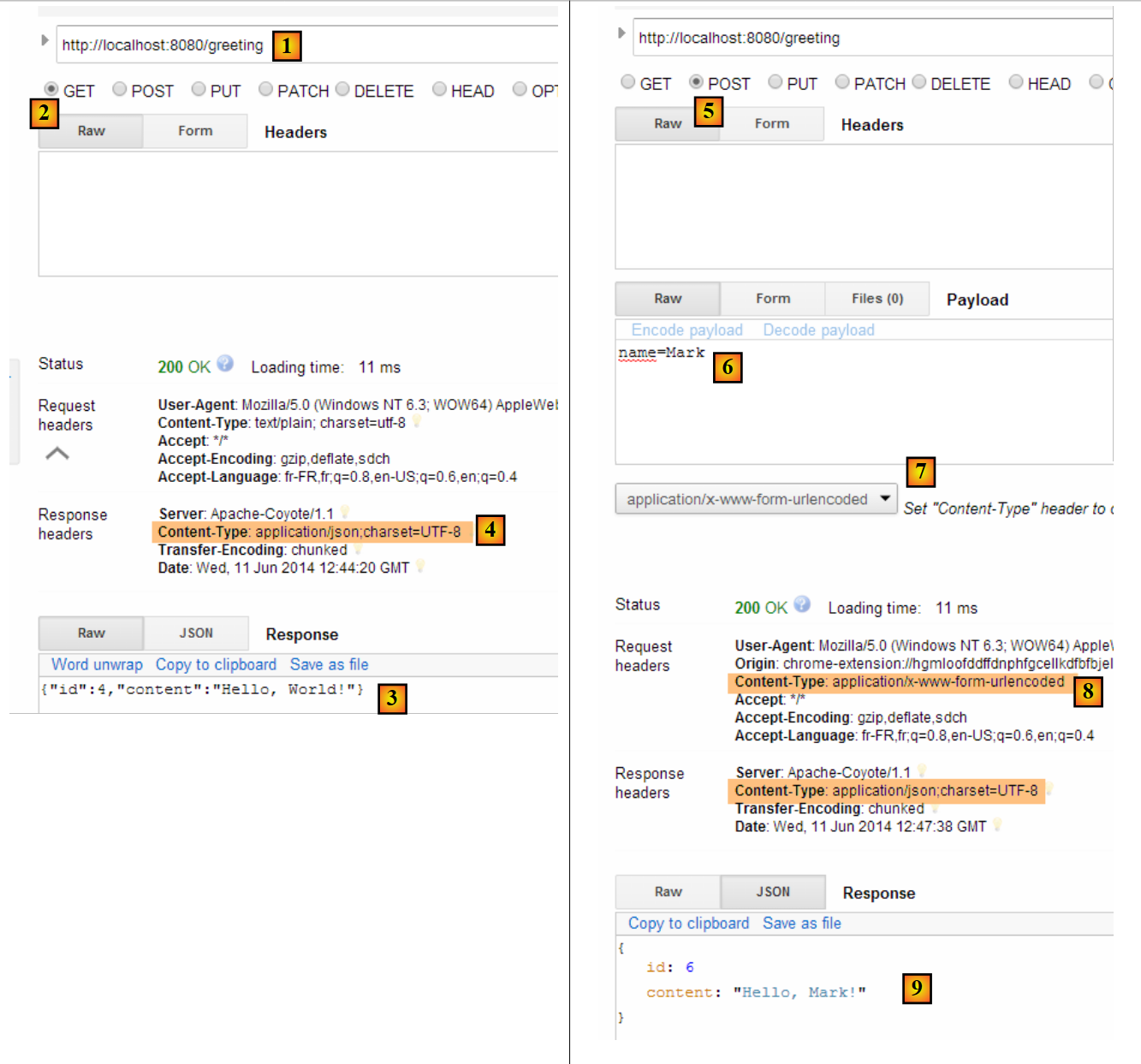 |
- 在 [1] 中,请求的是 URL;
- 在 [2] 中,采用 GET 方法;
- 在 [3] 中,响应为 jSON;
- 在 [4] 中,服务器表示将发送格式为 jSON 的响应;
- 在 [5] 中,请求的是相同的 URL,但这次使用的是 POST;
- 在 [7] 中,信息以 [urlencoded] 的形式发送给服务器;
- 在 [6] 中,name 参数及其值;
- 在 [8] 中,浏览器告知服务器将发送 [urlencoded] 信息;
- 在 [9] 中,服务器返回的响应 jSON;
13.4.8. 创建可执行存档
现在我们创建一个可执行存档:
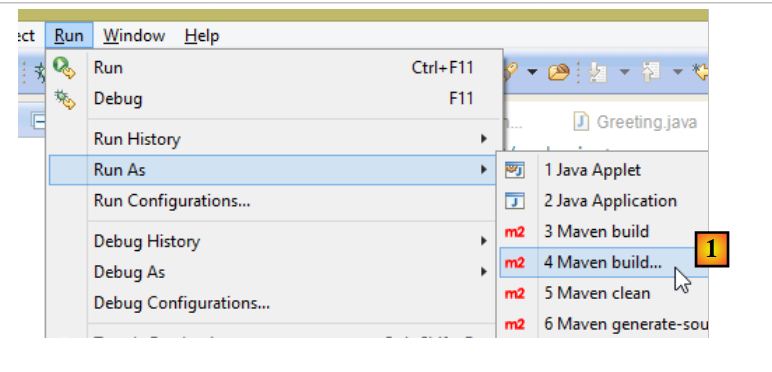 |
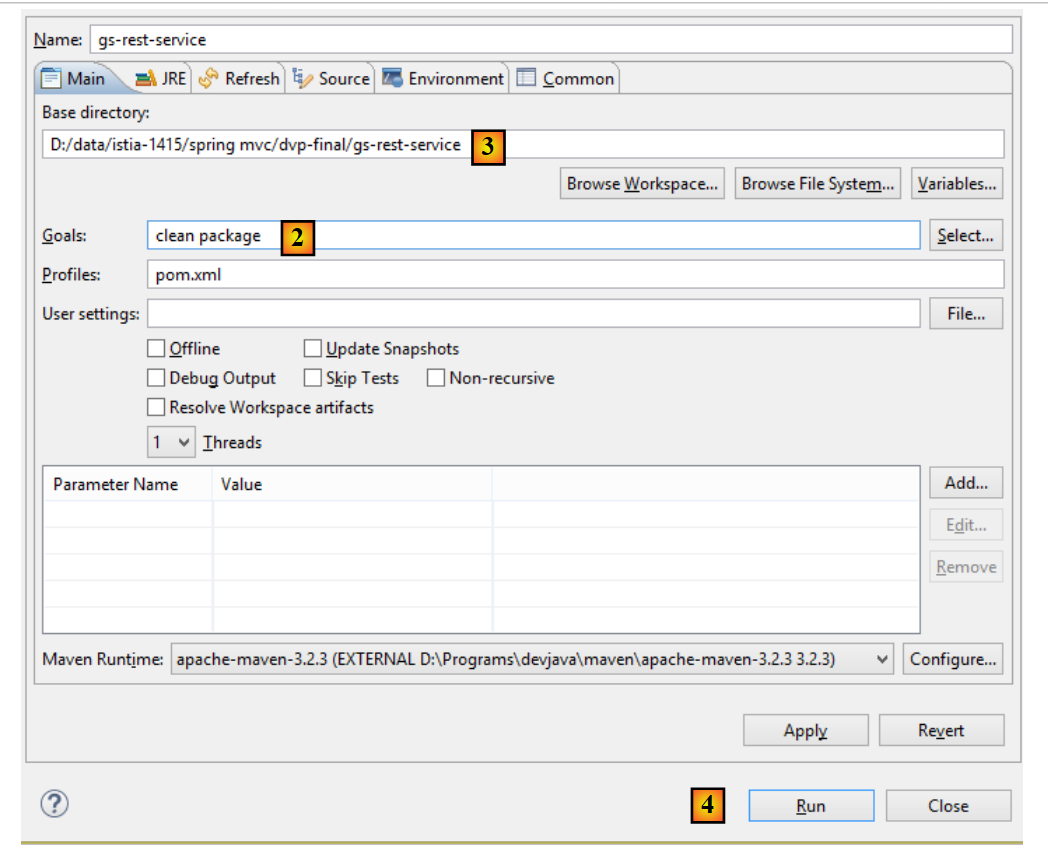 |
- 生成 [1]:执行一个 Maven 目标;
- 在 [2] 中:有两个目标(goals):[clean] 用于从 Maven 项目中删除 [target] 文件夹,[package] 用于重新生成该文件夹;
- 在 [3] 中:生成的 [target] 文件夹将位于此文件夹中;
- 在 [4] 阶段:生成目标;
在控制台显示的日志中,务必确认出现插件 [spring-boot-maven-plugin]。正是该插件负责生成可执行存档。
在控制台中,进入生成的文件夹:
D:\Temp\wksSTS\gs-rest-service\target>dir
 ...
11/06/2014  15:30    <DIR>          classes
11/06/2014  15:30    <DIR>          generated-sources
11/06/2014  15:30        11 073 572 gs-rest-service-0.1.0.jar
11/06/2014  15:30             3 690 gs-rest-service-0.1.0.jar.original
11/06/2014  15:30    <DIR>          maven-archiver
11/06/2014  15:30    <DIR>          maven-status
...
- 第 5 行:生成的压缩包;
该可执行包的运行方式如下:
D:\Temp\wksSTS\gs-rest-service-complete\target>java -jar gs-rest-service-0.1.0.jar

  .   ____          _            __ _ _
 /\\ / ___'_ __ _ _(_)_ __  __ _ \ \ \ \
( ( )\___ | '_ | '_| | '_ \/ _` | \ \ \ \
 \\/  ___)| |_)| | | | | || (_| |  ) ) ) )
  '  |____| .__|_| |_|_| |_\__, | / / / /
 =========|_|==============|___/=/_/_/_/
 :: Spring Boot ::        (v1.1.0.RELEASE)

2014-06-11 15:32:47.088  INFO 4972 --- [           main] hello.Application
                  : Starting Application on Gportpers3 with PID 4972 (D:\Temp\wk
sSTS\gs-rest-service-complete\target\gs-rest-service-0.1.0.jar started by ST in
D:\Temp\wksSTS\gs-rest-service-complete\target)
...
现在 Web 应用程序已启动,可通过浏览器访问:
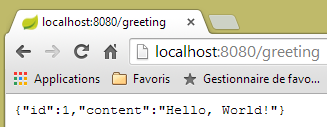 |
13.4.9. 将应用程序部署到 Tomcat 服务器
与上一个项目一样,我们将文件 [pom.xml] 修改如下:
<?xml version="1.0" encoding="UTF-8"?>
<project xmlns="http://maven.apache.org/POM/4.0.0" xmlns:xsi="http://www.w3.org/2001/XMLSchema-instance"
    xsi:schemaLocation="http://maven.apache.org/POM/4.0.0 http://maven.apache.org/xsd/maven-4.0.0.xsd">
    <modelVersion>4.0.0</modelVersion>

    <groupId>org.springframework</groupId>
    <artifactId>gs-rest-service</artifactId>
    <version>0.1.0</version>
    <packaging>war</packaging>

    ...
</project>
- 第 9 行:需指定将生成一个 WAR 归档文件(Web ARchive);
此外,还需配置Web应用程序。由于缺少[web.xml]文件,可通过继承自[SpringBootServletInitializer]的类来实现:
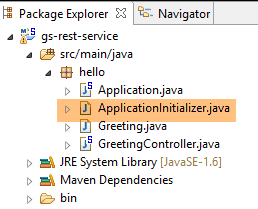 |
[ApplicationInitializer] 类如下:
package hello;

import org.springframework.boot.builder.SpringApplicationBuilder;
import org.springframework.boot.context.web.SpringBootServletInitializer;

public class ApplicationInitializer extends SpringBootServletInitializer {

    @Override
    protected SpringApplicationBuilder configure(SpringApplicationBuilder application) {
        return application.sources(Application.class);
    }

}
- 第 6 行:类 [ApplicationInitializer] 继承自类 [SpringBootServletInitializer];
- 第 9 行:方法 [configure] 被重新定义(第 8 行);
- 第10行:指定用于配置项目的类;
要运行该项目,可以按以下步骤操作:
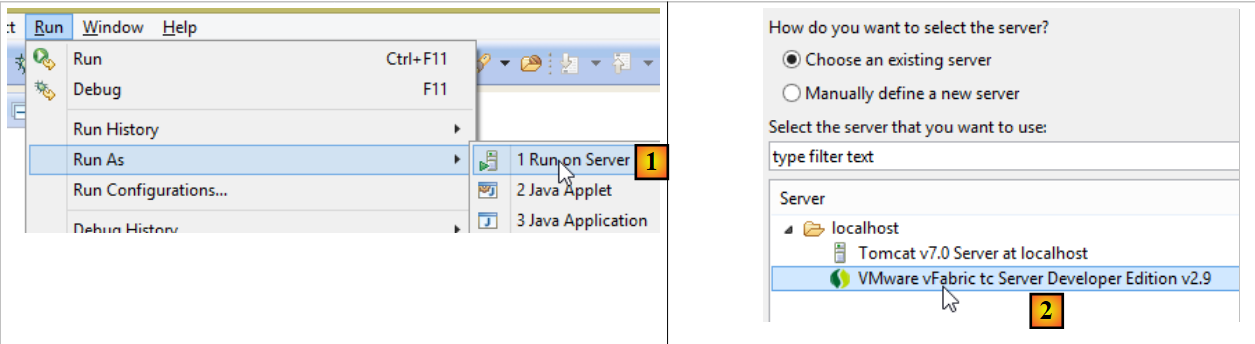 |
- 在 [1-2] 中,在 Eclipse 中注册的某台服务器上运行该项目;
完成上述操作后,可在浏览器中访问 URL [http://localhost:8080/gs-rest-service/greeting/?name=Mitchell]:
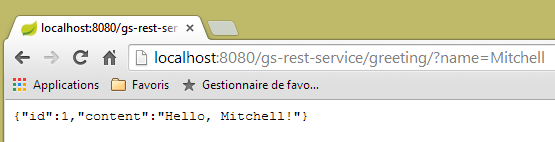 |
13.4.10. 结论
我们介绍了一种 Spring 项目类型,其中 Web 应用程序会向浏览器发送数据流。 接下来,我们将开发一个 Web 应用程序 / jSON,用于在 Web 上公开教程 [Introduction à Spring Data] 中所研究的数据库 [dbintrospringdata]。
13.5. 将 [dbintrospringdata] 数据库发布到网络上
13.5.1. Web 服务架构 / jSON
我们将构建以下架构:
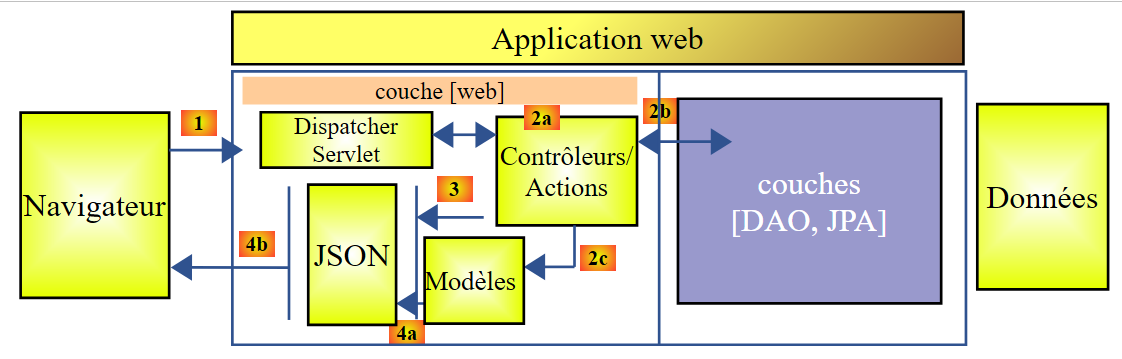 |
[DAO] 和 [JPA] 层由教程 [Introduction à Spring Data] 中编写的应用程序实现。
13.5.2. 数据库安装
 |
脚本 SQL [dbintrospringdata.sql] 可用于创建测试所需的 MySQL 数据库。
13.5.3. Web 服务的 Eclipse 项目 / jSON
Web 服务 / jSON 的 Eclipse 项目如下:
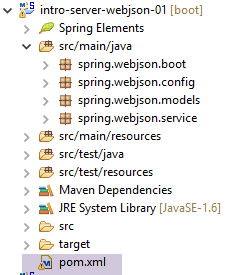 |
这是一个 Maven 项目,其 [pom.xml] 文件如下:
<project xmlns="http://maven.apache.org/POM/4.0.0" xmlns:xsi="http://www.w3.org/2001/XMLSchema-instance"
    xsi:schemaLocation="http://maven.apache.org/POM/4.0.0 http://maven.apache.org/xsd/maven-4.0.0.xsd">
    <modelVersion>4.0.0</modelVersion>
    <groupId>istia.st.webjson</groupId>
    <artifactId>intro-server-webjson01</artifactId>
    <version>0.0.1-SNAPSHOT</version>

    <name>intro-server-webjson01</name>
    <description>démo spring mvc</description>

    <parent>
        <groupId>org.springframework.boot</groupId>
        <artifactId>spring-boot-starter-parent</artifactId>
        <version>1.2.7.RELEASE</version>
    </parent>

    <dependencies>
        <dependency>
            <groupId>istia.st.springdata</groupId>
            <artifactId>intro-spring-data-01</artifactId>
            <version>0.0.1-SNAPSHOT</version>
        </dependency>
        <dependency>
            <groupId>org.springframework.boot</groupId>
            <artifactId>spring-boot-starter-web</artifactId>
        </dependency>
        <dependency>
            <groupId>org.springframework.boot</groupId>
            <artifactId>spring-boot-starter</artifactId>
        </dependency>
    </dependencies>

    <build>
        <plugins>
            <plugin>
                <groupId>org.springframework.boot</groupId>
                <artifactId>spring-boot-maven-plugin</artifactId>
            </plugin>
            <plugin>
                <groupId>org.apache.maven.plugins</groupId>
                <artifactId>maven-surefire-plugin</artifactId>
                <version>2.18.1</version>
            </plugin>
        </plugins>
    </build>

</project>
- 第 11-15 行:已用于 [DAO] 层的父 Maven 项目;
- 第 18-22 行:对 [DAO] 层的依赖;
- 第 23-26 行:对 [spring-boot-starter-web] 构建的依赖。该构建包含创建 Web 服务 / jSON 所需的所有依赖项。但同时也引入了一些不必要的库。 因此需要更精确的配置。但此配置对于入门来说很实用;
- 第28-30行:对[spring-boot-starter]构建的依赖用于管理Spring Boot注解;
此配置引入的依赖项如下:
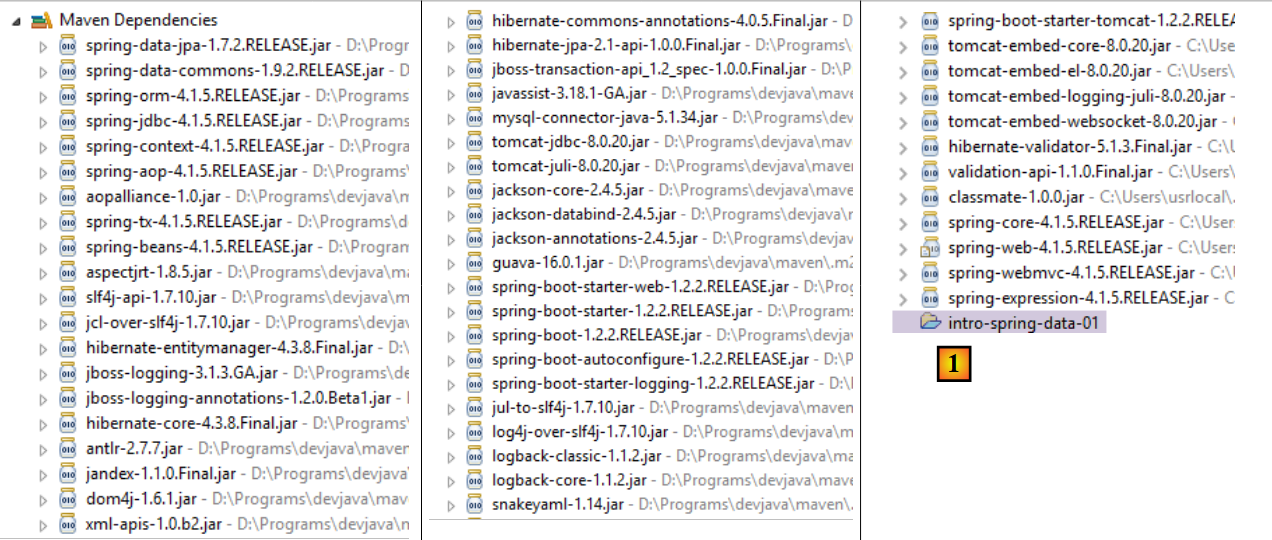 |
- 在 [1] 中,可以看到 Eclipse 已识别出对 [intro-spring-data-01] 项目归档的依赖;
上述依赖关系同时属于 [DAO] 层和 [web] 层。
13.5.3.1. [web] 层的配置
[web] 层由文件 [AppConfig] 进行配置:
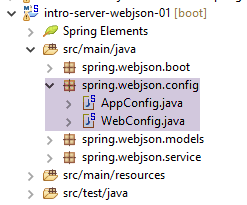 |
类 [WebConfig] 配置了层 [web]:
package spring.webjson.config;

import org.springframework.beans.factory.annotation.Autowired;
import org.springframework.boot.context.embedded.EmbeddedServletContainerFactory;
import org.springframework.boot.context.embedded.ServletRegistrationBean;
import org.springframework.boot.context.embedded.tomcat.TomcatEmbeddedServletContainerFactory;
import org.springframework.context.ApplicationContext;
import org.springframework.context.annotation.Bean;
import org.springframework.web.context.WebApplicationContext;
import org.springframework.web.servlet.DispatcherServlet;
import org.springframework.web.servlet.config.annotation.EnableWebMvc;
import org.springframework.web.servlet.config.annotation.WebMvcConfigurerAdapter;

import com.fasterxml.jackson.databind.ObjectMapper;
import com.fasterxml.jackson.databind.ser.impl.SimpleBeanPropertyFilter;
import com.fasterxml.jackson.databind.ser.impl.SimpleFilterProvider;

@EnableWebMvc
public class WebConfig extends WebMvcConfigurerAdapter {

    // -------------------------------- [web] 层配置
    @Autowired
    private ApplicationContext context;

    @Bean
    public DispatcherServlet dispatcherServlet() {
        DispatcherServlet servlet = new DispatcherServlet((WebApplicationContext) context);
        return servlet;
    }

    @Bean
    public ServletRegistrationBean servletRegistrationBean(DispatcherServlet dispatcherServlet) {
        return new ServletRegistrationBean(dispatcherServlet, "/*");
    }

    @Bean
    public EmbeddedServletContainerFactory embeddedServletContainerFactory() {
        return new TomcatEmbeddedServletContainerFactory("", 8080);
    }

    // 过滤器 jSON
    @Bean(name = "jsonMapper")
    public ObjectMapper jsonMapper() {
        return new ObjectMapper();
    }

    @Bean(name = "jsonMapperCategorieWithProduits")
    public ObjectMapper jsonMapperCategorieWithProduits() {
        // 映射器 jSON
        ObjectMapper mapper = new ObjectMapper();
        // 过滤器
        mapper.setFilters(
                new SimpleFilterProvider().addFilter("jsonFilterCategorie", SimpleBeanPropertyFilter.serializeAllExcept())
                        .addFilter("jsonFilterProduit", SimpleBeanPropertyFilter.serializeAllExcept("categorie")));
        // 结果
        return mapper;
    }

    @Bean(name = "jsonMapperProduitWithCategorie")
    public ObjectMapper jsonMapperProduitWithCategorie() {
        // 映射器 jSON
        ObjectMapper mapper = new ObjectMapper();
        // 过滤器
        mapper.setFilters(
                new SimpleFilterProvider().addFilter("jsonFilterProduit", SimpleBeanPropertyFilter.serializeAllExcept())
                        .addFilter("jsonFilterCategorie", SimpleBeanPropertyFilter.serializeAllExcept("produits")));
        // 结果
        return mapper;
    }

    @Bean(name = "jsonMapperCategorieWithoutProduits")
    public ObjectMapper jsonMapperCategorieWithoutProduits() {
        // 映射器 jSON
        ObjectMapper mapper = new ObjectMapper();
        // 过滤器
        mapper.setFilters(new SimpleFilterProvider().addFilter("jsonFilterCategorie",
                SimpleBeanPropertyFilter.serializeAllExcept("produits")));
        // 结果
        return mapper;
    }

    @Bean(name = "jsonMapperProduitWithoutCategorie")
    public ObjectMapper jsonMapperProduitWithoutCategorie() {
        // 映射器 jSON
        ObjectMapper mapper = new ObjectMapper();
        // 过滤器
        mapper.setFilters(new SimpleFilterProvider().addFilter("jsonFilterProduit",
                SimpleBeanPropertyFilter.serializeAllExcept("categorie")));
        // 结果
        return mapper;
    }
}
- 第 18 行:注解 [@EnableWebMvc] 为 Spring 框架 MVC 生成自动配置;
- 第 19 行:类 [WebConfig] 继承 Spring 类 [WebMvcConfigurerAdapter],以重定义其中的某些 Bean(第 26-40 行);
- 第 22-23 行:注入 Spring 上下文;
- 第25-29行:定义Spring框架的Servlet类MVC,该类负责将HTTP请求路由到正确的控制器和方法。[DispatcherServlet]是Spring的一个类;
- 第31-34行:指定该Servlet处理所有URL请求;
- 第36-39行:正是该Bean的存在将激活项目归档中的Tomcat服务器。它将在8080端口上等待请求;
- 第 42-91 行:用于管理 jSON 过滤器的 Bean;
- 第42-45行:一个不带过滤器的映射器 jSON;
- 第 47-57 行:映射器 jSON,用于显示包含产品的类别。 需要注意的是,当请求包含产品的类别时,必须同时配置类 [Categorie] 的过滤器 jSON 以及类 [Produit] 的过滤器。情况总是如此。 当对类进行序列化/反序列化为 jSON 时,必须配置该类的 jSON 过滤器,以及所有需包含在该类中的依赖项的过滤器;
- 第 59-69 行:映射器 jSON,用于生成包含其所属类别的商品;
- 第 71-80 行:映射器 jSON,用于生成不含产品的分类;
- 第 82-91 行:映射器 jSON,用于生成不含所属类别的商品;
类 [AppConfig] 配置整个应用程序,即 [web] 和 [DAO] 这两个层:
package spring.webjson.config;

import org.springframework.context.annotation.ComponentScan;
import org.springframework.context.annotation.Import;

import spring.data.config.DaoConfig;

@ComponentScan(basePackages = { "spring.webjson" })
@Import({ DaoConfig.class, WebConfig.class})
public class AppConfig {

}
- 第 9 行:导入 [DAO] 层和 [web] 层的 Bean;
- 第 8 行:指定在哪些包中查找其他 Spring Bean;
需要注意的是,我们并未在任何地方使用 [@EnableAutoConfiguration] 注解。我们更倾向于自行控制配置。
13.5.4. 应用程序模型
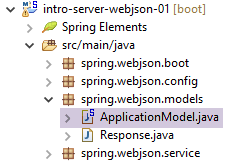 |
[ApplicationModel] 类如下:
package spring.webjson.models;

import java.util.List;

import org.springframework.beans.factory.annotation.Autowired;
import org.springframework.stereotype.Component;

import spring.data.dao.IDao;
import spring.data.entities.Categorie;
import spring.data.entities.Produit;

@Component
public class ApplicationModel implements IDao {

    // 图层[DAO]
    @Autowired
    private IDao dao;

    @Override
    public void addProduits(List<Produit> produits) {
        dao.addProduits(produits);
    }

    @Override
    public void deleteAllProduits() {
        dao.deleteAllProduits();
    }

    @Override
    public void updateProduits(List<Produit> produits) {
        dao.updateProduits(produits);
    }

    @Override
    public List<Produit> getAllProduits() {
        return dao.getAllProduits();
    }

    @Override
    public void addCategories(List<Categorie> categories) {
        dao.addCategories(categories);
    }

    @Override
    public void deleteAllCategories() {
        dao.deleteAllCategories();
    }

    @Override
    public void updateCategories(List<Categorie> categories) {
        dao.updateCategories(categories);
    }

    @Override
    public List<Categorie> getAllCategories() {
        return dao.getAllCategories();
    }

    @Override
    public Produit getProduitByIdWithCategorie(Long idProduit) {
        return dao.getProduitByIdWithCategorie(idProduit);
    }

    @Override
    public Produit getProduitByNameWithCategorie(String nom) {
        return dao.getProduitByNameWithCategorie(nom);
    }

    @Override
    public Categorie getCategorieByIdWithProduits(Long idCategorie) {
        return dao.getCategorieByIdWithProduits(idCategorie);
    }

    @Override
    public Categorie getCategorieByNameWithProduits(String nom) {
        return dao.getCategorieByNameWithProduits(nom);
    }

    @Override
    public Produit getProduitByIdWithoutCategorie(Long idProduit) {
        return dao.getProduitByIdWithoutCategorie(idProduit);
    }

    @Override
    public Categorie getCategorieByIdWithoutProduits(Long idCategorie) {
        return dao.getCategorieByIdWithoutProduits(idCategorie);
    }

    @Override
    public Produit getProduitByNameWithoutCategorie(String nom) {
        return dao.getProduitByNameWithoutCategorie(nom);
    }

    @Override
    public Categorie getCategorieByNameWithoutProduits(String nom) {
        return dao.getCategorieByNameWithoutProduits(nom);
    }

}
- 第 12 行:该类是 Spring 单例;
- 第 13 行:该类实现了 [DAO] 层中的 [IDao] 接口;
- 第 16-17 行:向 [DAO] 层注入一个引用;
- 第19-99行:实现[IDao]接口;
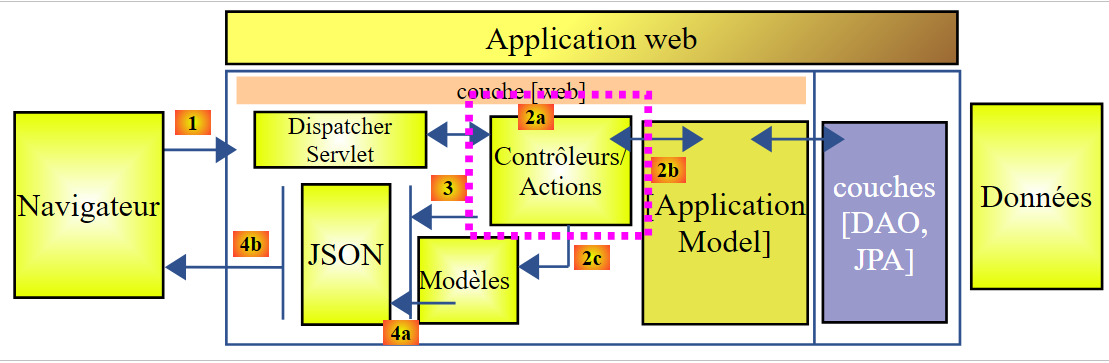
Web层的架构演变如下:
 |
- 在 [2b] 中,控制器的方法与单例 [ApplicationModel] 进行通信;
该策略为缓存管理提供了灵活性。类[ApplicationModel]可用于存储从层[DAO]获取的信息,或配置数据。 当无法控制 [DAO] 层时,这会非常有用。该缓存策略可能会随着时间的推移而演变。这些更改不会对控制器代码产生任何影响。
13.5.5. 控制器
 |
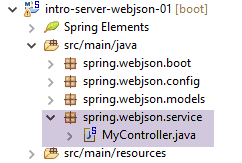 |
此处仅有一个控制器,即类 [MyController]。
13.5.5.1. 该控制器暴露的 URL
该控制器暴露的 URL 如下:
| 将产品添加到数据库中。这些数据已提交。返回结果为字符串 jSON,其中包含已添加产品的列表及其主键。 |
| 从数据库中删除所有产品。 |
| 更新数据库中的产品。这些产品已发布。响应为更新产品列表的字符串 jSON。 |
| 获取所有产品的字符串 jSON。 |
| 向数据库中添加分类。这些分类已发布。返回结果为字符串 jSON,其中包含已添加分类及其主键的列表。如果分类包含产品,这些产品也会被添加到数据库中。 |
| 删除数据库中的所有分类及其下的所有产品。删除后数据库将为空。 |
| 更新数据库中的分类。这些分类已发布。返回更新后的分类列表。如果分类包含商品,这些商品也会在数据库中同步更新。返回修改后分类的字符串 jSON; |
| 获取所有类别的字符串 jSON。 |
| 根据产品 ID 获取该产品的字符串 jSON 及其类别。 |
| 获取由其 ID 指定的产品的字符串 jSON,不包含其类别。 |
| 获取指定名称产品的字符串 jSON 及其类别。 |
| 获取指定名称(不含类别)的产品的字符串 jSON。 |
| 获取由其ID指定的类别及其产品的字符串jSON。 |
| 获取由名称指定的类别及其产品的字符串 jSON。 |
| 获取由名称指定的类别(不含其产品)的字符串 jSON。 |
| 获取指定 ID 类别(不含其产品)的字符串 jSON。 |
所展示的 URL 对应于 [DAO] 层中 [IDao] 接口的方法。 Web 服务 / jSON 的所有方法均基于相同的模板构建。我们将探讨其中的一些方法。
13.5.5.2. 控制器框架
控制器的骨架如下:
package spring.webjson.service;

import java.util.ArrayList;
import java.util.List;
import java.util.Set;

import javax.servlet.http.HttpServletRequest;

import org.springframework.beans.factory.annotation.Autowired;
import org.springframework.beans.factory.annotation.Qualifier;
import org.springframework.stereotype.Controller;
import org.springframework.web.bind.annotation.PathVariable;
import org.springframework.web.bind.annotation.RequestMapping;
import org.springframework.web.bind.annotation.RequestMethod;
import org.springframework.web.bind.annotation.ResponseBody;

import com.fasterxml.jackson.core.JsonProcessingException;
import com.fasterxml.jackson.core.type.TypeReference;
import com.fasterxml.jackson.databind.ObjectMapper;
import com.google.common.io.CharStreams;

import spring.data.dao.DaoException;
import spring.data.entities.Categorie;
import spring.data.entities.Produit;
import spring.webjson.models.ApplicationModel;
import spring.webjson.models.Response;

@Controller
public class MyController {

    // Spring 依赖
    @Autowired
    private ApplicationModel application;

    // 过滤器 jSON
    @Autowired
    @Qualifier("jsonMapper")
    private ObjectMapper jsonMapper;
    @Autowired
    @Qualifier("jsonMapperCategorieWithProduits")
    private ObjectMapper jsonMapperCategorieWithProduits;
    @Autowired
    @Qualifier("jsonMapperProduitWithCategorie")
    private ObjectMapper jsonMapperProduitWithCategorie;
    @Autowired
    @Qualifier("jsonMapperCategorieWithoutProduits")
    private ObjectMapper jsonMapperCategorieWithoutProduits;
    @Autowired
    @Qualifier("jsonMapperProduitWithoutCategorie")
    private ObjectMapper jsonMapperProduitWithoutCategorie;

    // 类 [MyController] 是单例,且仅在 Bean 实例化后才会被实例化

    public MyController() {
        // System.out.println("MyController");
    }

    @RequestMapping(value = "/addProduits", method = RequestMethod.POST, consumes = "application/json; charset=UTF-8", produces = "application/json; charset=UTF-8")
    @ResponseBody
    public String addProduits(HttpServletRequest request) throws JsonProcessingException {
        ...
    }
- 第 28 行:注解 [@Controller] 将该类定义为 Spring 组件;
- 第 32-33 行:向 [ApplicationModel] 类注入引用;
- 第 36-50 行:向映射器 jSON 注入引用;
- 第 58 行:暴露的 URL 实为 [/addProduits]。客户端必须使用 [POST] 方法进行请求(method = RequestMethod.POST)。 客户端应将POST数据以字符串形式发送(consumes = "application/json; charset=UTF-8")。该方法会直接向客户端返回响应(第59行)。响应将是一个字符串(第60行)。 将向客户端发送标头 HTTP [Content-type : application/json; charset=UTF-8],以告知其即将接收字符串 jSON(第 58 行);
- 第60行:方法[addProduits]将产品列表中的字符串jSON写入数据库;
13.5.5.3. 控制器方法的响应
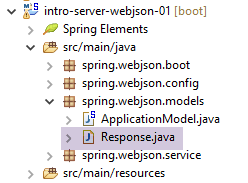
控制器中的所有方法均返回如下 [Response] 类型的响应:
 |
package spring.webjson.service;

import java.util.List;

public class Response<T> {

    // ----------------- 属性
    // 操作状态
    private int status;
    // 可能出现的错误信息
    private List<String> messages;
    // 响应正文
    private T body;

    // 构造函数
    public Response() {

    }

    public Response(int status, List<String> messages, T body) {
        this.status = status;
        this.messages = messages;
        this.body = body;
    }

    // 获取器和设置器
    ...
}
- 第 5 行:响应封装了一个类型 T;
- 第 13 行:类型为 T 的响应;
- 第 9-11 行:方法可能抛出异常。在此情况下,它将返回如下响应:
- 第 9 行:status!=0;
- 第11行:遇到的错误列表;
13.5.5.4. L'URL [/addProduits]
L'URL [/addProduits] 由以下方法处理:
@RequestMapping(value = "/addProduits", method = RequestMethod.POST, consumes = "application/json; charset=UTF-8", produces = "application/json; charset=UTF-8")
    @ResponseBody
    public String addProduits(HttpServletRequest request) throws JsonProcessingException {
        // 响应
        Response<List<Produit>> response;
        try {
            // 获取提交的值
            String body = CharStreams.toString(request.getReader());
            List<Produit> produits = jsonMapperProduitWithoutCategorie.readValue(body, new TypeReference<List<Produit>>() {
            });
            // 重建产品与分类之间的关联
            for (Produit produit : produits) {
                produit.setCategorie(application.getCategorieByIdWithoutProduits(produit.getIdCategorie()));
            }
            // 保存商品
            application.addProduits(produits);
            response = new Respon    se<List<Produit>>(0, null, produits);
        } catch (DaoException e1) {
            response = new Response<List<Produit>>(1000, e1.getErreurs(), null);
        } catch (Exception e2) {
            response = new Response<List<Produit>>(1000, getErreursForException(e2), null);
        }
        // 响应jSON
        return jsonMapperProduitWithoutCategorie.writeValueAsString(response);
    }
- 第3行:该方法接受参数[HttpServletRequest request],该参数封装了客户端请求的所有信息;
- 第 5 行:将发送给客户端的响应:一个产品列表;
- 第 8 行:获取提交的值。类 [CharStreams] 属于库 [Google Guava],该库的引用已在文件 [pom.xml] 中添加。 获取客户端提交的字符串 jSON。必须对其进行反序列化才能进行后续处理;
- 第 8-10 行:完成反序列化。得到一个产品列表,其中每个产品都有一个 [categorie=null] 字段;
- 第12-14行:重置列表中所有产品的[categorie]字段。为此,使用已初始化的产品[idCategorie]字段;
- 第16行:将产品插入数据库;
- 第17行:使用产品列表初始化对象[response];
- 第18-19行:当方法遇到[DAO]层异常的情况。 将响应初始化为 [status=1000](错误代码)[messages=e1.getMessages()],即向客户端发送服务器端遇到的错误列表;
- 第20-21行:方法遇到其他类型异常的情况。使用[status=1000](错误代码) [messages=getErreursForException(e)],其中 [getErreursForException] 是该类的私有方法,用于返回与 e 的异常堆栈中异常相关的错误列表,以及 [body=null];
- 第 24 行:返回响应字符串 jSON;
13.5.5.5. URL [/getAllProduits]
URL [/getAllProduits] 通过以下方法处理:
    @RequestMapping(value = "/getAllProduits", method = RequestMethod.GET, produces = "application/json; charset=UTF-8")
    @ResponseBody
    public String getAllProduits() throws JsonProcessingException {
        // 响应
        Response<List<Produit>> response;
        try {
            response = new Response<List<Produit>>(0, null, application.getAllProduits());
        } catch (DaoException e1) {
            response = new Response<List<Produit>>(1003, e1.getErreurs(), null);
        } catch (Exception e2) {
            response = new Response<List<Produit>>(1003, getErreursForException(e2), null);
        }
        // 响应 jSON
        return jsonMapperProduitWithoutCategorie.writeValueAsString(response);
}
- 第1行:通过[GET]操作请求URL [/getAllProduits]。该操作生成jSON;
- 第2行:该方法将响应jSON直接发送给客户端;
- 第 5 行:该方法发送字符串 jSON,其类型为 [Response<List<Produit>>];
- 第 7 行:请求产品时未指定其类别;
- 第8-12行:若发生错误,响应将初始化为包含错误代码和错误消息;
- 第14行:将响应中的jSON发送给客户端;
13.5.5.6. Conclusion
我们不再介绍控制器中的其他方法。它们与我们刚刚介绍的这两种方法中的任一种类似。
13.5.6. Web 服务的执行类 / jSON
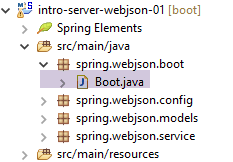 |
类 [Boot] 是该项目的可执行类:
package spring.webjson.boot;

import org.springframework.boot.SpringApplication;

import spring.webjson.server.config.AppConfig;

public class Boot {

    public static void main(String[] args) {
        SpringApplication.run(AppConfig.class, args);
    }
}
- 第 10 行:执行静态方法 [SpringApplication.run]。类 [SpringApplication] 是项目 [Spring Boot] 中的一个类(第 3 行)。向其传递两个参数:
- [AppConfig.class]:配置整个应用程序的类;
- [args]:传递给第 9 行方法 [main] 的任何参数。此参数在此处未被使用;
执行该类时,会生成以下日志:
- 第 17-19 行:启动将执行 Web 服务 / jSON 的 Tomcat 服务器;
- 第 25-33 行:构建 [DAO] 层;
- 第32-51行:发现已暴露的URL;
13.5.7. Web服务 / jSON 的测试
为了进行测试,我们使用脚本 SQL [dbintrospringdata.sql] 生成数据库 MySQL [dbintrospringdata]:
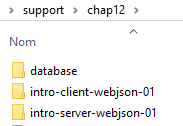 |
完成上述操作后,我们使用客户端 [Advanced Rest Client](参见第 22.5 节)来查询由 Web 服务 / jSON 提供的 URL (需先启动 Web 服务 / jSON)。
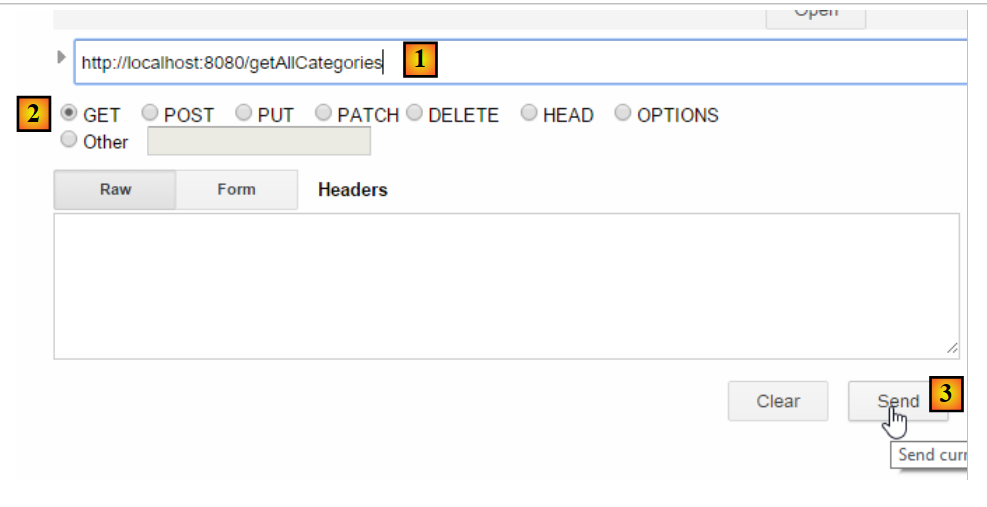 |
- 在 [1-3] 中,我们通过 HTTP GET 命令请求 URL [/getAllCategories];
我们得到以下响应:
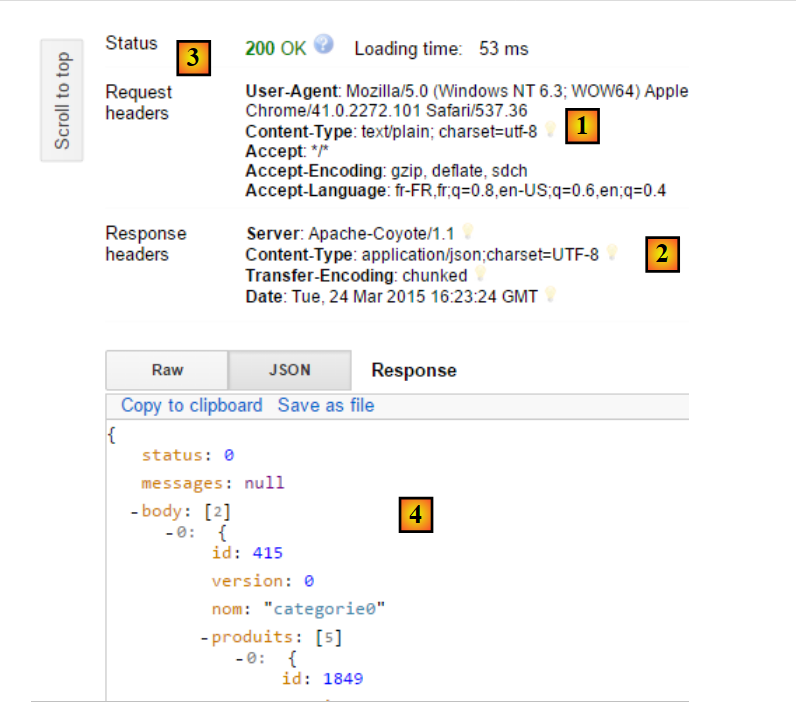 |
- 在 [1] 中,客户端的请求 HTTP;
- [2] 对应服务器的响应 HTTP;
- [3],状态码[200 OK]表示服务器已正确处理该请求;
- 在 [4] 中,服务器响应 jSON;
完整的 jSON 响应如下:
{"status":0,"messages":null,"body":[{"id":415,"version":0,"nom":"categorie0","produits":[{"id":1849,"version":0,"nom":"produit00","idCategorie":415,"prix":100.0,"description":"desc00"},{"id":1850,"version":0,"nom":"produit01","idCategorie":415,"prix":101.0,"description":"desc01"},{"id":1851,"version":0,"nom":"produit02","idCategorie":415,"prix":102.0,"description":"desc02"},{"id":1852,"version":0,"nom":"produit03","idCategorie":415,"prix":103.0,"description":"desc03"},{"id":1853,"version":0,"nom":"produit04","idCategorie":415,"prix":104.0,"description":"desc04"}]},{"id":416,"version":0,"nom":"categorie1","produits":[{"id":1856,"version":0,"nom":"produit12","idCategorie":416,"prix":112.0,"description":"desc12"},{"id":1857,"version":0,"nom":"produit13","idCategorie":416,"prix":113.0,"description":"desc13"},{"id":1858,"version":0,"nom":"produit14","idCategorie":416,"prix":114.0,"description":"desc14"},{"id":1854,"version":0,"nom":"produit10","idCategorie":416,"prix":110.0,"description":"desc10"},{"id":1855,"version":0,"nom":"produit11","idCategorie":416,"prix":111.0,"description":"desc11"}]}]}
- status:0 表示服务器端未发生错误;
- messages:null 表示没有错误消息;
- body:是响应正文,此处为包含产品的分类列表。共有两个分类,每个分类包含5个产品;
我们将向类别 [categorie1] 中添加产品 [produit15]。为此,我们将使用 URL [/addCategories],其代码如下:
@RequestMapping(value = "/addCategories", method = RequestMethod.POST, consumes = "application/json; charset=UTF-8", produces = "application/json; charset=UTF-8")
    @ResponseBody
    public String addCategories(HttpServletRequest request) throws JsonProcessingException {
        Response<List<Categorie>> response;
        ObjectMapper mapper = context.getBean(ObjectMapper.class);
        // 保存分类
        try {
            // 获取提交的值
            String body = CharStreams.toString(request.getReader());
            mapper.setFilters(jsonFilterCategorieWithProduits);
            List<Categorie> categories = mapper.readValue(body, new TypeReference<List<Categorie>>() {
            });
            // 重建产品与分类之间的关联
            for (Categorie categorie : categories) {
                Set<Produit> produits = categorie.getProduits();
                if (produits != null) {
                    for (Produit produit : categorie.getProduits()) {
                        produit.setCategorie(categorie);
                    }
                }
            }
            // 保存分类
            application.addCategories(categories);
            response = new Response<List<Categorie>>(0, null, categories);
        } catch (Exception e) {
            response = new Response<List<Categorie>>(1004, getErreursForException(e), null);
        }
        // 响应 jSON
        return mapper.writeValueAsString(response);
    }
- 第 1 行:客户必须生成 POST,且提交的值必须为字符串 jSON;
- 第9-12行:提交的值应为包含相关产品的分类列表;
我们将创建一个类别 [categorie2] 及对应的产品 [produit21]。此时需发送的字符串 jSON 如下:
[{"id":null,"version":0,"nom":"categorie2","produits":[{"id":null,"version":0,"nom":"produit21","idCategorie":null,"prix":111.0,"description":"desc21"}]}]
向 Web 服务 /jSON 发送的请求如下:
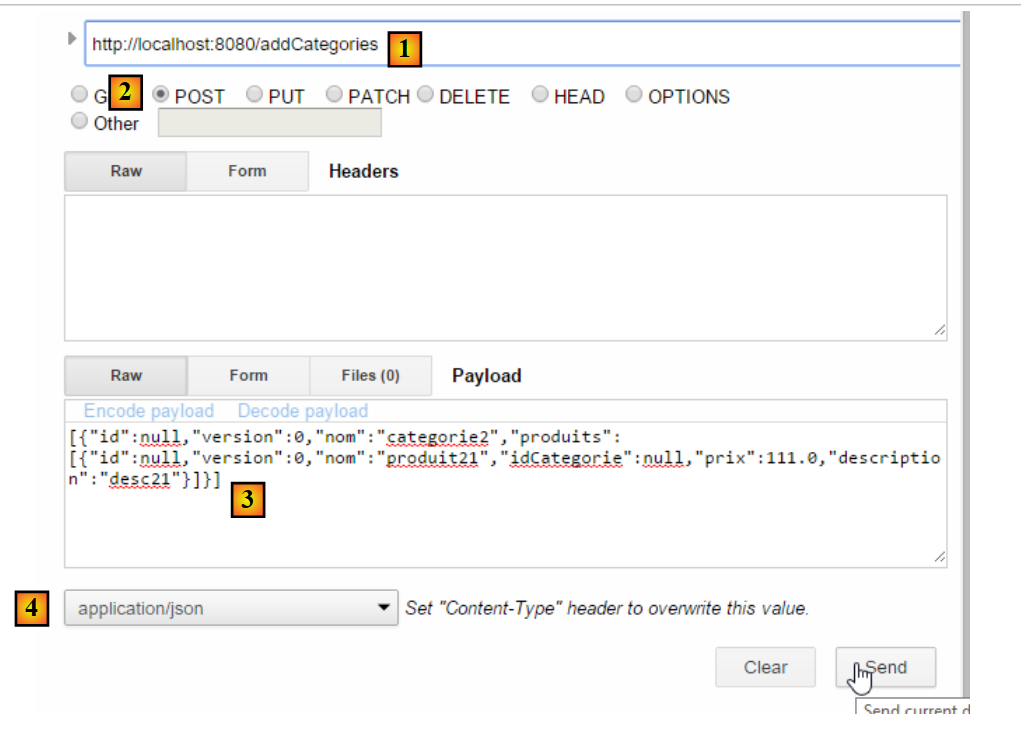 |
- 在 [1] 中,请求的 URL;
- 在 [2] 中,该请求是通过 POST 操作发出的;
- 在 [3] 中,已发送字符串 jSON;
- 在 [4] 中,通知服务器将向其发送 jSON;
服务器的响应如下:
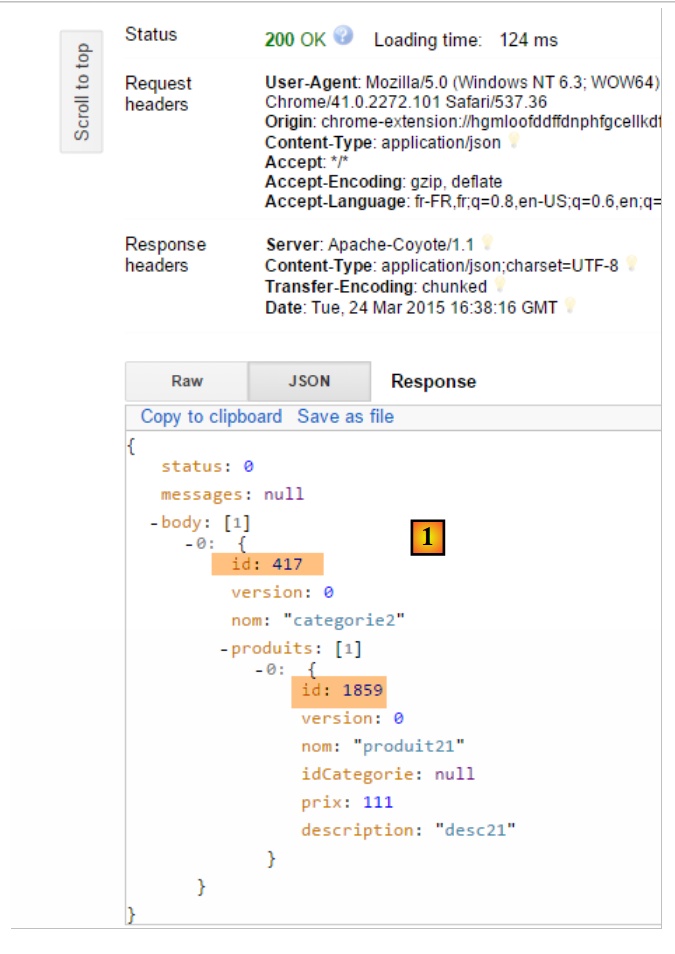 |
- 在 [1] 中,可以看到该分类及其产品现在都拥有主键,这表明它们很可能已被插入数据库。我们将通过 URL 和 [/getCategorieByNameWithProduits/categorie2] 来验证这一点:
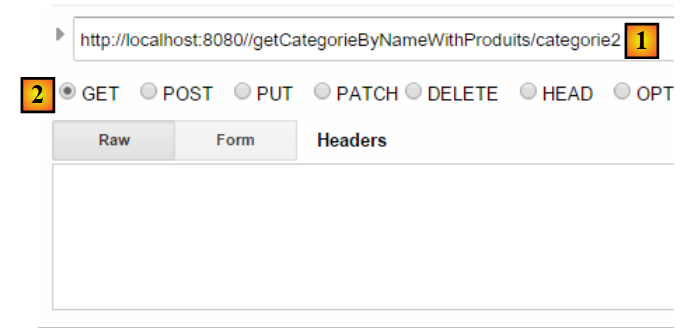 |
我们得到以下结果:
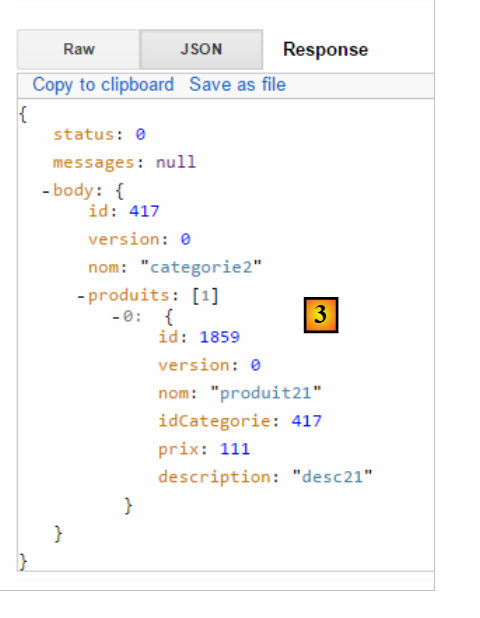 |
我们确实获取到了[categorie2]类别及其唯一的商品[produit21]。我们也可以仅查询商品。为此,我们使用URL [/getProduitByIdWithoutCategorie/1859]:
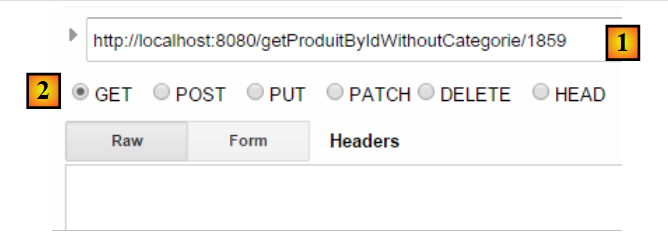 |
我们得到以下结果:
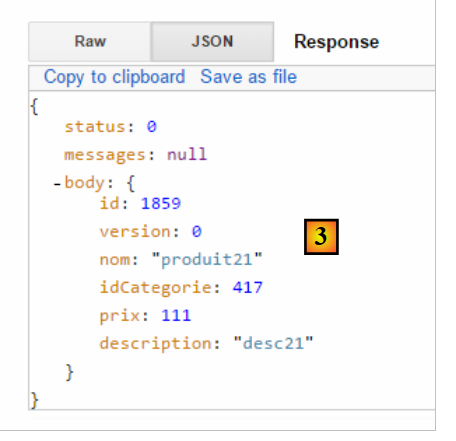 |
所有 [GET] 操作均可在普通浏览器中完成:
 |
欢迎读者测试Web服务/json中的其他URL操作。
13.6. 为 / jSON 网络服务编写的客户端
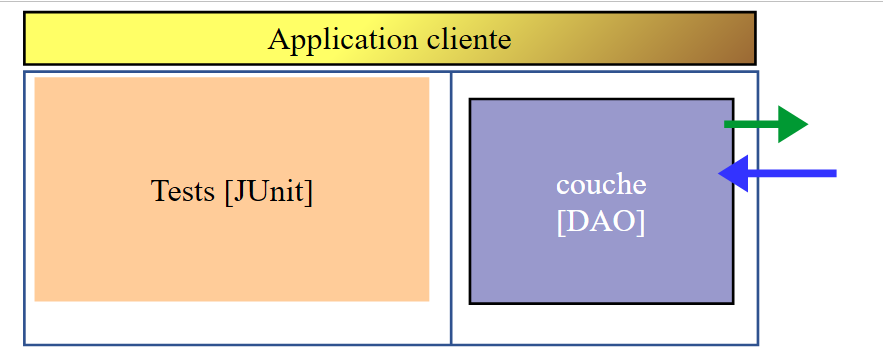
既然 [dbintrospringdata] 数据库已在网上提供,我们将编写一个利用它的应用程序。届时将采用以下客户端/服务器架构:
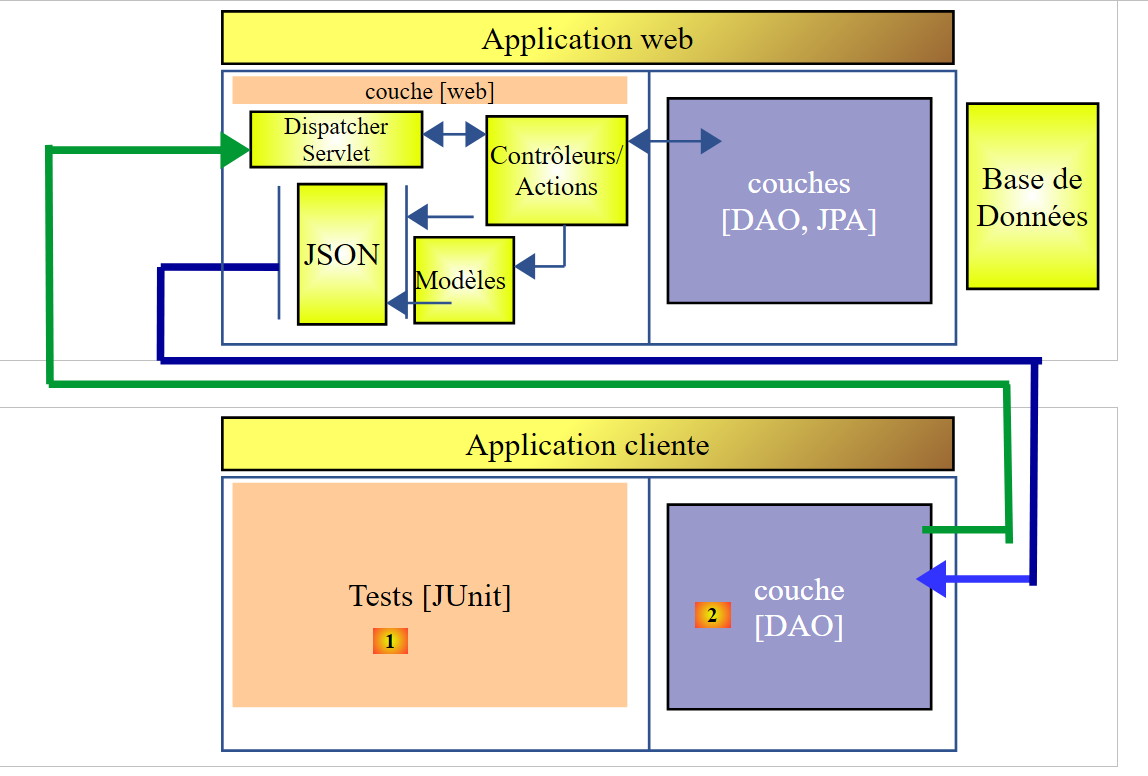 |
客户端应用程序将包含两层:
- 一个 [DAO] [2] 层,用于与暴露数据库的 Web 应用程序 / jSON 进行通信;
- 一个测试层 JUnit [1],用于验证客户端和服务器是否正常工作;
13.6.1. Eclipse 项目
客户端的 Eclipse 项目如下:
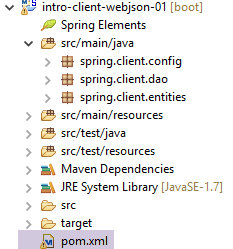 |
- 文件夹 [src/main/java] 实现了 [DAO] 层;
- 文件夹 [src/test/java] 实现了测试 JUnit;
13.6.2. 项目的 Maven 配置
该项目是一个由以下 [pom.xml] 文件配置的 Maven 项目:
<project xmlns="http://maven.apache.org/POM/4.0.0" xmlns:xsi="http://www.w3.org/2001/XMLSchema-instance"
    xsi:schemaLocation="http://maven.apache.org/POM/4.0.0 http://maven.apache.org/xsd/maven-4.0.0.xsd">
    <modelVersion>4.0.0</modelVersion>
    <groupId>istia.st.webjson</groupId>
    <artifactId>intro-client-webjson-01</artifactId>
    <version>0.0.1-SNAPSHOT</version>
    <description>Client console du serveur web / jSON</description>

    <properties>
        <project.build.sourceEncoding>UTF-8</project.build.sourceEncoding>
        <java.version>1.8</java.version>
    </properties>

    <parent>
        <groupId>org.springframework.boot</groupId>
        <artifactId>spring-boot-starter-parent</artifactId>
        <version>1.2.7.RELEASE</version>
    </parent>

    <dependencies>
        <!-- Spring -->
        <dependency>
            <groupId>org.springframework</groupId>
            <artifactId>spring-web</artifactId>
        </dependency>
        <!-- Spring 使用的库 jSON -->
        <dependency>
            <groupId>com.fasterxml.jackson.core</groupId>
            <artifactId>jackson-core</artifactId>
        </dependency>
        <dependency>
            <groupId>com.fasterxml.jackson.core</groupId>
            <artifactId>jackson-databind</artifactId>
        </dependency>
        <!-- Spring 使用的组件 RestTemplate -->
        <dependency>
            <groupId>org.apache.httpcomponents</groupId>
            <artifactId>httpclient</artifactId>
        </dependency>
        <!-- Google Guava -->
        <dependency>
            <groupId>com.google.guava</groupId>
            <artifactId>guava</artifactId>
            <version>16.0.1</version>
            <scope>test</scope>
        </dependency>
        <!-- 日志库 -->
        <dependency>
            <groupId>org.springframework.boot</groupId>
            <artifactId>spring-boot-starter-logging</artifactId>
        </dependency>
        <!-- Spring Boot 测试 -->
        <dependency>
            <groupId>org.springframework.boot</groupId>
            <artifactId>spring-boot-starter-test</artifactId>
            <scope>test</scope>
        </dependency>
        <!-- Spring Boot -->
        <dependency>
            <groupId>org.springframework.boot</groupId>
            <artifactId>spring-boot</artifactId>
            <scope>test</scope>
        </dependency>
    </dependencies>
    <!-- 插件 -->
    <build>
        <plugins>
            <plugin>
                <artifactId>maven-assembly-plugin</artifactId>
                <configuration>
                    <descriptorRefs>
                        <descriptorRef>jar-with-dependencies</descriptorRef>
                    </descriptorRefs>
                </configuration>
            </plugin>
            <plugin>
                <groupId>org.apache.maven.plugins</groupId>
                <artifactId>maven-surefire-plugin</artifactId>
                <version>2.18.1</version>
            </plugin>
        </plugins>
    </build>

    <name>intro-client-webjson-01</name>
</project>
- 第 14-18 行:父 Maven 项目 [spring-boot-starter-parent],它允许我们定义若干不带版本号的依赖项,因为版本号已在父项目中定义;
- 第 22-25 行: 尽管我们并非在编写 Web 应用程序,但仍需引入依赖项 [spring-web],该依赖项包含类 [RestTemplate],可轻松与 Web 应用程序 / jSON 进行交互;
- 第 27-34 行:一个 jSON 库;
- 第36-39行:一个依赖项,它将允许我们在客户端的HTTP请求中附加一个timeout。 timeout 表示服务器响应的最大等待时间。超过此时间,客户端将通过抛出异常来报告 timeout 错误;
- 第 41-46 行:测试中使用的 Google Guava 库。 因此,我们在第 45 行将其作用域限定为 [test]。这意味着该依赖项仅在执行 [src/test/java] 分支的代码时才会被引入;
- 第 48-51 行:日志库;
- 第52-63行:用于测试的依赖项JUnit。它特别引入了测试所需的JUnit库。 这些依赖项带有 [<scope>test</scope>] 属性,表明它们仅在测试阶段需要。它们不会包含在项目的最终归档中;
13.6.3. [DAO] 层的实现
 |
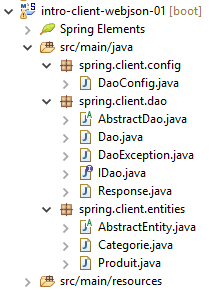 |
- [spring.client.config] 包包含 [DAO] 层的 Spring 配置;
- 包 [spring.client.dao] 包含 [DAO] 层的实现;
- 包 [spring.client.entities] 包含与 Web 服务 / jSON 交换的对象;
13.6.3.1. Configuration
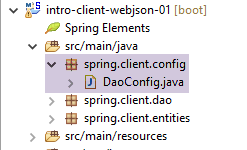 |
类 [DaoConfig] 负责 [DAO] 层的 Spring 配置。其代码如下:
package spring.client.config;

import org.springframework.context.annotation.Bean;
import org.springframework.context.annotation.ComponentScan;
import org.springframework.context.annotation.Configuration;
import org.springframework.http.client.HttpComponentsClientHttpRequestFactory;
import org.springframework.web.client.RestTemplate;

import com.fasterxml.jackson.databind.ObjectMapper;
import com.fasterxml.jackson.databind.ser.impl.SimpleBeanPropertyFilter;
import com.fasterxml.jackson.databind.ser.impl.SimpleFilterProvider;

@ComponentScan({ "spring.client.dao" })
public class DaoConfig {

    // 常量
    static private final int TIMEOUT = 1000;
    static private final String URL_WEBJSON = "http://localhost:8080";

    @Bean
    public RestTemplate restTemplate(int timeout) {
        // 组件创建RestTemplate
        HttpComponentsClientHttpRequestFactory factory = new HttpComponentsClientHttpRequestFactory();
        RestTemplate restTemplate = new RestTemplate(factory);
        // 通信超时
        factory.setConnectTimeout(timeout);
        factory.setReadTimeout(timeout);
        // 结果
        return restTemplate;
    }

    @Bean
    public int timeout() {
        return TIMEOUT;
    }

    @Bean
    public String urlWebJson() {
        return URL_WEBJSON;
    }

    // 过滤器 jSON
    @Bean(name = "jsonMapper")
    public ObjectMapper jsonMapper() {
        return new ObjectMapper();
    }

    @Bean(name = "jsonMapperCategorieWithProduits")
    public ObjectMapper jsonMapperCategorieWithProduits() {
        // 映射器jSON
        ObjectMapper mapper = new ObjectMapper();
        // 过滤器
        mapper.setFilters(
                new SimpleFilterProvider().addFilter("jsonFilterCategorie", SimpleBeanPropertyFilter.serializeAllExcept())
                        .addFilter("jsonFilterProduit", SimpleBeanPropertyFilter.serializeAllExcept("categorie")));
        // 结果
        return mapper;
    }

    @Bean(name = "jsonMapperProduitWithCategorie")
    public ObjectMapper jsonMapperProduitWithCategorie() {
        // 映射器 jSON
        ObjectMapper mapper = new ObjectMapper();
        // 过滤器
        mapper.setFilters(
                new SimpleFilterProvider().addFilter("jsonFilterProduit", SimpleBeanPropertyFilter.serializeAllExcept())
                        .addFilter("jsonFilterCategorie", SimpleBeanPropertyFilter.serializeAllExcept("produits")));
        // 结果
        return mapper;
    }

    @Bean(name = "jsonMapperCategorieWithoutProduits")
    public ObjectMapper jsonMapperCategorieWithoutProduits() {
        // 映射器 jSON
        ObjectMapper mapper = new ObjectMapper();
        // 过滤器
        mapper.setFilters(new SimpleFilterProvider().addFilter("jsonFilterCategorie",
                SimpleBeanPropertyFilter.serializeAllExcept("produits")));
        // 结果
        return mapper;
    }

    @Bean(name = "jsonMapperProduitWithoutCategorie")
    public ObjectMapper jsonMapperProduitWithoutCategorie() {
        // 映射器 jSON
        ObjectMapper mapper = new ObjectMapper();
        // 过滤器
        mapper.setFilters(new SimpleFilterProvider().addFilter("jsonFilterProduit",
                SimpleBeanPropertyFilter.serializeAllExcept("categorie")));
        // 结果
        return mapper;
    }
}
- 第13行:该类是Spring配置类——需在[spring.client.dao]包中查找Spring组件;
- 第 17 行:将 timeout 的超时时间设置为 1 秒(1000 毫秒);
- 第 32-35 行:返回该值的 Bean;
- 第 18 行:Web 服务的 URL / jSON;
- 第 37-40 行:返回该值的 Bean;
- 第20-30行:[RestTemplate]类的配置,该类负责与Web服务/jSON进行交互。若无需配置,可在代码中直接使用[new RestTemplate()]。 在此,我们希望将与 Web 服务 / jSON 进行交互的 timeout 固定下来。 第 36 行中的 [timeout] Bean 被作为参数传递给了第 24 行中的 [restTemplate] 方法;
- 第23行:组件[HttpComponentsClientHttpRequestFactory]用于设定通信中的timeout(第29-30行);
- 第24行:[RestTemplate]类是基于该组件构建的。由于它依赖该组件与Web服务/jSON进行通信,因此数据交换将确实通过timeout进行;
- 客户端和服务器将交换文本行。 转换器负责将对象序列化为文本,反之亦将文本反序列化为对象。[RestTemplate] 类可能关联多个转换器,具体选用哪个取决于服务器发送的 HTTP 头部信息。 在此,我们将不使用任何转换器。因此,[RestTemplate]组件不会以任何方式尝试转换以下两个元素:
- 发布的文本;
- 作为响应收到的文本;
这些文本将作为 jSON 字符串存在,因此 [RestTemplate] 组件将保持其原始状态。作为开发者,我们将自行进行必要的 jSON 序列化/反序列化操作。 这是因为对提交值和接收响应应用的过滤器可能不同,且经验表明,自行处理比尝试配置 [RestTemplate] 组件使其使用正确的 jSON 转换器更为简便;
- 第 42-92 行:定义 jSON 过滤器。这些过滤器与第 13.5.3.1 节中介绍和解释的服务器端过滤器相同;
- 第 43-46 行:一个不带过滤器的映射器 jSON;
- 第64-68行:使用映射器 jSON,以生成不含产品的分类;
- 第 48-58 行:映射器 jSON,用于生成包含其产品的类别;
- 第 83-92 行:映射器 jSON,用于生成不包含所属类别的商品;
- 第 60-70 行:映射器 jSON,用于生成包含其所属类别的商品;
所有这些Bean都将提供给[DAO]层中的代码以及JUnit测试。
13.6.3.2. 实体
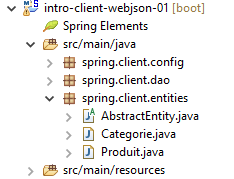 |
[DAO] 层处理的实体是其与 Web 服务 / jSON 交换的实体。这些实体包括商品和产品。 在服务器端,这些实体带有持久化注解 JPA。在此,这些注解已被移除。为便于回顾,我们再次列出实体的代码:
[AbstractEntity]
package spring.client.entities;

import com.fasterxml.jackson.core.JsonProcessingException;
import com.fasterxml.jackson.databind.ObjectMapper;

public abstract class AbstractEntity {
    // 属性
    protected Long id;
    protected Long version;

    // 构造函数
    public AbstractEntity() {

    }

    public AbstractEntity(Long id, Long version) {
        this.id = id;
        this.version = version;
    }

    // 重定义 [equals] 和 [hashcode]
    @Override
    public int hashCode() {
        return (id != null ? id.hashCode() : 0);
    }

    @Override
    public boolean equals(Object entity) {
        if (!(entity instanceof AbstractEntity)) {
            return false;
        }
        String class1 = this.getClass().getName();
        String class2 = entity.getClass().getName();
        if (!class2.equals(class1)) {
            return false;
        }
        AbstractEntity other = (AbstractEntity) entity;
        return id != null && this.id == other.id.longValue();
    }

    // 签名 jSON
    public String toString() {
        ObjectMapper mapper = new ObjectMapper();
        try {
            return mapper.writeValueAsString(this);
        } catch (JsonProcessingException e) {
            e.printStackTrace();
            return null;
        }
    }

    // 获取器和设置器
...
}
[Categorie]
package spring.client.entities;

import java.util.HashSet;
import java.util.Set;

import com.fasterxml.jackson.annotation.JsonFilter;

@JsonFilter("jsonFilterCategorie")
public class Categorie extends AbstractEntity {

    // 属性
    private String nom;

    // 相关产品
    public Set<Produit> produits = new HashSet<Produit>();

    // 构造函数
    public Categorie() {

    }

    public Categorie(String nom) {
        this.nom = nom;
    }

    // 方法
    public void addProduit(Produit produit) {
        // 添加产品
        produits.add(produit);
        // 设置其类别
        produit.setCategorie(this);
    }

    // 获取器和设置器
    ...
}
[Produit]
package spring.webjson.client.entities;

import com.fasterxml.jackson.annotation.JsonFilter;

@JsonFilter("jsonFilterProduit")
public class Produit extends AbstractEntity {

    // 名称
    private String nom;
   // 分类编号
    private Long idCategorie;
   // 价格
    private double prix;
   // 描述
    private String description;

    // 类别
    private Categorie categorie;

    // 制造商
    public Produit() {

    }

    public Produit(String nom, double prix, String description) {
        this.nom = nom;
        this.prix = prix;
        this.description = description;
    }

    // 获取器和设置器
...
}
13.6.3.3. [DaoException]类
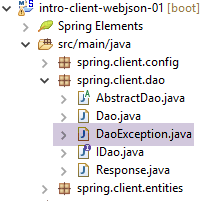 |
当 [DAO] 层遇到错误时,它将抛出类型为 [DaoException] 的异常。该类是服务器端使用的类,并在第 11.3.7 节中进行了描述。
13.6.3.4. [DAO] 层的接口
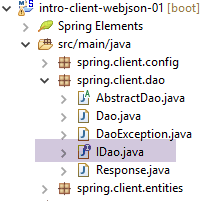 |
[DAO] 层提供第 11.3.7 节中描述的 [IDao] 接口。
package spring.client.dao;

import java.util.List;

import spring.client.entities.Categorie;
import spring.client.entities.Produit;

public interface IDao {

    // 插入产品列表
    public List<Produit> addProduits(List<Produit> produits);

    // 删除所有产品
    public void deleteAllProduits();

    // 更新产品列表
    public List<Produit> updateProduits(List<Produit> produits);

    // 获取所有产品
    public List<Produit> getAllProduits();

    // 插入分类列表
    public List<Categorie> addCategories(List<Categorie> categories);

    // 删除所有分类
    public void deleteAllCategories();

    // 更新分类列表
    public List<Categorie> updateCategories(List<Categorie> categories);

    // 获取所有分类
    public List<Categorie> getAllCategories();

    // 特定产品
    public Produit getProduitByIdWithCategorie(Long idProduit);

    public Produit getProduitByIdWithoutCategorie(Long idProduit);

    public Produit getProduitByNameWithCategorie(String nom);

    public Produit getProduitByNameWithoutCategorie(String nom);

    // 特定类别
    public Categorie getCategorieByIdWithProduits(Long idCategorie);

    public Categorie getCategorieByIdWithoutProduits(Long idCategorie);

    public Categorie getCategorieByNameWithProduits(String nom);

    public Categorie getCategorieByNameWithoutProduits(String nom);

}
13.6.3.5. Web 服务的响应 / jSON
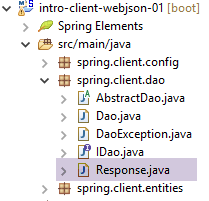 |
我们看到,Web 服务 / jSON 中的所有 URL 都返回了第 13.5.5.3 节中定义的 [Response] 类型。我们在此重述该类:
package spring.client.dao;

import java.util.List;

public class Response<T> {

    // ----------------- 属性
    // 操作状态
    private int status;
    // 可能出现的错误信息
    private List<String> messages;
    // 响应正文
    private T body;

    // 构造函数
    public Response() {

    }

    public Response(int status, List<String> messages, T body) {
        this.status = status;
        this.messages = messages;
        this.body = body;
    }

    // 获取器和设置器
    ...
}
13.6.3.6. 与 Web 服务 / jSON 的交互实现
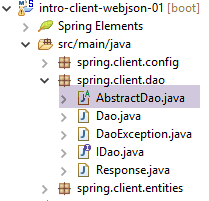 |
类 [AbstractDao] 实现了与 Web 服务 / jSON 的交互:
package spring.client.dao;

import java.net.URI;
import java.net.URISyntaxException;

import org.springframework.beans.factory.annotation.Autowired;
import org.springframework.core.ParameterizedTypeReference;
import org.springframework.http.MediaType;
import org.springframework.http.RequestEntity;
import org.springframework.web.client.RestTemplate;

public abstract class AbstractDao {

    // 数据
    @Autowired
    protected RestTemplate restTemplate;
    @Autowired
    protected String urlServiceWebJson;

    // 通用请求
    protected String getResponse(String url, String jsonPost) {

        // 联系网址:URL
        // jsonPost:要发布的值 jSON
        try {
            // 执行请求
            RequestEntity<?> request;
            if (jsonPost != null) {
                // 请求 POST
                request = RequestEntity.post(new URI(String.format("%s%s", urlServiceWebJson, url)))
                        .header("Content-Type", "application/json").accept(MediaType.APPLICATION_JSON).body(jsonPost);
            } else {
                // 请求 GET
                request = RequestEntity.get(new URI(String.format("%s%s", urlServiceWebJson, url)))
                        .accept(MediaType.APPLICATION_JSON).build();
            }
            // 正在执行该查询
            return restTemplate.exchange(request, new ParameterizedTypeReference<String>() {
            }).getBody();
        } catch (URISyntaxException e1) {
            throw new DaoException(20, e1);
        } catch (RuntimeException e2) {
            throw new DaoException(21, e2);
        }
    }

}
- 第 15-16 行:注入组件 [RestTemplate],该组件负责与服务器的通信;
- 第 17-18 行:注入 Web 服务 / jSON 的 URL;
与服务器通信的方法实现被提取到了 [getResponse] 方法中:
- 第21行:该方法接收2个参数:
- [url]:请求的 URL;
- [jsonPost]:待发送的字符串 jSON,否则为 null。 若为 [jsonPost==null],则使用 GET 向 URL 发起请求,否则使用 POST;
- 第38行:向服务器发送请求并接收响应的语句。[RestTemplate]组件提供了大量与服务器交互的方法。此处我们选择了[exchange]方法,但还有其他方法;
- 第27-36行:我们需要构建类型为[RequestEntity]的请求。根据使用GET还是POST进行请求,其构建方式有所不同;
- 第30-31行:针对GET的请求。 [RequestEntity] 类提供了静态方法,用于创建 GET、POST、HEAD 等查询; [RequestEntity.get] 方法通过串联构建该查询的各个方法,从而创建 GET 查询:
- 方法 [RequestEntity.get] 接受目标 URL 作为参数,该目标以 URI 实例的形式呈现,
- 方法 [accept] 用于定义 HTTP 请求头中的 [Accept] 元素。在此,我们指定接受服务器将发送的 [application/json] 类型;
- 方法 [build] 利用这些不同信息来构建请求的类型 [RequestEntity];
- 第 34-35 行:针对 POST 的请求。[RequestEntity.post] 方法通过串联构建该请求的各个方法,从而生成 POST 请求:
- 方法 [RequestEntity.post] 接受目标 URL 作为参数,该目标以 URI 实例的形式呈现,
- 方法 [header] 定义了一个 HTTP 头部。 此处向服务器发送 [Content-Type: application/json] 头部,以告知其将接收的 POST 值将以 jSON 字符串的形式发送;
- 方法 [accept] 用于表明我们接受服务器将发送的类型 [application/json];
- 方法 [body] 确定了提交的值。该值是泛型方法 [getResponse](第 1 行)的第 4 个参数;
- 第 38 行:方法 [RestTemplate].exchange 返回类型 [ResponseEntity<String>],该类型封装了服务器的完整响应:包括 HTTP 头部和文档正文。 方法 [ResponseEntity].getBody() 可获取该正文,其代表服务器的响应,此处为字符串;
13.6.3.7. [IDao] 接口的实现
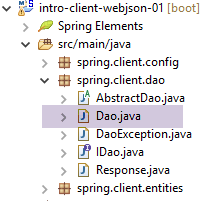 |
类 [Dao] 实现了接口 [IDao]:
package spring.client.dao;

import java.io.IOException;
import java.util.List;

import org.springframework.beans.factory.annotation.Autowired;
import org.springframework.beans.factory.annotation.Qualifier;
import org.springframework.context.ApplicationContext;
import org.springframework.stereotype.Component;

import com.fasterxml.jackson.core.type.TypeReference;
import com.fasterxml.jackson.databind.ObjectMapper;

import spring.client.entities.Categorie;
import spring.client.entities.Produit;

@Component
public class Dao extends AbstractDao implements IDao {

    @Autowired
    private ApplicationContext context;

    // 筛选条件 jSON
    @Autowired
    @Qualifier("jsonMapper")
    private ObjectMapper jsonMapper;
    @Autowired
    @Qualifier("jsonMapperCategorieWithProduits")
    private ObjectMapper jsonMapperCategorieWithProduits;
    @Autowired
    @Qualifier("jsonMapperProduitWithCategorie")
    private ObjectMapper jsonMapperProduitWithCategorie;
    @Autowired
    @Qualifier("jsonMapperCategorieWithoutProduits")
    private ObjectMapper jsonMapperCategorieWithoutProduits;
    @Autowired
    @Qualifier("jsonMapperProduitWithoutCategorie")
    private ObjectMapper jsonMapperProduitWithoutCategorie;

    @Override
    public List<Produit> addProduits(List<Produit> produits) {
        // ----------- 添加产品(不包含其类别)
        ...
}
- 第 17 行:类 [Dao] 是一个 Spring 组件,因此可以向其中注入其他 Spring 组件;
- 第 18 行:类 [Dao] 继承了我们刚刚看到的类 [AbstractDao],并实现了接口 [IDao];
- 第 20-21 行:注入 Spring 上下文以访问其 Bean;
- 第24-38行:注入在第13.6.2节中介绍的[AppConfig]类中定义的jSON映射器;
接口 [IDao] 中各方法的实现均遵循相同的模式。我们将介绍两个方法,其中一个基于操作 [POST],另一个基于操作 [GET]。
[GET] 的示例:[getCategorieByNameWithProduits]
@Override
    public Categorie getCategorieByNameWithProduits(String nom) {
        // ----------- 根据名称获取指定分类及其下的商品
        try {
            // 查询
            Response<Categorie> response = jsonMapperCategorieWithProduits.readValue(
                    getResponse(String.format("/getCategorieByNameWithProduits/%s", nom), null),
                    new TypeReference<Response<Categorie>>() {
                    });
            // 错误?
            if (response.getStatus() != 0) {
                // 抛出 1 个异常
                throw new DaoException(response.getStatus(), response.getMessages());
            } else {
                // 返回服务器响应的核心内容
                return response.getBody();
            }
        } catch (DaoException e1) {
            throw e1;
        } catch (RuntimeException | IOException e2) {
            throw new DaoException(113, e2);
        }
    }
- 第 7 行:调用父类的 [getResponse] 方法。正是该方法负责与 Web 服务 / jSON 进行交互。其参数如下:
getResponse(String.format("/getCategorieByNameWithProduits/%s", nom), null)
- (续)
- 被调用的服务 URL 的 [/getCategorieByNameWithProduits/nom];
- 提交的值。此处无数据;
方法 [getResponse] 返回一个 String 类型,即服务器发送的响应 jSON。我们按以下方式对该响应 jSON 进行反序列化:
jsonMapperCategorieWithProduits.readValue(
                    jsonResponse,
                    new TypeReference<Response<Categorie>>() {
});
因为字符串 jSON 是类型 [Response<Categorie>] 的序列化结果;
- 第 11-17 行:检测响应状态。如果状态不为 0,则表示服务器端发生了错误。此时抛出异常(第 13 行),并包含响应中的信息(状态和错误消息列表);
- 第 16 行:如果服务器端没有发生错误,则返回类型 [Response<Categorie>] 的主体,即所请求的类别;
- 第18-19行:处理第16行抛出的异常;
- 第20-22行:处理所有其他异常;
[POST] 的示例:[addCategories]
@Override
    public List<Categorie> addCategories(List<Categorie> categories) {
        // ----------- 添加分类(及其产品)
        try {
            // 请求
            Response<List<Categorie>> response = jsonMapperCategorieWithProduits.readValue(
                    getResponse("/addCategories", jsonMapperCategorieWithProduits.writeValueAsString(categories)),
                    new TypeReference<Response<List<Categorie>>>() {
                    });
            // 错误?
            if (response.getStatus() != 0) {
                // 抛出 1 个异常
                throw new DaoException(response.getStatus(), response.getMessages());
            } else {
                // 返回服务器响应主体
                return response.getBody();
            }
        } catch (DaoException e1) {
            throw e1;
        } catch (RuntimeException | IOException e2) {
            throw new DaoException(104, e2);
        }
    }
- 第2行:方法[addCategories]用于将作为参数传递的类别持久化到数据库中。该方法会为这些类别添加主键。如果类别是与产品一起传递的,这些产品也会被持久化;
- 第7行:调用父类的方法[getResponse],用于与Web服务/jSON进行交互;
- 第一个参数是 URL [/addCategories];
- 第二个参数是提交的值,此处为待保存的分类列表;
getResponse("/addCategories", jsonMapperCategorieWithProduits.writeValueAsString(categories))
随后对获得的字符串 jSON 进行反序列化,以获取预期的 [Response<List<Categorie>] 类型:
Response<List<Categorie>> response = jsonMapperCategorieWithProduits.readValue(
                    jsonResponse,
                    new TypeReference<Response<List<Categorie>>>() {
                    });
- 第 11-17 行:处理服务器响应(是否发生错误);
- 第20-22行:异常处理;
所有其他方法均遵循上述两种方法的框架。
13.6.4. 测试 JUnit
让我们回到正在构建的客户端/服务器架构:
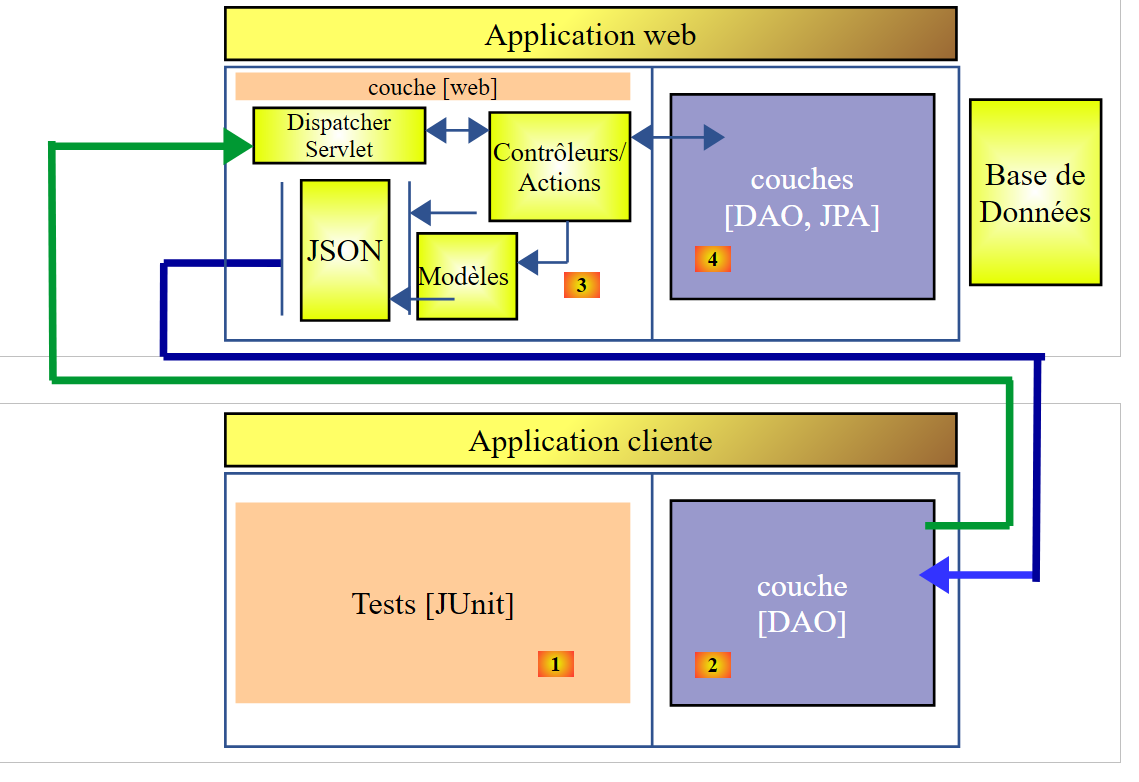 |
我们构建了一个 [DAO] [2] 层,其接口与 [DAO] [4] 层相同。 因此,要测试 [DAO] [2] 层,可以使用之前用于测试 [DAO] [4] 层的 JUnit 测试。 提醒一下,该测试代码如下:
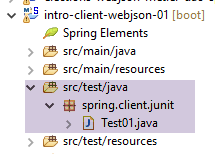 |
package spring.client.junit;

import java.util.ArrayList;
import java.util.List;
import java.util.Set;

import org.junit.Assert;
import org.junit.Before;
import org.junit.Test;
import org.junit.runner.RunWith;
import org.springframework.beans.BeansException;
import org.springframework.beans.factory.annotation.Autowired;
import org.springframework.beans.factory.annotation.Qualifier;
import org.springframework.boot.test.SpringApplicationConfiguration;
import org.springframework.test.context.junit4.SpringJUnit4ClassRunner;

import com.fasterxml.jackson.core.JsonProcessingException;
import com.fasterxml.jackson.databind.ObjectMapper;
import com.google.common.collect.Lists;

import spring.client.config.DaoConfig;
import spring.client.dao.DaoException;
import spring.client.dao.IDao;
import spring.client.entities.Categorie;
import spring.client.entities.Produit;

@SpringApplicationConfiguration(classes = DaoConfig.class)
@RunWith(SpringJUnit4ClassRunner.class)
public class Test01 {

    // [DAO] 层
    @Autowired
    private IDao dao;

    // 过滤器 jSON
    @Autowired
    @Qualifier("jsonMapper")
    private ObjectMapper jsonMapper;
    @Autowired
    @Qualifier("jsonMapperCategorieWithProduits")
    private ObjectMapper jsonMapperCategorieWithProduits;
    @Autowired
    @Qualifier("jsonMapperProduitWithCategorie")
    private ObjectMapper jsonMapperProduitWithCategorie;
    @Autowired
    @Qualifier("jsonMapperCategorieWithoutProduits")
    private ObjectMapper jsonMapperCategorieWithoutProduits;
    @Autowired
    @Qualifier("jsonMapperProduitWithoutCategorie")
    private ObjectMapper jsonMapperProduitWithoutCategorie;

    @Before
    public void cleanAndFill() {
        // 每次测试前清理数据库
        log("Vidage de la base de données", 1);
        // 清空表 [CATEGORIES] - 由此引发级联,表 [PRODUITS] 将被清空
        dao.deleteAllCategories();
        // --------------------------------------------------------------------------------------
        log("Remplissage de la base", 1);
        // 填充表
        List<Categorie> categories = new ArrayList<Categorie>();
        for (int i = 0; i < 2; i++) {
            Categorie categorie = new Categorie(String.format("categorie%d", i));
            for (int j = 0; j < 5; j++) {
                categorie.addProduit(new Produit(String.format("produit%d%d", i, j), 100 * (1 + (double) (i * 10 + j) / 100),
                        String.format("desc%d%d", i, j)));
            }
            categories.add(categorie);
        }
        // 添加分类 - 通过级联,产品也将被插入
        categories = dao.addCategories(categories);
    }

    @Test
    public void showDataBase() throws BeansException, JsonProcessingException {
        // 类别列表
        log("Liste des catégories", 2);
        List<Categorie> categories = dao.getAllCategories();
        affiche(categories, jsonMapperCategorieWithoutProduits);
        // 产品列表
        log("Liste des produits", 2);
        List<Produit> produits = dao.getAllProduits();
        affiche(produits, jsonMapperProduitWithoutCategorie);
        // 进行一些验证
        Assert.assertEquals(2, categories.size());
        Assert.assertEquals(10, produits.size());
        Categorie categorie = findCategorieByName("categorie0", categories);
        Assert.assertNotNull(categorie);
        Produit produit = findProduitByName("produit03", produits);
        Assert.assertNotNull(produit);
        Long idCategorie = produit.getIdCategorie();
        Assert.assertEquals(categorie.getId(), idCategorie);
    }

    @Test
    public void getCategorieByNameWithProduits() {
        log("getCategorieByNameWithProduits", 1);
        Categorie categorie1 = dao.getCategorieByNameWithProduits("categorie1");
        Assert.assertNotNull(categorie1);
        Assert.assertEquals(5, categorie1.getProduits().size());
    }

    @Test
    public void getCategorieByNameWithoutProduits() {
        log("getCategorieByNameWithoutProduits", 1);
        Categorie categorie1 = dao.getCategorieByNameWithoutProduits("categorie1");
        Assert.assertNotNull(categorie1);
        Assert.assertEquals("categorie1", categorie1.getNom());
    }

    @Test
    public void getCategorieByIdWithProduits() {
        log("getCategorieByIdWithProduits", 1);
        Categorie categorie1 = dao.getCategorieByNameWithProduits("categorie1");
        Categorie categorie2 = dao.getCategorieByIdWithProduits(categorie1.getId());
        Assert.assertNotNull(categorie2);
        Assert.assertEquals(categorie1.getId(), categorie2.getId());
        Assert.assertEquals(categorie1.getNom(), categorie2.getNom());
    }

    @Test
    public void getCategorieByIdWithoutProduits() {
        log("getCategorieByIdWithoutProduits", 1);
        Categorie categorie1 = dao.getCategorieByNameWithProduits("categorie1");
        Categorie categorie2 = dao.getCategorieByIdWithoutProduits(categorie1.getId());
        Assert.assertNotNull(categorie2);
        Assert.assertEquals(categorie1.getNom(), categorie2.getNom());
    }

    @Test
    public void getProduitByNameWithCategorie() {
        log("getProduitByNameWithCategorie", 1);
        Produit produit = dao.getProduitByNameWithCategorie("produit03");
        Assert.assertNotNull(produit);
        Assert.assertNotNull(produit.getCategorie());
    }

    @Test
    public void getProduitByNameWithoutCategorie() {
        log("getProduitByNameWithoutCategorie", 1);
        Produit produit = dao.getProduitByNameWithoutCategorie("produit03");
        Assert.assertNotNull(produit);
        Assert.assertEquals("produit03", produit.getNom());
    }

    @Test
    public void getProduitByIdWithCategorie() {
        log("getProduitByNameWithCategorie", 1);
        Produit produit = dao.getProduitByNameWithCategorie("produit03");
        Produit produit2 = dao.getProduitByIdWithCategorie(produit.getId());
        Assert.assertNotNull(produit2);
        Assert.assertEquals(produit2.getNom(), produit.getNom());
        Assert.assertEquals(produit2.getId(), produit.getId());
        Assert.assertEquals(produit.getCategorie().getId(), produit2.getCategorie().getId());
    }

    @Test
    public void getProduitByIdWithoutCategorie() {
        log("getProduitByIdWithoutCategorie", 1);
        Produit produit = dao.getProduitByNameWithCategorie("produit03");
        Produit produit2 = dao.getProduitByIdWithoutCategorie(produit.getId());
        Assert.assertNotNull(produit2);
        Assert.assertEquals(produit2.getNom(), produit.getNom());
        Assert.assertEquals(produit2.getId(), produit.getId());
    }

    @Test
    public void doInsertsInTransaction() {
        log("Ajout d'une catégorie [cat1] avec deux produits de même nom", 1);
        // 执行插入操作
        Categorie categorie = new Categorie("cat1");
        categorie.addProduit(new Produit("x", 1.0, ""));
        categorie.addProduit(new Produit("x", 1.0, ""));
        // 添加类别 - 相关产品也将随之自动插入
        try {
            categorie = dao.addCategories(Lists.newArrayList(categorie)).get(0);
        } catch (DaoException e) {
            show("Les erreurs suivantes se sont produites :", e.getErreurs());
        }
        // 检查
        List<Categorie> categories = dao.getAllCategories();
        Assert.assertEquals(2, categories.size());
        List<Produit> produits = dao.getAllProduits();
        Assert.assertEquals(10, produits.size());
    }

    @Test
    public void updateDataBase() {
        log("Mise à jour du prix des produits de [categorie1]", 1);
        Categorie categorie1 = dao.getCategorieByNameWithProduits("categorie1");
        Categorie categorie1Saved = dao.getCategorieByNameWithProduits("categorie1");
        Set<Produit> produits = categorie1.getProduits();
        for (Produit produit : produits) {
            produit.setPrix(1.1 * produit.getPrix());
        }
        List<Produit> produits2 = Lists.newArrayList(produits);
        produits2 = dao.updateProduits(produits2);
        // 检查
        List<Produit> produitsSaved = Lists.newArrayList(categorie1Saved.getProduits());
        for (Produit produit2 : produits2) {
            Produit produit = findProduitByName(produit2.getNom(), produitsSaved);
            Assert.assertEquals(produit2.getPrix(), produit.getPrix() * 1.1, 1e-6);
        }
    }

    @Test
    public void addProduits() throws BeansException, JsonProcessingException {
        log("Ajout de deux produits de catégorie [categorie0]", 1);
        Categorie categorie0 = dao.getCategorieByNameWithoutProduits("categorie0");
        Long idCategorie = categorie0.getId();
        Produit p1 = new Produit("x", 1, "");
        p1.setIdCategorie(idCategorie);
        p1.setCategorie(categorie0);
        Produit p2 = new Produit("y", 1, "");
        p2.setIdCategorie(idCategorie);
        p2.setCategorie(categorie0);
        List<Produit> produits = new ArrayList<Produit>();
        produits.add(p1);
        produits.add(p2);
        produits = dao.addProduits(produits);
        // 验证
        affiche(produits, jsonMapperProduitWithoutCategorie);
    }

    // -------------- 私有方法
    private Produit findProduitByName(String nom, List<Produit> produits) {
        for (Produit produit : produits) {
            if (produit.getNom().equals(nom)) {
                return produit;
            }
        }
        return null;
    }

    private Categorie findCategorieByName(String nom, List<Categorie> categories) {
        for (Categorie categorie : categories) {
            if (categorie.getNom().equals(nom)) {
                return categorie;
            }
        }
        return null;
    }

    // 显示 T 类型的元素
    static private <T> void affiche(T element, ObjectMapper jsonMapper) throws JsonProcessingException {
        System.out.println(jsonMapper.writeValueAsString(element));
    }

    // 显示 T 类型元素的列表
    static private <T> void affiche(List<T> elements, ObjectMapper jsonMapper) throws JsonProcessingException {
        for (T element : elements) {
            affiche(element, jsonMapper);
        }
    }

    private static void log(String message, int mode) {
        // 显示消息
        String toPrint = null;
        switch (mode) {
        case 1:
            toPrint = String.format("%s --------------------------------", message);
            break;
        case 2:
            toPrint = String.format("-- %s", message);
            break;
        }
        System.out.println(toPrint);
    }

    private static void show(String title, List<String> messages) {
        // 标题
        System.out.println(String.format("%s : ", title));
        // 消息
        for (String message : messages) {
            System.out.println(String.format("- %s", message));
        }
    }

}
其执行成功,并在控制台上输出以下结果:
Vidage de la base de données --------------------------------
Remplissage de la base --------------------------------
Ajout de deux produits de catégorie [categorie0] --------------------------------
{"id":6285,"version":0,"nom":"x","idCategorie":1319,"prix":1.0,"description":""}
{"id":6286,"version":0,"nom":"y","idCategorie":1319,"prix":1.0,"description":""}
Vidage de la base de données --------------------------------
Remplissage de la base --------------------------------
Mise à jour du prix des produits de [categorie1] --------------------------------
Vidage de la base de données --------------------------------
Remplissage de la base --------------------------------
getCategorieByIdWithoutProduits --------------------------------
Vidage de la base de données --------------------------------
Remplissage de la base --------------------------------
getProduitByNameWithoutCategorie --------------------------------
Vidage de la base de données --------------------------------
Remplissage de la base --------------------------------
getCategorieByNameWithProduits --------------------------------
Vidage de la base de données --------------------------------
Remplissage de la base --------------------------------
getCategorieByNameWithoutProduits --------------------------------
Vidage de la base de données --------------------------------
Remplissage de la base --------------------------------
getProduitByNameWithCategorie --------------------------------
Vidage de la base de données --------------------------------
Remplissage de la base --------------------------------
getProduitByNameWithCategorie --------------------------------
Vidage de la base de données --------------------------------
Remplissage de la base --------------------------------
getProduitByIdWithoutCategorie --------------------------------
Vidage de la base de données --------------------------------
Remplissage de la base --------------------------------
-- Liste des catégories
{"id":1337,"version":0,"nom":"categorie0"}
{"id":1338,"version":0,"nom":"categorie1"}
-- Liste des produits
{"id":6367,"version":0,"nom":"produit00","idCategorie":1337,"prix":100.0,"description":"desc00"}
{"id":6368,"version":0,"nom":"produit01","idCategorie":1337,"prix":101.0,"description":"desc01"}
{"id":6369,"version":0,"nom":"produit02","idCategorie":1337,"prix":102.0,"description":"desc02"}
{"id":6370,"version":0,"nom":"produit03","idCategorie":1337,"prix":103.0,"description":"desc03"}
{"id":6371,"version":0,"nom":"produit04","idCategorie":1337,"prix":104.0,"description":"desc04"}
{"id":6372,"version":0,"nom":"produit10","idCategorie":1338,"prix":110.0,"description":"desc10"}
{"id":6373,"version":0,"nom":"produit11","idCategorie":1338,"prix":111.0,"description":"desc11"}
{"id":6374,"version":0,"nom":"produit12","idCategorie":1338,"prix":112.0,"description":"desc12"}
{"id":6375,"version":0,"nom":"produit13","idCategorie":1338,"prix":113.0,"description":"desc13"}
{"id":6376,"version":0,"nom":"produit14","idCategorie":1338,"prix":114.0,"description":"desc14"}
Vidage de la base de données --------------------------------
Remplissage de la base --------------------------------
getCategorieByIdWithProduits --------------------------------
Vidage de la base de données --------------------------------
Remplissage de la base --------------------------------
Ajout d'une catégorie [cat1] avec deux produits de même nom --------------------------------
Les erreurs suivantes se sont produites :
- org.hibernate.exception.ConstraintViolationException: could not execute statement
- could not execute statement
- Duplicate entry 'x' for key 'NOM'
11:24:37.650 [Thread-1] INFO  o.s.c.a.AnnotationConfigApplicationContext - Closing org.springframework.context.annotation.AnnotationConfigApplicationContext@f8c1ddd: startup date [Fri Nov 20 11:24:34 CET 2015]; root of context hierarchy