Skip to content

11. 案例研究:RdvMedecins 应用的 Flutter 客户端

11.1. 问题

在这里,[RdvMedecins] 应用允许用户在医生诊所预约。[NestJS] 课程把它开发为一个 HTML 应用,由服务器生成页面;[Vue.js]、[Angular] 和 [React] 为它编写了 Web 客户端,这些客户端根据“RdvMedecins 服务器,一个黑盒”一章中介绍的服务器 JSON 数据,在浏览器中生成相同的页面。这里我们描述 [Flutter] 客户端:一个移动应用([Android]),也可以编译为 Web 版本。

客户端必须提供其他客户端提供的一切:

  • 一个由验证码保护的登录屏幕,并可选择创建患者账户;
  • 某位医生在指定日期的日程,支持预约(患者选择窗口)和取消;
  • 对于管理员,管理医生和客户(列表、添加、编辑、删除);
  • 对于患者,一个个人面板(显示即将到来的预约,可以取消)以及账户管理;
  • 两种语言:法语和英语;
  • 与 Web 客户端相同的地址([/schedule?doctorId=1&day=...])。在手机上,它们是不可见的,但用来组织应用;在 Web 上,用户可以重新加载它们、为它们添加书签,并使用浏览器的后退/前进按钮在应用中导航。

移动应用有其自身的要求:窄屏幕(没有五列的表格)、会遮住半个屏幕的键盘、返回按钮、密码管理器,以及没有用于存储令牌 Cookie 的浏览器。

11.2. 安装与运行

必须已安装并运行 JSON 服务器(参见“RdvMedecins 服务器:黑盒”一章)。你不需要 CAPTCHA 测试模式:可以将服务器上[CAPTCHA_TEST] 字段留空,位于[.env]文件中。

在打开到[rdvmedecins_flutter]文件夹的控制台窗口中:

flutter create --platforms=android,web --org fr.stahe --project-name rdvmedecins_flutter .
flutter pub get

第一条命令会向项目添加平台专用文件夹([android/]、[web/]),与各示例中的做法一样;它不会修改任何现有文件,随项目提供的[android/app/src/main/AndroidManifest.xml]文件(示例 22 中的那个)会被保留。然后,从以下命令中选择一条:

1
2
3
flutter run -d emulator-5554
flutter run -d R58N12ABCDE --dart-define=SERVER=http://192.168.1.20:8080
flutter run -d chrome
  • 第一行在[Android]模拟器上启动应用([flutter devices]命令会列出可用设备)。模拟器通过地址[10.0.2.2:8080] 连接到服务器(参见示例 22);
  • 第二行在通过 USB(需在其开发者选项中启用“USB 调试”)或 Wi-Fi 连接的真机上运行应用。手机和计算机必须位于同一网络;请输入计算机在该网络中的地址(在[ipconfig] 下,于[Windows]中)。[Windows] 上的防火墙必须允许 8080 端口的传入连接;
  • 第三行在[Chrome]中运行,地址为 http://localhost:5173:[Flutter] 中的 Web 开发服务器会将 /api 请求转发到 JSON 服务器(文件[web_dev_config.yaml])。

演示账号列在登录界面上(密码 = 登录名)。应用运行期间,修改代码后,在控制台按[r]键会执行“热重载”;[R] 重启应用;[q] 停止应用。

11.3. 使用应用

本节的截图来自分辨率为 1080 × 2340 像素(412 × 891 dp)的手机。

11.3.1. 登录界面

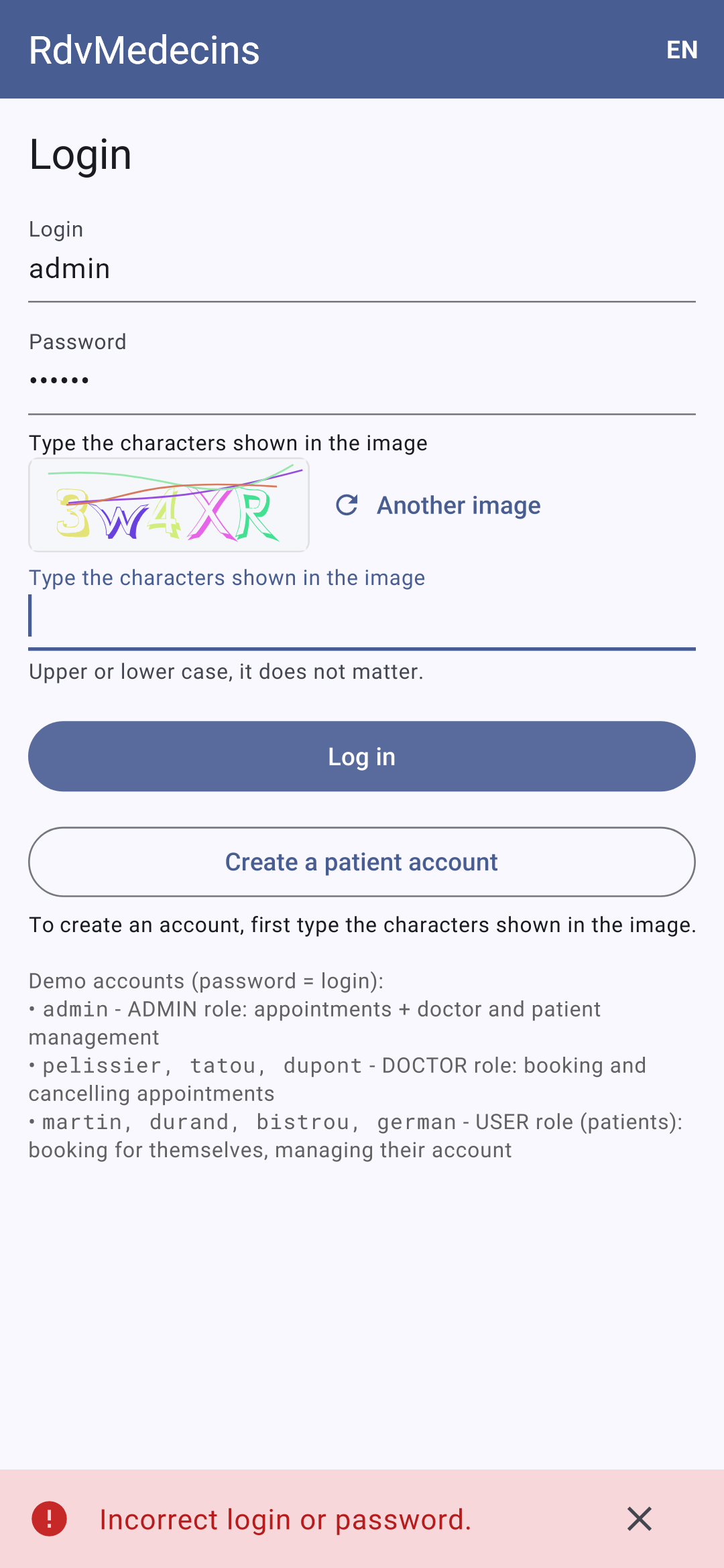
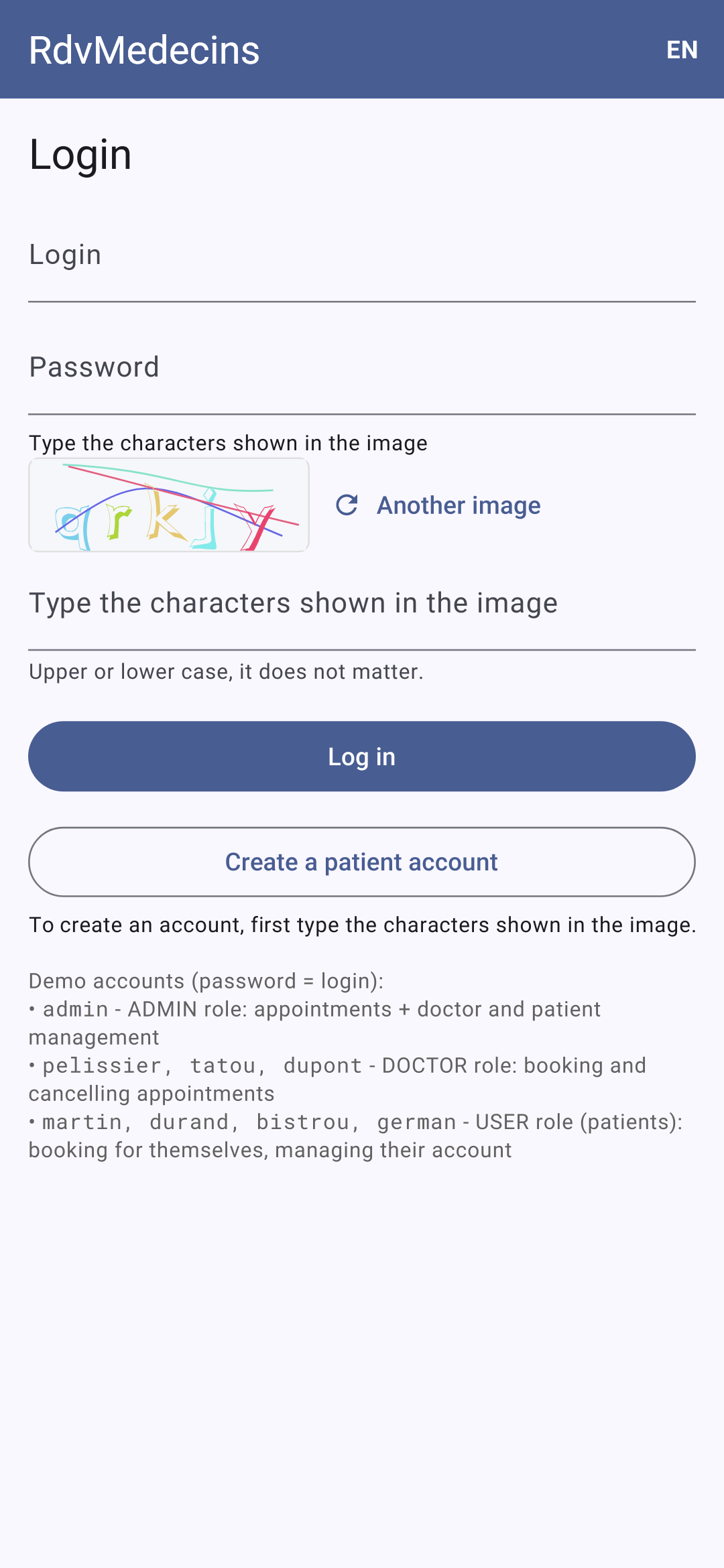
登录界面;密码错误:消息显示在屏幕底部,并显示一张新图片(每张图片只使用一次):
11.3.2. 管理员和医生看到的日历

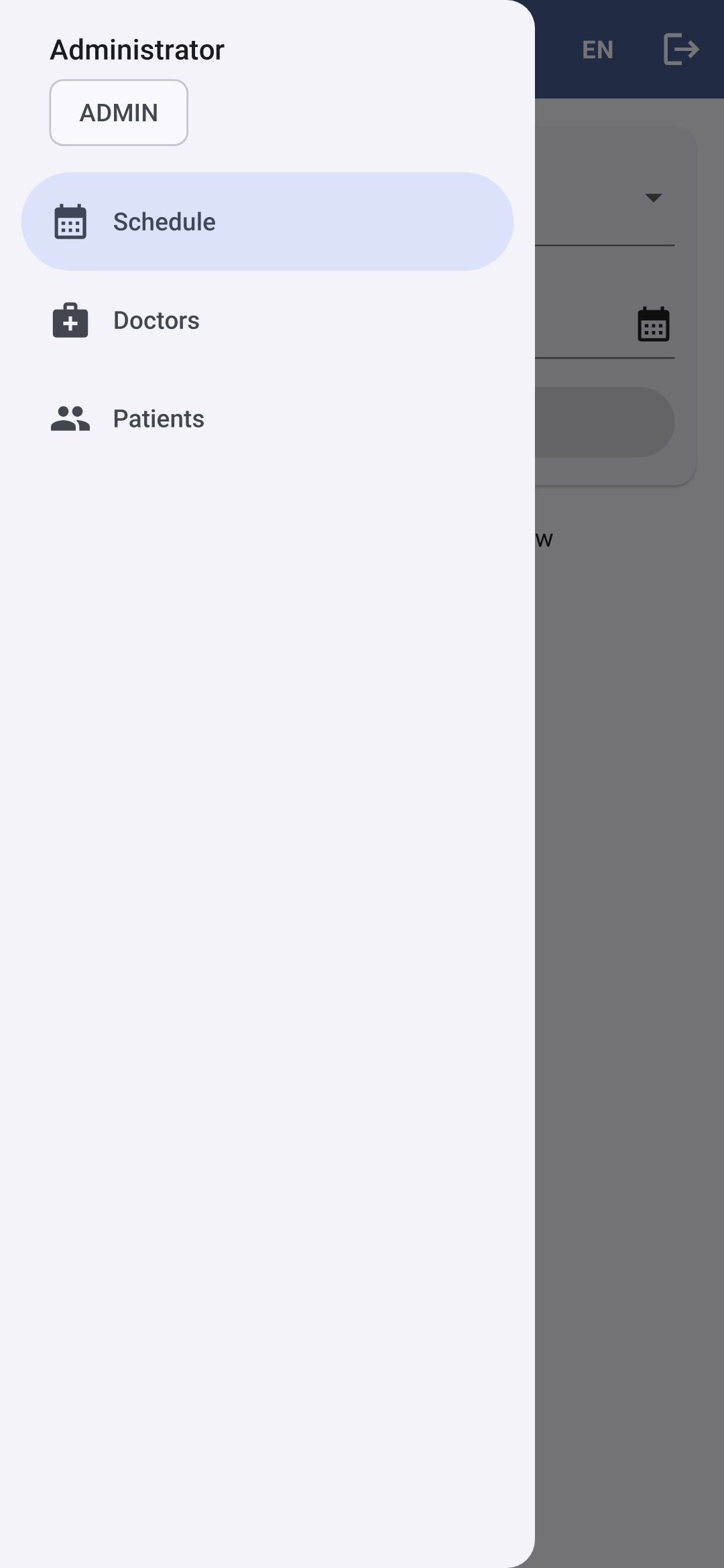
以[admin]身份登录后,你会进入日历。☰ 按钮会打开菜单:管理员可访问的界面,以及顶部显示的当前登录用户:
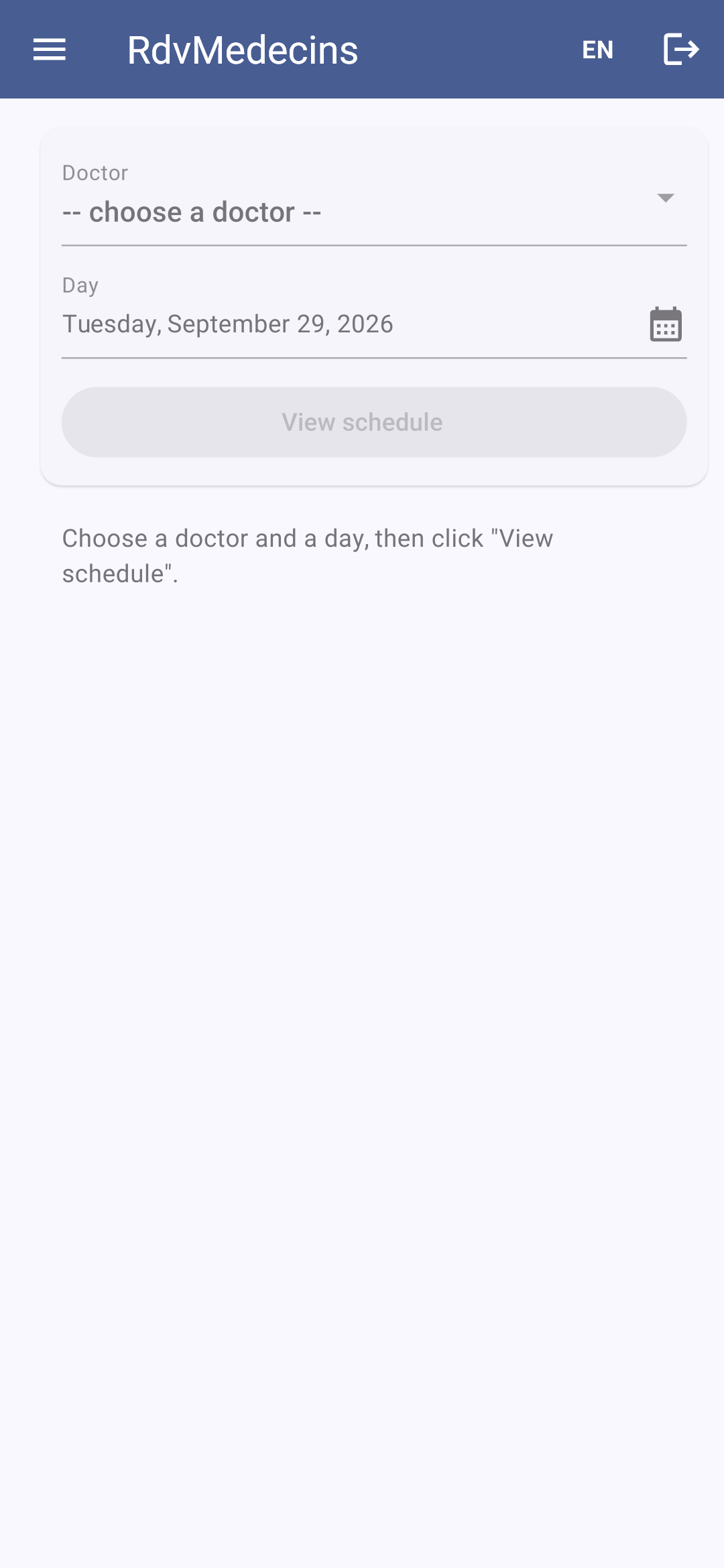
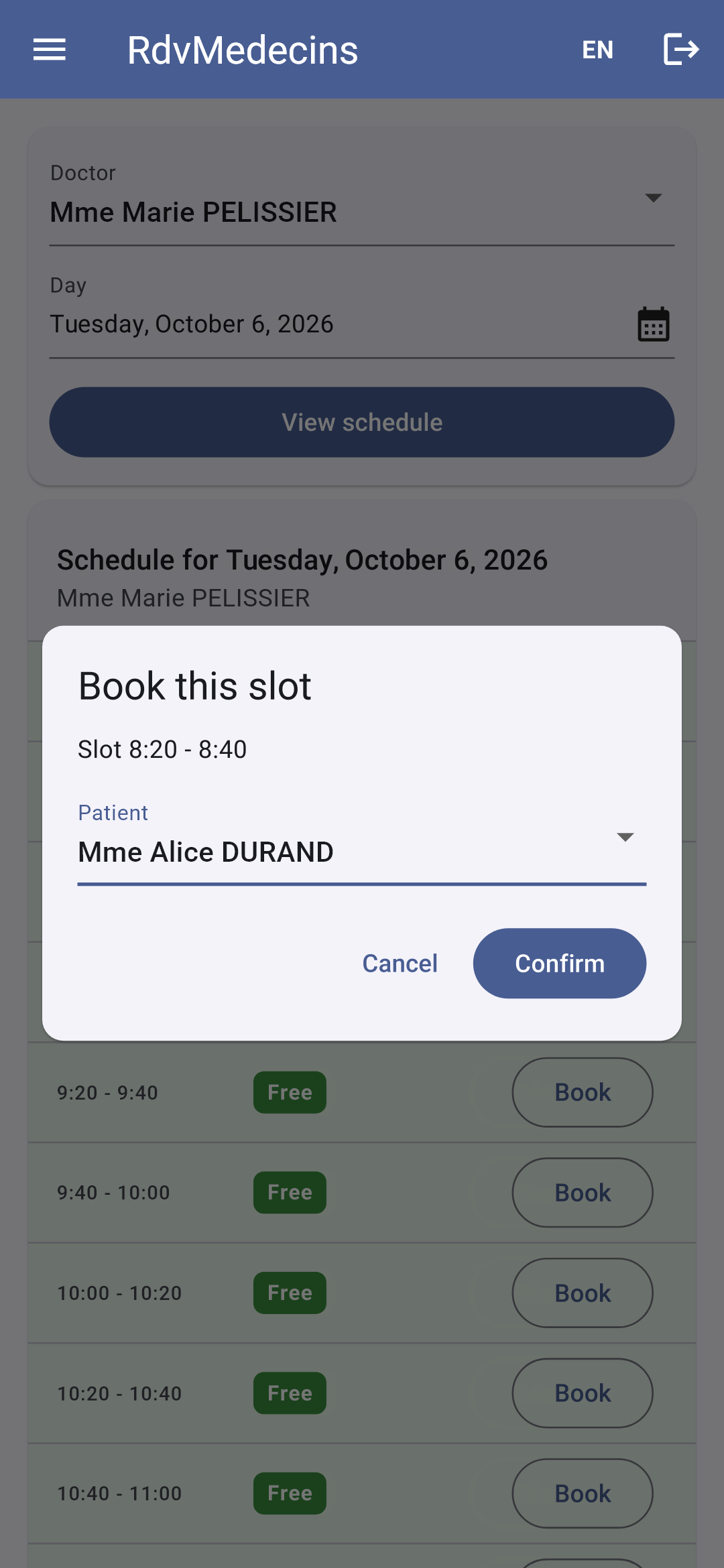
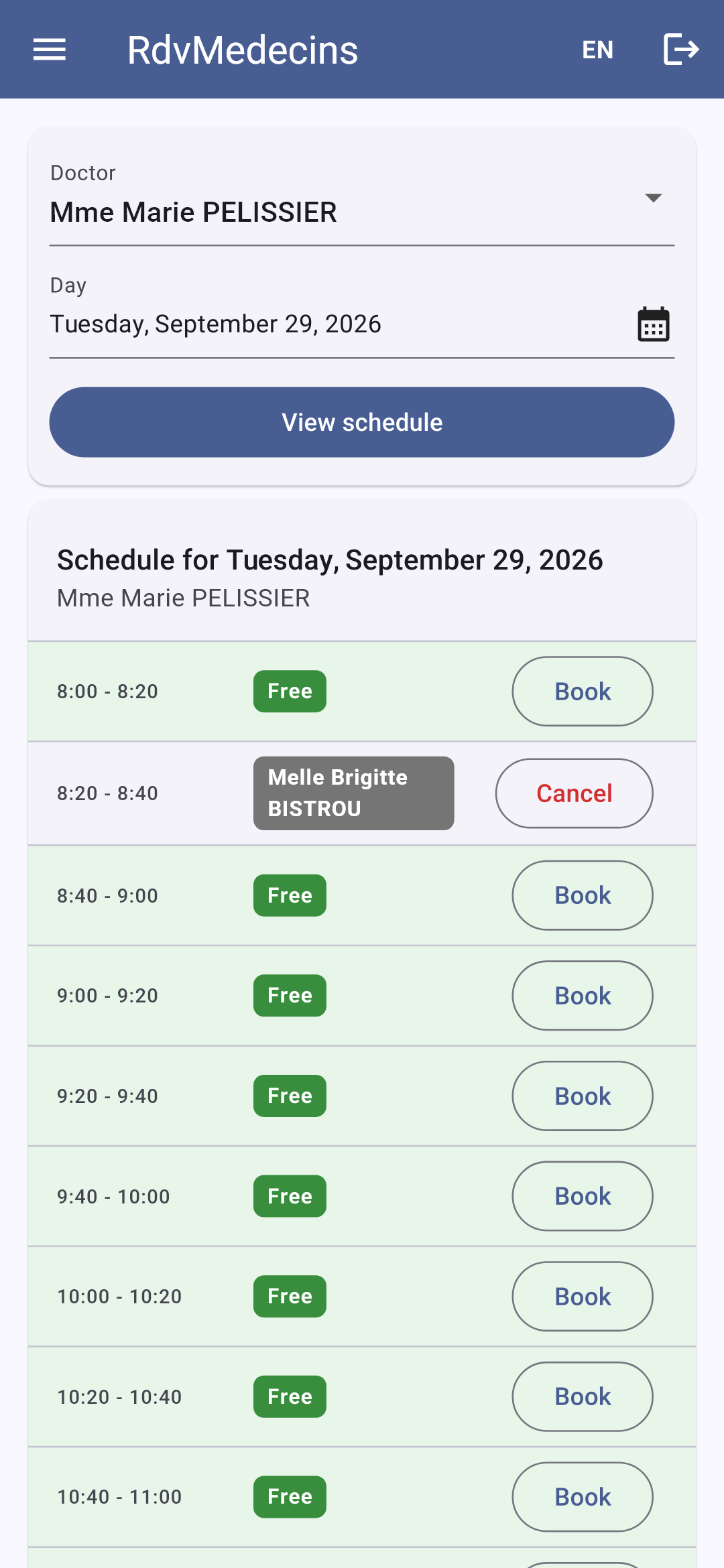
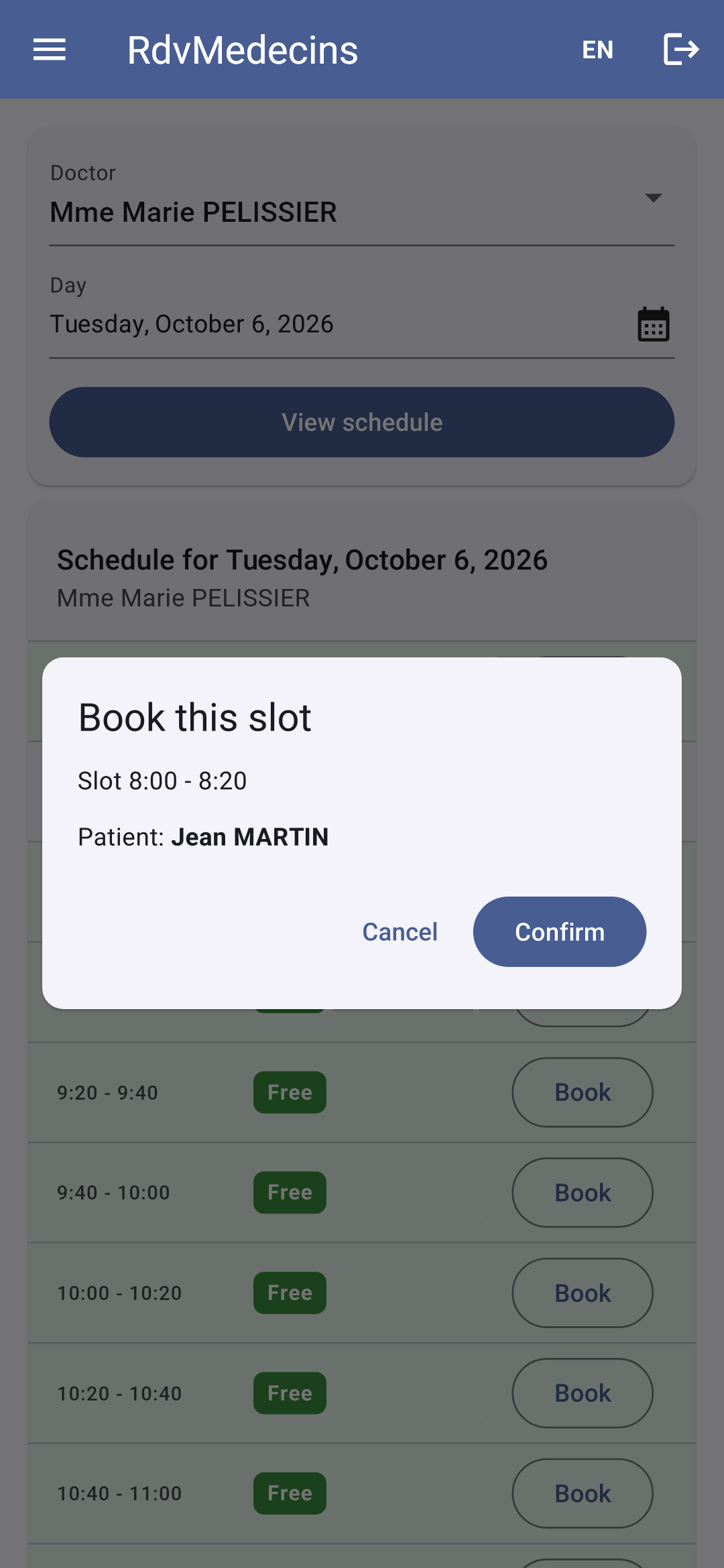
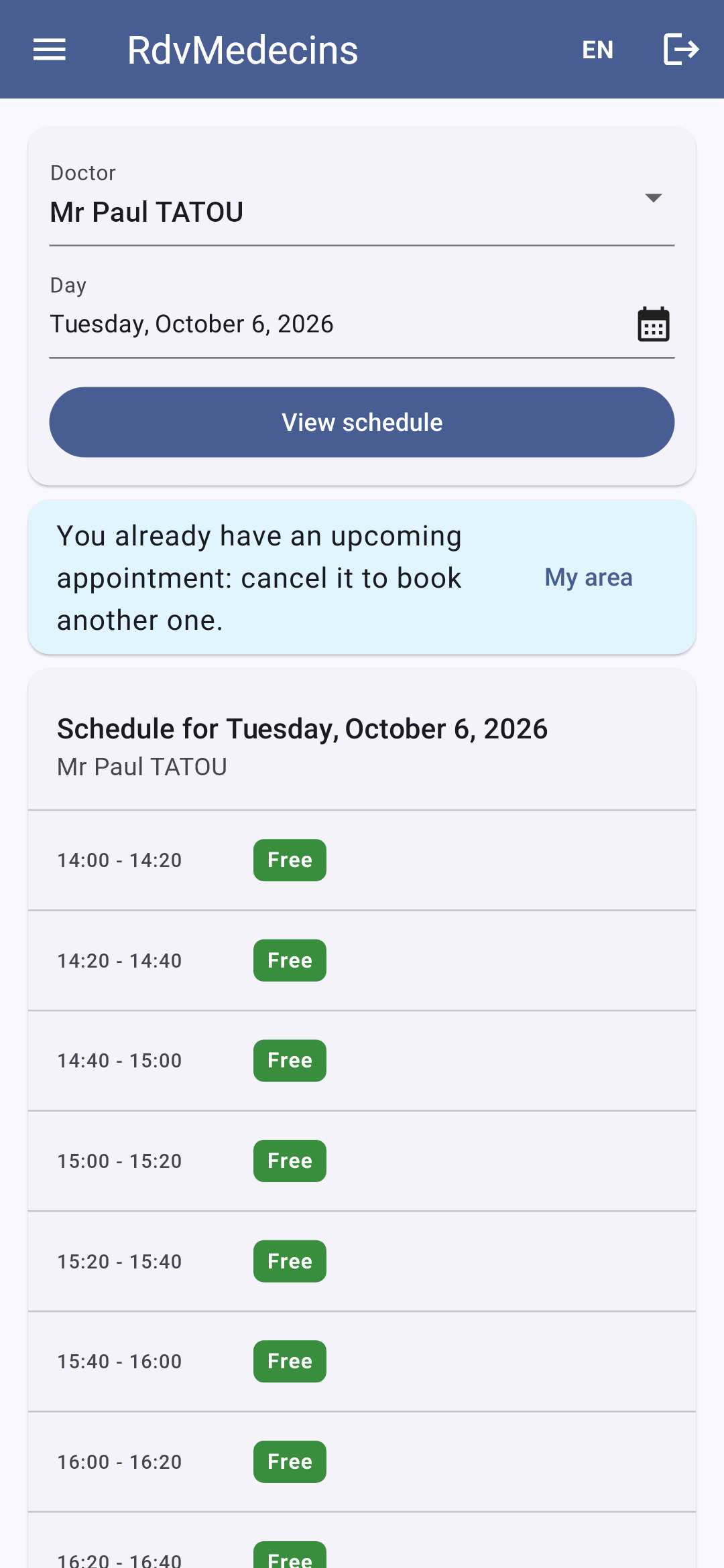
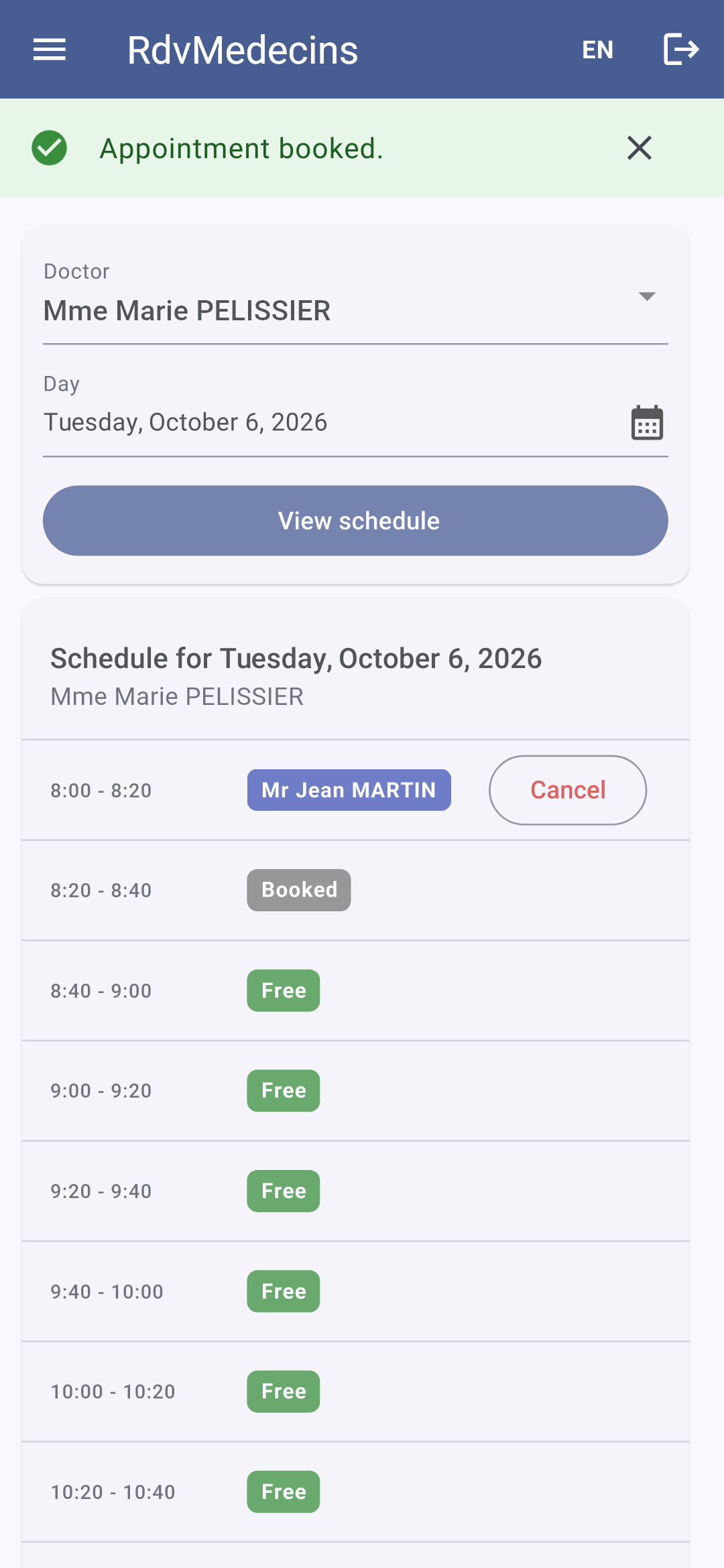
选择一位医生和一个日期(在日历中选择日期),然后点击“查看日程”。URL 变为[/schedule?doctorId=1&day=2026-10-05]。点击“预约”会打开预约窗口;URL 变为[/schedule?doctorId=1&day=2026-10-05&book=3]:
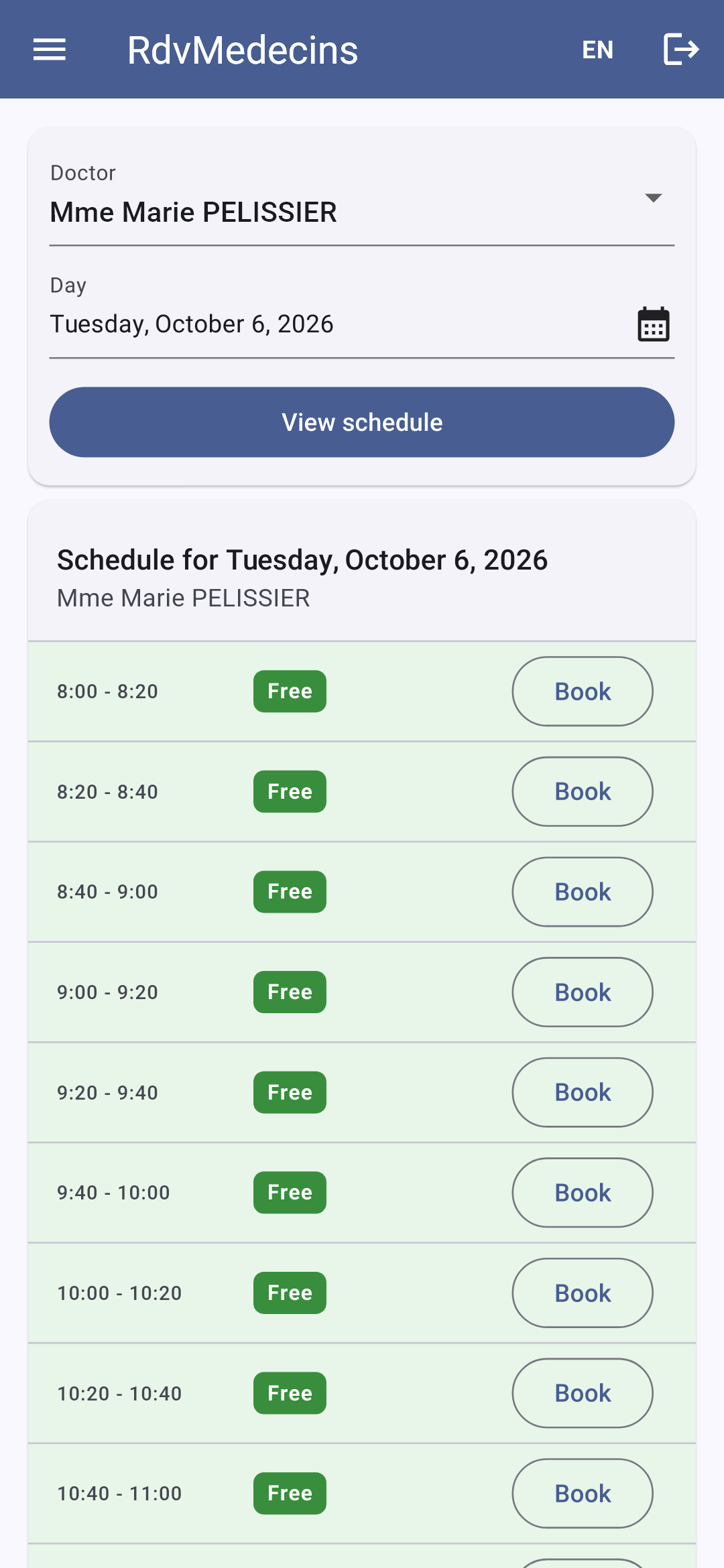
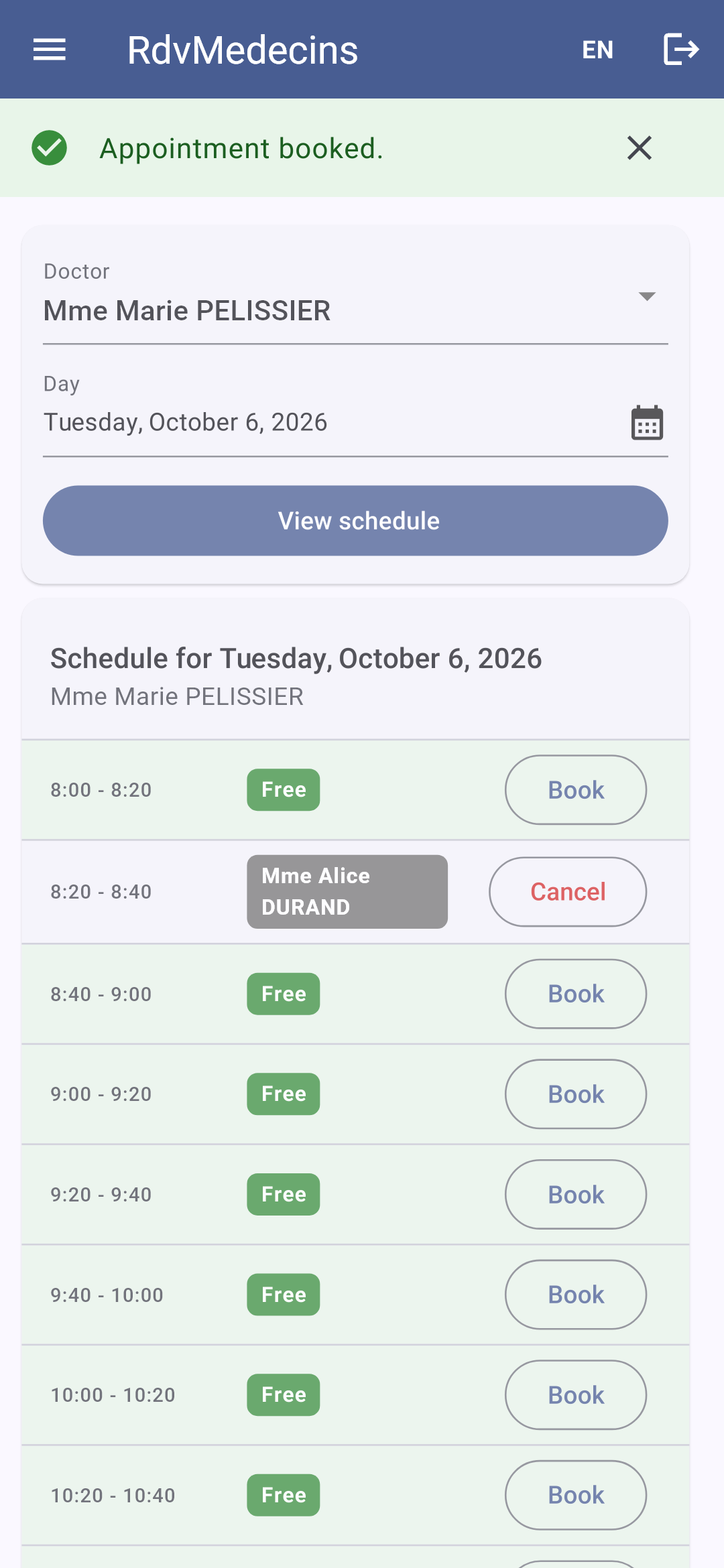
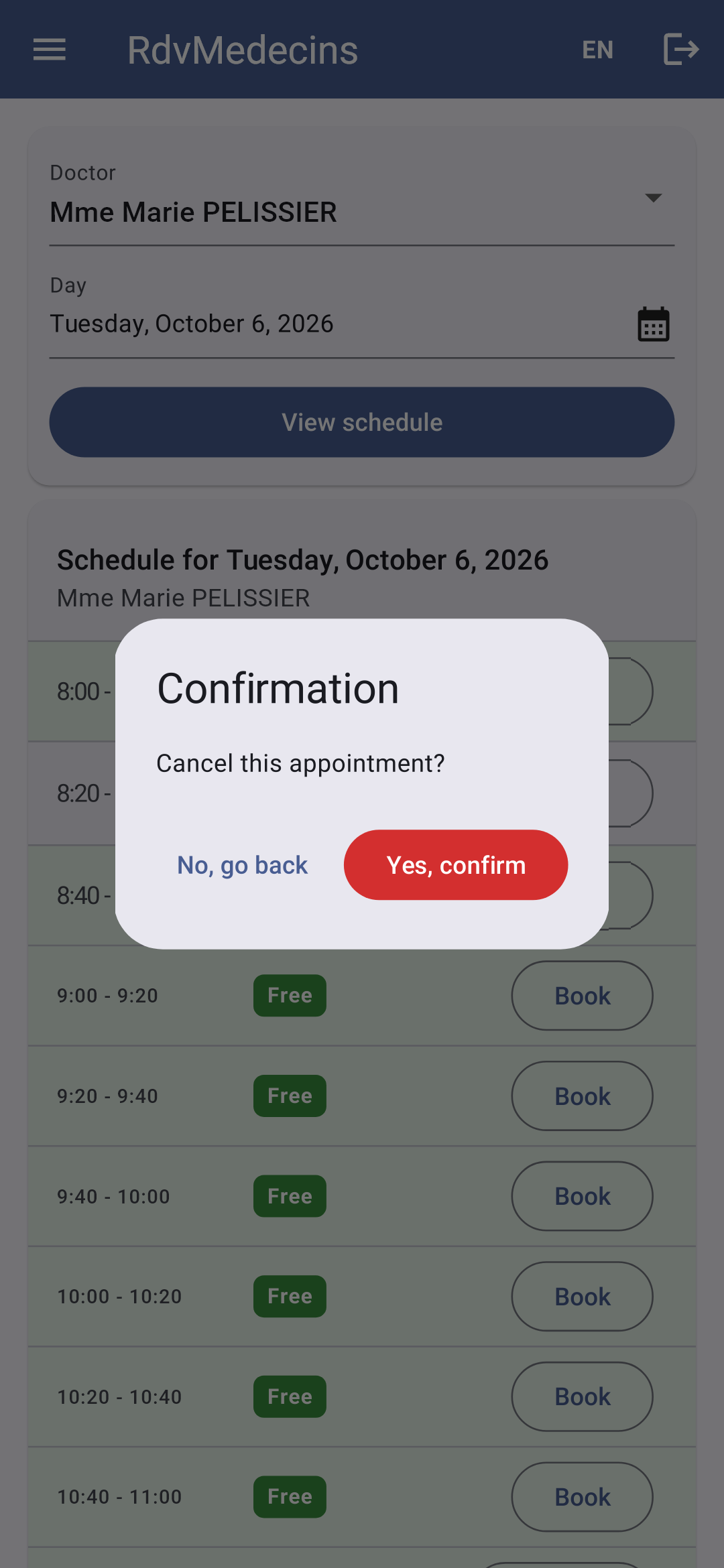
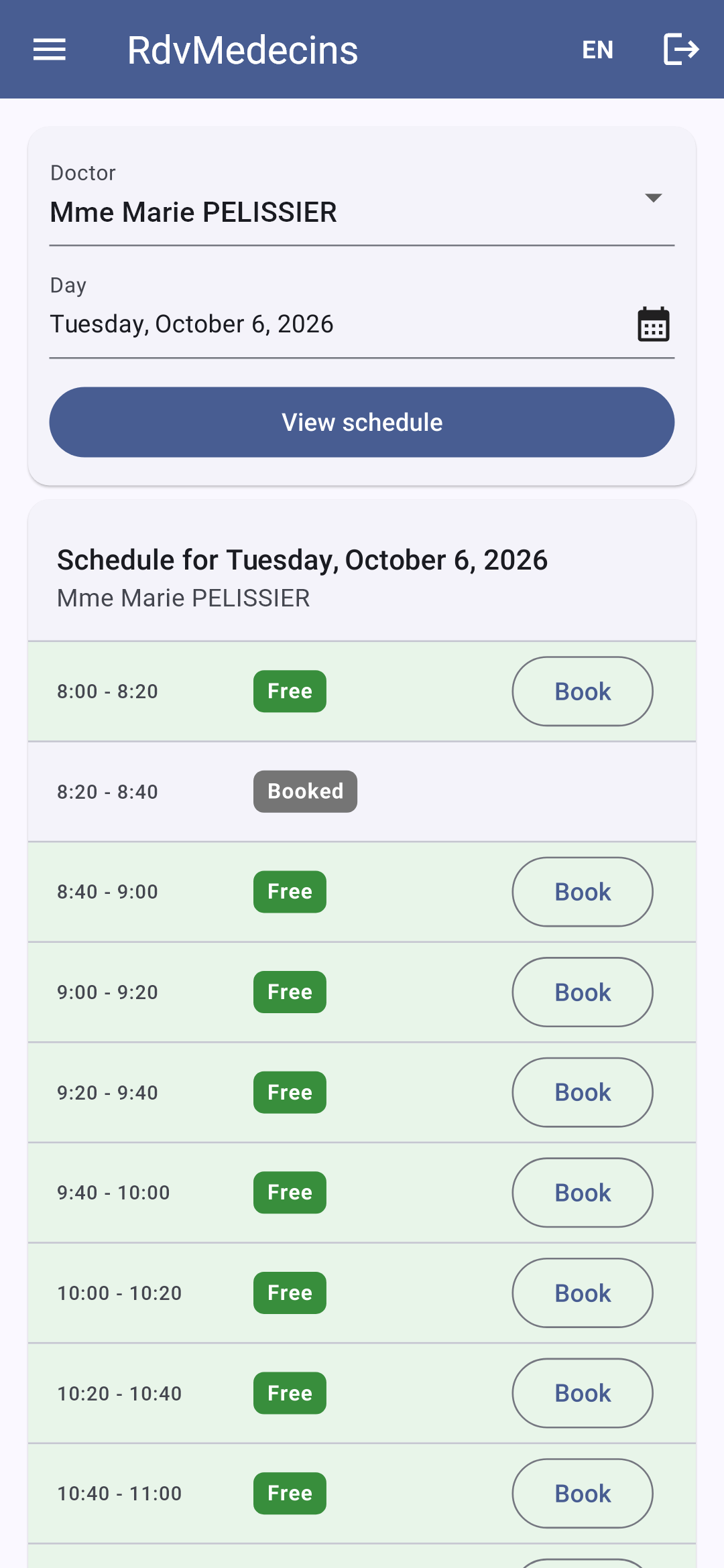
预约已保存;“取消”会要求确认:

医生登录后直接进入他本人今天的日程:

Image

11.3.3. 患者门户

患者([martin])进入“我的空间”。在日历中,其他患者的时间段旁显示“已预约”,他可以为自己预约,而无需选择具体的患者:
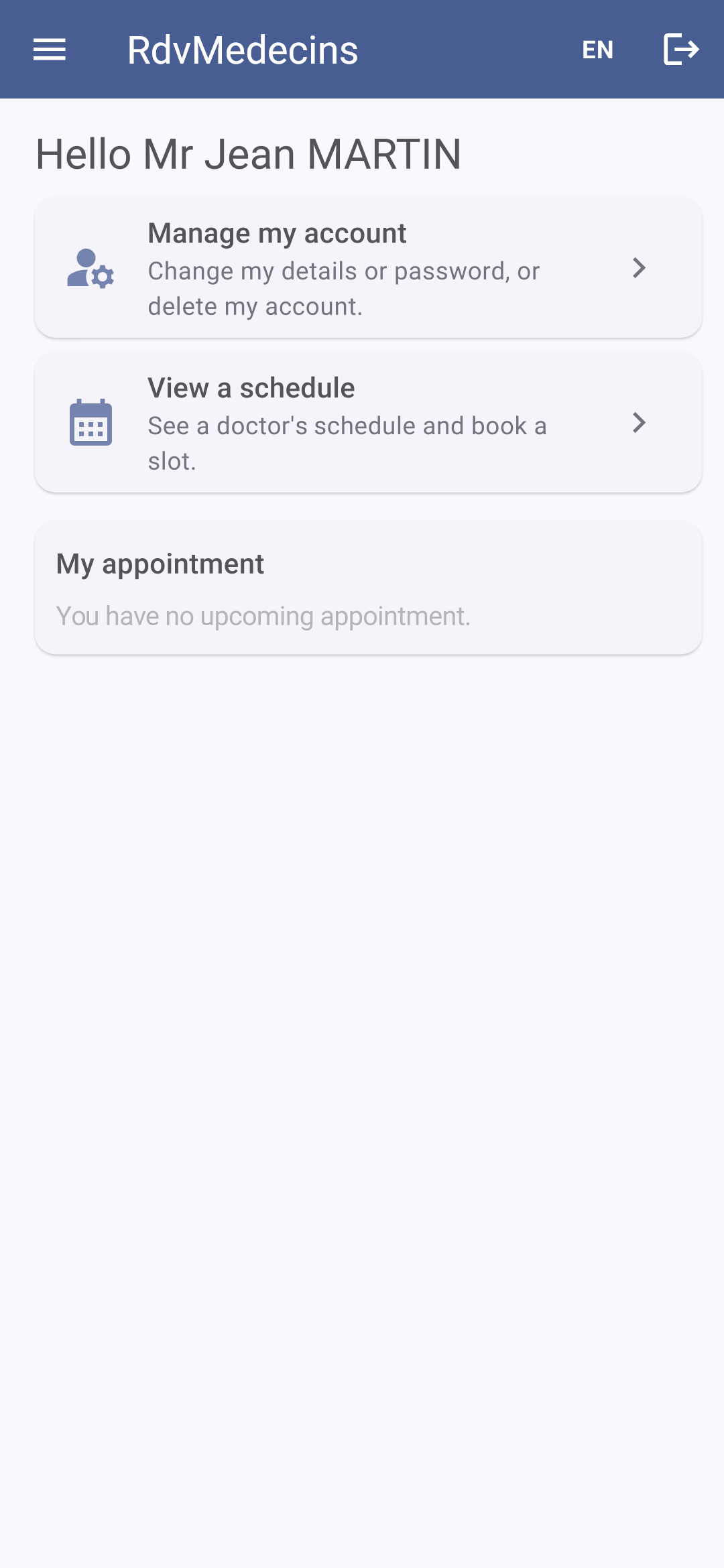
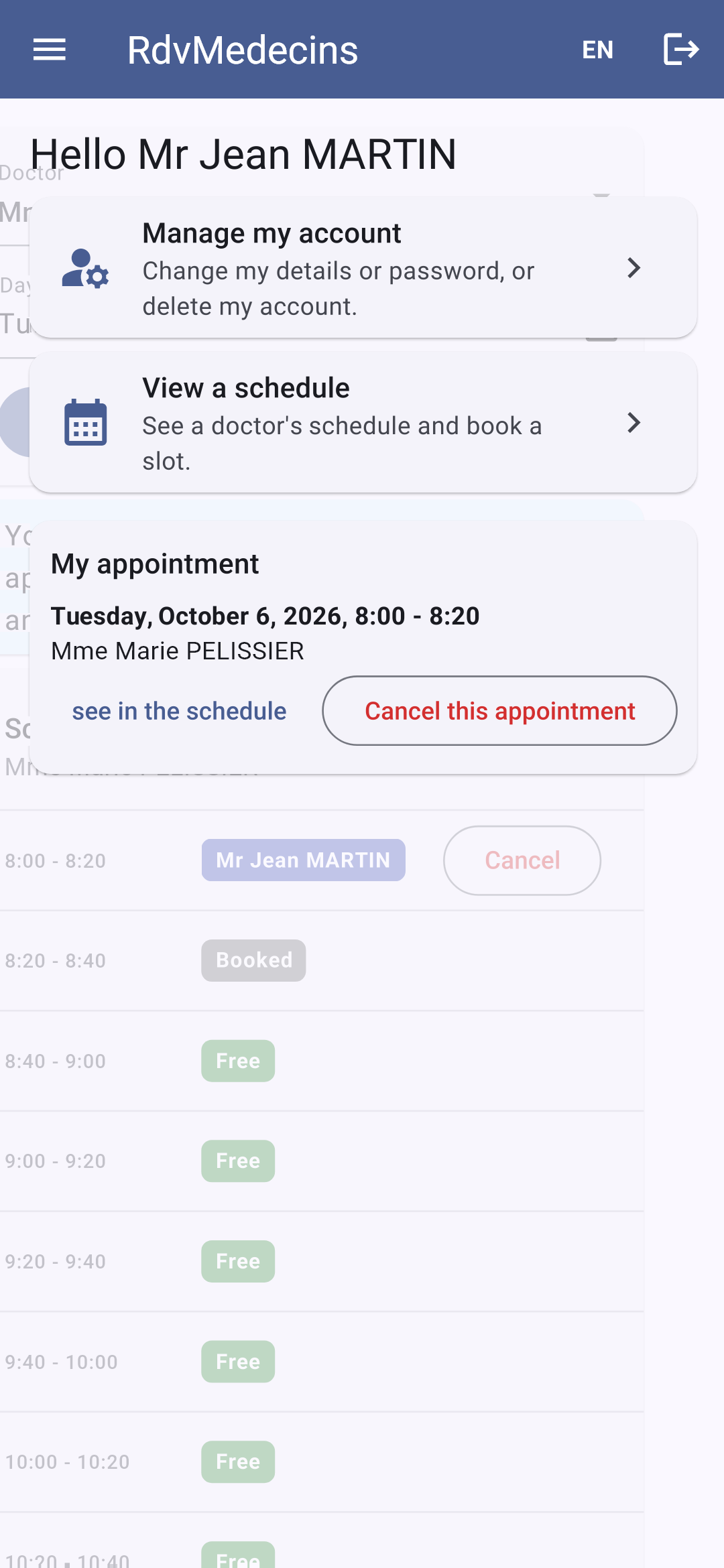
他的预约显示在他的名下;“预约”按钮不再可用(只允许一个即将到来的预约)。在另一位医生的日历中,由于他的预约不出现在其中,会有一条消息说明他为何无法预约。他的空间(“我的空间”)会显示该预约:
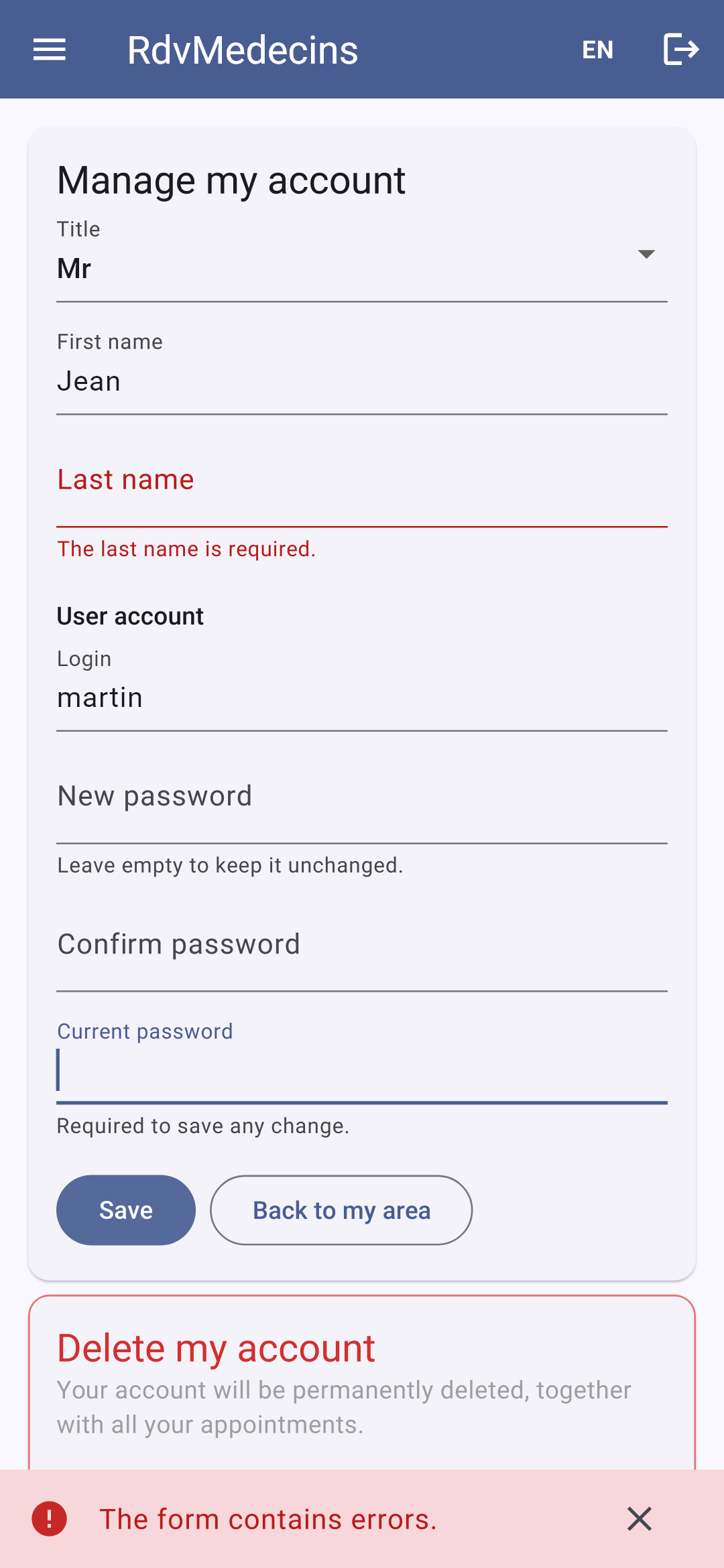
“管理我的账号”:任何更改都需要当前密码;错误来自服务器:

Image

患者的菜单中没有“医生”项。在 Web 上,如果患者自己输入地址 /doctors,路由器会显示 403 错误页面(参见[router.dart])。

11.3.4. 管理医生和客户

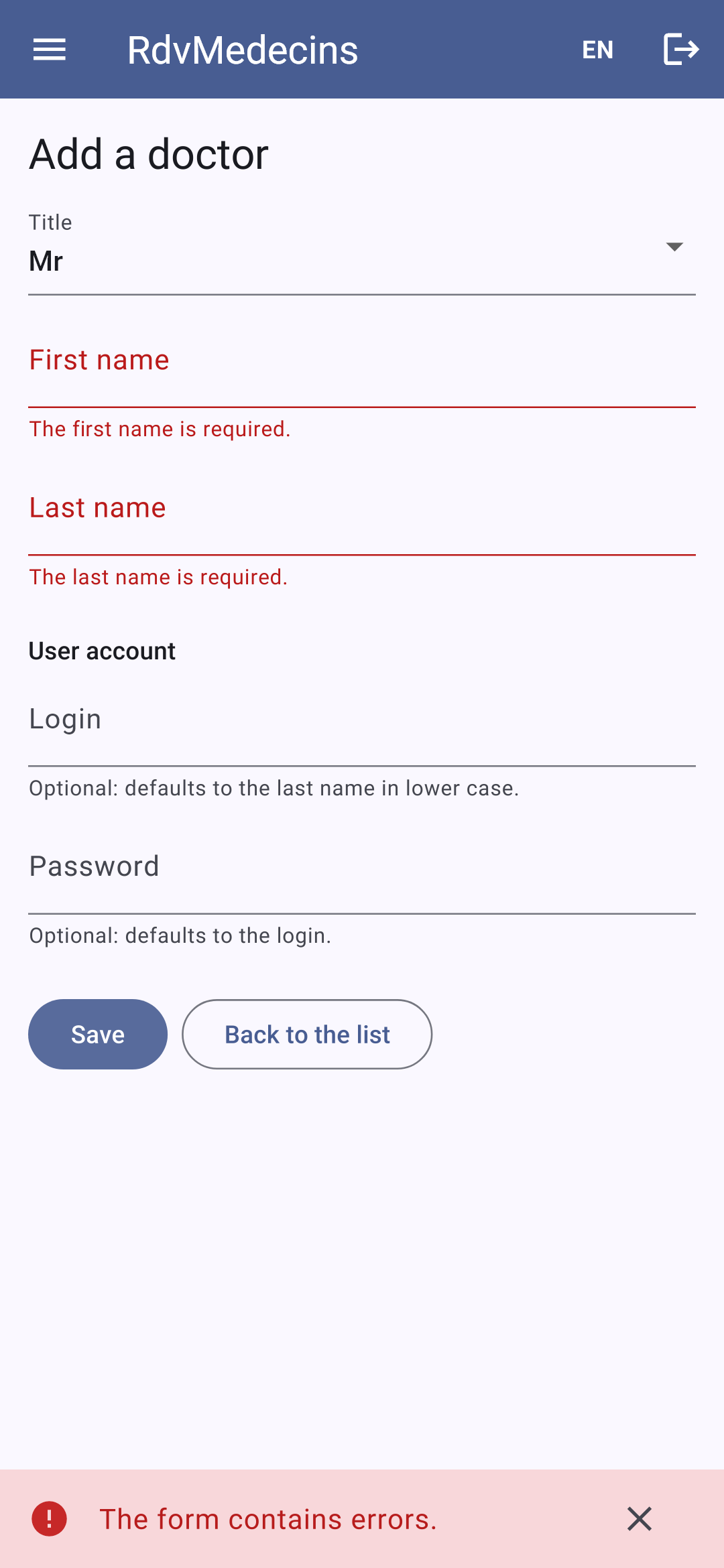
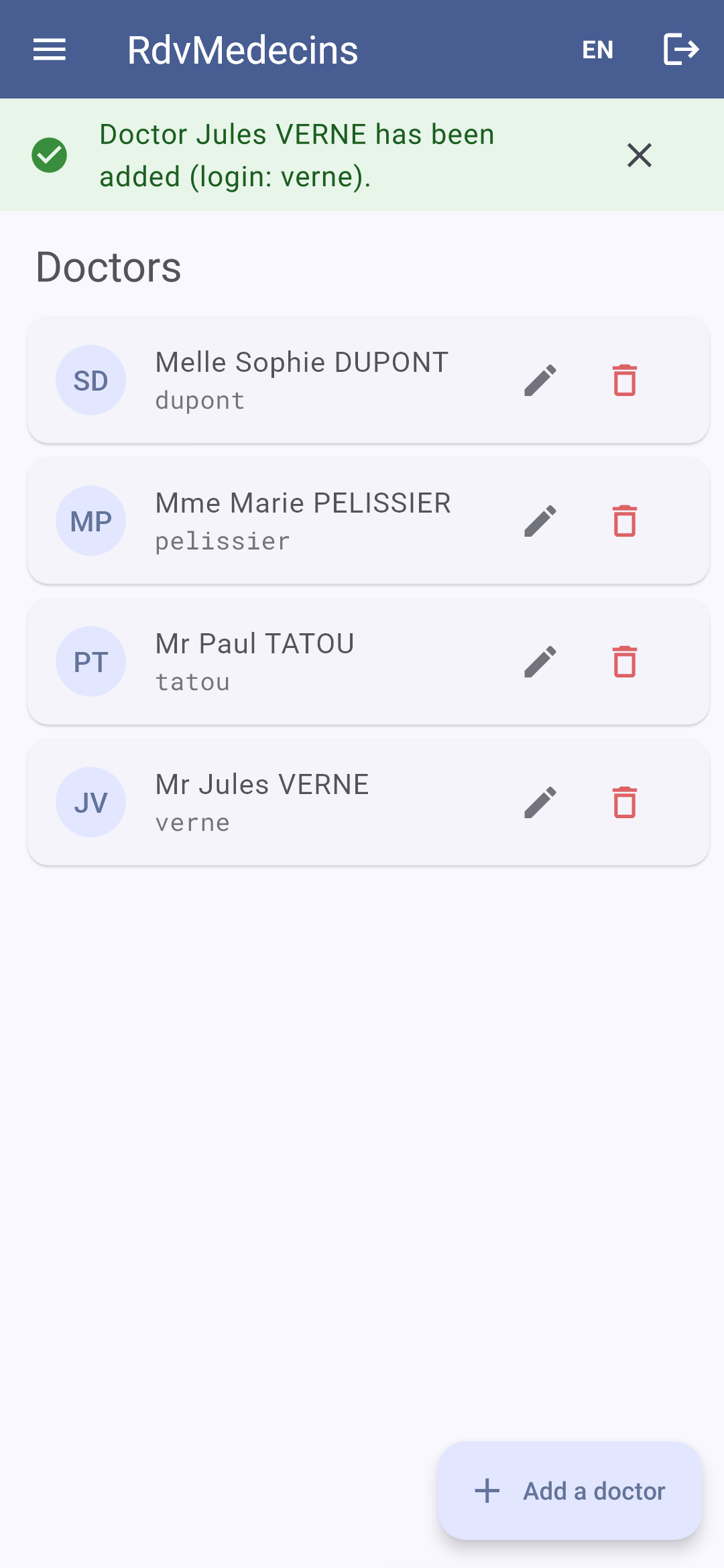
医生列表;一条填写不正确的记录:
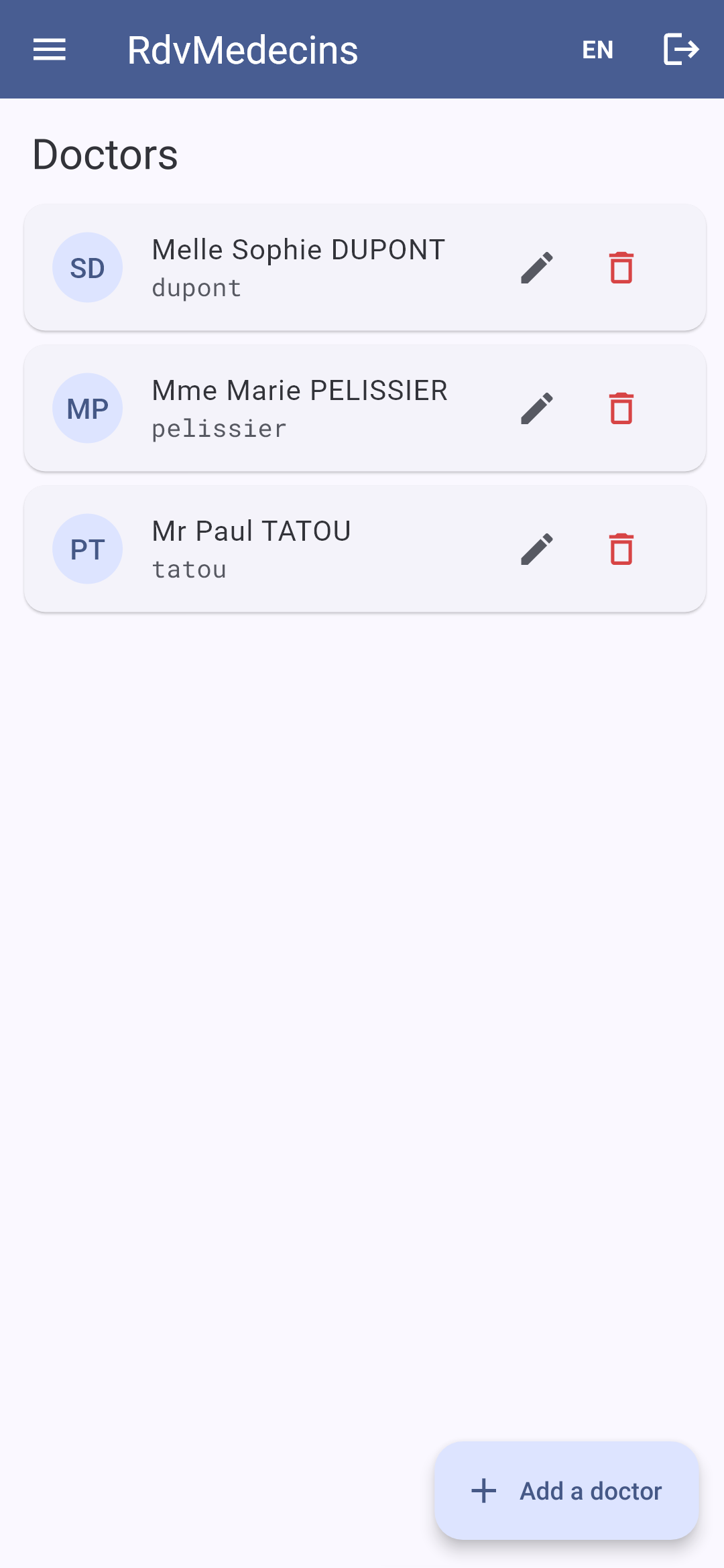
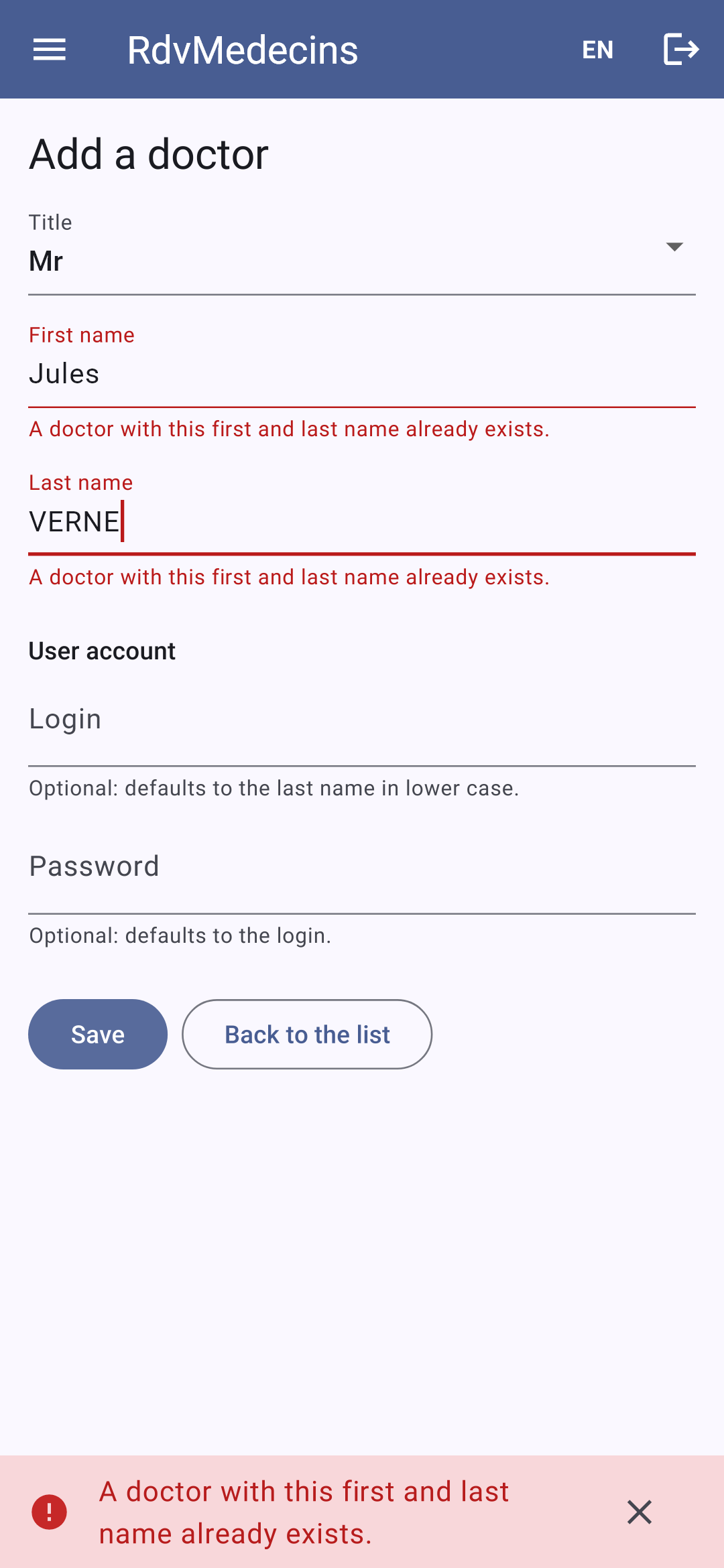
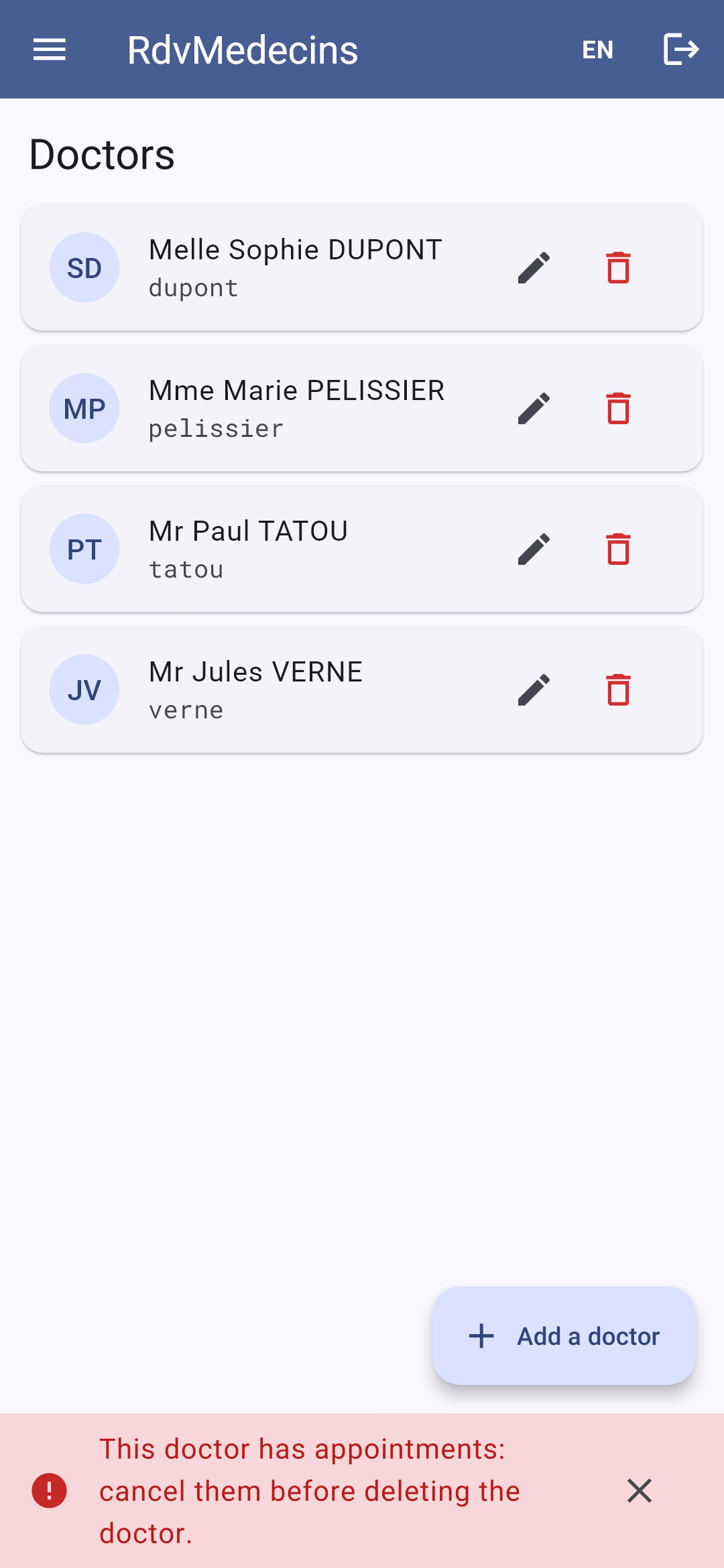
添加成功;重名;删除有预约的医生被拒绝:

11.3.5. 创建账号

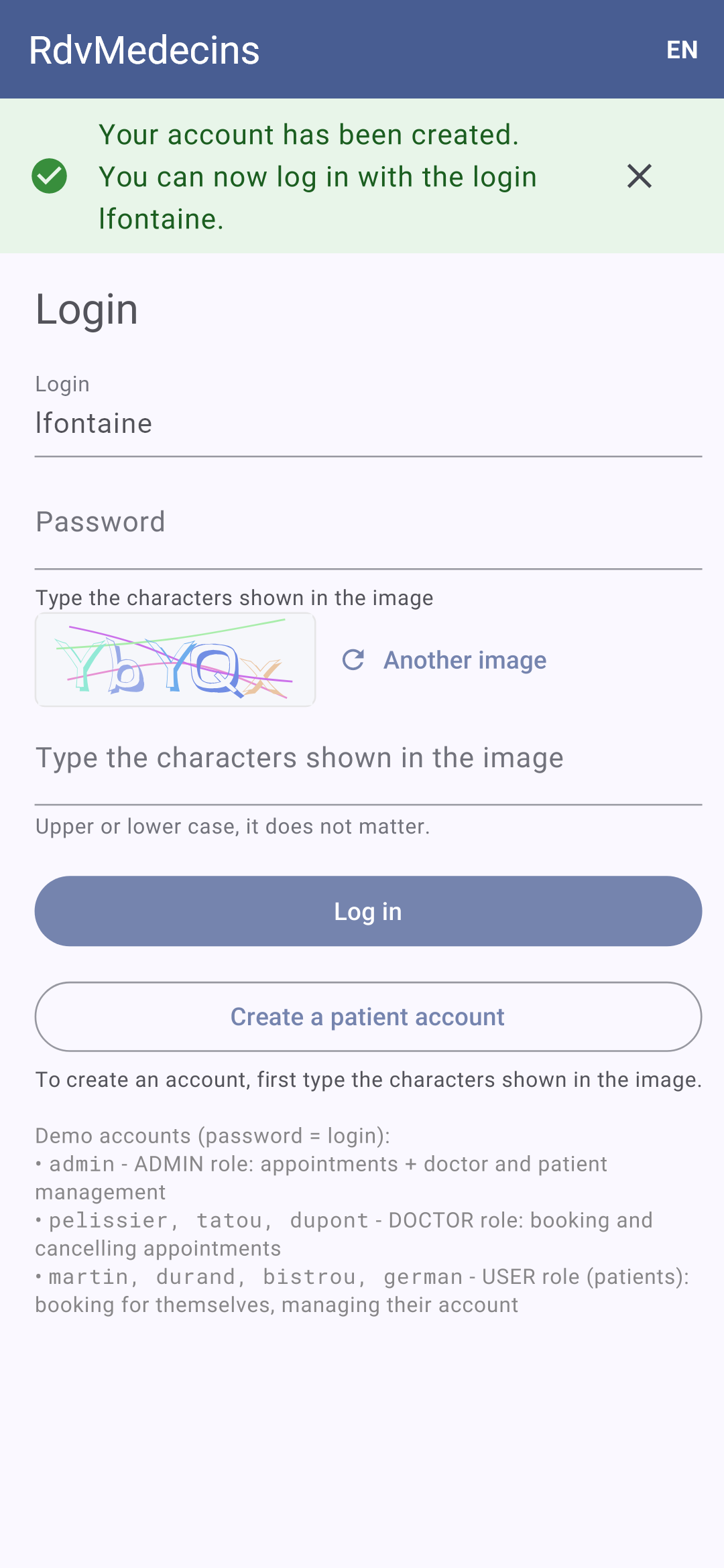
在登录界面输入验证码(CAPTCHA),然后点击“创建患者账号”。表单被服务器拒绝;账号创建成功后,你会返回登录界面,并且登录信息已预先填好:
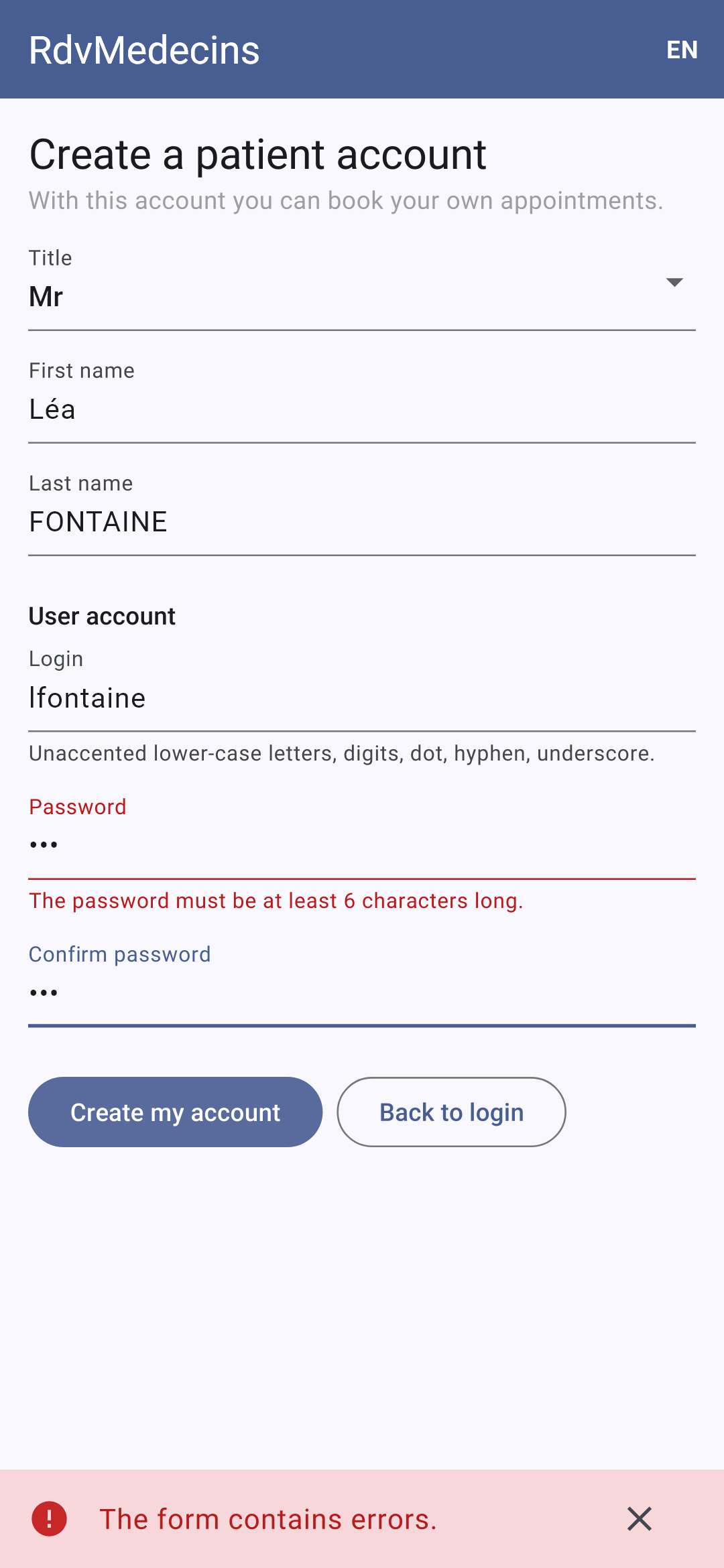
11.3.6. 法语界面;大屏幕

顶部栏中的 FR / EN 菜单会在本地重新渲染界面,不向服务器发出任何请求。在宽屏(Web、平板)上,菜单会一直显示在左侧:
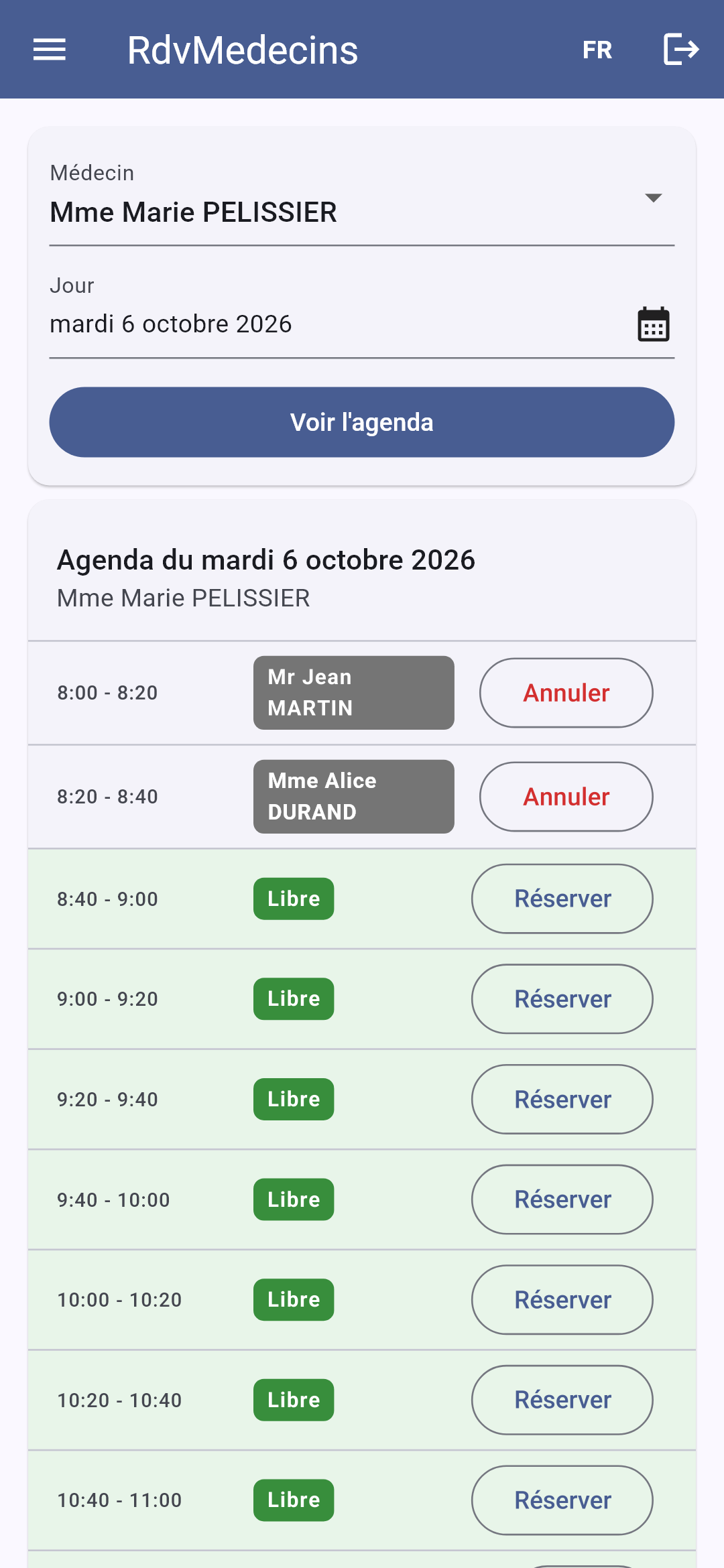
11.3.7. 会话过期

如果令牌过期(或 Cookie 被删除),下一次请求会收到 401 响应;应用会重定向到登录界面:
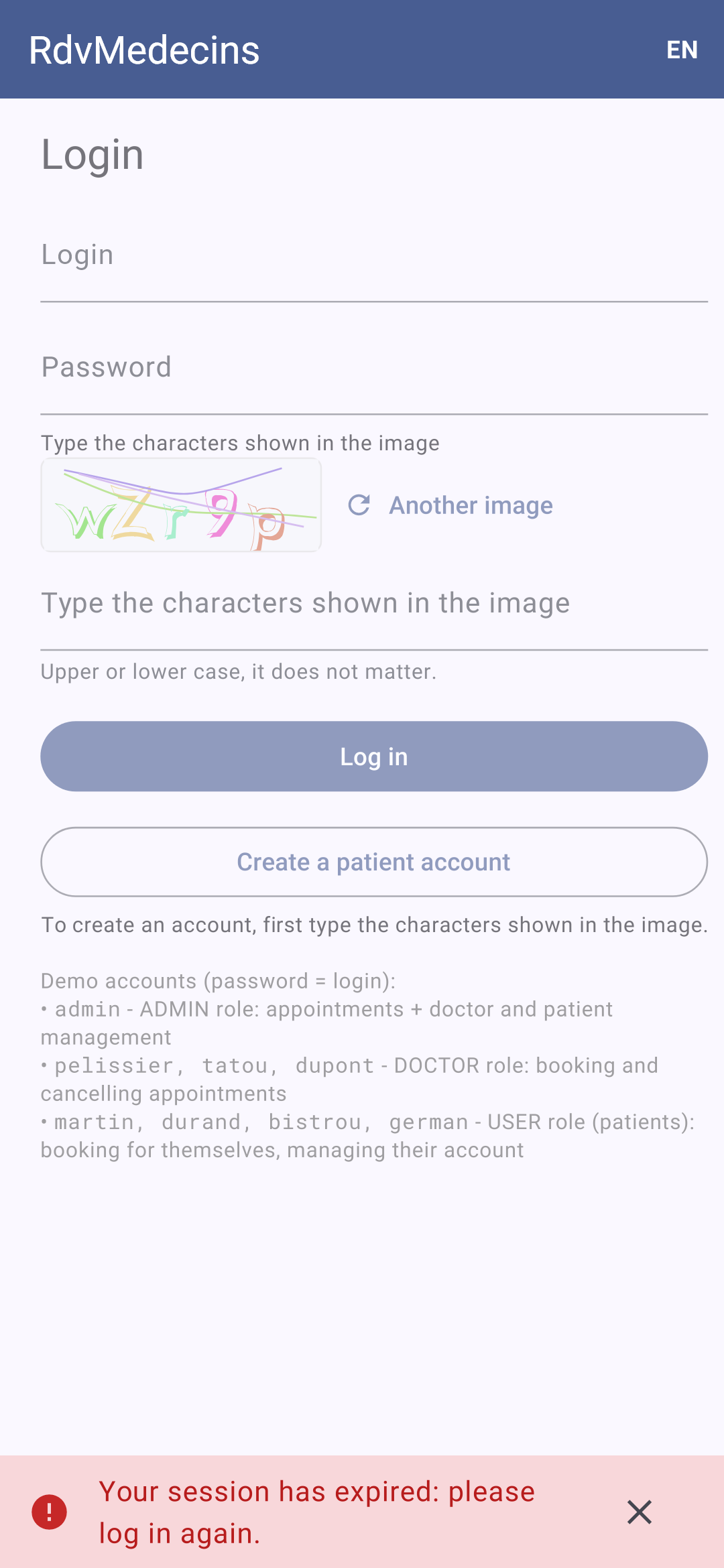
Image

11.4. 客户端架构

rdvmedecins_flutter/
├── pubspec.yaml               the libraries, the resources
├── analysis_options.yaml      the rules of the code analyzer
├── web_dev_config.yaml        the web development server (proxy /api)
├── android/                   the Android project (including AndroidManifest.xml)
├── web/                       the HTML page of the web version
├── assets/
│   ├── i18n/                  the dictionaries fr.json, en.json
│   └── fonts/                 the RobotoMono font
├── test/                      unit tests; making of the screenshots
└── lib/
    ├── main.dart              the startup
    ├── config.dart            the server address
    ├── router.dart            the screens, their addresses, their access rights
    ├── formatting.dart        the formatting of times and days
    ├── api/                   the API access layer
    ├── i18n/                  the languages
    ├── state/                 session, messages, cache (ChangeNotifier)
    ├── widgets/               the layout and the reusable widgets
    └── pages/                 the screens

这是[Flutter]指南(“App architecture”)推荐的架构,这里做了更简单的说明:

  • 一个数据层([api/]):唯一了解[http]包、URL 和 JSON 的层;
  • 一个状态层([state/]):提供给整个应用的[ChangeNotifier]对象([provider]),由各界面监听;
  • 一个界面层([pages/]、[widgets/]):显示状态并传递用户操作的组件(Widget)。

下表对比了[NestJS]课程中的 HTML 应用、[React]客户端以及本客户端:

HTML 应用(NestJS)
React 客户端
Flutter 客户端
服务器渲染每个页面([res.render])
组件在浏览器中渲染页面
组件(Widget)在手机上渲染界面
[views/layout.hbs] 及其局部视图
[Layout.tsx] 和各组件
[layout.dart] (一个[ShellRoute])和各组件(Widget)
控制器路由
[React Router]
[go_router]
[JwtAuthGuard]、[RolesGuard]
路由守卫(中间件)
路由器的[redirect]函数
令牌 Cookie,由浏览器存储
同上
管理 Cookie 的 HTTP 客户端(在手机上)
Cookie 中的闪现消息
名为[Zustand]的存储
一个[ChangeNotifier],[Messages]
由服务器读取的字典
[i18next]
[Translations] (示例 21)
语言存储在 Cookie 中
存储在[localStorage]
存储在[shared_preferences]
已读取的数据
[TanStack Query]
[Cache] (几行代码)
表单被拒绝:服务器重新加载页面
400/409 响应,错误显示在字段下方
同上

下面展示客户端的全部文件。它们都带有详尽的注释;这些注释是课程的一部分。

11.5. 项目配置

11.5.1. pubspec.yaml

# ==========================================================================
# pubspec.yaml - RdvMedecins 应用的 Flutter 客户端
# ==========================================================================

name: rdvmedecins_flutter
description: The Flutter client (Android, web) of the RdvMedecins appointment booking application.
publish_to: none
version: 1.0.0

environment:
  sdk: ^3.12.0

dependencies:
  flutter:
    sdk: flutter
  flutter_localizations:
    sdk: flutter
  flutter_web_plugins:
    sdk: flutter
  intl: any
  go_router: ^16.2.0
  provider: ^6.1.5
  shared_preferences: ^2.5.3
  http: ^1.5.0
  flutter_svg: ^2.2.1

dev_dependencies:
  flutter_test:
    sdk: flutter
  flutter_lints: ^6.0.0

flutter:
  uses-material-design: true
  assets:
    - assets/i18n/
  fonts:
    - family: RobotoMono
      fonts:
        - asset: assets/fonts/RobotoMono-Regular.ttf
        - asset: assets/fonts/RobotoMono-Bold.ttf
          weight: 700

示例中的各个库,除了[flutter_svg]……它被保留:验证码(CAPTCHA)是一张图片(SVG)。唯一的资源是字典和用于演示账号的等宽字体。

11.5.2. analysis_options.yaml

# ==========================================================================
# analysis_options.yaml - Dart 代码分析器的规则
# --------------------------------------------------------------------------
# 分析器在输入代码时就进行检查(VS Code 会为错误加下划线),
# 错误)以及 flutter analyze 命令。我们从这些规则出发
# Flutter 团队推荐的规则(flutter_lints 包)为基础……
# ==========================================================================

include: package:flutter_lints/flutter.yaml

analyzer:
  language:
    # ……并使其更严格:不允许 dynamic 类型的隐式转换
    strict-casts: true
    strict-raw-types: true

linter:
  rules:
    # 到处使用单引号,与课程中的示例一致
    prefer_single_quotes: true
    # 从不重新赋值的局部变量使用 "final"
    prefer_final_locals: true
    # 允许过长的字符串(界面文本)
    lines_longer_than_80_chars: false

分析器的规则,与示例中的相同:

  • 第 9 行:[Flutter]团队推荐的规则;
  • 第 14–15 行:更严格的类型检查:[dynamic](例如[jsonDecode]返回的值)不能在不显式转换的情况下用作[String] ([as String],或使用[Dart] 3 的模式过滤);
  • 第 20–24 行:三条格式规则。

[flutter analyze]命令会将这些规则应用于整个项目;[VS Code] 则在你输入时就应用它们。

11.5.3. web_dev_config.yaml

# ==========================================================================
# web_dev_config.yaml - Flutter 的 Web 开发服务器
# --------------------------------------------------------------------------
# flutter run -d chrome 在 http://localhost:5173 提供应用服务,并且
# 将所有 /api/... 请求转发到 RdvMedecins JSON 服务器(端口 8080):
# 对浏览器来说,应用和 API 具有相同(SAME)的源(没有
# CORS,令牌 Cookie 也会随之传递)。
# ==========================================================================

server:
  host: localhost
  port: 5173
  proxy:
    - target: "http://localhost:8080/"
      prefix: "/api/"

与示例 22 中的相同:在 Web 开发中,/api 请求会被发送到 JSON 服务器。

11.6. 启动应用

11.6.1. lib/config.dart

// =========================================================================
// lib/config.dart - JSON 服务器在哪里?
// -------------------------------------------------------------------------
// 对于由服务器自己提供服务的 Web 应用,这个问题不存在:
// 请求发往与页面相同的源
// (相对地址,/api/...)。但移动应用没有
// 源:必须给它服务器的完整地址。
//   - Android 模拟器通过地址 10.0.2.2 访问运行它的那台计算机
//     (对模拟器而言,localhost 是模拟器自身);
//   - 真机与计算机连接到同一个 Wi-Fi 网络时,必须
//     使用计算机在该网络中的地址(192.168.1.20……):
//     在启动应用时给出:
//         flutter run --dart-define=SERVER=http://192.168.1.20:8080 ...
//   - 在 Web 开发中(flutter run -d chrome),Flutter 的开发
//     服务器会把 /api 请求转发给 JSON 服务器
//     (web_dev_config.yaml 文件):使用相对地址即可;
//   - 在计算机上(Windows、macOS、Linux):localhost。
// =========================================================================

import 'package:flutter/foundation.dart';

// 通过 dart-define 选项 SERVER=... 传入的值,默认为 ''。
// String.fromEnvironment 在编译时(COMPILE time)求值:它是一个常量
const _forcedServer = String.fromEnvironment('SERVER');

class Config {
  // kIsWeb:如果应用在浏览器中运行则为 true;
  // defaultTargetPlatform:系统(android、iOS、windows……)
  static String serverUrl = _forcedServer.isNotEmpty
      ? _forcedServer
      : kIsWeb
      ? '' // 同源:使用相对地址
      : defaultTargetPlatform == TargetPlatform.android
      ? 'http://10.0.2.2:8080'
      : 'http://localhost:8080';
}

服务器地址,取决于平台(参见示例 22):

  • 第 24 行:启动时由[--dart-define=SERVER=...]提供的值。[String.fromEnvironment] 在编译时求值:该地址被嵌入到构建出的应用中;
  • 第 29–35 行:否则,在 Web 上使用相对地址(开发服务器,以及生产环境中的 JSON 服务器本身,同时提供页面和 API),在[10.0.2.2] 上,[Android] (从模拟器看到的计算机)使用该地址,其他情况使用[localhost] 。[static]:类变量,而非对象变量;不使用[final],以便测试可以修改它。

11.6.2. lib/main.dart

// =========================================================================
// lib/main.dart - 应用的启动
// -------------------------------------------------------------------------
// 我们一次性构建好整个应用共享的对象,
// 然后把它们提供给所有界面(provider):
//   - HTTP 客户端(在手机上处理令牌 Cookie)和
//     API 访问层;
//   - 会话(谁已登录?)、消息、数据缓存;
//   - 翻译(法语、英语);
//   - 路由器,它显示当前地址对应的界面。
// 有两种机制把这些对象联系在一起:
//   1. 受保护请求的 401 响应(会话过期):我们忘记
//      用户并准备好消息;监听会话的路由器随后
//      返回登录界面(参见 api/api_client.dart);
//   2. “flash” 消息:在每次导航结束时,上一个界面的
//      消息消失,留给下一个界面的
//      消息出现(参见 state/messages.dart)。
// =========================================================================

import 'package:flutter/material.dart';
import 'package:flutter_localizations/flutter_localizations.dart';
import 'package:flutter_web_plugins/url_strategy.dart';
import 'package:go_router/go_router.dart';
import 'package:intl/date_symbol_data_local.dart';
import 'package:provider/provider.dart';
import 'package:shared_preferences/shared_preferences.dart';

import 'api/api_client.dart';
import 'api/http_client.dart';
import 'api/rdvmedecins_api.dart';
import 'state/cache.dart';
import 'state/messages.dart';
import 'state/session.dart';
import 'i18n/translations.dart';
import 'router.dart';

Future<void> main() async {
  WidgetsFlutterBinding.ensureInitialized();
  usePathUrlStrategy(); // 在 Web 端:使用 /schedule 而不是 /#/schedule
  await initializeDateFormatting();
  final storage = await SharedPreferences.getInstance();
  final translations = Translations(storage);
  await translations.start();
  runApp(Application(storage: storage, translations: translations));
}

class Application extends StatefulWidget {
  final SharedPreferences storage;
  final Translations translations;

  const Application({super.key, required this.storage, required this.translations});

  @override
  State<Application> createState() => _ApplicationState();
}

class _ApplicationState extends State<Application> {
  late final ApiClient _client = ApiClient(CookieClient(widget.storage));
  late final RdvMedecinsApi _api = RdvMedecinsApi(_client);
  late final Session _session = Session(_api);
  final Messages _messages = Messages();
  final Cache _cache = Cache();
  late final GoRouter _router = createRouter(_session, _messages, _api);
  String? _address;

  @override
  void initState() {
    super.initState();
    // 1. 会话过期
    _client.onSessionExpired = () {
      _session.forget();
      _cache.clear();
      _messages.flash(success: false, key: 'ERRORS.SESSION_EXPIRED');
      // 不要 _router.go('/login'):由路由器的守卫负责处理,
      // 并记住当前界面(?redirect=...)以便返回
    };
    // 会话发生变化(登录、注销):为上一个用户读取的
    // 数据不再有任何价值
    _session.addListener(_cache.clear);
    // 2. 每次导航完成时(地址已变化):新页面
    _router.routerDelegate.addListener(() {
      // state:位于栈顶的界面(包括通过 push 压入的界面)
      final address = _router.state.uri.toString();
      if (address != _address) {
        _address = address;
        _messages.newPage();
      }
    });
  }

  @override
  void dispose() {
    _router.dispose();
    super.dispose();
  }

  @override
  Widget build(BuildContext context) {
    return MultiProvider(
      providers: [
        // 普通对象……
        Provider.value(value: _api),
        // ……以及会通知其变化的对象
        ChangeNotifierProvider.value(value: _cache),
        ChangeNotifierProvider.value(value: _session),
        ChangeNotifierProvider.value(value: _messages),
        ChangeNotifierProvider.value(value: widget.translations),
      ],
      child: Consumer<Translations>(
        builder: (context, translations, _) => MaterialApp.router(
          debugShowCheckedModeBanner: false,
          onGenerateTitle: (context) => translations.t('APP.TITLE'),
          theme: ThemeData(colorSchemeSeed: const Color(0xFF0D6EFD)),
          // Flutter 自身的文本(日历……)使用所选语言
          locale: Locale(translations.language),
          supportedLocales: [for (final l in languages) Locale(l)],
          localizationsDelegates: GlobalMaterialLocalizations.delegates,
          routerConfig: _router,
        ),
      ),
    );
  }
}
  • 第 37–44 行:在显示任何内容之前,先准备好需要准备的东西:不带[#] 的 Web 地址(示例 17)、所有语言的星期和月份名称([intl],示例 09)、设备存储,以及初始语言的字典。[WidgetsFlutterBinding.ensureInitialized()]:这些操作需要[Flutter]引擎,因此我们在[runApp]之前启动它;
  • 第 58–63 行:共享对象,只创建一次,位于根组件(Widget)的状态中。每个对象在创建时接收它所需要的对象:这就是依赖注入,只不过是手动完成的。[late]:初始化发生在第一次使用时,此时[widget] 已经存在;
  • 第 70–76 行:1. 会话过期。API 访问层既不了解会话,也不了解消息;它被交付一个函数,每收到一次 401 响应就调用该函数。用户被遗忘,缓存被清空,并为下一个界面准备好消息。界面跳转本身由路由器处理,它监视会话;
  • 第 79 行:每当用户变化时,缓存就会被清空:为前一位用户读取的数据对下一位用户毫无用处(患者不应看到管理员查看过的日历);
  • 第 81–88 行:2. 闪现消息。路由器的[routerDelegate] 在每次传递时通知其监听者;将地址与前一个地址进行比较([_router.state]:栈顶部的界面,包括由[push]压入的界面,例如预约窗口),如果地址已改变,系统就进入“新页面”:前一个界面的消息消失,放在这个界面上的消息出现(参见[messages.dart]);
  • 第 99–107 行:共享对象提供给所有界面(示例 20)。[.value]:对象已经存在;provider 不创建它(也不会销毁它);
  • 第 109–118 行:应用本身,每次语言变化都会重新构建([Consumer],参见示例 20):标题([onGenerateTitle]),以及[Flutter] 自身文本(日历、工具提示)的语言。[colorSchemeSeed]:[Material] 由这一种颜色推导出整个调色板;这是[Bootstrap]的蓝色,即 Web 客户端使用的颜色。

11.7. API 访问层

11.7.1. lib/api/http_client.dart

// =========================================================================
// lib/api/http_client.dart - 处理 Cookie 的 HTTP 客户端
// -------------------------------------------------------------------------
// RdvMedecins 服务器把 JWT 令牌放在一个 Cookie(httpOnly)中。
// 在浏览器中,由浏览器存储这些 Cookie,并在每次请求时
// 把它们发回:应用代码无需做任何事。
// 在手机上,没有(NO)浏览器:必须由应用来
// 扮演它的角色,也就是:
//   1. 读取每个响应的 "Set-Cookie" 头,并存储这些 Cookie;
//   2. 在每个请求的 "Cookie" 头中把它们发回去。
// 这个 HTTP 客户端通过包装(WRAPPING)http 包的客户端来做到这一点
// (http.BaseClient:只需编写 send 方法)。这些 Cookie
// 也存储在设备上(shared_preferences):我们在停止并重启应用后
// 仍保持登录状态。
// 在 Web 上,它与普通客户端相比什么也不多做:
// 浏览器禁止应用读取或写入这些头。
// =========================================================================

import 'dart:convert';

import 'package:flutter/foundation.dart';
import 'package:http/http.dart' as http;
import 'package:shared_preferences/shared_preferences.dart';

class CookieClient extends http.BaseClient {
  static const _key = 'rdvmedecins.cookies';

  final http.Client _inner = http.Client();
  final SharedPreferences? _storage;
  // Cookie 名称 -> 它的值
  final Map<String, String> _cookies = {};

  CookieClient([this._storage]) {
    // 在之前的使用中存储的 Cookie
    final stored = _storage?.getString(_key);
    if (stored != null) {
      _cookies.addAll((jsonDecode(stored) as Map<String, Object?>).cast<String, String>());
    }
  }

  @override
  Future<http.StreamedResponse> send(http.BaseRequest request) async {
    if (!kIsWeb && _cookies.isNotEmpty) {
      // "rdvmedecins_jwt=eyJhbGci...; other=value"
      request.headers['cookie'] = [for (final MapEntry(:key, :value) in _cookies.entries) '$key=$value'].join('; ');
    }
    final response = await _inner.send(request);
    final setCookie = response.headers['set-cookie'];
    if (!kIsWeb && setCookie != null) {
      _store(setCookie);
    }
    return response;
  }

  // Set-Cookie: rdvmedecins_jwt=eyJ...; Max-Age=7200; Path=/api; Expires=Tue, 29 Sep 2026 ...; HttpOnly
  // (多个 Cookie 用逗号分隔)。我们只保留
  // 每个 Cookie 的名称和值;空值(登出)会将其删除
  void _store(String setCookie) {
    // 一个后面跟着 "=" 的名称,位于头的开头或逗号之后
    for (final m in RegExp(r'(?:^|,)\s*([^=;,\s]+)=([^;]*)').allMatches(setCookie)) {
      final name = m[1]!;
      final value = m[2]!.trim();
      if (value.isEmpty) {
        _cookies.remove(name);
      } else {
        _cookies[name] = value;
      }
    }
    _storage?.setString(_key, jsonEncode(_cookies));
  }

  @override
  void close() => _inner.close();
}

示例 23 中的 HTTP 客户端,未做改动:在手机上,它存储收到的 Cookie([Set-Cookie]头)并将其发回([Cookie]头);在 Web 上,则交由浏览器处理。

11.7.2. lib/api/api_client.dart

// =========================================================================
// lib/api/api_client.dart - 所有对 API 的请求都经过这里
// -------------------------------------------------------------------------
// 取自示例中的 common/api.dart,并有新增内容:
// 对 401 响应的集中处理。
//
// 401 可能在任何时候发生:令牌已过期(2 小时)、
// 账户已被删除、服务器使用另一个密钥
// 重启了……与其在每个界面中处理这种情况,不如
// 在这里统一处理一次。但这个文件既不了解路由器也不了解消息
// (它不依赖任何东西):它调用启动时传给它的一个函数
// (onSessionExpired,参见 main.dart),该函数会忘记用户并
// 返回登录页面。
//
// 有些请求自己处理 401(登录、GET
// /api/auth/me……):它们是“公开”的(参见 rdvmedecins_api.dart)。
// =========================================================================

import 'dart:convert';

import 'package:http/http.dart' as http;

import '../config.dart';
import 'api_error.dart';

class ApiClient {
  final http.Client _client;
  // 当服务器对受保护的请求响应 401 时该怎么做
  void Function() onSessionExpired = () {};

  ApiClient(this._client);

  // isPublic:对自己处理 401 的路由为 true
  Future<Object?> request(String method, String url, {Object? body, bool isPublic = false}) async {
    final request = http.Request(method, Uri.parse('${Config.serverUrl}/api$url'));
    if (body != null) {
      request.headers['content-type'] = 'application/json';
      request.body = jsonEncode(body);
    }
    final http.Response response;
    try {
      response = await http.Response.fromStream(await _client.send(request));
    } catch (_) {
      // 没有响应:网络中断、服务器已停止、地址错误
      throw const ApiError(0, 'ERRORS.SERVER_UNREACHABLE');
    }
    if (response.statusCode >= 400) {
      final error = ApiError.fromResponse(response);
      if (error.statusCode == 401 && !isPublic) {
        onSessionExpired();
        // 等待该响应的界面也会显示这条消息
        throw const ApiError(401, 'ERRORS.SESSION_EXPIRED');
      }
      throw error;
    }
    return response.bodyBytes.isEmpty ? null : jsonDecode(utf8.decode(response.bodyBytes));
  }
}

示例中的[common/api.dart]文件,增加了一个新特性:401 响应。

  • 第 29 行:一个在发生 401 错误时调用的函数,在启动时指定(参见[main.dart])。默认情况下它什么也不做;
  • 第 34 行:[isPublic] 是一个命名可选参数(用花括号括起):[request('GET', '/captcha', isPublic: true)];
  • 第 35–38 行:请求被逐步构建:方法、地址、头和 JSON 请求体;
  • 第 40–45 行:发送请求。这里出现异常意味着没有收到响应(网络中断、服务器宕机、地址不正确)。[final http.Response response;]:一个[final] 变量,声明时没有赋值;[Dart] 会检查它在被读取之前恰好获得一次值;
  • 第 47–54 行:错误响应会变成一个 [ApiError]。对受保护请求返回 401 意味着会话已过期:调用[onSessionExpired],然后无论如何都会抛出一个错误(等待该响应的界面必须知道响应没有到达),使用的键是[ERRORS.SESSION_EXPIRED]:如果该界面显示这个错误,则它是同一条消息;
  • 第 56 行:没有响应体的响应(204)得到[null]。我们将字节解码为 UTF-8:如果没有[charset]头,[http] 包会将 [response.body] 按 Latin-1 解码,重音字符就会损坏。

11.7.3. lib/api/api_error.dart

// =========================================================================
// lib/api/api_error.dart - 用唯一的一个类表示 API 的所有错误
// -------------------------------------------------------------------------
// RdvMedecins 服务器的所有错误响应都具有相同的结构:
//   { "statusCode": 409, "key": "ERRORS.LOGIN_TAKEN", "params": {...}, "fields": {...} }
// 但请求也可能以其他方式失败:完全没有响应
// (网络中断、服务器已停止、地址错误),或者响应
// 并非来自我们的服务器(代理的错误页面)。我们把
// 这一切都转换为唯一的一个类 ApiError,它携带
// 服务器发送的翻译键(以及参数
// 和各字段的错误,如果有的话)。
// =========================================================================

import 'dart:convert';

import 'package:http/http.dart' as http;

// "implements Exception":一个可以被抛出(throw)和捕获(catch)的对象
class ApiError implements Exception {
  final int statusCode; // 0:服务器没有响应
  final String key; // 例如 'ERRORS.LOGIN_TAKEN'
  final Map<String, String> params;
  final Map<String, String> fields;

  const ApiError(this.statusCode, this.key, {this.params = const {}, this.fields = const {}});

  // 错误响应(4xx、5xx)-> 一个 ApiError
  factory ApiError.fromResponse(http.Response response) {
    Object? body;
    try {
      body = jsonDecode(utf8.decode(response.bodyBytes));
    } on FormatException {
      body = null; // 不是 JSON:响应并非来自我们的服务器
    }
    // Map 的“模式匹配”:如果响应体有一个类型为 String 的键
    // "key",就把它存入变量 key
    if (body case {'key': final String key}) {
      final json = body as Map<String, Object?>;
      return ApiError(response.statusCode, key, params: _strings(json['params']), fields: _strings(json['fields']));
    }
    // 没有 key:由代理或网络代替服务器做出了响应
    return ApiError(
      response.statusCode,
      response.statusCode >= 500 ? 'ERRORS.SERVER_UNREACHABLE' : 'ERRORS.SERVER_ERROR',
    );
  }

  // JSON 对象 { "name": "ERRORS..." } -> Map<String, String>(否则为空)
  static Map<String, String> _strings(Object? json) =>
      json is Map<String, Object?> ? {for (final e in json.entries) e.key: '${e.value}'} : const {};

  @override
  String toString() => '$statusCode $key';
}

示例 24 中的那个:任何失败的请求最终都会得到一个 [ApiError],它包含消息的翻译键、其参数以及每个字段的错误。

11.7.4. lib/api/types.dart

// =========================================================================
// lib/api/types.dart - 与服务器交换的 JSON 对象
// -------------------------------------------------------------------------
// 将“服务器,一个黑盒”一章中描述的 API 翻译成 Dart 类
// (参见示例中的 common/types.dart)。每个
// 类都使用 Dart 3 的模式匹配读取它的 JSON:结构与预期不符的
// 响应在收到时就会被发现。
// =========================================================================

enum Role { admin, doctor, user }

Role _role(String name) => Role.values.byName(name.toLowerCase());

Never _unexpected(String what, Object? json) => throw FormatException('unexpected $what: $json');

// POST /api/auth/login, GET /api/auth/me, PUT /api/my-account
class User {
  final String login;
  final String name; // 显示名称:"Marie PELISSIER"
  final Role role;

  const User(this.login, this.name, this.role);

  factory User.fromJson(Object? json) => switch (json) {
    {'login': final String login, 'name': final String name, 'role': final String role} => User(
      login,
      name,
      _role(role),
    ),
    _ => _unexpected('User', json),
  };
}

// GET /api/captcha
class Captcha {
  final String id;
  final String svg;

  const Captcha(this.id, this.svg);

  factory Captcha.fromJson(Object? json) => switch (json) {
    {'id': final String id, 'svg': final String svg} => Captcha(id, svg),
    _ => _unexpected('Captcha', json),
  };
}

// 头衔、名、姓
class Identity {
  final String title;
  final String firstName;
  final String lastName;

  const Identity(this.title, this.firstName, this.lastName);

  factory Identity.fromJson(Object? json) => switch (json) {
    {'title': final String title, 'firstName': final String firstName, 'lastName': final String lastName} => Identity(
      title,
      firstName,
      lastName,
    ),
    _ => _unexpected('Identity', json),
  };

  // "Mme Alice DURAND"
  String get label => '$title $firstName $lastName';
}

// 医生或客户:GET /api/doctors、GET /api/clients/:id……
class Person extends Identity {
  final int id;
  final int version; // 乐观锁:更新时需回传
  final String? login; // 仅限 ADMIN

  const Person(this.id, this.version, super.title, super.firstName, super.lastName, [this.login]);

  factory Person.fromJson(Object? json) => switch (json) {
    {
      'id': final int id,
      'version': final int version,
      'title': final String title,
      'firstName': final String firstName,
      'lastName': final String lastName,
    } =>
      Person(id, version, title, firstName, lastName, (json as Map<String, Object?>)['login'] as String?),
    _ => _unexpected('Person', json),
  };

  static List<Person> list(Object? json) => [for (final p in json as List<Object?>) Person.fromJson(p)];
}

// 一个时间段
class Slot {
  final int id;
  final int startHour;
  final int startMinute;
  final int endHour;
  final int endMinute;

  const Slot(this.id, this.startHour, this.startMinute, this.endHour, this.endMinute);

  factory Slot.fromJson(Object? json) => switch (json) {
    {'id': final int id, 'startHour': final int sh, 'startMinute': final int sm, 'endHour': final int eh, 'endMinute': final int em} =>
      Slot(id, sh, sm, eh, em),
    _ => _unexpected('Slot', json),
  };
}

// 日程的一行,带有已登录用户的权限
class ScheduleSlot extends Slot {
  final bool free;
  final Identity? patient; // null:空闲,或被另一位患者占用
  final bool mine; // 已登录患者的预约
  final bool bookable;
  final int? appointmentId; // 如果用户可以取消,则设置

  const ScheduleSlot(
    super.id,
    super.startHour,
    super.startMinute,
    super.endHour,
    super.endMinute,
    this.free,
    this.patient,
    this.mine,
    this.bookable,
    this.appointmentId,
  );

  factory ScheduleSlot.fromJson(Object? json) {
    final s = Slot.fromJson(json);
    return switch (json) {
      {
        'free': final bool free,
        'patient': final Object? patient,
        'mine': final bool mine,
        'bookable': final bool bookable,
        'appointmentId': final int? appointmentId,
      } =>
        ScheduleSlot(
          s.id,
          s.startHour,
          s.startMinute,
          s.endHour,
          s.endMinute,
          free,
          patient == null ? null : Identity.fromJson(patient),
          mine,
          bookable,
          appointmentId,
        ),
      _ => _unexpected('Slot', json),
    };
  }
}

// GET /api/schedule?doctorId=...&day=...
class Schedule {
  final Person doctor;
  final String day; // "yyyy-MM-dd"
  final List<ScheduleSlot> slots;
  final String? info; // 翻译键(已有预约的患者)

  const Schedule(this.doctor, this.day, this.slots, this.info);

  factory Schedule.fromJson(Object? json) => switch (json) {
    {
      'doctor': final Object doctor,
      'day': final String day,
      'slots': final List<Object?> slots,
      'info': final String? info,
    } =>
      Schedule(Person.fromJson(doctor), day, [for (final s in slots) ScheduleSlot.fromJson(s)], info),
    _ => _unexpected('Schedule', json),
  };
}

// GET /api/my-area 中的一个预约
class Appointment {
  final int id;
  final String day;
  final Slot slot;
  final Person doctor;

  const Appointment(this.id, this.day, this.slot, this.doctor);

  factory Appointment.fromJson(Object? json) => switch (json) {
    {'id': final int id, 'day': final String day, 'slot': final Object slot, 'doctor': final Object doctor} =>
      Appointment(id, day, Slot.fromJson(slot), Person.fromJson(doctor)),
    _ => _unexpected('Appointment', json),
  };
}

// GET /api/my-area
class MyArea {
  final Identity patient;
  final List<Appointment> appointments;

  const MyArea(this.patient, this.appointments);

  factory MyArea.fromJson(Object? json) => switch (json) {
    {'patient': final Object patient, 'appointments': final List<Object?> a} => MyArea(Identity.fromJson(patient), [
      for (final r in a) Appointment.fromJson(r),
    ]),
    _ => _unexpected('Area', json),
  };
}

// GET /api/my-account
class MyAccount extends Identity {
  final String login;
  final int version;

  const MyAccount(super.title, super.firstName, super.lastName, this.login, this.version);

  factory MyAccount.fromJson(Object? json) {
    final i = Identity.fromJson(json);
    return switch (json) {
      {'login': final String login, 'version': final int version} => MyAccount(
        i.title,
        i.firstName,
        i.lastName,
        login,
        version,
      ),
      _ => _unexpected('Account', json),
    };
  }
}

API 的 JSON 对象,表示为[Dart]类(参见示例 24):

  • 第 14 行:一个永远不会正常结束的函数(它会抛出异常):其返回类型为[Never]。因此它可以作为任意类型的[switch] 的最后一个分支;
  • 第 24–30 行:对[Map]进行模式过滤:如果 JSON 至少包含这三个键,且值具有这些类型,则该分支适用,这些值顺带存入变量;
  • 第 69–88 行:医生或客户:一个 [Identity],加上一个标识符、一个版本号 (乐观锁:修改时会将它回传),以及一个登录名,只有 ADMIN 才会收到它(因此用方括号表示可选参数);
  • 第 109–114 行:日历中的一项,显示由服务器计算出的已登录用户的权限:[patient] 只显示给有权查看的人,[bookable] 表示用户是否可以预约;[appointmentId] 只提供给可以取消的人;
  • 第 129–151 行:首先读取时间段本身([Slot.fromJson]),然后读取其特有字段;
  • 第 209–213 行:已登录患者的账号:其身份、登录名和版本号。[super.title]:该参数原样传递给父类构造函数。

11.7.5. lib/api/rdvmedecins_api.dart

// =========================================================================
// lib/api/rdvmedecins_api.dart - API 的每条路由对应一个方法
// -------------------------------------------------------------------------
// 客户端的“数据访问层”(用 Flutter 架构指南的
// 术语来说是“仓库(repository)”):界面调用
// 这些有类型的方法,而对 URL、http 包或
// JSON 一无所知。如果 API 发生变化,只需修改这一个文件。
// 每个方法返回一个 Future;失败时,它以
// ApiError 完成(参见 api_client.dart)。
// 发送的数据(表单)是普通的 Map<String, Object?>:
// 它们的键是服务器期望的字段名,也是
// 服务器回传的错误中的字段名(ApiError.fields)。
// =========================================================================

import 'api_client.dart';
import 'types.dart';

// /api/doctors 或 /api/clients:两者的处理方式相同
enum PersonType { doctors, clients }

typedef Data = Map<String, Object?>;

class RdvMedecinsApi {
  final ApiClient _client;

  RdvMedecinsApi(this._client);

  Future<Object?> _get(String url, {bool isPublic = false}) => _client.request('GET', url, isPublic: isPublic);
  Future<Object?> _post(String url, Object body, {bool isPublic = false}) =>
      _client.request('POST', url, body: body, isPublic: isPublic);

  // ================================================ 登录(公开路由)
  Future<Captcha> captcha() async => Captcha.fromJson(await _get('/captcha', isPublic: true));

  Future<User> me() async => User.fromJson(await _get('/auth/me', isPublic: true));

  Future<User> logIn(String login, String password, String captchaId, String captcha) async =>
      User.fromJson(
        await _post('/auth/login', {
          'login': login,
          'password': password,
          'captchaId': captchaId,
          'captcha': captcha,
        }, isPublic: true),
      );

  Future<void> logOut() => _post('/auth/logout', {}, isPublic: true);

  // ================================================ 创建账户(公开)
  Future<void> registrationAccess(String captchaId, String captcha) =>
      _post('/register/access', {'captchaId': captchaId, 'captcha': captcha}, isPublic: true);

  Future<bool> registrationAccessStatus() async => switch (await _get('/register/access', isPublic: true)) {
    {'valid': true} => true,
    _ => false,
  };

  Future<String> register(Data data) async => switch (await _post('/register', data, isPublic: true)) {
    {'login': final String login} => login,
    final other => throw FormatException('Unexpected response: $other'),
  };

  // ================================================ 日程和预约
  // doctorId 为 null:对已登录的医生,则是他们自己的日程
  Future<Schedule> schedule(int? doctorId, String day) async {
    final params = Uri(queryParameters: {'day': day, 'doctorId': ?doctorId?.toString()}).query;
    return Schedule.fromJson(await _get('/schedule?$params'));
  }

  Future<void> book(String day, int slotId, int? clientId) =>
      _post('/appointments', {'day': day, 'slotId': slotId, 'clientId': ?clientId});

  Future<void> cancelAppointment(int appointmentId) => _client.request('DELETE', '/appointments/$appointmentId');

  // ================================================ 医生和客户
  Future<List<Person>> list(PersonType type) async => Person.list(await _get('/${type.name}'));

  Future<Person> read(PersonType type, int id) async => Person.fromJson(await _get('/${type.name}/$id'));

  Future<Person> add(PersonType type, Data data) async =>
      Person.fromJson(await _post('/${type.name}', data));

  Future<Person> edit(PersonType type, int id, Data data) async =>
      Person.fromJson(await _client.request('PUT', '/${type.name}/$id', body: data));

  Future<void> remove(PersonType type, int id) => _client.request('DELETE', '/${type.name}/$id');

  // ================================================ 患者专区
  Future<MyArea> myArea() async => MyArea.fromJson(await _get('/my-area'));

  Future<MyAccount> myAccount() async => MyAccount.fromJson(await _get('/my-account'));

  Future<User> editMyAccount(Data data) async =>
      User.fromJson(await _client.request('PUT', '/my-account', body: data));

  Future<void> deleteMyAccount(String currentPassword) =>
      _client.request('DELETE', '/my-account', body: {'currentPassword': currentPassword});
}

每个 API 路由对应一个方法:这是示例 24 中的[RdvMedecins]类,经过了扩充。

  • 第 19 行:[/api/doctors] 和[/api/clients] 的处理方式相同:使用一个枚举,每个值的名称([PersonType.doctors.name],“doctors”)就是路由的名称;
  • 第 21 行:一个类型别名:为现有类型起一个更具描述性的名称;
  • 第 33–47 行:登录相关的路由,它们是公开的:401 在这里有其特定的含义(“没有人登录”“密码错误”),并不表示会话已过期;
  • 第 53 行:账号创建令牌是否有效?对响应使用[switch] 表达式:[true] 仅当响应为[{"valid": true}]时;
  • 第 65–67 行:地址参数,由[Uri] 构造(它会对参数编码)。['doctorId': ?doctorId?.toString()]:可选的[Map] 元素([Dart] 3.8):只有当值不为[null]时才会添加该键。已登录的医生请求日历时不带[doctorId]:服务器会返回该医生自己的日历;
  • 第 71 行:类似地,只有在已知时才会发送[clientId] (患者为自己预约);
  • 第 76–86 行:涉及医生或客户的五个操作:[/api/${type.name}];
  • 第 89–97 行:患者的空间。删除账号时,会随[DELETE]请求发送消息体(当前密码):HTTP 允许这样做,[http]包也允许,方法是手动构造一个[http.Request] (参见[api_client.dart])。

11.8. 语言

11.8.1. lib/i18n/translations.dart

// =========================================================================
// lib/i18n/translations.dart - 字典,当前语言
// -------------------------------------------------------------------------
// 取自示例 21。字典(assets/i18n/fr.json、en.json)
// 与 Vue.js、Angular 和 React 客户端的相同:键相同,
// 约定相同({{param}},复数 _one / _other)。服务器只返回
// 键("ERRORS.LOGIN_TAKEN"):正是在这里它们变成
// 文本,使用用户选择的语言。
//   - t('KEY', {'param': value}):当前语言的文本;
//   - changeLanguage('fr')       :加载另一个字典,通知
//                                  各个界面(ChangeNotifier),并将
//                                  选择保存在设备上。
// =========================================================================

import 'dart:convert';

import 'package:flutter/services.dart';
import 'package:flutter/widgets.dart';
import 'package:intl/intl.dart';
import 'package:shared_preferences/shared_preferences.dart';

const languages = ['fr', 'en'];

class Translations extends ChangeNotifier {
  final SharedPreferences? _storage;
  String _language = 'en';
  Map<String, Object?> _dictionary = {};

  Translations([this._storage]);

  String get language => _language;

  // 初始语言:设备上存储的那个,否则是
  // 手机的语言(如果已知),否则是英语
  Future<void> start() async {
    final stored = _storage?.getString('rdvmedecins.language');
    final device = WidgetsBinding.instance.platformDispatcher.locale.languageCode;
    await changeLanguage(stored ?? (languages.contains(device) ? device : 'en'));
  }

  Future<void> changeLanguage(String language) async {
    // rootBundle:随应用一起发布的文件(pubspec 的 assets 部分)
    final json = await rootBundle.loadString('assets/i18n/$language.json');
    _dictionary = jsonDecode(json) as Map<String, Object?>;
    _language = language;
    await _storage?.setString('rdvmedecins.language', language);
    notifyListeners();
  }

  // "HOME.HELLO" -> dictionary['HOME']['HELLO'];缺失时为 null
  String? _find(String key) {
    Object? node = _dictionary;
    for (final part in key.split('.')) {
      node = node is Map<String, Object?> ? node[part] : null;
    }
    return node is String ? node : null;
  }

  String t(String key, [Map<String, Object?> params = const {}]) {
    String? text;
    final count = params['count'];
    if (count is int) {
      // Intl.pluralLogic:复数形式,依据语言的规则
      text = Intl.pluralLogic(
        count,
        locale: _language,
        zero: _find('${key}_zero'),
        one: _find('${key}_one'),
        other: _find('${key}_other'),
      );
    }
    text ??= _find(key);
    // 未知的键按原样显示:我们能立刻看出缺了什么
    if (text == null) return key;
    // {{name}} -> 参数 name 的值
    return text.replaceAllMapped(RegExp(r'\{\{(\w+)\}\}'), (m) => '${params[m[1]] ?? m[0]}');
  }
}

示例 21 中的[Translations]类,经过简化:字典的命名始终遵循同一规则([assets/i18n/fr.json])。

  • 第 35–38 行:初始语言:上次使用时选择的语言,否则是手机的语言(如果应用支持),再否则是英语。[platformDispatcher.locale]:系统语言;
  • 第 59–76 行:键的翻译,包括复数([_zero]、[_one]、[_other])和参数([{{name}}]),遵循[i18next]的约定,这些约定与其他客户端的字典所用的相同。

11.8.2. 字典

这些字典来自[React]客户端,并补充了几个移动应用特有的键(“我的账号”菜单、“选择日期”等)。法语字典的开头部分:

{
  "APP": {
    "TITLE": "RdvMedecins",
    "LOGOUT": "Se déconnecter",
    "MENU_SCHEDULE": "Agenda",
    "MENU_DOCTORS": "Médecins",
    "MENU_PATIENTS": "Clients",
    "MENU_MY_AREA": "Mon espace",
    "LOADING": "Chargement...",
    "LANGUAGE": "Langue",
    "MENU_ACCOUNT": "Mon compte",
    "CONNECTED_AS": "Connecté : {{name}}",
    "RETRY": "Réessayer"
  },
  "LOGIN": {
    "TITLE": "Connexion",
    "LOGIN_LABEL": "Login",
    "PASSWORD_LABEL": "Mot de passe",
    "SUBMIT": "Se connecter",
    "ERROR": "Login ou mot de passe incorrect.",
    "DEMO_ACCOUNTS": "Comptes de démonstration (mot de passe = login) :",
    "DEMO_ADMIN": "rôle ADMIN : rendez-vous + gestion des médecins et des clients",
    "DEMO_DOCTOR": "rôle DOCTOR : prise et annulation de rendez-vous",
    "DEMO_USER": "rôle USER (patients) : réservation pour eux-mêmes, gestion de leur compte",
    "CREATE_ACCOUNT": "Créer un compte client",
    "CREATE_ACCOUNT_HELP": "Pour créer un compte, recopiez d'abord les caractères de l'image."
  },
  "DOCTOR_DAY_PICKER": {
    "DOCTOR_LABEL": "Médecin",
    "CHOOSE_DOCTOR": "-- choisir un médecin --",
    "DAY_LABEL": "Jour",
    "VIEW_SCHEDULE": "Voir l'agenda",
    "CHOOSE_DAY": "Choisir le jour"
  },

每种语言一个文件,每个文件中的键相同;每个界面一组键;[ERRORS.*]键是服务器返回的那些键。

11.9. 共享状态

三个[ChangeNotifier] 对象,由[main.dart]提供给整个应用。

11.9.1. lib/state/session.dart

// =========================================================================
// lib/state/session.dart - 谁已登录?
// -------------------------------------------------------------------------
// 已登录的用户(或 null),存放在提供给整个应用的 ChangeNotifier 中
// (provider,参见示例 20):界面和路由器都可以读取,
// 路由器监听它以重新评估其守卫(refreshListenable)。
//
// JWT 令牌本身不在这里:它在 Cookie 中(Web 端由
// 浏览器处理,手机上由 CookieClient 处理)。会话
// 只保存用户的描述({ login, name, role })。
//
// 应用启动时,会话为空:check() 会询问
// 服务器,且只询问一次,谁已登录(GET /api/auth/me)。
// =========================================================================

import 'package:flutter/foundation.dart';

import '../api/rdvmedecins_api.dart';
import '../api/types.dart';

class Session extends ChangeNotifier {
  final RdvMedecinsApi _api;
  User? _user;
  // 在主动注销(按钮、删除账户)之后为 true;
  // 会话过期之后为 false。路由器会考虑它(参见 router.dart)
  bool _voluntaryLogout = false;
  // “谁已登录?”这个问题是否已经问过服务器?
  Future<void>? _checking;

  Session(this._api);

  User? get user => _user;
  bool get voluntaryLogout => _voluntaryLogout;

  // 只在第一次询问服务器(Future 被保留)
  Future<void> check() => _checking ??= _api.me().then(
    (u) => _change(u),
    onError: (Object _) => _change(null), // 401:没有人;或者服务器不可达
  );

  Future<void> logIn(String login, String password, String captchaId, String captcha) async {
    _change(await _api.logIn(login, password, captchaId, captcha));
  }

  // 用户更改了自己的姓名或登录名(PUT /api/my-account)
  void update(User u) => _change(u);

  Future<void> logOut() async {
    try {
      await _api.logOut();
    } finally {
      forget(voluntary: true);
    }
  }

  // 不询问服务器任何事:会话过期、账户被删除
  void forget({bool voluntary = false}) => _change(null, voluntary: voluntary);

  // notifyListeners:路由器(refreshListenable)重新评估其守卫,
  // 并自行离开新用户无权查看的界面
  void _change(User? u, {bool voluntary = false}) {
    _user = u;
    _voluntaryLogout = voluntary;
    notifyListeners();
  }
}

// 我们从用户推导出的内容:扩展(添加到 User? 的 "getter")
extension Rights on User? {
  bool get isAdmin => this?.role == Role.admin;
  bool get isPatient => this?.role == Role.user;
  // ADMIN 和 DOCTOR:为任何患者预约和取消预约
  bool get isManager => this?.role == Role.admin || this?.role == Role.doctor;
  // 每个角色登录后的主页
  String get homePage => isPatient ? '/my-area' : '/schedule';
}

谁已登录?会话存储的是用户的描述信息(登录名、姓名、角色),而不是令牌,令牌保留在用户的 Cookie 中。

  • 第 36–38 行:“谁已登录?”这个问题只会在启动时向服务器发送一次([GET /api/auth/me]):[??=] 只有在 [_checking] 为 [null] 时才会赋值 [Future]。之后的调用返回同一个[Future],它已经完成:路由器可以在每次导航前[check()] 调用它而没有任何开销。启动时,如果存储的 Cookie 中包含仍然有效的令牌,用户就保持登录状态;
  • 第 41–42 行:登录:如果服务器拒绝,[_api.logIn] 会抛出 [ApiError],而 [_change] 不会被调用;
  • 第 48–52 行:登出:即使服务器没有响应,用户也会被遗忘([finally]);
  • 第 61–64 行:所有变更都经由这里,并通知监听者:显示用户的界面(布局)、缓存(它会被清空)以及路由器(它会重新评估其守卫)。[_voluntaryLogout] 用于区分主动登出和会话过期(参见[router.dart]);
  • 第 69–75 行:扩展为现有类型添加 getter,这里是为[User?]:[session.user.isAdmin] 在没有人登录时为[false] ,无需事先检查[null] ([this?.role])。

11.9.2. lib/state/messages.dart

// =========================================================================
// lib/state/messages.dart - 向用户显示的消息
// -------------------------------------------------------------------------
// 与其他 RdvMedecins 客户端的呈现相同:
//   - 成功消息显示在屏幕顶部(绿色横幅);
//   - 错误消息显示在底部(粉色横幅),始终可见。
// 消息是一个翻译键(加上它的参数):因此如果用户更改语言,
// 它会自行重新翻译。
//
// “flash”消息:以界面切换结束的操作
// (预约、添加医生……)通过 flash() 留下它的消息;
// 该消息会显示在下一个界面,然后在随后的
// 导航中消失。路由器在每次导航结束时
// 调用 newPage()(参见 router.dart)。
// =========================================================================

import 'package:flutter/foundation.dart';

import '../api/api_error.dart';

typedef Message = ({String key, Map<String, String> params});

class Messages extends ChangeNotifier {
  Message? success;
  Message? error;
  // 要在下一个界面显示的消息
  Message? _pendingSuccess;
  Message? _pendingError;

  void showSuccess(String key, [Map<String, String> params = const {}]) {
    success = (key: key, params: params);
    error = null;
    notifyListeners();
  }

  void showError(String key, [Map<String, String> params = const {}]) {
    error = (key: key, params: params);
    success = null;
    notifyListeners();
  }

  // ApiError -> 界面的消息;任何其他错误都是
  // 客户端的 bug,我们任其向上传播
  void showApiError(Object e) {
    if (e is! ApiError) throw e;
    showError(e.key, e.params);
  }

  void clear() {
    success = null;
    error = null;
    notifyListeners();
  }

  // 用于下一个界面
  void flash({bool success = true, required String key, Map<String, String> params = const {}}) {
    if (success) {
      _pendingSuccess = (key: key, params: params);
    } else {
      _pendingError = (key: key, params: params);
    }
  }

  // 新界面:上一个界面的消息消失,flash
  // 消息出现
  void newPage() {
    success = _pendingSuccess;
    error = _pendingError;
    _pendingSuccess = null;
    _pendingError = null;
    notifyListeners();
  }
}

应用消息:成功消息显示在屏幕顶部,错误消息显示在底部(参见[layout.dart])。

  • 第 21 行:一条消息就是一个翻译键及其参数(一个 record)。它只在显示时才被翻译:切换语言会重新翻译已显示的消息;
  • 第 44–46 行:[ApiError] 会成为界面的错误消息。任何其他异常都是客户端自身的问题:我们重新抛出它,使其在开发期间出现在控制台中,而不是将其隐藏;
  • 第 56–60 行:给下一个界面的消息:以界面切换结束的操作(预约、添加等)把它的消息放在这里;
  • 第 66–71 行:每当地址变化时调用(参见[main.dart]):前一个界面的消息消失,闪现消息出现。

11.9.3. lib/state/cache.dart

// =========================================================================
// lib/state/cache.dart - 已从服务器读取的数据
// -------------------------------------------------------------------------
// 医生列表几乎不会变化:没有必要在每次访问日程时
// 都重新读取。缓存按键(KEY)保存每次读取的 Future
// ('doctors'、'schedule/1/2026-10-05'……):
//
//     cache.read('doctors', () => api.list(PersonType.doctors))
//
// 返回已保存的 Future,或者发起读取并保存它。
// 发生更改后,我们使相关的键失效(下一次请求时
// 会重新读取):cache.invalidate('schedule')。
// 失败的读取不会被保留:下一次会重试。
// 缓存是一个 ChangeNotifier:invalidate() 会通知其监听者。
// 因此仍然存活的界面(即使被栈中另一个界面遮住,比如
// 预约对话框下面的日程)可以重新读取其数据。
// 这用几行代码实现了 React 客户端的 TanStack Query 库
// 所做的事情。
// =========================================================================

import 'package:flutter/foundation.dart';

class Cache extends ChangeNotifier {
  final Map<String, Future<Object?>> _futures = {};

  Future<T> read<T>(String key, Future<T> Function() load) {
    final future = _futures.putIfAbsent(key, () {
      final f = load();
      // 失败时,我们忘记这个 Future(下一次请求会重试)
      f.then((_) {}, onError: (Object _) => _futures.remove(key));
      return f;
    });
    return future.then((v) => v as T);
  }

  // 忘记所有以 prefix 开头的键,并通知各个界面
  void invalidate(String prefix) {
    _futures.removeWhere((key, _) => key.startsWith(prefix));
    notifyListeners();
  }

  // 用户变更:我们忘记一切,但不发出通知(上一个用户的
  // 界面即将消失,它们不得重新读取任何内容)
  void clear() => _futures.clear();
}

已从服务器读取的数据:用几行代码实现,相当于[React]客户端中的[TanStack Query] 。

  • 第 24 行:缓存存储的是[Future],而不是实际的值:两个界面在数据还在传输途中时请求同一份数据,会收到同一个 [Future],因此只会发送一次请求;
  • 第 26–33 行:一个泛型方法:[read<List<Person>>(...)] 返回一个 [Future<List<Person>>] (类型[T] 大多由函数[load]推断得出)。[putIfAbsent]:返回该键的值,如果键不存在,则返回函数的结果,并将其存储在该键下。读取失败会被忽略:下一次请求会重试;
  • 第 37–39 行:修改之后,受影响的键会被丢弃,并通知各界面。日历界面监听这一点:预约之后,它会重新加载自己,即使它被隐藏在预约窗口后面;
  • 第 44 行:当用户变化时,所有内容都会被清空,且不通知任何人:前一位用户的界面会消失,它们没有什么需要重新加载的。

11.10. 格式化

11.10.1. lib/formatting.dart

// =========================================================================
// lib/formatting.dart - 时间和日期的显示
// -------------------------------------------------------------------------
// 服务器发送原始数据(startHour: 8, startMinute: 0;day:
// "2026-10-05");依赖于语言的格式化是
// 客户端的职责(参见示例 09)。
// =========================================================================

import 'package:intl/intl.dart';

import 'api/types.dart';

String _twoDigits(int n) => n.toString().padLeft(2, '0');

// "8:05" 而不是 "8:5"
String time(int h, int m) => '$h:${_twoDigits(m)}';

// "8:00 - 8:20"
String timeRange(Slot s) => '${time(s.startHour, s.startMinute)} - ${time(s.endHour, s.endMinute)}';

// 日期 -> "yyyy-MM-dd"(API 的格式)
String toDay(DateTime d) => '${d.year}-${_twoDigits(d.month)}-${_twoDigits(d.day)}';

String today() => toDay(DateTime.now());

// 如果 day 是一个真实存在的日期且格式为 yyyy-MM-dd,则为 true
bool isValidDate(String day) {
  if (!RegExp(r'^\d{4}-\d{2}-\d{2}$').hasMatch(day)) return false;
  final d = DateTime.tryParse(day);
  return d != null && toDay(d) == day; // 2026-02-30 -> 2026-03-02:被拒绝
}

// "Monday, October 5, 2026" / "lundi 5 octobre 2026"
String longDate(String day, String language) => DateFormat.yMMMMEEEEd(language).format(DateTime.parse(day));

格式化来自服务器的原始数据(参见示例 09):

  • 第 22 行:API 格式的[DateTime] (“2026-10-05”);
  • 第 27–30 行:地址中的日期是否有效?[DateTime.tryParse] 会接受“2026-02-30”(即 3 月 2 日):我们验证重新格式化后得到的字符串与原字符串相同;
  • 第 34 行:“Monday, October 5, 2026”或“lundi 5 octobre 2026”,取决于语言([DateFormat.yMMMMEEEEd] 源自[intl])。

11.11. 路由器

11.11.1. lib/router.dart

// =========================================================================
// lib/router.dart - 应用的各个界面及其访问权限
// -------------------------------------------------------------------------
// 与其他客户端使用相同的地址(/login、/schedule、/doctors、
// /my-area……)。在 Web 端,它们显示在地址栏中;
// 在手机上,它们不可见,但同样组织着
// 应用(以及“返回”按钮的界面栈)。
//
// 所有界面都在一个 ShellRoute 中,其组件(Widget) AppLayout 把
// 它们显示在顶部栏和错误面板之间。
//
// 守卫(GUARDS):GoRouter 的 redirect 函数在每次导航之前
// 被调用。它可以是异步的:第一次(应用启动、
// Web 端按 F5),它会等待服务器回答
// “谁已登录?”这个问题(session.check())。然后它检查
// 所请求界面的权限(rightsOf),必要时进行重定向。
// 提醒:这些检查只是一种便利(不显示无用的
// 界面)。数据的保护由服务器保证,服务器在
// 每次请求时都会再次检查令牌和角色。
// =========================================================================

import 'package:go_router/go_router.dart';

import 'api/rdvmedecins_api.dart';
import 'api/types.dart';
import 'state/messages.dart';
import 'state/session.dart';
import 'pages/schedule.dart';
import 'pages/login.dart';
import 'pages/patient_area.dart';
import 'pages/register.dart';
import 'pages/my_account.dart';
import 'pages/error_page.dart';
import 'pages/person_form.dart';
import 'pages/persons.dart';
import 'widgets/layout.dart';

// 界面的访问权限:公开(无需登录),或仅限
// 某些角色(null:所有已登录的角色)
typedef Rights = ({bool public, Set<Role>? roles});

Rights rightsOf(String path) => switch (path) {
  '/login' || '/register' => (public: true, roles: null),
  _ when path.startsWith('/doctors') || path.startsWith('/clients') => (public: false, roles: {Role.admin}),
  '/my-area' || '/my-account' => (public: false, roles: {Role.user}),
  '/schedule' || '/forbidden' || '/' => (public: false, roles: null),
  _ => (public: true, roles: null), // 未知地址:对所有人显示 404 页面
};

// 只接受内部路径("/doctors"):绝不接受 "//other-site.com"
String? internalPath(String? r) => r != null && r.startsWith('/') && !r.startsWith('//') ? r : null;

// "3" -> 3;""、"abc"、"-2"、缺失(null)-> null
int? positiveInteger(String? value) {
  final n = int.tryParse(value ?? '');
  return n != null && n > 0 ? n : null;
}

GoRouter createRouter(Session session, Messages messages, RdvMedecinsApi api) {
  // 医生或客户的三个管理界面(ADMIN)
  List<GoRoute> personRoutes(PersonType type) => [
    GoRoute(
      path: '/${type.name}',
      builder: (_, _) => PersonsPage(type: type),
    ),
    GoRoute(
      path: '/${type.name}/add',
      builder: (_, _) => PersonFormPage(type: type),
    ),
    GoRoute(
      path: '/${type.name}/:id/edit',
      builder: (_, state) {
        final id = positiveInteger(state.pathParameters['id']);
        // /doctors/abc/edit:该地址不存在
        return id == null ? const ErrorPage(code: 404) : PersonFormPage(type: type, id: id);
      },
    ),
  ];

  return GoRouter(
    initialLocation: '/login',
    // 会话发生变化(登录、注销、过期):针对当前界面
    // 重新评估守卫
    refreshListenable: session,
    redirect: (context, state) async {
      await session.check();
      final user = session.user;
      final path = state.uri.path;
      final rights = rightsOf(path);
      if (rights.public) {
        // 已登录:登录界面不再有意义。我们正是在这里
        // 离开它,就在登录之后:会话已变化,监听它的路由器
        // 会重新评估其守卫。我们前往登录前请求的界面
        // (?redirect=...),否则前往该角色的主页
        if (path == '/login' && user != null) {
          return internalPath(state.uri.queryParameters['redirect']) ?? user.homePage;
        }
        return null;
      }
      if (user == null) {
        // 主动注销:直接显示登录界面
        if (session.voluntaryLogout) return '/login';
        // 会话过期,或在未登录时打开的地址:我们记住
        // 所请求的界面,以便登录后返回
        return Uri(path: '/login', queryParameters: {'redirect': state.uri.toString()}).toString();
      }
      if (path == '/') return user.homePage;
      if (rights.roles != null && !rights.roles!.contains(user.role)) return '/forbidden';
      return null;
    },
    routes: [
      ShellRoute(
        builder: (context, state, child) => AppLayout(child: child),
        routes: [
          GoRoute(path: '/', builder: (_, _) => const ErrorPage(code: 404)), // (已在上面重定向)
          GoRoute(
            path: '/login',
            builder: (_, state) {
              // 地址中的登录名:最多 30 个字符
              final login = state.uri.queryParameters['login'] ?? '';
              return LoginPage(login: login.length > 30 ? login.substring(0, 30) : login);
            },
          ),
          GoRoute(
            path: '/schedule',
            builder: (_, state) => SchedulePage(
              doctorId: positiveInteger(state.uri.queryParameters['doctorId']),
              day: state.uri.queryParameters['day'],
              book: positiveInteger(state.uri.queryParameters['book']),
            ),
          ),
          ...personRoutes(PersonType.doctors),
          ...personRoutes(PersonType.clients),
          GoRoute(
            path: '/register',
            // 此路由专属的守卫:没有通行证(在登录界面上
            // 解出的验证码(CAPTCHA)),就返回登录界面
            redirect: (context, state) async {
              final valid = await api.registrationAccessStatus().catchError((_) => false);
              if (valid) return null;
              messages.flash(success: false, key: 'ERRORS.CAPTCHA_BEFORE_ACCOUNT');
              return '/login';
            },
            builder: (_, _) => const RegisterPage(),
          ),
          GoRoute(path: '/my-area', builder: (_, _) => const PatientAreaPage()),
          GoRoute(path: '/my-account', builder: (_, _) => const MyAccountPage()),
          GoRoute(path: '/forbidden', builder: (_, _) => const ErrorPage(code: 403)),
        ],
      ),
    ],
    // 没有任何路由描述的地址:布局中的 404 页面
    errorBuilder: (context, state) => const AppLayout(child: ErrorPage(code: 404)),
  );
}

应用的各个界面、它们的地址及其访问权限(参见示例 17 和 18)。

  • 第 40 行:界面的访问权限:公开,或仅限某些角色([null]:所有角色);
  • 第 42–47 行:每个地址的权限;只集中在一个地方:一个[switch] 字符串表达式。['/login' || '/register']:一个“或”模式;[_ when ...]:一个“任意值”模式,带有条件(一个守卫);
  • 第 51 行:只有当地址[?redirect=] 是内部路径时才会跟随:在 Web 上,通过电子邮件发送的地址[/login?redirect=//pirate-site.com] 不能在用户登录后把他们带到别的网站;
  • 第 54–56 行:地址的参数是字符串,任何人都可以写入(在 Web 上):“abc”或“-2”会变成[null];
  • 第 61–78 行:一个局部函数,为医生或客户生成三条路由:[/doctors], [/doctors/add], [/doctors/:id/edit]。[:id]:一个路径参数,通过[state.pathParameters['id']]读取;
  • 第 81 行:手机上的初始界面(在 Web 上,则是输入的地址);
  • 第 84 行:路由器监视会话:每次变化(登录、登出、过期)时,它都会针对当前界面重新评估其守卫,必要时切换界面;
  • 第 85–109 行:那个守卫,在每次导航之前调用:
    • 第 86 行:第一次时,我们等待服务器对“谁已登录?”这个问题的响应;此后,该调用不再有任何开销;
    • 第 90–98 行:公开界面对所有人开放;但是,已登录的用户没有理由停留在登录界面:他们会前往登录前请求的界面,或其角色的主页。应用就是这样在登录成功后离开登录界面的:登录界面本身不需要进行导航;
    • 第 100–105 行:没有人登录:转到登录界面。会话过期后,或者直接打开了受保护的 URL(在 Web 上)时,所请求的界面([?redirect=])会被保留,以便用户登录后可以回到该界面;主动登出之后则不保留;
    • 第 107–108 行:[/] 指向角色的主页;角色权限不足则指向 403 页面;
  • 第 112–113 行:所有界面都显示在布局之内(顶部栏、菜单、消息);
  • 第 117–121 行:[/login?login=jbernard] (创建账号之后)会预先填好登录名字段;
  • 第 125–129 行:从 URL 读取的三个日历参数;整个界面的状态都存在于其中(参见[schedule.dart]);
  • 第 135–142 行:某条路由专有的守卫:创建账号需要一张通行证,由服务器在验证码(CAPTCHA)输入后签发([POST /api/register/access],参见登录界面)。没有通行证,就会被重定向到登录界面并显示一条消息;
  • 第 153 行:未映射到任何路由的地址:404 页面,显示在布局中。

这些防护措施只是形式上的:它们防止显示无用的界面。数据保护由服务器保证,服务器在每次请求时都会重新验证令牌和角色。

11.12. 组件(Widget)

11.12.1. lib/widgets/layout.dart

// =========================================================================
// lib/widgets/layout.dart - 所有界面共用的布局
// -------------------------------------------------------------------------
// 路由器的 ShellRoute 的组件(Widget)(参见 router.dart):
//   - 顶部栏:标题、语言(FR / EN)、注销;
//   - 侧边菜单(“抽屉”,Drawer),由 ☰ 按钮打开:
//     用户角色被允许访问的界面。“医生”和“患者”
//     只对 ADMIN 显示:这只是显示上的便利,
//     真正的保护由服务器负责;
//   - 顶部的成功消息;
//   - 当前界面(child);
//   - 底部的错误面板。
// 在大屏幕(Web、平板)上,菜单会常驻显示
// 在左侧:用 NavigationRail 取代抽屉。
// =========================================================================

import 'package:flutter/material.dart';
import 'package:go_router/go_router.dart';
import 'package:provider/provider.dart';

import '../state/messages.dart';
import '../state/session.dart';
import '../i18n/translations.dart';

// 一个菜单项:路径、标签的键、图标
typedef MenuEntry = ({String path, String key, IconData icon});

List<MenuEntry> menuEntries(Session session) {
  final u = session.user;
  if (u == null) return const [];
  return [
    if (u.isPatient) (path: '/my-area', key: 'APP.MENU_MY_AREA', icon: Icons.home),
    (path: '/schedule', key: 'APP.MENU_SCHEDULE', icon: Icons.calendar_month),
    if (u.isAdmin) ...[
      (path: '/doctors', key: 'APP.MENU_DOCTORS', icon: Icons.medical_services),
      (path: '/clients', key: 'APP.MENU_PATIENTS', icon: Icons.people),
    ],
    if (u.isPatient) (path: '/my-account', key: 'APP.MENU_ACCOUNT', icon: Icons.manage_accounts),
  ];
}

class AppLayout extends StatelessWidget {
  final Widget child;

  const AppLayout({super.key, required this.child});

  @override
  Widget build(BuildContext context) {
    final translations = context.watch<Translations>();
    final t = translations.t;
    final session = context.watch<Session>();
    final u = session.user;
    final entries = menuEntries(session);
    // 当前地址,即路由器所知道的地址
    final path = GoRouter.of(context).routerDelegate.currentConfiguration.uri.path;
    final active = entries.indexWhere((e) => path.startsWith(e.path));
    // MediaQuery:屏幕的尺寸;从 800 点起,视为大屏幕
    final largeScreen = MediaQuery.sizeOf(context).width >= 800;

    // 会话变为空;监听它的路由器会显示登录界面
    Future<void> logOut() => session.logOut().catchError((_) {}); // 即使服务器没有响应

    final content = Column(
      crossAxisAlignment: CrossAxisAlignment.stretch,
      children: [
        const _SuccessMessage(),
        Expanded(child: child),
        const _ErrorPanel(),
      ],
    );

    return Scaffold(
      appBar: AppBar(
        title: Text(t('APP.TITLE')),
        backgroundColor: Theme.of(context).colorScheme.primary,
        foregroundColor: Theme.of(context).colorScheme.onPrimary,
        actions: [
          // FR / EN:不向服务器发请求,界面当场重新翻译
          PopupMenuButton<String>(
            tooltip: t('APP.LANGUAGE'),
            // 文本使用栏中图标的颜色(onPrimary)
            icon: Text(
              translations.language.toUpperCase(),
              style: TextStyle(fontWeight: FontWeight.bold, color: Theme.of(context).colorScheme.onPrimary),
            ),
            onSelected: translations.changeLanguage,
            itemBuilder: (_) => [for (final l in languages) PopupMenuItem(value: l, child: Text(l.toUpperCase()))],
          ),
          if (u != null) IconButton(tooltip: t('APP.LOGOUT'), icon: const Icon(Icons.logout), onPressed: logOut),
        ],
      ),
      // 抽屉:仅在已登录时,且仅在小屏幕上
      drawer: u == null || largeScreen
          ? null
          : NavigationDrawer(
              selectedIndex: active < 0 ? null : active,
              onDestinationSelected: (i) {
                Navigator.pop(context); // 关闭抽屉
                context.go(entries[i].path);
              },
              children: [
                // 页眉:谁已登录
                Padding(
                  padding: const EdgeInsets.fromLTRB(28, 16, 16, 10),
                  child: Column(
                    crossAxisAlignment: CrossAxisAlignment.start,
                    children: [
                      Text(u.name, style: Theme.of(context).textTheme.titleMedium),
                      Chip(label: Text(u.role.name.toUpperCase())),
                    ],
                  ),
                ),
                for (final e in entries) NavigationDrawerDestination(icon: Icon(e.icon), label: Text(t(e.key))),
              ],
            ),
      body: u == null || !largeScreen
          ? content
          : Row(
              children: [
                NavigationRail(
                  selectedIndex: active < 0 ? null : active,
                  labelType: NavigationRailLabelType.all,
                  onDestinationSelected: (i) => context.go(entries[i].path),
                  destinations: [
                    for (final e in entries) NavigationRailDestination(icon: Icon(e.icon), label: Text(t(e.key))),
                  ],
                ),
                const VerticalDivider(width: 1),
                Expanded(child: content),
              ],
            ),
    );
  }
}

// 顶部的成功消息
class _SuccessMessage extends StatelessWidget {
  const _SuccessMessage();

  @override
  Widget build(BuildContext context) {
    final success = context.watch<Messages>().success;
    if (success == null) return const SizedBox.shrink();
    final t = context.watch<Translations>().t;
    return Material(
      color: Colors.green.shade50,
      child: ListTile(
        leading: Icon(Icons.check_circle, color: Colors.green.shade700),
        title: Text(t(success.key, success.params), style: TextStyle(color: Colors.green.shade900)),
        trailing: IconButton(icon: const Icon(Icons.close), onPressed: context.read<Messages>().clear),
      ),
    );
  }
}

// 底部的错误面板:始终可见,即使界面滚动
class _ErrorPanel extends StatelessWidget {
  const _ErrorPanel();

  @override
  Widget build(BuildContext context) {
    final error = context.watch<Messages>().error;
    if (error == null) return const SizedBox.shrink();
    final t = context.watch<Translations>().t;
    return Material(
      color: const Color(0xFFF8D7DA),
      // SafeArea:位于手机导航栏之上
      child: SafeArea(
        top: false,
        child: ListTile(
          leading: Icon(Icons.error, color: Colors.red.shade800),
          title: Text(t(error.key, error.params), style: TextStyle(color: Colors.red.shade900)),
          trailing: IconButton(icon: const Icon(Icons.close), onPressed: context.read<Messages>().clear),
        ),
      ),
    );
  }
}

布局,即 [ShellRoute] 的组件(Widget):包围所有界面的元素。

  • 第 26 行:一个菜单项:一个 record;
  • 第 28–38 行:用户角色所允许的菜单项,通过列表中的 [if] 实现(示例 03)。[...[...]]:展开运算符一次插入多个元素;
  • 第 55 行:当前地址,用于标记活动的菜单项;
  • 第 58 行:屏幕宽度,单位为点。超过 800 点(Web、横屏的平板)时,菜单会一直显示;
  • 第 61 行:登出——会话被清除,正在监听此变化的路由器会显示登录界面。[catchError]:即使服务器没有响应,用户也被视为已登出;
  • 第 63–68 行:顶部是成功消息,中间是界面([Expanded]:占据所有剩余空间),底部是错误消息;
  • 第 73–89 行:顶部栏:标题、语言菜单([PopupMenuButton]:打开一个列表的按钮;这里它的图标是文本,“FR”或“EN”)、登出按钮;
  • 第 93–113 行:在小屏幕上,使用一个抽屉 ([NavigationDrawer]),通过[Scaffold] 自动添加到顶部栏的 ☰ 按钮打开。点击某一项会关闭抽屉([Navigator.pop])并改变 URL;
  • 第 116–129 行:在大屏幕上,使用一个[NavigationRail]:菜单排成一列,位于内容的左侧;
  • 第 137–154 行:成功消息。[context.watch<Messages>()]:每当消息变化时,该组件(Widget)都会重新构建;没有消息时,它不占用任何空间([SizedBox.shrink]);
  • 第 168–169 行:错误区域位于屏幕底部:[SafeArea] 使其与手机的导航栏([Android]的按钮或手势条)保持分隔。

11.12.2. lib/widgets/page_title.dart

// =========================================================================
// lib/widgets/page_title.dart - 界面的标题,已翻译
// -------------------------------------------------------------------------
// 在 Web 端:标签页的标题;在 Android 上:最近使用的应用列表中
// 的应用名称。"Schedule - RdvMedecins"
// =========================================================================

import 'package:flutter/material.dart';
import 'package:provider/provider.dart';

import '../i18n/translations.dart';

class PageTitle extends StatelessWidget {
  final String titleKey;
  final Widget child;

  const PageTitle({super.key, required this.titleKey, required this.child});

  @override
  Widget build(BuildContext context) {
    final t = context.watch<Translations>().t;
    return Title(title: '${t(titleKey)} - ${t('APP.TITLE')}', color: Theme.of(context).colorScheme.primary, child: child);
  }
}

界面标题,已翻译([Title],参见示例 02):在 Web 上是标签页标题,在[Android]上是最近使用的应用列表中的应用名称。

11.12.3. lib/widgets/form_submit.dart

// =========================================================================
// lib/widgets/form_submit.dart - 向服务器发送表单
// -------------------------------------------------------------------------
// 应用的所有表单都遵循与示例 25 相同的模式:
// 在手机上不检查任何规则(它们只存在于
// 一个地方,即服务器),被拒绝时:
//   - 每个字段的错误(ApiError.fields)显示在该字段下方;
//   - 通用消息(ApiError.key)显示在界面底部。
// 这个类把这些步骤组合在一起(它就是示例 23 的 Command,
// 再加上字段的错误)。每个界面为每个表单创建一个:
//
//     final _submit = FormSubmit(messages);
//     if (await _submit.submit(() => api.register(input))) { ... }
//     InputField(..., error: _submit.errors['lastName'])
// =========================================================================

import 'package:flutter/foundation.dart';

import '../api/api_error.dart';
import '../state/messages.dart';

class FormSubmit extends ChangeNotifier {
  final Messages _messages;
  // 每个字段的错误:一个翻译键
  Map<String, String> errors = {};
  // 错误消息的参数({{min}}……),由服务器回传
  Map<String, String> params = {};
  bool submitting = false;

  FormSubmit(this._messages);

  // 执行提交;成功则返回 true。遇到 ApiError 时,
  // 显示错误并返回 false
  Future<bool> submit(Future<void> Function() action) async {
    if (submitting) return false; // 不重复提交
    errors = {};
    params = {};
    submitting = true;
    notifyListeners();
    try {
      await action();
      return true;
    } on ApiError catch (e) {
      _messages.showApiError(e);
      errors = e.fields;
      params = e.params;
      return false;
    } finally {
      submitting = false;
      notifyListeners();
    }
  }

  // 用户修改了某个字段:它的错误消失
  void clearError(String field) {
    if (errors.containsKey(field)) {
      errors = {...errors}..remove(field);
      notifyListeners();
    }
  }
}

向服务器提交表单:示例 23 中的[Command] ,并补充了字段错误(示例 25)。

  • 第 34–50 行:提交:不允许重复提交;提交期间,[submitting] (按钮被禁用);出现 [ApiError]时,会显示屏幕底部的通用消息以及每个字段的错误。[finally] 在所有情况下都会运行,即使在[return]之后;
  • 第 55–57 行:用户修正某个字段;错误随之消失。我们用副本替换[Map] ,而不是修改它:旧的可能是服务器提供的([e.fields]),而常量[Map] ([const {}])是不可更改的。

11.12.4. lib/widgets/input_field.dart

// =========================================================================
// lib/widgets/input_field.dart - 一个完整的表单字段
// -------------------------------------------------------------------------
// 标签 + 字段 + 帮助消息或错误消息。应用的
// 所有表单都使用它:
//
//   InputField(label: 'PERSONS.LASTNAME_LABEL', maxLength: 20,
//              value: _input['lastName'], onChanged: (v) => _edit('lastName', v),
//              error: _submit.errors['lastName'])
//
// 这是一个受控组件(CONTROLLED widget)(参见示例 11):值属于
// 父表单;didUpdateWidget 会把父组件自己修改过的值
// 复制到字段中。label、help 和 error 都是翻译
// 键;params 是它们消息的参数({{min}}……)。
// =========================================================================

import 'package:flutter/material.dart';
import 'package:provider/provider.dart';

import '../i18n/translations.dart';

class InputField extends StatefulWidget {
  final String label;
  final String value;
  final ValueChanged<String> onChanged;
  final String? error;
  final String? help;
  final Map<String, String> params;
  final bool secret; // 密码:隐藏字符
  final int? maxLength;
  final bool autofocus;
  final Iterable<String>? autofill; // 供手机的密码管理器使用

  const InputField({
    super.key,
    required this.label,
    required this.value,
    required this.onChanged,
    this.error,
    this.help,
    this.params = const {},
    this.secret = false,
    this.maxLength,
    this.autofocus = false,
    this.autofill,
  });

  @override
  State<InputField> createState() => _InputFieldState();
}

class _InputFieldState extends State<InputField> {
  late final _controller = TextEditingController(text: widget.value);

  @override
  void didUpdateWidget(InputField old) {
    super.didUpdateWidget(old);
    if (widget.value != _controller.text) _controller.text = widget.value;
  }

  @override
  void dispose() {
    _controller.dispose();
    super.dispose();
  }

  @override
  Widget build(BuildContext context) {
    final t = context.watch<Translations>().t;
    final error = widget.error;
    return Padding(
      padding: const EdgeInsets.only(bottom: 8),
      child: TextField(
        controller: _controller,
        obscureText: widget.secret,
        autocorrect: !widget.secret,
        autofocus: widget.autofocus,
        maxLength: widget.maxLength,
        autofillHints: widget.autofill,
        decoration: InputDecoration(
          labelText: t(widget.label),
          errorText: error == null ? null : t(error, widget.params),
          helperText: widget.help == null ? null : t(widget.help!, widget.params),
          helperMaxLines: 2,
          errorMaxLines: 3,
          counterText: '', // 字段下方不显示 "0/20" 计数器
        ),
        onChanged: widget.onChanged,
      ),
    );
  }
}

一个完整的表单字段:标签、输入框、帮助文本或错误消息。所有表单都使用它。

  • 第 22–32 行:参数。标签、帮助文本和错误消息都是翻译键;
  • 第 53–58 行:一个受控组件(Widget)(示例 11):值属于父组件。如果父组件自己修改了它(验证码在失败后被清空),[didUpdateWidget] 会把它复制回输入框;
  • 第 75–79 行:密码会被遮盖,拼写检查器不会干扰;[autofillHints] 告诉手机的密码管理器该字段包含什么内容(用户名、密码、新密码);
  • 第 80–86 行:标签、错误消息(它会取代帮助文本)以及帮助文本。[maxLength] 会限制输入,并会在字段下方显示一个计数器(“3/20”);[counterText: ''] 将其隐藏。

11.12.5. lib/widgets/person_fields.dart

// =========================================================================
// lib/widgets/person_fields.dart - 头衔、名、姓
// -------------------------------------------------------------------------
// 身份字段,三个表单共用:ADMIN 的医生/客户
// 表单、“创建患者账户”和“管理我的账户”。父组件
// 向它传入值、错误,以及修改字段的函数:
//     PersonFields(values: _input, errors: _submit.errors, onChanged: _edit)
// =========================================================================

import 'package:flutter/material.dart';
import 'package:provider/provider.dart';

import '../i18n/translations.dart';
import 'input_field.dart';

const titles = ['Mr', 'Mme', 'Melle'];

class PersonFields extends StatelessWidget {
  final Map<String, Object?> values;
  final Map<String, String> errors;
  final void Function(String field, String value) onChanged;

  const PersonFields({super.key, required this.values, required this.errors, required this.onChanged});

  @override
  Widget build(BuildContext context) {
    final t = context.watch<Translations>().t;
    final titleError = errors['title'];
    return Column(
      crossAxisAlignment: CrossAxisAlignment.stretch,
      children: [
        // DropdownButtonFormField:带标签和错误的下拉列表
        DropdownButtonFormField<String>(
          // key:如果值被代码修改,字段会用该值重新创建
          key: ValueKey(values['title']),
          initialValue: values['title'] as String,
          decoration: InputDecoration(
            labelText: t('PERSONS.TITLE_LABEL'),
            errorText: titleError == null ? null : t(titleError),
          ),
          items: [for (final title in titles) DropdownMenuItem(value: title, child: Text(title))],
          onChanged: (title) => onChanged('title', title!),
        ),
        const SizedBox(height: 8),
        InputField(
          label: 'PERSONS.FIRSTNAME_LABEL',
          maxLength: 20,
          value: values['firstName'] as String,
          onChanged: (v) => onChanged('firstName', v),
          error: errors['firstName'],
        ),
        InputField(
          label: 'PERSONS.LASTNAME_LABEL',
          maxLength: 20,
          value: values['lastName'] as String,
          onChanged: (v) => onChanged('lastName', v),
          error: errors['lastName'],
        ),
      ],
    );
  }
}

身份字段(称谓、名、姓),为 ADMIN 表单、账号创建表单和“管理我的账号”表单所共用。

  • 第 21 行:父组件传入值、错误以及一个用于修改任意字段的函数;
  • 第 33–42 行:称谓,使用下拉列表,带有标签和错误消息,与输入字段类似。[initialValue] 只在字段创建时读取;如果值通过代码发生变化,键([ValueKey])会使它重新创建。

11.12.6. lib/widgets/captcha_field.dart

// =========================================================================
// lib/widgets/captcha_field.dart - 验证码(CAPTCHA)图像和输入字段
// -------------------------------------------------------------------------
// 一个展示用的组件(Widget):图像(svg)、“换一张图片”按钮
// (onReload),以及由父表单控制的字段(value、
// onChanged)。图像及其标识符由登录页面向服务器请求,
// 因为登录页面需要它们来发送答案。
// =========================================================================

import 'package:flutter/material.dart';
import 'package:flutter_svg/flutter_svg.dart';
import 'package:provider/provider.dart';

import '../i18n/translations.dart';
import 'input_field.dart';

class CaptchaField extends StatelessWidget {
  final String? svg;
  final String value;
  final ValueChanged<String> onChanged;
  final VoidCallback onReload;
  final String? error;

  const CaptchaField({
    super.key,
    required this.svg,
    required this.value,
    required this.onChanged,
    required this.onReload,
    this.error,
  });

  @override
  Widget build(BuildContext context) {
    final t = context.watch<Translations>().t;
    return Column(
      crossAxisAlignment: CrossAxisAlignment.start,
      children: [
        Text(t('CAPTCHA.LABEL'), style: Theme.of(context).textTheme.bodySmall),
        Row(
          children: [
            Container(
              height: 54,
              width: 160,
              decoration: BoxDecoration(
                color: const Color(0xFFF5F7FA),
                border: Border.all(color: Colors.grey.shade300),
                borderRadius: BorderRadius.circular(6),
              ),
              // Semantics:屏幕阅读器代替图像朗读的内容
              child: svg == null
                  ? null
                  : Semantics(
                      label: t('CAPTCHA.IMAGE_ALT'),
                      child: SvgPicture.string(svg!, fit: BoxFit.contain),
                    ),
            ),
            TextButton.icon(
              onPressed: onReload,
              icon: const Icon(Icons.refresh),
              label: Text(t('CAPTCHA.NEW_IMAGE')),
            ),
          ],
        ),
        InputField(
          label: 'CAPTCHA.LABEL',
          help: 'CAPTCHA.HELP',
          maxLength: 10,
          value: value,
          onChanged: onChanged,
          error: error,
        ),
      ],
    );
  }
}

CAPTCHA 图片、“换一张图片”按钮和输入框。该组件(Widget)不调用服务器:由登录界面请求图片,因为它需要图片的标识符来发送答案。

  • 第 51–53 行:SVG 图片,以文本形式接收([SvgPicture.string],示例 22)。[Semantics]:屏幕阅读器朗读的内容([TalkBack] ,来自[Android]),用来代替图片。

11.12.7. lib/widgets/confirmation.dart

// =========================================================================
// lib/widgets/confirmation.dart - “确定吗?”
// -------------------------------------------------------------------------
// 取自示例 16。消息是一个翻译键:
//     if (await confirm(context, 'SCHEDULE.CANCEL_CONFIRM')) { ... }
// 用“不,返回”而不是“取消”:问题有时是“取消这个
// 预约吗?”,此处的“取消”按钮会产生歧义。焦点放在
// “不”上:心不在焉地按下 Enter 不会删除任何东西。
// 新的提问会清除上一个操作的消息。
// =========================================================================

import 'package:flutter/material.dart';
import 'package:provider/provider.dart';

import '../state/messages.dart';
import '../i18n/translations.dart';

Future<bool> confirm(BuildContext context, String key) async {
  context.read<Messages>().clear();
  final t = context.read<Translations>().t;
  final yes = await showDialog<bool>(
    context: context,
    builder: (context) => AlertDialog(
      title: Text(t('CONFIRMATION.TITLE')),
      content: Text(t(key)),
      actions: [
        TextButton(autofocus: true, onPressed: () => Navigator.pop(context, false), child: Text(t('CONFIRMATION.NO'))),
        FilledButton(
          style: FilledButton.styleFrom(backgroundColor: Colors.red.shade700),
          onPressed: () => Navigator.pop(context, true),
          child: Text(t('CONFIRMATION.YES')),
        ),
      ],
    ),
  );
  return yes ?? false;
}

示例 16 中的确认窗口,已翻译:[if (await confirm(context, 'SCHEDULE.CANCEL_CONFIRM')) ...]。焦点在“否”上([autofocus]):在 Web 上,不小心按下 Enter 键也不会删除任何东西。

11.12.8. lib/widgets/booking_dialog.dart

// =========================================================================
// lib/widgets/booking_dialog.dart - 时间段的预约对话框
// -------------------------------------------------------------------------
// 日程上方的一个窗口,包括灰色背景。它不是
// 由 showDialog 打开的:它是日程界面的一部分,日程界面
// 在其地址要求时显示它(/schedule?...&book=7,参见
// pages/schedule.dart)。因此,地址描述了整个界面,包括对话框。
//
// 该组件不与服务器通信:它调用
//   - onConfirm,传入所选的患者(患者为自己预约时
//     为 null);
//   - onClose。
// 由日程界面决定如何处理它们。
// =========================================================================

import 'package:flutter/material.dart';
import 'package:provider/provider.dart';

import '../api/types.dart';
import '../i18n/translations.dart';

class BookingDialog extends StatefulWidget {
  final String time; // "8:00 - 8:20"
  final List<Person> clients; // ADMIN / DOCTOR:可供选择的患者
  final String? patient; // USER:患者就是用户本人
  final bool submitting;
  final ValueChanged<int?> onConfirm;
  final VoidCallback onClose;

  const BookingDialog({
    super.key,
    required this.time,
    required this.clients,
    required this.patient,
    required this.submitting,
    required this.onConfirm,
    required this.onClose,
  });

  @override
  State<BookingDialog> createState() => _BookingDialogState();
}

class _BookingDialogState extends State<BookingDialog> {
  int? _clientId;

  @override
  Widget build(BuildContext context) {
    final t = context.watch<Translations>().t;
    final patient = widget.patient;
    return Stack(
      children: [
        // ModalBarrier:灰色背景;点击它会关闭对话框
        ModalBarrier(color: Colors.black54, onDismiss: widget.onClose),
        Center(
          child: Card(
            margin: const EdgeInsets.all(24),
            child: Padding(
              padding: const EdgeInsets.all(20),
              child: Column(
                mainAxisSize: MainAxisSize.min,
                crossAxisAlignment: CrossAxisAlignment.stretch,
                children: [
                  Text(t('BOOKING_DIALOG.TITLE'), style: Theme.of(context).textTheme.titleLarge),
                  const SizedBox(height: 12),
                  Text(t('BOOKING_DIALOG.SLOT', {'time': widget.time})),
                  const SizedBox(height: 12),
                  // 患者为自己预约:没有列表(而且服务器
                  // 无论如何都会忽略可能存在的 clientId)
                  if (patient != null)
                    Text.rich(
                      TextSpan(
                        children: [
                          TextSpan(text: '${t('BOOKING_DIALOG.PATIENT_LABEL')}: '),
                          TextSpan(
                            text: patient,
                            style: const TextStyle(fontWeight: FontWeight.bold),
                          ),
                        ],
                      ),
                    )
                  else
                    DropdownButtonFormField<int?>(
                      initialValue: _clientId,
                      isExpanded: true,
                      decoration: InputDecoration(labelText: t('BOOKING_DIALOG.PATIENT_LABEL')),
                      items: [
                        DropdownMenuItem(value: null, child: Text(t('BOOKING_DIALOG.CHOOSE_PATIENT'))),
                        for (final c in widget.clients) DropdownMenuItem(value: c.id, child: Text(c.label)),
                      ],
                      onChanged: (id) => setState(() => _clientId = id),
                    ),
                  const SizedBox(height: 20),
                  // OverflowBar:按钮并排显示,放不下时上下排列
                  OverflowBar(
                    alignment: MainAxisAlignment.end,
                    spacing: 8,
                    children: [
                      TextButton(onPressed: widget.onClose, child: Text(t('BOOKING_DIALOG.CANCEL'))),
                      FilledButton(
                        onPressed: widget.submitting ? null : () => widget.onConfirm(_clientId),
                        child: Text(t('BOOKING_DIALOG.CONFIRM')),
                      ),
                    ],
                  ),
                ],
              ),
            ),
          ),
        ),
      ],
    );
  }
}

时间段预约窗口。它不是由 [showDialog]打开的:它是日历界面的一部分,当地址要求时由日历界面显示它([&book=7])。

  • 第 23–28 行:该组件(Widget)不与服务器通信;它接收要显示的数据,以及两个函数,分别在确认(带上所选患者)或关闭时调用;
  • 第 51–54 行:[Stack] 将其子组件叠放:首先是一个[ModalBarrier]——背景变灰——它覆盖整个屏幕,并拦截发往日历的点击(点击会关闭窗口),然后是窗口本身,居中显示;
  • 第 70–91 行:患者为自己预约:显示其姓名,没有列表。ADMIN 或医生则从下拉列表中选择患者;所选的患者决定窗口的状态;
  • 第 95–102 行:按钮([OverflowBar]:并排显示,放不下时则上下排列);提交期间“确认”按钮被禁用。

11.13. 界面

11.13.1. lib/pages/login.dart

// =========================================================================
// lib/pages/login.dart - 登录界面(/login)
// -------------------------------------------------------------------------
// 与其他客户端相同的界面:登录名、密码、验证码(CAPTCHA),以及
// 第二个按钮“创建患者账户”,它在打开账户创建页面之前
// 会检查同一个验证码。
//
// /login?login=jbernard:登录名字段已预先填好(就在
// 创建账户之后)。
// 登录成功后,这个界面不会自己导航:会话
// 发生变化,由路由器离开登录界面
// (前往 /login?redirect=... 或该角色的主页,参见 router.dart)。
// =========================================================================

import 'package:flutter/material.dart';
import 'package:go_router/go_router.dart';
import 'package:provider/provider.dart';

import '../api/rdvmedecins_api.dart';
import '../api/types.dart';
import '../state/messages.dart';
import '../state/session.dart';
import '../i18n/translations.dart';
import '../widgets/captcha_field.dart';
import '../widgets/input_field.dart';
import '../widgets/form_submit.dart';
import '../widgets/page_title.dart';

class LoginPage extends StatefulWidget {
  final String login; // 地址中的登录名(?login=...)

  const LoginPage({super.key, this.login = ''});

  @override
  State<LoginPage> createState() => _LoginPageState();
}

class _LoginPageState extends State<LoginPage> {
  late final _api = context.read<RdvMedecinsApi>();
  late final _messages = context.read<Messages>();
  late final _submit = FormSubmit(_messages);
  late final Map<String, String> _input = {'login': widget.login, 'password': '', 'captcha': ''};
  Captcha? _captcha;

  @override
  void initState() {
    super.initState();
    _reloadCaptcha();
  }

  @override
  void dispose() {
    _submit.dispose();
    super.dispose();
  }

  // 新图像:每次尝试之后都需要,因为一张图像只能
  // 使用一次(服务器一检查完就会忘记它)
  Future<void> _reloadCaptcha() async {
    Captcha? captcha;
    try {
      captcha = await _api.captcha();
    } catch (_) {
      captcha = null; // 服务器不可达:登录将失败,并给出明确的消息
    }
    if (mounted) setState(() => _captcha = captcha);
  }

  void _edit(String field, String value) {
    setState(() => _input[field] = value);
    _submit.clearError(field);
  }

  // 两个按钮共用这个流程:发送,然后在失败时
  // 显示错误消息和一张新图像
  Future<void> _attempt(Future<void> Function() action) async {
    _messages.clear();
    final succeeded = await _submit.submit(action);
    if (!succeeded && mounted) {
      setState(() => _input['captcha'] = '');
      await _reloadCaptcha();
    }
  }

  // 成功时,这里无需再做其他事:由路由器切换界面
  Future<void> _logIn() => _attempt(
    () => context.read<Session>().logIn(
      _input['login']!.trim(),
      _input['password']!,
      _captcha?.id ?? '',
      _input['captcha']!,
    ),
  );

  Future<void> _createAccount() => _attempt(() async {
    await _api.registrationAccess(_captcha?.id ?? '', _input['captcha']!);
    if (mounted) context.go('/register');
  });

  @override
  Widget build(BuildContext context) {
    final t = context.watch<Translations>().t;
    return PageTitle(
      titleKey: 'LOGIN.TITLE',
      child: ListenableBuilder(
        listenable: _submit,
        builder: (context, _) => ListView(
          padding: const EdgeInsets.all(16),
          children: [
            Text(t('LOGIN.TITLE'), style: Theme.of(context).textTheme.headlineSmall),
            const SizedBox(height: 12),
            // AutofillGroup:手机的密码管理器可以填写表单
            AutofillGroup(
              child: Column(
                children: [
                  InputField(
                    label: 'LOGIN.LOGIN_LABEL',
                    value: _input['login']!,
                    onChanged: (v) => _edit('login', v),
                    error: _submit.errors['login'],
                    autofill: const [AutofillHints.username],
                  ),
                  InputField(
                    label: 'LOGIN.PASSWORD_LABEL',
                    secret: true,
                    value: _input['password']!,
                    onChanged: (v) => _edit('password', v),
                    error: _submit.errors['password'],
                    autofill: const [AutofillHints.password],
                  ),
                ],
              ),
            ),
            CaptchaField(
              svg: _captcha?.svg,
              value: _input['captcha']!,
              onChanged: (v) => _edit('captcha', v),
              onReload: _reloadCaptcha,
              error: _submit.errors['captcha'],
            ),
            const SizedBox(height: 8),
            FilledButton(onPressed: _submit.submitting ? null : _logIn, child: Text(t('LOGIN.SUBMIT'))),
            const SizedBox(height: 12),
            OutlinedButton(onPressed: _submit.submitting ? null : _createAccount, child: Text(t('LOGIN.CREATE_ACCOUNT'))),
            Padding(
              padding: const EdgeInsets.only(top: 4),
              child: Text(
                t('LOGIN.CREATE_ACCOUNT_HELP'),
                textAlign: TextAlign.center,
                style: Theme.of(context).textTheme.bodySmall,
              ),
            ),
            const SizedBox(height: 16),
            _DemoAccounts(t: t),
          ],
        ),
      ),
    );
  }
}

// 演示账户
class _DemoAccounts extends StatelessWidget {
  final String Function(String, [Map<String, Object?>]) t;

  const _DemoAccounts({required this.t});

  @override
  Widget build(BuildContext context) {
    const code = TextStyle(fontFamily: 'RobotoMono', fontSize: 12);
    final style = Theme.of(context).textTheme.bodySmall!.copyWith(color: Colors.grey.shade700);
    return DefaultTextStyle(
      style: style,
      child: Column(
        crossAxisAlignment: CrossAxisAlignment.start,
        children: [
          Text(t('LOGIN.DEMO_ACCOUNTS')),
          for (final (accounts, roleKey) in [
            ('admin', 'LOGIN.DEMO_ADMIN'),
            ('pelissier, tatou, dupont', 'LOGIN.DEMO_DOCTOR'),
            ('martin, durand, bistrou, german', 'LOGIN.DEMO_USER'),
          ])
            Text.rich(
              TextSpan(
                children: [
                  const TextSpan(text: '• '),
                  TextSpan(text: accounts, style: code),
                  TextSpan(text: ' - ${t(roleKey)}'),
                ],
              ),
            ),
        ],
      ),
    );
  }
}

登录界面。

  • 第 39–43 行:状态:API 访问层和消息(只读取一次,[late]:首次使用时)、表单提交、数据输入(一个[Map]:字段名 -> 值),以及收到的 CAPTCHA;
  • 第 59–66 行:新图片,在界面打开时、应请求时,以及每次尝试之后(一张图片只使用一次);
  • 第 76–81 行:两个按钮都遵循这一流程:提交,然后,如果失败,则清空 CAPTCHA 并显示一张新图片;
  • 第 86–93 行:登录。如果成功,界面不再做任何其他事情:会话发生变化,正在监听它的路由器会离开登录界面(参见[router.dart]);
  • 第 95–97 行:“创建患者账号”:服务器验证 CAPTCHA 并签发一个令牌(一个 Cookie);随后打开账号创建界面;
  • 第 105–106 行:提交状态变化时(进行中、出错),界面会重新加载;
  • 第 113–129 行:[AutofillGroup] 将用户名和密码组合在一起:手机的密码管理器会一并填写它们,并在登录后提示保存该账号;
  • 第 163–195 行:演示账号。[for (final (accounts, roleKey) in [...])]:对一个 record 列表的循环,循环过程中会对它们进行解构(示例 03)。

11.13.2. lib/pages/schedule.dart

  1
  2
  3
  4
  5
  6
  7
  8
  9
 10
 11
 12
 13
 14
 15
 16
 17
 18
 19
 20
 21
 22
 23
 24
 25
 26
 27
 28
 29
 30
 31
 32
 33
 34
 35
 36
 37
 38
 39
 40
 41
 42
 43
 44
 45
 46
 47
 48
 49
 50
 51
 52
 53
 54
 55
 56
 57
 58
 59
 60
 61
 62
 63
 64
 65
 66
 67
 68
 69
 70
 71
 72
 73
 74
 75
 76
 77
 78
 79
 80
 81
 82
 83
 84
 85
 86
 87
 88
 89
 90
 91
 92
 93
 94
 95
 96
 97
 98
 99
100
101
102
103
104
105
106
107
108
109
110
111
112
113
114
115
116
117
118
119
120
121
122
123
124
125
126
127
128
129
130
131
132
133
134
135
136
137
138
139
140
141
142
143
144
145
146
147
148
149
150
151
152
153
154
155
156
157
158
159
160
161
162
163
164
165
166
167
168
169
170
171
172
173
174
175
176
177
178
179
180
181
182
183
184
185
186
187
188
189
190
191
192
193
194
195
196
197
198
199
200
201
202
203
204
205
206
207
208
209
210
211
212
213
214
215
216
217
218
219
220
221
222
223
224
225
226
227
228
229
230
231
232
233
234
235
236
237
238
239
240
241
242
243
244
245
246
247
248
249
250
251
252
253
254
255
256
257
258
259
260
261
262
263
264
265
266
267
268
269
270
271
272
273
274
275
276
277
278
279
280
281
282
283
284
285
286
287
288
289
290
291
292
293
294
295
296
297
298
299
300
301
302
303
304
305
306
307
308
309
310
311
312
313
314
315
316
317
318
319
320
321
322
323
324
325
326
327
328
329
330
331
332
333
334
335
336
337
338
339
340
341
342
343
344
345
346
347
348
349
350
351
352
353
354
355
356
357
358
359
360
361
362
363
364
365
366
367
368
369
370
371
372
373
374
375
376
377
378
379
380
381
382
383
384
385
386
387
388
389
390
391
392
393
394
395
396
397
398
399
400
401
402
403
404
405
406
407
408
409
410
411
412
413
414
415
416
417
418
419
420
421
422
423
424
425
426
// =========================================================================
// lib/pages/schedule.dart - 日程界面(/schedule)
// -------------------------------------------------------------------------
// 三个部分,与其他客户端相同:
//   1. 选择医生和日期;
//   2. 该医生在那一天的日程;
//   3. 时间段的预约对话框。
//
// 界面的全部状态都在它的地址中:
//     /schedule?doctorId=1&day=2026-10-05             日程
//     /schedule?doctorId=1&day=2026-10-05&book=7      + 预约对话框
// 路由器把这三个参数传给组件;界面据此推导出
// 要显示的内容,而用户的操作会改变地址
// (context.go、context.push)。因此在 Web 端,我们可以重新加载页面、
// 将其加入书签、使用后退/前进;在手机上,
// “返回”按钮会关闭预约对话框。
//
// 每个人能看到什么、能做什么,由服务器决定(每个时间段的
// patient、mine、bookable、appointmentId 字段):界面只是
// 显示它们。患者甚至收不到其他患者的姓名。
// =========================================================================

import 'package:flutter/material.dart';
import 'package:go_router/go_router.dart';
import 'package:provider/provider.dart';

import '../api/api_error.dart';
import '../api/rdvmedecins_api.dart';
import '../api/types.dart';
import '../state/cache.dart';
import '../state/messages.dart';
import '../state/session.dart';
import '../formatting.dart';
import '../i18n/translations.dart';
import '../widgets/confirmation.dart';
import '../widgets/booking_dialog.dart';
import '../widgets/page_title.dart';

// 日程的地址(不带预约对话框,或带)
String scheduleAddress(int? doctorId, String day, [int? book]) => Uri(
  path: '/schedule',
  queryParameters: {'doctorId': '${doctorId ?? ''}', 'day': day, 'book': ?book?.toString()},
).toString();

class SchedulePage extends StatefulWidget {
  final int? doctorId;
  final String? day; // 按地址中原样保存:可能无效
  final int? book;

  const SchedulePage({super.key, this.doctorId, this.day, this.book});

  @override
  State<SchedulePage> createState() => _SchedulePageState();
}

class _SchedulePageState extends State<SchedulePage> {
  late final _api = context.read<RdvMedecinsApi>();
  late final _cache = context.read<Cache>();
  late final _messages = context.read<Messages>();
  Future<List<Person>>? _doctors;
  List<Person> _clients = [];
  Future<Schedule>? _schedule;
  bool _submitting = false;

  // 日期:如果地址中的日期有效则用它,否则用今天
  bool get _invalidDay => widget.day != null && !isValidDate(widget.day!);
  String get _day => widget.day != null && !_invalidDay ? widget.day! : today();

  @override
  void initState() {
    super.initState();
    final user = context.read<Session>().user;
    _doctors = _cache.read('doctors', () => _api.list(PersonType.doctors));
    // 患者:仅供有权读取他们的人使用(预约对话框)
    if (user.isManager) {
      _cache.read('clients', () => _api.list(PersonType.clients)).then((c) {
        if (mounted) setState(() => _clients = c);
      }, onError: _messages.showApiError);
    }
    if (_invalidDay) {
      // 在界面构建完成之后:我们不在构建过程中改变另一个状态
      WidgetsBinding.instance.addPostFrameCallback((_) => _messages.showError('ERRORS.INVALID_DATE'));
    }
    _loadSchedule();
    // 数据已失效(预约、取消):我们重新读取日程。
    // 尤其对被预约对话框遮住的界面有用(参见 _confirmBooking)
    _cache.addListener(_loadSchedule);
  }

  @override
  void dispose() {
    _cache.removeListener(_loadSchedule);
    super.dispose();
  }

  // 路由器用另一个地址(其他医生、其他日期)复用该界面
  @override
  void didUpdateWidget(SchedulePage old) {
    super.didUpdateWidget(old);
    if (old.doctorId != widget.doctorId || old.day != widget.day) _loadSchedule();
  }

  void _loadSchedule() {
    final user = context.read<Session>().user;
    // 地址中没有医生时,DOCTOR 看到的是他们自己的日程(服务器
    // 根据令牌找到它);其他人什么也看不到
    final withSchedule = !_invalidDay && (widget.doctorId != null || user?.role == Role.doctor);
    setState(() {
      _schedule = withSchedule
          ? _cache.read('schedule/${widget.doctorId}/$_day', () => _api.schedule(widget.doctorId, _day))
          : null;
    });
    // 读取失败:其消息显示在界面底部
    _schedule?.then((_) {}, onError: (Object e) => _messages.showApiError(e));
  }

  // 服务器是权威:每次操作之后,我们重新读取日程
  // (以及患者专区,它会显示他们的预约)。失效
  // 会通知所有存活的日程界面,包括这一个(_loadSchedule)
  void _reload() {
    _cache.invalidate('my-area');
    _cache.invalidate('schedule');
  }

  void _closeBooking(int? doctorId) {
    if (context.canPop()) {
      context.pop();
    } else {
      context.go(scheduleAddress(doctorId, _day));
    }
  }

  Future<void> _confirmBooking(ScheduleSlot slot, int? doctorId, int? clientId) async {
    final manager = context.read<Session>().user.isManager;
    setState(() => _submitting = true);
    try {
      await _api.book(_day, slot.id, manager ? clientId : null);
      _messages.flash(key: 'SCHEDULE.BOOKED');
    } on ApiError catch (e) {
      if (e.key == 'ERRORS.CHOOSE_PATIENT') {
        // 没有选择患者:对话框保持打开
        _messages.showError(e.key);
        return; // (finally 照样会执行)
      }
      // 时间段在此期间被占用、患者已有预约……:
      // 消息会显示在日程上,对话框已关闭
      _messages.flash(success: false, key: e.key, params: e.params);
    } finally {
      if (mounted) setState(() => _submitting = false);
    }
    if (!mounted) return;
    _closeBooking(doctorId);
    _reload();
  }

  Future<void> _cancel(ScheduleSlot s) async {
    if (s.appointmentId == null || !await confirm(context, 'SCHEDULE.CANCEL_CONFIRM')) return;
    try {
      await _api.cancelAppointment(s.appointmentId!);
      _messages.showSuccess('SCHEDULE.CANCELLED');
    } on ApiError catch (e) {
      _messages.showApiError(e);
    }
    if (mounted) _reload();
  }

  @override
  Widget build(BuildContext context) {
    final translations = context.watch<Translations>();
    final t = translations.t;
    final user = context.watch<Session>().user;

    return PageTitle(
      titleKey: 'SCHEDULE.PAGE_TITLE',
      // FutureBuilder:日程(在它到达之前,或不存在时为 null)
      child: FutureBuilder<Schedule>(
        future: _schedule,
        builder: (context, state) {
          final s = state.data;
          // 显示的医生:地址中的医生,或所收到日程中的医生(DOCTOR)
          final doctorId = widget.doctorId ?? s?.doctor.id;
          // 预约对话框已打开的时间段(&book=7),
          // 仅当该用户可以预约它时
          final toBook = s?.slots.where((c) => c.id == widget.book && c.bookable).firstOrNull;
          // 服务器给已有即将到来的预约的患者的消息
          // (“取消它以预约另一个”),如果这个预约
          // 就在所显示的日程中,这条消息就毫无意义:我们能在它
          // 的姓名下看到它,旁边还有“取消”按钮。它只显示在其他日程中
          final info = s != null && !s.slots.any((c) => c.mine) ? s.info : null;

          final Widget content;
          if (state.connectionState == ConnectionState.waiting) {
            content = const Padding(
              padding: EdgeInsets.all(24),
              child: Center(child: CircularProgressIndicator()),
            );
          } else if (s != null) {
            content = _Schedule(
              schedule: s,
              language: translations.language,
              onBook: (c) => context.push(scheduleAddress(doctorId, _day, c.id)),
              onCancel: _cancel,
            );
          } else {
            content = Padding(padding: const EdgeInsets.all(16), child: Text(t('SCHEDULE.EMPTY_STATE')));
          }

          return Stack(
            children: [
              ListView(
                padding: const EdgeInsets.all(12),
                children: [
                  // 1. 选择医生和日期。它的 key 随地址变化:
                  // Flutter 于是重新创建它,它从新的值重新开始
                  FutureBuilder<List<Person>>(
                    future: _doctors,
                    builder: (context, doctors) => _DoctorDayPicker(
                      key: ValueKey('$doctorId|$_day'),
                      doctors: doctors.data ?? const [],
                      doctorId: doctorId,
                      day: _day,
                      onView: (id, day) => context.go(scheduleAddress(id, day)),
                    ),
                  ),
                  // 已有即将到来的预约的患者:为什么没有“预约”按钮
                  if (info != null)
                    Card(
                      color: Colors.lightBlue.shade50,
                      child: ListTile(
                        title: Text(t(info)),
                        trailing: TextButton(
                          onPressed: () => context.go('/my-area'),
                          child: Text(t('APP.MENU_MY_AREA')),
                        ),
                      ),
                    ),
                  content,
                ],
              ),
              // 3. 预约对话框,仅当地址包含 &book=... 时
              if (toBook != null)
                BookingDialog(
                  time: timeRange(toBook),
                  clients: _clients,
                  patient: user.isPatient ? user!.name : null,
                  submitting: _submitting,
                  onConfirm: (clientId) => _confirmBooking(toBook, doctorId, clientId),
                  onClose: () => _closeBooking(doctorId),
                ),
            ],
          );
        },
      ),
    );
  }
}

// -------------------------------------------------------------------------
// 1. 选择医生和日期:一个小表单,其状态
// 只在发送之前有用。它以地址中的值开始。
// -------------------------------------------------------------------------
class _DoctorDayPicker extends StatefulWidget {
  final List<Person> doctors;
  final int? doctorId;
  final String day;
  final void Function(int? doctorId, String day) onView;

  const _DoctorDayPicker({
    super.key,
    required this.doctors,
    required this.doctorId,
    required this.day,
    required this.onView,
  });

  @override
  State<_DoctorDayPicker> createState() => _DoctorDayPickerState();
}

class _DoctorDayPickerState extends State<_DoctorDayPicker> {
  late int? _doctorId = widget.doctorId;
  late String _day = widget.day;

  Future<void> _pickDay() async {
    final choice = await showDatePicker(
      context: context,
      initialDate: DateTime.parse(_day),
      firstDate: DateTime(2020),
      lastDate: DateTime(2035, 12, 31),
    );
    if (choice != null) setState(() => _day = toDay(choice));
  }

  @override
  Widget build(BuildContext context) {
    final translations = context.watch<Translations>();
    final t = translations.t;
    // 所选的医生必须在列表中(否则:无)
    final knownId = widget.doctors.any((d) => d.id == _doctorId) ? _doctorId : null;
    return Card(
      child: Padding(
        padding: const EdgeInsets.all(12),
        child: Column(
          crossAxisAlignment: CrossAxisAlignment.stretch,
          children: [
            DropdownButtonFormField<int?>(
              key: ValueKey('${widget.doctors.length}/$knownId'),
              initialValue: knownId,
              isExpanded: true,
              decoration: InputDecoration(labelText: t('DOCTOR_DAY_PICKER.DOCTOR_LABEL')),
              items: [
                DropdownMenuItem(value: null, child: Text(t('DOCTOR_DAY_PICKER.CHOOSE_DOCTOR'))),
                for (final d in widget.doctors) DropdownMenuItem(value: d.id, child: Text(d.label)),
              ],
              onChanged: (id) => setState(() => _doctorId = id),
            ),
            const SizedBox(height: 8),
            // 日期:一个打开日历的按钮
            InputDecorator(
              decoration: InputDecoration(labelText: t('DOCTOR_DAY_PICKER.DAY_LABEL')),
              child: InkWell(
                onTap: _pickDay,
                child: Row(
                  children: [
                    Expanded(child: Text(longDate(_day, translations.language))),
                    const Icon(Icons.calendar_month),
                  ],
                ),
              ),
            ),
            const SizedBox(height: 12),
            FilledButton(
              onPressed: knownId == null ? null : () => widget.onView(knownId, _day),
              child: Text(t('DOCTOR_DAY_PICKER.VIEW_SCHEDULE')),
            ),
          ],
        ),
      ),
    );
  }
}

// -------------------------------------------------------------------------
// 2. 日程
// -------------------------------------------------------------------------
class _Schedule extends StatelessWidget {
  final Schedule schedule;
  final String language;
  final ValueChanged<ScheduleSlot> onBook;
  final ValueChanged<ScheduleSlot> onCancel;

  const _Schedule({required this.schedule, required this.language, required this.onBook, required this.onCancel});

  @override
  Widget build(BuildContext context) {
    final t = context.watch<Translations>().t;
    final s = schedule;
    return Card(
      child: Padding(
        padding: const EdgeInsets.symmetric(vertical: 8),
        child: Column(
          crossAxisAlignment: CrossAxisAlignment.stretch,
          children: [
            ListTile(
              title: Text(
                '${t('SCHEDULE.TITLE_PREFIX')} ${longDate(s.day, language)}',
                style: Theme.of(context).textTheme.titleMedium,
              ),
              subtitle: Text(s.doctor.label),
            ),
            if (s.slots.isEmpty) Padding(padding: const EdgeInsets.all(16), child: Text(t('SCHEDULE.NO_SLOTS'))),
            for (final c in s.slots) ...[
              const Divider(height: 1),
              ListTile(
                // 可预约的时间段带有淡淡的颜色
                tileColor: c.bookable ? Colors.green.shade50 : null,
                leading: SizedBox(
                  width: 96,
                  child: Text(timeRange(c), style: const TextStyle(fontWeight: FontWeight.w500)),
                ),
                title: Align(
                  alignment: Alignment.centerLeft,
                  child: c.free
                      ? _Badge(t('SCHEDULE.FREE'), Colors.green.shade700)
                      : c.patient != null
                      ? _Badge(c.patient!.label, c.mine ? Colors.indigo : Colors.grey.shade600)
                      : _Badge(t('SCHEDULE.BOOKED_BY_OTHER'), Colors.grey.shade600),
                ),
                // “预约”会改变地址(&book=...),从而打开预约对话框
                trailing: c.bookable
                    ? OutlinedButton(onPressed: () => onBook(c), child: Text(t('SCHEDULE.BOOK')))
                    : c.appointmentId != null
                    ? OutlinedButton(
                        style: OutlinedButton.styleFrom(foregroundColor: Colors.red.shade700),
                        onPressed: () => onCancel(c),
                        child: Text(t('SCHEDULE.CANCEL_APPOINTMENT')),
                      )
                    : null,
              ),
            ],
          ],
        ),
      ),
    );
  }
}

// 彩色标签(其他客户端的“badge”)
class _Badge extends StatelessWidget {
  final String text;
  final Color color;

  const _Badge(this.text, this.color);

  @override
  Widget build(BuildContext context) {
    return Container(
      padding: const EdgeInsets.symmetric(horizontal: 8, vertical: 3),
      decoration: BoxDecoration(color: color, borderRadius: BorderRadius.circular(6)),
      child: Text(
        text,
        style: const TextStyle(color: Colors.white, fontSize: 12, fontWeight: FontWeight.bold),
      ),
    );
  }
}

功能最丰富的界面:选择医生和日期、日历以及预约窗口。

  • 第 40–43 行:日历的地址。界面的全部状态都包含在其地址中;用户操作会改变地址,界面再根据地址决定显示什么;
  • 第 66–67 行:地址中的日期(如果有效);否则为今天;
  • 第 70–87 行:界面打开时:医生(来自缓存——整个会话期间只加载一次)、患者(如果用户有权查看,用于预约窗口)以及日历。如果地址中的日期无效:会在界面构建完成之后显示一条消息([addPostFrameCallback]:在界面构建期间不修改其他状态)。最后,界面从缓存中读取;
  • 第 98–100 行:“查看日程”会改变地址;路由器会用新参数复用该界面(同一路由):[didUpdateWidget] 随后重新读取日历;
  • 第 103–114 行:缓存读取日程。如果地址中没有指定医生,已登录的医生会看到他自己的日程(服务器通过令牌获取);
  • 第 120–122 行:预约或取消之后,服务器的数据优先:日历(以及患者的空间)被置为失效;缓存通知各日历界面,它们随即重新加载;
  • 第 125–129 行:关闭窗口:返回前一个 URL。“预约”通过压栈推入了带有 [&book=] 的 URL ([context.push]):现在将其回退([context.pop]),与手机的返回按钮的效果完全相同。如果界面是直接在该地址打开的(在 Web 上),就没有可回退的内容:此时转到日历地址;
  • 第 133–153 行:预约时间段。如果没有选择患者,窗口保持打开并显示消息。其他任何操作都会关闭窗口,消息(成功或错误——例如该时间段在此期间已被占用……)会作为弹出消息显示在日历上。包含窗口的日历界面消失;下面的那个界面重新出现,这得益于缓存;
  • 第 156–164 行:确认之后取消;
  • 第 176–184 行:界面显示日历([FutureBuilder])。预约窗口中的时间段是地址中的那个([&book=7]),仅当该时间段可由该用户预约时才显示(时间段在此期间已被占用、手动构造的地址:不显示窗口);
  • 第 189 行:服务器会把这条消息([info])连同所有日历一起发送;但是在包含该患者预约的日历中(时间段 [mine]),这条消息是不必要的——在刚预约之后甚至会造成误导:患者看到自己的预约列在其名下,并带有“取消”按钮。因此,它只显示在其他日历中。[s.slots.any((c) => c.mine)]:只要至少有一个时间段满足条件,就为 true;
  • 第 201–202 行:“预约”推入窗口的地址;
  • 第 215–222 行:选择医生和日期。它的键包含 URL 中的医生和日期:当 URL 改变时(手机的返回按钮、浏览器的后退按钮),[Flutter] 会重新创建该组件(Widget),它会用新的值重新开始;
  • 第 226–233 行:已有即将到来的预约的患者:为什么没有“预约”按钮(参见上文的[info]);
  • 第 241–248 行:预约窗口,位于日历之上(在[Stack]中);
  • 第 280–291 行:选择医生和日期:一个简短的表单,其状态以地址中的值开始。[late int? _doctorId = widget.doctorId;]:一个从[widget]初始化的字段,这要归功于[late]。[showDatePicker] 会以应用的语言打开来自[Material] 的日历;
  • 第 319–326 行:日期显示为一个输入字段([InputDecorator]:字段的标签和边框,可包裹任何组件),点击它即可打开日历;
  • 第 346–406 行:日程。每个时间段一行:时间、一个标签(自定义文本、患者姓名,或对其他患者显示“已预约”),以及由服务器启用的按钮([bookable]、[appointmentId])。

11.13.3. lib/pages/persons_config.dart

// =========================================================================
// lib/pages/persons_config.dart - 医生还是客户?
// -------------------------------------------------------------------------
// 医生和客户的管理界面完全相同:相同的
// 列表,相同的表单。我们只写一次(persons.dart、
// person_form.dart);只有 API 的地址和
// 标签的键不同,在这里描述。路由器把类型传给每个界面。
// =========================================================================

import '../api/rdvmedecins_api.dart';
import '../api/types.dart';

typedef PersonKeys = ({
  String title, // “医生”
  String add, // “添加医生”
  String edit, // “编辑医生”
  String empty, // “没有医生。”
  String confirmDelete,
  String added, // “已添加医生 {{name}}(登录名:{{login}})。”
  String edited,
  String deleted,
  String notFound, // 该记录在此期间已被删除
});

PersonKeys keys(PersonType type) => switch (type) {
  PersonType.doctors => (
    title: 'DOCTORS.TITLE',
    add: 'DOCTORS.ADD',
    edit: 'DOCTORS.EDIT',
    empty: 'DOCTORS.EMPTY',
    confirmDelete: 'DOCTORS.DELETE_CONFIRM',
    added: 'DOCTORS.ADDED',
    edited: 'DOCTORS.UPDATED',
    deleted: 'DOCTORS.DELETED',
    notFound: 'ERRORS.DOCTOR_NOT_FOUND',
  ),
  PersonType.clients => (
    title: 'CLIENTS.TITLE',
    add: 'CLIENTS.ADD',
    edit: 'CLIENTS.EDIT',
    empty: 'CLIENTS.EMPTY',
    confirmDelete: 'CLIENTS.DELETE_CONFIRM',
    added: 'CLIENTS.ADDED',
    edited: 'CLIENTS.UPDATED',
    deleted: 'CLIENTS.DELETED',
    notFound: 'ERRORS.PATIENT_NOT_FOUND',
  ),
};

// “已添加/已更新/已删除”消息中的 {{name}} 和 {{login}}
Map<String, String> messageParams(Person p) => {'name': '${p.firstName} ${p.lastName}', 'login': p.login ?? ''};

医生界面和客户界面是相同的;只有标签键不同,这里对它们作了说明。

  • 第 13–22 行:一个带命名字段的 record,包含某一类人员的键;
  • 第 25–37 行:对枚举的表达式:[Dart] 确保所有情况都得到处理。向[PersonType] 添加一个值会在这里引发编译错误;
  • 第 51 行:“已添加”“已修改”和“已删除”消息的参数。

11.13.4. lib/pages/persons.dart

// =========================================================================
// lib/pages/persons.dart - 医生或客户的列表(ADMIN)
// -------------------------------------------------------------------------
// 一个界面兼顾两者:类型(医生或客户)作为
// 参数传入(参见 router.dart);各自特有的标签在
// persons_config.dart 中。
// 在手机上,五列的表格放不下:每个人
// 一行列表项(姓名、登录名),带两个按钮;圆形按钮
// “+”(FloatingActionButton)用于添加人员。
// =========================================================================

import 'package:flutter/material.dart';
import 'package:go_router/go_router.dart';
import 'package:provider/provider.dart';

import '../api/api_error.dart';
import '../api/rdvmedecins_api.dart';
import '../api/types.dart';
import '../state/cache.dart';
import '../state/messages.dart';
import '../i18n/translations.dart';
import '../widgets/confirmation.dart';
import '../widgets/page_title.dart';
import 'persons_config.dart';

class PersonsPage extends StatefulWidget {
  final PersonType type;

  const PersonsPage({super.key, required this.type});

  @override
  State<PersonsPage> createState() => _PersonsPageState();
}

class _PersonsPageState extends State<PersonsPage> {
  late final _api = context.read<RdvMedecinsApi>();
  late final _cache = context.read<Cache>();
  late final _messages = context.read<Messages>();
  Future<List<Person>>? _list;

  @override
  void initState() {
    super.initState();
    _load();
  }

  // 路由器为另一种类型复用该界面(/doctors -> /clients)
  @override
  void didUpdateWidget(PersonsPage old) {
    super.didUpdateWidget(old);
    if (old.type != widget.type) _load();
  }

  void _load() {
    final type = widget.type;
    setState(() {
      _list = _cache.read(type.name, () => _api.list(type));
    });
    _list!.then((_) {}, onError: (Object e) => _messages.showApiError(e));
  }

  Future<void> _delete(Person p) async {
    final k = keys(widget.type);
    if (!await confirm(context, k.confirmDelete)) return;
    try {
      await _api.remove(widget.type, p.id);
      _messages.showSuccess(k.deleted, messageParams(p));
    } on ApiError catch (e) {
      // 仍有预约的医生:409 ERRORS.DOCTOR_HAS_APPOINTMENTS
      _messages.showApiError(e);
    }
    _cache.invalidate(widget.type.name);
    if (mounted) _load();
  }

  @override
  Widget build(BuildContext context) {
    final t = context.watch<Translations>().t;
    final k = keys(widget.type);
    final type = widget.type.name;
    return PageTitle(
      titleKey: k.title,
      // 布局中的 Scaffold:为了它的浮动按钮
      child: Scaffold(
        floatingActionButton: FloatingActionButton.extended(
          onPressed: () => context.go('/$type/add'),
          icon: const Icon(Icons.add),
          label: Text(t(k.add)),
        ),
        body: FutureBuilder<List<Person>>(
          future: _list,
          builder: (context, state) {
            final list = state.data;
            if (list == null) {
              // 尚未加载(或加载失败:消息在界面底部)
              return state.hasError ? const SizedBox.shrink() : const Center(child: CircularProgressIndicator());
            }
            return ListView(
              // 底部留出空间,以免最后一行被浮动按钮遮住
              padding: const EdgeInsets.fromLTRB(8, 8, 8, 88),
              children: [
                Padding(
                  padding: const EdgeInsets.all(8),
                  child: Text(t(k.title), style: Theme.of(context).textTheme.headlineSmall),
                ),
                if (list.isEmpty) ListTile(title: Text(t(k.empty))),
                for (final p in list)
                  Card(
                    child: ListTile(
                      leading: CircleAvatar(child: Text('${p.firstName[0]}${p.lastName[0]}')),
                      title: Text(p.label),
                      subtitle: Text(p.login ?? '', style: const TextStyle(fontFamily: 'RobotoMono')),
                      trailing: Row(
                        mainAxisSize: MainAxisSize.min,
                        children: [
                          IconButton(
                            tooltip: t('PERSONS.EDIT'),
                            icon: const Icon(Icons.edit),
                            onPressed: () => context.go('/$type/${p.id}/edit'),
                          ),
                          IconButton(
                            tooltip: t('PERSONS.DELETE'),
                            icon: Icon(Icons.delete_outline, color: Colors.red.shade700),
                            onPressed: () => _delete(p),
                          ),
                        ],
                      ),
                    ),
                  ),
              ],
            );
          },
        ),
      ),
    );
  }
}

医生或客户的列表。

  • 第 54–59 行:列表,来自缓存。请注意[setState(() { ... })]中的花括号:如果写成箭头形式,[setState(() => _list = ...)],该函数就会返回被赋的值,这里是一个[Future],而[setState] 会拒绝返回[Future] 的函数(状态更新必须是同步的):[Flutter] 会以一个错误来提示这一点;
  • 第 62–73 行:确认之后删除。有预约的医生会被服务器拒绝(409 [DOCTOR_HAS_APPOINTMENTS]);
  • 第 84–88 行:一个[Scaffold] 嵌套在布局的 [Scaffold]之内,用于放置右下角的悬浮“+ 添加”按钮([FloatingActionButton]);
  • 第 107–124 行:每个人员一个列表项([ListTile]):带姓名首字母的头像、姓名、用户名和两个按钮。像 Web 客户端那样的五列表格在手机上放不下。

11.13.5. lib/pages/person_form.dart

// =========================================================================
// lib/pages/person_form.dart - 创建或更新
// 医生或客户(ADMIN)
// -------------------------------------------------------------------------
//     /doctors/add               -> 创建(无 id)
//     /doctors/3/edit            -> 更新(id = 3)
// (/clients 下的地址同理)。
//
// 两个组件(Widget):
//   - PersonFormPage 读取要更新的记录(如果有);
//   - _Form 只有在记录读取完毕之后才显示:它以
//     记录的值开始(初始状态),无需稍后再复制它们。
// 这里不检查任何规则:服务器验证一切,它的错误
// 显示在字段下方(参见 widgets/form_submit.dart)。
// 随记录一起读取的版本号(VERSION)会随更新一起回传:如果另一个
// ADMIN 在此期间修改了它,服务器会响应 409 CONCURRENT_UPDATE。
// =========================================================================

import 'package:flutter/material.dart';
import 'package:go_router/go_router.dart';
import 'package:provider/provider.dart';

import '../api/api_error.dart';
import '../api/rdvmedecins_api.dart';
import '../api/types.dart';
import '../state/cache.dart';
import '../state/messages.dart';
import '../i18n/translations.dart';
import '../widgets/input_field.dart';
import '../widgets/person_fields.dart';
import '../widgets/form_submit.dart';
import '../widgets/page_title.dart';
import 'persons_config.dart';

const _empty = <String, Object?>{'title': 'Mr', 'firstName': '', 'lastName': '', 'login': '', 'password': ''};

class PersonFormPage extends StatefulWidget {
  final PersonType type;
  final int? id; // null:创建

  const PersonFormPage({super.key, required this.type, this.id});

  @override
  State<PersonFormPage> createState() => _PersonFormPageState();
}

class _PersonFormPageState extends State<PersonFormPage> {
  Future<Person>? _details;

  @override
  void initState() {
    super.initState();
    final id = widget.id;
    if (id != null) {
      // 更新:我们读取记录(包括它的版本号),不使用缓存:它
      // 必须是最新的(否则表单会以过期的
      // 版本号开始:409 CONCURRENT_UPDATE)
      _details = context.read<RdvMedecinsApi>().read(widget.type, id);
      // 记录不存在(在此期间被删除……):返回列表
      _details!.then(
        (_) {},
        onError: (Object e) {
          if (e is! ApiError || !mounted) return;
          context.read<Messages>().flash(success: false, key: e.key, params: e.params);
          context.go('/${widget.type.name}');
        },
      );
    }
  }

  @override
  Widget build(BuildContext context) {
    final k = keys(widget.type);
    return PageTitle(
      titleKey: widget.id == null ? k.add : k.edit,
      child: widget.id == null
          ? _Form(type: widget.type, id: null, initial: _empty)
          : FutureBuilder<Person>(
              future: _details,
              builder: (context, state) {
                final p = state.data;
                if (p == null) return const Center(child: CircularProgressIndicator());
                return _Form(
                  type: widget.type,
                  id: p.id,
                  initial: {
                    'title': p.title,
                    'firstName': p.firstName,
                    'lastName': p.lastName,
                    'login': p.login ?? '',
                    'password': '',
                    'version': p.version,
                  },
                );
              },
            ),
    );
  }
}

// 表单本身
class _Form extends StatefulWidget {
  final PersonType type;
  final int? id;
  final Map<String, Object?> initial;

  const _Form({required this.type, required this.id, required this.initial});

  @override
  State<_Form> createState() => _FormState();
}

class _FormState extends State<_Form> {
  late final _messages = context.read<Messages>();
  late final _submit = FormSubmit(_messages);
  // 初始值的可修改副本
  late final Map<String, Object?> _input = {...widget.initial};

  bool get _creating => widget.id == null;

  @override
  void dispose() {
    _submit.dispose();
    super.dispose();
  }

  void _edit(String field, String value) {
    setState(() => _input[field] = value);
    _submit.clearError(field);
  }

  Future<void> _save() async {
    final api = context.read<RdvMedecinsApi>();
    final cache = context.read<Cache>();
    final k = keys(widget.type);
    final succeeded = await _submit.submit(() async {
      final id = widget.id;
      final p = id == null ? await api.add(widget.type, _input) : await api.edit(widget.type, id, _input);
      _messages.flash(key: _creating ? k.added : k.edited, params: messageParams(p));
    });
    if (!mounted) return;
    final errorKey = _messages.error?.key;
    if (succeeded) {
      cache.invalidate(widget.type.name); // 列表已变化
      context.go('/${widget.type.name}');
    } else if (errorKey == k.notFound) {
      // 在此期间被另一位 ADMIN 删除:返回列表
      _messages.flash(success: false, key: errorKey!);
      context.go('/${widget.type.name}');
    }
  }

  @override
  Widget build(BuildContext context) {
    final t = context.watch<Translations>().t;
    final k = keys(widget.type);
    return ListenableBuilder(
      listenable: _submit,
      builder: (context, _) => ListView(
        padding: const EdgeInsets.all(16),
        children: [
          Text(t(_creating ? k.add : k.edit), style: Theme.of(context).textTheme.headlineSmall),
          const SizedBox(height: 8),
          PersonFields(values: _input, errors: _submit.errors, onChanged: _edit),
          const SizedBox(height: 16),
          Text(t('PERSONS.ACCOUNT_SECTION'), style: Theme.of(context).textTheme.titleSmall),
          InputField(
            label: 'PERSONS.LOGIN_LABEL',
            maxLength: 30,
            value: _input['login'] as String,
            onChanged: (v) => _edit('login', v),
            error: _submit.errors['login'],
            help: _creating ? 'PERSONS.LOGIN_HELP_CREATE' : 'PERSONS.LOGIN_HELP_EDIT',
          ),
          // 从不预填:密码从不会从服务器返回
          InputField(
            label: 'PERSONS.PASSWORD_LABEL',
            secret: true,
            maxLength: 72,
            value: _input['password'] as String,
            onChanged: (v) => _edit('password', v),
            error: _submit.errors['password'],
            params: _submit.params,
            help: _creating ? 'PERSONS.PASSWORD_HELP_CREATE' : 'PERSONS.PASSWORD_HELP_EDIT',
          ),
          const SizedBox(height: 16),
          Wrap(
            spacing: 8,
            children: [
              FilledButton(onPressed: _submit.submitting ? null : _save, child: Text(t('PERSONS.SAVE'))),
              OutlinedButton(onPressed: () => context.go('/${widget.type.name}'), child: Text(t('PERSONS.BACK'))),
            ],
          ),
        ],
      ),
    );
  }
}

添加或修改医生或客户。

  • 第 54–65 行:要进行修改,需要读取该记录;不使用缓存:其版本号必须是最新的。如果找不到记录(在此期间被删除):返回列表并显示一条消息;
  • 第 78–92 行:表单只有在记录读取之后才显示,并以其值开始;用户之后无需再重新输入它们;
  • 第 117 行:初始值的可修改副本([...]:展开运算符,位于[Map]之中);
  • 第 132–149 行:保存记录:[POST] 或[PUT],取决于是否有标识符。成功消息是一条闪现消息:它会出现在列表上。如果记录在此期间被另一位 ADMIN 删除:返回列表;
  • 第 167–184 行:用户名和密码,创建和修改时使用不同的帮助消息(密码字段留空则不更改密码)。密码从不预先填入:服务器永远不会返回它。

11.13.6. lib/pages/register.dart

// =========================================================================
// lib/pages/register.dart - “创建患者账户”(/register)
// -------------------------------------------------------------------------
// 只有在复制了登录界面的验证码(CAPTCHA)之后(按钮
// “创建患者账户”)才会到达这里:服务器随后签发了一张
// 通行证(一个 Cookie),路由的守卫已检查过它(参见
// router.dart)。字段与 ADMIN 的表单相同,但登录名
// 和密码是必填的,且需要确认。
// =========================================================================

import 'package:flutter/material.dart';
import 'package:go_router/go_router.dart';
import 'package:provider/provider.dart';

import '../api/rdvmedecins_api.dart';
import '../state/messages.dart';
import '../i18n/translations.dart';
import '../widgets/input_field.dart';
import '../widgets/person_fields.dart';
import '../widgets/form_submit.dart';
import '../widgets/page_title.dart';

// 患者所选密码的最小长度:与服务器的值相同
// (服务器在 PASSWORD_TOO_SHORT 错误中也会回传 {min})
const passwordMin = '6';

class RegisterPage extends StatefulWidget {
  const RegisterPage({super.key});

  @override
  State<RegisterPage> createState() => _RegisterPageState();
}

class _RegisterPageState extends State<RegisterPage> {
  late final _messages = context.read<Messages>();
  late final _submit = FormSubmit(_messages);
  final Map<String, Object?> _input = {
    'title': 'Mr',
    'firstName': '',
    'lastName': '',
    'login': '',
    'password': '',
    'confirmation': '',
  };

  @override
  void dispose() {
    _submit.dispose();
    super.dispose();
  }

  void _edit(String field, String value) {
    setState(() => _input[field] = value);
    _submit.clearError(field);
  }

  Future<void> _create() async {
    final api = context.read<RdvMedecinsApi>();
    var login = '';
    final succeeded = await _submit.submit(() async => login = await api.register(_input));
    if (!mounted) return;
    if (succeeded) {
      // 返回登录界面,登录名已预先填好
      _messages.flash(key: 'REGISTRATION.DONE', params: {'login': login});
      context.go(Uri(path: '/login', queryParameters: {'login': login}).toString());
    } else if (_messages.error?.key == 'ERRORS.CAPTCHA_BEFORE_ACCOUNT') {
      // 通行证已过期(15 分钟):返回验证码
      _messages.flash(success: false, key: 'ERRORS.CAPTCHA_BEFORE_ACCOUNT');
      context.go('/login');
    }
  }

  @override
  Widget build(BuildContext context) {
    final t = context.watch<Translations>().t;
    // 帮助消息和密码错误的参数
    final passwordParams = {'min': passwordMin, ..._submit.params};
    return PageTitle(
      titleKey: 'REGISTRATION.TITLE',
      child: ListenableBuilder(
        listenable: _submit,
        builder: (context, _) => ListView(
          padding: const EdgeInsets.all(16),
          children: [
            Text(t('REGISTRATION.TITLE'), style: Theme.of(context).textTheme.headlineSmall),
            Text(t('REGISTRATION.INTRO'), style: const TextStyle(color: Colors.grey)),
            const SizedBox(height: 8),
            PersonFields(values: _input, errors: _submit.errors, onChanged: _edit),
            const SizedBox(height: 16),
            Text(t('PERSONS.ACCOUNT_SECTION'), style: Theme.of(context).textTheme.titleSmall),
            InputField(
              label: 'PERSONS.LOGIN_LABEL',
              maxLength: 30,
              value: _input['login'] as String,
              onChanged: (v) => _edit('login', v),
              error: _submit.errors['login'],
              help: 'REGISTRATION.LOGIN_HELP',
              autofill: const [AutofillHints.newUsername],
            ),
            InputField(
              label: 'PERSONS.PASSWORD_LABEL',
              secret: true,
              maxLength: 72,
              value: _input['password'] as String,
              onChanged: (v) => _edit('password', v),
              error: _submit.errors['password'],
              params: passwordParams,
              help: 'REGISTRATION.PASSWORD_HELP',
              autofill: const [AutofillHints.newPassword],
            ),
            InputField(
              label: 'ACCOUNT.CONFIRMATION_LABEL',
              secret: true,
              maxLength: 72,
              value: _input['confirmation'] as String,
              onChanged: (v) => _edit('confirmation', v),
              error: _submit.errors['confirmation'],
            ),
            const SizedBox(height: 16),
            Wrap(
              spacing: 8,
              children: [
                FilledButton(onPressed: _submit.submitting ? null : _create, child: Text(t('REGISTRATION.SUBMIT'))),
                OutlinedButton(onPressed: () => context.go('/login'), child: Text(t('REGISTRATION.BACK_TO_LOGIN'))),
              ],
            ),
          ],
        ),
      ),
    );
  }
}

创建患者账号,凭登录界面签发的通行证访问(参见 [router.dart] 中该路由的守卫)。

  • 第 25 行:密码的最小长度;用于帮助消息:与服务器使用相同的值(服务器也会随错误[PASSWORD_TOO_SHORT]一起返回它);
  • 第 57–69 行:创建。成功:返回登录界面,用户名已预先填好([/login?login=...]),并显示一条弹出消息。因通行证已过期(15 分钟)而失败:返回 CAPTCHA。其他任何错误都会一直显示在字段下方;
  • 第 77 行:帮助消息和密码错误的参数([{{min}}]);
  • 第 98–109 行:一个新账号:密码管理器可以建议一个强密码并保存它。

11.13.7. lib/pages/patient_area.dart

// =========================================================================
// lib/pages/patient_area.dart - “我的专区”(/my-area,USER 角色)
// -------------------------------------------------------------------------
// 患者的主界面,就在登录之后:
//   - 两个选项:[Manage my account] 和 [View a schedule];
//   - 他们即将到来的预约(如果有),以及取消它的途径。
// =========================================================================

import 'package:flutter/material.dart';
import 'package:go_router/go_router.dart';
import 'package:provider/provider.dart';

import '../api/api_error.dart';
import '../api/rdvmedecins_api.dart';
import '../api/types.dart';
import '../state/cache.dart';
import '../state/messages.dart';
import '../formatting.dart';
import '../i18n/translations.dart';
import '../widgets/confirmation.dart';
import '../widgets/page_title.dart';
import 'schedule.dart';

class PatientAreaPage extends StatefulWidget {
  const PatientAreaPage({super.key});

  @override
  State<PatientAreaPage> createState() => _PatientAreaPageState();
}

class _PatientAreaPageState extends State<PatientAreaPage> {
  late final _api = context.read<RdvMedecinsApi>();
  late final _cache = context.read<Cache>();
  late final _messages = context.read<Messages>();
  Future<MyArea>? _area;

  @override
  void initState() {
    super.initState();
    _load();
  }

  void _load() {
    // 使用花括号:箭头函数会返回所赋值的 Future,而
    // setState 拒绝返回 Future 的函数
    setState(() {
      _area = _cache.read('my-area', _api.myArea);
    });
    _area!.then((_) {}, onError: (Object e) => _messages.showApiError(e));
  }

  Future<void> _cancel(int appointmentId) async {
    if (!await confirm(context, 'SCHEDULE.CANCEL_CONFIRM')) return;
    try {
      await _api.cancelAppointment(appointmentId);
      _messages.showSuccess('SCHEDULE.CANCELLED');
    } on ApiError catch (e) {
      _messages.showApiError(e);
    }
    // 专区和日程都已变化
    _cache.invalidate('my-area');
    _cache.invalidate('schedule');
    if (mounted) _load();
  }

  @override
  Widget build(BuildContext context) {
    final translations = context.watch<Translations>();
    final t = translations.t;
    return PageTitle(
      titleKey: 'AREA.TITLE',
      child: FutureBuilder<MyArea>(
        future: _area,
        builder: (context, state) {
          final a = state.data;
          if (a == null) return const Center(child: CircularProgressIndicator());
          return ListView(
            padding: const EdgeInsets.all(12),
            children: [
              Padding(
                padding: const EdgeInsets.all(4),
                child: Text(
                  t('AREA.HELLO', {'name': a.patient.label}),
                  style: Theme.of(context).textTheme.headlineSmall,
                ),
              ),
              _Option(
                icon: Icons.manage_accounts,
                title: t('AREA.MANAGE_ACCOUNT'),
                help: t('AREA.MANAGE_ACCOUNT_HELP'),
                onTap: () => context.go('/my-account'),
              ),
              _Option(
                icon: Icons.calendar_month,
                title: t('AREA.VIEW_SCHEDULE'),
                help: t('AREA.VIEW_SCHEDULE_HELP'),
                onTap: () => context.go('/schedule'),
              ),
              const SizedBox(height: 8),
              Card(
                child: Padding(
                  padding: const EdgeInsets.all(12),
                  child: Column(
                    crossAxisAlignment: CrossAxisAlignment.start,
                    children: [
                      Text(t('AREA.MY_APPOINTMENT'), style: Theme.of(context).textTheme.titleMedium),
                      // 通常只有一个(规则“同一时间只有一个即将到来的
                      // 预约”),但界面可以显示多个
                      for (final ap in a.appointments) ...[
                        const SizedBox(height: 8),
                        Text(
                          '${longDate(ap.day, translations.language)}, ${timeRange(ap.slot)}',
                          style: const TextStyle(fontWeight: FontWeight.w600),
                        ),
                        Text(ap.doctor.label),
                        Wrap(
                          spacing: 8,
                          children: [
                            // 医生在那一天的日程:患者能在其中看到自己的姓名
                            TextButton(
                              onPressed: () => context.go(scheduleAddress(ap.doctor.id, ap.day)),
                              child: Text(t('AREA.SEE_IN_SCHEDULE')),
                            ),
                            OutlinedButton(
                              style: OutlinedButton.styleFrom(foregroundColor: Colors.red.shade700),
                              onPressed: () => _cancel(ap.id),
                              child: Text(t('AREA.CANCEL_APPOINTMENT')),
                            ),
                          ],
                        ),
                      ],
                      if (a.appointments.isEmpty)
                        Padding(
                          padding: const EdgeInsets.only(top: 8),
                          child: Text(t('AREA.NO_APPOINTMENT'), style: const TextStyle(color: Colors.grey)),
                        ),
                    ],
                  ),
                ),
              ),
            ],
          );
        },
      ),
    );
  }
}

// 一个选项“卡片”,点按即可打开一个界面
class _Option extends StatelessWidget {
  final IconData icon;
  final String title;
  final String help;
  final VoidCallback onTap;

  const _Option({required this.icon, required this.title, required this.help, required this.onTap});

  @override
  Widget build(BuildContext context) {
    return Card(
      child: ListTile(
        leading: Icon(icon, size: 32, color: Theme.of(context).colorScheme.primary),
        title: Text(title, style: Theme.of(context).textTheme.titleMedium),
        subtitle: Text(help),
        trailing: const Icon(Icons.chevron_right),
        onTap: onTap,
      ),
    );
  }
}

患者的主界面:两个选项,以及他们即将到来的预约。

  • 第 52–63 行:取消预约:该空间和各日程都发生了变化;
  • 第 109–127 行:预约,以及两个按钮:查看医生当天的日程(患者在其中会看到自己的姓名)、取消;
  • 第 150–166 行:一个选项:点击后打开某个界面的卡片。

11.13.8. lib/pages/my_account.dart

// =========================================================================
// lib/pages/my_account.dart - “管理我的账户”(/my-account,USER 角色)
// -------------------------------------------------------------------------
// 两个相互独立的表单:
//   1. 更新(身份、登录名、可选的新密码);
//   2. 删除账户,这也会取消它的预约。
// 两者都需要当前密码(由服务器检查)。
// 两个表单,因此有两个 FormSubmit(两套错误)。与
// 人员表单一样,更新表单只有在账户读取完毕之后
// 才显示,并以账户的值开始。
// =========================================================================

import 'package:flutter/material.dart';
import 'package:go_router/go_router.dart';
import 'package:provider/provider.dart';

import '../api/rdvmedecins_api.dart';
import '../api/types.dart';
import '../state/cache.dart';
import '../state/messages.dart';
import '../state/session.dart';
import '../i18n/translations.dart';
import '../widgets/input_field.dart';
import '../widgets/person_fields.dart';
import '../widgets/confirmation.dart';
import '../widgets/form_submit.dart';
import '../widgets/page_title.dart';

class MyAccountPage extends StatefulWidget {
  const MyAccountPage({super.key});

  @override
  State<MyAccountPage> createState() => _MyAccountPageState();
}

class _MyAccountPageState extends State<MyAccountPage> {
  // 每次访问都重新读取,不使用缓存:它的版本号必须是最新的
  late final Future<MyAccount> _account = context.read<RdvMedecinsApi>().myAccount();

  @override
  Widget build(BuildContext context) {
    return PageTitle(
      titleKey: 'MY_ACCOUNT.TITLE',
      child: ListView(
        padding: const EdgeInsets.all(12),
        children: [
          FutureBuilder<MyAccount>(
            future: _account,
            builder: (context, state) => state.hasData
                ? _Update(account: state.data!)
                : const Padding(
                    padding: EdgeInsets.all(24),
                    child: Center(child: CircularProgressIndicator()),
                  ),
          ),
          const _Deletion(),
        ],
      ),
    );
  }
}

// -------------------------------------------------------------------------
// 1. 更新
// -------------------------------------------------------------------------
class _Update extends StatefulWidget {
  final MyAccount account;

  const _Update({required this.account});

  @override
  State<_Update> createState() => _UpdateState();
}

class _UpdateState extends State<_Update> {
  late final _messages = context.read<Messages>();
  late final _submit = FormSubmit(_messages);
  late final Map<String, Object?> _input = {
    'title': widget.account.title,
    'firstName': widget.account.firstName,
    'lastName': widget.account.lastName,
    'login': widget.account.login,
    'password': '',
    'confirmation': '',
    'currentPassword': '',
    'version': widget.account.version,
  };

  @override
  void dispose() {
    _submit.dispose();
    super.dispose();
  }

  void _edit(String field, String value) {
    setState(() => _input[field] = value);
    _submit.clearError(field);
  }

  Future<void> _save() async {
    final api = context.read<RdvMedecinsApi>();
    final session = context.read<Session>();
    final cache = context.read<Cache>();
    final succeeded = await _submit.submit(() async {
      // 服务器签发了新的令牌(姓名、登录名):顶部栏必须随之更新
      session.update(await api.editMyAccount(_input));
      _messages.flash(key: 'MY_ACCOUNT.UPDATED');
    });
    if (!mounted) return;
    if (succeeded) {
      cache.invalidate('my-area');
      context.go('/my-area');
    } else {
      // 被拒绝的提交之后,字段中绝不留下密码;
      // 我们不经过 _edit() 就修改该值,以免清除
      // 服务器刚刚附加在它上面的错误
      setState(() => _input['currentPassword'] = '');
    }
  }

  @override
  Widget build(BuildContext context) {
    final t = context.watch<Translations>().t;
    return ListenableBuilder(
      listenable: _submit,
      builder: (context, _) => Card(
        child: Padding(
          padding: const EdgeInsets.all(16),
          child: Column(
            crossAxisAlignment: CrossAxisAlignment.stretch,
            children: [
              Text(t('MY_ACCOUNT.TITLE'), style: Theme.of(context).textTheme.titleLarge),
              PersonFields(values: _input, errors: _submit.errors, onChanged: _edit),
              const SizedBox(height: 12),
              Text(t('PERSONS.ACCOUNT_SECTION'), style: Theme.of(context).textTheme.titleSmall),
              InputField(
                label: 'PERSONS.LOGIN_LABEL',
                maxLength: 30,
                value: _input['login'] as String,
                onChanged: (v) => _edit('login', v),
                error: _submit.errors['login'],
              ),
              InputField(
                label: 'MY_ACCOUNT.NEW_PASSWORD_LABEL',
                secret: true,
                maxLength: 72,
                value: _input['password'] as String,
                onChanged: (v) => _edit('password', v),
                error: _submit.errors['password'],
                params: _submit.params,
                help: 'PERSONS.PASSWORD_HELP_EDIT',
              ),
              InputField(
                label: 'ACCOUNT.CONFIRMATION_LABEL',
                secret: true,
                maxLength: 72,
                value: _input['confirmation'] as String,
                onChanged: (v) => _edit('confirmation', v),
                error: _submit.errors['confirmation'],
              ),
              InputField(
                label: 'MY_ACCOUNT.CURRENT_PASSWORD_LABEL',
                secret: true,
                maxLength: 72,
                value: _input['currentPassword'] as String,
                onChanged: (v) => _edit('currentPassword', v),
                error: _submit.errors['currentPassword'],
                help: 'MY_ACCOUNT.CURRENT_PASSWORD_HELP',
              ),
              const SizedBox(height: 8),
              Wrap(
                spacing: 8,
                children: [
                  FilledButton(onPressed: _submit.submitting ? null : _save, child: Text(t('PERSONS.SAVE'))),
                  OutlinedButton(onPressed: () => context.go('/my-area'), child: Text(t('MY_ACCOUNT.BACK'))),
                ],
              ),
            ],
          ),
        ),
      ),
    );
  }
}

// -------------------------------------------------------------------------
// 2. 删除:只有一个字段的表单
// -------------------------------------------------------------------------
class _Deletion extends StatefulWidget {
  const _Deletion();

  @override
  State<_Deletion> createState() => _DeletionState();
}

class _DeletionState extends State<_Deletion> {
  late final _messages = context.read<Messages>();
  late final _submit = FormSubmit(_messages);
  String _currentPassword = '';

  @override
  void dispose() {
    _submit.dispose();
    super.dispose();
  }

  Future<void> _delete() async {
    final api = context.read<RdvMedecinsApi>();
    final session = context.read<Session>();
    if (!await confirm(context, 'MY_ACCOUNT.DELETE_CONFIRM')) return;
    final succeeded = await _submit.submit(() => api.deleteMyAccount(_currentPassword));
    if (succeeded) {
      // 先设置消息:它会显示在登录界面上,会话一为空,
      // 路由器就会把我们带到那里
      _messages.flash(key: 'MY_ACCOUNT.DELETED');
      session.forget(voluntary: true); // 服务器已清除令牌 Cookie
    }
  }

  @override
  Widget build(BuildContext context) {
    final t = context.watch<Translations>().t;
    return ListenableBuilder(
      listenable: _submit,
      builder: (context, _) => Card(
        shape: RoundedRectangleBorder(
          side: BorderSide(color: Colors.red.shade300),
          borderRadius: BorderRadius.circular(12),
        ),
        child: Padding(
          padding: const EdgeInsets.all(16),
          child: Column(
            crossAxisAlignment: CrossAxisAlignment.stretch,
            children: [
              Text(
                t('MY_ACCOUNT.DELETE_TITLE'),
                style: Theme.of(context).textTheme.titleLarge!.copyWith(color: Colors.red.shade700),
              ),
              Text(t('MY_ACCOUNT.DELETE_HELP'), style: const TextStyle(color: Colors.grey)),
              InputField(
                label: 'MY_ACCOUNT.CURRENT_PASSWORD_LABEL',
                secret: true,
                maxLength: 72,
                value: _currentPassword,
                onChanged: (v) {
                  setState(() => _currentPassword = v);
                  _submit.clearError('currentPassword');
                },
                error: _submit.errors['currentPassword'],
              ),
              Align(
                alignment: Alignment.centerLeft,
                child: FilledButton(
                  style: FilledButton.styleFrom(backgroundColor: Colors.red.shade700),
                  onPressed: _submit.submitting ? null : _delete,
                  child: Text(t('MY_ACCOUNT.DELETE_SUBMIT')),
                ),
              ),
            ],
          ),
        ),
      ),
    );
  }
}

“管理我的账号”:两个相互独立的表单,各自带有自己的[FormSubmit]。

  • 第 38 行:账号,每次访问都重新加载,不使用缓存(其版本号必须是最新的);
  • 第 100–117 行:修改。服务器返回更新后的用户(以及其 Cookie 中的新令牌):会话随之更新,菜单中显示的姓名也相应更新。被拒绝之后,字段中的当前密码会被清空;
  • 第 207–216 行:确认之后删除账号。首先是消息(一条弹出消息);然后会话被清除,路由器显示登录界面,并附带该消息。

11.13.9. lib/pages/error_page.dart

// =========================================================================
// lib/pages/error_page.dart - 错误界面:404(未知地址)或
// 403(角色权限不足,参见 router.dart)
// =========================================================================

import 'package:flutter/material.dart';
import 'package:go_router/go_router.dart';
import 'package:provider/provider.dart';

import '../i18n/translations.dart';
import '../widgets/page_title.dart';

class ErrorPage extends StatelessWidget {
  final int code; // 403 或 404

  const ErrorPage({super.key, required this.code});

  @override
  Widget build(BuildContext context) {
    final t = context.watch<Translations>().t;
    return PageTitle(
      titleKey: 'ERROR_PAGE.TITLE',
      child: Padding(
        padding: const EdgeInsets.all(24),
        child: Column(
          crossAxisAlignment: CrossAxisAlignment.start,
          children: [
            Text(
              '${t('ERROR_PAGE.TITLE')} $code',
              style: Theme.of(context).textTheme.headlineMedium!.copyWith(color: Colors.red.shade700),
            ),
            const SizedBox(height: 8),
            Text(t(code == 403 ? 'ERRORS.FORBIDDEN' : 'ERRORS.NOT_FOUND')),
            const SizedBox(height: 16),
            FilledButton(onPressed: () => context.go('/'), child: Text(t('ERROR_PAGE.BACK'))),
          ],
        ),
      ),
    );
  }
}

错误页面:404(未知地址)或 403(角色权限不足)。“返回主页”指向[/],路由器会将其重定向到该角色的主页。