Skip to content

9. 与服务器通信

现在必须启动 JSON 版 [RdvMedecins] 服务器(端口 8080),如上一章所述。

9.1. 示例 22:第一个 HTTP 请求

9.1.1. 服务器在哪里?

对于由服务器自身提供的 Web 客户端,这个问题并不存在:请求使用相对地址([/api/captcha])发往与页面相同的源。移动应用没有源:你必须向它提供服务器的完整地址。而这个地址取决于应用运行在哪里:

// =========================================================================
// lib/common/config.dart - JSON 服务器在哪里(WHERE)?
// -------------------------------------------------------------------------
// 对于由服务器自己提供服务的 Web 应用,这个问题并不存在:
// 请求发往与页面相同(SAME)的源
// (相对地址,/api/...)。但移动(MOBILE)应用没有
// 源:必须给它服务器的完整地址。
//   - Android 模拟器通过地址 10.0.2.2 访问运行它的
//     电脑(对它来说,localhost 是模拟器自身);
//   - 真实手机连接到与电脑相同的 Wi-Fi 网络,必须
//     使用电脑在该网络上的地址(192.168.1.20……):
//     在启动应用时传入:
//         flutter run 加上 dart-define 选项 SERVER=http://192.168.1.20:8080 ...
//   - 在 Web 开发中(flutter run -d chrome),Flutter 的开发
//     服务器会把 /api 请求转发给 JSON 服务器
//     (web_dev_config.yaml 文件):相对地址就足够了;
//   - 在电脑上(Windows、macOS、Linux):localhost。
// =========================================================================

import 'package:flutter/foundation.dart';

// 通过 dart-define 选项 SERVER=... 传入的值,默认为 ''。
// String.fromEnvironment 在编译时(COMPILE time)求值:它是一个常量
const _forcedServer = String.fromEnvironment('SERVER');

class Config {
  // kIsWeb:如果应用在浏览器中运行则为 true;
  // defaultTargetPlatform:系统(android、iOS、windows……)
  static String serverUrl = _forcedServer.isNotEmpty
      ? _forcedServer
      : kIsWeb
      ? '' // 同源:使用相对地址
      : defaultTargetPlatform == TargetPlatform.android
      ? 'http://10.0.2.2:8080'
      : 'http://localhost:8080';
}
  • 第 24 行:应用启动时通过选项 [--dart-define] 提供的地址:[flutter run --dart-define=SERVER=http://192.168.1.20:8080 ...]。[String.fromEnvironment] 在编译时求值:如果没有提供该选项,它是一个常量,即“”;
  • 第 29–35 行:否则,使用默认地址,取决于平台。[kIsWeb] 在应用运行于浏览器中时为 true;[defaultTargetPlatform] 指示它运行在哪个系统上([TargetPlatform.android]、[TargetPlatform.windows]……):
    • 在 Web 上:相对地址(''),与应用同源;
    • 在 [Android] 模拟器上:[http://10.0.2.2:8080]。模拟器是一台独立的机器,有自己的网络:对模拟器而言,[localhost] 指的是模拟器自身。特殊地址 [10.0.2.2] 指的是运行模拟器的那台电脑;
    • 在电脑上([Windows]……):[http://localhost:8080]。

一部真实手机,如果与服务器所在的电脑连接在同一个 Wi-Fi 网络上,就必须使用该电脑在这个网络中的地址([ipconfig] 命令在 [Windows] 下可以得到它):这个地址通过 [--dart-define] 传入。电脑的防火墙还必须允许 8080 端口的入站连接。

在 [Android] 项目中需要两项设置,位于 [android/app/src/main/AndroidManifest.xml] 文件中:

1
2
3
4
5
6
7
8
<manifest xmlns:android="http://schemas.android.com/apk/res/android">
    <!-- 网络访问(JSON 服务器) -->
    <uses-permission android:name="android.permission.INTERNET" />
    <application
        android:label="examples_flutter"
        android:name="${applicationName}"
        android:icon="@mipmap/ic_launcher"
        android:usesCleartextTraffic="true">
  • 第 3 行:使用网络的权限。在开发期间,[Flutter] 会自动添加它(用于热重载);对于发布的应用,必须显式声明;
  • 第 8 行:从 [Android] 9 版本开始,应用默认只允许通过 HTTPS 通信。我们的开发服务器使用 HTTP(“未加密”):我们对此予以允许。在生产环境中,服务器会使用 HTTPS,这一行就要删除。

至于 Web:[Flutter] ([flutter run -d chrome])的开发服务器在它自己的端口上提供应用;而 JSON 服务器则在 8080 端口。这是两个不同的源:浏览器会拒绝在请求中包含 Cookie,甚至拒绝在响应中读取它(服务器不允许来自不同源的请求,即所谓的“CORS”)。[web_dev_config.yaml] 文件用来配置 [Flutter] 的 Web 开发服务器(自 3.38 版本起):

# ==========================================================================
# web_dev_config.yaml - Flutter 的 Web 开发服务器
# --------------------------------------------------------------------------
# flutter run -d chrome 在 http://localhost:5173 提供应用服务,并且
# 把每个 /api/... 请求转发给 RdvMedecins JSON 服务器(端口 8080):
# 对浏览器来说,应用和 API 具有相同(SAME)的源(没有
# CORS,令牌 Cookie 也能随请求传输)。示例 22 至 25。
# ==========================================================================

server:
  host: localhost
  port: 5173
  proxy:
    - target: "http://localhost:8080/"
      prefix: "/api/"
  • 第 12 行:Web 应用在 5173 端口上提供;
  • 第 13–15 行:一个代理:任何发往以 [/api/] 开头的地址的请求,都会被转发到 JSON 服务器(8080 端口),其响应再被送回浏览器。对浏览器而言,应用和 API 同源。这正是 [Vite] 代理在 [React] 课程中所起的作用。

9.1.2. 请求

// =========================================================================
// lib/ex22_http/main.dart - 向服务器发出的第一个 HTTP 请求
// -------------------------------------------------------------------------
// 必须先启动 RdvMedecins JSON 服务器(端口 8080)。我们向它请求
// 一个验证码:GET /api/captcha -> { "id": "...", "svg": "<svg ...>" }。
//
//   - http.get(uri):http 包中发送
//     GET 请求的函数。它返回响应(http.Response)的 Future:包含它的状态
//     码(statusCode)、它的头(headers)、它的正文(body);
//   - jsonDecode(text):JSON 正文 -> Dart 对象(Map、List……);
//   - 服务器的地址取决于应用在哪里运行
//     (Android 模拟器、手机、浏览器……):见 common/config.dart;
//   - 要显示三种状态:进行中、成功、失败;
//   - 验证码的图像是 SVG:flutter_svg 包可以绘制它。
// =========================================================================

import 'dart:convert';

import 'package:flutter/material.dart';
import 'package:flutter_svg/flutter_svg.dart';
import 'package:http/http.dart' as http;

import '../common/config.dart';

void main() {
  runApp(
    MaterialApp(
      debugShowCheckedModeBanner: false,
      theme: ThemeData(colorSchemeSeed: Colors.indigo),
      home: const CaptchaPage(),
    ),
  );
}

class CaptchaPage extends StatefulWidget {
  const CaptchaPage({super.key});

  @override
  State<CaptchaPage> createState() => _CaptchaPageState();
}

class _CaptchaPageState extends State<CaptchaPage> {
  // GET /api/captcha 返回的内容:一个 record
  ({String id, String svg})? _captcha;
  bool _loading = true;
  String? _error;
  int _requestCount = 0;
  int _requestNumber = 0; // 最近一次请求的编号

  @override
  void initState() {
    super.initState();
    _load(); // 第一次请求,在界面一出现时就发出
  }

  Future<void> _load() async {
    final number = ++_requestNumber;
    setState(() {
      _loading = true;
      _error = null;
    });
    try {
      final response = await http.get(Uri.parse('${Config.serverUrl}/api/captcha'));
      // 对于错误响应(4xx、5xx),http.get 不会(NOT)抛出异常:
      // 而是要检查状态码
      if (response.statusCode != 200) {
        throw Exception('the server answered ${response.statusCode} ${response.reasonPhrase}');
      }
      final json = jsonDecode(response.body) as Map<String, dynamic>;
      // 一个过时(OUTDATED)请求的响应(期间已发出了新的请求),或者
      // 在界面关闭之后才到达的响应:它会被忽略
      if (!mounted || number != _requestNumber) return;
      setState(() {
        _captcha = (id: json['id'] as String, svg: json['svg'] as String);
        _requestCount++;
        _loading = false;
      });
    } catch (e) {
      // 完全没有响应(服务器已停止、地址错误……),或者出现错误
      if (!mounted || number != _requestNumber) return;
      setState(() {
        _error = '$e';
        _captcha = null;
        _loading = false;
      });
    }
  }

  @override
  Widget build(BuildContext context) {
    final captcha = _captcha;
    return Scaffold(
      appBar: AppBar(title: const Text('Example 22 - a first HTTP request')),
      body: ListView(
        padding: const EdgeInsets.all(16),
        children: [
          Text(
            'Server: ${Config.serverUrl.isEmpty ? '(same origin)' : Config.serverUrl}',
            style: const TextStyle(color: Colors.grey),
          ),
          const SizedBox(height: 12),
          if (_loading) const LinearProgressIndicator(),
          if (_error != null)
            Card(
              color: Colors.red.shade50,
              child: Padding(
                padding: const EdgeInsets.all(12),
                child: Text(
                  'Unable to get a captcha: $_error.\n'
                  'Is the RdvMedecins JSON server started (port 8080)?',
                ),
              ),
            ),
          if (captcha != null && !_loading) ...[
            // SvgPicture.string:绘制以文本形式给出的 SVG 图像
            Container(
              padding: const EdgeInsets.all(4),
              decoration: BoxDecoration(
                border: Border.all(color: Colors.grey.shade300),
                borderRadius: BorderRadius.circular(6),
              ),
              child: SvgPicture.string(captcha.svg, height: 60),
            ),
            const SizedBox(height: 8),
            Text('id: ${captcha.id}', style: const TextStyle(fontFamily: 'RobotoMono', fontSize: 11)),
          ],
          const SizedBox(height: 12),
          Align(
            alignment: Alignment.centerLeft,
            child: FilledButton(onPressed: _loading ? null : _load, child: const Text('Another image')),
          ),
          const SizedBox(height: 8),
          Text('$_requestCount successful request(s)', style: const TextStyle(color: Colors.grey)),
        ],
      ),
    );
  }
}
  • 第 21 行:[http] 包,即 [Dart] 团队的 HTTP 客户端。[as http]:它的函数带前缀使用([http.get]、[http.Response]),这样可避免它们的名称与其他名称混淆;
  • 第 44–48 行:状态:收到的验证码(一个记录,或 [null])、请求的三种状态(进行中、错误、成功)、成功请求的数量;
  • 第 51–53 行:屏幕一出现就发出第一个请求;
  • 第 56–84 行:请求:
    • 第 63 行:[http.get] 发送一个 GET 请求,稍后返回 [Future<http.Response>]:即响应。[Uri.parse] 根据字符串构造地址;
    • 第 66–67 行:对于错误响应(4xx、5xx),[http.get] 不会抛出异常:它只是另一个响应。我们要检查它的状态码;
    • 第 69 行:[response.body] 是响应体,即文本;[jsonDecode] 把它转换为 [Dart] 对象:这里得到的是一个 [Map];
    • 第 72 行:对过期请求(其间又请求了一张图片)的响应,或在屏幕关闭之后才到达的响应,会被忽略(见示例 19);
    • 第 74 行:JSON 的类型是 [dynamic]:每个值都要转换为相应的类型,因此使用 [as];
    • 第 78–82 行:根本没有响应(服务器宕机、地址错误、网络断开):[http.get] 会抛出异常,该异常被捕获并显示;
  • 第 102 行:请求期间显示进度条;
  • 第 122 行:验证码图片是文本形式的 SVG:[SvgPicture.string] (包 [flutter_svg])负责渲染它。它由我们自己的服务器生成,不包含任何用户提供的内容;
  • 第 130 行:“换一张图片”,请求期间禁用。

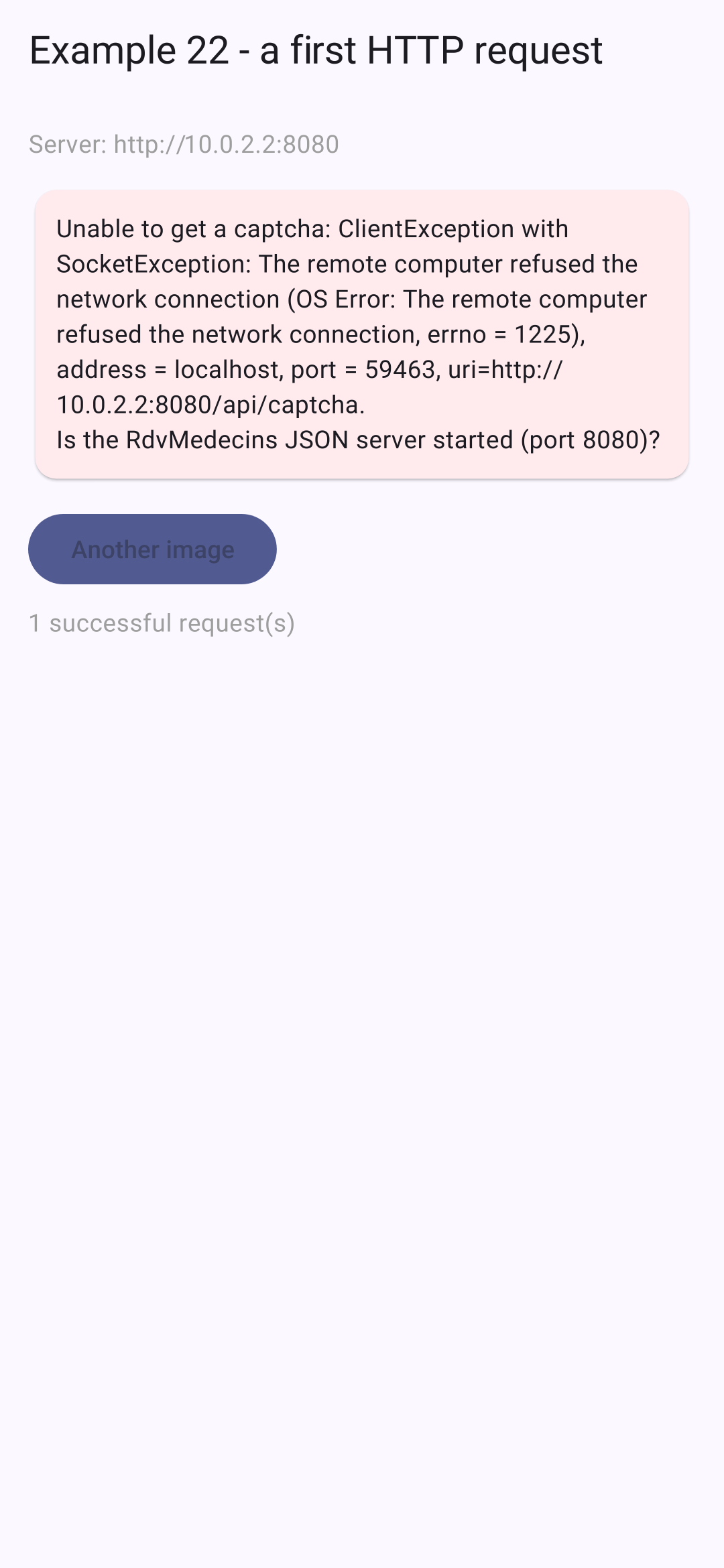
在 [Android] 模拟器上;然后,在关闭 JSON 服务器的情况下:
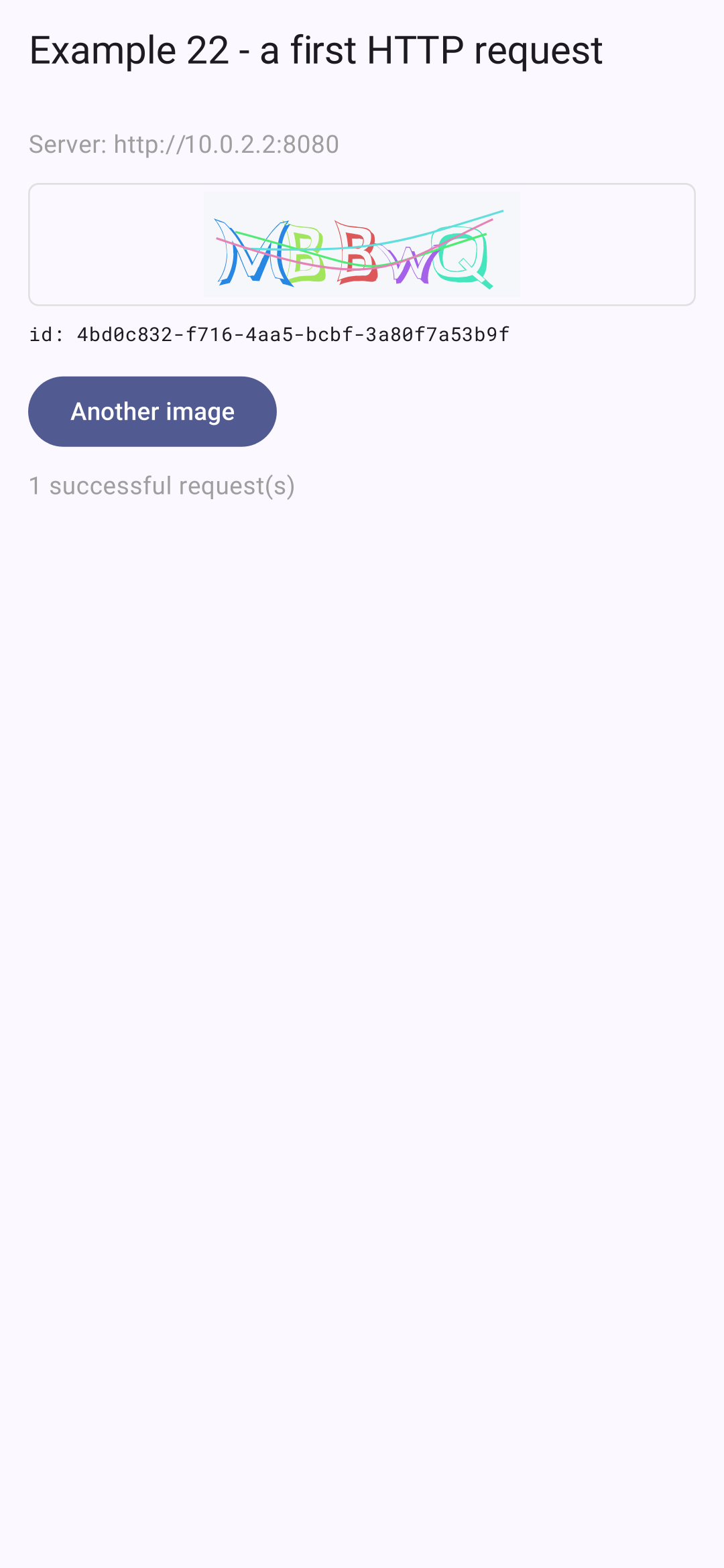
该 [Flutter DevTools] 工具(由 [VS Code] 启动,或通过 [flutter run] 提供的地址打开)有一个 Network 选项卡,它显示应用发出的每个 HTTP 请求及其头和主体,类似于浏览器的开发者工具。

9.2. 示例 23:登录、Cookie 与会话

服务器把 JWT 令牌存放在 Cookie 中。在浏览器里,存储和发送 Cookie 都由浏览器处理;应用代码不需要做任何事。而在手机上没有浏览器——需要由应用自己来处理。

// =========================================================================
// lib/common/http_client.dart - 一个处理 Cookie 的 HTTP 客户端
// -------------------------------------------------------------------------
// RdvMedecins 服务器把 JWT 令牌放在一个 Cookie(httpOnly)中。
// 在浏览器中,由浏览器存储这些 Cookie,并在每次请求时
// 把它们发回:应用代码无需做任何事。
// 在手机上,没有(NO)浏览器:必须由应用来
// 扮演它的角色,也就是:
//   1. 读取每个响应的 "Set-Cookie" 头,并存储这些 Cookie;
//   2. 在每个请求的 "Cookie" 头中把它们发回去。
// 这个 HTTP 客户端通过包装(WRAPPING)http 包的客户端来做到这一点
// (http.BaseClient:只需编写 send 方法)。这些 Cookie
// 也存储在设备上(shared_preferences):我们在停止并重启应用后
// 仍保持登录状态。
// 在 Web 上,它与普通客户端相比什么也不多做:
// 浏览器禁止应用读取或写入这些头。
// =========================================================================

import 'dart:convert';

import 'package:flutter/foundation.dart';
import 'package:http/http.dart' as http;
import 'package:shared_preferences/shared_preferences.dart';

class CookieClient extends http.BaseClient {
  static const _key = 'rdvmedecins.cookies';

  final http.Client _inner = http.Client();
  final SharedPreferences? _storage;
  // Cookie 名称 -> 它的值
  final Map<String, String> _cookies = {};

  CookieClient([this._storage]) {
    // 在之前的使用中存储的 Cookie
    final stored = _storage?.getString(_key);
    if (stored != null) {
      _cookies.addAll((jsonDecode(stored) as Map<String, Object?>).cast<String, String>());
    }
  }

  @override
  Future<http.StreamedResponse> send(http.BaseRequest request) async {
    if (!kIsWeb && _cookies.isNotEmpty) {
      // "rdvmedecins_jwt=eyJhbGci...; other=value"
      request.headers['cookie'] = [for (final MapEntry(:key, :value) in _cookies.entries) '$key=$value'].join('; ');
    }
    final response = await _inner.send(request);
    final setCookie = response.headers['set-cookie'];
    if (!kIsWeb && setCookie != null) {
      _store(setCookie);
    }
    return response;
  }

  // Set-Cookie: rdvmedecins_jwt=eyJ...; Max-Age=7200; Path=/api; Expires=Tue, 29 Sep 2026 ...; HttpOnly
  // (多个 Cookie 用逗号分隔)。我们只保留
  // 每个 Cookie 的名称和值;空值(登出)会将其删除
  void _store(String setCookie) {
    // 一个后面跟着 "=" 的名称,位于头的开头或逗号之后
    for (final m in RegExp(r'(?:^|,)\s*([^=;,\s]+)=([^;]*)').allMatches(setCookie)) {
      final name = m[1]!;
      final value = m[2]!.trim();
      if (value.isEmpty) {
        _cookies.remove(name);
      } else {
        _cookies[name] = value;
      }
    }
    _storage?.setString(_key, jsonEncode(_cookies));
  }

  @override
  void close() => _inner.close();
}
  • 第 25 行:[http] 包允许你包装自己的客户端:继承 [http.BaseClient],只需实现 [send] 方法,所有请求([get]、[post]……)都要经过它;
  • 第 28–31 行:被包装的客户端、设备的存储(可选:[?]),以及各个 Cookie(名称 → 值);
  • 第 33–37 行:创建时,读取在应用上一次使用期间存储的 Cookie。这样,关闭再重新打开应用时仍保持登录状态:在手机上,这相当于浏览器在两次访问之间保留它的 Cookie;
  • 第 42–52 行:每个请求都带上头 [Cookie] (“rdvmedecins_jwt=eyJhbGci...; other=value”),然后读取响应中的 [Set-Cookie] 头。[kIsWeb]:在 Web 上,应用什么也不多做,只相当于一个普通客户端,因为浏览器不允许应用读取或写入这些头(它自己处理它们);
  • 第 58–69 行:解析 [Set-Cookie] 头。多个 Cookie 以逗号分隔,但日期 [Expires] 本身就含有逗号(“Tue, 29 Sep 2026”):正则表达式只匹配后面跟着 [=] 的名称,且该名称位于头的开头或逗号之后。每个 Cookie 只保留名称和值;值为空(退出登录时:服务器发送 [rdvmedecins_jwt=; Expires=Thu, 01 Jan 1970...])就会删除该 Cookie。[_storage?.setString(...)]:只有当 [_storage] 不是 [null] 时才执行该调用。

更完善的 Cookie 管理(域、路径、过期时间)可以在一些包中找到([cookie_jar],与客户端 [dio] 搭配);我们只有几行的实现,对于一台服务器来说已经足够。安全提示:这里令牌以明文存储在设备上。生产环境的应用应使用 [flutter_secure_storage] 包(见示例 20)。

9.2.2. 命令

// =========================================================================
// lib/ex23_login/command.dart - 一个动作(ACTION)、它的状态、它的结果
// -------------------------------------------------------------------------
// 异步动作(登录、保存……)有一个状态,
// 界面必须把它显示出来:它是否进行中(IN PROGRESS)(按钮被禁用,显示指示器)?
// 是否以错误(ERROR)结束(消息)?这是 Flutter 架构指南中的 "Command" 模式,
// 精简到了最基本的部分:
//
//     final login = Command();
//     login.execute(() => logIn(...));          // 启动该操作
//     login.running, login.error               // 它的状态
//
// Command 是一个 ChangeNotifier:界面监听它(ListenableBuilder)
// 并在它开始和结束时重绘自己。
// =========================================================================

import 'package:flutter/foundation.dart';

class Command extends ChangeNotifier {
  bool _running = false;
  Object? _error;

  bool get running => _running;
  Object? get error => _error;

  // 执行该操作,前提是没有另一个操作正在运行
  Future<void> execute(Future<void> Function() action) async {
    if (_running) return; // 不重复发送(双击按钮)
    _running = true;
    _error = null;
    notifyListeners();
    try {
      await action();
    } catch (e) {
      _error = e; // 错误会被保留,以便显示
    } finally {
      // finally:无论成功还是出错,都会执行
      _running = false;
      notifyListeners();
    }
  }

  void clearError() {
    _error = null;
    notifyListeners();
  }
}

异步操作(登录、保存等)有一个状态,屏幕必须把它显示出来:它是否进行中(按钮被禁用)?它是否以错误结束(显示消息)?这就是 [Flutter] 架构指南中的“Command”模型,已精简到只剩要点。[React] 课程为此使用了 [React] 19 的“actions”([useActionState])。

  • 第 27–39 行:执行一个操作:如果另一个操作正在进行,就什么也不做(防止按钮被按两次而重复发送);否则,命令切换为“进行中”并通知它的监听者;如果发生异常,错误会被记录下来用于显示;无论哪种情况([finally]),命令都不再处于进行中。

9.2.3. 屏幕

// =========================================================================
// lib/ex23_login/main.dart - 登录 RdvMedecins 服务器
// -------------------------------------------------------------------------
//   1. 启动时:GET /api/auth/me - 我们是否已经登录?
//      (应用可能曾被停止;而服务器则读取
//      提交给它的 Cookie);
//   2. 登录:POST /api/auth/login,JSON 请求体 { login, password,
//      captchaId, captcha }。成功后,服务器会发送
//      JWT 令牌的 Cookie(Set-Cookie 头);
//   3. 受保护的请求:GET /api/doctors。Cookie 会随请求一起发送;
//   4. 注销:POST /api/auth/logout - 服务器清除 Cookie。
// 在手机上,由 CookieClient(common/http_client.dart)负责
// 存储并回传 Cookie;在 Web 端,则由浏览器负责。
// =========================================================================

import 'dart:convert';

import 'package:flutter/material.dart';
import 'package:flutter_svg/flutter_svg.dart';
import 'package:http/http.dart' as http;
import 'package:shared_preferences/shared_preferences.dart';

import '../common/http_client.dart';
import '../common/config.dart';
import 'command.dart';

// 本示例所需的少量消息(示例 25 将使用字典)
const messages = {
  'LOGIN.ERROR': 'Incorrect login or password.',
  'ERRORS.WRONG_CAPTCHA': 'The characters you typed do not match the image.',
  'ERRORS.TOO_MANY_ATTEMPTS': 'Too many failed attempts. Try again later.',
};

Future<void> main() async {
  WidgetsFlutterBinding.ensureInitialized();
  final client = CookieClient(await SharedPreferences.getInstance());
  runApp(
    MaterialApp(
      debugShowCheckedModeBanner: false,
      theme: ThemeData(colorSchemeSeed: Colors.indigo),
      home: LoginPage(client: client),
    ),
  );
}

// 非 2xx 的响应会变成一个异常,该异常会保留这个响应
class ErrorResponse implements Exception {
  final http.Response response;
  const ErrorResponse(this.response);
}

class LoginPage extends StatefulWidget {
  final http.Client client;

  const LoginPage({super.key, required this.client});

  @override
  State<LoginPage> createState() => _LoginPageState();
}

class _LoginPageState extends State<LoginPage> {
  Map<String, dynamic>? _user; // null:没有人登录
  List<dynamic> _doctors = [];
  Map<String, dynamic>? _captcha;
  bool _ready = false; // 初始检查是否已完成?
  String? _serverError;
  final _loginCommand = Command();
  final _login = TextEditingController(text: 'admin');
  final _password = TextEditingController();
  final _captchaAnswer = TextEditingController();

  @override
  void initState() {
    super.initState();
    _checkSession();
  }

  @override
  void dispose() {
    _loginCommand.dispose();
    _login.dispose();
    _password.dispose();
    _captchaAnswer.dispose();
    super.dispose();
  }

  Uri _url(String path) => Uri.parse('${Config.serverUrl}/api$path');

  // 一个 GET 请求,我们需要它的 JSON 响应体;如果不是 2xx 则抛出异常
  Future<dynamic> _read(String path) async {
    final response = await widget.client.get(_url(path));
    if (response.statusCode >= 300) throw ErrorResponse(response);
    return jsonDecode(utf8.decode(response.bodyBytes));
  }

  // 带 JSON 请求体的 POST
  Future<http.Response> _post(String path, Object body) {
    return widget.client.post(
      _url(path),
      headers: {'content-type': 'application/json'}, // 请求体是 JSON
      body: jsonEncode(body),
    );
  }

  Future<void> _loadCaptcha() async {
    final captcha = await _read('/captcha') as Map<String, dynamic>;
    _captchaAnswer.clear();
    if (mounted) setState(() => _captcha = captcha);
  }

  Future<void> _loadDoctors() async {
    final doctors = await _read('/doctors') as List<dynamic>;
    if (mounted) setState(() => _doctors = doctors);
  }

  // 1. 谁已登录?200 -> 用户;401 -> 没有人
  Future<void> _checkSession() async {
    try {
      final user = await _read('/auth/me') as Map<String, dynamic>;
      setState(() => _user = user);
      await _loadDoctors();
    } on ErrorResponse catch (e) {
      // "on Type catch":只捕获这种类型的异常
      if (e.response.statusCode == 401) {
        await _loadCaptcha();
      } else {
        _serverError = 'The server answered ${e.response.statusCode}.';
      }
    } catch (_) {
      _serverError = 'Is the RdvMedecins JSON server started (${Config.serverUrl})?';
    }
    if (mounted) setState(() => _ready = true);
  }

  // 2. 登录:由 Command 执行的操作,它会保存自己的错误
  Future<void> _logIn() async {
    final response = await _post('/auth/login', {
      'login': _login.text.trim(),
      'password': _password.text,
      'captchaId': _captcha?['id'],
      'captcha': _captchaAnswer.text,
    });
    if (response.statusCode != 200) {
      // 错误响应的 JSON 请求体:{ statusCode, key, ... }
      final error = jsonDecode(response.body) as Map<String, dynamic>;
      final key = error['key'] as String;
      await _loadCaptcha(); // 每张图片只使用一次
      throw '${response.statusCode} - ${messages[key] ?? key}'; // 可以抛出……一个字符串
    }
    _password.clear();
    setState(() => _user = jsonDecode(response.body) as Map<String, dynamic>);
    await _loadDoctors();
  }

  // 4. 注销
  Future<void> _logOut() async {
    await _post('/auth/logout', {});
    setState(() {
      _user = null;
      _doctors = [];
    });
    await _loadCaptcha();
  }

  @override
  Widget build(BuildContext context) {
    final Widget content;
    final user = _user;
    if (!_ready) {
      content = const Text('Checking the session...', style: TextStyle(color: Colors.grey));
    } else if (user != null) {
      // 已登录
      content = Card(
        child: Padding(
          padding: const EdgeInsets.all(12),
          child: Column(
            crossAxisAlignment: CrossAxisAlignment.start,
            children: [
              Text.rich(
                TextSpan(
                  children: [
                    const TextSpan(text: 'Logged in: '),
                    TextSpan(
                      text: '${user['name']}',
                      style: const TextStyle(fontWeight: FontWeight.bold),
                    ),
                    TextSpan(text: ' (${user['login']}), role ${user['role']}'),
                  ],
                ),
              ),
              const SizedBox(height: 8),
              Text('GET /api/doctors', style: Theme.of(context).textTheme.titleSmall),
              for (final m in _doctors) Text('• ${m['title']} ${m['firstName']} ${m['lastName']}'),
              const SizedBox(height: 8),
              const Text(
                'Stop then restart the application: you remain logged in.',
                style: TextStyle(color: Colors.grey),
              ),
              const SizedBox(height: 8),
              OutlinedButton(onPressed: _logOut, child: const Text('Log out')),
            ],
          ),
        ),
      );
    } else if (_serverError == null) {
      // 未登录:显示表单
      content = Card(
        child: Padding(
          padding: const EdgeInsets.all(12),
          child: Column(
            crossAxisAlignment: CrossAxisAlignment.start,
            children: [
              TextField(
                controller: _login,
                decoration: const InputDecoration(labelText: 'Login'),
              ),
              TextField(
                controller: _password,
                obscureText: true,
                decoration: const InputDecoration(labelText: 'Password'),
              ),
              const SizedBox(height: 12),
              Row(
                children: [
                  if (_captcha != null) SvgPicture.string('${_captcha!['svg']}', height: 50),
                  TextButton(onPressed: _loadCaptcha, child: const Text('Another image')),
                ],
              ),
              TextField(
                controller: _captchaAnswer,
                autocorrect: false,
                decoration: const InputDecoration(labelText: 'Type the characters of the image'),
              ),
              const SizedBox(height: 16),
              // ListenableBuilder:这一部分跟随命令的状态
              ListenableBuilder(
                listenable: _loginCommand,
                builder: (context, _) => Column(
                  crossAxisAlignment: CrossAxisAlignment.start,
                  children: [
                    FilledButton(
                      onPressed: _loginCommand.running ? null : () => _loginCommand.execute(_logIn),
                      child: Text(_loginCommand.running ? 'Logging in...' : 'Log in'),
                    ),
                    if (_loginCommand.error != null)
                      Padding(
                        padding: const EdgeInsets.only(top: 12),
                        child: Text('${_loginCommand.error}', style: const TextStyle(color: Colors.red)),
                      ),
                  ],
                ),
              ),
              const SizedBox(height: 8),
              const Text(
                'Accounts: admin, pelissier, martin... (password = login).',
                style: TextStyle(color: Colors.grey, fontSize: 12),
              ),
            ],
          ),
        ),
      );
    } else {
      content = const SizedBox.shrink(); // 一个“空”组件(Widget)
    }

    return Scaffold(
      appBar: AppBar(title: const Text('Example 23 - logging in to the server')),
      body: ListView(
        padding: const EdgeInsets.all(16),
        children: [
          content,
          if (_serverError != null)
            Card(
              color: Colors.red.shade50,
              child: Padding(padding: const EdgeInsets.all(12), child: Text(_serverError!)),
            ),
        ],
      ),
    );
  }
}
  • 第 36–41 行:把 Cookie 存储在设备上的 HTTP 客户端在启动时创建,并传给屏幕;
  • 第 47–49 行:一个把响应作为错误捕获的异常(可以从中读取其状态码)。[implements Exception]:一个可以被抛出的对象([throw]);
  • 第 90–93 行:一个我们想要获取响应体(JSON)的请求(GET),如果状态码不是 2xx 则抛出异常。[widget.client.get(...)]:带 Cookie 的客户端。[utf8.decode(response.bodyBytes)]:响应体按 UTF-8 解码(带重音的字符),而不论响应头怎么说;
  • 第 97–101 行:一个 POST:头是 [content-type: application/json] ,请求体为 JSON(服务器会拒绝不是 JSON 的 POST);
  • 第 117–132 行:1. 启动时:谁已连接?[GET /api/auth/me]:200,表示有用户;401,表示没有人。[on ErrorResponse catch (e)] 只捕获这一类异常;下一个 [catch] 捕获所有其他异常(根本没有响应);
  • 第 136–152 行:2. 连接:[POST /api/auth/login]。如果请求被拒绝,错误响应的响应体会给出消息键;加载一张新图片(每张只使用一次),然后抛出该消息:在 [Dart] 中,任何对象都可以被抛出——这里抛出的是一个字符串。由命令来捕获并存储它;
  • 第 156–162 行:4. 退出登录:[POST /api/auth/logout];服务器删除 Cookie(客户端也删除它的 Cookie);
  • 第 193–197 行:3. 已登录:医生列表([GET /api/doctors],一个受保护的请求:Cookie 随它一起发送);
  • 第 225–226 行:验证码及其按钮;
  • 第 236–248 行:按钮反映请求的状态:请求发送期间被禁用并显示“Logging in...”;任何错误消息都显示在其下方。

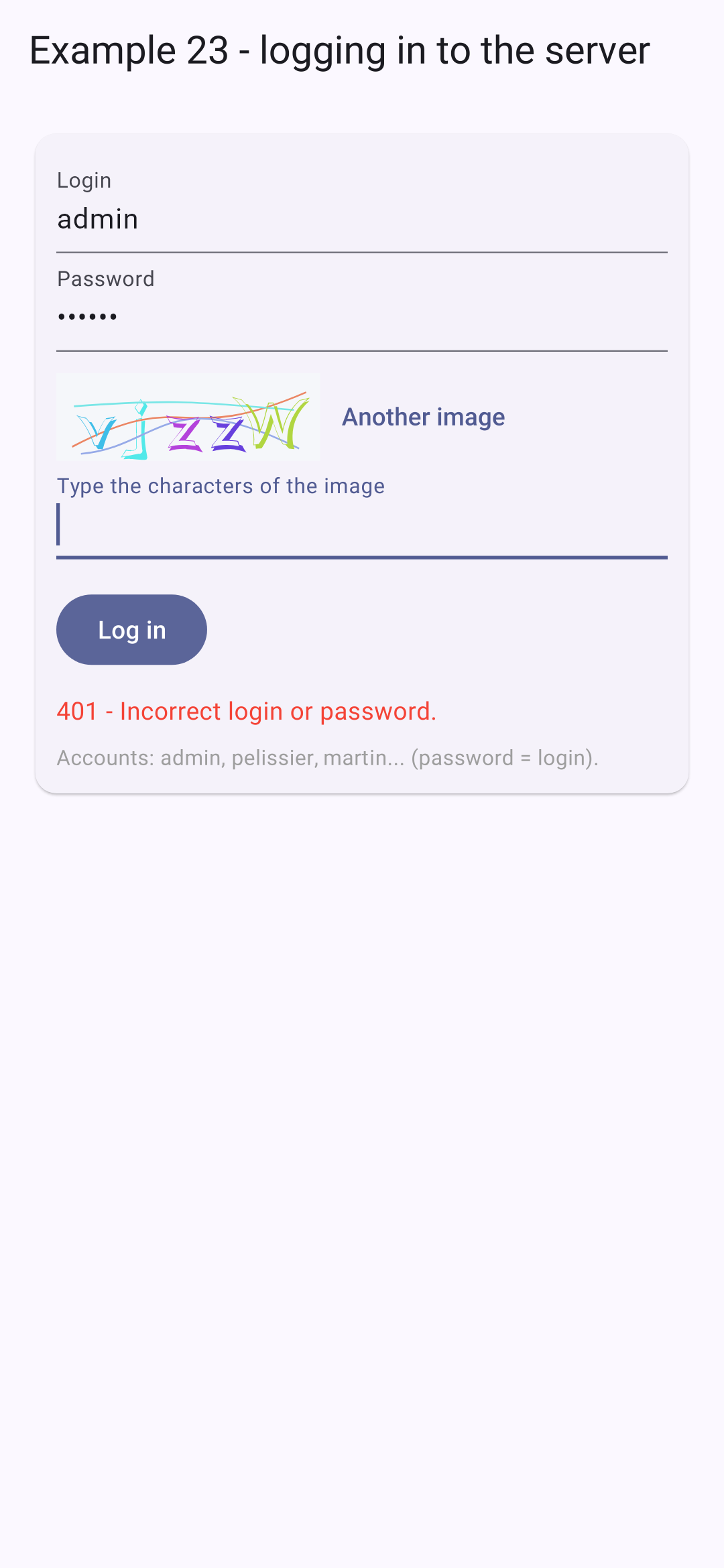
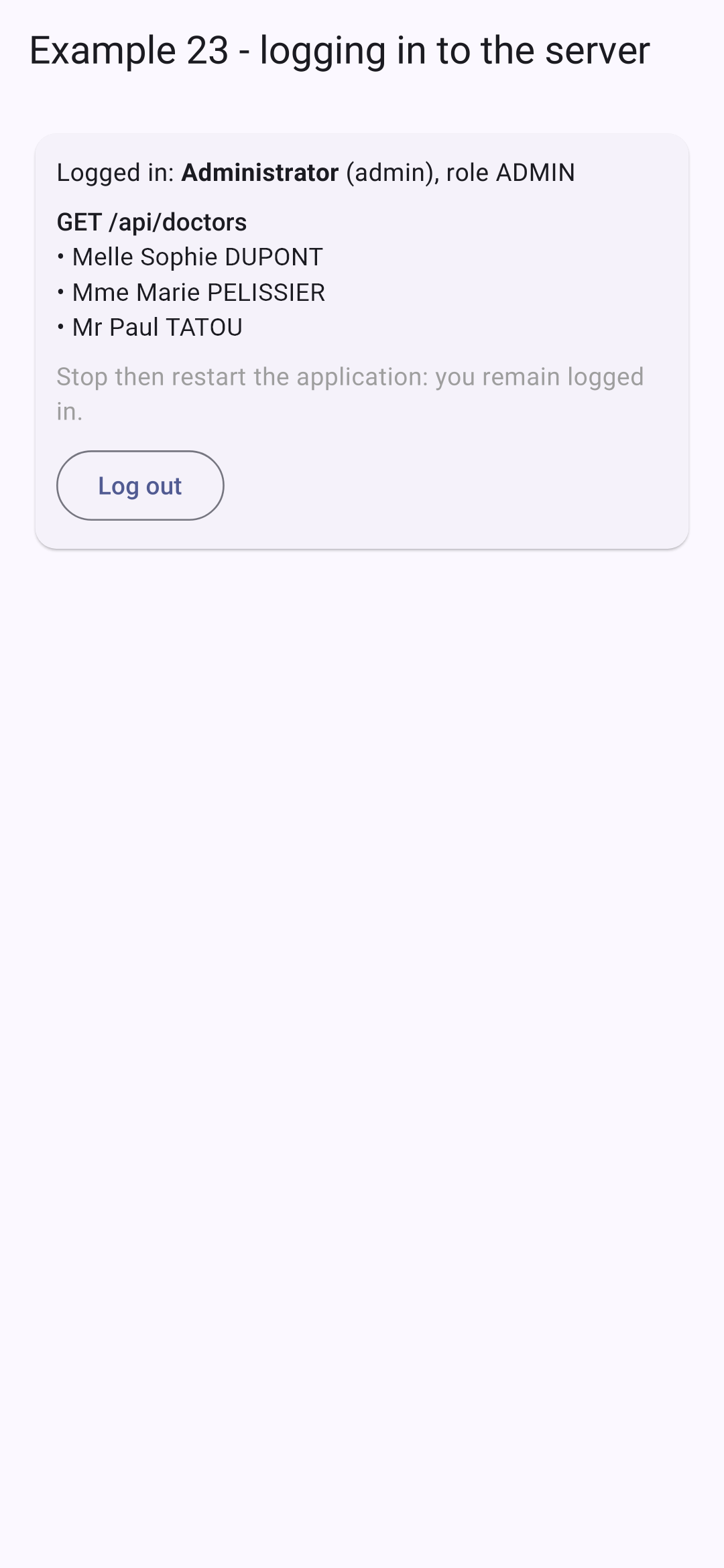
登录屏幕;密码错误;登录成功:
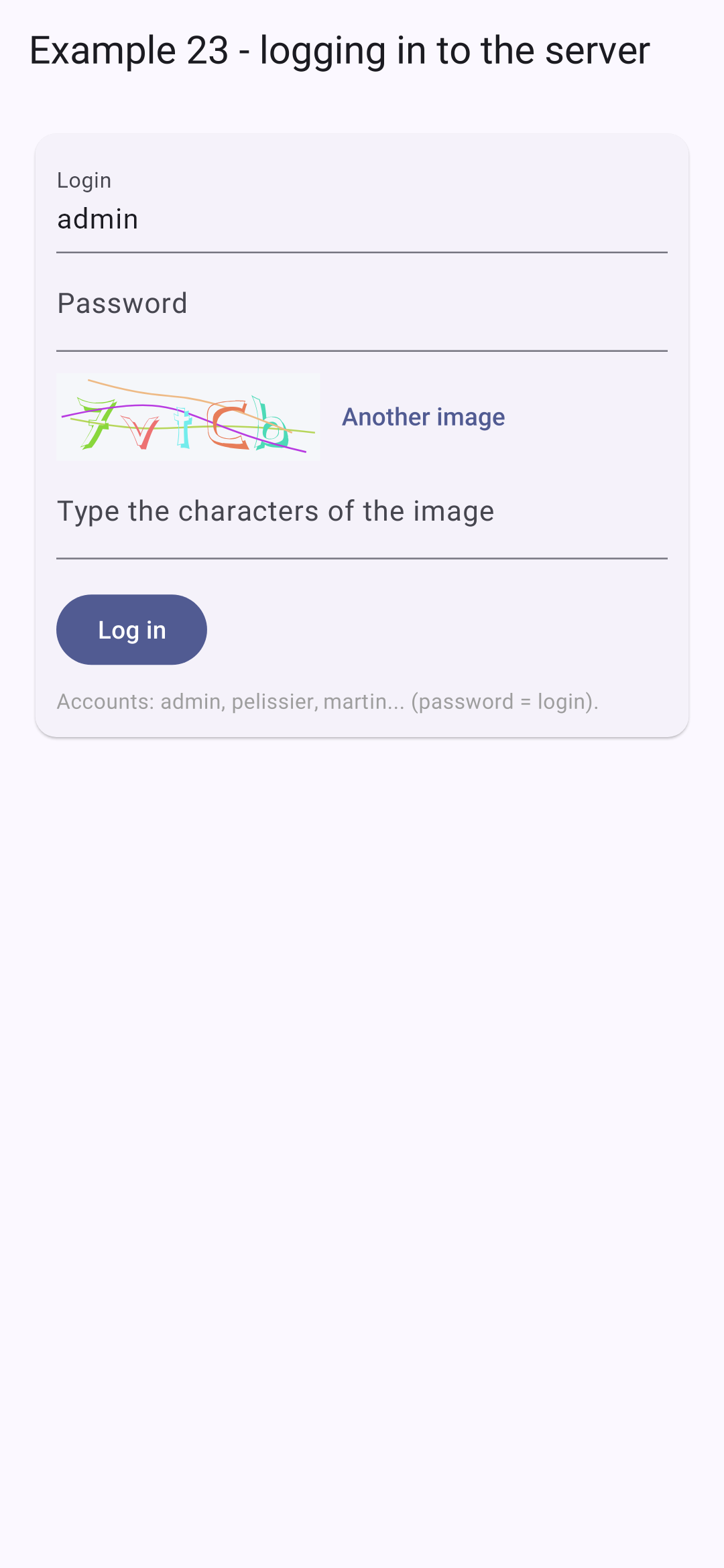
关闭后重新启动应用:它会以已登录状态启动。存储在设备上的 Cookie 被提交给 [GET /api/auth/me],服务器返回用户的身份信息。令牌在两小时后过期:此后 [GET /api/auth/me] 将返回 401 响应,登录屏幕会重新出现。

9.3. 示例 24:API 访问层

在示例 23 中,每个请求都重复了相同的步骤。本示例把它们组织成三层,案例研究将再次用到这三层。

9.3.1. 类型

// =========================================================================
// lib/common/types.dart - 与 RdvMedecins API 交换的 JSON 对象
// (参见黑盒一章,其中描述了每条路由)
// -------------------------------------------------------------------------
// 解码后的 JSON 没有类型:Map<String, dynamic>、List……
// 每个类都有一个 "factory" 构造函数 fromJson,借助 Dart 3 的“模式匹配”
// 来检查所收到 JSON 的结构:
//
//   switch (json) {
//     {'login': String login, 'name': String name} => ...   // 预期的结构
//     _ => throw FormatException(...)                       // 其他所有情况
//   }
//
// 模式 {'login': String login, ...} 会检查 json 是否为 Map、
// 这些键是否存在、它们的值类型是否正确,并将
// 这些值存入变量。意外的响应会
// 立即被发现,而不是稍后在显示过程中才暴露。
// =========================================================================

enum Role { admin, doctor, user }

// "ADMIN" -> Role.admin
Role _role(String name) => Role.values.byName(name.toLowerCase());

// POST /api/auth/login, GET /api/auth/me
class User {
  final String login;
  final String name;
  final Role role;

  const User(this.login, this.name, this.role);

  factory User.fromJson(Object? json) => switch (json) {
    {'login': final String login, 'name': final String name, 'role': final String role} => User(
      login,
      name,
      _role(role),
    ),
    _ => throw FormatException('unexpected User: $json'),
  };
}

// GET /api/captcha
class Captcha {
  final String id;
  final String svg;

  const Captcha(this.id, this.svg);

  factory Captcha.fromJson(Object? json) => switch (json) {
    {'id': final String id, 'svg': final String svg} => Captcha(id, svg),
    _ => throw FormatException('unexpected Captcha: $json'),
  };
}

// 医生或客户(GET /api/doctors、GET /api/clients……)
class Person {
  final int id;
  final int version;
  final String title;
  final String firstName;
  final String lastName;
  final String? login; // 仅限 ADMIN

  const Person(this.id, this.version, this.title, this.firstName, this.lastName, [this.login]);

  factory Person.fromJson(Object? json) => switch (json) {
    {
      'id': final int id,
      'version': final int version,
      'title': final String title,
      'firstName': final String firstName,
      'lastName': final String lastName,
    } =>
      // "login" 键是可选的:单独读取
      Person(id, version, title, firstName, lastName, (json as Map<String, Object?>)['login'] as String?),
    _ => throw FormatException('unexpected Person: $json'),
  };

  // JSON 列表 -> 人员列表
  static List<Person> list(Object? json) => [for (final p in json as List<Object?>) Person.fromJson(p)];

  String get fullName => '$title $firstName $lastName';
}

// 一个人的姓名,仅此而已
class Identity {
  final String title;
  final String firstName;
  final String lastName;

  const Identity(this.title, this.firstName, this.lastName);

  factory Identity.fromJson(Object? json) => switch (json) {
    {'title': final String title, 'firstName': final String firstName, 'lastName': final String lastName} => Identity(
      title,
      firstName,
      lastName,
    ),
    _ => throw FormatException('unexpected Identity: $json'),
  };

  @override
  String toString() => '$title $firstName $lastName';
}

// GET /api/schedule 的一行
class ScheduleSlot {
  final int id;
  final int startHour;
  final int startMinute;
  final int endHour;
  final int endMinute;
  final bool free;
  final Identity? patient;
  final bool mine;
  final bool bookable;
  final int? appointmentId;

  const ScheduleSlot(
    this.id,
    this.startHour,
    this.startMinute,
    this.endHour,
    this.endMinute,
    this.free,
    this.patient,
    this.mine,
    this.bookable,
    this.appointmentId,
  );

  factory ScheduleSlot.fromJson(Object? json) => switch (json) {
    {
      'id': final int id,
      'startHour': final int startHour,
      'startMinute': final int startMinute,
      'endHour': final int endHour,
      'endMinute': final int endMinute,
      'free': final bool free,
      'patient': final Object? patient,
      'mine': final bool mine,
      'bookable': final bool bookable,
      'appointmentId': final int? appointmentId,
    } =>
      ScheduleSlot(
        id,
        startHour,
        startMinute,
        endHour,
        endMinute,
        free,
        patient == null ? null : Identity.fromJson(patient),
        mine,
        bookable,
        appointmentId,
      ),
    _ => throw FormatException('unexpected ScheduleSlot: $json'),
  };

  // "8:00 - 8:20"
  String get timeRange {
    String hm(int h, int m) => '$h:${m.toString().padLeft(2, '0')}';
    return '${hm(startHour, startMinute)} - ${hm(endHour, endMinute)}';
  }
}

// GET /api/schedule?doctorId=...&day=...
class Schedule {
  final Person doctor;
  final String day;
  final List<ScheduleSlot> slots;
  final String? info;

  const Schedule(this.doctor, this.day, this.slots, this.info);

  factory Schedule.fromJson(Object? json) => switch (json) {
    {
      'doctor': final Object doctor,
      'day': final String day,
      'slots': final List<Object?> slots,
      'info': final String? info,
    } =>
      Schedule(Person.fromJson(doctor), day, [for (final c in slots) ScheduleSlot.fromJson(c)], info),
    _ => throw FormatException('unexpected Schedule: $json'),
  };
}

解码后的 JSON 是无类型的:[Map]、[List]、[dynamic]。每个类都有一个工厂构造函数 [fromJson] ,用来验证收到的 JSON 的格式。[factory] 构造函数不一定创建新对象:它是一个返回该类对象的函数。

  • 第 33–39 行:[Dart] 3 的模式匹配应用于 JSON。模式 [{'login': final String login, 'name': final String name, 'role': final String role}] 验证 [json] 是一个 [Map],这三个键都存在,它们的值是字符串,并把这些值存入三个变量。如果 JSON 的格式不同,例如 [_] 的情况,就按异常处理。这样,意外的响应在收到时就被检测出来,而不是稍后在显示过程中才发现;
  • 第 23 行:“ADMIN” -> [Role.admin]:[byName] 按名称取回一个枚举值;
  • 第 67–76 行:模式检查必需的键;可选的键 [login] 单独读取;
  • 第 81 行:一个列表形式的 JSON -> 一个人员列表;
  • 第 133–144 行:[final Object? patient] 接受任何值,包括 [null];[final int? appointmentId],是一个整数,或 [null];
  • 第 162–164 行:一个格式化的 getter。

9.3.2. 错误

// =========================================================================
// lib/common/api_error.dart - 用唯一的一个类表示 API 的所有错误
// -------------------------------------------------------------------------
// RdvMedecins 服务器的所有错误响应都具有相同的结构:
//   { "statusCode": 409, "key": "ERRORS.LOGIN_TAKEN", "params": {...}, "fields": {...} }
// 但请求也可能以其他方式失败:完全没有响应
// (网络中断、服务器已停止、地址错误),或者响应
// 并非来自我们的服务器(代理的错误页面)。我们把
// 这一切都转换为唯一的一个类 ApiError,它携带
// 服务器发送的翻译键(以及参数
// 和各字段的错误,如果有的话)。
// =========================================================================

import 'dart:convert';

import 'package:http/http.dart' as http;

// "implements Exception":一个可以被抛出(throw)和捕获(catch)的对象
class ApiError implements Exception {
  final int statusCode; // 0:服务器没有响应
  final String key; // 例如 'ERRORS.LOGIN_TAKEN'
  final Map<String, String> params;
  final Map<String, String> fields;

  const ApiError(this.statusCode, this.key, {this.params = const {}, this.fields = const {}});

  // 错误响应(4xx、5xx)-> 一个 ApiError
  factory ApiError.fromResponse(http.Response response) {
    Object? body;
    try {
      body = jsonDecode(utf8.decode(response.bodyBytes));
    } on FormatException {
      body = null; // 不是 JSON:响应并非来自我们的服务器
    }
    // Map 的“模式匹配”:如果响应体有一个类型为 String 的键
    // "key",就把它存入变量 key
    if (body case {'key': final String key}) {
      final json = body as Map<String, Object?>;
      return ApiError(response.statusCode, key, params: _strings(json['params']), fields: _strings(json['fields']));
    }
    // 没有 key:由代理或网络代替服务器做出了响应
    return ApiError(
      response.statusCode,
      response.statusCode >= 500 ? 'ERRORS.SERVER_UNREACHABLE' : 'ERRORS.SERVER_ERROR',
    );
  }

  // JSON 对象 { "name": "ERRORS..." } -> Map<String, String>(否则为空)
  static Map<String, String> _strings(Object? json) =>
      json is Map<String, Object?> ? {for (final e in json.entries) e.key: '${e.value}'} : const {};

  @override
  String toString() => '$statusCode $key';
}

服务器的所有错误响应都具有相同的格式。但是,请求也可能以其他方式失败:根本没有响应,或者响应并非来自我们的服务器。我们把这一切都转换为同一个类 [ApiError]。

  • 第 19–23 行:一个状态(0:没有响应)、一个翻译键、它的参数,以及每个字段的错误;
  • 第 28–44 行:一个错误响应 → 一个 [ApiError]。[if (body case {'key': final String key})]:在 [if] 中进行过滤(“if-case”):如果响应体有一个字符串类型的 [key] 键,它就被存入 [key] 变量。 否则,说明响应的不是我们的服务器;
  • 第 53 行:“401 LOGIN.ERROR”,用于快速显示。

9.3.3. 请求

// =========================================================================
// lib/common/api.dart - 一行代码完成对 API 的请求
// -------------------------------------------------------------------------
// 在示例 23 中,每个请求都重复相同的步骤:服务器
// 地址、/api 前缀、JSON 头、状态码测试、读取
// 错误响应体……这里把它们集中起来:
//
//   final json = await api.get('/doctors');
//   await api.post('/appointments', {'day': day, 'slotId': 3});
//
//   - 成功时,Future 返回已解码的 JSON 响应体(Map、
//     List、String、数字……);
//   - 失败时,它以 ApiError 完成。
// 所有请求都经过 request 方法:所有请求共有的
// 问题就在这里处理(参见案例研究和
// 401 响应)。供示例 24 和 25 使用。
// =========================================================================

import 'dart:convert';

import 'package:http/http.dart' as http;

import 'config.dart';
import 'api_error.dart';

class Api {
  final http.Client _client;

  Api(this._client);

  Future<Object?> request(String method, String url, [Object? body]) async {
    final request = http.Request(method, Uri.parse('${Config.serverUrl}/api$url'));
    if (body != null) {
      // JSON 请求体(服务器会拒绝没有请求体的 POST)
      request.headers['content-type'] = 'application/json';
      request.body = jsonEncode(body);
    }
    final http.Response response;
    try {
      // send 发送请求;fromStream 等待响应的完整请求体
      response = await http.Response.fromStream(await _client.send(request));
    } catch (_) {
      // 没有响应(网络、服务器已停止、地址错误)
      throw const ApiError(0, 'ERRORS.SERVER_UNREACHABLE');
    }
    if (response.statusCode >= 400) {
      throw ApiError.fromResponse(response);
    }
    return response.bodyBytes.isEmpty ? null : jsonDecode(utf8.decode(response.bodyBytes));
  }

  Future<Object?> get(String url) => request('GET', url);
  // POST 总是带有 JSON 请求体:默认为 {}
  Future<Object?> post(String url, [Object body = const {}]) => request('POST', url, body);
  Future<Object?> put(String url, Object body) => request('PUT', url, body);
  Future<Object?> delete(String url, [Object? body]) => request('DELETE', url, body);
}
  • 第 31–49 行:所有请求都经过这个方法:服务器地址和前缀 [/api]、JSON 格式的请求体、发送([_client.send],随后是 [http.Response.fromStream],它会等待完整的响应体)、被转换为 [ApiError] 的错误,以及解码后的响应体。我们可以在这里处理所有请求共有的问题(见案例研究和 401 响应);
  • 第 52–56 行:四个快捷方法。POST 总是带有 JSON 请求体:默认为 [{}] 。

9.3.4. 登录栏

// =========================================================================
// lib/common/login_bar.dart - 在一个栏中完成登录/注销
// -------------------------------------------------------------------------
// 示例 23 的表单,精简为一个栏,并用 api.dart 重写。
// 该组件(Widget)在每次变化时都会用已登录的用户(或
// null)调用 onUserChange,包括启动时,在
// 查询 GET /api/auth/me 之后。Api 对象从上下文中读取
// (由 provider 提供,参见示例 24 和 25 的 main)。
// =========================================================================

import 'package:flutter/material.dart';
import 'package:flutter_svg/flutter_svg.dart';
import 'package:provider/provider.dart';

import 'api.dart';
import 'api_error.dart';
import 'types.dart';

class LoginBar extends StatefulWidget {
  final ValueChanged<User?> onUserChange;

  const LoginBar({super.key, required this.onUserChange});

  @override
  State<LoginBar> createState() => _LoginBarState();
}

class _LoginBarState extends State<LoginBar> {
  // late:在 initState 中从上下文读取
  late final Api _api = context.read<Api>();
  User? _user;
  Captcha? _captcha;
  final _login = TextEditingController(text: 'admin');
  final _password = TextEditingController();
  final _captchaAnswer = TextEditingController();
  String? _error;

  @override
  void initState() {
    super.initState();
    _start();
  }

  @override
  void dispose() {
    _login.dispose();
    _password.dispose();
    _captchaAnswer.dispose();
    super.dispose();
  }

  void _setUser(User? u) {
    setState(() => _user = u);
    widget.onUserChange(u);
  }

  Future<void> _newCaptcha() async {
    final captcha = Captcha.fromJson(await _api.get('/captcha'));
    _captchaAnswer.clear();
    if (mounted) setState(() => _captcha = captcha);
  }

  // 启动时:我们是否已经登录?
  Future<void> _start() async {
    try {
      _setUser(User.fromJson(await _api.get('/auth/me')));
    } on ApiError {
      _setUser(null); // 401:没有人登录
      try {
        await _newCaptcha();
      } on ApiError {
        setState(() => _error = 'Is the JSON server started (port 8080)?');
      }
    }
  }

  Future<void> _logIn() async {
    setState(() => _error = null);
    try {
      final u = User.fromJson(
        await _api.post('/auth/login', {
          'login': _login.text.trim(),
          'password': _password.text,
          'captchaId': _captcha?.id,
          'captcha': _captchaAnswer.text,
        }),
      );
      _password.clear();
      _setUser(u);
    } on ApiError catch (e) {
      setState(() => _error = '$e'); // "401 LOGIN.ERROR"
      await _newCaptcha();
    }
  }

  Future<void> _logOut() async {
    await _api.post('/auth/logout');
    _setUser(null);
    await _newCaptcha();
  }

  @override
  Widget build(BuildContext context) {
    final u = _user;
    return Card(
      color: Colors.blueGrey.shade50,
      child: Padding(
        padding: const EdgeInsets.all(8),
        child: u != null
            ? Row(
                children: [
                  const Icon(Icons.person),
                  const SizedBox(width: 8),
                  Expanded(child: Text('${u.name} (${u.role.name.toUpperCase()})')),
                  TextButton(onPressed: _logOut, child: const Text('Log out')),
                ],
              )
            : Column(
                crossAxisAlignment: CrossAxisAlignment.start,
                children: [
                  Row(
                    children: [
                      Expanded(
                        child: TextField(
                          controller: _login,
                          decoration: const InputDecoration(labelText: 'login', isDense: true),
                        ),
                      ),
                      const SizedBox(width: 8),
                      Expanded(
                        child: TextField(
                          controller: _password,
                          obscureText: true,
                          decoration: const InputDecoration(labelText: 'password', isDense: true),
                        ),
                      ),
                    ],
                  ),
                  Row(
                    children: [
                      // 验证码(CAPTCHA)的 SVG 图像,由我们自己的服务器生成(参见示例 22)
                      if (_captcha != null) SvgPicture.string(_captcha!.svg, height: 40),
                      const SizedBox(width: 8),
                      Expanded(
                        child: TextField(
                          controller: _captchaAnswer,
                          autocorrect: false,
                          decoration: const InputDecoration(labelText: 'captcha', isDense: true),
                        ),
                      ),
                      IconButton(tooltip: 'Log in', icon: const Icon(Icons.login), onPressed: _logIn),
                    ],
                  ),
                  if (_error != null) Text(_error!, style: const TextStyle(color: Colors.red)),
                ],
              ),
      ),
    );
  }
}

示例 23 中的表单,精简为一个单独的栏,并使用 [Api] 重写。每当已登录用户发生变化(包括启动时),它都会调用 [onUserChange]。

  • 第 30 行:对象 [Api] 在更上层提供(由 [provider]);[late]:它只在首次使用时才读取,即在 [initState] 中;
  • 第 64–72 行:启动时,谁已连接?[User.fromJson(await _api.get('/auth/me'))]:只有一行。任何 [ApiError] 都表示“没有人”;
  • 第 77–92 行:连接,只需几行:错误以 [ApiError] 的形式出现。

9.3.5. API 访问层

// =========================================================================
// lib/ex24_api_layer/rdvmedecins.dart - API 访问层
// -------------------------------------------------------------------------
// API 的每条路由对应一个有类型的方法。界面既不知道
// URL,也不知道 http 包,更不知道 JSON 格式:它们调用的是
// 返回 Dart 对象(Person、Schedule……)的方法。
// 它相当于服务器端 DAO 层在客户端的对应物:如果 API
// 发生变化(某个 URL、某个字段名),只需修改这一个文件。
// 在 Flutter 的架构指南中,它被称为“仓库(repository)”。
// =========================================================================

import '../common/api.dart';
import '../common/types.dart';

class RdvMedecins {
  final Api _api;

  RdvMedecins(this._api);

  Future<List<Person>> getDoctors() async => Person.list(await _api.get('/doctors'));

  Future<List<Person>> getClients() async => Person.list(await _api.get('/clients'));

  // Uri 构建出 "doctorId=1&day=2030-01-15",并对需要的部分进行编码
  Future<Schedule> getSchedule(int doctorId, String day) async {
    final params = Uri(queryParameters: {'doctorId': '$doctorId', 'day': day}).query;
    return Schedule.fromJson(await _api.get('/schedule?$params'));
  }

  // [int? clientId]:可选参数。Map 中的 '?clientId':只有当 clientId 不为 null 时,
  // 才会把该键放入 Map(Dart 3.8)
  Future<void> book(String day, int slotId, [int? clientId]) =>
      _api.post('/appointments', {'day': day, 'slotId': slotId, 'clientId': ?clientId});

  Future<void> cancelAppointment(int appointmentId) => _api.delete('/appointments/$appointmentId');
}

每条 API 路由对应一个带类型的方法。屏幕不知道地址、[http] 包或 JSON 的格式:它们调用的是返回 [Dart] 对象的方法。如果 API 发生变化(地址、字段名),只需修改这一个文件。[Flutter] 架构指南把这一层称为“仓库(repository)”。

  • 第 26 行:[Uri] 构造出字符串“doctorId=1&day=2030-01-15”,并对必要的数据进行编码;
  • 第 33 行:['clientId': ?clientId] 位于 [Map] 字面量中:键被放入 [Map] 中,仅当 [clientId] 不是 [null] 时(这是 [Dart] 3.8 的“可选元素”)。

9.3.6. 视图模型

// =========================================================================
// lib/ex24_api_layer/schedule_model.dart - 界面的“视图模型”
// -------------------------------------------------------------------------
// Flutter 的架构指南建议将以下两者分离:
//   - 视图(VIEW):各个组件(Widget),负责显示并传递
//     用户的操作;
//   - 视图模型(VIEW MODEL,ViewModel):一个 ChangeNotifier,保存界面的状态
//     (所选的医生、日期、收到的日程……)、
//     各种操作(选择、预约、取消),并调用 API 访问
//     层。
// 视图不再有任何逻辑:读起来很简单;视图模型
// 不含任何组件:测试起来很简单。
//
// 它还承担了我们不想为每个界面重写的工作:
//   - 缓存(CACHE):每个已读取的(医生、日期)日程都会被保留;再次
//     回到它时会立即显示,同时在后台重新读取;
//   - 过期(STALE)的响应会被忽略(参见示例 19)。
// =========================================================================

import 'package:flutter/foundation.dart';

import '../common/api_error.dart';
import '../common/types.dart';
import 'rdvmedecins.dart';

String _twoDigits(int n) => n.toString().padLeft(2, '0');
String formatDay(DateTime d) => '${d.year}-${_twoDigits(d.month)}-${_twoDigits(d.day)}';

class ScheduleModel extends ChangeNotifier {
  final RdvMedecins _rdvmedecins;

  ScheduleModel(this._rdvmedecins);

  // ==== 状态 ====
  User? user;
  List<Person> doctors = [];
  List<Person> clients = [];
  int? doctorId;
  String day = formatDay(DateTime.now().add(const Duration(days: 1))); // 明天
  int? clientId;
  Schedule? schedule;
  bool loading = false;
  ({bool success, String text})? message;

  final Map<String, Schedule> _cache = {};
  int _readNumber = 0;

  // ==== 计算值 ====
  bool get loggedIn => user != null;
  bool get isManager => loggedIn && user!.role != Role.user;

  // ==== 各种操作 ====
  Future<void> changeUser(User? u) async {
    user = u;
    doctors = [];
    clients = [];
    schedule = null;
    doctorId = null;
    _cache.clear(); // 权限已变化:一切都被遗忘
    notifyListeners();
    if (u == null) return;
    doctors = await _rdvmedecins.getDoctors();
    if (isManager) clients = await _rdvmedecins.getClients(); // USER 会收到 403
    notifyListeners();
  }

  void chooseDoctor(int id) {
    doctorId = id;
    message = null;
    _readSchedule();
  }

  void chooseDay(DateTime d) {
    day = formatDay(d);
    message = null;
    _readSchedule();
  }

  void chooseClient(int? id) {
    clientId = id;
    notifyListeners();
  }

  Future<void> book(ScheduleSlot c) =>
      _act(() => _rdvmedecins.book(day, c.id, isManager ? clientId : null), 'Slot ${c.timeRange} booked.');

  Future<void> cancel(ScheduleSlot c) =>
      _act(() => _rdvmedecins.cancelAppointment(c.appointmentId!), 'Appointment of ${c.timeRange} cancelled.');

  // 先执行一个操作,然后始终重新读取日程:以服务器为准
  Future<void> _act(Future<void> Function() action, String success) async {
    try {
      await action();
      message = (success: true, text: success);
    } on ApiError catch (e) {
      message = (success: false, text: '$e');
    }
    await _readSchedule();
  }

  Future<void> _readSchedule() async {
    final id = doctorId;
    if (id == null) return;
    final key = '$id/$day';
    final number = ++_readNumber;
    // 先用缓存(或什么都没有),然后再读取
    schedule = _cache[key];
    loading = true;
    notifyListeners();
    try {
      final fetched = await _rdvmedecins.getSchedule(id, day);
      if (number != _readNumber) return; // 已发起了一次更新的读取
      schedule = _cache[key] = fetched;
    } on ApiError catch (e) {
      if (number != _readNumber) return;
      schedule = null;
      message = (success: false, text: '$e');
    }
    loading = false;
    notifyListeners();
  }
}

在 [Flutter] 架构指南中,建议把视图 (组件,负责显示并传递用户的操作)和视图模型 (一个 [ChangeNotifier] ,包含屏幕的状态及其操作,并调用 API 访问层)分开。视图不再包含任何逻辑;视图模型不含组件:无需屏幕就可以测试它。

  • 第 35–43 行:屏幕状态;
  • 第 45–46 行:一个缓存:每个已读取过的(医生,日期)对应的日程都会被存储;再次回到它时会立即显示,同时重新读取。还有最近一次读取的编号,用来忽略过期的响应(见示例 19)。这几行代码所做的,就是 [TanStack Query] 库在 [React] 课程中所做的事;
  • 第 49–50 行:计算值;
  • 第 53–64 行:一个新用户:我们清除一切(权限已经改变),然后读取医生,并且对于 ADMIN 和 DOCTOR,还读取客户(USER 会收到 403);
  • 第 91–98 行:一个操作(预约、取消),然后始终重新读取日程:以服务器的响应为准;
  • 第 101–120 行:获取日程:先从缓存(或什么也没有)获取,然后是服务器的响应,除非期间发起了更新的获取。

9.3.7. 屏幕

// =========================================================================
// lib/ex24_api_layer/main.dart - 带 API 访问层的日程
// -------------------------------------------------------------------------
// 登录(顶部栏),选择医生和日期:
// 即显示日程。ADMIN 和 DOCTOR 可以为患者预约并
// 取消;患者(martin……)为自己预约。每个操作
// 都以重新读取日程结束。
// 三层,自下而上:
//   Api (common/api.dart)          HTTP 请求、错误;
//   RdvMedecins (rdvmedecins.dart) API 的每条路由对应一个有类型的方法;
//   ScheduleModel (schedule_model.dart) 界面的状态和操作;
// 以及下面的视图,它只负责显示模型。
// =========================================================================

import 'package:flutter/material.dart';
import 'package:provider/provider.dart';
import 'package:shared_preferences/shared_preferences.dart';

import '../common/api.dart';
import '../common/login_bar.dart';
import '../common/http_client.dart';
import '../common/types.dart';
import 'schedule_model.dart';
import 'rdvmedecins.dart';

Future<void> main() async {
  WidgetsFlutterBinding.ensureInitialized();
  final api = Api(CookieClient(await SharedPreferences.getInstance()));
  runApp(
    MultiProvider(
      providers: [
        // Provider:提供一个普通对象(它不发出任何通知)
        Provider.value(value: api),
        ChangeNotifierProvider(create: (_) => ScheduleModel(RdvMedecins(api))),
      ],
      child: MaterialApp(
        debugShowCheckedModeBanner: false,
        theme: ThemeData(colorSchemeSeed: Colors.indigo),
        home: const SchedulePage(),
      ),
    ),
  );
}

class SchedulePage extends StatelessWidget {
  const SchedulePage({super.key});

  @override
  Widget build(BuildContext context) {
    final model = context.watch<ScheduleModel>();
    final schedule = model.schedule;
    final message = model.message;
    return Scaffold(
      appBar: AppBar(title: const Text('Example 24 - an API access layer')),
      body: ListView(
        padding: const EdgeInsets.all(12),
        children: [
          LoginBar(onUserChange: model.changeUser),
          if (model.loggedIn) ...[
            DropdownButton<int>(
              isExpanded: true,
              hint: const Text('-- choose a doctor --'),
              value: model.doctorId,
              items: [for (final m in model.doctors) DropdownMenuItem(value: m.id, child: Text(m.fullName))],
              onChanged: (id) => model.chooseDoctor(id!),
            ),
            Row(
              children: [
                Text('Day: ${model.day}'),
                IconButton(
                  icon: const Icon(Icons.calendar_month),
                  onPressed: () async {
                    final d = await showDatePicker(
                      context: context,
                      initialDate: DateTime.parse(model.day),
                      firstDate: DateTime(2020),
                      lastDate: DateTime(2035),
                    );
                    if (d != null) model.chooseDay(d);
                  },
                ),
              ],
            ),
            if (model.isManager)
              DropdownButton<int?>(
                isExpanded: true,
                value: model.clientId,
                items: [
                  const DropdownMenuItem(value: null, child: Text('-- patient to book for --')),
                  for (final c in model.clients) DropdownMenuItem(value: c.id, child: Text(c.fullName)),
                ],
                onChanged: model.chooseClient,
              ),
            if (message != null)
              Card(
                color: message.success ? Colors.green.shade50 : Colors.red.shade50,
                child: Padding(padding: const EdgeInsets.all(10), child: Text(message.text)),
              ),
            if (model.loading) const LinearProgressIndicator(),
            if (schedule != null) ...[
              // info:当患者已有一个即将到来的预约时,服务器发送的键
              if (schedule.info != null) Text(schedule.info!, style: const TextStyle(color: Colors.blue)),
              Padding(
                padding: const EdgeInsets.symmetric(vertical: 8),
                child: Text(
                  'Schedule of ${schedule.day} - ${schedule.doctor.fullName}',
                  style: Theme.of(context).textTheme.titleSmall,
                ),
              ),
              for (final c in schedule.slots) _SlotRow(slot: c),
            ],
          ],
        ],
      ),
    );
  }
}

// 日程的一行:时间段、占用者、允许的按钮
class _SlotRow extends StatelessWidget {
  final ScheduleSlot slot;

  const _SlotRow({required this.slot});

  @override
  Widget build(BuildContext context) {
    final c = slot;
    final model = context.read<ScheduleModel>();
    final Widget status = c.free
        ? Chip(label: const Text('Free'), backgroundColor: Colors.green.shade100)
        : Chip(
            label: Text(c.patient?.toString() ?? 'Booked'),
            backgroundColor: c.mine ? Colors.indigo.shade100 : Colors.grey.shade300,
          );
    return ListTile(
      dense: true,
      contentPadding: EdgeInsets.zero,
      leading: SizedBox(width: 90, child: Text(c.timeRange)),
      title: Align(alignment: Alignment.centerLeft, child: status),
      // 按钮遵循服务器计算出的权限
      trailing: c.bookable
          ? IconButton(
              tooltip: 'Book',
              icon: const Icon(Icons.add_circle_outline, color: Colors.green),
              onPressed: () => model.book(c),
            )
          : c.appointmentId != null
          ? IconButton(
              tooltip: 'Cancel',
              icon: const Icon(Icons.cancel_outlined, color: Colors.red),
              onPressed: () => model.cancel(c),
            )
          : null,
    );
  }
}
  • 第 28–34 行:在启动时组装的三层:[Api] (请求)、[RdvMedecins] (路由)、[ScheduleModel] (屏幕)。[Provider.value] 返回一个普通对象,它不会触发任何通知;
  • 第 50 行:视图订阅视图模型;
  • 第 58 行:登录栏通知模型;
  • 其余只是显示:每个组件读取模型的状态,并在用户执行操作时调用它的某个方法([model.chooseDoctor(id!)], [model.book(c)]……);
  • 第 120–153 行:日程中的一行。按钮遵循由服务器 计算出的权限([bookable]、[appointmentId])。

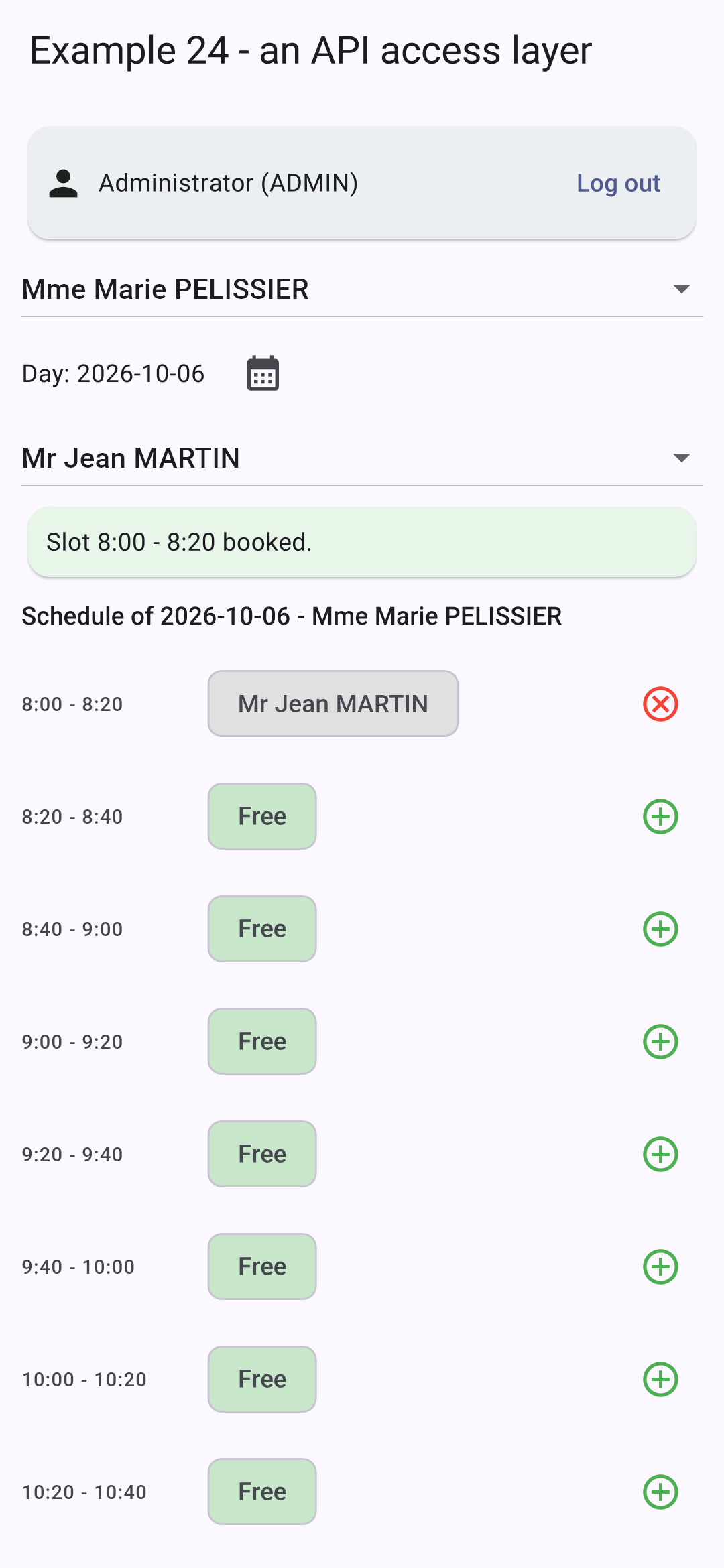
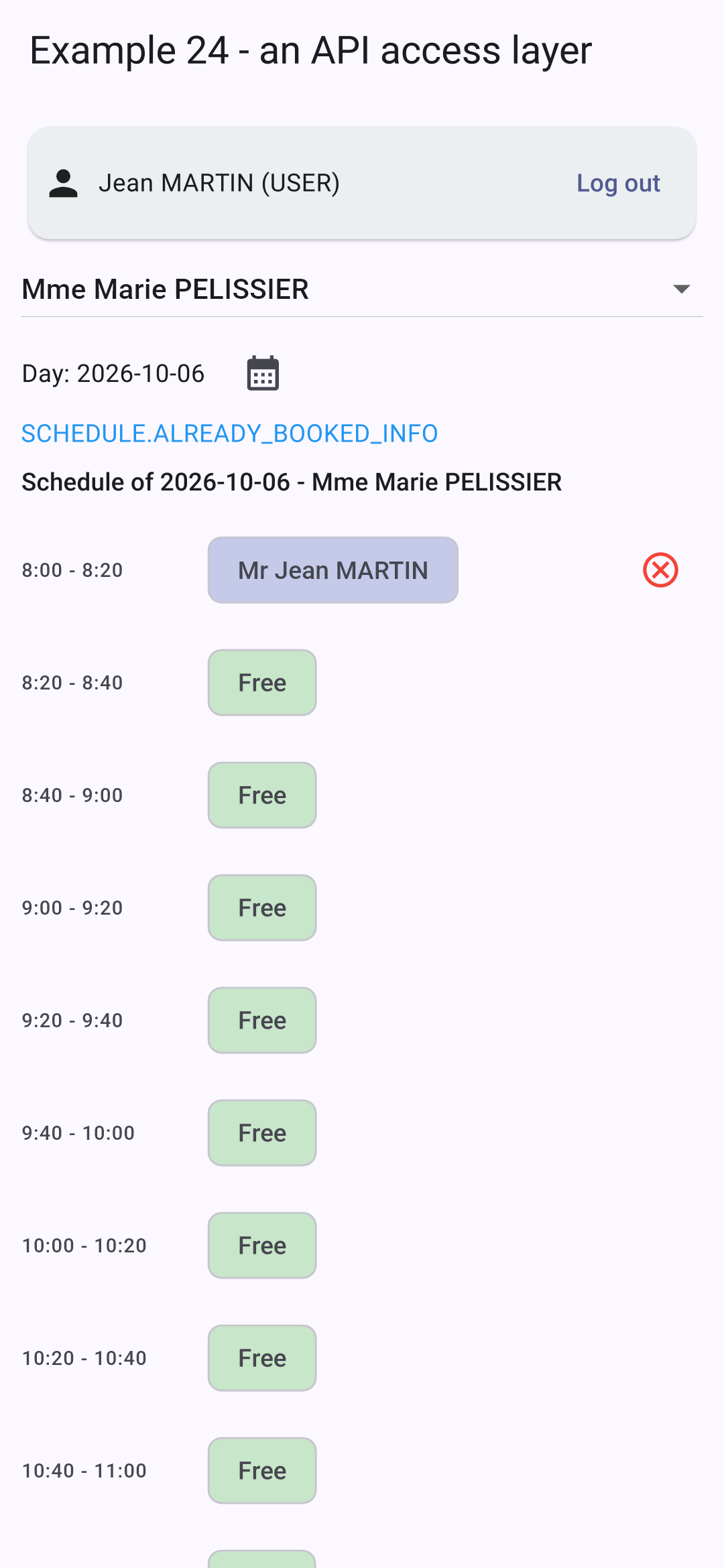
以 [admin] 身份登录,PELISSIER 女士的日程;一个时间段被预约给一位患者;以 [martin] (角色 USER)身份登录,同一份日程:
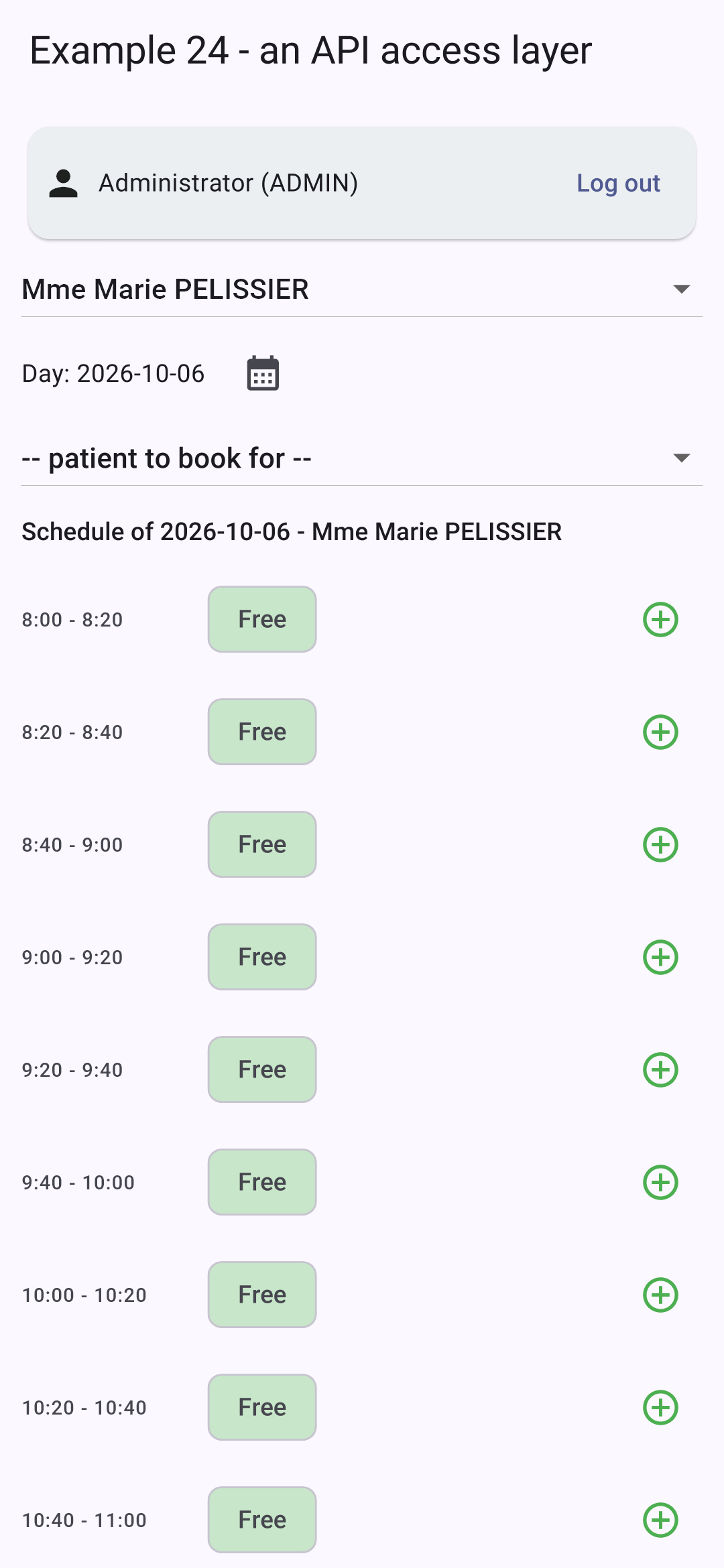
患者 [martin] 看不到已预约时间段的患者姓名:服务器没有把它发给他。

9.4. 示例 25:服务器返回的错误

9.4.1. 字典

{
  "FORM": {
    "TITLE_ADD": "Ajouter un client",
    "TITLE_EDIT": "Modifier un client",
    "TITLE": "Titre",
    "FIRSTNAME": "Prénom",
    "LASTNAME": "Nom",
    "LOGIN": "Login",
    "PASSWORD": "Mot de passe",
    "SAVE": "Enregistrer",
    "CANCEL": "Annuler",
    "EDIT": "Modifier",
    "DELETE": "Supprimer",
    "DELETE_CONFIRM": "Supprimer le client {{name}}, son compte et ses rendez-vous ?",
    "ADDED": "Le client {{name}} a été ajouté (login : {{login}}).",
    "UPDATED": "Le client {{name}} a été modifié.",
    "DELETED": "Le client {{name}} a été supprimé.",
    "ADMIN_ONLY": "Connectez-vous avec le compte admin : seul le rôle ADMIN gère les clients.",
    "PAGE_TITLE": "Exemple 25 - les erreurs du serveur",
    "NEW": "Nouveau client"
  },
  "ERRORS": {
    "INVALID_FORM": "Le formulaire contient des erreurs.",
    "INVALID_TITLE": "Choisissez un titre dans la liste.",
    "FIRSTNAME_REQUIRED": "Le prénom est obligatoire.",
    "FIRSTNAME_TOO_LONG": "Le prénom ne doit pas dépasser 20 caractères.",
    "LASTNAME_REQUIRED": "Le nom est obligatoire.",
    "LASTNAME_TOO_LONG": "Le nom ne doit pas dépasser 20 caractères.",
    "INVALID_LOGIN": "30 caractères au plus : lettres minuscules non accentuées, chiffres, point, tiret, souligné.",
    "PASSWORD_TOO_LONG": "Le mot de passe ne doit pas dépasser 72 caractères.",
    "LOGIN_TAKEN": "Ce login est déjà utilisé par un autre compte.",
    "PATIENT_ALREADY_EXISTS": "Un client portant ce prénom et ce nom existe déjà.",
    "PATIENT_NOT_FOUND": "Ce client n'existe pas (ou plus).",
    "CONCURRENT_UPDATE": "Cette fiche a été modifiée entre-temps par un autre utilisateur. Rechargez-la avant de recommencer.",
    "FORBIDDEN": "Votre rôle ne vous permet pas cette action.",
    "AUTH_REQUIRED": "Connectez-vous d'abord.",
    "SESSION_EXPIRED": "Votre session a expiré : reconnectez-vous.",
    "SERVER_UNREACHABLE": "Le serveur ne répond pas.",
    "SERVER_ERROR": "Une erreur inattendue s'est produite.",
    "WRONG_CAPTCHA": "Les caractères recopiés ne correspondent pas à l'image."
  }
}

服务器的错误消息是键 (“ERRORS.LASTNAME_REQUIRED”):由字典来翻译它们。

9.4.2. 屏幕

// =========================================================================
// lib/ex25_server_errors/main.dart - 显示服务器的错误
// -------------------------------------------------------------------------
// 客户管理(管理员账户)。这个表单在手机上特意
// 不做任何验证:所有内容都发送给
// 服务器,如果被拒绝,服务器会返回 JSON 错误(由 common/api.dart 转换为
// ApiError):
//
//   400 { key: 'ERRORS.INVALID_FORM', fields: { lastName: 'ERRORS.LASTNAME_REQUIRED' } }
//   409 { key: 'ERRORS.PATIENT_ALREADY_EXISTS', fields: { firstName: ..., lastName: ... } }
//   409 { key: 'ERRORS.CONCURRENT_UPDATE' }         (乐观锁)
//
// 每个字段的错误(ApiError.fields)都存储在状态中,并
// 显示在该字段下方(errorText);其消息是服务器发送的键(KEY),
// 由界面进行翻译(示例 21 的字典)。
// 修改字段会清除它的错误。
// 可以试试:空的姓、"Dr" 头衔、重名者(Alice DURAND)、
// 已被占用的登录名(martin)、在两台设备上修改同一条记录……
// =========================================================================

import 'package:flutter/material.dart';
import 'package:provider/provider.dart';
import 'package:shared_preferences/shared_preferences.dart';

import '../common/api.dart';
import '../common/login_bar.dart';
import '../common/http_client.dart';
import '../common/api_error.dart';
import '../common/types.dart';
import '../ex16_confirmation/confirmation.dart';
import '../ex21_i18n/translations.dart';
import '../ex23_login/command.dart';

Future<void> main() async {
  WidgetsFlutterBinding.ensureInitialized();
  final storage = await SharedPreferences.getInstance();
  final translations = Translations('ex25', storage);
  await translations.start();
  runApp(
    MultiProvider(
      providers: [
        Provider.value(value: Api(CookieClient(storage))),
        ChangeNotifierProvider.value(value: translations),
      ],
      child: MaterialApp(
        debugShowCheckedModeBanner: false,
        theme: ThemeData(colorSchemeSeed: Colors.indigo),
        home: const ClientsPage(),
      ),
    ),
  );
}

// 表单的各个字段
enum Field { title, firstName, lastName, login, password }

class ClientsPage extends StatefulWidget {
  const ClientsPage({super.key});

  @override
  State<ClientsPage> createState() => _ClientsPageState();
}

class _ClientsPageState extends State<ClientsPage> {
  late final Api _api = context.read<Api>();
  User? _user;
  List<Person> _clients = [];

  // 表单:_editedId == null -> 创建,否则为更新
  int? _editedId;
  int _version = 0;
  String _title = 'Mr';
  final _texts = {
    for (final c in [Field.firstName, Field.lastName, Field.login, Field.password]) c: TextEditingController(),
  };
  // 每个字段的错误(翻译键),由服务器返回
  Map<String, String> _errors = {};
  // 上一次错误的通用消息,以及成功时的消息(键 + 参数)
  ApiError? _pageError;
  ({String key, Map<String, String> params})? _success;
  // 发送到服务器:一个 Command(示例 23),它会告知是否正在进行中
  final _sending = Command();

  bool get _isAdmin => _user?.role == Role.admin;

  @override
  void dispose() {
    for (final c in _texts.values) {
      c.dispose();
    }
    _sending.dispose();
    super.dispose();
  }

  Future<void> _reload() async {
    final clients = Person.list(await _api.get('/clients'));
    if (mounted) setState(() => _clients = clients);
  }

  Future<void> _onUserChange(User? u) async {
    setState(() {
      _user = u;
      _clients = [];
    });
    if (u?.role == Role.admin) await _reload();
  }

  void _clearMessages() {
    _errors = {};
    _pageError = null;
    _success = null;
  }

  void _newForm() {
    setState(() {
      _editedId = null;
      _version = 0;
      _title = 'Mr';
      for (final c in _texts.values) {
        c.clear();
      }
      _clearMessages();
    });
  }

  void _edit(Person c) {
    setState(() {
      _editedId = c.id;
      // 随记录一起读取的版本号(VERSION)会随更新一起回传:如果在此期间有人
      // 修改了该记录,服务器会回答 409 CONCURRENT_UPDATE
      _version = c.version;
      _title = c.title;
      _texts[Field.firstName]!.text = c.firstName;
      _texts[Field.lastName]!.text = c.lastName;
      _texts[Field.login]!.text = c.login ?? '';
      _texts[Field.password]!.clear();
      _clearMessages();
    });
  }

  Future<void> _save() async {
    setState(_clearMessages);
    final input = {
      'title': _title,
      for (final MapEntry(key: field, value: c) in _texts.entries) field.name: c.text,
      'version': _version,
    };
    try {
      final client = Person.fromJson(
        _editedId == null ? await _api.post('/clients', input) : await _api.put('/clients/$_editedId', input),
      );
      final key = _editedId == null ? 'FORM.ADDED' : 'FORM.UPDATED';
      _newForm(); // 表单已清空,消息已清除……
      // ……除了这一条
      setState(
        () => _success = (key: key, params: {'name': '${client.firstName} ${client.lastName}', 'login': client.login ?? ''}),
      );
      await _reload();
    } on ApiError catch (e) {
      setState(() {
        _pageError = e; // 通用消息
        _errors = e.fields; // 每个字段的错误
      });
    }
  }

  Future<void> _delete(Person c) async {
    final t = context.read<Translations>().t;
    final name = '${c.firstName} ${c.lastName}';
    final yes = await confirm(context, t('FORM.DELETE_CONFIRM', {'name': name}));
    if (!yes || !mounted) return;
    setState(_clearMessages);
    try {
      await _api.delete('/clients/${c.id}');
      setState(() => _success = (key: 'FORM.DELETED', params: {'name': name}));
    } on ApiError catch (e) {
      setState(() => _pageError = e);
    }
    await _reload();
  }

  @override
  Widget build(BuildContext context) {
    final translations = context.watch<Translations>();
    final t = translations.t;

    // 一个输入字段,带有它的错误(服务器的键)的译文
    Widget field(Field c, {bool secret = false}) => TextField(
      controller: _texts[c],
      obscureText: secret,
      decoration: InputDecoration(
        labelText: t('FORM.${c.name.toUpperCase()}'),
        errorText: _errors[c.name] == null ? null : t(_errors[c.name]!),
        errorMaxLines: 2,
      ),
      // 被修改的字段:它的错误消失
      onChanged: (_) {
        if (_errors.containsKey(c.name)) setState(() => _errors = {..._errors}..remove(c.name));
      },
    );

    final success = _success;
    final pageError = _pageError;
    return Scaffold(
      appBar: AppBar(
        title: Text(t('FORM.PAGE_TITLE')),
        actions: [
          // 语言:一个菜单
          PopupMenuButton<String>(
            icon: const Icon(Icons.translate),
            onSelected: translations.changeLanguage,
            itemBuilder: (_) => [for (final l in languages) PopupMenuItem(value: l, child: Text(l.toUpperCase()))],
          ),
        ],
      ),
      body: ListView(
        padding: const EdgeInsets.all(12),
        children: [
          LoginBar(onUserChange: _onUserChange),
          if (_user != null && !_isAdmin)
            Card(
              color: Colors.amber.shade50,
              child: Padding(padding: const EdgeInsets.all(12), child: Text(t('FORM.ADMIN_ONLY'))),
            ),
          if (_isAdmin) ...[
            for (final c in _clients)
              ListTile(
                dense: true,
                title: Text(c.fullName),
                subtitle: Text(c.login ?? ''),
                trailing: Row(
                  mainAxisSize: MainAxisSize.min,
                  children: [
                    IconButton(tooltip: t('FORM.EDIT'), icon: const Icon(Icons.edit), onPressed: () => _edit(c)),
                    IconButton(
                      tooltip: t('FORM.DELETE'),
                      icon: const Icon(Icons.delete_outline, color: Colors.red),
                      onPressed: () => _delete(c),
                    ),
                  ],
                ),
              ),
            Card(
              child: Padding(
                padding: const EdgeInsets.all(12),
                child: Column(
                  crossAxisAlignment: CrossAxisAlignment.start,
                  children: [
                    Text(
                      t(_editedId == null ? 'FORM.TITLE_ADD' : 'FORM.TITLE_EDIT'),
                      style: Theme.of(context).textTheme.titleMedium,
                    ),
                    // 服务器会拒绝的 "Dr" 头衔:用来查看 ERRORS.INVALID_TITLE
                    DropdownButton<String>(
                      value: _title,
                      items: [
                        for (final title in ['Mr', 'Mme', 'Melle', 'Dr'])
                          DropdownMenuItem(value: title, child: Text(title)),
                      ],
                      onChanged: (v) => setState(() {
                        _title = v!;
                        _errors = {..._errors}..remove('title');
                      }),
                    ),
                    if (_errors['title'] != null)
                      Text(t(_errors['title']!), style: const TextStyle(color: Colors.red, fontSize: 12)),
                    field(Field.firstName),
                    field(Field.lastName),
                    field(Field.login),
                    field(Field.password, secret: true),
                    const SizedBox(height: 12),
                    ListenableBuilder(
                      listenable: _sending,
                      builder: (context, _) => Wrap(
                        spacing: 8,
                        children: [
                          FilledButton(
                            onPressed: _sending.running ? null : () => _sending.execute(_save),
                            child: Text(t('FORM.SAVE')),
                          ),
                          OutlinedButton(onPressed: _newForm, child: Text(t('FORM.CANCEL'))),
                        ],
                      ),
                    ),
                    if (success != null)
                      Padding(
                        padding: const EdgeInsets.only(top: 12),
                        child: Text(t(success.key, success.params), style: const TextStyle(color: Colors.green)),
                      ),
                    // 通用消息和 HTTP 状态,便于理解
                    if (pageError != null)
                      Padding(
                        padding: const EdgeInsets.only(top: 12),
                        child: Text.rich(
                          TextSpan(
                            children: [
                              TextSpan(
                                text: t(pageError.key, pageError.params),
                                style: const TextStyle(color: Colors.red),
                              ),
                              TextSpan(
                                text: '  ($pageError)',
                                style: const TextStyle(color: Colors.grey, fontSize: 12),
                              ),
                            ],
                          ),
                        ),
                      ),
                  ],
                ),
              ),
            ),
          ],
        ],
      ),
    );
  }
}

患者管理(admin 账户)。这个表单在手机上不做任何验证:一切都发送给服务器,服务器在拒绝时会返回错误 JSON,并被转换为 [ApiError]。

  • 第 37–43 行:示例 21 中的翻译,使用该示例中的字典;
  • 第 77 行:每个字段的错误:由服务器返回的一个翻译键;
  • 第 79–82 行:最近一次错误的通用消息、成功消息,以及发送给服务器的 [Command](示例 23);
  • 第 126–131 行:从记录中读取的版本 会随修改一同更新:如果其间有人修改了该记录,服务器会返回 409 [CONCURRENT_UPDATE] (乐观锁);
  • 第 141–162 行:保存操作:[POST /api/clients] (创建)或 [PUT /api/clients/:id] (更新)。如果操作被拒绝,[ApiError] 会返回一条通用错误消息和每个字段的具体错误;
  • 第 188–198 行:一个输入字段:它的错误(一个服务器键)会被翻译并显示在字段下方([errorText]);编辑该字段会清除它的错误;
  • 第 209–212 行:顶部栏中用于选择语言的菜单;
  • 第 257 行:一个“Dr”称谓,服务器会拒绝它:见 [ERRORS.INVALID_TITLE];
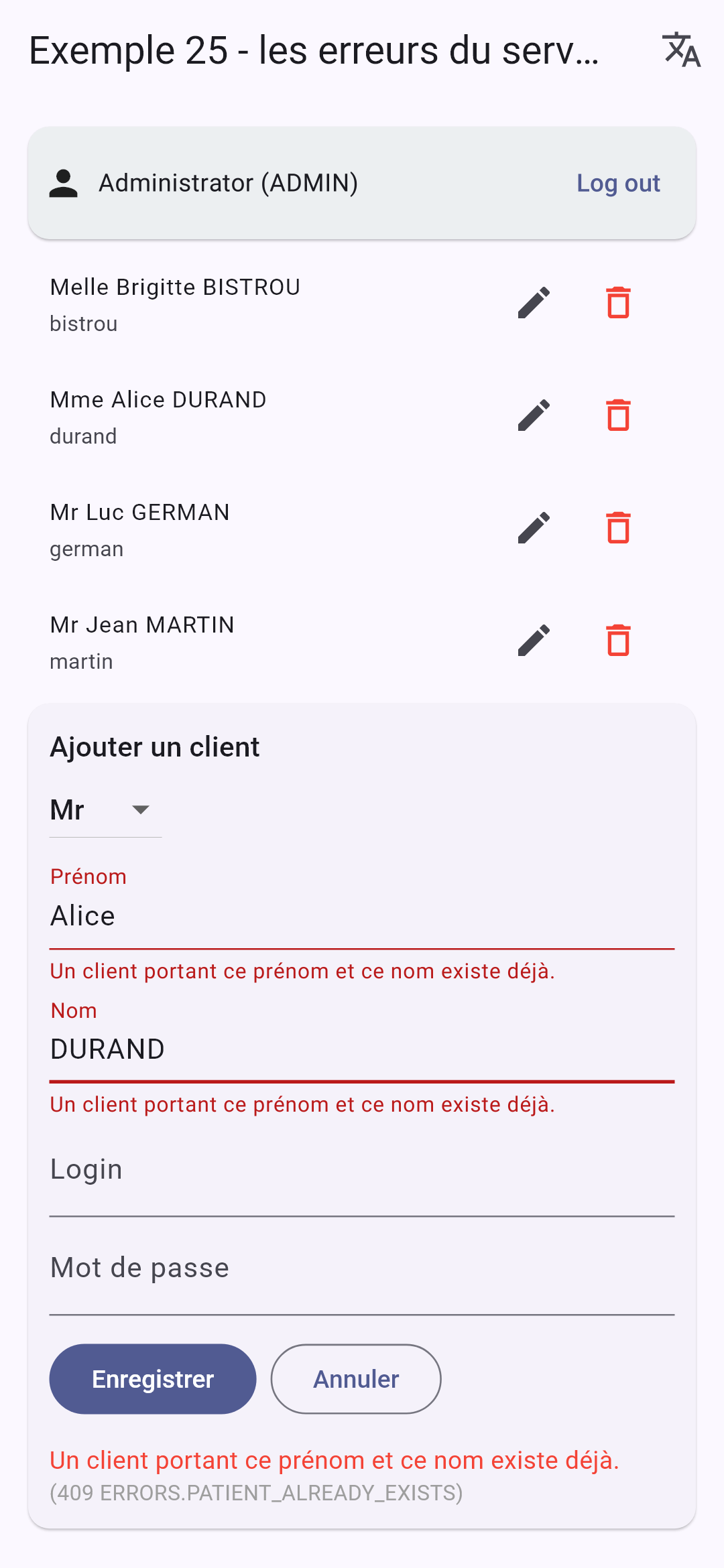
  • 第 291–302 行:翻译后的通用消息,以及为了说明上下文而显示的 HTTP 状态和键。

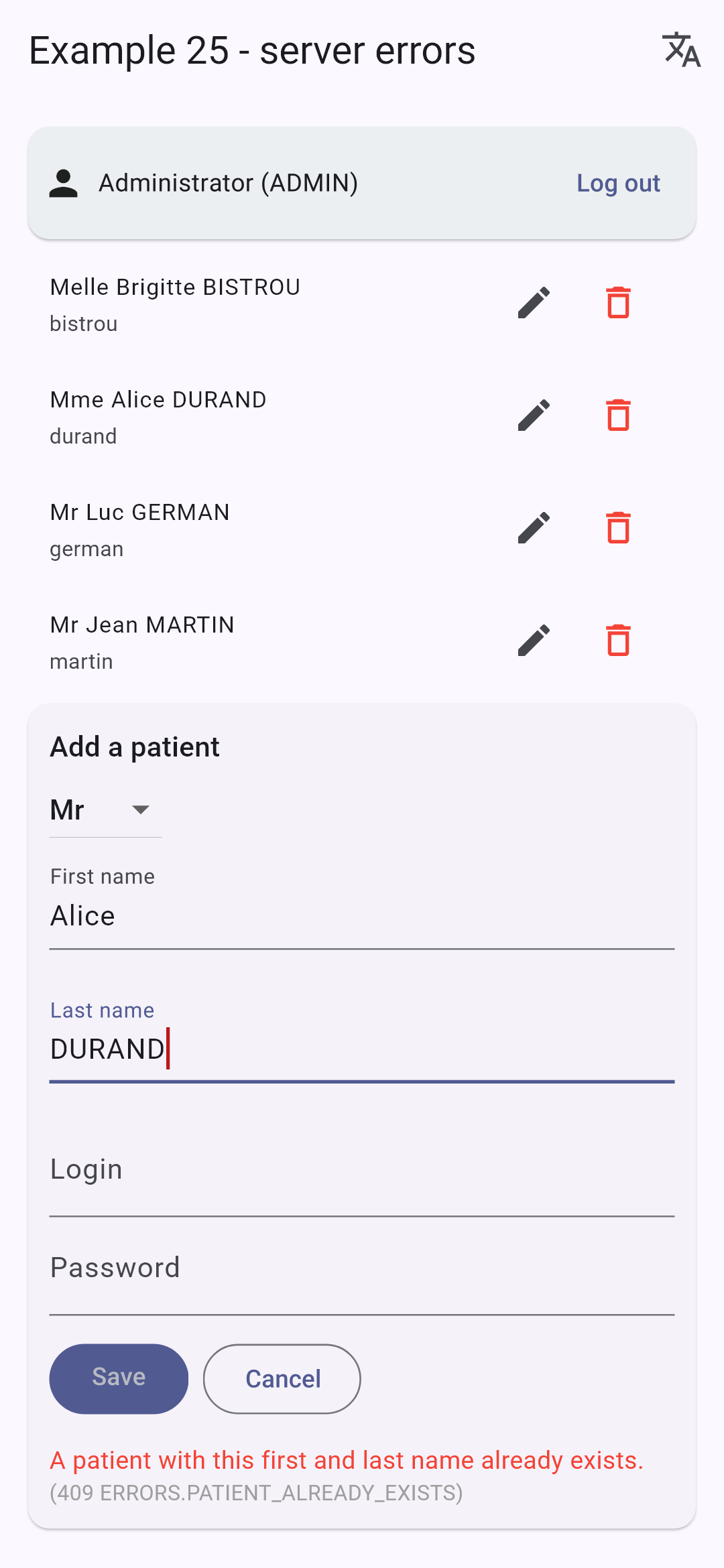
一个空表单;一个同名者(“Alice DURAND”);同样的情形,用法语显示:
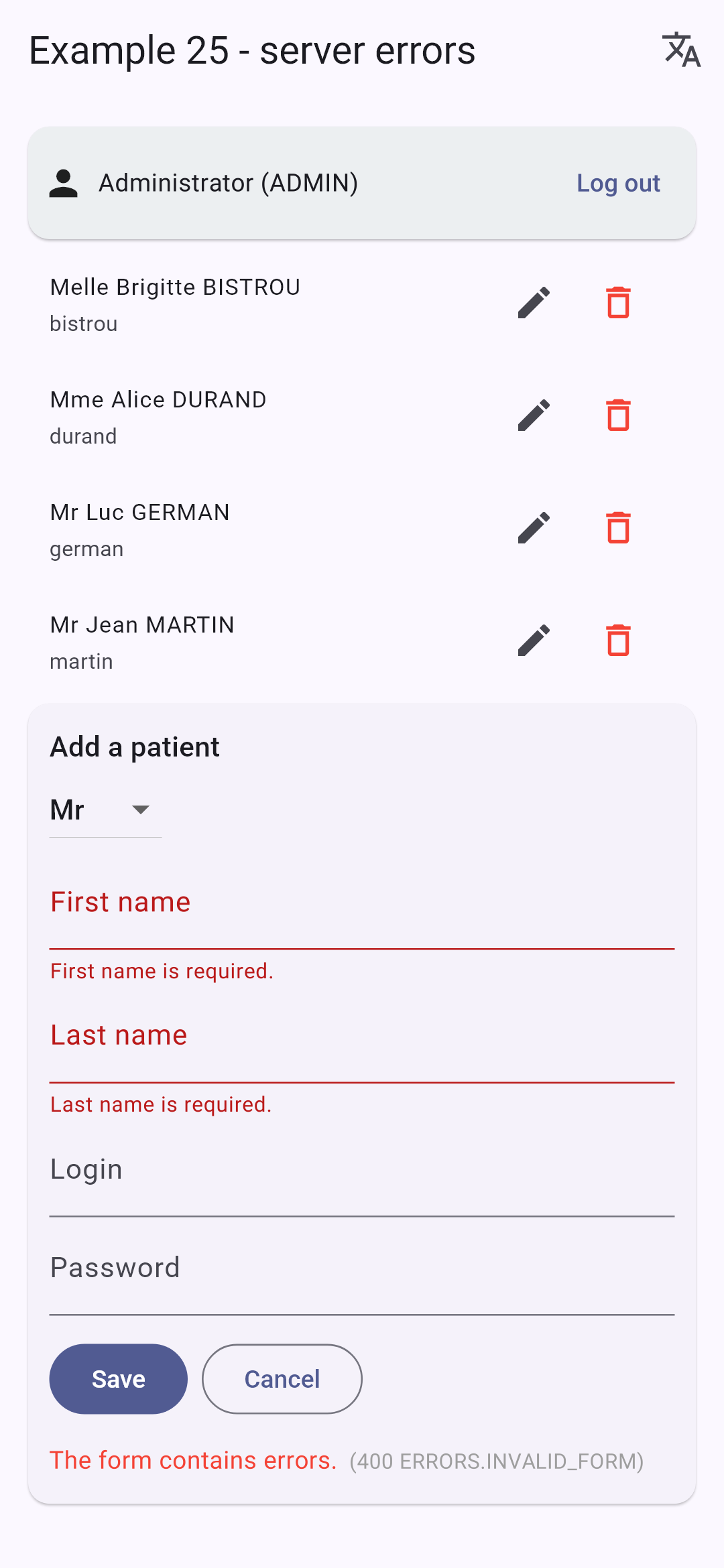
还可以试试:一个已被占用的登录名([martin])、一个无效的登录名(“Jean M”),以及在两台设备上编辑同一条记录(或在应用中和用 [curl] 同时编辑)。

其原理与案例研究中的所有表单相同:规则只存在于一个地方——服务器;应用用用户的语言显示结果。