6. 税款计算服务的 HTTP 客户端
6.1. 简介
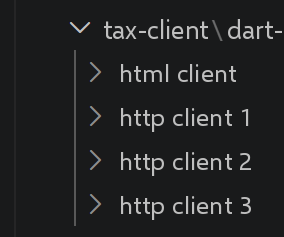
本章不做结构性改动,复现了 TypeScript 课程中构建的三层相继的客户端,每一层都对前一层加以改进:第一个客户端(CLI),所有计算都留在服务器端;第二个客户端(CLI),计算转移到客户端([business] 层);第三个客户端,为浏览器编译;最后是一个完整的 HTML 客户端,拥有自己的视图。这四个客户端都依赖同一个 NestJS 服务器,该服务器已在上一章中安装。
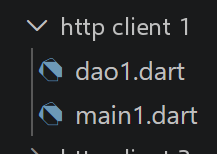
6.2. HTTP 客户端 1
6.2.1. [dao] 层
6.2.2. 脚本 [dao1]
| // dao1.dart
// 移植自 Dao1.ts:[dao] 层(数据访问对象)将与税款计算服务器 HTTP 通信的
// 所有细节(URL、
// 方法、会话 Cookie)封装在简单的业务方法 ¶(initSession、
// authenticateUser、calculateTax……)之后。
import 'package:dio/dio.dart';
class Dao1 {
final Dio _dio;
final String _sessionCookieName;
String _sessionCookie = '';
// 构造函数 - 接收要使用的 Dio 实例,就像 TypeScript
// 脚本把 axios 实例作为参数接收一样
Dao1(this._dio) : _sessionCookieName = "connect.sid";
// 初始化会话
Future<dynamic> initSession() {
return _getRemoteData(
'main.php',
method: 'GET',
queryParameters: {'action': 'init-session', 'type': 'json'},
);
}
Future<dynamic> authenticateUser(String user, String password) {
return _getRemoteData(
'main.php',
method: 'POST',
queryParameters: {'action': 'authenticate-user'},
data: {'user': user, 'password': password},
contentType: Headers.formUrlEncodedContentType,
);
}
// 税款计算
Future<dynamic> calculateTax(String married, int children, int salary) {
return _getRemoteData(
'main.php',
method: 'POST',
queryParameters: {'action': 'calculate-tax'},
data: {'married': married, 'children': children, 'salary': salary},
contentType: Headers.formUrlEncodedContentType,
);
}
// 模拟列表
Future<dynamic> listSimulations() {
return _getRemoteData(
'main.php',
method: 'GET',
queryParameters: {'action': 'list-simulations'},
);
}
// 删除一次模拟
Future<dynamic> deleteSimulation(int index) {
return _getRemoteData(
'main.php',
method: 'GET',
queryParameters: {'action': 'delete-simulation', 'number': index},
);
}
Future<dynamic> _getRemoteData(
String path, {
required String method,
Map<String, dynamic>? queryParameters,
Object? data,
String? contentType,
}) async {
// 用于会话 Cookie
final options = Options(
method: method,
contentType: contentType,
headers: {'Cookie': _sessionCookie},
validateStatus: (_) => true,
);
// 执行 HTTP 请求
final response = await _dio.request(
path,
queryParameters: queryParameters,
data: data,
options: options,
);
// 如果会话 Cookie 存在,我们就取出它
final setCookie = response.headers['set-cookie'];
if (setCookie != null) {
for (final header in setCookie) {
final result = RegExp('^($_sessionCookieName.+?);').firstMatch(header);
if (result != null) {
_sessionCookie = result.group(1)!;
break;
}
}
}
// 服务器的响应在 [response.data] 中
return response.data;
}
}
|
我们来解读这段代码:
- 第 48 行:[dao] 层(数据访问对象)将所有 HTTP 通信细节(URL、方法、会话 Cookie)封装在简单的业务方法之后——[initSession]、[authenticateUser]、[calculateTax]、[listSimulations]、[deleteSimulation](第 57 行)。
- 第 15 行:[Dao1(this._dio)] 接收要使用的 [Dio] 实例作为构造函数参数,与 TypeScript 脚本接收 [axios] 实例的方式完全一样。
- 第 65 行:[_getRemoteData](私有,前缀为 [_])集中处理会话 Cookie 的手动跟踪([response.headers['set-cookie']]、[RegExp](第 90 行)),这在 dart_dio_03.dart 中已经出现过:DAO 的每个公共方法都依赖这同一个私有方法。
6.2.3. [main1]
6.2.4. 脚本 [main1]
| // main1.dart
// 移植自 main1.ts。
import 'dart:convert';
import 'package:dio/dio.dart';
import 'dao1.dart';
Future<void> main() async {
// Dio 配置 - 全局 baseUrl/timeout,与 TypeScript 中的 axios.defaults
// 相同
final dio = Dio(BaseOptions(
baseUrl: 'http://localhost:3000/',
connectTimeout: const Duration(seconds: 2),
receiveTimeout: const Duration(seconds: 2),
));
// 实例化 [dao] 层
final dao = Dao1(dio);
// 使用 [dao] 层
try {
// 初始化会话
log("-----------init-session");
dynamic response = await dao.initSession();
log(response);
// 身份验证
log("-----------authenticate-user");
response = await dao.authenticateUser("admin", "admin");
log(response);
// 税款计算 -
// Future.wait 相当于 Promise.all ¶(已在 async_05.dart 中见过)
log("-----------calculate-tax x 3");
response = await Future.wait([
dao.calculateTax("yes", 2, 45000),
dao.calculateTax("no", 2, 45000),
dao.calculateTax("no", 1, 30000),
]);
log(response);
// 模拟列表
log("-----------list-of-simulations");
response = await dao.listSimulations();
log(response);
// 删除一次模拟
log("-----------deleting simulation no. 1");
response = await dao.deleteSimulation(1);
log(response);
} catch (error) {
// 我们记录该错误
print("error=$error");
}
}
// JSON 日志
void log(Object? object) {
const JsonEncoder encoder = JsonEncoder.withIndent(' ');
print(encoder.convert(object));
}
|
我们来解读这段代码:
- 第 16 行:[final dao = Dao1(dio);]:[dao] 层只实例化一次,然后在整个调用序列(init-session、身份验证、计算、列表、删除)中复用。
- 第 30–31 行:[Future.wait([dao.calculateTax(...), ...])]:三次税款计算并行启动,相当于 Dart 中的 [Promise.all],我们在 async_05.dart 中已经见过。
- 第 52–53 行:[JsonEncoder.withIndent(' ').convert(object)]:实用函数 [log] 复现了 [JSON.stringify(x, null, 2)] 的缩进显示。
执行结果如下:
| "-----------init-session"
{
"action": "init-session",
"status": 700,
"response": "session started with type [json]"
}
"-----------authenticate-user"
{
"action": "authenticate-user",
"status": 200,
"response": "Authentication successful [admin, admin]"
}
"-----------calculate-tax x 3"
[
{
"action": "calculate-tax",
"status": 300,
"response": {
"married": "yes",
"children": 2,
"salary": 45000,
"tax": 502,
"surcharge": 0,
"discount": 857,
"reduction": 126,
"rate": 0.14
}
},
{
"action": "calculate-tax",
"status": 300,
"response": {
"married": "no",
"children": 2,
"salary": 45000,
"tax": 3250,
"surcharge": 370,
"discount": 0,
"reduction": 0,
"rate": 0.3
}
},
{
"action": "calculate-tax",
"status": 300,
"response": {
"married": "no",
"children": 1,
"salary": 30000,
"tax": 1687,
"surcharge": 0,
"discount": 0,
"reduction": 0,
"rate": 0.14
}
}
]
"-----------list-of-simulations"
{
"action": "list-simulations",
"status": 500,
"response": [
{
"married": "yes",
"children": 2,
"salary": 45000,
"tax": 502,
"surcharge": 0,
"discount": 857,
"reduction": 126,
"rate": 0.14
},
{
"married": "no",
"children": 1,
"salary": 30000,
"tax": 1687,
"surcharge": 0,
"discount": 0,
"reduction": 0,
"rate": 0.14
}
]
}
"-----------deleting simulation no. 1"
{
"action": "delete-simulation",
"status": 600,
"response": [
{
"married": "yes",
"children": 2,
"salary": 45000,
"tax": 502,
"surcharge": 0,
"discount": 857,
"reduction": 126,
"rate": 0.14
}
]
}
|
6.3. HTTP 客户端 2
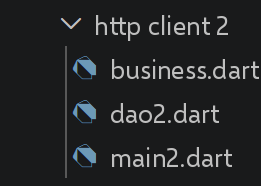
第二个客户端将税款计算从服务器转移到客户端:服务器现在只通过 [get-admindata] 一次性提供原始税务数据(税率、档次等),由 [business] 层来执行计算。
6.3.1. [Business]
6.3.2. 脚本 [business]
| // business.dart
// 移植自 Business.ts:
// 税款计算完全在客户端完成 ¶(TypeScript 中在浏览器里,这里在 Dart 程序里),依据
// 仅从服务器获取一次的原始税务数据,通过
// [Dao2.getAdminData](见 dao2.dart)。
class Business {
// [dynamic]:税务服务器发送的数据(税率、上限……)的
// 确切结构在这里没有文档说明;与
// TypeScript 中一样,我们有意在该类型上保持灵活
final Map<String, dynamic> taxAdminData;
Business(this.taxAdminData);
// 税款计算
// --------------------------------------------------------------------------
// married:是、否
// children:子女数
// salary:年薪
Map<String, dynamic> calculateTax(String married, int children, num salary) {
// 计算有子女时的税款
final result1 = _calculateTax2(married, children, salary);
final tax1 = result1['tax'] as num;
// 计算无子女时的税款
Map<String, dynamic> result2;
num tax2;
num halfShareCeiling;
if (children != 0) {
result2 = _calculateTax2(married, 0, salary);
tax2 = result2['tax'] as num;
// 应用家庭系数上限
halfShareCeiling = taxAdminData['halfShareQfCeiling'] as num;
if (children < 3) {
// 前 2 个子女的 halfShareCeiling
tax2 = tax2 - children * halfShareCeiling;
} else {
// 前 2 个子女的 halfShareCeiling,之后的子女加倍
tax2 = tax2 - 2 * halfShareCeiling - (children - 2) * 2 * halfShareCeiling;
}
} else {
// 不重新计算税款
tax2 = tax1;
result2 = result1;
}
// 我们取 [tax1, tax2] 中较高的税款
num tax;
num rate;
num surcharge;
if (tax1 > tax2) {
tax = tax1;
rate = result1['rate'] as num;
surcharge = result1['surcharge'] as num;
} else {
surcharge = tax2 - tax1 + (result2['surcharge'] as num);
tax = tax2;
rate = result2['rate'] as num;
}
// 计算可能的减免
final discount = _getDiscount(married, tax);
tax -= discount;
// 计算可能的税款扣减
final reduction = _getReduction(married, salary, children, tax);
tax -= reduction;
// 结果
return {
'tax': tax.floor(),
'surcharge': surcharge,
'discount': discount,
'reduction': reduction,
'rate': rate,
};
}
// --------------------------------------------------------------------------
Map<String, dynamic> _calculateTax2(String married, int children, num salary) {
// 份数
married = married.toLowerCase();
num shares;
if (married == "yes") {
shares = children / 2 + 2;
} else {
shares = children / 2 + 1;
}
// 从第 3 个子女起每个子女 1 份
if (children >= 3) {
// 从第 3 个子女起每个子女多半份
shares += 0.5 * (children - 2);
}
// 应税收入
final taxableIncome = _getTaxableIncome(salary);
// 附加税
num surcharge = (taxableIncome - 0.9 * salary).floor();
// 出于舍入问题
if (surcharge < 0) {
surcharge = 0;
}
// 家庭系数
final quotient = taxableIncome / shares;
// 税款计算
final List<num> limits = List<num>.from(taxAdminData['limits'] as List);
final List<num> coeffR = List<num>.from(taxAdminData['coeffR'] as List);
final List<num> coeffN = List<num>.from(taxAdminData['coeffN'] as List);
// 被放在 [limits] 列表的末尾以停止后面的循环
limits[limits.length - 1] = quotient;
// 查找税率
var i = 0;
while (quotient > limits[i]) {
i++;
}
// 因为我们把 quotient 放在了 limits 的末尾,前面的循环
// 不会越过 limits 列表
// 现在我们可以计算税款
final tax = (taxableIncome * coeffR[i] - shares * coeffN[i]).floor();
// 结果
return {'tax': tax, 'surcharge': surcharge, 'rate': coeffR[i]};
}
// taxableIncome = annualSalary - allowance(扣除额有最小值和最大值)
num _getTaxableIncome(num salary) {
// 按薪水 10% 计算的扣除额
num allowance = 0.1 * salary;
// 该扣除额不能超过 tenPercentAllowanceMax
final allowanceMax = taxAdminData['tenPercentAllowanceMax'] as num;
if (allowance > allowanceMax) {
allowance = allowanceMax;
}
// 该扣除额不能低于 tenPercentAllowanceMin
final allowanceMin = taxAdminData['tenPercentAllowanceMin'] as num;
if (allowance < allowanceMin) {
allowance = allowanceMin;
}
// 应税收入
final taxableIncome = salary - allowance;
return taxableIncome.floor();
}
// 计算可能的减免
num _getDiscount(String married, num taxes) {
// 起初,减免为零
num discount = 0;
// 获得减免的最高税额
final taxCeilingForDiscount = married == "yes"
? taxAdminData['coupleTaxCeilingForDiscount'] as num
: taxAdminData['singleTaxCeilingForDiscount'] as num;
if (taxes < taxCeilingForDiscount) {
// 减免的最高金额
final discountCeiling = married == "yes"
? taxAdminData['coupleDiscountCeiling'] as num
: taxAdminData['singleDiscountCeiling'] as num;
// 理论减免额
discount = discountCeiling - 0.75 * taxes;
// 减免额不能超过税额
if (discount > taxes) {
discount = taxes;
}
// 减免额不能 < 0
if (discount < 0) {
discount = 0;
}
}
// 结果 - ceil() 相当于 Math.ceil() 的 Dart 写法
return discount.ceil();
}
// 计算可能的扣减
num _getReduction(String married, num salary, int children, num taxes) {
// 享受 20% 扣减的收入上限
num incomeCeilingForReduction = married == "yes"
? taxAdminData['coupleIncomeCeilingForReduction'] as num
: taxAdminData['singleIncomeCeilingForReduction'] as num;
final halfShareReductionValue = taxAdminData['halfShareReductionValue'] as num;
incomeCeilingForReduction += children * halfShareReductionValue;
if (children > 2) {
incomeCeilingForReduction += (children - 2) * halfShareReductionValue;
}
// 应税收入
final taxableIncome = _getTaxableIncome(salary);
// 扣减
num reduction = 0;
if (taxableIncome < incomeCeilingForReduction) {
// 20% 扣减
reduction = 0.2 * taxes;
}
return reduction.ceil();
}
}
|
我们来解读这段代码:
- 第 12 行:[Business(this.taxAdminData)]:构造函数接收 DAO 仅检索一次的原始税务数据——此后计算税款不再需要任何网络调用。
- 第 19 行:[Map<String, dynamic> calculateTax(String married, int children, num salary)]:TypeScript 算法的忠实逐行移植——步骤相同([_calculateTax2]、[_getTaxableIncome]、[_getDiscount]、[_getReduction]),限制家庭系数上限的逻辑也相同。
- [.floor()]/[.ceil()]([num] 的方法)取代了 [Math.floor(...)]/[Math.ceil(...)]:在 Dart 中,它们是数字本身的实例方法,而不是工具类的静态方法。
- 返回的 [Map] 的键([tax]、[surcharge]、[discount]、[reduction]……)使用与 Dart 标识符(变量名和参数名)相同的纯 ASCII 名称——Dart 中字符串可以包含重音字符,但标识符不可以(参见本章后面的 simulation.dart)。
6.3.3. [Dao2]
6.3.4. 脚本 [dao2]
| // dao2.dart
// 移植自 Dao2.ts:initSession 和
// authenticateUser 与 dao1.dart 相同,但提供 [getAdminData] 而不是
// [calculateTax]/[listSimulations]/[deleteSimulation] - 计算和
// 模拟列表现在由
// [business] 层在客户端处理(见 business.dart),服务器只用于提供
// 原始税务数据(税率、上限……)。
import 'package:dio/dio.dart';
class Dao2 {
final Dio _dio;
final String _sessionCookieName;
String _sessionCookie = '';
Dao2(this._dio) : _sessionCookieName = "connect.sid";
Future<dynamic> initSession() {
return _getRemoteData(
'main.php',
method: 'GET',
queryParameters: {'action': 'init-session', 'type': 'json'},
);
}
Future<dynamic> authenticateUser(String user, String password) {
return _getRemoteData(
'main.php',
method: 'POST',
queryParameters: {'action': 'authenticate-user'},
data: {'user': user, 'password': password},
contentType: Headers.formUrlEncodedContentType,
);
}
Future<dynamic> getAdminData() {
return _getRemoteData(
'main.php',
method: 'GET',
queryParameters: {'action': 'get-admindata'},
);
}
Future<dynamic> _getRemoteData(
String path, {
required String method,
Map<String, dynamic>? queryParameters,
Object? data,
String? contentType,
}) async {
final options = Options(
method: method,
contentType: contentType,
headers: {'Cookie': _sessionCookie},
validateStatus: (_) => true,
);
final response = await _dio.request(
path,
queryParameters: queryParameters,
data: data,
options: options,
);
final setCookie = response.headers['set-cookie'];
if (setCookie != null) {
for (final header in setCookie) {
final result = RegExp('^($_sessionCookieName.+?);').firstMatch(header);
if (result != null) {
_sessionCookie = result.group(1)!;
break;
}
}
}
return response.data;
}
}
|
我们来解读这段代码:
- 第 4 行:[initSession] 和 [authenticateUser] 与 [Dao1] 相同,但暴露的是 [getAdminData],而不是 [calculateTax]/[listSimulations](第 4 行)/[deleteSimulation](第 4 行):这三个操作现在由刚刚引入的 [business] 层在客户端处理。
6.3.5. [main2]
6.3.6. 脚本 [main2]
| // main2.dart
// 移植自 main2.ts。
import 'dart:convert';
import 'package:dio/dio.dart';
import 'dao2.dart';
import 'business.dart';
Future<void> main() async {
// Dio 配置
final dio = Dio(BaseOptions(
baseUrl: 'http://localhost:3000/',
connectTimeout: const Duration(seconds: 2),
receiveTimeout: const Duration(seconds: 2),
));
// 实例化 [dao] 层
final dao = Dao2(dio);
// HTTP 请求
Map<String, dynamic> taxAdminData;
try {
// 初始化会话
log("-----------init-session");
dynamic response = await dao.initSession();
log(response);
// 身份验证
log("-----------authenticate-user");
response = await dao.authenticateUser("admin", "admin");
log(response);
// 税务数据
log("-----------get-admindata");
response = await dao.getAdminData();
log(response);
taxAdminData = response['response'] as Map<String, dynamic>;
} catch (error) {
// 我们记录该错误
print("error=$error");
// 结束
return;
}
// 实例化 [business] 层
final business = Business(taxAdminData);
// 税款计算
log("-----------calculate-tax x 3");
final List<Map<String, dynamic>> simulations = [];
simulations.add(business.calculateTax("yes", 2, 45000));
simulations.add(business.calculateTax("no", 2, 45000));
simulations.add(business.calculateTax("no", 1, 30000));
// 模拟列表
log("-----------list-of-simulations");
log(simulations);
// 删除一次模拟
log("-----------deleting simulation no. 1");
simulations.removeAt(1);
log(simulations);
}
// JSON 日志
void log(Object? object) {
const JsonEncoder encoder = JsonEncoder.withIndent(' ');
print(encoder.convert(object));
}
|
我们来解读这段代码:
- 第 41 行:[final business = Business(taxAdminData);]:[business] 层只实例化一次,就在从服务器检索税务数据之后。
- [simulations.add(business.calculateTax(...));]:税款计算不再涉及任何网络调用——与 main1.dart 不同,在 main1.dart 中每次计算都是一个单独的 HTTP 请求。
执行结果如下:
| "-----------init-session"
{
"action": "init-session",
"status": 700,
"response": "session started with type [json]"
}
"-----------authenticate-user"
{
"action": "authenticate-user",
"status": 200,
"response": "Authentication successful [admin, admin]"
}
"-----------get-admindata"
{
"action": "get-admindata",
"status": 1000,
"response": {
"limits": [
9964,
27519,
73779,
156244,
0
],
"coeffR": [
0,
0.14,
0.3,
0.41,
0.45
],
"coeffN": [
0,
1394.96,
5798,
13913.69,
20163.45
],
"halfShareQfCeiling": 1551,
"singleIncomeCeilingForReduction": 21037,
"coupleIncomeCeilingForReduction": 42074,
"halfShareReductionValue": 3797,
"singleDiscountCeiling": 1196,
"coupleDiscountCeiling": 1970,
"coupleTaxCeilingForDiscount": 2627,
"singleTaxCeilingForDiscount": 1595,
"tenPercentAllowanceMax": 12502,
"tenPercentAllowanceMin": 437
}
}
"-----------calculate-tax x 3"
"-----------list-of-simulations"
[
{
"tax": 502,
"surcharge": 0,
"discount": 857,
"reduction": 126,
"rate": 0.14
},
{
"tax": 3250,
"surcharge": 370,
"discount": 0,
"reduction": 0,
"rate": 0.3
},
{
"tax": 1687,
"surcharge": 0,
"discount": 0,
"reduction": 0,
"rate": 0.14
}
]
"-----------deleting simulation no. 1"
[
{
"tax": 502,
"surcharge": 0,
"discount": 857,
"reduction": 126,
"rate": 0.14
},
{
"tax": 1687,
"surcharge": 0,
"discount": 0,
"reduction": 0,
"rate": 0.14
}
]
|
6.4. HTTP 客户端 3
6.4.1. 自 2019 年以来工具链的演变
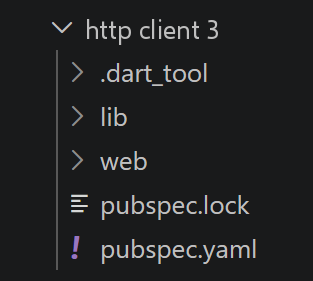
第三个客户端使用与 HTTP 客户端 2 相同的 [dao]/[business] 组合,但它是为浏览器编译的,而不是从命令行运行。与 TypeScript 一样,这种构建需要 webpack 和 babel,以及 polyfill([core-js/stable]、[regenerator-runtime/runtime]),以便现代代码在旧版浏览器中也能工作。在 Dart 方面,SDK 自带 Web 编译器([dart compile js]):不需要 polyfill;[Future]/[async]/[await]、记录、模式等都会被直接编译为等价的 JavaScript,与目标环境无关。
6.4.2. 编译并运行项目
在 [http client 3] 文件夹中:
[webdev serve] 开发服务器不是由 Dart SDK 提供的:必须先通过 [dart pub global activate webdev] 全局安装一次 [webdev] 包。
此命令会把 [webdev] 可执行文件安装到全局 pub 缓存中,该文件夹不会自动加入 Windows 的 PATH。要一劳永逸地将其加入(针对当前用户),请打开 PowerShell 终端并运行:
| [Environment]::SetEnvironmentVariable("Path", $env:Path + ";$env:LOCALAPPDATA\Pub\Cache\bin", "User")
|
然后必须关闭并重新打开终端(或 VSCode),新的 PATH 才会生效。接着,仍在 [http client 3] 文件夹中:
| dart pub get
webdev serve
|
在开发阶段,[webdev serve] 会启动一个服务器,每次修改都会自动重新编译(热重载):终端会显示要在浏览器中打开的 URL(默认:http://localhost:8080)。对于生产构建,仍可使用 [dart compile js web/main.dart -o web/main.dart.js] 命令:然后由 [web/index.html] 页面加载 [main.dart.js] 来测试结果——与 TypeScript 课程中最小入口点 [src/index.ts] 的概念相同。
6.4.3. [main3] 脚本
6.4.4. 脚本 [main3]
| // main3.dart
// 移植自 main3.ts。
//
// [注意,与 TypeScript 的根本区别] main3.ts 需要
// 两个 polyfill(core-js/stable、regenerator-runtime),以便经 babel/webpack 转译后,
// async/await 和较新的 JavaScript 特性能在
// 旧浏览器上运行。面向 Web 的
// Dart 编译器(`dart compile js`)不需要此类
// polyfill:Future/async/await、记录、模式……
// 会被直接编译为等价的 JavaScript 或 WebAssembly,
// 无论目标是什么 - 这是从统一的语言和工具链进行编译
// 的直接优势,而不是把
// “现代”JavaScript 转译为“旧”JavaScript。
import 'dart:convert';
import 'package:http/browser_client.dart';
import 'dao3.dart';
import 'business.dart';
Future<void> main() async {
// 浏览器专用的 HTTP 客户端,withCredentials=true -
// 相当于 "axios.defaults.withCredentials = true" 的 Dart 写法
final client = BrowserClient()..withCredentials = true;
final dao = Dao3(client, 'http://localhost:3000');
Map<String, dynamic> taxAdminData;
try {
log("-----------init-session");
Map<String, dynamic> response = await dao.initSession();
log(response);
if (response['status'] != 700) {
throw Exception(jsonEncode(response['response']));
}
log("-----------authenticate-user");
response = await dao.authenticateUser("admin", "admin");
log(response);
if (response['status'] != 200) {
throw Exception(jsonEncode(response['response']));
}
log("-----------get-admindata");
response = await dao.getAdminData();
log(response);
if (response['status'] != 1000) {
throw Exception(jsonEncode(response['response']));
}
taxAdminData = response['response'] as Map<String, dynamic>;
} catch (error) {
print("error=$error");
return;
} finally {
client.close();
}
// 实例化 [business] 层
final business = Business(taxAdminData);
log("-----------calculate-tax x 3");
final List<Map<String, dynamic>> simulations = [];
simulations.add(business.calculateTax("yes", 2, 45000));
simulations.add(business.calculateTax("no", 2, 45000));
simulations.add(business.calculateTax("no", 1, 30000));
log("-----------list-of-simulations");
log(simulations);
log("-----------deleting simulation no. 1");
simulations.removeAt(1);
log(simulations);
}
// JSON 日志
void log(Object? object) {
const JsonEncoder encoder = JsonEncoder.withIndent(' ');
print(encoder.convert(object));
}
|
我们来解读这段代码:
- 第 22 行:[final client = BrowserClient()..withCredentials = true;]:[BrowserClient]([package:http/browser_client.dart])只有在代码为 Web 编译时才存在;它的 [withCredentials] 选项相当于 Dart 中的 [axios.defaults.withCredentials = true]——此后由浏览器自行处理会话 Cookie。
- Dart 的 Web 编译器不需要任何 polyfill(与 main3.ts 不同):[Future]/[async]/[await] 以及最新的语言特性都被直接编译——这直接得益于从统一的语言和工具集出发,而不是把现代 JavaScript 转译为旧版 JavaScript。
6.4.5. [Dao3]
6.4.6. 脚本 [dao3]
| // dao3.dart
// 移植自 tax client/http client 3/src/Dao3.ts。
//
// 与 dao2.dart 的区别:此文件旨在为浏览器编译 ¶(使用 `dart compile js`,
// 见本文件夹的 README),而不是
// 在 CLI 上用 `dart run` 运行。在浏览器中,会话 Cookie
// 一旦允许发送,就由浏览器自身自动处理(与任何
// 网页一样)- 因此不再
// 需要 dao1.dart/dao2.dart 中手工进行的手动 Cookie 跟踪 ¶(这正是已有的那个道理,
// 使 Dao3.ts 得以
// 去掉 Dao2.ts 中所有的 Cookie 处理代码)。
//
// [与 TypeScript 的对应] "axios.defaults.withCredentials = true" ¶(在 main3.dart 中设置,
// 不在这里)对应于 Dart [http] 包一侧
// Web 专用客户端 [BrowserClient](package:http/browser_client.dart)
// 的 [withCredentials] 选项 - 这个类
// 只有在为 Web 编译代码时才存在,不同于
// 到处都能工作的 http.Client。
import 'dart:convert';
import 'package:http/http.dart' as http;
class Dao3 {
final http.Client _client;
final String _baseUrl;
Dao3(this._client, this._baseUrl);
Future<dynamic> initSession() {
return _getRemoteData(
'main.php',
method: 'GET',
queryParameters: {'action': 'init-session', 'type': 'json'},
);
}
Future<dynamic> authenticateUser(String user, String password) {
return _getRemoteData(
'main.php',
method: 'POST',
queryParameters: {'action': 'authenticate-user'},
body: {'user': user, 'password': password},
);
}
Future<dynamic> getAdminData() {
return _getRemoteData(
'main.php',
method: 'GET',
queryParameters: {'action': 'get-admindata'},
);
}
Future<dynamic> _getRemoteData(
String path, {
required String method,
Map<String, dynamic>? queryParameters,
Map<String, String>? body,
}) async {
final uri = Uri.parse('$_baseUrl/$path').replace(
queryParameters: queryParameters?.map((k, v) => MapEntry(k, '$v')),
);
final http.Response response;
if (method == 'POST') {
response = await _client.post(uri, body: body);
} else {
response = await _client.get(uri);
}
// [与 CLI 客户端的区别] 这里不手动读取 set-cookie
// 头:在浏览器中,
// response.headers 甚至不会暴露它 ¶(该头受浏览器保护,对
// JavaScript/Dart 代码不可见,恰恰因为它已经由浏览器自行处理)
return jsonDecode(response.body);
}
}
|
我们来解读这段代码:
- 不再需要手动跟踪会话 Cookie(与 [Dao1]/[Dao2] 不同):在浏览器中,会话 Cookie 由浏览器自动管理,前提是允许发送 Cookie([withCredentials],在 main3.dart 中设置)。
- [response.headers] 在浏览器中甚至不再暴露 [set-cookie] 头:它是受保护的头,客户端的 JavaScript/Dart 代码看不到,正是因为它已经被自动管理了。
6.4.7. 编译与运行
参见上文的 [Compiling and Running the Project] 一节:同样的 [dart compile js] 命令编译 [web/main.dart],后者委托给 [main3.dart]。
启动开发服务器以运行 Http3 客户端 Web 应用程序:
| PS C:\Data\st-2026\dev\dart-sept-2026-scripts\dart-fundamentals\tax-client\dart-fundamentals\tax client\http client 3> webdev serve
[INFO] Serving `web` on http://127.0.0.1:8080
[INFO] ------------------------------------------------------------------------------------
[INFO] Injected debugging metadata for entrypoint at http://127.0.0.1:8080/main.dart.bootstr
[INFO] Injected debugging metadata for entrypoint at http://localhost:8080/main.dart.bootstrap.js
|
执行结果如下:
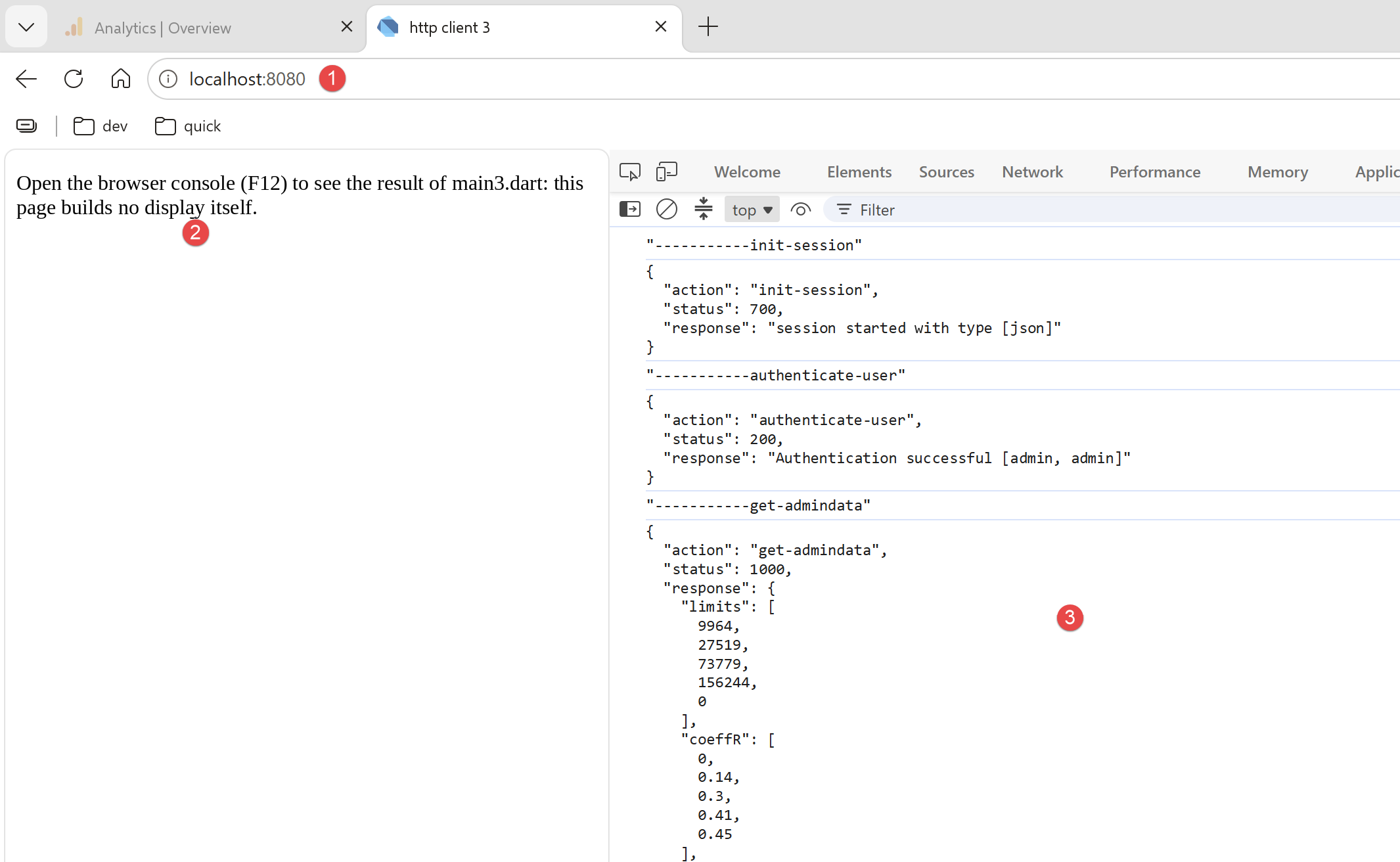
- 在 [1] 中,打开浏览器并请求 URL [http://localhost:8080];
- 在 [2] 中,是所请求页面显示的文本;
- 在 [3] 中,执行结果可以在浏览器控制台中找到(F12,然后选择 Console 选项)。我们得到与之前相同的结果,只是这次是在浏览器中;
6.5. HTML 客户端
6.5.1. 解决方案架构
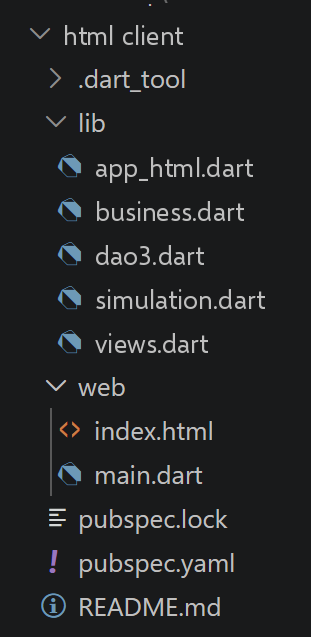
这第四个也是最后一个客户端,在 HTTP 客户端 3 的基础上增加了真正的 HTML 界面:[dao]([Dao3])层和 [business]([Business])层原封不动地复用,并新增两层——视图(构建 DOM)和控制器(编排)。项目分为两个文件夹:[web/](入口点、HTML、CSS)和 [lib/](共享代码),遵循标准 Dart Web 项目的约定——有关该约定的详情,请参阅此文件夹中的 README.md。
6.5.2. HTML 模板:[web/index.html] 文件
从 [src/index.html] 原样复制(CSS 类相同:[banner]、[menu]、[content]、[section-title]、[field-row]、[result]、[error]、[simulations]……),只有一个小差异:加载的脚本是 [main.dart.js](由 Dart Web 工具设定的固定名称),而 Views.ts 中的 [index.html] 加载的是带哈希名称的 Webpack 包([main.a44f6e1c12ab338daedc.js])。
6.5.3. 修改后的 [webpack.config.js] 配置
Dart 方面不需要等价物:无需编写打包器配置文件。[web/main.dart] 仅凭其在目录树中的位置(直接位于 [web/] 下),就起到了 [webpack.config.js] 中 [entry: './src/main3.ts'] 这一行的作用——命名和位置的约定取代了整个配置文件。
6.5.4. [dao] 层和 [business] 层:两个原封不动复用的文件
[lib/dao3.dart] 和 [lib/business.dart] 是 HTTP 客户端 3 中同名文件的完全相同的副本——与 Views.ts 和 AppHtml.ts 对 [Dao3.ts] 和 [Business.ts] 的复用方式一样,没有任何修改。
6.5.5. [views] 层:[Views.ts]
6.5.6. 脚本 [simulation, views]
视图层由三个文件支撑:simulation.dart(显示的数据)、views.dart(DOM 的构建)和 app_html.dart(控制器,将在下一节讨论)。我们先从 simulation.dart 开始:
| // simulation.dart
// 税款计算的结果,如 business.dart 所返回的,并补充
// 了输入的参数。移植自 Views.ts 的 [Simulation] 接口。
//
// [新特性,Dart 3] 这里我们使用命名记录(见
// dart-fundamentals/dart3/dart3_01_records.dart)而不是类:一个
// 简单的类型别名 [typedef],无需编写构造函数或单独的文件,
// 适用于仅仅是一个普通字段“集合”、没有
// 关联行为的数据 - 完全符合原始 TypeScript
// 接口的精神。
//
// [关于字段名的说明] 与 TypeScript/JavaScript 不同,后者中
// 标识符可以包含带重音的字母(原始法语课程中
// 处处使用),Dart 把
// 标识符限制为 ASCII 字母:重音只能出现在
// 字符串中,绝不能出现在
// 变量、字段、类或记录的名称中。无论如何,本课程
// 处处使用简单的英文 ASCII 名称(married、tax、discount……):
// 下面记录的字段与
// business.dart 中 Map 的键同名。
typedef Simulation = ({
String married,
int children,
num salary,
num tax,
num surcharge,
num discount,
num reduction,
num rate,
});
|
我们来解读这段代码:
- 第 21–24 行:[typedef Simulation = ({String married, int children, num salary, ...});]:Views.ts 声明的是一个接口 [Simulation],而此文件使用的是 Dart 3 的具名记录(参见 dart3_01_records.dart)——一个简单的类型别名,没有构造函数,也不需要单独的文件,适用于纯描述性的数据。
- 字段名是纯 ASCII([married]、[tax]、[discount]……):Dart 标识符仅限于 ASCII 字母,这与 TypeScript/JavaScript 不同,在后者中,带重音的名称如 [marié]/[impôt](原法语课程中使用)是有效的字段名。
[lib/views.dart],由 DOM 和 [package:web] 组成:
| // views.dart
// 移植自 Views.ts:构建应用的视图(DOM)- 身份验证
// 视图、税款计算视图、模拟列表视图。此
// 模块不进行任何网络调用:它构建 DOM,并把
// 用户的操作委托给由
// 控制器提供的回调函数(见 app_html.dart)。
//
// [技术选择] 这里我们使用 [package:web](pub.dev/packages/web),
// 它是旧的 dart:html 的现代替代品:它暴露的 DOM API 与 Views.ts 使用的
// 标准 DOM 非常接近(document.createElement、
// .textContent、.addEventListener……)。需要了解的一个表面差异:
// Dart 事件处理函数(一个普通函数)在传给 [addEventListener] 之前
// 必须用 [.toJS](dart:js_interop 的扩展)转换为
// JavaScript 函数 - 这是 Dart 世界与 JavaScript 世界之间的
// “桥梁”,被明确表现出来,而在
// TypeScript 中不需要转换(那里一切本来就已经是
// JavaScript)。
import 'dart:js_interop';
import 'package:web/web.dart' as web;
import 'simulation.dart';
// 通用装饰(不是原始 PHP 服务器的照片)
const String _logoSvg = '''
<svg width="60" height="60" viewBox="0 0 60 60" xmlns="http://www.w3.org/2000/svg">
<circle cx="30" cy="30" r="29" fill="#eef1ec" stroke="#ccc" />
<g fill="none" stroke="#8a9a7a" stroke-width="2">
<path d="M30 46 C30 32 22 28 17 19" />
<path d="M30 46 C30 30 39 26 44 17" />
<path d="M30 46 C30 37 30 30 30 21" />
</g>
<g fill="#b9c9a6">
<circle cx="17" cy="19" r="4.5" />
<circle cx="44" cy="17" r="4.5" />
<circle cx="30" cy="19" r="4.5" />
</g>
</svg>''';
// [authentication] 视图的回调 - [与 TypeScript 的区别]
// TypeScript 的回调接口在 Dart 中自然转换为
// 函数记录(见 simulation.dart):比
// 类更轻量,适合一组简单的函数
typedef AuthenticationCallbacks = ({void Function(String user, String password) onSubmit});
typedef CalculationCallbacks = ({
void Function(String married, int children, int salary) onSubmit,
void Function() onList,
void Function() onEndSession,
});
typedef ListCallbacks = ({
void Function(int number) onDelete,
void Function() onCalculation,
void Function() onEndSession,
});
class Views {
final web.HTMLElement root;
late web.HTMLDivElement _banner;
late web.HTMLDivElement _menu;
late web.HTMLDivElement _content;
// 在 [root] 元素内部构建页面的固定结构(横幅
// + 菜单/内容区)
Views(this.root) {
// [注意] 与普通 DOM 属性(textContent、
// value……)不同,package:web 的 [innerHTML] setter 期望 [JSAny],而不是
// 原始的 Dart [String] - 这是其生成方式的一个特点,与标准 DOM 的
// WebIDL 属性 [LegacyNullToEmptyString] 有关:因此
// 必须始终用 [.toJS] 转换。
root.innerHTML = ''.toJS;
_banner = _div()..className = 'banner';
final logo = _div()..className = 'logo';
logo.innerHTML = _logoSvg.toJS;
final title = web.document.createElement('h1') as web.HTMLHeadingElement;
title.textContent = 'Calculate your tax';
_banner
..appendChild(logo)
..appendChild(title);
final body = _div()..className = 'page-body';
_menu = _div()..className = 'menu';
_content = _div()..className = 'content';
body
..appendChild(_menu)
..appendChild(_content);
root
..appendChild(_banner)
..appendChild(body);
}
// --------------------------------------------------------------------
// DOM 构建工具
// --------------------------------------------------------------------
web.HTMLDivElement _div() => web.document.createElement('div') as web.HTMLDivElement;
void _clearMenu() {
_menu.innerHTML = ''.toJS;
_menu.style.display = 'none';
_content.classList.add('full-width');
}
web.HTMLAnchorElement _menuLink(String text, void Function() onClick) {
final a = web.document.createElement('a') as web.HTMLAnchorElement;
a.textContent = text;
a.addEventListener('click', ((web.Event event) => onClick()).toJS);
return a;
}
void _showMenu(List<web.HTMLAnchorElement> links) {
_menu.innerHTML = ''.toJS;
_menu.style.display = '';
_content.classList.remove('full-width');
for (final link in links) {
_menu.appendChild(link);
}
}
web.HTMLElement? _errorBanner(String? message) {
if (message == null) return null;
final div = _div()..className = 'error';
div.textContent = message;
return div;
}
// 一个表单行 [标签 + 文本/密码/数字字段]
(web.HTMLDivElement row, web.HTMLInputElement input) _fieldRow(
String labelText,
String type,
String initialValue, {
String? help,
}) {
final row = _div()..className = 'field-row';
final label = web.document.createElement('label') as web.HTMLLabelElement;
label.textContent = labelText;
final field = _div()..className = 'field';
final input = web.document.createElement('input') as web.HTMLInputElement;
input.type = type;
input.value = initialValue;
if (type == 'number') {
input.min = '0';
}
field.appendChild(input);
if (help != null) {
final div = _div()..className = 'help';
div.textContent = help;
field.appendChild(div);
}
row
..appendChild(label)
..appendChild(field);
return (row, input);
}
// --------------------------------------------------------------------
// [authentication] 视图
// --------------------------------------------------------------------
void authenticationView(String? error, AuthenticationCallbacks callbacks) {
_clearMenu();
_content.innerHTML = ''.toJS;
final title = _div()
..className = 'section-title'
..textContent = 'Please authenticate';
_content.appendChild(title);
final banner = _errorBanner(error);
if (banner != null) _content.appendChild(banner);
final userField = _fieldRow("Username", 'text', 'admin');
final passwordField = _fieldRow('Password', 'password', '');
_content
..appendChild(userField.$1)
..appendChild(passwordField.$1);
final button = web.document.createElement('button') as web.HTMLButtonElement;
button.textContent = 'Submit';
button.addEventListener(
'click',
((web.Event event) {
callbacks.onSubmit(userField.$2.value.trim(), passwordField.$2.value);
}).toJS,
);
_content.appendChild(button);
}
// --------------------------------------------------------------------
// [tax calculation] 视图
// --------------------------------------------------------------------
void calculationView(Simulation? result, String? error, CalculationCallbacks callbacks) {
_showMenu([
_menuLink('List of simulations', callbacks.onList),
_menuLink('End of session', callbacks.onEndSession),
]);
_content.innerHTML = ''.toJS;
final title = _div()
..className = 'section-title'
..textContent = 'Fill in the form below and then submit it';
_content.appendChild(title);
final banner = _errorBanner(error);
if (banner != null) _content.appendChild(banner);
// [married] 单选按钮行
final marriedRow = _div()..className = 'field-row';
final marriedLabel = web.document.createElement('label') as web.HTMLLabelElement;
marriedLabel.textContent = 'Are you married or in a civil partnership?';
final marriedField = _div()..className = 'field radios';
final radioYes = web.document.createElement('input') as web.HTMLInputElement;
radioYes.type = 'radio';
radioYes.name = 'married';
radioYes.value = 'yes';
radioYes.checked = true;
final labelYes = web.document.createElement('label') as web.HTMLLabelElement;
labelYes.appendChild(radioYes);
labelYes.appendChild(web.document.createTextNode(' Yes'));
final radioNo = web.document.createElement('input') as web.HTMLInputElement;
radioNo.type = 'radio';
radioNo.name = 'married';
radioNo.value = 'no';
final labelNo = web.document.createElement('label') as web.HTMLLabelElement;
labelNo.appendChild(radioNo);
labelNo.appendChild(web.document.createTextNode(' No'));
marriedField
..appendChild(labelYes)
..appendChild(labelNo);
marriedRow
..appendChild(marriedLabel)
..appendChild(marriedField);
_content.appendChild(marriedRow);
final childrenField = _fieldRow("Number of dependent children", 'number', '0');
_content.appendChild(childrenField.$1);
final salaryField = _fieldRow(
'Annual salary',
'number',
'',
help: "Round down to the nearest euro",
);
_content.appendChild(salaryField.$1);
final button = web.document.createElement('button') as web.HTMLButtonElement;
button.textContent = 'Submit';
button.addEventListener(
'click',
((web.Event event) {
final married = radioYes.checked ? 'yes' : 'no';
final children = int.tryParse(childrenField.$2.value) ?? 0;
final salary = int.tryParse(salaryField.$2.value) ?? 0;
callbacks.onSubmit(married, children, salary);
}).toJS,
);
_content.appendChild(button);
// 上一次模拟的结果(绿色框),如果有的话
if (result != null) {
final box = _div()..className = 'result';
final ratePercent = (result.rate * 100).round();
box.innerHTML = ("Tax amount: ${result.tax} euros<br>"
"Discount: ${result.discount} euros<br>"
"Reduction: ${result.reduction} euros<br>"
"Surcharge: ${result.surcharge} euros<br>"
"Tax rate: $ratePercent %")
.toJS;
_content.appendChild(box);
}
}
// --------------------------------------------------------------------
// [list of simulations] 视图
// --------------------------------------------------------------------
void listView(List<Simulation> simulations, String? error, ListCallbacks callbacks) {
_showMenu([
_menuLink("Tax calculation", callbacks.onCalculation),
_menuLink('End of session', callbacks.onEndSession),
]);
_content.innerHTML = ''.toJS;
final title = _div()
..className = 'section-title'
..textContent = 'List of your simulations';
_content.appendChild(title);
final banner = _errorBanner(error);
if (banner != null) _content.appendChild(banner);
if (simulations.isEmpty) {
final empty = _div()
..className = 'simulations-empty'
..textContent = 'No simulation recorded.';
_content.appendChild(empty);
return;
}
final table = web.document.createElement('table') as web.HTMLTableElement;
table.className = 'simulations';
final thead = web.document.createElement('thead') as web.HTMLTableSectionElement;
thead.innerHTML = ("<tr><th>#</th><th>Married</th><th>Number of children</th>"
"<th>Annual salary</th><th>Tax amount</th><th>Surcharge</th>"
"<th>Discount</th><th>Reduction</th><th>Rate</th><th></th></tr>")
.toJS;
table.appendChild(thead);
final tbody = web.document.createElement('tbody') as web.HTMLTableSectionElement;
for (var number = 0; number < simulations.length; number++) {
final simulation = simulations[number];
final tr = web.document.createElement('tr') as web.HTMLTableRowElement;
final ratePercent = (simulation.rate * 100).round();
tr.innerHTML = ("<td>$number</td>"
"<td>${simulation.married}</td>"
"<td>${simulation.children}</td>"
"<td>${simulation.salary}</td>"
"<td>${simulation.tax}</td>"
"<td>${simulation.surcharge}</td>"
"<td>${simulation.discount}</td>"
"<td>${simulation.reduction}</td>"
"<td>$ratePercent %</td>")
.toJS;
final tdDelete = web.document.createElement('td') as web.HTMLTableCellElement;
final deleteLink = web.document.createElement('a') as web.HTMLAnchorElement;
deleteLink.className = 'delete';
deleteLink.textContent = 'Delete';
deleteLink.addEventListener(
'click',
((web.Event event) => callbacks.onDelete(number)).toJS,
);
tdDelete.appendChild(deleteLink);
tr.appendChild(tdDelete);
tbody.appendChild(tr);
}
table.appendChild(tbody);
_content.appendChild(table);
}
}
|
我们来解读这段代码:
- 第 19 行:[import 'package:web/web.dart' as web;]:旧的 [dart:html] 的现代替代品,其 API 和 DOM 与 Views.ts 使用的标准 DOM 非常相似([document.createElement]、[.textContent]、[.addEventListener]……)。
- 第 44–45 行:[typedef CalculationCallbacks = ({void Function(...) onSubmit, ...});]:TypeScript 的回调接口在 Dart 3 中自然对应为一个函数记录——对于一组简单的函数,比类更轻量。
- 第 108 行:[a.addEventListener('click', ((web.Event event) { ... }).toJS);]:Dart 事件处理函数(一个简单的函数)在传给 [addEventListener] 之前,必须使用 [.toJS]([dart:js_interop] 的扩展)转换为 JavaScript 函数——Dart 世界与 JavaScript 世界之间的“桥梁”是显式的,而 TypeScript 不需要任何转换。
- 第 141 行:[input.value = initialValue;]、[title.textContent = '...';](第 76 行):大多数字符串类型的属性仍然是简单的 Dart 字符串,无需转换。[innerHTML] 是例外:如果直接给它赋 [String],[dart analyze] 会报错——它的 setter 期望的是 [JSAny](这是其生成方式的特殊之处,与标准 DOM 的 WebIDL [LegacyNullToEmptyString] 属性有关)——因此要写 [root.innerHTML = ''.toJS;]:除了函数之外,额外增加一次 [.toJS] 转换,处理 [innerHTML] 时务必牢记。
- 第 129 行:[(web.HTMLDivElement row, web.HTMLInputElement input) _fieldRow(...)]:以位置记录(RECORD)作为返回类型,无需中间类即可一次返回两个 DOM 元素——这是 Dart 3 记录的又一个实际用途。
6.5.7. 控制器:[AppHtml.ts] 文件
6.5.8. [app_html] 脚本
| // app_html.dart
// 移植自 AppHtml.ts:HTML 应用的控制器。它编排
// 对服务器的调用([dao] 层,dao3.dart)、计算 ¶([business] 层,
// business.dart)以及视图的显示([views] 层,
// views.dart)。
//
// 与 main3.dart 一样,此客户端只为三个操作调用 NestJS 服务器:
// [init-session]、[authenticate-user] 和 [get-admindata]。
// 一旦用 [get-admindata] 取回税务数据(税率、上限……),
// 就由 [business] 层在
// 浏览器中计算税款,不再有新的网络调用。模拟列表同样
// 只保存在浏览器中(字段 [simulations]),
// 与 main3.dart 用其局部变量
// [simulations] 的做法完全一样(`simulations.add(...)`、`simulations.removeAt(...)`)。
import 'dart:js_interop';
import 'package:http/browser_client.dart';
import 'dao3.dart';
import 'business.dart';
import 'simulation.dart';
import 'views.dart';
import 'package:web/web.dart' as web;
class AppHtml {
final Dao3 dao;
final Views views;
// [business] 层:只有在取回税务数据之后才存在 ¶(身份验证成功之后)
// - 见 [_initBusiness]。
// 可空字段(Business?),而不是 late 字段([late]):不同于
// Views.ts 中 [business?: Business] 在未赋值时只是保持“undefined”,
// Dart 的 [late] 字段如果在赋值之前被
// 读取就会抛出错误(这正是 [_endSession] 在
// 重置它时所做的)- 所以可空类型在这里是正确的选择,
// 而不只是风格问题。
Business? _business;
// 已计算过的模拟列表,保存在浏览器中
List<Simulation> _simulations = [];
// [与 TypeScript 的区别] AppHtml.ts 配置了一个全局 axios
// 实例(axios.defaults.timeout/baseURL/withCredentials),然后把它交给
// Dao。这里,[BrowserClient](package:http/browser_client.dart,已在
// main3.dart 中遇到过)承担了
// "axios.defaults.withCredentials = true" 的等价功能;http.Client 上
// 没有“全局超时”的直接对应物 - 它要在每次调用上
// 用 `.timeout(Duration(...))` 逐一应用,
// 如 [http] 一章(dart_fetch_01.dart)中那样。
AppHtml()
: dao = Dao3(
BrowserClient()..withCredentials = true,
'http://localhost:3000',
),
views = Views(web.document.getElementById('app') as web.HTMLElement);
// 应用的入口点
Future<void> start() async {
try {
// 初始化会话 - 在任何其他操作之前必须执行(见 main.php)
final response = await dao.initSession() as Map<String, dynamic>;
if (response['status'] != 700) {
views.authenticationView(
_formatError(response['response']),
(onSubmit: (user, password) => _authenticate(user, password)),
);
return;
}
} catch (error) {
views.authenticationView(
"Unable to contact the server ($error)",
(onSubmit: (user, password) => _authenticate(user, password)),
);
return;
}
// 会话已初始化:我们显示身份验证
_showAuthentication();
}
// --------------------------------------------------------------------
// [authentication] 视图
// --------------------------------------------------------------------
void _showAuthentication([String? error]) {
views.authenticationView(
error,
(onSubmit: (user, password) => _authenticate(user, password)),
);
}
Future<void> _authenticate(String user, String password) async {
try {
final response = await dao.authenticateUser(user, password)
as Map<String, dynamic>;
if (response['status'] == 200) {
// 身份验证成功:与 main3.dart 中一样,我们现在一次性
// 取回 [business] 层
// 所需的税务数据
await _initBusiness();
} else {
// 失败(登录名/密码错误,或缺少参数)
_showAuthentication(_formatError(response['response']));
}
} catch (error) {
_showAuthentication("Unable to contact the server ($error)");
}
}
// 取回税务管理数据,并用这些数据实例化
// [business] 层 - 整个会话只调用一次服务器,
// 与 main3.dart 完全一样
Future<void> _initBusiness() async {
try {
final response = await dao.getAdminData() as Map<String, dynamic>;
if (response['status'] == 1000) {
_business = Business(response['response'] as Map<String, dynamic>);
// 新的工作会话:我们从空列表重新开始
_simulations = [];
_showCalculation();
} else {
_showAuthentication(_formatError(response['response']));
}
} catch (error) {
_showAuthentication("Unable to contact the server ($error)");
}
}
// --------------------------------------------------------------------
// [tax calculation] 视图
// --------------------------------------------------------------------
void _showCalculation([Simulation? result, String? error]) {
views.calculationView(
result,
error,
(
onSubmit: (married, children, salary) =>
_calculate(married, children, salary),
onList: () => _showList(),
onEndSession: () => _endSession(),
),
);
}
// 税款计算完全在浏览器中完成([business]
// 层):不调用服务器,
// 不同于此客户端的第一版 ¶(http client 1 / http client 2)
void _calculate(String married, int children, int salary) {
// _business 必然已初始化:我们只有在 _initBusiness 之后才会进入 [calculation] 视图 ¶(所以这里的 [!] 是安全的,
// 与 TypeScript 中 [this.business!] 上的
// [!] 一样)
final result = _business!.calculateTax(married, children, salary);
// [与 TypeScript 的区别] Views.ts 用简单的对象展开
// 构建模拟:`{ married, children, salary, ...result }`。
// 这里,[Simulation] 是一个记录(simulation.dart),而不是 Map:记录
// 不能通过展开 Map 来“补全”,
// 而且它的字段是有类型的(num、int……),而
// business.dart 返回的 [result] 是一个无类型的 Map,其键
// 只是恰好同名('tax'、'surcharge'……,见 business.dart)。所以我们
// 逐个字段重建该记录 - 比展开稍微啰嗦一点,
// 但完全由编译器检查(遗漏
// 或类型错误的字段是编译错误,而不是运行时的
// 意外)。
final Simulation simulation = (
married: married,
children: children,
salary: salary,
tax: result['tax'] as num,
surcharge: result['surcharge'] as num,
discount: result['discount'] as num,
reduction: result['reduction'] as num,
rate: result['rate'] as num,
);
// 保存在浏览器中(与 main3.dart 中的 `simulations.add(...)`
// 相同)
_simulations.add(simulation);
_showCalculation(simulation);
}
// --------------------------------------------------------------------
// [list of simulations] 视图
// --------------------------------------------------------------------
// 这里不再调用服务器:列表已经完全在
// [_simulations] 中
void _showList([String? error]) {
views.listView(
_simulations,
error,
(
onDelete: (number) => _deleteSimulation(number),
onCalculation: () => _showCalculation(),
onEndSession: () => _endSession(),
),
);
}
void _deleteSimulation(int number) {
// 从 [_simulations] 本地删除,与 main3.dart 中的
// `simulations.removeAt(number)` 相同 - 仍然没有
// 服务器调用
_simulations.removeAt(number);
_showList();
}
// --------------------------------------------------------------------
// 会话结束
// --------------------------------------------------------------------
void _endSession() {
// 仅在客户端结束会话:
// 我们丢弃 [business] 层 ¶(因此也丢弃税务数据)和已计算的模拟,然后
// 回到身份验证界面。此客户端无需
// 为此调用服务器。
_business = null;
_simulations = [];
_showAuthentication();
}
// --------------------------------------------------------------------
// 格式化服务器错误响应的 [response] 字段,它
// 要么是字符串,要么是字符串列表(见 PHP 控制器)
// --------------------------------------------------------------------
String _formatError(Object? response) {
if (response is List) {
return response.join(' ; ');
}
return '$response';
}
}
// 执行 - [与 TypeScript 的区别] 传给 addEventListener 的事件处理函数
// 必须用
// [.toJS] 转换为 JavaScript 函数(见 views.dart);这只是同一规则的“入口点”
// 版本。
void main() {
web.window.addEventListener(
'DOMContentLoaded',
((web.Event event) {
AppHtml().start();
}).toJS,
);
}
|
我们来说明这段代码:
- 第 46–51 行:[AppHtml() : dao = Dao3(BrowserClient()..withCredentials = true, ...), views = Views(...)]:在初始化列表(INITIALIZER LIST)中构造 DAO 和视图(VIEWS)——与 TypeScript 构造函数的概念相同,只是使用了 Dart 特有的 [: field1 = ..., field2 = ...] 语法。
- 第 34 行:[Business? _business;]:一个可空(NULLABLE)字段,在 AppHtml.ts 中此前写作 [business?: Business]——概念相同(“尚未初始化”),并使用同样的 [!] 运算符来确认它在代码的某个特定位置确实已被赋值。
- 第 158–162 行:[final Simulation simulation = (married: married, ..., tax: result['tax'] as num, ...);]:与 AppHtml.ts 中简单的展开写法 [{ married, children, salary, ...result }] 不同,记录无法通过 [Map] 的展开来补全——因此记录要逐个字段(FIELD BY FIELD)重新构造,这稍显冗长,但完全由编译器验证。
- 第 229–233 行:[web.window.addEventListener('DOMContentLoaded', ((web.Event event) { AppHtml().start(); }).toJS);]:与 AppHtml.ts 的入口点相同,回调转换([.toJS])也与 views.dart 中一致。
6.5.9. 编译与执行
参见此文件夹中的 README.md:开发时先执行 [dart pub get],再执行 [webdev serve](包含热重载);生产构建则使用 [dart compile js web/main.dart -o web/main.dart.js]——相当于 [npm run build],且无需任何事先的打包工具配置步骤。
如果 [http client 3] Web 应用程序的 [webdev serve] 服务器仍在运行,必须先停止它(在启动它的终端中按 Ctrl-C)。然后,在 [html client] 目录下的终端中:
| dart pub get
webdev serve
|
第 2 行启动将为 HTML 客户端应用程序提供服务的 Web 服务器:
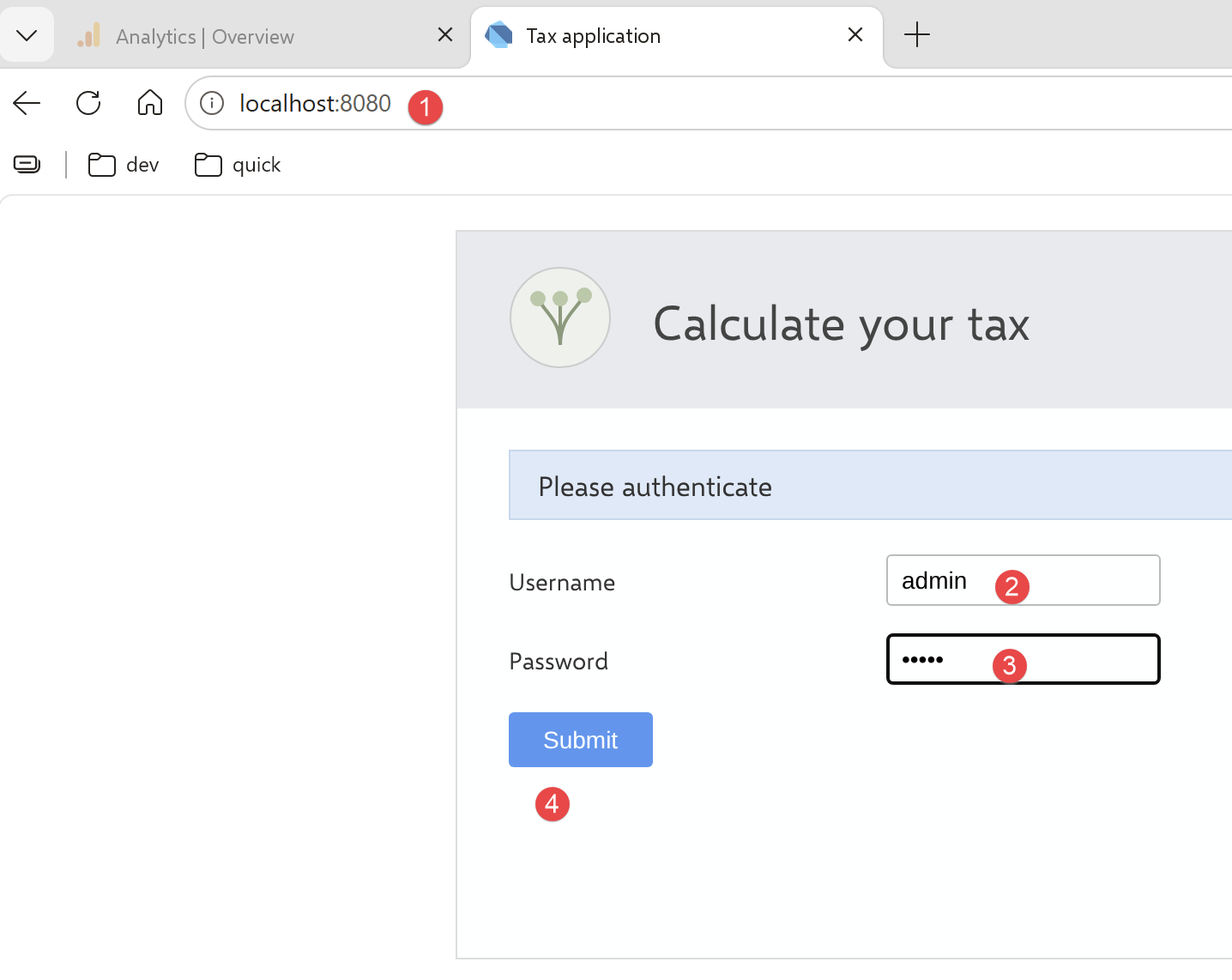
- 在 [1] 中,在浏览器中请求 URL [http://localhost:8080];
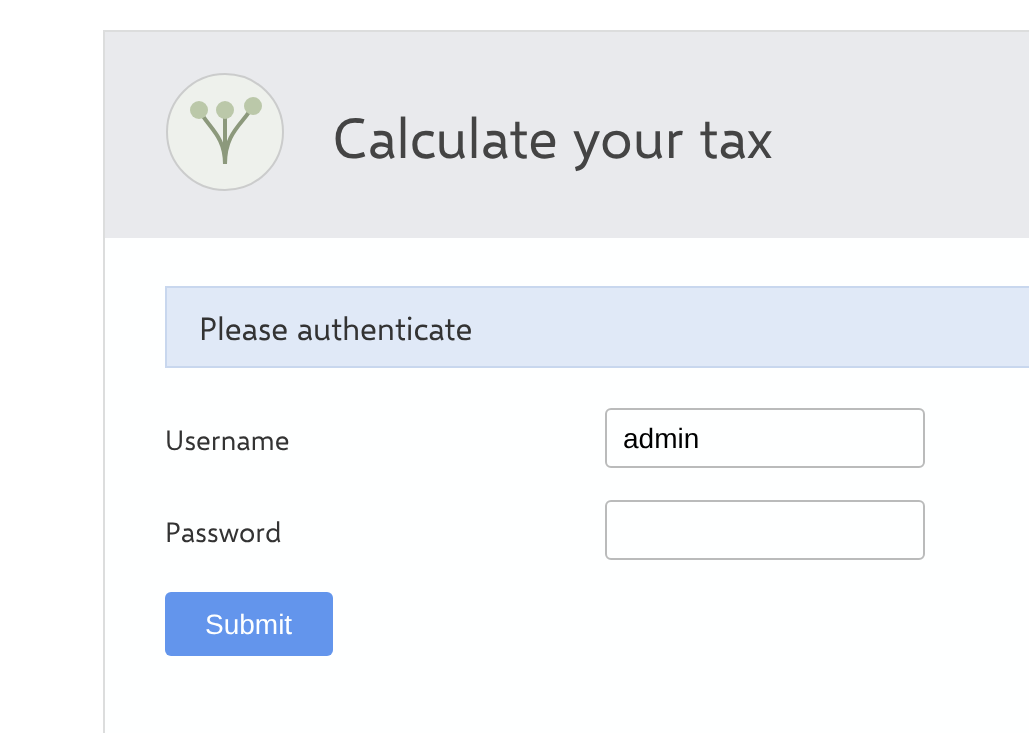
- 在 [2-3] 中,输入凭据 admin / admin;
- 在 [4] 中,提交页面;
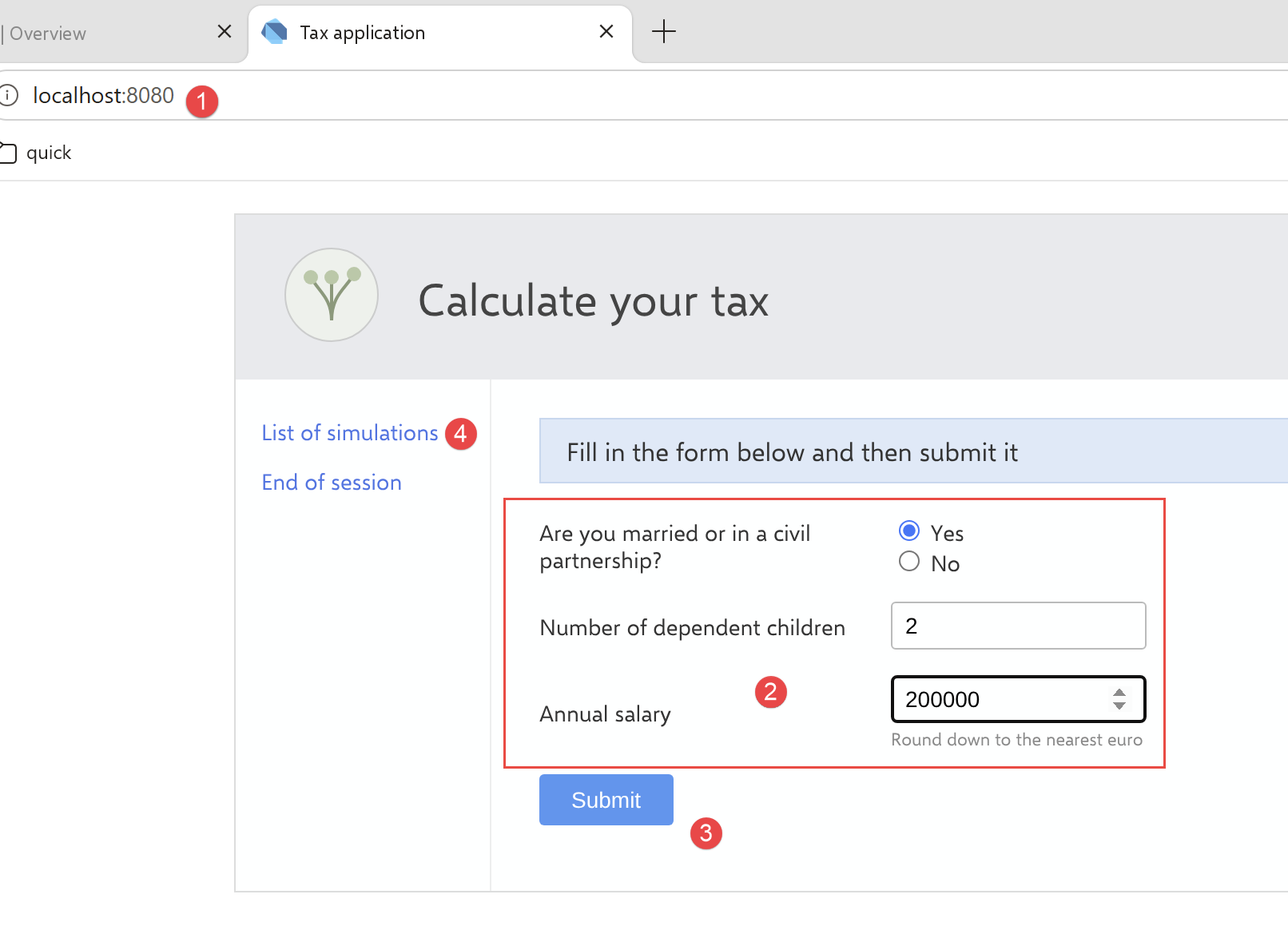
- 在 [2] 中,填写各字段;
- 在 [3] 中,提交页面;
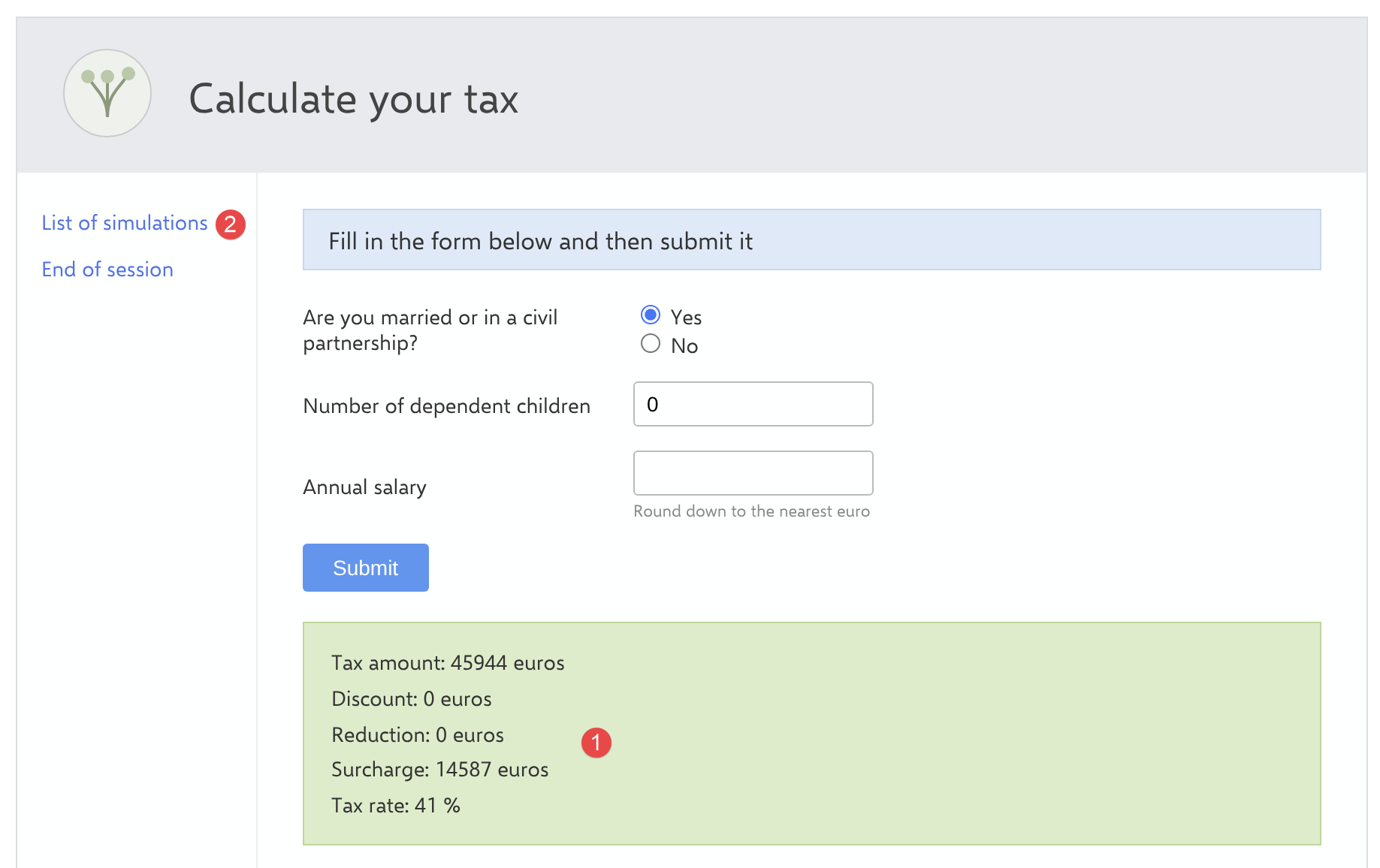
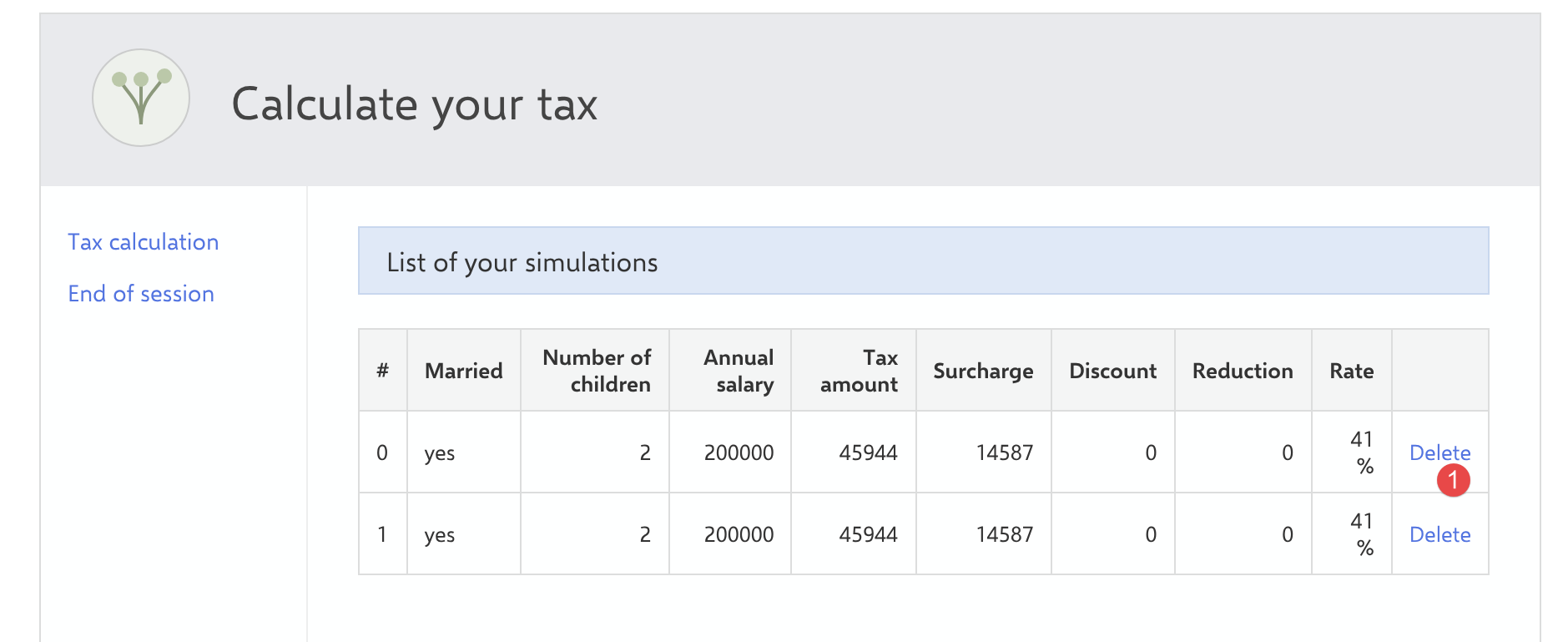
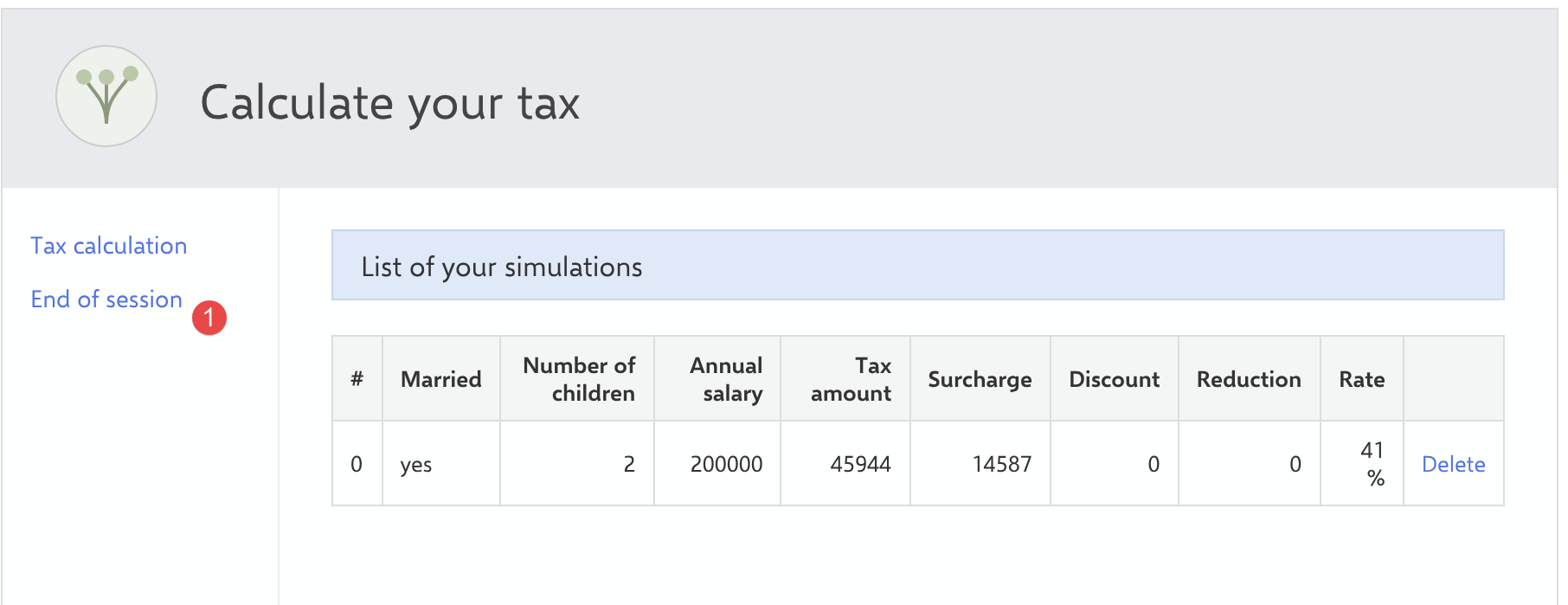
税额显示在 [1] 中。运行几次模拟,然后在 [2] 中请求列表;
6.6. 结论
本章的四个客户端用 Dart 展示了与 TypeScript 完全相同的演进过程:从服务器端处理到客户端处理,再从 CLI 脚本到完整的 Web 客户端。需要注意的关键差异有:会话 Cookie 的手动跟踪(CLI 中必需,浏览器中则不需要)、[dart:js_interop] 强制要求在视图中使用 [.toJS] 转换以跨越 Dart/JavaScript 边界,以及 Web 编译时完全没有 polyfill——这是 Dart 工具链相对于 webpack/babel 流水线的明显优势。