Skip to content

7. 数据库访问

Image

TypeScript 课程用三章来讲解 MySQL 数据库的访问:先是原生驱动 [mysql2],然后是两个 ORM([TypeORM] 和 [Prisma]),使用同一个示例——两个数据库,[dbpersons](单个表)和 [dbschool](四个相关联的表:班级、学生、科目和成绩)。本章与第一章相同,然后把两个 ORM 章节合并为一章:Dart 没有成熟的、可用于 MySQL 的 [TypeORM] 或 [Prisma] 的等价物(见本章末尾的补充说明),因此我们不去强行与其中任何一个建立人为的对应关系,而是亲自动手编写一个“轻量级 ORM”,以此展示 ORM 究竟做了什么。

7.1. 直接访问数据库
Image

TypeScript 的 [mysql2] 包在 Dart 一侧没有由 MySQL 团队自己维护的等价物。本章的早期版本使用的是 [package:mysql1](pub.dev/packages/mysql1),这是一个被广泛使用的纯 Dart 驱动——MySQL——但事实证明它与 MySQL 8.4(Laragon 随附的版本)不兼容:即使是“select 1”这样简单的查询也始终失败,并报告协议错误“Got packets out of order”,这是该包中一个已知且尚未解决的缺陷(GitHub 问题 adamlofts/mysql1_dart #112 和 #161)。因此我们现在改用 [package:mysql_client_plus](pub.dev/packages/mysql_client_plus),这是一个积极维护的分支,已在 MySQL 8.x 上测试过,其 API——[MySQLConnection.createConnection]、[connection.connect]、[connection.execute]、[connection.close]——与 [mysql2] 的非常相似。

7.1.1. 准备 [dbpersons] 数据库

dbpersons 数据库只包含一个表 persons, 其结构与 Python 课程中使用的相同(列 id、first\_name、last\_name, age,并对 (last\_name, first\_name) 这一对列设有唯一性约束)。下面的脚本 sql/create_dbpersons.sql 会创建数据库、应用程序用户和表,然后向其中插入五个任意的人员:

-- create_dbpersons.sql
-- Recreates the [dbpersons] database used by the chapter "Accessing MySQL with the
-- native [mysql2] driver", with arbitrary data (the originals of the 2020
-- Python/Flask course being no longer available).
--
-- Usage:
--   mysql -u root -p < create_dbpersons.sql
--
-- Creates the database, the application user [admpersons/nobody] (same
-- credentials as the original course) and the [persons] table.

DROP DATABASE IF EXISTS dbpersons;
CREATE DATABASE dbpersons CHARACTER SET utf8mb4 COLLATE utf8mb4_unicode_ci;

CREATE USER IF NOT EXISTS 'admpersons'@'localhost' IDENTIFIED BY 'nobody';
GRANT ALL PRIVILEGES ON dbpersons.* TO 'admpersons'@'localhost';
FLUSH PRIVILEGES;

USE dbpersons;

CREATE TABLE persons (
  id         INT PRIMARY KEY,
  first_name VARCHAR(30) NOT NULL,
  last_name  VARCHAR(30) NOT NULL,
  age        INTEGER NOT NULL,
  UNIQUE (last_name, first_name)
);

-- arbitrary data (same persons as the examples of the original course)
INSERT INTO persons (id, first_name, last_name, age) VALUES
  (1, 'Paul',     'Langevin', 48),
  (2, 'Sylvie',   'Lefur',    70),
  (3, 'Pierre',   'Nicazou',  35),
  (4, 'Geraldine','Colou',    26),
  (5, 'Paulette', 'Girond',   56);

要创建此数据库(MySQL),可以使用 Laragon 的 [HeidiSQL] 工具。我们之前已经用过它。
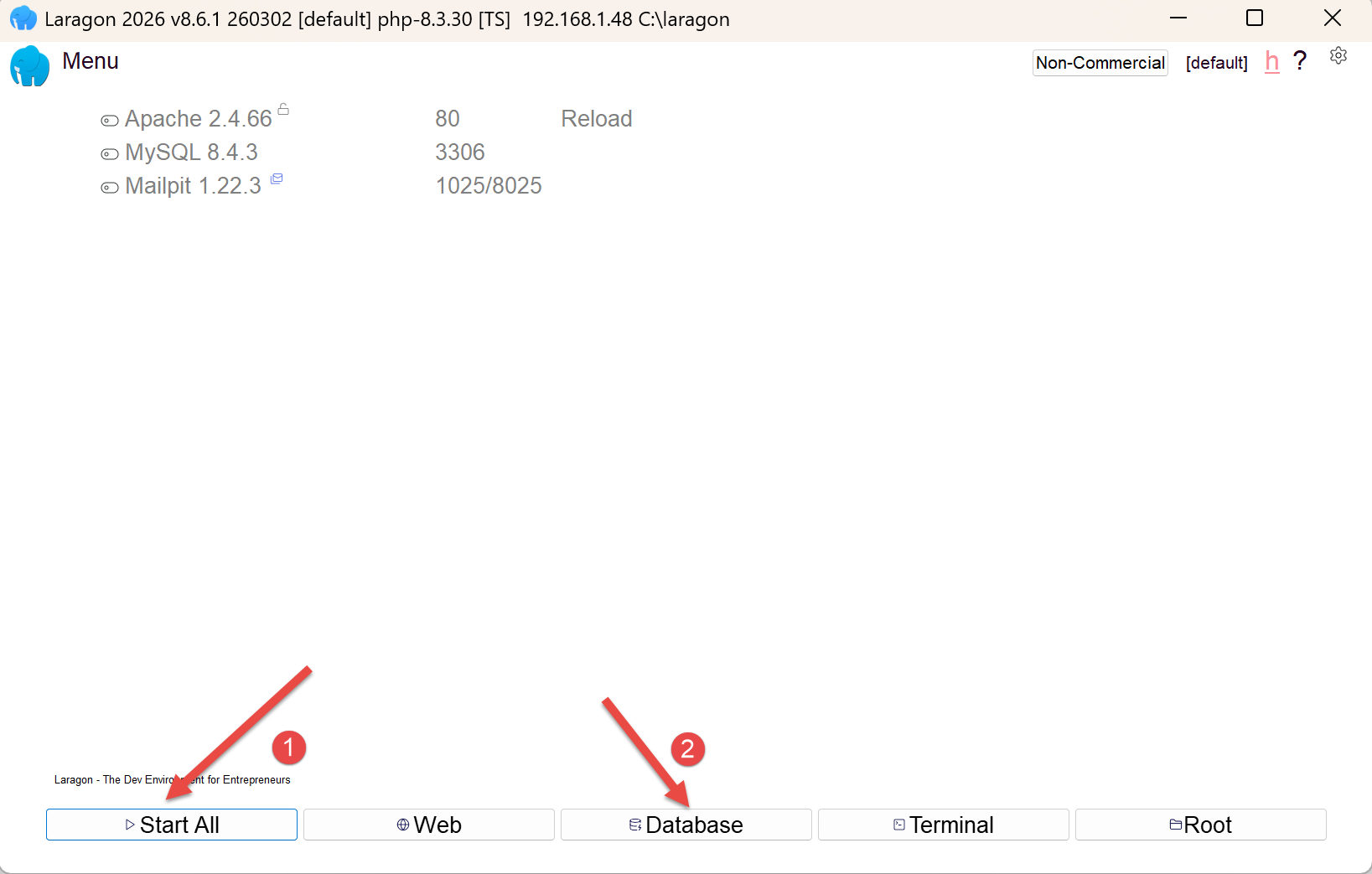
  • 在 [1] 中,启动 Laragon 的所有服务。这将启动 MySQL 数据库管理系统;
  • 在 [2] 中,进入 [HeidiSQL] 数据库管理工具;
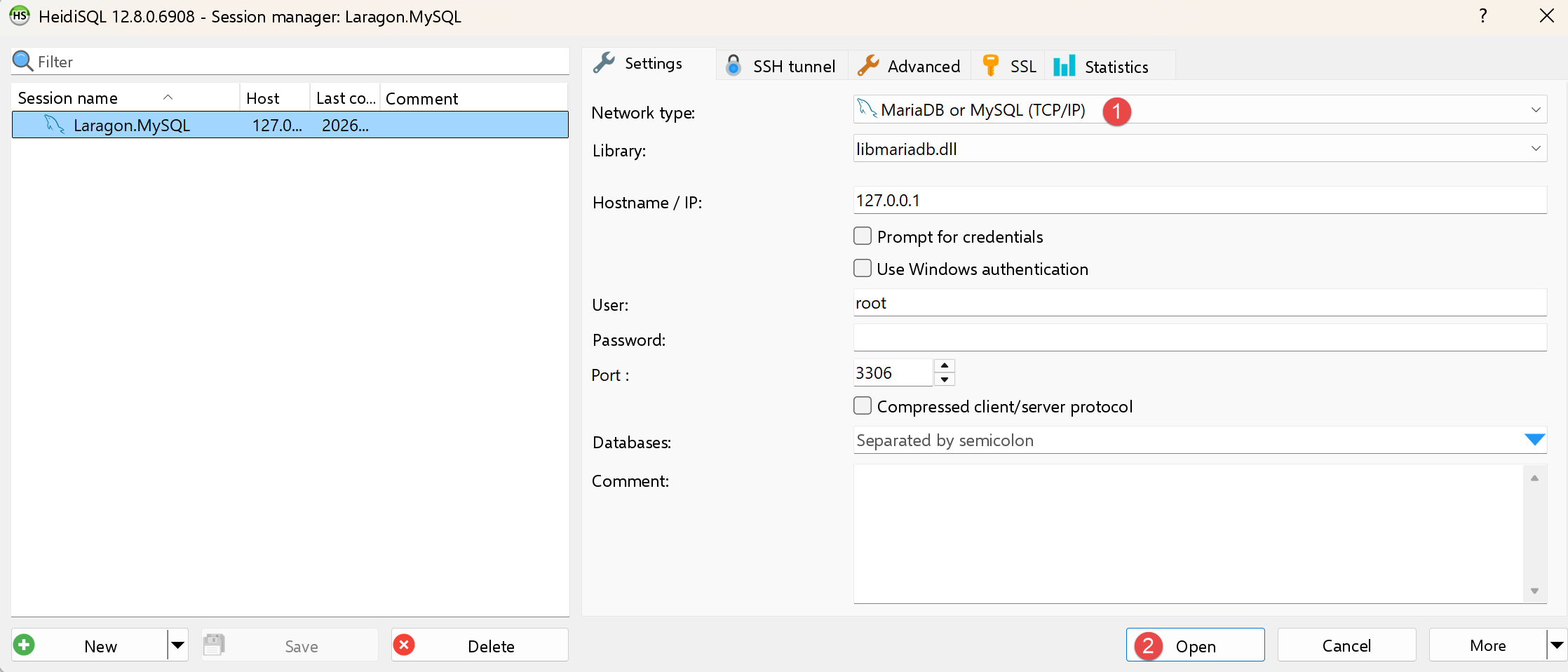
  • 在 [1-2] 中,登录 MySQL;

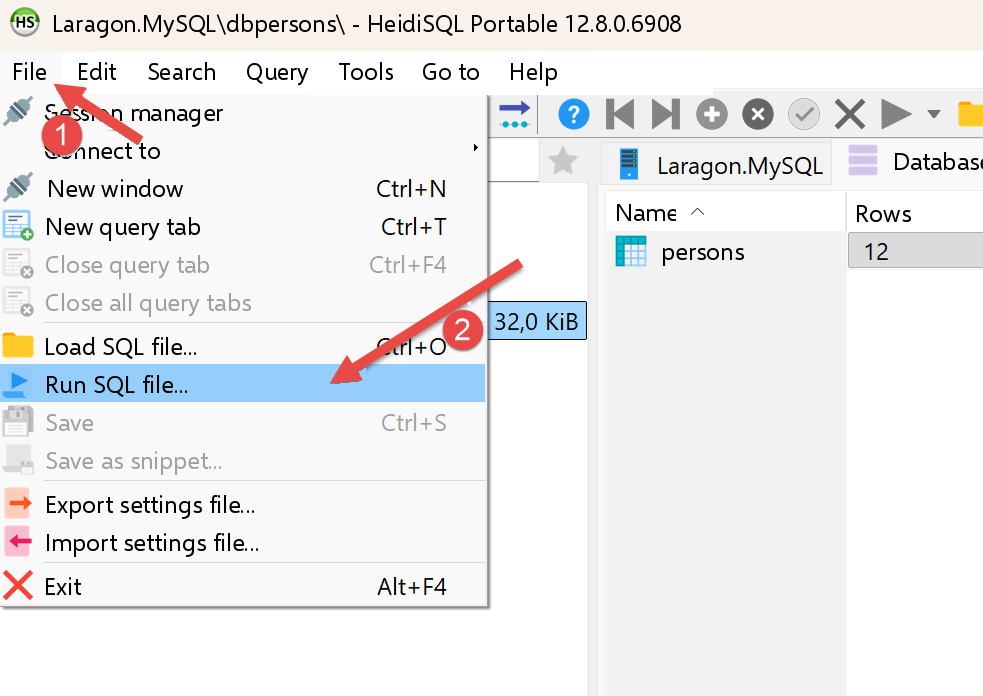
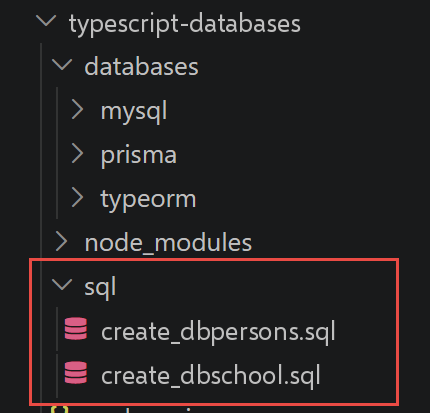
通过 [1-2],依次运行项目中的两个 SQL 文件:

Image

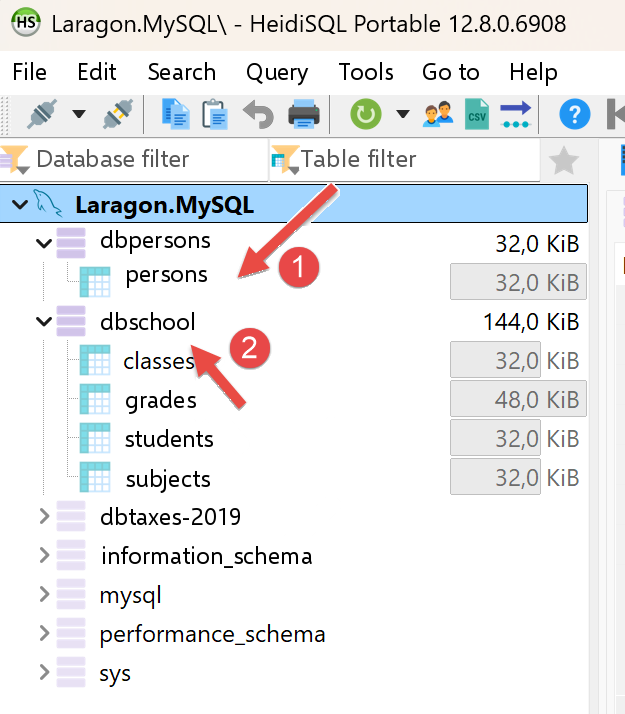
仍在 [HeidiSQL] 中,按 F5 刷新显示:

现在我们可以使用这两个数据库了。

7.1.2. [mysql_01] 脚本

// mysql_01.dart
// 移植自 databases/mysql/mysql-01.ts。
//
// 第一步:连接到 MySQL 数据库 [dbpersons],然后
// 断开连接。
//
// [技术选择] TypeScript 包 [mysql2] 在 Dart 一侧没有由 MySQL 团队自己维护的
// 直接对应物。本章的第一版使用了 [package:mysql1](pub.dev/packages/
// mysql1),一个被广泛使用的纯 Dart MySQL 驱动 - 但事实证明
// 它与 MySQL 8.4(Laragon 自带)不兼容:即使是
// "select 1" 这样简单的查询,也总是以
// 协议错误 "Got packets out of order" 失败(该包已知且未解决的 bug)。
// 所以这里我们使用 [package:mysql_client_plus]
// ¶(pub.dev/packages/mysql_client_plus)
// ,一个积极维护的分支,
// 在 MySQL 8.x 上测试过,其 API - [MySQLConnection.createConnection]、
// [connection.connect]、[connection.execute]、[connection.close] - 仍然
// 与 [mysql2] 的非常接近。
import 'package:mysql_client_plus/mysql_client_plus.dart';

// 连接到 MySQL 数据库 [dbpersons]
// 用户身份为 (admpersons, nobody)
const String user = 'admpersons';
const String pwd = 'nobody';
const String host = 'localhost';
const int port = 3306;
const String database = 'dbpersons';

Future<void> main() async {
  // [与 TypeScript 的区别] 这里没有联合类型 "MySqlConnection |
  // undefined":可空字段([MySQLConnection?])起同样的
  // 作用 - “尚未连接”用 [null] 表示,正如
  // TS 一侧用 [undefined] 表示“尚未连接”一样。
  MySQLConnection? connection;
  try {
    print('Connecting to the MySQL DBMS...');
    // [与 TypeScript 的区别] 与 mysql1(和 mysql2)不同,
    // [mysql_client_plus] 把连接对象的创建 ¶([createConnection],
    // 此时还不进行网络交换)与
    // 连接的实际建立([connect],它与服务器协商
    // 协议)分开 - 这是两个截然不同的步骤,而
    // mysql1 把它们合并为一次调用 [MySqlConnection.connect]。
    // 我们只在 [connect] 成功之后才给 [connection]([finally] 块的可空变量)赋值:
    // 如果 [connect] 失败,[connection]
    // 保持 [null],[finally] 就不会尝试关闭一个
    // 从未真正打开的连接。
    final newConnection = await MySQLConnection.createConnection(
      host: host,
      port: port,
      userName: user,
      password: pwd,
      databaseName: database,
    );
    await newConnection.connect();
    connection = newConnection;
    // 后续
    print(
      "Successful MySQL connection to database=$database, host=$host as user=$user, passwd=$pwd",
    );
  } catch (error) {
    // 显示错误
    print("The following error occurred: $error");
  } finally {
    // 如果连接已打开,则关闭它
    if (connection != null) {
      await connection.close();
    }
  }
}

我们来说明这段代码:

  • 第 19 行:[import 'package:mysql_client_plus/mysql_client_plus.dart';]:全新的、完全用 Dart 编写的 MySQL 驱动,用来取代 [package:mysql1]——后者与 MySQL 8.4(Laragon 自带)不兼容:即使是“select 1”这样简单的查询也始终失败,并报告协议错误“Got packets out of order”,这是该包中一个已知且尚未解决的缺陷(参见文件顶部的注释)。
  • 第 34 行:[MySQLConnection? connection;]:可空(NULLABLE)字段,其作用与 TypeScript 的联合类型 [MySqlConnection | undefined] 完全相同——[null] 表示“尚未连接”,就像 TS 中的 [undefined] 一样。
  • 第 47–55 行:[final newConnection = await MySQLConnection.createConnection(...); await newConnection.connect(); connection = newConnection;]:[mysql_client_plus] 把连接对象的创建([createConnection],此时尚未产生任何网络交互)与连接的实际建立([connect],与服务器协商协议)分开——这是两个不同的阶段,而 [mysql1](与 TypeScript 一侧的 [mysql2] 一样)把它们合并为一次调用。[connection]([finally] 中使用的可空变量)只有在 [connect] 成功之后才会被赋值,这样 [finally] 就绝不会关闭一个从未真正打开的连接。
  • [try] / [catch] / [finally]:结构与前一版本相同——无论是否发生错误,连接总是在 [finally] 中关闭。

执行结果如下:

Connecting to the MySQL DBMS...
Successful MySQL connection to database=dbpersons, host=localhost as user=admpersons, passwd=nobody

7.1.3. [mysql_02] 脚本

// mysql_02.dart
// 移植自 databases/mysql/mysql-02.ts。
//
// 在这个新脚本中,数据库连接被隔离在
// 一个函数中。
import 'package:mysql_client_plus/mysql_client_plus.dart';

// 连接然后断开(login、pwd)服务器
// [host] 上的数据库 [database];如果有问题则抛出异常
Future<void> connect(String host, int port, String database, String login, String pwd) async {
  MySQLConnection? cnx;
  try {
    // 连接 - [createConnection] 创建对象,[connect] 真正
    // 与服务器协商(见 mysql_01.dart 中的注释);我们
    // 只在 [connect] 成功之后才给 [cnx] 赋值,以便 [finally]
    // 从不关闭一个未成功的连接
    final newConnection = await MySQLConnection.createConnection(
      host: host,
      port: port,
      userName: login,
      password: pwd,
      databaseName: database,
    );
    await newConnection.connect();
    cnx = newConnection;
    print(
      "Successful connection to database=$database, host=$host as user=$login, passwd=$pwd",
    );
  } finally {
    // 如果连接已打开,则关闭它
    if (cnx != null) {
      await cnx.close();
      print('Successful disconnection\n');
    }
  }
}

// ============================================== main
// 连接凭据
const String user = 'admpersons';
const String passwd = 'nobody';
const String host = 'localhost';
const int port = 3306;
const String database = 'dbpersons';

Future<void> main() async {
  // 连接一个已存在的用户
  try {
    await connect(host, port, database, user, passwd);
  } catch (error) {
    // 显示错误
    print('$error');
  }

  // 连接一个不存在的用户
  try {
    await connect(host, port, database, 'xx', 'xx');
  } catch (error) {
    // 显示错误
    print('$error');
  }
}

我们来说明这段代码:

  • 第 10–36 行:[Future<void> connect(String host, int port, String database, String login, String pwd) async { ... }]:连接被封装在一个可复用的函数中,该函数在失败时抛出异常,而不是自己捕获——如何处理由调用者决定。它复用了 [mysql_01.dart] 中的“创建 + [connect()]”模式:[cnx] 只有在 [connect] 成功之后才会被赋值。
  • 第 43 行:[const int port = 3306;]:[mysql_client_plus] 要求显式指定端口([createConnection]),而 [mysql1] 的 [ConnectionSettings] 会自行推断默认端口(3306)。
  • [main] 在两个独立的 [try] 和 [catch] 块中调用此函数两次:一次使用有效的标识,一次使用无效的标识,以演示两种路径。

执行结果如下:

1
2
3
4
Successful connection to database=dbpersons, host=localhost as user=admpersons, passwd=nobody
Successful disconnection

MySQLServerException [1045]: Access denied for user 'xx'@'localhost' (using password: YES)

7.1.4. 脚本 [mysql_03]

// mysql_03.dart
// 移植自 databases/mysql/mysql-03.ts。
//
// 现在我们知道如何连接了,就在连接上发出 SQL 语句:
// 我们(重新)创建 [dbpersons] 数据库的 [persons] 表。
import 'dart:io';
import 'package:mysql_client_plus/mysql_client_plus.dart';

// 在连接上执行更新查询
Future<void> executeSql(MySQLConnection connection, String query) async {
  await connection.execute(query);
}

// ============================================== main
// 连接凭据
const String id = 'admpersons';
const String pwd = 'nobody';
const String host = 'localhost';
const int port = 3306;
const String database = 'dbpersons';

Future<void> main() async {
  // 我们分步进行
  late final MySQLConnection connection;
  try {
    // 连接 - [package:mysql_client_plus] 与之前的 mysql1 一样,
    // 默认在各自自动提交的事务中
    // 执行每个查询(相当于 Python 一侧的 AUTOCOMMIT=True)
    connection = await MySQLConnection.createConnection(
      host: host,
      port: port,
      userName: id,
      password: pwd,
      databaseName: database,
    );
    await connection.connect();
  } catch (error) {
    print("The following error occurred: $error");
    // [与 TypeScript 的区别] `process.exit(1)` 变成 `exit(1)` ¶(dart:io)- 语义相同,
    // 进程退出码相同
    exit(1);
  }

  // 如果 persons 表存在则删除它
  // 如果它不存在就会出错 - 我们忽略该错误
  try {
    await executeSql(connection, 'drop table persons');
  } catch (_) {
    // 被忽略 - [_] 表示我们不关心异常的值
  }

  // 创建 persons 表
  const query = 'create table persons (id int PRIMARY KEY, first_name varchar(30) NOT NULL, last_name varchar(30) NOT NULL, '
      'age integer NOT NULL, unique(last_name,first_name))';
  try {
    await executeSql(connection, query);
    print('$query: query succeeded');
  } catch (error) {
    print("The following error occurred: $error");
  } finally {
    await connection.close();
  }
}

我们来说明这段代码:

  • 第 10–12 行:[Future<void> executeSql(MySQLConnection connection, String query) async { await connection.execute(query); }]:一个执行 SQL 更新命令的工具函数(此处是 DROP TABLE 后接 CREATE TABLE)——[connection.execute(...)] 取代了 [mysql1] 的 [connection.query(...)](作用相同,只是在 [mysql_client_plus] 一侧方法名称变了)。
  • 第 41 行:[exit(1);](来自 [dart:io]):等价于 [process.exit(1)]——语义相同,连接失败时的进程退出码也相同。
  • 第 47 行:[try { await executeSql(connection, 'drop table persons'); } catch (_) {}]:把 [_] 作为参数传给 [catch],表示忽略异常值——因为该表可能根本还不存在。

执行结果如下:

create table persons (id int PRIMARY KEY, first_name varchar(30) NOT NULL, last_name varchar(30) NOT NULL, age integer NOT NULL, unique(last_name,first_name)): query succeeded

7.1.5. 脚本 [config_04]

// config_04.dart
// 移植自 databases/mysql/config-04.ts。
//
// [mysql_04] 脚本的配置:SQL 命令文件的路径
// 和 [dbpersons] 数据库的连接凭据。
//
// [与 TypeScript 的区别] config-04.ts 用
// `dirname(fileURLToPath(import.meta.url))` 找到脚本所在的文件夹。Dart 有更直接
// 也更简短的等价写法:[Platform.script](dart:io)已经是
// 正在运行的脚本的 URI - 我们只需用 [.resolve(...)] 针对它解析
// 相对路径,无需字符串处理。细微差别:
// [Platform.script] 指的是由 `dart run` 启动的主脚本 ¶(mysql_04.dart)
// ,而不是本文件 - 不同于 `import.meta.url`,
// 它是每个文件各自特有的。这里的结果相同,因为
// config_04.dart 和 mysql_04.dart 位于同一文件夹。
import 'dart:io';

class Config {
  final String commandsFilename;
  final String host;
  // [mysql_client_plus 迁移] 与 mysql1 不同,后者的
  // [ConnectionSettings] 自己推断默认端口(3306),
  // [MySQLConnection.createConnection] 需要显式指定端口 - 所以我们
  // 在这里把它加入配置。
  final int port;
  final String database;
  final String user;
  final String password;

  const Config({
    required this.commandsFilename,
    required this.host,
    required this.port,
    required this.database,
    required this.user,
    required this.password,
  });
}

Config configure() {
  return Config(
    // SQL 命令文件,相对于本文件解析
    commandsFilename: Platform.script.resolve('data/commands.sql').toFilePath(),
    // 数据库连接凭据
    host: 'localhost',
    port: 3306,
    database: 'dbpersons',
    user: 'admpersons',
    password: 'nobody',
  );
}

我们来分析这段代码:

  • 第 43 行:[Platform.script.resolve('data/commands.sql').toFilePath()](来自 [dart:io]):相当于 TypeScript 中 [dirname(fileURLToPath(import.meta.url))] 的更直接、更简短的写法——[Platform.script] 本身已经是当前运行脚本的 URI,只需在其中解析一个相对路径即可。
  • 重要说明:[Platform.script] 指的是由 [dart run] 启动的主(MAIN)脚本(这里是 [mysql_04.dart]),而不一定是编写该表达式的文件——这一点与 [import.meta.url] 不同,后者对每个文件都是唯一的。由于 [config_04.dart] 和 [mysql_04.dart] 位于同一文件夹,这里的结果仍然正确。
  • 第 18–28 行:[class Config { final String commandsFilename; ...; final int port; ...; const Config({required this... }); }]:一个用于组织配置的不可变类,类似于 TypeScript 版本的 [Config] 接口——另外多了一个 [port] 字段,这是 [MySQLConnection.createConnection] 明确要求的(而 [mysql1] 的 [ConnectionSettings] 会自动推断默认端口 3306)。

7.1.6. 脚本 [mysql_module]

// mysql_module.dart
// 移植自 databases/mysql/mysql-module.ts:可复用的函数,
// 用于在已打开的 MySQL 连接上
// 执行 SQL 命令列表(或文件)。
//
// [迁移] 此文件最初使用 [package:mysql1],事实证明
// 它与 MySQL 8.4 不兼容(见 pubspec.yaml 中的注释)。它
// 已移植到 [package:mysql_client_plus] - 下面说明这在事务处理上
// 带来的差异。
import 'dart:io';
import 'package:mysql_client_plus/mysql_client_plus.dart';

// 显示一条 SQL 命令的结果(mysql_client_plus 的 execute()
// 的结果)
// - 如果 [results.cols] 非空,则是 SELECT:我们显示
//   列,然后显示行;
// - 否则是更新语句(INSERT/UPDATE/DELETE/DDL):我们
//   显示被修改的行数([results.affectedRows],
//   相当于游标的 [rowcount])。
void _displayInfo(IResultSet results) {
  if (results.cols.isNotEmpty) {
    // 这是一个 SELECT - [cols] 描述所请求的列
    final titles = results.cols.map((c) => c.name).toList();
    final header = titles.join(', ');
    print(header);
    print('*' * header.length);
    for (final row in results.rows) {
      print(titles.map((t) => row.colByName(t)).toList());
    }
    print('*' * header.length);
  } else {
    // 没有描述列 - 更新语句
    print('number of modified rows: ${results.affectedRows}');
  }
}

// 使用已打开的连接 [connection]
// 在此连接上执行列表
// [sqlCommands] 中包含的 SQL 命令(每个元素一条命令;空行或以 # 开头的行
// 会被忽略)
// - 如果 verbose=true,每次执行 SQL 语句之后都会
//   显示其成功或失败;
// - 如果 stop=true,函数在遇到第 1 个错误时停止,
//   否则执行所有命令;
// - 如果 withTransaction=true,任何错误都会取消此前
//   执行的所有 SQL 语句(回滚);否则每条命令
//   独立提交(MySQL 的默认行为,AUTOCOMMIT 模式);
// 函数返回一个列表 [error1, error2, ...]
//
// [与 TypeScript 的区别] mysql2 直接暴露
// `connection.beginTransaction()/commit()/rollback()`。
// [package:mysql1] ¶(本文件的第一版所用)没有逐个暴露这些
// 方法:必须“手工”驱动事务,
// 自己发送 SQL 语句 [START TRANSACTION]、[COMMIT] 和
// [ROLLBACK]。[package:mysql_client_plus] 终于带来了与 mysql2 直接对应的
// 功能:`connection.transactional<T>((cnx)
// async { ... })` 在事务中执行
// 回调,如果正常结束则自动提交(COMMIT),如果抛出
// 异常则自动取消(ROLLBACK) - 不再需要
// 自己编写事务控制 SQL 语句。
Future<List<String>> executeListOfCommands(
  MySQLConnection connection,
  List<String> sqlCommands, {
  bool verbose = false,
  bool stop = true,
  bool withTransaction = true,
}) async {
  final errors = <String>[];

  // 在所提供的连接 [cnx] 上实际执行命令:它
  // 要么是 [connection] 本身(无事务),要么是 [transactional] 交给其回调的
  // “工作”连接(有
  // 事务)- 循环只写一次,两种情况共用
  Future<void> executeCommands(MySQLConnection cnx) async {
    for (final rawCommand in sqlCommands) {
      // 去掉当前命令前后的空白
      final command = rawCommand.trim();
      // 空命令或注释?转到下一条
      if (command == '' || command[0] == '#') {
        continue;
      }
      // 执行当前命令
      try {
        final results = await cnx.execute(command);
        // 没有错误
        if (verbose) {
          print('[$command]: Successful execution');
        }
        _displayInfo(results);
      } catch (error) {
        final msg = '$command: Error ($error)';
        errors.add(msg);
        if (verbose) {
          print(msg);
        }
        // 我们要停止吗?
        if (withTransaction || stop) {
          // 有事务时:我们重新抛出错误,以便
          // [connection.transactional] 触发 ROLLBACK - 在
          // [package:mysql_client_plus] 中,驱动取消的是异常,
          // 而不是像 mysql1 版本中手动 ROLLBACK 那样
          // 仅仅退出循环
          if (withTransaction) rethrow;
          return;
        }
      }
    }
  }

  if (withTransaction) {
    try {
      await connection.transactional((cnx) => executeCommands(cnx));
    } catch (_) {
      // 错误已经在上面记录到 [errors] 中;我们在这里
      // 吞掉它,以便向调用者正常返回错误列表,
      // 与 mysql1 版本完全一样(它从不
      // 让异常从该函数中逃逸)
    }
  } else {
    await executeCommands(connection);
  }
  return errors;
}

// 使用已打开的连接 [connection]
// 在此连接上执行文本文件 [sqlFilename] 中
// 包含的 SQL 命令(每行一条命令)
Future<List<String>> executeFileOfCommands(
  MySQLConnection connection,
  String sqlFilename, {
  bool verbose = false,
  bool stop = true,
  bool withTransaction = true,
}) async {
  try {
    final content = await File(sqlFilename).readAsString();
    return await executeListOfCommands(
      connection,
      content.split('\n'),
      verbose: verbose,
      stop: stop,
      withTransaction: withTransaction,
    );
  } catch (error) {
    return ["The file $sqlFilename could not be processed: $error"];
  }
}

我们来说明这段代码:

  • 第 20 行:[void _displayInfo(IResultSet results)]:区分 SELECT([results.cols] 描述所请求的列)与更新语句([results.affectedRows],相当于游标的 [rowcount])——[results.cols]/[results.rows] 取代了 [mysql1] 的 [results.fields],[row.colByName(t)] 取代了 [row.fields[t]] 这种写法。
  • 第 61–67 行:[Future<List<String>> executeListOfCommands(MySQLConnection connection, List<String> sqlCommands, {bool verbose = false, bool stop = true, bool withTransaction = true}) async { ... }]:带默认值的命名参数(NAMED PARAMETERS),与 [mysql1] 版本相比没有变化——完全类似于 TypeScript 配置对象的可选参数。
  • 第 74–108 行:[Future<void> executeCommands(MySQLConnection cnx) async { ... }]:一个(嵌套的)局部(LOCAL)函数,既用于“带事务”的情形(此时它接收 [transactional] 传给其回调的工作连接),也用于“不带事务”的情形(此时它直接接收 [connection])——这样,命令执行循环只需写一次。在带事务的情形下,触发 ROLLBACK 的是重新抛出的异常(EXCEPTION,[rethrow]),而不是像 [mysql1] 版本中手动 ROLLBACK 时那样简单地结束循环。
  • 第 110–118 行:[if (withTransaction) { try { await connection.transactional((cnx) => executeCommands(cnx)); } catch (_) { ... } }]:[mysql2] 直接提供 [connection.beginTransaction()]/[commit()]/[rollback()]。[package:mysql1] 没有逐一提供这些方法:必须自己发送 SQL 命令 [START TRANSACTION]、[COMMIT] 和 [ROLLBACK],“手动”控制事务。[package:mysql_client_plus] 终于提供了 [mysql2] 的直接等价物:[connection.transactional((cnx) async { ... })] 在事务中执行回调,正常完成时自动提交(COMMIT),抛出异常时自动回滚(ROLLBACK)——不再需要自己编写 SQL 事务控制语句。
  • 第 128–134 行:[Future<List<String>> executeFileOfCommands(...) async { ... }]:读取文件([File(sqlFilename).readAsString()]),然后委托给 [executeListOfCommands]——与 [mysql1] 版本相比没有变化,结构与 TypeScript 中相同。

7.1.7. 脚本 [mysql_04]

这个主脚本协调前面的两个脚本来执行文件 [data/commands.sql](与 TypeScript 课程中的相同),是否使用事务取决于提供的命令行参数。

// mysql_04.dart
// 移植自 databases/mysql/mysql-04.ts。
//
// 主脚本:执行 SQL 命令文件
// [data/commands.sql],是否使用事务取决于在命令行上
// 传入的参数。
//   dart run mysql_04.dart true   (使用事务)
//   dart run mysql_04.dart false  (不使用事务)
import 'dart:io';
import 'package:mysql_client_plus/mysql_client_plus.dart';
import 'config_04.dart';
import 'mysql_module.dart';

Future<void> main(List<String> arguments) async {
  final config = configure();

  // ============================================== main
  // 检查调用语法
  bool error = arguments.length != 1;
  String withTransactionText = '';
  if (!error) {
    withTransactionText = arguments[0].toLowerCase();
    error = withTransactionText != 'true' && withTransactionText != 'false';
  }
  if (error) {
    print('syntax: dart run mysql_04.dart true / false');
    exit(1);
  }

  // 计算文本
  final withTransaction = withTransactionText == 'true';
  final text = withTransaction ? 'with transaction' : 'without transaction';

  // 屏幕日志
  print('--------------------------------------------------------------------');
  print('Executing the SQL file ${config.commandsFilename} $text');
  print('--------------------------------------------------------------------');

  // 执行文件中的 SQL 语句
  MySQLConnection? connection;
  List<String> errors = [];
  try {
    // 连接数据库 -
    // 我们只在 [connect] 成功之后才给 [connection] 赋值 ¶(见 mysql_01.dart 中的注释)
    final newConnection = await MySQLConnection.createConnection(
      host: config.host,
      port: config.port,
      userName: config.user,
      password: config.password,
      databaseName: config.database,
    );
    await newConnection.connect();
    connection = newConnection;
    // 执行 SQL 命令文件
    errors = await executeFileOfCommands(
      connection,
      config.commandsFilename,
      verbose: true,
      stop: false,
      withTransaction: withTransaction,
    );
  } catch (fatalError) {
    print("The following fatal error occurred: $fatalError");
    exit(1);
  } finally {
    if (connection != null) {
      await connection.close();
    }
  }

  // 显示错误数量
  print('--------------------------------------------------------------------');
  print('Execution completed');
  print('--------------------------------------------------------------------');
  print('There were ${errors.length} error(s)');
  for (final currentError in errors) {
    print(currentError);
  }
}

我们来说明这段代码:

  • 第 14–28 行:[Future<void> main(List<String> arguments) async { ... }]:[arguments] 接收命令行参数,就像 Node 一侧的 [process.argv.slice(2)]——这里只期望一个参数:[true] 或 [false]。
  • 第 45–53 行:[final newConnection = await MySQLConnection.createConnection(...); await newConnection.connect(); connection = newConnection;]:连接使用与 [connect()] 相同的创建模式,如 [mysql_01.dart] 中所示,参数取自 [config](包括新增的字段 [port])。
  • 第 55–61 行:[executeFileOfCommands(connection, config.commandsFilename, verbose: true, stop: false, withTransaction: withTransaction)]:执行 [data/commands.sql],是否使用事务取决于参数——[dart run mysql_04.dart true] 或 [dart run mysql_04.dart false]。

下面是两种可能的执行情况:

dart run mysql_04.dart true
[insert into persons(first_name, last_name, age) values ('Sylvie','Lefur',70)]: Successful execution
number of modified rows: 1
[select first_name, last_name, age from persons]: Successful execution
first_name, last_name, age
**************************
[Paul, Langevin, 48]
[Sylvie, Lefur, 70]
**************************
xx: Error (MySQLServerException [1064]: You have an error in your SQL syntax; check the manual that corresponds to your MySQL server version for the right syntax to use near 'xx' at line 1)
--------------------------------------------------------------------
Execution completed
--------------------------------------------------------------------
There were 1 error(s)
xx: Error (MySQLServerException [1064]: You have an error in your SQL syntax; check the manual that corresponds to your MySQL server version for the right syntax to use near 'xx' at line 1)
dart run mysql_04.dart false
Executing the SQL file C:\Data\st-2026\dev\dart-sept-2026-scripts\dart-databases\mysql\data\commands.sql without transaction
--------------------------------------------------------------------
[drop table persons]: Successful execution
number of modified rows: 0
[create table persons (first_name varchar(30) not null, last_name varchar(30) not null, age integer not null, primary key (last_name,first_name))]: Successful execution
number of modified rows: 0
[insert into persons(first_name, last_name, age) values('Paul','Langevin',48)]: Successful execution
number of modified rows: 1
[insert into persons(first_name, last_name, age) values ('Sylvie','Lefur',70)]: Successful execution
number of modified rows: 1
[select first_name, last_name, age from persons]: Successful execution
first_name, last_name, age
**************************
[Paul, Langevin, 48]
[Sylvie, Lefur, 70]
**************************
xx: Error (MySQLServerException [1064]: You have an error in your SQL syntax; check the manual that corresponds to your MySQL server version for the right syntax to use near 'xx' at line 1)
[insert into persons(first_name, last_name, age) values ('Pierre','Nicazou',35)]: Successful execution
number of modified rows: 1
[insert into persons(first_name, last_name, age) values ('Geraldine','Colou',26)]: Successful execution
number of modified rows: 1
[insert into persons(first_name, last_name, age) values ('Paulette','Girond',56)]: Successful execution
number of modified rows: 1
[select first_name, last_name, age from persons]: Successful execution
first_name, last_name, age
**************************
[Geraldine, Colou, 26]
[Paulette, Girond, 56]
[Paul, Langevin, 48]
[Sylvie, Lefur, 70]
[Pierre, Nicazou, 35]
**************************
[select last_name,first_name from persons order by last_name asc, first_name desc]: Successful execution
last_name, first_name
*********************
[Colou, Geraldine]
[Girond, Paulette]
[Langevin, Paul]
[Lefur, Sylvie]
[Nicazou, Pierre]
*********************
[select last_name,first_name,age from persons where age between 20 and 40 order by age desc, last_name asc, first_name asc]: Successful execution
last_name, first_name, age
**************************
[Nicazou, Pierre, 35]
[Colou, Geraldine, 26]
**************************
[insert into persons(first_name, last_name, age) values('Josette','Bruneau',46)]: Successful execution
number of modified rows: 1
[update persons set age=47 where last_name='Bruneau']: Successful execution
number of modified rows: 1
[select last_name,first_name,age from persons where last_name='Bruneau']: Successful execution
last_name, first_name, age
**************************
[Bruneau, Josette, 47]
**************************
[delete from persons where last_name='Bruneau']: Successful execution
number of modified rows: 1
[select last_name,first_name,age from persons where last_name='Bruneau']: Successful execution
last_name, first_name, age
**************************
**************************
--------------------------------------------------------------------
Execution completed
--------------------------------------------------------------------
There were 1 error(s)
xx: Error (MySQLServerException [1064]: You have an error in your SQL syntax; check the manual that corresponds to your MySQL server version for the right syntax to use near 'xx' at line 1)

7.1.8. 脚本 [mysql_05]

// mysql_05.dart
// 移植自 databases/mysql/mysql-05.ts。
//
// 参数化查询:单次预处理插入,然后批量
// 插入。这里我们用带 [id] 列的模式重新创建 [persons] 表 ¶(如脚本 mysql_03 中)
// ,以便本脚本独立于
// mysql_04 留下的状态。
import 'package:mysql_client_plus/mysql_client_plus.dart';

// 用户身份
const String id = 'admpersons';
const String pwd = 'nobody';
// DBMS 所在主机
const String host = 'localhost';
const int port = 3306;
// 数据库标识
const String database = 'dbpersons';

// [与 TypeScript 的区别] `type Person = [id: number, lastName: string,
// firstName: string, age: number]`(TypeScript 元组,有名字但在运行时仍然是
// 普通数组)
// 在这里变成 Dart 3 的位置记录 ¶(见 dart-fundamentals/dart3/dart3_01_records.dart):同样是
// “无需编写类的、由带类型的值组成的小集合”的想法,但它是
// 独立的真正类型,有别于 [List]。
typedef Person = (int id, String lastName, String firstName, int age);

Future<void> main() async {
  // 人员列表(id、lastName、firstName、age)
  final persons = <Person>[
    for (var i = 0; i < 5; i++) (i, 'l0$i', 'f0$i', i + 10),
    (40, "d'Aboot", "Y'éna", 18),
  ];

  // 另一个人员列表
  final otherPersons = <Person>[
    for (var i = 0; i < 5; i++) (i + 100, 'l1$i', 'f1$i', i + 20),
    (200, "d'Aboot", "F'ilhem", 34),
  ];

  // 访问 DBMS
  MySQLConnection? connection;
  try {
    // 连接 -
    // 我们只在 [connect] 成功之后才给 [connection] 赋值 ¶(见 mysql_01.dart 中的注释)
    final newConnection = await MySQLConnection.createConnection(
      host: host,
      port: port,
      userName: id,
      password: pwd,
      databaseName: database,
    );
    await newConnection.connect();
    connection = newConnection;

    // 用带 [id] 列的模式(重新)创建表(见 mysql_03)
    await connection.execute('drop table if exists persons');
    await connection.execute(
      'create table persons (id int PRIMARY KEY, first_name varchar(30) NOT NULL, last_name varchar(30) NOT NULL, '
      'age integer NOT NULL, unique(last_name,first_name))',
    );

    // 删除现有记录
    await connection.execute('delete from persons');
    // 使用参数化查询逐个人员插入 -
    // 在 for 头部直接解构位置记录 [person] ¶(见
    // dart-fundamentals/dart3/dart3_02_patterns.dart)
    //
    // [与 TypeScript 和 mysql1 的区别] mysql2(以及本脚本第一版中的 mysql1)
    // 使用位置
    // 占位符("?",与按相同顺序排列的值列表关联)。
    // [package:mysql_client_plus] 的做法不同:
    // 占位符是命名的(":id"、":last_name"……),
    // 并与 [Map] 关联 ¶(占位符名称 -> 值)- 这里写起来更啰嗦,但
    // 它使每个查询独立于参数的顺序。
    for (final (idP, lastName, firstName, age) in persons) {
      await connection.execute(
        'insert into persons(id,last_name,first_name,age) values(:id,:last_name,:first_name,:age)',
        {'id': idP, 'last_name': lastName, 'first_name': firstName, 'age': age},
      );
    }
    // [与 TypeScript 的区别] mysql2 提供
    // `connection.query('insert ... values ?', [[[...],[...],...]])`,它
    // 自己从数组的数组构建单个多行查询。
    // [package:mysql_client_plus] 没有这样的
    // 对应物(与之前的 mysql1 一样):所以我们自己构建 SQL 文本,
    // 每行一组命名占位符(":id0"、
    // ":last_name0"…… ":id1"、":last_name1"……),因为命名占位符
    // 不能在同一查询中重复 - 只需一次网络
    // 往返,与 TypeScript 版本相同。
    final placeholderGroups = <String>[];
    final values = <String, Object?>{};
    for (var i = 0; i < otherPersons.length; i++) {
      final (idP, lastName, firstName, age) = otherPersons[i];
      placeholderGroups.add('(:id$i,:last_name$i,:first_name$i,:age$i)');
      values['id$i'] = idP;
      values['last_name$i'] = lastName;
      values['first_name$i'] = firstName;
      values['age$i'] = age;
    }
    await connection.execute(
      'insert into persons(id,last_name,first_name,age) values ${placeholderGroups.join(',')}',
      values,
    );

    // 提交事务 - 这里每个查询都已经
    // 自动提交(MySQL 默认处于 AUTOCOMMIT 模式,与脚本 mysql_03 中
    // 提到的默认模式相同);所以没有什么需要
    // 显式提交的
    print('${persons.length + otherPersons.length} persons inserted.');
  } catch (error) {
    print("The following error occurred: $error");
  } finally {
    if (connection != null) {
      await connection.close();
    }
  }
}

我们来说明这段代码:

  • 第 25 行:[typedef Person = (int id, String lastName, String firstName, int age);]:TypeScript 中的元组,命名为 [type Person = [id: number, lastName: string, firstName: string, age: number]](运行时只是一个简单数组),在 Dart 3 中变为位置记录(POSITIONAL RECORD)——它本身就是一个完整的类型,与 [List] 不同。
  • 第 75–80 行:[for (final (idP, lastName, firstName, age) in persons) { await connection.execute('insert into persons(id,last_name,first_name,age) values(:id,:last_name,:first_name,:age)', {'id': idP, 'last_name': lastName, 'first_name': firstName, 'age': age}); }]:每条预处理插入语句都在 [for] 头部直接解构位置记录(参见“Dart 3.x 的新特性”一章)——使用与 [Map] 关联的命名(NAMED)占位符([:id]、[:last_name]……),而不是 [mysql1] 和 [mysql2] 的位置(POSITIONAL)占位符([?] 加值列表)。
  • 第 90–99 行:[final placeholderGroups = <String>[]; final values = <String, Object?>{}; for (...) { placeholderGroups.add('(:id$i,:last_name$i,:first_name$i,:age$i)'); ... }]:[mysql2] 直接支持通过数组的数组进行批量插入([values ?] 配合 [[[...],[...]]])。[package:mysql_client_plus] 没有这样的等价物(与之前的 [mysql1] 一样):因此必须自己构造 SQL 文本,但每一行使用一组带名称且带编号的(NAMED 且 NUMBERED)占位符([:id0]、[:last_name0]……[:id1]、[:last_name1]……),因为命名占位符不能在同一个请求中重复使用——与 TypeScript 版本一样,只需一次网络往返。
  • 第 93 行:[final (idP, lastName, firstName, age) = otherPersons[i];]:这里再次使用位置记录的解构——需要根据记录的四个字段为每个占位符([:id0]、[:last_name0]……)单独命名,因为 [mysql_client_plus] 不像此脚本前一版本中使用的 [p.$1, p.$2...] 那样提供直接的位置访问。

执行结果如下:

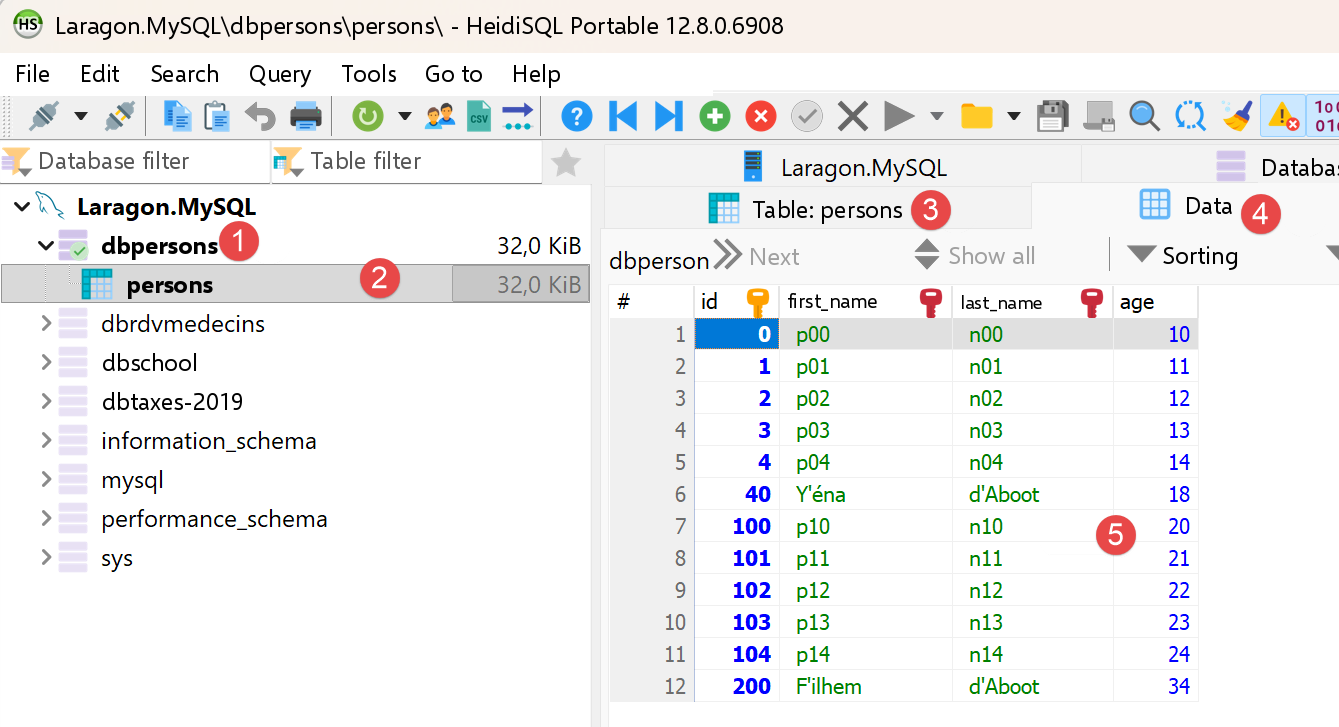
12 persons inserted.

可以使用 Laragon 的 HeidiSQL 验证结果:

Image

7.1.9. 结论

原生驱动的移植忠实于原来的 TypeScript 版本。在最初尝试 [package:mysql1]——因与 MySQL 8.4 不兼容而被放弃——之后,[package:mysql_client_plus] 最终提供了比 [mysql1] 更接近 [mysql2] 的 API:[connection.transactional(...)] 直接等价于 [beginTransaction()]/[commit()]/[rollback()],而 [mysql1] 则需要使用 SQL 命令 [START TRANSACTION]、[COMMIT] 和 [ROLLBACK] 手动管理事务。还有一个差异依然存在,尽管更为细微:DECIMAL 列([dbschool] 数据库中的 [subjects.coefficient]、[grades.value])需要借助一个小的辅助函数 [_decimal]([typedColByName<String>(...)] 然后 [num.parse(...)])进行显式转换,因为驱动不支持把此 SQL 类型直接转换为 [num] 或 [double]。

7.2. 轻量级 ORM
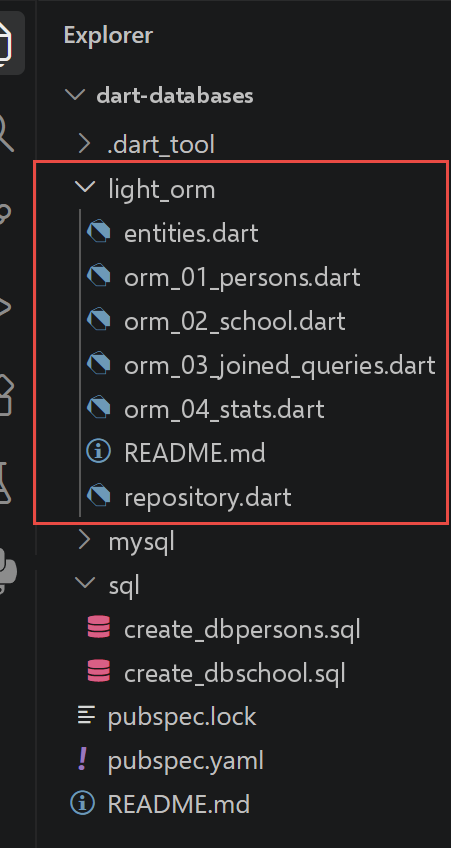
Image

TypeScript 课程用两个独立的章节讲解通过 ORM([Object-Relational Mapping],对象关系映射)访问数据库:先是 [TypeORM],然后是 [Prisma],使用同一个示例模式。两者基于一个共同的原理:先一次性描述模式(TypeORM 在类上使用装饰器,Prisma 则使用 [.prisma] 文件),然后让工具在启动时或编译期间生成所有把对象的读写转换为 SQL 的代码——包括表之间关系的加载。

Dart 没有成熟且被广泛采用的、可用于 MySQL 的这两个工具的等价物:虽然存在 Dart 的 ORM 库,但它们主要面向 Flutter/SQLite([Drift]、[Floor])或其他不同的架构——Prisma 本身也不提供 Dart 客户端。我们不去强行建立“某某 Dart 包 = TypeORM”或“某某包 = Prisma”这样的人为对应,而是采用一种不同的、教学上更合理的方式:通过亲自编写一个刻意保持精简的版本,来展示 ORM 究竟做了什么——因此得名 [light ORM]。

7.2.1. 实体:[entities.dart] 文件

// entities.dart
// 移植自 TypeORM 实体(databases/typeorm/entities/*.entity.ts):
// Person(数据库 [dbpersons]),以及 SchoolClass / Student / Subject / Grade(数据库
// [dbschool])。
//
// [与 TypeScript 的根本区别] TypeORM 实体是普通的
// 带装饰器的类(`@Entity`、`@Column`、`@ManyToOne`……):
// 是 TypeORM 在启动时读取这些装饰器(一种
// 反射/元编程),
// 以知道如何在 SQL 中读写每个字段,以及如何按需加载关联。Dart
// 在这里没有可用的反射等价物(`dart:mirrors` 对于 Web/AOT 编译
// 已被弃用):所以这些类只是
// 普通的可变“字段集合”,没有任何注解 - 是
// 整个 light_orm 文件夹(尤其是 repository.dart),
// 通过手写来扮演反射对 TypeORM 所起的作用。完整的讨论见
// 本文件夹的 README.md。
class Person {
  int id;
  String lastName;
  String firstName;
  int age;

  Person({required this.id, required this.lastName, required this.firstName, required this.age});

  @override
  String toString() => 'Person($id, $firstName $lastName, $age years old)';
}

class SchoolClass {
  int id;
  String name;
  // 反向关联(Student.schoolClass 的反向引用)- 不会自动
  // 加载:除非我们显式调用
  // 填充它的查询,否则保持为空(见 orm_03_joined_queries.dart)
  List<Student> students = [];

  SchoolClass({required this.id, required this.name});

  @override
  String toString() => 'SchoolClass($id, $name)';
}

class Student {
  int id;
  String lastName;
  String firstName;
  int classId;
  // 到 SchoolClass 的 N-1 关联 -
  // 在显式加载之前为 null ¶(相当于 TypeORM 的 `relations: { schoolClass: true }`
  // 选项,但在这里表现为普通的可空字段,使其可见)
  SchoolClass? schoolClass;
  List<Grade> grades = [];

  Student({
    required this.id,
    required this.lastName,
    required this.firstName,
    required this.classId,
    this.schoolClass,
  });

  @override
  String toString() => 'Student($id, $firstName $lastName)';
}

class Subject {
  int id;
  String name;
  num coefficient;
  List<Grade> grades = [];

  Subject({required this.id, required this.name, required this.coefficient});

  @override
  String toString() => 'Subject($id, $name, coefficient $coefficient)';
}

class Grade {
  int id;
  num value;
  int studentId;
  int subjectId;
  Student? student;
  Subject? subject;

  Grade({
    required this.id,
    required this.value,
    required this.studentId,
    required this.subjectId,
    this.student,
    this.subject,
  });

  @override
  String toString() => 'Grade($id, $value)';
}

我们来说明这段代码:

  • TypeORM 的实体是普通的带装饰器(DECORATED)的类([@Entity]、[@Column]、[@ManyToOne]……):是 TypeORM 在启动时读取这些装饰器(一种反射),以确定如何用 SQL 读写每个字段,并按需加载关系。Dart 在这里没有可用的等价反射机制([dart:mirrors] 在 Web 编译/AOT 中已被弃用):因此这些类只是可变的“字段袋”,不带任何注解。
  • 第 29 行:[class SchoolClass { ...; List<Student> students = []; }]、[class Student { ...; SchoolClass? schoolClass; List<Grade> grades = []; }](第 43 行):关系只是简单字段(空集合或可空引用),永远不会被自动加载——扮演 TypeORM 中反射所起作用的,是手工编写的 [repository.dart]。

7.2.2. 泛型仓库:[repository.dart] 文件

// repository.dart
// 手写的“轻量 ORM”:一个通用的 [Repository] 类,强烈
// 受 TypeORM 的 Repository 启发(`AppDataSource.getRepository(...)`、
// `.find()`、`.findOneBy()`、`.save()`、`.delete()`),但基于
// 单个表构建,没有装饰器,也不自动加载
// 关联 - 关于这一选择的完整讨论见 README.md。
//
// [迁移] 此文件最初使用 [package:mysql1];它已
// 移植到 [package:mysql_client_plus](见
// pubspec.yaml 中的注释)。对调用者来说最明显的变化是
// 参数化查询的风格:mysql1 使用位置
// 占位符("?" + 按顺序排列的值列表),而
// [mysql_client_plus] 使用命名占位符(":column" +
// [Map] 列名 -> 值)- 这在这里相当合适,
// 因为这个仓库本来就处理由列组成的
// [Map<String, Object?>]。
import 'package:mysql_client_plus/mysql_client_plus.dart';

// [T]:此仓库所管理的实体类型(Person、SchoolClass……)
class Repository<T> {
  final MySQLConnection connection;
  // SQL 表的名称
  final String table;
  // 主键列的名称
  final String keyColumn;
  // 从 SQL 结果行构建 [T] 实体
  final T Function(ResultSetRow row) fromRow;
  // 返回 [T] 实体的 SQL 列(列名 -> 值),
  // 包含主键(既可用于插入,也可用于
  // 更新)
  final Map<String, Object?> Function(T entity) toColumns;
  // 提取 [T] 实体的主键值
  final Object? Function(T entity) key;

  Repository(
    this.connection, {
    required this.table,
    required this.keyColumn,
    required this.fromRow,
    required this.toColumns,
    required this.key,
  });

  // 相当于 `repo.find({ order: { column: 'ASC' } })`
  Future<List<T>> findAll({String? orderBy}) async {
    final sql = 'select * from $table${orderBy != null ? ' order by $orderBy' : ''}';
    final results = await connection.execute(sql);
    return results.rows.map(fromRow).toList();
  }

  // 相当于 `repo.findOneBy({ column: value })` - [conditions] 是
  // 对每个提供的列做“AND”相等比较;[conditions] 的键
  // 既用作 SQL 列名,也用作命名占位符
  // 名称(":column")- 所以它们原样
  // 复用为查询参数
  Future<T?> findOneBy(Map<String, Object?> conditions) async {
    final where = conditions.keys.map((c) => '$c = :$c').join(' and ');
    final results = await connection.execute(
      'select * from $table where $where limit 1',
      conditions,
    );
    if (results.rows.isEmpty) return null;
    return fromRow(results.rows.first);
  }

  // 相当于 `repo.findOneByOrFail(...)` / `findOneOrFail(...)`
  Future<T> findOneByOrFail(Map<String, Object?> conditions) async {
    final found = await findOneBy(conditions);
    if (found == null) {
      throw StateError('No row found in [$table] for $conditions');
    }
    return found;
  }

  // 相当于 `repo.save(entity)`:如果键尚不存在则插入,
  // 否则更新 - 与 TypeORM 一侧 `save()` 的
  // “upsert”行为完全一样
  Future<void> save(T entity) async {
    final columns = toColumns(entity);
    final currentKey = key(entity);
    final alreadyExists = await findOneBy({keyColumn: currentKey}) != null;
    if (alreadyExists) {
      final toUpdate = columns.keys.where((c) => c != keyColumn);
      final assignments = toUpdate.map((c) => '$c = :$c').join(', ');
      // 要更新的列,加上键(使用与 WHERE 子句中相同的占位符
      // 名称)- 不可能冲突,
      // 因为 [keyColumn] 已被明确地从 [toUpdate] 中排除
      final values = <String, Object?>{
        for (final c in toUpdate) c: columns[c],
        keyColumn: currentKey,
      };
      await connection.execute('update $table set $assignments where $keyColumn = :$keyColumn', values);
    } else {
      final names = columns.keys.join(',');
      final placeholders = columns.keys.map((c) => ':$c').join(',');
      await connection.execute('insert into $table ($names) values ($placeholders)', columns);
    }
  }

  // 相当于 `repo.delete({ column: value })`
  Future<void> delete(Map<String, Object?> conditions) async {
    final where = conditions.keys.map((c) => '$c = :$c').join(' and ');
    await connection.execute('delete from $table where $where', conditions);
  }
}

我们来说明这段代码:

  • 第 20–33 行:[class Repository<T> { ...; final T Function(ResultSetRow row) fromRow; final Map<String, Object?> Function(T entity) toColumns; final Object? Function(T entity) key; ... }]:一个泛型(GENERIC)类,由实体类型 [T] 进行配置,围绕调用者提供的三个函数(THREE FUNCTIONS)构建——如何读取一行 SQL、如何写入,以及主键是什么。这就是“对象关系映射”的全部,精简到了最核心的部分;与 [mysql1] 版本相比,只有第一个函数的类型发生了变化(用 [ResultSetRow] 代替 [ResultRow])。
  • 第 57 行:[final where = conditions.keys.map((c) => '$c = :$c').join(' and ');]:[conditions] 的键既是 SQL 的列名,又是命名占位符(NAMED PLACEHOLDER,[:column])的名称——与使用位置占位符([?] 加按顺序排列的值列表 LIST)的 [mysql1] 不同,[mysql_client_plus] 需要一个 [Map](占位符名称 → 值),这正好很合适,因为此仓库本来就用 [Map<String, Object?>] 处理列。
  • 第 45–63 行:[Future<List<T>> findAll({String? orderBy}) async { ... }]、[Future<T?> findOneBy(Map<String, Object?> conditions) async { ... }]:直接等价于 TypeORM 的 [repo.find(...)] 和 [repo.findOneBy(...)]——[execute()] 取代了 [query()],[results.rows] 包含结果行(而不是 [mysql1] 直接返回的列表)。
  • 第 78–96 行:[Future<void> save(T entity) async { ...; final alreadyExists = await findOneBy(...) != null; if (alreadyExists) { ... update ... } else { ... insert ... } }]:[repo.save(...)] 的“upsert”行为——主键尚不存在则插入,否则更新——与 [mysql1] 版本相比保持不变,只是占位符的风格不同。

7.2.3. 脚本 [orm_01_persons]

// orm_01_persons.dart
// 移植自 databases/typeorm/typeorm-01.ts。
//
// “轻量 ORM”的首次使用:打开连接,然后通过 [Repository<Person>] 读取
// 和写入 [persons] 表,
// 在本文件中不写一行 SQL(所有 SQL 都
// 在 repository.dart 中,为所有实体一次性写好)。
import 'package:mysql_client_plus/mysql_client_plus.dart';
import 'entities.dart';
import 'repository.dart';

Future<void> main() async {
  final connection = await MySQLConnection.createConnection(
    host: 'localhost',
    port: 3306,
    userName: 'admpersons',
    password: 'nobody',
    databaseName: 'dbpersons',
  );
  await connection.connect();
  print('Connection to [dbpersons] established.');

  try {
    final repo = Repository<Person>(
      connection,
      table: 'persons',
      keyColumn: 'id',
      // [mysql_client_plus 迁移] mysql1 已经把每一列解码
      // 为预期的原生 Dart 类型([row.fields['id'] as int]
      // 直接可用)。[package:mysql_client_plus] 要求对每一列进行显式的
      // 类型化访问 - [typedColByName<T>(name)] - 它
      // 自己处理转换;这里的 [!] 是安全的,因为
      // 这些列在 SQL 模式中是 NOT NULL。
      fromRow: (row) => Person(
        id: row.typedColByName<int>('id')!,
        lastName: row.typedColByName<String>('last_name')!,
        firstName: row.typedColByName<String>('first_name')!,
        age: row.typedColByName<int>('age')!,
      ),
      toColumns: (p) => {'id': p.id, 'last_name': p.lastName, 'first_name': p.firstName, 'age': p.age},
      key: (p) => p.id,
    );

    // 所有人员,按姓氏排序
    final all = await repo.findAll(orderBy: 'last_name asc');
    print('Persons in the database:');
    for (final p in all) {
      print('  ${p.id} ${p.firstName} ${p.lastName} (${p.age} years old)');
    }

    // 按主键查询的一个人员
    final paul = await repo.findOneBy({'id': 1});
    print('Person id=1: ${paul != null ? '${paul.firstName} ${paul.lastName}' : 'not found'}');

    // 插入一个新人员(实体是普通类:
    // 构造函数就够了,不需要特殊的工厂)
    final newPerson = Person(id: 99, firstName: 'Ada', lastName: 'Lovelace', age: 36);
    await repo.save(newPerson);
    print('Person 99 inserted.');

    // 更新
    newPerson.age = 37;
    await repo.save(newPerson);
    print('After update, age=${(await repo.findOneBy({'id': 99}))?.age}');

    // 删除 - 我们让数据库恢复到我们发现它时的状态
    await repo.delete({'id': 99});
    print('Person 99 deleted.');
  } finally {
    await connection.close();
  }
}

我们来说明这段代码:

  • 第 24–42 行:[final repo = Repository<Person>(connection, table: 'persons', keyColumn: 'id', fromRow: (row) => Person(...), toColumns: (p) => {...}, key: (p) => p.id);]:为 [Person] 实体构建一个仓库,并向其提供所期望的三个函数——这是文件中唯一“了解”SQL 列细节的地方。[mysql1] 已经把每一列解码为所期望的 Dart 原生类型([row.fields['id'] as int] 可直接使用);[mysql_client_plus] 则要求按列进行显式的类型化(TYPED)访问——[typedColByName<T>(name)]——由它自己处理转换。
  • 脚本的其余部分([repo.findAll]、[repo.findOneBy]、[repo.save]、[repo.delete])不再包含任何 SQL 行——与 TypeORM 日常提供的体验完全相同,不因迁移而改变。

执行结果如下:

Connection to [dbpersons] established.
Persons in the database:
40 Y'éna d'Aboot (18 years old)
200 F'ilhem d'Aboot (34 years old)
0 f00 l00 (10 years old)
1 f01 l01 (11 years old)
2 f02 l02 (12 years old)
3 f03 l03 (13 years old)
4 f04 l04 (14 years old)
100 f10 l10 (20 years old)
101 f11 l11 (21 years old)
102 f12 l12 (22 years old)
103 f13 l13 (23 years old)
104 f14 l14 (24 years old)
Person id=1: f01 l01
Person 99 inserted.
After update, age=37
Person 99 deleted.

7.2.4. 脚本 [orm_02_school]

// orm_02_school.dart
// 移植自 databases/typeorm/typeorm-02.ts。
//
// 映射 [dbschool] 数据库的三个实体(SchoolClass、Student、Subject)
// 并通过它们的仓库进行基本操作(CRUD)。
import 'package:mysql_client_plus/mysql_client_plus.dart';
import 'entities.dart';
import 'repository.dart';

// 将 SQL DECIMAL/NUMERIC 列(这里是 [subjects.coefficient])读取为
// [num]。[package:mysql_client_plus] 可以把 DECIMAL 转换为
// [String](任何 SQL 类型都可以读取为 [String]),但不能
// 直接转换为 [num] 或 [double] - `typedColByName<num>(...)` 随后会抛出
// "Cannot convert MySQL type 246 to requested type num"(246 =
// NEWDECIMAL,DECIMAL 列的 MySQL 内部类型)。所以我们把
// 该列读取为 [String],再自己转换。
num _decimal(ResultSetRow row, String column) => num.parse(row.typedColByName<String>(column)!);

Repository<SchoolClass> _classRepo(MySQLConnection cnx) => Repository<SchoolClass>(
      cnx,
      table: 'classes',
      keyColumn: 'id',
      fromRow: (r) => SchoolClass(
        id: r.typedColByName<int>('id')!,
        name: r.typedColByName<String>('name')!,
      ),
      toColumns: (c) => {'id': c.id, 'name': c.name},
      key: (c) => c.id,
    );

Repository<Student> _studentRepo(MySQLConnection cnx) => Repository<Student>(
      cnx,
      table: 'students',
      keyColumn: 'id',
      fromRow: (r) => Student(
        id: r.typedColByName<int>('id')!,
        lastName: r.typedColByName<String>('last_name')!,
        firstName: r.typedColByName<String>('first_name')!,
        classId: r.typedColByName<int>('class_id')!,
      ),
      toColumns: (s) => {'id': s.id, 'last_name': s.lastName, 'first_name': s.firstName, 'class_id': s.classId},
      key: (s) => s.id,
    );

Repository<Subject> _subjectRepo(MySQLConnection cnx) => Repository<Subject>(
      cnx,
      table: 'subjects',
      keyColumn: 'id',
      fromRow: (r) => Subject(
        id: r.typedColByName<int>('id')!,
        name: r.typedColByName<String>('name')!,
        coefficient: _decimal(r, 'coefficient'),
      ),
      toColumns: (s) => {'id': s.id, 'name': s.name, 'coefficient': s.coefficient},
      key: (s) => s.id,
    );

Future<void> main() async {
  final connection = await MySQLConnection.createConnection(
    host: 'localhost',
    port: 3306,
    userName: 'admschool',
    password: 'pwdschool',
    databaseName: 'dbschool',
  );
  await connection.connect();
  print('Connection to [dbschool] established.');

  try {
    final classRepo = _classRepo(connection);
    final studentRepo = _studentRepo(connection);
    final subjectRepo = _subjectRepo(connection);

    // 所有班级
    print('Classes:');
    for (final c in await classRepo.findAll(orderBy: 'name asc')) {
      print('  ${c.id} ${c.name}');
    }

    // 所有科目及其系数
    print('Subjects:');
    for (final s in await subjectRepo.findAll(orderBy: 'name asc')) {
      print('  ${s.id} ${s.name} (coefficient ${s.coefficient})');
    }

    // 在 [class1] 中添加一名新学生
    final class1 = await classRepo.findOneByOrFail({'name': 'class1'});
    final newStudent = Student(id: 999, lastName: 'Curie', firstName: 'Marie', classId: class1.id);
    await studentRepo.save(newStudent);
    print('Student ${newStudent.firstName} ${newStudent.lastName} added to ${class1.name}.');

    // 重新读取 - [与 TypeScript 的区别] typeorm-02.ts 指定了
    // `relations: { schoolClass: true }`,以便在加载学生的同时加载所属班级。
    // [Repository.findOneBy] 只能加载 [students] 表 ¶(没有自动连接)
    // :所以我们
    // 自己用第二次显式查询获取班级 -
    // 这正是 TypeORM 在 `relations: { schoolClass: true }` 背后
    // 为我们触发的额外查询,但在这里是可见的。
    final reread = await studentRepo.findOneByOrFail({'id': 999});
    reread.schoolClass = await classRepo.findOneByOrFail({'id': reread.classId});
    print('Re-read: ${reread.firstName} ${reread.lastName}, class=${reread.schoolClass!.name}');

    // 删除 - 我们让数据库恢复到我们发现它时的状态
    await studentRepo.delete({'id': 999});
    print('Student 999 deleted.');
  } finally {
    await connection.close();
  }
}

我们来分析这段代码:

  • 第 10–17 行:[num _decimal(ResultSetRow row, String column) => num.parse(row.typedColByName<String>(column)!);]:[mysql_client_plus] 可以把 SQL 的 DECIMAL 列(此处是 [subjects.coefficient])转换为 [String](任何 SQL 类型都可以按 [String] 读取),但无法把它直接转换为 [num] 或 [double]——[typedColByName<num>(...)] 随后会产生 [MySQLProtocolException: Cannot convert MySQL type 246 to requested type num](246 = NEWDECIMAL,即 MySQL 中 DECIMAL 列的内部类型)。因此该列先按 [String] 读取,再手动转换。
  • 三个私有函数——[_classRepo]、[_studentRepo] 和 [_subjectRepo]——各自为 [dbschool] 中三个实体之一构建一个 [Repository];只有 [_subjectRepo] 对 [coefficient] 列使用了 [_decimal]。
  • 第 99–100 行:[final reread = await studentRepo.findOneByOrFail({'id': 999}); reread.schoolClass = await classRepo.findOneByOrFail({'id': reread.classId});]:[typeorm-02.ts] 通过指定 [relations: { schoolClass: true }] 来在加载学生的同时加载关联的班级,而 [Repository.findOneBy] 只能从 [students] 表加载(没有自动连接)——因此我们自己通过第二次显式查询来获取班级:这正是 TypeORM 在幕后触发的那次额外查询,只不过在这里变得可见(VISIBLE)了。

执行结果如下:

Connection to [dbschool] established.
Classes:
1 class1
2 class2
Subjects:
1 subject1 (coefficient 1.0)
2 subject2 (coefficient 2.0)
Student Marie Curie added to class1.
Re-read: Marie Curie, class=class1
Student 999 deleted.

7.2.5. 脚本 [orm_03_joined_queries]

// orm_03_joined_queries.dart
// 移植自 databases/typeorm/typeorm-03-joined-queries.ts。
//
// 突出展示获取分散在多个表中的信息所必须编写的 SQL 查询 -
// TypeORM 在 `relations`
// 选项背后通过 SQL JOIN ¶(`JOIN`)
// 为你触发的那些查询。不同于 orm_02_school.dart(它为简单起见,
// 用两个独立查询模拟加载关联),本文件
// 编写真正的 SQL 连接 - 正是 TypeORM 在
// 幕后所做的,但完全可见。
//
// [与 TypeScript 的根本区别]
// TypeORM(与原始 Python 课程使用的
// SQLAlchemy 一样)对“经典”实体默认不做懒加载:
// 必须用 `relations` 选项显式请求要加载的关联。
// 我们的“轻量 ORM”把这一原则推得更远,因为这里既没有懒
// 加载,也没有“魔法”般的关联加载:每个连接都是
// 逐行手写的 SQL - 这是不依赖
// 任何对象关系映射库所要付出的代价。
//
// [mysql_client_plus 迁移] 与 repository.dart 中一样,
// mysql1 的位置占位符("?")变成命名
// 占位符(":id"、":name"……),而对
// 结果行各列的访问(mysql1 中的 [row.fields['x']])
// 变成类型化调用 ¶([row.typedColByName<T>('x')])。
import 'package:mysql_client_plus/mysql_client_plus.dart';
import 'entities.dart';

// 将 SQL DECIMAL/NUMERIC 列(这里是 [grades.value] 和
// [subjects.coefficient])读取为 [num]。[package:mysql_client_plus] 可以
// 把 DECIMAL 转换为 [String](任何 SQL 类型都可以
// 读取为 [String]),但不能直接转换为 [num] 或 [double] -
// `typedColByName<num>(...)` 随后会抛出 "Cannot convert MySQL type 246 to
// requested type num"(246 = NEWDECIMAL,DECIMAL 列的 MySQL 内部类型)。
// 所以我们把该列读取为 [String],再
// 自己转换。
num _decimal(ResultSetRow row, String column) => num.parse(row.typedColByName<String>(column)!);

// 按 id 查询学生及其班级(JOIN students/classes)
Future<Student> _studentWithClass(MySQLConnection cnx, int id) async {
  final results = await cnx.execute(
    'select s.id as s_id, s.last_name as s_last_name, s.first_name as s_first_name, s.class_id as s_class_id, '
    'c.id as c_id, c.name as c_name '
    'from students s join classes c on s.class_id = c.id where s.id = :id',
    {'id': id},
  );
  final row = results.rows.first;
  return Student(
    id: row.typedColByName<int>('s_id')!,
    lastName: row.typedColByName<String>('s_last_name')!,
    firstName: row.typedColByName<String>('s_first_name')!,
    classId: row.typedColByName<int>('s_class_id')!,
    schoolClass: SchoolClass(id: row.typedColByName<int>('c_id')!, name: row.typedColByName<String>('c_name')!),
  );
}

// 按 id 查询班级及其学生列表(JOIN classes/students)
Future<SchoolClass> _classWithStudents(MySQLConnection cnx, int id) async {
  final results = await cnx.execute(
    'select c.id as c_id, c.name as c_name, s.id as s_id, s.last_name as s_last_name, s.first_name as s_first_name '
    'from classes c left join students s on s.class_id = c.id where c.id = :id',
    {'id': id},
  );
  final firstRow = results.rows.first;
  final schoolClass = SchoolClass(id: firstRow.typedColByName<int>('c_id')!, name: firstRow.typedColByName<String>('c_name')!);
  schoolClass.students = [
    for (final row in results.rows)
      Student(
        id: row.typedColByName<int>('s_id')!,
        lastName: row.typedColByName<String>('s_last_name')!,
        firstName: row.typedColByName<String>('s_first_name')!,
        classId: schoolClass.id,
      ),
  ];
  return schoolClass;
}

// 按名称查询班级及其学生列表
Future<SchoolClass> _classWithStudentsByName(MySQLConnection cnx, String name) async {
  final results = await cnx.execute(
    'select c.id as c_id, c.name as c_name, s.id as s_id, s.last_name as s_last_name, s.first_name as s_first_name '
    'from classes c left join students s on s.class_id = c.id where c.name = :name',
    {'name': name},
  );
  final firstRow = results.rows.first;
  final schoolClass = SchoolClass(id: firstRow.typedColByName<int>('c_id')!, name: firstRow.typedColByName<String>('c_name')!);
  schoolClass.students = [
    for (final row in results.rows)
      Student(
        id: row.typedColByName<int>('s_id')!,
        lastName: row.typedColByName<String>('s_last_name')!,
        firstName: row.typedColByName<String>('s_first_name')!,
        classId: schoolClass.id,
      ),
  ];
  return schoolClass;
}

// 按姓氏查询学生及其班级
Future<Student> _studentByLastNameWithClass(MySQLConnection cnx, String lastName) async {
  final results = await cnx.execute(
    'select s.id as s_id, s.last_name as s_last_name, s.first_name as s_first_name, s.class_id as s_class_id, '
    'c.id as c_id, c.name as c_name '
    'from students s join classes c on s.class_id = c.id where s.last_name = :last_name',
    {'last_name': lastName},
  );
  final row = results.rows.first;
  return Student(
    id: row.typedColByName<int>('s_id')!,
    lastName: row.typedColByName<String>('s_last_name')!,
    firstName: row.typedColByName<String>('s_first_name')!,
    classId: row.typedColByName<int>('s_class_id')!,
    schoolClass: SchoolClass(id: row.typedColByName<int>('c_id')!, name: row.typedColByName<String>('c_name')!),
  );
}

// 一个学生的成绩,附带每个成绩对应的科目(双重 JOIN)
Future<Student> _studentWithGradesAndSubject(MySQLConnection cnx, int id) async {
  final studentRow = (await cnx.execute('select id, last_name, first_name, class_id from students where id = :id', {'id': id})).rows.first;
  final student = Student(
    id: studentRow.typedColByName<int>('id')!,
    lastName: studentRow.typedColByName<String>('last_name')!,
    firstName: studentRow.typedColByName<String>('first_name')!,
    classId: studentRow.typedColByName<int>('class_id')!,
  );
  final results = await cnx.execute(
    'select g.id as g_id, g.value as g_value, sub.id as sub_id, sub.name as sub_name, sub.coefficient as sub_coefficient '
    'from grades g join subjects sub on g.subject_id = sub.id where g.student_id = :id',
    {'id': id},
  );
  student.grades = [
    for (final row in results.rows)
      Grade(
        id: row.typedColByName<int>('g_id')!,
        value: _decimal(row, 'g_value'),
        studentId: student.id,
        subjectId: row.typedColByName<int>('sub_id')!,
        subject: Subject(
          id: row.typedColByName<int>('sub_id')!,
          name: row.typedColByName<String>('sub_name')!,
          coefficient: _decimal(row, 'sub_coefficient'),
        ),
      ),
  ];
  return student;
}

// 按名称查询科目及其成绩列表
Future<Subject> _subjectWithGradesByName(MySQLConnection cnx, String name) async {
  final results = await cnx.execute(
    'select sub.id as sub_id, sub.name as sub_name, sub.coefficient as sub_coefficient, g.id as g_id, g.value as g_value '
    'from subjects sub left join grades g on g.subject_id = sub.id where sub.name = :name',
    {'name': name},
  );
  final firstRow = results.rows.first;
  final subject = Subject(
    id: firstRow.typedColByName<int>('sub_id')!,
    name: firstRow.typedColByName<String>('sub_name')!,
    coefficient: _decimal(firstRow, 'sub_coefficient'),
  );
  subject.grades = [
    for (final row in results.rows)
      Grade(
        id: row.typedColByName<int>('g_id')!,
        value: _decimal(row, 'g_value'),
        studentId: 0,
        subjectId: subject.id,
      ),
  ];
  return subject;
}

Future<void> main() async {
  final connection = await MySQLConnection.createConnection(
    host: 'localhost',
    port: 3306,
    userName: 'admschool',
    password: 'pwdschool',
    databaseName: 'dbschool',
  );
  await connection.connect();

  try {
    // 按 id 查询学生及其班级(显式连接)
    print('student id=11 -----------');
    final student11 = await _studentWithClass(connection, 11);
    print('student={"id":${student11.id},"lastName":"${student11.lastName}","firstName":"${student11.firstName}"}');
    print('student\'s class: {"id":${student11.schoolClass!.id},"name":"${student11.schoolClass!.name}"}');

    // 同一班级的学生(新查询,带有它自己的
    // 连接)
    print('students in the same class:');
    final studentsClass = await _classWithStudents(connection, student11.schoolClass!.id);
    for (final s in studentsClass.students) {
      print('student={"id":${s.id},"lastName":"${s.lastName}","firstName":"${s.firstName}"}');
    }

    // 按姓氏查询一个学生
    print("student lastName='lastname2' -----------");
    final byName = await _studentByLastNameWithClass(connection, 'lastname2');
    print('student={"id":${byName.id},"lastName":"${byName.lastName}","firstName":"${byName.firstName}"}');
    print('student\'s class: {"id":${byName.schoolClass!.id},"name":"${byName.schoolClass!.name}"}');

    // 一个学生的成绩,附带每个成绩对应的科目
    print('grades of student id=11 -----------');
    final studentWithGrades = await _studentWithGradesAndSubject(connection, 11);
    for (final grade in studentWithGrades.grades) {
      print('grade={"id":${grade.id},"value":${grade.value}}, subject={"name":"${grade.subject!.name}"}');
    }

    // 按班级名称查询一个班级的学生
    for (final className in ['class1', 'class2']) {
      print("students of class name='$className' -----------");
      final schoolClass = await _classWithStudentsByName(connection, className);
      for (final s in schoolClass.students) {
        print('{"id":${s.id},"lastName":"${s.lastName}","firstName":"${s.firstName}"}');
      }
    }

    // 按科目名称查询一个科目的成绩
    for (final subjectName in ['subject1', 'subject2']) {
      print("subject with name='$subjectName' -----------");
      final subject = await _subjectWithGradesByName(connection, subjectName);
      print('subject={"name":"${subject.name}","coefficient":${subject.coefficient}}');
      print('Grades in the subject: ');
      for (final grade in subject.grades) {
        print('{"id":${grade.id},"value":${grade.value}}');
      }
    }
  } finally {
    await connection.close();
  }
}

我们来分析这段代码:

  • 与 [orm_02_school.dart](两个独立的请求)不同,这个文件编写的是真正的 SQL 连接——这正是 TypeORM 通过 [relations] 选项在幕后所做的事情,只是在这里完全可见。
  • 第 44–61 行:[from students s join classes c on s.class_id = c.id where s.id = :id]、[from classes c left join students s on s.class_id = c.id where c.id = :id]:JOIN(必需的关系)和 LEFT JOIN(可选的关系;一个班级可以没有学生)——TypeORM 会根据所声明的关系可选性替你选择其中之一。[mysql1] 的位置占位符([?])变成命名占位符([:id]),对一行中各列的访问([mysql1] 中的 [row['x']] 或 [row.fields['x']])变成类型化调用([row.typedColByName<T>('x')])。
  • 第 135 行:[value: _decimal(row, 'g_value')]、[coefficient: _decimal(row, 'sub_coefficient')]:与 [orm_02_school.dart] 中相同的辅助函数 [_decimal],这里的两个 DECIMAL 列 [grades.value] 和 [subjects.coefficient] 需要它。
  • TypeORM(与 SQLAlchemy 一样)默认不会对“标准”实体执行懒加载:必须使用 [relations] 选项显式请求关系。轻量级 ORM 把这一原则推得更远,因为这里根本没有懒加载——没有“神奇的”关系加载:每个连接都是手工编写的——这是不依赖任何对象关系映射库所要付出的代价。

执行结果如下:

student id=11 -----------
student={"id":11,"lastName":"lastname1","firstName":"firstname1"}
student's class: {"id":1,"name":"class1"}
students in the same class:
student={"id":11,"lastName":"lastname1","firstName":"firstname1"}
student={"id":21,"lastName":"lastname2","firstName":"firstname2"}
student lastName='lastname2' -----------
student={"id":21,"lastName":"lastname2","firstName":"firstname2"}
student's class: {"id":1,"name":"class1"}
grades of student id=11 -----------
grade={"id":1,"value":10.0}, subject={"name":"subject1"}
grade={"id":5,"value":6.0}, subject={"name":"subject2"}
students of class name='class1' -----------
{"id":11,"lastName":"lastname1","firstName":"firstname1"}
{"id":21,"lastName":"lastname2","firstName":"firstname2"}
students of class name='class2' -----------
{"id":32,"lastName":"lastname3","firstName":"firstname3"}
{"id":42,"lastName":"lastname4","firstName":"firstname4"}
subject with name='subject1' -----------
subject={"name":"subject1","coefficient":1.0}
Grades in the subject: 
{"id":1,"value":10.0}
{"id":2,"value":12.0}
{"id":3,"value":14.0}
{"id":4,"value":16.0}
subject with name='subject2' -----------
subject={"name":"subject2","coefficient":2.0}
Grades in the subject: 
{"id":5,"value":6.0}
{"id":6,"value":8.0}
{"id":7,"value":10.0}
{"id":8,"value":12.0}

7.2.6. [orm_04_stats] 脚本

// orm_04_stats.dart
// 移植自 databases/typeorm/typeorm-04-stats.ts。
//
// 为给定学生计算按科目系数加权的平均分
// 以及其最低分和最高分。
//
// [与 TypeScript 的区别] typeorm-04-stats.ts 警告说,
// MySQL 的 `decimal` 列(这里是 grade.value 和 subject.coefficient)
// 在运行时被 mysql2 驱动返回为字符串 ¶(以免丢失精度),尽管它们声明的类型是
// `number` - 这是经典的 TypeScript 陷阱,即
// 静态类型可能与运行时的真实值不符。在 Dart 一侧,
// [package:mysql_client_plus] 有类似的陷阱,但被编译器
// 显现出来而不是在运行时隐藏:类型化访问 ¶(`typedColByName<T>(...)`)
// 既不能把 DECIMAL 列 ¶(内部 SQL 类型 246,
// "NEWDECIMAL")转换为 [num],也不能转换为 [double] -
// 它会抛出 `MySQLProtocolException: Cannot
// convert MySQL type 246 to requested
// type num`。对任何 SQL 类型都能保证的唯一转换是
// [String];所以我们用
// `typedColByName<String>(...)` 把 DECIMAL 列读取为 [String],然后自己用
// [num.parse] 转换 - 见下面的 [_decimal]。
import 'package:mysql_client_plus/mysql_client_plus.dart';

// 将 SQL DECIMAL/NUMERIC 列读取为 [num](见文件
// 顶部的注释)
num _decimal(ResultSetRow row, String column) => num.parse(row.typedColByName<String>(column)!);

// 计算一个学生的统计数据(加权平均分、最低分、最高分)
Future<void> _studentStats(MySQLConnection cnx, int studentId) async {
  final studentRow = (await cnx.execute('select id, last_name, first_name from students where id = :id', {'id': studentId})).rows.first;
  print(
    'Statistics of student {"id":${studentRow.typedColByName<int>('id')},"lastName":"${studentRow.typedColByName<String>('last_name')}","firstName":"${studentRow.typedColByName<String>('first_name')}"}',
  );

  final grades = await cnx.execute(
    'select g.value as value, sub.name as subject_name, sub.coefficient as coefficient '
    'from grades g join subjects sub on g.subject_id = sub.id where g.student_id = :id',
    {'id': studentId},
  );

  if (grades.rows.isEmpty) {
    print('  no grades.');
    return;
  }

  num weightedSum = 0;
  num coefficientsSum = 0;
  num min = double.infinity;
  num max = double.negativeInfinity;

  for (final row in grades.rows) {
    // 通过 [_decimal] 显式转换(见文件顶部的说明):
    // 因此 [value] 和 [coefficient] 是真正的 [num],而不是字符串
    final value = _decimal(row, 'value');
    final coefficient = _decimal(row, 'coefficient');
    weightedSum += value * coefficient;
    coefficientsSum += coefficient;
    if (value < min) min = value;
    if (value > max) max = value;
    print(
      '  grade=${value.toStringAsFixed(2)} subject="${row.typedColByName<String>('subject_name')}" '
      '(coefficient ${coefficient.toStringAsFixed(2)})',
    );
  }

  final average = weightedSum / coefficientsSum;
  print('  weighted average=${average.toStringAsFixed(2)}, min=${min.toStringAsFixed(2)}, max=${max.toStringAsFixed(2)}');
}

Future<void> main() async {
  final connection = await MySQLConnection.createConnection(
    host: 'localhost',
    port: 3306,
    userName: 'admschool',
    password: 'pwdschool',
    databaseName: 'dbschool',
  );
  await connection.connect();

  try {
    // 学生 id=11:成绩 subject1=10(系数 1.0)、subject2=6(系数 2.0)
    // 加权平均分 = (10*1.0 + 6*2.0) / (1.0+2.0) = 22/3 = 7.33
    await _studentStats(connection, 11);
    print('');
    // 学生 id=21:成绩 subject1=12(系数 1.0)、subject2=8(系数 2.0)
    await _studentStats(connection, 21);
    print('');
    // 学生 id=32:成绩 subject1=14(系数 1.0)、subject2=10(系数 2.0)
    await _studentStats(connection, 32);
    print('');
    // 学生 id=42:成绩 subject1=16(系数 1.0)、subject2=12(系数 2.0)
    await _studentStats(connection, 42);
  } finally {
    await connection.close();
  }
}

我们来说明这段代码:

  • [typeorm-04-stats.ts] 指出,MySQL 的 [decimal] 列(此处是 [grade.value] 和 [subject.coefficient])在运行时被 [mysql2] 以字符串(CHARACTER STRINGS)形式返回(以避免丢失精度),尽管其声明的类型是 [number]——这是 TypeScript 的一个经典陷阱:静态类型可能并不反映运行时的实际值。
  • 第 26 行:[num _decimal(ResultSetRow row, String column) => num.parse(row.typedColByName<String>(column)!);]:在 Dart 一侧,[package:mysql_client_plus] 存在与 TypeScript 类似的陷阱,但它由编译器变得可见(VISIBLE),而不是在运行时被隐藏:类型化访问([typedColByName<T>(...)])无法把 DECIMAL 列转换为 [num] 或 [double]——它会抛出 [MySQLProtocolException: Cannot convert MySQL type 246 to requested type num]。对任何 SQL 类型唯一有保证的转换是转为 [String];因此标记为 DECIMAL 的列先按 [String] 读取,再手动用 [num.parse] 转换。
  • 第 67 行:[final average = weightedSum / coefficientsSum;]:加权平均值的计算本身与 TypeScript 版本和 [mysql1] 版本完全相同——只有 DECIMAL 列的读取(READING)发生了变化。

执行结果如下:

Statistics of student {"id":11,"lastName":"lastname1","firstName":"firstname1"}
grade=10.00 subject="subject1" (coefficient 1.00)
grade=6.00 subject="subject2" (coefficient 2.00)
weighted average=7.33, min=6.00, max=10.00

Statistics of student {"id":21,"lastName":"lastname2","firstName":"firstname2"}
grade=12.00 subject="subject1" (coefficient 1.00)
grade=8.00 subject="subject2" (coefficient 2.00)
weighted average=9.33, min=8.00, max=12.00

Statistics of student {"id":32,"lastName":"lastname3","firstName":"firstname3"}
grade=14.00 subject="subject1" (coefficient 1.00)
grade=10.00 subject="subject2" (coefficient 2.00)
weighted average=11.33, min=10.00, max=14.00

Statistics of student {"id":42,"lastName":"lastname4","firstName":"firstname4"}
grade=16.00 subject="subject1" (coefficient 1.00)
grade=12.00 subject="subject2" (coefficient 2.00)
weighted average=13.33, min=12.00, max=16.00

7.2.7. 轻量级 ORM 不做的事情

与 TypeORM/Prisma 不同:没有模式生成([synchronize]/迁移),没有装饰器,没有懒加载或标识缓存,没有查询构建器([QueryBuilder]),而且加载关系始终是(ALWAYS)第二次查询或手工编写的连接——绝不会自动进行。这是一种刻意的折衷:足以借助课程中的示例来说明仓库模式,而不妄称可以在生产环境中取代真正的仓库。