9. 服务器组件 ASP - 3
9.1. Introduction
我们将继续完善用户界面,深入开发[DataList]、[DataGrid]组件的功能,特别是在其显示数据的更新方面
9.2. 管理与数据绑定组件数据相关的事件
9.2.1. 示例
请看以下页面:
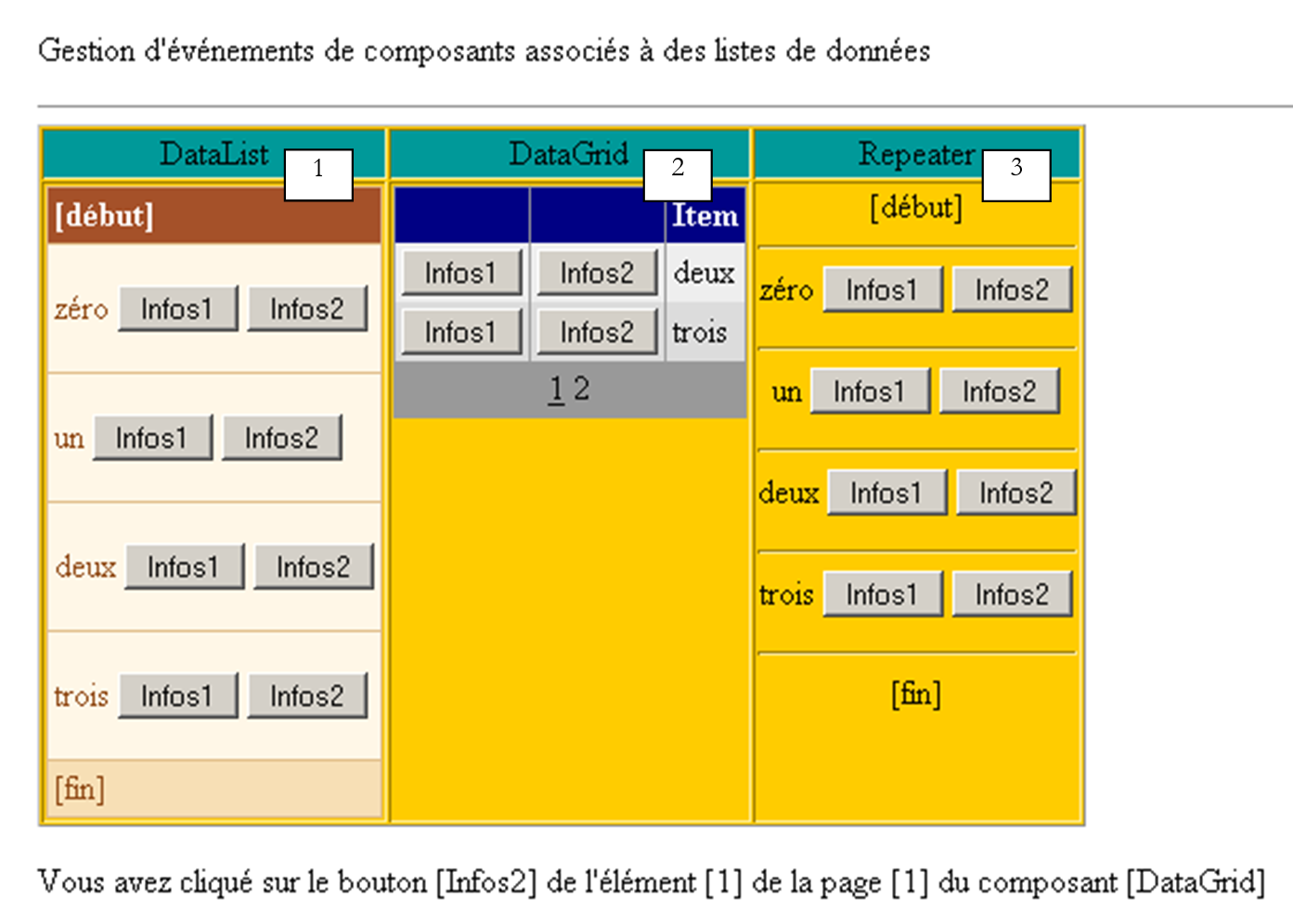 |
该页面包含三个与数据列表关联的组件:
- 一个名为 [DataList1] 的 [DataList] 组件
- 一个名为 [DataGrid1] 的 [DataGrid] 组件
- 一个名为 [Repeater1] 的 [Repeater] 组件
相关的数据列表是数组 {"零","一","二","三"}。 每个数据都关联一组由两个按钮组成的组,按钮名称分别为 [Infos1] 和 [Infos2]。用户点击其中一个按钮后,会显示该按钮的名称。本文旨在展示如何管理按钮或链接列表。
9.2.2. 组件配置
[DataList1]组件的配置如下:
                        <asp:datalist id="DataList1" ... runat="server">
                            <SelectedItemStyle ...</SelectedItemStyle>
                            <HeaderTemplate>
                                [début]
                            </HeaderTemplate>
                            <FooterTemplate>
                                [fin]
                            </FooterTemplate>
                            <ItemStyle ...></ItemStyle>
                            <ItemTemplate>
                                <P><%# Container.DataItem %>
                                    <asp:Button runat="server" Text="Infos1" CommandName="infos1"></asp:Button>
                                    <asp:Button runat="server" Text="Infos2" CommandName="infos2"></asp:Button></P>
                            </ItemTemplate>
                            <FooterStyle ...></FooterStyle>
                            <HeaderStyle ...></HeaderStyle>
                        </asp:datalist>
我们省略了与 [DataList] 外观相关的所有内容,仅关注其内容:
- <HeaderTemplate> 部分定义了 [DataList] 的页眉,而 <FooterTemplate> 部分则定义了其页脚。
- <ItemTemplate> 部分是用于显示关联数据列表中每条数据的显示模板。其中包含以下元素:
- 组件关联数据列表中当前数据的值:<%# Container.DataItem %>
- 两个分别命名为 [Infos1] 和 [Infos2] 的按钮。类 [Button] 具有一个 [CommandName] 属性,此处即使用该属性。 它将帮助我们确定哪个按钮在 [DataList] 中触发了事件。为了处理按钮的点击,我们将仅使用一个事件处理程序,该处理程序将与 [DataList] 本身相关联,而非与按钮相关联。 该处理程序将接收一条信息,告知点击发生在 [DataList] 的哪一行。通过 [CommandName] 属性,我们可以确定点击发生在该行的哪个按钮上。
[Repeater1] 组件的配置方式与此非常相似:
                        <asp:repeater id="Repeater1" runat="server">
                            <HeaderTemplate>
                                [début]<hr />
                            </HeaderTemplate>
                            <FooterTemplate>
                                <hr />
                                [fin]
                            </FooterTemplate>
                            <SeparatorTemplate>
                                <hr />
                            </SeparatorTemplate>
                            <ItemTemplate>
                                <%# Container.DataItem %>
                                <asp:Button runat="server" Text="Infos1" CommandName="infos1"></asp:Button>
                                <asp:Button runat="server" Text="Infos2" CommandName="infos2"></asp:Button></P>
                            </ItemTemplate>
                        </asp:repeater>
我们只是添加了一个 <SeparatorTemplate> 部分,以便组件显示的连续数据之间用一条水平线分隔。
最后,[DataGrid1]组件的配置如下:
                        <asp:datagrid id="DataGrid1" ... runat="server" PageSize="2" AllowPaging="True">
                            <SelectedItemStyle ...></SelectedItemStyle>
                            <AlternatingItemStyle ...></AlternatingItemStyle>
                            <ItemStyle ...></ItemStyle>
                            <HeaderStyle ...></HeaderStyle>
                            <FooterStyle ....></FooterStyle>
                            <Columns>
                                <asp:ButtonColumn Text="Infos1" ButtonType="PushButton" CommandName="Infos1">
                              </asp:ButtonColumn>
                                <asp:ButtonColumn Text="Infos2" ButtonType="PushButton" CommandName="Infos2">
                              </asp:ButtonColumn>
                            </Columns>
                            <PagerStyle .... Mode="NumericPages"></PagerStyle>
                        </asp:datagrid>
同样,我们省略了样式信息(颜色、宽度等)。当前处于自动生成列的模式,这是 [DataGrid] 的默认模式。这意味着列的数量将与数据源中的列数相同。 此处仅有一列。我们添加了另外两列,并使用 <asp:ButtonColumn> 进行标记。其中定义的信息与其他两个组件类似,同时还定义了按钮类型,此处为 [PushButton]。 默认类型为 [LinkButton],c.a.d 表示链接。此外,数据将按 [AllowPaging=true] 进行分页,每页显示 [PageSize=2] 两个元素。
9.2.3. 页面布局代码
示例页面的呈现代码已保存在文件 [main.aspx] 中:
<%@ page codebehind="main.aspx.vb" inherits="vs.main" autoeventwireup="false" %>
<HTML>
    <HEAD>
    </HEAD>
    <body>
        <form runat="server">
            <P>Gestion d'événements de composants associés à des listes de données</P>
            <HR width="100%" SIZE="1">
            <table cellSpacing="1" cellPadding="1" bgColor="#ffcc00" border="1">
                <tr>
                    <td ...>DataList</td>
                    <td ...>DataGrid</td>
                    <td ...>Repeater</td>
                </tr>
                <tr>
                    <td ...>

                      <asp:datalist id="DataList1" ... runat="server">
                            <HeaderTemplate>
                                [début]
                            </HeaderTemplate>
                            <FooterTemplate>
                                [fin]
                            </FooterTemplate>
                            <ItemStyle ...></ItemStyle>
                            <ItemTemplate>
                                <P><%# Container.DataItem %>
                                    <asp:Button runat="server" Text="Infos1" CommandName="infos1"></asp:Button>
                                    <asp:Button runat="server" Text="Infos2" CommandName="infos2"></asp:Button></P>
                            </ItemTemplate>
                            <FooterStyle ...></FooterStyle>
                            <HeaderStyle ....></HeaderStyle>
                        </asp:datalist>

                        <P></P>
                    </td>
                    <td ...>

                       <asp:datagrid id="DataGrid1" ... runat="server" PageSize="2" AllowPaging="True">
                            <AlternatingItemStyle ...></AlternatingItemStyle>
                            <ItemStyle ...></ItemStyle>
                            <HeaderStyle ...></HeaderStyle>
                            <FooterStyle ...></FooterStyle>
                            <Columns>
                                <asp:ButtonColumn Text="Infos1" ButtonType="PushButton" CommandName="Infos1">
                              </asp:ButtonColumn>
                                <asp:ButtonColumn Text="Infos2" ButtonType="PushButton" CommandName="Infos2">
                               </asp:ButtonColumn>
                            </Columns>
                            <PagerStyle ... Mode="NumericPages"></PagerStyle>
                        </asp:datagrid>

                  </td>
                    <td ...>

                       <asp:repeater id="Repeater1" runat="server">
                            <HeaderTemplate>
                                [début]<hr />
                            </HeaderTemplate>
                            <FooterTemplate>
                                <hr />
                                [fin]
                            </FooterTemplate>
                            <SeparatorTemplate>
                                <hr />
                            </SeparatorTemplate>
                            <ItemTemplate>
                                <%# Container.DataItem %>
                                <asp:Button runat="server" Text="Infos1" CommandName="infos1"></asp:Button>
                                <asp:Button runat="server" Text="Infos2" CommandName="infos2"></asp:Button></P>
                            </ItemTemplate>
                        </asp:repeater>

                  </td>
                </tr>
            </table>
            <P><asp:label id="lblInfo" runat="server"></asp:label></P>
            <P></P>
        </form>
    </body>
</HTML>
在上面的代码中,我们省略了格式化代码(颜色、线条、字号等)
9.2.4. 页面控制代码
应用程序的控制代码已放置在文件 [main.aspx.vb] 中:
Public Class main
    Inherits System.Web.UI.Page

     ' 页面组件
    Protected WithEvents DataList1 As System.Web.UI.WebControls.DataList
    Protected WithEvents lblInfo As System.Web.UI.WebControls.Label
    Protected WithEvents DataGrid1 As System.Web.UI.WebControls.DataGrid
    Protected WithEvents Repeater1 As System.Web.UI.WebControls.Repeater

     ' 数据源
    Protected textes() As String = {"zéro", "un", "deux", "trois"}

    Private Sub Page_Load(ByVal sender As System.Object, ByVal e As System.EventArgs) Handles MyBase.Load
        If Not IsPostBack Then
             '与数据源的连接
            DataList1.DataSource = textes
            DataGrid1.DataSource = textes
            Repeater1.DataSource = textes
            Page.DataBind()
        End If
    End Sub

    Private Sub DataList1_ItemCommand(ByVal source As Object, ByVal e As System.Web.UI.WebControls.DataListCommandEventArgs) Handles DataList1.ItemCommand
         ' [datalist] 的某行发生了一个事件
        lblInfo.Text = "Vous avez cliqué sur le bouton [" + e.CommandName + "] de l'élément [" + e.Item.ItemIndex.ToString + "] du composant [DataList]"
    End Sub

    Private Sub Repeater1_ItemCommand(ByVal source As Object, ByVal e As System.Web.UI.WebControls.RepeaterCommandEventArgs) Handles Repeater1.ItemCommand
         ' [repeater] 的某一行上发生了一个事件
        lblInfo.Text = "Vous avez cliqué sur le bouton [" + e.CommandName + "] de l'élément [" + e.Item.ItemIndex.ToString + "] du composant [Repeater]"
    End Sub

    Private Sub DataGrid1_ItemCommand(ByVal source As Object, ByVal e As System.Web.UI.WebControls.DataGridCommandEventArgs) Handles DataGrid1.ItemCommand
         ' [datagrid] 的某一行上发生了一个事件
        lblInfo.Text = "Vous avez cliqué sur le bouton [" + e.CommandName + "] de l'élément [" + e.Item.ItemIndex.ToString + "] de la page [" + DataGrid1.CurrentPageIndex.ToString() + "] du composant [DataGrid]"
    End Sub

    Private Sub DataGrid1_PageIndexChanged(ByVal source As Object, ByVal e As System.Web.UI.WebControls.DataGridPageChangedEventArgs) Handles DataGrid1.PageIndexChanged
         ' 页面切换
        With DataGrid1
            .CurrentPageIndex = e.NewPageIndex
            .DataSource = textes
            .DataBind()
        End With
    End Sub
End Class
注释:
- 数据源 [textes] 是一个简单的字符串数组。它将与页面上的三个组件建立关联
- 该关联在首次请求时通过过程 [Page_Load] 建立。对于后续请求,这三个组件将通过 [VIEW_STATE] 机制获取其值。
- 这三个组件均设有 [ItemCommand] 事件处理程序。当用户点击组件行中的按钮或链接时,该事件即被触发。处理程序将接收两项信息:
- source:触发事件的对象(按钮或链接)的引用
- a:根据具体情况,提供类型为 [DataListCommandEventArgs]、[RepeaterCommandEventArgs] 或 [DataGridCommandEventArgs] 的事件信息。参数 a 携带多种信息,其中有两项与我们相关:
- a.Item:表示发生事件的行,类型为 [DataListItem]、[DataGridItem] 或 [RepeaterItem]。 无论具体类型为何,元素 [Item] 都拥有一个 [ItemIndex] 属性,该属性指明了其所属容器中 [Item] 行的编号。我们在此显示该行编号
- a.CommandName:是触发该事件的按钮(Button, LinkButton, ImageButton)的 [CommandName] 属性。 结合前面的信息,我们可以确定容器中的哪个按钮触发了事件 [ItemCommand]
9.3. 应用程序——订阅列表管理
既然我们已经了解如何拦截数据容器内部发生的事件,下面将通过一个示例展示如何管理这些事件。
9.3.1. 简介
本示例模拟了一个邮件列表订阅应用程序。这些列表由一个包含三个列的 [DataTable] 对象定义:
名称 | 类型 | 角色 |
字符串 | 主键 | |
字符串 | 列表主题名称 | |
字符串 | 列表所涉及主题的描述 |
为避免示例过于冗长,上文中的 [DataTable] 对象将通过代码任意生成。 在实际应用中,该对象通常由数据访问类的某个方法提供。列表表的构建将在 [Application_Start] 过程内完成,生成的表将被放置在应用程序中。 我们将该表命名为 [dtThèmes]。用户将订阅该表中的某些主题。其订阅列表将保存在名为 [DataTable] 的对象中(该对象又称为 [dtAbonnements]),其结构如下:
名称 | 类型 | 角色 |
字符串 | 主键 | |
字符串 | 列表主题名称 |
单页应用程序如下:
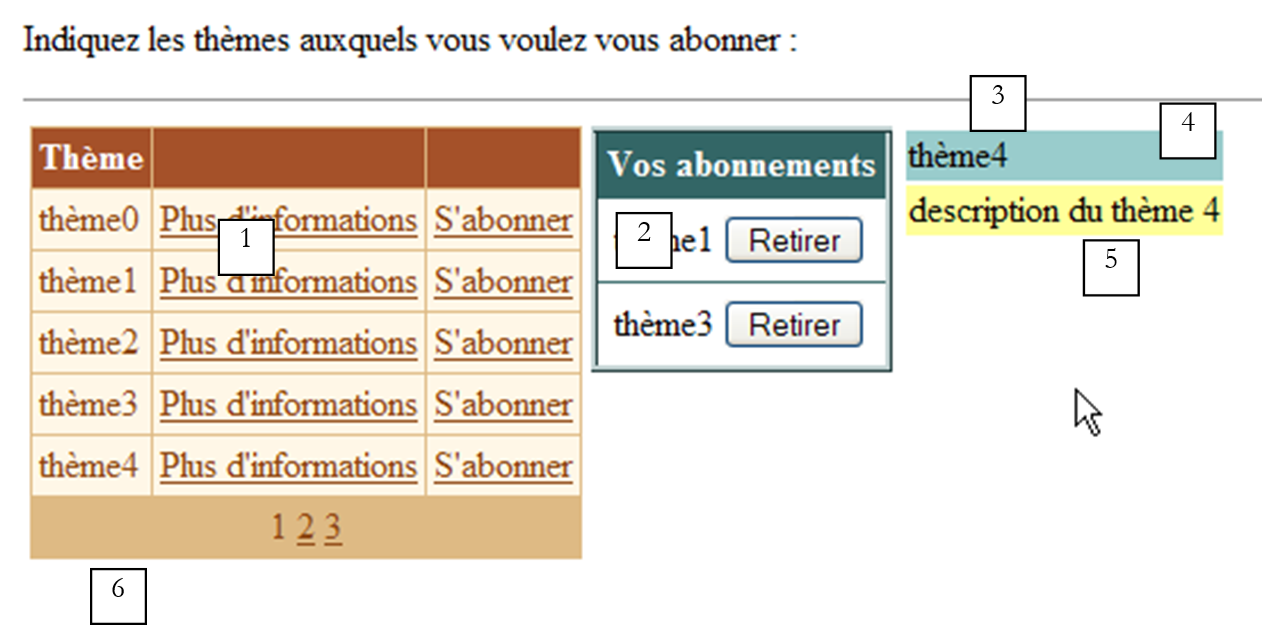 |
编号 | 名称 | 类型 | 属性 | 角色 |
DataGrid | 可供订阅的邮件列表 | |||
DataList | 用户对上述邮件列表的订阅列表 | |||
面板 | 用户所选主题的信息面板,附带链接 [Plus d'informations] | |||
标签 | 属于 [panelInfos] | 主题名称 | ||
标签 | 属于 [panelInfos] | 主题描述 | ||
标签 | 应用程序信息提示 |
本示例旨在演示 [DataGrid] 和 [DataList] 组件的使用,特别是这些数据容器行级事件的管理。 因此,该应用程序没有确认按钮,不会将用户的选项保存到数据库中。尽管如此,它仍具有现实意义。这与电子商务应用程序非常接近,在电子商务中,用户会将产品(订阅)放入购物车。
9.3.2. 工作原理
用户首先看到的是以下界面:
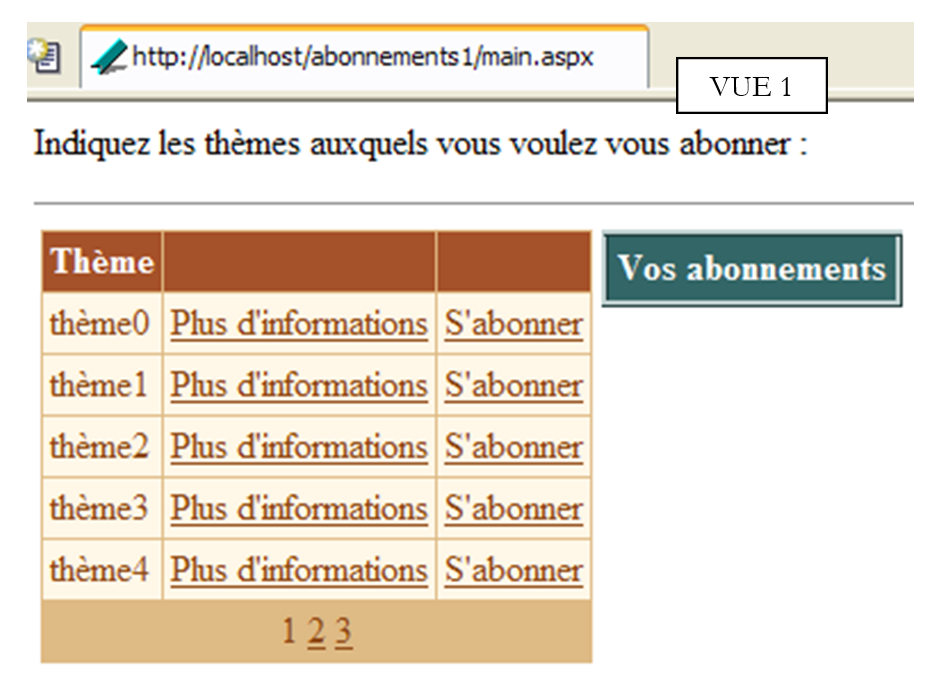 |
用户点击链接 [Plus d'informations] 以获取某主题的相关信息。这些信息显示在 [panelInfos] 中:
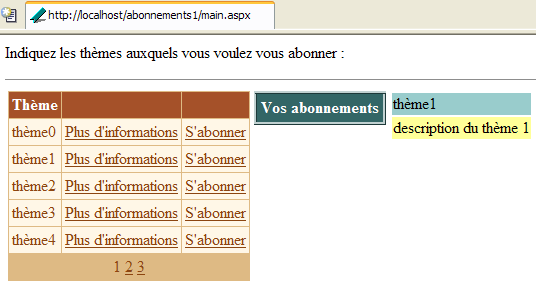
用户点击链接 [S'abonner] 订阅某个主题。所选主题将显示在组件 [dlAbonnements] 中:
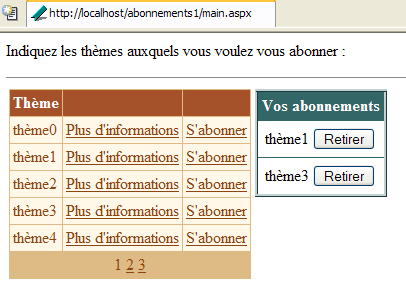
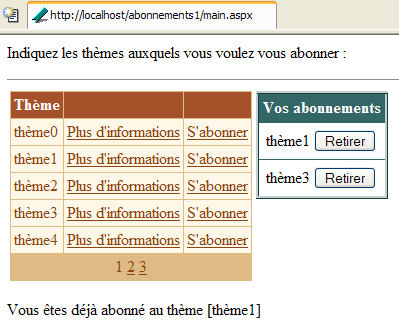
用户可能希望订阅自己已订阅的列表。系统会显示一条提示信息:
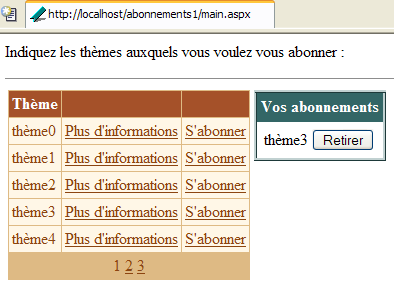
最后,用户可通过上方的 [Retirer] 按钮取消对某个主题的订阅。此操作无需确认。此处无需确认,因为用户可以轻松重新订阅。以下是取消对 [thème1] 订阅后的界面:
9.3.3. 数据容器的配置
类型为 [DataGrid] 的组件 [dgThèmes] 关联了一个类型为 [DataTable] 的数据源。 其格式化是通过 [DataGrid] 属性面板中的链接 [Mise en forme automatique] 完成的。 其属性定义则是通过同一面板中的链接 [Générateur de proprités] 完成的。生成的代码如下(排版代码已省略):
<asp:datagrid id="dgThèmes" AutoGenerateColumns="False" AllowPaging="True" PageSize="5"
runat="server">
<ItemStyle ...></ItemStyle>
<HeaderStyle ...></HeaderStyle>
<FooterStyle ...></FooterStyle>
<Columns>
<asp:BoundColumn DataField="thème" HeaderText="Thème"></asp:BoundColumn>
<asp:ButtonColumn Text="Plus d'informations" CommandName="infos"></asp:ButtonColumn>
<asp:ButtonColumn Text="S'abonner" CommandName="abonner"></asp:ButtonColumn>
</Columns>
<PagerStyle HorizontalAlign="Center" ... Mode="NumericPages"></PagerStyle>
</asp:datagrid>
请注意以下几点:
我们自己在 <columns>...</columns> 部分中定义要显示的列 | |
用于数据分页 | |
定义了 [thème] 列 (HeaderText) 列,该列将与数据源 (DataField) 中的 [thème] 列相关联 | |
定义了两列按钮(或链接)。为了区分同一行中的两个链接,将使用它们的 [CommandName] 属性。 |
组件 [DataGrid] 尚未完全配置。将在控制器代码中进行配置。
类型为 [DataList] 的组件 [dlAbonnements] 关联了一个类型为 [DataTable] 的数据源。 其格式化是通过 [DataList] 属性面板中的链接 [Mise en forme automatique] 完成的。其属性的定义则是直接在呈现代码中完成的。该代码如下(格式化代码已省略):
                        <asp:DataList id="dlAbonnements" ... runat="server" >
                            <HeaderTemplate>
                                <div align="center">
                                    Vos abonnements</div>
                            </HeaderTemplate>
                            <ItemStyle ...></ItemStyle>
                            <ItemTemplate>
                                <TABLE>
                                    <TR>
                                        <TD><%#Container.DataItem("主题")%></TD>
                                        <TD>
                                            <asp:Button id="lnkRetirer" CommandName="retirer" runat="server" Text="Retirer" /></TD>
                                    </TR>
                                </TABLE>
                            </ItemTemplate>
                            <HeaderStyle ...></HeaderStyle>
                        </asp:DataList>
定义[DataList]的表头文本 | |
定义 [DataList] 的当前元素——此处放置了一个两列一行的表格。第一个单元格用于显示用户想要订阅的主题名称,另一个单元格则包含 [Retirer] 按钮,允许用户取消选择。 |
9.3.4. 展示页面
展示代码 [main.aspx] 如下:
<%@ page src="main.aspx.vb" inherits="main" autoeventwireup="false" %>
<HTML>
    <HEAD>
        <title></title>
    </HEAD>
    <body>
        <P>Indiquez les thèmes auxquels vous voulez vous abonner :</P>
        <HR width="100%" SIZE="1">
        <form runat="server">
            <table>
                <tr>
                    <td vAlign="top">
                        <asp:datagrid id="dgThèmes" ... runat="server">
...
                        </asp:datagrid>
                  </td>
                    <td vAlign="top">
                        <asp:DataList id="dlAbonnements" ... runat="server" GridLines="Horizontal" ShowFooter="False">
....
                        </asp:DataList>
                   </td>
                    <td vAlign="top">
                        <asp:Panel ID="panelInfo" Runat="server" EnableViewState="False">
                            <TABLE>
                                <TR>
                                    <TD bgColor="#99cccc">
                                        <asp:Label id="lblThème" runat="server"></asp:Label></TD>
                                </TR>
                                <TR>
                                    <TD bgColor="#ffff99">
                                        <asp:Label id="lblDescription" runat="server"></asp:Label></TD>
                                </TR>
                            </TABLE>
                        </asp:Panel>
                    </td>
                </tr>
            </table>
            <P>
                <asp:Label id="lblInfo" runat="server" EnableViewState="False"></asp:Label></P>
        </form>
    </body>
</HTML>
9.3.5. 控制器
控制逻辑分布在文件 [global.asax] 和 [main.aspx] 中。文件 [global.asax] 内容如下:
关联文件 [global.asax.vb] 包含以下代码:
Imports System.Web
Imports System.Web.SessionState
Imports System.Data
Imports System

Public Class global
    Inherits System.Web.HttpApplication

    Sub Application_Start(ByVal sender As Object, ByVal e As EventArgs)
        ' 初始化数据源
        Dim thèmes As New DataTable
        ' 列
        With thèmes.Columns
            .Add("id", GetType(System.Int32))
            .Add("thème", GetType(System.String))
            .Add("description", GetType(System.String))
        End With
        ' id 列将作为主键
        thèmes.Constraints.Add("cléprimaire", thèmes.Columns("id"), True)
        ' 行
        Dim ligne As DataRow
        For i As Integer = 0 To 10
            ligne = thèmes.NewRow
            ligne.Item("id") = i.ToString
            ligne.Item("thème") = "thème" + i.ToString
            ligne.Item("description") = "description du thème " + i.ToString
            thèmes.Rows.Add(ligne)
        Next
        ' 将数据源放入应用程序
        Application("thèmes") = thèmes
    End Sub

    Sub Session_Start(ByVal sender As Object, ByVal e As EventArgs)
        ' 会话开始 - 创建一个空的订阅表
        Dim dtAbonnements As New DataTable
        With dtAbonnements
            ' 列
            .Columns.Add("id", GetType(String))
            .Columns.Add("thème", GetType(String))
            ' 主键
            .PrimaryKey = New DataColumn() {.Columns("id")}
        End With
        ' 将表放入会话
        Session.Item("abonnements") = dtAbonnements
    End Sub

End Class
当应用程序收到其首个请求时,会执行过程 [Application_Start],该过程会构建可订阅主题的 [DataTable]。该对象通过代码任意构建而成。回顾我们之前学过的方法,构建顺序如下:
- 一个空的、无结构且无数据的 [DataTable] 对象
- 通过定义列(名称及其包含的数据类型)来构建表结构
- 表中的行,用于表示有效数据
这里我们添加了一个主键。作为主键的是“id”列。表达这一点有多种方式。在此,我们使用了一个约束。在SQL中,约束是指行数据必须遵守的规则,只有满足该规则,该行才能被添加到表中。可能存在各种各样的约束。 “Primary Key”约束要求其所施加的列必须具有唯一且非空的值。实际上,主键可以由涉及多个列值的表达式组成。[DataTable].Constraints 表示给定表的所有约束集合。 要添加约束,需使用方法 [DataTable.Constraints.Add]。该方法有多种签名。此处使用了方法 [Add(Byval nom as String, Byval colonne as DataColumn, Byval cléPrimaire as Boolean)]:
约束名称 - 可以是任意名称 | |
将作为主键的列 - 类型为 [DataColumn] | |
若要将 [colonne] 设为主键,此处应为 [vrai]。若为 [cléPrimaire=false],则仅对 [colonne] 设置唯一性约束 |
因此,要将名为“id”的列设为表 [dtAbonnements] 的主键,应写为:
过程 [Session_Start] 在应用程序收到来自客户端的第一个请求时执行。它用于创建属于每个客户端的对象,这些对象必须在该客户端的不同请求中保持持久化。该过程构建了客户订阅的 [DataTable]。 由于该表初始为空,因此仅构建其结构。该表将随着请求的进行而逐渐填充。在此处,“id”列同样用作主键。我们采用了一种不同的技术来声明此约束:
是构成主键的列数组——此处声明了一个单元素数组:名为“id”的列 |
当客户端的请求到达控制器 [main.aspx] 时,应用程序中已为“主题”表准备好两个 [DataTable] 对象,会话中也已为“订阅”表准备好两个 [main.aspx.vb] 对象。控制器 [main.aspx.vb] 的代码如下:
Imports System.Data

Public Class main
    Inherits System.Web.UI.Page

    Protected WithEvents dgThèmes As System.Web.UI.WebControls.DataGrid
    Protected WithEvents lblThème As System.Web.UI.WebControls.Label
    Protected WithEvents lblDescription As System.Web.UI.WebControls.Label
    Protected WithEvents dlAbonnements As System.Web.UI.WebControls.DataList
    Protected WithEvents lblInfo As System.Web.UI.WebControls.Label
    Protected WithEvents panelInfo As System.Web.UI.WebControls.Panel

    Protected dtThèmes As DataTable
    Protected dtAbonnements As DataTable

    Private Sub Page_Load(ByVal sender As System.Object, ByVal e As System.EventArgs) Handles MyBase.Load
...
    End Sub

    Private Sub liaisons()
...
    End Sub

    Private Sub dgThèmes_PageIndexChanged(ByVal source As Object, ByVal e As System.Web.UI.WebControls.DataGridPageChangedEventArgs) Handles dgThèmes.PageIndexChanged
...
    End Sub

    Private Sub dgThèmes_ItemCommand(ByVal source As Object, ByVal e As System.Web.UI.WebControls.DataGridCommandEventArgs) Handles dgThèmes.ItemCommand
...
    End Sub

    Private Sub infos(ByVal id As String)
...
    End Sub

    Private Sub abonner(ByVal id As String)
...
    End Sub

    Private Sub dlAbonnements_ItemCommand(ByVal source As Object, ByVal e As System.Web.UI.WebControls.DataListCommandEventArgs) Handles dlAbonnements.ItemCommand
...
    End Sub
End Class
过程 [Page_Load] 的主要作用是:
- 检索分别位于应用程序和会话中的两个表 [dtThèmes] 和 [dtAbonnements],以便将其提供给页面上的所有方法
- 将这两个数据源与各自的容器进行关联。此操作仅在首次请求时执行。后续请求中,无需系统性地进行关联;若需关联,有时需等待[Page_Load]处理完成后再进行。
[Page_Load] 的代码如下:
    Private Sub Page_Load(ByVal sender As System.Object, ByVal e As System.EventArgs) Handles MyBase.Load
        ' 获取数据源
        dtThèmes = CType(Application("thèmes"), DataTable)
        dtAbonnements = CType(Session("abonnements"), DataTable)
        ' 数据关联
        If Not IsPostBack Then
            liaisons()
        End If
        ' 隐藏部分信息
        panelInfo.Visible = False
    End Sub

    Private Sub liaisons()
        '将数据源与组件关联 [datagrid]
        With dgThèmes
            .DataSource = dtThèmes
            .DataKeyField = "id"
        End With
        ' 将数据源与组件关联 [datalist]
        With dlAbonnements
            .DataSource = dtAbonnements
            .DataKeyField = "id"
        End With
        ' 将数据分配给组件
        Page.DataBind()
    End Sub
在 [liaisons] 过程 中,我们利用 [DataList] 和 [DataGrid] 组件的 [DataKeyField] 属性,来定义数据源中用于唯一标识容器行数的列。 通常情况下,该列是数据源的主键,但这并非强制要求。只需确保该列不包含重复值和空值即可。对于容器 [dgThèmes], 数据源 [dtThèmes] 的“id”列将作为主键;而对于容器 [dlAbonnements],则使用数据源 [dtAbonnements] 的“id”列。 容器作为主键的列无需由该容器显示。在此,两个容器均未显示主键列。容器拥有主键的意义在于,它能帮助在数据源中轻松查找与发生事件的容器行相关联的信息。 实际上,通常需要根据发生事件的容器行,对与其关联的数据源中的对应行进行操作。主键能简化这一工作。
[DataGrid]的分页采用传统管理方式:
    Private Sub dgThèmes_PageIndexChanged(ByVal source As Object, ByVal e As System.Web.UI.WebControls.DataGridPageChangedEventArgs) Handles dgThèmes.PageIndexChanged
        ' 换页
        dgThèmes.CurrentPageIndex = e.NewPageIndex
        ' 关联
        liaisons()
    End Sub
链接 [Plus d'informations] 和 [S'abonner] 上的操作由过程 [dgThèmes_ItemCommand] 管理:
    Private Sub dgThèmes_ItemCommand(ByVal source As Object, ByVal e As System.Web.UI.WebControls.DataGridCommandEventArgs) Handles dgThèmes.ItemCommand
        ' [datagrid] 某行上的事件
        Dim commande As String = e.CommandName
        Select Case commande
            Case "infos"
                infos(dgThèmes.DataKeys(e.Item.ItemIndex))
            Case "abonner"
                abonner(dgThèmes.DataKeys(e.Item.ItemIndex))
        End Select
        ' 关联
        liaisons()
    End Sub
利用这两个链接都具有 [CommandName] 属性这一事实来区分它们。 根据该属性的值,调用 [infos] 或 [abonner] 过程,并在两种情况下均传递与发生事件的 [DataGrid] 元素关联的“id”键。 基于此信息,[info] 过程将显示用户所选主题的信息:
    Private Sub infos(ByVal id As String)
        ' 关于键 id 的主题信息
        ' 检索 [datatable] 中与该键对应的行
        Dim ligne As DataRow
        ligne = dtThèmes.Rows.Find(id)
        If Not ligne Is Nothing Then
            ' 显示信息
            lblThème.Text = CType(ligne("thème"), String)
            lblDescription.Text = CType(ligne("description"), String)
            panelInfo.Visible = True
        End If
    End Sub
由于表 [dtThèmes] 具有主键,方法 [dtThèmes.Rows.Find("P")] 可用于查找主键为 P 的行。若找到该行,则返回一个 [DataRow] 对象。 在此,我们需要查找主键为 [id] 的行,其中 [id] 作为参数传入。 若找到该行,则将该行的 [thème] 和 [description] 信息放入信息面板中,随后将该面板显示出来。
过程 [abonner(id)] 需将键主题 [id] 添加到订阅列表中。其代码如下:
    Private Sub abonner(ByVal id As String)
         ' 订阅键ID主题
         ' 获取与该密钥对应的 [datatable] 行
        Dim ligne As DataRow
        ligne = dtThèmes.Rows.Find(id)
        If Not ligne Is Nothing Then
             ' 检查是否已订阅
            Dim abonnement As DataRow
            abonnement = dtAbonnements.Rows.Find(id)
            If Not abonnement Is Nothing Then
                 ' 报告错误
                lblInfo.Text = "Vous êtes déjà abonné au thème [" + ligne("thème") + "]"
            Else
                 ' 将主题添加到订阅列表中
                abonnement = dtAbonnements.NewRow
                abonnement("id") = id
                abonnement("thème") = ligne("thème")
                dtAbonnements.Rows.Add(abonnement)
                 ' 建立关联
                liaisons()
            End If
        End If
    End Sub
在主题列表 [dtThèmes] 中,首先查找键值行 [id]。 若找到该行,需验证该主题是否已存在于订阅列表中,以避免重复添加。若已存在,则显示一条错误信息。否则,在表 [dtAbonnements] 中添加一个新的订阅,并将数据列表组件与各自的数据源建立关联。
当用户点击按钮 [Retirer] 时,需从表 [dtAbonnements] 中删除一个条目。此操作通过以下过程实现:
    Private Sub dlAbonnements_ItemCommand(ByVal source As Object, ByVal e As System.Web.UI.WebControls.DataListCommandEventArgs) Handles dlAbonnements.ItemCommand
        ' 取消订阅
        Dim commande As String = e.CommandName
        If commande = "retirer" Then
            ' 从 [datatable] 中移除订阅
            With dtAbonnements.Rows
                .Remove(.Find(dlAbonnements.DataKeys(e.Item.ItemIndex)))
            End With
            ' 建立关联
            liaisons()
        End If
    End Sub
首先检查触发事件的元素的 [CommandName] 属性。实际上这并没有什么意义,因为在 [DataList] 组件中,只有 [Retirer] 按钮能够触发事件。 因此不存在歧义。要从 [DataTable] 对象中删除一行,需使用 [DataList.Remove(DataRow)] 方法,该方法会将作为参数传递的 [DataRow] 类型的行从表中移除。 该行由方法 [DataList.Find] 通过传入的目标行主键定位。删除行后,将数据与组件建立关联
9.4. 管理分页的 [DataList]
我们延续前面的示例,对表示用户订阅列表的组件 [DataList] 进行分页。与组件 [DataGrid] 不同,组件 [DataList] 并未提供任何分页功能。 我们将看到,手动实现分页相当复杂,这也让我们更加珍视 [DataGrid] 组件的自动分页功能。
9.4.1. 工作原理
唯一的区别在于 [DataList] 的分页功能。页面将显示两个订阅。如果用户有五个订阅,则会生成三页。第一页如下所示:
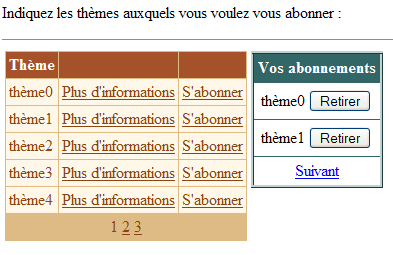
第二页可通过链接 [Suivant] 获取:
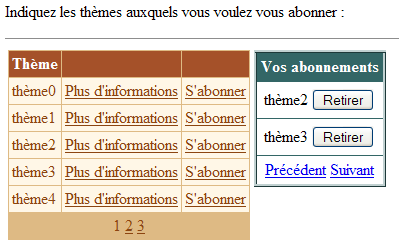
第三个页面:
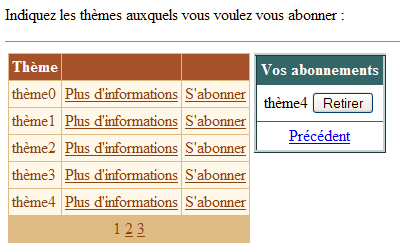
需要注意的是,链接 [Précédent] 和 [Suivant] 仅在当前页面之前和之后分别存在上一页和下一页时才会显示。
9.4.2. 呈现代码
链接 [Précédent] 和 [Suivant] 是通过在 [DataList] 中添加 <FooterTemplate> 标签生成的:
                        <asp:datalist id="dlAbonnements" runat="server" ...>
....
                            <FooterTemplate>
                                <asp:LinkButton id="lnkPrecedent" runat="server" CommandName="precedent">Précédent</asp:LinkButton>
                                <asp:LinkButton id="lnkSuivant" runat="server" CommandName="suivant">Suivant</asp:LinkButton>
                            </FooterTemplate>
....
                        </asp:datalist>
9.4.3. 校验码
关联文件 [global.asax.vb] 的变化如下:
...

Public Class global
    Inherits System.Web.HttpApplication

    Sub Application_Start(ByVal sender As Object, ByVal e As EventArgs)
...
    End Sub

    Sub Session_Start(ByVal sender As Object, ByVal e As EventArgs)
         ' 会话开始 - 创建一个空的订阅表
        Dim dtAbonnements As New DataTable
        With dtAbonnements
             ' 列
            .Columns.Add("id", GetType(String))
            .Columns.Add("thème", GetType(String))
             ' 主键
            .PrimaryKey = New DataColumn() {.Columns("id")}
        End With
         ' 将表放入会话
        Session.Item("abonnements") = dtAbonnements
         ' 当前页面为第 0 页
        Session.Item("pAC") = 0
         ' 该页面的订阅数为 0
        Session.Item("nbAC") = 0
    End Sub
除了订阅表 [dtAbonnements] 之外,还向会话中放入了另外两条信息:
类型为 [Integer]——这是上次请求时显示的当前页面的编号 | |
类型为 [Integer]——前一当前页面中显示的行数 |
在会话开始时,当前页码及该页的行数均为零。
控制器 [main.aspx.vb] 的变化如下:
....

Public Class main
    Inherits System.Web.UI.Page

....

     ' 应用程序数据
    Protected dtThèmes As DataTable
    Protected dtAbonnements As DataTable
    Protected dtPA As DataTable    ' la page d'abonnements affichée
    Protected Const nbAP As Integer = 2    ' nbre abonnements par page
    Protected pAC As Integer    ' page abonnement courant
    Protected nbAC As Integer    ' nombre d'abonnements dans page courante

    Private Sub Page_Load(ByVal sender As System.Object, ByVal e As System.EventArgs) Handles MyBase.Load
...
    End Sub

    Private Sub terminer()
...
    End Sub

    Private Sub dgThèmes_PageIndexChanged(ByVal source As Object, ByVal e As System.Web.UI.WebControls.DataGridPageChangedEventArgs) Handles dgThèmes.PageIndexChanged
...
    End Sub

    Private Sub dgThèmes_ItemCommand(ByVal source As Object, ByVal e As System.Web.UI.WebControls.DataGridCommandEventArgs) Handles dgThèmes.ItemCommand
...
    End Sub

    Private Sub infos(ByVal id As String)
...
    End Sub

    Private Sub abonner(ByVal id As String)
...
    End Sub

    Private Sub dlAbonnements_ItemCommand(ByVal source As Object, ByVal e As System.Web.UI.WebControls.DataListCommandEventArgs) Handles dlAbonnements.ItemCommand
...
    End Sub

    Private Sub changePAC()
...
    End Sub

    Private Sub setLiens(ByVal ctl As Control, ByVal blPrec As Boolean, ByVal blSuivant As Boolean)
...
    End Sub
End Class
其中定义了与订阅分页相关的新数据:
    Protected dtPA As DataTable    ' la page d'abonnements affichée
    Protected Const nbAP As Integer = 2    ' nbre abonnements par page
    Protected pAC As Integer    ' page abonnement courant
    Protected nbAC As Integer    ' nombre d'abonnements dans page courante
其中部分信息存储在会话中,并在每次调用 [Page_Load] 过程时被检索:
    Private Sub Page_Load(ByVal sender As System.Object, ByVal e As System.EventArgs) Handles MyBase.Load
        ' 正在检索数据源
        dtThèmes = CType(Application("thèmes"), DataTable)
        dtAbonnements = CType(Session("abonnements"), DataTable)
        ' 以及订阅的显示信息
        pAC = CType(Session("pAC"), Integer)
        nbAC = CType(Session("nbAC"), Integer)
        ' 数据关联
        If Not IsPostBack Then
            ' 显示空订阅列表
            terminer()
        End If
        ' 隐藏某些信息
        panelInfo.Visible = False
    End Sub
检索到的信息 [pAC] 和 [nbAC] 是上次请求时显示的订阅页面信息:
这是上一次请求时显示的当前页面的编号 | |
当前页面中显示的行数 |
方法 [terminer] 负责将组件与其数据源进行关联,这与前一个应用程序中方法 [liaisons] 的作用相同。 此处的新变化在于,将 [DataList] 与表 [dtPA] 建立关联,该表即待显示的订阅页面:
    Private Sub terminer()
        ' 将数据源与组件 [datagrid] 关联
        With dgThèmes
            .DataSource = dtThèmes
            .DataKeyField = "id"
        End With
        ' 将订阅页面与组件 [datalist] 关联,同时考虑当前页面 pAC
        changePAC()
        ' 显示页面 p
        With dlAbonnements
            .DataSource = dtPA
            .DataKeyField = "id"
        End With
        ' 将数据分配给组件
        Page.DataBind()
        ' 管理 [datalist] 中的链接 [précédent] 和 [suivant]
        Dim blprec As Boolean = pAC <> 0
        Dim blsuivant As Boolean = pAC <> (dtAbonnements.Rows.Count - 1) \ nbAP
        Dim nbLiensTrouvés As Integer = 0
        setLiens(dlAbonnements, blprec, blsuivant, nbLiensTrouvés)
        ' 将当前页面的信息保存到会话中
        Session("pAC") = pAC
        Session("nbAC") = dtPA.Rows.Count
    End Sub
请注意以下几点:
- 源代码 [dtPA] 取决于要显示的当前页码 [pAC]。变量 [pAC] 是该类的全局变量,由需要更改当前页码的方法进行操作。 [changePAC]方法负责构建[dtPA]表,该表将与组件[dlAbonnements]相关联。
- 方法 [setLiens] 的作用是根据当前显示的页面 [pAC] 前后是否存在其他页面,来显示或隐藏链接 [Précédent] 和 [Suivant]。 该方法有四个参数:
- [dlAbonnements]:即控件 [DataList],我们将通过探索该控件的控件树来定位这两个链接。 事实上,尽管这两个链接位于[DataList]页脚的特定位置,但似乎没有简单的方法直接引用它们。至少,本文中未找到此类方法。
- [blPrecedent]:布尔值,用于赋值给链接 [Precedent] 的属性 [visible]——若当前页面不为 0,则该值为真
- [blSuivant]:布尔值,用于赋值给链接 [Suivant] 的属性 [visible]——若当前页面不是订阅列表的最后一页,则设为 true
- [nbLiensTrouvés]:一个输出参数,用于统计找到的链接数量。一旦该数量达到两个,方法即结束。
- [pAC] 和 [nbAC] 的信息将保存在会话中,以备下次请求使用。
方法 [changePAC] 会构建表 [dtPA],该表将与组件 [dlAbonnements] 建立关联。其构建依据是当前待显示页面的编号 [pAC]。 表 [dtPA] 需显示订阅表 [dtAbonnements] 中的某些行。需注意,该表存储在会话中,并会随着查询的进行而更新(增加或减少)。 首先,需设定 [premier,dernier] 区间,即 [dtAbonnements] 表中 [dtPA] 表需显示的行号范围:
    Private Sub changePAC()
        ' 将页面 pAC 设为订阅的当前页面
        ' 管理 [datalist] 的页面
        Dim nbAbonnements = dtAbonnements.Rows.Count
        Dim dernièrePage = (nbAbonnements - 1) \ nbAP
        ' 第一个和最后一个订阅
        If pAC < 0 Then pAC = 0
        If pAC > dernièrePage Then pAC = dernièrePage
        Dim premier As Integer = pAC * nbAP
        Dim dernier As Integer = (pAC + 1) * nbAP - 1
        If dernier > nbAbonnements - 1 Then dernier = nbAbonnements - 1
完成上述步骤后,即可构建表 [dtPA]。 首先定义其结构 [id,thème],然后通过复制 [dtAbonnements] 中编号位于先前计算出的 [premier,dernier] 区间内的行来填充该表。
         ' 创建数据表 dtpa
        dtPA = New DataTable
        With dtPA
            ' 列
            .Columns.Add("id", GetType(String))
            .Columns.Add("thème", GetType(String))
            ' 主键
            .PrimaryKey = New DataColumn() {.Columns("id")}
        End With
        Dim abonnement As DataRow
        For i As Integer = premier To dernier
            abonnement = dtPA.NewRow
            With abonnement
                .Item("id") = dtAbonnements.Rows(i).Item("id")
                .Item("thème") = dtAbonnements.Rows(i).Item("thème")
            End With
            dtPA.Rows.Add(abonnement)
        Next
    End Sub
在方法 [changePAC] 结束时,表 [dtPA] 已构建完成,并可与组件 [DataList] 建立关联。此操作在方法 [terminer] 中完成。 在该方法中,使用过程 [setLiens] 来设置 [DataList] 中链接 [Précédent] 和 [Suivant] 的状态。该过程的代码如下:
    Private Sub setLiens(ByVal ctl As Control, ByVal blPrec As Boolean, ByVal blSuivant As Boolean, ByRef nbLiensTrouvés As Integer)
        ' 查找链接 [précédent] 和 [suivant]
        ' 在 [datalist] 的检查树中
        ' 是否已找到所有链接?
        If nbLiensTrouvés = 2 Then Exit Sub
        ' 检查子控件
        Dim c As Control
        For Each c In ctl.Controls
            ' 首先进行深度检查——链接位于树的底部
            setLiens(c, blPrec, blSuivant, nbLiensTrouvés)
            ' 链接 [Précédent] ?
            If c.ID = "lnkPrecedent" Then
                CType(c, LinkButton).Visible = blPrec
                nbLiensTrouvés += 1
            End If
            ' 链接 [Suivant] ?
            If c.ID = "lnkSuivant" Then
                CType(c, LinkButton).Visible = blSuivant
                nbLiensTrouvés += 1
            End If
        Next
    End Sub
该过程是递归的。它首先在 在组件 [dlAbonnements] 的子控件中,查找名为 [lnkPrecedent] 和 [lnkSuivant] 的组件,它们是两个分页链接的标识(属性 ID)。 它首先从控件树的底部开始搜索,因为这两个控件位于树底层。一旦找到一个链接,计数器 [nbLiensTrouvés] 就会递增,并且该链接的属性 [visible] 会被赋值为该过程的参数值。 一旦找到这两个链接,就不再遍历控件树,递归过程随即结束。
我们曾提到,方法 [changePAC] 用于为组件 [dlAbonnements] 设置数据源 [dtPA],该方法会使用当前待显示页面的编号 [pAC]。 有多个过程会修改该编号:
    Private Sub abonner(ByVal id As String)
        ' 订阅主题的密钥 ID
..
            ' 将主题添加到订阅中
..
             ' 更新当前页码——现在是最后一页
            pAC = (dtAbonnements.Rows.Count - 1) \ nbAP
             ' 数据关联
            terminer()
        End If
    End Sub
添加订阅后,该订阅会显示在订阅列表的末尾。因此,页面会自动跳转至订阅列表的最后一页,以便用户查看已添加的内容。
    Private Sub dlAbonnements_ItemCommand(ByVal source As Object, ByVal e As System.Web.UI.WebControls.DataListCommandEventArgs) Handles dlAbonnements.ItemCommand
        ' 取消订阅
        Dim commande As String = e.CommandName
        Select Case commande
            Case "retirer"
                ' 从 [datatable] 中移除订阅
                With dtAbonnements.Rows
                    .Remove(.Find(dlAbonnements.DataKeys(e.Item.ItemIndex)))
                End With
                ' 是否需要切换当前页面?
                nbAC -= 1
                If nbAC = 0 Then pAC -= 1
            Case "precedent"
                ' 更改当前页面
                pAC -= 1
            Case "suivant"
                ' 更改当前页面
                pAC += 1
        End Select
        ' 数据关联
        terminer()
    End Sub
- [nbAC] 是取消订阅前当前页面显示的行数。如果页面的新行数等于 0,则当前页码 [pAC] 减 1。
- 若点击链接 [Precedent],则当前页码 [pAC] 减 1。
- 点击链接 [Suivant] 时,当前页码 [pAC] 增加 1。
其余流程与之前保持一致。
9.4.4. 结论
通过此示例,我们展示了如何对组件 [DataList] 进行分页。这种分页操作较为复杂,建议在可能的情况下,优先使用组件 [DataGrid] 的自动分页功能。 本示例还展示了如何访问 [DataList] 组件页脚中的组件。
9.5. 产品数据库访问类
我们再次关注之前已使用的数据库 ACCESS [produits]。需要提醒的是,该数据库仅包含一个名为 [liste] 的表,其结构如下:
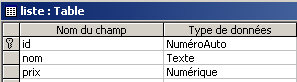 | 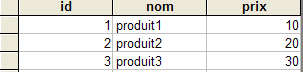 |
我们将构建一个用于访问表 [liste] 的类,该类将支持读取和更新该表。我们还将构建一个控制台客户端,该客户端将利用上述类来更新该表。随后,我们将构建一个 Web 客户端来完成相同的工作。
9.5.1. ExceptionProduits 类
类 [Exception] 拥有一个将错误消息作为参数的构造函数。在此,我们希望有一个异常类,其构造函数接受一组错误消息列表,而非单一的错误消息。这将由下文中的类 [ExceptionProduits] 实现:
    Public Class ExceptionProduits
        Inherits Exception

        ' 与异常相关的错误消息
        Private _erreurs As ArrayList

        ' 构造函数
        Public Sub New(ByVal erreurs As ArrayList)
            Me._erreurs = erreurs
        End Sub

        ' 属性
        Public ReadOnly Property erreurs() As ArrayList
            Get
                Return _erreurs
            End Get
        End Property
    End Class
9.5.2. 结构 [sProduit]
结构 [produit] 将表示产品 [id, nom, prix]:
     ' 结构sProduit
    Public Structure sProduit
         ' 字段
        Private _id As Integer
        Private _nom As String
        Private _prix As Double

         ' ID 属性
        Public Property id() As Integer
            Get
                Return _id
            End Get
            Set(ByVal Value As Integer)
                _id = Value
            End Set
        End Property

        ' 名称属性
        Public Property nom() As String
            Get
                Return _nom
            End Get
            Set(ByVal Value As String)
                If IsNothing(Value) OrElse Value.Trim = String.Empty Then Throw New Exception
                _nom = Value
            End Set
        End Property

        ' 价格属性
        Public Property prix() As Double
            Get
                Return _prix
            End Get
            Set(ByVal Value As Double)
                If IsNothing(Value) OrElse Value < 0 Then Throw New Exception
                _prix = Value
            End Set
        End Property
    End Structure
该结构仅允许字段 [nom] 和 [prix] 包含有效数据。
9.5.3. 产品类
类[Produits]是用于更新产品数据库中表[liste]的类。其结构如下:
    Public Class produits
         ' 实例数据

        Public Sub New(ByVal chaineConnexionOLEDB As String)
....
        End Sub

        Public Function getProduits() As DataTable
....
        End Function

        Public Sub ajouterProduit(ByVal produit As sProduit)
...
        End Sub

        Public Sub modifierProduit(ByVal produit As sProduit)
...
        End Sub

        Public Sub supprimerProduit(ByVal id As Integer)
...
        End Sub

    End Class
实例数据
该类中不同方法共享的数据如下:
        Private connexion As OleDbConnection
        Private Const selectText As String = "select id,nom,prix from liste"
        Private Const insertText As String = "insert into liste(nom,prix) values(?,?)"
        Private Const updateText As String = "update liste set nom=?,prix=? where id=?"
        Private Const deleteText As String = "delete from liste where id=?"
        Private selectCommand As New OleDbCommand
        Dim insertCommand As New OleDbCommand
        Dim updateCommand As New OleDbCommand
        Dim deleteCommand As New OleDbCommand
        Dim adaptateur As New OleDbDataAdapter
数据库连接——将为执行命令 SQL 而打开,随后立即关闭 | |
查询 SQL [select] 获取整个表 [liste] | |
允许向表中插入一行(名称、价格)的查询 [liste]。 请注意,此处未指定字段 [id]。实际上,该字段由 SGBD 自动递增,因此无需指定。 | |
用于更新表 [liste] 中具有主键 [id] 的行中字段(名称、价格)的查询 | |
用于删除表 [liste] 中键为 [id] 的行 | |
对象 [OleDbCommand] 在连接 [connexion] 上执行查询 [selectText] | |
对象 [OleDbCommand] 在连接 [connexion] 上执行查询 [updateText] | |
对象 [OleDbCommand] 在连接 [connexion] 上执行查询 [insertText] | |
对象 [OleDbCommand] 在连接 [connexion] 上执行查询 [deleteText] | |
用于将 [selectCommand] 的执行结果检索到 [DataSet] 对象中的对象 |
构造函数
构造函数接收一个唯一的参数 [chaineConnexionOLEDB],该参数是指定要操作的数据库的连接字符串。基于此,系统准备了四条用于操作和更新表的命令以及适配器。这仅是准备工作,尚未建立任何连接。
        Public Sub New(ByVal chaineConnexionOLEDB As String)
            ' 正在建立连接
            connexion = New OleDbConnection(chaineConnexionOLEDB)
            ' 正在准备查询语句
            Dim commandes() As OleDbCommand = {selectCommand, insertCommand, updateCommand, deleteCommand}
            Dim textes() As String = {selectText, insertText, updateText, deleteText}
            For i As Integer = 0 To commandes.Length - 1
                With commandes(i)
                    .CommandText = textes(i)
                    .Connection = connexion
                End With
            Next
            ' 正在准备数据访问适配器
            adaptateur.SelectCommand = selectCommand
        End Sub
方法 getProduits
该方法用于将表 [Liste] 的内容导入到对象 [DataTable] 中。其代码如下:
        Public Function getProduits() As DataTable
            ' 将表 [liste] 放入 [dataset]
            Dim contenu As New DataSet
            ' 创建对象 DataAdapter 以读取源 OLEDB 中的数据
            Try
                With adaptateur
                    .FillSchema(contenu, SchemaType.Source)
                    .Fill(contenu)
                End With
            Catch e As Exception
                ' 问题
                Dim erreursCommande As New ArrayList
                erreursCommande.Add(String.Format("Erreur d'accès à la base de données : {0}", e.Message))
                Throw New ExceptionProduits(erreursCommande)
            End Try
            ' 返回结果
            Return contenu.Tables(0)
        End Function
该操作通过以下两条指令完成:
                With adaptateur
                    .FillSchema(contenu, SchemaType.Source)
                    .Fill(contenu)
                End With
方法 [FillSchema] 根据 [adaptateur.Connexion] 引用的数据库结构,确定 [DataSet] 和 contenu 的结构(列、约束、关系)。 这使我们能够获取 [liste] 表的结构,特别是其主键。 接下来的操作 [Fill] 将 [Dataset] 和 contenu 填充为 [liste] 表中的行。 仅通过此操作,虽然获得了数据和结构,但缺少主键。而主键对于更新内存中的 [liste] 表至关重要。 在此,与其他方法一样,我们利用类 [ExceptionProduits] 来处理可能出现的错误,从而获取一个错误列表(ArrayList),而非单个错误。 方法 [getProduits] 将表 [liste] 转换为 [DataTable] 对象的形式。
方法 ajouterProduits
该方法用于向表 [liste] 中添加一行(id、名称、价格)。这些信息以 [sProduit] 结构的形式提供,其中包含 [id, nom, prix] 字段。该方法的代码如下:
        Public Sub ajouterProduit(ByVal produit As sProduit)
            ' 添加产品 [nom,prix]
            ' 准备添加参数
            With insertCommand.Parameters
                .Clear()
                .Add(New OleDbParameter("nom", produit.nom))
                .Add(New OleDbParameter("prix", produit.prix))
            End With
            ' 已添加
            Try
                ' 建立连接
                connexion.Open()
                ' 执行命令
                insertCommand.ExecuteNonQuery()
            Catch ex As Exception
                ' 问题
                Dim erreursCommande As New ArrayList
                erreursCommande.Add(String.Format("Erreur lors de l'ajout : {0}", ex.Message))
                Throw New ExceptionProduits(erreursCommande)
            Finally
                ' 关闭连接
                connexion.Close()
            End Try
        End Sub
结构 [produit] 的字段被注入到命令 [insertCommand] 的参数中。回顾该命令的当前配置(参见制造商):
 Private Const insertText As String = "insert into liste(nom,prix) values(?,?)"
 insertCommand.Connexion=connexion
命令 SQL [insert] 的文本中包含形式参数 ?,需将其替换为实际参数。 这需要通过类 [OleDbCommand] 中的集合 [Parameters] 来实现。该集合包含类型为 [OleDbParameter] 的元素,这些元素定义了用于替换形式参数 ? 的实际参数。 由于这些实际参数未命名,因此使用实际参数的索引来确定哪个实际参数对应哪个形式参数。在此,集合 [Parameters] 中的第 i 个实际参数将替换第 i 个形式参数 ?。 要创建类型为 [OleDbParameter] 的实际参数,此处使用构造函数 [OleDbParameter (Byval nom as String, Byval valeur as Object)] 来定义实际参数的名称和值。名称可以是任意名称。 此外,此处将不会使用该名称。指令 SQL 的两个参数 [insert] 接收来自结构 [produit] 中字段 [nom, prix] 的值。 完成上述操作后,插入操作由指令 [insertCommand.ExecuteNonQuery] 执行。
方法 modifierProduits
该方法用于修改表 [liste] 中的行。其所需的信息通过结构 [sProduit] 中的字段 [id, nom, prix] 提供。
        Public Sub modifierProduit(ByVal produit As sProduit)
            ' 修改产品[id,nom,prix]
            ' 准备更新参数
            With updateCommand.Parameters
                .Clear()
                .Add(New OleDbParameter("nom", produit.nom))
                .Add(New OleDbParameter("prix", produit.prix))
                .Add(New OleDbParameter("id", produit.id))
            End With
            ' 正在进行修改
            Try
                ' 建立连接
                connexion.Open()
                ' 执行命令
                Dim nbLignes As Integer = updateCommand.ExecuteNonQuery()
                If nbLignes = 0 Then Throw New Exception(String.Format("Le produit de clé [{0}] n'existe pas dans la table des données", produit.id))
            Catch ex As Exception
                ' 问题
                Dim erreursCommande As New ArrayList
                erreursCommande.Add(String.Format("Erreur lors de la modification : {0}", ex.Message))
                Throw New ExceptionProduits(erreursCommande)
            Finally
                ' 关闭连接
                connexion.Close()
            End Try
        End Sub
该代码与方法 [ajouterProduits] 的代码几乎完全相同,唯一的区别在于相关的命令 [OleDbCommand] 是 [updateCommand],而不是 [insertCommand]。
方法 supprimerProduits
该方法用于从表 [liste] 中删除作为参数传入的键 [id] 对应的行。代码如下:
        Public Sub supprimerProduit(ByVal id As Integer)
            ' 删除密钥产品 [id]
            ' 准备删除参数
            With deleteCommand.Parameters
                .Clear()
                .Add(New OleDbParameter("id", id))
            End With
            ' 执行删除
            Try
                ' 建立连接
                connexion.Open()
                ' 执行命令
                Dim nbLignes As Integer = deleteCommand.ExecuteNonQuery()
                If nbLignes = 0 Then Throw New Exception(String.Format("Le produit de clé [{0}] n'existe pas dans la table des données", id))
            Catch ex As Exception
                ' 问题
                Dim erreursCommande As New ArrayList
                erreursCommande.Add(String.Format("Erreur lors de la suppression : {0}", ex.Message))
                Throw New ExceptionProduits(erreursCommande)
            Finally
                ' 关闭连接
                connexion.Close()
            End Try
        End Sub
这与前面的方法采用相同的步骤。
9.5.4. [produits]类的测试
一个名为 [testproduits.vb] 的控制台测试程序可能如下所示:
Option Explicit On
Option Strict On

' 命名空间
Imports System
Imports System.Data
Imports Microsoft.VisualBasic
Imports System.Collections

Namespace st.istia.univangers.fr

     ' 测试页面
    Module testproduits
        Dim contenu As DataTable

        Sub Main(ByVal arguments() As String)
             ' 显示产品表的内容
             ' 该表位于一个名为 ACCESS 的数据库中,其程序文件以此命名
            Const syntaxe1 As String = "pg bdACCESS"

             ' 验证程序参数
            If arguments.Length <> 1 Then
                 ' 错误消息
                Console.Error.WriteLine(syntaxe1)
                 ' 结束
                Environment.Exit(1)
            End If
             ' 准备连接字符串
            Dim chaineConnexion As String = "Provider=Microsoft.Jet.OLEDB.4.0; Ole DB Services=-4; Data Source=" + arguments(0)
             ' 创建产品对象
            Dim objProduits As produits = New produits(chaineConnexion)
             ' 显示所有产品
            afficheProduits(objProduits)
             ' 正在插入产品
            Dim produit As New sProduit
            With produit
                .nom = "xxx"
                .prix = 1
            End With
            Try
                objProduits.ajouterProduit(produit)
            Catch ex As ExceptionProduits
                afficheErreurs(ex.erreurs)
            End Try
             ' 显示所有产品
            afficheProduits(objProduits)
             ' 获取已添加产品的ID
            produit.id = CType(contenu.Rows(contenu.Rows.Count - 1)("id"), Integer)
             ' 修改已添加的产品
            produit.prix = 200
            Try
                objProduits.modifierProduit(produit)
            Catch ex As ExceptionProduits
                afficheErreurs(ex.erreurs)
            End Try
             ' 显示所有产品
            afficheProduits(objProduits)
             ' 删除已添加的产品
            Try
                objProduits.supprimerProduit(produit.id)
            Catch ex As ExceptionProduits
                afficheErreurs(ex.erreurs)
            End Try
             ' 显示所有产品
            afficheProduits(objProduits)
        End Sub

        Sub afficheProduits(ByRef objProduits As produits)
             ' 将产品表导入数据表
            Try
                contenu = objProduits.getProduits()
            Catch ex As ExceptionProduits
                afficheErreurs(ex.erreurs)
                Environment.Exit(2)
            End Try
            Dim lignes As DataRowCollection = contenu.Rows
            For i As Integer = 0 To lignes.Count - 1
                 ' 表中的第 i 行
                Console.Out.WriteLine(lignes(i).Item("id").ToString + "," + lignes(i).Item("nom").ToString + _
                "," + lignes(i).Item("prix").ToString)
            Next
             ' 停止控制台输出
            Console.WriteLine("...")
            Console.ReadLine()
        End Sub

        Sub afficheErreurs(ByRef erreurs As ArrayList)
             ' 在控制台显示错误
            If erreurs.Count <> 0 Then
                Console.WriteLine("Les erreurs suivantes se sont produites :")
                For i As Integer = 0 To erreurs.Count - 1
                    Console.WriteLine(String.Format("-- {0}", CType(erreurs(i), String)))
                Next
            End If
             ' 停止控制台输出
            Console.WriteLine("...")
            Console.ReadLine()
        End Sub
    End Module
End Namespace
编译这两个源文件:
dos>vbc /t:library /r:system.dll /r:system.data.dll /r:system.xml.dll produits.vb

dos >vbc /r:produits.dll /r:system.dll /r:system.data.dll /r:system.xml.dll testproduits.vb

dos>dir
07/04/2004  08:40             7 168 produits.dll
04/04/2004  16:38           118 784 produits.mdb
07/04/2004  08:31             6 209 produits.vb
07/04/2004  08:40             5 120 testproduits.exe
03/04/2004  19:02             3 312 testproduits.vb
然后进行测试:
dos>testproduits produits.mdb
1,produit1,10
2,produit2,20
3,produit3,30
...

1,produit1,10
2,produit2,20
3,produit3,30
8,xxx,1
...

1,produit1,10
2,produit2,20
3,produit3,30
8,xxx,200
...

1,produit1,10
2,produit2,20
3,produit3,30
...
请读者将上述屏幕输出与测试程序代码进行对照。
9.6. 缓存产品表更新Web应用程序
9.6.1. 简介
现在,我们将编写一个用于更新产品表(添加、删除、修改)的Web应用程序。更新后的表将保存在内存中的[DataTable]对象中,并由所有用户共享。我们希望重点说明以下两点:
- [DataTable]对象的管理
- 多个用户同时更新同一表时的问题。
该应用程序的 MVC 架构如下:
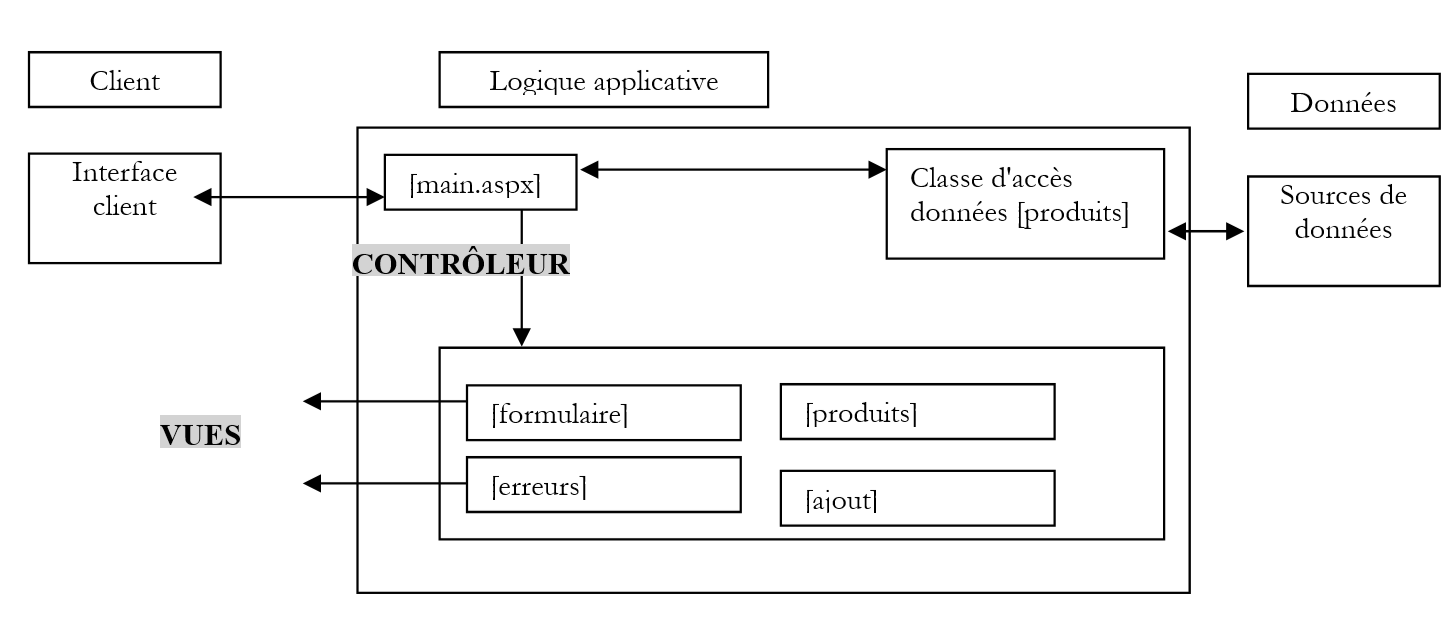 |
9.6.2. 工作原理与视图
应用程序的主视图如下:
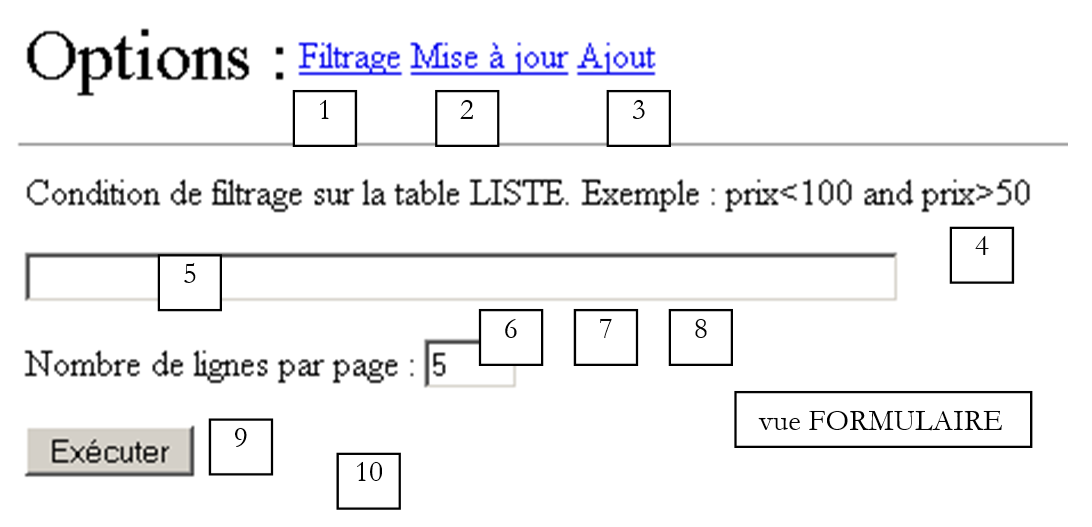
该视图名为 [formulaire],允许用户对产品设置筛选条件,并设定每页显示的产品数量。
编号 | 名称 | 类型 | 角色 |
LinkButton | 显示视图 [Formulaire],用于设置筛选条件 | ||
LinkButton | 显示视图 [Produits],用于查看和更新产品表(修改和删除) | ||
LinkButton | 显示视图 [Ajout],用于添加产品 | ||
vueFormulaire | 视图 [Formulaire] | ||
TextBox | 筛选条件 | ||
TextBox | 每页显示的产品数量 | ||
RequiredFieldValidator | 检查[txtPages]中是否存在值 | ||
RangeValidator | 检查 txtPages 是否在 [3,10] 的区间内 | ||
按钮 [submit],用于显示根据条件 (5) 过滤后的视图 [produits] | |||
标签 | 错误时的提示文本 |
例如,如果视图 [formulaire] 填充如下:
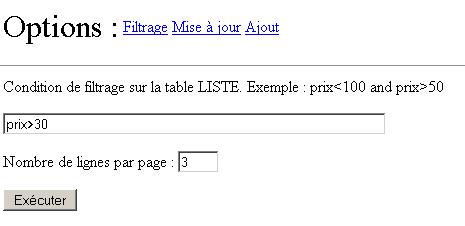
则会得到以下结果:
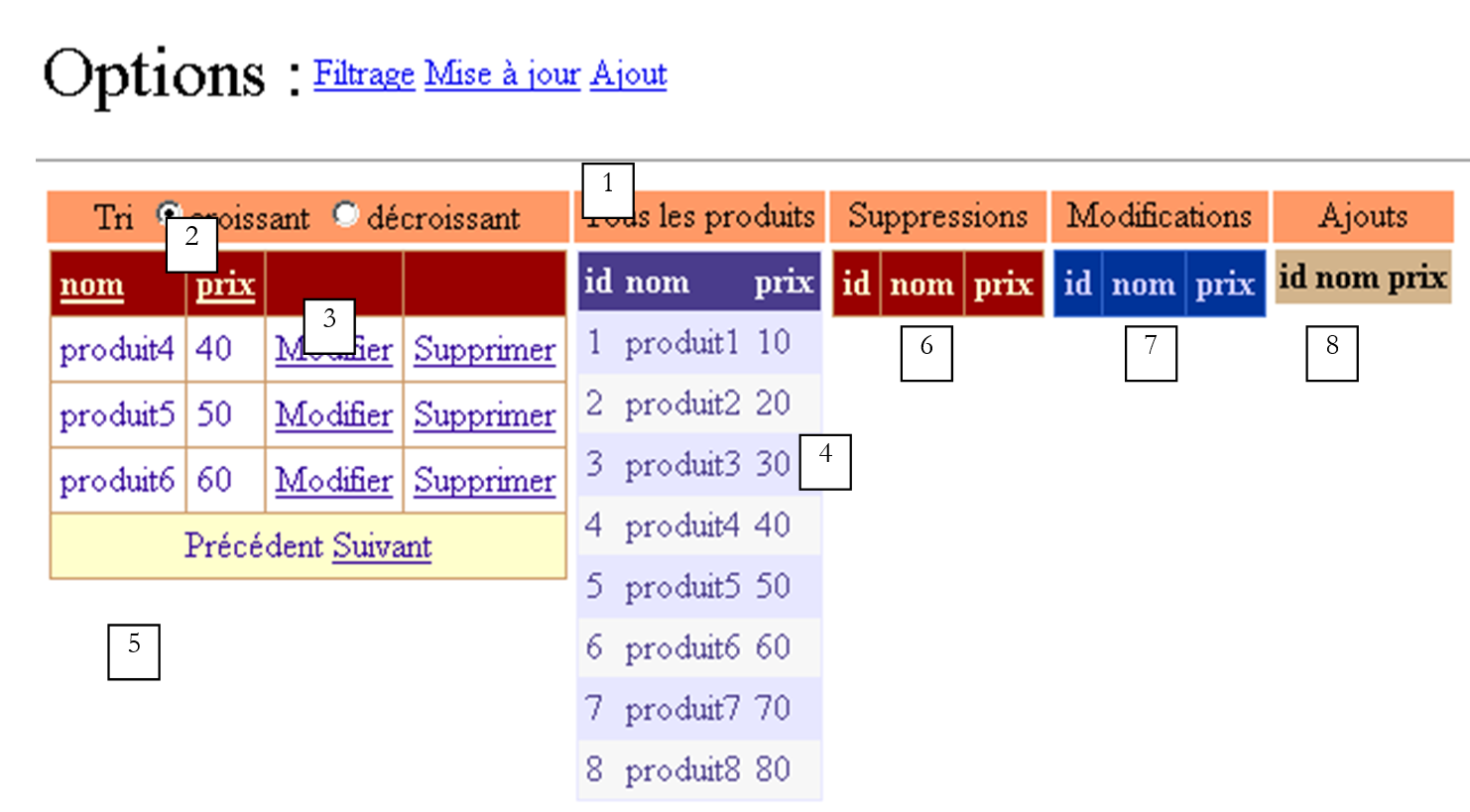 |
编号 | 名称 | 类型 | 角色 |
面板 | |||
RadioButton | 允许用户在点击某列标题时设置所需的排序顺序 [nom], [prix]。这两个按钮属于组 [rdTri]。 | ||
DataGrid | 产品表过滤视图的显示网格。该过滤器由视图 [formulaire] 设定。此外还有 .AllowPaging=true, .AllowSorting=true | ||
DataGrid | 显示完整的产品表 - 便于跟踪更新 | ||
标签 | 信息文本,特别是在出现错误时 | ||
DataGrid | 将在产品表中显示已删除的产品 | ||
DataGrid | 将在产品表中显示已修改的产品 | ||
DataGrid | 将在产品表中显示已添加的产品 |
该页面中有五个数据容器。它们均通过不同的视图 [DataView] 显示相同的表 [dtProduits]。 视图代表了其源表行数据的一个子集。该子集基于类 [DataView] 的属性 [RowFilter] 和 [RowStateFilter] 创建:
- [RowFilter] 用于对行设置过滤条件,例如上文中的 [prix>30]。此类过滤将由 [DataGrid1] 使用。
- [RowStateFilter] 允许根据表中行状态设置过滤条件。该状态表示该行相对于创建表视图时原始状态的变化情况。 此处的表 [dtProduits] 源自数据库。最初,其所有行状态均设为 [Original],以表明这些是表的原始行。随后该状态可能发生变化并取不同值,其中包括:
- [Added]:该行已被添加——它原本不属于原始表
- [Deleted]:该行已被删除——它仍存在于表中,但已被“标记”为“待删除”
- [Modified]:该行已被修改
[RowStateFilter] 可用于显示表中具有特定状态的行:
- (续)
- [DataViewRowState.Added]:仅显示已添加的行,并显示其当前值。
- [DataViewRowState.ModifiedOriginal]:仅显示已修改的行。这些行将显示其原始值。
- [DataViewRowState.ModifiedCurrent]:仅显示已修改的行,并显示其当前值。
- [DataViewRowState.Deleted]:仅显示已删除的行。这些行将显示其原始值。
- [DataViewRowState.CurrentRows]:显示未删除的行。这些行将显示其当前值。
因此,筛选器 [RowStateFilter] 将具有以下值:
未对线路状态进行筛选 | ||
DataViewRowState.CurrentRows | 显示产品表的当前状态 | |
DataViewRowState.Deleted | 显示产品表中已删除的行 | |
DataViewRowState.ModifiedOriginal | 显示产品表中已修改的行及其初始值 | |
DataViewRowState.Added | 显示添加到初始产品表中的行 |
[DataGrid1-5] 容器将帮助我们跟踪 [dtProduits] 表的更新。 组件 [DataGrid1] 支持修改和删除产品。我们将探讨该组件的配置如何实现此更新功能。该组件还支持分页和排序。这两个功能已在之前的示例中进行过探讨。
链接 [Ajout] 可访问产品添加表单:
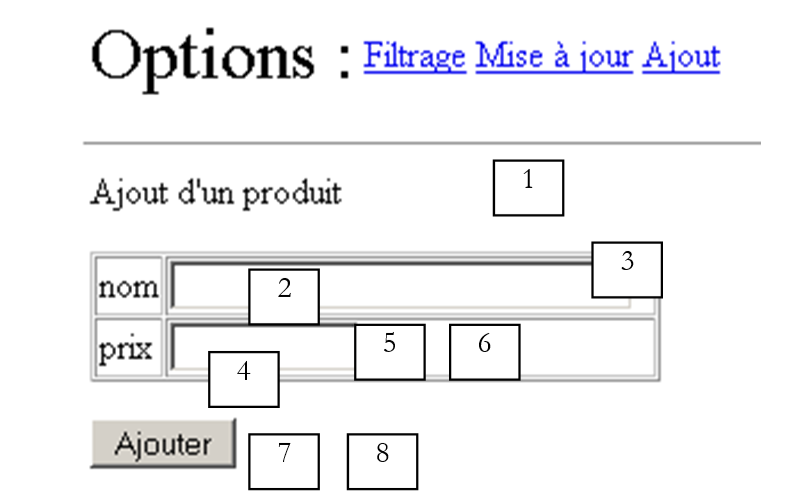 |
编号 | 名称 | 类型 | 角色 |
面板 | |||
TextBox | 产品名称 | ||
RequiredFieldValidator | 检查 [txtNom] 中是否存在值 | ||
TextBox | 产品价格 | ||
RequiredFieldValidator | 检查 [txtPrix] 中是否存在值 | ||
CompareValidator | 检查价格是否大于等于0 | ||
按钮 | 添加商品按钮 [submit] | ||
标签 | 添加操作结果的信息文本 |
在应用程序启动时,数据库 [produits] 可能不可用。在这种情况下,将向用户显示视图 [erreurs]:
 |
编号 | 名称 | 类型 | 角色 |
面板 | |||
中继器 | 错误列表 |
9.6.3. 数据容器的配置
五个 [DataGrid] 容器已在 [WebMatrix] 下配置。它们通过其属性面板中的链接 [Configuration automatique] 进行了格式设置(颜色和边框)。 容器 [DataGrid1] 已通过该属性面板中的链接 [Générateur de propriétés] 进行配置。已启用排序功能(选项卡 [Général]):
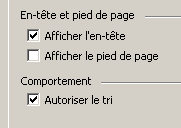
与其他四个容器不同,这些列不会自动生成。它们是通过向导手动定义的:
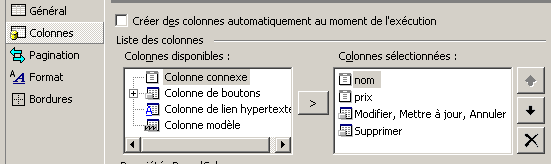
首先创建了两个类型为 [Colonne connexe] 的列,分别命名为 [nom] 和 [prix]。 它们分别与数据源中的字段 [nom] 和 [prix] 相关联,容器将显示这些字段。以下是列 [nom] 的配置示例:
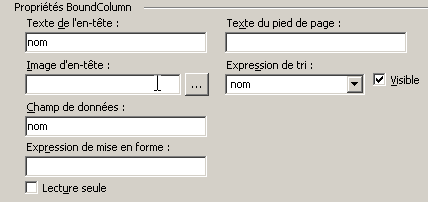
排序表达式是需要放置在语句 SQL [select] 的 [order by] 子句后面的表达式,该语句将在用户点击与[DataGrid]中的字段[nom]关联的标题列[nom]时,该语句将被执行。 此处我们设置了 [nom],因此排序子句将为 [order by nom]。 稍后我们将根据用户选择的排序顺序,将其修改为 [order by nom asc] 或 [order by nom desc]。
此外,我们还创建了两列按钮:
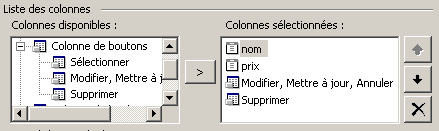
[Modifier, Mettre à jour, Annuler] 列用于修改产品,而 [Supprimer] 列用于删除产品。每列均可进行配置。[Modifier, Mettre à jour, Annuler] 列提供以下配置:
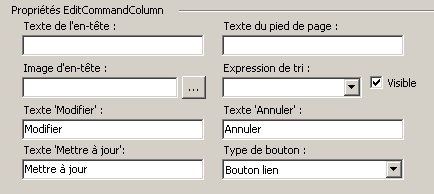
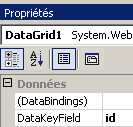
可以看到,我们可以修改按钮上的文字。关于按钮,我们可以选择链接或按钮(如上方的下拉列表所示)。此处选择的是链接。[Supprimer]列的配置与此类似。 除了这个配置向导,我们还直接使用了 [DataGrid] 的属性窗口来填写 [DataKeyField] 属性,该属性指定了 [DataGrid] 的行与数据源中的哪个字段相关联。 此处使用的是产品表的主键:
最终,此配置生成了以下呈现代码:
<asp:DataGrid id="DataGrid1" runat="server" AllowSorting="True" PageSize="4" AllowPaging="True" AutoGenerateColumns="False" DataKeyField="id">
<SelectedItemStyle ...></SelectedItemStyle>
<HeaderStyle ...></HeaderStyle>
<FooterStyle ...></FooterStyle>
<Columns>
<asp:BoundColumn DataField="nom" SortExpression="nom" HeaderText="nom"></asp:BoundColumn>
<asp:BoundColumn DataField="prix" SortExpression="prix" HeaderText="prix"></asp:BoundColumn>
<asp:EditCommandColumn ButtonType="LinkButton" UpdateText="Mettre à jour" CancelText="Annuler" EditText="Modifier"></asp:EditCommandColumn>
<asp:ButtonColumn Text="Supprimer" CommandName="Delete"></asp:ButtonColumn>
</Columns>
<PagerStyle NextPageText="Suivant" PrevPageText="Précédent" ...></PagerStyle>
</asp:DataGrid>
一如既往,一旦积累了一定经验,就可以直接编写上述代码的全部或部分内容。
其他 [DataGrid] 容器采用默认配置,该配置通过自动生成 [DataGrid] 的列来实现,这些列源自与其关联的数据源。
容器 [Repeater] 用于显示错误列表。其配置直接在呈现代码中完成:
                            <asp:Repeater id="rptErreurs" runat="server" EnableViewState="False">
                                <HeaderTemplate>
                                    Les erreurs suivantes se sont produites :
                                    <ul>
                                </HeaderTemplate>
                                <ItemTemplate>
                                    <li>
                                        <%# Container.DataItem %>
                                    </li>
                                </ItemTemplate>
                                <FooterTemplate>
                                    </ul>
                                </FooterTemplate>
                            </asp:Repeater>
该组件的每一行都会显示数据列表中对应的值,例如 [Container.DataItem]、c.a.d。该列表的类型为 [ArrayList],表示一个错误列表。
9.6.4. 应用程序的呈现代码
该代码位于文件 [main.aspx] 中:
<%@ Page src="main.aspx.vb" inherits="main" autoeventwireup="false" Language="vb" %>
<HTML>
<HEAD>
</HEAD>
<body>
<form id="Form1" runat="server">
<P>
<table>
<tr>
<td><FONT size="6">Options :</FONT></td>
<td>
<asp:linkbutton id="lnkFiltre" runat="server" CausesValidation="False">
Filtrage
</asp:linkbutton>
</td>
<td>
<asp:linkbutton id="lnkMisajour" runat="server" CausesValidation="False">
Mise à jour
</asp:linkbutton>
</td>
<td>
<asp:linkbutton id="lnkAjout" runat="server" CausesValidation="False">
Ajout
</asp:linkbutton>
</td>
</tr>
</table>
</P>
<HR width="100%" SIZE="1">
<table>
<tr>
<td>
<asp:panel id="vueFormulaire" runat="server">
<P>Condition de filtrage sur la table LISTE. Exemple : prix<100 and
prix>50</P>
<P>
<asp:TextBox id="txtFiltre" runat="server" Columns="60"></asp:TextBox></P>
<P>Nombre de lignes par page :
<asp:TextBox id="txtPages" runat="server" Columns="3">5</asp:TextBox>
<asp:RequiredFieldValidator id="rfvLignes" runat="server" Display="Dynamic"
ControlToValidate="txtPages" ErrorMessage="Indiquez le nombre de lignes par page"
EnableClientScript="False">
</asp:RequiredFieldValidator></P>
<P>
<asp:RangeValidator id="rvLignes" runat="server" Display="Dynamic"
ControlToValidate="txtPages" ErrorMessage="Vous devez indiquer un nombre entre 3 et 10"
EnableClientScript="False" MaximumValue="10" MinimumValue="3" Type="Integer"
EnableViewState="False">
</asp:RangeValidator></P>
<P>
<asp:Label id="lblinfo1" runat="server"></asp:Label></P>
<P>
<asp:Button id="btnExécuter" runat="server" CausesValidation="False"
EnableViewState="False" Text="Exécuter">
</asp:Button></P>
</asp:panel>
<asp:panel id="vueProduits" runat="server">
<TABLE>
<TR>
<TD align="center" bgColor="#ff9966">
<P>Tri
<asp:RadioButton id="rdCroissant" runat="server" Text="croissant"
GroupName="rdTri" Checked="True">
</asp:RadioButton>
<asp:RadioButton id="rdDécroissant" runat="server" Text="décroissant"
GroupName="rdTri">
</asp:RadioButton></P>
</TD>
<TD align="center" bgColor="#ff9966">Tous les produits
</TD>
<TD align="center" bgColor="#ff9966">Suppressions
</TD>
<TD align="center" bgColor="#ff9966">Modifications
</TD>
<TD align="center" bgColor="#ff9966">Ajouts
</TD>
<TR>
<TD vAlign="top">
<P>
<asp:DataGrid id="DataGrid1" runat="server" AllowSorting="True" PageSize="4"
AllowPaging="True" .... AutoGenerateColumns="False" DataKeyField="id">
<ItemStyle ...></ItemStyle>
<HeaderStyle ...></HeaderStyle>
<FooterStyle ...></FooterStyle>
<Columns>
<asp:BoundColumn DataField="nom" SortExpression="nom" HeaderText="nom">
</asp:BoundColumn>
<asp:BoundColumn DataField="prix" SortExpression="prix" HeaderText="prix">
</asp:BoundColumn>
<asp:EditCommandColumn ButtonType="LinkButton" UpdateText="Mettre à jour"
CancelText="Annuler" EditText="Modifier">
</asp:EditCommandColumn>
<asp:ButtonColumn Text="Supprimer" CommandName="Delete">
</asp:ButtonColumn>
</Columns>
<PagerStyle NextPageText="Suivant" PrevPageText="Précédent" ....>
</PagerStyle>
</asp:DataGrid>
</P>
</TD>
<TD vAlign="top">
<asp:DataGrid id="DataGrid2" runat="server" ...>
<AlternatingItemStyle ...></AlternatingItemStyle>
<ItemStyle ...></ItemStyle>
<HeaderStyle ....></HeaderStyle>
<FooterStyle ...></FooterStyle>
<PagerStyle ... Mode="NumericPages"></PagerStyle>
</asp:DataGrid>
</TD>
<TD vAlign="top">
<asp:DataGrid id="DataGrid3" runat="server" ...>
<ItemStyle ...></ItemStyle>
<HeaderStyle ...></HeaderStyle>
<FooterStyle ...></FooterStyle>
<PagerStyle ...></PagerStyle>
</asp:DataGrid>
</TD>
<TD vAlign="top">
<asp:DataGrid id="DataGrid4" runat="server" ...>
<ItemStyle ....></ItemStyle>
<HeaderStyle ....></HeaderStyle>
<FooterStyle ...></FooterStyle>
<PagerStyle .... Mode="NumericPages"></PagerStyle>
</asp:DataGrid>
</TD>
<TD vAlign="top">
<asp:DataGrid id="DataGrid5" runat="server....>
<AlternatingItemStyle ...></AlternatingItemStyle>
<HeaderStyle ..></HeaderStyle>
<FooterStyle ...></FooterStyle>
<PagerStyle ....></PagerStyle>
</asp:DataGrid>
</TD>
</TR>
</TABLE>
<P></P>
<P>
<asp:Label id="lblInfo2" runat="server"></asp:Label></P>
</asp:panel>
<asp:panel id="vueErreurs" runat="server">
<asp:Repeater id="rptErreurs" runat="server" EnableViewState="False">
<HeaderTemplate>
Les erreurs suivantes se sont produites :
<ul>
</HeaderTemplate>
<ItemTemplate>
<li>
<%# Container.DataItem %>
</li>
</ItemTemplate>
<FooterTemplate>
</ul>
</FooterTemplate>
</asp:Repeater>
</asp:panel>
<asp:panel id="vueAjout" EnableViewState="False" Runat="server">
<P>Ajout d'un produit</P>
<P>
<TABLE ... border="1">
<TR>
<TD>nom</TD>
<TD>
<asp:TextBox id="txtNom" runat="server" Columns="30"></asp:TextBox>
<asp:RequiredFieldValidator id="rfvNom" runat="server" ControlToValidate="txtNom"
ErrorMessage="Vous devez indiquer un nom">
</asp:RequiredFieldValidator>
</TD>
</TR>
<TR>
<TD>prix</TD>
<TD>
<asp:TextBox id="txtPrix" runat="server" Columns="10"></asp:TextBox>
<asp:RequiredFieldValidator id="rfvPrix" runat="server" ControlToValidate="txtPrix"
ErrorMessage="Vous devez indiquer un prix">
</asp:RequiredFieldValidator>
<asp:CompareValidator id="cvPrix" runat="server" ControlToValidate="txtPrix"
ErrorMessage="CompareValidator" Type="Double" Operator="GreaterThanEqual"
ValueToCompare="0">
</asp:CompareValidator>
</TD>
</TR>
</TABLE>
</P>
<P>
<asp:Button id="btnAjouter" runat="server" CausesValidation="False"
Text="Ajouter">
</asp:Button></P>
<P>
<asp:Label id="lblInfo3" runat="server"></asp:Label></P>
</asp:panel>
</td>
</tr>
</table>
</form>
</body>
</HTML>
请注意以下几点:
- 该页面由四个 [vueFormulaire, vueProduits, vueAjout, vueErreurs] 容器(面板)组成,它们将构成应用程序的四个视图。
- 类型为 [submit] 的按钮或链接具有属性 [CausesValidation=false]。属性 [causesValidation=true] 会触发页面上所有验证控件的执行。但在此处,并非所有有效性检查都需要同时进行。 例如,在添加数据时,我们不希望执行关于每页行数的验证。因此,我们将自行指定需要执行哪些有效性验证。
9.6.5. 验证代码 [global.asax]
[global.asax] 验证器如下:
关联代码 [global.asax.vb]:
Imports System
Imports System.Web
Imports System.Web.SessionState
Imports st.istia.univangers.fr
Imports System.Configuration
Imports System.Data
Imports Microsoft.VisualBasic
Imports System.Collections

Public Class Global
    Inherits System.Web.HttpApplication

    Sub Application_Start(ByVal sender As Object, ByVal e As EventArgs)
        ' 正在检索配置信息
        Dim chaînedeConnexion As String = ConfigurationSettings.AppSettings("OLEDBStringConnection")
        Dim defaultProduitsPage As String = ConfigurationSettings.AppSettings("defaultProduitsPage")
        Dim erreurs As New ArrayList
        If IsNothing(chaînedeConnexion) Then erreurs.Add("Le paramètre [OLEDBStringConnection] n'a pas été initialisé")
        If IsNothing(defaultProduitsPage) Then
            erreurs.Add("Le paramètre [defaultProduitsPage] n'a pas été initialisé")
        Else
            Try
                Dim defProduitsPage As Integer = CType(defaultProduitsPage, Integer)
                If defProduitsPage <= 0 Then Throw New Exception
            Catch ex As Exception
                erreurs.Add("Le paramètre [defaultProduitsPage] a une valeur incorrecte")
            End Try
        End If
        ' 是否有配置错误?
        If erreurs.Count <> 0 Then
            ' 记录错误
            Application("erreurs") = erreurs
            ' 退出
            Exit Sub
        End If
        ' 此处无配置错误
        ' 创建产品对象
        Dim dtProduits As DataTable
        Try
            dtProduits = New produits(chaînedeConnexion).getProduits
        Catch ex As ExceptionProduits
            '访问产品时发生错误,已在应用程序中记录
            Application("erreurs") = ex.erreurs
            Exit Sub
        Catch ex As Exception
            ' 未处理的错误
            erreurs.Add(ex.Message)
            Application("erreurs") = erreurs
            ' 退出子程序
        End Try
        ' 此处无初始化错误
        ' 保存每页产品数量
        Application("defaultProduitsPage") = defaultProduitsPage
        ' 保存产品表
        Application("dtProduits") = dtProduits
    End Sub

    Sub Session_Start(ByVal sender As Object, ByVal e As EventArgs)
        ' 初始化会话变量
        If IsNothing(Application("erreurs")) Then
            ' 显示产品列表
            Session("dvProduits") = CType(Application("dtProduits"), DataTable).DefaultView
            ' 每页产品数量
            Session("nbProduitsPage") = Application("defaultProduitsPage")
            ' 当前显示的页面
            Session("pageCourante") = 0
        End If
    End Sub
End Class
在 [Application_Start] 中,首先从应用程序的配置文件 [web.config] 中获取两项信息:
- OLEDBStringConnection:连接产品数据库的字符串 OLEDB
- defaultProduitsPage:每页显示产品的默认数量
<?xml version="1.0" encoding="utf-8" ?>
<configuration>
    <appSettings>
        <add key="OLEDBStringConnection" value="Provider=Microsoft.Jet.OLEDB.4.0; Ole DB Services=-4; Data Source=D:\data\devel\aspnet\poly\webforms3\vs\majproduits1\produits.mdb" />
        <add key="defaultProduitsPage" value="5" />
    </appSettings>
</configuration>
如果这两项信息中缺少任何一项,系统将生成错误列表并将其写入应用程序。如果参数 [defaultProduitsPage] 存在但不正确,情况也是如此。 如果两个预期参数均存在且正确,则构建表 [dtProduits] 并将其放入应用程序中。该表将由各个客户端进行读取和更新。数据库本身将保持不变。关于数据库的更新,我们将在后续的应用程序中进行探讨。 该表基于先前研究的 [produits] 类的实例及其 [getProduits] 方法构建。获取 [dtProduits] 表可能失败。 在此情况下,已知类 [produits] 会抛出类型为 [ExceptionProduits] 的异常。该异常在此被拦截,相关错误列表被放入与键 [erreurs] 关联的应用程序中。 每次处理请求时,都会检查应用程序中记录的信息中是否存在该键。如果找到该键,则将视图 [erreurs] 发送给客户端。
尽管表 [dtProduits] 由所有 Web 客户端共享,但每个客户端仍拥有针对该表的独立视图 [dvProduits]。 实际上,每个Web客户端均可对表[dtProduits]设置过滤条件及排序规则。这些特定于每个Web客户端的信息存储在客户端视图中。因此,该视图在[Session_Start]中创建,以便存入每个客户端的专属会话中。 我们使用表 [dtProduits] 中的 [DefaultView] 属性来获取该表的默认视图。初始时,既没有过滤条件也没有排序顺序。此外,还有两项信息也被放入会话中:
- 键为 [nbProduitsPage] 的每页产品数量。会话启动时,该数值等于配置文件中定义的默认数量。
- 当前产品页的页码。初始时,此值为第一页。
9.6.6. 控制器代码 [main.aspx.vb]
控制器的骨架如下:
Imports System.Collections
Imports Microsoft.VisualBasic
Imports System.Data
Imports st.istia.univangers.fr
Imports System
Imports System.Xml
Imports System.Web.UI.WebControls

Public Class main
    Inherits System.Web.UI.Page

    ' 页面组件
    Protected WithEvents txtPages As System.Web.UI.WebControls.TextBox
    Protected WithEvents btnExécuter As System.Web.UI.WebControls.Button
    Protected WithEvents vueFormulaire As System.Web.UI.WebControls.Panel
    Protected WithEvents DataGrid1 As System.Web.UI.WebControls.DataGrid
    Protected WithEvents lnkErreurs As System.Web.UI.WebControls.LinkButton
    Protected WithEvents vueErreurs As System.Web.UI.WebControls.Panel
    Protected WithEvents rdCroissant As System.Web.UI.WebControls.RadioButton
    Protected WithEvents rdDécroissant As System.Web.UI.WebControls.RadioButton
    Protected WithEvents txtFiltre As System.Web.UI.WebControls.TextBox
    Protected WithEvents lblInfo2 As System.Web.UI.WebControls.Label
    Protected WithEvents lblinfo1 As System.Web.UI.WebControls.Label
    Protected WithEvents lblErreurs As System.Web.UI.WebControls.Label
    Protected WithEvents DataGrid2 As System.Web.UI.WebControls.DataGrid
    Protected WithEvents vueProduits As System.Web.UI.WebControls.Panel
    Protected WithEvents vueAjout As System.Web.UI.WebControls.Panel
    Protected WithEvents lnkMisajour As System.Web.UI.WebControls.LinkButton
    Protected WithEvents lnkFiltre As System.Web.UI.WebControls.LinkButton
    Protected WithEvents txtNom As System.Web.UI.WebControls.TextBox
    Protected WithEvents txtPrix As System.Web.UI.WebControls.TextBox
    Protected WithEvents btnAjouter As System.Web.UI.WebControls.Button
    Protected WithEvents lblInfo3 As System.Web.UI.WebControls.Label
    Protected WithEvents rfvLignes As System.Web.UI.WebControls.RequiredFieldValidator
    Protected WithEvents rvLignes As System.Web.UI.WebControls.RangeValidator
    Protected WithEvents rfvNom As System.Web.UI.WebControls.RequiredFieldValidator
    Protected WithEvents rfvPrix As System.Web.UI.WebControls.RequiredFieldValidator
    Protected WithEvents cvPrix As System.Web.UI.WebControls.CompareValidator
    Protected WithEvents lnkAjout As System.Web.UI.WebControls.LinkButton
    Protected WithEvents DataGrid3 As System.Web.UI.WebControls.DataGrid
    Protected WithEvents DataGrid4 As System.Web.UI.WebControls.DataGrid
    Protected WithEvents DataGrid5 As System.Web.UI.WebControls.DataGrid

    ' 页面数据
    Protected dtProduits As DataTable
    Protected dvProduits As DataView
    Protected defaultProduitsPage As Integer
    Protected erreur As Boolean = False

    ' 页面加载
    Private Sub Page_Load(ByVal sender As System.Object, ByVal e As System.EventArgs) Handles MyBase.Load
...
    End Sub

    Private Sub afficheErreurs()
...
    End Sub

    Private Sub afficheFormulaire()
...
    End Sub

    Private Sub btnExécuter_Click(ByVal sender As System.Object, ByVal e As System.EventArgs) Handles btnExécuter.Click
....
    End Sub

    Private Sub afficheProduits(ByVal page As Integer, ByVal taillePage As Integer)
...
    End Sub

    Private Sub DataGrid1_PageIndexChanged(ByVal source As Object, ByVal e As System.Web.UI.WebControls.DataGridPageChangedEventArgs) Handles DataGrid1.PageIndexChanged
...
    End Sub

    Private Sub DataGrid1_SortCommand(ByVal source As Object, ByVal e As System.Web.UI.WebControls.DataGridSortCommandEventArgs) Handles DataGrid1.SortCommand
....
    End Sub

    Private Sub DataGrid1_DeleteCommand(ByVal source As Object, ByVal e As System.Web.UI.WebControls.DataGridCommandEventArgs) Handles DataGrid1.DeleteCommand
....
    End Sub

    Private Sub DataGrid1_EditCommand(ByVal source As Object, ByVal e As System.Web.UI.WebControls.DataGridCommandEventArgs) Handles DataGrid1.EditCommand
...
    End Sub

    Private Sub DataGrid1_CancelCommand(ByVal source As Object, ByVal e As System.Web.UI.WebControls.DataGridCommandEventArgs) Handles DataGrid1.CancelCommand
...
    End Sub

    Private Sub DataGrid1_UpdateCommand(ByVal source As Object, ByVal e As System.Web.UI.WebControls.DataGridCommandEventArgs) Handles DataGrid1.UpdateCommand
...
    End Sub

    Private Sub supprimerProduit(ByVal idProduit As Integer)
...
    End Sub

    Private Sub modifierProduit(ByVal idProduit As Integer, ByVal item As DataGridItem)
....
    End Sub

    Private Sub lnkMisajour_Click(ByVal sender As System.Object, ByVal e As System.EventArgs) Handles lnkMisajour.Click
...
    End Sub

    Private Sub lnkAjout_Click(ByVal sender As System.Object, ByVal e As System.EventArgs) Handles lnkAjout.Click
...
    End Sub

    Private Sub afficheAjout()
...
    End Sub

    Private Sub lnkFiltre_Click(ByVal sender As System.Object, ByVal e As System.EventArgs) Handles lnkFiltre.Click
....
    End Sub

    Private Sub btnAjouter_Click(ByVal sender As System.Object, ByVal e As System.EventArgs) Handles btnAjouter.Click
....
    End Sub
End Class
9.6.7. 实例数据
类 [main] 使用以下实例数据:
Public Class main
    Inherits System.Web.UI.Page

     ' 页面组件
    Protected WithEvents txtPages As System.Web.UI.WebControls.TextBox
...

     ' 页面数据
    Protected dtProduits As DataTable
    Protected dvProduits As DataView
    Protected defaultProduitsPage As Integer
产品表 [DataTable] - 适用于所有客户 | |
产品视图 [DataView] - 每个客户专属 | |
默认每页显示的产品数量 |
9.6.8. 页面加载过程 [Page_Load]
[page_Load] 过程的代码如下:
    ' 页面加载
    Private Sub Page_Load(ByVal sender As System.Object, ByVal e As System.EventArgs) Handles MyBase.Load
        ' 检查应用程序是否出错
        If Not IsNothing(Application("erreurs")) Then
            ' 应用程序未正确初始化
            afficheErreurs(CType(Application("erreurs"), ArrayList))
            Exit Sub
        End If
        ' 从产品表中获取引用
        dtProduits = CType(Application("dtProduits"), DataTable)
         ' 获取产品视图
        dvProduits = CType(Session("dvProduits"), DataView)
         ' 获取每页产品数量
        defaultProduitsPage = CType(Application("defaultProduitsPage"), Integer)
         ' 取消任何正在进行的更新
        DataGrid1.EditItemIndex = -1
        '首次请求
        If Not IsPostBack Then
            ' 显示初始表单
            txtPages.Text = defaultProduitsPage.ToString
            afficheFormulaire()
        End If
    End Sub
- 首先检查产品表是否已在应用程序启动时加载成功。若未加载成功,则显示视图 [erreurs] 并附上相应的错误信息,随后将布尔值 [erreur] 设为真,并退出该过程。 该标志将由某些过程进行检测。
- 在应用程序中获取产品表 [dtProduits],并将其存入实例变量 [dtProduits],以便页面上的所有方法都能共享该数据。
- 对从会话中获取的视图 [dvProduits] 以及从应用程序中获取的每页默认产品数量,也采用同样的处理方式。
- 如果这是客户端的首次请求,则向其展示用于定义筛选条件和分页的表单,默认每页显示 [defaultProduitsPage] 个产品。
- 取消组件 [dataGrid1] 的编辑模式。该组件有一个属性 [EditItemIndex],表示当前正在编辑的元素索引。若 [EditItemIndex]=-1,则表示没有元素正在编辑。 如果 [EditItemIndex]=i,则表示组件 [DataGrid] 的第 i 个元素正在编辑中。此时,该元素的显示方式与 [dataGrid] 中的其他元素不同:
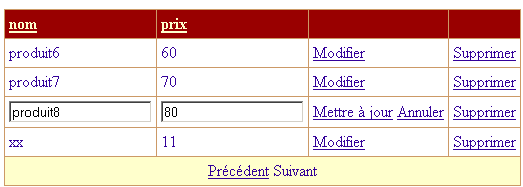
上图中,[Produit8, 80] 元素处于 [édition] 模式。 上图显示,用户可通过链接 [Mettre à jour] 确认更新,通过链接 [Annuler] 取消更新。用户还可以使用其他与当前正在编辑的元素无关的链接。 通过在每次加载页面时添加 [DataGrid1.EditItemIndex=-1],可确保系统性地取消 [DataGrid1] 的编辑模式。 只有当点击了链接 [Modifier] 时,才会为其赋予不同的值。这将在处理该事件的程序中完成。将出现以下情况:
- 点击了 [DataGrid1] 中第 8 个元素的链接 [Modifier]。[Page_Load] 首先将 -1 赋值给 [DataGrid1.EditItemIndex]。 随后,处理事件 [Modifier] 的程序将向 [DataGrid1.EditItemIndex] 中写入 8。最终,当页面返回给客户端时,第 8 个元素将处于 [édition] 模式,其显示效果如上所示。
- 用户修改处于 [édition] 模式下的产品,并通过链接 [Mettre à jour] 确认修改。[Page_Load] 将 -1 写入 [DataGrid1.EditItemIndex]。 随后,处理事件 [Mettre à jour] 的程序将执行,并更新 [dtProduits] 的第 8 个元素。 当页面返回给客户端时,[DataGrid1]中的所有元素均不会处于编辑模式(DataGrid.EditItemIndex=-1)。
- 如果用户已进入产品更新界面,那么通过 [Annuler] 取消该更新是合理的。然而,没有任何机制能阻止用户点击其他链接。因此我们需要预先处理这种情况。 在此情况下,与之前的情况一样,[Page_Load] 首先将 -1 写入 [DataGrid1.EditItemIndex],随后处理该事件的流程将开始执行。 该处理程序不会修改 [DataGrid1.EditItemIndex] 属性,因此该属性将保持 -1 的值。当页面返回给客户端时,[DataGrid1] 中的所有元素都不会处于编辑模式。
可见,通过在页面加载时将 [EditItemIndex] 设为 -1,便无需担心用户点击链接时是否处于更新状态。
9.6.9. 显示视图 [erreurs]、[formulaire] 和 [ajout]
如果在加载页面 [Page_Load] 时发现应用程序初始化失败,则会调用视图 [erreurs] 的显示。 此显示操作通过将数据组件 [rptErreurs] 与作为参数传递的错误列表关联,并使相应的容器可见来实现。最后,三个链接 [Filtre, Mise à jour, Ajout] 被隐藏,因为一旦发生错误,应用程序将无法使用。
    Private Sub afficheErreurs(ByVal erreurs As ArrayList)
        ' 将错误列表关联到重复器 rptErreurs
        With rptErreurs
            .DataSource = erreurs
            .DataBind()
        End With
        '禁用选项
        lnkAjout.Visible = False
        lnkMisajour.Visible = False
        lnkFiltre.Visible = False
        ' 显示视图 [erreurs]
        vueErreurs.Visible = True
        vueFormulaire.Visible = False
        vueProduits.Visible = False
        vueAjout.Visible = False
    End Sub
其他视图是根据向用户提供的选项请求的:
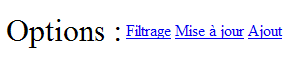
当用户点击页面上的链接 [Ajout] 时,将请求显示视图 [Ajout]:
    Private Sub lnkAjout_Click(ByVal sender As System.Object, ByVal e As System.EventArgs) Handles lnkAjout.Click
        ' 显示视图 [ajout]
        afficheAjout()
    End Sub
    Private Sub afficheAjout()
        ' 显示添加视图
        vueAjout.Visible = True
        vueFormulaire.Visible = False
        vueProduits.Visible = False
        vueErreurs.Visible = False
    End Sub
当用户点击页面上的链接 [Filtrage] 时,系统将显示视图 [Formulaire]。此时应呈现该视图,以便定义
- 产品表的筛选条件
- 每页网页中显示的产品数量
系统将显示一个表单,其中包含会话中存储的值:
    Private Sub lnkFiltre_Click(ByVal sender As System.Object, ByVal e As System.EventArgs) Handles lnkFiltre.Click
        ' 定义筛选条件
        txtFiltre.Text = dvProduits.RowFilter
        ' 设置分页
        txtPages.Text = CType(Session("nbProduitsPage"), String)
        ' 显示筛选表单
        afficheFormulaire()
    End Sub
视图的筛选条件定义在其属性 [RowFilter] 中。需要提醒的是,经过筛选和分页的视图名为 [dvProduits],并在加载页面 [Page_Load] 时从会话中获取。 因此,筛选条件从 [dvProduits.RowFilter] 中获取。每页显示的产品数量同样从会话中获取。如果用户从未设置过此信息,该数值将等于每页产品的默认数量。完成上述操作后,系统将显示用于设置这两项信息的表单:
    Private Sub afficheFormulaire()
        ' 显示视图 [formulaire]
        vueFormulaire.Visible = True
        vueErreurs.Visible = False
        vueProduits.Visible = False
        vueAjout.Visible = False
    End Sub
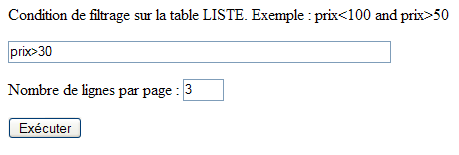
9.6.10. 视图验证 [formulaire]
点击上方的 [Exécuter] 按钮将由以下过程处理:
    Private Sub btnExécuter_Click(ByVal sender As System.Object, ByVal e As System.EventArgs) Handles btnExécuter.Click
        ' 页面有效吗?
        rfvLignes.Validate()
        rvLignes.Validate()
        If Not rfvLignes.IsValid Or Not rvLignes.IsValid Then
            afficheFormulaire()
            Exit Sub
        End If
        ' 将筛选后的数据附加到网格中
        Try
            dvProduits.RowFilter = txtFiltre.Text.Trim
        Catch ex As Exception
            lblinfo1.Text = "Erreur de filtrage (" + ex.Message + ")"
            afficheFormulaire()
            Exit Sub
        End Try
        ' 保存每页产品数量
        Session("nbProduitsPage") = txtPages.Text
        '以及当前页面
        Session("pageCourante") = 0
        ' 一切正常——显示数据
        afficheProduits(0, CType(txtPages.Text, Integer))
    End Sub
首先需要提醒的是,该页面包含两个验证组件:
编号 | 名称 | 类型 | 角色 |
RequiredFieldValidator | 检查 [txtPages] 中是否存在值 | ||
RangeValidator | 检查 txtPages 是否在 [3,10] 的区间内 |
该过程首先使用方法 [Validate] 执行上述两个组件的检查代码,然后验证其属性 [IsValid] 的值。 只有当验证的数据被判定为有效时,该属性值才会为 [true]。如果两个组件中的任一个有效性测试失败,则重新显示视图 [formulaire],以便用户更正错误。 筛选条件应用于属性 [dvProduits.RowFilter]。如果用户设置了不正确的筛选条件(如下所示),则可能会发生异常:
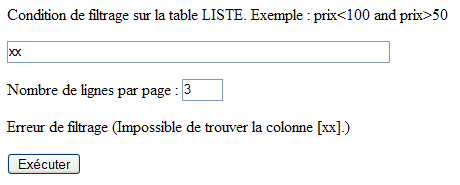
此时,将重新显示视图 [formulaire]。如果输入的两项信息均正确,则会将两项数据存入会话中:
- 用户选择的每页产品数量
- 即将显示的页码——初始为第 0 页
每次调用视图 [produits] 时,都会使用这两项信息。
9.6.11. 显示视图 [produits]
视图 [produits] 如下所示:
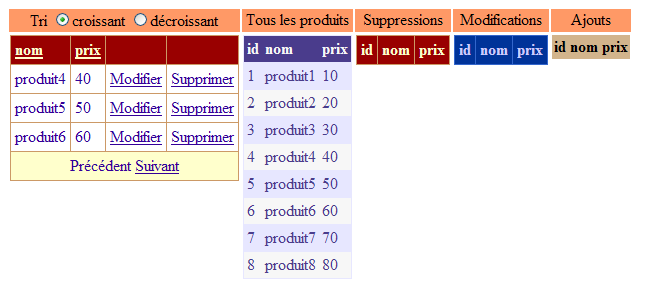
我们有 5 个 [DataGrid] 组件,每个组件都展示产品表 [dtProduits] 的特定视图。从左到右依次为:
名称 | 角色 |
产品表过滤视图的显示网格。该过滤器由视图 [formulaire] 设定。此外还有 .AllowPaging=true, .AllowSorting=true | |
显示完整的产品列表 - 支持实时更新 | |
将在产品表中显示已删除的产品 | |
将在产品表中显示已修改的产品 | |
将在产品表中显示已添加的产品 |
过程 [afficheProduits] 负责显示上一个视图:
    Private Sub afficheProduits(ByVal page As Integer, ByVal taillePage As Integer)
        ' 将数据附加到两个组件上 [DataGrid]
        Application.Lock()
        With DataGrid1
            .DataSource = dvProduits
            .PageSize = taillePage
            .CurrentPageIndex = page
            .DataBind()
        End With
        Dim dvCurrent As New DataView(dtProduits)
        dvCurrent.RowStateFilter = DataViewRowState.CurrentRows
        With DataGrid2
            .DataSource = dvCurrent
            .DataBind()
        End With
        Dim dvSupp As DataView = New DataView(dtProduits)
        dvSupp.RowStateFilter = DataViewRowState.Deleted
        With DataGrid3
            .DataSource = dvSupp
            .DataBind()
        End With
        Dim dvModif As DataView = New DataView(dtProduits)
        dvModif.RowStateFilter = DataViewRowState.ModifiedOriginal
        With DataGrid4
            .DataSource = dvModif
            .DataBind()
        End With
        Dim dvAjout As DataView = New DataView(dtProduits)
        dvAjout.RowStateFilter = DataViewRowState.Added
        With DataGrid5
            .DataSource = dvAjout
            .DataBind()
        End With
        Application.UnLock()
        ' 显示视图 [produits]
        vueProduits.Visible = True
        vueFormulaire.Visible = False
        vueErreurs.Visible = False
        vueAjout.Visible = False
        ' 保存当前页面
        Session("pageCourante") = page
    End Sub
该过程接受两个参数:
- 要在 [DataGrid1] 中显示的页码 [page]
- 每页的产品数量 [taillePage]
[DataGrid] 与产品表的关联是通过 5 个不同的视图实现的。
- [DataGrid1] 关联到分页并排序的视图 [dvProduits]。
        With DataGrid1
            .DataSource = dvProduits
            .PageSize = taillePage
            .CurrentPageIndex = page
            .DataBind()
        End With
正是将 [DataGrid1] 与其数据源关联时,才需要将这两项信息作为参数传递给该过程。
- [DataGrid2] 关联了一个视图,该视图显示了表 [dtProduits] 中的所有当前数据。它与 [DataGrid1] 类似,展示了表 [dtProduits] 的最新视图,但不包含分页和排序功能。
        Dim dvCurrent As New DataView(dtProduits)
        dvCurrent.RowStateFilter = DataViewRowState.CurrentRows
        With DataGrid2
            .DataSource = dvCurrent
            .DataBind()
        End With
此处我们使用类 [DataView] 的属性 [RowStateFilter]。表中的一行(此处为视图中的一行)具有一个属性 [RowState],用于指示该行的状态。以下列举了其中几种:
- (续)
- [Added]:该行已被添加
- [Modified]:该行已被修改
- [Deleted]:该行已被删除
- [Unchanged]:行未发生变化
当表 [dtProduits] 最初在 [Application_Start] 中创建时,其所有行均处于状态 [Unchanged]。该状态将随着 Web 客户端的更新而变化:
- (续)
- 当客户创建新产品时,会在表 [dtProduits] 中添加一行。该行将处于状态 [Added]。
- 当产品被修改时,其状态将从 [Unchanged] 变为 [Modified]。
- 当产品被删除时,该行不会被物理删除。而是被标记为待删除,其状态变为 [Deleted]。此删除操作可以撤销。
类 [DataView] 的属性 [RowStateFilter] 允许根据行状态 [RowState] 对视图进行筛选。其可能的取值来自枚举 [DataRowViewState]:
- (续)
- DataRowViewState.CurrentRows:显示未删除的行及其当前值
- DataRowViewState.Added:显示已添加的行及其当前值
- DataRowViewState.Deleted:已删除的行将显示其原始值
- DataRowViewState.ModifiedOriginal:显示已修改的行及其原始值
- DataRowViewState.ModifiedCurrent:显示已修改行的当前值
一条已修改的记录有两个值:原始值(即该记录在首次修改前的值)和当前值(即经过一次或多次修改后获得的值)。这两个值会同时保留。
DataGrid 2 至 5 显示了根据 [RowStateFilter] 属性过滤后的 [dtProduits] 表视图
DataGrid | 筛选 |
RowStateFilter= DataRowViewState.CurrentRows | |
RowStateFilter= DataRowViewState.Deleted | |
RowStateFilter= DataRowViewState.ModifiedOriginal | |
RowStateFilter= DataRowViewState.Added |
表 [dtPoduits] 由不同的 Web 客户端同时更新,这可能会导致对该表的访问冲突。 当某个客户端显示 [dtProduits] 表的视图时,我们需要避免在该表处于不稳定状态(即正在被另一个 Web 客户端修改)时进行此操作。 因此,每当客户端需要读取上述表 [dtProduits],或在添加、修改和删除产品时需要写入该表时,它将通过以下步骤与其他客户端进行同步:
应用程序代码中可能存在多个关键部分:
其工作原理如下:
- 一个或多个客户端到达关键部分 1 中的指令 [Application.Lock]。这是一个唯一的入口令牌分配器。仅有一个客户端获得该令牌。我们称其为 C1。
- 只要客户端 C1 尚未通过 [Application.Unlock] 释放该令牌,其他任何客户端均不得进入由 [Application.Lock] 控制的临界区。 因此,在上例中,没有任何客户端可以进入关键部分 1 和 2。
- 客户端 C1 执行 [Application.Unlock],并因此释放了进入令牌。该令牌随后可分配给另一个客户端。步骤 1 至 3 将重新执行。
通过此机制,我们将确保仅有一名客户端能够访问表 [dtProduits],无论是读取还是写入。
链接 [Mise à jour] 同样显示视图 [Produits]:

相关存储过程如下:
    Private Sub lnkMisajour_Click(ByVal sender As System.Object, ByVal e As System.EventArgs) Handles lnkMisajour.Click
        ' 显示产品视图
        afficheProduits(CType(Session("pageCourante"), Integer), CType(Session("nbProduitsPage"), Integer))
    End Sub
需显示视图 [produits]。 这通过过程 [afficheProduits] 实现,该过程接受两个参数:要显示的当前页码以及每页显示的产品数量。这两项信息存储在会话中,如果用户从未自行定义过这些参数,则可能使用其初始值。
9.6.12. [DataGrid1] 的分页与排序
我们在另一个示例中已经接触过管理 [DataGrid] 分页和排序的程序。 当切换页面时,通过将新页码作为参数传递给 [afficheProduits] 过程,来显示 [produits] 视图。
    Private Sub DataGrid1_PageIndexChanged(ByVal source As Object, ByVal e As System.Web.UI.WebControls.DataGridPageChangedEventArgs) Handles DataGrid1.PageIndexChanged
        ' 换页
        afficheProduits(e.NewPageIndex, DataGrid1.PageSize)
    End Sub
当用户点击 [DataGrid1] 表中某列的表头时,将执行 [DataGrid1_SortCommand] 过程。 此时,必须将排序表达式分配给由 [DataGrid1] 显示的视图 [dvProduits] 的属性 [Sort]。 该表达式的语法等同于语句 SQL SELECT 中 [order by] 子句后面的排序表达式。 该过程的参数 [e] 具有一个属性 [SortExpression],该属性为我们提供了与被点击的列头相关的排序表达式。在构建组件 [DataGrid1] 时,该排序表达式已被定义。 以下是为 [DataGrid1] 中的 [nom] 列定义的排序表达式:
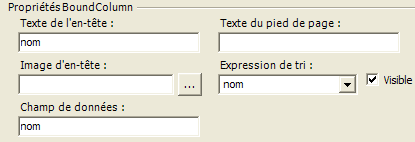
如果在设计 [DataGrid] 时未定义排序表达式,则将使用 [DataGrid] 列关联的数据字段名称。 此处的排序方向(升序、降序)由用户通过单选按钮 [rdCroissant, rd Décroissant] 设定:
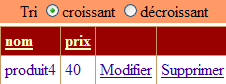
排序流程如下:
    Private Sub DataGrid1_SortCommand(ByVal source As Object, ByVal e As System.Web.UI.WebControls.DataGridSortCommandEventArgs) Handles DataGrid1.SortCommand
        ' 对数据视图进行排序
        With dvProduits
            .Sort = e.SortExpression + " " + CType(IIf(rdCroissant.Checked, "asc", "desc"), String)
        End With
        ' 显示
        afficheProduits(0, DataGrid1.PageSize)
    End Sub
9.6.13. 删除产品
要删除产品,用户需点击产品行中的链接 [Supprimer]:
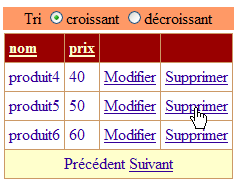
随后将执行过程 [DataGrid1_DeleteCommand]:
    Private Sub DataGrid1_DeleteCommand(ByVal source As Object, ByVal e As System.Web.UI.WebControls.DataGridCommandEventArgs) Handles DataGrid1.DeleteCommand
        ' 删除产品
        ' 待删除产品的ID
        Dim idProduit As Integer = CType(DataGrid1.DataKeys(e.Item.ItemIndex), Integer)
        ' 删除产品
        Dim erreur As Boolean = False
        Try
            supprimerProduit(idProduit)
        Catch ex As Exception
            ' 问题
            lblInfo2.Text = ex.Message
            erreur = True
        End Try
        ' 换页?
        Dim page As Integer = DataGrid1.CurrentPageIndex
        If Not erreur AndAlso DataGrid1.Items.Count = 1 Then
            page = DataGrid1.CurrentPageIndex - 1
            If page < 0 Then page = 0
        End If
        ' 显示产品
        afficheProduits(page, DataGrid1.PageSize)
    End Sub
产品的更新将通过产品的密钥 [id] 进行。 实际上,表 [dtProduits] 中的列 [id] 是主键,借助该主键,我们可以在表 [dtProduits] 中找到在组件 [DataGrid1] 中被更新的产品行。 因此,该过程首先获取点击了链接 [Supprimer] 的产品的主键:
         ' 待删除产品的ID
        Dim idProduit As Integer = CType(DataGrid1.DataKeys(e.Item.ItemIndex), Integer)
我们知道,[e.Item] 是 [DataGrid1] 中引发该事件的元素。 大致来说,该元素是 [DataGrid] 表中的一行。[e.Item.ItemIndex] 是触发该事件的行号。该索引与当前显示的页面相关。 因此,即使在产品表中编号为17,当前显示页面的第一行在[ItemIndex=0]属性中仍被标识。[DataGrid1.DataKeys]是[DataGrid]的键列表。 由于我们在设计时写入了 [DataGrid1.DataKey=id],因此 [DataGrid1] 的键由 [dtProduits] 表中 [id] 列的值组成,该列同时也是主键。 因此,[DataGrid1.DataKeys(e.Item.ItemIndex)]即为待删除产品的主键[id]。获取该主键后,我们通过过程[supprimerProduit]请求删除该产品:
         ' 删除产品
        Dim erreur As Boolean = False
        Try
            supprimerProduit(idProduit)
        Catch ex As Exception
            ' 问题
            lblInfo2.Text = ex.Message
            erreur = True
        End Try
在某些情况下,此删除操作可能会失败。我们将探讨原因。此时会抛出一个异常,并在该处进行处理。如果发生错误,[DataGrid1]无需更改。 仅在视图 [produits] 中添加一条错误消息。若无错误且用户刚删除了当前页面上的唯一产品,则显示上一页。
         ' 换页?
        Dim page As Integer = DataGrid1.CurrentPageIndex
        If Not erreur AndAlso DataGrid1.Items.Count = 1 Then
            page = DataGrid1.CurrentPageIndex - 1
            If page < 0 Then page = 0
        End If
在所有情况下,视图 [produits] 都会通过过程 [afficheProduits] 重新显示:
过程 [supprimerProduit] 如下:
    Private Sub supprimerProduit(ByVal idProduit As Integer)
        Dim erreur As String
        Try
            ' 同步
            Application.Lock()
            ' 查找要删除的行
            Dim ligne As DataRow = dtProduits.Rows.Find(idProduit)
            If ligne Is Nothing Then
                erreur = String.Format("Produit [{0}] inexistant", idProduit)
            Else
                ' 删除行
                ligne.Delete()
            End If
        Catch ex As Exception
            erreur = String.Format("Erreur de suppression : {0}", ex.Message)
        Finally
            ' 同步结束
            Application.UnLock()
        End Try
        ' 若发生错误则抛出异常
        If erreur <> String.Empty Then Throw New Exception(erreur)
    End Sub
该过程接收要删除的产品密钥作为参数。如果只有一个客户端需要进行更新,则删除操作可按以下方式进行:
当多个客户端同时进行更新时,情况会变得更为复杂。实际上,请考虑以下时间序列:
 |
时间 | 操作 |
T1 | 客户端 A 读取表 [dtProduits]——其中存在键值为 20 的记录 |
T2 | 客户 B 读取表 [dtProduits] - 存在键值为 20 的产品 |
T3 | 客户端 A 删除了键为 20 的产品 |
T4 | 客户端 B 删除了键为 20 的产品 |
当客户端 A 和 B 读取产品表并将内容显示在网页上时,该表中包含键为 20 的产品。因此,他们可能希望对该产品执行操作,例如将其删除。 两人中必然有一人会率先执行该操作。随后访问的客户将试图删除一个已不存在的商品。[supprimerProduits] 程序通过多种方式处理此情况:
- 首先,该过程会与[Application.Lock]进行同步。这意味着当某位客户通过此同步机制后,将不再有其他客户能够修改或读取产品表。实际上,所有此类操作均通过这种方式进行同步。我们在读取操作中已对此进行过说明。
- 随后会检查要删除的产品是否存在。如果存在,则将其删除;否则,将生成一条错误消息。
             ' 查找待删除的行
            Dim ligne As DataRow = dtProduits.Rows.Find(idProduit)
            If ligne Is Nothing Then
                erreur = String.Format("Produit [{0}] inexistant", idProduit)
            Else
                 ' 删除行
                ligne.Delete()
            End If
- 通过 [Application.Unlock] 退出关键序列,以便其他客户端进行更新。
- 如果无法删除该行,该过程将抛出一个与错误消息相关的异常。
让我们看一个示例。我们启动客户端 [Mozilla],并立即采用选项 [Mise à jour](部分视图):
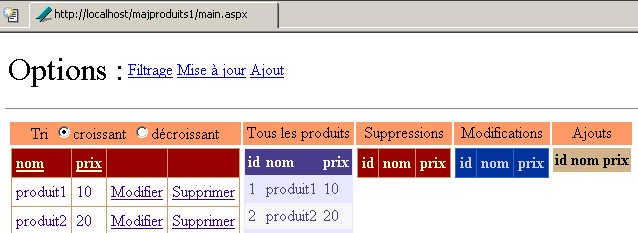
我们对 [Internet Explorer] 客户端(部分视图)也进行同样的操作:
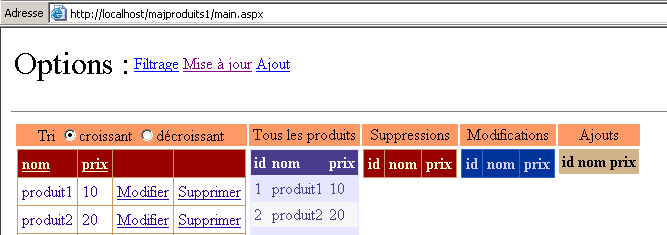
针对客户 [Mozilla],我们删除了产品 [produit2]。随后获得如下新页面:

删除操作已成功完成。被删除的产品已正确显示在已删除产品列表 [DataGrid] 中,并且不再出现在组件 [DataGrid1] 和 [DataGrid2] 的产品列表中,这些组件展示了当前表中存在的产品。 接下来对 [Interbet Explorer] 执行相同操作。删除元素 [produit2]:
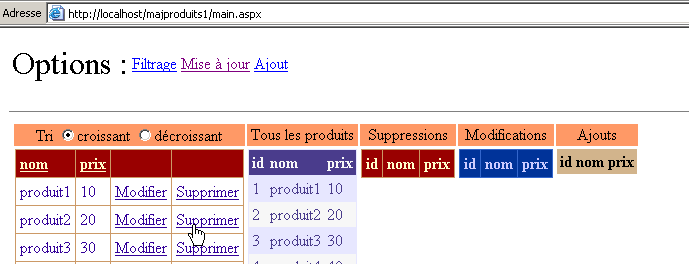
得到的响应如下:
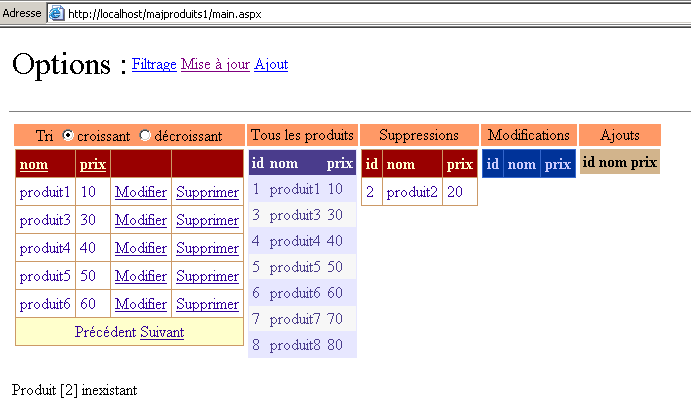
一条错误消息提示用户,键值 [2] 对应的产品不存在。响应向客户端返回了一个新视图,反映了表的当前状态。我们可以看到,键值 [2] 对应的产品确实出现在已删除的产品列表中。 因此,视图 [produits] 反映了所有客户端的更新情况,而非仅某个客户端。
9.6.14. 添加产品
要添加产品,用户需使用选项中的链接 [Ajout]。该链接仅用于显示视图 [Ajout]:
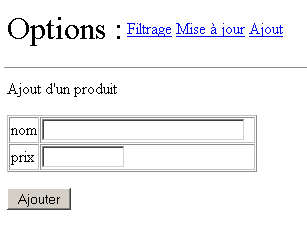
此操作涉及以下两个流程:
    Private Sub lnkAjout_Click(ByVal sender As System.Object, ByVal e As System.EventArgs) Handles lnkAjout.Click
        ' 显示视图 [ajout]
        afficheAjout()
    End Sub

    Private Sub afficheAjout()
        ' 显示添加视图
        vueAjout.Visible = True
        vueFormulaire.Visible = False
        vueProduits.Visible = False
        vueErreurs.Visible = False
    End Sub
请注意,视图 [Ajout] 包含以下验证组件:
姓名 | 类型 | 角色 |
RequiredFieldValidator | 检查 [txtNom] 中是否存在值 | |
RequiredFieldValidator | 检查 [txtPrix] 中是否存在值 | |
CompareValidator | 检查价格是否大于等于0 |
[Ajouter]按钮的点击处理流程如下:
    Private Sub btnAjouter_Click(ByVal sender As System.Object, ByVal e As System.EventArgs) Handles btnAjouter.Click
        ' 在产品表中添加新条目
        ' 首先必须确保数据有效
        rfvNom.Validate()
        rfvPrix.Validate()
        cvPrix.Validate()
        If Not rfvNom.IsValid Or Not rfvPrix.IsValid Or Not cvPrix.IsValid Then
            ' 再次显示输入表单
            afficheAjout()
            Exit Sub
        End If
        ' 创建一行
        Dim produit As DataRow = dtProduits.NewRow
        produit("nom") = txtNom.Text.Trim
        produit("prix") = txtPrix.Text.Trim
        ' 将该行添加到表中
        Application.Lock()
        Try
            dtProduits.Rows.Add(produit)
            lblInfo3.Text = "Ajout réussi"
            ' 清理
            txtNom.Text = ""
            txtPrix.Text = ""
        Catch ex As Exception
            lblInfo3.Text = String.Format("Erreur : {0}", ex.Message)
        End Try
        Application.UnLock()
    End Sub
首先,执行三个组件 [rfvNom, rfvPrix, cvPrix] 的有效性检查。如果其中任何一项检查失败,将重新显示视图 [Ajout],并显示验证组件的错误消息。以下是一个示例:
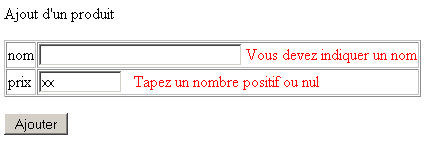
如果数据有效,则准备将该行插入到表 [dtProduits] 中。
         ' 创建一行
        Dim produit As DataRow = dtProduits.NewRow
        produit("nom") = txtNom.Text.Trim
        produit("prix") = txtPrix.Text.Trim
首先,使用方法 [DataTable.NewRow] 在表 [dtProduits] 中创建一条新记录。该记录将包含表 [dtProduits] 中 [id, nom, prix] 的三个列。 [nom, prix]列将填充在添加表单中输入的值。[id]列则不进行填充。 该列的类型为 [AutoIncrement]、c.a.d。SGBD 将作为新产品的键,即现有最大键值加 1。 此处创建的行 [produit] 已从表 [dtProduits] 中分离。现在我们需要将其插入该表。由于我们将更新表 [dtProduits],因此需启用跨客户同步:
完成上述操作后,尝试将该行添加到表 [dtProduits] 中。如果成功,则显示成功消息;否则显示错误消息。
        Try
            dtProduits.Rows.Add(produit)
            lblInfo3.Text = "Ajout réussi"
             ' 清理
            txtNom.Text = ""
            txtPrix.Text = ""
        Catch ex As Exception
            lblInfo3.Text = String.Format("Erreur : {0}", ex.Message)
        End Try
通常情况下不会出现任何异常。但出于谨慎考虑,我们还是设置了异常处理机制。添加完成后,通过 [Application.Unlock] 退出关键部分。
9.6.15. 修改产品
要修改产品,用户需点击产品行中的链接 [Modifier]:
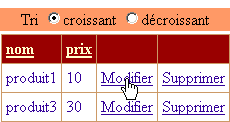
随后进入编辑模式:
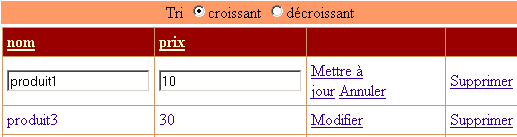
借助组件 [DataGrid],仅需极少的代码即可实现此效果:
    Private Sub DataGrid1_EditCommand(ByVal source As Object, ByVal e As System.Web.UI.WebControls.DataGridCommandEventArgs) Handles DataGrid1.EditCommand
        ' 将当前元素设为编辑模式
        DataGrid1.EditItemIndex = e.Item.ItemIndex
        ' 重新显示产品
        afficheProduits(DataGrid1.CurrentPageIndex, DataGrid1.PageSize)
    End Sub
点击链接 [Modifier] 将触发服务器端执行过程 [DataGrid1_EditCommand]。组件 [DataGrid1] 包含字段 [EditItemIndex]。 索引值为 [EditItemIndex] 的行将进入编辑模式。如上图所示,该行中每个已更新的值均可在输入框中进行修改。 因此,我们获取点击链接 [Modifier] 时对应的产品索引,并将其赋值给组件 [DataGrid1] 的属性 [EditItemIndex]。 最后只需重新显示视图 [produits]。该视图外观与之前相同,但会多出一行处于编辑模式。
正在编辑的产品链接 [Annuler] 允许用户取消更新操作。与该链接关联的流程如下:
    Private Sub DataGrid1_CancelCommand(ByVal source As Object, ByVal e As System.Web.UI.WebControls.DataGridCommandEventArgs) Handles DataGrid1.CancelCommand
        ' 重新显示产品
        afficheProduits(DataGrid1.CurrentPageIndex, DataGrid1.PageSize)
    End Sub
该操作仅重新显示视图 [produits]。 人们可能会想在 [DataGrid1.EditItemIndex] 中输入 -1 来取消更新模式。实际上,我们知道 [Page_Load] 过程会系统地执行此操作。因此无需重复此操作。
通过当前正在编辑的行中的链接 [Mettre à jour] 确认修改。随后将执行以下过程:
    Private Sub DataGrid1_UpdateCommand(ByVal source As Object, ByVal e As System.Web.UI.WebControls.DataGridCommandEventArgs) Handles DataGrid1.UpdateCommand
        ' 待修改产品的键值
        Dim idProduit As Integer = CType(DataGrid1.DataKeys(e.Item.ItemIndex), Integer)
        ' 已修改的项目
        Dim nom As String = CType(e.Item.Cells(0).Controls(0), TextBox).Text.Trim
        Dim prix As String = CType(e.Item.Cells(1).Controls(0), TextBox).Text.Trim
        ' 修改有效吗?
        lblInfo2.Text = ""
        If nom = String.Empty Then lblInfo2.Text += "[Indiquez un nom]"
        If prix = String.Empty Then
            lblInfo2.Text += "[Indiquez un prix]"
        Else
            Dim nouveauPrix As Double
            Try
                nouveauPrix = CType(prix, Double)
                If nouveauPrix < 0 Then Throw New Exception
            Catch ex As Exception
                lblInfo2.Text += "[prix invalide]"
            End Try
        End If
        '  若出现错误,重新显示更新页面
        If lblInfo2.Text <> String.Empty Then
            ' 将该行恢复为更新模式
            DataGrid1.EditItemIndex = e.Item.ItemIndex
            ' 显示产品
            afficheProduits(DataGrid1.CurrentPageIndex, DataGrid1.PageSize)
            ' 结束
            Exit Sub
        End If
        ' 若无错误 - 修改数据表
        Try
            modifierProduit(idProduit, e.Item)
        Catch ex As Exception
            ' 问题
            lblInfo2.Text = ex.Message
        End Try
        ' 显示产品
        afficheProduits(DataGrid1.CurrentPageIndex, DataGrid1.PageSize)
    End Sub
与删除操作类似,我们需要获取待修改产品的密钥,以便在产品表 [dtProduits] 中定位其记录:
         ' 待修改产品的键
        Dim idProduit As Integer = CType(DataGrid1.DataKeys(e.Item.ItemIndex), Integer)
接下来,我们需要获取要分配给该行的新值。这些值位于组件 [DataGrid1] 中。该过程的参数 [e] 正是为此而设。 [e.Item] 代表事件源 [DataGrid1] 中的行。因此,这是当前正在更新的行,因为链接 [Mettre à jour] 仅存在于该行上。 该行包含由该行集合 [Cells] 指定的列。因此,[e.Item.Cells(0)] 代表正在更新的行中的第 0 列。我们知道新值位于输入框中。 集合 [e.Item.Cells(i).Controls] 代表行 [e.Item] 中第 i 列的控件集合。以下两条语句从 [DataGrid1] 中获取更新行中输入框的值:
         ' 已修改的项目
        Dim nom As String = CType(e.Item.Cells(0).Controls(0), TextBox).Text.Trim
        Dim prix As String = CType(e.Item.Cells(1).Controls(0), TextBox).Text.Trim
因此,我们以字符串形式获得了修改后行的新值。接下来,我们将验证这些数据是否有效。名称不能为空,价格必须为正数或零:
         ' 修改有效吗?
        lblInfo2.Text = ""
        If nom = String.Empty Then lblInfo2.Text += "[Indiquez un nom]"
        If prix = String.Empty Then
            lblInfo2.Text += "[Indiquez un prix]"
        Else
            Dim nouveauPrix As Double
            Try
                nouveauPrix = CType(prix, Double)
                If nouveauPrix < 0 Then Throw New Exception
            Catch ex As Exception
                lblInfo2.Text += "[prix invalide]"
            End Try
        End If
如果出现错误,标签 [lblInfo2] 将显示一条错误信息,并仅重新显示同一页面:
          ' 若出现错误,重新显示更新页面
        If lblInfo2.Text <> String.Empty Then
            ' 将该行恢复为更新模式
            DataGrid1.EditItemIndex = e.Item.ItemIndex
            ' 显示产品
            afficheProduits(DataGrid1.CurrentPageIndex, DataGrid1.PageSize)
             ' 结束
            Exit Sub
        End If
上述代码未显示的是,输入的值会被丢失。实际上,[DataGrid1] 与表 [dtProduits] 中的数据相关联,该表包含被修改行原始的值。以下是一个示例。
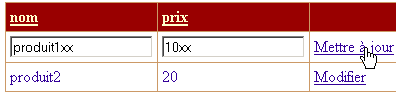
得到的响应如下:
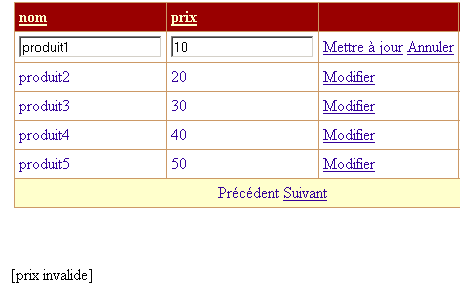
可见,最初输入的值已丢失。在专业应用中,这种情况可能无法接受。 这暴露了组件 [DataGrid] 标准更新模式的某些局限性。最好能有一个类似于视图 [Ajout] 的视图 [Modification]。
如果数据有效,则将其用于更新表 [dtProduits]:
         ' 若无错误 - 修改数据表
        Try
            modifierProduit(idProduit, e.Item)
        Catch ex As Exception
            ' 问题
            lblInfo2.Text = ex.Message
        End Try
        ' 显示产品
        afficheProduits(DataGrid1.CurrentPageIndex, DataGrid1.PageSize)
与删除产品时提到的原因相同,修改操作可能会失败。因为在客户读取表 [dtProduits] 与修改其产品之间,该产品可能已被其他客户删除。 过程 [modifierProduit] 通过抛出异常来处理这种情况。此处对该异常进行了处理。无论更新成功与否,应用程序都会将视图 [produits] 返回给客户端。 接下来我们将了解 [modifierProduit] 过程如何执行更新:
    Private Sub modifierProduit(ByVal idProduit As Integer, ByVal item As DataGridItem)
        Dim erreur As String
        Try
            ' 同步
            Application.Lock()
            ' 查找待修改的行
            Dim ligne As DataRow = dtProduits.Rows.Find(idProduit)
            If ligne Is Nothing Then
                erreur = String.Format("Produit [{0}] inexistant", idProduit)
            Else
                ' 修改该行
                With ligne
                    .Item("nom") = CType(item.Cells(0).Controls(0), TextBox).Text.Trim
                    .Item("prix") = CType(item.Cells(1).Controls(0), TextBox).Text.Trim
                End With
            End If
        Catch ex As Exception
            erreur = String.Format("Erreur lors de la modification : {0}", ex.Message)
        Finally
            ' 同步结束
            Application.UnLock()
        End Try
        ' 若发生错误则抛出异常
        If erreur <> String.Empty Then Throw New Exception(erreur)
    End Sub
我们不会详细说明此流程,其代码与之前已详细讲解过的流程 [supprimerProduit] 类似。我们仅看两个示例。首先,我们修改产品 [produit1] 的价格:

使用上述链接 [Mettre à jour] 会得到以下响应:

该修改确实已反映在组件 [DataGrid] 1 和 2 中,它们展示了表 [dtProduits] 的当前状态。 该修改同样存在于组件 [DataGrid4] 中,该组件是已修改行视图,其中显示了这些行及其原始值。现在我们来看一个访问冲突的案例。与删除示例类似,我们将使用两个不同的 Web 客户端。 一个 [Mozilla] 客户端读取表 [dtProduits],并开始修改产品 [produit1]:
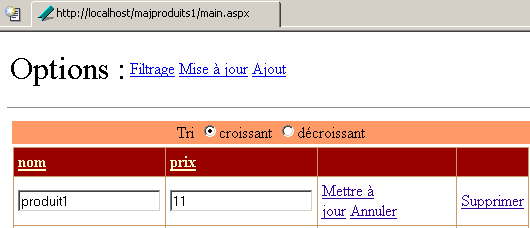
客户 [Internet Explorer] 正准备删除产品 [produit1]:
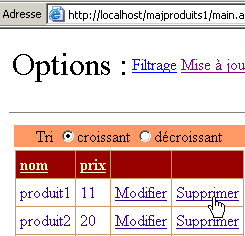
客户 [Internet Explorer] 正在删除 [produit1]:
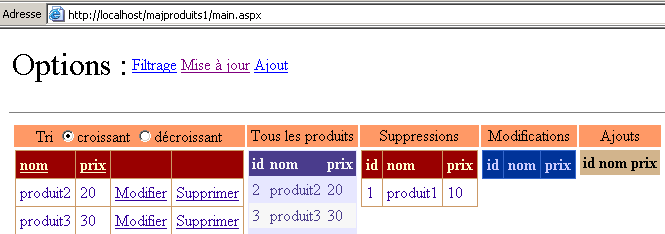
值得注意的是,[produit1] 已不再出现在“已修改行”表中,而是出现在“已删除行”表中。客户端 [Mozilla] 对其更新进行了确认:
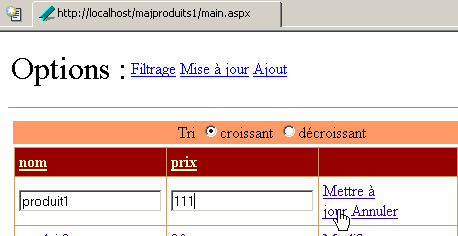
客户端 [Mozilla] 收到对其更新的以下响应:
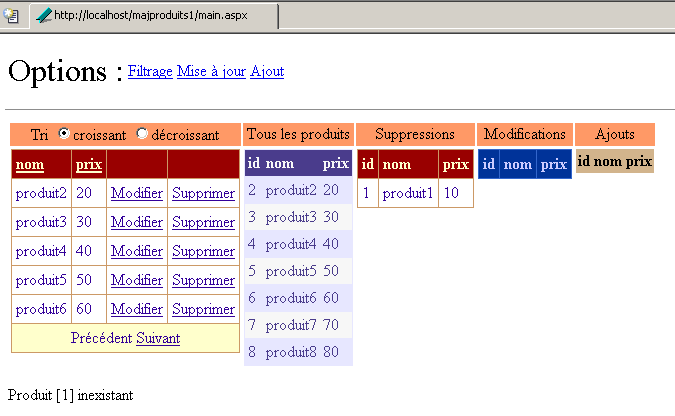
他可以发现 [produit1] 已被删除,因为它出现在已删除产品列表中。
9.7. 产品物理表更新 Web 应用程序
9.7.1. 建议的解决方案
前面的应用更多是一个示例,旨在展示缓存中对象 [DataTable] 的管理,而非实际应用场景。实际上,在某个时刻,必须更新实际的数据源。可以选择两种不同的策略:
- 利用内存中的 [dtProduits] 缓存来更新数据源。 可以在前一个应用程序的Web树结构中设置一个页面,以便访问该应用程序的[dtProduits]缓存。该页面将允许管理员将[dtProduits]缓存中的修改同步到物理数据源。 为此,可在访问类 [produits] 中添加一个新方法,该方法接受缓存 [dtProduits] 作为参数,并利用该缓存更新物理数据源。
- 在更新缓存的同时更新物理数据源。
策略 1 允许仅与物理数据源建立一次连接。策略 2 则需要在每次更新时建立连接。 根据连接的可用性,可以选择其中一种策略。由于我们拥有实现该策略的工具(类 [produits]),因此我们选择策略 2。
9.7.2. 解决方案 1
为保持与前一应用程序的连续性,我们选择以下策略:
- 物理数据源与缓存同时更新
- 缓存仅在应用程序初始化时通过 [global.asax.vb] 构建一次。这意味着,如果物理数据源被 Web 客户端以外的其他客户端更新,Web 客户端将无法看到这些更改。它们只能看到自己对缓存表所做的修改。
为了更新物理数据源,我们需要一个产品访问类的实例。每个客户端可以拥有自己的实例。也可以共享一个由应用程序在启动时创建的唯一实例。这是我们在此选择的解决方案。控制代码 [global.asax.vb] 修改如下:
Imports System
Imports System.Web
...

Public Class Global
    Inherits System.Web.HttpApplication

    Sub Application_Start(ByVal sender As Object, ByVal e As EventArgs)
        ' 获取配置信息
        Dim chaînedeConnexion As String = ConfigurationSettings.AppSettings("OLEDBStringConnection")
        Dim defaultProduitsPage As String = ConfigurationSettings.AppSettings("defaultProduitsPage")
        Dim erreurs As New ArrayList
...
        ' 此处无配置错误
        ' 创建产品对象
        Dim objProduits As New produits(chaînedeConnexion)
        Dim dtProduits As DataTable
        Try
            dtProduits = objProduits.getProduits
        Catch ex As ExceptionProduits
            '访问产品时发生错误,在应用程序中记录该错误
            Application("erreurs") = ex.erreurs
            Exit Sub
        Catch ex As Exception
            ' 未处理的错误
            erreurs.Add(ex.Message)
            Application("erreurs") = erreurs
            ' 退出子程序
        End Try
        ' 此处无初始化错误
...
        ' 保存数据访问实例
        Application("objProduits") = objProduits
    End Sub

    Sub Session_Start(ByVal sender As Object, ByVal e As EventArgs)
...
    End Sub
End Class
应用程序中已存储了一个数据访问类的实例,其关联键为 [objProduits]。每个客户端将使用该实例访问物理数据源。该实例将在 [main.aspx.vb] 的 [Page_Load] 过程 中被检索:
    Protected objProduits As produits
....
    Private Sub Page_Load(ByVal sender As System.Object, ByVal e As System.EventArgs) Handles MyBase.Load
...
        ' 获取产品访问实例
        objProduits = CType(Application("objProduits"), produits)
...
    End Sub
数据访问实例 [objProduits] 可供页面上的所有方法使用。它将用于三项更新操作:添加、删除和修改。
添加过程修改如下:
    Private Sub btnAjouter_Click(ByVal sender As System.Object, ByVal e As System.EventArgs) Handles btnAjouter.Click
...
        ' 添加该行
        Application.Lock()
        Try
            ' 将该行添加到缓存表中
            dtProduits.Rows.Add(produit)
             ' 将该行添加到物理源
            Dim nouveauProduit As sProduit
            With nouveauProduit
                .nom = CType(produit("nom"), String)
                .prix = CType(produit("prix"), Double)
            End With
            objProduits.ajouterProduit(nouveauProduit)
            ' 跟踪
            lblInfo3.Text = "Ajout réussi"
            ' 清理
            txtNom.Text = ""
            txtPrix.Text = ""
        Catch ex As Exception
            ' 错误
            lblInfo3.Text = String.Format("Erreur : {0}", ex.Message)
        End Try
        Application.UnLock()
    End Sub
修改程序如下:
    Private Sub modifierProduit(ByVal idProduit As Integer, ByVal item As DataGridItem)
        Dim erreur As String
        Try
            ' 同步
            Application.Lock()
            ' 查找待修改的行
            Dim ligne As DataRow = dtProduits.Rows.Find(idProduit)
            If ligne Is Nothing Then
                erreur = String.Format("Produit [{0}] inexistant", idProduit)
            Else
                ' 在缓存中修改该行
                With ligne
                    .Item("nom") = CType(item.Cells(0).Controls(0), TextBox).Text.Trim
                    .Item("prix") = CType(item.Cells(1).Controls(0), TextBox).Text.Trim
                End With
                 ' 在物理源中修改该行
                Dim nouveauProduit As sProduit
                With nouveauProduit
                    .id = idProduit
                    .nom = CType(ligne.Item("nom"), String)
                    .prix = CType(ligne.Item("prix"), Double)
                End With
                objProduits.modifierProduit(nouveauProduit)
            End If
        Catch ex As Exception
            erreur = String.Format("Erreur lors de la modification : {0}", ex.Message)
        Finally
            ' 同步结束
            Application.UnLock()
        End Try
        ' 若发生错误则抛出异常
        If erreur <> String.Empty Then Throw New Exception(erreur)
    End Sub
删除程序修改如下:
    Private Sub supprimerProduit(ByVal idProduit As Integer)
        Dim erreur As String
        Try
            ' 同步
            Application.Lock()
            ' 查找待删除的行
            Dim ligne As DataRow = dtProduits.Rows.Find(idProduit)
            If ligne Is Nothing Then
                erreur = String.Format("Produit [{0}] inexistant", idProduit)
            Else
                ' 在缓存中删除该行
                ligne.Delete()
                 ' 在物理源中删除行
                objProduits.supprimerProduit(idProduit)
            End If
        Catch ex As Exception
            erreur = String.Format("Erreur de suppression : {0}", ex.Message)
        Finally
            ' 同步结束
            Application.UnLock()
        End Try
        ' 若发生错误则抛出异常
        If erreur <> String.Empty Then Throw New Exception(erreur)
    End Sub
9.7.3. 测试
我们从文件 ACCESS 中的以下数据表开始:
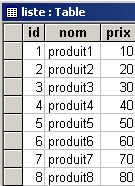
启动一个 Web 客户端:
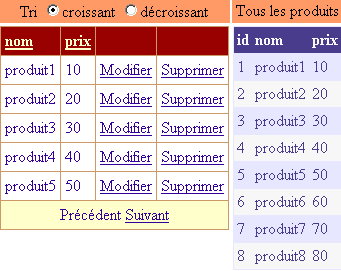
我们添加一个产品:
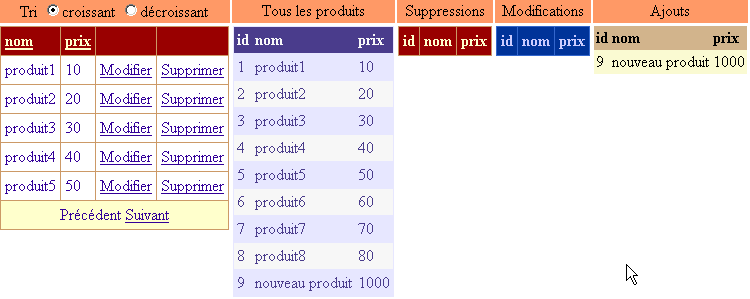
我们删除 [produit1]:
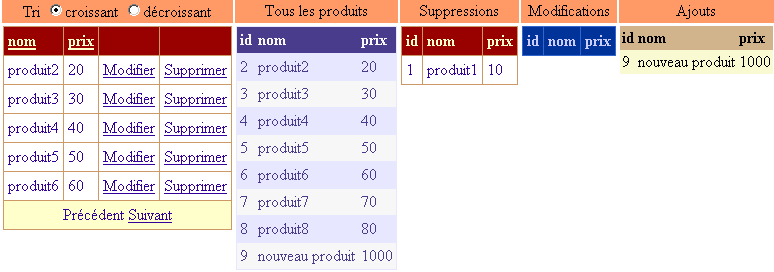
我们修改了 [produit2] 的价格:
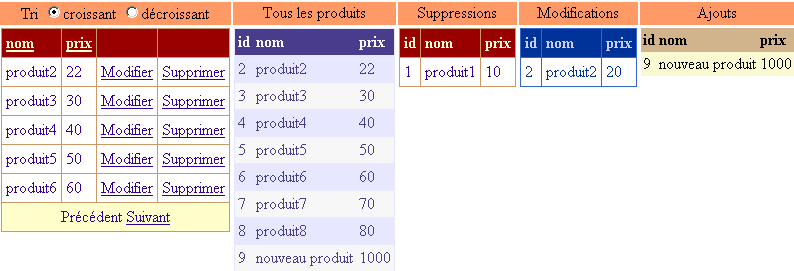
完成这些修改后,我们查看数据库 ACCESS 中表 [liste] 的内容:
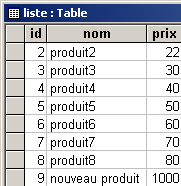
这三项修改已正确反映在物理表中。现在我们来看一个冲突的情况。我们在 ACCESS 的正下方删除 [produit2] 这一行:
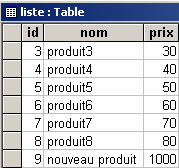
我们回到我们的Web客户端。该客户端没有看到已执行的删除操作,因此也想删除[produit2]:
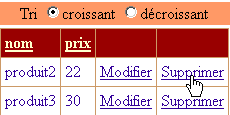
他收到了以下响应:
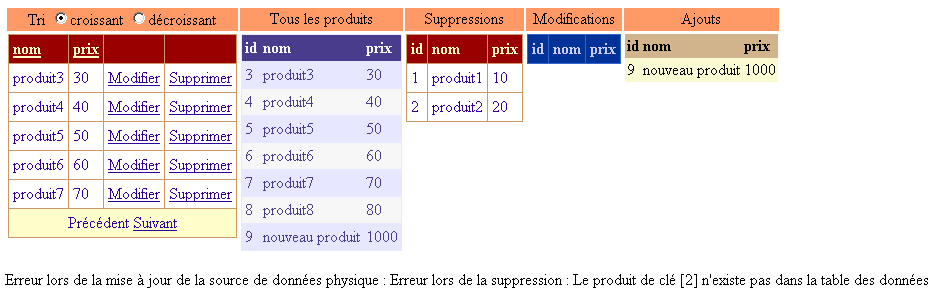
如已删除产品列表所示,[produit2] 确实已从缓存中移除。但如错误信息所示,在物理源中删除 [produit2] 的操作失败了。
9.7.4. 解决方案 2
在前一种方案中,Web客户端会同时更新物理数据源,但无法看到其他客户端所做的修改。它们只能看到自己的修改。现在,我们希望客户端能够看到物理数据源的当前状态,而不是应用程序启动时的状态。为此,我们将为客户提供一个新选项:

通过 [Rafraîchir] 选项,客户端可强制重新读取物理数据源。为避免影响其他客户端,此次读取生成的表必须归属于执行刷新操作的客户端,且不与其他客户端共享。这是与先前应用程序的首要区别。 数据源的缓存 [dtProduits] 将由每个客户端构建,而非由应用程序本身构建。修改内容见 [global.asax.vb]:
Imports System
Imports System.Web
Imports System.Web.SessionState
Imports st.istia.univangers.fr
Imports System.Configuration
Imports System.Data
Imports Microsoft.VisualBasic
Imports System.Collections

Public Class Global
    Inherits System.Web.HttpApplication

    Sub Application_Start(ByVal sender As Object, ByVal e As EventArgs)
        ' 获取配置信息
...
        ' 此处无配置错误
        ' 创建产品对象
        Dim objProduits As New produits(chaînedeConnexion)
        ' 存储每页产品数量
        Application("defaultProduitsPage") = defaultProduitsPage
        ' 保存数据访问实例
        Application("objProduits") = objProduits
    End Sub

    Sub Session_Start(ByVal sender As Object, ByVal e As EventArgs)
        ' 初始化会话变量
        If IsNothing(Application("erreurs")) Then
            ' 将数据源缓存
            Dim dtProduits As DataTable
            Try
                Application.Lock()
                dtProduits = CType(Application("objProduits"), produits).getProduits
            Catch ex As ExceptionProduits
                '访问产品时发生错误,将其记录在会话中
                Session("erreurs") = ex.erreurs
                Exit Sub
            Finally
                Application.UnLock()
            End Try
            ' 将缓存 [dtProduits] 存入会话
            Session("dtProduits") = dtProduits
            ' 查看产品列表
            Session("dvProduits") = dtProduits.DefaultView
            ' 每页显示的产品数量
            Session("nbProduitsPage") = Application("defaultProduitsPage")
            ' 当前显示的页面
            Session("pageCourante") = 0
        End If
    End Sub

End Class
会话中的信息会在每次请求时通过过程 [Page_Load] 进行检索:
     ' 页面数据
    Protected dtProduits As DataTable
    Protected dvProduits As DataView
    Protected objProduits As produits
    Protected nbProduitsPage As Integer
    Protected pageCourante As Integer

    Private Sub Page_Load(ByVal sender As System.Object, ByVal e As System.EventArgs) Handles MyBase.Load
        ' 检查应用程序是否出错
        If Not IsNothing(Application("erreurs")) Then
            ' 应用程序未正确初始化
            afficheErreurs(CType(Application("erreurs"), ArrayList))
            Exit Sub
        End If
        ' 检查会话是否出错
        If Not IsNothing(Session("erreurs")) Then
            ' 会话初始化失败
            afficheErreurs(CType(Session("erreurs"), ArrayList))
            Exit Sub
        End If
        ' 从产品表中获取引用
        dtProduits = CType(Session("dtProduits"), DataTable)
        ' 获取产品视图
        dvProduits = CType(Session("dvProduits"), DataView)
        ' 获取每页显示的产品数量
        nbProduitsPage = CType(Session("nbProduitsPage"), Integer)
        ' 获取当前页面
        pageCourante = CType(Session("pageCourante"), Integer)
        ' 获取产品访问实例
        objProduits = CType(Application("objProduits"), produits)
        ' 取消任何正在进行的更新
        DataGrid1.EditItemIndex = -1
        '首次请求
        If Not IsPostBack Then
            ' 显示初始表单
            txtPages.Text = nbProduitsPage.ToString
            afficheFormulaire()
        End If
    End Sub
在会话中检索到的信息将在每次请求结束时保存在该会话结束时:
    Private Sub Page_PreRender(ByVal sender As Object, ByVal e As System.EventArgs) Handles MyBase.PreRender
        ' 将某些信息存储在会话中
        Session("dtProduits") = dtProduits
        Session("dvProduits") = dvProduits
        Session("nbProduitsPage") = nbProduitsPage
        Session("pageCourante") = pageCourante
    End Sub
事件 [PreRender] 表示响应即将发送给客户端。 我们借此机会将所有需要保留的数据保存到会话中。这有些过度,因为很多时候只有其中部分数据的值发生了变化。这种系统性的保存方式的好处是,它减轻了我们在页面其他方法中管理会话的负担。
缓存刷新操作由以下过程负责:
    Private Sub lnkRefresh_Click(ByVal sender As System.Object, ByVal e As System.EventArgs) Handles lnkRefresh.Click
        ' 需使用物理数据源刷新缓存 [dtProduits]
        ' 开始同步
        Application.Lock()
        Try
            ' 产品表
            dtProduits = CType(Application("objProduits"), produits).getProduits
            ' 保存当前筛选条件
            Dim filtre As String = dvProduits.RowFilter
            ' 创建新的过滤视图
            dvProduits = New DataView(dtProduits)
            ' 恢复过滤器
            dvProduits.RowFilter = filtre
        Catch ex As ExceptionProduits
            '访问产品时发生错误,将其记录在会话中
            Session("erreurs") = ex.erreurs
            ' 显示视图[erreurs]
            afficheErreurs(ex.erreurs)
            ' 完成
            Exit Sub
        Finally
            ' 同步完成
            Application.UnLock()
        End Try
        ' 操作成功 - 从首页开始显示产品
        afficheProduits(0, nbProduitsPage)
    End Sub
该过程为缓存 [dtProduits] 和视图 [dvProduits] 生成新的值。这些值将由上文所述的 [Page_PreRender] 过程放入会话中。 重建缓存 [dtProduits] 后,将从首页开始显示产品。
以下是一个执行示例。启动 [mozilla] 客户端并显示产品:
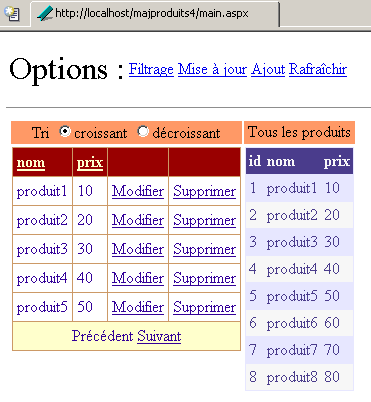
[Internet Explorer] 客户端同样执行此操作:
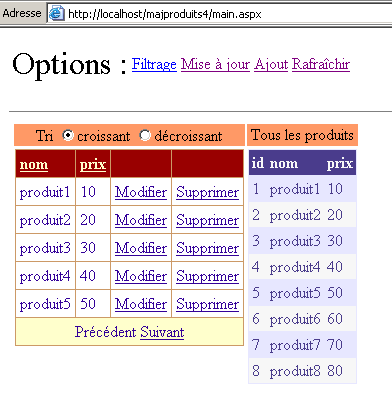
客户端 [Mozilla] 删除了 [produit1],修改了 [produit2],并添加了一个新产品。它得到了以下新页面:
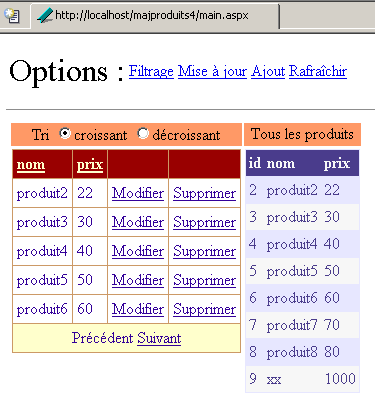
客户 [Internet Explorer] 希望删除 [produit1]。
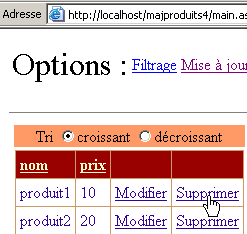
他收到以下响应:
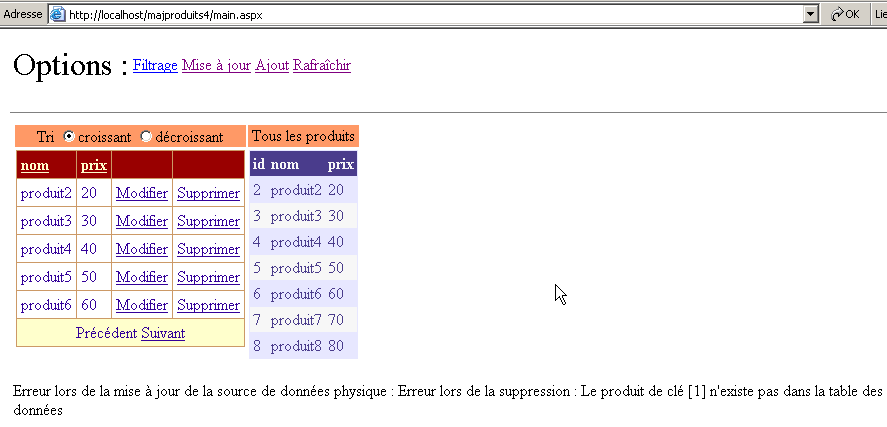
系统提示 [produit1] 已不存在。用户随后决定使用上述链接 [Rafraîchir] 刷新缓存。他收到以下响应:
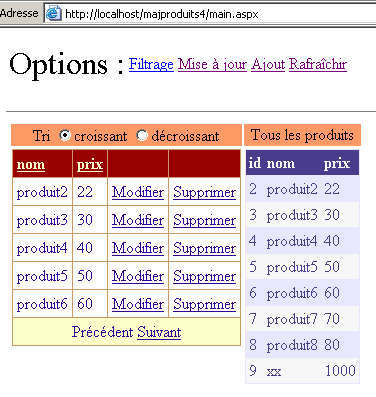
现在,他拥有与客户端 [Mozilla] 相同的数据源。
9.8. Conclusion
在本章中,我们花了不少时间探讨数据容器及其与数据源的关联。最后,我们演示了如何使用 [DataGrid] 组件更新数据源。 我们选用了一个数据库表作为数据源。尽管 [DataGrid] 组件在数据呈现方面提供了一定便利,但真正的难点并不在于展示环节,而在于管理不同客户端对数据源所做的更新。 可能会出现访问冲突,必须加以处理。在此,我们通过在控制器中使用 [Application.Lock] 来处理这些冲突。更明智的做法可能是将数据源的访问同步到数据访问类中,这样控制器就无需处理这些不属于其职责范围的细节。
实际上,数据库中的表之间通过关系相互关联,对其进行更新时必须考虑这些关系。这首先会影响数据访问类,使其比处理独立表所需的类更为复杂。此外,这通常也会影响Web应用程序的展示层,因为通常需要显示的并非单一表,而是通过关系相互关联的表。
此外,本章还介绍了各种数据结构,例如 [DataTable, DataView]。