6. 示例
本章将通过一系列示例来阐释前文所述内容。
6.1. 示例 1
6.1.1. 问题
该应用程序应允许用户计算其应缴税款。我们以一个仅需申报工资收入的纳税人为例(2004年数据,对应2003年收入):
- 计算该雇员的税额份额 nbParts=nbEnfants/2 +1(若未婚), 已婚者为 nbEnfants/2+2,其中 nbEnfants 代表其子女数量。
- 若其子女数≥3,则额外增加半份
- 计算其应税收入 R=0.72*S,其中 S 为其年薪
- 计算其家庭系数 QF=R/nbParts
- 计算其应缴税额 I。请看下表:
4262 | 0 | 0 |
8382 | 0.0683 | 291.09 |
14753 | 0.1914 | 1322.92 |
23888 | 0.2826 | 2668.39 |
38868 | 0.3738 | 4846.98 |
47932 | 0.4262 | 6883.66 |
0 | 0.4809 | 9505.54 |
每行有 3 个字段。要计算税款 I,需查找满足 QF<=字段1 的第一行。例如,若 QF=5000,则会找到该行
此时税额 I 等于 0.0683*R - 291.09*nbParts。 如果 QF 使得关系 QF<=field1 从未成立,则使用最后一行中的系数。此处为:
由此得出的税额 I=0.4809*R - 9505.54*nbParts。
6.1.2. 应用程序的结构 MVC
应用程序的结构 MVC 将如下所示:
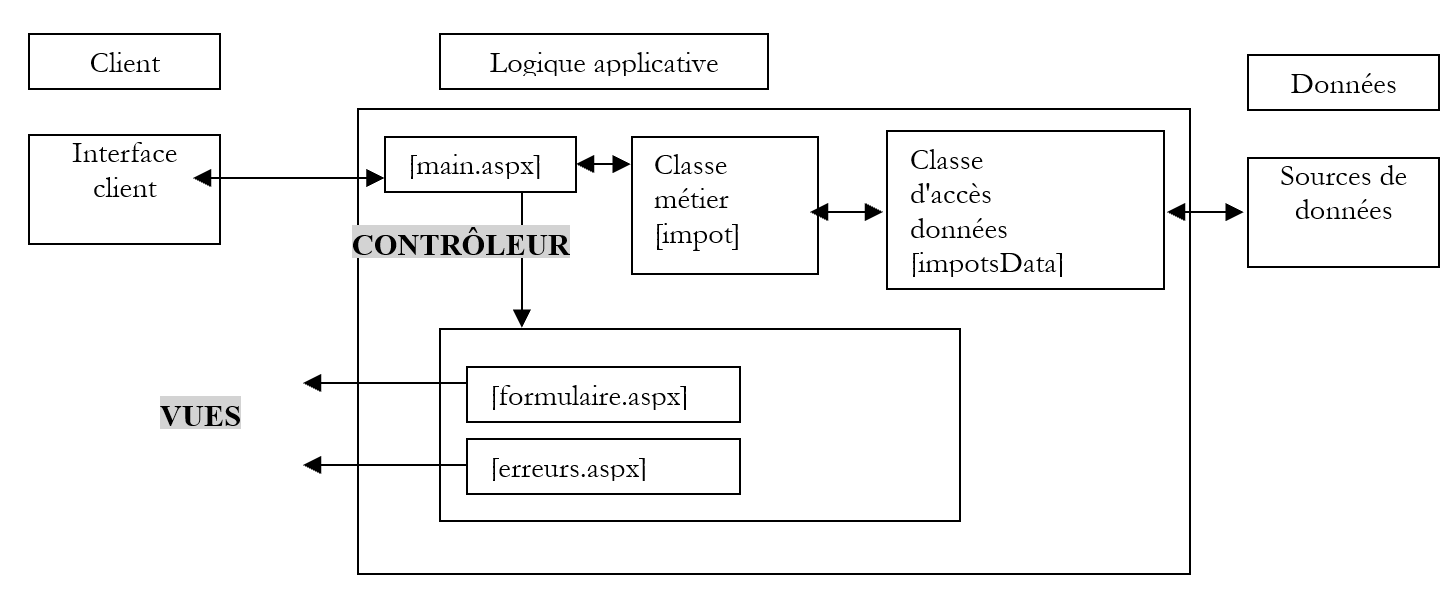
控制器将由页面 [main.aspx] 承担。可能有三种操作:
- init:对应客户端的首次请求。控制器将显示视图 [formulaire.aspx]
- calcul:对应税款计算请求。若表单数据正确,则通过业务类 [impots] 计算税款。 控制器将已通过验证的视图 [formulaire.aspx] 返回给客户端,并附上计算出的税额。如果输入表单的数据有误,控制器将返回视图 [erreurs.aspx],其中包含错误列表以及返回表单的链接。
- 返回:指发生错误后返回表单。控制器将显示错误发生前已通过验证的视图 [formulaire.aspx]。
控制器 [main.aspx] 不涉及任何税款计算。它仅负责管理客户端与服务端之间的交互,并执行客户端请求的操作。 对于操作 [calcul],它将依赖业务类 [impot]。
6.1.3. 业务类
税类将定义如下:
' 导入的命名空间
Imports System

' 类
Namespace st.istia.univangers.fr
    Public Class impot
        Private limites(), coeffR(), coeffN() As Decimal

        ' 构造函数
        Public Sub New(ByRef source As impotsData)
            ' 计算税款所需的数据
             ' 来自外部源 [source]
             ' 从外部获取——可能会有例外
            Dim data() As Object = source.getData
            limites = CType(data(0), Decimal())
            coeffR = CType(data(1), Decimal())
            coeffN = CType(data(2), Decimal())
        End Sub

         ' 计算税款
        Public Function calculer(ByVal marié As Boolean, ByVal nbEnfants As Integer, ByVal salaire As Long) As Long
             ' 份额数量计算
            Dim nbParts As Decimal
            If marié Then
                nbParts = CDec(nbEnfants) / 2 + 2
            Else
                nbParts = CDec(nbEnfants) / 2 + 1
            End If
            If nbEnfants >= 3 Then
                nbParts += 0.5D
            End If
             ' 应税收入及家庭商数计算
            Dim revenu As Decimal = 0.72D * salaire
            Dim QF As Decimal = revenu / nbParts
             ' 计算税额
            limites((limites.Length - 1)) = QF + 1
            Dim i As Integer = 0
            While QF > limites(i)
                i += 1
            End While
            Return CLng(revenu * coeffR(i) - nbParts * coeffN(i))
        End Function
    End Class
End Namespace
通过向其构造函数提供类型为 [impotsData] 的数据源来创建一个税款对象。该类有一个公共方法 [getData],用于获取计算税款所需的三个数据表(即前文所述的数据表)。 如果无法获取数据或数据不正确,该方法可处理异常。创建 [impot] 对象后,可以反复调用其 **calculer** 方法,该方法根据纳税人的婚姻状况(已婚或未婚)、子女数量和年薪来计算其应缴税额。
6.1.4. 数据访问类
类 [impotsData] 是用于访问数据的类。这是一个抽象类。对于每种可能的新数据源(表、平面文件、数据库、控制台等),都必须创建一个派生类。其定义如下:
Imports System.Collections

Namespace st.istia.univangers.fr
    Public MustInherit Class impotsData
        Protected limites() As Decimal
        Protected coeffr() As Decimal
        Protected coeffn() As Decimal
        Protected checked As Boolean
        Protected valide As Boolean

        ' 数据访问方法
        Public MustOverride Function getData() As Object()

        ' 数据验证方法
        Protected Function checkData() As Integer
            ' 验证获取的数据
            ' 必须有数据
            valide = Not limites Is Nothing AndAlso Not coeffr Is Nothing AndAlso Not coeffn Is Nothing
            If Not valide Then Return 1
            ' 必须有3个大小相同的数组
            If valide Then valide = limites.Length = coeffr.Length AndAlso limites.Length = coeffn.Length
            If Not valide Then Return 2
            ' 数组必须不为空
            valide = limites.Length <> 0
            If Not valide Then Return 3
            ' 每个数组必须包含 >=0 的元素,且按升序排列
            valide = check(limites, limites.Length - 1) AndAlso check(coeffr, coeffr.Length) AndAlso check(coeffn, coeffn.Length)
            If Not valide Then Return 4
            ' 一切正常
            Return 0
        End Function

        ' 验证数组内容的有效性
        Protected Function check(ByRef tableau() As Decimal, ByVal n As Integer) As Boolean
            ' 数组的前 n 个元素必须 >=0 且严格按升序排列
            If tableau(0) < 0 Then Return False
            For i As Integer = 1 To n - 1
                If tableau(i) <= tableau(i - 1) Then Return False
            Next
            ' 正确
            Return True
        End Function
    End Class
End Namespace
该类具有以下受保护的属性:
税率区间限额表 | |
应税收入适用系数表 | |
适用于份额数量的系数表 | |
布尔值,用于指示数据(限值、系数、份额系数)是否已通过验证 | |
布尔值,表示数据(限值、coeffr、coeffn)是否有效 |
该类没有构造函数。它有一个抽象方法 [getData],派生类必须实现该方法。该方法的作用是:
- 为三个数组 limits、coeffr、coeffn 赋值
- 若无法获取数据或数据被判定为无效,则抛出异常。
该类提供了受保护的方法 [checkData] 和 [check],用于验证属性(limites、coeffr、coeffn)的有效性。这使得派生类无需实现这些方法,只需直接调用即可。
我们将使用的第一个派生类如下:
Imports System.Collections
Imports System

Namespace st.istia.univangers.fr
    Public Class impotsArray
        Inherits impotsData

        ' 无参构造函数
        Public Sub New()
            ' 使用常量初始化数组
            limites = New Decimal() {4262D, 8382D, 14753D, 23888D, 38868D, 47932D, 0D}
            coeffr = New Decimal() {0D, 0.0683D, 0.1914D, 0.2826D, 0.3738D, 0.4262D, 0.4809D}
            coeffn = New Decimal() {0D, 291.09D, 1322.92D, 2668.39D, 4846.98D, 6883.66D, 9505.54D}
            checked = True
            valide = True
        End Sub

        ' 带三个数组作为输入的构造函数
        Public Sub New(ByRef limites() As Decimal, ByRef coeffr() As Decimal, ByRef coeffn() As Decimal)
            ' 存储数据
            Me.limites = limites
            Me.coeffr = coeffr
            Me.coeffn = coeffn
            checked = False
        End Sub

        Public Overrides Function getData() As Object()
            ' 如有必要,验证数据
            Dim erreur As Integer
            If Not checked Then erreur = checkData() : checked = True
            ' 若无效,则抛出异常
            If Not valide Then Throw New Exception("Les données des tranches d'impôts sont invalides (" + erreur.ToString + ")")
            ' 否则返回三个数组
            Return New Object() {limites, coeffr, coeffn}
        End Function
    End Class
End Namespace
名为 [impotsArray] 的类有两个构造函数:
- 一个无参构造函数,它使用“硬编码”的数组初始化基类的属性(limites、coeffr、coeffn)
- 一个构造函数,它使用作为参数传递的数组来初始化基类的属性(limites、coeffr、coeffn)
方法 [getData] 允许外部类获取数组(limites、coeffr、coeffn),该方法仅通过基类的 [checkData] 方法验证这三个数组的有效性。若数据无效,则抛出异常。
6.1.5. 业务类和数据访问类的测试
在 Web 应用程序中,务必仅包含经过验证的业务类和数据访问类。这样,Web 应用程序的调试阶段就可以专注于控制器和视图部分。测试程序可以如下所示:
' 选项
Option Strict On
Option Explicit On

' 命名空间
Imports System
Imports Microsoft.VisualBasic

Namespace st.istia.univangers.fr
    Module test
        Sub Main()
             ' 交互式税款计算程序
             ' 用户通过键盘输入三项数据:已婚 nbEnfants 工资
             ' 程序随后显示应缴税额
            Const syntaxe As String = "syntaxe : marié nbEnfants salaire" + ControlChars.Lf + "marié : o pour marié, n pour non marié" + ControlChars.Lf + "nbEnfants : nombre d'enfants" + ControlChars.Lf + "salaire : salaire annuel en F"

             ' 创建一个税款对象
            Dim objImpôt As impot = Nothing
            Try
                objImpôt = New impot(New impotsArray)
            Catch ex As Exception
                Console.Error.WriteLine(("L'erreur suivante s'est produite : " + ex.Message))
                Environment.Exit(1)
            End Try
            ' 无限循环
            Dim marié As String
            Dim nbEnfants As Integer
            Dim salaire As Long
            While True
                ' 请求税款计算参数
                Console.Out.Write("Paramètres du calcul de l'impôt au format marié nbEnfants salaire ou rien pour arrêter :")
                Dim paramètres As String = Console.In.ReadLine().Trim()
                ' 需要做什么?
                If paramètres Is Nothing OrElse paramètres = "" Then
                    Exit While
                End If
                ' 验证输入行中的参数数量
                Dim erreur As Boolean = False
                Dim args As String() = paramètres.Split(Nothing)
                Dim nbParamètres As Integer = args.Length
                If nbParamètres <> 3 Then
                    Console.Error.WriteLine(syntaxe)
                    erreur = True
                End If
                ' 参数有效性验证
                If Not erreur Then
                    ' 已婚
                    marié = args(0).ToLower()
                    If marié <> "o" And marié <> "n" Then
                        erreur = True
                    End If
                    ' nbEnfants
                    Try
                        nbEnfants = Integer.Parse(args(1))
                        If nbEnfants < 0 Then
                            Throw New Exception
                        End If
                    Catch
                        erreur = True
                    End Try
                    ' 工资
                    Try
                        salaire = Integer.Parse(args(2))
                        If salaire < 0 Then
                            Throw New Exception
                        End If
                    Catch
                        erreur = True
                    End Try
                End If
                 ' 如果参数正确,则计算税款
                If Not erreur Then
                    Console.Out.WriteLine(("impôt=" & objImpôt.calculer(marié = "o", nbEnfants, salaire) & " euro(s)"))
                Else
                    Console.Error.WriteLine(syntaxe)
                End If
            End While
        End Sub
    End Module
End Namespace
该应用程序要求用户通过键盘输入计算其税款所需的三个信息:
- 婚姻状况:o 代表已婚,n 代表未婚
- 子女数量
- 年薪
税额计算通过在应用程序启动时创建的 [impot] 类型对象完成:
             ' 创建税项对象
            Dim objImpôt As impot = Nothing
            Try
                objImpôt = New impot(New impotsArray)
            Catch ex As Exception
                Console.Error.WriteLine(("L'erreur suivante s'est produite : " + ex.Message))
                Environment.Exit(1)
            End Try
作为数据源,我们使用类型为 [impotsArray] 的对象。这里使用的是该类的无参构造函数,它会提供三个数组(limites、coeffr、coeffn),其中包含“硬编码”的值。 理论上,创建 [impot] 对象可能会引发异常,因为在创建过程中,该对象会向作为参数传递的数据源请求数据(limites、coeffr、coeffn),而此数据获取过程可能抛出异常。 实际上,此处的获取数据方法(硬编码)不会引发异常。但我们保留了异常处理逻辑,旨在提醒读者注意 [impot] 对象可能构建失败这一可能性。
以下是上述程序的运行示例:
dos>dir
05/04/2004  13:28                1 337 impots.vb
21/04/2004  08:23                1 311 impotsArray.vb
21/04/2004  08:26                1 634 impotsData.vb
21/04/2004  08:42                2 490 testimpots1.vb
我们将所有 [impot, impotsData, impotsArray] 类编译到 [impot.dll] 程序集:
dos>vbc /t:library /out:impot.dll impotsData.vb impotsArray.vb impots.vb
Compilateur Microsoft (R) Visual Basic .NET version 7.10.3052.4
dos>dir
05/04/2004  13:28                1 337 impots.vb
21/04/2004  08:23                1 311 impotsArray.vb
21/04/2004  08:26                1 634 impotsData.vb
21/04/2004  08:42                2 490 testimpots1.vb
21/04/2004  09:21                5 632 impot.dll
我们编译测试程序:
dos>dir
05/04/2004  13:28                1 337 impots.vb
21/04/2004  08:23                1 311 impotsArray.vb
21/04/2004  08:26                1 634 impotsData.vb
21/04/2004  08:42                2 490 testimpots1.vb
21/04/2004  09:21                5 632 impot.dll
21/04/2004  09:23                4 608 testimpots1.exe
我们可以进行测试:
dos>testimpots1
Paramètres du calcul de l'impôt au format marié nbEnfants salaire ou rien pour arrêter :o 2 60000
impôt=4300 euro(s)
Paramètres du calcul de l'impôt au format marié nbEnfants salaire ou rien pour arrêter :n 2 60000
impôt=6872 euro(s)
Paramètres du calcul de l'impôt au format marié nbEnfants salaire ou rien pour arrêter :
6.1.6. Web 应用程序的视图
该应用程序将包含两个视图:[formulaire.aspx] 和 [erreurs.aspx]。我们将通过屏幕截图来演示该应用程序的工作原理。 当首次请求 URL [main.aspx] 时,将显示视图 [formulaire.aspx]:
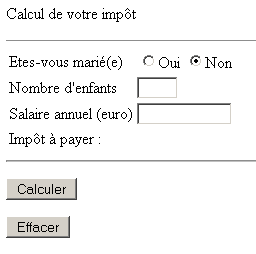
用户填写表单:
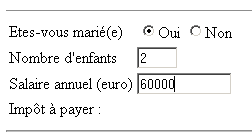
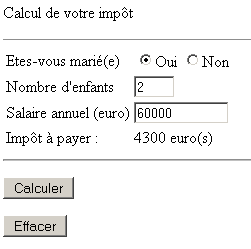
并点击按钮 [Calculer] 获取以下响应:
用户可能在输入数据时出错:
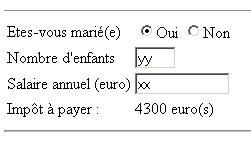
此时使用按钮 [Calculer] 则会得到另一个响应 [erreurs.aspx]:
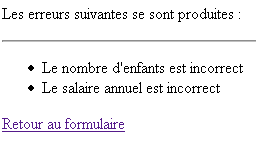
他可以使用上面的链接 [Retour au formulaire] 来恢复错误发生前已确认的视图 [formulaire.aspx]:
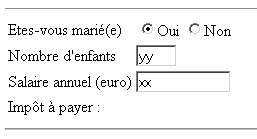
6.1.7. 视图 [formulaire.aspx]
页面 [formulaire.aspx] 将如下所示:
<%@ page src="formulaire.aspx.vb" inherits="formulaire" AutoEventWireup="false"%>
<html>
    <head>
        <title>Impôt</title>
    </head>
    <body>
        <P>Calcul de votre impôt</P>
        <HR>
        <form method="post" action="main.aspx?action=calcul">
            <TABLE border="0">
                <TR>
                    <TD>Etes-vous marié(e)</TD>
                    <TD>
                        <INPUT type="radio" value="oui" name="rdMarie" <%=rdouichecked%>>Oui
                      <INPUT type="radio"  value="non" name="rdMarie" <%=rdnonchecked%>>Non
                     </TD>
                </TR>
                <TR>
                    <TD>Nombre d'enfants</TD>
                    <TD><INPUT type="text" size="3" maxLength="3" name="txtEnfants" value="<%=txtEnfants%>"></TD>
                </TR>
                <TR>
                    <TD>Salaire annuel (euro)</TD>
                    <TD><INPUT type="text" maxLength="12" size="12" name="txtSalaire" value="<%=txtSalaire%>"></TD>
                </TR>
                <TR>
                    <TD>Impôt à payer :
                    </TD>
                    <TD><%=txtImpot%></TD>
                </TR>
            </TABLE>
            <hr>
            <P>
                <INPUT type="submit" value="Calculer">
            </P>
        </form>
        <form method="post" action="main.aspx?action=effacer">
                <INPUT type="submit" value="Effacer">
        </form>
    </body>
</html>
本页的动态字段如下:
如果需要勾选复选框 [oui],则为“checked”,否则为“” | |
[non]复选框同上 | |
[txtEnfants] 输入字段中的值 | |
输入到输入字段中的值 [txtSalaire] | |
要放入输入字段的值 [txtImpot] |
该页面有两个表单,每个表单都有一个按钮 [submit]。按钮 [Calculer] 是下一个表单中的按钮 [submit]:
        <form method="post" action="main.aspx?action=calcul">
...
            <P>
                <INPUT type="submit" value="Calculer">
            </P>
        </form>
可以看出,表单参数将通过 [action=calcul] 提交至控制器。按钮 [Effacer] 即为以下表单中的 [submit] 按钮:
        <form method="post" action="main.aspx?action=effacer">
                <INPUT type="submit" value="Effacer">
        </form>
可以看出,表单的参数将通过 [action=effacer] 提交给控制器。在此,表单没有参数。只有操作(action)才重要。
[formulaire.aspx] 的字段由 [formulaire.aspx.vb] 计算得出:
Imports System.Collections.Specialized

Public Class formulaire
    Inherits System.Web.UI.Page

    ' 页面字段
    Protected rdouichecked As String
    Protected rdnonchecked As String
    Protected txtEnfants As String
    Protected txtSalaire As String
    Protected txtImpot As String

    Private Sub Page_Load(ByVal sender As System.Object, ByVal e As System.EventArgs) Handles MyBase.Load
        ' 从上下文中获取上一个请求
        Dim form As NameValueCollection = Context.Items("formulaire")
        ' 准备要显示的页面
        ' 单选按钮
        rdouichecked = ""
        rdnonchecked = "checked"
        If form("rdMarie").ToString = "oui" Then
            rdouichecked = "checked"
            rdnonchecked = ""
        End If
        ' 其余部分
        txtEnfants = CType(form("txtEnfants"), String)
        txtSalaire = CType(form("txtSalaire"), String)
        txtImpot = CType(Context.Items("txtImpot"), String)
    End Sub
End Class
[main.aspx] 字段的计算基于控制器放置在页面上下文中的两项信息:
- Context.Items("表单"):类型为 NameValueCollection 的字典,其中包含字段 HTML 和 [rdmarie,txtEnfants,txtSalaire] 的值
- Context.Items("txtImpot"):税额
6.1.8. 视图 [erreurs.aspx]
视图 [erreurs.aspx] 用于显示应用程序运行期间可能出现的错误。其呈现代码如下:
<%@ page src="erreurs.aspx.vb" inherits="erreurs" AutoEventWireup="false"%>
<HTML>
    <HEAD>
        <title>Impôt</title>
    </HEAD>
    <body>
        <P>Les erreurs suivantes se sont produites :</P>
        <HR>
        <ul>
            <%=erreursHTML%>
        </ul>
        <a href="<%=href%>">
            <%=lien%>
        </a>
    </body>
</HTML>
该页面有三个动态字段:
错误列表中的代码 HTML | |
链接的URL | |
链接文本 |
这些字段由页面控制器部分在 [erreurs.aspx.vb] 中计算得出:
Imports System.Collections
Imports Microsoft.VisualBasic

Public Class erreurs
    Inherits System.Web.UI.Page

    ' 页面参数
    Protected erreursHTML As String = ""
    Protected href As String
    Protected lien As String

    Private Sub Page_Load(ByVal sender As System.Object, ByVal e As System.EventArgs) Handles MyBase.Load
        ' 从上下文中获取元素
        Dim erreurs As ArrayList = CType(context.Items("erreurs"), ArrayList)
        href = context.Items("href").ToString
        lien = context.Items("lien").ToString
        ' 生成列表的代码 HTML
        Dim i As Integer
        For i = 0 To erreurs.Count - 1
            erreursHTML += "<li> " + erreurs(i).ToString + "</li>" + ControlChars.CrLf
        Next
    End Sub

End Class
页面控制器会从页面上下文中获取由应用程序控制器放置的信息:
对象 ArrayList 包含待显示的错误消息列表 | |
链接的 URL | |
链接文本 |
既然我们已经了解了应用程序用户所看到的界面,接下来就可以着手编写应用程序的控制器了。
6.1.9. 控制器 [global.asax, main.aspx]
回顾一下我们应用程序的架构图 MVC:
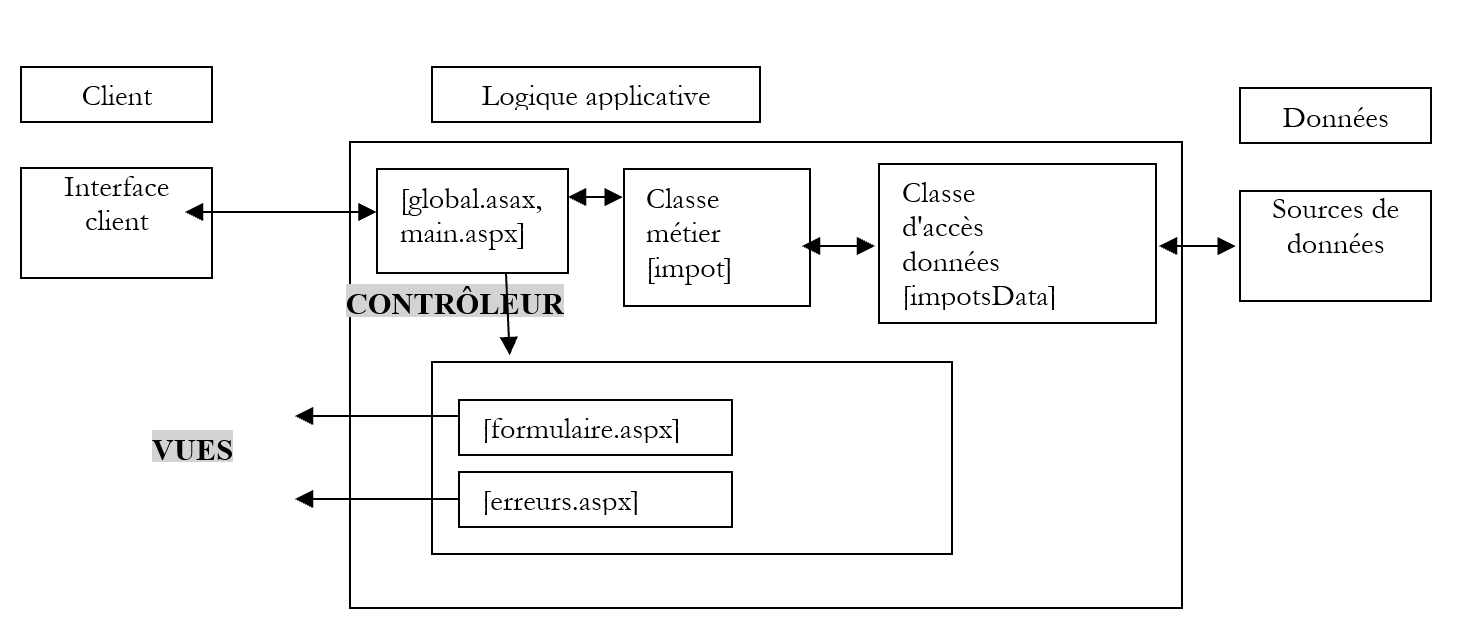
客户端 应用逻辑
控制器 [main.aspx] 需要处理三项操作:
- init:对应客户端的首次请求。控制器显示视图 [formulaire.aspx]
- calcul:对应税款计算请求。如果输入表单的数据正确,则通过业务类 [impots] 计算税款。 控制器将已通过验证的视图 [formulaire.aspx] 连同计算出的税额一并返回给客户端。如果输入表单的数据有误,控制器将返回视图 [erreurs.aspx],其中包含错误列表以及返回表单的链接。
- 返回:指发生错误后返回表单。控制器将显示错误发生前已通过验证的视图 [formulaire.aspx]。
此外,我们知道,所有发往应用程序的请求都会通过控制器 [global.asax](如果存在的话)。因此,在应用程序入口处,我们有一条由两个控制器组成的链:
- [global.asax] 根据架构设计,会接收所有发往应用程序的请求
- [main.aspx] 根据开发人员的决策,同样接收所有发往应用程序的请求
[main.aspx] 的存在是因为我们需要管理会话。我们已经看到,[global.asax] 在此情况下不适合作为控制器。这里完全可以省略 [global.asax]。 不过,我们将利用它来在应用程序启动时执行代码。上方的 MVC 流程图显示,我们需要创建一个 [impot] 对象来计算税款。无需多次创建该对象,创建一次即可。 因此,我们将在应用程序启动时,通过由控制器 [global.asax] 处理的事件 [Application_Start] 来创建该对象。其代码如下:
[global.asax]
[global.asax.vb]
Imports System
Imports System.Web
Imports System.Web.SessionState
Imports st.istia.univangers.fr

Public Class Global
    Inherits System.Web.HttpApplication

    Sub Application_Start(ByVal sender As Object, ByVal e As EventArgs)
        ' 创建一个导入对象
        Dim objImpot As impot
        Try
            objImpot = New impot(New impotsArray)
            ' 将对象放入应用程序
            Application("objImpot") = objImpot
            ' 无错误
            Application("erreur") = False
        Catch ex As Exception
            '发生错误,在应用程序中记录
            Application("erreur") = True
        End Try
    End Sub
End Class
创建完成后,类型为 [impot] 的对象会被放入应用程序中。来自不同客户端的各种请求将在此处获取该对象。 由于 [impot] 对象的构建可能失败,因此我们处理了可能出现的异常,并在应用程序中放置了一个 [erreur] 键,用于标记在创建 [impot] 对象时是否发生错误。
控制器 [main.aspx, main.aspx.vb] 的代码如下:
[main.aspx]
[main.aspx.vb]
Imports System
Imports System.Collections.Specialized
Imports System.Collections
Imports st.istia.univangers.fr

Public Class main
    Inherits System.Web.UI.Page

    Private Sub Page_Load(ByVal sender As System.Object, ByVal e As System.EventArgs) Handles MyBase.Load
        ' 首先,检查应用程序是否已正确初始化
        If CType(Application("erreur"), Boolean) Then
            ' 重定向至错误页面
            Dim erreurs As New ArrayList
            erreurs.Add("Application momentanément indisponible...")
            context.Items("erreurs") = erreurs
            context.Items("lien") = ""
            context.Items("href") = ""
            Server.Transfer("erreurs.aspx")
        End If
        ' 获取待执行的操作
        Dim action As String
        If Request.QueryString("action") Is Nothing Then
            action = "init"
        Else
            action = Request.QueryString("action").ToString.ToLower
        End If
        ' 执行该操作
        Select Case action
            Case "init"
                ' 初始化应用程序
                initAppli()
            Case "calcul"
                ' 计算税额
                calculImpot()
            Case "retour"
                ' 返回表单
                retourFormulaire()
            Case "effacer"
                ' 初始化应用程序
                initAppli()
            Case Else
                ' 未知操作 = 初始化
                initAppli()
        End Select
    End Sub

    Private Sub initAppli()
        ' 显示预填表单
        Context.Items("formulaire") = initForm()
        Context.Items("txtImpot") = ""
        Server.Transfer("formulaire.aspx", True)
    End Sub

    Private Function initForm() As NameValueCollection
        ' 初始化表单
        Dim form As New NameValueCollection
        form.Set("rdMarie", "non")
        form.Set("txtEnfants", "")
        form.Set("txtSalaire", "")
        Return form
    End Function

    Private Sub calculImpot()
        ' 验证输入数据的有效性
        Dim erreurs As ArrayList = checkData()
        ' 如有错误,则提示
        If erreurs.Count <> 0 Then
            ' 保存输入内容
            Session.Item("formulaire") = Request.Form
            ' 准备错误页面
            context.Items("href") = "main.aspx?action=retour"
            context.Items("lien") = "Retour au formulaire"
            context.Items("erreurs") = erreurs
            Server.Transfer("erreurs.aspx")
        End If
        ' 此处无错误 - 计算税款
        Dim impot As Long = CType(Application("objImpot"), impot).calculer( _
        Request.Form("rdMarie") = "oui", _
        CType(Request.Form("txtEnfants"), Integer), _
        CType(Request.Form("txtSalaire"), Long))
        ' 显示结果页面
        context.Items("txtImpot") = impot.ToString + " euro(s)"
        context.Items("formulaire") = Request.Form
        Server.Transfer("formulaire.aspx", True)
    End Sub

    Private Sub retourFormulaire()
        ' 显示包含会话中取值的表单
        Context.Items("formulaire") = Session.Item("formulaire")
        Context.Items("txtImpot") = ""
        Server.Transfer("formulaire.aspx", True)
    End Sub

    Private Function checkData() As ArrayList
        ' 初始状态无错误
        Dim erreurs As New ArrayList
        Dim erreur As Boolean = False
        ' 已婚单选按钮
        Try
            Dim rdMarie As String = Request.Form("rdMarie").ToString
            If rdMarie <> "oui" And rdMarie <> "non" Then
                Throw New Exception
            End If
        Catch
            erreurs.Add("Vous n'avez pas indiqué votre statut marital")
        End Try
        ' 子女数量
        Try
            Dim txtEnfants As String = Request.Form("txtEnfants").ToString
            Dim nbEnfants As Integer = CType(txtEnfants, Integer)
            If nbEnfants < 0 Then Throw New Exception
        Catch
            erreurs.Add("Le nombre d'enfants est incorrect")
        End Try
        ' 工资
        Try
            Dim txtSalaire As String = Request.Form("txtSalaire").ToString
            Dim salaire As Integer = CType(txtSalaire, Long)
            If salaire < 0 Then Throw New Exception
        Catch
            erreurs.Add("Le salaire annuel est incorrect")
        End Try
        ' 返回错误列表
        Return erreurs
    End Function
End Class
控制器首先会检查应用程序是否已正确初始化:
         ' 首先,检查应用程序是否已正确初始化
        If CType(Application("erreur"), Boolean) Then
            ' 重定向至错误页面
            Dim erreurs As New ArrayList
            erreurs.Add("Application momentanément indisponible...")
            context.Items("erreurs") = erreurs
            context.Items("lien") = ""
            context.Items("href") = ""
            Server.Transfer("erreurs.aspx")
        End If
如果控制器发现应用程序无法正确初始化(无法创建计算所需的 [impot] 对象),则会显示带有相应参数的错误页面。 在此情况下,无需在表单上放置返回链接,因为整个应用程序均不可用。一条通用错误消息(类型为 [ArrayList])被放置在 [Context.Items("erreurs")] 中。
如果控制器检测到应用程序处于运行状态,它就会通过参数 [action] 来分析需要执行的操作。我们已经多次遇到过这种工作模式。每种操作的处理都委托给一个函数来完成。
6.1.9.1. init、effacer 操作
这两个操作应显示空的输入表单。需要提醒的是,该表单(参见视图)有两个参数:
- Context.Items("form"):类型为 [NameValueCollection] 的字典,包含字段 HTML 和 [rdmarie,txtEnfants,txtSalaire] 的值
- Context.Items("txtImpot"):税额
函数 [initAppli] 初始化这两个参数,以便显示一个空表单。
6.1.9.2. 计算操作
该操作需根据表单中输入的数据计算应缴税款,并将表单预填入已输入的值以及计算出的税款金额后返回。负责此任务的函数 [calculImpot] 首先会验证表单数据是否正确:
- 字段 [rdMarie] 必须存在,且其值为 [oui] 或 [non]
- 字段 [txtEnfants] 必须存在,且为大于等于 0 的整数
- 字段 [txtSalaire] 必须存在,且必须为大于等于 0 的整数
如果输入的数据被判定为无效,控制器将显示视图 [erreurs.aspx],并在显示前将该视图所需的预期值放入上下文中:
- 错误消息被放入 [ArrayList] 对象中,该对象随后被放入 [Context.Items("erreurs")] 上下文中
- 返回链接的 URL 及其文本也会被放入上下文中。
在将控制权移交给负责向客户端发送响应的页面 [erreurs.aspx] 之前,表单(Request.Form)中输入的值会被存入会话中,并关联到“formulaire”键。这将允许后续请求检索这些值。
这里可能会有人质疑,是否需要验证客户端发送的请求中是否包含 [rdMarie, txtEnfants, txtSalaire] 字段。如果我们确信客户端是一个已接收包含这些字段的 [formulaire.aspx] 视图的浏览器,那么这种验证就没有必要。但我们永远无法完全确定这一点。 稍后我们将展示一个示例,其中客户端是之前提到的 [curl] 应用程序。我们将不发送该应用程序所期望的字段来对其进行查询,并观察其反应。 这是一条已多次强调的规则,在此再次重申:应用程序绝不能对发起请求的客户端类型做出任何假设。出于安全考虑,它必须假设请求可能来自编程生成的应用程序,该应用程序可能会发送意料之外的参数字符串。在任何情况下,它都必须保持正确的行为。
在本例中,我们已验证请求中包含字段 [rdMarie, txtEnfants, txtSalaire],但并未确认请求中是否可能包含其他字段。 在该应用程序中,这些字段会被忽略。然而,出于安全考虑,将此类请求记录在日志文件中并向应用程序管理员发出警报仍具有重要意义,以便管理员知晓应用程序正在接收“异常”请求。 通过分析日志文件中的这些记录,管理员可能发现针对应用程序的潜在攻击,并采取必要措施加以防护。
如果预期数据正确,控制器将使用存储在应用程序中的对象 [impot] 启动税款计算。随后,它将视图 [formulaire.aspx] 所需的两项信息存储在上下文中:
- Context.Items("表单"): 类型为 [NameValueCollection] 的字典,其中包含字段 HTML、[rdmarie,txtEnfants,txtSalaire](此处为 [Request.Form)]、c.a.d)的值。 之前在表单中输入的值
- Context.Items("txtImpot"):刚刚计算出的税额
细心的读者在阅读以上内容时可能产生了一个疑问:既然在应用程序启动时创建的对象 [impot] 被所有请求共享,是否会发生访问冲突,从而导致对象 [impot] 的数据损坏? 要回答这个问题,我们需要回到 [impot] 类的代码。请求调用 [impot].calculerImpot 方法来获取应缴税额。因此,我们需要检查的就是这段代码:
        Public Function calculer(ByVal marié As Boolean, ByVal nbEnfants As Integer, ByVal salaire As Long) As Long
             ' 计算份额数量
            Dim nbParts As Decimal
            If marié Then
                nbParts = CDec(nbEnfants) / 2 + 2
            Else
                nbParts = CDec(nbEnfants) / 2 + 1
            End If
            If nbEnfants >= 3 Then
                nbParts += 0.5D
            End If
             ' 计算应税收入及家庭分摊额
            Dim revenu As Decimal = 0.72D * salaire
            Dim QF As Decimal = revenu / nbParts
             ' 计算应纳税额
            limites((limites.Length - 1)) = QF + 1
            Dim i As Integer = 0
            While QF > limites(i)
                i += 1
            End While
            Dim impot As Long = CLng(revenu * coeffR(i) - nbParts * coeffN(i))
            Return impot
        End Function
假设一个线程正在执行上述方法,但被中断了。此时另一个线程开始执行该方法。这会带来哪些风险?为了弄清楚这一点,我们添加了以下代码:
            Dim impot As Long = CLng(revenu * coeffR(i) - nbParts * coeffN(i))
            ' 等待10秒
            Thread.Sleep(10000)
            Return impot
线程 1 在计算出局部变量 [impot] 的值 [impot1] 后被中断。 随后线程 2 开始执行,并为同一变量 [impot] 计算出新值 [impot2],随后被中断。线程 1 重新获得控制权。它在局部变量 [impot] 中会发现什么? 由于该变量是方法的局部变量,因此存储在称为栈的内存结构中。该栈属于线程上下文的一部分,在线程被中断时会被保存。当线程 2 启动时,其上下文会通过一个新的栈进行初始化,因此会生成一个新的局部变量 [impot]。 当线程 2 随后被中断时,其上下文也将被保存。当线程 1 重新启动时,其上下文(包括栈)会被恢复。此时它会找回自己的局部变量 [impot],而非线程 2 的变量。因此,我们处于一种请求之间不存在访问冲突的情况。 上述采用10秒暂停时间的测试证实,并发请求确实获得了预期结果。
6.1.9.3. 返回操作
此操作对应于激活视图 [erreurs.aspx] 中的链接 [Retour vers le formulaire],从而返回视图 [formulaire.aspx],该视图已预先填充了先前输入并保存在会话中的值。 函数 [retourFormulaire] 负责获取此信息。视图 [formulaire.aspx] 所需的两个参数被初始化:
- Context.Items("表单") 采用先前输入并保存在会话中的值
- Context.Items("txtImpot") 并使用空字符串
6.1.10. Web 应用程序测试
上述所有文件均放置在 <application-path> 文件夹中。
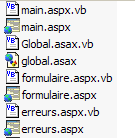
在此文件夹中创建一个子文件夹 [bin],并将业务类文件([impots.vb, impotsData.vb, impotsArray.vb])编译生成的程序集 [impot.dll] 放置其中。以下是所需的编译命令:
dos>vbc /t:library /out:impot.dll impotsData.vb impotsArray.vb impots.vb
Compilateur Microsoft (R) Visual Basic .NET version 7.10.3052.4
dos>dir
05/04/2004  13:28                1 337 impots.vb
21/04/2004  08:23                1 311 impotsArray.vb
21/04/2004  08:26                1 634 impotsData.vb
21/04/2004  09:21                5 632 impot.dll
上述文件 [impot.dll] 必须放置在 <application-path>\bin 目录下,以便 Web 应用程序能够访问。Cassini 服务器使用参数 (<application-path>,/impots1) 启动。使用浏览器,我们请求 URL [http://localhost/impots1/main.aspx]:
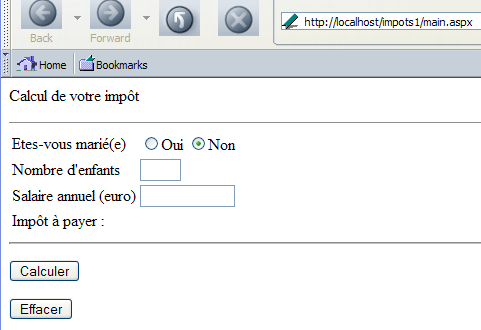
填写表单:
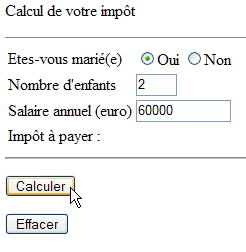
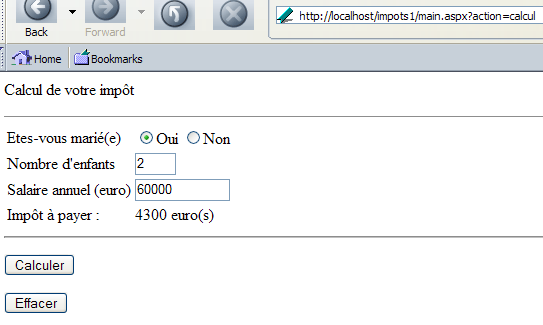
然后通过按钮 [Calculer] 启动税款计算。我们得到以下响应:
接着我们输入错误数据:
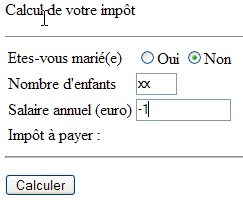
点击按钮 [Calculer] 后,得到以下结果:
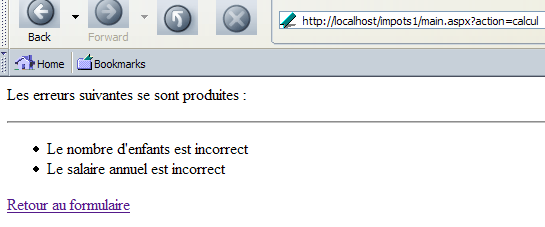
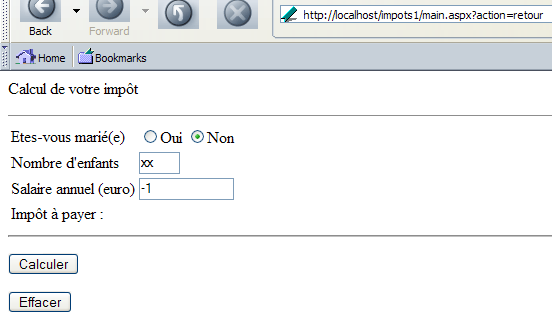
点击链接 [Retour au formulaire] 会将我们带回表单在提交时的状态:
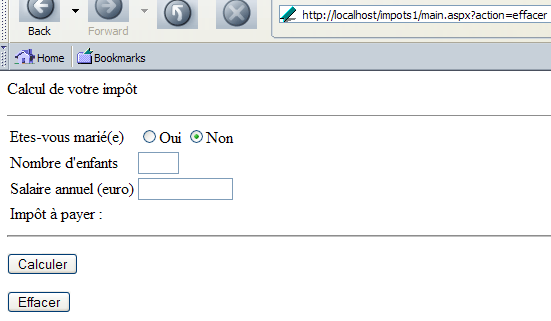
最后,点击按钮 [Effacer] 将重置页面:
6.1.11. 使用客户端 [curl]
使用浏览器以外的其他客户端测试 Web 应用程序非常重要。如果向浏览器发送一个表单,并在表单提交时包含要发送的参数,浏览器会将这些参数的值发回给服务器。而其他客户端可能不会这样做,因此服务器收到的请求中可能会缺少某些参数。服务器必须知道在这种情况下该如何处理。 另一个例子是客户端输入验证。如果表单包含待验证的数据,可以通过表单所在文档中嵌入的脚本在客户端进行验证。只有当所有客户端验证的数据均有效时,浏览器才会提交表单。 因此,服务器端可能会产生一种误解,认为收到的数据已经过验证,从而不想再次进行验证。这将是一个错误。事实上,非浏览器客户端可能会向服务器发送无效数据,从而导致Web应用程序出现意外行为。我们将通过客户端[curl]来说明这些要点。
首先,我们请求 URL [http://localhost/impots1/main.aspx]:
dos>curl --include --url http://localhost/impots1/main.aspx

HTTP/1.1 200 OK
Server: Microsoft ASP.NET Web Matrix Server/0.6.0.0
Date: Thu, 01 Apr 2004 15:18:10 GMT
Set-Cookie: ASP.NET_SessionId=ivthkl45tjdjrzznevqsf255; path=/
Cache-Control: private
Content-Type: text/html; charset=utf-8
Content-Length: 982
Connection: Close


<html>
    <head>
        <title>Impôt</title>
    </head>
    <body>
        <P>Calcul de votre impôt</P>
        <HR width="100%" SIZE="1">
        <form method="post" action="main.aspx?action=calcul">
            <TABLE border="0">
                <TR>
                    <TD>Etes-vous marié(e)</TD>
                    <TD>
                        <INPUT type="radio" value="oui" name="rdMarie" >Oui <INPUT type="radio"  value="non" name="rdMarie" checked>Non</TD>
                </TR>
                <TR>
                    <TD>Nombre d'enfants</TD>
                    <TD><INPUT type="text" size="3" maxLength="3" name="txtEnfants" value=""></TD>
                </TR>
                <TR>
                    <TD>Salaire annuel (euro)</TD>
                    <TD><INPUT type="text" maxLength="12" size="12" name="txtSalaire" value=""></TD>
                </TR>
                <TR>
                    <TD>Impôt à payer :
                    </TD>
                    <TD></TD>
                </TR>
            </TABLE>
            <hr>
            <P>
                <INPUT type="submit" value="Calculer">
            </P>
        </form>
        <form method="post" action="main.aspx?action=effacer">
                <INPUT type="submit" value="Effacer">
        </form>
    </body>
</html>
服务器向我们发送了表单的代码 HTML。在 HTTP 的头部信息中,我们获得了会话 Cookie。我们将在后续请求中使用它来维持会话。现在,让我们不带任何参数地调用 [calcul] 操作:
dos>curl --cookie ASP.NET_SessionId=ivthkl45tjdjrzznevqsf255 --include --url  http://localhost/impots1/main.aspx?action=calcul

HTTP/1.1 200 OK
Server: Microsoft ASP.NET Web Matrix Server/0.6.0.0
Date: Thu, 01 Apr 2004 15:22:42 GMT
Cache-Control: private
Content-Type: text/html; charset=utf-8
Content-Length: 380
Connection: Close


<HTML>
    <HEAD>
        <title>Impôt</title>
    </HEAD>
    <body>
        <P>Les erreurs suivantes se sont produites :</P>
        <HR>
        <ul>
            <li> Vous n'avez pas indiqué votre statut marital</li>
<li> Le nombre d'enfants est incorrect</li>
<li> Le salaire annuel est incorrect</li>
        </ul>
        <a href="main.aspx?action=retour">
            Retour au formulaire
        </a>
    </body>
</HTML>
我们可以看到,Web应用程序返回了视图[erreurs],并针对三个缺失的参数返回了三条错误消息。现在,让我们发送错误的参数:
dos>curl --cookie ASP.NET_SessionId=ivthkl45tjdjrzznevqsf255 --include --data rdMarie=xx --data txtEnfants=xx --data txtSalaire=xx --url http://localhost/impots1/main.aspx?action=calcul

HTTP/1.1 200 OK
Server: Microsoft ASP.NET Web Matrix Server/0.6.0.0
Date: Thu, 01 Apr 2004 15:25:50 GMT
Cache-Control: private
Content-Type: text/html; charset=utf-8
Content-Length: 380
Connection: Close


<HTML>
    <HEAD>
        <title>Impôt</title>
    </HEAD>
    <body>
        <P>Les erreurs suivantes se sont produites :</P>
        <HR>
        <ul>
            <li> Vous n'avez pas indiqué votre statut marital</li>
<li> Le nombre d'enfants est incorrect</li>
<li> Le salaire annuel est incorrect</li>
        </ul>
        <a href="main.aspx?action=retour">
            Retour au formulaire
        </a>
    </body>
</HTML>
这三个错误已被正确检测到。现在让我们发送一些有效的参数:
dos>curl --cookie ASP.NET_SessionId=ivthkl45tjdjrzznevqsf255 --include --data rdMarie=oui --data txtEnfants=2 --data txtSalaire=60000 --url http://localhost/impots1/main.aspx?action=calcul

HTTP/1.1 200 OK
Server: Microsoft ASP.NET Web Matrix Server/0.6.0.0
Date: Thu, 01 Apr 2004 15:28:24 GMT
Cache-Control: private
Content-Type: text/html; charset=utf-8
Content-Length: 1000
Connection: Close


<html>
    <head>
        <title>Impôt</title>
    </head>
    <body>
        <P>Calcul de votre impôt</P>
        <HR width="100%" SIZE="1">
        <form method="post" action="main.aspx?action=calcul">
            <TABLE border="0">
                <TR>
                    <TD>Etes-vous marié(e)</TD>
                    <TD>
                        <INPUT type="radio" value="oui" name="rdMarie" checked>Oui <INPUT type="radio"  value="non" name="rdMarie" >Non</TD>
                </TR>
                <TR>
                    <TD>Nombre d'enfants</TD>
                    <TD><INPUT type="text" size="3" maxLength="3" name="txtEnfants" value="2"></TD>
                </TR>
                <TR>
                    <TD>Salaire annuel (euro)</TD>
                    <TD><INPUT type="text" maxLength="12" size="12" name="txtSalaire" value="60000"></TD>
                </TR>
                <TR>
                    <TD>Impôt à payer :
                    </TD>
                    <TD>4300 euro(s)</TD>
                </TR>
            </TABLE>
            <hr>
            <P>
                <INPUT type="submit" value="Calculer">
            </P>
        </form>
        <form method="post" action="main.aspx?action=effacer">
                <INPUT type="submit" value="Effacer">
        </form>
    </body>
</html>
我们确实计算出了应缴税额:4300欧元。 从这个例子中我们可以得出一个教训:不要因为我们编写的是面向浏览器用户的Web应用程序而产生错觉。Web应用程序是一种TCP/IP服务,而这种网络协议无法识别服务客户端应用程序的性质。因此,我们无法确定Web应用程序的客户端是否为浏览器。因此,我们遵循两条规则:
- 收到客户端请求时,不做任何关于客户端的假设,并验证请求中是否包含预期参数且这些参数有效
- 构建面向浏览器的响应,通常为 HTML 格式的文档
一个Web应用程序可以设计为同时服务于不同的客户端,例如浏览器和移动电话。此时,可以在每个请求中包含一个新参数来指示客户端的类型。因此,浏览器将通过向URL http://machine/impots/ 发送请求来计算税款main.aspx?client=浏览器&action=计算;而移动设备则会向 http://machine/impots/main.aspx?client=mobile&action=calcul 发送请求。 MVC 这种结构有助于编写此类应用程序。其代码如下:
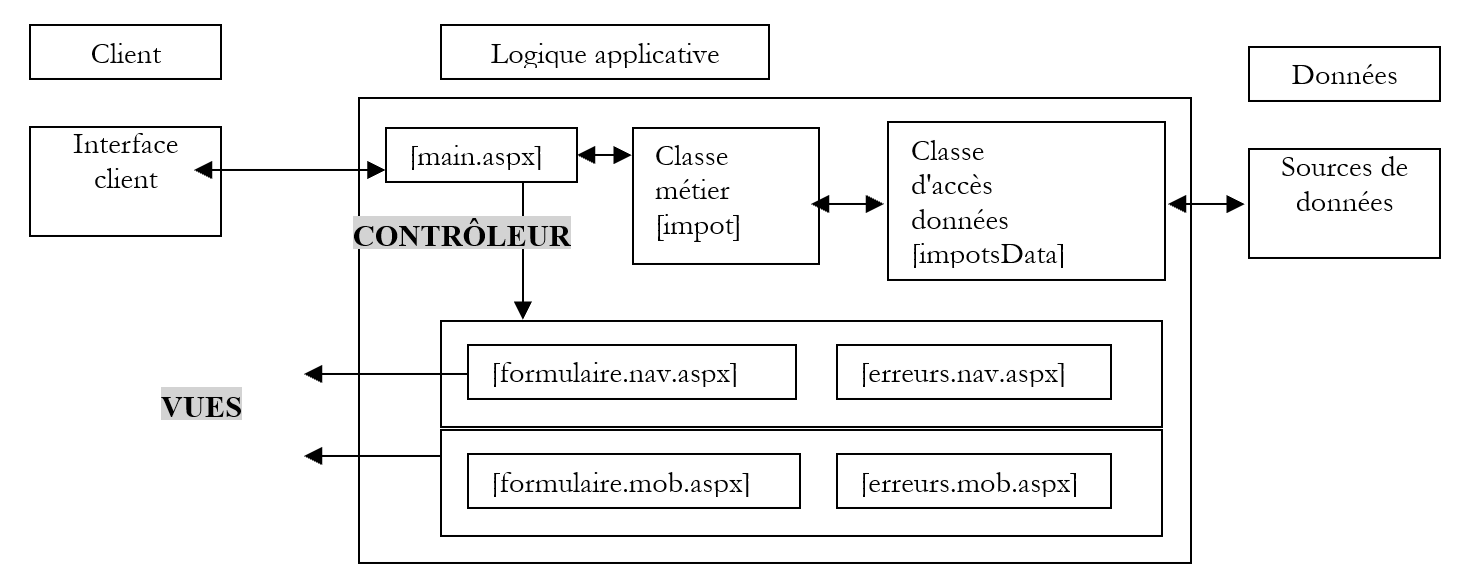
[Classes métier, Classes d'accès aux données]模块保持不变。因为这部分对客户端而言无关紧要。[Contrôleur]模块变化不大,但必须在请求中考虑一个新参数——[client]参数,该参数用于指示当前处理的是哪种类型的客户端。 模块 [vues] 需为每种客户类型生成相应的视图。即使短期或中期目标仅针对浏览器,在应用程序设计阶段就应考虑请求中是否包含参数 [client],这或许值得关注。 如果应用程序日后需要管理新的客户端类型,只需编写适用于该类型的视图即可。
6.2. 示例 2
6.2.1. 问题
在此,我们将处理与之前相同的问题,但会修改 Web 应用程序创建的对象 [impot] 的数据源。 在之前的版本中,所使用的数据源提供的是代码中“硬编码”的数组值。这次,新的数据源将从与数据库 MySQL 关联的数据源 ODBC 中获取这些值。
6.2.2. 数据源 ODBC
数据将位于名为 [IMPOTS] 的表中,该表属于名为 [dbimpots] 的数据库 MySQL。该表的内容如下:
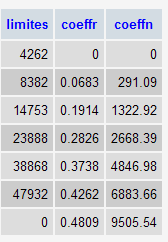
该数据库的所有者是用户 [admimpots],密码为 [mdpimpots]。 我们将数据源 ODBC 与该数据库关联。在进行此操作之前,让我们先回顾一下使用 .NET 平台访问数据库的各种方法。
Windows 平台上有许多数据库。应用程序通过称为驱动程序(drivers)的程序来访问这些数据库。
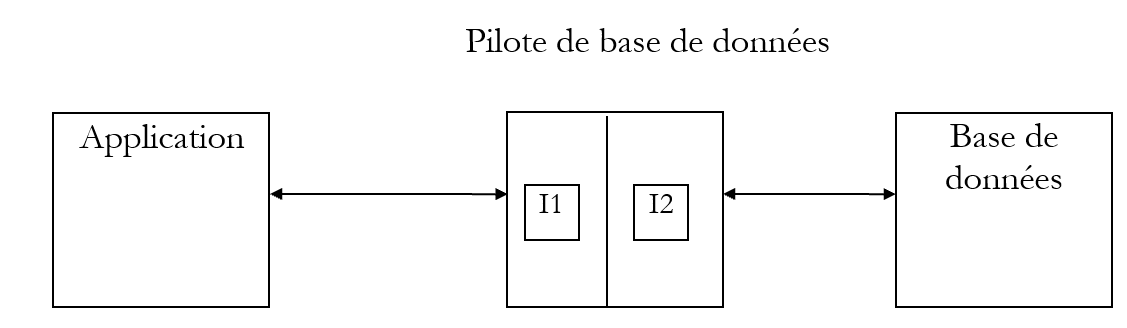
在上图中,驱动程序提供了两个接口:
- 面向应用程序的 I1 接口
- 面向数据库的 I2 接口
为了避免因迁移至不同的 B2 数据库而需要重写针对 B1 数据库编写的应用程序,我们对 I1 接口进行了标准化处理。 如果使用的是采用“标准化”驱动程序的数据库,则 B1 数据库将随附 P1 驱动程序, B2数据库将随附P2驱动程序,且这两个驱动程序的I1接口将完全一致。因此无需重写应用程序。 例如,可以将 ACCESS 数据库迁移至 MySQL 数据库,而无需修改应用程序。
目前有两种标准驱动程序:
- ODBC 驱动程序(Open DataBase Connectivity)
- OLE 和 DB 驱动程序(对象链接与嵌入 DataBase)
ODBC 驱动程序支持访问数据库。OLE 和 DB 驱动程序的数据源更为多样:数据库、邮件系统、通讯录等,没有限制。 只要开发人员决定,任何数据源都可以成为 Ole 驱动程序 DB 的对象。其优势显而易见:可以统一访问多种多样的数据。
.NET 1.1 平台提供了三种数据访问类:
- SQL 和 Server.NET 类,用于访问 Microsoft SQL Server 数据库
- Ole类Db.NET,用于访问提供OLE和DB驱动程序的SGBD数据库
- odbc.net 类,用于访问提供 ODBC 驱动程序的 SGBD 数据库
SGBD MySQL 类很久以前就已提供 ODBC 驱动程序。我们现在使用的就是这个。在 Windows 系统中,我们选择 [Menu Démarrer/Panneau de configuration/Outils d'administration/Sources ODBC 32 bits] 选项。 根据 Windows 版本的不同,该路径可能会略有差异。我们将获得以下应用程序,它将帮助我们创建 ODBC 源文件:
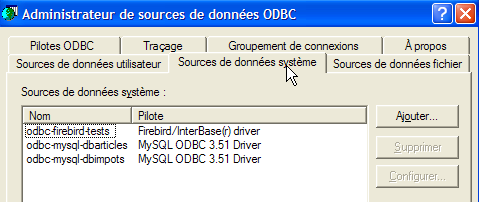
我们将创建一个系统数据源 c.a.d。这是一个所有计算机用户均可访问的数据源 utiliser.Aussi,如上图所示,请选择 [Source de données système] 选项卡。 当前页面上有一个按钮 [Ajouter],我们使用它来创建新的数据源 ODBC:
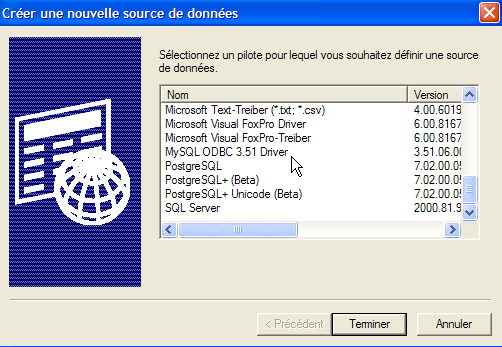
向导要求选择要使用的驱动程序 ODBC。Windows 系统自带了若干预安装的 ODBC 驱动程序。 ODBC驱动程序(源自MySQL)并不包含在其中。 因此需要先安装该驱动程序。您可以在搜索引擎中输入关键词“MySQL ODBC”或“MyODBC”进行查找。 此处我们已安装了驱动程序 [MySQL ODBC 3.51]。选中该驱动后,执行 [Terminer]:
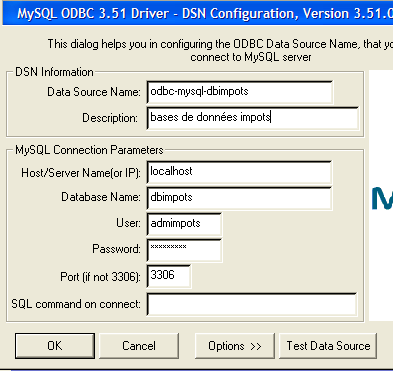
需要提供以下信息:
用于标识数据源的名称 ODBC。任何 Windows 应用程序均可通过此名称访问该数据源 | |
描述数据源的任意文本 | |
托管 SGBD 的机器名称。 此处指本地机器。也可以是远程机器。这使得Windows应用程序无需任何特殊编码即可访问远程数据库。这是ODBC源代码的一大优势。 | |
SGBD MySQL 可以管理多个数据库。这里指定要管理的是哪个:dbimpots | |
在SGBD和MySQL中声明的用户名。将以此用户名访问数据源。此处:admimpots | |
该用户的密码。此处为:mdpimpots | |
SGBD MySQL的工作端口。默认端口为3306。我们未对其进行更改 |
完成上述操作后,我们通过按钮 [Test Data Source] 测试连接参数的有效性:
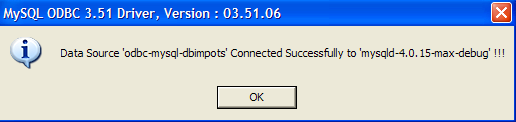
完成上述操作后,我们确认了数据源 ODBC。现在可以开始使用它了。我们重复执行 [OK] 操作直至退出向导 ODBC。
如果读者没有 SGBD mySQL,可以从网址 [http://www.mysql.com] 免费获取。 下面介绍使用 Access 创建 ODBC 数据源的步骤。前几个步骤与上述描述相同。添加一个新的系统数据源:
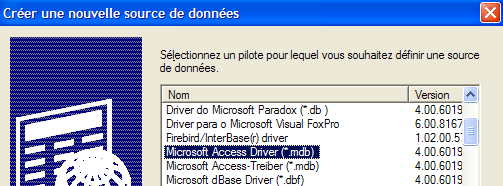
所选驱动程序为 [Microsoft Access Driver]。执行 [Terminer] 以转至 ODBC 数据源的定义:
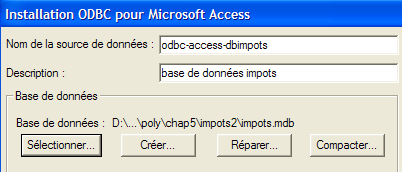
需提供的信息如下:
用于标识数据源的名称 ODBC。任何 Windows 应用程序均可通过此名称访问该数据源 | |
描述数据源的任意文本 | |
待处理的 ACCESS 文件的完整名称 |
6.2.3. 一个新的数据访问类
让我们回到应用程序的 MVC 结构:
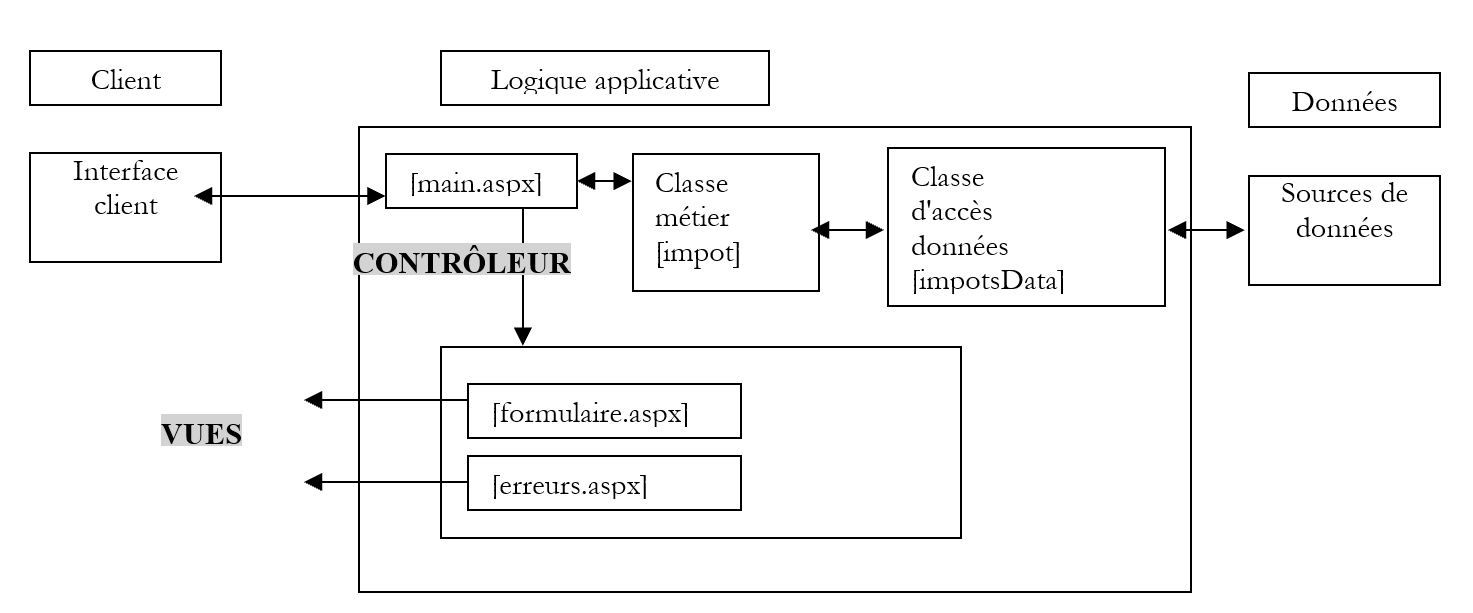
在上图中,[impotsData] 类负责检索数据。在此处,它需要从 MySQL 和 [dbimpots] 数据库中获取数据。 从该应用程序的上一版本开始,我们已知 [impotsData] 是一个抽象类,每次需要将其适配到新的数据源时,都必须对其进行派生。回顾一下该抽象类的结构:
Imports System.Collections

Namespace st.istia.univangers.fr
    Public MustInherit Class impotsData
        Protected limites() As Decimal
        Protected coeffr() As Decimal
        Protected coeffn() As Decimal
        Protected checked As Boolean
        Protected valide As Boolean

        ' 数据访问方法
        Public MustOverride Function getData() As Object()

        ' 数据验证方法
        Protected Function checkData() As Integer
            ' 验证采集的数据
...
        End Function

        ' 验证数组内容的有效性
        Protected Function check(ByRef tableau() As Decimal, ByVal n As Integer) As Boolean
        ...
        End Function
    End Class
End Namespace
继承自 [impotsData] 的类必须实现两个方法:
- 如果 [impotsData] 的无参构造函数不适合,则需实现构造函数
- 方法 [getData],该方法返回三个数组(limites、coeffr、coeffn)
我们创建类 [impotsODBC],该类将从名为 ODBC 的数据源中获取数据(limites、coeffr、coeffn):
Imports System.Data.Odbc
Imports System.Data
Imports System.Collections
Imports System

Namespace st.istia.univangers.fr
    Public Class impotsODBC
        Inherits impotsData

        ' 实例变量
        Protected DSNimpots As String

        ' 构造函数
        Public Sub New(ByVal DSNimpots As String)
            ' 记录以下三项信息
            Me.DSNimpots = DSNimpots
        End Sub

        Public Overrides Function getdata() As Object()
            ' 根据
            ' 基于数据库 ODBC DSNimpots 中表 [impots] 的内容
            ' limites、coeffr、coeffn 是该表的三个列
            ' 可能引发各种异常

            Dim connectString As String = "DSN=" + DSNimpots + ";"         ' chaîne de connexion à la base
            Dim impotsConn As OdbcConnection = Nothing         ' la connexion
            Dim sqlCommand As OdbcCommand = Nothing         ' la commande SQL
            ' 查询 SELECT
            Dim selectCommand As String = "select limites,coeffr,coeffn from impots"
            ' 用于检索数据的表
            Dim aLimites As New ArrayList
            Dim aCoeffR As New ArrayList
            Dim aCoeffN As New ArrayList
            Try
                ' 尝试访问数据库
                impotsConn = New OdbcConnection(connectString)
                impotsConn.Open()
                ' 创建命令对象
                sqlCommand = New OdbcCommand(selectCommand, impotsConn)
                ' 正在执行查询
                Dim myReader As OdbcDataReader = sqlCommand.ExecuteReader()
                ' 对检索到的表进行处理
                While myReader.Read()
                    ' 将当前行数据放入数组
                    aLimites.Add(myReader("limites"))
                    aCoeffR.Add(myReader("coeffr"))
                    aCoeffN.Add(myReader("coeffn"))
                End While
                ' 释放资源
                myReader.Close()
                impotsConn.Close()
            Catch e As Exception
                Throw New Exception("Erreur d'accès à la base de données (" + e.Message + ")")
            End Try
            ' 将动态数组转换为静态数组
            Me.limites = New Decimal(aLimites.Count - 1) {}
            Me.coeffr = New Decimal(aLimites.Count - 1) {}
            Me.coeffn = New Decimal(aLimites.Count - 1) {}
            Dim i As Integer
            For i = 0 To aLimites.Count - 1
                limites(i) = Decimal.Parse(aLimites(i).ToString())
                coeffR(i) = Decimal.Parse(aCoeffR(i).ToString())
                coeffN(i) = Decimal.Parse(aCoeffN(i).ToString())
            Next i
            ' 验证获取的数据
            Dim erreur As Integer = checkData()
            ' 若数据无效,则抛出异常
            If Not valide Then Throw New Exception("Les données des tranches d'impôts sont invalides (" + erreur.ToString + ")")
            ' 否则返回三个数组
            Return New Object() {limites, coeffr, coeffn}
        End Function
    End Class
End Namespace
让我们来看看制造商:
        ' 构造函数
        Public Sub New(ByVal DSNimpots As String)
            ' 记录这三项信息
            Me.DSNimpots = DSNimpots
        End Sub
该方法接收一个参数,即包含待获取数据的源名称 ODBC。 构造函数仅需记住该名称。方法 [getData] 负责读取表 [impots] 中的数据,并将其放入三个数组中(limites、coeffr、coeffn)。让我们来分析其代码:
- 连接数据源 ODBC 的参数已定义,但该数据源尚未打开
             ' 数据库连接字符串
            Dim connectString As String = "DSN=" + DSNimpots + ";"
            ' 创建数据库连接对象——该连接尚未打开
            Dim impotsConn As OdbcConnection = New OdbcConnection(connectString)
- 定义了三个对象 [ArrayList] 用于从表 [impots] 中提取数据:
             ' 用于检索数据的表
            Dim aLimites As New ArrayList
            Dim aCoeffR As New ArrayList
            Dim aCoeffN As New ArrayList
- 所有数据库访问代码均使用 try/catch 语句进行包裹,以处理可能出现的访问错误。建立与数据库的连接:
                 ' 尝试访问数据库
                impotsConn = New OdbcConnection(connectString)
                impotsConn.Open()
- 在已建立的连接上执行命令 [select]。我们将获得一个 [OdbcDataReader] 对象,该对象将允许我们遍历 SELECT 语句返回结果表中的各行:
                 ' 创建一个命令对象
                Dim sqlCommand As OdbcCommand = New OdbcCommand(selectCommand, impotsConn)
                ' 执行查询
                Dim myReader As OdbcDataReader = sqlCommand.ExecuteReader()
- 我们逐行遍历结果表。为此,我们使用先前获取的 [OdbcDataReader] 对象中的 [Read] 方法。该方法主要执行两项操作:
- 在表中向前移动一行。初始时,光标位于第一行之前
- 如果成功向前移动一行,则返回布尔值 [true];否则返回 [false],后者表示所有行均已处理完毕。
对象 [OdbcDataReader] 中当前行的列值通过 OdbcDataReader 获取。 由此获得一个表示该列值的对象。我们遍历整个表,将其内容放入三个对象 [ArrayList] 中:
                 ' 对检索到的表进行分析
                While myReader.Read()
                    ' 将当前行数据放入数组
                    aLimites.Add(myReader("limites"))
                    aCoeffR.Add(myReader("coeffr"))
                    aCoeffN.Add(myReader("coeffn"))
- 完成上述操作后,我们释放与连接相关的资源:
- 三个对象 [ArrayList] 的内容被转移到三个常规数组中:
             ' 将动态数组转换为静态数组
            limites = New Decimal(aLimites.Count - 1) {}
            coeffr = New Decimal(aLimites.Count - 1) {}
            coeffn = New Decimal(aLimites.Count - 1) {}
            Dim i As Integer
            For i = 0 To aLimites.Count - 1
                limites(i) = CType(aLimites(i), Decimal)
                coeffR(i) = CType(aCoeffR(i), Decimal)
                coeffN(i) = CType(aCoeffN(i), Decimal)
            Next i
- 当表 [impots] 的数据导入到这三个数组后,只需使用基类 [impotsData] 的方法 [checkData] 来验证这些数组的内容:
             ' 验证获取的数据
            Dim erreur As Integer = checkData()
             ' 若数据无效,则抛出异常
            If Not valide Then Throw New Exception("Les données des tranches d'impôts sont invalides (" + erreur.ToString + ")")
             ' 否则返回三个数组
            Return New Object() {limites, coeffr, coeffn}
6.2.4. 数据访问类测试
一个测试程序可以如下所示:
Option Explicit On
Option Strict On

' 命名空间
Imports System
Imports Microsoft.VisualBasic

Namespace st.istia.univangers.fr

     ' 测试页面
    Module testimpots
        Sub Main(ByVal arguments() As String)
             ' 交互式税款计算程序
             ' 用户通过键盘输入三项数据:已婚 nbEnfants 工资
             ' 程序随后显示应缴税额
            Const syntaxe1 As String = "pg DSNimpots"
            Const syntaxe2 As String = "syntaxe : marié nbEnfants salaire" + ControlChars.Lf + "marié : o pour marié, n pour non marié" + ControlChars.Lf + "nbEnfants : nombre d'enfants" + ControlChars.Lf + "salaire : salaire annuel en F"

             ' 程序参数验证
            If arguments.Length <> 1 Then
                 ' 错误信息
                Console.Error.WriteLine(syntaxe1)
                 ' 结束
                Environment.Exit(1)
            End If
             ' 获取参数
            Dim DSNimpots As String = arguments(0)

             ' 创建税款对象
            Dim objImpot As impot = Nothing
            Try
                objImpot = New impot(New impotsODBC(DSNimpots))
            Catch ex As Exception
                Console.Error.WriteLine(("L'erreur suivante s'est produite : " + ex.Message))
                Environment.Exit(2)
            End Try

             ' 无限循环
            While True
                 ' 初始时无错误
                Dim erreur As Boolean = False

                 ' 请求税费计算参数
                Console.Out.Write("Paramètres du calcul de l'impôt au format marié nbEnfants salaire ou rien pour arrêter :")
                Dim paramètres As String = Console.In.ReadLine().Trim()

                 ' 需要做什么?
                If paramètres Is Nothing Or paramètres = "" Then
                    Exit While
                End If

                 ' 验证输入行中的参数数量
                Dim args As String() = paramètres.Split(Nothing)
                Dim nbParamètres As Integer = args.Length
                If nbParamètres <> 3 Then
                    Console.Error.WriteLine(syntaxe2)
                    erreur = True
                End If
                Dim marié As String
                Dim nbEnfants As Integer
                Dim salaire As Integer
                If Not erreur Then
                     ' 正在验证参数的有效性
                     ' 已婚
                    marié = args(0).ToLower()
                    If marié <> "o" And marié <> "n" Then
                        Console.Error.WriteLine((syntaxe2 + ControlChars.Lf + "Argument marié incorrect : tapez o ou n"))
                        erreur = True
                    End If
                     ' nbEnfants
                    nbEnfants = 0
                    Try
                        nbEnfants = Integer.Parse(args(1))
                        If nbEnfants < 0 Then
                            Throw New Exception
                        End If
                    Catch
                        Console.Error.WriteLine(syntaxe2 + "\nArgument nbEnfants incorrect : tapez un entier positif ou nul")
                        erreur = True
                    End Try
                     ' 工资
                    salaire = 0
                    Try
                        salaire = Integer.Parse(args(2))
                        If salaire < 0 Then
                            Throw New Exception
                        End If
                    Catch
                        Console.Error.WriteLine(syntaxe2 + "\nArgument salaire incorrect : tapez un entier positif ou nul")
                        erreur = True
                    End Try
                End If
                If Not erreur Then
                     ' 参数正确 - 计算税款
                    Console.Out.WriteLine(("impôt=" & objImpot.calculer(marié = "o", nbEnfants, salaire).ToString + " euro(s)"))
                End If
            End While
        End Sub
    End Module
End Namespace
应用程序以一个参数启动:
- DSNimpots:要使用的数据源名称 ODBC
税额计算通过在应用程序启动时创建的类型为 [impot] 的对象进行:
             ' 创建税项对象
            Dim objImpôt As impot = Nothing
            Try
                objImpot = New impot(New impotsODBC(DSNimpots))
            Catch ex As Exception
                Console.Error.WriteLine(("L'erreur suivante s'est produite : " + ex.Message))
                Environment.Exit(1)
            End Try
应用程序初始化后,会反复提示用户通过键盘输入计算税款所需的三个信息:
- 婚姻状况:o 代表已婚,n 代表未婚
- 子女数量
- 年薪
所有类均已编译:
dos>vbc /r:system.dll /r:system.data.dll /t:library /out:impot.dll impots.vb impotsArray.vb impotsData.vb impotsODBC.vb
dos>dir
01/04/2004  19:34             7 168 impot.dll
01/04/2004  19:31             1 360 impots.vb
21/04/2004  08:23             1 311 impotsArray.vb
21/04/2004  08:26             1 634 impotsData.vb
01/04/2004  19:34             2 735 impotsODBC.vb
01/04/2004  19:32             3 210 testimpots.vb
测试程序也依次编译:
dir>dir
01/04/2004  19:34             7 168 impot.dll
01/04/2004  19:31             1 360 impots.vb
21/04/2004  08:23             1 311 impotsArray.vb
21/04/2004  08:26             1 634 impotsData.vb
01/04/2004  19:34             2 735 impotsODBC.vb
01/04/2004  19:34             6 144 testimpots.exe
01/04/2004  19:32             3 210 testimpots.vb
测试程序首先使用数据源 ODBC MySQL 运行:
dos>testimpots odbc-mysql-dbimpots
Paramètres du calcul de l'impôt au format marié nbEnfants salaire ou rien pour arrêter :o 2 60000
impôt=4300 euro(s)
将数据源从 ODBC 切换为 Access 数据源:
dos>testimpots odbc-access-dbimpots
Paramètres du calcul de l'impôt au format marié nbEnfants salaire ou rien pour arrêter :o 2 60000
impôt=4300 F
6.2.5. Web 应用程序的视图
这些视图与前一个应用程序相同:formulaire.aspx 和 erreurs.aspx
6.2.6. 应用程序控制器 [global.asax, main.aspx]
仅需修改控制器 [global.asax]。该控制器负责在应用程序启动时创建对象 [impot]。 该对象的构造函数仅有一个参数,即负责获取数据的 [impotsData] 类型对象。因此,该参数会随着每种新数据源类型的引入而改变。[global.asax.vb] 控制器修改后如下:
Imports System
Imports System.Web
Imports System.Web.SessionState
Imports st.istia.univangers.fr
Imports System.Configuration

Public Class Global
    Inherits System.Web.HttpApplication

    Sub Application_Start(ByVal sender As Object, ByVal e As EventArgs)
        ' 创建税项对象
        Dim objImpot As impot
        Try
            objImpot = New impot(New impotsODBC(ConfigurationSettings.AppSettings("DSNimpots")))
            ' 将对象放入应用程序
            Application("objImpot") = objImpot
            ' 无错误
            Application("erreur") = False
        Catch ex As Exception
            '出现错误,在应用程序中记录
            Application("erreur") = True
            Application("message") = ex.Message
        End Try
    End Sub
End Class
对象 [impot] 的数据源现为对象 [impotODBC]。后者的参数为待使用的数据源 ODBC 的名称 DSN。 与其将该名称硬编码在代码中,不如将其放入应用程序的配置文件 [web.config] 中:
<?xml version="1.0" encoding="utf-8" ?>
<configuration>
    <appSettings>
        <add key="DSNimpots" value="odbc-mysql-dbimpots" />
    </appSettings>
</configuration>
已知文件 [web.config] 中 <appSettings> 部分的键 C 的值,是在应用程序代码中通过 [ConfigurationSettings.AppSettings(C)] 获取的。
为了查明异常的原因,我们在应用程序中记录了该异常的消息,以便后续查询时能够获取。控件 [main.aspx.vb] 将把该消息包含在其错误列表中:
    Private Sub Page_Load(ByVal sender As System.Object, ByVal e As System.EventArgs) Handles MyBase.Load
        ' 首先,检查应用程序是否已正确初始化
        If CType(Application("erreur"), Boolean) Then
            ' 重定向至错误页面
            Dim erreurs As New ArrayList
            erreurs.Add("Application momentanément indisponible...(" + Application("message").ToString + ")")
            context.Items("erreurs") = erreurs
            context.Items("lien") = ""
            context.Items("href") = ""
            Server.Transfer("erreurs.aspx")
        End If
        ' 获取待执行的操作
...
6.2.7. 修改总结
应用程序已准备就绪,可进行测试。以下是相较于上一版本的修改列表:
- 构建了一个新的数据访问类
- 控制器 [global.asax.vb] 在两处进行了修改:[impot] 对象的构建,以及将可能出现的异常相关消息记录到应用程序中
- 控制器 [main.aspx.vb] 在一处进行了修改,用于显示上述异常消息
- 新增了一个名为 [web.config] 的文件
修改工作主要在 Web 应用程序外部的 1, c.a.d 中完成。这得益于应用程序的 MVC 架构,该架构将控制器与业务类分离。这正是该架构的核心优势。 可以证明,如果使用合适的配置文件,本可以完全避免对应用程序控制器进行任何修改。可以在配置文件中指定要动态实例化的数据访问类名称,以及实例化所需的各种参数。 凭借这些信息,[global.asax] 即可实例化数据访问对象。因此,更换数据源的操作仅需:
- 如果该数据源的访问类尚不存在,则创建该类
- 修改文件 [web.config],以便在 [global.asax] 中动态创建该类的实例
6.2.8. Web 应用程序测试
上述所有文件均放置在 <application-path> 文件夹中。
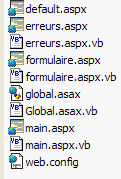
在此文件夹中创建一个名为 [bin] 的子文件夹,并将由业务类文件([impots.vb, impotsData.vb, impotsArray.vb, impotsODBC.vb])编译生成的程序集 [impot.dll] 放置其中。以下是所需的编译命令:
dos>vbc /r:system.dll /r:system.data.dll /t:library /out:impot.dll impots.vb impotsArray.vb impotsData.vb impotsODBC.vb
dos>dir
01/04/2004  19:34             7 168 impot.dll
01/04/2004  19:31             1 360 impots.vb
21/04/2004  08:23             1 311 impotsArray.vb
21/04/2004  08:26             1 634 impotsData.vb
01/04/2004  19:34             2 735 impotsODBC.vb
01/04/2004  19:32             3 210 testimpots.vb
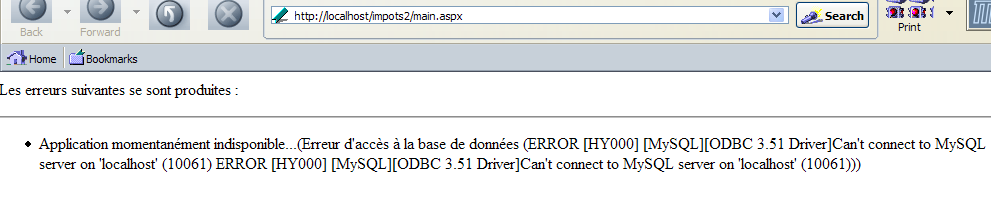
上述文件 [impot.dll] 必须放置在 <application-path>\bin 目录下,以便 Web 应用程序能够访问。Cassini 服务器使用参数 (<application-path>,/impots2) 启动。测试结果与上一版本相同,数据库的存在对用户而言是透明的。 不过,为了说明数据库的存在,我们通过停止 SGBD 和 MySQL 来确保源文件 ODBC 不可用,并请求 URL [http://localhost/impots2/main.aspx]。 我们得到以下响应:
6.3. 示例 3
6.3.1. 问题
在此,我们将通过再次修改 Web 应用程序创建的 [impot] 对象的数据源来处理相同的问题。这次,新的数据源将是一个 ACCESS 数据库,我们将通过 OLEDB 驱动程序访问该数据库。 我们的目的是展示访问数据库的另一种方式。
6.3.2. 数据源 OLEDB
数据将位于名为 [IMPOTS] 的表中,该表属于数据库 ACCESS。该表的内容如下:
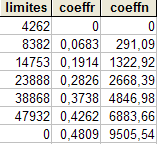
6.3.3. 数据访问类
让我们回到应用程序的 MVC 结构:
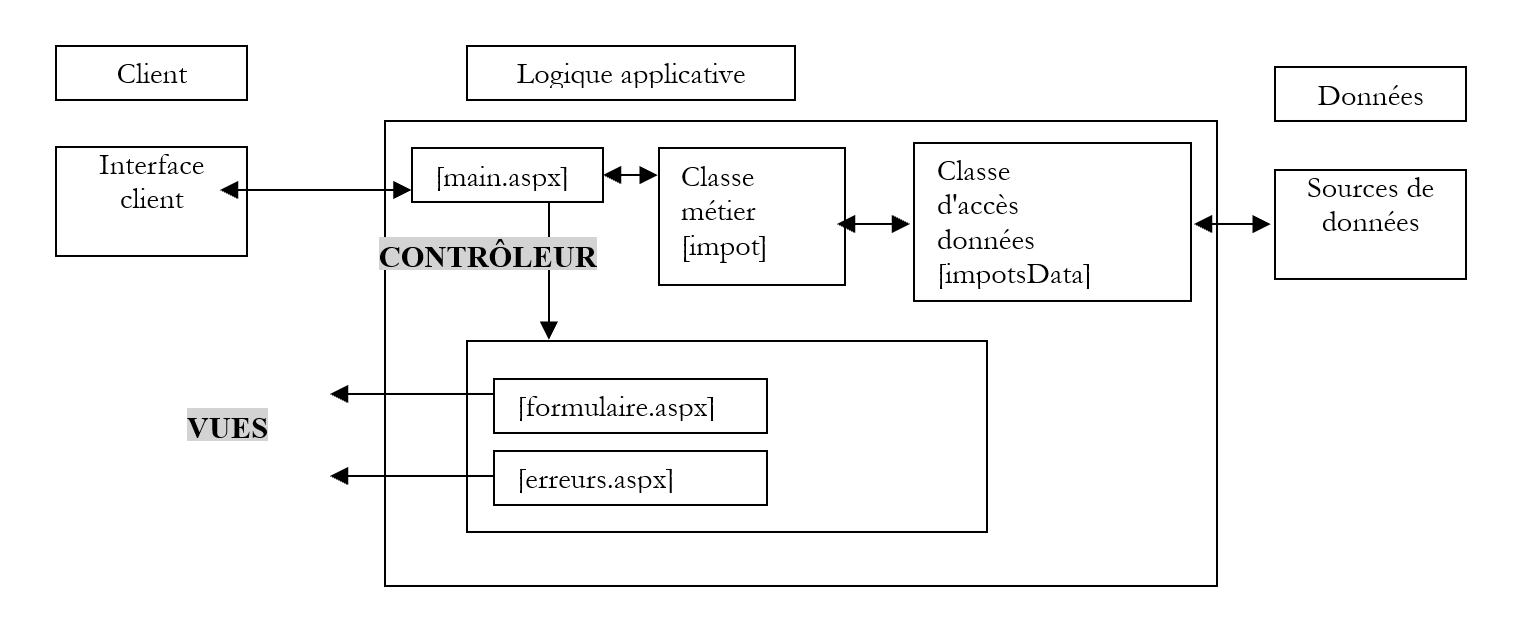
- 在上图中,[impotsData]类负责检索数据。此次它需要从OLEDB数据源中获取数据。
我们创建类 [impotsOLEDB],该类将从名为
Imports System.Data
Imports System.Collections
Imports System
Imports System.Xml
Imports System.Data.OleDb

Namespace st.istia.univangers.fr
    Public Class impotsOLEDB
        Inherits impotsData

        ' 实例变量
        Protected chaineConnexion As String

        ' 构造函数
        Public Sub New(ByVal chaineConnexion As String)
            ' 记录三项信息
            Me.chaineConnexion = chaineConnexion
        End Sub

        Public Overrides Function getData() As Object()
            ' 根据
            ' 基于数据库 OLEDB 中表 [impots] 的内容 [chaineConnexion]
            ' limites、coeffr、coeffn 是该表的三个列
            ' 可能抛出各种异常

            ' 创建一个对象 DataAdapter 用于读取源 OLEDB 中的数据
            Dim adaptateur As New OleDbDataAdapter("select limites,coeffr,coeffn from impots", chaineConnexion)
            ' 创建 select 结果的内存映像
            Dim contenu As New DataTable("impots")
            Try
                adaptateur.Fill(contenu)
            Catch e As Exception
                Throw New Exception("Erreur d'accès à la base de données (" + e.Message + ")")
            End Try
            ' 检索 impots 表的内容
            Dim lignesImpots As DataRowCollection = contenu.Rows
            ' 为接收数组分配内存
            Me.limites = New Decimal(lignesImpots.Count - 1) {}
            Me.coeffr = New Decimal(lignesImpots.Count - 1) {}
            Me.coeffn = New Decimal(lignesImpots.Count - 1) {}
            ' 将 impots 表的内容传输到数组中
            Dim i As Integer
            Dim ligne As DataRow
            Try
                For i = 0 To lignesImpots.Count - 1
                    ' 表的第 i 行
                    ligne = lignesImpots.Item(i)
                    ' 获取该行的内容
                    limites(i) = CType(ligne.Item(0), Decimal)
                    coeffr(i) = CType(ligne.Item(1), Decimal)
                    coeffn(i) = CType(ligne.Item(2), Decimal)
                Next
            Catch
                Throw New Exception("Les données des tranches d'impôts n'ont pas le bon type")
            End Try
            ' 验证获取的数据
            Dim erreur As Integer = checkData()
            ' 若数据无效,则抛出异常
            If Not valide Then Throw New Exception("Les données des tranches d'impôts sont invalides (" + erreur.ToString + ")")
            ' 否则返回三个数组
            Return New Object() {limites, coeffr, coeffn}
        End Function
    End Class
End Namespace
让我们来看看制造商:
         ' 构造函数
        Public Sub New(ByVal chaineConnexion As String)
             ' 记录这三项信息
            Me.chaineConnexion = chaineConnexion
        End Sub
它接收的参数是源 OLEDB 的连接字符串,其中包含待采集的数据。该构造函数仅负责将其存储起来。 连接字符串包含驱动程序 OLEDB 连接源 OLEDB 所需的所有参数。该字符串通常相当复杂。 要获取 ACCESS 数据库的连接字符串,可借助工具 [WebMatrix]。启动该工具后,会弹出一个用于连接数据源的窗口:
  |  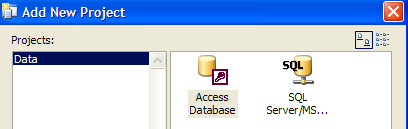 |
通过上图箭头所指的图标,可以建立与两种 Microsoft 数据库的连接:SQL Server 和 ACCESS。我们选择 ACCESS:
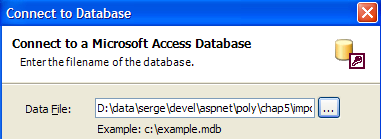
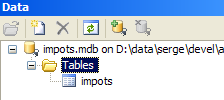
我们使用按钮 [...] 指定了数据库 ACCESS。我们确认向导。在 [Data] 选项卡中,图标表示连接:
现在,通过 [Files/New File] 生成一个新的 .aspx 文件:
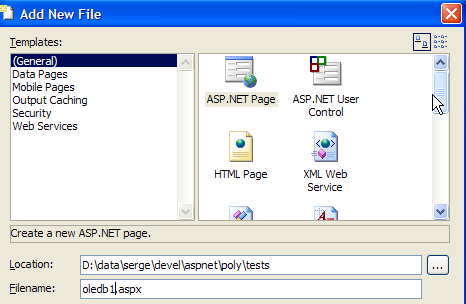
我们将获得一个空白页面,可以在上面设计我们的网页界面:

将 [Data] 标签页中的 [impots] 表格拖放到上方的画布上。结果如下:
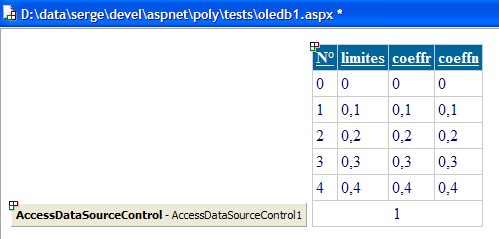
右键单击下方的 [AccessDataSourceControl] 对象,即可访问其属性:
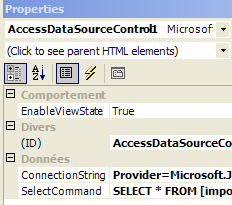
连接到数据库 ACCESS 的连接字符串 OLEDB 由上方的属性 [ConnectionString] 提供:
Provider=Microsoft.Jet.OLEDB.4.0; Ole DB Services=-4; Data Source=D:\data\serge\devel\aspnet\poly\chap5\impots\3\impots.mdb
可以看出,该字符串由固定部分和可变部分组成,其中可变部分即为文件名 ACCESS。我们将利用这一特性来生成连接数据源 OLEDB 的连接字符串。
现在让我们回到 [impotsOLEDB] 类。[getData] 方法负责读取 [impots] 表中的数据,并将它们放入三个数组(limites、coeffr、coeffn)中。让我们逐行分析其代码:
- 我们定义了对象 [DataAdapter],它将使我们能够将查询 SQL select 的结果传输到内存中。 为此,我们定义了待执行的查询 [select],并将其与对象 [DataAdapter] 关联。该对象的构造函数还要求提供用于连接数据源 OLEDB 的连接字符串
             ' 创建一个 DataAdapter 对象以读取源 OLEDB 中的数据
            Dim adaptateur As New OleDbDataAdapter("select limites,coeffr,coeffn from impots", chaineConnexion)
- 通过对象 [DataAdapter] 的方法 [Fill] 执行命令 [select]。 [select]的结果被注入到为此创建的[DataTable]对象中。 对象 [DataTable] 是数据库表 c.a.d(一组行和列)在内存中的映射。我们处理了可能发生的异常,例如连接字符串不正确的情况。
             ' 创建 select 结果的内存映像
            Dim contenu As New DataTable("impots")
            Try
                adaptateur.Fill(contenu)
            Catch e As Exception
                Throw New Exception("Erreur d'accès à la base de données (" + e.Message + ")")
            End Try
- 在 [contenu] 中,我们拥有由 [select] 引入的 [impots] 表。 对象 [DataTable] 是一个表,即一组行。可以通过 [datatable] 的属性 [rows] 访问这些行:
             ' 检索 impots 表的内容
            Dim lignesImpots As DataRowCollection = contenu.Rows
- 集合 [lignesImpots] 中的每个元素都是类型为 [DataRow] 的对象,代表表中的一行。该行的列可通过对象 [DataRow] 及其属性 [Item] 访问。 [DataRow].[Item(i)] 是行 [DataRow] 的第 i 列。 通过遍历行集合(即 DataRows 到 lignesImpots 的集合)以及每行的列集合,我们可以获取整个表:
             ' 为接收数组分配内存
            Me.limites = New Decimal(lignesImpots.Count - 1) {}
            Me.coeffr = New Decimal(lignesImpots.Count - 1) {}
            Me.coeffn = New Decimal(lignesImpots.Count - 1) {}
             ' 将 impots 表的内容传输到数组中
            Dim i As Integer
            Dim ligne As DataRow
            Try
                For i = 0 To lignesImpots.Count - 1
                     ' 表的第 i 行
                    ligne = lignesImpots.Item(i)
                     ' 获取该行的内容
                    limites(i) = CType(ligne.Item(0), Decimal)
                    coeffr(i) = CType(ligne.Item(1), Decimal)
                    coeffn(i) = CType(ligne.Item(2), Decimal)
                Next
            Catch
                Throw New Exception("Les données des tranches d'impôts n'ont pas le bon type")
            End Try
- 当表 [impots] 的数据导入到三个数组后,只需使用基类 [impotsData] 的方法 [checkData] 来验证这些数组的内容:
            ' 验证获取的数据
            Dim erreur As Integer = checkData()
             ' 若数据无效,则抛出异常
            If Not valide Then Throw New Exception("Les données des tranches d'impôts sont invalides (" + erreur.ToString + ")")
             ' 否则返回三个数组
            Return New Object() {limites, coeffr, coeffn}
6.3.4. 数据访问类测试
一个测试程序可以如下所示:
Option Explicit On
Option Strict On

' 命名空间
Imports System
Imports Microsoft.VisualBasic

Namespace st.istia.univangers.fr

     ' 测试页面
    Module testimpots
        Sub Main(ByVal arguments() As String)
             ' 交互式税款计算程序
             ' 用户通过键盘输入三项数据:已婚 nbEnfants 工资
             ' 程序随后显示应缴税额
            Const syntaxe1 As String = "pg bdACCESS"
            Const syntaxe2 As String = "syntaxe : marié nbEnfants salaire" + ControlChars.Lf + "marié : o pour marié, n pour non marié" + ControlChars.Lf + "nbEnfants : nombre d'enfants" + ControlChars.Lf + "salaire : salaire annuel en F"

             ' 程序参数验证
            If arguments.Length <> 1 Then
                 ' 错误信息
                Console.Error.WriteLine(syntaxe1)
                 ' 结束
                Environment.Exit(1)
            End If
             ' 获取参数
            Dim chemin As String = arguments(0)
             ' 准备连接字符串
            Dim chaineConnexion As String = "Provider=Microsoft.Jet.OLEDB.4.0; Ole DB Services=-4; Data Source=" + chemin

             ' 创建税项对象
            Dim objImpot As impot = Nothing
            Try
                objImpot = New impot(New impotsOLEDB(chaineConnexion))
            Catch ex As Exception
                Console.Error.WriteLine(("L'erreur suivante s'est produite : " + ex.Message))
                Environment.Exit(2)
            End Try

             ' 无限循环
            While True
                 ' 起初没有错误
                Dim erreur As Boolean = False

                 ' 需要提供税款计算的参数
                Console.Out.Write("Paramètres du calcul de l'impôt au format marié nbEnfants salaire ou rien pour arrêter :")
                Dim paramètres As String = Console.In.ReadLine().Trim()

                 ' 需要做什么?
                If paramètres Is Nothing Or paramètres = "" Then
                    Exit While
                End If

                 ' 验证输入行中的参数数量
                Dim args As String() = paramètres.Split(Nothing)
                Dim nbParamètres As Integer = args.Length
                If nbParamètres <> 3 Then
                    Console.Error.WriteLine(syntaxe2)
                    erreur = True
                End If
                Dim marié As String
                Dim nbEnfants As Integer
                Dim salaire As Integer
                If Not erreur Then
                     ' 验证参数的有效性
                     ' 已婚
                    marié = args(0).ToLower()
                    If marié <> "o" And marié <> "n" Then
                        Console.Error.WriteLine((syntaxe2 + ControlChars.Lf + "Argument marié incorrect : tapez o ou n"))
                        erreur = True
                    End If
                     ' nbEnfants
                    nbEnfants = 0
                    Try
                        nbEnfants = Integer.Parse(args(1))
                        If nbEnfants < 0 Then
                            Throw New Exception
                        End If
                    Catch
                        Console.Error.WriteLine(syntaxe2 + "\nArgument nbEnfants incorrect : tapez un entier positif ou nul")
                        erreur = True
                    End Try
                     ' 工资
                    salaire = 0
                    Try
                        salaire = Integer.Parse(args(2))
                        If salaire < 0 Then
                            Throw New Exception
                        End If
                    Catch
                        Console.Error.WriteLine(syntaxe2 + "\nArgument salaire incorrect : tapez un entier positif ou nul")
                        erreur = True
                    End Try
                End If
                If Not erreur Then
                     ' 参数正确 - 计算税款
                    Console.Out.WriteLine(("impôt=" & objImpot.calculer(marié = "o", nbEnfants, salaire).ToString + " euro(s)"))
                End If
            End While
        End Sub
    End Module
End Namespace
应用程序以一个参数启动:
- bdACCESS:待处理的文件名称 ACCESS
税额计算通过在应用程序启动时创建的类型为 [impot] 的对象进行:
             ' 获取参数
            Dim chemin As String = arguments(0)
            ' 准备连接字符串
            Dim chaineConnexion As String = "Provider=Microsoft.Jet.OLEDB.4.0; Ole DB Services=-4; Data Source=" + chemin

             ' 创建税款对象
            Dim objImpot As impot = Nothing
            Try
                objImpot = New impot(New impotsOLEDB(chaineConnexion))
            Catch ex As Exception
                Console.Error.WriteLine(("L'erreur suivante s'est produite : " + ex.Message))
                Environment.Exit(2)
            End Try
源连接字符串 OLEDB 是根据 [WebMatrix] 获取的信息构建的。
初始化完成后,应用程序会反复要求用户通过键盘输入计算其税款所需的三个信息:
- 婚姻状况:o 代表已婚,n 代表未婚
- 子女数量
- 年薪
所有类均已编译:
dos>vbc /r:system.dll /r:system.data.dll /t:library /out:impot.dll impots.vb impotsArray.vb impotsData.vb impotsOLEDB.vb
文件 [impots.mdb] 被放置在测试应用程序的文件夹中,该应用程序通过以下方式启动:
dos>testimpots impots.mdb
Paramètres du calcul de l'impôt au format marié nbEnfants salaire ou rien pour arrêter :o 2 60000
impôt=4300 euro(s)
也可以使用一个错误的 ACCESS 文件启动应用程序:
dos>testimpots xx
L'erreur suivante s'est produite : Erreur d'accès à la base de données (Ficher 'D:\data\serge\devel\aspnet\poly\chap5\impots\3\xx' introuvable.)
6.3.5. Web 应用程序的视图
这些视图与前一个应用程序相同:formulaire.aspx 和 erreurs.aspx
6.3.6. 应用程序控制器 [global.asax, main.aspx]
仅需修改控制器 [global.asax]。该控制器负责在应用程序启动时创建对象 [impot]。 该对象的构造函数仅有一个参数,即负责获取数据的 [impotsData] 类型对象。因此,由于数据源发生了变化,该参数也会随之改变。[global.asax.vb] 控制器修改后如下:
Imports System
Imports System.Web
Imports System.Web.SessionState
Imports st.istia.univangers.fr
Imports System.Configuration

Public Class Global
    Inherits System.Web.HttpApplication

    Sub Application_Start(ByVal sender As Object, ByVal e As EventArgs)
        ' 创建税对象
        Dim objImpot As impot
        Try
            objImpot = New impot(New impotsOLEDB(ConfigurationSettings.AppSettings("chaineConnexion")))
            ' 将对象放入应用程序
            Application("objImpot") = objImpot
            ' 无错误
            Application("erreur") = False
        Catch ex As Exception
            '发生错误,在应用程序中记录
            Application("erreur") = True
            Application("message") = ex.Message
        End Try
    End Sub
End Class
对象 [impot] 的数据源现为对象 [impotOLEDB]。 后者的参数是待使用的数据源 OLEDB 的连接字符串。该字符串位于应用程序的配置文件 [web.config] 中:
<?xml version="1.0" encoding="utf-8" ?>
<configuration>
    <appSettings>
        <add key="chaineConnexion"
        value="Provider=Microsoft.Jet.OLEDB.4.0; Ole DB Services=-4; Data Source=D:\data\serge\devel\aspnet\poly\chap5\impots2\impots.mdb" />
    </appSettings>
</configuration>
控制器 [main.aspx] 保持不变。
6.3.7. 修改总结
应用程序已准备就绪,可进行测试。以下列出相较于上一版本的变更:
- 构建了一个新的数据访问类
- 控制器 [global.asax.vb] 在一处进行了修改:构建了对象 [impot]
- 新增了一个名为 [web.config] 的文件
6.3.8. Web 应用程序测试
上述所有文件均放置在 <application-path> 文件夹中。
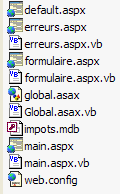
在此文件夹中创建子文件夹 [bin],并将业务类文件([impots.vb, impotsData.vb, impotsArray.vb, impotsOLEDB.vb])编译生成的程序集 [impot.dll] 放置其中。以下重述所需的编译命令:
dos>vbc /r:system.dll /r:system.data.dll /t:library /out:impot.dll impots.vb impotsArray.vb impotsData.vb impotsOLEDB.vb
该命令生成的文件 [impot.dll] 必须放置在 <application-path>\bin 目录下,以便 Web 应用程序能够访问。Cassini 服务器使用参数 (<application-path>,/impots3) 启动。测试结果与上一版本相同。
6.4. 示例 4
6.4.1. 问题
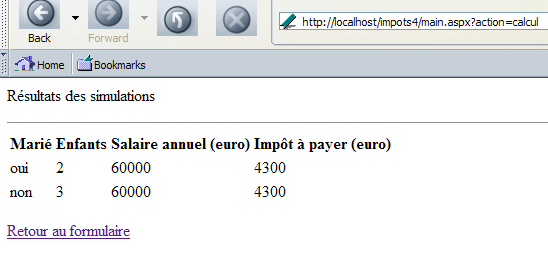
现在,我们将把应用程序改造成一个税款计算模拟应用程序。用户可以进行连续的税款计算,计算结果将显示在一个类似于下图的新视图中:
6.4.2. 应用程序的结构 MVC
应用程序的结构 MVC 变为如下所示:
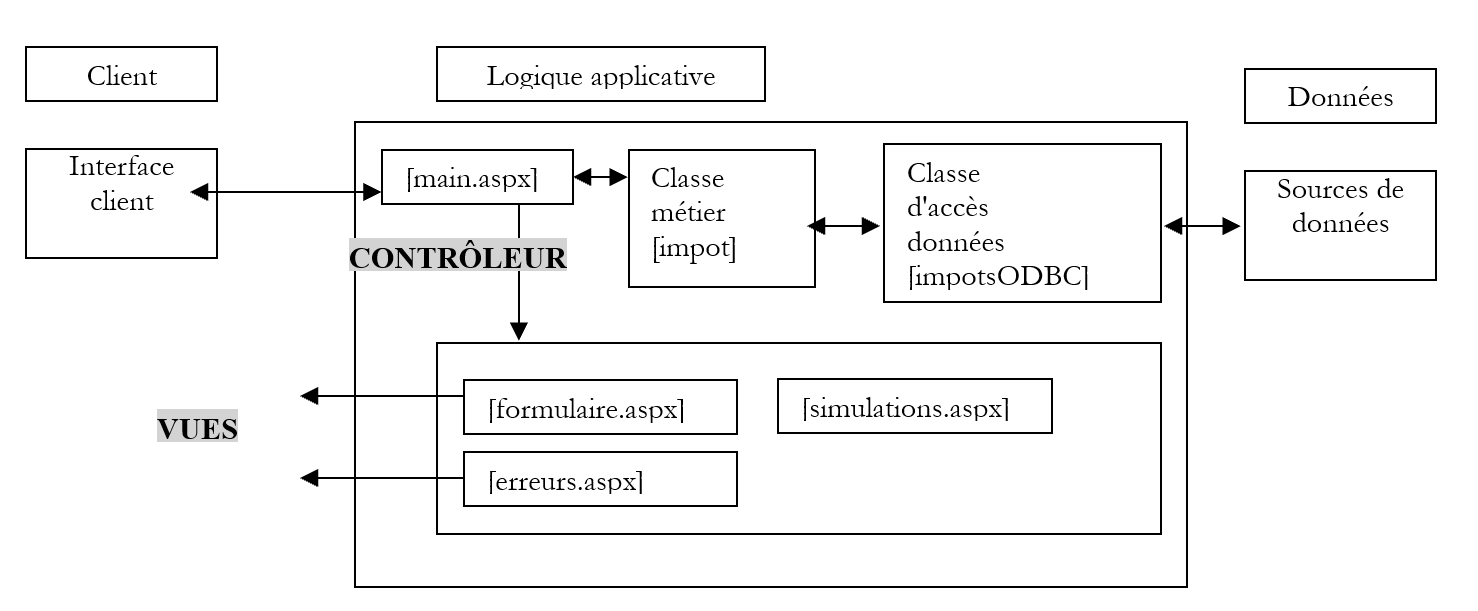
此时会出现一个新的视图 [simulations.aspx],我们刚刚提供了该视图的屏幕截图。数据访问类将是示例 2 中的类 [impotsODBC]。
6.4.3. Web 应用程序的视图
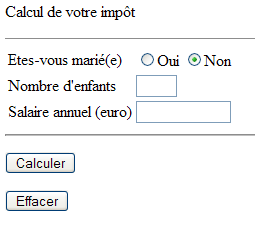
视图 [erreurs.aspx] 保持不变。 视图 [formulaire.aspx] 略有变化。实际上,税额现已不再显示在此视图中。它现在显示在视图 [simulations.aspx] 中。因此,启动时,向用户展示的页面如下:
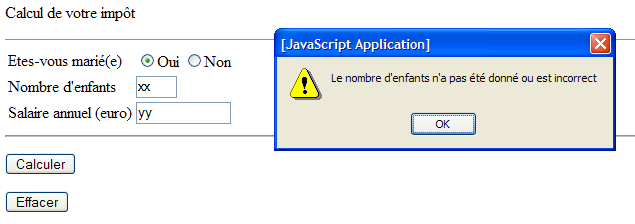
此外,视图 [formulaire] 携带了一个 JavaScript 脚本,该脚本会在将数据发送至服务器之前验证其有效性,如下例所示:
呈现代码如下:
<%@ page src="formulaire.aspx.vb" inherits="formulaire" AutoEventWireup="false"%>
<html>
    <head>
        <title>Impôt</title>
        <script language="javascript">
        function calculer(){
          // 在将参数发送至服务器前进行验证
        with(document.frmImpots){
          //子节点数量
          champs=/^\s*(\d+)\s*$/.exec(txtEnfants.value);
          if(champs==null){
            // 模型未通过验证
            alert("Le nombre d'enfants n'a pas été donné ou est incorrect");
            txtEnfants.focus();
            return;
          }//if
          //工资
          champs=/^\s*(\d+)\s*$/.exec(txtSalaire.value);
          if(champs==null){
            // 未验证模板
            alert("Le salaire n'a pas été donné ou est incorrect");
            txtSalaire.focus();
            return;
          }//if
          // 没问题——将表单发送至服务器
          submit();
        }//with
      }//计算
        </script>
    </head>
    <body>
        <P>Calcul de votre impôt</P>
        <HR width="100%" SIZE="1">
        <form name="frmImpots" method="post" action="main.aspx?action=calcul">
            <TABLE border="0">
                <TR>
                    <TD>Etes-vous marié(e)</TD>
                    <TD>
                        <INPUT type="radio" value="oui" name="rdMarie" <%=rdouichecked%>>Oui
                      <INPUT type="radio"  value="non" name="rdMarie" <%=rdnonchecked%>>Non</TD>
                </TR>
                <TR>
                    <TD>Nombre d'enfants</TD>
                    <TD><INPUT type="text" size="3" maxLength="3" name="txtEnfants" value="<%=txtEnfants%>"></TD>
                </TR>
                <TR>
                    <TD>Salaire annuel (euro)</TD>
                    <TD><INPUT type="text" maxLength="12" size="12" name="txtSalaire" value="<%=txtSalaire%>"></TD>
                </TR>
            </TABLE>
            <hr>
            <P>
                <INPUT type="button" value="Calculer" onclick="calculer()">
            </P>
        </form>
        <form method="post" action="main.aspx?action=effacer">
            <INPUT type="submit" value="Effacer">
        </form>
    </body>
</html>
页面中的动态字段与以前的版本相同。税额动态字段已消失。 按钮 [Calculer] 不再是 [submit] 类型的按钮。它是 [button] 类型的,点击时将执行 JavaScript 函数 [calculer()]:
<INPUT type="button" value="Calculer" onclick="calculer()">
我们为表单命名为 [frmImpots],以便在脚本 [calculer] 中引用它:
<form name="frmImpots" method="post" action="main.aspx?action=calcul">
JavaScript 函数 [calculer] 使用正则表达式来验证表单 [document.frmImpots.txtEnfants] 和 [document.frmImpots.txtSalaire] 中字段的有效性。 如果输入的值正确,则由 [document.frmImpots.submit()] 将其发送至服务器。
展示页面通过以下控制器 [formulaire.aspx.vb] 获取其动态字段:
Imports System.Collections.Specialized

Public Class formulaire
    Inherits System.Web.UI.Page

    ' 页面字段
    Protected rdouichecked As String
    Protected rdnonchecked As String
    Protected txtEnfants As String
    Protected txtSalaire As String
    Protected txtImpot As String

    Private Sub Page_Load(ByVal sender As System.Object, ByVal e As System.EventArgs) Handles MyBase.Load
        ' 从上下文中获取上一次请求
        Dim form As NameValueCollection = Context.Items("formulaire")
        ' 准备要显示的页面
        ' 单选按钮
        rdouichecked = ""
        rdnonchecked = "checked"
        If form("rdMarie").ToString = "oui" Then
            rdouichecked = "checked"
            rdnonchecked = ""
        End If
        ' 其余部分
        txtEnfants = CType(form("txtEnfants"), String)
        txtSalaire = CType(form("txtSalaire"), String)
    End Sub
End Class
控制器 [formulaire.aspx.vb] 与之前的版本完全相同,只是它不再需要从上下文中检索字段 [txtImpot],因为该字段已从页面中移除。
视图 [simulations.aspx] 的视觉呈现如下:
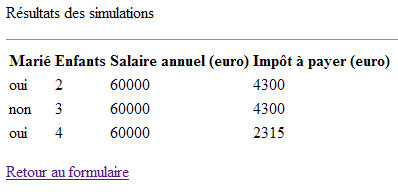
并对应以下呈现代码:
<%@ page src="simulations.aspx.vb" inherits="simulations" autoeventwireup="false" %>
<HTML>
    <HEAD>
        <title>simulations</title>
    </HEAD>
    <body>
        <P>Résultats des simulations</P>
        <HR width="100%" SIZE="1">
        <table>
            <tr>
                <th>
                    Marié</th>
                <th>
                    Enfants</th>
                <th>
                    Salaire annuel (euro)</th>
                <th>
                    Impôt à payer (euro)</th>
            </tr>
            <%=simulationsHTML%>
        </table>
        <p></p>
        <a href="<%=href%>">
            <%=lien%>
        </a>
    </body>
</HTML>
该代码包含三个动态字段:
HTML 模拟列表代码,以表格行形式呈现HTML | |
链接的URL | |
链接文本 |
它们由控制器部分生成 [simulations.aspx.vb]:
Imports System.Collections
Imports Microsoft.VisualBasic

Public Class simulations
    Inherits System.Web.UI.Page

    Protected simulationsHTML As String = ""
    Protected href As String
    Protected lien As String

    Private Sub Page_Load(ByVal sender As System.Object, ByVal e As System.EventArgs) Handles MyBase.Load
        '从上下文中获取模拟数据
        Dim simulations As ArrayList = CType(context.Items("simulations"), ArrayList)
        ' 每个模拟数据都是一个包含4个字符串元素的数组
        Dim simulation() As String
        Dim i, j As Integer
        For i = 0 To simulations.Count - 1
            simulation = CType(simulations(i), String())
            simulationsHTML += "<tr>"
            For j = 0 To simulation.Length - 1
                simulationsHTML += "<td>" + simulation(j) + "</td>"
            Next
            simulationsHTML += "</tr>" + ControlChars.CrLf
        Next
        ' 获取上下文中的其他元素
        href = context.Items("href").ToString
        lien = context.Items("lien").ToString
    End Sub
End Class
页面控制器会从页面上下文中获取由应用程序控制器放置的信息:
对象 ArrayList 包含待显示的模拟列表。每个元素是一个由 4 个字符串组成的数组,代表模拟中的信息(已婚、子女、工资、税款)。 | |
链接的URL | |
链接文本 |
6.4.4. 控制器 [global.asax, main.aspx]
回顾我们应用程序的架构图 MVC:
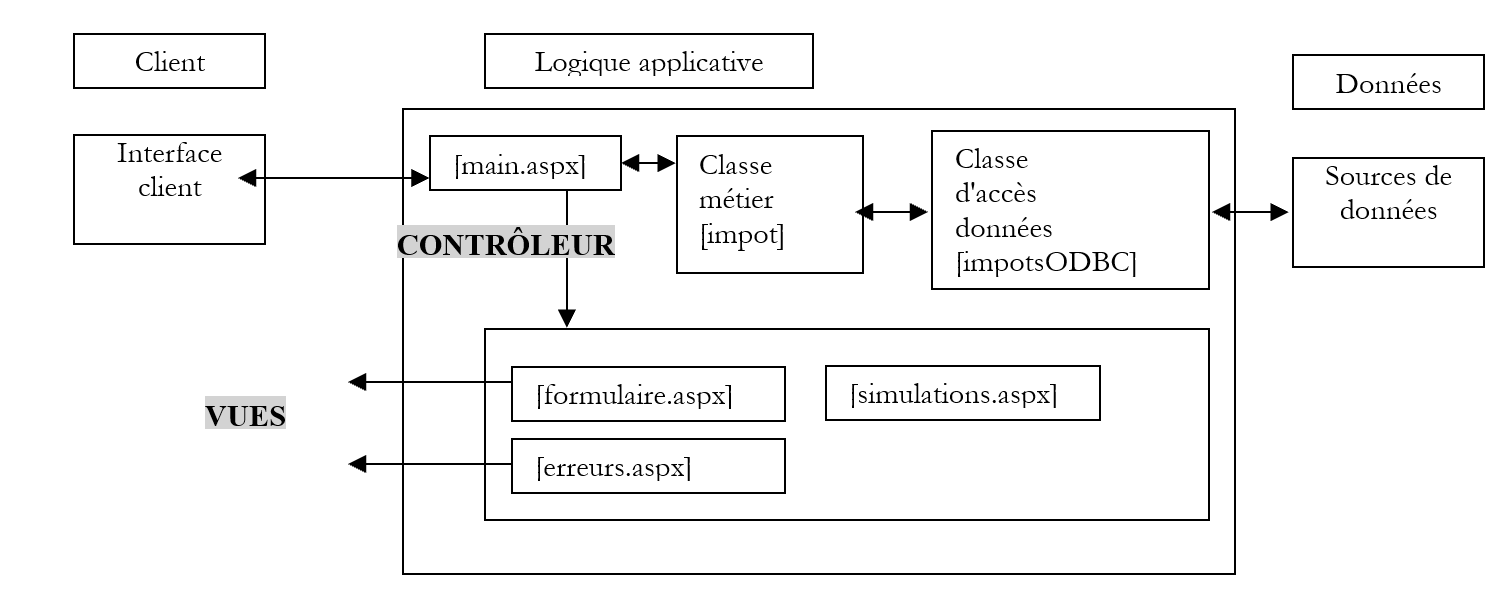
控制器 [main.aspx] 需要处理三个操作:
- init:对应客户端的首次请求。控制器显示视图 [formulaire.aspx]
- calcul:对应税款计算请求。如果输入表单的数据正确,则通过业务类 [impotsODBC] 计算税款。 控制器向客户端返回视图 [simulations.aspx],其中包含当前模拟结果以及所有先前模拟的结果。如果输入表单的数据不正确,控制器将返回视图 [erreurs.aspx],其中包含错误列表以及返回表单的链接。
- 返回:指发生错误后返回表单。控制器将显示视图 [formulaire.aspx],其内容为错误发生前已通过验证的状态。
在此新版本中,仅 [calcul] 操作发生了变更。具体而言,若数据有效,该操作应跳转至视图 [simulations.aspx],而此前则跳转至视图 [formulaire.aspx]。 [main.aspx.vb] 控制器现调整为:
Imports System
...

Public Class main
    Inherits System.Web.UI.Page

    Private Sub Page_Load(ByVal sender As System.Object, ByVal e As System.EventArgs) Handles MyBase.Load
        ' 首先,检查应用程序是否已正确初始化
...
        ' 执行操作
        Select Case action
            Case "init"
                ' 初始化应用程序
                initAppli()
            Case "calcul"
                ' 计算税额
                calculImpot()
            Case "retour"
                ' 返回表单
                retourFormulaire()
            Case "effacer"
                ' 初始化应用程序
                initAppli()
            Case Else
                ' 未知操作 = 初始化
                initAppli()
        End Select
    End Sub

...
    Private Sub calculImpot()
        ' 保存输入内容
        Session.Item("formulaire") = Request.Form
        ' 正在验证输入数据的有效性
        Dim erreurs As ArrayList = checkData()
        ' 如有错误,则提示
        If erreurs.Count <> 0 Then
            ' 准备错误页面
            context.Items("href") = "main.aspx?action=retour"
            context.Items("lien") = "Retour au formulaire"
            context.Items("erreurs") = erreurs
            Server.Transfer("erreurs.aspx")
        End If
        ' 此处无错误 - 计算税款
        Dim impot As Long = CType(Application("objImpot"), impot).calculer( _
        Request.Form("rdMarie") = "oui", _
        CType(Request.Form("txtEnfants"), Integer), _
        CType(Request.Form("txtSalaire"), Long))
        ' 将结果添加到现有模拟中
        Dim simulations As ArrayList
        If Not Session.Item("simulations") Is Nothing Then
            simulations = CType(Session.Item("simulations"), ArrayList)
        Else
            simulations = New ArrayList
        End If
        ' 添加当前模拟
        Dim simulation() As String = New String() {Request.Form("rdMarie").ToString, _
        Request.Form("txtEnfants").ToString, Request.Form("txtSalaire").ToString, _
        impot.ToString}
        simulations.Add(simulation)
        ' 将模拟结果存入会话和上下文
        context.Items("simulations") = simulations
        Session.Item("simulations") = simulations
        ' 显示结果页面
        context.Items("href") = "main.aspx?action=retour"
        context.Items("lien") = "Retour au formulaire"
        Server.Transfer("simulations.aspx", True)
    End Sub
...
End Class
上文仅保留了理解仅存在于函数 [calculImpots] 中的修改所必需的内容:
- 首先,该函数将表单 [Request.Form] 保存到会话中,以便能够以表单被提交时的状态重新生成该表单。 无论操作结果是返回 [erreurs.aspx] 还是 [simulations.aspx],都必须执行此步骤,因为系统会通过链接 [Retour au formulaire] 返回表单。 要正确恢复表单,必须事先将表单值保存到会话中。
- 如果输入的数据正确,该函数会将当前的模拟(已婚、子女、工资、税款)添加到模拟列表中。该列表位于与键“simulations”关联的会话中。
- 模拟列表会被存回会话中以备将来使用。它也会被放入当前上下文中,因为视图 [simulations.aspx] 正是在此处等待该列表
- 在将视图 [simulations.aspx] 所需的其他信息放入上下文后,该视图即被显示
6.4.5. 修改总结
应用程序已准备就绪,可进行测试。以下列出相较于先前版本所做的修改:
- 构建了一个新的视图
- 控制器 [main.aspx.vb] 在一处进行了修改:处理操作 [calcul]
6.4.6. Web 应用程序测试
请读者进行测试。现重申测试步骤。应用程序的所有文件均放置在<application-path>文件夹中。在此文件夹内创建了一个名为[bin]的子文件夹,其中存放着由业务类文件编译生成的[impot.dll]程序集: [impots.vb, impotsData.vb, impotsArray.vb, impotsODBC.vb。 该命令生成的文件 [impot.dll] 必须放置在 <application-path>\bin 目录下,以便 Web 应用程序能够访问。Cassini 服务器将使用参数 (<application-path>,/impots4) 启动。
6.5. Conclusion
前面的示例通过具体案例展示了 Web 开发中常用的机制。出于教学目的,我们系统地使用了 MVC 架构。如果没有这个架构,我们本可以采用不同的方式处理这些示例,甚至可能更简单。但一旦应用程序变得稍微复杂一些,包含多个页面时,该架构便能带来巨大的优势。
我们可以以多种方式继续展开这些示例。以下是其中几种:
- 用户可能希望长期保存其模拟结果。例如,用户在第 J 天进行模拟,并在第 J+3 天检索这些结果。解决此问题的可行方案是使用 Cookie。我们知道,服务器与客户端之间的会话令牌正是通过此机制传输的。同样,我们也可以利用该机制在客户端与服务器之间传输模拟数据。
- 当服务器发送模拟结果页面时,会在其HTTP标头中发送一个Cookie,其中包含代表模拟结果的字符串。 由于这些数据位于 [ArrayList] 对象中,因此需要将该对象转换为 [String] 格式。服务器会为该 Cookie 设定有效期,例如 30 天。
- 客户端浏览器将接收到的 Cookie 存储在文件中,并在每次向发送这些 Cookie 的服务器发起请求时,若其仍处于有效期内(未超过有效期),便将其一并发送回去。 在模拟过程中,服务器将收到字符串 [String],并需将其转换为对象 [ArrayList]。
Cookie在发送至客户端时由 [Response.Cookies] 管理,在服务器接收时由 [Request.Cookies] 管理。
- 如果模拟数量庞大,上述机制可能会变得相当繁重。此外,用户通常会定期清理Cookie,将所有Cookie删除,即使他们允许浏览器使用Cookie。因此,迟早会丢失模拟相关的Cookie。 因此,我们可能希望将这些Cookie存储在服务器上(例如数据库中),而非客户端。为了将模拟数据与特定用户关联,应用程序可以首先进行身份验证阶段,要求用户输入登录名和密码,这些凭据本身存储在数据库或其他类型的数据存储中。
- 我们可能还希望确保应用程序运行的安全性。当前该应用程序基于以下两个假设:
- 用户始终通过控制器 [main.aspx] 进行操作
- 在此情况下,用户始终使用我们发送给他的页面中提供的操作
例如,如果用户直接请求 URL [http://localhost/impots4/formulaire.aspx] 会发生什么? 这种情况不太可能发生,因为用户并不知道该 URL 的存在。但我们仍需对此进行预先规划。这可以通过应用程序控制器 [global.asax] 来处理,该控制器会拦截所有发往应用程序的请求。这样,它就能验证所请求的资源是否确实是 [main.aspx]。
更可能的情况是,用户未使用服务器发送给他的页面上的操作。例如,如果用户在未先填写表单的情况下直接请求 URL [http://localhost/impots4/main.aspx?action=retour],会发生什么?让我们试一试。我们得到以下响应:
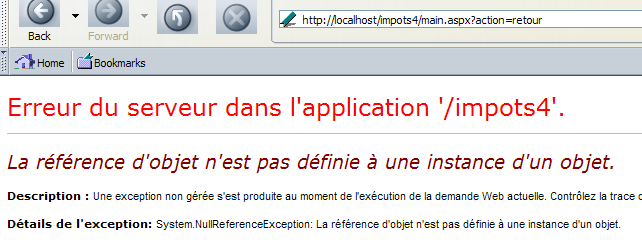
服务器发生崩溃。这是正常现象。对于操作 [retour],控制器期望在会话中找到一个 [NameValueCollection] 对象,该对象代表其需要显示的表单值。但它未能找到该对象。 控制器机制为该问题提供了一个优雅的解决方案。对于每个请求,控制器 [main.aspx] 可以验证所请求的操作是否确实是之前发送给用户的页面中的操作之一。可以使用以下机制:
- 控制器在向客户端发送响应之前,将标识该页面的信息存储在客户端的会话中
- 当收到客户端的新请求时,它会验证所请求的操作是否确实属于上次发送给该客户端的页面
- 将页面与页面中允许的操作关联的信息可写入应用程序的配置文件 [web.config] 中。
- 实践表明,应用程序控制器具有广泛的共同基础,因此可以构建一个通用控制器,并通过配置文件将其针对特定应用程序进行定制。例如,在Java Web编程领域,工具[Struts]就采用了这种方法。