11. Exercício prático: versão 3
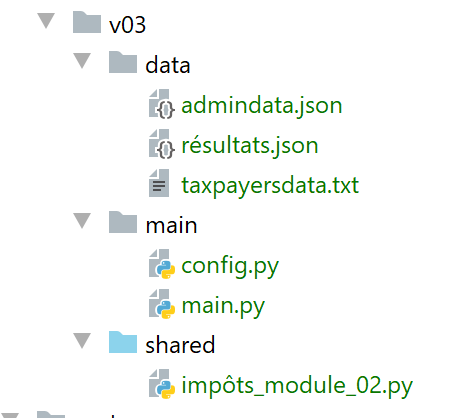
Esta nova versão introduz duas alterações:
- os dados necessários para o cálculo do imposto, fornecidos pela administração fiscal, são colocados num ficheiro jSON [admindata.json]:
{
    "limites": [9964, 27519, 73779, 156244, 0],
    "coeffR": [0, 0.14, 0.3, 0.41, 0.45],
    "coeffN": [0, 1394.96, 5798, 13913.69, 20163.45],
    "PLAFOND_QF_DEMI_PART": 1551,
    "PLAFOND_REVENUS_CELIBATAIRE_POUR_REDUCTION": 21037,
    "PLAFOND_REVENUS_COUPLE_POUR_REDUCTION": 42074,
    "VALEUR_REDUC_DEMI_PART": 3797,
    "PLAFOND_DECOTE_CELIBATAIRE": 1196,
    "PLAFOND_DECOTE_COUPLE": 1970,
    "PLAFOND_IMPOT_COUPLE_POUR_DECOTE": 2627,
    "PLAFOND_IMPOT_CELIBATAIRE_POUR_DECOTE": 1595,
    "ABATTEMENT_DIXPOURCENT_MAX": 12502,
    "ABATTEMENT_DIXPOURCENT_MIN": 437
}
- os resultados do cálculo do imposto serão igualmente colocados num ficheiro jSON [résultats.json]:
[
  {
    "marié": "oui",
    "enfants": 2,
    "salaire": 55555,
    "impôt": 2814,
    "surcôte": 0,
    "décôte": 0,
    "réduction": 0,
    "taux": 0.14
  },
  {
    "marié": "oui",
    "enfants": 2,
    "salaire": 50000,
    "impôt": 1384,
    "surcôte": 0,
    "décôte": 384,
    "réduction": 347,
    "taux": 0.14
  },
  …
  {
    "marié": "oui",
    "enfants": 3,
    "salaire": 200000,
    "impôt": 42842,
    "surcôte": 17283,
    "décôte": 0,
    "réduction": 0,
    "taux": 0.41
  }
]
11.1. O script de configuração [config.py]
O script de configuração será o seguinte:
def configure():
    import os

    # caminho absoluto da pasta deste script
    script_dir = os.path.dirname(os.path.abspath(__file__))
    # dependências da aplicação
    absolute_dependencies = [
        f"{script_dir}/../shared",
    ]
    # configuração da aplicação
    config = {
        # caminho absoluto do ficheiro dos contribuintes
        "taxpayersFilename": f"{script_dir}/../data/taxpayersdata.txt",
        # caminho absoluto do ficheiro de resultados
        "resultsFilename": f"{script_dir}/../data/résultats.json",
        # caminho absoluto do ficheiro de dados da administração fiscal
        "admindataFilename": f"{script_dir}/../data/admindata.json"
    }
    # atualização do syspath
    from myutils import set_syspath

    set_syspath(absolute_dependencies)

    # recupera-se a configuração
    return config
- linha 8: adiciona-se a pasta [shared] ao Python Path. Esta pasta contém o módulo [impôts_module_02] utilizado pelo script principal;
11.2. Script principal [main.py]
O script principal da versão 3 é o seguinte:
# configuramos a aplicação
import config

config = config.configure()

# o syspath está configurado — já é possível efetuar as importações
from impôts_module_02 import calcul_impôt, get_admindata, get_taxpayers_data, record_results_in_json_file

# ficheiro dos contribuintes
taxpayers_filename = config['taxpayersFilename']
# ficheiro de resultados
results_filename = config['resultsFilename']
# ficheiro com os dados da administração fiscal
admindata_filename = config['admindataFilename']
# código
try:

    # leitura dos dados da administração fiscal
    admindata = get_admindata(admindata_filename)
    # leitura dos dados dos contribuintes
    taxpayers = get_taxpayers_data(taxpayers_filename)
    # lista de resultados
    results = []
    # cálculo do imposto dos contribuintes
    for taxpayer in taxpayers:
        # o cálculo do imposto devolve um dicionário de chaves
        # ['marié', 'enfants', 'salaire', 'impôt', 'surcôte', 'décôte', 'réduction', 'taux']
        result = calcul_impôt(admindata, taxpayer['marié'], taxpayer['enfants'], taxpayer['salaire'])
        # o dicionário é adicionado à lista de resultados
        results.append(result)
    # os resultados são guardados
    record_results_in_json_file(results_filename, results)
except BaseException as erreur:
    # podem ocorrer vários erros: ficheiro inexistente, conteúdo do ficheiro incorreto
    # é exibido o erro e a aplicação é encerrada
    print(f"L'erreur suivante s'est produite : {erreur}]\n")
finally:
    print("Travail terminé...")
Notas
- nas linhas 2-4, configura-se a aplicação, nomeadamente o seu Python Path;
- linha 7: importam-se as funções necessárias do ficheiro [main.py];
- linhas 9-14: os nomes dos ficheiros utilizados pela aplicação são obtidos a partir da configuração;
- o script principal da versão 3 apresenta três diferenças em relação ao das versões 1 e 2:
- linha 21: os dados da administração fiscal são obtidos do ficheiro jSON [./data/admindata.json];
- linha 32: os resultados do cálculo do imposto são colocados no ficheiro jSON [./data/résultats.json];
- linha 7: as funções da versão 3 encontram-se no módulo [impots.modules.impôts_module_02];
11.3. O módulo [impots.v02.modules.impôts_module_02]
O módulo [impots.v02.modules.impôts_module_02] tem a seguinte estrutura:
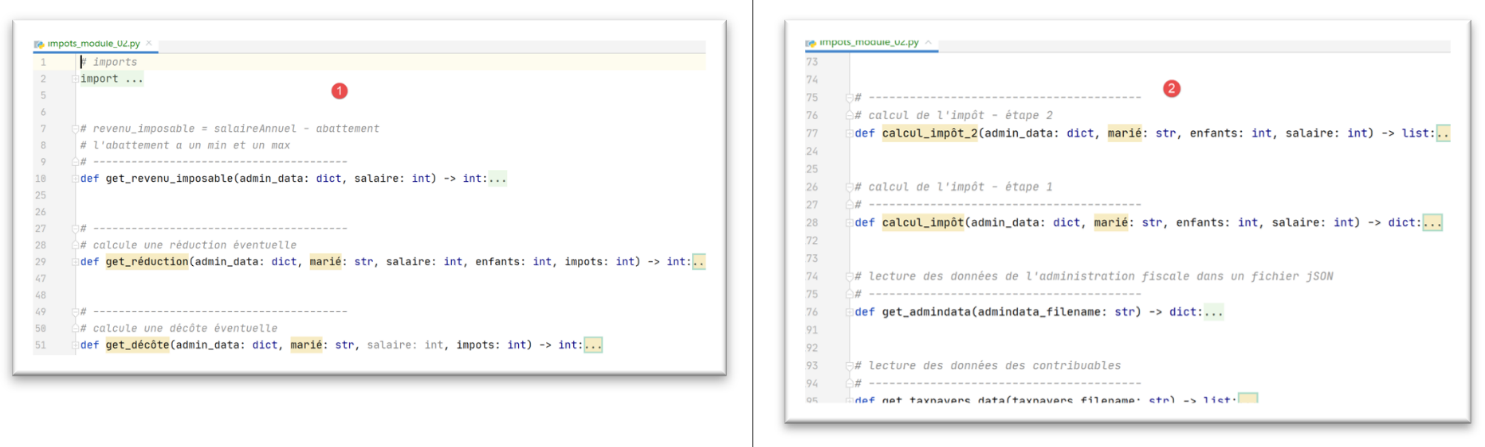
- Encontram-se neste módulo funções já presentes no módulo utilizado pela versão 1, mas com uma diferença. Quando o módulo da versão 2 retoma uma função presente no módulo da versão 1, fá-lo com um parâmetro adicional: [adminData] (linhas 29, 51, 77, 127). Este parâmetro representa o dicionário de dados fiscais provenientes do ficheiro jSON [adminData.json]. No módulo da versão 1, estes dados não precisavam de ser passados para as funções, uma vez que estavam definidos globalmente para as mesmas, o que fazia com que as funções os conhecessem;
11.4. Leitura dos dados da administração fiscal
A função [get_admindata] é a seguinte:
# leitura dos dados da administração fiscal num ficheiro jSON
# ----------------------------------------
def get_admindata(admindata_filename: str) -> dict:
    # leitura dos dados da administração fiscal
    # deixa-se que as eventuais exceções sejam reportadas: ausência do ficheiro, conteúdo incorreto do ficheiro jSON
    file = None
    try:
        # abertura do ficheiro jSON em modo de leitura
        file = codecs.open(admindata_filename, "r", "utf8")
        # transferência do conteúdo para um dicionário
        admin_data = json.load(file)
        # retorna o resultado
        return admin_data
    finally:
        # fecho do ficheiro, caso tenha sido aberto
        if file:
            file.close()
- linha 9: recupera-se o dicionário de imagens do ficheiro jSON lido;
11.5. Registo dos resultados
A função [record_results_in_json_file] é a seguinte:
# gravação dos resultados num ficheiro jSON
# ----------------------------------------
def record_results_in_json_file(results_filename: str, results: list):
    file = None
    try:
        # abertura do ficheiro de resultados
        file = codecs.open(results_filename, "w", "utf8")
        # gravação em bloco
        json.dump(results, file, ensure_ascii=False)
    finally:
        # fecha-se o ficheiro, caso tenha sido aberto
        if file:
            file.close()
- linha 7: cria-se um ficheiro codificado em UTF-8;
- linha 9: escreve-se a lista [results] no ficheiro jSON. Os caracteres UTF-8 não são escapados (ensure_ascii=False);
11.6. Alterações nas funções
Algumas funções passam agora a receber um parâmetro adicional [admin_data]. Isto altera ligeiramente a sua sintaxe. Tomemos, por exemplo, a função [calcul_impôt]:
# cálculo do imposto - etapa 1
# ----------------------------------------
def calcul_impôt(admin_data: dict, marié: str, enfants: int, salaire: int) -> dict:
    # casado: sim, não
    # filhos: número de filhos
    # salário: salário anual
    # limites, coeffr, coeffn: as tabelas de dados que permitem o cálculo do imposto
    #
    # cálculo do imposto com filhos
    result1 = calcul_impôt_2(admin_data, marié, enfants, salaire)
    impot1 = result1["impôt"]
    # cálculo do imposto sem filhos
    if enfants != 0:
        result2 = calcul_impôt_2(admin_data, marié, 0, salaire)
        impot2 = result2["impôt"]
        # aplicação do limite máximo do quociente familiar
        if enfants < 3:
            # PLAFOND_QF_DEMI_PART euros para os dois primeiros filhos
            impot2 = impot2 - enfants * admin_data['plafond_qf_demi_part']
        else:
            # PLAFOND_QF_DEMI_PART euros para os dois primeiros filhos, o dobro para os seguintes
            impot2 = impot2 - 2 * admin_data['plafond_qf_demi_part'] - (enfants - 2) * 2 * admin_data[
                'plafond_qf_demi_part']
    else:
        impot2 = impot1
        result2 = result1

    # considera-se o imposto mais elevado, com a taxa e a sobretaxa correspondentes
    if impot1 > impot2:
        impot = impot1
        taux = result1["taux"]
        surcôte = result1["surcôte"]
    else:
        surcôte = impot2 - impot1 + result2["surcôte"]
        impot = impot2
        taux = result2["taux"]

    # cálculo de uma eventual redução
    décôte = get_décôte(admin_data, marié, salaire, impot)
    impot -= décôte
    # cálculo de uma eventual redução de impostos
    réduction = get_réduction(admin_data, marié, salaire, enfants, impot)
    impot -= réduction
    # resultado
    return {"marié": marié, "enfants": enfants, "salaire": salaire, "impôt": math.floor(impot), "surcôte": surcôte,
            "décôte": décôte, "réduction": réduction, "taux": taux}
Notas
- nos casos em que a função [calcul_impôt] chama outras funções, passa a função [admin_data] como primeiro parâmetro (linhas 10, 14, 39, 42);
- sempre que a função [calcul_impôt] utiliza constantes fiscais, passa agora pelo dicionário [admin_data] (linhas 19, 22);
Todas as funções que recebem [admin_data] como parâmetro sofrem este mesmo tipo de alterações.
11.7. Resultados
Os resultados obtidos são os apresentados no início do parágrafo 8.3.