10. Servizi Web
10.1. Introduzione
Nel capitolo precedente abbiamo presentato diverse applicazioni client-server TCP/IP. Poiché i client e il server si scambiano righe di testo, possono essere scritti in qualsiasi linguaggio. Il client deve semplicemente conoscere il protocollo di comunicazione previsto dal server. I servizi Web sono applicazioni server TCP/IP che presentano le seguenti caratteristiche:
- Sono ospitate da server web e il protocollo di comunicazione client-server è quindi HTTP (HyperText Transport Protocol), un protocollo che si sovrappone a TCP-IP.
- Il servizio Web dispone di un protocollo di comunicazione standard indipendentemente dal servizio fornito. Un servizio Web offre diversi servizi: S1, S2, ..., Sn. Ciascuno di essi richiede parametri forniti dal client e restituisce a quest’ultimo un risultato. Per ogni servizio, il client deve conoscere:
- il nome esatto del servizio, se
- l’elenco dei parametri da fornire e il loro tipo
- il tipo di risultato restituito dal servizio
Una volta noti questi elementi, il dialogo client-server segue lo stesso formato indipendentemente dal servizio web interpellato. La scrittura dei client è così standardizzata.
- Per motivi di sicurezza contro gli attacchi provenienti da Internet, molte organizzazioni dispongono di reti private e aprono verso Internet solo alcune porte dei propri server: essenzialmente la porta 80 del servizio web. Tutte le altre porte sono bloccate. Pertanto, le applicazioni client-server descritte nel capitolo precedente sono realizzate all’interno della rete privata (intranet) e in genere non sono accessibili dall’esterno. Ospitare un servizio su un server web lo rende accessibile a tutta la comunità di Internet.
- Il servizio Web può essere modellato come un oggetto remoto. I servizi offerti diventano quindi metodi di tale oggetto. Un client può accedere a questo oggetto remoto come se fosse locale. Ciò nasconde l’intera parte relativa alla comunicazione di rete e consente di realizzare un client indipendente da tale livello. Se quest’ultimo dovesse cambiare, il client non dovrebbe essere modificato. Si tratta di un enorme vantaggio e probabilmente del principale punto di forza dei servizi Web.
- Come per le applicazioni client-server TCP/IP presentate nel capitolo precedente, il client e il server possono essere scritti in qualsiasi linguaggio. Essi si scambiano righe di testo. Queste sono composte da due parti:
- le intestazioni necessarie al protocollo HTTP
- il corpo del messaggio. Per una risposta del server al client, quest’ultimo è in formato XML (eXtensible Markup Language). Per una richiesta del client al server, il corpo del messaggio può assumere diverse forme, tra cui XML. La richiesta XML del client può avere un formato particolare denominato SOAP (Simple Object Access Protocol). In questo caso, anche la risposta del server segue il formato SOAP.
10.2. I browser e XML
I servizi Web inviano XML ai propri clienti. I browser possono reagire in modo diverso alla ricezione di questo flusso XML. Internet Explorer dispone di un foglio di stile predefinito che ne consente la visualizzazione. Netscape Communicator, invece, non dispone di tale foglio di stile e non visualizza il codice XML ricevuto. È necessario visualizzare il codice sorgente della pagina ricevuta per accedere al XML. Ecco un esempio per il seguente codice XML:
<?xml version="1.0" encoding="utf-8"?>
<string xmlns="st.istia.univ-angers.fr">bonjour de nouveau !</string>
Internet Explorer visualizzerà la seguente pagina:

mentre Netscape Navigator visualizzerà:

Se si visualizza il codice sorgente della pagina ricevuta da Netscape, si ottiene:

Netscape ha ricevuto effettivamente lo stesso contenuto di Internet Explorer, ma lo ha visualizzato in modo diverso. Di seguito utilizzeremo Internet Explorer per le schermate.
10.3. Un primo servizio web
Scopriremo i servizi web attraverso un esempio semplicissimo declinato in tre versioni.
10.3.1. Versione 1
Per questa prima versione useremo VS.NET, che presenta il vantaggio di poter generare uno scheletro di servizio web immediatamente operativo. Una volta compresa questa architettura, potremo iniziare a muovere i primi passi in autonomia. Questo sarà l’oggetto delle versioni successive.
Con VS.NET, creiamo un nuovo progetto con l’opzione [Fichier/Nouveau/Projet]:
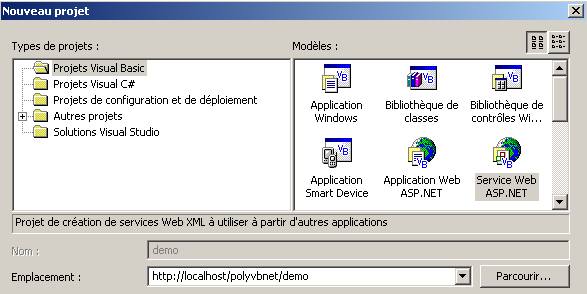
Si notino i seguenti punti:
- il tipo di progetto è Visual Basic (riquadro a sinistra)
- il modello del progetto è Servizio Web ASP.NET (riquadro di destra)
- la posizione è libera. In questo caso, il servizio Web sarà ospitato da un server Web locale IIS. Il suo URL sarà quindi http://localhost/[chemin], dove [chemin] è da definire. Qui scegliamo il percorso http://localhost/polyvbnet/demo. VS.NET creerà quindi una cartella per questo progetto. Dove? Il server IIS ha una radice per l’albero dei documenti web che distribuisce. Chiamiamo questa radice <IISroot>. Essa corrisponde a URL http://localhost. Ne consegue che l'URL http://localhost/polyvbnet/demo sarà associata alla cartella <IISroot>/polyvbnet/demo. <IISroot> è normalmente la cartella \inetpub\wwwroot sul disco in cui è stato installato IIS. Nel nostro esempio si tratta del disco E. La cartella creata da VS.NET è quindi la cartella e:\inetpub\wwwroot\polyvbnet\demo:
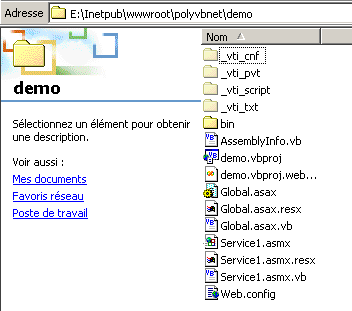
Come sempre, vengono create numerose cartelle. Non tutte sono rilevanti. Ci limiteremo a spiegare solo quelle di cui abbiamo bisogno in un determinato momento. VS.NET ha creato un progetto:
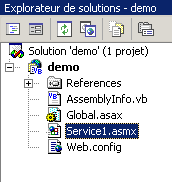
Troviamo alcuni dei file presenti nella cartella fisica del progetto. Il file più interessante per noi è quello con estensione asmx. È l’estensione dei servizi web. Un servizio web viene gestito da VS.NET come un’applicazione Windows, c.a.d, ovvero un’applicazione dotata di un’interfaccia grafica e del codice necessario per gestirla. Ecco perché abbiamo una finestra di progettazione:
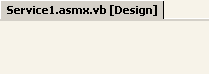
Normalmente un servizio web non ha un'interfaccia grafica. Rappresenta un oggetto che può essere richiamato da remoto. Dispone di metodi che vengono richiamati dalle applicazioni. Lo considereremo quindi come un oggetto classico, con la particolarità di poter essere istanziato da remoto tramite la rete. Pertanto, non utilizzeremo la finestra di progettazione presentata da VS.NET. Concentriamoci piuttosto sul codice del servizio utilizzando l’opzione Visualizza/Codice:

Ci sono diversi punti da notare:
- il file si chiama Service1.asmx.vb e non Service1.asmx. Torneremo sul contenuto del file Service1.asmx più avanti.
- si nota una finestra di codice simile a quella che avevamo quando creavamo applicazioni Windows con VS.NET
Il codice generato da VS.NET è il seguente:
Imports System.Web.Services

<System.Web.Services.WebService(Namespace := "http://tempuri.org/demo/Service1")> _
Public Class Service1
    Inherits System.Web.Services.WebService

#Regione "Codice generato dal Web Service Designer"

    Public Sub New()
        MyBase.New()

        'Questa chiamata è richiesta dal Web Service Designer.
        InitializeComponent()

        'Aggiungere il codice di inizializzazione dopo la chiamata InitializeComponent()

    End Sub

    'Richiesto dal Web Service Designer
    Private components As System.ComponentModel.IContainer

    'REMARQUE: la procedura seguente è richiesta dal Web Service Designer
    'Può essere modificata utilizzando il Web Service Designer.
    'Non modificarla utilizzando l'editor di codice.
    <System.Diagnostics.DebuggerStepThrough()> Private Sub InitializeComponent()
        components = New System.ComponentModel.Container()
    End Sub

    Protected Overloads Overrides Sub Dispose(ByVal disposing As Boolean)
        'CODEGEN: questa procedura è richiesta dal Web Service Designer
        'Non modificarla utilizzando l'editor di codice.
        If disposing Then
            If Not (components Is Nothing) Then
                components.Dispose()
            End If
        End If
        MyBase.Dispose(disposing)
    End Sub

#Fine regione

    ' EXEMPLE DE SERVICE WEB
    ' L'esempio di servizio HelloWorld() restituisce la stringa "Hello World".
    ' Per generare il progetto, non commentare le righe seguenti, quindi salvare e generare il progetto.
    ' Per testare questo servizio Web, assicurarsi che il file .asmx sia la pagina iniziale
    ' e premere F5.
    '
    '<WebMethod()> Public Function HelloWorld() As String
    '    HelloWorld = "Hello World"
    ' Fine funzione

End Class
Innanzitutto, notiamo che abbiamo qui una classe, la classe Service1, che deriva dalla classe WebService:
Questo ci porta a importare lo spazio dei nomi System.Web.Services:
Imports System.Web.Services
La dichiarazione della classe è preceduta da un attributo di compilazione:
<System.Web.Services.WebService(Namespace := "http://tempuri.org/demo/Service1")> _
Public Class Service1
    Inherits System.Web.Services.WebService
L'attributo System.Web.Services.WebService() indica che la classe che segue è un servizio web. Questo attributo ammette diversi parametri, tra cui uno denominato NameSpace. Serve a collocare il servizio web in uno spazio dei nomi. Infatti, è possibile immaginare che esistano diversi servizi web denominati meteo nel mondo. Abbiamo bisogno di un modo per distinguerli. È lo spazio dei nomi a permetterlo. Uno potrebbe chiamarsi [espacenom1].meteo e un altro [espacenom2].meteo. Si tratta di un concetto analogo agli spazi dei nomi delle classi. VS.NET ha generato automaticamente del codice che ha inserito in una regione del codice sorgente:
Se osserviamo questo codice, riconosciamo quello che il progettista generava quando si creavano applicazioni Windows. Si tratta di un codice che potremo semplicemente eliminare se non disponiamo di un’interfaccia grafica, come nel caso dei servizi web.
La lezione si conclude con un esempio di come potrebbe essere un servizio web:
#Fine regione

    ' EXEMPLE DE SERVICE WEB
    ' L'esempio di servizio HelloWorld() restituisce la stringa "Hello World".
    ' Per generare il progetto, non commentare le righe seguenti, quindi salvare e generare il progetto.
    ' Per testare questo servizio Web, assicurarsi che il file .asmx sia la pagina iniziale
    ' e premere F5.
    '
    '<WebMethod()> Public Function HelloWorld() As String
    '    HelloWorld = "Hello World"
    ' End Function
Sulla base di quanto appena detto, ripuliamo il codice in modo che diventi il seguente:
Imports System.Web.Services

<System.Web.Services.WebService(Namespace:="st.istia.univ-angers.fr")> _
Public Class Bonjour
    Inherits System.Web.Services.WebService

    <WebMethod()> Public Function Bonjour() As String
        Return "bonjour !"
    End Function
End Class
Ora la situazione è un po’ più chiara.
- un servizio web è una classe derivata dalla classe WebService
- la classe è qualificata dall’attributo <System.Web.Services.WebService(Namespace:="st.istia.univ-angers.fr")>. Collochiamo quindi il nostro servizio nello spazio dei nomi st.istia.univ-angers.fr.
- I metodi della classe sono qualificati dall’attributo <WebMethod()>, che indica che si tratta di un metodo che può essere chiamato in remoto tramite la rete
La classe che gestisce il nostro servizio web si chiama quindi Bonjour e ha un unico metodo, anch’esso denominato Bonjour, che restituisce una stringa di caratteri. Siamo pronti per un primo test.
- Avviamo il server web IIS, se non è già stato fatto
- utilizziamo l’opzione Debug/Esegui senza debug. VS.NET
VS.NET compilerà quindi l’intera applicazione, avvierà un browser (spesso Internet Explorer, se presente) e visualizzerà l’URL http://localhost/polyvbnet/demo/Service1.asmx:
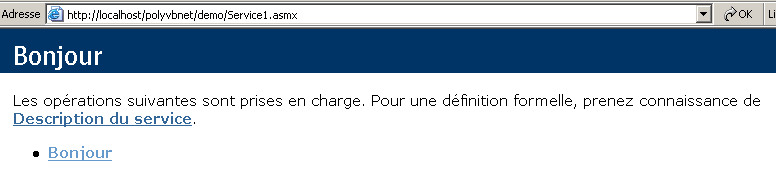
Perché l’URL http://localhost/polyvbnet/demo/Service1.asmx? Perché era l’unico file .asmx del progetto:
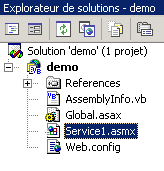
Se ci fossero stati più file .asmx, avremmo dovuto specificare quale doveva essere eseguito per primo. Per farlo, basta cliccare con il tasto destro del mouse sul file .asmx in questione e selezionare l’opzione [Définir comme page de démarrage].
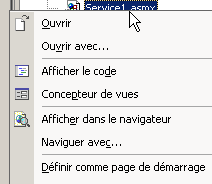
Potrebbe interessarci sapere cosa contiene il file service1.asmx. Infatti, con VS.NET abbiamo lavorato sul file service1.asmx.vb e non sul file service1.asmx. Questo file si trova nella cartella del progetto:
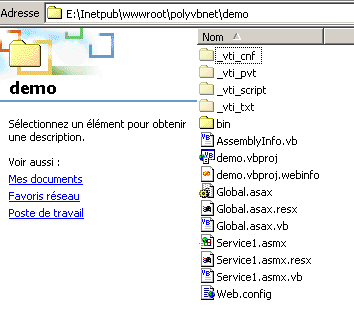
Apriamolo con un editor di testo (Blocco note o altro). Si ottiene il seguente contenuto:
Il file contiene una semplice direttiva destinata al server IIS che indica:
- che si tratta di un servizio web (parola chiave WebService)
- che il linguaggio della classe di questo servizio è Visual Basic (Language="vb")
- che il codice sorgente di questa classe si trova nel file Service1.asmx.vb (Codebehind="Service1.asmx.vb")
- che la classe che implementa il servizio si chiama demo.Bonjour (Class="demo.Bonjour"). Si noti che VS.NET ha inserito la classe Bonjour nello spazio dei nomi demo, che è anche il nome del progetto.
Torniamo alla pagina ottenuta all'URL http://localhost/polyvbnet/demo/Service1.asmx:
Chi ha scritto il codice HTML della pagina sopra riportata? Non siamo stati noi, lo sappiamo bene. È stato IIS, che presenta i servizi web in modo standard. Questa pagina ci propone due link. Seguiamo il primo, [Description du service]:
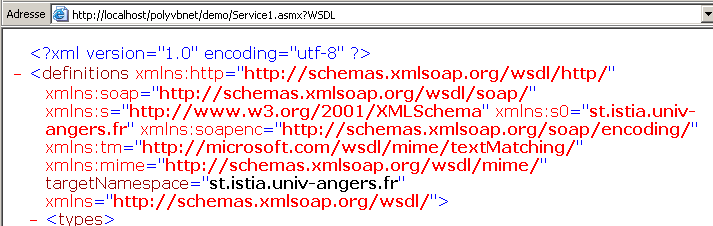
Oops... è un codice XML piuttosto incomprensibile. Notiamo comunque il codice URL
http://localhost/polyvbnet/demo/Service1.asmx?WSDL. Aprite un browser e digitate direttamente questo URL. Otterrete lo stesso risultato di prima. Ricordiamo quindi che l'URL http://serviceweb?WSDL dà accesso alla descrizione XML del servizio web. Torniamo alla pagina iniziale e selezioniamo il link [Bonjour]. Ricordiamo che Bonjour è un metodo del servizio web. Se avessimo avuto più metodi, sarebbero stati tutti presentati qui. Otteniamo la seguente nuova pagina:
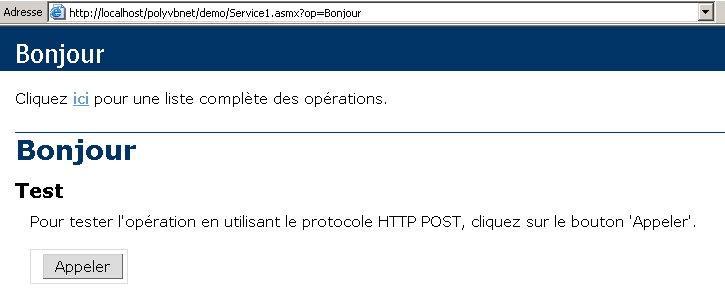
Abbiamo volutamente troncato la pagina ottenuta per non appesantire la nostra dimostrazione. Notiamo nuovamente l’URL ottenuto:
Se digitiamo direttamente questo URL in un browser, otterremo lo stesso risultato di cui sopra. Ci viene suggerito di utilizzare il pulsante [Appeler]. Facciamolo. Otteniamo una nuova pagina:

Si tratta ancora di XML. Vi ritroviamo due informazioni che erano presenti nel nostro servizio web:
- lo spazio dei nomi st.istia.univ-angers.fr del nostro servizio
<System.Web.Services.WebService(Namespace:="st.istia.univ-angers.fr")>
- il valore restituito dal metodo Bonjour:
Return "bonjour !"
Cosa abbiamo imparato?
- come scrivere un servizio web S
- come richiamarlo
Ora ci occuperemo di scrivere un servizio web senza l'ausilio di VS.NET.
10.3.2. Versione 2
Nell’esempio precedente, VS.NET ha svolto molte operazioni in autonomia. È possibile creare un servizio web senza questo strumento? La risposta è sì e ora ve lo mostreremo. Con un editor di testo, realizzeremo il seguente servizio web:
Imports System.Web.Services

<System.Web.Services.WebService(Namespace:="st.istia.univ-angers.fr")> _
Public Class Bonjour2
    Inherits System.Web.Services.WebService

    <WebMethod()> Public Function getBonjour() As String
        Return "bonjour de nouveau !"
    End Function
End Class
La classe si chiama Bonjour2 e ha un metodo chiamato getBonjour. È stata inserita nel file demo2.vb, a sua volta situato nella struttura del server IIS, all’interno della cartella E:\Inetpub\wwwroot\polyvbnet\demo2. Si tratta di una classica classe VB.NET che è quindi possibile compilare:
dos>vbc /out:demo2 /t:library /r:system.dll /r:system.web.services.dll demo2.vb

dos>dir
02/03/2004  18:04                  286 demo2.vb
02/03/2004  18:10                   77 demo2.asmx
02/03/2004  18:12                3 072 demo2.dll
Inseriamo l'assieme demo2.dll in una cartella denominata "bin" (il nome è obbligatorio):
Ora creiamo il file demo2.asmx. Sarà questo il file richiamato dai client web. Il suo contenuto è il seguente:
Abbiamo già incontrato questa direttiva. Essa indica che:
- la classe del servizio web si chiama Bonjour2 e si trova nell’assembly demo2.dll. IIS cercherà questo assembly in diverse posizioni, in particolare nella cartella bin del servizio web. Ecco perché abbiamo collocato lì l’assembly demo2.dll.
Ora possiamo eseguire diversi test. Ci assicuriamo che IIS sia attivo e richiediamo con un browser l’URL http://localhost/polyvbnet/demo2/demo2.asmx:
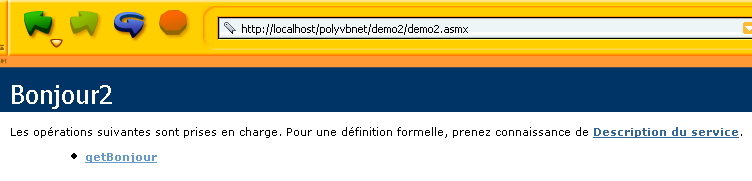
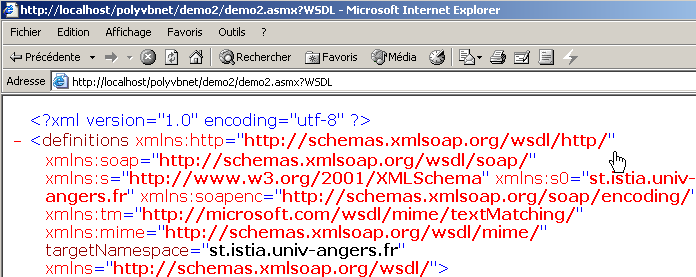
Quindi l’URL http://localhost/polyvbnet/demo2/demo2.asmx?WSDL
Poi l'URL http://localhost/polyvbnet/demo2/demo2.asmx?op=getBonjour, dove getBonjour è il nome dell'unico metodo del nostro servizio web:
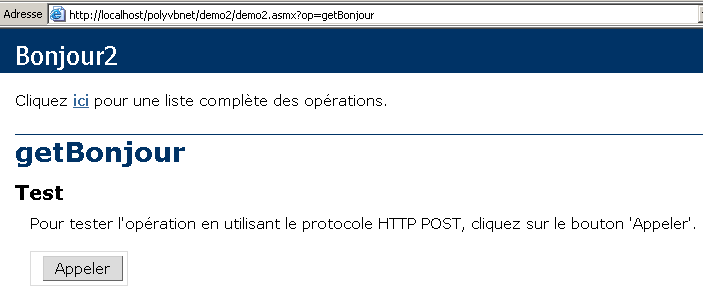
Utilizziamo il pulsante [Appeler] riportato sopra:

Otteniamo correttamente il risultato della chiamata al metodo getBonjour del servizio web. Ora sappiamo come costruire un servizio web senza vs.net. D'ora in poi tralasceremo il modo in cui è costruito il servizio web per concentrarci esclusivamente sui file fondamentali.
10.3.3. Versione 3
Le due versioni precedenti del servizio web [Bonjour] utilizzavano due file:
- un file .asmx, punto di ingresso del servizio web
- un file .vb, codice sorgente del servizio web
Qui dimostriamo che è possibile limitarsi al solo file .asmx. Il codice del servizio demo3.asmx è il seguente:
Notiamo che il codice sorgente del servizio si trova ora direttamente nel file sorgente demo3.asmx. La direttiva
non fa più riferimento a una classe in un assembly esterno, ma a una classe presente nello stesso file sorgente. Inseriamo quest’ultimo nella cartella <IISroot>\polyvbnet\demo3:
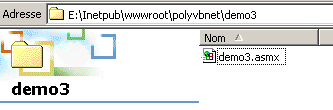
Avviamo IIS e richiediamo l'URL http://localhost/polyvbnet/demo3/demo3.asmx:
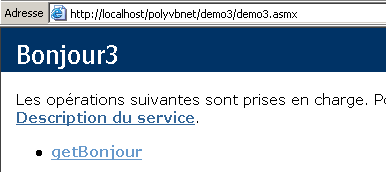
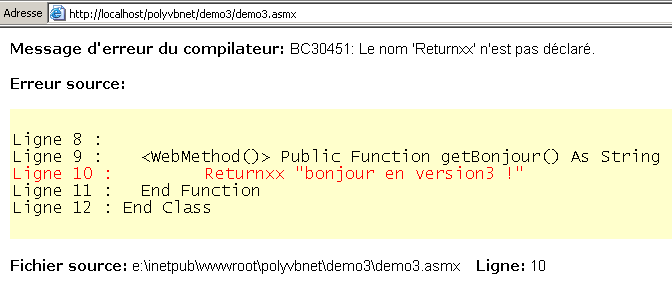
Notiamo una differenza significativa rispetto alla versione precedente: non abbiamo dovuto compilare il codice VB del servizio. IIS ha eseguito questa compilazione autonomamente tramite il compilatore VB.NET installato sulla stessa macchina. Successivamente ha generato la pagina. In caso di errore di compilazione, questo verrà segnalato da IIS:
10.3.4. Versione 4
Qui ci occupiamo della configurazione del server IIS. Finora abbiamo sempre collocato i nostri servizi web nella directory radice <IISroot> del server IIS, in questo caso [e:\inetpub\wwwroot]. Qui dimostriamo che è possibile collocare il servizio web in qualsiasi posizione. Ciò avviene tramite le cartelle virtuali di IIS. Collochiamo il nostro servizio nella seguente cartella:
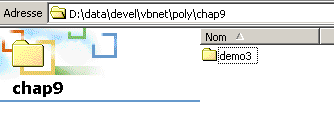
La cartella [D:\data\devel\vbnet\poly\chap9\demo3] non si trova nella struttura di directory del server IIS. È necessario indicarlo al server creando una cartella virtuale IIS. Avviamo IIS e selezioniamo l’opzione [Avancé] riportata di seguito:
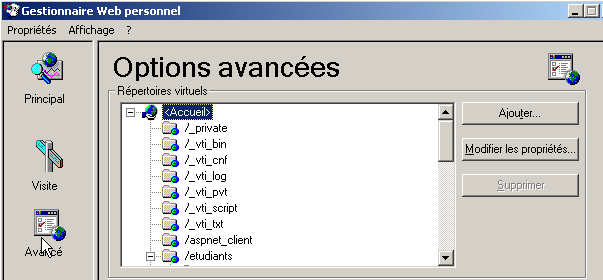
Viene visualizzato un elenco di directory virtuali. Non ci soffermeremo su questo aspetto. Creiamo una nuova directory virtuale utilizzando il pulsante [Ajouter] sopra indicato:
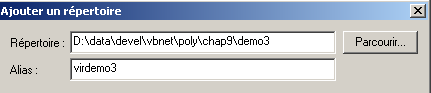
Utilizzando il pulsante [Parcourir], indichiamo la cartella fisica contenente il servizio web, in questo caso la cartella [D:\data\devel\vbnet\poly\chap9\demo3]. Assegniamo un nome logico (virtuale) a questa cartella: [virdemo3]. Ciò significa che i documenti all’interno della cartella fisica [D:\data\devel\vbnet\poly\chap9\demo3] saranno accessibili in rete tramite l’URL [http://<machine>/virdemo3]. La finestra di dialogo sopra riportata contiene altri parametri che lasciamo invariati. Confermiamo le impostazioni. La nuova cartella virtuale compare nell’elenco delle cartelle virtuali di IIS:
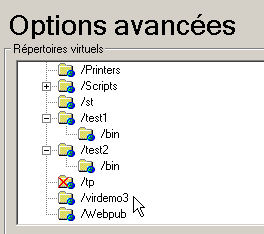
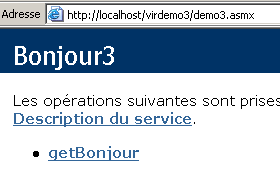
Ora apriamo un browser e digitiamo l’URL [http://localhost/virdemo3/demo3.asmx]. Otteniamo lo stesso risultato di prima:
10.3.5. Conclusione
Abbiamo illustrato diversi modi per creare un servizio web. In seguito, utilizzeremo il metodo della versione 3 per la creazione del servizio e il metodo 4 per la sua localizzazione. In questo modo non avremo bisogno di VS.NET. Tuttavia, va sottolineato l’interesse nell’utilizzare VS.NET per l’aiuto che fornisce nel debug. Esistono strumenti gratuiti per lo sviluppo di applicazioni web, in particolare il prodotto WebMatrix sponsorizzato da Microsoft, disponibile su URL [http://www.asp.net/webmatrix]. Si tratta di uno strumento eccellente per avvicinarsi alla programmazione web senza investimenti iniziali.
10.4. Un servizio web di operazioni
Consideriamo un servizio web che offre cinque funzioni:
- aggiungere(a,b) che restituirà a+b
- sottrai(a,b) che restituirà a-b
- moltiplicare(a,b) che restituirà a*b
- dividere(a,b) che restituirà a/b
- tutto(a,b) che restituirà l'array [a+b,a-b,a*b,a/b]
Il codice VB.NET di questo servizio è il seguente:
<%@ WebService language="VB" class=operations %>

imports system.web.services

<WebService(Namespace:="st.istia.univ-angers.fr")> _
   Public Class operations
      Inherits WebService

      <WebMethod>  _
      Function ajouter(a As Double, b As Double) As Double
         Return a + b
      End Function

      <WebMethod>  _
      Function soustraire(a As Double, b As Double) As Double
         Return a - b
      End Function

      <WebMethod>  _
      Function multiplier(a As Double, b As Double) As Double
         Return a * b
      End Function

      <WebMethod>  _
      Function diviser(a As Double, b As Double) As Double
         Return a / b
      End Function

      <WebMethod>  _
      Function toutfaire(a As Double, b As Double) As Double()
         Return New Double() {a + b, a - b, a * b, a / b}
      End Function
   End Class
Riportiamo qui alcune spiegazioni già fornite, ma che meritano di essere ribadite o integrate. La classe operations è simile a una classe VB.NET, con tuttavia alcuni punti da notare:
- i metodi sono preceduti da un attributo <WebMethod()> che indica al compilatore quali metodi devono essere “pubblicati” (c.a.d) e resi disponibili al client. Un metodo non preceduto da questo attributo risulterebbe invisibile ai client remoti. Potrebbe trattarsi di un metodo interno utilizzato da altri metodi ma non destinato alla pubblicazione.
- La classe deriva dalla classe WebService definita nello spazio dei nomi System.Web.Services. Questa ereditarietà non è sempre obbligatoria. In questo esempio, in particolare, se ne potrebbe fare a meno.
- La classe stessa è preceduta da un attributo <WebService(Namespace="st.istia.univ-angers.fr")> destinato ad assegnare uno spazio dei nomi al servizio web. Un fornitore di classi assegna uno spazio dei nomi alle proprie classi per conferire loro un nome univoco ed evitare così conflitti con classi di altri fornitori che potrebbero avere lo stesso nome. Per i servizi web vale lo stesso principio. Ogni servizio web deve poter essere identificato da un nome univoco, in questo caso st.istia.univ-angers.fr.
- Non abbiamo definito alcun costruttore. Verrà quindi utilizzato implicitamente il costruttore della classe padre.
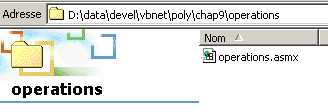
Il codice sorgente precedente non è destinato direttamente al compilatore VB.NET, bensì al server Web IIS. Deve recare il suffisso .asmx ed essere salvato nella struttura di directory del server Web. Qui lo salviamo con il nome operations.asmx nella cartella <IISroot>\polyvbnet\operations:
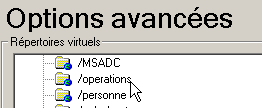
A questa cartella fisica associamo la cartella virtuale IIS [operations]:
 |  |
Accediamo al servizio tramite un browser. Il file URl da richiedere è [http://localhost/operations/operations.asmx]:
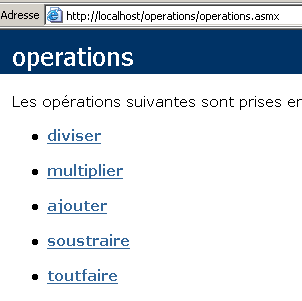
Otteniamo un documento web con un link per ciascuno dei metodi definiti nel servizio web operations. Seguiamo il link ajouter:
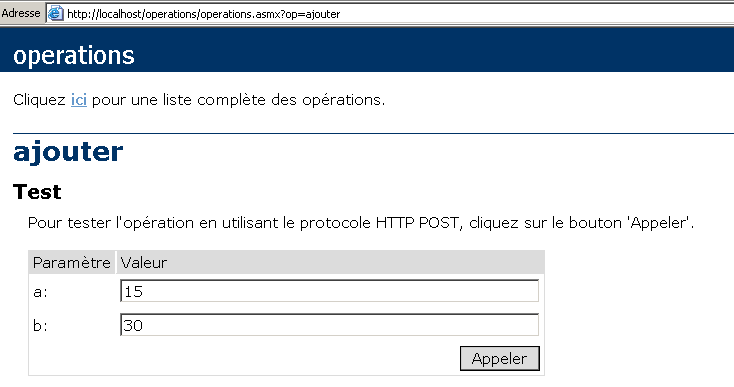
La pagina ottenuta ci propone di testare il metodo ajouter fornendogli i due argomenti a e b di cui ha bisogno. Ricordiamo la definizione del metodo ajouter:
Si noti che la pagina ha ripreso i nomi degli argomenti a e b utilizzati nella definizione del metodo. Si utilizza il pulsante Appeler e si ottiene la seguente risposta in una finestra separata del browser:

Se, come sopra, si esegue [Affichage/Source], si ottiene il codice seguente:

Ripetiamo l’operazione per il metodo [toutfaire]:
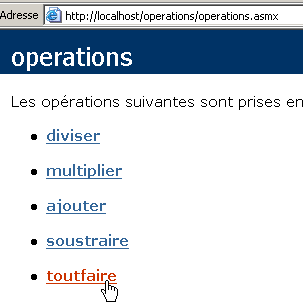
Otteniamo la seguente pagina:
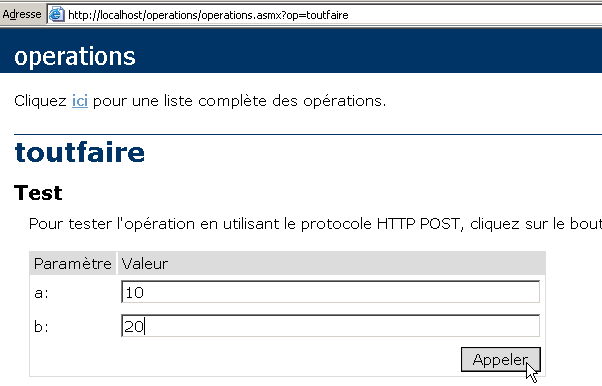
Utilizziamo il pulsante [Appeler] qui sopra:
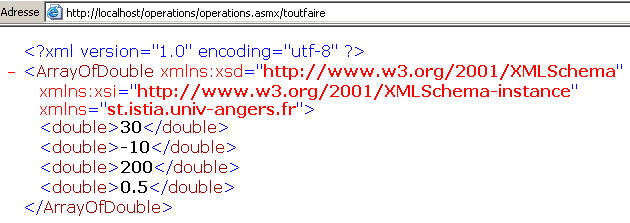
In ogni caso, la risposta del server ha il seguente formato:
- la risposta è nel formato XML
- la riga 1 è standard ed è sempre presente nella risposta
- le righe successive dipendono dal tipo di risultato (doppio, ArrayOfDouble), dal numero di risultati e dallo spazio dei nomi del servizio web (in questo caso st.istia.univ-angers.fr).
Esistono diversi metodi per interrogare un servizio web e ottenere la sua risposta. Torniamo al URL del servizio:
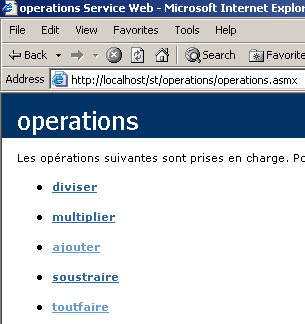
e seguiamo il link [ajouter]. Nella pagina visualizzata sono illustrati due metodi per interrogare la funzione [ajouter] del servizio web:
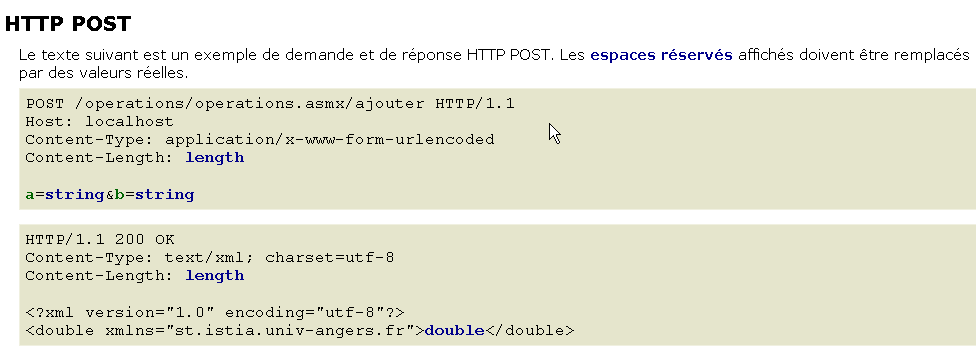
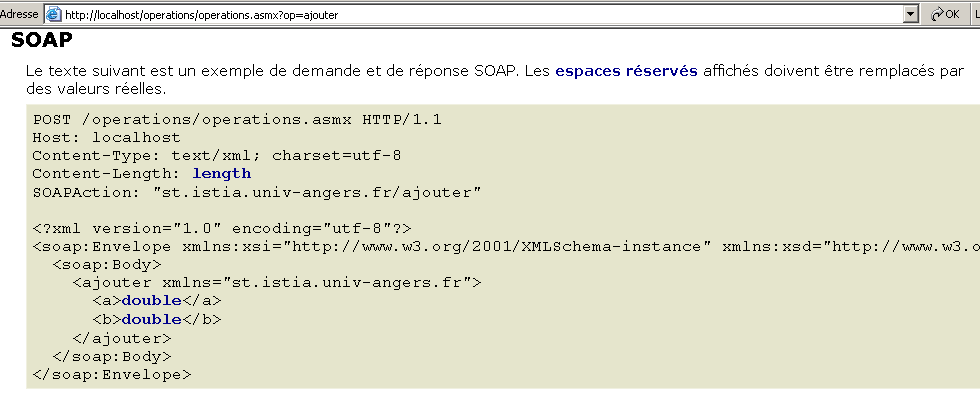
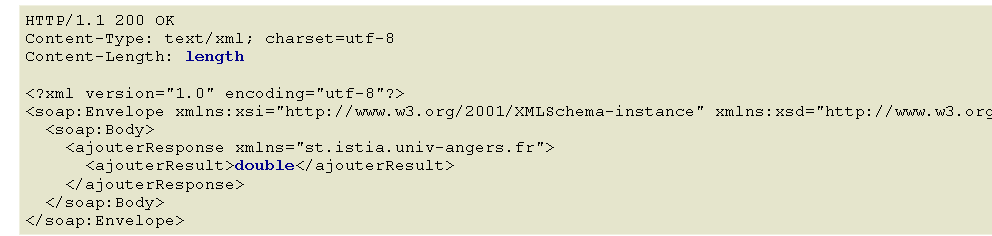
Questi due metodi di accesso alle funzioni di un servizio web sono denominati rispettivamente: HTTP-POST e SOAP. Li esamineremo ora uno dopo l'altro.
Nota: nelle prime versioni di VS.NET esisteva un terzo metodo denominato HTTP-GET. Alla data di redazione del presente documento (marzo 2004), tale metodo non sembra più essere disponibile. Ciò significa che il servizio web generato da VS.NET non accetta richieste GET. Ciò non significa che non sia possibile scrivere servizi web in grado di accettare richieste GET, in particolare utilizzando strumenti diversi da VS.NET o semplicemente a mano.
10.5. Un client HTTP-POST
Seguiamo il metodo proposto dal servizio web:
Commentiamo quanto scritto. Innanzitutto, il client web deve inviare le seguenti intestazioni HTTP:
Il client web effettua una richiesta POST all'endpoint URL /operations/operations.asmx/aggiungi secondo il protocollo HTTP versione 1.1 | |
Si specifica il computer di destinazione della richiesta. In questo caso localhost. Questa intestazione è stata resa obbligatoria dalla versione 1.1 del protocollo HTTP | |
Qui si specifica che, dopo le intestazioni HTTP, verranno inviati parametri aggiuntivi in formato urlencoded. Questo formato sostituisce alcuni caratteri con il loro codice esadecimale. | |
Si tratta della lunghezza in caratteri della stringa di parametri che verrà inviata dopo le intestazioni HTTP. |
Le intestazioni HTTP sono seguite da una riga vuota e poi dalla stringa di parametri del POST composta da [Content-Length] caratteri nella forma a=XX&b=YY, dove XX e YY sono le stringhe "urlencodate" dei valori dei parametri a e b. Sappiamo abbastanza per riprodurre quanto sopra con il nostro client TCP generico già utilizzato nel capitolo sulla programmazione TCP-IP:
- avviamo IIS
- il servizio è disponibile all'URL [http://localhost/operations/operations.asmx]
- utilizziamo il client TCP generico in una finestra DOS
dos>clttcpgenerique localhost 80
Commandes :
POST /operations/operations.asmx/ajouter HTTP/1.1
HOST: localhost
Connection: close
Content-Type: application/x-www-form-urlencoded
Content-length: 7
<-- HTTP/1.1 100 Continue
<-- Server: Microsoft-IIS/5.0
<-- Date: Wed, 03 Mar 2004 13:55:17 GMT
<-- X-Powered-By: ASP.NET
<--
a=2&b=3
<-- HTTP/1.1 200 OK
<-- Server: Microsoft-IIS/5.0
<-- Date: Wed, 03 Mar 2004 13:55:26 GMT
<-- X-Powered-By: ASP.NET
<-- Connection: close
<-- X-AspNet-Version: 1.1.4322
<-- Cache-Control: private, max-age=0
<-- Content-Type: text/xml; charset=utf-8
<-- Content-Length: 90
<--
<-- <?xml version="1.0" encoding="utf-8"?>
<-- <double xmlns="st.istia.univ-angers.fr">5</double>
[fin du thread de lecture des réponses du serveur]
fin
[fin du thread d'envoi des commandes au serveur]
Notiamo innanzitutto che abbiamo aggiunto l'intestazione [Connection: close] per richiedere al server di chiudere la connessione dopo aver inviato la risposta. Ciò è necessario in questo caso. Se non lo si specifica, per impostazione predefinita il server manterrà aperta la connessione. Tuttavia, la sua risposta è costituita da una serie di righe di testo, l’ultima delle quali non termina con un carattere di fine riga. Il nostro client generico TCP legge le righe di testo che terminano con il carattere di fine riga utilizzando il metodo ReadLine. Se il server non chiude la connessione dopo l’invio dell’ultima riga, il client rimane bloccato perché attende un carattere di fine riga che non arriva. Se il server chiude la connessione, il metodo ReadLine del client termina e il client non rimane bloccato.
Subito dopo aver ricevuto la riga vuota che segnala la fine delle intestazioni HTTP, il server IIS invia una prima risposta:
<-- HTTP/1.1 100 Continue
<-- Server: Microsoft-IIS/5.0
<-- Date: Wed, 03 Mar 2004 13:55:17 GMT
<-- X-Powered-By: ASP.NET
<--
Questa risposta, composta esclusivamente dalle intestazioni HTTP, indica al cliente che può inviare i 7 caratteri che ha dichiarato di voler inviare. Ecco cosa facciamo:
Va notato che il nostro client TCP invia più di 7 caratteri, poiché li invia con un carattere di fine riga (WriteLine). Ciò non crea problemi al server, che dei caratteri ricevuti prenderà solo i primi 7 e, poiché in seguito la connessione viene chiusa (Connection: close). Questi caratteri in eccesso sarebbero stati un problema se la connessione fosse rimasta aperta, poiché in tal caso sarebbero stati interpretati come provenienti dal comando successivo del client. Una volta ricevuti i parametri, il server invia la sua risposta:
<-- HTTP/1.1 200 OK
<-- Server: Microsoft-IIS/5.0
<-- Date: Wed, 03 Mar 2004 13:55:26 GMT
<-- X-Powered-By: ASP.NET
<-- Connection: close
<-- X-AspNet-Version: 1.1.4322
<-- Cache-Control: private, max-age=0
<-- Content-Type: text/xml; charset=utf-8
<-- Content-Length: 90
<--
<-- <?xml version="1.0" encoding="utf-8"?>
<-- <double xmlns="st.istia.univ-angers.fr">5</double>
Ora disponiamo degli elementi necessari per scrivere un client programmato per il nostro servizio web. Si tratterà di un client da console denominato httpPost2, da utilizzare come segue:
dos>httpPost2 http://localhost/operations/operations.asmx
Tapez vos commandes au format : [ajouter|soustraire|multiplier|diviser] a b
ajouter 6 7
--> POST /operations/operations.asmx/ajouter HTTP/1.1
--> Host: localhost:80
--> Content-Type: application/x-www-form-urlencoded
--> Content-Length: 7
--> Connection: Keep-Alive
-->
<-- HTTP/1.1 100 Continue
<-- Server: Microsoft-IIS/5.0
<-- Date: Wed, 03 Mar 2004 14:56:38 GMT
<-- X-Powered-By: ASP.NET
<--
--> a=6&b=7
<-- HTTP/1.1 200 OK
<-- Server: Microsoft-IIS/5.0
<-- Date: Wed, 03 Mar 2004 14:56:38 GMT
<-- X-Powered-By: ASP.NET
<-- X-AspNet-Version: 1.1.4322
<-- Cache-Control: private, max-age=0
<-- Content-Type: text/xml; charset=utf-8
<-- Content-Length: 91
<--
<-- <?xml version="1.0" encoding="utf-8"?>
<-- <double xmlns="st.istia.univ-angers.fr">13</double>
[résultat=13]
soustraire 8 9
--> POST /operations/operations.asmx/soustraire HTTP/1.1
--> Host: localhost:80
--> Content-Type: application/x-www-form-urlencoded
--> Content-Length: 7
--> Connection: Keep-Alive
-->
<-- HTTP/1.1 100 Continue
<-- Server: Microsoft-IIS/5.0
<-- Date: Wed, 03 Mar 2004 14:56:47 GMT
<-- X-Powered-By: ASP.NET
<--
--> a=8&b=9
<-- HTTP/1.1 200 OK
<-- Server: Microsoft-IIS/5.0
<-- Date: Wed, 03 Mar 2004 14:56:47 GMT
<-- X-Powered-By: ASP.NET
<-- X-AspNet-Version: 1.1.4322
<-- Cache-Control: private, max-age=0
<-- Content-Type: text/xml; charset=utf-8
<-- Content-Length: 91
<--
<-- <?xml version="1.0" encoding="utf-8"?>
<-- <double xmlns="st.istia.univ-angers.fr">-1</double>
[résultat=-1]
fin
dos>
Il client viene chiamato passandole il codice URL del servizio web:
Successivamente, il client legge i comandi digitati sulla tastiera e li esegue. Questi hanno il seguente formato:
dove «funzione» è la funzione del servizio web chiamata (aggiungere, sottrarre, moltiplicare, dividere) e «a» e «b» sono i valori su cui opererà tale funzione. Ad esempio:
A questo punto, il client invierà al server web la richiesta HTTP necessaria e otterrà una risposta. Gli scambi client-server vengono visualizzati sullo schermo per una migliore comprensione del processo:
ajouter 6 7
--> POST /operations/operations.asmx/ajouter HTTP/1.1
--> Host: localhost:80
--> Content-Type: application/x-www-form-urlencoded
--> Content-Length: 7
--> Connection: Keep-Alive
-->
<-- HTTP/1.1 100 Continue
<-- Server: Microsoft-IIS/5.0
<-- Date: Wed, 03 Mar 2004 14:56:38 GMT
<-- X-Powered-By: ASP.NET
<--
--> a=6&b=7
<-- HTTP/1.1 200 OK
<-- Server: Microsoft-IIS/5.0
<-- Date: Wed, 03 Mar 2004 14:56:38 GMT
<-- X-Powered-By: ASP.NET
<-- X-AspNet-Version: 1.1.4322
<-- Cache-Control: private, max-age=0
<-- Content-Type: text/xml; charset=utf-8
<-- Content-Length: 91
<--
<-- <?xml version="1.0" encoding="utf-8"?>
<-- <double xmlns="st.istia.univ-angers.fr">13</double>
[résultat=13]
Quello che vediamo sopra è lo stesso scambio già osservato con il client TCP generico, con una sola differenza: l'intestazione HTTP Connection: Keep-Alive richiede al server di non chiudere la connessione. Questa rimane quindi aperta per l'operazione successiva del client, che non ha quindi bisogno di riconnettersi al server. Ciò lo obbliga tuttavia a utilizzare un metodo diverso da ReadLine() per leggere la risposta del server, poiché sappiamo che quest’ultima è una sequenza di righe di cui l’ultima non termina con un carattere di fine riga. Una volta ottenuta l’intera risposta del server, il client la analizza per individuare il risultato dell’operazione richiesta e visualizzarlo:
Esaminiamo il codice del nostro client:
' spazi dei nomi
Imports System
Imports System.Net.Sockets
Imports System.IO
Imports System.Text.RegularExpressions
Imports System.Collections
Imports Microsoft.VisualBasic
Imports System.Web
' client di un servizio web operations
Public Module clientPOST
Public Sub Main(ByVal args() As String)
' sintassi
Const syntaxe As String = "pg URI"
Dim fonctions As String() = {"ajouter", "soustraire", "multiplier", "diviser"}
' numero di argomenti
If args.Length <> 1 Then
erreur(syntaxe, 1)
End If
' si nota la richiesta URI
Dim URIstring As String = args(0)
' ci si connette al server
Dim uri As Uri = Nothing ' l'URI du service web
Dim client As TcpClient = Nothing ' la liaison tcp du client avec le serveur
Dim [IN] As StreamReader = Nothing ' le flux de lecture du client
Dim OUT As StreamWriter = Nothing ' le flux d'écriture du client
Try
' connessione al server
uri = New Uri(URIstring)
client = New TcpClient(uri.Host, uri.Port)
' si creano i flussi di ingresso-uscita del client TCP
[IN] = New StreamReader(client.GetStream())
OUT = New StreamWriter(client.GetStream())
OUT.AutoFlush = True
Catch ex As Exception
' URI non corretto o altro problema
erreur("L'erreur suivante s'est produite : " + ex.Message, 2)
End Try
' creazione di un dizionario delle funzioni del servizio web
Dim dicoFonctions As New Hashtable
Dim i As Integer
For i = 0 To fonctions.Length - 1
dicoFonctions.Add(fonctions(i), True)
Next i
' le richieste dell'utente vengono digitate dalla tastiera
' nella forma funzione a b
' terminano con il comando fine
Dim commande As String = Nothing ' commande tapée au clavier
Dim champs As String() = Nothing ' champs d'une ligne de commande
Dim fonction As String = Nothing ' nom d'une fonction du service web
Dim a, b As String ' les arguments des fonctions du service web
' richiesta all'utente
Console.Out.WriteLine("Tapez vos commandes au format : [ajouter|soustraire|multiplier|diviser] a b")
' gestione degli errori
Dim erreurCommande As Boolean
Try
' ciclo di immissione dei comandi digitati dalla tastiera
While True
' nessun errore all'inizio
erreurCommande = False
' lettura comando
commande = Console.In.ReadLine().Trim().ToLower()
' finito?
If commande Is Nothing Or commande = "fin" Then
Exit While
End If
' scomposizione del comando in campi
champs = Regex.Split(commande, "\s+")
Try
' sono necessari tre campi
If champs.Length <> 3 Then
Throw New Exception
End If
' il campo 0 deve essere una funzione riconosciuta
fonction = champs(0)
If Not dicoFonctions.ContainsKey(fonction) Then
Throw New Exception
End If
' il campo 1 deve essere un numero valido
a = champs(1)
Double.Parse(a)
' il campo 2 deve essere un numero valido
b = champs(2)
Double.Parse(b)
Catch
' comando non valido
Console.Out.WriteLine("syntaxe : [ajouter|soustraire|multiplier|diviser] a b")
erreurCommande = True
End Try
' viene inviata la richiesta al servizio web
If Not erreurCommande Then executeFonction([IN], OUT, uri, fonction, a, b)
End While
Catch e As Exception
Console.Out.WriteLine(("L'erreur suivante s'est produite : " + e.Message))
End Try
' fine connessione client-server
Try
[IN].Close()
OUT.Close()
client.Close()
Catch
End Try
End Sub
...........
' visualizzazione degli errori
Public Sub erreur(ByVal msg As String, ByVal exitCode As Integer)
' visualizzazione dell'errore
System.Console.Error.WriteLine(msg)
' arresto con errore
Environment.Exit(exitCode)
End Sub
End Module
Si tratta di elementi già incontrati più volte e che non richiedono particolari commenti. Esaminiamo ora il codice del metodo executeFonction, dove si trovano le novità:
' executeFonction
Public Sub executeFonction(ByVal [IN] As StreamReader, ByVal OUT As StreamWriter, ByVal uri As Uri, ByVal fonction As String, ByVal a As String, ByVal b As String)
' esegue la funzione (a,b) sul servizio web con URI URI
' gli scambi client-server avvengono tramite i flussi IN e OUT
' il risultato della funzione si trova nella riga
' <double xmlns="st.istia.univ-angers.fr">double</double>
' inviata dal server
' costruzione della stringa di query
Dim requête As String = "a=" + HttpUtility.UrlEncode(a) + "&b=" + HttpUtility.UrlEncode(b)
Dim nbChars As Integer = requête.Length
' costruzione della tabella delle intestazioni HTTP da inviare
Dim entetes(5) As String
entetes(0) = "POST " + uri.AbsolutePath + "/" + fonction + " HTTP/1.1"
entetes(1) = "Host: " & uri.Host & ":" & uri.Port
entetes(2) = "Content-Type: application/x-www-form-urlencoded"
entetes(3) = "Content-Length: " & nbChars
entetes(4) = "Connection: Keep-Alive"
entetes(5) = ""
' invio delle intestazioni HTTP al server
Dim i As Integer
For i = 0 To entetes.Length - 1
' invio al server
OUT.WriteLine(entetes(i))
' output su schermo
Console.Out.WriteLine(("--> " + entetes(i)))
Next i
' si legge la prima risposta del server Web HTTP/1.1 100
Dim ligne As String = Nothing
' una riga del flusso di lettura
ligne = [IN].ReadLine()
While ligne <> ""
'eco
Console.Out.WriteLine(("<-- " + ligne))
' riga successiva
ligne = [IN].ReadLine()
End While
'eco dell'ultima riga
Console.Out.WriteLine(("<-- " + ligne))
' invio dei parametri della richiesta
OUT.Write(requête)
' echo
Console.Out.WriteLine(("--> " + requête))
' costruzione dell'espressione regolare per determinare la dimensione della risposta XML
' nel flusso della risposta del server web
Dim modèleLength As String = "^Content-Length: (.+?)\s*$"
Dim RegexLength As New Regex(modèleLength) '
Dim MatchLength As Match = Nothing
Dim longueur As Integer = 0
' lettura della seconda risposta del server web dopo l'invio della richiesta
' si memorizza il valore della riga Content-Length
ligne = [IN].ReadLine()
While ligne <> ""
' output su schermo
Console.Out.WriteLine(("<-- " + ligne))
' Content-Length?
MatchLength = RegexLength.Match(ligne)
If MatchLength.Success Then
longueur = Integer.Parse(MatchLength.Groups(1).Value)
End If
' riga successiva
ligne = [IN].ReadLine()
End While
' output dell'ultima riga
Console.Out.WriteLine("<--")
' costruzione dell'espressione regolare che consente di recuperare il risultato
' nel flusso della risposta del server web
Dim modèle As String = "<double xmlns=""st.istia.univ-angers.fr"">(.+?)</double>"
Dim ModèleRésultat As New Regex(modèle)
Dim MatchRésultat As Match = Nothing
' si legge il resto della risposta del server web
Dim chrRéponse(longueur) As Char
[IN].Read(chrRéponse, 0, longueur)
Dim strRéponse As String = New [String](chrRéponse)
' si scompone la risposta in righe di testo
Dim lignes As String() = Regex.Split(strRéponse, ControlChars.Lf)
' si scorrono le righe di testo alla ricerca del risultato
Dim strRésultat As String = "?" ' résultat de la fonction
For i = 0 To lignes.Length - 1
' monitoraggio
Console.Out.WriteLine(("<-- " + lignes(i)))
' confronto della riga corrente con il modello
MatchRésultat = ModèleRésultat.Match(lignes(i))
' È stato trovato?
If MatchRésultat.Success Then
' si annota il risultato
strRésultat = MatchRésultat.Groups(1).Value
End If
Next i
' visualizzazione del risultato
Console.Out.WriteLine(("[résultat=" + strRésultat + "]" + ControlChars.Lf))
End Sub
Innanzitutto, il client HTTP-POST invia la sua richiesta nel formato POST:
' costruzione della stringa di query
Dim requête As String = "a=" + HttpUtility.UrlEncode(a) + "&b=" + HttpUtility.UrlEncode(b)
Dim nbChars As Integer = requête.Length
' costruzione della tabella delle intestazioni HTTP da inviare
Dim entetes(5) As String
entetes(0) = "POST " + uri.AbsolutePath + "/" + fonction + " HTTP/1.1"
entetes(1) = "Host: " & uri.Host & ":" & uri.Port
entetes(2) = "Content-Type: application/x-www-form-urlencoded"
entetes(3) = "Content-Length: " & nbChars
entetes(4) = "Connection: Keep-Alive"
entetes(5) = ""
' invio delle intestazioni HTTP al server
Dim i As Integer
For i = 0 To entetes.Length - 1
' invio al server
OUT.WriteLine(entetes(i))
' messaggio di eco sullo schermo
Console.Out.WriteLine(("--> " + entetes(i)))
Next i
Nell’intestazione
è necessario indicare la dimensione dei parametri che saranno inviati dal client dopo le intestazioni HTTP:
A tal fine si utilizza il seguente codice:
' costruzione della stringa di richiesta
Dim requête As String = "a=" + HttpUtility.UrlEncode(a) + "&b=" + HttpUtility.UrlEncode(b)
Dim nbChars As Integer = requête.Length
Il metodo HttpUtility.UrlEncode(stringa) trasforma alcuni dei caratteri da chaîne a %n1n2, dove n1n2 è il codice ASCII del carattere trasformato. I caratteri interessati da questa trasformazione sono tutti quelli che hanno un significato particolare in una query POST (lo spazio, il segno =, il segno &, ...). In questo caso il metodo HttpUtility.UrlEncode è normalmente superfluo, poiché a e b sono numeri che non contengono nessuno di questi caratteri particolari. Qui viene utilizzato a titolo di esempio. Richiede lo spazio dei nomi System.Web. Una volta che il client ha inviato le sue intestazioni HTTP:
--> POST /operations/operations.asmx/ajouter HTTP/1.1
--> Host: localhost:80
--> Content-Type: application/x-www-form-urlencoded
--> Content-Length: 7
--> Connection: Keep-Alive
-->
il server risponde con l'intestazione HTTP 100 Continue:
<-- HTTP/1.1 100 Continue
<-- Server: Microsoft-IIS/5.0
<-- Date: Wed, 03 Mar 2004 14:56:47 GMT
<-- X-Powered-By: ASP.NET
<--
Il codice si limita a leggere e visualizzare sullo schermo questa prima risposta:
' si legge la prima risposta del server Web HTTP/1.1 100
Dim ligne As String = Nothing
' una riga del flusso di lettura
ligne = [IN].ReadLine()
While ligne <> ""
'eco
Console.Out.WriteLine(("<-- " + ligne))
' riga successiva
ligne = [IN].ReadLine()
End While
'eco dell'ultima riga
Console.Out.WriteLine(("<-- " + ligne))
Una volta letta questa prima risposta, il client deve inviare i propri parametri:
Lo fa utilizzando il codice seguente:
' invio dei parametri della richiesta
OUT.Write(requête)
' echo
Console.Out.WriteLine(("--> " + requête))
Il server invierà quindi la sua risposta. Questa è composta da due parti:
- le intestazioni HTTP terminate da una riga vuota
- la risposta in formato XML
<-- HTTP/1.1 200 OK
<-- Server: Microsoft-IIS/5.0
<-- Date: Wed, 03 Mar 2004 14:56:38 GMT
<-- X-Powered-By: ASP.NET
<-- X-AspNet-Version: 1.1.4322
<-- Cache-Control: private, max-age=0
<-- Content-Type: text/xml; charset=utf-8
<-- Content-Length: 91
<--
<-- <?xml version="1.0" encoding="utf-8"?>
<-- <double xmlns="st.istia.univ-angers.fr">13</double>
In una prima fase, il client legge le intestazioni HTTP per individuare la riga Content-Length e recuperare la dimensione della risposta XML (in questo caso 90). Quest'ultima viene recuperata tramite un'espressione regolare. Si sarebbe potuto procedere in modo diverso e probabilmente più efficiente.
' costruzione dell'espressione regolare che consente di determinare la dimensione della risposta XML
' nel flusso della risposta del server web
Dim modèleLength As String = "^Content-Length: (.+?)\s*$"
Dim RegexLength As New Regex(modèleLength) '
Dim MatchLength As Match = Nothing
Dim longueur As Integer = 0
' lettura della seconda risposta del server web dopo l'invio della richiesta
' si memorizza il valore della riga Content-Length
ligne = [IN].ReadLine()
While ligne <> ""
' output su schermo
Console.Out.WriteLine(("<-- " + ligne))
' Content-Length?
MatchLength = RegexLength.Match(ligne)
If MatchLength.Success Then
longueur = Integer.Parse(MatchLength.Groups(1).Value)
End If
' riga successiva
ligne = [IN].ReadLine()
End While
' output dell'ultima riga
Console.Out.WriteLine("<--")
Una volta ottenuta la lunghezza N della risposta XML, non resta che leggere N caratteri dal flusso IN della risposta del server. Questa stringa di N caratteri viene scomposta in righe di testo per le esigenze del monitoraggio dello schermo. Tra queste righe si cerca la riga del risultato:
utilizzando, anche in questo caso, un’espressione regolare. Una volta individuato il risultato, questo viene visualizzato.
La parte finale del codice client è la seguente:
' costruzione dell'espressione regolare che consente di recuperare il risultato
' nel flusso della risposta del server web
Dim modèle As String = "<double xmlns=""st.istia.univ-angers.fr"">(.+?)</double>"
Dim ModèleRésultat As New Regex(modèle)
Dim MatchRésultat As Match = Nothing
' si legge il resto della risposta del server web
Dim chrRéponse(longueur) As Char
[IN].Read(chrRéponse, 0, longueur)
Dim strRéponse As String = New [String](chrRéponse)
' si scompone la risposta in righe di testo
Dim lignes As String() = Regex.Split(strRéponse, ControlChars.Lf)
' si scorrono le righe di testo alla ricerca del risultato
Dim strRésultat As String = "?" ' résultat de la fonction
For i = 0 To lignes.Length - 1
' monitoraggio
Console.Out.WriteLine(("<-- " + lignes(i)))
' confronto della riga corrente con il modello
MatchRésultat = ModèleRésultat.Match(lignes(i))
' è stato trovato?
If MatchRésultat.Success Then
' si annota il risultato
strRésultat = MatchRésultat.Groups(1).Value
End If
Next i
' visualizzazione del risultato
Console.Out.WriteLine(("[résultat=" + strRésultat + "]" + ControlChars.Lf))
End Sub
10.6. Un client SOAP
Qui esaminiamo un secondo client che utilizzerà un dialogo client-server di tipo SOAP (Simple Object Access Protocol). Ci viene presentato un esempio di dialogo per la funzione ajouter:
La richiesta del client è una richiesta POST. Ritroveremo quindi alcuni dei meccanismi del client precedente. La differenza principale è che, mentre il client HTTP-POST inviava i parametri a e b nella forma
, il client SOAP li invia in un formato XML più complesso:
POST /operations/operations.asmx HTTP/1.1
Host: localhost
Content-Type: text/xml; charset=utf-8
Content-Length: length
SOAPAction: "st.istia.univ-angers.fr/ajouter"
<?xml version="1.0" encoding="utf-8"?>
<soap:Envelope xmlns:xsi="http://www.w3.org/2001/XMLSchema-instance" xmlns:xsd="http://www.w3.org/2001/XMLSchema" xmlns:soap="http://schemas.xmlsoap.org/soap/envelope/">
<soap:Body>
<ajouter xmlns="st.istia.univ-angers.fr">
<a>double</a>
<b>double</b>
</ajouter>
</soap:Body>
</soap:Envelope>
In cambio riceve una risposta XML, anch’essa più complessa rispetto alle risposte viste in precedenza:
HTTP/1.1 200 OK
Content-Type: text/xml; charset=utf-8
Content-Length: length
<?xml version="1.0" encoding="utf-8"?>
<soap:Envelope xmlns:xsi="http://www.w3.org/2001/XMLSchema-instance" xmlns:xsd="http://www.w3.org/2001/XMLSchema" xmlns:soap="http://schemas.xmlsoap.org/soap/envelope/">
<soap:Body>
<ajouterResponse xmlns="st.istia.univ-angers.fr">
<ajouterResult>double</ajouterResult>
</ajouterResponse>
</soap:Body>
</soap:Envelope>
Sebbene la richiesta e la risposta siano più complesse, si tratta comunque dello stesso meccanismo HTTP utilizzato per il cliente HTTP-POST. Il codice del client SOAP può quindi essere modellato su quello del client HTTP-POST. Ecco un esempio di esecuzione:
dos>clientsoap1 http://localhost/operations/operations.asmx
Tapez vos commandes au format : [ajouter|soustraire|multiplier|diviser] a b
ajouter 3 4
--> POST /operations/operations.asmx HTTP/1.1
--> Host: localhost:80
--> Content-Type: text/xml; charset=utf-8
--> Content-Length: 321
--> Connection: Keep-Alive
--> SOAPAction: "st.istia.univ-angers.fr/ajouter"
-->
<-- HTTP/1.1 100 Continue
<-- Server: Microsoft-IIS/5.0
<-- Date: Thu, 04 Mar 2004 07:28:29 GMT
<-- X-Powered-By: ASP.NET
<--
--> <?xml version="1.0" encoding="utf-8"?>
<soap:Envelope xmlns:xsi="http://www.w3.org/2001/XMLSchema-instance" xmlns:xsd="http://www.w3.org/2001/XMLSchema" xmlns:soap="http://schemas.xmlsoap.org/soap/envelope/">
<soap:Body>
<ajouter xmlns="st.istia.univ-angers.fr">
<a>3</a>
<b>4</b>
</ajouter>
</soap:Body>
</soap:Envelope>
<-- HTTP/1.1 200 OK
<-- Server: Microsoft-IIS/5.0
<-- Date: Thu, 04 Mar 2004 07:28:33 GMT
<-- X-Powered-By: ASP.NET
<-- X-AspNet-Version: 1.1.4322
<-- Cache-Control: private, max-age=0
<-- Content-Type: text/xml; charset=utf-8
<-- Content-Length: 345
<--
<-- <?xml version="1.0" encoding="utf-8"?><soap:Envelope xmlns:soap="http://schemas.xmlsoap.org/soap/envelope/" xmlns:xsi="http://www.w3.org/2001/XMLSchema-inst
ance" xmlns:xsd="http://www.w3.org/2001/XMLSchema"><soap:Body><ajouterResponse xmlns="st.istia.univ-angers.fr"><ajouterResult>7</ajouterResult></ajouterResponse
></soap:Body></soap:Envelope>
[résultat=7]
Cambia solo il metodo executeFonction. Il client SOAP invia le intestazioni HTTP della sua richiesta. Sono semplicemente un po' più complesse di quelle di HTTP-POST:
ajouter 3 4
--> POST /operations/operations.asmx HTTP/1.1
--> Host: localhost:80
--> Content-Type: text/xml; charset=utf-8
--> Content-Length: 321
--> Connection: Keep-Alive
--> SOAPAction: "st.istia.univ-angers.fr/ajouter"
-->
Il codice che li genera:
' executeFonction
Public Sub executeFonction(ByVal [IN] As StreamReader, ByVal OUT As StreamWriter, ByVal uri As Uri, ByVal fonction As String, ByVal a As String, ByVal b As String)
' esegue la funzione(a,b) sul servizio web con URI URI
' gli scambi client-server avvengono tramite i flussi IN e OUT
' il risultato della funzione si trova nella riga
' <double xmlns="st.istia.univ-angers.fr">double</double>
' inviata dal server
' costruzione della stringa di query SOAP
Dim requêteSOAP As String = "<?xml version=" + """1.0"" encoding=""utf-8""?>" + ControlChars.Lf
requêteSOAP += "<soap:Envelope xmlns:xsi=""http://www.w3.org/2001/XMLSchema-instance"" xmlns:xsd=""http://www.w3.org/2001/XMLSchema"" xmlns:soap=""http://schemas.xmlsoap.org/soap/envelope/"">" + ControlChars.Lf
requêteSOAP += "<soap:Body>" + ControlChars.Lf
requêteSOAP += "<" + fonction + " xmlns=""st.istia.univ-angers.fr"">" + ControlChars.Lf
requêteSOAP += "<a>" + a + "</a>" + ControlChars.Lf
requêteSOAP += "<b>" + b + "</b>" + ControlChars.Lf
requêteSOAP += "</" + fonction + ">" + ControlChars.Lf
requêteSOAP += "</soap:Body>" + ControlChars.Lf
requêteSOAP += "</soap:Envelope>"
Dim nbCharsSOAP As Integer = requêteSOAP.Length
' costruzione dell'array delle intestazioni HTTP da inviare
Dim entetes(6) As String
entetes(0) = "POST " + uri.AbsolutePath + " HTTP/1.1"
entetes(1) = "Host: " & uri.Host & ":" & uri.Port
entetes(2) = "Content-Type: text/xml; charset=utf-8"
entetes(3) = "Content-Length: " & nbCharsSOAP
entetes(4) = "Connection: Keep-Alive"
entetes(5) = "SOAPAction: ""st.istia.univ-angers.fr/" + fonction + """"
entetes(6) = ""
' invio delle intestazioni HTTP al server
Dim i As Integer
For i = 0 To entetes.Length - 1
' invio al server
OUT.WriteLine(entetes(i))
' output su schermo
Console.Out.WriteLine(("--> " + entetes(i)))
Next i
Una volta ricevuta questa richiesta, il server invia la sua prima risposta, che il client visualizza:
<-- HTTP/1.1 100 Continue
<-- Server: Microsoft-IIS/5.0
<-- Date: Thu, 04 Mar 2004 07:28:29 GMT
<-- X-Powered-By: ASP.NET
<--
Il codice di lettura di questa prima risposta è il seguente:
' si legge la prima risposta del server Web HTTP/1.1 100
Dim ligne As String = Nothing
' una riga del flusso di lettura
ligne = [IN].ReadLine()
While ligne <> ""
'eco
Console.Out.WriteLine(("<-- " + ligne))
' riga successiva
ligne = [IN].ReadLine()
End While 'while
'eco dell'ultima riga
Console.Out.WriteLine(("<-- " + ligne))
Il client invierà ora i propri parametri nel formato XML all’interno di ciò che viene chiamato un «involucro» SOAP:
--> <?xml version="1.0" encoding="utf-8"?>
<soap:Envelope xmlns:xsi="http://www.w3.org/2001/XMLSchema-instance" xmlns:xsd="http://www.w3.org/2001/XMLSchema" xmlns:soap="http://schemas.xmlsoap.org/soap/envelope/">
<soap:Body>
<ajouter xmlns="st.istia.univ-angers.fr">
<a>3</a>
<b>4</b>
</ajouter>
</soap:Body>
</soap:Envelope>
Il codice:
Il server invierà quindi la sua risposta definitiva:
<-- HTTP/1.1 200 OK
<-- Server: Microsoft-IIS/5.0
<-- Date: Thu, 04 Mar 2004 07:28:33 GMT
<-- X-Powered-By: ASP.NET
<-- X-AspNet-Version: 1.1.4322
<-- Cache-Control: private, max-age=0
<-- Content-Type: text/xml; charset=utf-8
<-- Content-Length: 345
<--
<-- <?xml version="1.0" encoding="utf-8"?><soap:Envelope xmlns:soap="http://schemas.xmlsoap.org/soap/envelope/" xmlns:xsi="http://www.w3.org/2001/XMLSchema-inst
ance" xmlns:xsd="http://www.w3.org/2001/XMLSchema"><soap:Body><ajouterResponse xmlns="st.istia.univ-angers.fr"><ajouterResult>7</ajouterResult></ajouterResponse
></soap:Body></soap:Envelope>
Il client visualizza sullo schermo le intestazioni HTTP ricevute, cercando al contempo la riga Content-Length:
' costruzione dell'espressione regolare che consente di determinare la dimensione della risposta XML
' nel flusso della risposta del server web
Dim modèleLength As String = "^Content-Length: (.+?)\s*$"
Dim RegexLength As New Regex(modèleLength) '
Dim MatchLength As Match = Nothing
Dim longueur As Integer = 0
' lettura della seconda risposta del server web dopo l'invio della richiesta
' si memorizza il valore della riga Content-Length
ligne = [IN].ReadLine()
While ligne <> ""
' output su schermo
Console.Out.WriteLine(("<-- " + ligne))
' Content-Length?
MatchLength = RegexLength.Match(ligne)
If MatchLength.Success Then
longueur = Integer.Parse(MatchLength.Groups(1).Value)
End If
' riga successiva
ligne = [IN].ReadLine()
End While 'while
' output dell'ultima riga
Console.Out.WriteLine("<--")
Una volta nota la dimensione N della risposta XML, il client legge N caratteri dal flusso della risposta del server, scompone la stringa recuperata in righe di testo per visualizzarle sullo schermo e cerca al suo interno il tag XML del risultato: <ajouterResult>7</ajouterResult> e visualizzarlo:
' costruzione dell'espressione regolare che consente di recuperare il risultato
' nel flusso della risposta del server web
Dim modèle As String = "<" + fonction + "Result>(.+?)</" + fonction + "Result>"
Dim ModèleRésultat As New Regex(modèle)
Dim MatchRésultat As Match = Nothing
' si legge il resto della risposta del server web
Dim chrRéponse(longueur) As Char
[IN].Read(chrRéponse, 0, longueur)
Dim strRéponse As String = New [String](chrRéponse)
' si scompone la risposta in righe di testo
Dim lignes As String() = Regex.Split(strRéponse, ControlChars.Lf)
' si scorrono le righe di testo alla ricerca del risultato
Dim strRésultat As String = "?" ' résultat de la fonction
For i = 0 To lignes.Length - 1
' monitoraggio
Console.Out.WriteLine(("<-- " + lignes(i)))
' confronto della riga corrente con il modello
MatchRésultat = ModèleRésultat.Match(lignes(i))
' è stato trovato?
If MatchRésultat.Success Then
' si annota il risultato
strRésultat = MatchRésultat.Groups(1).Value
End If
'riga successiva
Next i
' visualizza il risultato
Console.Out.WriteLine(("[résultat=" + strRésultat + "]" + ControlChars.Lf))
End Sub
10.7. Incapsulamento degli scambi client-server
Immaginiamo che il nostro servizio web operations sia utilizzato da diverse applicazioni. Sarebbe interessante mettere a disposizione di queste ultime una classe che fungesse da interfaccia tra l’applicazione client e il servizio web e che nascondesse la maggior parte degli scambi di rete che, per la maggior parte degli sviluppatori, non sono banali. Si avrebbe così lo schema seguente:
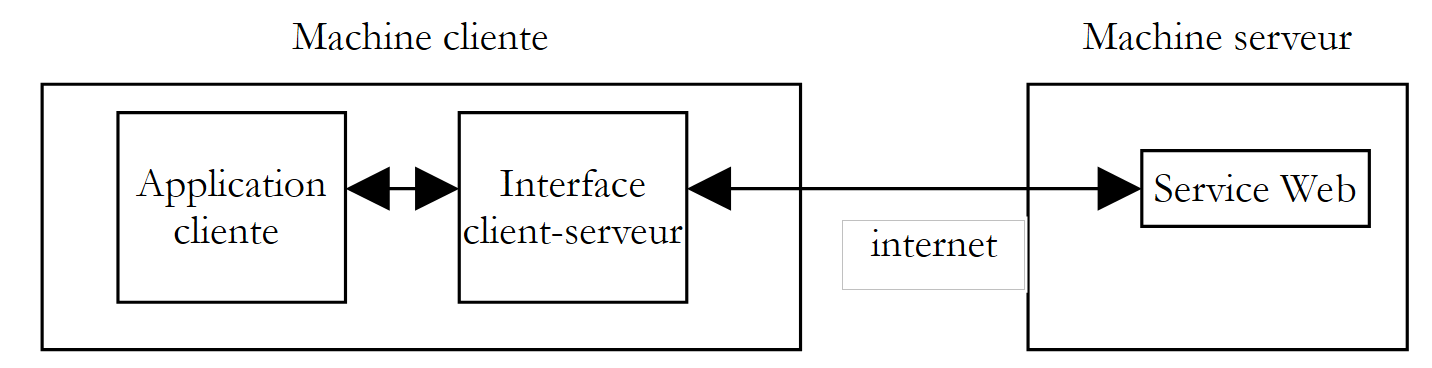 |
L'applicazione client si rivolgerebbe all'interfaccia client-server per inviare le proprie richieste al servizio web. Quest'ultima gestirebbe tutte le comunicazioni di rete necessarie con il server e restituirebbe il risultato ottenuto all'applicazione client. Quest'ultima non dovrebbe più occuparsi delle comunicazioni con il server, il che ne faciliterebbe notevolmente la scrittura.
10.7.1. La classe di incapsulamento
Dopo quanto visto nei paragrafi precedenti, ora conosciamo bene gli scambi di rete tra il client e il server. Abbiamo persino visto tre metodi. Scegliamo di incapsulare il metodo SOAP. La classe è la seguente:
' spazi dei nomi
Imports System
Imports System.Net.Sockets
Imports System.IO
Imports System.Text.RegularExpressions
Imports System.Collections
Imports System.Web
Imports Microsoft.VisualBasic
' clientSOAP del servizio Web operations
Public Class clientSOAP
' variabili di istanza
Private uri As uri = Nothing ' l'URI du service web
Private client As TcpClient = Nothing ' la liaison tcp du client avec le serveur
Private [IN] As StreamReader = Nothing ' le flux de lecture du client
Private OUT As StreamWriter = Nothing ' le flux d'écriture du client
' dizionario delle funzioni
Private dicoFonctions As New Hashtable
' elenco delle funzioni
Private fonctions As String() = {"ajouter", "soustraire", "multiplier", "diviser"}
' modalità verbosa
Private verbose As Boolean = False ' à vrai, affiche à l'écran les échanges client-serveur
' costruttore
Public Sub New(ByVal uriString As String, ByVal verbose As Boolean)
' modalità verbosa
Me.verbose = verbose
' connessione al server
uri = New Uri(uriString)
client = New TcpClient(uri.Host, uri.Port)
' si creano i flussi di ingresso-uscita del client TCP
[IN] = New StreamReader(client.GetStream())
OUT = New StreamWriter(client.GetStream())
OUT.AutoFlush = True
' creazione del dizionario delle funzioni del servizio web
Dim i As Integer
For i = 0 To fonctions.Length - 1
dicoFonctions.Add(fonctions(i), True)
Next i
End Sub
' chiusura della connessione al server
Public Sub Close()
' fine del collegamento client-server
[IN].Close()
OUT.Close()
client.Close()
End Sub
' executeFonction
Public Function executeFonction(ByVal fonction As String, ByVal a As String, ByVal b As String) As String
' esegue la funzione (a,b) sul servizio web con URI URI
' gli scambi client-server avvengono tramite i flussi IN e OUT
' il risultato della funzione si trova nella riga
' <double xmlns="st.istia.univ-angers.fr">double</double>
' inviata dal server
' funzione valida?
fonction = fonction.Trim().ToLower()
If Not dicoFonctions.ContainsKey(fonction) Then
Return "[fonction [" + fonction + "] indisponible : (ajouter, soustraire,multiplier,diviser)]"
End If
' argomenti a e b validi?
Dim doubleA As Double = 0
Try
doubleA = Double.Parse(a)
Catch
Return "[argument [" + a + "] incorrect (double)]"
End Try
Dim doubleB As Double = 0
Try
doubleB = Double.Parse(b)
Catch
Return "[argument [" + b + "] incorrect (double)]"
End Try
' divisione per zero?
If fonction = "diviser" And doubleB = 0 Then
Return "[division par zéro]"
End If
' costruzione della stringa di richiesta SOAP
Dim requêteSOAP As String = "<?xml version=" + """1.0"" encoding=""utf-8""?>" + ControlChars.Lf
requêteSOAP += "<soap:Envelope xmlns:xsi=""http://www.w3.org/2001/XMLSchema-instance"" xmlns:xsd=""http://www.w3.org/2001/XMLSchema"" xmlns:soap=""http://schemas.xmlsoap.org/soap/envelope/"">" + ControlChars.Lf
requêteSOAP += "<soap:Body>" + ControlChars.Lf
requêteSOAP += "<" + fonction + " xmlns=""st.istia.univ-angers.fr"">" + ControlChars.Lf
requêteSOAP += "<a>" + a + "</a>" + ControlChars.Lf
requêteSOAP += "<b>" + b + "</b>" + ControlChars.Lf
requêteSOAP += "</" + fonction + ">" + ControlChars.Lf
requêteSOAP += "</soap:Body>" + ControlChars.Lf
requêteSOAP += "</soap:Envelope>"
Dim nbCharsSOAP As Integer = requêteSOAP.Length
' costruzione della tabella delle intestazioni HTTP da inviare
Dim entetes(6) As String
entetes(0) = "POST " + uri.AbsolutePath + " HTTP/1.1"
entetes(1) = "Host: " + uri.Host + ":" + uri.Port.ToString
entetes(2) = "Content-Type: text/xml; charset=utf-8"
entetes(3) = "Content-Length: " + nbCharsSOAP.ToString
entetes(4) = "Connection: Keep-Alive"
entetes(5) = "SOAPAction: ""st.istia.univ-angers.fr/" + fonction + """"
entetes(6) = ""
' si inviano le intestazioni HTTP al server
Dim i As Integer
For i = 0 To entetes.Length - 1
' invio al server
OUT.WriteLine(entetes(i))
' output su schermo
If verbose Then
Console.Out.WriteLine(("--> " + entetes(i)))
End If
Next i
' si legge la prima risposta del server Web HTTP/1.1 100
Dim ligne As String = Nothing
' una riga del flusso di lettura
ligne = [IN].ReadLine()
While ligne <> ""
'eco
If verbose Then
Console.Out.WriteLine(("<-- " + ligne))
End If
' riga successiva
ligne = [IN].ReadLine()
End While
'eco dell'ultima riga
If verbose Then
Console.Out.WriteLine(("<-- " + ligne))
End If
' invio dei parametri della richiesta
OUT.Write(requêteSOAP)
' echo
If verbose Then
Console.Out.WriteLine(("--> " + requêteSOAP))
End If
' costruzione dell'espressione regolare che consente di determinare la dimensione della risposta XML
' nel flusso della risposta del server web
Dim modèleLength As String = "^Content-Length: (.+?)\s*$"
Dim RegexLength As New Regex(modèleLength) '
Dim MatchLength As Match = Nothing
Dim longueur As Integer = 0
' lettura della seconda risposta del server web dopo l'invio della richiesta
' si memorizza il valore della riga Content-Length
ligne = [IN].ReadLine()
While ligne <> ""
' output su schermo
If verbose Then
Console.Out.WriteLine(("<-- " + ligne))
End If
' Content-Length?
MatchLength = RegexLength.Match(ligne)
If MatchLength.Success Then
longueur = Integer.Parse(MatchLength.Groups(1).Value)
End If
' riga successiva
ligne = [IN].ReadLine()
End While
' output dell'ultima riga
If verbose Then
Console.Out.WriteLine("<--")
End If
' costruzione dell'espressione regolare che consente di recuperare il risultato
' nel flusso della risposta del server web
Dim modèle As String = "<" + fonction + "Result>(.+?)</" + fonction + "Result>"
Dim ModèleRésultat As New Regex(modèle)
Dim MatchRésultat As Match = Nothing
' si legge il resto della risposta del server web
Dim chrRéponse(longueur) As Char
[IN].Read(chrRéponse, 0, longueur)
Dim strRéponse As String = New [String](chrRéponse)
' si scompone la risposta in righe di testo
Dim lignes As String() = Regex.Split(strRéponse, ControlChars.Lf)
' si scorrono le righe di testo alla ricerca del risultato
Dim strRésultat As String = "?" ' résultat de la fonction
For i = 0 To lignes.Length - 1
' seguito
If verbose Then
Console.Out.WriteLine(("<-- " + lignes(i)))
End If ' comparaison ligne courante au modèle
MatchRésultat = ModèleRésultat.Match(lignes(i))
' è stato trovato?
If MatchRésultat.Success Then
' si annota il risultato
strRésultat = MatchRésultat.Groups(1).Value
End If
Next i
' si restituisce il risultato
Return strRésultat
End Function
End Class
Non c’è nulla di nuovo rispetto a quanto già visto. Abbiamo semplicemente ripreso il codice del client SOAP che abbiamo studiato e lo abbiamo leggermente riorganizzato per trasformarlo in una classe. Questa classe ha un costruttore e due metodi:
' costruttore
Public Sub New(ByVal uriString As String, ByVal verbose As Boolean)
' executeFonction
Public Function executeFonction(ByVal fonction As String, ByVal a As String, ByVal b As String) As String
' chiusura della connessione al server
Public Sub Close()
e presenta i seguenti attributi:
' variabili di istanza
Private uri As Uri = Nothing ' l'URI du service web
Private client As TcpClient = Nothing ' la liaison tcp du client avec le serveur
Private [IN] As StreamReader = Nothing ' le flux de lecture du client
Private OUT As StreamWriter = Nothing ' le flux d'écriture du client
' dizionario delle funzioni
Private dicoFonctions As New Hashtable
' elenco delle funzioni
Private fonctions As String() = {"ajouter", "soustraire", "multiplier", "diviser"}
' modalità verbosa
Private verbose As Boolean = False ' à vrai, affiche à l'écran les échanges client-serveur
Al costruttore vengono passati due parametri:
- l'ID URI del servizio web a cui deve connettersi
- un valore booleano verbose che, in realtà, richiede che gli scambi di rete vengano visualizzati sullo schermo; in caso contrario, non verranno visualizzati.
Durante la creazione, vengono generati i flussi IN di lettura di rete, OUT di scrittura di rete, nonché il dizionario delle funzioni gestite dal servizio. Una volta creato l'oggetto, viene aperta la connessione client-server e i relativi flussi IN e OUT diventano utilizzabili.
Il metodo Close consente di chiudere la connessione con il server.
Il metodo ExecuteFonction è quello che abbiamo scritto per il client SOAP analizzato in precedenza, con alcune piccole differenze:
- I parametri uri, IN e OUT, che in precedenza venivano passati come parametri al metodo, non devono più esserlo, poiché ora sono attributi dell’istanza accessibili a tutti i metodi dell’istanza
- Il metodo ExecuteFonction, che in precedenza restituiva un tipo void e visualizzava il risultato della funzione sullo schermo, ora restituisce tale risultato e quindi un tipo string.
In genere, un cliente utilizzerà la classe clientSOAP nel modo seguente:
- creazione di un oggetto clientSOAP che stabilirà la connessione con il servizio web
- utilizzo ripetuto del metodo executeFonction
- Chiusura della connessione con il servizio Web tramite il metodo Close.
Esaminiamo un primo client.
10.7.2. Un client console
Riprendiamo qui il client SOAP analizzato quando la classe clientSOAP non esisteva e lo riorganizziamo in modo che ora utilizzi questa classe:
' spazi dei nomi
Imports System
Imports System.IO
Imports System.Text.RegularExpressions
Imports Microsoft.VisualBasic
Public Module testClientSoap
' richiede l'URI dal servizio web operations
' esegue in modo interattivo i comandi digitati dalla tastiera
Public Sub Main(ByVal args() As String)
' sintassi
Const syntaxe As String = "pg URI [verbose]"
' numero di argomenti
If args.Length <> 1 And args.Length <> 2 Then
erreur(syntaxe, 1)
End If
' modalità verbosa?
Dim verbose As Boolean = False
If args.Length = 2 Then
verbose = args(1).ToLower() = "verbose"
End If
' si effettua la connessione al servizio web
Dim client As clientSOAP = Nothing
Try
client = New clientSOAP(args(0), verbose)
Catch ex As Exception
' errore di connessione
erreur("L'erreur suivante s'est produite lors de la connexion au service web : " + ex.Message, 2)
End Try
' le richieste dell'utente vengono digitate sulla tastiera
' nella forma funzione a b - terminano con il comando fine
Dim commande As String = Nothing ' commande tapée au clavier
Dim champs As String() = Nothing ' champs d'une ligne de commande
' richiesta all'utente
Console.Out.WriteLine("Tapez vos commandes au format : [ajouter|soustraire|multiplier|diviser] a b" + ControlChars.Lf)
' gestione degli errori
Dim erreurCommande As Boolean
Try
' ciclo di immissione dei comandi digitati dalla tastiera
While True
' all'inizio nessun errore
erreurCommande = False
' lettura comando
commande = Console.In.ReadLine().Trim().ToLower()
' finito?
If commande Is Nothing Or commande = "fin" Then
Exit While
End If
' scomposizione del comando in campi
champs = Regex.Split(commande, "\s+")
' sono necessari tre campi
If champs.Length <> 3 Then
Console.Out.WriteLine("syntaxe : [ajouter|soustraire|multiplier|diviser] a b")
' si registra l'errore
erreurCommande = True
End If
' si invia la richiesta al servizio web
If Not erreurCommande Then Console.Out.WriteLine(("résultat=" + client.executeFonction(champs(0).Trim().ToLower(), champs(1).Trim(), champs(2).Trim())))
' richiesta successiva
End While
Catch e As Exception
Console.Out.WriteLine(("L'erreur suivante s'est produite : " + e.Message))
End Try
' fine della connessione client-server
Try
client.Close()
Catch
End Try
End Sub
' visualizzazione degli errori
Public Sub erreur(ByVal msg As String, ByVal exitCode As Integer)
' visualizzazione dell'errore
System.Console.Error.WriteLine(msg)
' interruzione con errore
Environment.Exit(exitCode)
End Sub
End Module
Il client è ora notevolmente più semplice e non presenta alcuna comunicazione di rete. Il client accetta due parametri:
- l'ID URI del servizio web operations
- la parola chiave facoltativa verbose. Se presente, gli scambi di rete verranno visualizzati sullo schermo.
Questi due parametri vengono utilizzati per creare un oggetto clientSOAP che gestirà gli scambi con il servizio web.
' connessione al servizio web
Dim client As clientSOAP = Nothing
Try
client = New clientSOAP(args(0), verbose)
Catch ex As Exception
' errore di connessione
erreur("L'erreur suivante s'est produite lors de la connexion au service web : " + ex.Message, 2)
End Try
Una volta stabilita la connessione con il servizio web, il client può inviare le proprie richieste. Queste vengono digitate sulla tastiera, analizzate e quindi inviate al server tramite la chiamata al metodo executeFonction dell'oggetto clientSOAP.
' invio della richiesta al servizio web
If Not erreurCommande Then Console.Out.WriteLine(("résultat=" + client.executeFonction(champs(0).Trim().ToLower(), champs(1).Trim(), champs(2).Trim())))
La classe clientSOAP è compilata in un «assembly»:
dos>vbc /r:clientSOAP.dll testClientSOAP.vb
dos>dir
04/03/2004 08:46 6 913 clientSOAP.vb
04/03/2004 09:07 7 168 clientSOAP.dll
L'applicazione client testClientSoap viene quindi compilata da:
dos>vbc /r:clientSOAP.dll /r:system.dll testClientSOAP.vb
dos>dir
04/03/2004 09:08 2 711 testClientSOAP.vb
04/03/2004 09:08 4 608 testClientSOAP.exe
Ecco un esempio di esecuzione non verbosa:
dos>testclientsoap http://localhost/st/operations/operations.asmx
Tapez vos commandes au format : [ajouter|soustraire|multiplier|diviser] a b
ajouter 1 3
résultat=4
soustraire 6 7
résultat=-1
multiplier 4 5
résultat=20
diviser 1 2
résultat=0.5
x
syntaxe : [ajouter|soustraire|multiplier|diviser] a b
x 1 2
résultat=[fonction [x] indisponible : (ajouter, soustraire,multiplier,diviser)]
ajouter a b
résultat=[argument [a] incorrect (double)]
ajouter 1 b
résultat=[argument [b] incorrect (double)]
diviser 1 0
résultat=[division par zéro]
fin
È possibile monitorare gli scambi di rete richiedendo un'esecuzione "verbosa":
dos>testClientSOAP http://localhost/operations/operations.asmx verbose
Tapez vos commandes au format : [ajouter|soustraire|multiplier|diviser] a b
ajouter 4 8
--> POST /operations/operations.asmx HTTP/1.1
--> Host: localhost:80
--> Content-Type: text/xml; charset=utf-8
--> Content-Length: 321
--> Connection: Keep-Alive
--> SOAPAction: "st.istia.univ-angers.fr/ajouter"
-->
<-- HTTP/1.1 100 Continue
<-- Server: Microsoft-IIS/5.0
<-- Date: Thu, 04 Mar 2004 08:15:25 GMT
<-- X-Powered-By: ASP.NET
<--
--> <?xml version="1.0" encoding="utf-8"?>
<soap:Envelope xmlns:xsi="http://www.w3.org/2001/XMLSchema-instance" xmlns:xsd="http://www.w3.org/2001/XMLSchema" xmlns:soap="http://schemas.xmlsoap.org/soap/envelope/">
<soap:Body>
<ajouter xmlns="st.istia.univ-angers.fr">
<a>4</a>
<b>8</b>
</ajouter>
</soap:Body>
</soap:Envelope>
<-- HTTP/1.1 200 OK
<-- Server: Microsoft-IIS/5.0
<-- Date: Thu, 04 Mar 2004 08:15:25 GMT
<-- X-Powered-By: ASP.NET
<-- X-AspNet-Version: 1.1.4322
<-- Cache-Control: private, max-age=0
<-- Content-Type: text/xml; charset=utf-8
<-- Content-Length: 346
<--
<-- <?xml version="1.0" encoding="utf-8"?><soap:Envelope xmlns:soap="http://schemas.xmlsoap.org/soap/envelope/" xmlns:xsi="http://www.w3.org/2001/XMLSchema-inst
ance" xmlns:xsd="http://www.w3.org/2001/XMLSchema"><soap:Body><ajouterResponse xmlns="st.istia.univ-angers.fr"><ajouterResult>12</ajouterResult></ajouterResponse></soap:Body></soap:Envelope>
résultat=12
fin
Ora creiamo un client grafico.
10.7.3. Un client grafico per Windows
Ora interrogeremo il nostro servizio web con un client grafico che utilizzerà anch’esso la classe clientSOAP. L’interfaccia grafica sarà la seguente:
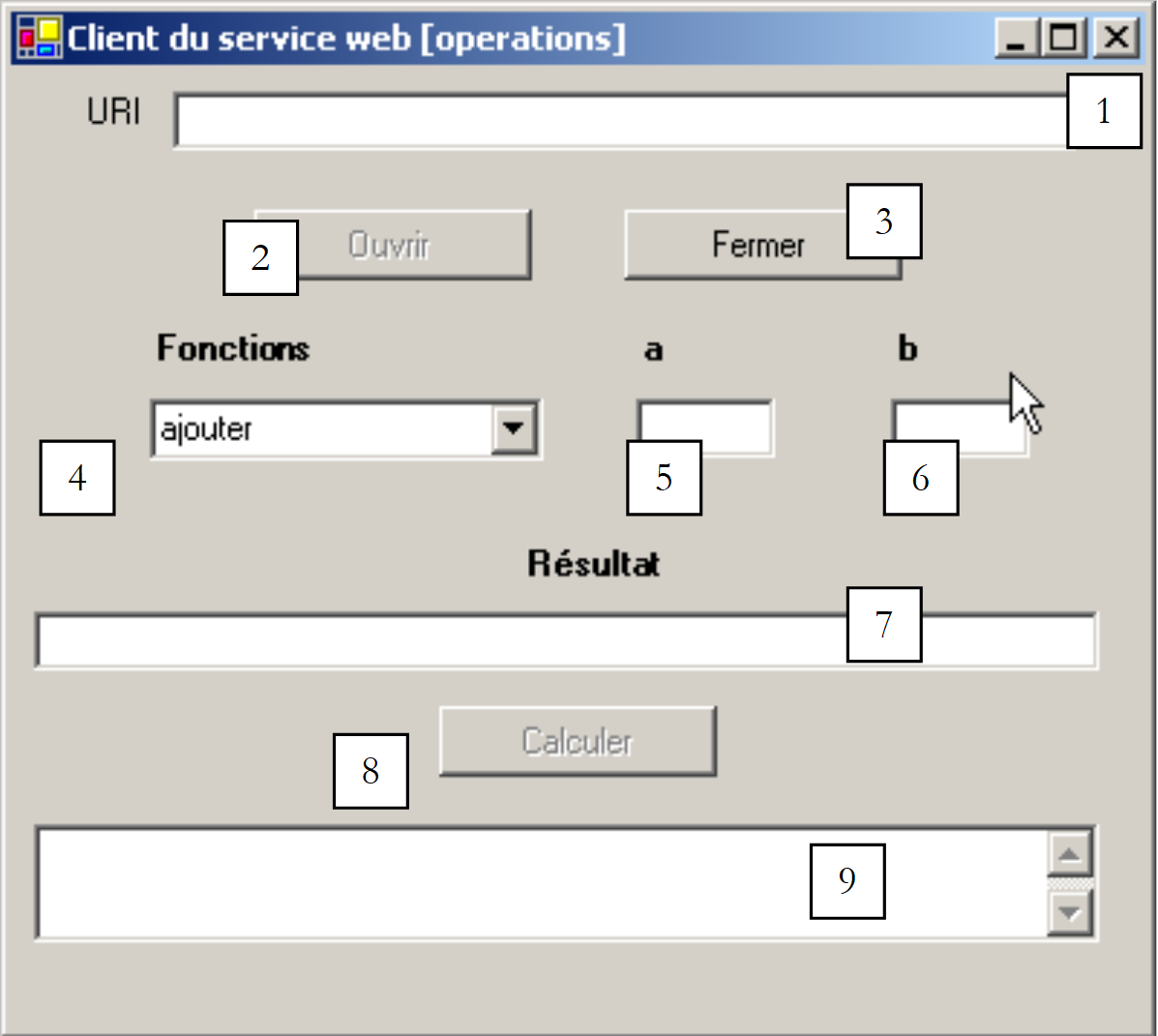 |
I controlli sono i seguenti:
n. | tipo | nome | ruolo |
TextBox | txtURI | URI del servizio web operations | |
Pulsante | btnOuvrir | apre la connessione con il servizio web | |
Pulsante | btnFermer | chiude la connessione con il servizio Web | |
ComboBox | cmbFonctions | l'elenco delle operazioni (addizione, sottrazione, moltiplicazione, divisione) | |
TextBox | txtA | Gli argomenti delle funzioni | |
TextBox | txtB | l'argomento b delle funzioni | |
TextBox | txtRésultat | il risultato della funzione (a, b) | |
Pulsante | btnCalculer | avvia il calcolo della funzione(a,b) | |
TextBox | txtErreur | visualizza un messaggio di stato della connessione |
Esistono alcune limitazioni operative:
- il pulsante btnOuvrir è attivo solo se il campo txtURI non è vuoto e se non è già aperta una connessione
- il pulsante btnFermer è attivo solo quando è stata aperta una connessione con il servizio web
- il pulsante btnCalculer è attivo solo quando è aperta una connessione e i campi txtA e txtB non sono vuoti
- i campi txtRésultat e txtErreur hanno l'attributo ReadOnly impostato su vero
Il client inizia aprendo la connessione con il servizio web tramite il pulsante [Ouvrir]:
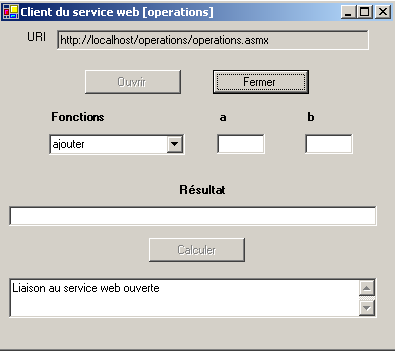
Successivamente l’utente può scegliere una funzione e i valori per a e b:
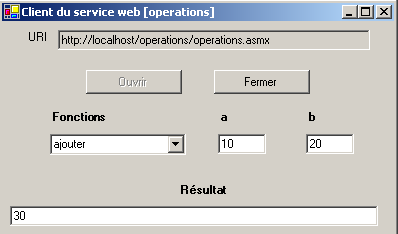
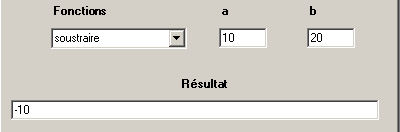
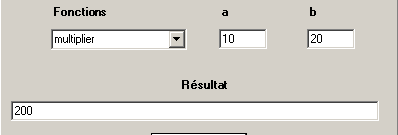
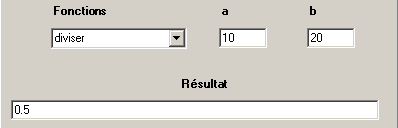
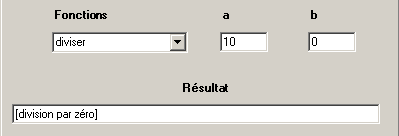
Di seguito è riportato il codice dell'applicazione. Abbiamo omesso il codice del modulo, che in questo contesto non è rilevante.
'spazi dei nomi
Imports System
Imports System.Windows.Forms
' la classe del modulo
Public Class FormClientSOAP
Inherits System.Windows.Forms.Form
' attributi di istanza
Dim client As clientSOAP ' client SOAP du service web operations
#Regione "Codice generato dal Windows Form Designer"
Public Sub New()
MyBase.New()
'Questa chiamata è richiesta dal Windows Form Designer.
InitializeComponent()
' altre inizializzazioni
myInit()
End Sub
'Il metodo sovrascritto Dispose del modulo per ripulire l'elenco dei componenti.
Protected Overloads Overrides Sub Dispose(ByVal disposing As Boolean)
....
End Sub
...
Private Sub InitializeComponent()
....
End Sub
#Fine regione
Private Sub myInit()
' inizializzazione del modulo
cmbFonctions.SelectedIndex = 0
btnOuvrir.Enabled = False
btnFermer.Enabled = True
btnCalculer.Enabled = False
End Sub
Private Sub txtURI_TextChanged(ByVal sender As Object, ByVal e As System.EventArgs) Handles txtURI.TextChanged
' il contenuto del campo di immissione è cambiato - si imposta lo stato del pulsante "Apri"
btnOuvrir.Enabled = txtURI.Text.Trim <> ""
End Sub
Private Sub btnOuvrir_Click(ByVal sender As Object, ByVal e As System.EventArgs) Handles btnOuvrir.Click
' richiesta di apertura di una connessione con il servizio web
Try
' creazione di un oggetto di tipo [clientSOAP]
client = New clientSOAP(txtURI.Text.Trim, False)
' stati dei pulsanti
btnOuvrir.Enabled = False
btnFermer.Enabled = True
' URI non può più essere modificato
txtURI.ReadOnly = True
' Stato cliente
txtErreur.Text = "Liaison au service web ouverte"
Catch ex As Exception
' si è verificato un errore - viene visualizzato
txtErreur.Text = ex.Message
End Try
End Sub
Private Sub btnFermer_Click(ByVal sender As Object, ByVal e As System.EventArgs) Handles btnFermer.Click
' Chiusura della connessione al servizio web
client.Close()
' stati dei pulsanti
btnOuvrir.Enabled = True
btnFermer.Enabled = False
' URI
txtURI.ReadOnly = False
' stato del cliente
txtErreur.Text = "Liaison au service web fermée"
End Sub
Private Sub btnCalculer_Click(ByVal sender As Object, ByVal e As System.EventArgs) Handles btnCalculer.Click
' calcolo di una funzione f(a,b)
' si cancella il risultato precedente
txtRésultat.Text = ""
Try
txtRésultat.Text = client.executeFonction(cmbFonctions.Text, txtA.Text.Trim, txtB.Text.Trim)
Catch ex As Exception
' si è verificato un errore di rete
txtErreur.Text = ex.Message
' si chiude la connessione
btnFermer_Click(Nothing, Nothing)
End Try
End Sub
Private Sub txtA_TextChanged(ByVal sender As Object, ByVal e As System.EventArgs) Handles txtA.TextChanged
' modifica del valore di A
btnCalculer.Enabled = txtA.Text.Trim <> "" And txtB.Text.Trim <> ""
End Sub
Private Sub txtB_TextChanged(ByVal sender As Object, ByVal e As System.EventArgs) Handles txtB.TextChanged
' modifica del valore di B
txtA_TextChanged(Nothing, Nothing)
End Sub
' metodo principale
Public Shared Sub main()
Application.Run(New FormClientSOAP)
End Sub
End Class
Anche in questo caso la classe clientSOAP nasconde l'intero aspetto di rete dell'applicazione. L'applicazione è stata realizzata nel modo seguente:
- l'assembly clientSOAP.dll contenente la classe clientSOAP è stato inserito nella cartella del progetto
- l’interfaccia grafica clientsoapgui.vb è stata creata con VS.NET e successivamente compilata in una finestra DOS:
dos>vbc /r:system.dll /r:system.windows.forms.dll /r:system.drawing.dll /r:clientSOAP.dll clientsoapgui.vb
dos>dir
04/03/2004 09:13 7 168 clientSOAP.dll
04/03/2004 16:44 9 866 clientsoapgui.vb
04/03/2004 16:44 11 264 clientsoapgui.exe
L'interfaccia grafica è stata quindi avviata tramite:
10.8. Un client proxy
Ricordiamo ciò che è stato appena fatto. Abbiamo creato una classe intermedia che incapsula gli scambi di rete tra un client e un servizio web secondo lo schema riportato di seguito:
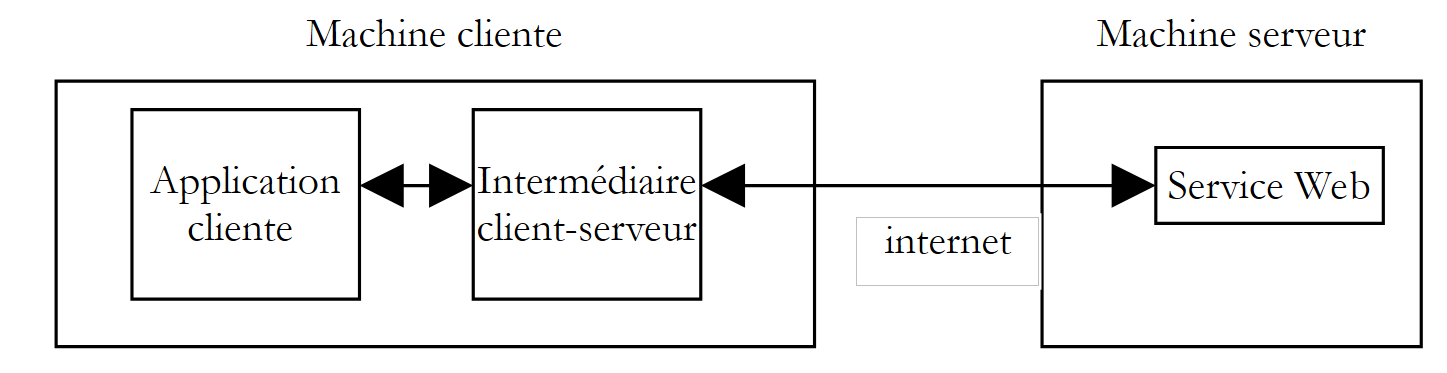 |
La piattaforma .NET porta questa logica un passo oltre. Una volta individuato il servizio web da raggiungere, possiamo generare automaticamente la classe che fungerà da intermediario per accedere alle funzioni del servizio web e che nasconderà l’intera parte di rete. Questa classe viene definita un proxy per il servizio web per il quale è stata generata.
Come generare la classe proxy di un servizio web? Un servizio web è sempre accompagnato da un file di descrizione in formato XML. Se il file URI del nostro servizio web operations è http://localhost/operations/operations.asmx, il suo file di descrizione è disponibile all'indirizzo URL http://localhost/operations/operations.asmx?wsdl, come mostra la seguente schermata:

Si tratta di un file XML che descrive in modo preciso tutte le funzioni del servizio web, indicando per ciascuna di esse il tipo e il numero di parametri, nonché il tipo di risultato. Questo file viene denominato file WSDL del servizio poiché utilizza il linguaggio WSDL (Web Services Description Language). A partire da questo file, è possibile generare una classe proxy utilizzando lo strumento wsdl:
dos>wsdl http://localhost/operations/operations.asmx?wsdl /language=vb
Microsoft (R) Web Services Description Language Utility
[Microsoft (R) .NET Framework, Version 1.1.4322.573]
Copyright (C) Microsoft Corporation 1998-2002. All rights reserved.
Écriture du fichier 'D:\data\devel\vbnet\poly\chap9\clientproxy\operations.vb'.
dos>dir
04/03/2004 17:17 6 663 operations.vb
Lo strumento wsdl genera un file sorgente VB.NET (opzione /language=vb) che porta il nome della classe che implementa il servizio web, in questo caso operations. Esaminiamo una parte del codice generato:
'------------------------------------------------------------------------------
' <generato automaticamente>
' Questo codice è stato generato da uno strumento.
' Versione runtime: 1.1.4322.573
'
' Le modifiche apportate a questo file potrebbero causare un comportamento errato e andranno perse se
' il codice viene rigenerato.
' </autogenerated>
'------------------------------------------------------------------------------
Option Strict Off
Option Explicit On
Imports System
Imports System.ComponentModel
Imports System.Diagnostics
Imports System.Web.Services
Imports System.Web.Services.Protocols
Imports System.Xml.Serialization
'
'Questo codice sorgente è stato té generato automaticamente généré da wsdl, Versione=1.1.4322.573.
'
'<remarks/>
<System.Diagnostics.DebuggerStepThroughAttribute(), _
System.ComponentModel.DesignerCategoryAttribute("code"), _
System.Web.Services.WebServiceBindingAttribute(Name:="operationsSoap", [Namespace]:="st.istia.univ-angers.fr")> _
Public Class operations
Inherits System.Web.Services.Protocols.SoapHttpClientProtocol
'<remarks/>
Public Sub New()
MyBase.New
Me.Url = "http://localhost/operations/operations.asmx"
End Sub
'<remarks/>
<System.Web.Services.Protocols.SoapDocumentMethodAttribute("st.istia.univ-angers.fr/ajouter", RequestNamespace:="st.istia.univ-angers.fr", ResponseNamespace:="st.istia.univ-angers.fr", Use:=System.Web.Services.Description.SoapBindingUse.Literal, ParameterStyle:=System.Web.Services.Protocols.SoapParameterStyle.Wrapped)> _
Public Function ajouter(ByVal a As Double, ByVal b As Double) As Double
Dim results() As Object = Me.Invoke("ajouter", New Object() {a, b})
Return CType(results(0),Double)
End Function
'<note/>
Public Function Beginajouter(ByVal a As Double, ByVal b As Double, ByVal callback As System.AsyncCallback, ByVal asyncState As Object) As System.IAsyncResult
Return Me.BeginInvoke("ajouter", New Object() {a, b}, callback, asyncState)
End Function
'<note/>
Public Function Endajouter(ByVal asyncResult As System.IAsyncResult) As Double
Dim results() As Object = Me.EndInvoke(asyncResult)
Return CType(results(0),Double)
End Function
....
A prima vista questo codice può sembrare un po' complesso. Non è necessario comprenderne i dettagli per poterlo utilizzare. Esaminiamo innanzitutto la dichiarazione della classe:
La classe prende il nome operations dal servizio web per il quale è stata creata. Deriva dalla classe SoapHttpClientProtocol:
La nostra classe proxy ha un unico costruttore:
Il costruttore assegna all'attributo url il valore URL del servizio web associato al proxy. La classe operations sopra riportata non definisce direttamente l'attributo url. Quest’ultimo viene ereditato dalla classe da cui deriva il proxy: System.Web.Services.Protocols.SoapHttpClientProtocol. Esaminiamo ora ciò che riguarda il metodo ajouter:
Public Function ajouter(ByVal a As Double, ByVal b As Double) As Double
Dim results() As Object = Me.Invoke("ajouter", New Object() {a, b})
Return CType(results(0),Double)
End Function
Si può notare che presenta la stessa firma del servizio Web operations, dove era definita come segue:
      <WebMethod>  _
      Function ajouter(a As Double, b As Double) As Double
         Return a + b
End Function 'ajouter
Il modo in cui questa classe interagisce con il servizio Web non è riportato qui. Tale interazione è interamente gestita dalla classe padre System.Web.Services.Protocols.SoapHttpClientProtocol. Nel proxy si trova solo ciò che lo differenzia dagli altri proxy:
- l'URL del servizio web associato
- la definizione dei metodi del servizio associato.
Per utilizzare i metodi del servizio web operations, un client ha bisogno solo della classe proxy operations generata in precedenza. Compiliamo questa classe in un file assembly:
Ora scriviamo un client da console. Viene chiamato senza parametri ed esegue le richieste digitate dalla tastiera:
dos>testclientproxy
Tapez vos commandes au format : [ajouter|soustraire|multiplier|diviser|toutfaire] a b
ajouter 4 5
résultat=9
soustraire 9 8
résultat=1
multiplier 10 4
résultat=40
diviser 6 7
résultat=0,857142857142857
toutfaire 10 20
résultats=[30,-10,200,0,5]
diviser 5 0
résultat=+Infini
fin
Il codice del cliente è il seguente:
' spazi dei nomi
Imports System
Imports System.IO
Imports System.Text.RegularExpressions
Imports System.Collections
Imports Microsoft.VisualBasic
Public Module testClientProxy
' esegue in modo interattivo i comandi digitati sulla tastiera
' e li invia al servizio web operations
Public Sub Main()
' non ci sono più argomenti - l'URL del servizio web è hardcoded nel proxy
' creazione di un dizionario delle funzioni del servizio web
Dim fonctions As String() = {"ajouter", "soustraire", "multiplier", "diviser", "toutfaire"}
Dim dicoFonctions As New Hashtable
Dim i As Integer
For i = 0 To fonctions.Length - 1
dicoFonctions.Add(fonctions(i), True)
Next i
' si crea un oggetto proxy operations
Dim myOperations As operations = Nothing
Try
myOperations = New operations
Catch ex As Exception
' errore di connessione
erreur("L'erreur suivante s'est produite lors de la connexion au proxy dy service web : " + ex.Message, 2)
End Try
' le richieste dell'utente vengono digitate dalla tastiera
' nella forma funzione a b - terminano con il comando fine
Dim commande As String = Nothing ' commande tapée au clavier
Dim champs As String() = Nothing ' champs d'une ligne de commande
' richiesta all'utente
Console.Out.WriteLine("Tapez vos commandes au format : [ajouter|soustraire|multiplier|diviser|toutfaire] a b" + ControlChars.Lf)
' alcuni dati locali
Dim erreurCommande As Boolean
Dim fonction As String
Dim a, b As Double
' ciclo di immissione dei comandi digitati dalla tastiera
While True
' all'inizio nessun errore
erreurCommande = False
' lettura comando
commande = Console.In.ReadLine().Trim().ToLower()
' finito?
If commande Is Nothing Or commande = "fin" Then
Exit While
End If
' scomposizione del comando in campi
champs = Regex.Split(commande, "\s+")
Try
' sono necessari tre campi
If champs.Length <> 3 Then
Throw New Exception
End If
' il campo 0 deve essere una funzione riconosciuta
fonction = champs(0)
If Not dicoFonctions.ContainsKey(fonction) Then
Throw New Exception
End If
' il campo 1 deve essere un numero valido
a = Double.Parse(champs(1))
' il campo 2 deve essere un numero valido
b = Double.Parse(champs(2))
Catch
' comando non valido
Console.Out.WriteLine("syntaxe : [ajouter|soustraire|multiplier|diviser] a b")
erreurCommande = True
End Try
' viene inviata la richiesta al servizio web
If Not erreurCommande Then
Try
Dim résultat As Double
Dim résultats() As Double
If fonction = "ajouter" Then
résultat = myOperations.ajouter(a, b)
Console.Out.WriteLine(("résultat=" + résultat.ToString))
End If
If fonction = "soustraire" Then
résultat = myOperations.soustraire(a, b)
Console.Out.WriteLine(("résultat=" + résultat.ToString))
End If
If fonction = "multiplier" Then
résultat = myOperations.multiplier(a, b)
Console.Out.WriteLine(("résultat=" + résultat.ToString))
End If
If fonction = "diviser" Then
résultat = myOperations.diviser(a, b)
Console.Out.WriteLine(("résultat=" + résultat.ToString))
End If
If fonction = "toutfaire" Then
résultats = myOperations.toutfaire(a, b)
Console.Out.WriteLine(("résultats=[" + résultats(0).ToString + "," + résultats(1).ToString + "," + _
résultats(2).ToString + "," + résultats(3).ToString + "]"))
End If
Catch e As Exception
Console.Out.WriteLine(("L'erreur suivante s'est produite : " + e.Message))
End Try
End If
End While
End Sub
' visualizzazione degli errori
Public Sub erreur(ByVal msg As String, ByVal exitCode As Integer)
' visualizzazione dell'errore
System.Console.Error.WriteLine(msg)
' interruzione con errore
Environment.Exit(exitCode)
End Sub
End Module
Esaminiamo solo il codice relativo all'utilizzo della classe proxy. Innanzitutto viene creato un oggetto proxy operations:
' si crea un oggetto proxy operations
Dim myOperations As operations = Nothing
Try
myOperations = New operations
Catch ex As Exception
' errore di connessione
erreur("L'erreur suivante s'est produite lors de la connexion au proxy dy service web : " + ex.Message, 2)
End Try
Vengono digitate le righe della funzione a b. Sulla base di queste informazioni, vengono chiamati i metodi appropriati del proxy:
' viene inviata la richiesta al servizio web
If Not erreurCommande Then
Try
Dim résultat As Double
Dim résultats() As Double
If fonction = "ajouter" Then
résultat = myOperations.ajouter(a, b)
Console.Out.WriteLine(("résultat=" + résultat.ToString))
End If
If fonction = "soustraire" Then
résultat = myOperations.soustraire(a, b)
Console.Out.WriteLine(("résultat=" + résultat.ToString))
End If
If fonction = "multiplier" Then
résultat = myOperations.multiplier(a, b)
Console.Out.WriteLine(("résultat=" + résultat.ToString))
End If
If fonction = "diviser" Then
résultat = myOperations.diviser(a, b)
Console.Out.WriteLine(("résultat=" + résultat.ToString))
End If
If fonction = "toutfaire" Then
résultats = myOperations.toutfaire(a, b)
Console.Out.WriteLine(("résultats=[" + résultats(0).ToString + "," + résultats(1).ToString + "," + _
résultats(2).ToString + "," + résultats(3).ToString + "]"))
End If
Catch e As Exception
Console.Out.WriteLine(("L'erreur suivante s'est produite : " + e.Message))
End Try
Qui viene elaborata per la prima volta l’operazione toutfaire che esegue le quattro operazioni. Finora era stata ignorata poiché invia un array di numeri incapsulato in un involucro XML, più complicato da gestire rispetto alle semplici risposte XML delle altre funzioni, che restituiscono un unico risultato. Si nota che qui, con la classe proxy, l’utilizzo del metodo toutfaire non è più complicato rispetto all’utilizzo degli altri metodi. L’applicazione è stata compilata in una finestra DOS nel modo seguente:
dos>vbc /r:operations.dll /r:system.dll /r:system.web.services.dll testClientProxy.vb
dos>dir
04/03/2004  17:17                6 663 operations.vb
04/03/2004  17:24                7 680 operations.dll
04/03/2004 17:41 4 099 testClientProxy.vb
04/03/2004 17:41 5 632 testClientProxy.exe
10.9. Configurazione di un servizio Web
Un servizio Web potrebbe necessitare di informazioni di configurazione per inizializzarsi correttamente. Con il server IIS, tali informazioni possono essere inserite in un file denominato web.config e situato nella stessa cartella del servizio Web. Supponiamo di voler creare un servizio Web che necessiti di due informazioni per l'inizializzazione: un nome e un'età. Queste due informazioni possono essere inserite nel file web.config nella forma seguente:
<?xml version="1.0" encoding="UTF-8" ?>
<configuration>
  <appSettings>
    <add key="nom" value="tintin"/>
    <add key="age" value="27"/>
  </appSettings>
</configuration>
I parametri di inizializzazione sono contenuti in un contenitore XML:
Un parametro di inizializzazione denominato P con valore V verrà dichiarato con la riga:
<add key="P" value="V"/>
In che modo il servizio Web recupera queste informazioni? Quando IIS carica un servizio Web, verifica se nella stessa cartella è presente un file web.config. In caso affermativo, lo legge. Il valore V di un parametro P viene ottenuto tramite l'istruzione:
dove ConfigurationSettings è una classe nello spazio dei nomi System.Configuration.
Verifichiamo questa tecnica sul seguente servizio web:
<%@ WebService language="VB" class=personne %>

Imports System.Web.Services
imports System.Configuration

<WebService([Namespace] := "st.istia.univ-angers.fr")> _
Public Class personne
   Inherits WebService

   ' attributi
   Private nom As String
   Private age As Integer

   ' costruttore
   Public Sub New()
      ' inizializzazione degli attributi
      nom = ConfigurationSettings.AppSettings("nom")
      age = Integer.Parse(ConfigurationSettings.AppSettings("age"))
   End Sub

   <WebMethod>  _
   Function id() As String
      Return "[" + nom + "," + age.ToString + "]"
   End Function

End Class
Il servizio web personne ha due attributi, nom e age, che vengono inizializzati nel suo costruttore senza parametri a partire dai valori letti nel file di configurazione web.config del servizio personne. Il file è il seguente:
<configuration>
    <appSettings>
        <add key="nom" value="tintin"/>
        <add key="age" value="27"/>
    </appSettings>
</configuration>
Il servizio web dispone inoltre di un ID <WebMethod> senza parametri, che si limita a restituire gli attributi nom e age. Il servizio è registrato nel file sorgente personne.asmx, che si trova insieme al relativo file di configurazione nella cartella c:\inetpub\wwwroot\st\personne:
Associamo una cartella virtuale IIS/config alla cartella fisica precedente. Avviamo IIS, quindi con un browser richiediamo l’URL http://localhost/config/personne.asmx del servizio personne:
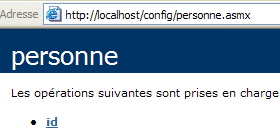
Seguiamo il link dell’ID metodo unico:
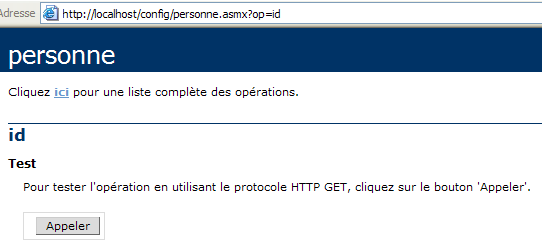
Il metodo id non ha parametri. Utilizziamo il pulsante Appeler:
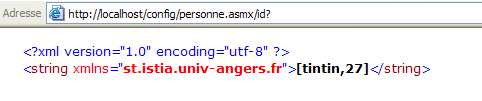
Abbiamo recuperato correttamente le informazioni contenute nel file web.config del servizio.
10.10. Il servizio Web IMPOTS
Riprendiamo l’applicazione IMPOTS, ormai ben nota. L’ultima volta che l’abbiamo utilizzata, ne avevamo fatto un server remoto raggiungibile via Internet. Ora ne facciamo un servizio web.
10.10.1. Il servizio web
Partiamo dalla classe impôt creata nel capitolo dedicato ai database e che si basa sulle informazioni contenute in un database ODBC:
' opzioni
Option Strict On
Option Explicit On

' spazi dei nomi
Imports System
Imports System.Data
Imports Microsoft.Data.Odbc
Imports System.Collections

Public Class impôt
    ' dati necessari per il calcolo dell'imposta
    ' provengono da una fonte esterna
    Private limites(), coeffR(), coeffN() As Decimal

    ' costruttore
    Public Sub New(ByVal LIMITES() As Decimal, ByVal COEFFR() As Decimal, ByVal COEFFN() As Decimal)
        ' si verifica che le 3 tabelle abbiano le stesse dimensioni
        Dim OK As Boolean = LIMITES.Length = COEFFR.Length And LIMITES.Length = COEFFN.Length
        If Not OK Then
            Throw New Exception("Les 3 tableaux fournis n'ont pas la même taille(" & LIMITES.Length & "," & COEFFR.Length & "," & COEFFN.Length & ")")
        End If
        ' va bene
        Me.limites = LIMITES
        Me.coeffR = COEFFR
        Me.coeffN = COEFFN
    End Sub

    ' costruttore 2
    Public Sub New(ByVal DSNimpots As String, ByVal Timpots As String, ByVal colLimites As String, ByVal colCoeffR As String, ByVal colCoeffN As String)
        ' inizializza i tre array di limiti, coeffR, coeffN a partire
        ' dal contenuto della tabella Timpots del database ODBC DSNimpots
        ' colLimites, colCoeffR, colCoeffN sono le tre colonne di questa tabella
        ' può generare un'eccezione
        Dim connectString As String = "DSN=" + DSNimpots + ";"        ' chaîne de connexion à la base
        Dim impotsConn As OdbcConnection = Nothing        ' la connexion
        Dim sqlCommand As OdbcCommand = Nothing        ' la commande SQL
        ' la query SELECT
        Dim selectCommand As String = "select " + colLimites + "," + colCoeffR + "," + colCoeffN + " from " + Timpots
        ' tabelle per recuperare i dati
        Dim tLimites As New ArrayList
        Dim tCoeffR As New ArrayList
        Dim tCoeffN As New ArrayList

        ' si tenta di accedere al database
        impotsConn = New OdbcConnection(connectString)
        impotsConn.Open()
        ' si crea un oggetto command
        sqlCommand = New OdbcCommand(selectCommand, impotsConn)
        ' si esegue la query
        Dim myReader As OdbcDataReader = sqlCommand.ExecuteReader()
        ' Analisi della tabella recuperata
        While myReader.Read()
            ' i dati della riga corrente vengono inseriti nelle tabelle
            tLimites.Add(myReader(colLimites))
            tCoeffR.Add(myReader(colCoeffR))
            tCoeffN.Add(myReader(colCoeffN))
        End While
        ' liberazione delle risorse
        myReader.Close()
        impotsConn.Close()

        ' gli array dinamici vengono inseriti negli array statici
        Me.limites = New Decimal(tLimites.Count) {}
        Me.coeffR = New Decimal(tLimites.Count) {}
        Me.coeffN = New Decimal(tLimites.Count) {}
        Dim i As Integer
        For i = 0 To tLimites.Count - 1
            limites(i) = Decimal.Parse(tLimites(i).ToString())
            coeffR(i) = Decimal.Parse(tCoeffR(i).ToString())
            coeffN(i) = Decimal.Parse(tCoeffN(i).ToString())
        Next i
    End Sub

    ' Calcolo dell'imposta
    Public Function calculer(ByVal marié As Boolean, ByVal nbEnfants As Integer, ByVal salaire As Integer) As Long
        ' calcolo del numero di quote
        Dim nbParts As Decimal
        If marié Then
            nbParts = CDec(nbEnfants) / 2 + 2
        Else
            nbParts = CDec(nbEnfants) / 2 + 1
        End If
        If nbEnfants >= 3 Then
            nbParts += 0.5D
        End If
        ' calcolo del reddito imponibile e del quoziente familiare
        Dim revenu As Decimal = 0.72D * salaire
        Dim QF As Decimal = revenu / nbParts
        ' calcolo dell'imposta
        limites((limites.Length - 1)) = QF + 1
        Dim i As Integer = 0
        While QF > limites(i)
            i += 1
        End While
        ' restituzione del risultato
        Return CLng(revenu * coeffR(i) - nbParts * coeffN(i))
    End Function
End Class
Nel servizio web è possibile utilizzare solo un costruttore senza parametri. Pertanto, il costruttore della classe diventerà il seguente:
    ' funzione di costruzione
    Public Sub New()
        ' inizializza le tre tabelle dei limiti, coeffR, coeffN, a partire
        ' dal contenuto della tabella Timpots del database ODBC DSNimpots
        ' colLimites, colCoeffR, colCoeffN sono le tre colonne di questa tabella
        ' può generare un'eccezione

        ' consente di recuperare i parametri di configurazione del servizio
        Dim DSNimpots As String = ConfigurationSettings.AppSettings("DSN")
        Dim Timpots As String = ConfigurationSettings.AppSettings("TABLE")
        Dim colLimites As String = ConfigurationSettings.AppSettings("COL_LIMITES")
        Dim colCoeffR As String = ConfigurationSettings.AppSettings("COL_COEFFR")
        Dim colCoeffN As String = ConfigurationSettings.AppSettings("COL_COEFFN")

        ' si esegue l'elaborazione del database
        Dim connectString As String = "DSN=" + DSNimpots + ";"     ' chaîne de connexion à la base
I cinque parametri del costruttore della classe precedente vengono ora letti dal file web.config del servizio. Il codice del file sorgente impots.asmx è il seguente. Riprende la maggior parte del codice precedente. Ci siamo limitati a evidenziare le parti di codice specifiche del servizio web:
<%@ WebService language="VB" class=impots %>

' creazione di un servizio web per le imposte
Imports System
Imports System.Data
Imports Microsoft.Data.Odbc
Imports System.Collections
Imports System.Configuration
Imports System.Web.Services

<WebService([Namespace]:="st.istia.univ-angers.fr")> _
Public Class impôt
    Inherits WebService

    ' i dati necessari per il calcolo dell'imposta
    ' provengono da una fonte esterna
    Private limites(), coeffR(), coeffN() As Decimal
    Private OK As Boolean = False
    Private errMessage As String = ""


    ' costruttore
    Public Sub New()
        ' inizializza le tre tabelle dei limiti, coeffR, coeffN, a partire
        ' del contenuto della tabella Timpots del database ODBC DSNimpots
        ' colLimites, colCoeffR, colCoeffN sono le tre colonne di questa tabella
        ' può generare un'eccezione

        ' consente di recuperare i parametri di configurazione del servizio
        Dim DSNimpots As String = ConfigurationSettings.AppSettings("DSN")
        Dim Timpots As String = ConfigurationSettings.AppSettings("TABLE")
        Dim colLimites As String = ConfigurationSettings.AppSettings("COL_LIMITES")
        Dim colCoeffR As String = ConfigurationSettings.AppSettings("COL_COEFFR")
        Dim colCoeffN As String = ConfigurationSettings.AppSettings("COL_COEFFN")

        ' si esegue l'elaborazione del database
        Dim connectString As String = "DSN=" + DSNimpots + ";"     ' chaîne de connexion à la base
        Dim impotsConn As OdbcConnection = Nothing     ' la connexion
        Dim sqlCommand As OdbcCommand = Nothing     ' la commande SQL
        Dim myReader As OdbcDataReader     ' lecteur de données Odbc

        ' la query SELECT
        Dim selectCommand As String = "select " + colLimites + "," + colCoeffR + "," + colCoeffN + " from " + Timpots

        ' tabelle per recuperare i dati
        Dim tLimites As New ArrayList
        Dim tCoeffR As New ArrayList
        Dim tCoeffN As New ArrayList

        ' si tenta di accedere al database
        Try
            impotsConn = New OdbcConnection(connectString)
            impotsConn.Open()
            ' si crea un oggetto comando
            sqlCommand = New OdbcCommand(selectCommand, impotsConn)
            ' si esegue la query
            myReader = sqlCommand.ExecuteReader()
            ' Analisi della tabella recuperata
            While myReader.Read()
                ' i dati della riga corrente vengono inseriti nelle tabelle
                tLimites.Add(myReader(colLimites))
                tCoeffR.Add(myReader(colCoeffR))
                tCoeffN.Add(myReader(colCoeffN))
            End While
            ' liberazione delle risorse
            myReader.Close()
            impotsConn.Close()

            ' gli array dinamici vengono trasferiti in array statici
            Me.limites = New Decimal(tLimites.Count) {}
            Me.coeffR = New Decimal(tLimites.Count) {}
            Me.coeffN = New Decimal(tLimites.Count) {}
            Dim i As Integer
            For i = 0 To tLimites.Count - 1
                limites(i) = Decimal.Parse(tLimites(i).ToString())
                coeffR(i) = Decimal.Parse(tCoeffR(i).ToString())
                coeffN(i) = Decimal.Parse(tCoeffN(i).ToString())
            Next i
            ' Tutto a posto
            OK = True
            errMessage = ""
        Catch ex As Exception
            ' errore
            OK = False
            errMessage += "[" + ex.Message + "]"
        End Try
    End Sub

    ' calcolo dell'imposta
    <WebMethod()> _
    Function calculer(ByVal marié As Boolean, ByVal nbEnfants As Integer, ByVal salaire As Integer) As Long
        ' calcolo del numero di quote
        Dim nbParts As Decimal
        If marié Then
            nbParts = CDec(nbEnfants) / 2 + 2
        Else
            nbParts = CDec(nbEnfants) / 2 + 1
        End If
        If nbEnfants >= 3 Then
            nbParts += 0.5D
        End If
        ' calcolo del reddito imponibile e del quoziente familiare
        Dim revenu As Decimal = 0.72D * salaire
        Dim QF As Decimal = revenu / nbParts
        ' calcolo dell'imposta
        limites((limites.Length - 1)) = QF + 1
        Dim i As Integer = 0
        While QF > limites(i)
            i += 1
        End While
        ' restituzione del risultato
        Return CLng(revenu * coeffR(i) - nbParts * coeffN(i))
    End Function

    ' ID
    <WebMethod()> _
    Function id() As String
        ' per verificare che tutto sia corretto OK
        Return "[" + OK + "," + errMessage + "]"
    End Function
End Class
Spieghiamo le poche modifiche apportate alla classe impots oltre a quelle necessarie per trasformarla in un servizio web:
- la lettura del database nel costruttore potrebbe non andare a buon fine. Abbiamo quindi aggiunto due attributi alla nostra classe e un metodo:
- il valore booleano OK assume il valore vrai se il database è stato letto, altrimenti assume il valore faux
- la stringa errMessage contiene un messaggio di errore se non è stato possibile leggere il database.
- Il metodo id senza parametri consente di ottenere il valore di questi due attributi.
- Per gestire l'eventuale errore di accesso al database, la parte del codice del costruttore relativa a tale accesso è stata racchiusa in un try-catch.
Il file di configurazione del servizio web.config è il seguente:
<configuration>
    <appSettings>
        <add key="DSN" value="mysql-impots" />
        <add key="TABLE" value="timpots" />
        <add key="COL_LIMITES" value="limites" />
        <add key="COL_COEFFR" value="coeffr" />
        <add key="COL_COEFFN" value="coeffn" />
    </appSettings>
</configuration>
Durante un primo tentativo di caricamento del servizio impots, il compilatore ha segnalato di non riuscire a trovare lo spazio dei nomi Microsoft.Data.Odbc utilizzato nella direttiva:
Dopo aver consultato la documentazione
- è stata aggiunta una direttiva di compilazione in web.config per indicare che era necessario utilizzare l'assembly Microsoft.Data.odbc
- una copia del file microsoft.data.odbc.dll è stata inserita nella cartella bin del progetto. Quest'ultima viene sistematicamente scansionata dal compilatore di un servizio web quando cerca un "assembly".
Altre soluzioni sembrano possibili, ma non sono state approfondite in questa sede. Il file di configurazione è quindi diventato:
<configuration>
    <appSettings>
        <add key="DSN" value="mysql-impots" />
        <add key="TABLE" value="timpots" />
        <add key="COL_LIMITES" value="limites" />
        <add key="COL_COEFFR" value="coeffr" />
        <add key="COL_COEFFN" value="coeffn" />
    </appSettings>
    <system.web>
        <compilation>
            <assemblies>
                <add assembly="Microsoft.Data.Odbc" />
            </assemblies>
        </compilation>
    </system.web>
</configuration>
Contenuto della cartella impots\bin:
Il servizio e il relativo file di configurazione sono stati inseriti in impots:
La cartella fisica del servizio web è stata associata alla cartella virtuale /impots di IIS. La pagina del servizio è quindi la seguente:
Se si segue il link id:
Se si utilizza il pulsante Appeler:
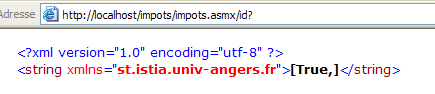
Il risultato precedente mostra i valori degli attributi OK (true) e errMessage (""). In questo esempio, il database è stato caricato correttamente. Non è sempre stato così ed è per questo che abbiamo aggiunto il metodo id per poter accedere al messaggio di errore. L’errore era dovuto al fatto che il nome DSN del database era stato definito come utente DSN, mentre avrebbe dovuto essere definito come sistema DSN. Questa distinzione viene effettuata nel gestore delle fonti ODBC a 32 bit:
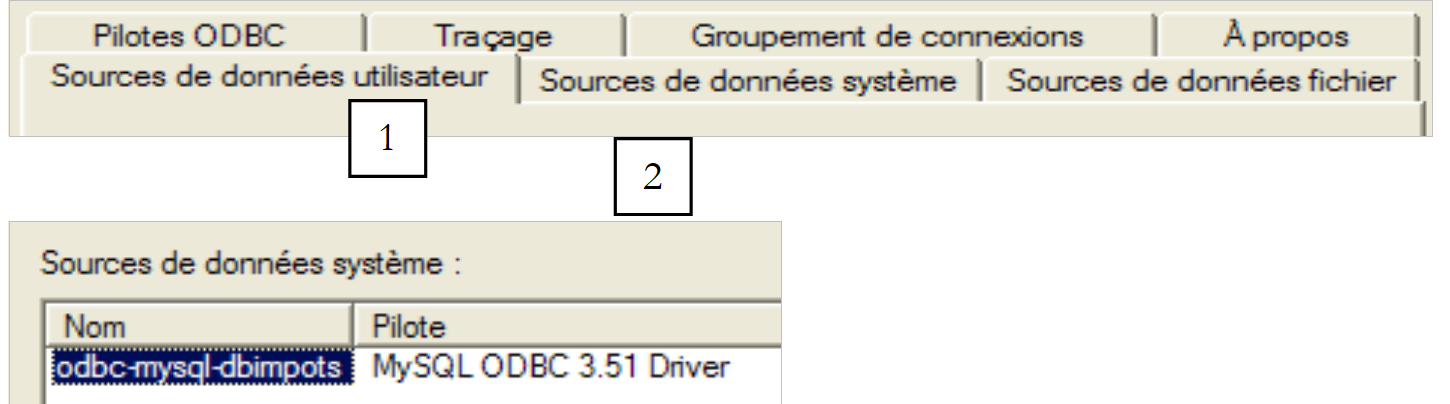 |
Torniamo alla pagina del servizio:
Seguiamo il link calculer:
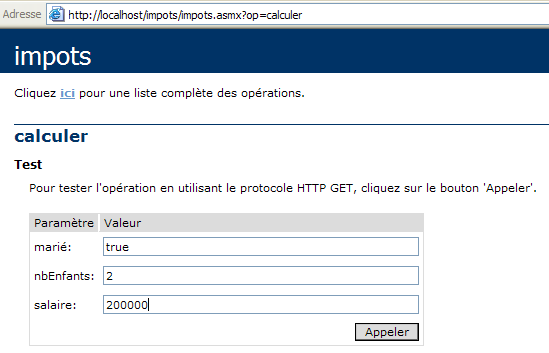
Definiamo i parametri della chiamata ed eseguiamo quest'ultima:

Il risultato è corretto.
10.10.2. Generare il proxy del servizio impots
Ora che disponiamo di un servizio web impots operativo, possiamo generare la sua classe proxy. Ricordiamo che questa verrà utilizzata dalle applicazioni client per accedere al servizio web impots in modo trasparente. Per prima cosa si utilizza l’utilità wsdl per generare il file sorgente della classe proxy, che viene poi compilato in una DLL.
dos>wsdl /language=vb http://localhost/imposti/impots.asmx
Microsoft (R) Web Services Description Language Utility
[Microsoft (R) .NET Framework, Version 1.1.4322.573]
Copyright (C) Microsoft Corporation 1998-2002. All rights reserved.

Écriture du fichier 'D:\data\serge\devel\vbnet\poly\chap9\impots\impots.vb'.

D:\data\serge\devel\vbnet\poly\chap9\impots>dir
09/03/2004  10:20    <REP>          bin
09/03/2004  10:58             4 651 impots.asmx
09/03/2004  11:05             3 364 impots.vb
09/03/2004  10:19               431 web.config

dos>vbc /t:library /r:system.dll /r:system.web.services.dll /r:system.xml.dll impots.vb
Compilateur Microsoft (R) Visual Basic .NET version 7.10.3052.4
pour Microsoft (R) .NET Framework version 1.1.4322.573
Copyright (C) Microsoft Corporation 1987-2002. Tous droits réservés.

dos>dir
09/03/2004  10:20    <REP>          bin
09/03/2004  10:58             4 651 impots.asmx
09/03/2004  11:09             5 120 impots.dll
09/03/2004  11:05             3 364 impots.vb
09/03/2004  10:19               431 web.config
10.10.3. Utilizzo del proxy con un client
Nel capitolo dedicato ai database avevamo creato un'applicazione da console che consentiva il calcolo dell'imposta:
dos>dir
27/02/2004  16:56             5 120 impots.dll
27/02/2004  17:12             3 586 impots.vb
27/02/2004  17:08             6 144 testimpots.exe
27/02/2004  17:18             3 328 testimpots.vb

dos>testimpots
pg DSNimpots tabImpots colLimites colCoeffR colCoeffN

dos>testimpots odbc-mysql-dbimpots impots limites coeffr coeffn
Paramètres du calcul de l'impôt au format marié nbEnfants salaire ou rien pour arrêter :o 2 200000
impôt=22504 F
Il programma testimpots utilizzava quindi la classe impôt classica, quella contenuta nel file impots.dll. Il codice del programma testimpots.vb era il seguente:
Option Explicit On
Option Strict On

' spazi dei nomi
Imports System
Imports Microsoft.VisualBasic

' pagina di prova
Module testimpots
    Sub Main(ByVal arguments() As String)
        ' programma interattivo per il calcolo delle imposte
        ' l'utente digita tre dati dalla tastiera: sposato nbEnfants stipendio
        ' il programma visualizza quindi l'imposta da pagare
        Const syntaxe1 As String = "pg DSNimpots tabImpots colLimites colCoeffR colCoeffN"
        Const syntaxe2 As String = "syntaxe : marié nbEnfants salaire" + ControlChars.Lf + "marié : o pour marié, n pour non marié" + ControlChars.Lf + "nbEnfants : nombre d'enfants" + ControlChars.Lf + "salaire : salaire annuel en F"

        ' verifica dei parametri del programma
        If arguments.Length <> 5 Then
            ' messaggio di errore
            Console.Error.WriteLine(syntaxe1)
            ' fine
            Environment.Exit(1)
        End If        'if
        ' si recuperano gli argomenti
        Dim DSNimpots As String = arguments(0)
        Dim tabImpots As String = arguments(1)
        Dim colLimites As String = arguments(2)
        Dim colCoeffR As String = arguments(3)
        Dim colCoeffN As String = arguments(4)

        ' creazione di un oggetto imposta
        Dim objImpôt As impôt = Nothing
        Try
            objImpôt = New impôt(DSNimpots, tabImpots, colLimites, colCoeffR, colCoeffN)
        Catch ex As Exception
            Console.Error.WriteLine(("L'erreur suivante s'est produite : " + ex.Message))
            Environment.Exit(2)
        End Try

        ' ciclo infinito
        While True
            ' all'inizio nessun errore
            Dim erreur As Boolean = False

            ' vengono richiesti i parametri per il calcolo dell'imposta
            Console.Out.Write("Paramètres du calcul de l'impôt au format marié nbEnfants salaire ou rien pour arrêter :")
            Dim paramètres As String = Console.In.ReadLine().Trim()

            ' Cosa fare?
            If paramètres Is Nothing Or paramètres = "" Then
                Exit While
            End If

            ' verifica del numero di argomenti nella riga inserita
            Dim args As String() = paramètres.Split(Nothing)
            Dim nbParamètres As Integer = args.Length
            If nbParamètres <> 3 Then
                Console.Error.WriteLine(syntaxe2)
                erreur = True
            End If
            Dim marié As String
            Dim nbEnfants As Integer
            Dim salaire As Integer
            If Not erreur Then
                ' Verifica della validità dei parametri
                ' sposato
                marié = args(0).ToLower()
                If marié <> "o" And marié <> "n" Then
                    Console.Error.WriteLine((syntaxe2 + ControlChars.Lf + "Argument marié incorrect : tapez o ou n"))
                    erreur = True
                End If
                ' nbEnfants
                nbEnfants = 0
                Try
                    nbEnfants = Integer.Parse(args(1))
                    If nbEnfants < 0 Then
                        Throw New Exception
                    End If
                Catch
                    Console.Error.WriteLine(syntaxe2 + "\nArgument nbEnfants incorrect : tapez un entier positif ou nul")
                    erreur = True
                End Try
                ' stipendio
                salaire = 0
                Try
                    salaire = Integer.Parse(args(2))
                    If salaire < 0 Then
                        Throw New Exception
                    End If
                Catch
                    Console.Error.WriteLine(syntaxe2 + "\nArgument salaire incorrect : tapez un entier positif ou nul")
                    erreur = True
                End Try
            End If
            If Not erreur Then
                ' i parametri sono corretti - si calcola l'imposta
                Console.Out.WriteLine(("impôt=" & objImpôt.calculer(marié = "o", nbEnfants, salaire).ToString + " F"))
            End If
        End While
    End Sub
End Module
Riprendiamo lo stesso programma per fargli utilizzare ora il servizio web impots tramite la classe proxy impots creata in precedenza. Siamo costretti a modificare leggermente il codice:
- mentre la classe originale impôt aveva un costruttore a cinque argomenti, la classe proxy impots ha un costruttore senza parametri. I cinque parametri, come abbiamo visto, sono ora impostati nel file di configurazione del servizio web.
- Non è quindi più necessario passare questi cinque parametri come argomenti al programma di test
Il nuovo codice è il seguente:
Imports System
Imports Microsoft.VisualBasic

' pagina di prova
Module testimpots

    Public Sub Main(ByVal arguments() As String)
        ' programma interattivo per il calcolo delle imposte
        ' l'utente digita tre dati dalla tastiera: coniugato nbEnfants stipendio
        ' il programma visualizza quindi l'imposta da pagare
        Const syntaxe2 As String = "syntaxe : marié nbEnfants salaire" + ControlChars.Lf + "marié : o pour marié, n pour non marié" + ControlChars.Lf + "nbEnfants : nombre d'enfants" + ControlChars.Lf + "salaire : salaire annuel en F"

        ' creazione di un oggetto «imposta»
        Dim objImpôt As impôt = Nothing
        Try
            objImpôt = New impôt
        Catch ex As Exception
            Console.Error.WriteLine(("L'erreur suivante s'est produite : " + ex.Message))
            Environment.Exit(2)
        End Try

        ' ciclo infinito
        Dim erreur As Boolean
        While True
            ' all’inizio nessun errore
            erreur = False
            ' vengono richiesti i parametri per il calcolo dell'imposta
            Console.Out.Write("Paramètres du calcul de l'impôt au format marié nbEnfants salaire ou rien pour arrêter :")
            Dim paramètres As String = Console.In.ReadLine().Trim()
            ' Cosa fare?
            If paramètres Is Nothing Or paramètres = "" Then
                Exit While
            End If
            ' verifica del numero di argomenti nella riga inserita
            Dim args As String() = paramètres.Split(Nothing)
            Dim nbParamètres As Integer = args.Length
            If nbParamètres <> 3 Then
                Console.Error.WriteLine(syntaxe2)
                erreur = True
            End If
            If Not erreur Then
                ' verifica della validità dei parametri
                ' coniugato
                Dim marié As String = args(0).ToLower()
                If marié <> "o" And marié <> "n" Then
                    Console.Error.WriteLine((syntaxe2 + ControlChars.Lf + "Argument marié incorrect : tapez o ou n"))
                    erreur = True
                End If
                ' nbEnfants
                Dim nbEnfants As Integer = 0
                Try
                    nbEnfants = Integer.Parse(args(1))
                    If nbEnfants < 0 Then
                        Throw New Exception
                    End If
                Catch
                    Console.Error.WriteLine((syntaxe2 + ControlChars.Lf + "Argument nbEnfants incorrect : tapez un entier positif ou nul"))
                    erreur = True
                End Try
                ' stipendio
                Dim salaire As Integer = 0
                Try
                    salaire = Integer.Parse(args(2))
                    If salaire < 0 Then
                        Throw New Exception
                    End If
                Catch
                    Console.Error.WriteLine((syntaxe2 + ControlChars.Lf + "Argument salaire incorrect : tapez un entier positif ou nul"))
                    erreur = True
                End Try
                ' se i parametri sono corretti, si calcola l’imposta
                If Not erreur Then Console.Out.WriteLine(("impôt=" + objImpôt.calculer(marié = "o", nbEnfants, salaire).ToString + " F"))
            End If
        End While
    End Sub
End Module
Abbiamo il proxy impots.dll e il codice sorgente testimpots nella stessa cartella.
dos>dir
09/03/2004  11:28    <REP>          bin
09/03/2004  11:09             5 120 impots.dll
09/03/2004  11:34             3 396 testimpots.vb
09/03/2004  10:19               431 web.config
Compiliamo il codice sorgente testimpots.vb:
dos>vbc /r:impots.dll /r:microsoft.visualbasic.dll /r:system.web.services.dll /r:system.dll testimpots.vb
dos>dir
09/03/2004  11:28    <REP>          bin
09/03/2004  11:09             5 120 impots.dll
09/03/2004  11:05             3 364 impots.vb
09/03/2004  11:35             5 632 testimpots.exe
09/03/2004  11:34             3 396 testimpots.vb
09/03/2004  10:19               431 web.config
quindi lo eseguiamo:
dos>testimpots
Paramètres du calcul de l'impôt au format marié nbEnfants salaire ou rien pour arrêter :o 2 200000
impôt=22504 F
Otteniamo effettivamente il risultato atteso.