7. Utilizzo del DBMS MySQL
Scriveremo script PHP utilizzando un database MySQL:
 |
Il DBMS MySQL è incluso nel pacchetto WampServer (vedere la sezione 2.1.1). Mostreremo come creare un database e un utente MySQL.
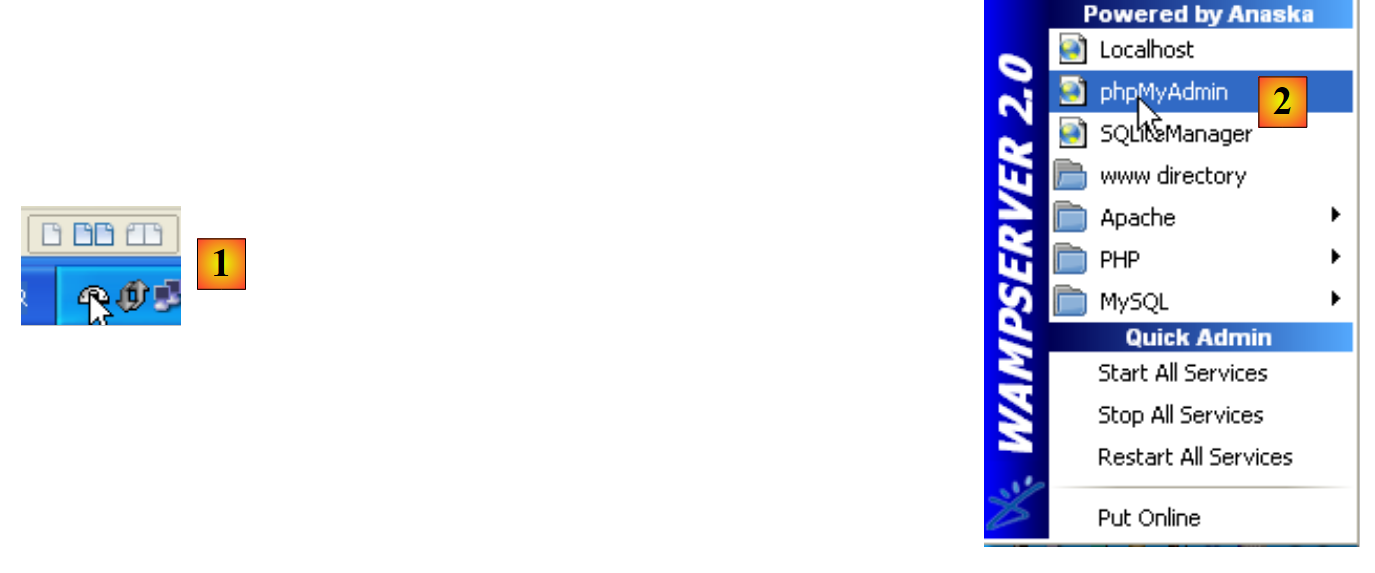 |
- Una volta avviato, WampServer può essere gestito tramite un'icona [1] situata in basso a destra nella barra delle applicazioni.
- In [2], avviare lo strumento di amministrazione di MySQL
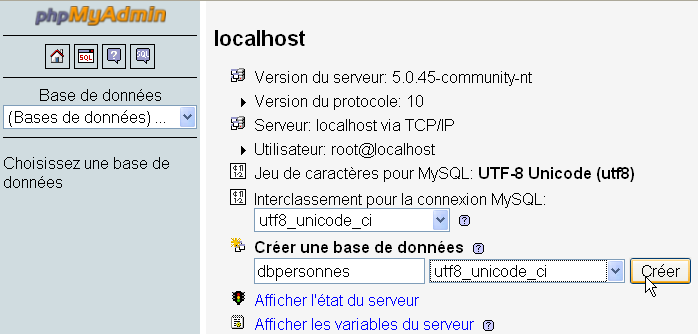
Creare un database [dbpersonnes]:
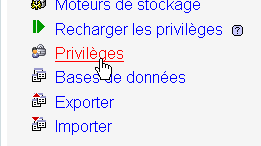
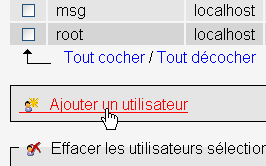
Crea un utente [admpersonnes] con la password [nobody]:
 |  |
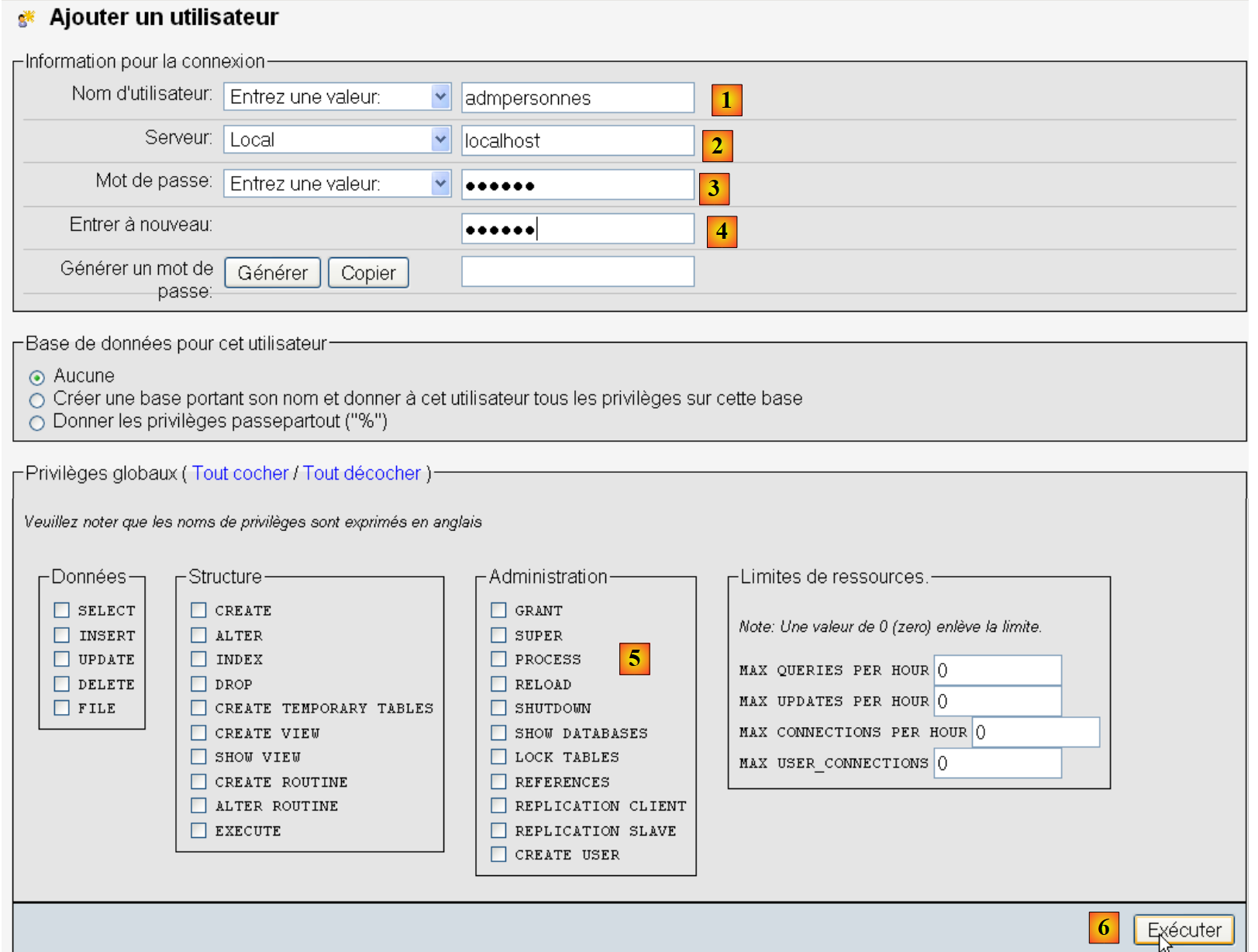 |
- In [1], il nome utente
- In [2], il server DBMS su cui si concedono le autorizzazioni
- in [3], la loro password
- in [4], come sopra
- in [5], non concediamo alcun diritto a questo utente
- in [6], creare l'utente
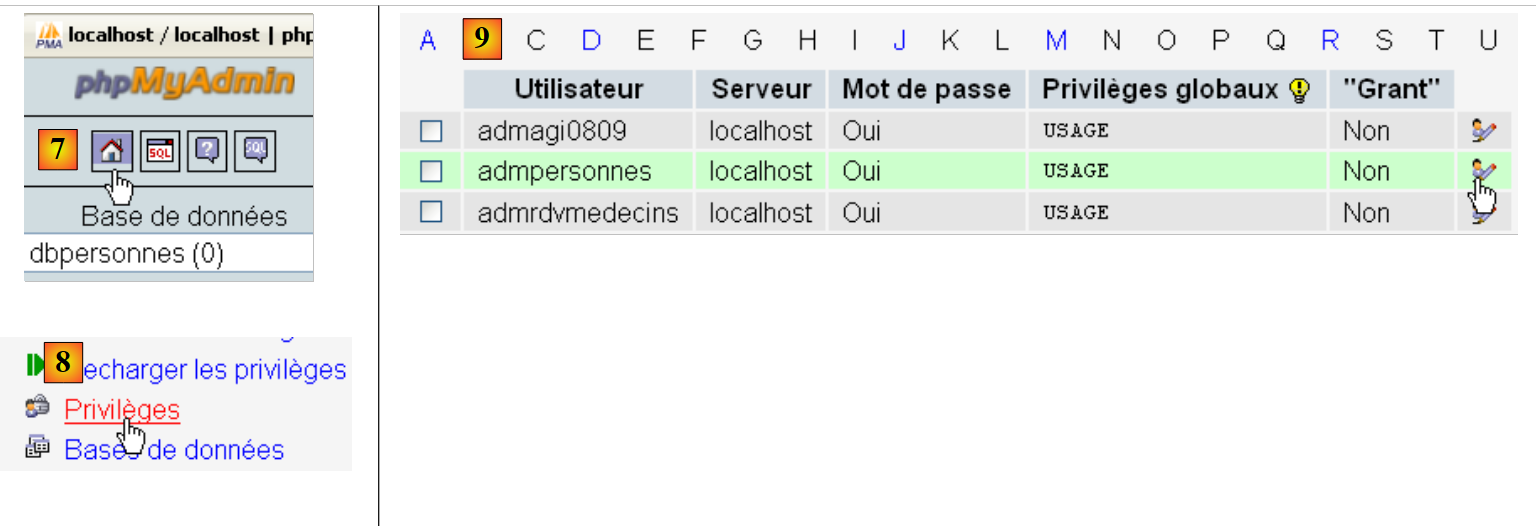 |
- in [7], tornare alla pagina iniziale di phpMyAdmin
- in [8], utilizzare il link [Privilegi] in questa pagina per modificare i privilegi dell'utente [admpersonnes] [9].
 |

- In [10], specificare che si desidera concedere all'utente [admpersonnes] i diritti sul database [dbpersonnes]
- In [11], confermare la selezione
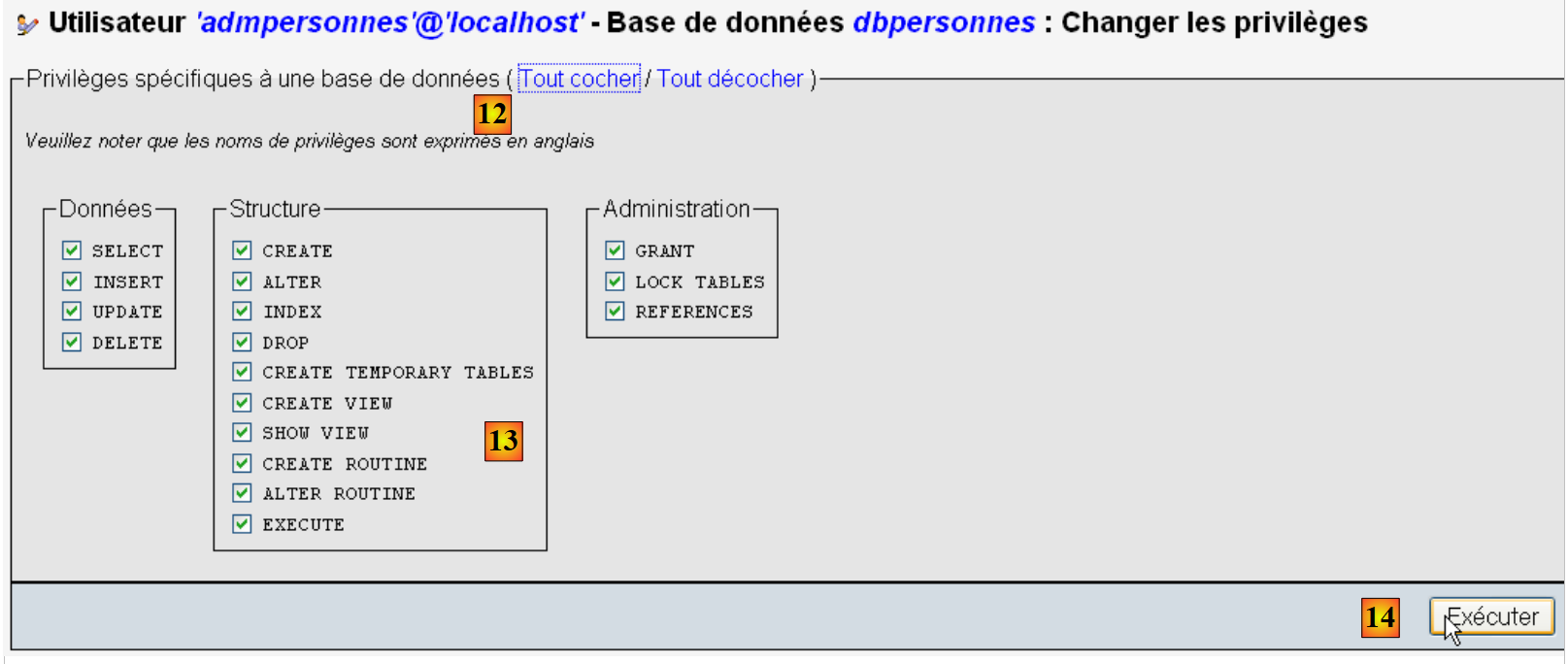 |
- utilizzando il link [12] [Seleziona tutto], concedere all'utente [admpersonnes] tutti i diritti sul database [dbpersonnes] [13]
- Confermare in [14]
Ora abbiamo:
- un database MySQL [dbpersonnes]
- un utente [admpersonnes / nobody] che ha pieno accesso a questo database
Scriveremo degli script PHP per interagire con il database. PHP dispone di varie librerie per la gestione dei database. Useremo la libreria PDO (PHP Data Objects), che funge da interfaccia tra il codice PHP e il DBMS:
 |
La libreria PDO permette allo script PHP di astrarsi dalla natura esatta del DBMS utilizzato. Pertanto, come mostrato sopra, il DBMS MySQL può essere sostituito dal DBMS Postgres con un impatto minimo sul codice dello script PHP. Questa libreria non è disponibile di default. È possibile verificarne la disponibilità su come segue:
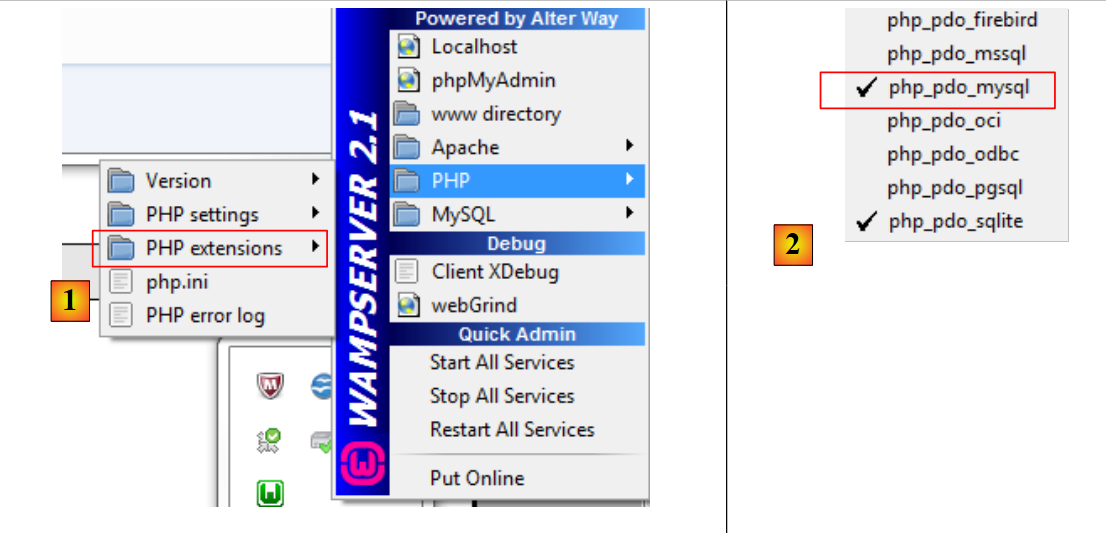 |
- 1: Dall'icona di amministrazione di WampServer, selezionare l'opzione [PHP / Estensioni PHP]
- 2: Verranno visualizzate le varie estensioni PDO disponibili e quelle attive: [PHP_pdo_mysql] per il DBMS MySQL, [PHP_pdo_sqlite] per il DBMS SQLite. Per abilitare un'estensione, è sufficiente cliccarci sopra. L'interprete PHP verrà quindi riavviato con la nuova estensione abilitata.
7.1. Connessione a un database MySQL – 1 (mysql_01)
Per connettersi a un DBMS è necessario creare un oggetto PDO. Il costruttore accetta diversi parametri:
I parametri hanno i seguenti significati:
$dsn | (Data Source Name) è una stringa che specifica il tipo di DBMS e la sua posizione su Internet. La stringa "mysql:host=localhost" indica che si tratta di un DBMS MySQL in esecuzione sul server locale. Questa stringa può includere altri parametri, come la porta di ascolto del DBMS e il nome del database a si desidera connettersi: "mysql:host=localhost:port=3306:dbname=dbpersonnes". |
$user | nome utente dell'utente che effettua l'accesso |
$passwd | la sua password |
$driver_options | un array di opzioni per il driver DBMS |
È richiesto solo il primo parametro. L'oggetto così creato fungerà quindi da veicolo per tutte le operazioni eseguite sul database a cui ci si è connessi. Se l'oggetto PDO non può essere creato, viene generata un'eccezione PDOException.
Ecco un esempio di connessione:
<?php

// connection to a MySql database
// user identity is (admpersonnes,nobody)
$ID = "admpersonnes";
$PWD = "nobody";
$HOTE = "localhost";

try {
  // connection
  $dbh = new PDO("mysql:host=$HOTE", $ID, $PWD);
  print "Connexion réussie\n";
  // closure
  $dbh = null;
} catch (PDOException $e) {
  print "Erreur : " . $e->getMessage() . "\n";
  exit();
}
Risultati:
Commenti
- Riga 11: La connessione a un DBMS viene stabilita creando un oggetto PDO. Il costruttore viene utilizzato qui con i seguenti parametri:
- una stringa che specifica il tipo di DBMS e la sua posizione su Internet. La stringa "mysql:host=localhost" indica che si tratta di un DBMS MySQL in esecuzione sul server locale. La porta non è stata specificata. Viene quindi utilizzata la porta 3306 per impostazione predefinita. Non è specificato nemmeno il nome del database. Verrà quindi stabilita una connessione al DBMS MySQL, con la selezione di un database specifico da effettuare in un secondo momento.
- un ID utente
- la sua password
- Riga 14: La connessione viene chiusa distruggendo l'oggetto PDO creato inizialmente.
- Riga 15: La connessione a un DBMS potrebbe fallire. In questo caso, viene generata un'eccezione PDOException.
7.2. Creazione di una tabella MySQL (mysql_02)
<?php

// connection to the MySql database
// user identity
$ID = "admpersonnes";
$PWD = "nobody";
// base identity
$DSN = "mysql:host=localhost;dbname=dbpersonnes";

// connection
list($erreur, $connexion) = connecte($DSN, $ID, $PWD);
if ($erreur) {
  print "Erreur lors de la connexion à la base [$DSN] sous l'identité ($ID,$PWD) : $erreur\n";
  exit;
}

// delete the people table if it exists
$requête = "drop table personnes";
$erreur = exécuteRequête($connexion, $requête);
//was there a mistake?
if ($erreur)
  print "$requête : Erreur ($erreur)\n";
else
  print "$requête: Exécution réussie\n";
// create people table
$requête = "create table personnes (prenom varchar(30) NOT NULL, nom varchar(30) NOT NULL, age integer NOT NULL, primary key(nom,prenom))";
$erreur = exécuteRequête($connexion, $requête);
//was there a mistake?
if ($erreur)
  print "$requête : Erreur ($erreur)\n";
else
  print "$requête: Exécution réussie\n";
// disconnect and exit
déconnecte($connexion);
exit;

// ---------------------------------------------------------------------------------
function connecte($dsn, $login, $pwd) {
  // connects ($login,$pwd) to base $dsn
  // returns the connection id and an error code
  try {
    // connection
    $dbh = new PDO($dsn, $login, $pwd);
    // error-free return
    return array("", $dbh);
  } catch (PDOException $e) {
    // return with error
    return array($e->getMessage(), null);
  }
}

// ---------------------------------------------------------------------------------
function déconnecte($connexion) {
  // closes the connection identified by $connexion
  $connexion = null;
}

// ---------------------------------------------------------------------------------
function exécuteRequête($connexion, $sql) {
  // executes the $sql request on the $connexion connection
  try {
    $connexion->exec($sql);
    // error-free return
    return "";
  } catch (PDOException $e) {
    // return with error
    return $e->getMessage();
  }
}
Risultati:
drop table personnes: Exécution réussie
create table personnes (prenom varchar(30) NOT NULL, nom varchar(30) NOT NULL, age integer NOT NULL, primary key(nom,prenom)): Exécution réussie
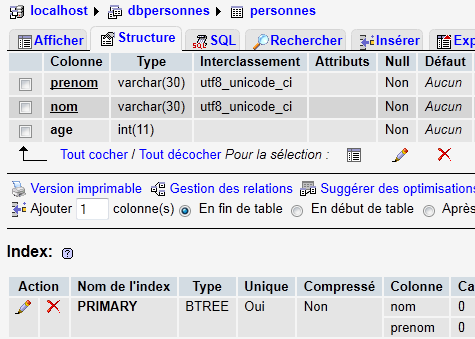
In PHPMyAdmin, puoi vedere che la tabella esiste:
 |
Commenti
- Righe 38–50: La funzione
connectstabilisce una connessione a un sistema di gestione di database (DBMS). Restituisce un array ($error, $connection*) in cui$connection*è la connessione stabilita onullse la connessione non è stata stabilita. In quest'ultimo caso,$errorcontiene un messaggio di errore. - Righe 53–56: La funzione
*disconnect* chiude una connessione - Riga 59: La funzione
*executeQueryconsente di eseguire un'istruzione SQL su una connessione. La connessione è un oggetto PDO. Il metodo utilizzato per eseguire un'istruzione SQL su un oggetto PDO è il metodo exec* (riga 63). L'esecuzione della query può generare un'eccezione PDOException. Pertanto, questa viene gestita. La funzione restituisce un messaggio di errore se si verifica un errore, altrimenti una stringa vuota.
7.3. Popolamento della tabella people (mysql_03)
Lo script seguente esegue le istruzioni SQL presenti nel seguente file di testo [creation.txt]:
drop table personnes
create table personnes (prenom varchar(30) not null, nom varchar(30) not null, age integer not null, primary key (nom,prenom))
insert into personnes values('Paul','Langevin',48)
insert into personnes values ('Sylvie','Lefur',70)
insert into personnes values ('Pierre','Nicazou',35)
insert into personnes values ('Geraldine','Colou',26)
insert into personnes values ('Paulette','Girond',56)
<?php

// connection to the MySql database
// user identity
$ID = "admpersonnes";
$PWD = "nobody";
// base identity
$DSN = "mysql:host=localhost;dbname=dbpersonnes";
// identity of the SQL command text file to be executed
$TEXTE = "creation.txt";

// connection
list($erreur, $connexion) = connecte($DSN, $ID, $PWD);
if ($erreur) {
  print "Erreur lors de la connexion à la base [$DSN] sous l'identité ($ID,$PWD) : $erreur\n";
  exit;
}

// table creation and filling
$erreurs = exécuterCommandes($connexion, $TEXTE, 1, 0);
//display number of errors
print "il y a eu $erreurs[0] erreurs\n";
for ($i = 1; $i < count($erreurs); $i++)
  print "$erreurs[$i]\n";

// disconnect and exit
déconnecte($connexion);
exit;

// ---------------------------------------------------------------------------------
function connecte($dsn, $login, $pwd) {
...
}

// ---------------------------------------------------------------------------------
function déconnecte($connexion) {
 ...
}

// ---------------------------------------------------------------------------------
function exécuteRequête($connexion, $sql) {
  // executes the $sql request on the $connexion connection
  // returns 1 error msg if error, empty string otherwise
  ...
}

// ---------------------------------------------------------------------------------
function exécuterCommandes($connexion, $SQL, $suivi=0, $arrêt=1) {
  // uses the $connexion connection
  // executes the SQL commands contained in the $SQL text file
  // this is a file of SQL commands to be executed one per line
  // if $suivi=1 then each execution of a SQL order is displayed as a success or failure
  // if $arrêt=1, the function stops on the 1st error encountered, otherwise it executes all sql commands
  // the function returns an array (nb of errors, error1, error2, ...)

  // check for the presence of the $SQL file
  if (! file_exists($SQL))
    return array(1, "Le fichier $SQL n'existe pas");

  // execution of SQL queries contained in $SQL
  // we put them in a table
  $requêtes = file($SQL);
  // we run them - initially no errors
  $erreurs = array(0);
  for ($i = 0; $i < count($requêtes); $i++) {
    //do we have an empty query
    if (preg_match("/^\s*$/", $requêtes[$i]))
      continue;
    // execute query $i
    $erreur = exécuteRequête($connexion, $requêtes[$i]);
    //was there a mistake?
    if ($erreur) {
      // one more mistake
      $erreurs[0]++;
      // error msg
      $msg = "$requêtes[$i] : Erreur ($erreur)\n";
      $erreurs[] = $msg;
      // screen tracking or not?
      if ($suivi)
        print "$msg\n";
      // shall we stop?
      if ($arrêt)
        return $erreurs;
    } else
    if ($suivi)
      print "$requêtes[$i] : Exécution réussie\n";
  }//for
  // return
  return $erreurs;
}
Risultati sullo schermo:
drop table personnes : Exécution réussie
create table personnes (prenom varchar(30) not null, nom varchar(30) not null, age integer not null, primary key (nom,prenom)) : Exécution réussie
insert into personnes values('Paul','Langevin',48) : Exécution réussie
insert into personnes values ('Sylvie','Lefur',70) : Exécution réussie
insert into personnes values ('Pierre','Nicazou',35) : Exécution réussie
insert into personnes values ('Geraldine','Colou',26) : Exécution réussie
insert into personnes values ('Paulette','Girond',56) : Exécution réussie
il y a eu 0 erreurs
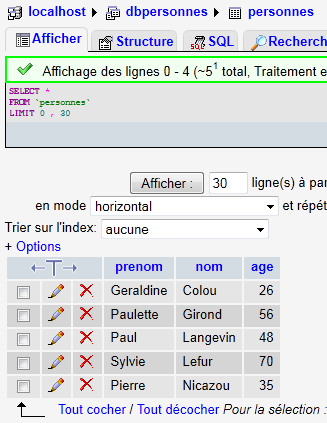
Gli inserimenti effettuati sono visibili in phpMyAdmin:
 |
Commenti
La nuova funzionalità è la funzione executeCommands alle righe 48–90. Questa funzione esegue i comandi SQL presenti nel file di testo denominato $SQL sulla connessione $connection. Restituisce un array di errori ($nbErrors, $msg1, $msg2, …) dove $nbErrors è il numero di errori e $msg1 è il messaggio di errore numero i. Se non ci sono errori, l'array restituito è array(0).
7.4. Esecuzione di query SQL arbitrarie (mysql_04)
Lo script seguente mostra l'esecuzione di comandi SQL dal seguente file di testo [sql.txt]:
select * from personnes
select nom,prenom from personnes order by nom asc, prenom desc
select * from personnes where age between 20 and 40 order by age desc, nom asc, prenom asc
insert into personnes values('Josette','Bruneau',46)
update personnes set age=47 where nom='Bruneau'
select * from personnes where nom='Bruneau'
delete from personnes where nom='Bruneau'
select * from personnes where nom='Bruneau'
xselect * from personnes where nom='Bruneau'
Tra queste istruzioni SQL, vi è l'istruzione SELECT, che restituisce risultati dal database; le istruzioni INSERT, UPDATE e DELETE, che modificano il database senza restituire risultati; e infine, istruzioni non valide come l'ultima (xselect).
<?php

// connection to the MySql database
// user identity
$ID = "admpersonnes";
$PWD = "nobody";
// base identity
$DSN = "mysql:host=localhost;dbname=dbpersonnes";
// identity of the SQL command text file to be executed
$TEXTE = "sql.txt";

// connection
list($erreur, $connexion) = connecte($DSN, $ID, $PWD);
if ($erreur) {
  print "Erreur lors de la connexion à la base [$DSN] sous l'identité ($ID,$PWD) : $erreur\n";
  exit;
}

// order execution SQL
$erreurs = exécuterCommandes($connexion, $TEXTE, 1, 0);
//display number of errors
print "il y a eu $erreurs[0] erreur(s)\n";
for ($i = 1; $i < count($erreurs); $i++)
  print "$erreurs[$i]\n";

// disconnect and exit
déconnecte($connexion);
exit;

// ---------------------------------------------------------------------------------
function connecte($dsn, $login, $pwd) {
  // connects ($login,$pwd) to base $dsn
  // returns the connection id and an error msg
  ...
}

// ---------------------------------------------------------------------------------
function déconnecte($connexion) {
  ...
}

// ---------------------------------------------------------------------------------
function exécuteRequête($connexion, $sql) {
  // executes the $sql request on the $connexion connection
  // returns an array of 2 elements ($erreur,$résultat)

  // determine whether it's a select or not
  $commande = "";
  if (preg_match("/^\s*(\S+)/", $sql, $champs)) {
    $commande = $champs[0];
  }
  // order processing
  try {
    if (strtolower($commande) == "select") {
      $res = $connexion->query($sql);
    } else {
      $res = $connexion->exec($sql);
      if($res===FALSE){
        $info=$connexion->errorInfo();
        return array($info[2],null);
      }
    }
    // error-free return
    return array("", $res);
  } catch (PDOException $e) {
    // return with error
    return array($e->getMessage(), null);
  }
}

// ---------------------------------------------------------------------------------
function exécuterCommandes($connexion, $SQL, $suivi=0, $arrêt=1) {
  // uses the $connexion connection
  // executes the SQL commands contained in the $SQL text file
  // this is a file of SQL commands to be executed one per line
  // if $suivi=1 then each execution of a SQL order is displayed as a success or failure
  // if $arrêt=1, the function stops on the 1st error encountered, otherwise it executes all sql commands
  // the function returns an array (nb of errors, error1, error2, ...)
  // check for the presence of the $SQL file
  if (!file_exists($SQL))
    return array(1, "Le fichier $SQL n'existe pas");

  // execution of SQL queries contained in $TEXTE
  // we put them in a table
  $requêtes = file($SQL);
  // we run them - initially no errors
  $erreurs = array(0);
  for ($i = 0; $i < count($requêtes); $i++) {
    //do we have an empty query
    if (preg_match("/^\s*$/", $requêtes[$i]))
      continue;
    // execute query $i
    list($erreur, $res) = exécuteRequête($connexion, $requêtes[$i]);
    //was there a mistake?
    if ($erreur) {
      // one more mistake
      $erreurs[0]++;
      // error msg
      $msg = "$requêtes[$i] : Erreur ($erreur)\n";
      $erreurs[] = $msg;
      // screen tracking or not?
      if ($suivi)
        print "$msg\n";
      // shall we stop?
      if ($arrêt)
        return $erreurs;
    } else
    if ($suivi) {
      print "$requêtes[$i] : Exécution réussie\n";
      // information on the result of the query
      afficherInfos($res);
    }
  }//for
  // return
  return $erreurs;
}

// ---------------------------------------------------------------------------------
function afficherInfos($résultat) {
  // displays the $résultat result of an sql query
  // was it a select?
  if ($résultat instanceof PDOStatement) {
    // displays field names
    $titre = "";
    $nbColonnes = $résultat->columnCount();
    for ($i = 0; $i < $nbColonnes; $i++) {
      $infos = $résultat->getColumnMeta($i);
      $titre.=$infos['name'] . ",";
    }
    // remove the last character ,
    $titre = substr($titre, 0, strlen($titre) - 1);
    // displays the list of fields
    print "$titre\n";
    // dividing line
    $séparateurs = "";
    for ($i = 0; $i < strlen($titre); $i++) {
      $séparateurs.="-";
    }
    print "$séparateurs\n";
    // data
    foreach ($résultat as $ligne) {
      $data = "";
      for ($i = 0; $i < $nbColonnes; $i++) {
        $data.=$ligne[$i] . ",";
      }

      // remove the last character ,
      $data = substr($data, 0, strlen($data) - 1);
      // on affiche
      print "$data\n";
    }
  } else {
    // it wasn't a select
    print " $résultat lignes(s) a (ont) été modifiée(s)\n";
  }
}
Risultati sullo schermo:
select * from personnes
 : Exécution réussie
prenom,nom,age
--------------
Geraldine,Colou,26
Paulette,Girond,56
Paul,Langevin,48
Sylvie,Lefur,70
Pierre,Nicazou,35
select nom,prenom from personnes order by nom asc, prenom desc : Exécution réussie
nom,prenom
----------
Colou,Geraldine
Girond,Paulette
Langevin,Paul
Lefur,Sylvie
Nicazou,Pierre
select * from personnes where age between 20 and 40 order by age desc, nom asc, prenom asc : Exécution réussie
prenom,nom,age
--------------
Pierre,Nicazou,35
Geraldine,Colou,26
insert into personnes values('Josette','Bruneau',46) : Exécution réussie
 1 lignes(s) a (ont) été modifiée(s)
update personnes set age=47 where nom='Bruneau' : Exécution réussie
 1 lignes(s) a (ont) été modifiée(s)
select * from personnes where nom='Bruneau' : Exécution réussie
prenom,nom,age
--------------
Josette,Bruneau,47
delete from personnes where nom='Bruneau' : Exécution réussie
 1 lignes(s) a (ont) été modifiée(s)
select * from personnes where nom='Bruneau' : Exécution réussie
prenom,nom,age
--------------
xselect * from personnes where nom='Bruneau' : Erreur (You have an error in your SQL syntax; check the manual that corresponds to your MySQL server version for the right syntax to use near 'xselect * from personnes where nom='Bruneau'' at line 1)

il y a eu 1 erreur(s)
xselect * from personnes where nom='Bruneau' : Erreur (You have an error in your SQL syntax; check the manual that corresponds to your MySQL server version for the right syntax to use near 'xselect * from personnes where nom='Bruneau'' at line 1)
Commenti
Ogni comando nel file di testo [sql.txt] viene eseguito dalla funzione exécuteRequête alla riga 43.
- Riga 43: I due parametri della funzione sono la connessione ($connexion) su cui devono essere eseguiti i comandi SQL e il comando SQL ($sql) da eseguire. La funzione restituisce un array di due valori ($erreur, $résultat) dove
- $error è un messaggio di errore, che può essere vuoto se non si è verificato alcun errore
- $result: il risultato restituito dall'esecuzione dell'istruzione SQL. Questo risultato varia a seconda che l'istruzione sia una SELECT o un'istruzione INSERT, UPDATE o DELETE.
- Righe 48–51: recuperiamo il primo elemento dell'istruzione SQL per determinare se si tratta di un'istruzione SELECT o di un'istruzione INSERT, UPDATE o DELETE.
- riga 55: nel caso di un'istruzione SELECT, questa viene eseguita utilizzando il metodo [PDO]->query("istruzione SELECT"). Il risultato restituito è un oggetto PDOStatement.
- Riga 57: Nel caso di un'istruzione INSERT, UPDATE o DELETE, questa viene eseguita utilizzando il metodo [PDO]->exec("istruzione SQL"). Il risultato restituito è il numero di righe modificate dall'istruzione SQL. Pertanto, se un'istruzione SQL DELETE elimina due righe, il risultato restituito è il numero intero 2. Se durante l'esecuzione si verifica un errore, il risultato restituito è il valore booleano false. In questo caso, il metodo [PDO]->errorinfo() fornisce informazioni sull'errore sotto forma di un array di valori. L'elemento all'indice 2 di questo array è il messaggio di errore.
- righe 58–60: gestione di eventuali errori derivanti dall'operazione [PDO]->exec("SQL statement").
- righe 65–68: gestione di eventuali eccezioni
- Riga 72: la funzione
executeCommandsesegue i comandi SQL memorizzati nel file di testo*$SQL*sulla connessione*$connection*. Si tratta di codice che abbiamo già visto, con una piccola differenza: la riga 111. - Riga 111: la funzione
executeQueryha restituito un array (*$error*, *$result*), dove$result*è il risultato dell'esecuzione di un comando SQL. Questo risultato varia a seconda che il comando SQL fosse un'istruzioneSELECT*o un'istruzioneINSERT*,UPDATE*oDELETE*. La funzionedisplayInfo* visualizza le informazioni relative a questo risultato. - Riga 122: Se l'istruzione SQL era un'istruzione SELECT, il risultato è di tipo PDOStatement. Questo tipo rappresenta una tabella composta da righe e colonne.
- Riga 125: il metodo [PDOStatement]->getColumnCount() restituisce il numero di colonne nella tabella risultante dal SELECT
- Riga 127: Il metodo [PDOStatement]->getMeta(i) restituisce un dizionario di informazioni relative alla colonna i della tabella dei risultati SELECT. In questo dizionario, il valore associato alla chiave 'name' è il nome della colonna.
- Righe 127–129: i nomi delle colonne della tabella dei risultati SELECT vengono concatenati in una stringa.
- Righe 141–145: È possibile iterare su un oggetto PDOStatement utilizzando un ciclo foreach. Ad ogni iterazione, l’elemento restituito è una riga della tabella dei risultati SELECT sotto forma di un array di valori che rappresentano i valori delle varie colonne della riga. Visualizziamo tutti questi valori utilizzando un ciclo for.
- Riga 154: Il risultato dell'esecuzione di un'istruzione INSERT, UPDATE o DELETE è il numero di righe modificate dall'istruzione.