8. Esercizio di calcolo delle imposte con MySQL
Abbiamo già scritto tre versioni di questo esercizio. L'ultima versione utilizzava una classe di calcolo delle imposte. Questa classe recuperava i dati necessari per il calcolo da un file di testo. Ora li recupererà da un database. Per farlo, scriviamo un codice iniziale che trasferirà i dati dal file di testo a un database.
Il file di testo impots.txt è il seguente:
12620:13190:15640:24740:31810:39970:48360:55790:92970:127860:151250:172040:195000:0
0:0.05:0.1:0.15:0.2:0.25:0.3:0.35:0.4:0.45:0.5:0.55:0.6:0.65
0:631:1290.5:272.5:3309.5:4900:6898.5:9316.5:12106:16754.5:23147.5:30710:39312:49062
Il database da creare è il seguente:
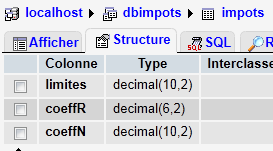 | 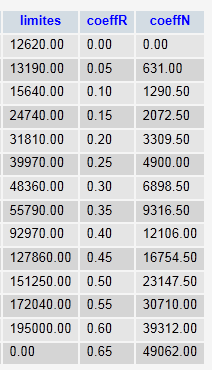 |
Il database si chiama [dbimpots] e contiene una sola tabella [impots]. L'accesso è consentito all'utente [root] senza password.
8.1. Importazione di un file di testo in una tabella MySQL (txt2mysql)
<?php

// transfers the text file containing the data needed to calculate taxes
// in a mysql table
// the data
$IMPOTS = "impots.txt";
$BASE = "dbimpots";
$TABLE = "impots";
$USER = "root";
$PWD = "";
$HOTE = "localhost";

// the data required to calculate the tax has been placed in the $IMPOTS file
// one line per table in the form
// val1:val2:val3,...
list($erreur, $limites, $coeffR, $coeffN) = getTables($IMPOTS);
// was there a mistake?
if ($erreur) {
  print "$erreur\n";
  exit;
}//if
// transfer these tables to a mysql table
$erreur = copyToMysql($limites, $coeffR, $coeffN, $HOTE, $USER, $PWD, $BASE, $TABLE);
if ($erreur)
  print "$erreur\n";
else
  print "Transfert opéré\n";
// end
exit;

// --------------------------------------------------------------------------
function copyToMysql($limites, $coeffR, $coeffN, $HOTE, $USER, $PWD, $BASE, $TABLE) {
  // copy the 3 numerical tables $limites, $coeffR, $coeffN
  // in table $TABLE of mysql database $BASE
  // the mysql database is on machine $HOTE
  // the user is identified by $USER and $PWD
  // connection
  list($erreur, $connexion) = connecte("mysql:host=$HOTE;dbname=$BASE", $USER, $PWD);
  if ($erreur)
    return "Erreur lors de la connexion à MySql sous l'identité ($HOTE,$USER,$PWD) : $erreur\n";
  // table deletion
  $requête = "drop table $TABLE";
  exécuteRequête($connexion, $requête);
  // table creation
  $requête = "create table $TABLE (limites decimal(10,2), coeffR decimal(6,2), coeffN decimal(10,2))";
  list($erreur, $res) = exécuteRequête($connexion, $requête);
  if ($erreur)
    return "$requête : erreur ($erreur)";
  // filling
  for ($i = 0; $i < count($limites); $i++) {
    // insertion request
    $requête = "insert into $TABLE (limites,coeffR,coeffN) values ($limites[$i],$coeffR[$i],$coeffN[$i])";
    // query execution
    list($erreur, $res) = exécuteRequête($connexion, $requête);
    // return if error
    if ($erreur)
      return "$requête : erreur ($erreur)";
  }//for
  // it's over - log off
  déconnecte($connexion);
  // error-free return
  return "";
}
// --------------------------------------------------------------------------
function getTables($IMPOTS) {
  // $IMPOTS: name of the file containing data from tables $limites, $coeffR, $coeffN
  ...
  // end
  return array("", $limites, $coeffR, $coeffN);
}
// --------------------------------------------------------------------------
function cutNewLinechar($ligne) {
  // delete the end-of-line mark from $ligne if it exists
  ...
  // end
  return($ligne);
}
// ---------------------------------------------------------------------------------
function connecte($dsn, $login, $pwd) {
  // connects ($login,$pwd) to base $dsn
  // returns the connection id and an error msg
  ...
}

//connect
// ---------------------------------------------------------------------------------
function déconnecte($connexion) {
  // closes the connection identified by $connexion
  ...
}

// ---------------------------------------------------------------------------------
function exécuteRequête($connexion, $sql) {
  // executes the $sql request on the $connexion connection
  // returns an array of 2 elements ($erreur,$résultat)
 ...
}
Risultati sullo schermo:
8.2. Il programma di calcolo delle imposte ( impots_04)
Questa versione utilizza una classe Impôts che recupera i valori necessari per calcolare l'imposta da un database. Qui introduciamo un nuovo concetto: la prepared statement. L'esecuzione di un'istruzione SQL da parte di un DBMS avviene in due fasi:
- La query viene preparata: il DBMS prepara un piano di esecuzione ottimizzato per la query. L'obiettivo è eseguirla nel modo più efficiente possibile.
- La query viene eseguita.
Se la stessa query viene eseguita N volte, i due passaggi precedenti vengono eseguiti N volte. Tuttavia, è possibile preparare la query una sola volta ed eseguirla N volte. Per farlo, è necessario utilizzare le query preparate. Se $query è l'istruzione SQL da eseguire e $connection è l'oggetto PDO che rappresenta la connessione:
- $statement = $connection->prepare($query) prepara una query e restituisce la query "preparata"
- $statement->execute() esegue la query preparata.
Se la query preparata è un'istruzione SELECT, allora
- $statement->fetchAll() restituisce tutte le righe della tabella dei risultati della query SELECT come un array T, dove T[i,j] è il valore della colonna j nella riga i della tabella
- $statement->fetch() restituisce la riga corrente della tabella sotto forma di array T, dove T[j] è il valore della colonna j nella riga
Le istruzioni preparate offrono vantaggi che vanno oltre la semplice maggiore efficienza. In particolare, garantiscono una maggiore sicurezza. Pertanto, dovrebbero essere utilizzate sistematicamente.
<?php

// test -----------------------------------------------------
// definition of constants
$DATA = "data.txt";
$RESULTATS = "resultats.txt";
$TABLE = "impots";
$BASE = "dbimpots";
$USER = "root";
$PWD = "";
$HOTE="localhost";

// the data required to calculate the tax has been placed in table mysqL $TABLE
// belonging to the $BASE database. The table has the following structure
// limits decimal(10,2), coeffR decimal(6,2), coeffN decimal(10,2)
// taxable person parameters (marital status, number of children, annual salary)
// were placed in the $DATA text file, one line for each taxpayer
// the results (marital status, number of children, annual salary, tax payable) are placed in the
// the $RESULTATS text file, with one result per line

// create a Tax object
$I = new Impôts($HOTE, $USER, $PWD, $BASE, $TABLE);
// was there a mistake?
$erreur=$I->getErreur();
if ($erreur) {
  print "$I->erreur\n";
  exit;
}//if
// create a utilities object
$u = new Utilitaires();

// opening taxpayer data files
$data = fopen($DATA, "r");
if (!$data) {
  print "Impossible d'ouvrir en lecture le fichier des données [$DATA]\n";
  exit;
}

// open results file
$résultats = fopen($RESULTATS, "w");
if (!$résultats) {
  print "Impossible de créer le fichier des résultats [$RESULTATS]\n";
  exit;
}

// the current line of the taxpayer data file is used
while ($ligne = fgets($data, 100)) {
  // remove any end-of-line marker
  $ligne = $u->cutNewLineChar($ligne);
  // we retrieve the 3 fields married,children,salary which form $ligne
  list($marié, $enfants, $salaire) = explode(",", $ligne);
  // tax calculation
  $impôt = $I->calculer($marié, $enfants, $salaire);
  // enter the result
  fputs($résultats, "$marié:$enfants:$salaire:$impôt\n");
  // following data
}
// close files
fclose($data);
fclose($résultats);

// end
exit;

// ---------------------------------------------------------------------------------
// definition of a Tax class
class Impôts {

  // attributes: the 3 data tables
  private $limites;
  private $coeffR;
  private $coeffN;
  private $erreur;
  private $nbLimites;

  // getter
  public function getErreur(){
    return $this->erreur;
  }
  // manufacturer

  function __construct($HOTE, $USER, $PWD, $BASE, $TABLE) {
    // initializes $limites, $coeffR, $coeffN attributes
    // the data required to calculate the tax has been placed in the mysql table $TABLE
    // belonging to the $BASE database. The table has the following structure
    // limits decimal(10,2), coeffR decimal(6,2), coeffN decimal(10,2)
    // connection to the mysql database on machine $HOTE is made as ($USER,$PWD)
    // initializes the $erreur field with a possible error
    // empty if no error
    //
    // connection to mysql database
    $DSN = "mysql:host=$HOTE;dbname=$BASE";
    list($erreur, $connexion) = connecte($DSN, $USER, $PWD);
    if ($erreur) {
      $this->erreur = "Erreur lors de la connexion à MySql sous l'identité ($HOTE,$USER,$PWD) : $erreur\n";
      return;
    }
    // read table $TABLE
    $requête = "select limites,coeffR,coeffN from $TABLE";
    // executes the $requête request on the $connexion connection
    try {
      $statement = $connexion->prepare($requête);
      $statement->execute();
      // query result evaluation
      while ($colonnes = $statement->fetch()) {
        $this->limites[] = $colonnes[0];
        $this->coeffR[] = $colonnes[1];
        $this->coeffN[] = $colonnes[2];
      }
      // no error
      $this->erreur = "";
      // number of elements in the limit table
      $this->nbLimites = count($this->limites);
    } catch (PDOException $e) {
      $this->erreur = $e->getMessage();
    }
     // disconnect
    déconnecte($connexion);
  }
  // --------------------------------------------------------------------------
  function calculer($marié, $enfants, $salaire) {
    // $marié : yes, no
    // $enfants : number of children
    // $salaire: annual salary

  // is the item in good condition?
    if ($this->erreur)
      return -1;

    // number of shares
    ...
  }

}

// ---------------------------------------------------------------------------------
// a class of utility functions
class Utilitaires {

  function cutNewLinechar($ligne) {
    // delete the end-of-line mark from $ligne if it exists
    ...
  }

}
// ---------------------------------------------------------------------------------
function connecte($dsn, $login, $pwd) {
  // connects ($login,$pwd) to base $dsn
  // returns the connection id and an error msg
  ...
}

//connect
// ---------------------------------------------------------------------------------
function déconnecte($connexion) {
  // closes the connection identified by $connexion
  ...
}
Risultati: gli stessi delle versioni precedenti.
Commenti
Le nuove funzionalità sono le righe 98–109:
- riga 99: l'istruzione SQL SELECT che recupera i dati necessari per calcolare l'imposta.
- Riga 102: preparazione dell'istruzione SQL SELECT
- Riga 103: esecuzione dell'istruzione preparata
- Righe 105–109: elaborazione riga per riga della tabella dei risultati dell'istruzione SELECT