9. Funzioni di rete PHP
Discuteremo ora delle funzioni di rete di PHP, che ci consentono di eseguire la programmazione TCP/IP (Transmission Control Protocol/Internet Protocol).
9.1. Recupero del nome o dell'indirizzo IP di una macchina su Internet (inet_01)
<?php

// functions machine name <--> address IP machine
ini_set("display_errors", "off");
// constants
$HOTES = array("istia.univ-angers.fr", "www.univ-angers.fr", "www.ibm.com", "localhost", "", "xx");
// IP addresses of $HOTES machines
for ($i = 0; $i < count($HOTES); $i++) {
  getIPandName($HOTES[$i]);
}
// end
exit;

//------------------------------------------------
function getIPandName($nomMachine) {
//$nomMachine: name of the machine whose address is required IP: name of the machine whose address is required IP: name of the machine whose address is required
// nomMachine-->adresse IP
  $ip = gethostbyname($nomMachine);
  if ($ip != $nomMachine) {
    print "ip[$nomMachine]=$ip\n";
// address IP --> nomMachine
    $name = gethostbyaddr($ip);
    if ($name != $ip) {
      print "name[$ip]=$name\n";
    } else {
      print "Erreur, machine[$ip] non trouvée\n";
    }
  } else {
    print "Erreur, machine[$nomMachine] non trouvée\n";
  }
}
Risultati:
ip[istia.univ-angers.fr]=193.49.146.171
name[193.49.146.171]=istia.istia.univ-angers.fr
ip[www.univ-angers.fr]=193.49.144.40
name[193.49.144.40]=ametys-fo.univ-angers.fr
ip[www.ibm.com]=129.42.56.216
Erreur, machine[129.42.56.216] non trouvée
ip[localhost]=127.0.0.1
name[127.0.0.1]=localhost127.0.0.1
ip[]=192.168.1.11
name[192.168.1.11]=st-PC.home
Erreur, machine[xx] non trouvée
Commenti
- Riga 4: Indichiamo al sistema di non visualizzare gli errori di runtime.
Le funzioni di rete di PHP vengono utilizzate nella funzione getIpandName alla riga 15.
- Riga 18: La funzione gethostbyname($name) recupera l'indirizzo IP "ip3.ip2.ip1.ip0" della macchina denominata $name. Se la macchina $name non esiste, la funzione restituisce $name come risultato.
- Riga 22: La funzione gethostbyaddr($ip) recupera il nome host del computer con indirizzo IP $ip nel formato "ip3.ip2.ip1.ip0". Se il computer $ip non esiste, la funzione restituisce $ip come risultato.
9.2. Un client web ( inet_02)
Uno script per recuperare il contenuto della pagina indice di un sito web.
<?php

// error management
ini_set("display_errors","off");
// otain the text HTML from URL
// list of websites
$SITES = array("istia.univ-angers.fr", "www.univ-angers.fr", "www.ibm.com", "xx");
// reading the index pages of the sites in the $SITES table
for ($i = 0; $i < count($SITES); $i++) {
// read site index page $SITES[$i]
  $résultat = getIndex($SITES[$i]);
// result display
  print "$résultat\n";
}//for
// end
exit;

//-----------------------------------------------------------------------
function getIndex($site) {
// reads the URL $site/ and stores it in the $site.html file
// create file $site.html
  $html = fopen("$site.html", "w");
  if (!$html)
    return "Erreur lors de la création du fichier $site.html";

// open a connection on port 80 of $site
  $connexion = fsockopen($site, 80);
// return if error
  if (!$connexion)
    return "Echec de la connexion au site ($site,80) : $erreur";
// $connexion represents a bidirectional communication flow
// between the client (this program) and the contacted web server
// this channel is used for the exchange of orders and information
// the dialog protocol is HTTP
// the customer sends the get command to request URL /
// syntaxe get URL HTTP/1.0
// protocol HTTP headers must end with an empty line
  fputs($connexion, "GET / HTTP/1.0\n\n");
// the server will now respond on channel $connexion. It will send all
// then close the channel. The client therefore reads everything that arrives from $connexion
// until the channel closes
  while ($ligne = fgets($connexion, 1000))
    fputs($html, $ligne);
// the customer in turn closes the connection
  fclose($connexion);
// close file $html
  fclose($html);
// return
  return "Transfert réussi de la page index du site $site";
}
Risultati: ad esempio, il file ricevuto per il sito [www.ibm.com]:
- Le righe da 1 a 11 sono le intestazioni HTTP della risposta del server
- riga 1: il server indica al client di reindirizzarsi all'URL specificato nella riga 8
- riga 2: data e ora della risposta
- riga 3: identità del server web
- Riga 4: contenuto inviato dal server. In questo caso, una pagina HTML che inizia alla riga 13
- Riga 12: la riga vuota che conclude le intestazioni HTTP
- Righe 13–19: La pagina HTML inviata dal server web.
Commenti sul codice:
- riga 7: l'elenco degli URL dei siti web di cui vogliamo le pagine indice. Questi saranno memorizzati nel file di testo [sitename.html].
- Riga 11: la funzione getIndex esegue l'operazione
- riga 19: la funzione getIndex($site) scarica la pagina principale (o pagina indice) del sito web $site e la memorizza nel file di testo $site.html.
- riga 27: la funzione fsockopen($site,$port) crea una connessione con un servizio TCP/IP in esecuzione sulla porta $port della macchina $site. Una volta aperta la connessione client/server, molti servizi TCP/IP scambiano righe di testo. È il caso, in questo caso, del protocollo HTTP (HyperText Transfer Protocol). Il flusso di dati dal server al client può quindi essere trattato come un file di testo. Lo stesso vale per il flusso di dati dal client al server.
- Riga 38: La funzione fputs permette al client di inviare dati al server. In questo caso, la riga di testo inviata ha il seguente significato: "Voglio (GET) la pagina principale (/) del sito web a cui sono connesso. Sto usando la versione 1.0 di HTTP." La versione attuale di questo protocollo è la 1.1.
- Riga 42: Le righe di testo della risposta del server possono essere lette riga per riga utilizzando un ciclo while e salvate nel file di testo [$site.html]. Una volta che il server web ha inviato la pagina richiesta, chiude la connessione con il client. Sul lato client, ciò verrà rilevato come fine del file.
9.3. Un client SMTP (inet_03)
Tra i protocolli TCP/IP, SMTP (Simple Mail Transfer Protocol) è il protocollo di comunicazione per il servizio di consegna della posta.
Note:
- Su un computer Windows con software antivirus, l'antivirus probabilmente impedirà allo script PHP di connettersi alla porta 25 di un server SMTP. È quindi necessario disabilitare l'antivirus. Per McAfee, ad esempio, è possibile procedere come segue:
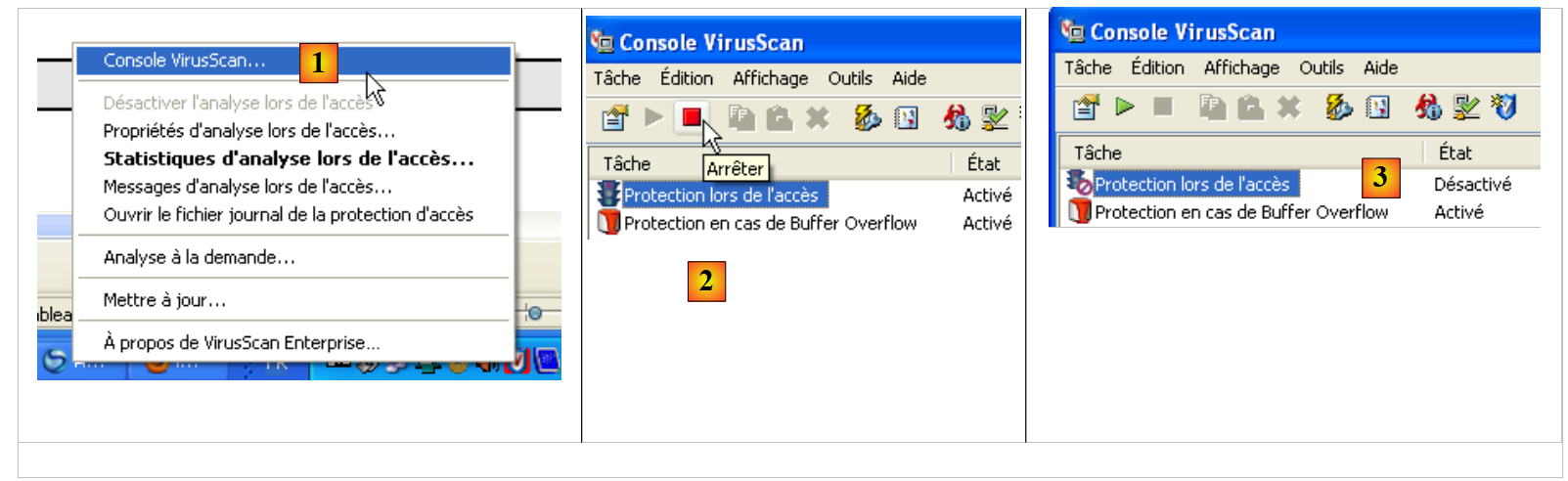 |
- In [1], aprire la console di VirusScan
- In [2], arrestare il servizio [On-Access Protection]
- in [3], è stato arrestato
Lo script:
<?php

// client SMTP (SendMail Transfer Protocol) for sending a message
// information is taken from a $INFOS file containing the following lines
// line 1: smtp, sender, recipient
// next lines: message text
// sender: email sender
// recipient: email recipient
// smtp: name of smtp server to use
// communication protocol SMTP client-server
// -> client connects to smtp server port 25
// <- server sends him a welcome message
// -> customer sends command EHLO: machine name
// <- server responds OK or not
// -> customer sends mail order from: <sender>
// <- server responds OK or not
// -> client sends the rcpt to command: <recipient>
// <- server responds OK or not
// -> customer sends data order
// <- server responds OK or not
// -> client sends all the lines of its message and ends with a line containing the
// single character .
// <- server responds OK or not
// -> customer sends quit order
// <- server responds OK or not
// server responses have the form xxx text where xxx is a 3-digit number. Any number xxx >=500
// indicates an error. The answer may consist of several lines all beginning with xxx except the last one
// of the form xxx(space)
// exchanged text lines must end with the characters RC(#13) and LF(#10)

// data
$INFOS = "mail.txt"; // mail settings
// retrieve mail parameters
list($erreur, $smtpServer, $expéditeur, $destinataire, $message) = getInfos($INFOS);
// mistake?
if ($erreur) {
  print "$erreur\n";
  exit;
}
print "Envoi du message [$smtpServer,$expéditeur,$destinataire]\n";
// sending mail in verbose mode
$résultat = sendmail($smtpServer, $expéditeur, $destinataire, $message, 1);
print "Résultat de l'envoi : $résultat\n";
// end
exit;

//-----------------------------------------------------------------------
function getInfos($fichier) {
// returns information ($smtp,$expéditeur,$destinataire,$message) taken from text file $fichier
// line 1: smtp, sender, recipient
// next lines: message text

// opening of $fichier
  $infos = fopen($fichier, "r");
// does the $fichier file exist?
  if (!$infos)
    return array("Le fichier $fichier n'a pu être ouvert en lecture");
// read the 1st line
  $ligne = fgets($infos, 1000);
// delete end-of-line mark
  $ligne = cutNewLineChar($ligne);
// retrieving smtp, sender and recipient fields
  $champs = explode(",", $ligne);
// do we have the right number of fields?
  if (count($champs) != 3)
    return "La ligne 1 du fichier $fichier (serveur smtp, expéditeur, destinataire) a un
nombre de champs incorrect";
// "processing" the recovered information
  for ($i = 0; $i < count($champs); $i++)
    $champs[$i] = trim($champs[$i]);
// field recovery
  list($smtpServer, $expéditeur, $destinataire) = $champs;
// read message
  $message = "";
  while ($ligne = fgets($infos, 1000))
    $message.=$ligne;
  fclose($infos);
// return
  return array("", $smtpServer, $expéditeur, $destinataire, $message);
}

//-----------------------------------------------------------------------

function sendmail($smtpServer, $expéditeur, $destinataire, $message, $verbose) {
// sends $message to smtp server $smtpserver from $expéditeur
// for $destinataire. If $verbose=1, tracks client-server exchanges
// retrieve the customer's name
  $client = gethostbyaddr(gethostbyname(""));
// open a connection on port 25 of $smtpServer
  $connexion = fsockopen($smtpServer, 25);
// return if error
  if (!$connexion)
    return "Echec de la connexion au site ($smtpServer,25)";
// $connexion represents a bidirectional communication flow
// between the client (this program) and the smtp server contacted
// this channel is used for the exchange of orders and information

// after connection, the server sends a welcome message which is read as follows
  $erreur = sendCommand($connexion, "", $verbose, 1);
  if ($erreur) {
    fclose($connexion);
    return $erreur;
  }

// cmde ehlo:
  $erreur = sendCommand($connexion, "EHLO $client", $verbose, 1);
  if ($erreur) {
    fclose($connexion);
    return $erreur;
  }

// cmde mail from:
  $erreur = sendCommand($connexion, "MAIL FROM: <$expéditeur>", $verbose, 1);
  if ($erreur) {
    fclose($connexion);
    return $erreur;
  }

// cmde rcpt to:
  $erreur = sendCommand($connexion, "RCPT TO: <$destinataire>", $verbose, 1);
  if ($erreur) {
    fclose($connexion);
    return $erreur;
  }

// cmde data
  $erreur = sendCommand($connexion, "DATA", $verbose, 1);
  if ($erreur) {
    fclose($connexion);
    return $erreur;
  }

// prepare message to send
  // it must contain the lines
  // From: expéditeur
  // To: recipient
  // blank line
  // Message
  // .
  $data = "From: $expéditeur\r\nTo: $destinataire\r\n$message\r\n.\r\n";
  $erreur = sendCommand($connexion, $data, $verbose, 0);
  if ($erreur) {
    fclose($connexion);
    return $erreur;
  }

// cmde quit
  $erreur = sendCommand($connexion, "QUIT", $verbose, 1);
  if ($erreur) {
    fclose($connexion);
    return $erreur;
  }

// end
  fclose($connexion);
  return "Message envoyé";
}

// --------------------------------------------------------------------------

function sendCommand($connexion, $commande, $verbose, $withRCLF) {
// sends $commande to the $connexion channel
// verbose mode if $verbose=1
// if $withRCLF=1, adds sequence RCLF to exchange

// data
  if ($withRCLF)
    $RCLF = "\r\n"; else
    $RCLF="";

// send cmde if $commande not empty
  if ($commande) {
    fputs($connexion, "$commande$RCLF");

// possible echo
    if ($verbose)
      affiche($commande, 1);
  }////if

// reading response
  $réponse = fgets($connexion, 1000);

// possible echo
  if ($verbose)
    affiche($réponse, 2);

// error code recovery
  $codeErreur = substr($réponse, 0, 3);

// last line of the answer?
  while (substr($réponse, 3, 1) == "-") {

     // reading response
    $réponse = fgets($connexion, 1000);

     // possible echo
    if ($verbose)
      affiche($réponse, 2);
  }////while
// answer completed

// error returned by the server?
  if ($codeErreur >= 500)
    return substr($réponse, 4);

// error-free return
  return "";
}

// --------------------------------------------------------------------------

function affiche($échange, $sens) {
// displays $échange on screen
// if $sens=1 displays -->$echange
// if $sens=2 displays <-- $échange without the last 2 characters RCLF
  switch ($sens) {
    case 1:
      print "--> [$échange]\n";
      return;
    case 2:
      $L = strlen($échange);
      print "<-- [" . substr($échange, 0, $L - 2) . "]\n";
      return;
  }////switch
}

// --------------------------------------------------------------------------

function cutNewLinechar($ligne) {
// delete the end-of-line mark from $ligne if it exists
  ...
}
Il file infos.txt:
- riga 1: [smtp.orange.fr] il server utilizzato per inviare l'e-mail, [serge.tahe@univ-angers.fr] l'indirizzo del mittente, [serge.tahe@istia.univ-angers.fr] l'indirizzo del destinatario
- riga 2: intestazioni del messaggio. Qui ce n'è solo una, l'oggetto del messaggio.
- riga 3: la riga vuota conclude le intestazioni del messaggio
- righe 4–7: il corpo del messaggio
Risultati sullo schermo:
- riga 1: messaggio di tracciamento dell'esecuzione dello script
- riga 2: prima risposta dal server SMTP. Questo segue la connessione del client alla porta 25 del server SMTP. Le risposte del server sono righe nella forma [xxx messaggio] o [xxx-messaggio]. La prima sintassi indica che la risposta è completa. xxx è un codice di stato. Un valore maggiore o uguale a 500 indica un errore. La seconda sintassi indica che la risposta non è completa e che seguirà un'altra riga.
- Riga 2: il server SMTP indica di essere pronto a ricevere comandi
- Riga 3: il client invia il comando [EHLO machineName], dove machineName è il nome host della macchina su cui è in esecuzione il client
- Righe 4–10: Risposta dal server SMTP
- Riga 11: il client invia il comando [MAIL FROM: <mittente>], che specifica l'indirizzo e-mail del mittente.
- Riga 12: il server SMTP indica che accetta questo indirizzo. Avrebbe potuto rifiutarlo se la sintassi fosse stata errata. Detto questo, non verifica che l'indirizzo e-mail esista effettivamente.
- Riga 13: il client invia il comando [RCPT TO: <destinatario>], che specifica l'indirizzo e-mail del destinatario del messaggio.
- Riga 14: Il server SMTP risponde che accetta questo indirizzo. Anche in questo caso viene eseguito un controllo sintattico.
- Riga 15: Il client invia il comando [DATA], che indica all'utente che le righe che seguono costituiscono il corpo del messaggio.
- Riga 16: il server risponde che il messaggio può essere inviato. Il messaggio è una sequenza di righe di testo che deve terminare con una riga di un solo carattere: un punto.
- Righe 17–25: Il messaggio inviato dal client
- Righe 17–19: le intestazioni del messaggio [From:, To:, Subject:] indicano rispettivamente il mittente, il destinatario e l'oggetto del messaggio.
- Riga 20: Una riga vuota che indica la fine delle intestazioni
- Righe 21–23: il corpo del messaggio
- Riga 24: la riga costituita da un singolo punto che segnala la fine del messaggio.
- Riga 26: Il server SMTP risponde che accetta il messaggio
- Riga 27: il client invia il comando [QUIT] per indicare che ha terminato
- Riga 28: il server SMTP risponde che chiuderà la connessione con il client
Commenti al codice
Non entreremo nei dettagli del codice dello script poiché è stato ampiamente commentato.
- Righe 48–80: La funzione che elabora il file [infos.txt], contenente il messaggio da inviare insieme alle informazioni necessarie per l'invio. Restituisce un array ($error, $smtpServer, $sender, $recipient, $message) con:
- $error: un possibile messaggio di errore; altrimenti vuoto.
- $smtpServer: il nome del server SMTP a cui connettersi
- $sender: l'indirizzo e-mail del mittente
- $recipient: l'indirizzo email del destinatario
- $message: il messaggio da inviare. Oltre al corpo del messaggio, potrebbero esserci delle intestazioni.
- righe 84-157: la funzione sendMail è responsabile dell'invio del messaggio. I suoi parametri sono i seguenti:
- $smtpServer: il nome del server SMTP a cui connettersi
- $sender: l'indirizzo email del mittente
- $recipient: l'indirizzo email del destinatario
- $message: il messaggio da inviare.
- $verbose: se impostato su 1, indica che la comunicazione con il server SMTP deve essere registrata nella console.
La funzione sendMail restituisce un messaggio di errore; restituisce una stringa vuota se non ci sono stati errori.
- Riga 88: recupera il nome Windows di un computer che esegue il sistema operativo Windows.
- riga 99: abbiamo visto che il dialogo client/server segue questo schema:
- il client invia un comando su una singola riga
- risposta del server su una o più righe
- Righe 161–208: la funzione `sendCommand` accetta i seguenti parametri:
- $connection: il canale TCP/IP che collega il client al server
- $command: il comando da inviare su questo canale. Verrà letta la risposta del server a questo comando.
- $verbose: impostato su 1 indica che gli scambi con il server SMTP devono essere visualizzati sulla console.
- $withRCLF: se impostato su 1, indica che il marcatore di fine riga "\r\n" deve essere aggiunto alla fine del comando
- riga 173: il client invia il comando
- riga 181: lettura della prima riga della risposta del server SMTP nella forma xxx testo o xxx-testo. Il secondo caso indica che il server ha un'altra riga da inviare. xxx è il codice di errore inviato dal server.
- riga 188 – recupero del codice di errore dalla risposta
- righe 191–199: lettura delle altre righe della risposta
- righe 203–204: se il codice di errore è >=500, allora il server SMTP sta segnalando un errore.
9.4. Un secondo programma per l'invio di e-mail (inet_04)
Questo script ha la stessa funzionalità del precedente: l'invio di un'e-mail. A tal fine utilizziamo i moduli della libreria PEAR. Questa libreria contiene decine di moduli che coprono vari campi. Utilizzeremo i seguenti:
- Net/SMTP: un modulo per comunicare con un server SMTP
- Mail: un modulo per gestire l'invio di e-mail utilizzando vari protocolli.
- Mail/Mime: un modulo per la creazione di un messaggio che può includere documenti allegati.
Per utilizzare questi moduli, è necessario prima installarli sul computer su cui è in esecuzione lo script PHP. L'installazione del pacchetto software WampServer ha installato un interprete PHP. All'interno della sua struttura di directory è possibile installare i moduli PEAR.
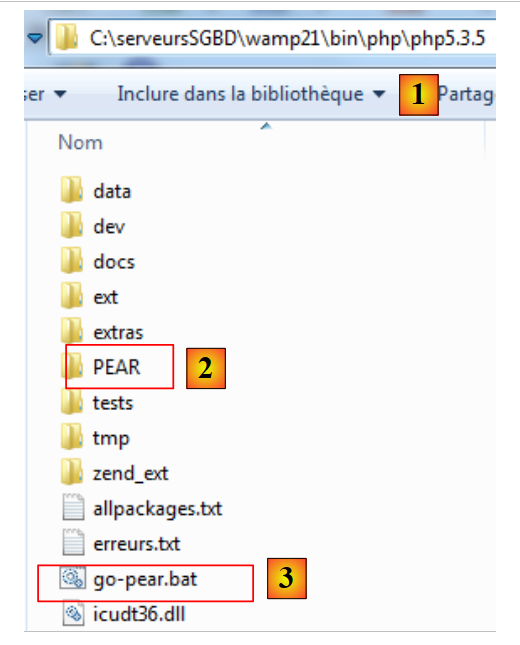 |
- in [1], la directory di installazione dell'interprete PHP
- in [2], la cartella PEAR che conterrà i moduli PEAR da installare
- [3] è il file batch [go-pear.bat] che inizializza la libreria PEAR
Per inizializzare la libreria PEAR, apri una finestra DOS ed esegui il file [go-pear.bat]. Questo script si collegherà al sito web della libreria PEAR. È quindi necessaria una connessione a Internet.
Una volta connesso al sito web della libreria PEAR, lo script scaricherà una serie di elementi. Tra questi c'è un nuovo script [pear.bat]. Useremo questo script per installare i vari moduli PEAR di cui abbiamo bisogno. Questo script viene richiamato con degli argomenti. Tra questi, l'argomento [help] fornisce un elenco dei comandi accettati dallo script:
C:\serveursSGBD\wamp21\bin\PHP\php5.3.5>pear help
Commands:
build                  Build an Extension From C Source
bundle                 Unpacks a Pecl Package
channel-add            Add a Channel
channel-alias          Specify an alias to a channel name
channel-delete         Remove a Channel From the List
channel-discover       Initialize a Channel from its server
channel-info           Retrieve Information on a Channel
channel-login          Connects and authenticates to remote channel server
channel-logout         Logs out from the remote channel server
channel-update         Update an Existing Channel
clear-cache            Clear Web Services Cache
config-create          Create a Default configuration file
config-get             Show One Setting
config-help            Show Information About Setting
config-set             Change Setting
config-show            Show All Settings
convert                Convert a package.xml 1.0 to package.xml 2.0 format
cvsdiff                Run a "cvs diff" for all files in a package
cvstag                 Set CVS Release Tag
download               Download Package
download-all           Downloads each available package from the default channel

info                   Display information about a package
install                Install Package
list                   List Installed Packages In The Default Channel
list-all               List All Packages
list-channels          List Available Channels
list-files             List Files In Installed Package
list-upgrades          List Available Upgrades
login                  Connects and authenticates to remote server [Deprecated i
n favor of channel-login]
logout                 Logs out from the remote server [Deprecated in favor of c
hannel-logout]
makerpm                Builds an RPM spec file from a PEAR package
package                Build Package
package-dependencies   Show package dependencies
package-validate       Validate Package Consistency
pickle                 Build PECL Package
remote-info            Information About Remote Packages
remote-list            List Remote Packages
run-scripts            Run Post-Install Scripts bundled with a package
run-tests              Run Regression Tests
search                 Search remote package database
shell-test             Shell Script Test
sign                   Sign a package distribution file
svntag                 Set SVN Release Tag
uninstall              Un-install Package
update-channels        Update the Channel List
upgrade                Upgrade Package
upgrade-all            Upgrade All Packages [Deprecated in favor of calling upgr
ade with no parameters]
Usage: pear [options] command [command-options] <parameters>
Type "pear help options" to list all options.
Type "pear help shortcuts" to list all command shortcuts.
Type "pear help <command>" to get the help for the specified command.
Il comando [install] viene utilizzato per installare i moduli PEAR. È possibile ottenere aiuto sul comando [install]:
C:\serveursSGBD\wamp21\bin\PHP\php5.3.5>pear help install
pear install [options] [channel/]<package> ...
Installs one or more PEAR packages.  You can specify a package to install in four ways:

"Package-1.0.tgz" : installs from a local file

"http://example.com/Package-1.0.tgz" : installs from anywhere on the net.

"package.xml" : installs the package described in package.xml.  Useful for testing, or for wrapping a PEAR package in another package manager such as RPM.

"Package[-version/state][.tar]" : queries your default channel's server(pear.php.net) and downloads the newest package with the preferred quality/state (stable).

To retrieve Package version 1.1, use "Package-1.1," to retrieve Package state beta, use "Package-beta."  To retrieve an uncompressed file, append .tar (make sure there is no file by the same name first)

To download a package from another channel, prefix with the channel name like "channel/Package"

More than one package may be specified at once.  It is ok to mix these four ways of specifying packages.

Options:
  -f, --force
        will overwrite newer installed packages
  -l, --loose
        do not check for recommended dependency version
  -n, --nodeps
        ignore dependencies, install anyway
  -r, --register-only
        do not install files, only register the package as installed
  -s, --soft
        soft install, fail silently, or upgrade if already installed
  -B, --nobuild
        don't build C extensions
  -Z, --nocompress
        request uncompressed files when downloading
  -R DIR, --installroot=DIR
        root directory used when installing files (ala PHP's INSTALL_ROOT), use packagingroot for RPM
  -P DIR, --packagingroot=DIR
        root directory used when packaging files, like RPM packaging
  --ignore-errors
        force install even if there were errors
  -a, --alldeps
        install all required and optional dependencies
  -o, --onlyreqdeps
        install all required dependencies
  -O, --offline
        do not attempt to download any urls or contact channels
  -p, --pretend
        Only list the packages that would be downloaded
I moduli PEAR da installare sono: [Mail], [Mail_Mime], [Net_SMTP]. Nella finestra del Prompt dei comandi, inserisci i seguenti comandi uno dopo l'altro:
<PHP_installDir>pear install Mail
...
<PHP_installDir>pear install Mail_Mime
…
<PHP_installDir>pear install Net_SMTP
…
dove <PHP_installDir> è la directory di installazione dell'interprete PHP (C:\serveursSGBD\wamp21\bin\PHP\php5.3.5 in questo esempio)
È possibile visualizzare i moduli installati:
C:\serveursSGBD\wamp21\bin\PHP\php5.3.5>pear list
INSTALLED PACKAGES, CHANNEL PEAR.php.NET:
=========================================
PACKAGE          VERSION STATE
Archive_Tar      1.3.7   stable
Console_Getopt   1.3.1   stable
Mail             1.2.0   stable
Mail_Mime        1.8.1   stable
Net_SMTP         1.6.0   stable
Net_Socket       1.0.10  stable
PEAR             1.9.4   stable
PHPUnit          1.3.2   stable
Structures_Graph 1.0.4   stable
XML_Util         1.2.1   stable
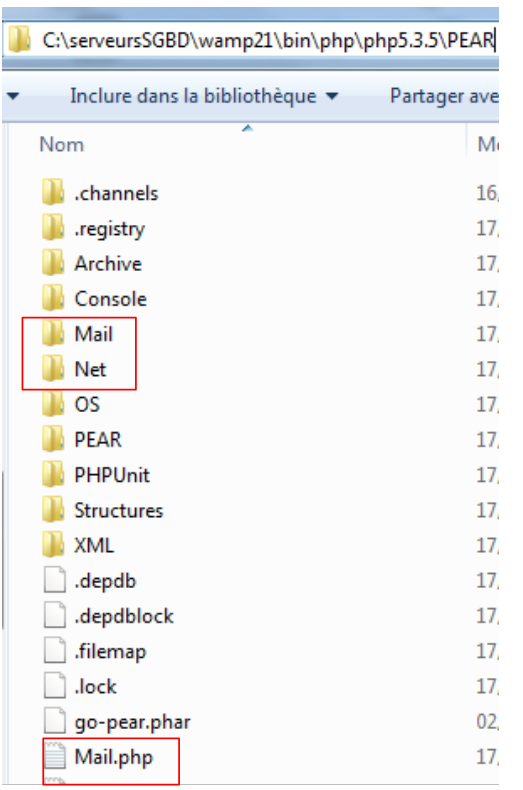
I moduli sono installati nella cartella <PHP_installDir>/PEAR:
 |
Una volta installati i moduli PEAR, lo script PHP per l'invio delle e-mail avrà questo aspetto:
<?php

// error management
ini_set("display_errors", "off");
// modules
ini_set("include_path", ".;C:\serveursSGBD\wamp21\bin\PHP\php5.3.5\PEAR");
require_once "Mail.php";
require_once "Mail/Mime.php";
require_once "Net/SMTP.php";


// client SMTP (SendMail Transfer Protocol) for sending a message
// information is taken from a $INFOS file containing the following lines
// line 1: smtp, sender, recipient, attachment
// next lines: message text
// sender:email sender
// recipient: email recipient
// smtp: name of smtp server to use
// attachment: name of the document to be attached
//
// data
$INFOS = "mail2.txt"; // mail settings
// retrieve mail parameters
list($erreur, $smtpServer, $expéditeur, $destinataire, $message, $sujet, $attachement) = getInfos($INFOS);
// mistake?
if ($erreur) {
  print "$erreur\n";
  exit;
}
print "Envoi du message [$smtpServer,$expéditeur,$destinataire,$sujet, $attachement]\n";
// sending mail in verbose mode
$résultat = sendmail($smtpServer, $expéditeur, $destinataire, $message, $sujet, $attachement);
print "Résultat de l'envoi : $résultat\n";
// end
exit;

//-----------------------------------------------------------------------
function getInfos($fichier) {
// returns information ($smtp,$expéditeur,$destinataire,$message, $sujet, $attachement) taken from text file $fichier
// line 1: smtp, sender, recipient, subject, attachment
// next lines: message text
...
// return
  return array("", $smtpServer, $expéditeur, $destinataire, $message, $sujet, $attachement);
}

//getInfos
//-----------------------------------------------------------------------

function sendmail($smtpServer, $expéditeur, $destinataire, $message, $sujet, $attachement) {
// sends $message to smtp server $smtpserver from $expéditeur
// for $destinataire. Document $attachement is attached to the message
// message has subject $sujet
//
  // message
  $msg = new Mail_Mime();
  $msg->setTXTBody($message);
  $msg->addAttachment($attachement);
  $headers = $msg->headers(array("From" => $expéditeur, "To" => $destinataire, "Subject" => $sujet));
  // shipping
  $mailer = &Mail::factory("smtp", array("host" => $smtpServer, "port" => 25));
  $envoi = $mailer->send($expéditeur, $headers, $msg->get());
  if ($envoi === TRUE) {
    return "Message envoyé";
  } else {
    return $envoi;
  }
}

// --------------------------------------------------------------------------

function cutNewLinechar($ligne) {
// delete the end-of-line mark from $ligne if it exists
  …
}
Il file [mail2.txt]:
- riga 1: in ordine, il server SMTP, l'indirizzo del mittente, l'indirizzo del destinatario, l'oggetto del messaggio, il documento da allegare.
- righe 2-4: il testo del messaggio
Risultati sullo schermo
Envoi du message [smtp.orange.fr,serge.tahe@univ-angers.fr,serge.tahe@univ-angers.fr,test, document.pdf]
Résultat de l'envoi : Message envoyé
Commenti
Questo script differisce dal precedente solo per l'uso della funzione sendmail. Descriviamo questa funzione di seguito:
- Riga 6: Gli script PHP per i moduli PEAR sono stati installati in una directory che l'interprete PHP non cerca di default. Per garantire che l'interprete possa trovare i moduli PEAR, specifichiamo manualmente le directory in cui deve cercare. È possibile modificare alcuni parametri di configurazione dell'interprete PHP durante l'esecuzione. Questa modifica è visibile solo allo script che la effettua e solo per la durata della sua esecuzione. La configurazione predefinita dell'interprete PHP si trova nel file <PHP_installdir>/PHP.ini. Questo file contiene righe del tipo
Il valore della chiave può essere modificato durante l'esecuzione utilizzando la funzione ini_set(key, new_value). La chiave utilizzata per specificare il percorso di ricerca delle funzioni e delle classi PHP a cui fa riferimento lo script è 'include_path'. Qui, aggiungiamo al percorso di ricerca sia la directory dello script (.) che la directory PEAR all'interno della directory di installazione dell'interprete PHP.
- Righe 7–9: Vengono caricati gli script PHP per l'invio delle email.
- riga 50: la funzione sendmail, che gestisce l'invio dell'e-mail. I suoi parametri sono i seguenti:
- $smtpServer: il nome del server SMTP a cui connettersi
- $sender: l'indirizzo e-mail del mittente
- $recipient: l'indirizzo e-mail del destinatario
- $message: il messaggio da inviare.
- $subject: l'oggetto del messaggio
- $attachment: il nome del documento da allegare al messaggio
La funzione sendMail restituisce un messaggio di errore; se non si è verificato alcun errore, il messaggio è vuoto.
- Riga 56: creazione di un messaggio Mail_Mime. Questo messaggio è composto da intestazioni (Da, A, Oggetto) e da un corpo (il messaggio stesso)
- Riga 57: viene impostato il corpo del messaggio Mail_Mime.
- riga 58: allegare un documento al messaggio
- riga 59: impostazione delle intestazioni (Da, A, Oggetto) del messaggio Mail_Mime
- riga 61: crea la classe responsabile dell'invio del messaggio Mail_Mime. Il primo parametro del metodo è il nome del protocollo da utilizzare, in questo caso il protocollo SMTP. Il secondo parametro è un array che specifica il nome e la porta del servizio SMTP da utilizzare
- riga 62: invio del messaggio. Il metodo send accetta tre parametri: l'indirizzo del mittente, le intestazioni del messaggio Mail_Mime e il corpo del messaggio Mail_Mime. La funzione send restituisce il valore booleano TRUE se il messaggio è stato inviato con successo, oppure un messaggio di errore in caso contrario.