12. Funzioni HTTP di JavaScript
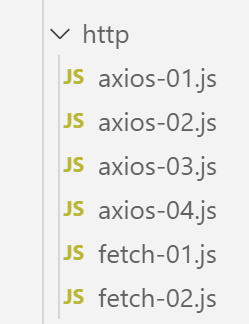
12.1. Scelta di una libreria HTTP
Qui abbiamo scelto due librerie:
ECMAScript 6 dispone nativamente di una funzione HTTP denominata [fetch] che non è implementata da [node.js] (a settembre 2019). Esiste una libreria chiamata [node-fetch] che consente di utilizzare la funzione [fetch] in Node. Questa libreria utilizza alcune API specifiche di [node.js]. Il codice [node-fetch] potrebbe quindi non essere portabile al 100% in un ambiente non [node], come un browser;
Esiste anche una libreria chiamata [axios] dedicata alle richieste HTTP che è compatibile sia con [node.js] che con i browser. Questa è la libreria che useremo alla fine.
Presenteremo lo stesso script scritto utilizzando entrambe le librerie per dimostrare che l'approccio di codifica è simile.
12.2. Configurazione di un ambiente di sviluppo
12.2.1. Installazione del server di calcolo delle imposte
Alla fine, scriveremo un'applicazione web con la seguente architettura:
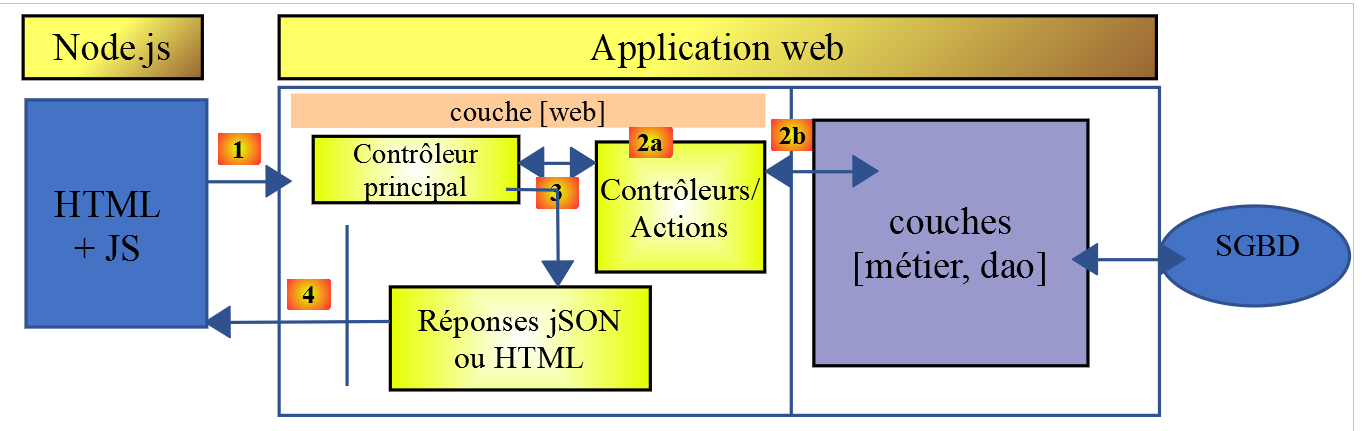
JS: JavaScript
Il codice JavaScript è lato client:
- da un servizio che fornisce pagine o frammenti statici;
- un servizio JSON;
Il codice JavaScript è quindi un client JSON e, in quanto tale, può essere organizzato in livelli [UI, logica di business, DAO] (UI: Interfaccia utente) proprio come i nostri client JSON scritti in PHP.
Il server sarà il server di calcolo delle imposte per il quale abbiamo già scritto 13 versioni. Ne scriveremo una quattordicesima. Iniziamo quindi duplicando, in NetBeans, la cartella della versione 13 nella cartella della versione 14:
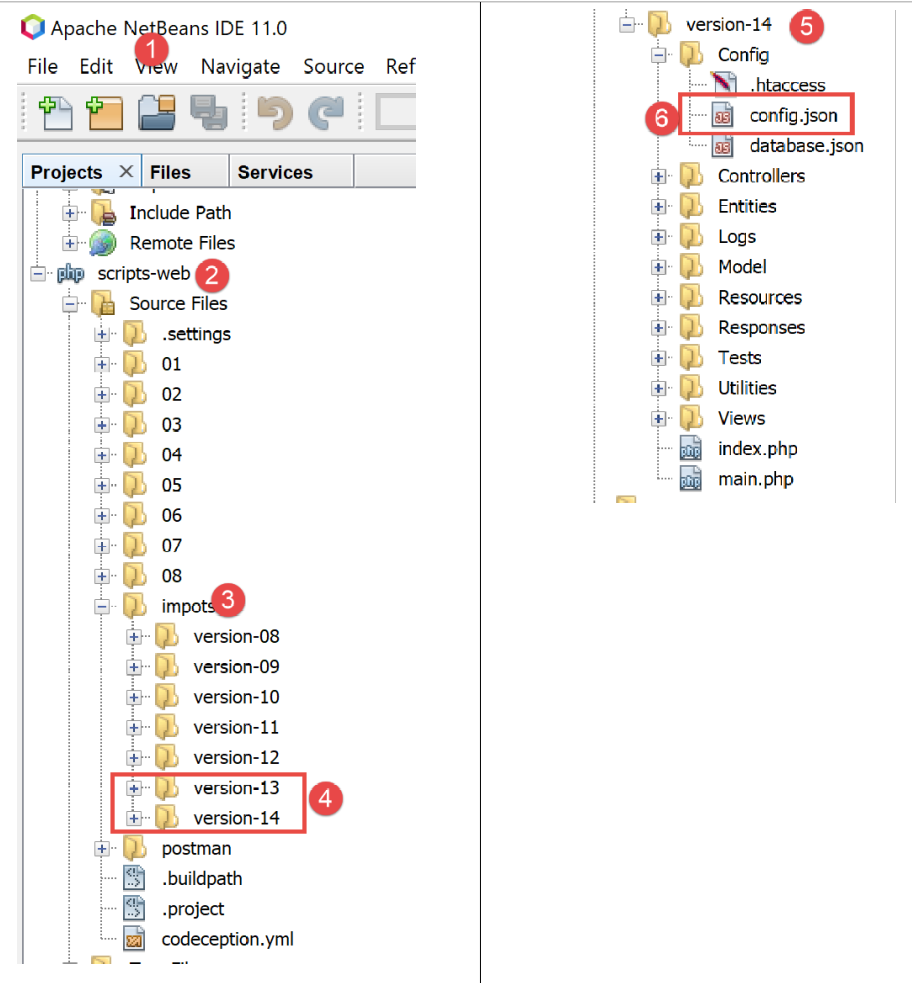
- in [6], modifichiamo il file [config.json] della versione 14 come segue:
{
    "databaseFilename": "Config/database.json",
    "rootDirectory": "C:/myprograms/laragon-lite/www/php7/scripts-web/impots/version-14",
    "relativeDependencies": [

        "/Entities/BaseEntity.php",
        "/Entities/Simulation.php",
        ...
    "vues": {
        "vue-authentification.php": [700, 221, 400],
        "vue-calcul-impot.php": [200, 300, 341, 350, 800],
        "vue-liste-simulations.php": [500, 600]
    },
    "vue-erreurs": "vue-erreurs.php"
}
- Alla riga 3, modifichiamo la directory principale dell'applicazione;
Per accedere a questo server, è necessario avviare i servizi [Laragon].
Una volta fatto ciò, possiamo testare questa nuova versione del server — che al momento è identica alla versione 13 — utilizzando [Postman] (vedi l'articolo collegato). Possiamo utilizzare la raccolta di richieste utilizzata per testare la versione 12 del server di calcolo delle imposte:
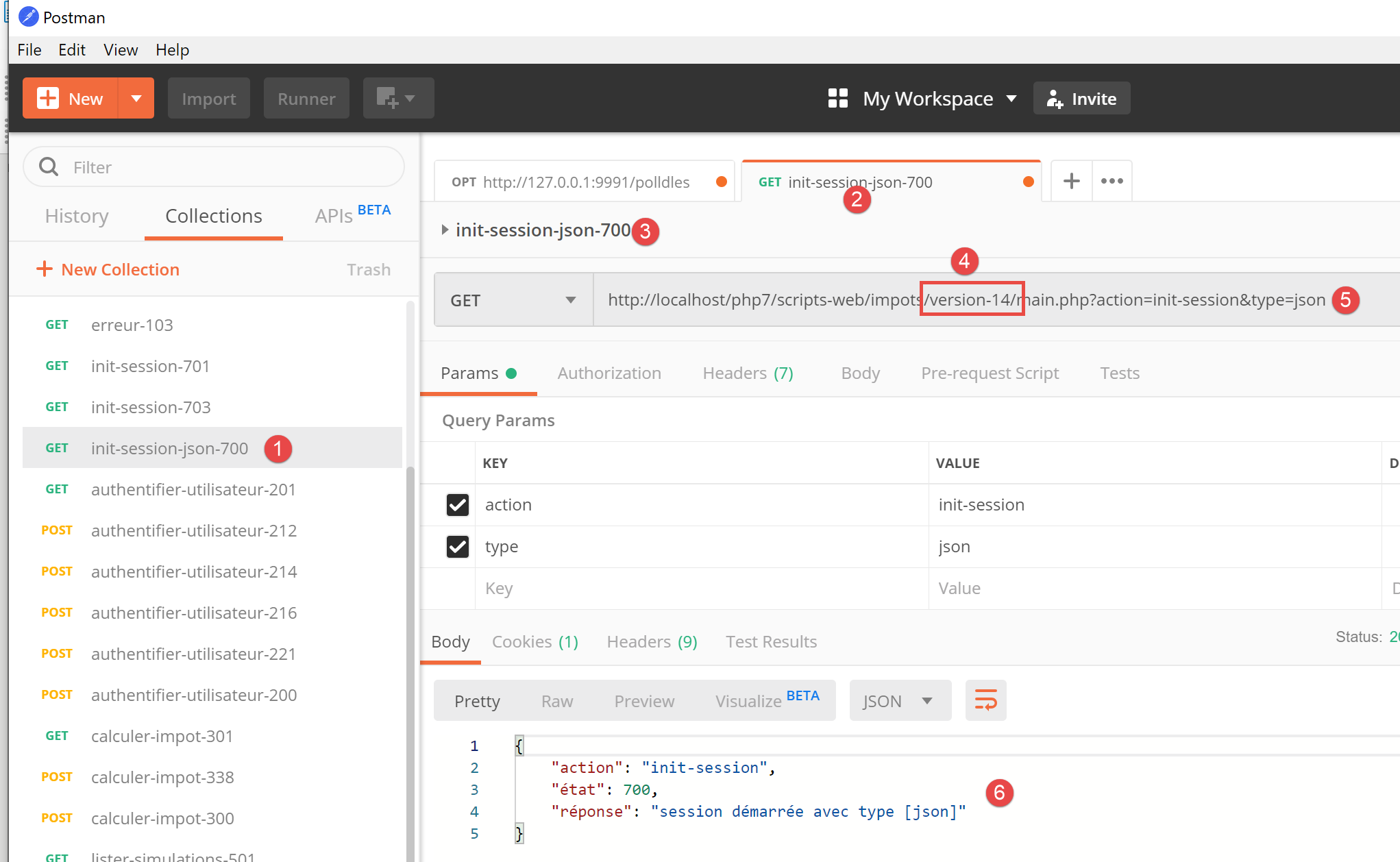
- nei punti [1-4], utilizzare la richiesta [init-session-700] per inizializzare una sessione JSON;
- in [4-5], sostituire [version-12] con [version-14] per testare la versione 14 del progetto;
- una volta eseguita l'operazione, dovremmo ricevere la risposta JSON [6] dal server;
La versione 14 del server è ora operativa. Dovremo modificarla leggermente. Esaminiamo l'API di questo server:
Azione | Ruolo | Contesto di esecuzione |
init-session | Utilizzato per impostare il tipo (json, xml, html) delle risposte desiderate | Richiesta GET main.php?action=init-session&type=x può essere inviata in qualsiasi momento |
authenticate-user | Autorizza o nega l'accesso di un utente | Richiesta POST main.php?action=authenticate-user La richiesta deve avere due parametri inviati [user, password] Può essere emessa solo se il tipo di sessione (json, xml, html) è noto |
calcola-imposta | Esegue una simulazione del calcolo delle imposte | Richiesta POST a main.php?action=calculate-tax La richiesta deve avere tre parametri inviati [married, children, salary] Può essere emessa solo se il tipo di sessione (json, xml, html) è noto e l'utente è autenticato |
list-simulations | Richiesta per visualizzare l'elenco delle simulazioni eseguite dall'inizio della sessione | Richiesta GET main.php?action=list-simulations La richiesta non accetta altri parametri Può essere emessa solo se il tipo di sessione (json, xml, html) è noto e l'utente è autenticato |
delete-simulation | Elimina una simulazione dall'elenco delle simulazioni | Richiesta GET main.php?action=list-simulations&number=x La richiesta non accetta altri parametri Può essere emessa solo se il tipo di sessione (json, xml, html) è noto e l'utente è autenticato |
end-session | Termina la sessione di simulazione. | Tecnicamente, la vecchia sessione web viene eliminata e ne viene creata una nuova Può essere emessa solo se il tipo di sessione (json, xml, html) è noto e l'utente è autenticato |
12.2.2. Installazione delle librerie HTTP del client JavaScript
Inizialmente, lavoreremo con la seguente architettura:
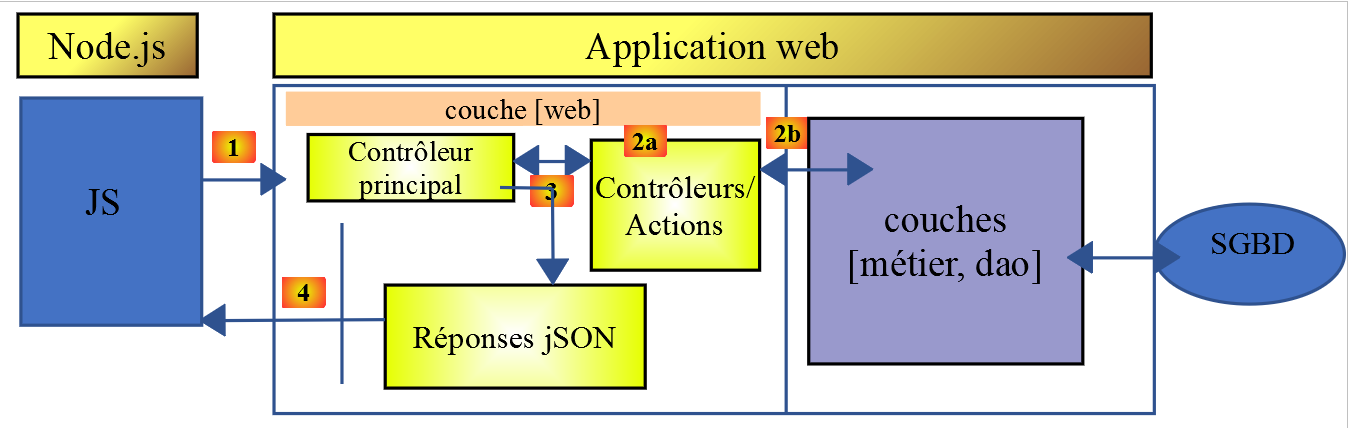
- In [1], uno script da console [node.js] effettua una richiesta HTTP al server JSON di calcolo delle imposte;
- In [4], riceve questa risposta e la visualizza nella console;
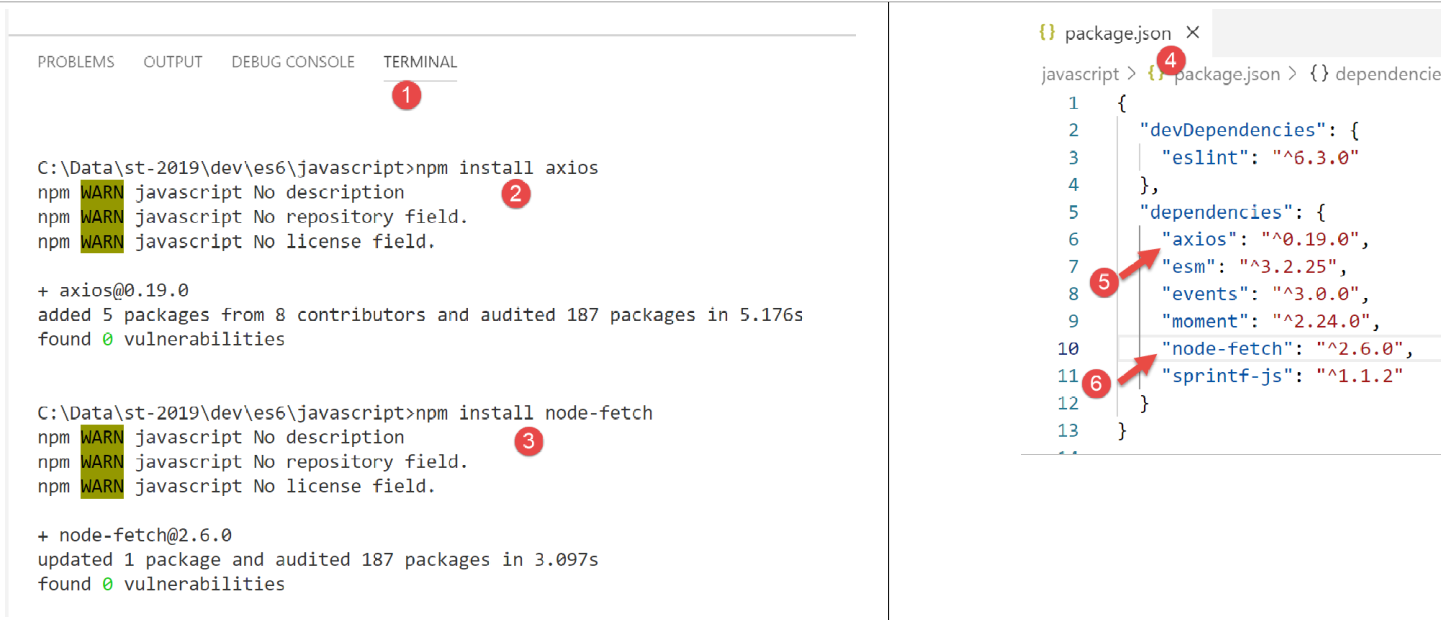
Nell'Esempio 1 useremo le librerie [node-fetch] e [axios], e poi terremo solo [axios] per gli esempi seguenti. Ora installeremo queste due librerie JavaScript dal terminale di [VSCode]:
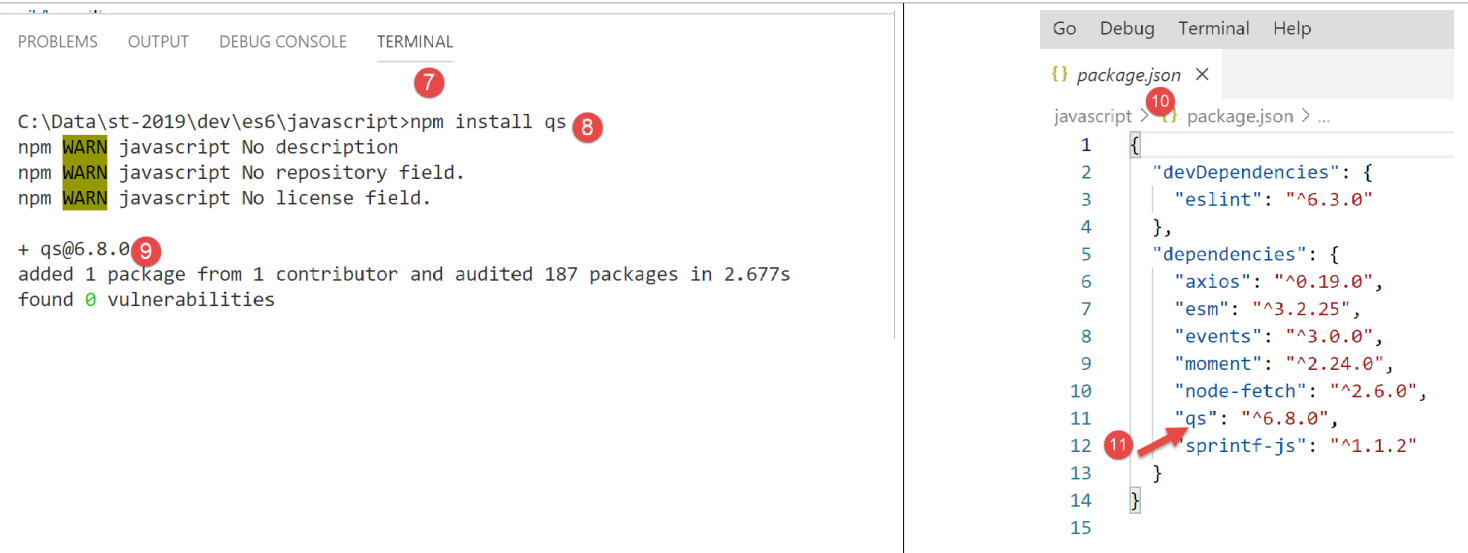
Utilizzeremo anche la libreria [qs], che consente la codifica URL di una stringa. Ricordiamo che questa codifica viene utilizzata per codificare i parametri di una richiesta HTTP GET o POST.
12.3. script [fetch-01]
Lo script [fetch-01] utilizza la libreria [node-fetch] per inizializzare una sessione JSON con il server di calcolo delle imposte. Il codice è il seguente:
'use strict';

// imports
import fetch from 'node-fetch';
import qs from 'qs';
import { sprintf } from 'sprintf-js';
import moment from 'moment';


// URL base of tax calculation server
const baseUrl = 'http://localhost/php7/scripts-web/impots/version-14/main.php?';
// init session
async function initSession() {
  // query options HHTP [get /main.php?action=init-session&type=json]
  const options = {
    method: "GET",
    timeout: 2000
  };
  // execute query HTTP [get /main.php?action=init-session&type=json]
  let débutFetch;
  try {
    // asynchronous request - [fetch] makes a promise
    débutFetch = moment(Date.now());
    const response = await fetch(baseUrl + qs.stringify({
      action: 'init-session',
      type: 'json'
    }), options);
    // [response] is the entire HTTP response from the server (HTTP headers + response itself)
    // display this answer to see its structure
    console.log(sprintf("réponse fetch formatée en json,=%j, %s", response, heure(débutFetch)));
    console.log("réponse fetch en javascript=", response);
    // you can have HTTP headers
    console.log("entêtes de la réponse=", response.headers);
    // if application/json response, the server's json response is obtained with the asynchronous function [response.json()]
    // in which case the calling code obtains a [Promise] object
    // [await] allows you to obtain the server's [json] response rather than its promise
    const débutJson = moment(Date.now());
    const objet = await response.json();
    console.log(sprintf("réponse json=%j, type=%s, %s", objet, typeof (objet), heure(débutJson)));
    return objet;
    // if text / plain, the text response from the server is obtained with [response.text()]
    // in which case the calling code obtains a [Promise] object
    // [await] allows you to obtain the server's [text] response rather than its promise
    // const text = await response.text();
    // console.log("answer text=", text);
    // return text;
  } catch (error) {
    // we're here because the server has sent an error code [404 Not Found, ...] accompanied by an empty body - we display the error to see its structure
    // or because the [fetch] client has thrown an exception (network inaccessible, ...)
    // the error structure is displayed
    console.log(sprintf("error fetch en json=%j, %s", error, heure(débutFetch)));
    console.log("error fetch en javascript=", typeof (error), error);
    // launch the error message received
    throw error.message;
  }
}

// the main function executes the asynchronous function [initSession]
async function main() {
  try {
    console.log("requête HTTP vers le serveur en cours ---------------------------------------------");
    const response = await initSession();
    console.log("succès ---------------------------------------------");
    console.log("réponse=", response, typeof (response))
  } catch (error) {
    console.log("erreur ---------------------------------------------");
    console.log("erreur=", error, typeof (error));
  }
}

// test
main();

// time and duration display utility
function heure(début) {
  // current time
  const now = moment(Date.now());
  // time formatting
  let result = "heure=" + now.format("HH:mm:ss:SSS");
  // is it necessary to calculate a duration?
  if (début) {
    const durée = now - début;
    const milliseconds = durée % 1000;
    const seconds = Math.floor(durée / 1000);
    // format time + duration
    result = result + sprintf(", durée= %s seconde(s) et %s millisecondes", seconds, milliseconds);
  }
  // result
  return result;
}
Commenti
- Le funzioni HTTP in JavaScript sono funzioni asincrone. Qui stiamo applicando ciò che abbiamo imparato nella sezione precedente (vedi link);
- riga 24: per attendere che la risposta della funzione asincrona [fetch] venga pubblicata sul ciclo di eventi [node.js], utilizziamo la parola chiave [await]. Sappiamo che questa istruzione deve trovarsi all'interno di codice preceduto dalla parola chiave [async] (riga 13);
- righe 13–56: incapsuliamo il codice HTTP all'interno della funzione asincrona [initSession];
- righe 59–69: una seconda funzione asincrona [main] viene utilizzata per chiamare la funzione asincrona [initSession] in modo bloccante (async/await);
- riga 72: viene chiamata la funzione asincrona [main];
- sebbene l'intero codice assomigli a codice sincrono, si tratta in realtà di funzioni asincrone che vengono eseguite, ma in modo bloccante;
- riga 19: per inizializzare una sessione JSON con il server di calcolo delle imposte, è necessario inviare la richiesta HTTP [get /main.php?action=init-session&type=json]. Questo è ciò che fa il codice nelle righe 24–27. La sintassi per [fetch] è la seguente: [fetch(URL, options)] con:
- [URL]: l'URL oggetto della richiesta;
- [options]: un oggetto che definisce le opzioni della richiesta. È qui che definiamo le intestazioni HTTP che vogliamo inviare al server di destinazione;
- righe 15–18: definiamo le opzioni per la richiesta che vogliamo effettuare:
- [method]: vogliamo eseguire un GET;
- [timeout]: vogliamo che il client [fetch] attenda non più di 2 secondi per la risposta del server. Se questo timeout viene superato, [fetch] genererà un'eccezione;
- riga 24: per ottenere l'URL [/main.php?action=init-session&type=json], utilizziamo la libreria [qs] per ottenere i parametri codificati nell'URL [action,type] della richiesta GET. La stringa risultante è [init-session&type=json], che avremmo potuto costruire noi stessi. Volevamo semplicemente dimostrare come ottenere una stringa codificata nell'URL;
- riga 24: la parola chiave [await] indica che qui viene avviata un'attività asincrona e che stiamo aspettando che pubblichi la sua risposta sul ciclo di eventi [node.js];
- riga 24: in [response], otteniamo un oggetto complesso che descrive l'intera risposta HTTP ricevuta (intestazioni e corpo);
- righe 30–31: stampiamo l'oggetto [response] per vederne la struttura, prima come stringa e poi come oggetto JavaScript;
- riga 33: visualizziamo le intestazioni HTTP inviate dal server;
- Riga 38: sappiamo che il server di calcolo delle imposte invierà una stringa JSON. Questa stringa è incapsulata nell'oggetto [response]. Possiamo recuperarla utilizzando il metodo [response.json()]. Tuttavia, questo metodo è asincrono. Scriviamo quindi [await response.json()] per recuperare la stringa JSON che verrà pubblicata sul ciclo di eventi [node.js]. In realtà, non è la stringa JSON stessa che otteniamo, ma l'oggetto JavaScript da essa rappresentato;
- riga 39: visualizzazione della stringa JSON ricevuta;
- riga 40: restituisce l'oggetto JavaScript ricevuto;
- riga 47: intercettiamo eventuali errori provenienti dall'istruzione [fetch]. Questa istruzione genera un'eccezione solo se l'operazione HTTP ha fallito e non è stata ricevuta alcuna risposta dal server. Se è stata ricevuta una risposta, anche con un codice di stato HTTP diverso da [200 OK], [fetch] non genera un'eccezione e la risposta del server sarà disponibile alla riga 38;
- righe 51–52: l'oggetto [error] ricevuto dalla clausola [catch] viene visualizzato, prima come stringa JSON e poi come oggetto JavaScript;
- riga 54: il messaggio di errore proveniente da [fetch] viene memorizzato in [error.message];
- righe 59–69: la funzione asincrona [main] chiama la funzione asincrona [initSession] in modo bloccante (await alla riga 62);
- riga 72: viene avviata la funzione asincrona [main] e il codice dello script principale è quindi completo. Lo script complessivo terminerà quando le attività asincrone avviate avranno pubblicato i propri risultati nel ciclo di eventi;
I risultati dell'esecuzione sono i seguenti:
Caso 1: il server Laragon non è in esecuzione
[Running] C:\myprograms\laragon-lite\bin\nodejs\node-v10\node.exe -r esm "c:\Data\st-2019\dev\es6\javascript\http\fetch-01.js"
requête HTTP vers le serveur en cours ---------------------------------------------
error fetch en json={"message":"network timeout at: http://localhost/php7/scripts-web/impots/version-14/main.php?action=init-session&type=json","type":"request-timeout"}, heure=10:08:48:180, durée= 2 seconde(s) et 62 millisecondes
error fetch en javascript= object { FetchError: network timeout at: http://localhost/php7/scripts-web/impots/version-14/main.php?action=init-session&type=json
    at Timeout.<anonymous> (c:\Data\st-2019\dev\es6\javascript\node_modules\node-fetch\lib\index.js:1448:13)
    at ontimeout (timers.js:436:11)
    at tryOnTimeout (timers.js:300:5)
    at listOnTimeout (timers.js:263:5)
    at Timer.processTimers (timers.js:223:10)
  message:
   'network timeout at: http://localhost/php7/scripts-web/impots/version-14/main.php?action=init-session&type=json',
  type: 'request-timeout' }
erreur ---------------------------------------------
erreur= network timeout at: http://localhost/php7/scripts-web/impots/version-14/main.php?action=init-session&type=json string

[Done] exited with code=0 in 2.804 seconds
Commenti
- riga 3: la richiesta HTTP fallisce dopo 2 secondi e 62 millisecondi a causa del timeout di 2 secondi imposto alla richiesta HTTP;
- righe 4–9: l'oggetto JavaScript [error] intercettato dalla clausola [catch(error)]. Questo oggetto ha due proprietà:
- [FetchError]: riga 4;
- [message]: righe 10–12;
- riga 14: il messaggio di errore ricevuto dalla funzione asincrona [main];
Caso 2: il server Laragon è in esecuzione
[Running] C:\myprograms\laragon-lite\bin\nodejs\node-v10\node.exe -r esm "c:\Data\st-2019\dev\es6\javascript\http\fetch-01.js"
requête HTTP vers le serveur en cours ---------------------------------------------
réponse fetch formatée en json,={"size":0,"timeout":2000}, heure=10:13:50:814, durée= 0 seconde(s) et 375 millisecondes
réponse fetch en javascript= Response {
  size: 0,
  timeout: 2000,
  [Symbol(Body internals)]:
   { body:
      PassThrough {
        _readableState: [ReadableState],
        readable: true,
        domain: null,
        _events: [Object],
        _eventsCount: 2,
        _maxListeners: undefined,
        _writableState: [WritableState],
        writable: false,
        allowHalfOpen: true,
        _transformState: [Object] },
     disturbed: false,
     error: null },
  [Symbol(Response internals)]:
   { url:
      'http://localhost/php7/scripts-web/impots/version-14/main.php?action=init-session&type=json',
     status: 200,
     statusText: 'OK',
     headers: Headers { [Symbol(map)]: [Object] },
     counter: 0 } }
entêtes de la réponse= Headers {
  [Symbol(map)]:
   [Object: null prototype] {
     date: [ 'Sat, 14 Sep 2019 08:13:50 GMT' ],
     server: [ 'Apache/2.4.35 (Win64) OpenSSL/1.1.0i PHP/7.2.11' ],
     'x-powered-by': [ 'PHP/7.2.11' ],
     'cache-control': [ 'max-age=0, private, must-revalidate, no-cache, private' ],
     'set-cookie': [ 'PHPSESSID=99q2iinusmhl55fa600aie2mmu; path=/' ],
     'content-length': [ '86' ],
     connection: [ 'close' ],
     'content-type': [ 'application/json' ] } }
réponse json={"action":"init-session","état":700,"réponse":"session démarrée avec type [json]"}, type=object, heure=10:13:50:825, durée= 0 seconde(s) et 1 millisecondes
succès ---------------------------------------------
réponse= { action: 'init-session',
  'état': 700,
  'réponse': 'session démarrée avec type [json]' } object

[Done] exited with code=0 in 1.022 seconds
Commenti
- riga 3: [fetch] riceve la risposta del server dopo 375 ms;
- righe 4–39: la struttura dell'oggetto JavaScript [response] che incapsula la risposta del server. Tra le sue proprietà, alcune potrebbero interessarci:
- [status] (riga 25): codice di stato HTTP della risposta del server;
- [statusText] (riga 26): testo associato a questo codice;
- [headers] (riga 27): le intestazioni HTTP della risposta del server;
- [body] (riga 8): rappresenta il documento inviato dal server. L'istruzione [fetch] fornisce metodi per lavorarci;
- righe 29–39: le intestazioni HTTP della risposta del server;
- riga 40: la funzione asincrona [response.json()] ha restituito la sua risposta dopo 1 millisecondo;
- righe 42–44: l'oggetto JavaScript ricevuto dalla funzione asincrona [main];
Caso 3: il server Laragon è in esecuzione, ma gli viene inviato un comando errato:
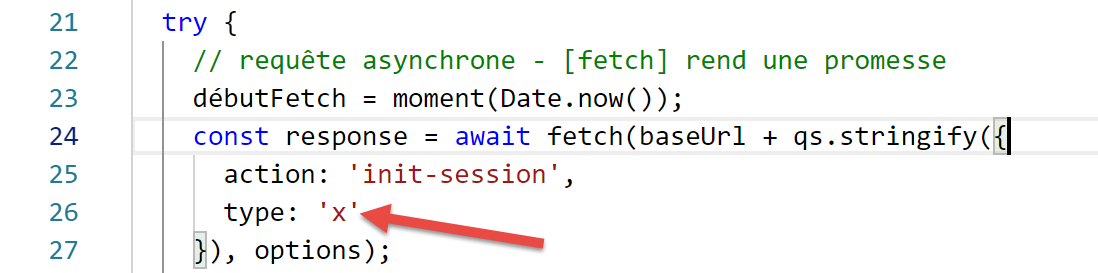
- sopra, riga 26, viene passato al server un tipo di sessione errato;
I risultati dell'esecuzione sono i seguenti:
requête HTTP vers le serveur en cours ---------------------------------------------
réponse fetch formatée en json,={"size":0,"timeout":2000}, heure=10:27:54:114, durée= 0 seconde(s) et 136 millisecondes
réponse fetch en javascript= Response {
  size: 0,
  timeout: 2000,
  [Symbol(Body internals)]:
   { body:
      PassThrough {
        _readableState: [ReadableState],
        readable: true,
        domain: null,
        _events: [Object],
        _eventsCount: 2,
        _maxListeners: undefined,
        _writableState: [WritableState],
        writable: false,
        allowHalfOpen: true,
        _transformState: [Object] },
     disturbed: false,
     error: null },
  [Symbol(Response internals)]:
   { url:
      'http://localhost/php7/scripts-web/impots/version-14/main.php?action=init-session&type=x',
     status: 400,
     statusText: 'Bad Request',
     headers: Headers { [Symbol(map)]: [Object] },
     counter: 0 } }
entêtes de la réponse= Headers {
  [Symbol(map)]:
   [Object: null prototype] {
     date: [ 'Sat, 14 Sep 2019 08:27:54 GMT' ],
     server: [ 'Apache/2.4.35 (Win64) OpenSSL/1.1.0i PHP/7.2.11' ],
     'x-powered-by': [ 'PHP/7.2.11' ],
     'cache-control': [ 'max-age=0, private, must-revalidate, no-cache, private' ],
     'set-cookie': [ 'PHPSESSID=5ku9gfok81ikj98hia0meeum57; path=/' ],
     'content-length': [ '79' ],
     connection: [ 'close' ],
     'content-type': [ 'application/json' ] } }
réponse json={"action":"init-session","état":703,"réponse":"paramètre type=[x] invalide"}, type=object, heure=10:27:54:127, durée= 0 seconde(s) et 2 millisecondes
succès ---------------------------------------------
réponse= { action: 'init-session',
  'état': 703,
  'réponse': 'paramètre type=[x] invalide' } object

[Done] exited with code=0 in 0.712 seconds
- La risposta del server viene ricevuta alla riga 2;
- riga 24: possiamo vedere che il codice di stato HTTP della risposta del server è 400, un codice di errore. Tuttavia, [fetch] non ha generato un'eccezione. Finché [fetch] riceve una risposta dal server, la elabora e non genera un'eccezione;
- righe 41–43: la risposta ottenuta dalla funzione asincrona [main];
12.4. script [fetch-02]
Lo script seguente riutilizza lo script [fetch-01] eliminando tutti i dettagli non necessari:
'use strict';

// imports
import fetch from 'node-fetch';
import qs from 'qs';

// URL base of tax calculation server
const baseUrl = 'http://localhost/php7/scripts-web/impots/version-14/main.php?';
// init session
async function initSession() {
  // query options HHTP [get /main.php?action=init-session&type=json]
  const options = {
    method: "GET",
    timeout: 2000
  };
  // execute query HTTP [get /main.php?action=init-session&type=json]
  const response = await fetch(baseUrl + qs.stringify({
    action: 'init-session',
    type: 'json'
  }), options);
  // result received in jSON
  return await response.json();
}

// the main function executes the asynchronous function [initSession]
async function main() {
  try {
    console.log("requête HTTP vers le serveur en cours ---------------------------------------------");
    const response = await initSession();
    console.log("succès ---------------------------------------------");
    console.log("réponse=", response)
  } catch (error) {
    console.log("erreur ---------------------------------------------");
    console.log("erreur=", error.message);
  }
}

// test
main();
Risultati di una normale esecuzione:
[Running] C:\myprograms\laragon-lite\bin\nodejs\node-v10\node.exe -r esm "c:\Data\st-2019\dev\es6\javascript\http\fetch-02.js"
requête HTTP vers le serveur en cours ---------------------------------------------
succès ---------------------------------------------
réponse= { action: 'init-session',
  'état': 700,
  'réponse': 'session démarrée avec type [json]' }

[Done] exited with code=0 in 0.56 seconds
Risultati di un'esecuzione con un'eccezione (arresto del server Laragon):
[Running] C:\myprograms\laragon-lite\bin\nodejs\node-v10\node.exe -r esm "c:\Data\st-2019\dev\es6\javascript\http\fetch-02.js"
requête HTTP vers le serveur en cours ---------------------------------------------
erreur ---------------------------------------------
erreur= network timeout at: http://localhost/php7/scripts-web/impots/version-14/main.php?action=init-session&type=json

[Done] exited with code=0 in 2.701 seconds
12.5. script [axios-01]
Qui riprendiamo lo script [fetch-01], che riscriviamo utilizzando la libreria [axios]. Ricordiamo che il nostro interesse per questa libreria risiede nella sua portabilità tra l'ambiente [node.js] e i browser più diffusi. Ciò consente di:
- Nella Fase 1, testare i nostri script in un ambiente [Node.js];
- nella fase 2, di portarli su un browser;
Lo script [axios-01] segue la struttura dello script [fetch-01]:
'use strict';
import axios from 'axios';

// axios default configuration
axios.defaults.timeout = 2000;
axios.defaults.baseURL = 'http://localhost/php7/scripts-web/impots/version-14';

// init session
async function initSession(axios) {
  // query options HHTP [get /main.php?action=init-session&type=json]
  const options = {
    method: "GET",
    // URL parameters
    params: {
      action: 'init-session',
      type: 'json'
    }
  };
  // execute query HTTP [get /main.php?action=init-session&type=json]
  try {
    // asynchronous request
    const response = await axios.request('main.php', options);
    // response is the entire HTTP response from the server (HTTP headers + response itself)
    // display this answer to see its structure
    console.log("réponse axios=", response);
    // the server response is in [response.data]
    return response.data;
  } catch (error) {
    // we're here because the server has sent an error code [404 Not Found, 500 Internal Server Error, ...]
    // the [error] parameter is an exception instance - it can take various forms
    // display it to see its structure
    console.log("axios error=", typeof (error), error);
    if (error.response) {
      // the server reported an error in status HTTP but also sent a response
      // then it is found in [error.response.data]
      // we know that the server sends jSON responses with structure {action, status, response}
      // and that in the event of an error, the error msg is in [reply]
      return error.response.data;
    } else {
      // we launch the error
      throw error;
    }
  }
}

// the main function executes the asynchronous function [initSession]
async function main() {
  try {
    console.log("requête HTTP vers le serveur en cours ---------------------------------------------");
    const response = await initSession(axios);
    console.log("succès ---------------------------------------------");
    console.log("réponse=", response, typeof (response))
  } catch (error) {
    console.log("erreur ---------------------------------------------");
    console.log("erreur=", error.message);
  }
}

// test
main();
Commenti
- riga 2: importiamo la libreria [axios];
- righe 5-6: configurazione predefinita per le richieste HTTP. Le opzioni [axios.defaults] si applicano a tutte le richieste HTTP inviate dall'oggetto [axios] senza bisogno di essere specificate per ogni nuova richiesta;
- riga 5: timeout di 2 secondi per tutte le richieste;
- riga 6: tutti gli URL saranno relativi all'URL di base;
- riga 9: la funzione asincrona [initSession];
- righe 11–18: le opzioni per la richiesta HTTP da inviare (oltre alle opzioni predefinite già definite nelle righe 5–6);
- righe 14–17: i parametri URL [action=init-session&type=json]. L'oggetto [params] verrà automaticamente convertito in una stringa codificata per URL;
- riga 22: chiamata bloccante alla funzione asincrona [axios.request]. Il primo parametro è l'URL di destinazione costruito come [main.php] aggiunto all'URL di base definito alla riga 6. Il secondo parametro è l'oggetto [options] delle righe 11–18;
- riga 25: [response] è un oggetto JavaScript che incapsula l'intera risposta HTTP dal server (intestazioni HTTP + corpo della risposta). Lo visualizziamo per vedere la sua struttura JavaScript;
- riga 27: se il server ha inviato un documento, lo si trova in [response.data]. Qui sappiamo che il server invia una risposta JSON accompagnata dall'intestazione HTTP [Content-type: application/json]. La presenza di questa intestazione fa sì che [axios] deserializzi automaticamente [response.data] in un oggetto JavaScript;
- riga 28: la funzione [axios] può generare un'eccezione. È qui che [axios] si differenzia da [fetch]. Viene generata un'eccezione nei seguenti casi:
- la richiesta HTTP non è stata inviata (errore lato client);
- il server ha inviato un codice di errore HTTP (400, 404, 500, …) (questo comportamento è in realtà configurabile). Si noti che se questo codice di stato HTTP è accompagnato da una risposta, [fetch] non ha generato un'eccezione, mentre [axios] sì. Tuttavia, se il codice di errore HTTP è accompagnato da un documento, questo viene inserito in [error.response];
- riga 32: visualizziamo la struttura JavaScript dell'oggetto [error];
- righe 33–38: se l'oggetto [error] contiene un oggetto [response], tale risposta viene restituita al codice chiamante;
- righe 39–42: in tutti gli altri casi, l'oggetto [error] viene restituito al codice chiamante;
- righe 47–57: la funzione asincrona [main];
- riga 50: chiamata bloccante alla funzione asincrona [initSession]. La risposta JSON dal server viene recuperata come oggetto JavaScript;
- righe 53–56: gestione di eventuali errori. Il messaggio di errore si trova in [error.message];
I risultati dell'esecuzione sono i seguenti:
Caso 1: il server Laragon non è in esecuzione
[Running] C:\myprograms\laragon-lite\bin\nodejs\node-v10\node.exe -r esm "c:\Data\st-2019\dev\es6\javascript\http\axios-01.js"
requête HTTP vers le serveur en cours ---------------------------------------------
axios error= object { Error: timeout of 2000ms exceeded
    at createError (c:\Data\st-2019\dev\es6\javascript\node_modules\axios\lib\core\createError.js:16:15)
    at Timeout.handleRequestTimeout (c:\Data\st-2019\dev\es6\javascript\node_modules\axios\lib\adapters\http.js:252:16)
    at ontimeout (timers.js:436:11)
    at tryOnTimeout (timers.js:300:5)
    at listOnTimeout (timers.js:263:5)
    at Timer.processTimers (timers.js:223:10)
  config:
   { url:
      'http://localhost/php7/scripts-web/impots/version-14/main.php',
     method: 'get',
     params: { action: 'init-session', type: 'json' },
     headers:
      { Accept: 'application/json, text/plain, */*',
        'User-Agent': 'axios/0.19.0' },
     baseURL: 'http://localhost/php7/scripts-web/impots/version-14',
     transformRequest: [ [Function: transformRequest] ],
     transformResponse: [ [Function: transformResponse] ],
     timeout: 2000,
     adapter: [Function: httpAdapter],
     xsrfCookieName: 'XSRF-TOKEN',
     xsrfHeaderName: 'X-XSRF-TOKEN',
     maxContentLength: -1,
     validateStatus: [Function: validateStatus],
     data: undefined },
  code: 'ECONNABORTED',
  request:
   Writable {
     _writableState:
      WritableState {
        objectMode: false,
        highWaterMark: 16384,
        finalCalled: false,
        needDrain: false,
        ending: false,
        ended: false,
        finished: false,
        destroyed: false,
        decodeStrings: true,
        defaultEncoding: 'utf8',
        length: 0,
        writing: false,
        corked: 0,
        sync: true,
        bufferProcessing: false,
        onwrite: [Function: bound onwrite],
        writecb: null,
        writelen: 0,
        bufferedRequest: null,
        lastBufferedRequest: null,
        pendingcb: 0,
        prefinished: false,
        errorEmitted: false,
        emitClose: true,
        bufferedRequestCount: 0,
        corkedRequestsFree: [Object] },
     writable: true,
     domain: null,
     _events:
      [Object: null prototype] {
        response: [Function: handleResponse],
        error: [Function: handleRequestError] },
     _eventsCount: 2,
     _maxListeners: undefined,
     _options:
      { protocol: 'http:',
        maxRedirects: 21,
        maxBodyLength: 10485760,
        path:
         '/php7/scripts-web/impots/version-14/main.php?action=init-session&type=json',
        method: 'GET',
        headers: [Object],
        agent: undefined,
        auth: undefined,
        hostname: 'localhost',
        port: null,
        nativeProtocols: [Object],
        pathname: '/php7/scripts-web/impots/version-14/main.php',
        search: '?action=init-session&type=json' },
     _redirectCount: 0,
     _redirects: [],
     _requestBodyLength: 0,
     _requestBodyBuffers: [],
     _onNativeResponse: [Function],
     _currentRequest:
      ClientRequest {
        domain: null,
        _events: [Object],
        _eventsCount: 6,
        _maxListeners: undefined,
        output: [],
        outputEncodings: [],
        outputCallbacks: [],
        outputSize: 0,
        writable: true,
        _last: true,
        chunkedEncoding: false,
        shouldKeepAlive: false,
        useChunkedEncodingByDefault: false,
        sendDate: false,
        _removedConnection: false,
        _removedContLen: false,
        _removedTE: false,
        _contentLength: 0,
        _hasBody: true,
        _trailer: '',
        finished: true,
        _headerSent: true,
        socket: [Socket],
        connection: [Socket],
        _header:
         'GET /php7/scripts-web/impots/version-14/main.php?action=init-session&type=json HTTP/1.1\r\nAccept: application/json, text/plain, */*\r\nUser-Agent: axios/0.19.0\r\nHost: localhost\r\nConnection: close\r\n\r\n',
        _onPendingData: [Function: noopPendingOutput],
        agent: [Agent],
        socketPath: undefined,
        timeout: undefined,
        method: 'GET',
        path:
         '/php7/scripts-web/impots/version-14/main.php?action=init-session&type=json',
        _ended: false,
        res: null,
        aborted: 1568528450762,
        timeoutCb: null,
        upgradeOrConnect: false,
        parser: [HTTPParser],
        maxHeadersCount: null,
        _redirectable: [Circular],
        [Symbol(isCorked)]: false,
        [Symbol(outHeadersKey)]: [Object] },
     _currentUrl:
      'http://localhost/php7/scripts-web/impots/version-14/main.php?action=init-session&type=json' },
  response: undefined,
  isAxiosError: true,
  toJSON: [Function] }
erreur ---------------------------------------------
erreur= timeout of 2000ms exceeded

[Done] exited with code=0 in 2.784 seconds
Commenti
- righe 33-136: l'oggetto [error] contiene molte informazioni;
- [Error], righe 3-9: una descrizione dell'errore verificatosi;
- [config], righe 10–27: la configurazione della richiesta HTTP che ha portato a questo errore;
- [config.url], righe 11–12: l'URL di destinazione;
- [config.method], riga 13: metodo di richiesta;
- [config.params], riga 14: i parametri URL;
- [config.headers], righe 16–17: le intestazioni HTTP della richiesta;
- [config.baseURL], riga 18: l'URL di base dell'URL di destinazione;
- [config.timeout], riga 21: il timeout della richiesta;
- [code], riga 28: un codice di errore;
- [request], righe 29–133: una descrizione dettagliata della richiesta HTTP. Si noti che la maggior parte delle proprietà è preceduta da un trattino basso (_), a indicare che si tratta di proprietà interne dell'oggetto [request] non destinate all'uso diretto da parte dello sviluppatore;
- [response], riga 134: la risposta del server, che in questo caso è vuota;
- riga 138: il messaggio di errore visualizzato dalla funzione [main];
Caso 2: il server Laragon è in esecuzione
[Running] C:\myprograms\laragon-lite\bin\nodejs\node-v10\node.exe -r esm "c:\Data\st-2019\dev\es6\javascript\http\axios-01.js"
requête HTTP vers le serveur en cours ---------------------------------------------
réponse axios= { status: 200,
  statusText: 'OK',
  headers:
   { date: 'Sun, 15 Sep 2019 07:09:26 GMT',
     server: 'Apache/2.4.35 (Win64) OpenSSL/1.1.0i PHP/7.2.11',
     'x-powered-by': 'PHP/7.2.11',
     'cache-control': 'max-age=0, private, must-revalidate, no-cache, private',
     'set-cookie': [ 'PHPSESSID=uas6lugtblstktcifpd8e5irm6; path=/' ],
     'content-length': '86',
     connection: 'close',
     'content-type': 'application/json' },
  config:
   { url:
      'http://localhost/php7/scripts-web/impots/version-14/main.php',
     method: 'get',
     params: { action: 'init-session', type: 'json' },
     headers:
      { Accept: 'application/json, text/plain, */*',
        'User-Agent': 'axios/0.19.0' },
     baseURL: 'http://localhost/php7/scripts-web/impots/version-14',
     transformRequest: [ [Function: transformRequest] ],
     transformResponse: [ [Function: transformResponse] ],
     timeout: 2000,
     adapter: [Function: httpAdapter],
     xsrfCookieName: 'XSRF-TOKEN',
     xsrfHeaderName: 'X-XSRF-TOKEN',
     maxContentLength: -1,
     validateStatus: [Function: validateStatus],
     data: undefined },
  request:
   ClientRequest {
     domain: null,
     _events:
      [Object: null prototype] {
        socket: [Function],
        abort: [Function],
        aborted: [Function],
        error: [Function],
        timeout: [Function],
        prefinish: [Function: requestOnPrefinish] },
     _eventsCount: 6,
     _maxListeners: undefined,
     output: [],
     outputEncodings: [],
     outputCallbacks: [],
     outputSize: 0,
     writable: true,
     _last: true,
     chunkedEncoding: false,
     shouldKeepAlive: false,
     useChunkedEncodingByDefault: false,
     sendDate: false,
     _removedConnection: false,
     _removedContLen: false,
     _removedTE: false,
     _contentLength: 0,
     _hasBody: true,
     _trailer: '',
     finished: true,
     _headerSent: true,
     socket:
      Socket {
        connecting: false,
        _hadError: false,
        _handle: [TCP],
        _parent: null,
        _host: 'localhost',
        _readableState: [ReadableState],
        readable: true,
        domain: null,
        _events: [Object],
        _eventsCount: 7,
        _maxListeners: undefined,
        _writableState: [WritableState],
        writable: false,
        allowHalfOpen: false,
        _sockname: null,
        _pendingData: null,
        _pendingEncoding: '',
        server: null,
        _server: null,
        parser: null,
        _httpMessage: [Circular],
        [Symbol(asyncId)]: 6,
        [Symbol(lastWriteQueueSize)]: 0,
        [Symbol(timeout)]: null,
        [Symbol(kBytesRead)]: 0,
        [Symbol(kBytesWritten)]: 0 },
     connection:
      Socket {
        connecting: false,
        _hadError: false,
        _handle: [TCP],
        _parent: null,
        _host: 'localhost',
        _readableState: [ReadableState],
        readable: true,
        domain: null,
        _events: [Object],
        _eventsCount: 7,
        _maxListeners: undefined,
        _writableState: [WritableState],
        writable: false,
        allowHalfOpen: false,
        _sockname: null,
        _pendingData: null,
        _pendingEncoding: '',
        server: null,
        _server: null,
        parser: null,
        _httpMessage: [Circular],
        [Symbol(asyncId)]: 6,
        [Symbol(lastWriteQueueSize)]: 0,
        [Symbol(timeout)]: null,
        [Symbol(kBytesRead)]: 0,
        [Symbol(kBytesWritten)]: 0 },
     _header:
      'GET /php7/scripts-web/impots/version-14/main.php?action=init-session&type=json HTTP/1.1\r\nAccept: application/json, text/plain, */*\r\nUser-Agent: axios/0.19.0\r\nHost: localhost\r\nConnection: close\r\n\r\n',
     _onPendingData: [Function: noopPendingOutput],
     agent:
      Agent {
        domain: null,
        _events: [Object],
        _eventsCount: 1,
        _maxListeners: undefined,
        defaultPort: 80,
        protocol: 'http:',
        options: [Object],
        requests: {},
        sockets: [Object],
        freeSockets: {},
        keepAliveMsecs: 1000,
        keepAlive: false,
        maxSockets: Infinity,
        maxFreeSockets: 256 },
     socketPath: undefined,
     timeout: undefined,
     method: 'GET',
     path:
      '/php7/scripts-web/impots/version-14/main.php?action=init-session&type=json',
     _ended: true,
     res:
      IncomingMessage {
        _readableState: [ReadableState],
        readable: false,
        domain: null,
        _events: [Object],
        _eventsCount: 3,
        _maxListeners: undefined,
        socket: [Socket],
        connection: [Socket],
        httpVersionMajor: 1,
        httpVersionMinor: 0,
        httpVersion: '1.0',
        complete: true,
        headers: [Object],
        rawHeaders: [Array],
        trailers: {},
        rawTrailers: [],
        aborted: false,
        upgrade: false,
        url: '',
        method: null,
        statusCode: 200,
        statusMessage: 'OK',
        client: [Socket],
        _consuming: false,
        _dumped: false,
        req: [Circular],
        responseUrl:
         'http://localhost/php7/scripts-web/impots/version-14/main.php?action=init-session&type=json',
        redirects: [] },
     aborted: undefined,
     timeoutCb: null,
     upgradeOrConnect: false,
     parser: null,
     maxHeadersCount: null,
     _redirectable:
      Writable {
        _writableState: [WritableState],
        writable: true,
        domain: null,
        _events: [Object],
        _eventsCount: 2,
        _maxListeners: undefined,
        _options: [Object],
        _redirectCount: 0,
        _redirects: [],
        _requestBodyLength: 0,
        _requestBodyBuffers: [],
        _onNativeResponse: [Function],
        _currentRequest: [Circular],
        _currentUrl:
         'http://localhost/php7/scripts-web/impots/version-14/main.php?action=init-session&type=json' },
     [Symbol(isCorked)]: false,
     [Symbol(outHeadersKey)]:
      [Object: null prototype] { accept: [Array], 'user-agent': [Array], host: [Array] } },
  data:
   { action: 'init-session',
     'état': 700,
     'réponse': 'session démarrée avec type [json]' } }
succès ---------------------------------------------
réponse= { action: 'init-session',
  'état': 700,
  'réponse': 'session démarrée avec type [json]' } object

[Done] exited with code=0 in 1.115 seconds
Commenti
- righe 3–203: l'oggetto JavaScript [response] che incapsula la risposta HTTP del server;
- riga 3, [status]: il codice di stato HTTP della risposta;
- riga 4, [statusText]: il testo associato al codice di stato HTTP precedente;
- righe 5-13, [headers]: le intestazioni HTTP della risposta:
- riga 10, [Set-Cookie]: il cookie di sessione;
- riga 13, [Content-Type]: il tipo di documento inviato dal server;
- righe 14–31, [config]: la configurazione della richiesta HTTP inviata;
- righe 32–199, [request]: l'oggetto JavaScript che descrive in dettaglio la richiesta HTTP inviata;
- righe 200–203, [request.data]: l'oggetto JavaScript che incapsula la risposta JSON del server;
- righe 205–207: la risposta recuperata dalla funzione asincrona [main];
Caso 3: viene inviata una richiesta [init-session] errata al server Laragon;
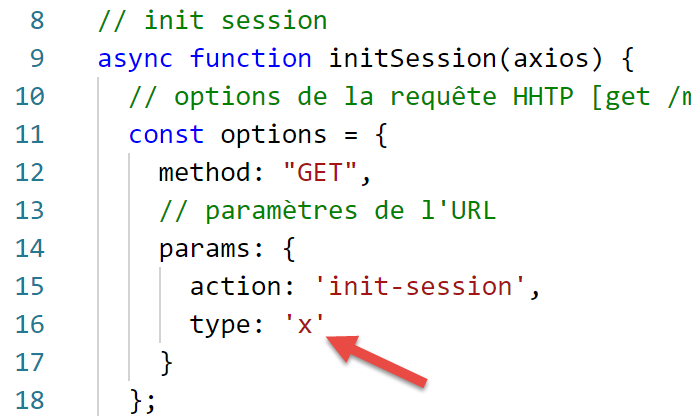
I risultati dell'esecuzione sono i seguenti:
[Running] C:\myprograms\laragon-lite\bin\nodejs\node-v10\node.exe -r esm "c:\Data\st-2019\dev\es6\javascript\http\axios-01.js"
requête HTTP vers le serveur en cours ---------------------------------------------
axios error= object { Error: Request failed with status code 400
   ...
  config:
   { url:
      'http://localhost/php7/scripts-web/impots/version-14/main.php',
     ...
     data: undefined },
  request:
   ...
     [Symbol(outHeadersKey)]:
      [Object: null prototype] { accept: [Array], 'user-agent': [Array], host: [Array] } },
  response:
   { status: 400,
     statusText: 'Bad Request',
     headers:
      { date: 'Sun, 15 Sep 2019 07:25:58 GMT',
        server: 'Apache/2.4.35 (Win64) OpenSSL/1.1.0i PHP/7.2.11',
        'x-powered-by': 'PHP/7.2.11',
        'cache-control': 'max-age=0, private, must-revalidate, no-cache, private',
        'set-cookie': [Array],
        'content-length': '79',
        connection: 'close',
        'content-type': 'application/json' },
     config:
      { url:
         'http://localhost/php7/scripts-web/impots/version-14/main.php',
        ...
        data: undefined },
     request:
      ...
        [Symbol(outHeadersKey)]: [Object] },
     data:
      { action: 'init-session',
        'état': 703,
        'réponse': 'paramètre type=[x] invalide' } },
  isAxiosError: true,
  toJSON: [Function] }
succès ---------------------------------------------
réponse= { action: 'init-session',
  'état': 703,
  'réponse': 'paramètre type=[x] invalide' } object

[Done] exited with code=0 in 0.69 seconds
Poiché il server ha risposto con un codice HTTP 400 (riga 15), [axios] ha generato un'eccezione (anche in questo caso, questo comportamento è configurabile). Sebbene [axios] abbia generato un'eccezione, otteniamo comunque la risposta HTTP dal server in [error.response] (riga 14) e il documento JSON inviato in [error.response.data] (riga 34). Righe 41–43: la funzione [main] recupera correttamente la risposta JSON dal server.
12.6. script [axios-02]
Ora che abbiamo descritto in dettaglio gli oggetti gestiti dalla libreria [axios] durante una richiesta HTTP, possiamo riscrivere lo script [axios-01] come segue:
'use strict';
import axios from 'axios';

// axios default configuration
axios.defaults.timeout = 2000;
axios.defaults.baseURL = 'http://localhost/php7/scripts-web/impots/version-14';

// init session
async function initSession(axios) {
  // query options HHTP [get /main.php?action=init-session&type=json]
  const options = {
    method: "GET",
    // URL parameters
    params: {
      action: 'init-session',
      type: 'json'
    }
  };
  try {
    // execute query HTTP [get /main.php?action=init-session&type=json]
    const response = await axios.request('main.php', options);
    // the server response is in [response.data]
    return response.data;
  } catch (error) {
    // server response
    if (error.response) {
      // the answer jSON is in [error.response.data]
      return error.response.data;
    } else {
      // error restart
      throw error;
    }
  }
}

// the main function executes the asynchronous function [initSession]
async function main() {
  try {
    console.log("requête HTTP vers le serveur en cours ---------------------------------------------");
    const response = await initSession(axios);
    console.log("succès ---------------------------------------------");
    console.log("réponse=", response, typeof (response))
  } catch (error) {
    console.log("erreur ---------------------------------------------");
    console.log("erreur=", error.message);
  }
}

// test
main();
12.7. script [axios-03]
Lo script [axios-03] segue la stessa metodologia dello script [axios-02]. Questa volta, aggiungiamo al server la richiesta HTTP [authenticate-user], che viene effettuata utilizzando una richiesta POST:
'use strict';
import axios from 'axios';
import qs from 'qs'

// axios configuration
axios.defaults.timeout = 2000;
axios.defaults.baseURL = 'http://localhost/php7/scripts-web/impots/version-14';


// init session
async function initSession(axios) {
  // query options HHTP [get /main.php?action=init-session&type=json]
  const options = {
    method: "GET",
    // URL parameters
    params: {
      action: 'init-session',
      type: 'json'
    }
  };
  try {
    // execute query HTTP [get /main.php?action=init-session&type=json]
    const response = await axios.request('main.php', options);
    // the server response is in [response.data]
    return response.data;
  } catch (error) {
    // server response
    if (error.response) {
      // the answer jSON is in [error.response.data]
      return error.response.data;
    } else {
      // error restart
      throw error;
    }
  }
}

async function authentifierUtilisateur(axios, user, password) {
  // query options HHTP [POST /main.php?action=authenticate-user]
  const options = {
    method: "POST",
    headers: {
      'Content-type': 'application/x-www-form-urlencoded',
    },
    // body of POST
    data: qs.stringify({
      user: user,
      password: password
    }),
    // URL parameters
    params: {
      action: 'authentifier-utilisateur'
    }
  };
  try {
    // execute query HTTP [post /main.php?action=authenticate-user]
    const response = await axios.request('main.php', options);
    // the server response is in [response.data]
    return response.data;
  } catch (error) {
    // server response
    if (error.response) {
      // the answer jSON is in [error.response.data]
      return error.response.data;
    } else {
      // error restart
      throw error;
    }
  }
}

// the main function executes asynchronous functions one by one
async function main() {
  try {
    // init-session
    console.log("action init-session en cours ---------------------------------------------");
    const response1 = await initSession(axios);
    console.log("succès ---------------------------------------------");
    console.log("réponse=", response1);
    // authenticate-user
    console.log("action authentifier-utilisateur en cours ---------------------------------------------");
    const response2 = await authentifierUtilisateur(axios, 'admin', 'admin');
    console.log("succès ---------------------------------------------");
    console.log("réponse=", response2)
  } catch (error) {
    console.log("erreur ---------------------------------------------");
    console.log("erreur=", error);
  }
}

// test
main();
Commenti
- righe 38-70: la funzione asincrona [authenticateUser];
- riga 39: la richiesta deve essere effettuata [POST /main.php?action=authenticate-user];
- righe 40–54: le opzioni della richiesta HTTP;
- riga 41: questa è una richiesta POST;
- righe 42–44: i parametri POST saranno codificati nell'URL in un documento che il client invia con la sua richiesta;
- righe 46–49: la proprietà [data] deve contenere la stringa POST codificata nell'URL. Per farlo, usiamo la libreria [qs] importata alla riga 3;
- righe 55–69: per eseguire la richiesta, utilizziamo lo stesso codice del metodo [initSession];
- righe 73–89: il metodo [asynchrone] chiama in successione i metodi [initSession] e [authentifierUtilisateur] in modo bloccante, righe 77 e 82;
- riga 82: la coppia (admin, admin) viene utilizzata come credenziali di accesso. Sappiamo che sono riconosciute dal server;
I risultati dell'esecuzione sono i seguenti:
[Running] C:\myprograms\laragon-lite\bin\nodejs\node-v10\node.exe -r esm "c:\Data\st-2019\dev\es6\javascript\http\axios-03.js"
action init-session en cours ---------------------------------------------
succès ---------------------------------------------
réponse= { action: 'init-session',
  'état': 700,
  'réponse': 'session démarrée avec type [json]' }
action authentifier-utilisateur en cours ---------------------------------------------
succès ---------------------------------------------
réponse= { action: 'authentifier-utilisateur',
  'état': 103,
  'réponse':
   [ 'pas de session en cours. Commencer par action [init-session]' ] }

[Done] exited with code=0 in 0.834 seconds
- righe 9-12: l'autenticazione dell'utente fallisce: il server non ha conservato il fatto che fosse stata avviata una sessione JSON. Ciò è dovuto al fatto che il cookie di sessione inviato in risposta alla prima richiesta [init-session] non è stato rispedito;
12.8. script [axios-04]
Lo script [axios-04] introduce due miglioramenti rispetto allo script [axios-03]:
- gestisce il cookie di sessione;
- integra in una funzione [getRemoteData] ciò che è comune alle funzioni [initSession] e [authenticateUser];
'use strict';
import axios from 'axios';
import qs from 'qs'

// axios configuration
axios.defaults.timeout = 2000;
axios.defaults.baseURL = 'http://localhost/php7/scripts-web/impots/version-14';

// session cookie
const sessionCookieName = "PHPSESSID";
let sessionCookie = '';

// init session
async function initSession(axios) {
  // query options HHTP [get /main.php?action=init-session&type=json]
  const options = {
    method: "GET",
    // URL parameters
    params: {
      action: 'init-session',
      type: 'json'
    }
  };
  // execute query HTTP
  return await getRemoteData(axios, options);
}

async function authentifierUtilisateur(axios, user, password) {
  // query options HHTP [post /main.php?action=authenticate-user]
  const options = {
    method: "POST",
    headers: {
      'Content-type': 'application/x-www-form-urlencoded',
    },
    // body of POST
    data: qs.stringify({
      user: user,
      password: password
    }),
    // URL parameters
    params: {
      action: 'authentifier-utilisateur'
    }
  };
  // execute query HTTP
  return await getRemoteData(axios, options);
}

async function getRemoteData(axios, options) {
  // for the session cookie
  if (!options.headers) {
    options.headers = {};
  }
  options.headers.Cookie = sessionCookie;
  // execute query HTTP
  let response;
  try {
    // asynchronous request
    response = await axios.request('main.php', options);
  } catch (error) {
    // the [error] parameter is an exception instance - it can take various forms
    if (error.response) {
      // the server response is in [error.response]
      response = error.response;
    } else {
      // error restart
      throw error;
    }
  }
  // response is the entire HTTP response from the server (HTTP headers + response itself)
  // retrieve the session cookie if it exists
  const setCookie = response.headers['set-cookie'];
  if (setCookie) {
    // setCookie is an array
    // look for the session cookie in this table
    let trouvé = false;
    let i = 0;
    while (!trouvé && i < setCookie.length) {
      // look for the session cookie
      const results = RegExp('^(' + sessionCookieName + '.+?);').exec(setCookie[i]);
      if (results) {
        // the session cookie is stored
        // eslint-disable-next-line require-atomic-updates
        sessionCookie = results[1];
        // we found
        trouvé = true;
      } else {
        // next item
        i++;
      }
    }
  }
  // the server response is in [response.data]
  return response.data;
}

// the main function executes asynchronous functions one by one
async function main() {
  try {
    // init-session
    console.log("action init-session en cours ---------------------------------------------");
    const response1 = await initSession(axios);
    console.log("succès ---------------------------------------------");
    console.log("réponse=", response1);
    // authenticate-user
    console.log("action authentifier-utilisateur en cours ---------------------------------------------");
    const response2 = await authentifierUtilisateur(axios, 'admin', 'admin');
    console.log("succès ---------------------------------------------");
    console.log("réponse=", response2)
  } catch (error) {
    console.log("erreur ---------------------------------------------");
    console.log("erreur=", error.message);
  }
}

// test
main();
Commenti
- righe 14–26: la funzione [initSession]. Ora si limita a preparare la richiesta HTTP da inviare al server, ma non la esegue. Delega questo compito al metodo [getRemoteDate] nelle righe 49–95;
- righe 28–47: la funzione [authentifierUtilisateur] segue la stessa procedura;
- riga 49: la funzione [getRemoteData] riceve le due informazioni necessarie per eseguire una richiesta HTTP:
- [axios], l'oggetto responsabile dell'invio della richiesta e della ricezione della risposta;
- [options], le opzioni di configurazione per la richiesta da inviare al server;
- riga 59: esecuzione della richiesta e attesa della risposta JSON;
- righe 60–68: gestione di eventuali eccezioni;
- riga 64: recupero della risposta, che potrebbe essere incapsulata nell'oggetto error;
- riga 67: se il server ha generato un'eccezione senza includere la risposta del server, l'errore ricevuto viene propagato al codice chiamante;
- La funzione [getRemoteData] gestisce il cookie di sessione:
- lo memorizza nella variabile [sessionCookie] (riga 11) quando lo riceve per la prima volta;
- poi lo restituisce con ogni nuova richiesta HTTP;
- righe 72–92: [getRemoteData] analizza ogni risposta del server per determinare se ha inviato l'intestazione HTTP [Set-Cookie]. Sappiamo che il server invia un cookie di sessione denominato [PHPSESSID] (riga 10). Questo è quindi il cookie che stiamo cercando (riga 10);
- riga 72: recuperiamo le intestazioni HTTP [Set-Cookie] se esistono (non fa differenza se maiuscolo o minuscolo). Potrebbero infatti esserci più intestazioni [Set-Cookie], quindi recuperiamo un array;
- riga 73: se è stato recuperato un array di cookie;
- righe 78–90: cerchiamo il cookie di sessione tra tutti i cookie presenti nell'array;
- riga 80: l'espressione relazionale utilizzata per cercare il cookie di sessione nel cookie #i;
- riga 81: se il confronto ha restituito risultati;
- riga 84: abbiamo in results[1], la prima parentesi del modello dell'espressione relazionale, ovvero (PHPSESSID=xxxx) fino alla parentesi di chiusura (non inclusa) che conclude il cookie di sessione;
- righe 50–54: ad ogni richiesta, il cookie di sessione è incluso nelle intestazioni HTTP della richiesta. La prima volta, questo cookie è vuoto e verrà quindi ignorato dal server;
I risultati dell'esecuzione sono i seguenti:
[Running] C:\myprograms\laragon-lite\bin\nodejs\node-v10\node.exe -r esm "c:\Data\st-2019\dev\es6\javascript\http\axios-04.js"
action init-session en cours ---------------------------------------------
succès ---------------------------------------------
réponse= { action: 'init-session',
  'état': 700,
  'réponse': 'session démarrée avec type [json]' }
action authentifier-utilisateur en cours ---------------------------------------------
succès ---------------------------------------------
réponse= { action: 'authentifier-utilisateur',
  'état': 200,
  'réponse': 'Authentification réussie [admin, admin]' }

[Done] exited with code=0 in 0.982 seconds