14. Client HTTP JavaScript del servizio di calcolo delle imposte
14.1. Introduzione
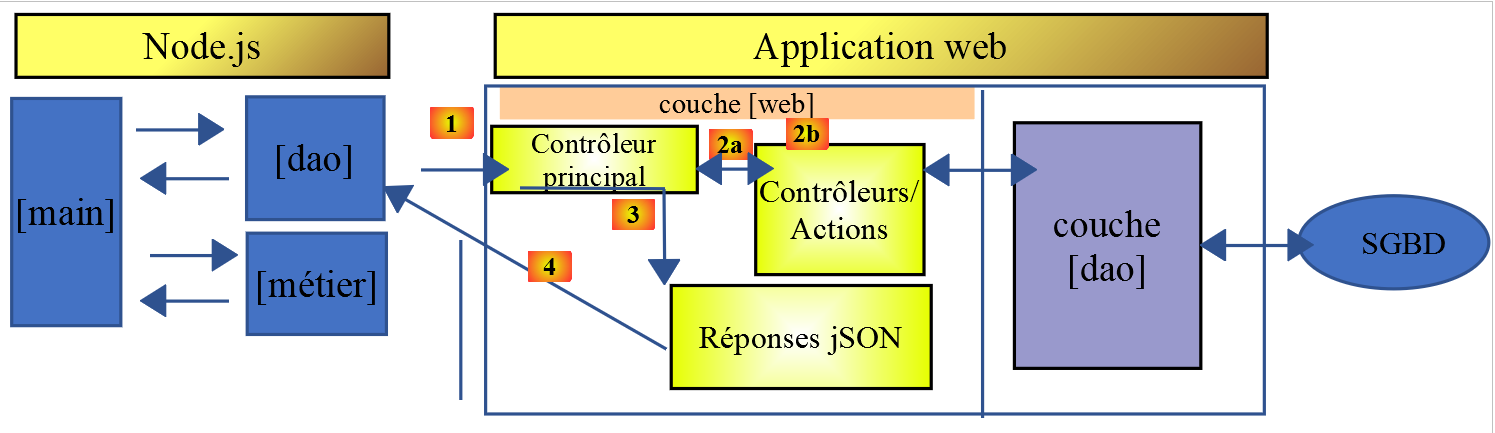
Qui proponiamo di scrivere un client [Node.js] per la versione 14 del servizio di calcolo delle imposte. L'architettura client/server sarà la seguente:
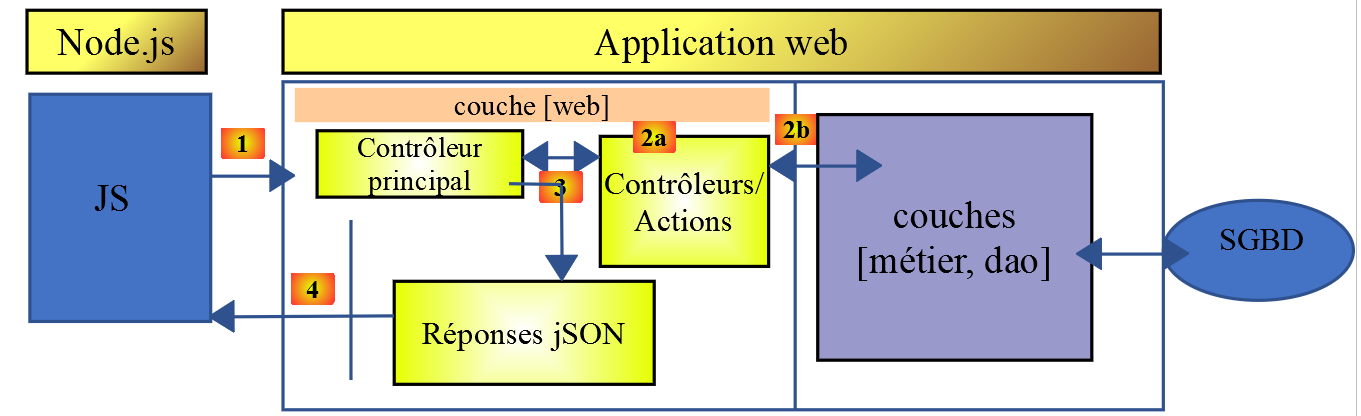
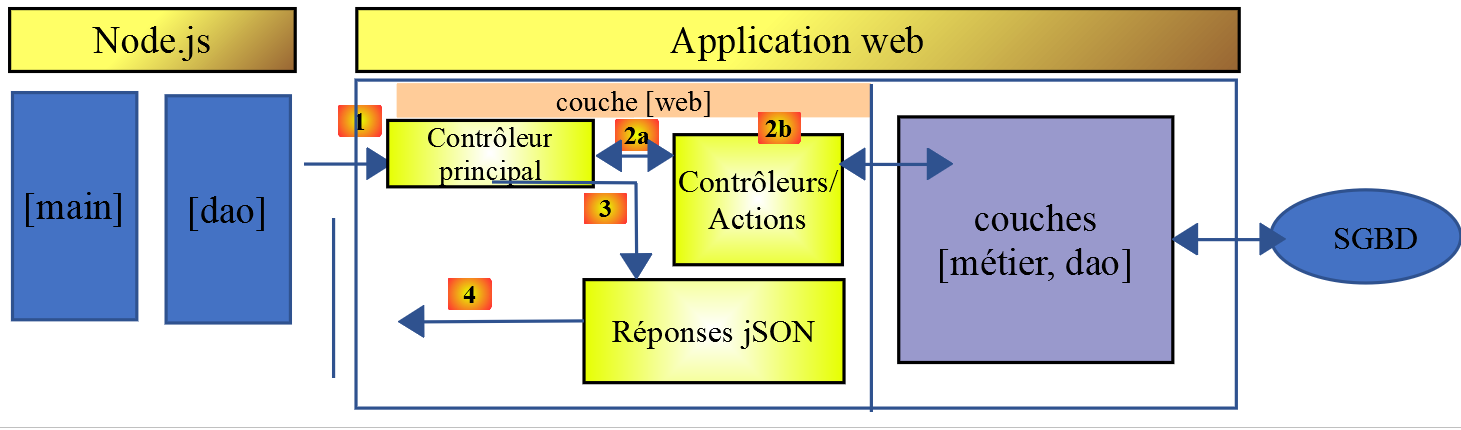
Esamineremo due versioni del client:
- La versione 1 del client avrà la seguente struttura a livelli [main, dao]:
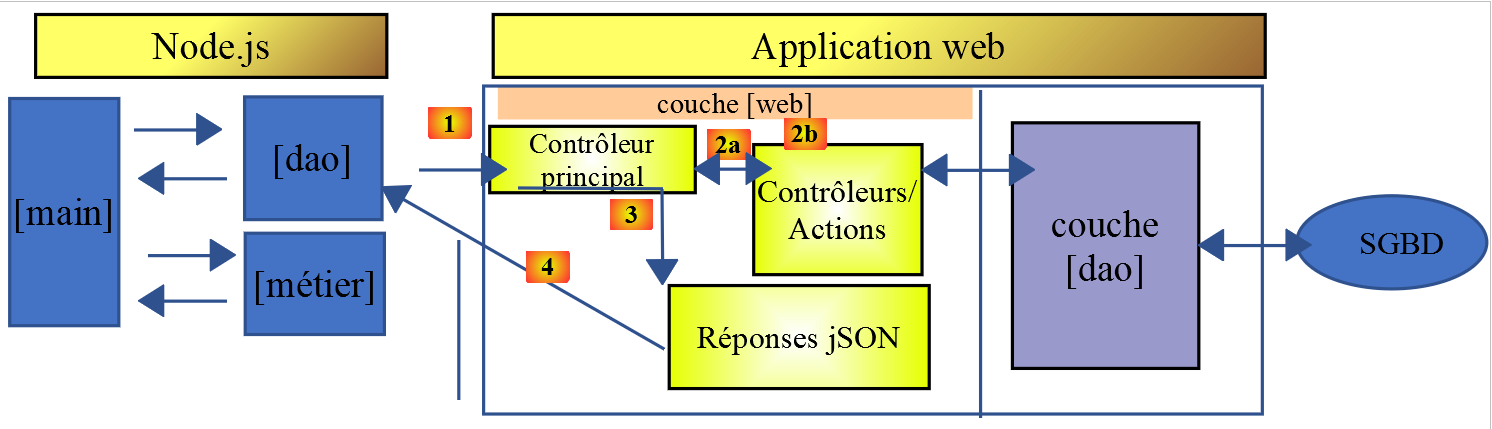
- La versione 2 del client avrà una struttura [main, business logic, DAO]. Il livello [business logic] del server verrà spostato sul client:
14.2. Client HTTP 1
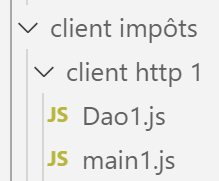
Come accennato, il client HTTP 1 implementa la seguente architettura client/server:
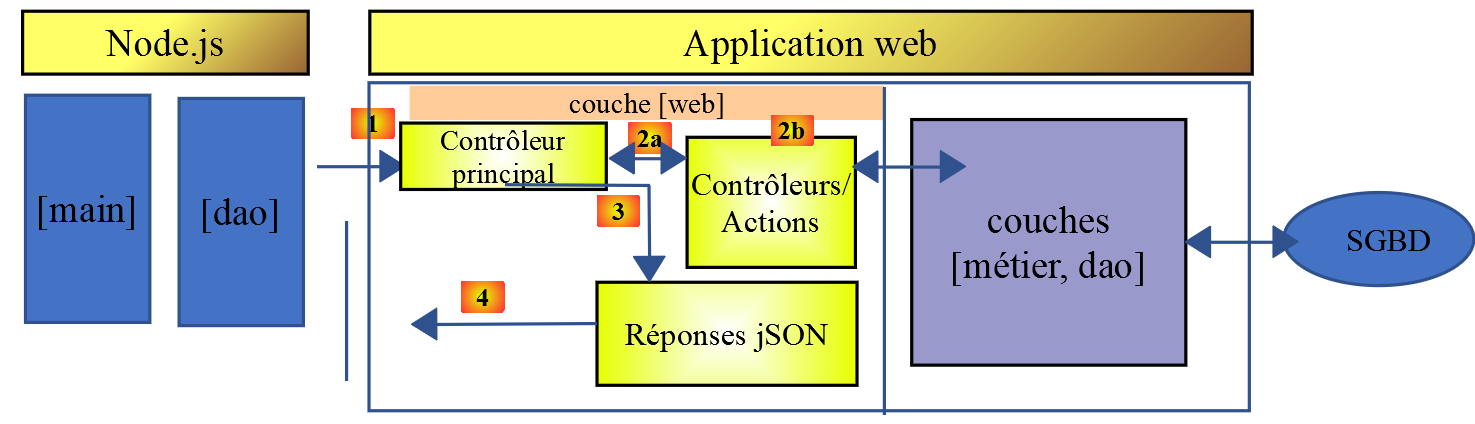
Implementeremo:
- il livello [DAO] come classe;
- il livello [main] come script che utilizza questa classe;
14.2.1. Il livello [dao]
Il livello [dao] sarà implementato dalla seguente classe [Dao1.js]:
'use strict';

// imports
import qs from 'qs'

class Dao1 {

  // manufacturer
  constructor(axios) {
    // axios library for queries HTTP
    this.axios = axios;
    // session cookie
    this.sessionCookieName = "PHPSESSID";
    this.sessionCookie = '';
  }

  // init session
  async  initSession() {
    // query options HHTP [get /main.php?action=init-session&type=json]
    const options = {
      method: "GET",
      // URL parameters
      params: {
        action: 'init-session',
        type: 'json'
      }
    };
    // execute query HTTP
    return await this.getRemoteData(options);
  }

  async  authentifierUtilisateur(user, password) {
    // query options HHTP [post /main.php?action=authenticate-user]
    const options = {
      method: "POST",
      headers: {
        'Content-type': 'application/x-www-form-urlencoded',
      },
      // body of POST
      data: qs.stringify({
        user: user,
        password: password
      }),
      // URL parameters
      params: {
        action: 'authentifier-utilisateur'
      }
    };
    // execute query HTTP
    return await this.getRemoteData(options);
  }

  // tAX CALCULATION
  async  calculerImpot(marié, enfants, salaire) {
    // query options HHTP [post /main.php?action=calculate-tax]
    const options = {
      method: "POST",
      headers: {
        'Content-type': 'application/x-www-form-urlencoded',
      },
      // body of POST [married, children, salary]
      data: qs.stringify({
        marié: marié,
        enfants: enfants,
        salaire: salaire
      }),
      // URL parameters
      params: {
        action: 'calculer-impot'
      }
    };
    // execute query HTTP
    const data = await this.getRemoteData(options);
    // result
    return data;
  }

  // list of simulations
  async  listeSimulations() {
    // query options HHTP [get /main.php?action=lister-simulations]
    const options = {
      method: "GET",
      // URL parameters
      params: {
        action: 'lister-simulations'
      },
    };
    // execute query HTTP
    const data = await this.getRemoteData(options);
    // result
    return data;
  }

  // list of simulations
  async  supprimerSimulation(index) {
    // query options HHTP [get /main.php?action=suppress-simulation&number=index]
    const options = {
      method: "GET",
      // URL parameters
      params: {
        action: 'supprimer-simulation',
        numéro: index
      },
    };
    // execute query HTTP
    const data = await this.getRemoteData(options);
    // result
    return data;
  }

  async  getRemoteData(options) {
    // for the session cookie
    if (!options.headers) {
      options.headers = {};
    }
    options.headers.Cookie = this.sessionCookie;
    // execute query HTTP
    let response;
    try {
      // asynchronous request
      response = await this.axios.request('main.php', options);
    } catch (error) {
      // the [error] parameter is an exception instance - it can take various forms
      if (error.response) {
        // the server response is in [error.response]
        response = error.response;
      } else {
        // error restart
        throw error;
      }
    }
    // response is the entire HTTP response from the server (HTTP headers + response itself)
    // retrieve the session cookie if it exists
    const setCookie = response.headers['set-cookie'];
    if (setCookie) {
      // setCookie is an array
      // look for the session cookie in this table
      let trouvé = false;
      let i = 0;
      while (!trouvé && i < setCookie.length) {
        // look for the session cookie
        const results = RegExp('^(' + this.sessionCookieName + '.+?);').exec(setCookie[i]);
        if (results) {
          // the session cookie is stored
          // eslint-disable-next-line require-atomic-updates
          this.sessionCookie = results[1];
          // we found
          trouvé = true;
        } else {
          // next item
          i++;
        }
      }
    }
    // the server response is in [response.data]
    return response.data;
  }
}

// class export
export default Dao1;
- Qui stiamo utilizzando ciò che abbiamo imparato nella sezione collegata, dove abbiamo introdotto la libreria [axios], che ci permette di effettuare richieste HTTP sia in [node.js] che in un browser. Esamineremo in particolare lo script nella sezione collegata;
- righe 9–15: il costruttore della classe. Questa classe avrà tre proprietà:
- [axios]: l'oggetto [axios] utilizzato per effettuare richieste HTTP. Viene passato dal codice chiamante;
- [sessionCookieName]: a seconda del server, il cookie di sessione ha nomi diversi. Qui è [PHPSESSID];
- [sessionCookie]: il cookie di sessione inviato dal server e memorizzato dal client;
- righe 53–76: la funzione asincrona [calculateTax] effettua la richiesta [post /main.php?action=calculate-tax] inviando i parametri [married, children, salary]. Restituisce la stringa JSON inviata dal server come oggetto JavaScript;
- righe 79–92: la funzione asincrona [listSimulations] effettua la richiesta [get /main.php?action=list-simulations]. Restituisce la stringa JSON inviata dal server come oggetto JavaScript;
- righe 95–109: la funzione asincrona [deleteSimulation] effettua la richiesta [get /main.php?action=delete-simulation&number=index]. Restituisce la stringa JSON inviata dal server come oggetto JavaScript;
- riga 121: viene utilizzata la notazione [this.axios] perché qui l'oggetto [axios] passato al costruttore è stato memorizzato nella proprietà [this.axios];
- riga 161: la classe [Dao1] viene esportata in modo da poter essere utilizzata;
14.2.2. Lo script [main1.js]
Lo script [main1.js] effettua una serie di chiamate al server utilizzando la classe [Dao1]:
- inizializzazione di una sessione JSON;
- autenticazione con [admin, admin];
- richiesta di tre calcoli fiscali;
- richiesta dell'elenco delle simulazioni;
- ne elimina una;
Il codice è il seguente:
// import axios
import axios from 'axios';
// dao1 class import
import Dao from './Dao1';

// asynchronous function [main]
async function main() {
  // axios configuration
  axios.defaults.timeout = 2000;
  axios.defaults.baseURL = 'http://localhost/php7/scripts-web/impots/version-14';
  // layer instantiation [dao]
  const dao = new Dao(axios);
  // using the [dao] layer
  try {
    // init session
    log("-----------init-session");
    let response = await dao.initSession();
    log(response);
    // authentication
    log("-----------authentifier-utilisateur");
    response = await dao.authentifierUtilisateur("admin", "admin");
    log(response);
    // tax calculations
    log("-----------calculer-impot x 3");
    response = await Promise.all([
      dao.calculerImpot("oui", 2, 45000),
      dao.calculerImpot("non", 2, 45000),
      dao.calculerImpot("non", 1, 30000)
    ]);
    log(response);
    // list of simulations
    log("-----------liste-des-simulations");
    response = await dao.listeSimulations();
    log(response);
    // deleting a simulation
    log("-----------suppression simulation n° 1");
    response = await dao.supprimerSimulation(1);
    log(response);
  } catch (error) {
    // we log the error
    console.log("erreur=", error.message);
  }
}

// log jSON
function log(object) {
  console.log(JSON.stringify(object, null, 2));
}

// execution
main();
Commenti
- riga 2: importa la libreria [axios];
- riga 4: importazione della classe [Dao];
- riga 7: la funzione [main] che comunica con il server è asincrona;
- righe 9-10: configurazione predefinita per le richieste HTTP da inviare al server:
- riga 9: [timeout] di 2 secondi;
- riga 10: tutti gli URL sono preceduti dall'URL di base della versione 14 del server di calcolo delle imposte;
- riga 12: viene creato il livello [Dao]. Ora è pronto per l'uso;
- righe 46–48: la funzione [log] viene utilizzata per visualizzare la stringa JSON di un oggetto JavaScript in modo formattato: verticalmente con indentazione di due spazi (3° parametro);
- righe 15–18: inizializzazione della sessione JSON;
- righe 19–22: autenticazione;
- righe 23–30: vengono richiesti tre calcoli fiscali in parallelo. Grazie a [await Promise.all], l'esecuzione rimane in attesa fino a quando non vengono ottenuti tutti e tre i risultati;
- righe 31–34: elenco delle simulazioni;
- righe 35–38: eliminazione di una simulazione;
- righe 39–42: gestione di eventuali eccezioni;
I risultati dell'esecuzione sono i seguenti:
[Running] C:\myprograms\laragon-lite\bin\nodejs\node-v10\node.exe -r esm "c:\Data\st-2019\dev\es6\javascript\client impôts\client http 1\main1.js"
"-----------init-session"
{
  "action": "init-session",
  "état": 700,
  "réponse": "session démarrée avec type [json]"
}
"-----------authentifier-utilisateur"
{
  "action": "authentifier-utilisateur",
  "état": 200,
  "réponse": "Authentification réussie [admin, admin]"
}
"-----------calculer-impot x 3"
[
  {
    "action": "calculer-impot",
    "état": 300,
    "réponse": {
      "marié": "oui",
      "enfants": "2",
      "salaire": "45000",
      "impôt": 502,
      "surcôte": 0,
      "décôte": 857,
      "réduction": 126,
      "taux": 0.14
    }
  },
  {
    "action": "calculer-impot",
    "état": 300,
    "réponse": {
      "marié": "non",
      "enfants": "2",
      "salaire": "45000",
      "impôt": 3250,
      "surcôte": 370,
      "décôte": 0,
      "réduction": 0,
      "taux": 0.3
    }
  },
  {
    "action": "calculer-impot",
    "état": 300,
    "réponse": {
      "marié": "non",
      "enfants": "1",
      "salaire": "30000",
      "impôt": 1687,
      "surcôte": 0,
      "décôte": 0,
      "réduction": 0,
      "taux": 0.14
    }
  }
]
"-----------liste-des-simulations"
{
  "action": "lister-simulations",
  "état": 500,
  "réponse": [
    {
      "marié": "oui",
      "enfants": "2",
      "salaire": "45000",
      "impôt": 502,
      "surcôte": 0,
      "décôte": 857,
      "réduction": 126,
      "taux": 0.14,
      "arrayOfAttributes": null
    },
    {
      "marié": "non",
      "enfants": "2",
      "salaire": "45000",
      "impôt": 3250,
      "surcôte": 370,
      "décôte": 0,
      "réduction": 0,
      "taux": 0.3,
      "arrayOfAttributes": null
    },
    {
      "marié": "non",
      "enfants": "1",
      "salaire": "30000",
      "impôt": 1687,
      "surcôte": 0,
      "décôte": 0,
      "réduction": 0,
      "taux": 0.14,
      "arrayOfAttributes": null
    }
  ]
}
"-----------suppression simulation n° 1"
{
  "action": "supprimer-simulation",
  "état": 600,
  "réponse": [
    {
      "marié": "oui",
      "enfants": "2",
      "salaire": "45000",
      "impôt": 502,
      "surcôte": 0,
      "décôte": 857,
      "réduction": 126,
      "taux": 0.14,
      "arrayOfAttributes": null
    },
    {
      "marié": "non",
      "enfants": "1",
      "salaire": "30000",
      "impôt": 1687,
      "surcôte": 0,
      "décôte": 0,
      "réduction": 0,
      "taux": 0.14,
      "arrayOfAttributes": null
    }
  ]
}

[Done] exited with code=0 in 0.516 seconds
14.3. Client HTTP 2
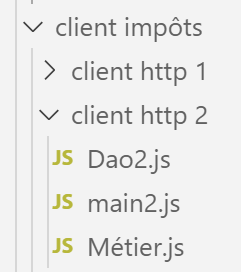
L'architettura del client HTTP2 è la seguente:
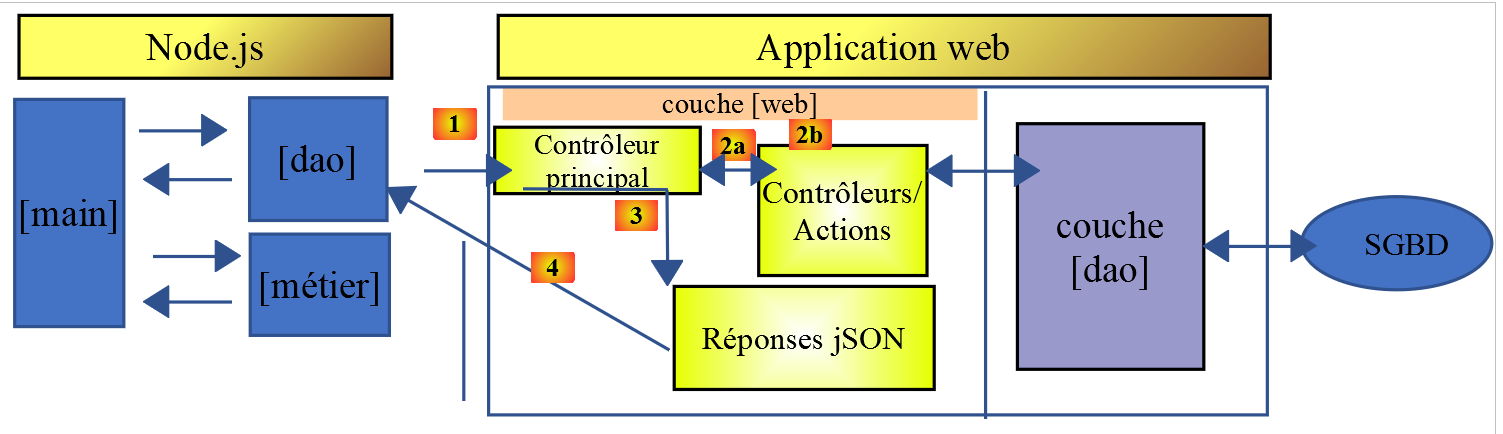
Abbiamo spostato il livello [business] dal server al client JavaScript. A differenza di quanto fatto nel corso su PHP7, il livello [main] non dovrà passare attraverso il livello [business] per raggiungere il livello [DAO]. Useremo questi due livelli come componenti specializzati:
- il livello [main] passa attraverso il livello [DAO] ogni volta che ha bisogno di dati che si trovano sul server;
- il livello [main] chiede al livello [business] di eseguire i calcoli fiscali;
- il livello [business] è indipendente dal livello [DAO] e non lo chiama mai;
14.3.1. La classe [Business] in JavaScript
L'essenza della classe [Business] in PHP è stata descritta nell'articolo collegato. Si tratta di un codice piuttosto complesso che riportiamo qui, non per spiegarlo, ma per poterlo tradurre in JavaScript:
<?php

// namespace
namespace Application;

class Metier implements InterfaceMetier {
  // dao layer
  private $dao;
  // tax administration data
  private $taxAdminData;

  //---------------------------------------------
  // setter couche [dao]
  public function setDao(InterfaceDao $dao) {
    $this->dao = $dao;
    return $this;
  }

  public function __construct(InterfaceDao $dao) {
    // a reference is stored on the [dao] layer
    $this->dao = $dao;
    // recover data for tax calculation
    // method [getTaxAdminData] may throw a ExceptionImpots exception
    // we then let it go back to the calling code
    $this->taxAdminData = $this->dao->getTaxAdminData();
  }

// tAX CALCULATION
// --------------------------------------------------------------------------
  public function calculerImpot(string $marié, int $enfants, int $salaire): array {
    // $marié : yes, no
    // $enfants : number of children
    // $salaire: annual salary
    // $this->taxAdminData: tax administration data
    //
    // we check that we have the correct data from the tax authorities
    if ($this->taxAdminData === NULL) {
      $this->taxAdminData = $this->getTaxAdminData();
    }
    // tax calculation with children
    $result1 = $this->calculerImpot2($marié, $enfants, $salaire);
    $impot1 = $result1["impôt"];
    // tax calculation without children
    if ($enfants != 0) {
      $result2 = $this->calculerImpot2($marié, 0, $salaire);
      $impot2 = $result2["impôt"];
      // application of the family allowance ceiling
      $plafonDemiPart = $this->taxAdminData->getPlafondQfDemiPart();
      if ($enfants < 3) {
        // $PLAFOND_QF_DEMI_PART euros for the first 2 children
        $impot2 = $impot2 - $enfants * $plafonDemiPart;
      } else {
        // $PLAFOND_QF_DEMI_PART euros for the first 2 children, double for subsequent children
        $impot2 = $impot2 - 2 * $plafonDemiPart - ($enfants - 2) * 2 * $plafonDemiPart;
      }
    } else {
      $impot2 = $impot1;
      $result2 = $result1;
    }
    // we take the highest tax
    if ($impot1 > $impot2) {
      $impot = $impot1;
      $taux = $result1["taux"];
      $surcôte = $result1["surcôte"];
    } else {
      $surcôte = $impot2 - $impot1 + $result2["surcôte"];
      $impot = $impot2;
      $taux = $result2["taux"];
    }
    // calculation of any discount
    $décôte = $this->getDecôte($marié, $salaire, $impot);
    $impot -= $décôte;
    // calculation of any tax reduction
    $réduction = $this->getRéduction($marié, $salaire, $enfants, $impot);
    $impot -= $réduction;
    // result
    return ["impôt" => floor($impot), "surcôte" => $surcôte, "décôte" => $décôte, "réduction" => $réduction, "taux" => $taux];
  }

// --------------------------------------------------------------------------
  private function calculerImpot2(string $marié, int $enfants, float $salaire): array {
    // $marié : yes, no
    // $enfants : number of children
    // $salaire: annual salary
    // $this->taxAdminData: tax administration data
    //
    // number of shares
    $marié = strtolower($marié);
    if ($marié === "oui") {
      $nbParts = $enfants / 2 + 2;
    } else {
      $nbParts = $enfants / 2 + 1;
    }
    // 1 part per child from the 3rd
    if ($enfants >= 3) {
      // an additional half share for each child from the 3rd onwards
      $nbParts += 0.5 * ($enfants - 2);
    }
    // taxable income
    $revenuImposable = $this->getRevenuImposable($salaire);
    // surcharge
    $surcôte = floor($revenuImposable - 0.9 * $salaire);
    // for rounding problems
    if ($surcôte < 0) {
      $surcôte = 0;
    }
    // family quotient
    $quotient = $revenuImposable / $nbParts;
    // tAX CALCULATION
    $limites = $this->taxAdminData->getLimites();
    $coeffR = $this->taxAdminData->getCoeffR();
    $coeffN = $this->taxAdminData->getCoeffN();
    // is set at the end of the limit array to stop the following loop
    $limites[count($limites) - 1] = $quotient;
    // tax rate search
    $i = 0;
    while ($quotient > $limites[$i]) {
      $i++;
    }
    // because $quotient has been placed at the end of the $limites array, the previous loop
    // cannot exceed the table $limites
    // now we can calculate the tax
    $impôt = floor($revenuImposable * $coeffR[$i] - $nbParts * $coeffN[$i]);
    // result
    return ["impôt" => $impôt, "surcôte" => $surcôte, "taux" => $coeffR[$i]];
  }

  // revenuImposable=annualwage-discount
  // the allowance has a minimum and a maximum
  private function getRevenuImposable(float $salaire): float {
    // 10% salary deduction
    $abattement = 0.1 * $salaire;
    // this allowance cannot exceed $this->taxAdminData->getAbattementDixPourCentMax()
    if ($abattement > $this->taxAdminData->getAbattementDixPourCentMax()) {
      $abattement = $this->taxAdminData->getAbattementDixPourcentMax();
    }
    // the allowance cannot be less than $this->taxAdminData->getAbattementDixPourcentMin()
    if ($abattement < $this->taxAdminData->getAbattementDixPourcentMin()) {
      $abattement = $this->taxAdminData->getAbattementDixPourcentMin();
    }
    // taxable income
    $revenuImposable = $salaire - $abattement;
    // result
    return floor($revenuImposable);
  }

// calculates any discount
  private function getDecôte(string $marié, float $salaire, float $impots): float {
    // at the outset, a zero discount
    $décôte = 0;
    // maximum tax amount to qualify for discount
    $plafondImpôtPourDécôte = $marié === "oui" ?
      $this->taxAdminData->getPlafondImpotCouplePourDecote() :
      $this->taxAdminData->getPlafondImpotCelibatairePourDecote();
    if ($impots < $plafondImpôtPourDécôte) {
      // maximum discount
      $plafondDécôte = $marié === "oui" ?
        $this->taxAdminData->getPlafondDecoteCouple() :
        $this->taxAdminData->getPlafondDecoteCelibataire();
      // theoretical discount
      $décôte = $plafondDécôte - 0.75 * $impots;
      // the discount cannot exceed the amount of tax due
      if ($décôte > $impots) {
        $décôte = $impots;
      }
      // no discount <0
      if ($décôte < 0) {
        $décôte = 0;
      }
    }
    // result
    return ceil($décôte);
  }

// calculates any reduction
  private function getRéduction(string $marié, float $salaire, int $enfants, float $impots): float {
    // the income ceiling to qualify for the 20% reduction
    $plafondRevenuPourRéduction = $marié === "oui" ?
      $this->taxAdminData->getPlafondRevenusCouplePourReduction() :
      $this->taxAdminData->getPlafondRevenusCelibatairePourReduction();
    $plafondRevenuPourRéduction += $enfants * $this->taxAdminData->getValeurReducDemiPart();
    if ($enfants > 2) {
      $plafondRevenuPourRéduction += ($enfants - 2) * $this->taxAdminData->getValeurReducDemiPart();
    }
    // taxable income
    $revenuImposable = $this->getRevenuImposable($salaire);
    // reduction
    $réduction = 0;
    if ($revenuImposable < $plafondRevenuPourRéduction) {
      // 20% discount
      $réduction = 0.2 * $impots;
    }
    // result
    return ceil($réduction);
  }

  // batch mode tax calculation
  public function executeBatchImpots(string $taxPayersFileName, string $resultsFileName, string $errorsFileName): void {
    // we let the exceptions coming from the [dao] layer flow upwards
    // retrieve taxpayer data
    $taxPayersData = $this->dao->getTaxPayersData($taxPayersFileName, $errorsFileName);
    // results table
    $results = [];
    // we exploit them
    foreach ($taxPayersData as $taxPayerData) {
      // tax calculation
      $result = $this->calculerImpot(
        $taxPayerData->getMarié(),
        $taxPayerData->getEnfants(),
        $taxPayerData->getSalaire());
      // complete [$taxPayerData]
      $taxPayerData->setMontant($result["impôt"]);
      $taxPayerData->setDécôte($result["décôte"]);
      $taxPayerData->setSurCôte($result["surcôte"]);
      $taxPayerData->setTaux($result["taux"]);
      $taxPayerData->setRéduction($result["réduction"]);
      // put the result in the results table
      $results [] = $taxPayerData;
    }
    // recording results
    $this->dao->saveResults($resultsFileName, $results);
  }

}
- righe 19–26: il costruttore della classe PHP. Poiché abbiamo detto che stavamo costruendo un livello [business] indipendente dal livello [DAO], apporteremo due modifiche a questo costruttore in JavaScript:
- non riceverà un'istanza del livello [DAO] (non ne ha più bisogno);
- non richiederà i dati fiscali dall'amministrazione [taxAdminData] del livello [dao]: il codice chiamante passerà questi dati al costruttore;
- Righe 197–122: non implementeremo il metodo [executeBatchImpots], il cui scopo finale era quello di salvare i risultati della simulazione in un file di testo. Vogliamo un codice che funzioni sia in [node.js] che in un browser. Tuttavia, non è possibile salvare i dati nel file system della macchina su cui è in esecuzione il browser client;
Date queste restrizioni, il codice per la classe JavaScript [Métier] è il seguente:
'use strict';

// job class
class Métier {

  // manufacturer
  constructor(taxAdmindata) {
    // this.taxAdminData: tax administration data
    this.taxAdminData = taxAdmindata;
  }

  // tAX CALCULATION
  // --------------------------------------------------------------------------
  calculerImpot(marié, enfants, salaire) {
    // married: yes, no
    // children: number of children
    // salary: annual salary
    // this.taxAdminData: tax administration data
    //
    // tax calculation with children
    const result1 = this.calculerImpot2(marié, enfants, salaire);
    const impot1 = result1["impôt"];
    // tax calculation without children
    let result2, impot2, plafondDemiPart;
    if (enfants !== 0) {
      result2 = this.calculerImpot2(marié, 0, salaire);
      impot2 = result2["impôt"];
      // application of the family allowance ceiling
      plafondDemiPart = this.taxAdminData.plafondQfDemiPart;
      if (enfants < 3) {
        // PLAFOND_QF_DEMI_PART euros for the first 2 children
        impot2 = impot2 - enfants * plafondDemiPart;
      } else {
        // PLAFOND_QF_DEMI_PART euros for the first 2 children, double for subsequent children
        impot2 = impot2 - 2 * plafondDemiPart - (enfants - 2) * 2 * plafondDemiPart;
      }
    } else {
      // no tax recalculation
      impot2 = impot1;
      result2 = result1;
    }
    // we take the highest tax in [impot1, impot2]
    let impot, taux, surcôte;
    if (impot1 > impot2) {
      impot = impot1;
      taux = result1["taux"];
      surcôte = result1["surcôte"];
    } else {
      surcôte = impot2 - impot1 + result2["surcôte"];
      impot = impot2;
      taux = result2["taux"];
    }
    // calculation of any discount
    const décôte = this.getDecôte(marié, impot);
    impot -= décôte;
    // calculation of any tax reduction
    const réduction = this.getRéduction(marié, salaire, enfants, impot);
    impot -= réduction;
    // result
    return {
      "impôt": Math.floor(impot), "surcôte": surcôte, "décôte": décôte, "réduction": réduction,
      "taux": taux
    };
  }

  // --------------------------------------------------------------------------
  calculerImpot2(marié, enfants, salaire) {
    // married: yes, no
    // children: number of children
    // salary: annual salary
    // this->taxAdminData: tax administration data
    //
    // number of shares
    marié = marié.toLowerCase();
    let nbParts;
    if (marié === "oui") {
      nbParts = enfants / 2 + 2;
    } else {
      nbParts = enfants / 2 + 1;
    }
    // 1 part per child from the 3rd
    if (enfants >= 3) {
      // an additional half share for each child from the 3rd onwards
      nbParts += 0.5 * (enfants - 2);
    }
    // taxable income
    const revenuImposable = this.getRevenuImposable(salaire);
    // surcharge
    let surcôte = Math.floor(revenuImposable - 0.9 * salaire);
    // for rounding problems
    if (surcôte < 0) {
      surcôte = 0;
    }
    // family quotient
    const quotient = revenuImposable / nbParts;
    // tAX CALCULATION
    const limites = this.taxAdminData.limites;
    const coeffR = this.taxAdminData.coeffR;
    const coeffN = this.taxAdminData.coeffN;
    // is set at the end of the limit table to stop the following loop
    limites[limites.length - 1] = quotient;
    // tax rate search
    let i = 0;
    while (quotient > limites[i]) {
      i++;
    }
    // because we've placed quotient at the end of the limit array, the previous loop
    // cannot go beyond the limit table
    // now we can calculate the tax
    const impôt = Math.floor(revenuImposable * coeffR[i] - nbParts * coeffN[i]);
    // result
    return { "impôt": impôt, "surcôte": surcôte, "taux": coeffR[i] };
  }

  // revenuImposable=annualwage-discount
  // the allowance has a minimum and a maximum
  getRevenuImposable(salaire) {
    // 10% salary deduction
    let abattement = 0.1 * salaire;
    // this allowance cannot exceed taxAdminData.getAbattementDixPourCentMax()
    if (abattement > this.taxAdminData.abattementDixPourCentMax) {
      abattement = this.taxAdminData.abattementDixPourcentMax;
    }
    // the allowance cannot be less than taxAdminData.getAbattementDixPourcentMin()
    if (abattement < this.taxAdminData.abattementDixPourcentMin) {
      abattement = this.taxAdminData.abattementDixPourcentMin;
    }
    // taxable income
    const revenuImposable = salaire - abattement;
    // result
    return Math.floor(revenuImposable);
  }

  // calculates any discount
  getDecôte(marié, impots) {
    // at the outset, a zero discount
    let décôte = 0;
    // maximum tax amount to qualify for discount
    let plafondImpôtPourDécôte = marié === "oui" ?
      this.taxAdminData.plafondImpotCouplePourDecote :
      this.taxAdminData.plafondImpotCelibatairePourDecote;
    let plafondDécôte;
    if (impots < plafondImpôtPourDécôte) {
      // maximum discount
      plafondDécôte = marié === "oui" ?
        this.taxAdminData.plafondDecoteCouple :
        this.taxAdminData.plafondDecoteCelibataire;
      // theoretical discount
      décôte = plafondDécôte - 0.75 * impots;
      // the discount cannot exceed the amount of tax due
      if (décôte > impots) {
        décôte = impots;
      }
      // no discount <0
      if (décôte < 0) {
        décôte = 0;
      }
    }
    // result
    return Math.ceil(décôte);
  }

  // calculates any reduction
  getRéduction(marié, salaire, enfants, impots) {
    // the income ceiling to qualify for the 20% reduction
    let plafondRevenuPourRéduction = marié === "oui" ?
      this.taxAdminData.plafondRevenusCouplePourReduction :
      this.taxAdminData.plafondRevenusCelibatairePourReduction;
    plafondRevenuPourRéduction += enfants * this.taxAdminData.valeurReducDemiPart;
    if (enfants > 2) {
      plafondRevenuPourRéduction += (enfants - 2) * this.taxAdminData.valeurReducDemiPart;
    }
    // taxable income
    const revenuImposable = this.getRevenuImposable(salaire);
    // reduction
    let réduction = 0;
    if (revenuImposable < plafondRevenuPourRéduction) {
      // 20% discount
      réduction = 0.2 * impots;
    }
    // result
    return Math.ceil(réduction);
  }
}

// class export
export default Métier;
- Il codice JavaScript segue da vicino il codice PHP;
- La classe [Business] viene esportata, riga 187;
14.3.2. La classe JavaScript [Dao2]
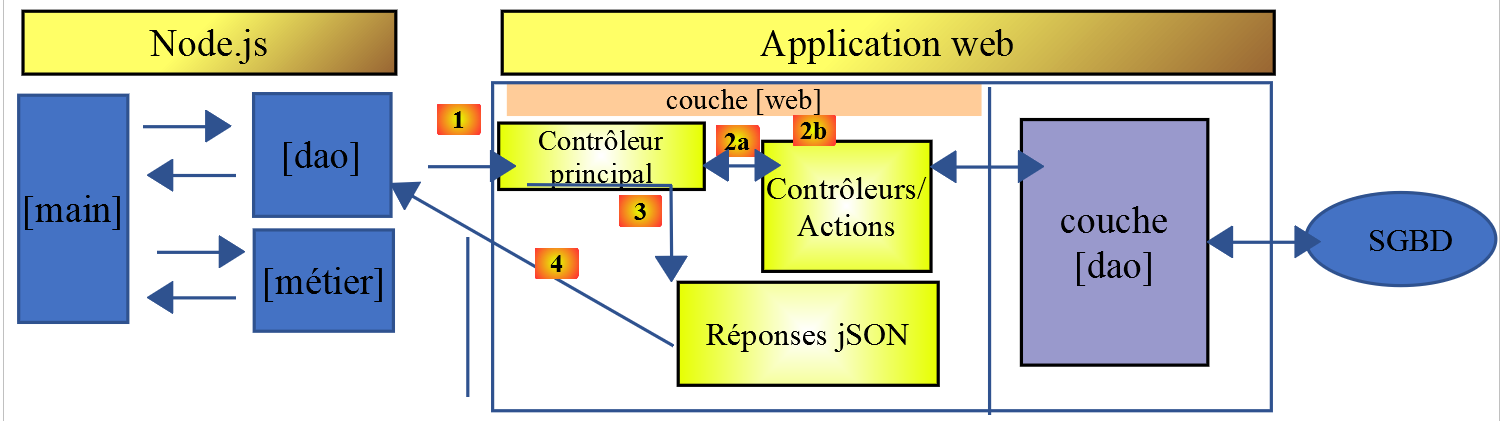
La classe [Dao2] implementa il livello [dao] del client JavaScript sopra riportato come segue:
'use strict';

// imports
import qs from 'qs'

class Dao2 {

  // manufacturer
  constructor(axios) {
    this.axios = axios;
    // session cookie
    this.sessionCookieName = "PHPSESSID";
    this.sessionCookie = '';
  }

  // init session
  async  initSession() {
    // query options HHTP [get /main.php?action=init-session&type=json]
    const options = {
      method: "GET",
      // URL parameters
      params: {
        action: 'init-session',
        type: 'json'
      }
    };
    // execute query HTTP
    return await this.getRemoteData(options);
  }

  async  authentifierUtilisateur(user, password) {
    // query options HHTP [post /main.php?action=authenticate-user]
    const options = {
      method: "POST",
      headers: {
        'Content-type': 'application/x-www-form-urlencoded',
      },
      // body of POST
      data: qs.stringify({
        user: user,
        password: password
      }),
      // URL parameters
      params: {
        action: 'authentifier-utilisateur'
      }
    };
    // execute query HTTP
    return await this.getRemoteData(options);
  }

  async getAdminData() {
    // query options HHTP [get /main.php?action=get-admindata]
    const options = {
      method: "GET",
      // URL parameters
      params: {
        action: 'get-admindata'
      }
    };
    // execute query HTTP
    const data = await this.getRemoteData(options);
    // result
    return data;
  }

  async  getRemoteData(options) {
    // for the session cookie
    if (!options.headers) {
      options.headers = {};
    }
    options.headers.Cookie = this.sessionCookie;
    // execute query HTTP
    let response;
    try {
      // asynchronous request
      response = await this.axios.request('main.php', options);
    } catch (error) {
      // the [error] parameter is an exception instance - it can take various forms
      if (error.response) {
        // the server response is in [error.response]
        response = error.response;
      } else {
        // error restart
        throw error;
      }
    }
    // response is the entire HTTP response from the server (HTTP headers + response itself)
    // retrieve the session cookie if it exists
    const setCookie = response.headers['set-cookie'];
    if (setCookie) {
      // setCookie is an array
      // look for the session cookie in this table
      let trouvé = false;
      let i = 0;
      while (!trouvé && i < setCookie.length) {
        // look for the session cookie
        const results = RegExp('^(' + this.sessionCookieName + '.+?);').exec(setCookie[i]);
        if (results) {
          // the session cookie is stored
          // eslint-disable-next-line require-atomic-updates
          this.sessionCookie = results[1];
          // we found
          trouvé = true;
        } else {
          // next item
          i++;
        }
      }
    }
    // the server response is in [response.data]
    return response.data;
  }
}

// class export
export default Dao2;
Commenti
- La classe [Dao2] implementa solo tre delle possibili richieste al server di calcolo delle imposte:
- [init-session] (righe 17–29): per inizializzare la sessione JSON;
- [authenticate-user] (righe 31–50): per l'autenticazione;
- [get-admindata] (righe 52–65): per recuperare i dati amministrativi fiscali necessari per eseguire i calcoli fiscali sul lato client;
- righe 52–65: introduciamo una nuova azione [get-admindata] sul server. Questa azione non era stata implementata fino ad ora. Lo stiamo facendo ora.
14.3.3. Modifica del server di calcolo delle imposte
Il server di calcolo delle imposte deve implementare una nuova azione. Lo faremo sulla versione 14 del server. L'azione da implementare presenta le seguenti caratteristiche:
- viene richiesta da un'operazione [get /main.php?action=get-admindata];
- restituisce la stringa JSON di un oggetto che incapsula i dati dell'amministrazione fiscale;
Esamineremo come aggiungere un'azione al nostro server.
La modifica verrà effettuata in NetBeans:
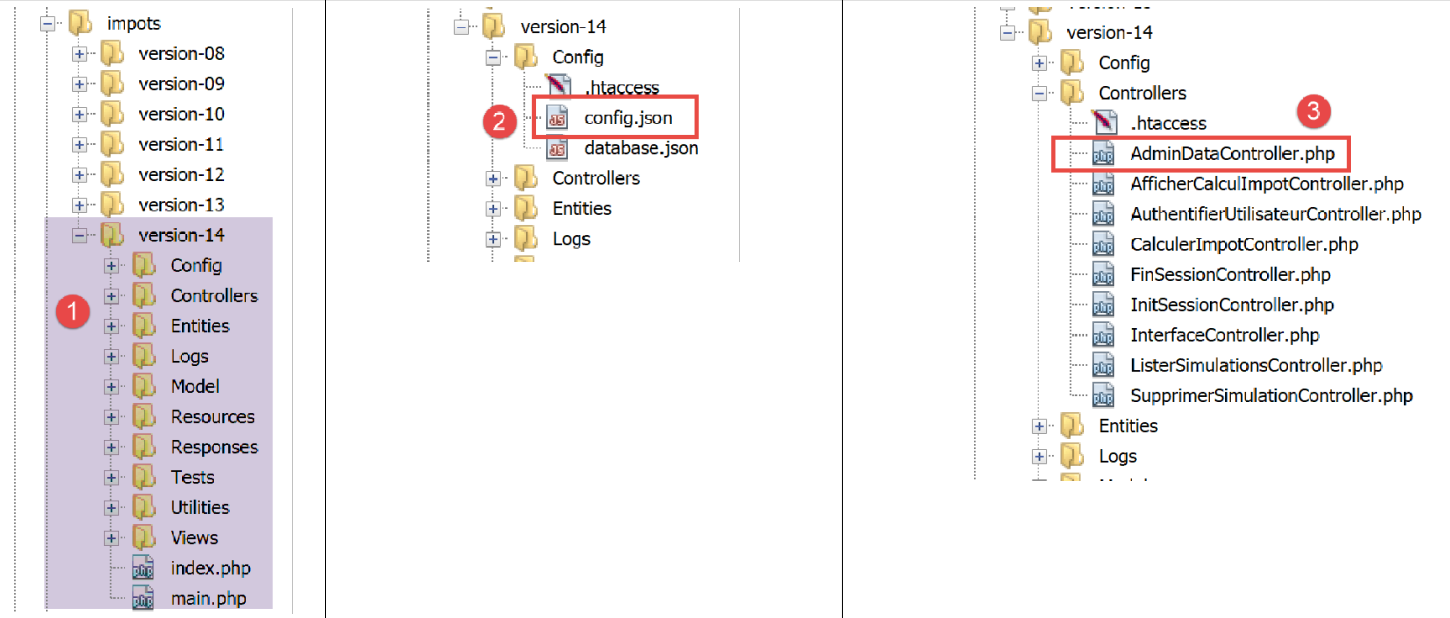
In [2], modifichiamo il file [config.json] per aggiungere la nuova azione:
{
    "databaseFilename": "Config/database.json",
    "corsAllowed": true,
    "rootDirectory": "C:/myprograms/laragon-lite/www/php7/scripts-web/impots/version-14",
    "relativeDependencies": [

        "/Entities/BaseEntity.php",
        "/Entities/Simulation.php",
        "/Entities/Database.php",
        "/Entities/TaxAdminData.php",
        "/Entities/ExceptionImpots.php",

        "/Utilities/Logger.php",
        "/Utilities/SendAdminMail.php",

        "/Model/InterfaceServerDao.php",
        "/Model/ServerDao.php",
        "/Model/ServerDaoWithSession.php",
        "/Model/InterfaceServerMetier.php",
        "/Model/ServerMetier.php",

        "/Responses/InterfaceResponse.php",
        "/Responses/ParentResponse.php",
        "/Responses/JsonResponse.php",
        "/Responses/XmlResponse.php",
        "/Responses/HtmlResponse.php",

        "/Controllers/InterfaceController.php",
        "/Controllers/InitSessionController.php",
        "/Controllers/ListerSimulationsController.php",
        "/Controllers/AuthentifierUtilisateurController.php",
        "/Controllers/CalculerImpotController.php",
        "/Controllers/SupprimerSimulationController.php",
        "/Controllers/FinSessionController.php",
        "/Controllers/AfficherCalculImpotController.php",
        "/Controllers/AdminDataController.php"
    ],
    "absoluteDependencies": [
        "C:/myprograms/laragon-lite/www/vendor/autoload.php",
        "C:/myprograms/laragon-lite/www/vendor/predis/predis/autoload.php"
    ],
    "users": [
        {
            "login": "admin",
            "passwd": "admin"
        }
    ],
    "adminMail": {
        "smtp-server": "localhost",
        "smtp-port": "25",
        "from": "guest@localhost",
        "to": "guest@localhost",
        "subject": "plantage du serveur de calcul d'impôts",
        "tls": "FALSE",
        "attachments": []
    },
    "logsFilename": "Logs/logs.txt",
    "actions":
            {
                "init-session": "\\InitSessionController",
                "authentifier-utilisateur": "\\AuthentifierUtilisateurController",
                "calculer-impot": "\\CalculerImpotController",
                "lister-simulations": "\\ListerSimulationsController",
                "supprimer-simulation": "\\SupprimerSimulationController",
                "fin-session": "\\FinSessionController",
                "afficher-calcul-impot": "\\AfficherCalculImpotController",
                "get-admindata": "\\AdminDataController"
            },
    "types": {
        "json": "\\JsonResponse",
        "html": "\\HtmlResponse",
        "xml": "\\XmlResponse"
    },
    "vues": {
        "vue-authentification.php": [700, 221, 400],
        "vue-calcul-impot.php": [200, 300, 341, 350, 800],
        "vue-liste-simulations.php": [500, 600]
    },
    "vue-erreurs": "vue-erreurs.php"
}
La modifica consiste in:
- riga 67: aggiungere l'azione [get-admindata] e associarla a un controller;
- riga 36: dichiarare questo controller nell'elenco delle classi da caricare dall'applicazione PHP;
Il passo successivo consiste nell'implementare il controller [AdminDataController] [3]:
<?php

namespace Application;

// symfony dependencies
use \Symfony\Component\HttpFoundation\Response;
use \Symfony\Component\HttpFoundation\Request;
use \Symfony\Component\HttpFoundation\Session\Session;
// layer alias [dao]
use \Application\ServerDaoWithSession as ServerDaoWithRedis;

class AdminDataController implements InterfaceController {

  // $config is the application configuration
  // traitement d'une requête Request
  // session and can modify it
  // $infos is additional information specific to each controller
  // renders an array [$statusCode, $état, $content, $headers]
  public function execute(
    array $config,
    Request $request,
    Session $session,
    array $infos = NULL): array {

    // you must have a single parameter GET
    $method = strtolower($request->getMethod());
    $erreur = $method !== "get" || $request->query->count() != 1;
    if ($erreur) {
      // we note the error
      $message = "il faut utiliser la méthode [get] avec l'unique paramètre [action] dans l'URL";
      $état = 1001;
      // return result to main controller
      return [Response::HTTP_BAD_REQUEST, $état, ["réponse" => $message], []];
    }

    // we can work
    // Redis
    \Predis\Autoloader::register();
    try {
      // customer [predis]
      $redis = new \Predis\Client();
      // connect to the server to see if it's there
      $redis->connect();
    } catch (\Predis\Connection\ConnectionException $ex) {
      // it didn't go well
      // return result with error to main controller
      $état = 1050;
      return [Response::HTTP_INTERNAL_SERVER_ERROR, $état,
        ["réponse" => "[redis], " . utf8_encode($ex->getMessage())], []];
    }

    // data recovery from tax authorities
    // first search the cache [redis]
    if (!$redis->get("taxAdminData")) {
      try {
        // retrieve tax data from the database
        $dao = new ServerDaoWithRedis($config["databaseFilename"], NULL);
        // taxAdminData
        $taxAdminData = $dao->getTaxAdminData();
        // put the recovered data into redis
        $redis->set("taxAdminData", $taxAdminData);
      } catch (\RuntimeException $ex) {
        // it didn't go well
        // return result with error to main controller
        $état = 1041;
        return [Response::HTTP_INTERNAL_SERVER_ERROR, $état,
          ["réponse" => utf8_encode($ex->getMessage())], []];
      }
    } else {
      // tax data are taken from the [redis] memory of the [application] scope
      $arrayOfAttributes = \json_decode($redis->get("taxAdminData"), true);
      // we instantiate an object [TaxAdminData] from the previous attribute array
      $taxAdminData = (new TaxAdminData())->setFromArrayOfAttributes($arrayOfAttributes);
    }

    // return result to main controller
    $état = 1000;
    return [Response::HTTP_OK, $état, ["réponse" => $taxAdminData], []];
  }

}
Commenti
- riga 12: come gli altri controller del server, [AdminDataController] implementa l'interfaccia [InterfaceController] costituita dal metodo [execute] alle righe 19–79;
- riga 78: come per gli altri controller del server, il metodo [AdminDataController.execute] restituisce un array [$status, $status, [‘response’=>$response]] con:
- [$status]: il codice di stato della risposta HTTP;
- [$état]: un codice interno dell'applicazione che rappresenta lo stato del server dopo l'esecuzione della richiesta del client;
- [$response]: un array che incapsula la risposta da inviare al client. In questo caso, tale array verrà successivamente convertito in una stringa JSON;
- righe 25–34: verifichiamo che l'azione [get-admindata] del client sia sintatticamente corretta;
- righe 37–74: recuperiamo un oggetto [TaxAdminData] trovato:
- righe 56–59: dal database se non è stato trovato nella cache [redis];
- righe 70–73: nella cache [redis];
Questo codice è tratto dal controller [CalculerImpotController] spiegato nell'articolo collegato. Infatti, anche questo controller doveva recuperare l'oggetto [TaxAdminData] che incapsula i dati dell'amministrazione fiscale.
Durante il test del client JavaScript, il formato JSON di [TaxAdminData] ha causato problemi quando questo oggetto è stato trovato nella cache [redis]. Per capire perché, esaminiamo come questo oggetto viene memorizzato in [redis]:
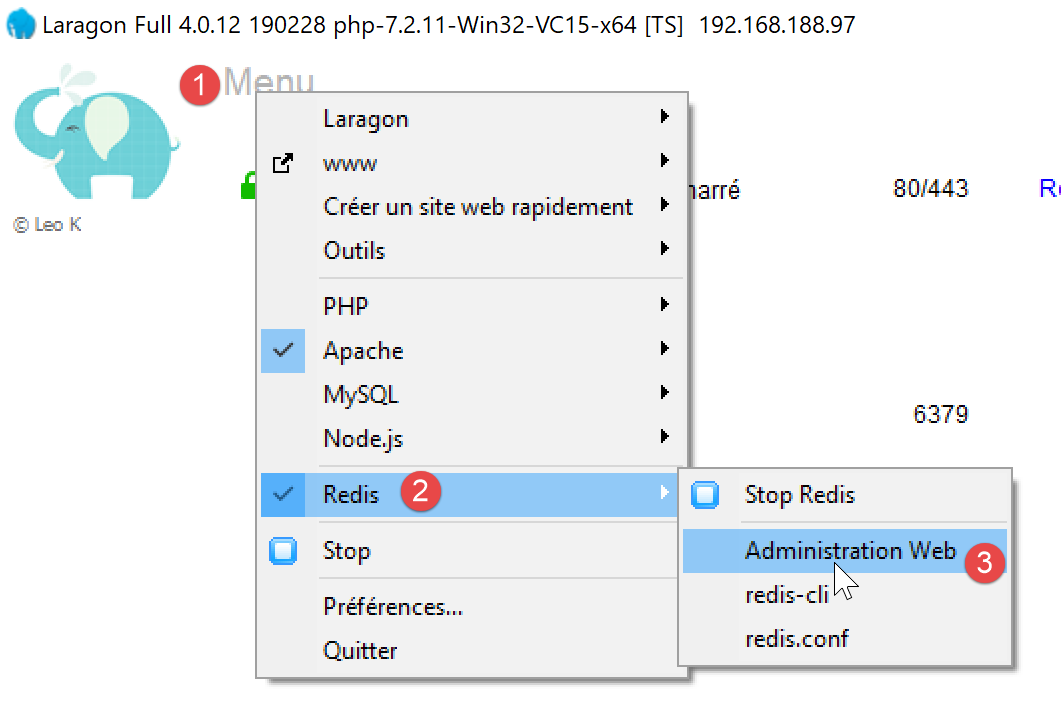
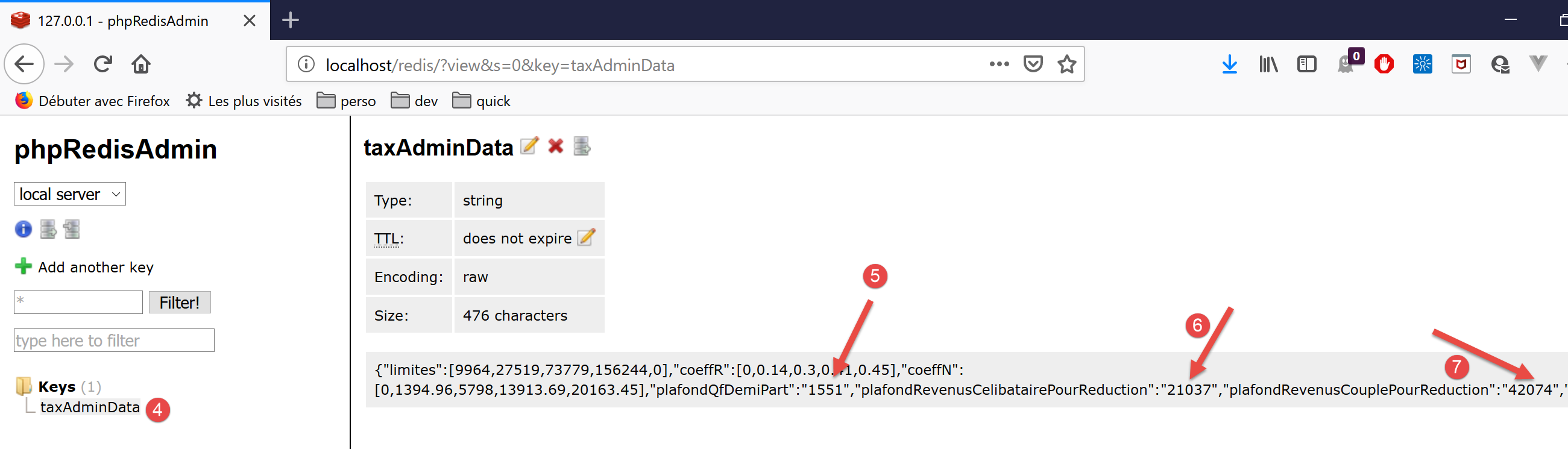
- Nei paragrafi [5-7] si osserva che i valori numerici sono stati memorizzati come stringhe. PHP ha gestito questa situazione perché l'operatore + nei calcoli che coinvolgono numeri e stringhe provoca implicitamente una conversione di tipo da stringa a numero. JavaScript, invece, fa il contrario: l'operatore + nei calcoli che coinvolgono numeri e stringhe provoca implicitamente una conversione di tipo da numero a stringa. I calcoli nella classe [Métier] di JavaScript sono quindi errati;
Per risolvere questo problema, modifichiamo il metodo [TaxAdminData.setFromArrayOfAttributes] utilizzato alla riga 71 del controller per istanziare un oggetto [TaxAdminData] (vedi articolo) dalla stringa JSON presente nella cache [redis]:
<?php

namespace Application;

class TaxAdminData extends BaseEntity {
  // tax brackets
  protected $limites;
  protected $coeffR;
  protected $coeffN;
  // tax calculation constants
  protected $plafondQfDemiPart;
  protected $plafondRevenusCelibatairePourReduction;
  protected $plafondRevenusCouplePourReduction;
  protected $valeurReducDemiPart;
  protected $plafondDecoteCelibataire;
  protected $plafondDecoteCouple;
  protected $plafondImpotCouplePourDecote;
  protected $plafondImpotCelibatairePourDecote;
  protected $abattementDixPourcentMax;
  protected $abattementDixPourcentMin;

  // initialization
  public function setFromJsonFile(string $taxAdminDataFilename) {
    // parent
    parent::setFromJsonFile($taxAdminDataFilename);
    // check attribute values
    $this->checkAttributes();
    // we return the object
    return $this;
  }

  protected function check($value): \stdClass {
    // $value is an array of string elements or a single element
    if (!\is_array($value)) {
      $tableau = [$value];
    } else {
      $tableau = $value;
    }
    // transform the array of strings into an array of reals
    $newTableau = [];
    $result = new \stdClass();
    // table elements must be positive or zero decimal numbers
    $modèle = '/^\s*([+]?)\s*(\d+\.\d*|\.\d+|\d+)\s*$/';
    for ($i = 0; $i < count($tableau); $i ++) {
      if (preg_match($modèle, $tableau[$i])) {
        // put the float in newTableau
        $newTableau[] = (float) $tableau[$i];
      } else {
        // we note the error
        $result->erreur = TRUE;
        // we leave
        return $result;
      }
    }
    // we return the result
    $result->erreur = FALSE;
    if (!\is_array($value)) {
      // a single value
      $result->value = $newTableau[0];
    } else {
      // a list of values
      $result->value = $newTableau;
    }
    return $result;
  }

  // initialization by an array of attributes
  public function setFromArrayOfAttributes(array $arrayOfAttributes) {
    // parent
    parent::setFromArrayOfAttributes($arrayOfAttributes);
    // check attribute values
    $this->checkAttributes();
    // we return the object
    return $this;
  }

  // checking attribute values
  protected function checkAttributes() {
    // check that attribute values are real >=0
    foreach ($this as $key => $value) {
      if (is_string($value)) {
        // $value must be a real number >=0 or an array of reals >=0
        $result = $this->check($value);
        // mistake?
        if ($result->erreur) {
          // throw an exception
          throw new ExceptionImpots("La valeur de l'attribut [$key] est invalide");
        } else {
          // we note the value
          $this->$key = $result->value;
        }
      }
    }

    // we return the object
    return $this;
  }

  // getters and setters
  ...

}
Commenti
- riga 5: la classe [TaxAdminData] estende la classe [BaseEntity], che dispone già del metodo [setFromArrayOfAttributes]. Poiché questo metodo non è adatto, lo ridefiniamo alle righe 67–75;
- riga 70: il metodo [setFromArrayOfAttributes] della classe padre viene utilizzato innanzitutto per inizializzare gli attributi della classe;
- riga 72: il metodo [checkAttributes] verifica che i valori associati siano effettivamente numeri. Se sono stringhe, vengono convertiti in numeri;
- riga 74: l'oggetto [$this] risultante è quindi un oggetto con attributi che hanno valori numerici;
- righe 78–93: il metodo [checkAttributes] verifica che i valori associati agli attributi dell'oggetto siano effettivamente numerici;
- riga 80: viene attraversato l'elenco degli attributi;
- riga 81: se il valore di un attributo è di tipo [string];
- riga 83: allora si verifica che questa stringa rappresenti un numero;
- riga 90: in tal caso, la stringa viene convertita in un numero e assegnata all'attributo in fase di verifica;
- righe 85–86: in caso contrario, viene generata un'eccezione;
- righe 32–65: la funzione [check] fa un po' più del necessario. Gestisce sia gli array che i singoli valori. Tuttavia, qui viene chiamata solo per verificare un valore di tipo [string]. Restituisce un oggetto con le proprietà [error, value] dove:
- [error] è un valore booleano che indica se si è verificato o meno un errore;
- [value] è il parametro [value] della riga 32, convertito in un numero o in un array di numeri a seconda dei casi;
La classe [BaseEntity], che in precedenza aveva un attributo denominato [arrayOfAttributes], è stata modificata per rimuovere tale attributo: causava problemi con la stringa JSON [TaxAdminData]. La classe è stata riscritta come segue:
<?php

namespace Application;

class BaseEntity {

  // initialization from a JSON file
  public function setFromJsonFile(string $jsonFilename) {
    // retrieve the contents of the tax data file
    $fileContents = \file_get_contents($jsonFilename);
    $erreur = FALSE;
    // mistake?
    if (!$fileContents) {
      // we note the error
      $erreur = TRUE;
      $message = "Le fichier des données [$jsonFilename] n'existe pas";
    }
    if (!$erreur) {
      // retrieve the JSON code from the configuration file in an associative array
      $arrayOfAttributes = \json_decode($fileContents, true);
      // mistake?
      if ($arrayOfAttributes === FALSE) {
        // we note the error
        $erreur = TRUE;
        $message = "Le fichier de données JSON [$jsonFilename] n'a pu être exploité correctement";
      }
    }
    // mistake?
    if ($erreur) {
      // throw an exception
      throw new ExceptionImpots($message);
    }
    // initialization of class attributes
    foreach ($arrayOfAttributes as $key => $value) {
      $this->$key = $value;
    }
    // we check the presence of all attributes
    $this->checkForAllAttributes($arrayOfAttributes);
    // we return the object
    return $this;
  }

  public function checkForAllAttributes($arrayOfAttributes) {
    // check that all keys have been initialized
    foreach (\array_keys($arrayOfAttributes) as $key) {
      if (!isset($this->$key)) {
        throw new ExceptionImpots("L'attribut [$key] de la classe "
          . get_class($this) . " n'a pas été initialisé");
      }
    }
  }

  public function setFromArrayOfAttributes(array $arrayOfAttributes) {
    // initialize certain class attributes (not necessarily all)
    foreach ($arrayOfAttributes as $key => $value) {
      $this->$key = $value;
    }
    // object is returned
    return $this;
  }

  // toString
  public function __toString() {
    // object attributes
    $arrayOfAttributes = \get_object_vars($this);
    // string jSON of object
    return \json_encode($arrayOfAttributes, JSON_UNESCAPED_UNICODE);
  }

}
Commenti
- riga 20: l'attributo [$this→arrayOfAttributes] è stato convertito in una variabile che ora deve essere passata al metodo [checkForAllAttributes] alla riga 38, che in precedenza operava sull'attributo [$this→arrayOfAttributes];
A causa di questa modifica in [BaseEntity], anche la classe [Database] deve essere leggermente modificata:
<?php

namespace Application;

class Database extends BaseEntity {
  // attributes
  protected $dsn;
  protected $id;
  protected $pwd;
  protected $tableTranches;
  protected $colLimites;
  protected $colCoeffR;
  protected $colCoeffN;
  protected $tableConstantes;
  protected $colPlafondQfDemiPart;
  protected $colPlafondRevenusCelibatairePourReduction;
  protected $colPlafondRevenusCouplePourReduction;
  protected $colValeurReducDemiPart;
  protected $colPlafondDecoteCelibataire;
  protected $colPlafondDecoteCouple;
  protected $colPlafondImpotCelibatairePourDecote;
  protected $colPlafondImpotCouplePourDecote;
  protected $colAbattementDixPourcentMax;
  protected $colAbattementDixPourcentMin;

  // setter
  // initialization
  public function setFromJsonFile(string $jsonFilename) {
    // parent
    parent::setFromJsonFile($jsonFilename);
    // object is returned
    return $this;
  }

  // getters and setters
  ...
}
Commenti
- Nel codice originale, dopo la riga 30, veniva chiamato il metodo [parent::checkForAllAttributes]. Questo non è più necessario poiché ora viene gestito automaticamente dal metodo [parent::setFromJsonFile($jsonFilename)];
14.3.4. Test del server [Postman]
[Postman] è stato presentato nell'articolo collegato.
Utilizziamo i seguenti test Postman:

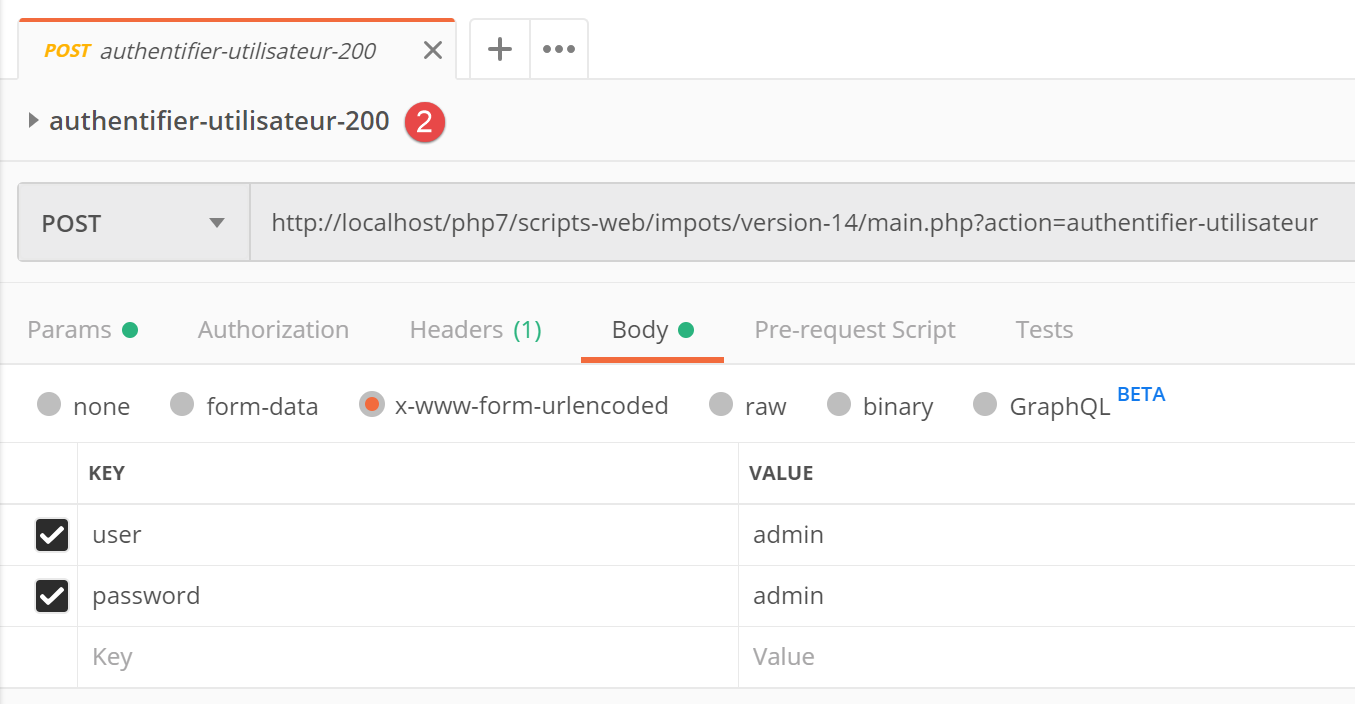
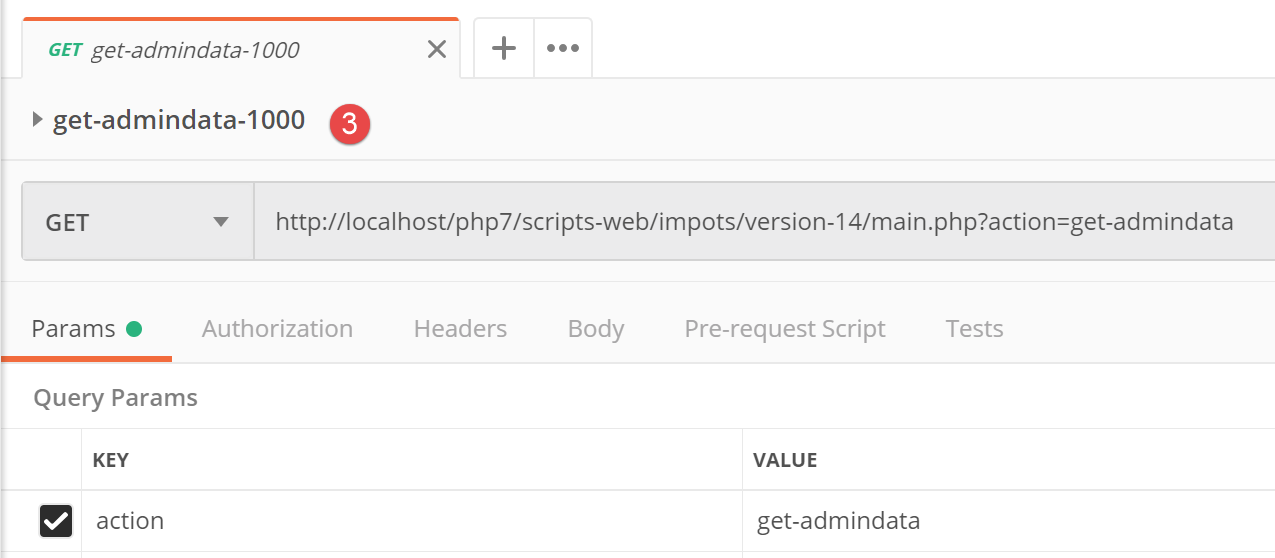
Il risultato JSON di quest'ultima richiesta è il seguente:
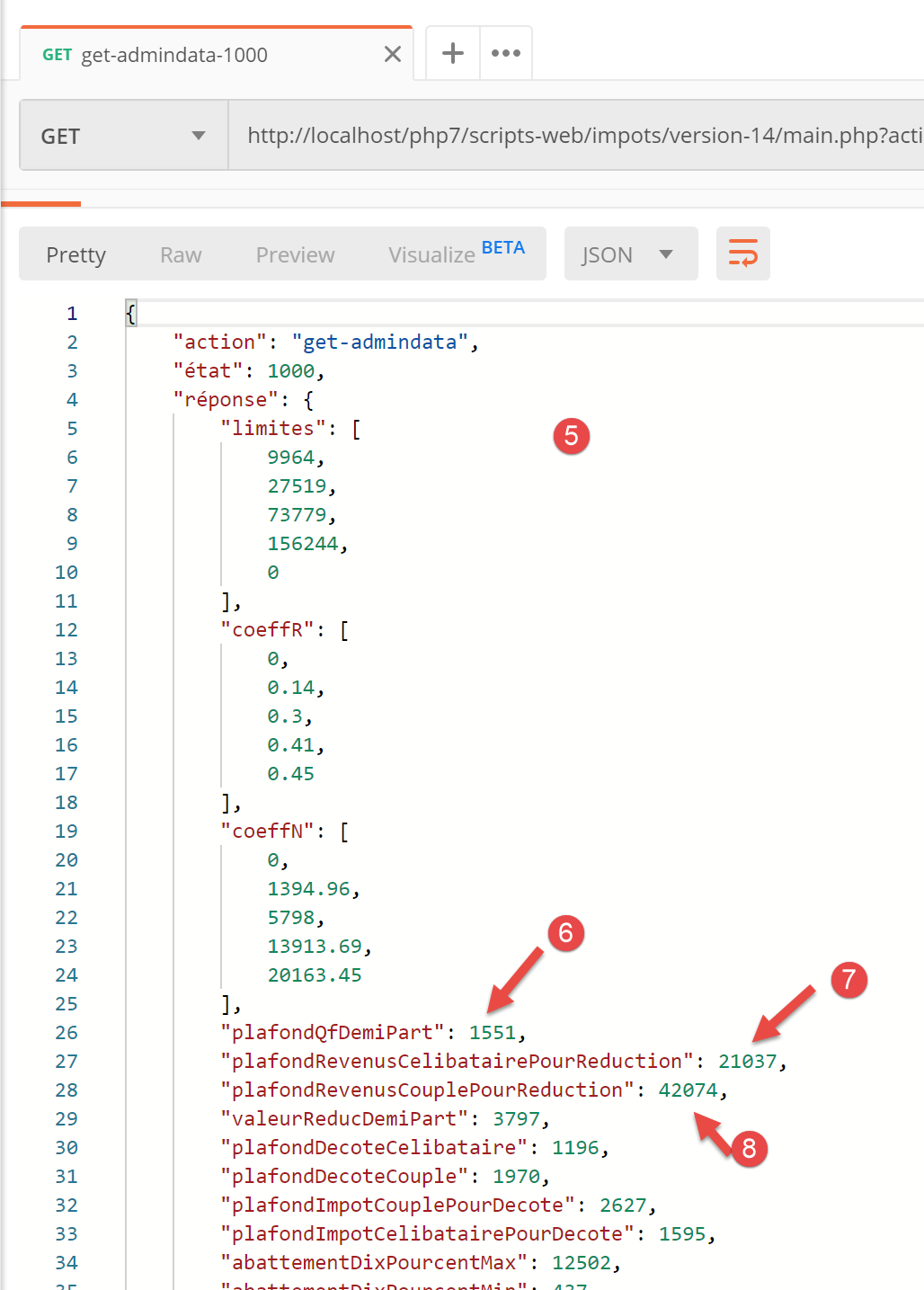
- In [5-8] è possibile notare che gli attributi nella stringa JSON hanno effettivamente valori numerici (non stringhe). Questo risultato consentirà alla classe JavaScript [Business] di funzionare normalmente;
14.3.5. Lo script principale [main]
Lo script principale [main] del client JavaScript è il seguente:
// imports
import axios from 'axios';

// imports
import Dao from './Dao2';
import Métier from './Métier';

// asynchronous function [main]
async function main() {
  // axios configuration
  axios.defaults.timeout = 2000;
  axios.defaults.baseURL = 'http://localhost/php7/scripts-web/impots/version-14';
  // layer instantiation [dao]
  const dao = new Dao(axios);
  // requests HTTP
  let taxAdminData;
  try {
    // init session
    log("-----------init-session");
    let response = await dao.initSession();
    log(response);
    // authentication
    log("-----------authentifier-utilisateur");
    response = await dao.authentifierUtilisateur("admin", "admin");
    log(response);
    // tax information
    log("-----------get-admindata");
    response = await dao.getAdminData();
    log(response);
    taxAdminData = response.réponse;
  } catch (error) {
    // we log the error
    console.log("erreur=", error.message);
    // end
    return;
  }

  // instantiation layer [business]
  const métier = new Métier(taxAdminData);

  // tax calculations
  log("-----------calculer-impot x 3");
  const simulations = [];
  simulations.push(métier.calculerImpot("oui", 2, 45000));
  simulations.push(métier.calculerImpot("non", 2, 45000));
  simulations.push(métier.calculerImpot("non", 1, 30000));
  // list of simulations
  log("-----------liste-des-simulations");
  log(simulations);
  // deleting a simulation
  log("-----------suppression simulation n° 1");
  simulations.splice(1, 1);
  log(simulations);
}

// log jSON
function log(object) {
  console.log(JSON.stringify(object, null, 2));
}

// execution
main();
Commenti
- righe 5-6: importazioni delle classi [Dao] e [Business];
- riga 9: la funzione asincrona [main] che gestirà la comunicazione con il server utilizzando la classe [Dao] e chiederà alla classe [Business] di eseguire i calcoli fiscali;
- righe 10-36: lo script chiama i metodi [initSession, authenticateUser, getAdminData] del livello [Dao] in modo sequenziale e bloccante;
- riga 38: non abbiamo più bisogno del livello [dao]. Abbiamo tutti gli elementi necessari per eseguire il livello [business] del client JavaScript;
- righe 41–46: eseguiamo tre calcoli delle imposte e memorizziamo i risultati in un array [simulations];
- riga 49: visualizziamo l'array delle simulazioni;
- riga 52: ne rimuoviamo una;
I risultati dell'esecuzione dello script principale sono i seguenti:
[Running] C:\myprograms\laragon-lite\bin\nodejs\node-v10\node.exe -r esm "c:\Data\st-2019\dev\es6\javascript\client impôts\client http 2\main2.js"
"-----------init-session"
{
  "action": "init-session",
  "état": 700,
  "réponse": "session démarrée avec type [json]"
}
"-----------authentifier-utilisateur"
{
  "action": "authentifier-utilisateur",
  "état": 200,
  "réponse": "Authentification réussie [admin, admin]"
}
"-----------get-admindata"
{
  "action": "get-admindata",
  "état": 1000,
  "réponse": {
    "limites": [
      9964,
      27519,
      73779,
      156244,
      0
    ],
    "coeffR": [
      0,
      0.14,
      0.3,
      0.41,
      0.45
    ],
    "coeffN": [
      0,
      1394.96,
      5798,
      13913.69,
      20163.45
    ],
    "plafondQfDemiPart": 1551,
    "plafondRevenusCelibatairePourReduction": 21037,
    "plafondRevenusCouplePourReduction": 42074,
    "valeurReducDemiPart": 3797,
    "plafondDecoteCelibataire": 1196,
    "plafondDecoteCouple": 1970,
    "plafondImpotCouplePourDecote": 2627,
    "plafondImpotCelibatairePourDecote": 1595,
    "abattementDixPourcentMax": 12502,
    "abattementDixPourcentMin": 437
  }
}
"-----------calculer-impot x 3"
"-----------liste-des-simulations"
[
  {
    "impôt": 502,
    "surcôte": 0,
    "décôte": 857,
    "réduction": 126,
    "taux": 0.14
  },
  {
    "impôt": 3250,
    "surcôte": 370,
    "décôte": 0,
    "réduction": 0,
    "taux": 0.3
  },
  {
    "impôt": 1687,
    "surcôte": 0,
    "décôte": 0,
    "réduction": 0,
    "taux": 0.14
  }
]
"-----------suppression simulation n° 1"
[
  {
    "impôt": 502,
    "surcôte": 0,
    "décôte": 857,
    "réduction": 126,
    "taux": 0.14
  },
  {
    "impôt": 1687,
    "surcôte": 0,
    "décôte": 0,
    "réduction": 0,
    "taux": 0.14
  }
]

[Done] exited with code=0 in 0.583 seconds
14.4. Client HTTP 3
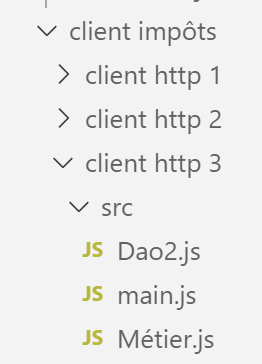
In questa sezione, portiamo l'applicazione [Client HTTP 2] su un browser utilizzando la seguente architettura:
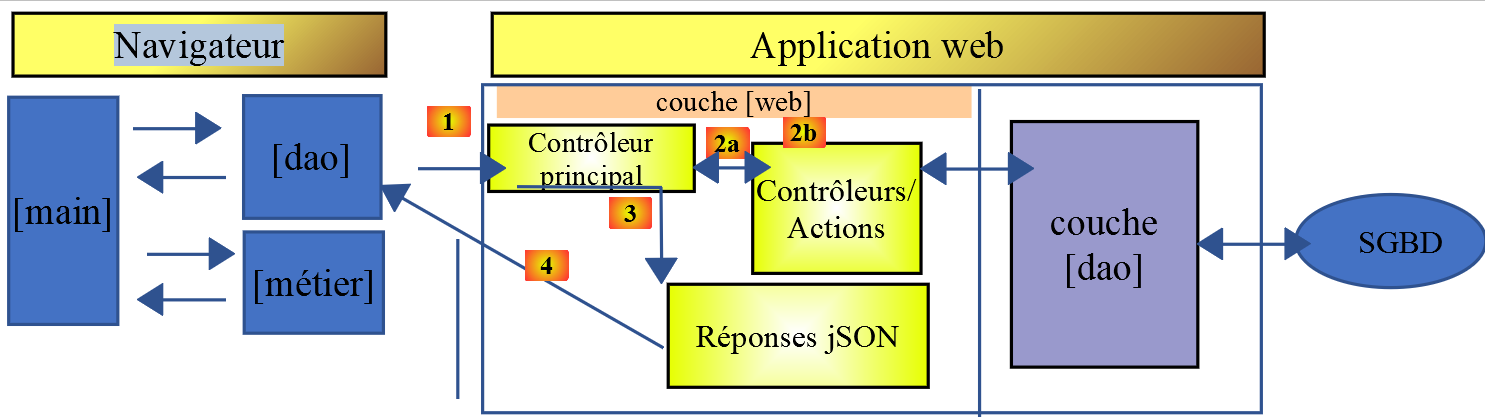
Il processo di porting non è semplice. Sebbene [node.js] sia in grado di eseguire JavaScript ES6, questo non è generalmente il caso dei browser. Dobbiamo quindi utilizzare strumenti che traducano il codice ES6 in codice ES5 comprensibile ai browser moderni. Fortunatamente, questi strumenti sono potenti e abbastanza facili da usare.
In questo caso, abbiamo seguito l'articolo [Come scrivere codice ES6 che sia sicuro da eseguire nel browser - Web Developer's Journal].
Nella cartella [client HTTP 3/src], abbiamo inserito i file [main.js, Métier.js, Dao2.js] dell'applicazione [Client Http 2] che abbiamo appena sviluppato.
14.4.1. Inizializzazione del progetto
Lavoreremo nella cartella [client http 3]. Apriamo un terminale in [VSCode] e navighiamo verso questa cartella:

Inizializziamo questo progetto con il comando [npm init] e accettiamo le risposte predefinite alle domande poste:
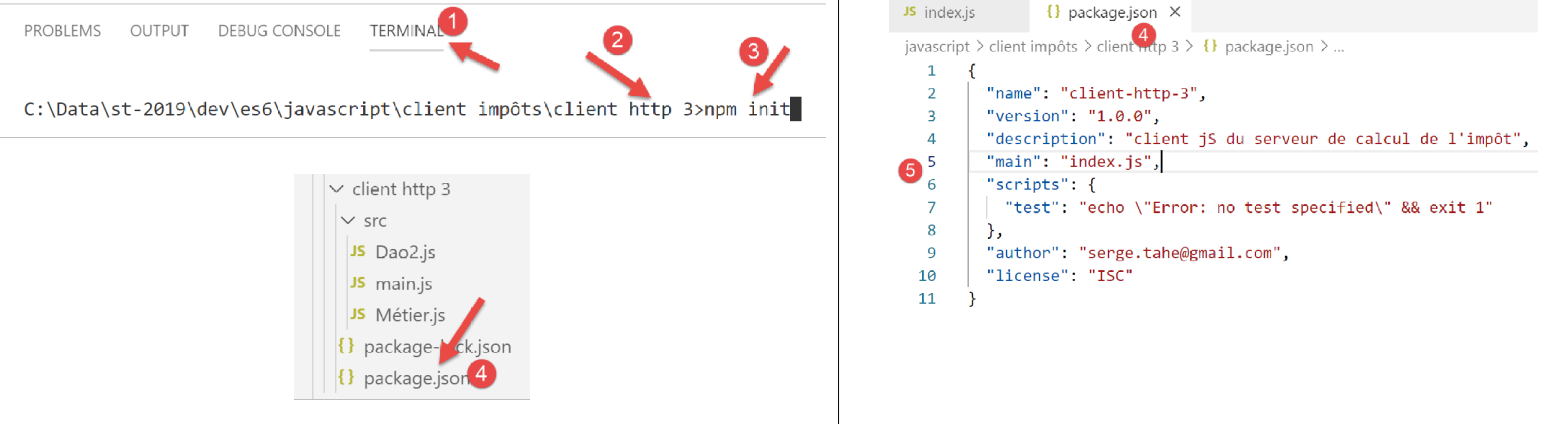
- nei passaggi [4-5], il file di configurazione del progetto [package.json] generato in base alle varie risposte fornite;
14.4.2. Installazione delle dipendenze del progetto
Installeremo le seguenti dipendenze:
- [@babel/core]: il nucleo dello strumento [Babel] [https://babeljs.io], che trasforma il codice ES 2015+ in codice eseguibile sia sui browser moderni che su quelli meno recenti;
- [@babel/preset-env]: parte del toolkit Babel. Viene eseguito prima della transpilazione da ES6 a ES5;
- [babel-loader]: questa dipendenza permette allo strumento [webpack] di richiamare lo strumento [Babel];
- [webpack]: l'orchestratore. È [webpack] che richiama Babel per transcompilare il codice ES6 in ES5, quindi assembla tutti i file risultanti in un unico file;
- [webpack-cli]: richiesto da [webpack];
- [@webpack-cli/init]: utilizzato per configurare [webpack];
- [webpack-dev-server]: fornisce un server web di sviluppo che gira di default sulla porta 8080. Quando i file sorgente vengono modificati, ricarica automaticamente l'applicazione web;
Le dipendenze del progetto vengono installate come segue in un terminale [VSCode]:
npm --save-dev install @babel/core @babel/preset-env babel-loader webpack webpack-cli webpack-dev-server @webpack-cli/init

Dopo l'installazione delle dipendenze, il file [package.json] è cambiato come segue:
{
  "name": "client-http-3",
  "version": "1.0.0",
  "description": "client jS du serveur de calcul de l'impôt",
  "main": "index.js",
  "scripts": {
    "test": "echo \"Error: no test specified\" && exit 1"
  },
  "author": "serge.tahe@gmail.com",
  "license": "ISC",
  "devDependencies": {
    "@babel/core": "^7.6.0",
    "@babel/preset-env": "^7.6.0",
    "@webpack-cli/init": "^0.2.2",
    "babel-loader": "^8.0.6",
    "cross-env": "^6.0.0",
    "webpack": "^4.40.2",
    "webpack-cli": "^3.3.9",
    "webpack-dev-server": "^3.8.1"
  }
}
- righe 12–19: le dipendenze del progetto sono [devDependencies]: ne abbiamo bisogno durante la fase di sviluppo ma non in quella di produzione. In produzione, viene utilizzato il file [dist/main.js]. È scritto in ES5 e non richiede più strumenti per transpilare il codice ES6 in ES5;
Dobbiamo aggiungere due dipendenze al progetto:
- [core-js]: contiene "polyfill" per ECMAScript 2019. Un polyfill consente al codice recente, come ECMAScript 2019 (settembre 2019), di funzionare su browser meno recenti;
- [regenerator-runtime]: secondo il sito web della libreria --> [Trasformatore di codice che abilita le funzioni generatrici di ECMAScript 6 nell'attuale JavaScript];
A partire da Babel 7, queste due dipendenze sostituiscono la dipendenza [@babel/polyfill], che in precedenza serviva a questo scopo e che ora (settembre 2019) è deprecata. Si installano come segue:

Il file [package.json] cambia quindi come segue:
{
  "name": "client-http-3",
  "version": "1.0.0",
  "description": "My webpack project",
  "main": "index.js",
  "scripts": {
    "test": "echo \"Error: no test specified\" && exit 1",
    "build": "webpack",
    "start": "webpack-dev-server"
  },
  "author": "serge.tahe@gmail.com",
  "license": "ISC",
  "devDependencies": {
    "@babel/core": "^7.6.0",
    "@babel/preset-env": "^7.6.0",
    "@webpack-cli/init": "^0.2.2",
    "babel-loader": "^8.0.6",
    "babel-plugin-syntax-dynamic-import": "^6.18.0",
    "html-webpack-plugin": "^3.2.0",
    "webpack": "^4.40.2",
    "webpack-cli": "^3.3.9",
    "webpack-dev-server": "^3.8.1"
  },
  "dependencies": {
    "core-js": "^3.2.1",
    "regenerator-runtime": "^0.13.3"
  }
}
Per utilizzare le dipendenze [core-js, regenerator-runtime] è necessario aggiungere le seguenti [importazioni] (righe 3–4) allo script principale [src/main.js]:
// imports
import axios from 'axios';
import "core-js/stable";
import "regenerator-runtime/runtime";

// imports
import Dao from './Dao2';
import Métier from './Métier';
14.4.3. Configurazione [webpack]
[webpack] è lo strumento che si occuperà di:
- la transpilazione di tutti i file JavaScript del progetto da ES6 a ES5;
- il raggruppamento dei file generati in un unico file;
Questo strumento è controllato da un file di configurazione [webpack.config.js], che può essere generato utilizzando una dipendenza chiamata [@webpack-cli/init] (settembre 2019). Questa dipendenza è stata installata insieme alle altre menzionate nella sezione "Link".
Eseguiamo il comando [npx webpack-cli init] in un terminale [VSCode]:
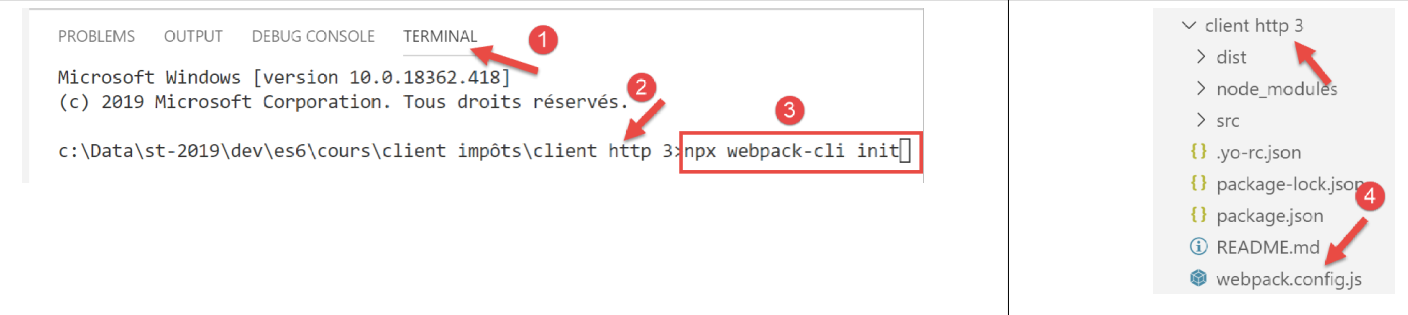
Dopo aver risposto alle varie domande (per le quali possiamo accettare la maggior parte delle risposte predefinite), viene generato un file [webpack.config.js] nella directory principale del progetto [4]:
Il file [webpack.config.js] ha questo aspetto:
/* eslint-disable */

const path = require('path');
const webpack = require('webpack');

/*
 * SplitChunksPlugin is enabled by default and replaced
 * deprecated CommonsChunkPlugin. It automatically identifies modules which
 * should be splitted of chunk by heuristics using module duplication count and
 * module category (i. e. node_modules). And splits the chunks…
 *
 * It is safe to remove "splitChunks" from the generated configuration
 * and was added as an educational example.
 *
 * https://webpack.js.org/plugins/split-chunks-plugin/
 *
 */

const HtmlWebpackPlugin = require('html-webpack-plugin');

/*
 * We've enabled HtmlWebpackPlugin for you! This generates a html
 * page for you when you compile webpack, which will make you start
 * developing and prototyping faster.
 *
 * https://github.com/jantimon/html-webpack-plugin
 *
 */

module.exports = {
    mode: 'development',
    entry: './src/index.js',

    output: {
        filename: '[name].[chunkhash].js',
        path: path.resolve(__dirname, 'dist')
    },

    plugins: [new webpack.ProgressPlugin(), new HtmlWebpackPlugin()],

    module: {
        rules: [
            {
                test: /.(js|jsx)$/,
                include: [path.resolve(__dirname, 'src')],
                loader: 'babel-loader',

                options: {
                    plugins: ['syntax-dynamic-import'],

                    presets: [
                        [
                            '@babel/preset-env',
                            {
                                modules: false
                            }
                        ]
                    ]
                }
            }
        ]
    },

    optimization: {
        splitChunks: {
            cacheGroups: {
                vendors: {
                    priority: -10,
                    test: /[\\/]node_modules[\\/]/
                }
            },

            chunks: 'async',
            minChunks: 1,
            minSize: 30000,
            name: true
        }
    },

    devServer: {
        open: true
    }
};
Non capisco tutti i dettagli di questo file, ma alcune cose saltano all'occhio:
- riga 1: il file non contiene codice ES6. [Eslint] segnala quindi degli errori che si propagano fino alla radice del progetto [javascript]. Questo è fastidioso. Per impedire a Eslint di analizzare un file, basta commentare la riga 1;
- riga 31: stiamo lavorando in modalità [development];
- riga 32: lo script di ingresso si trova qui [src/index.js]. Dovremo modificarlo;
- riga 36: la cartella in cui verrà collocato l'output di [webpack] è la cartella [dist];
- riga 46: possiamo vedere che [webpack] utilizza [babel-loader], una delle dipendenze che abbiamo installato;
- riga 54: vediamo che [webpack] utilizza [@babel-preset/env], una delle dipendenze che abbiamo installato;
L'inizializzazione di [webpack] ha modificato il file [package.json] (chiede il permesso):
{
  "name": "client-http-3",
  "version": "1.0.0",
  "description": "My webpack project",
  "main": "index.js",
  "scripts": {
    "test": "echo \"Error: no test specified\" && exit 1",
    "build": "webpack",
    "start": "webpack-dev-server"
  },
  "author": "serge.tahe@gmail.com",
  "license": "ISC",
  "devDependencies": {
    "@babel/core": "^7.6.0",
    "@babel/preset-env": "^7.6.0",
    "@webpack-cli/init": "^0.2.2",
    "babel-loader": "^8.0.6",
    "babel-plugin-syntax-dynamic-import": "^6.18.0",
    "html-webpack-plugin": "^3.2.0",
    "webpack": "^4.40.2",
    "webpack-cli": "^3.3.9",
    "webpack-dev-server": "^3.8.1"
  },
  "dependencies": {
    "core-js": "^3.2.1",
    "regenerator-runtime": "^0.13.3"
  }
}
- riga 4: è stata modificata;
- righe 8–9, 18–19: sono state aggiunte;
- riga 8: il task [npm] che compila il progetto;
- riga 9: il task [npm] che lo esegue;
- riga 18: ?
- riga 19: genera un file [dist/index.html] che incorpora automaticamente lo script [dist/main.js] generato da [webpack], ed è questo che viene utilizzato quando il progetto viene eseguito;
Infine, la configurazione [webpack] ha generato un file [src/index.js]:
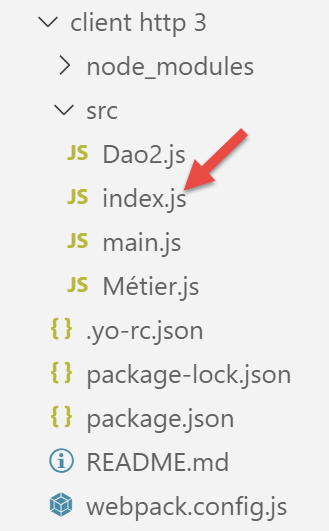
Il contenuto di [index.js] è il seguente (settembre 2019):
console.log("Hello World from your main file!");
14.4.4. Compilazione ed esecuzione del progetto
Il file [package.json] contiene tre operazioni [npm]:
"scripts": {
    "test": "echo \"Error: no test specified\" && exit 1",
    "build": "webpack",
    "start": "webpack-dev-server"
},
Queste attività vengono riconosciute da [VSCode], che le propone per l'esecuzione:
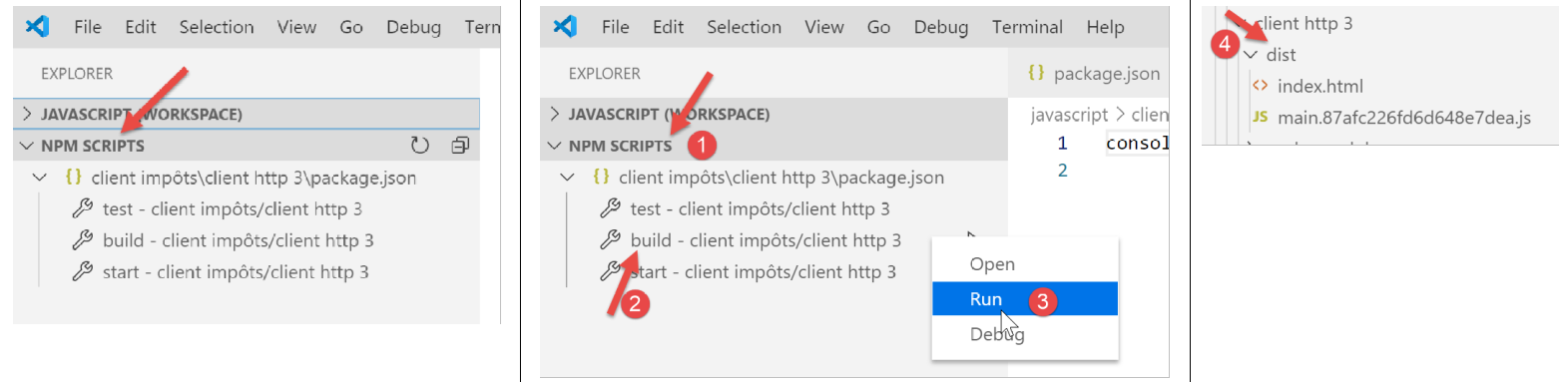
- in [1-3], il progetto viene compilato;
- in [4]: il progetto viene compilato in [dist/main.hash.js] e viene creata una pagina [dist/index.html];
La pagina [index.html] generata è la seguente:
<!DOCTYPE html>
<html>
  <head>
    <meta charset="UTF-8">
    <title>Webpack App</title>
  </head>
  <body>
  <script type="text/javascript" src="main.87afc226fd6d648e7dea.js"></script></body>
</html>
Questa pagina incapsula semplicemente il file [main.hash.js] generato da [webpack].
Il progetto viene eseguito tramite il task [start]:
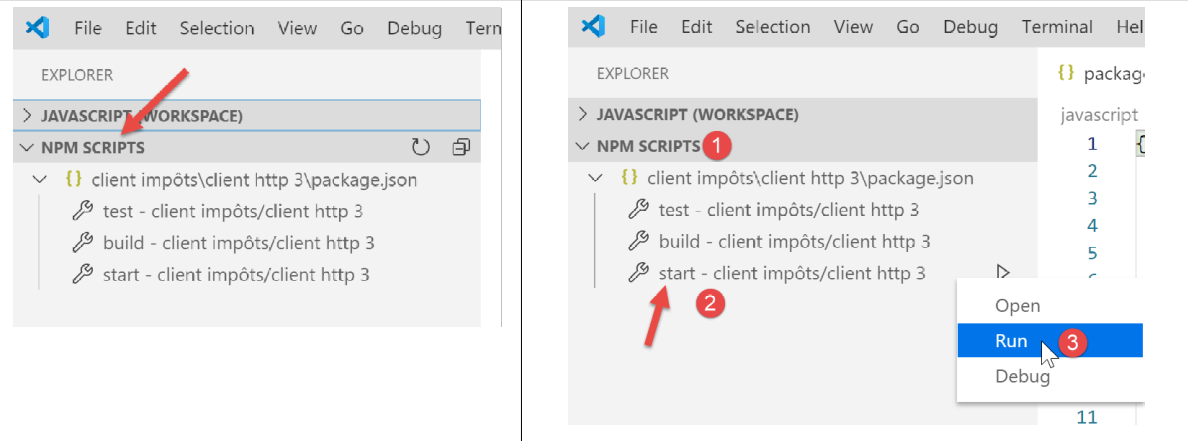
La pagina [dist/index.html] viene quindi caricata su un server, parte della suite [webpack], in esecuzione sulla porta 8080 della macchina locale e visualizzata dal browser predefinito della macchina:
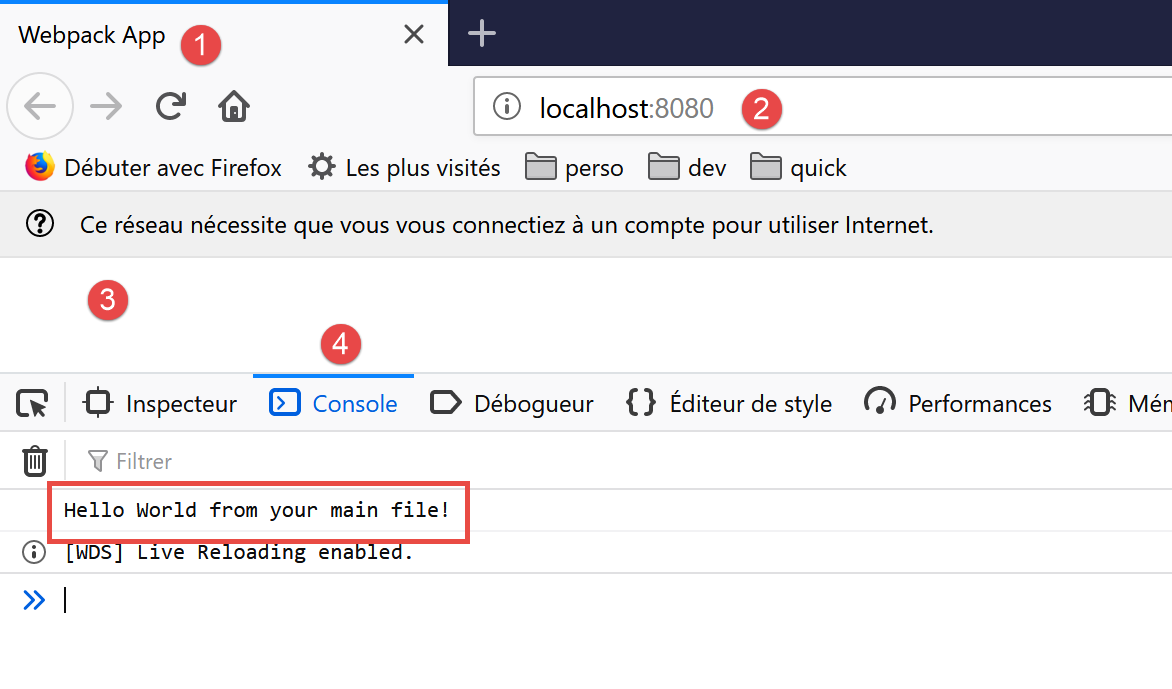
- in [2], la porta di servizio del server web [webpack];
- in [3], il corpo della pagina [dist/index.html] è vuoto;
- in [4], la scheda [console] degli strumenti di sviluppo del browser, in questo caso Firefox (F12);
- in [5], il risultato dell'esecuzione del file [src/index.js]. Ricordiamo che il suo contenuto era il seguente:
Ora, modifichiamo questo contenuto con la seguente riga:
Automaticamente (senza ricompilare), vengono generati nuovi file [main.js, index.html] e il nuovo file [index.html] viene caricato nel browser:
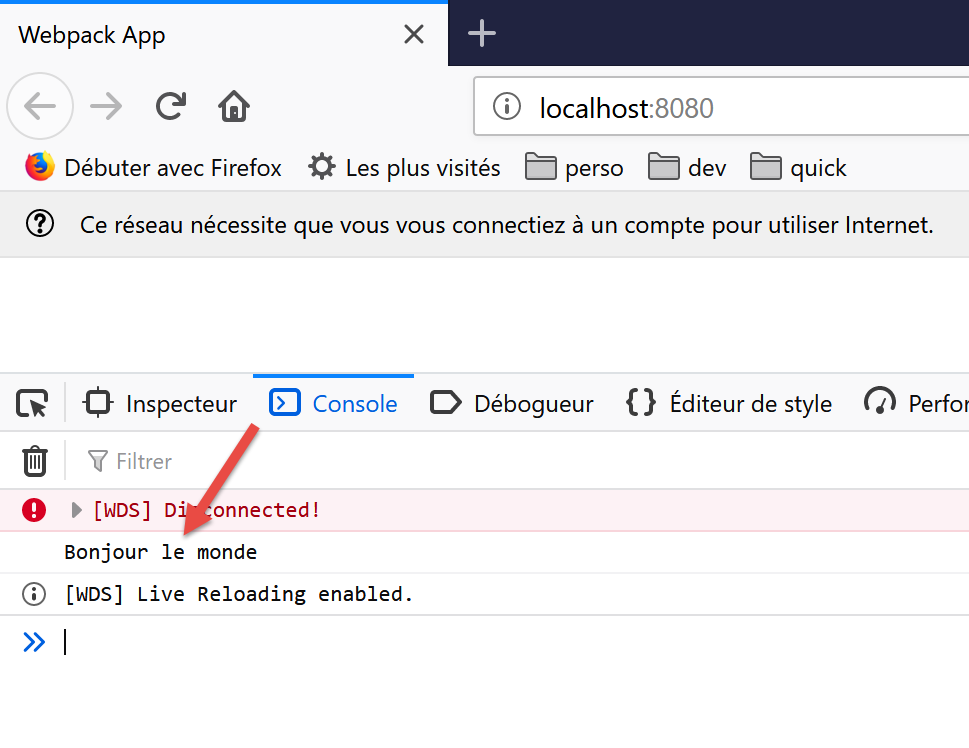
Non è necessario eseguire il task [build] prima del task [start]: quest'ultimo compila prima il progetto. Non salva l'output di questa compilazione nella cartella [dist]. Per verificarlo, basta cancellare questa cartella. Vedremo quindi che l'attività [start] compila ed esegue il progetto senza creare la cartella [dist]. Sembra memorizzare il suo output [index.html, main.hash.js] in una cartella specifica di [webpackdev-server]. Questo comportamento è sufficiente per i nostri test.
Quando il server di sviluppo è in esecuzione, qualsiasi modifica salvata in un file di progetto attiva una ricompilazione. Per questo motivo, disabilitiamo la modalità [Salvataggio automatico] di [VSCode]. Non vogliamo che il progetto venga ricompilato ogni volta che digitiamo caratteri in un file di progetto. Vogliamo che la ricompilazione avvenga solo quando le modifiche vengono salvate:
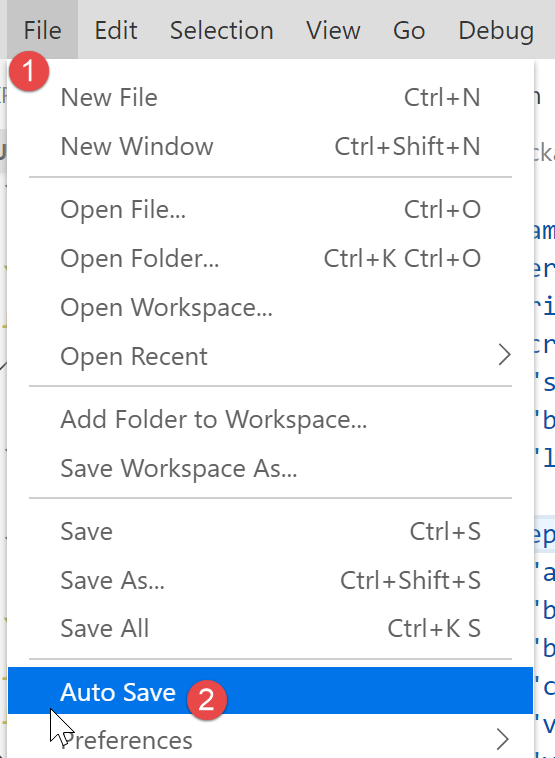
- in [2], l'opzione [Salvataggio automatico] non deve essere selezionata;
14.4.5. Test del client JavaScript per il server di calcolo delle imposte
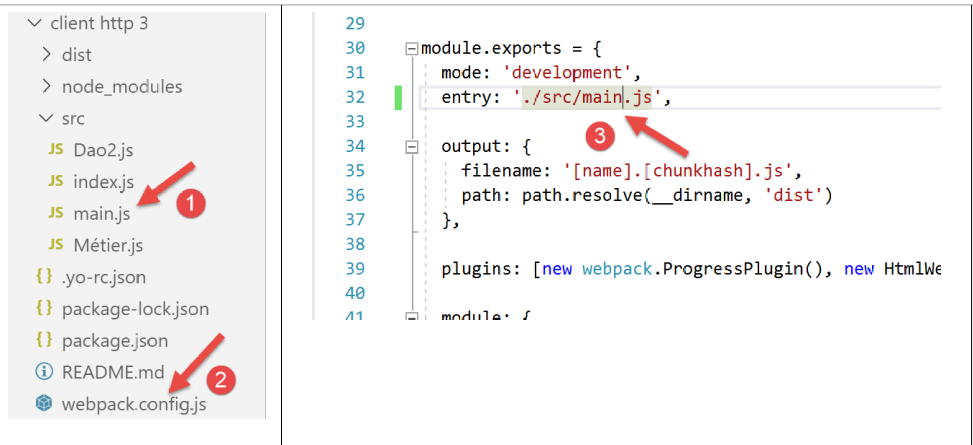
Per testare il client JavaScript del server di calcolo delle imposte, è necessario designare [main.js] [1] come punto di ingresso del progetto nel file [webpack.config.js] [2-3]:
Ricordare che lo script [main.js] deve includere due importazioni aggiuntive rispetto alla sua versione in [Client HTTP 2]:
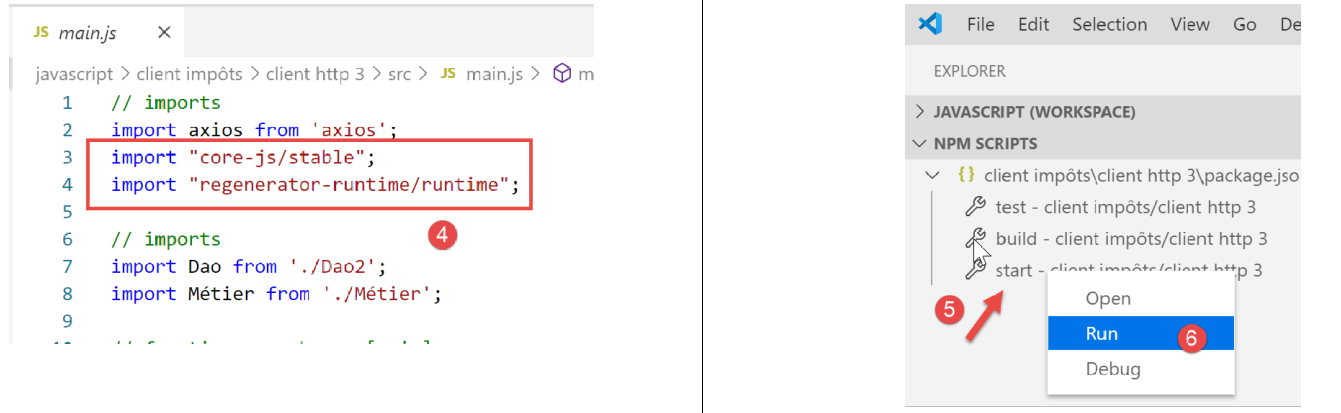
Inoltre, abbiamo leggermente modificato il codice per gestire gli errori che il server potrebbe inviare:
// imports
import axios from 'axios';
import "core-js/stable";
import "regenerator-runtime/runtime";

// imports
import Dao from './Dao2';
import Métier from './Métier';

// asynchronous function [main]
async function main() {
  // axios configuration
  axios.defaults.timeout = 2000;
  axios.defaults.baseURL = 'http://localhost/php7/scripts-web/impots/version-14';
  // layer instantiation [dao]
  const dao = new Dao(axios);
  // requests HTTP
  let taxAdminData;
  try {
    // init session
    log("-----------init-session");
    let response = await dao.initSession();
    log(response);
    if (response.état != 700) {
      throw new Error(JSON.stringify(response.réponse));
    }
    // authentication
    log("-----------authentifier-utilisateur");
    response = await dao.authentifierUtilisateur("admin", "admin");
    log(response);
    if (response.état != 200) {
      throw new Error(JSON.stringify(response.réponse));
    }
    // tax information
    log("-----------get-admindata");
    response = await dao.getAdminData();
    log(response);
    if (response.état != 1000) {
      throw new Error(JSON.stringify(response.réponse));
    }
    taxAdminData = response.réponse;
  } catch (error) {
    // we log the error
    console.log("erreur=", error.message);
    // end
    return;
  }

  // instantiation layer [business]
  const métier = new Métier(taxAdminData);

  // tax calculations
  log("-----------calculer-impot x 3");
  const simulations = [];
  simulations.push(métier.calculerImpot("oui", 2, 45000));
  simulations.push(métier.calculerImpot("non", 2, 45000));
  simulations.push(métier.calculerImpot("non", 1, 30000));
  // list of simulations
  log("-----------liste-des-simulations");
  log(simulations);
  // deleting a simulation
  log("-----------suppression simulation n° 1");
  simulations.splice(1, 1);
  log(simulations);
}

// log jSON
function log(object) {
  console.log(JSON.stringify(object, null, 2));
}

// execution
main();
Commenti
- Nelle righe [24-26], [31-33], [38-40], controlliamo il codice [response.status] inviato nella risposta JSON del server. Se questo codice indica un errore, viene generata un'eccezione con la stringa JSON della risposta del server [response.response] come messaggio di errore;
Una volta fatto ciò, eseguiamo il progetto [5-6].
La pagina [index.html] viene quindi generata e caricata nel browser:
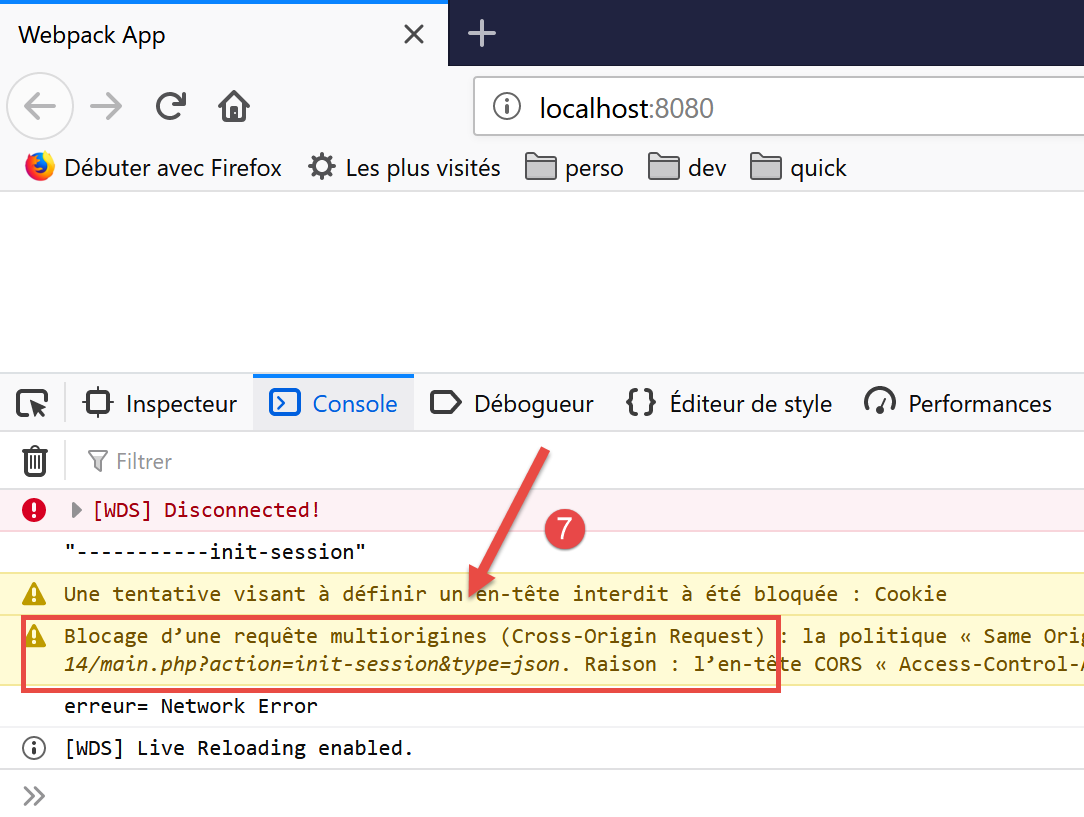
- In [7], vediamo che l'azione [init-session] non è stata completata a causa di un problema [CORS] (Cross-Origin Resource Sharing);
Il problema CORS deriva dalla relazione client/server:
- il nostro client JavaScript è stato scaricato sul computer [http://localhost:8080];
- il server di calcolo delle imposte è in esecuzione sul computer [http://localhost:80];
- il client e il server non si trovano quindi sullo stesso dominio (stessa macchina ma porte diverse);
- il browser che esegue il client JavaScript caricato dal computer [http://localhost:8080] blocca qualsiasi richiesta che non sia diretta a [http://localhost:80]. Si tratta di una misura di sicurezza. Di conseguenza, blocca la richiesta del client al server in esecuzione sul computer [http://localhost:80];
In realtà, il browser non blocca completamente la richiesta. In realtà, attende che il server gli "comunichi" che accetta le richieste cross-domain. Se riceve questa autorizzazione, il browser trasmetterà quindi la richiesta cross-domain.
Il server concede la propria autorizzazione inviando specifici header HTTP:
- Riga 1: Il client JavaScript opera sul dominio [http://localhost:8080]. Il server deve rispondere esplicitamente che accetta questo dominio;
- Riga 2: Il client JavaScript utilizzerà le intestazioni HTTP [Accept, Content-Type] nelle sue richieste:
- [Accept]: questa intestazione viene inviata in ogni richiesta;
- [Content-Type]: questa intestazione viene utilizzata nelle operazioni POST per specificare il tipo dei parametri POST;
Il server deve accettare esplicitamente queste due intestazioni HTTP;
- Riga 3: Il client JavaScript utilizzerà richieste GET e POST. Il server deve accettare esplicitamente questi due tipi di richieste;
- Riga 4: Il client JavaScript invierà cookie di sessione. Il server li accetta con l'intestazione alla riga 4;
Dobbiamo quindi modificare il server. Lo facciamo in [NetBeans]. Il problema CORS si verifica solo in modalità di sviluppo. In produzione, il client e il server opereranno all'interno dello stesso dominio [http://localhost:80] e non ci saranno problemi CORS. Abbiamo quindi bisogno di un modo per abilitare o disabilitare le richieste CORS tramite la configurazione del server.
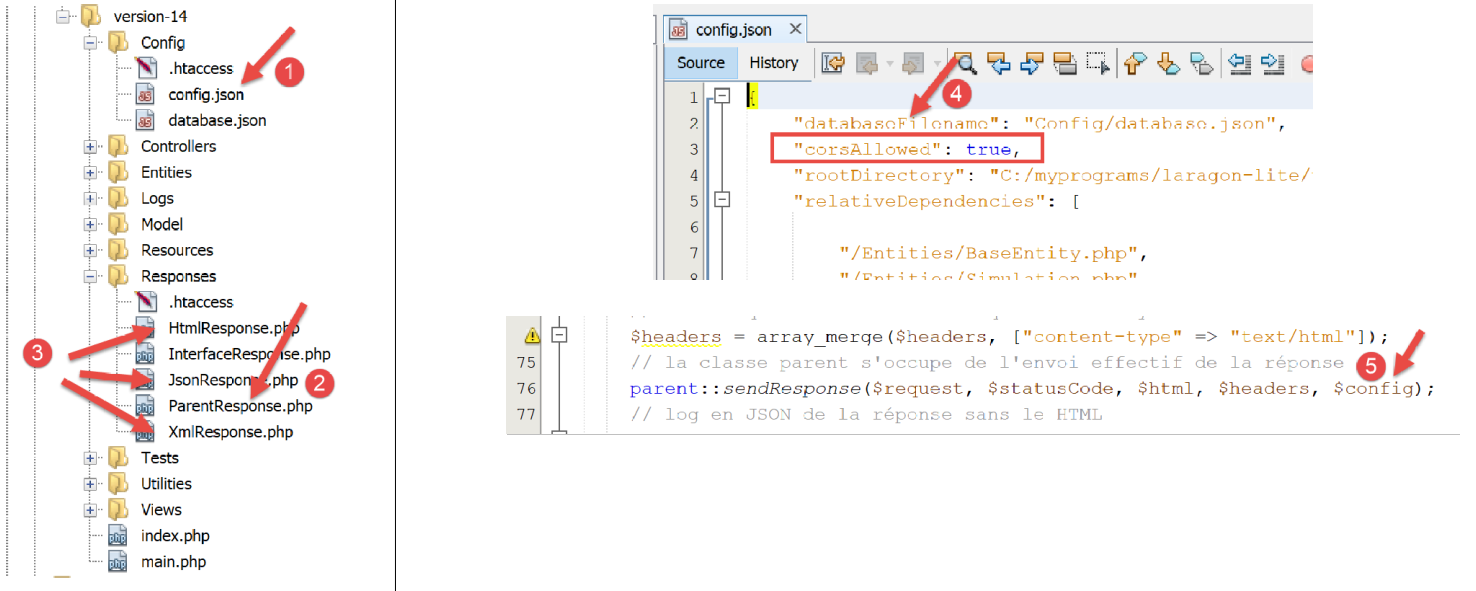
Le modifiche al server vengono apportate in tre punti:
- [1, 4]: nel file di configurazione [config.json] per impostare un valore booleano che controlla se le richieste cross-domain vengono accettate o meno;
- [2]: nella classe [ParentResponse], che invia la risposta al client JavaScript. Questa classe invierà le intestazioni CORS previste dal browser del client;
- [3]: nelle classi [HtmlResponse, JsonResponse, XmlResponse] che generano rispettivamente le risposte per le sessioni [html, json, xml]. Queste classi devono passare il valore booleano [corsAllowed] presente in [4] alla loro classe padre [2]. Ciò avviene in [5], passando l'array di immagini dal file JSON [2];
La classe [ParentResponse] [2] si evolve come segue:
<?php

namespace Application;

// symfony dependencies
use Symfony\Component\HttpFoundation\Response;
use Symfony\Component\HttpFoundation\Request;

class ParentResponse {

  // int $statusCode: HTTP response status code
  // string $content: the body of the response to be sent
  // depending on the case, this is a JSON, XML, HTML string
  // array $headers: HTTP headers to be added to the response

  public function sendResponse(
    Request $request,
    int $statusCode,
    string $content,
    array $headers,
    array $config): void {

    // preparing the server's text response
    $response = new Response();
    $response->setCharset("utf-8");
    // status code
    $response->setStatusCode($statusCode);
    // headers for cross-domain requests
    if ($config['corsAllowed']) {
      $origin = $request->headers->get("origin");
      if (strpos($origin, "http://localhost") === 0) {
        $headers = array_merge($headers,
          ["Access-Control-Allow-Origin" => $origin,
            "Access-Control-Allow-Headers" => "Accept, Content-Type",
            "Access-Control-Allow-Methods" => "GET, POST",
            "Access-Control-Allow-Credentials" => "true"
        ]);
      }
    }
    foreach ($headers as $text => $value) {
      $response->headers->set($text, $value);
    }
    // special case of the [OPTIONS] method
    // only the headers are important in this case
    $method = strtolower($request->getMethod());
    if ($method === "options") {
      $content = "";
      $response->setStatusCode(Response::HTTP_OK);
    }
    // we send the answer
    $response->setContent($content);
    $response->send();
  }

}
- riga 29: verifichiamo se è necessario gestire le richieste cross-domain. In tal caso, generiamo le intestazioni HTTP CORS (righe 33–37) anche se la richiesta corrente non è una richiesta cross-domain. In quest'ultimo caso, le intestazioni CORS saranno superflue e non verranno utilizzate dal client;
- riga 30: in una richiesta cross-domain, il browser client che interroga il server invia un'intestazione HTTP [Origin: http://localhost:8080] (nel caso specifico del nostro client JavaScript). Alla riga 30, recuperiamo questa intestazione HTTP dalla richiesta [$request];
- riga 31: accetteremo solo richieste cross-domain provenienti dalla macchina [http://localhost]. Si noti che queste richieste si verificano solo nella modalità di sviluppo del progetto;
- Righe 32–36: aggiungiamo le intestazioni CORS alle intestazioni già presenti nell'array [$headers];
- Righe 45–49: il modo in cui il browser client richiede le autorizzazioni CORS può variare a seconda del browser utilizzato. A volte il browser client richiede queste autorizzazioni utilizzando una richiesta HTTP [OPTIONS]. Si tratta di uno scenario nuovo per il nostro server, che è stato costruito per gestire solo richieste [GET] e [POST]. Nel caso di una richiesta [OPTIONS], il server attualmente genera una risposta di errore. Righe 46–49: correggiamo questo problema all'ultimo momento: se, alla riga 46, determiniamo che la richiesta corrente è una richiesta [OPTIONS], allora generiamo quanto segue per il client:
- righe 47, 51: una risposta [$content] vuota;
- riga 48: un codice di stato 200 che indica che la richiesta è andata a buon fine. L'unica cosa importante per questa richiesta è l'invio delle intestazioni CORS nelle righe 33–36. Questo è ciò che si aspetta il browser del client;
Una volta corretto il server in questo modo, il client JavaScript funziona meglio ma mostra un nuovo errore:
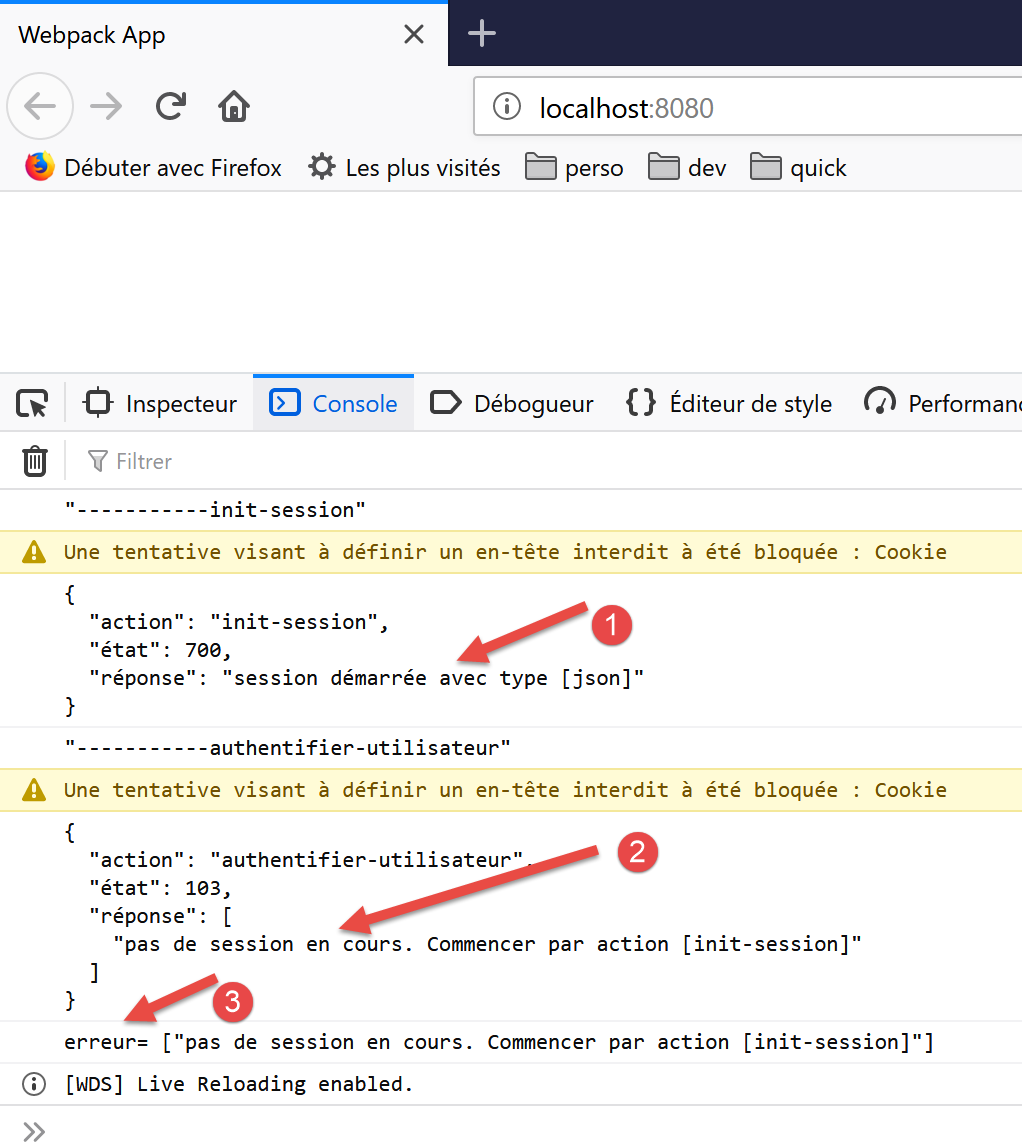
- in [1], la sessione JSON è inizializzata correttamente;
- In [2], l'azione [authenticate-user] fallisce: il server indica che non c'è una sessione attiva. Ciò significa che il client JavaScript non ha rinviato correttamente il cookie di sessione che aveva inviato durante l'azione [init-session];
Esaminiamo gli scambi avvenuti in rete:
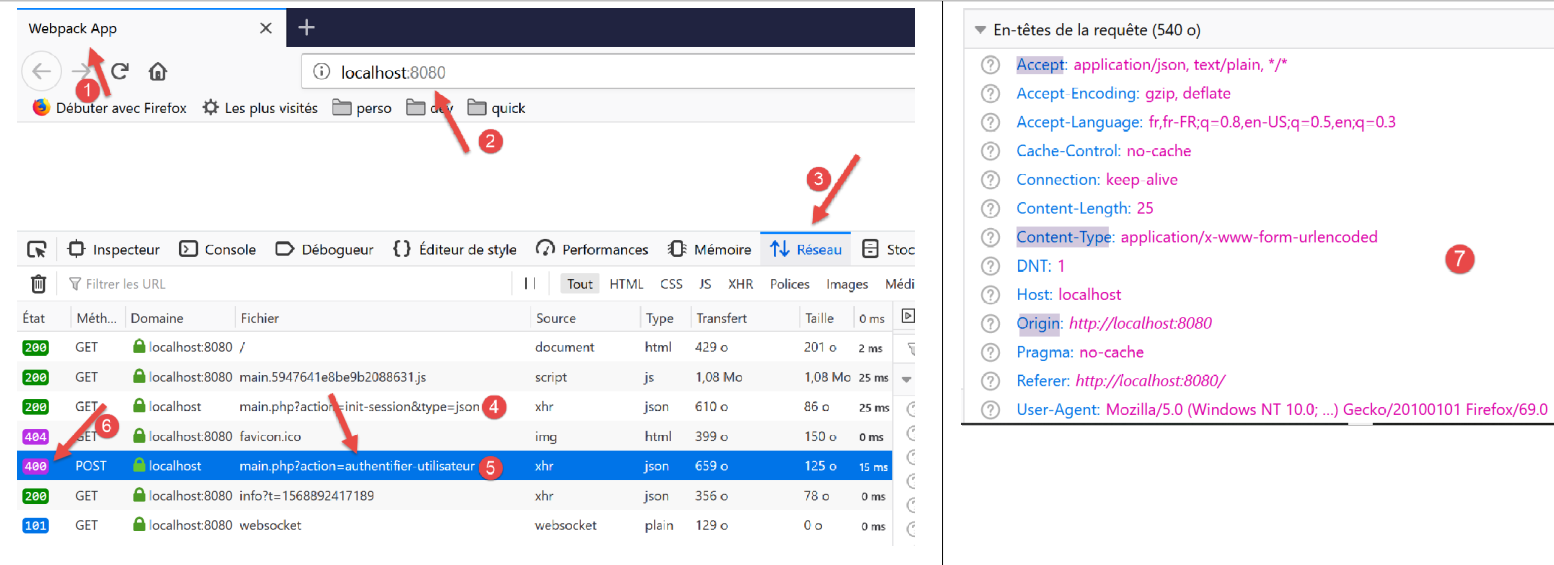
- in [4], la richiesta [init-session]. Si è conclusa con successo con un codice di stato 200 per la risposta;
- in [5], la richiesta [authenticate-user]. Questa richiesta fallisce con un codice di stato 400 (Bad Request) [6] per la risposta;
Se esaminiamo le intestazioni HTTP [7] della richiesta [5], possiamo vedere che il client JavaScript non ha inviato l'intestazione HTTP [Cookie], che gli avrebbe permesso di restituire il cookie di sessione inizialmente inviato dal server. Questo è il motivo per cui il server segnala che non c'è alcuna sessione.
Per far sì che il client invii il cookie di sessione, è necessario aggiungere una configurazione all'oggetto [axios]:
// imports
import axios from 'axios';
import "core-js/stable";
import "regenerator-runtime/runtime";

// imports
import Dao from './Dao2';
import Métier from './Métier';

// asynchronous function [main]
async function main() {
  // axios configuration
  axios.defaults.timeout = 2000;
  axios.defaults.baseURL = 'http://localhost/php7/scripts-web/impots/version-14';
  axios.defaults.withCredentials = true;
  // layer instantiation [dao]
  const dao = new Dao(axios);
  // requests HTTP
  let taxAdminData;
...
La riga 15 richiede che i cookie siano inclusi nelle intestazioni HTTP della richiesta [axios]. Si noti che ciò non era necessario nell'ambiente [node.js]. Esistono quindi differenze di codice tra i due ambienti.
Una volta risolto questo errore, il client JavaScript funziona normalmente:
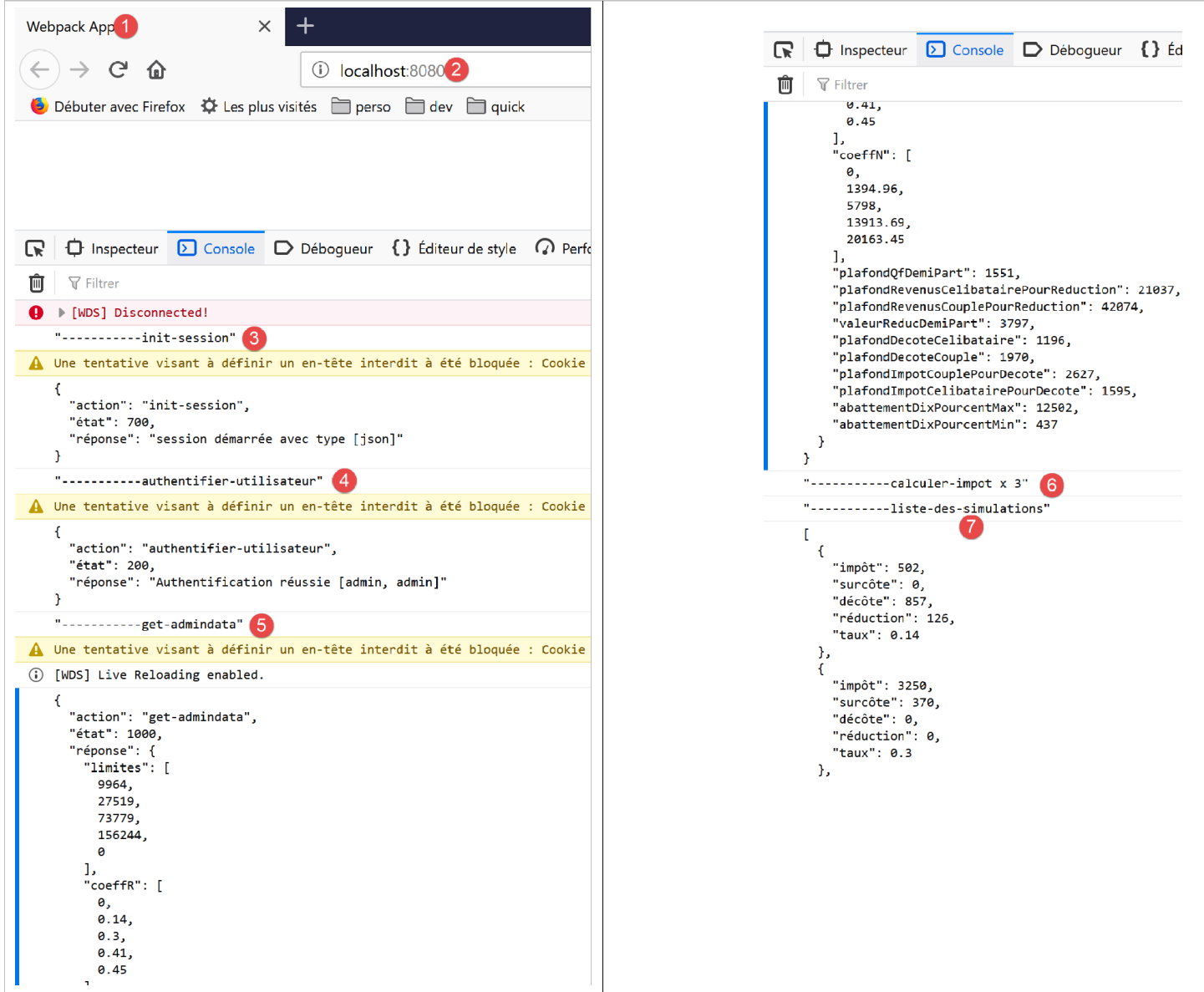
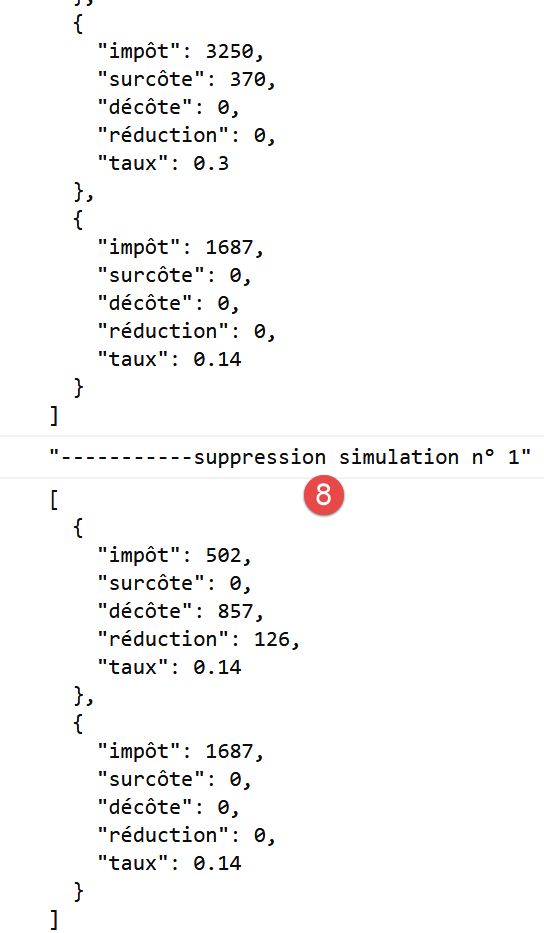
14.5. Miglioramento al client HTTP 3
Quando la precedente classe [Dao2] viene eseguita all'interno di un browser, la gestione dei cookie di sessione non è necessaria. Questo perché il browser che ospita il livello [dao] gestisce il cookie di sessione: rinvia automaticamente qualsiasi cookie che il server gli invia. Di conseguenza, la classe [Dao2] può essere riscritta come la seguente classe [Dao3]:
"use strict";

// imports
import qs from "qs";

class Dao3 {
  // manufacturer
  constructor(axios) {
    this.axios = axios;
  }

  // init session
  async initSession() {
    // query options HHTP [get /main.php?action=init-session&type=json]
    const options = {
      method: "GET",
      // URL parameters
      params: {
        action: "init-session",
        type: "json"
      }
    };
    // execute query HTTP
    return await this.getRemoteData(options);
  }

  async authentifierUtilisateur(user, password) {
    // query options HHTP [post /main.php?action=authenticate-user]
    const options = {
      method: "POST",
      headers: {
        "Content-type": "application/x-www-form-urlencoded"
      },
      // body of POST
      data: qs.stringify({
        user: user,
        password: password
      }),
      // URL parameters
      params: {
        action: "authentifier-utilisateur"
      }
    };
    // execute query HTTP
    return await this.getRemoteData(options);
  }

  async getAdminData() {
    // query options HHTP [get /main.php?action=get-admindata]
    const options = {
      method: "GET",
      // URL parameters
      params: {
        action: "get-admindata"
      }
    };
    // execute query HTTP
    const data = await this.getRemoteData(options);
    // result
    return data;
  }

  async getRemoteData(options) {
    // execute query HTTP
    let response;
    try {
      // asynchronous request
      response = await this.axios.request("main.php", options);
    } catch (error) {
      // the [error] parameter is an exception instance - it can take various forms
      if (error.response) {
        // the server response is in [error.response]
        response = error.response;
      } else {
        // error restart
        throw error;
      }
    }
    // response is the entire HTTP response from the server (HTTP headers + response itself)
    // the server response is in [response.data]
    return response.data;
  }
}

// class export
export default Dao3;
Tutto ciò che riguarda la gestione del cookie di gestione è scomparso.
Modifichiamo il progetto precedente come segue:
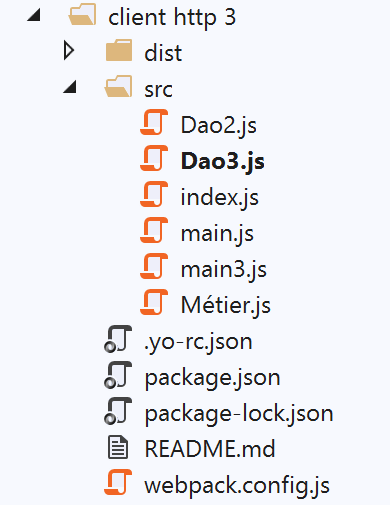
Nella cartella [src] abbiamo aggiunto due file:
- la classe [Dao3] che abbiamo appena introdotto;
- il file [main3] responsabile dell'avvio della nuova versione;
Il file [main3] rimane identico al file [main] della versione precedente, ma ora utilizza la classe [Dao3]:
// imports
import axios from "axios";
import "core-js/stable";
import "regenerator-runtime/runtime";

// imports
import Dao from "./Dao3";
import Métier from "./Métier";

// asynchronous function [main]
async function main() {
  // axios configuration
  axios.defaults.timeout = 2000;
  axios.defaults.baseURL =
    "http://localhost/php7/scripts-web/impots/version-14";
  axios.defaults.withCredentials = true;
  // layer instantiation [dao]
  const dao = new Dao(axios);
  // requests HTTP
  ...
}

// log jSON
function log(object) {
  console.log(JSON.stringify(object, null, 2));
}

// execution
main();
Il file [webpack.config] è stato modificato per eseguire ora lo script [main3]:
/* eslint-disable */

const path = require("path");
const webpack = require("webpack");

/*
 * SplitChunksPlugin is enabled by default and replaced
 * deprecated CommonsChunkPlugin. It automatically identifies modules which
 * should be splitted of chunk by heuristics using module duplication count and
 * module category (i. e. node_modules). And splits the chunks…
 *
 * It is safe to remove "splitChunks" from the generated configuration
 * and was added as an educational example.
 *
 * https://webpack.js.org/plugins/split-chunks-plugin/
 *
 */

const HtmlWebpackPlugin = require("html-webpack-plugin");

/*
 * We've enabled HtmlWebpackPlugin for you! This generates a html
 * page for you when you compile webpack, which will make you start
 * developing and prototyping faster.
 *
 * https://github.com/jantimon/html-webpack-plugin
 *
 */

module.exports = {
  mode: "development",
  //entry: "./src/mainjs",
  entry: "./src/main3.js",
  output: {
    filename: "[name].[chunkhash].js",
    path: path.resolve(__dirname, "dist")
  },

  plugins: [new webpack.ProgressPlugin(), new HtmlWebpackPlugin()],
...
};
Una volta fatto questo, eseguiamo il progetto dopo aver avviato il server di calcolo delle imposte:
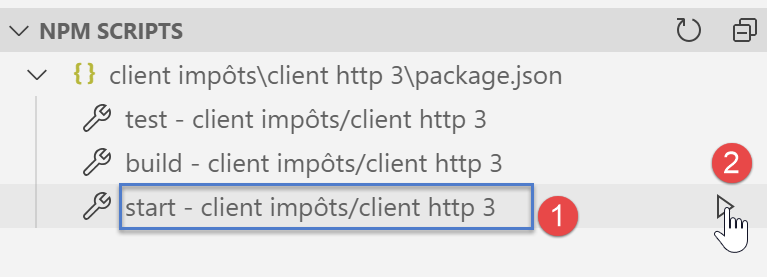
I risultati visualizzati nella console del browser sono identici a quelli della versione precedente.
14.6. Conclusione
Ora disponiamo di tutti gli strumenti necessari per sviluppare codice JavaScript per un'applicazione web. Possiamo:
- utilizzare il codice ECMAScript più recente;
- testare parti isolate di questo codice in un ambiente [node.js], che è più semplice per il debug e il testing;
- quindi trasferire questo codice su un browser utilizzando [babel] e [webpack];