1. Introduction
The PDF for this document is available |HERE|.
The examples in this document are available |HERE|.
The following text refers to the following documents:
[ref1]: [Introduction to Java EE with the NetBeans IDE and the GlassFish Application Server (2012)] - a Java course EE
[ref2]: [Java 5 Persistence Through Practice (2007)] - a course JPA
For simplicity, these references are hereinafter referred to as [ref1] and [ref2].
The tutorial aims to demonstrate the steps involved in creating and deploying a J2EE web service withIDE Netbeans 6.5 and the accompanying Glassfish application server. In addition, we present various clients options for this web service: clients Java, C#, Asp.Net, Flex.
The tools used are:
- SGBD, MySQL 5, [http://www.mysql.com/]
- IDE Netbeans 6.5 [http://www.netbeans.org/]
- IDE Visual Studio Express 2008 SP1 (C# and Web) [http://www.microsoft.com/Express/]
- IDE Adobe Flex Builder 3 [https://www.adobe.com/cfusion/tdrc/index.cfm?loc=fr_fr&product=flex]
- the Apache server from the Wamp tool [http://www.wampserver.com/]
- Adobe Flash Player: [http://www.adobe.com/fr/products/flashplayer/]
The code is not explained in minute detail. Therefore, this tutorial is intended for those with some prior experience with Netbeans, Java EE, EJB3, and JPA. All elements used in this tutorial are explained in [ref1] and [ref2] but not necessarily in the tutorial itself.
The tutorial comes with a zip file containing the following items:
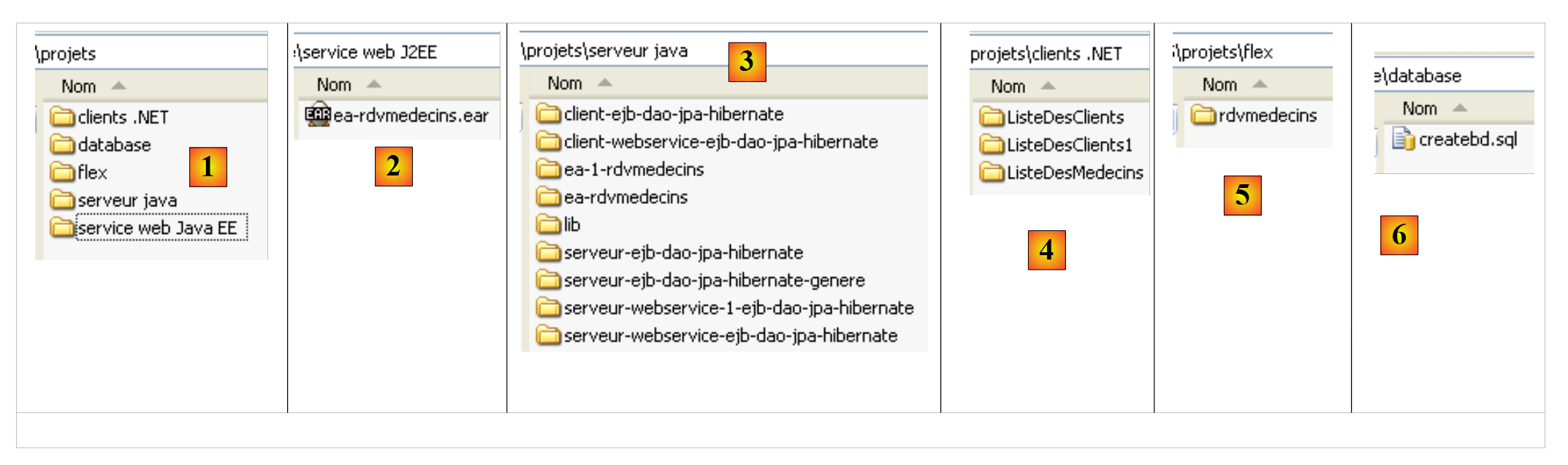 |
- [1]: the contents of the zip file
- [2]: the JEE web service in the form of an EAR archive
- [3]: a set of Netbeans 6.5 projects designed to progressively build the JEE web service
- [4]: clients .NET of the JEE service—a C# client and two clients ASP.NET / C#
- [5]: the clients Flex 3 service JEE
- [6]: the script for creating the database used by the application