5. Clients .NET from the J2EE service for appointments
5.1. A C# 2008 client
We now assume that the previous web service is available and active. A web service can be used by clients clients, which can be written in various languages. Here, we will write a C# console client to display the list of doctors.
 |
Let’s start by creating the C# project:
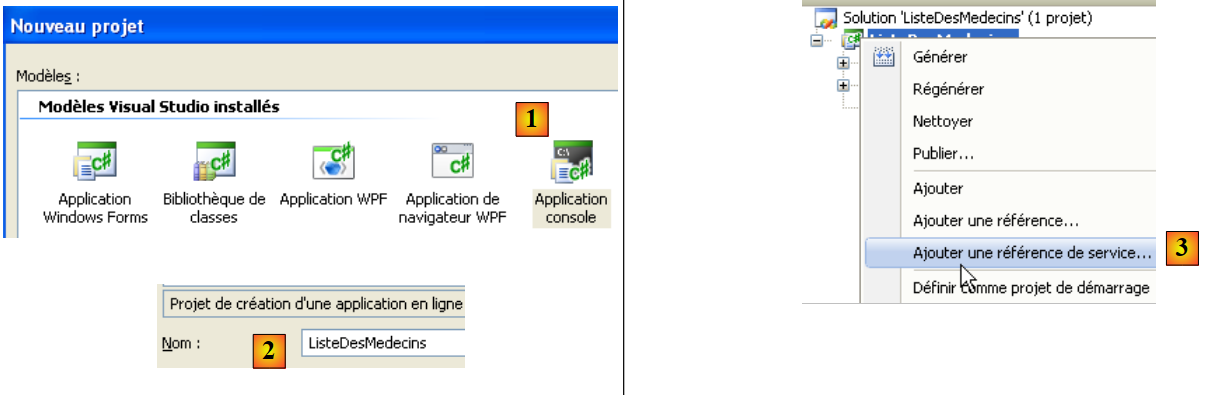 |
We create a console application named [1]. In [3], we create a reference to a web service. This tool is similar to the one used in Netbeans: it creates a local proxy for the remote web service.
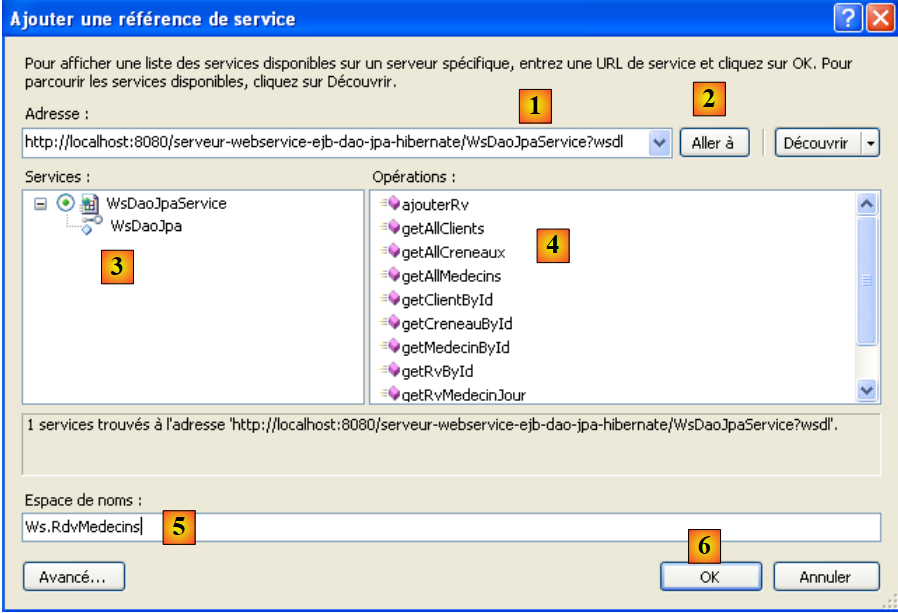 |
- In [1], the uri of the WSDL file for the web service is specified (see section 4.10.2).
- In [2], the wizard is asked to discover the web services exposed at this uri
- In [3], the web service found, and in [4], the methods it exposes.
- In [5], we specify the namespace in which the proxy C classes should be generated
- In [6], we generate the C proxy.
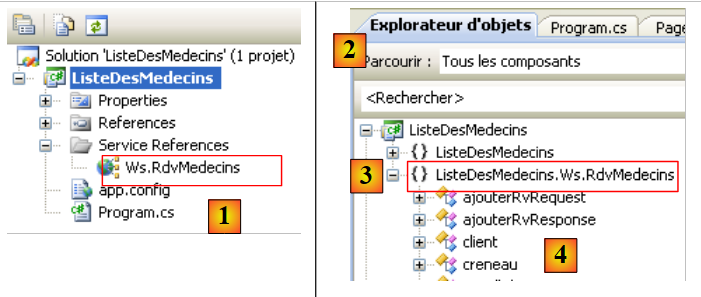 |
- In [1], the web reference we just created. Double-click on it.
- In [2], the Object Explorer opened by double-clicking.
- In [3], select the namespace [ListeDesMedecins.Ws.RdvMedecins], which is the namespace of the generated C proxy. The first term, [ListeDesMedecins], is the default namespace of the created C# application (we named this one ListeDesMedecins). The second term, [Ws.Rdvmedecins], is the namespace we assigned to the C proxy in the wizard. Ultimately, the C proxy objects are in the namespace [ListeDesMedecins.Ws.RdvMedecins].
- In [4], the objects of the generated C proxy
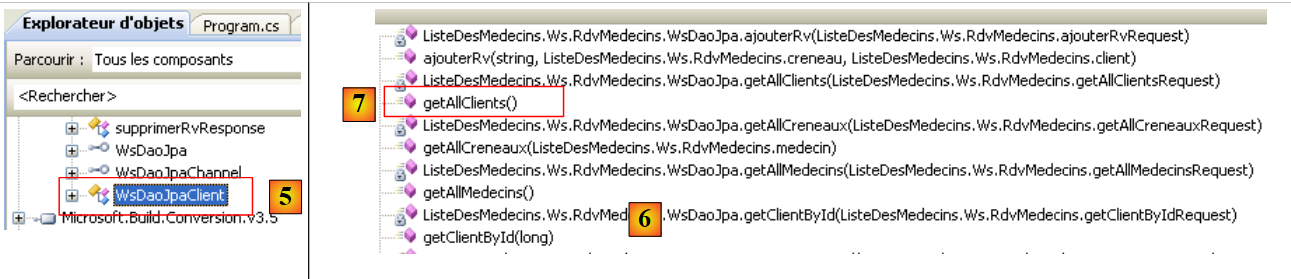 |
- in [5], [WsDaoJpaClient] is the class that locally implements the methods of the remote web service.
- in [6], the methods of the [WsDaoJpaClient] class. Here we find the methods of the remote web service, such as the getAllClients method in [7].
Let’s examine the code of the generated entities:
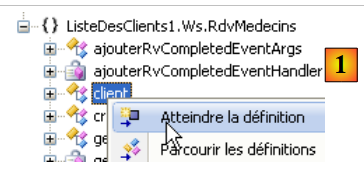 |
In [1] above, we request to view the code for the [client] class:
...
    public partial class client : personne {
    }

....
    public partial class personne : object, System.ComponentModel.INotifyPropertyChanged {
    ...
        public long id {
       ...
        }

...
}
Above, we have included only the code necessary for our analysis.
- line 2: the class [client] derives from the class [personne], just as in the web service.
- line 8: a public property of the [personne] class
What we notice is that the generated code does not follow standard C# coding conventions. The names of classes and public properties should start with a capital letter.
Let’s return to our C# application:
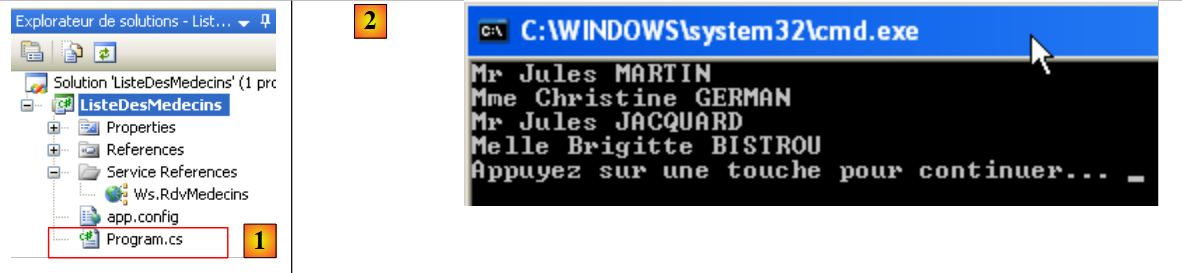 |
[Program.cs] [1] is the test class. Its code is as follows:
using System;
using ListeDesMedecins.Ws.RdvMedecins;
using Client = ListeDesMedecins.Ws.RdvMedecins.client;

namespace ListeDesMedecins {
    class Program {
        static void Main(string[] args) {
            try {
                // instantiation layer [dao] of the client
                WsDaoJpaClient dao = new WsDaoJpaClient();
                // list of doctors
                foreach (Client client in dao.getAllClients()) {
                    Console.WriteLine(String.Format("{0} {1} {2}", client.titre, client.prenom, client.nom));
                }
            } catch (Exception e) {
                Console.WriteLine(e);
            }
        }
    }
}
Line 12: The C proxy class [Client] is used, even though we just saw that it was actually called [client]. It is the declaration on line 3 that allows us to use [Client] instead of [client]. This allows us to comply with the class name coding standard. Still on line 12, the method [getAllClients] is used because that is its name in the C proxy. The C# naming convention would require it to be named [GetAllClients].
Executing the previous program [1] yields the results shown in [2].
5.2. A first ASP.NET client 2008
We are now writing a first ASP.NET / C# client to display the list of clients.
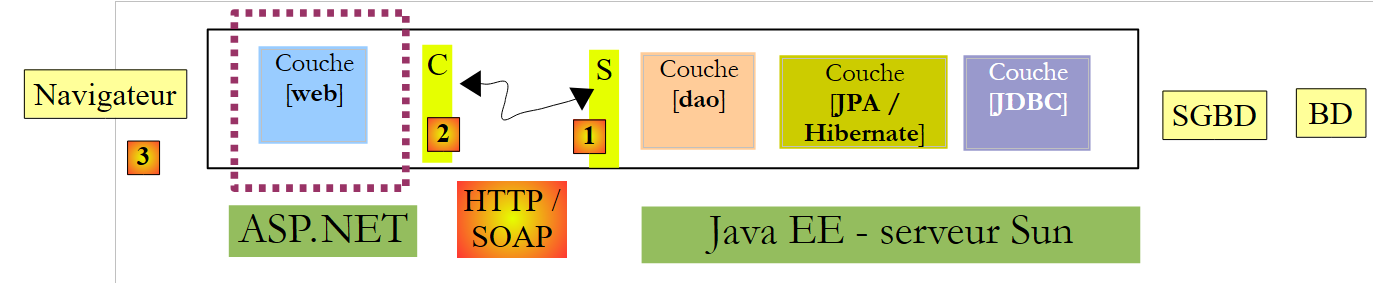 |
In this architecture, there are two web servers:
- the one running the remote web service
- the one running the ASP.NET client for the remote web service
We will create the ASP.NET client web project using Visual Web Express 2008 version. The following section shows how to create the same project if you do not have Visual Web Express 2008.
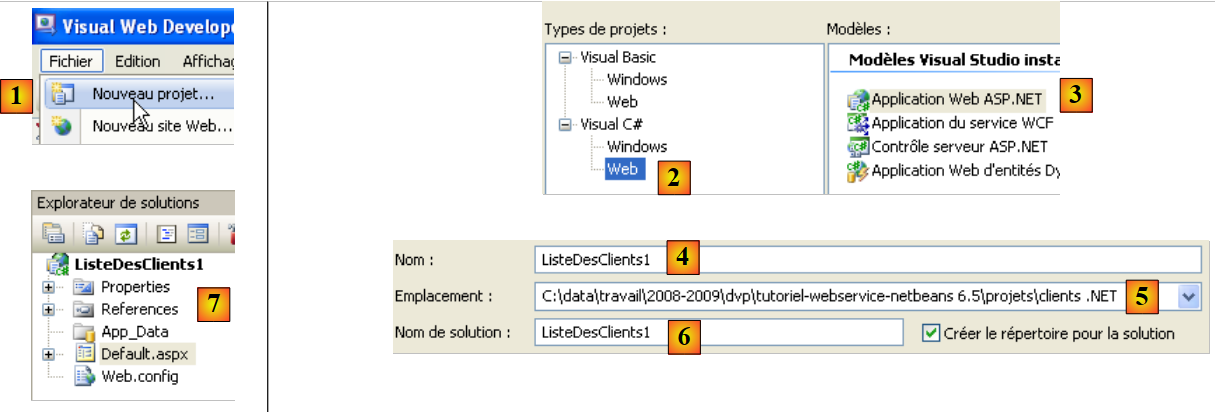 |
Create a web application named [1, 2, 3]. The project created in this way is visible in [7].
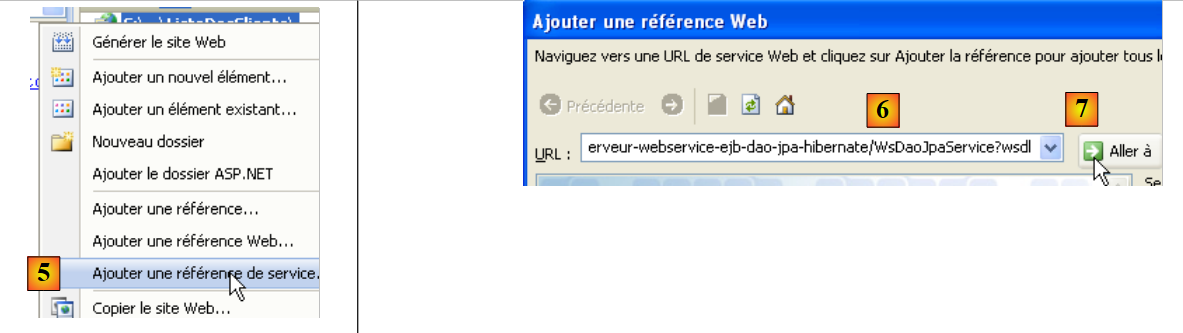 |
- In [5], right-click the project name and add a web service reference.
- In [6], specify the uri of the WSDL file for the web service (see section 4.10.2).
- In [7], ask the wizard to discover the web services exposed to this uri
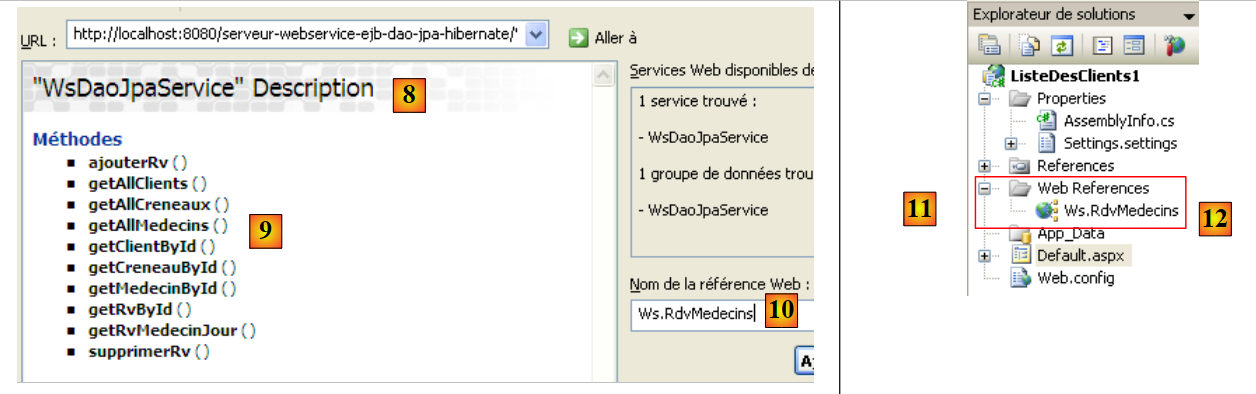 |
- In [8], the found web service is displayed, and in [9], the methods it exposes are displayed.
- In [10], we specify the namespace in which the C proxy classes should be generated
- In [11], the reference to the generated web service
Double-clicking the reference [Ws.Rdvmedecins] [12] displays the classes and interfaces generated for the C proxy:
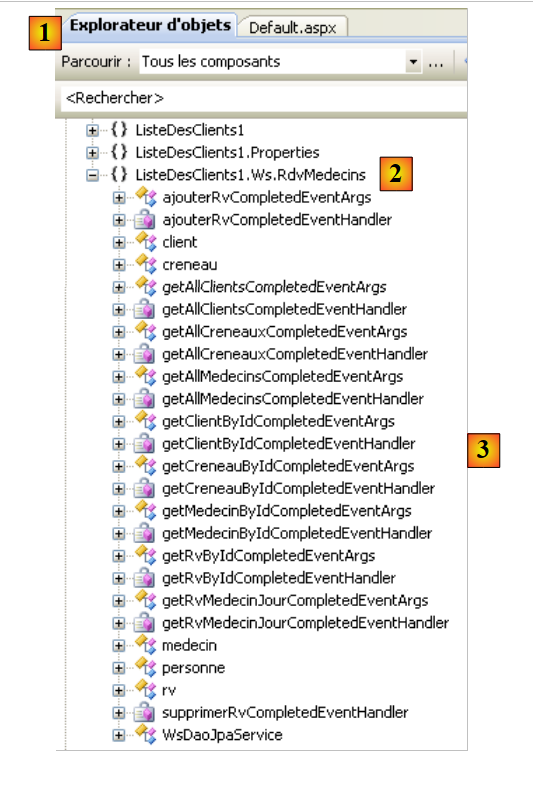 |
- In [1], the object explorer opened by double-clicking.
- In [2], select the namespace [ListeDesClients1.Ws.RdvMedecins], which is the namespace of the generated C proxy. The first term, [ListeDesClients1], is the default namespace of the created ASP.NET application (we named this one ListeDesClients1). The second term, [Ws.Rdvmedecins], is the namespace we assigned to the C proxy in the wizard. Ultimately, the C proxy objects are in the namespace [ListeDesClients1.Ws.RdvMedecins].
- In [3], the objects of the generated C proxy
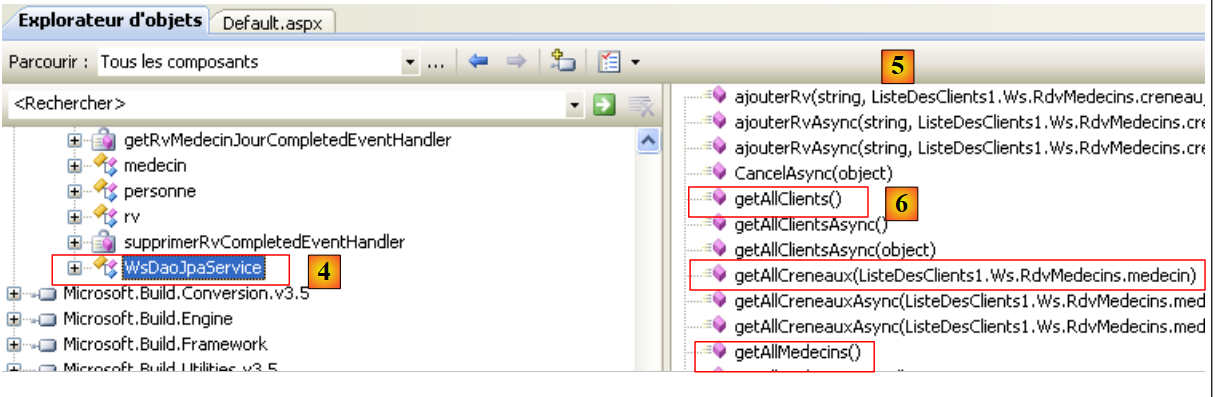 |
- in [4], [WsDaoJpaService] is the class that locally implements the methods of the remote web service.
- in [5], the methods of the [WsDaoJpaService] class. Here we find the methods of the remote web service, such as the getAllClients method in [6].
Let’s examine the code of the generated entities:
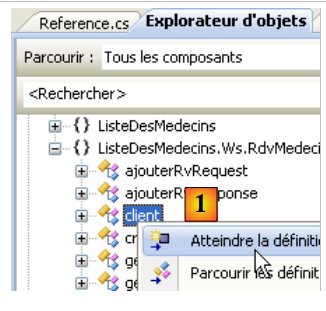 |
In [1] above, we request to view the code for the [client] class:
public partial class client : personne {
    }

...
    public partial class personne {
  ...
        public long id {
...
        }
Above, we have included only the code necessary for our analysis.
- Line 1: The class [client] derives from the class [personne], just as in the web service.
- line 5: the class [personne]
- line 7: a public property of the [personne] class
The code is similar to that already discussed for the C# client in section 5.1.
- The namespace of the generated C proxy is the one defined in its creation wizard, prefixed by the namespace of the web project itself: ListeDesClients1.Ws.RdvMedecins
- The proxy class that locally implements the methods of the remote web service is named WsDaoJpaService.
- Class and property names begin with a lowercase letter
We can write a [Default.aspx] page displaying the list of clients. The page is as follows:
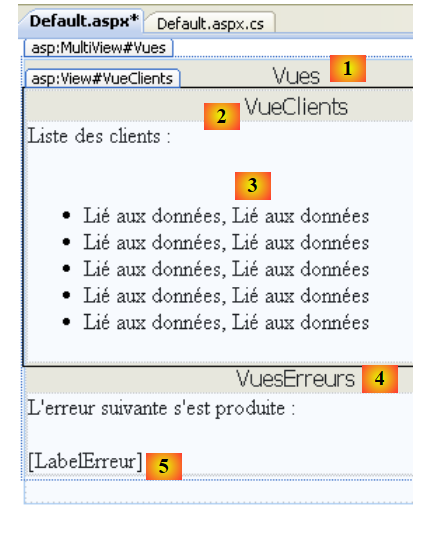 |
No. | Type | Name | Role |
MultiView | Views | View container | |
View | VueClients | The view containing the list of clients | |
Repeater | RepeaterClients | displays the list of clients as a bulleted list | |
View | VueErreurs | the view that displays any errors | |
Label | LabelErreur | The error text |
The code for this page is as follows:
<%@ Page Language="C#" AutoEventWireup="true" CodeBehind="Default.aspx.cs" Inherits="ListeDesClients1._Default" %>

<%@ Import Namespace="ListeDesClients1.Ws.RdvMedecins" %>
<!DOCTYPE html PUBLIC "-//W3C//DTD XHTML 1.1//EN" "http://www.w3.org/TR/xhtml11/DTD/xhtml11.dtd">
<html xmlns="http://www.w3.org/1999/xhtml">
<head id="Head1" runat="server">
  <title>Liste des clients</title>
</head>
<body>
  <form id="form1" runat="server">
  <div>
    <asp:MultiView ID="Vues" runat="server">
      <asp:View ID="VueClients" runat="server">
        Liste des clients :<br />
        <br />
        <ul>
          <asp:Repeater ID="RepeaterClients" runat="server">
            <ItemTemplate>
              <li>
                <%#(Container.DataItem as customer).name%>,
                <%#(Container.DataItem as customer).firstname%>
              </li>
            </ItemTemplate>
          </asp:Repeater>
        </ul>
      </asp:View>
      <asp:View ID="VuesErreurs" runat="server">
        L'erreur suivante s'est produite :<br />
        <br />
        <asp:Label ID="LabelErreur" runat="server"></asp:Label></asp:View>
    </asp:MultiView><br />
  </div>
  </form>
</body>
</html>
Note, on line 3, the need to import the [ListeDesClients1.Ws.RdvMedecins] namespace from the web service’s C proxy so that the [client] class on lines 20 and 21 is accessible.
The control code [Default.aspx.cs] associated with the presentation page [Default.aspx] is as follows:
using System;
using ListeDesClients1.Ws.RdvMedecins;

namespace ListeDesClients1
{
  public partial class _Default : System.Web.UI.Page
  {
    protected void Page_Load(object sender, EventArgs e)
    {
      try
      {
        // local proxy instantiation of remote [dao] layer
        WsDaoJpaService dao = new WsDaoJpaService();
        // customer view
        Vues.ActiveViewIndex = 0;
        // client view initialization
        RepeaterClients.DataSource = dao.getAllClients();
        RepeaterClients.DataBind();
      }
      catch (Exception ex)
      {
        // error view
        Vues.ActiveViewIndex = 1;
        //initialization error view
        LabelErreur.Text = ex.ToString();
      }
    }
  }
}
- Line 8: The Page_Load method is executed when the page is initially loaded. This loading occurs with every client request for the page.
- line 13: the local proxy C is instantiated. This proxy C implements the remote web service interface. The application will communicate with this proxy C.
- line 15: if no exception occurs during the instantiation of the local proxy C, the view named "VueClients" must be displayed, c.a.d. View No. 0 in the MultiView "Views" section of the page.
- Line 17: The repeater’s data source is the list of clients provided by the getAllClients method of proxy C.
- Line 23: In the event of an exception during the instantiation of local proxy C, the view named "VueErreurs" must be displayed, c.a.d. View No. 1 in the MultiView "Views" section of the page.
- Line 25: The exception is displayed in the "LabelErreur" label.
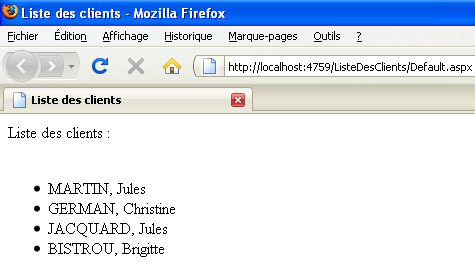
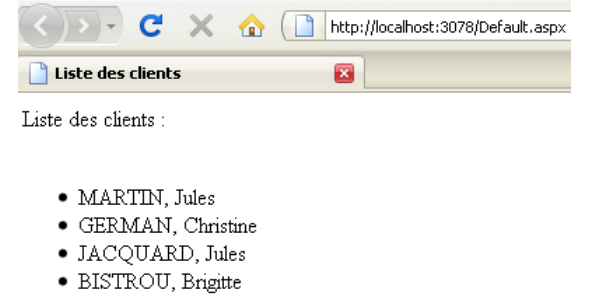
Executing the web project yields the following result:
 |
5.3. A second ASP.NET client 2008
We will now write a second client ASP.NET / C#, this time using version Visual Web Developer Express 2008, which preceded version and SP1.
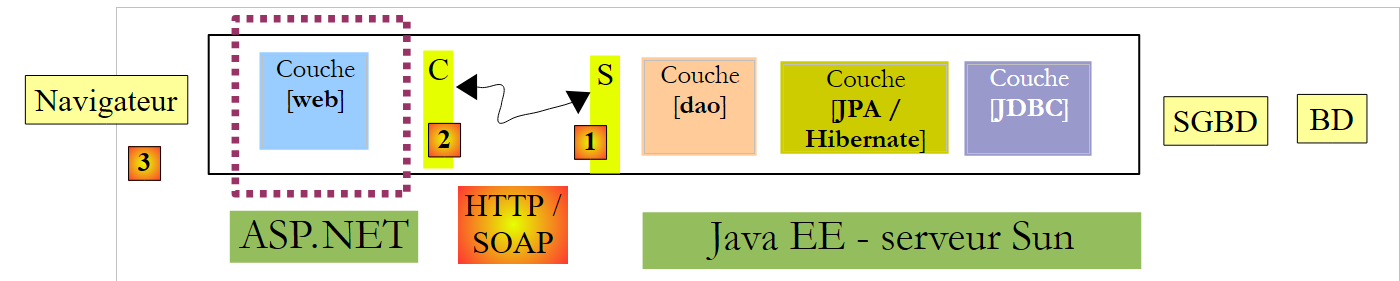 |
Let’s create the client’s web project .NET:
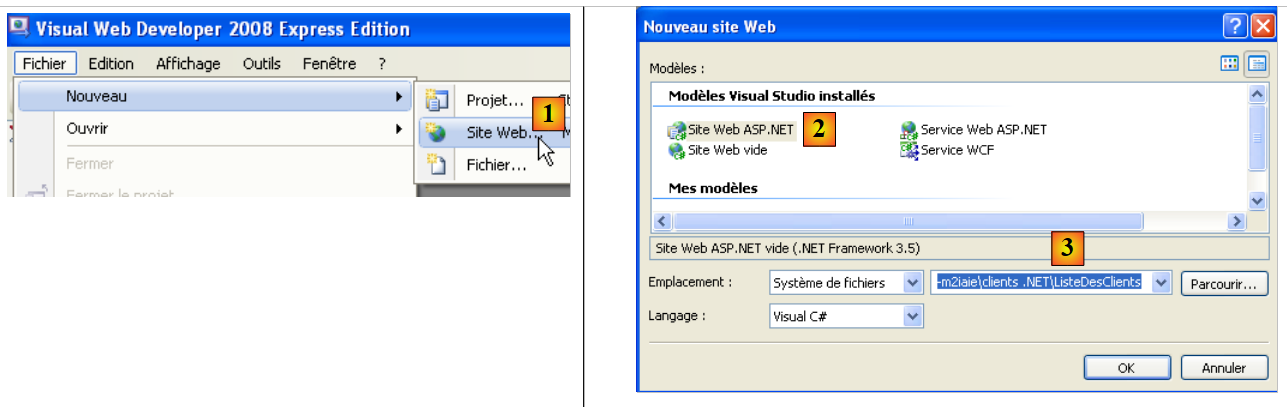 |
We create a [1, 2] website called [ListeDesClients] [3].
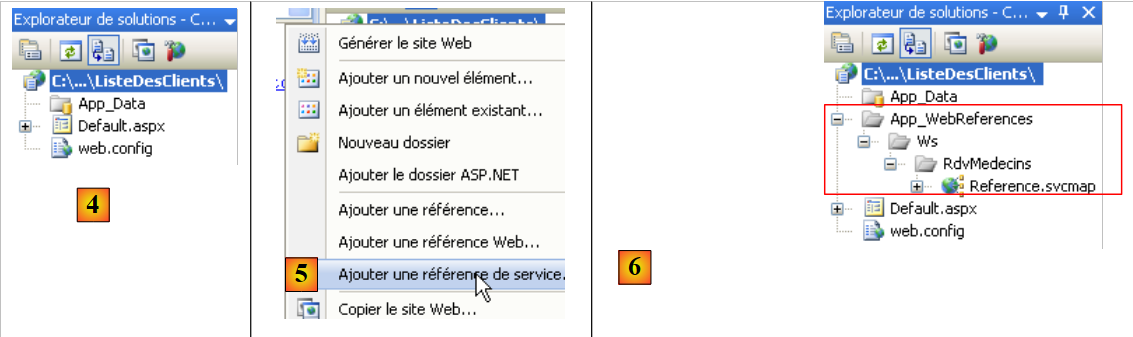 |
- In [4], the web project
- In [5], by right-clicking on the project name, we add a service reference as was done previously.
- In [6], the project once the reference to the remote web service has been added
Unlike the SP1 web project discussed earlier, you do not have access to the web service client objects via the Object Explorer.
Important to note:
- The namespace of the generated C proxy is the one defined in its creation wizard: Ws.RdvMedecins
- The proxy class that locally implements the methods of the remote web service is named WsDaoJpaClient.
- Class and property names begin with a lowercase letter
We can write a [Default.aspx] page displaying the list of clients. The page is as follows:
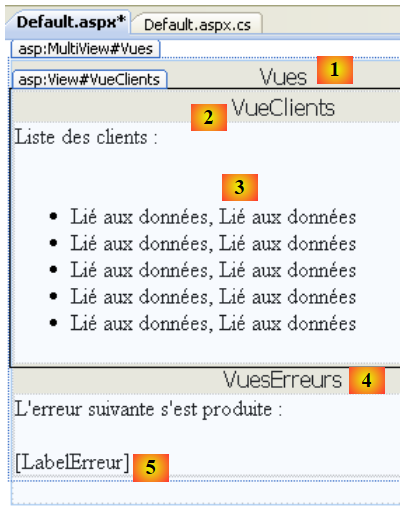 |
No. | Type | Name | Role |
MultiView | Views | View container | |
View | VueClients | The view containing the list of clients | |
Repeater | RepeaterClients | displays the list of clients as a bulleted list | |
View | VueErreurs | the view that displays any errors | |
Label | LabelErreur | The error text |
The HTML code for this page is as follows:
<%@ Page Language="C#" AutoEventWireup="true"  CodeFile="Default.aspx.cs" Inherits="_Default" %>
<%@ Import Namespace="Ws.RdvMedecins" %>
<!DOCTYPE html PUBLIC "-//W3C//DTD XHTML 1.1//EN" "http://www.w3.org/TR/xhtml11/DTD/xhtml11.dtd">
<html xmlns="http://www.w3.org/1999/xhtml">
<head id="Head1" runat="server">
    <title>Liste des clients</title>
</head>
<body>
    <form id="form1" runat="server">
        <div>
            <asp:MultiView ID="Vues" runat="server">
                <asp:View ID="VueClients" runat="server">
                    Liste des clients :<br />
                    <br />
                    <ul>
                        <asp:Repeater ID="RepeaterClients" runat="server">
                            <ItemTemplate>
                                <li>
                                    <%#(Container.DataItem as customer).lastname%>, <%#(Container.DataItem as customer).firstname%>
                                </li>
                            </ItemTemplate>
                        </asp:Repeater>
                    </ul>
                </asp:View>
                <asp:View ID="VuesErreurs" runat="server">
                    L'erreur suivante s'est produite :<br />
                    <br />
                    <asp:Label ID="LabelErreur" runat="server"></asp:Label></asp:View>
            </asp:MultiView><br />
        </div>
    </form>
</body>
</html>
Note, on line 2, the need to import the [Ws.RdvMedecins] namespace from the web service's C proxy so that the [client] class on line 19 is accessible.
The control code [Default.aspx.cs] associated with the presentation page [Default.aspx] is as follows:
using System;
using Ws.RdvMedecins;

public partial class _Default : System.Web.UI.Page
{
  protected void Page_Load(object sender, EventArgs e)
  {
    try
    {
      // local proxy instantiation of remote [dao] layer
      WsDaoJpaClient dao = new WsDaoJpaClient();
      // customer view
      Vues.ActiveViewIndex = 0;
      // client view initialization
      RepeaterClients.DataSource = dao.getAllClients();
      RepeaterClients.DataBind();
    }
    catch (Exception ex)
    {
      // error view
      Vues.ActiveViewIndex = 1;
      //initialization error view
      LabelErreur.Text = ex.ToString();
    }
  }
}
This code is similar to that of the previous version. Running the web project produces the following result: