1. Part 1
The PDF version of the document is available |HERE|.
The examples in the document are available |HERE|.
1.1. Introduction
Objectives of the article:
- write a 3-tier web application [interface utilisateur, métier, accès aux données]
- configure the application with Spring IOC
- write different versions by changing the implementation of one or more of the three layers.
Tools used:
- Visual Studio.net for development—see Appendix, Section 3.1;
- Cassini web server for execution - see Appendix, section 3.2;
- Nunit for unit testing – see Appendix, Section 3.4;
- Spring for the integration and configuration of the web application layers – see Appendix, Section 3.3;
On a beginner-intermediate-advanced scale, this document falls into the [intermédiaire-avancé] category. Understanding it requires various prerequisites. Some of these can be found in documents I have written. In such cases, I cite them. It goes without saying that this is merely a suggestion and that the reader is free to use their preferred resources.
- VB.net language: [Introduction to VB.NET through Examples (2004)];
- Web programming in VB.net: [Web Development with ASP.NET 1.1 (2004)];
- using the IoC aspect of Spring: [Spring IoC for .NET (2005)];
- Spring.net documentation: [Spring.NET | Homepage ]
This document follows the structure of a document written for Java [Architectures à 3 couches et architectures MVC avec Struts, Spring et Java ]. We are building the three-tier web application MVC, written in Java, using VB.NET. The point we want to make here is that the Java and .NET development platforms are sufficiently similar that skills acquired in one of these two domains can be reused in the other.
There does not appear to be a widely recognized MVC ASP.NET development solution. The following solution adopts the method introduced in the [Web Development with ASP.NET 1.1 (2004)]] document. While this method has the merit of using concepts common in J2EE development, it should nevertheless be taken for what it is: c.a.d. just one of many MVC development methods. As soon as a MVC development method in ASP.NET becomes widely accepted, it will be necessary to adopt the latter. Spring’s version .NET, currently under development, could well be an initial solution.
1.2. The webarticles application
Here we present the components of a simplified e-commerce web application. This will allow web users to:
- view a list of items from a database
- add some of them to an electronic shopping cart
- to confirm the cart. This confirmation will simply update the database with the stock levels of the purchased items.
The different views presented to the user will be as follows:
- the "LISTE" view, which displays a list of items for sale 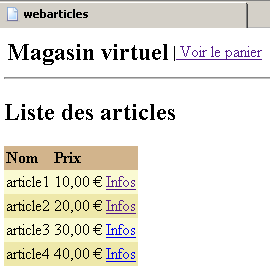 | - the "[INFOS]" view, which provides additional information about a product: 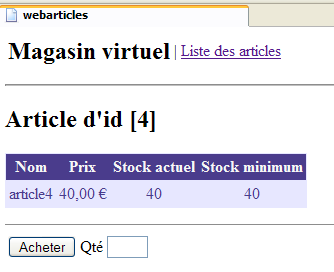 |
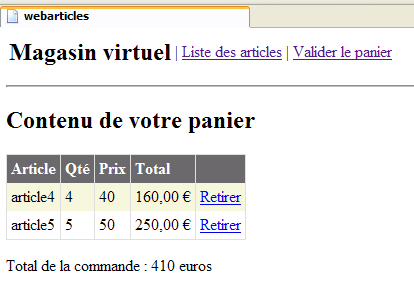
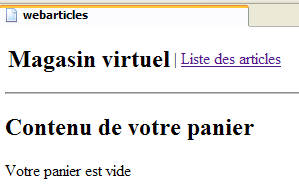
- the views [PANIER] and [PANIERVIDE], which display the contents of the customer’s shopping cart
 |  |
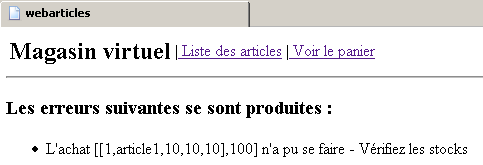
- the view [ERREURS], which reports any application errors
1.3. General Application Architecture
We want to build an application with the following three-tier structure:
 |
- The three layers are made independent through the use of interfaces
- The integration of the various layers is handled by Spring
- Each layer is assigned a separate namespace: web (UI layer), domain (business layer), and dao (data access layer).
The application will follow a MVC architecture (Model-View-Controller). If we refer back to the layered diagram above, the MVC architecture fits into it as follows:
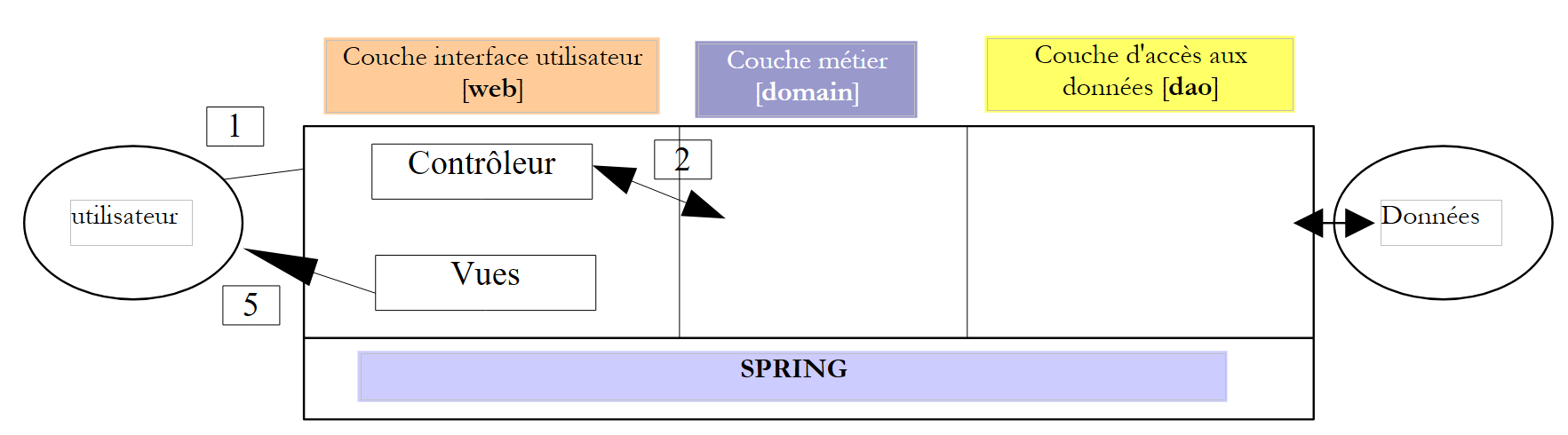 |
The processing of a client request proceeds as follows:
- The client makes a request to the controller. In this case, the controller is an .aspx page that plays a specific role. It handles all requests from the clients layer. It is the application’s entry point. It is the C in MVC.
- The controller processes this request. To do so, it may need assistance from the business layer, known as the M model in the MVC structure.
- The controller receives a response from the business layer. The client’s request has been processed. This can result in several possible responses. A classic example is
- an error page if the request could not be processed correctly
- a confirmation page otherwise
- The controller selects the response (= view) to send to the client. This is most often a page containing dynamic elements. The controller provides these to the view.
- The view is sent to the client. This is the V in MVC.
1.4. The Model
Here we examine the M in MVC. The model consists of the following elements:
- the business classes
- data access classes
- the database
1.4.1. The database
The database contains only one table named ARTICLES. This table was generated using the following SQL commands:
CREATE TABLE ARTICLES (
    ID            INTEGER NOT NULL,
    NOM           VARCHAR(20) NOT NULL,
    PRIX          NUMERIC(15,2) NOT NULL,
    STOCKACTUEL   INTEGER NOT NULL,
    STOCKMINIMUM  INTEGER NOT NULL
);
/* constraints */
ALTER TABLE ARTICLES ADD CONSTRAINT CHK_ID check (ID>0);
ALTER TABLE ARTICLES ADD CONSTRAINT CHK_PRIX check (PRIX>=0);
ALTER TABLE ARTICLES ADD CONSTRAINT CHK_STOCKACTUEL check (STOCKACTUEL>=0);
ALTER TABLE ARTICLES ADD CONSTRAINT CHK_STOCKMINIMUM check (STOCKMINIMUM>=0);
ALTER TABLE ARTICLES ADD CONSTRAINT CHK_NOM check (NOM<>'');
ALTER TABLE ARTICLES ADD CONSTRAINT UNQ_NOM UNIQUE (NOM);
/* primary key */
ALTER TABLE ARTICLES ADD CONSTRAINT PK_ARTICLES PRIMARY KEY (ID);
primary key uniquely identifying an item | |
item name | |
its price | |
current stock | |
the stock level below which a reorder must be placed |
1.4.2. The model's namespaces
Model M is provided here in the form of two namespaces:
- istia.st.articles.dao: contains the data access classes for the [dao] layer
- istia.st.articles.domain: contains the business classes of the [domain] layer
Each of these namespaces will be generated within its own "assembly" file:
content | role | |
- [IArticlesDao]: the interface for accessing the [dao] layer. This is the only interface that the [domain] layer sees. It sees no others. - [Article]: class defining an article - [ArticlesDaoArrayList]: implementation class of the [IArticlesDao] interface with a [ArrayList] | data access layer - is entirely within the [dao] of the 3-tier architecture of the web application | |
- [IArticlesDomain]: the interface for accessing the [domain] layer. This is the only interface visible to the web layer. It does not see any others. - [AchatsArticles]: a class implementing [IArticlesDomain] - [Achat]: a class representing a customer's purchase - [Panier]: a class representing all of a customer's purchases | represents the model of web purchases web - is located entirely in the [domain] layer of the 3-tier architecture of the web application |
1.4.3. The [dao] layer
The [dao] layer contains the following elements:
-
[IArticlesDao]: the interface for accessing the [dao] layer
-
[Article]: class defining an article
-
[ArticlesDaoArrayList]: implementation class for the [IArticlesDao] interface with a [ArrayList] class
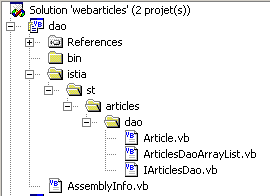
The structure of the [Visual Studio] project in the [dao] layer is as follows:
Comments:
- The [dao] project is of type [bibliothèque de classes]
- The classes have been placed in a tree structure rooted in the [istia] folder. They are all in the [istia.st.articles.dao] namespace.
1.4.3.1. The [Article] class
The class defining an item is as follows:
Imports System

Namespace istia.st.articles.dao

    Public Class Article

         ' private fields
        Private _id As Integer
        Private _nom As String
        Private _prix As Double
        Private _stockactuel As Integer
        Private _stockminimum As Integer

         ' id item
        Public Property id() As Integer
            Get
                Return _id
            End Get
            Set(ByVal Value As Integer)
                If Value <= 0 Then
                    Throw New Exception("Le champ id [" + Value.ToString + "] est invalide")
                End If
                Me._id = Value
            End Set
        End Property

         ' item name
        Public Property nom() As String
            Get
                Return _nom
            End Get
            Set(ByVal Value As String)
                If Value Is Nothing OrElse Value.Trim.Equals("") Then
                    Throw New Exception("Le champ nom [" + Value + "] est invalide")
                End If
                Me._nom = Value
            End Set
        End Property

         ' item price
        Public Property prix() As Double
            Get
                Return _prix
            End Get
            Set(ByVal Value As Double)
                If Value < 0 Then
                    Throw New Exception("Le champ prix [" + Value.ToString + "] est invalide")
                End If
                Me._prix = Value
            End Set
        End Property

         ' current stock item
        Public Property stockactuel() As Integer
            Get
                Return _stockactuel
            End Get
            Set(ByVal Value As Integer)
                If Value < 0 Then
                    Throw New Exception("Le champ stockActuel [" + Value.ToString + "] est invalide")
                End If
                Me._stockactuel = Value
            End Set
        End Property

         ' minimum stock item
        Public Property stockminimum() As Integer
            Get
                Return _stockminimum
            End Get
            Set(ByVal Value As Integer)
                If Value < 0 Then
                    Throw New Exception("Le champ stockMinimum [" + Value.ToString + "] est invalide")
                End If
                Me._stockminimum = Value
            End Set
        End Property

         ' default builder
        Public Sub New()
        End Sub

         ' builder with properties
        Public Sub New(ByVal id As Integer, ByVal nom As String, ByVal prix As Double, ByVal stockactuel As Integer, ByVal stockminimum As Integer)
            Me.id = id
            Me.nom = nom
            Me.prix = prix
            Me.stockactuel = stockactuel
            Me.stockminimum = stockminimum
        End Sub

         ' article identification method
        Public Overrides Function ToString() As String
            Return "[" + id.ToString + "," + nom + "," + prix.ToString + "," + stockactuel.ToString + "," + stockminimum.ToString + "]"
        End Function
    End Class
End Namespace
This class provides:
- a constructor for setting the 5 pieces of information for an item: [id, nom, prix, stockactuel, stockminimum]
- public properties for reading and writing the 5 pieces of information.
- a validation of the data entered for the item. If the data is invalid, an exception is thrown.
- a method toString that retrieves the value of an item as a string. This is often useful for debugging an application.
1.4.3.2. The [IArticlesDao] interface
The [IArticlesDao] interface is defined as follows:
Imports System
Imports System.Collections

Namespace istia.st.articles.dao

    Public Interface IArticlesDao
         ' list of all items
        Function getAllArticles() As IList
         ' add an article
        Function ajouteArticle(ByVal unArticle As Article) As Integer
         ' deletes an article
        Function supprimeArticle(ByVal idArticle As Integer) As Integer
         ' modify an article
        Function modifieArticle(ByVal unArticle As Article) As Integer
         ' search for an article
        Function getArticleById(ByVal idArticle As Integer) As Article
         ' deletes all articles
        Sub clearAllArticles()
         ' changes the stock of an item
        Function changerStockArticle(ByVal idArticle As Integer, ByVal mouvement As Integer) As Integer
    End Interface
End Namespace
The roles of the various methods in the interface are as follows:
returns all articles from the data source | |
clears the data source | |
returns the [Article] object identified by its primary key | |
allows you to add an article to the data source | |
allows you to modify an article in the data source | |
allows you to delete an item from the data source | |
allows you to modify the stock of an item in the data source |
The interface provides the program clients with a number of methods defined solely by their signatures. It does not concern itself with how these methods will actually be implemented. This provides flexibility within an application. The client program makes calls to an interface rather than to a specific implementation of that interface.
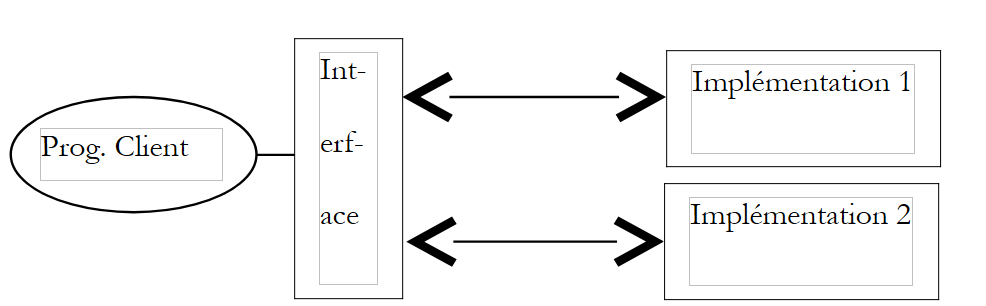 |
The specific implementation will be selected using a Spring configuration file. To demonstrate that, when testing the web application, only the data access interface matters—not its implementation class—we will first implement the data source using a simple [ArrayList] object. Later, we will present a solution based on SGBD.
1.4.3.3. The implementation class [ArticlesDaoArrayList]
The implementation class [ArticlesDaoArrayList] is defined as follows:
Imports System
Imports System.Collections

Namespace istia.st.articles.dao

    Public Class ArticlesDaoArrayList
        Implements istia.st.articles.dao.IArticlesDao

        Private articles As New ArrayList
        Private Const nbArticles As Integer = 4

         ' default builder
        Public Sub New()
             ' we build a few items
            For i As Integer = 1 To nbArticles
                articles.Add(New Article(i, "article" + i.ToString, i * 10, i * 10, i * 10))
            Next
        End Sub

         ' list of all items
        Public Function getAllArticles() As IList Implements IArticlesDao.getAllArticles
             ' returns the list of items
            SyncLock Me
                Return articles
            End SyncLock
        End Function

         ' delete all items
        Public Sub clearAllArticles() Implements IArticlesDao.clearAllArticles
             ' empty the list of items
            SyncLock Me
                articles.Clear()
            End SyncLock
        End Sub

         ' obtain an item identified by its key
        Public Function getArticleById(ByVal idArticle As Integer) As Article Implements IArticlesDao.getArticleById
             ' search for the item in the list
            SyncLock Me
                Dim ipos As Integer = posArticle(articles, idArticle)
                If ipos <> -1 Then
                    Return CType(articles(ipos), Article)
                Else
                    Return Nothing
                End If
            End SyncLock
        End Function

         ' add an item to the list of items
        Public Function ajouteArticle(ByVal unArticle As Article) As Integer Implements IArticlesDao.ajouteArticle
             ' add the item to the list of items
            SyncLock Me
                 ' we check that it doesn't already exist
                Dim ipos As Integer = posArticle(articles, unArticle.id)
                If ipos <> -1 Then
                    Throw New Exception("L'article d'id [" + unArticle.id.ToString + "] existe déjà")
                End If
                 ' we add the article
                articles.Add(unArticle)
                 ' we return the result
                Return 1
            End SyncLock
        End Function

         ' modify an article
        Public Function modifieArticle(ByVal articleNouveau As Article) As Integer Implements IArticlesDao.modifieArticle
             ' modify an article
            SyncLock Me
                 ' we check that
                Dim ipos As Integer = posArticle(articles, articleNouveau.id)
                 ' if it doesn't exist
                If ipos = -1 Then Return 0
                 ' it exists - we modify it
                articles(ipos) = articleNouveau
                 ' we return the result
                Return 1
            End SyncLock
        End Function

         ' delete an item identified by its key
        Public Function supprimeArticle(ByVal idArticle As Integer) As Integer Implements IArticlesDao.supprimeArticle
             ' article deletion
            SyncLock Me
                 ' we check that
                Dim ipos As Integer = posArticle(articles, idArticle)
                 ' if it doesn't exist
                If ipos = -1 Then Return 0
                 ' it exists - we remove it
                articles.RemoveAt(ipos)
                 ' we return the result
                Return 1
            End SyncLock
        End Function

         ' change the stock of an item identified by its key
        Public Function changerStockArticle(ByVal idArticle As Integer, ByVal mouvement As Integer) As Integer Implements IArticlesDao.changerStockArticle
             ' change the stock of an item
            SyncLock Me
                 ' we check that
                Dim ipos As Integer = posArticle(articles, idArticle)
                 ' if it doesn't exist
                If ipos = -1 Then Return 0
                 ' it exists - you modify your stock if you can
                Dim unArticle As Article = CType(articles(ipos), Article)
                 ' only change stock if it is sufficient
                If unArticle.stockactuel + mouvement >= 0 Then
                    unArticle.stockactuel += mouvement
                    Return 1
                Else
                    Return 0
                End If
            End SyncLock
        End Function

         ' search for an item identified by its key
        Private Function posArticle(ByVal listArticles As ArrayList, ByVal idArticle As Integer) As Integer
             ' returns the position of item [idArticle] in the list or -1 if not found
            Dim unArticle As Article
            For i As Integer = 0 To listArticles.Count - 1
                unArticle = CType(listArticles(i), Article)
                If unArticle.id = idArticle Then
                    Return i
                End If
            Next
             ' not found
            Return -1
        End Function
    End Class

End Namespace
Comments:
- The data source is simulated by the private field [articles] of type [ArrayList]
- The class constructor creates 4 records in the data source by default.
- All data access methods have been synchronized to prevent concurrent access issues to the data source. At any given time, only one thread has access to a given method.
- The method [posArticle] allows you to determine the position [0..N] in the source [ArrayList] of an item identified by its number. If the item does not exist, the method returns the position -1. This method is used repeatedly by the other methods.
- The [ajouteArticle] method allows you to add an item to the list of items. It returns the number of items inserted: 1. If the item already existed, an exception is thrown.
- The [modifieArticle] method allows you to modify an existing item. It returns the number of modified items: 1 if the item existed, 0 otherwise.
- The [supprimeArticle] method allows you to delete an existing item. It returns the number of items deleted: 1 if the item existed, 0 otherwise.
- The [getAllArticles] method returns a list of all articles
- The [getArticleById] method retrieves an item identified by its number. The value [nothing] is returned if the item does not exist.
- The code does not present any real difficulty. We leave it to the reader to review and understand it.
1.4.3.4. Generating the [dao] layer assembly
The Visual Studio project is configured to generate the [webarticles-dao.dll] assembly. This is generated in the [bin] folder of the project:
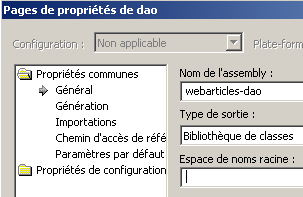 | 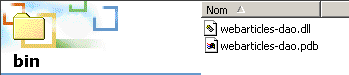 |
1.4.3.5. NUnit tests for the [dao] layer
In Java, classes are tested using the [Junit] framework. In .NET, the Nunit framework offers the same unit testing capabilities:
The structure of the Visual Studio test project is as follows:
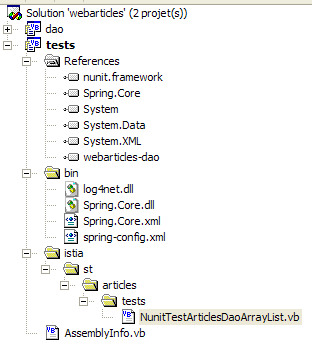
Comments:
- The [tests] project is of type [bibliothèque de classes]
- The [NUnit] tests require a reference to the [nunit.framework.dll] assembly
- The [NUnit] test class retrieves an instance of the object under test via Spring. Therefore,
- in the [bin] folder, the Spring class files
- in [References], a reference to the [Spring-Core.dll] assembly in the [bin] folder
- in [bin], a configuration file for Spring
- the test class requires the [webarticles-dao.dll] assembly from the [dao] layer. This has been placed in the [bin] folder and its reference added to the project references.
A test class [NUnit] requires access to classes in the [NUnit.Framework] namespace. Therefore, it contains the following import statement:
The [NUnit.Framework] namespace is located in the [nunit.framework.dll] assembly, which must be added to the project references:
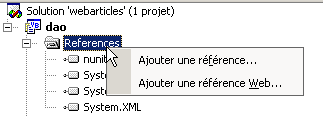 | 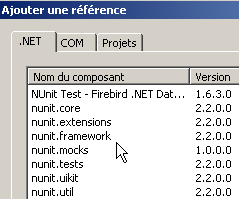 |
The [nunit.framework.dll] assembly should be in the list if [Nunit] has been installed. Simply double-click the assembly to add it to the project:
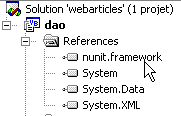
The [NUnit] test class in the [dao] layer could look like this:
Imports System
Imports System.Collections
Imports NUnit.Framework
Imports istia.st.articles.dao
Imports System.Threading
Imports Spring.Objects.Factory.Xml
Imports System.IO

Namespace istia.st.articles.tests

    <TestFixture()> _
    Public Class NunitTestArticlesArrayList
         ' the test object
        Private articlesDao As IArticlesDao

        <SetUp()> _
        Public Sub init()
             ' retrieve an instance of the Spring object manufacturer
            Dim factory As XmlObjectFactory = New XmlObjectFactory(New FileStream("spring-config.xml", FileMode.Open))
             ' request instantiation of articlesdao object
            articlesDao = CType(factory.GetObject("articlesdao"), IArticlesDao)
        End Sub

        <Test()> _
        Public Sub testGetAllArticles()
             ' visual check
            listArticles()
        End Sub

        <Test()> _
        Public Sub testClearAllArticles()
             ' delete all articles
            articlesDao.clearAllArticles()
             ' all articles are requested
            Dim articles As IList = articlesDao.getAllArticles
             ' verification: there must be 0
            Assert.AreEqual(0, articles.Count)
        End Sub

        <Test()> _
        Public Sub testAjouteArticle()
             ' delete all items
            articlesDao.clearAllArticles()
             ' check: the item table must be empty
            Dim articles As IList = articlesDao.getAllArticles
            Assert.AreEqual(0, articles.Count)
             ' we add two items
            articlesDao.ajouteArticle(New Article(3, "article3", 30, 30, 3))
            articlesDao.ajouteArticle(New Article(4, "article4", 40, 40, 4))
             ' check: there must be two items
            articles = articlesDao.getAllArticles
            Assert.AreEqual(2, articles.Count)
             ' visual check
            listArticles()
        End Sub

        <Test()> _
        Public Sub testSupprimeArticle()
             ' delete all items
            articlesDao.clearAllArticles()
             ' check: the item table must be empty
            Dim articles As IList = articlesDao.getAllArticles
            Assert.AreEqual(0, articles.Count)
             ' we add two items
            articlesDao.ajouteArticle(New Article(3, "article3", 30, 30, 3))
            articlesDao.ajouteArticle(New Article(4, "article4", 40, 40, 4))
             ' check: there must be 2 items
            articles = articlesDao.getAllArticles
            Assert.AreEqual(2, articles.Count)
             ' we delete article 4
            articlesDao.supprimeArticle(4)
             ' check: there must be 1 item left
            articles = articlesDao.getAllArticles
            Assert.AreEqual(1, articles.Count)
             ' visual check
            listArticles()
        End Sub

        <Test()> _
        Public Sub testModifieArticle()
             ' delete all items
            articlesDao.clearAllArticles()
             ' check
            Dim articles As IList = articlesDao.getAllArticles
            Assert.AreEqual(0, articles.Count)
             ' 2 items added
            articlesDao.ajouteArticle(New Article(3, "article3", 30, 30, 3))
            articlesDao.ajouteArticle(New Article(4, "article4", 40, 40, 4))
             ' check
            articles = articlesDao.getAllArticles
            Assert.AreEqual(2, articles.Count)
             ' article 3 search
            Dim unArticle As Article = articlesDao.getArticleById(3)
             ' check
            Assert.AreEqual(unArticle.nom, "article3")
             ' research article 4
            unArticle = articlesDao.getArticleById(4)
             ' check
            Assert.AreEqual(unArticle.nom, "article4")
             ' modification article 4
            articlesDao.modifieArticle(New Article(4, "article4", 44, 44, 44))
             ' check
            unArticle = articlesDao.getArticleById(4)
            Assert.AreEqual(unArticle.prix, 44, 0.000001)
             ' visual check
            listArticles()
        End Sub

        <Test()> _
        Public Sub testGetArticleById()
             ' article deletion
            articlesDao.clearAllArticles()
             ' check
            Dim articles As IList = articlesDao.getAllArticles
            Assert.AreEqual(0, articles.Count)
             ' 2 items added
            articlesDao.ajouteArticle(New Article(3, "article3", 30, 30, 3))
            articlesDao.ajouteArticle(New Article(4, "article4", 40, 40, 4))
             ' check
            articles = articlesDao.getAllArticles
            Assert.AreEqual(2, articles.Count)
             ' research article 3
            Dim unArticle As Article = articlesDao.getArticleById(3)
             ' check
            Assert.AreEqual(unArticle.nom, "article3")
             ' research article 4
            unArticle = articlesDao.getArticleById(4)
             ' check
            Assert.AreEqual(unArticle.nom, "article4")
        End Sub

         ' screen listing
        Private Sub listArticles()
            Dim articles As IList = articlesDao.getAllArticles
            For i As Integer = 0 To articles.Count - 1
                Console.WriteLine(CType(articles(i), Article).ToString)
            Next
        End Sub

        <Test()> _
        Public Sub testArticleAbsent()
             ' delete all items
            articlesDao.clearAllArticles()
             ' research article 1
            Dim article As article = articlesDao.getArticleById(1)
             ' check
            Assert.IsNull(article)
             ' modification of a non-existent item
            Dim i As Integer = articlesDao.modifieArticle(New article(1, "1", 1, 1, 1))
             ' had to modify no line
            Assert.AreEqual(i, 0)
             ' deletion of non-existent item
            i = articlesDao.supprimeArticle(1)
             ' had to delete no line
            Assert.AreEqual(0, i)
        End Sub

        <Test()> _
        Public Sub testChangerStockArticle()
             ' delete all items
            articlesDao.clearAllArticles()
             ' add an item
            Dim nbArticles As Integer = articlesDao.ajouteArticle(New Article(3, "article3", 30, 101, 3))
            Assert.AreEqual(nbArticles, 1)
             ' add an item
            nbArticles = articlesDao.ajouteArticle(New Article(4, "article4", 40, 40, 4))
            Assert.AreEqual(nbArticles, 1)
             ' creation of 100 threads
            Dim taches(99) As Thread
            For i As Integer = 0 To taches.Length - 1
                 ' create thread i
                taches(i) = New Thread(New ThreadStart(AddressOf décrémente))
                 ' set the thread name
                taches(i).Name = "tache_" & i
                 ' start execution of thread i
                taches(i).Start()
            Next
             ' wait for all threads to finish
            For i As Integer = 0 To taches.Length - 1
                taches(i).Join()
            Next
             ' checks - item 3 must have a stock of 1
            Dim unArticle As Article = articlesDao.getArticleById(3)
            Assert.AreEqual(unArticle.nom, "article3")
            Assert.AreEqual(1, unArticle.stockactuel)
             ' item 4 stock is decremented
            Dim erreur As Boolean = False
            Dim nbLignes As Integer = articlesDao.changerStockArticle(4, -100)
             ' check: its stock must not have changed
            Assert.AreEqual(0, nbLignes)
             ' visual check
            listArticles()
        End Sub

        Public Sub décrémente()
             ' thread launched
            System.Console.Out.WriteLine(Thread.CurrentThread.Name + " lancé")
             ' thread decrements stock
            articlesDao.changerStockArticle(3, -1)
             ' thread terminated
            System.Console.Out.WriteLine(Thread.CurrentThread.Name + " terminé")
        End Sub

    End Class
End Namespace
Comments:
- We wanted to write a test program for the [IArticlesDao] interface that is independent of its implementation class. Therefore, we used Spring to hide the name of the implementation class from the test program.
- The <Setup()> method retrieves a reference to the [articlesdao] object to be tested from Spring. This object is defined in the following [spring-config.xml] file:
<?xml version="1.0" encoding="iso-8859-1" ?>
<!DOCTYPE objects PUBLIC "-//SPRING//DTD OBJECT//EN"
"http://www.springframework.net/dtd/spring-objects.dtd">

<objects>
    <object id="articlesdao" type="istia.st.articles.dao.ArticlesDaoArrayList, webarticles-dao"/>
</objects>
This file specifies the name of the implementation class [istia.st.articles.dao.ArticlesDaoArrayList] for the interface [IArticlesDao] and where to find it: [ webarticles-dao.dll]. Since instantiation does not require any parameters, none are defined here.
- Most of the tests are easy to understand. The reader is encouraged to read the comments.
- The [testChangerStockArticle] method requires some explanation. It creates 100 threads responsible for decrementing the stock of a given item.
        <Test()> _
        Public Sub testChangerStockArticle()
             ' delete all items
            articlesDao.clearAllArticles()
             ' add an item
            Dim nbArticles As Integer = articlesDao.ajouteArticle(New Article(3, "article3", 30, 101, 3))
            Assert.AreEqual(nbArticles, 1)
             ' add an item
            nbArticles = articlesDao.ajouteArticle(New Article(4, "article4", 40, 40, 4))
            Assert.AreEqual(nbArticles, 1)
             ' creation of 100 threads
            Dim taches(99) As Thread
            For i As Integer = 0 To taches.Length - 1
                 ' create thread i
                taches(i) = New Thread(New ThreadStart(AddressOf décrémente))
                 ' set the thread name
                taches(i).Name = "tache_" & i
                 ' start execution of thread i
                taches(i).Start()
            Next
             ' wait for all threads to finish
            For i As Integer = 0 To taches.Length - 1
                taches(i).Join()
            Next
             ' checks - item 3 must have a stock of 1
            Dim unArticle As Article = articlesDao.getArticleById(3)
            Assert.AreEqual(unArticle.nom, "article3")
            Assert.AreEqual(1, unArticle.stockactuel)
             ' item 4 stock is decremented
            Dim erreur As Boolean = False
            Dim nbLignes As Integer = articlesDao.changerStockArticle(4, -100)
             ' check: its stock must not have changed
            Assert.AreEqual(0, nbLignes)
             ' visual check
            listArticles()
        End Sub
This test checks for concurrent access to the data source. The method responsible for updating the stock is as follows:
        Public Sub décrémente()
             ' thread launched
            System.Console.Out.WriteLine(Thread.CurrentThread.Name + " lancé")
             ' thread decrements stock
            articlesDao.changerStockArticle(3, -1)
             ' thread terminated
            System.Console.Out.WriteLine(Thread.CurrentThread.Name + " terminé")
        End Sub
It decrements the stock of item #3 by one unit. If we refer to the code for method [testChangerStockArticle], we see that:
- the stock of item no. 3 is initialized to 101
- the 100 threads will each decrement this stock by one
- we should therefore have a stock of 1 at the end of all threads’ execution
Furthermore, still within this method, we attempt to set the stock of item #4 to a negative value. This should fail.
To test the [dao] layer, we generate the DLL and [tests-webarticles-dao.dll] files in the [bin] folder of the [tests] project:
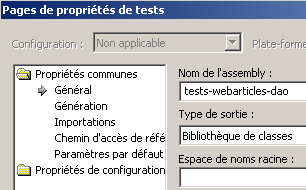 | 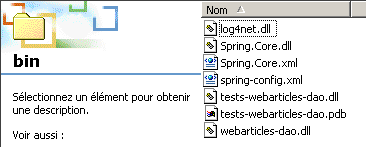 |
Then, using the [Nunit-Gui] application, we load this DLL and run the tests:
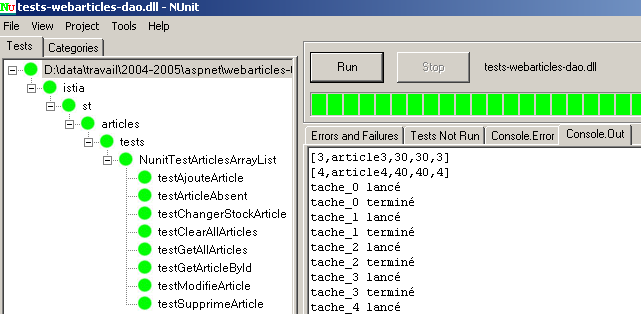
In the left window, we see the list of tested methods. The color of the dot preceding each method’s name indicates whether the method passed (green) or failed (red). Readers viewing this document on screen will see that all tests were successful. We will now consider that we have an operational [dao] layer.
1.4.4. The [domain] layer
The [domain] layer contains the following elements:
-
[IArticlesDomain]: the interface for accessing the [domain] layer
-
[Achat]: class defining a purchase
-
[Panier]: class defining a shopping cart
-
[AchatsArticles]: implementation class for the [IArticlesDomain] interface
The structure of solution [Visual Studio] in layer [domain] is as follows:
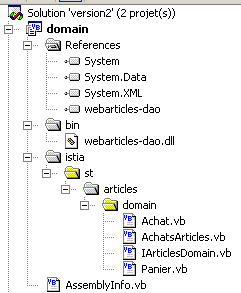
Comments:
- The [domain] project is of type [bibliothèque de classes]
- The classes have been placed in a tree structure rooted in the [istia] folder. They are all in the [istia.st.articles.domain] namespace.
- The DLL from the [dao] layer has been placed in the [bin] folder of the new project. Additionally, this DLL has been added as a reference to the project.
1.4.4.1. The [IArticlesDomain] interface
The [IArticlesDomain] interface decouples the [métier] layer from the [web] layer. The latter accesses the [métier/domain] layer via this interface without concerning itself with the class that actually implements it. The interface defines the following actions for accessing the business layer:
Imports Article = istia.st.articles.dao.Article

Namespace istia.st.articles.domain
    Public Interface IArticlesDomain
         ' methods
        Sub acheter(ByVal panier As Panier)
        Function getAllArticles() As IList
        Function getArticleById(ByVal idArticle As Integer) As Article
        ReadOnly Property erreurs() As ArrayList
    End Interface
End Namespace
returns the list of [Article] objects from the associated data source | |
returns the [Article] object identified by [idArticle] | |
validates the customer's cart by decrementing the stock of purchased items by the quantity purchased - may fail if stock is insufficient | |
returns the list of errors that occurred - empty if no errors |
1.4.4.2. The [Achat] class
The [Achat] class represents a customer purchase:
Imports istia.st.articles.dao

Namespace istia.st.articles.domain

    Public Class Achat

         ' private fields
        Private _article As article
        Private _qte As Integer

         ' default builder
        Public Sub New()
        End Sub

         ' builder with parameters
        Public Sub New(ByVal unArticle As article, ByVal qte As Integer)
             ' we go through the properties
            Me.article = unArticle
            Me.qte = qte
        End Sub

         ' item purchased
        Public Property article() As article
            Get
                Return _article
            End Get
            Set(ByVal Value As article)
                _article = Value
            End Set
        End Property

         ' qty purchased
        Public Property qte() As Integer
            Get
                Return _qte
            End Get
            Set(ByVal Value As Integer)
                If Value < 0 Then
                    Throw New Exception("Quantité [" + Value.ToString + "] invalide")
                End If
                _qte = Value
            End Set
        End Property

         ' total purchase
        Public ReadOnly Property totalAchat() As Double
            Get
                Return _qte * _article.prix
            End Get
        End Property

         ' identity
        Public Overrides Function ToString() As String
            Return "[" + _article.ToString + "," + _qte.ToString + "]"
        End Function
    End Class

End Namespace
Comments:
- The [Achat] class has the following properties and methods:
The purchased item | |
the quantity purchased | |
the purchase amount | |
object identifier string |
- It has a constructor that initializes the [article, qte] properties that define a purchase.
1.4.4.3. The [Panier] class
The [Panier] class represents all of the customer's purchases:
Namespace istia.st.articles.domain

Public Class Panier

     ' private fields
    Private _achats As New ArrayList
        Private _totalPanier As Double = 0

     ' default builder
    Public Sub New()
    End Sub

     ' list of purchases
    Public ReadOnly Property achats() As ArrayList
        Get
            Return _achats
        End Get
    End Property

     ' total purchases
    Public ReadOnly Property totalPanier() As Double
        Get
            Return _totalPanier
        End Get
    End Property

     ' methods
    Public Sub ajouter(ByVal unAchat As Achat)
         ' find out if the purchase already exists
        Dim iAchat As Integer = posAchat(unAchat.article.id)
        If iAchat <> -1 Then
             ' we found
                Dim achatCourant As Achat = CType(_achats(iAchat), Achat)
            achatCourant.qte += unAchat.qte
        Else
             ' we didn't find
            _achats.Add(unAchat)
        End If
         ' increment the basket total
        _totalPanier += unAchat.totalAchat
    End Sub

     ' remove a purchase
    Public Sub enlever(ByVal idAchat As Integer)
         ' we're looking to buy
            Dim iachat As Integer = posAchat(idAchat)
         ' if found, remove
        If iachat <> -1 Then
                Dim achatCourant As Achat = CType(_achats(iachat), Achat)
             ' remove from basket
            _achats.RemoveAt(iachat)
             ' decrement the basket total
            _totalPanier -= achatCourant.totalAchat
        End If
    End Sub

    Private Function posAchat(ByVal idArticle As Integer) As Integer
         ' search for a purchase in the purchase list
         ' returns its position in the list or -1 if not found
        Dim achatCourant As Achat
        Dim trouvé As Boolean = False
        Dim i As Integer = 0
            While Not trouvé AndAlso i < _achats.Count
                 ' regular purchase
                achatCourant = CType(_achats(i), Achat)
                 ' comparison with article searched
                If achatCourant.article.id = idArticle Then
                    Return i
                End If
                 'next purchase
                i += 1
            End While
             ' not found
            Return -1
    End Function

     ' identity function
    Public Overrides Function ToString() As String
        Return _achats.ToString
    End Function
End Class

End Namespace
Comments:
- The [Panier] class has the following properties and methods:
the list of the customer's purchases - a list of objects of type [Achat] | |
adds a purchase to the list of purchases | |
removes the purchase of item idAchat | |
the total amount of purchases in the cart | |
returns the shopping cart's ID string |
- The [posAchat] method is a utility method that allows you to obtain the position in the purchase list of a purchase identified by the item number. The shopping list is managed such that an item purchased multiple times occupies only one position in the list. Thus, a purchase can be identified by the item number. The [posAchat] method returns -1 if the purchase being searched for does not exist.
- The method [ajouter] adds a new purchase to the purchase list. This amounts to either adding a new entry to the purchase list if the purchased item did not already exist in the list, or incrementing the purchased quantity if it already existed.
- The [enlever] method allows you to remove a purchase identified by a number from the purchase list. If the purchase does not exist, the method does nothing.
- The total purchase amount ([totalPanier]) is maintained as purchases are added and removed.
1.4.4.4. The [AchatsArticles] class
The [IArticlesDomain] interface will be implemented by the following [AchatsArticles] class:
Imports istia.st.articles.dao

Namespace istia.st.articles.domain
    Public Class AchatsArticles
        Implements IArticlesDomain

         'private fields
        Private _articlesDao As IArticlesDao
        Private _erreurs As ArrayList

         ' manufacturer
        Public Sub New(ByVal articlesDao As IArticlesDao)
            _articlesDao = articlesDao
        End Sub

         ' error list
        Public ReadOnly Property erreurs() As ArrayList Implements IArticlesDomain.erreurs
            Get
                Return _erreurs
            End Get
        End Property

         ' list of items
        Public Function getAllArticles() As IList Implements IArticlesDomain.getAllArticles
             ' list of all items
            Try
                Return _articlesDao.getAllArticles
            Catch ex As Exception
                _erreurs = New ArrayList
                _erreurs.Add("Erreur d'accès aux données : " + ex.Message)
            End Try
        End Function

         ' get an item identified by its number
        Public Function getArticleById(ByVal idArticle As Integer) As Article Implements IArticlesDomain.getArticleById
             ' a special item
            Try
                Return _articlesDao.getArticleById(idArticle)
            Catch ex As Exception
                _erreurs = New ArrayList
                _erreurs.Add("Erreur d'accès aux données : " + ex.Message)
            End Try
        End Function


         ' buy a basket
        Public Sub acheter(ByVal panier As Panier) Implements IArticlesDomain.acheter
             ' basket purchase - stocks of purchased items must be decremented
            _erreurs = New ArrayList
            Dim achat As achat
            Dim achats As ArrayList = panier.achats
            For i As Integer = achats.Count - 1 To 0 Step -1
                 ' decrement stock item i
                achat = CType(achats(i), achat)
                Try
                    If _articlesDao.changerStockArticle(achat.article.id, -achat.qte) = 0 Then
                         ' we couldn't do the operation
                        _erreurs.Add("L'achat " + achat.ToString + " n'a pu se faire - Vérifiez les stocks")
                    Else
                         ' the transaction has been completed - the purchase is removed from the basket
                        panier.enlever(achat.article.id)
                    End If
                Catch ex As Exception
                    _erreurs = New ArrayList
                    _erreurs.Add("Erreur d'accès aux données : " + ex.Message)
                End Try
            Next
        End Sub
    End Class

End Namespace
Comments:
- This class implements the four methods of the [IArticlesDomain] interface. It has two private fields:
the data access object | |
the list of possible errors. It can be accessed via the public property [erreurs] |
- To create an instance of the class, you must provide the object that provides access to the data:
- The methods [getAllArticles] and [getArticleById] rely on the methods of the same name in the [dao] layer
- The [acheter] method validates the purchase of a shopping cart. This validation simply involves decrementing the stock levels of the purchased items. An item can only be purchased if there is sufficient stock. If this is not the case, the purchase is rejected: the item remains in the shopping cart and an error is reported in the [erreurs] list. A validated purchase is removed from the shopping cart and the stock of the corresponding item is decremented by the purchased quantity.
1.4.4.5. Generation of the [domain] layer assembly
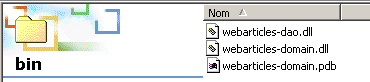
The Visual Studio project is configured to generate the [webarticles-domain.dll] assembly. This is generated in the [bin] folder of the project:
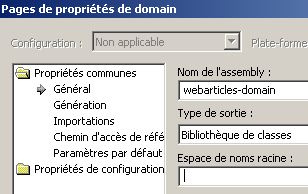 |  |
1.4.4.6. NUnit tests for the [domain] layer
The structure of the Visual Studio test project is as follows:
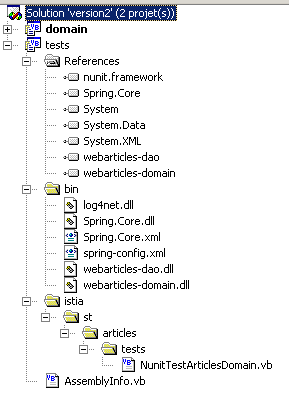
Comments:
- The [tests] project is of type [bibliothèque de classes]
- The [NUnit] tests require a reference to the [nunit.framework.dll] assembly
- The [NUnit] test class retrieves an instance of the object under test via Spring. Therefore,
- in the [bin] folder, the Spring class files
- in [References], a reference to the [Spring-Core.dll] assembly in the [bin] folder
- in [bin], a configuration file for Spring
- the test class requires the [webarticles-dao.dll] assembly from the [dao] layer and the [webarticles-domain.dll] assembly from the [domain] layer. These have been placed in the [bin] folder and their references added to the project references.
A test class NUnit from the [domain] layer could look like this:
Imports NUnit.Framework
Imports istia.st.articles.dao
Imports istia.st.articles.domain
Imports Spring.Objects.Factory.Xml
Imports System.IO

Namespace istia.st.articles.tests

    <TestFixture()> _
    Public Class NunitTestArticlesDomain

         ' the test object
        Private articlesDomain As IArticlesDomain
        Private articlesDao As IArticlesDao

        <SetUp()> _
        Public Sub init()
             ' retrieve an instance of the Spring object manufacturer
            Dim factory As XmlObjectFactory = New XmlObjectFactory(New FileStream("spring-config.xml", FileMode.Open))
             ' request instantiation of item object dao
            articlesDao = CType(factory.GetObject("articlesdao"), IArticlesDao)
             ' then the articlesdomain aobject
            articlesDomain = CType(factory.GetObject("articlesdomain"), IArticlesDomain)
        End Sub

        <Test()> _
        Public Sub getAllArticles()
             ' visual check
            listArticles()
        End Sub

        <Test()> _
        Public Sub getArticleById()
             ' article deletion
            articlesDao.clearAllArticles()
             ' check
            Dim articles As IList = articlesDomain.getAllArticles
            Assert.AreEqual(0, articles.Count)
             ' 2 items added
            articlesDao.ajouteArticle(New Article(3, "article3", 30, 30, 3))
            articlesDao.ajouteArticle(New Article(4, "article4", 40, 40, 4))
             ' check
            articles = articlesDomain.getAllArticles
            Assert.AreEqual(2, articles.Count)
             ' research article 3
            Dim unArticle As Article = articlesDomain.getArticleById(3)
             ' check
            Assert.AreEqual(unArticle.nom, "article3")
             ' research article 4
            unArticle = articlesDao.getArticleById(4)
             ' check
            Assert.AreEqual(unArticle.nom, "article4")
        End Sub

        <Test()> _
        Public Sub acheterPanier()
             ' article deletion
            articlesDao.clearAllArticles()
             ' check
            Dim articles As IList = articlesDomain.getAllArticles
            Assert.AreEqual(0, articles.Count)
             ' 2 items added
            articlesDao.ajouteArticle(New Article(3, "article3", 30, 30, 3))
            articlesDao.ajouteArticle(New Article(4, "article4", 40, 40, 4))
             ' check
            articles = articlesDomain.getAllArticles
            Assert.AreEqual(2, articles.Count)
             ' create a basket with two purchases
            Dim panier As New panier
            panier.ajouter(New Achat(New Article(3, "article3", 30, 30, 3), 10))
            panier.ajouter(New Achat(New Article(4, "article4", 40, 40, 4), 10))
             ' checks
            Assert.AreEqual(700, panier.totalPanier, 0.000001)
            Assert.AreEqual(2, panier.achats.Count)
             ' shopping cart validation
            articlesDomain.acheter(panier)
             ' checks
            Assert.AreEqual(0, articlesDomain.erreurs.Count)
            Assert.AreEqual(0, panier.achats.Count)
             ' research article 3
            Dim unArticle As Article = articlesDomain.getArticleById(3)
             ' check
            Assert.AreEqual(unArticle.stockactuel, 20)
             ' research article 4
            unArticle = articlesDao.getArticleById(4)
             ' check
            Assert.AreEqual(unArticle.stockactuel, 30)
             ' new basket
            panier.ajouter(New Achat(New Article(3, "article3", 30, 30, 3), 100))
             ' shopping cart validation
            articlesDomain.acheter(panier)
             ' checks
            Assert.AreEqual(1, articlesDomain.erreurs.Count)
             ' research article 3
            unArticle = articlesDomain.getArticleById(3)
             ' check
            Assert.AreEqual(unArticle.stockactuel, 20)
        End Sub

        <Test()> _
        Public Sub testRetirerAchats()
             ' delete contents of ARTICLES
            articlesDao.clearAllArticles()
             ' reads the ARTICLES table
            Dim articles As IList = articlesDao.getAllArticles()
            Assert.AreEqual(0, articles.Count)
             ' insertion
            Dim article3 As New Article(3, "article3", 30, 30, 3)
            articlesDao.ajouteArticle(article3)
            Dim article4 As New Article(4, "article4", 40, 40, 4)
            articlesDao.ajouteArticle(article4)
             ' reads the ARTICLES table
            articles = articlesDomain.getAllArticles()
            Assert.AreEqual(2, articles.Count)
             ' create a basket with two purchases
            Dim monPanier As New Panier
            monPanier.ajouter(New Achat(article3, 10))
            monPanier.ajouter(New Achat(article4, 10))
             ' checks
            Assert.AreEqual(700.0, monPanier.totalPanier, 0.000001)
            Assert.AreEqual(2, monPanier.achats.Count)
             ' add a previously purchased item
            monPanier.ajouter(New Achat(article3, 10))
             ' checks
             ' the total must be increased to 1000
            Assert.AreEqual(1000.0, monPanier.totalPanier, 0.000001)
             ' always 2 items in the basket
            Assert.AreEqual(2, monPanier.achats.Count)
             ' qty item 3 increased to 20
            Dim unAchat As Achat = CType(monPanier.achats(0), Achat)
            Assert.AreEqual(20, unAchat.qte)
             ' article 3 is removed from the basket
            monPanier.enlever(3)
             ' checks
             ' the total must be increased to 400
            Assert.AreEqual(400.0, monPanier.totalPanier, 0.000001)
             ' 1 item only in basket
            Assert.AreEqual(1, monPanier.achats.Count)
             ' this must be article no. 4
            Assert.AreEqual(4, CType(monPanier.achats(0), Achat).article.id)
        End Sub

         ' screen listing
        Private Sub listArticles()
            Dim articles As IList = articlesDomain.getAllArticles
            For i As Integer = 0 To articles.Count - 1
                Console.WriteLine(CType(articles(i), Article).ToString)
            Next
        End Sub

    End Class


End Namespace
Comments:
- We wanted to write a test program for the [IArticlesDomain] interface that is independent of its implementation class. Therefore, we used Spring to hide the name of the implementation class from the test program.
- The <Setup()> method retrieves a reference from Spring to the [articlesdomain] and [articlesdao] objects to be tested. These are defined in the following [spring-config.xml] file:
<?xml version="1.0" encoding="iso-8859-1" ?>
<!DOCTYPE objects PUBLIC "-//SPRING//DTD OBJECT//EN"
"http://www.springframework.net/dtd/spring-objects.dtd">
<objects>
    <object id="articlesdao" type="istia.st.articles.dao.ArticlesDaoArrayList, webarticles-dao" />
    <object id="articlesdomain" type="istia.st.articles.domain.AchatsArticles, webarticles-domain">
        <constructor-arg index="0">
            <ref object="articlesdao" />
        </constructor-arg>
    </object>
</objects>
This file states:
- (continued)
- for the singleton [articlesdao], the name of the implementation class [istia.st.articles.dao.ArticlesDaoArrayList] and where to find it [ webarticles-dao.dll]. Since instantiation does not require any parameters, none are defined here.
- for the singleton [articlesdomain], the name of the implementation class [istia.st.articles.domain.AchatsArticles] and where to find it [ webarticles-domain.dll]. The class [AchatsArticles] has a constructor with one parameter: the singleton managing access to the layer [dao]. Here, this is defined as the singleton [articlesdao] defined previously.
- The test class obtains an instance of the class under test, [articlesdomain], as well as an instance of the data access class, [articlesdao]. This last point is controversial. The test class should theoretically not need access to the [dao] layer, which it is not even supposed to know about. Here, we have disregarded this "convention" which, if followed, would have required us to create new methods in our [IArticlesDomain] interface.
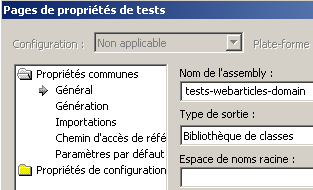
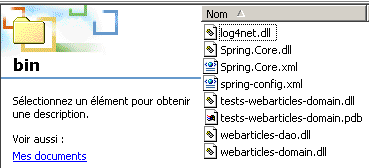
To test the [domain] layer, we generate DLL and [tests-webarticles-domain.dll] in the [bin] folder of the [tests] project:
 |  |
Then, using the [Nunit-Gui] application, we load this DLL and run the tests:
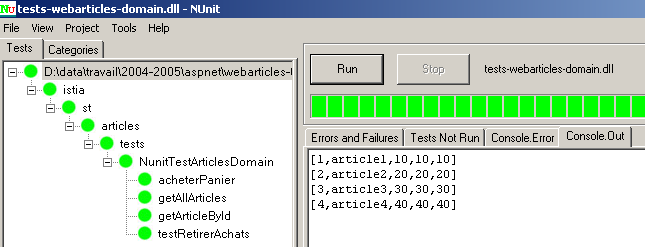
The reader viewing this document on screen will see that all tests were successful. We will then consider that we have an operational [domain] layer.
1.4.5. Conclusion
Recall that we want to build the following three-tier web application:
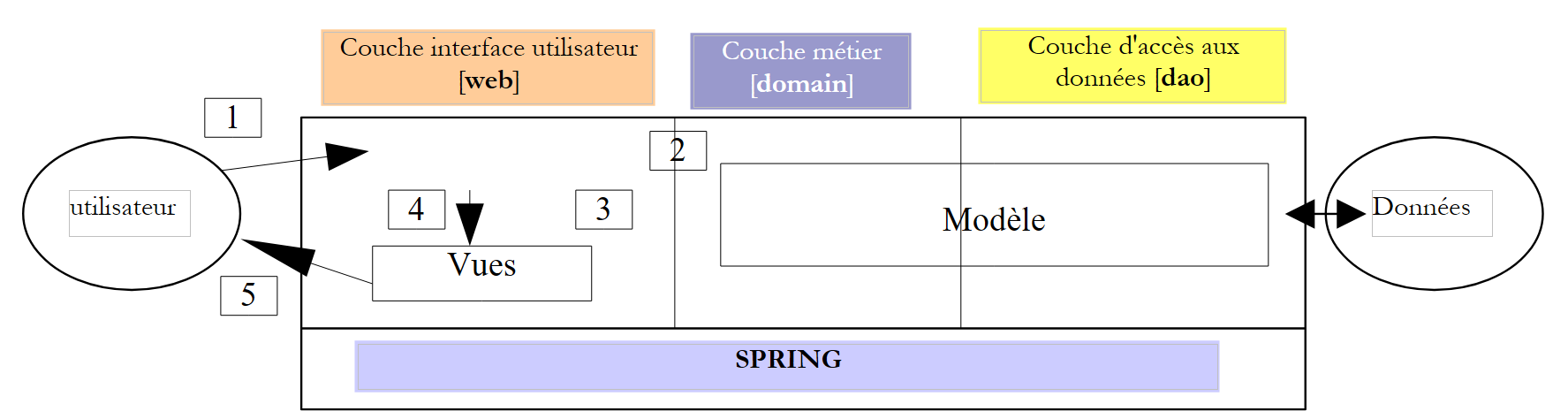 |
The M model of our MVC application is now written and tested. It is provided to us in two DLL and [webarticles-dao.dll, webarticles-domain.dll] files. We can now move on to the final layer, the [web] layer, which contains the C controller and the V views. We will first consider a method presented in the [Développement WEB avec ASP.NET 1.1 ] document
- the C controller is provided by two files, [global.asax, main.aspx]
- The V views are provided by aspx pages
1.5. The [web] layer
The MVC architecture of the web application will be as follows:
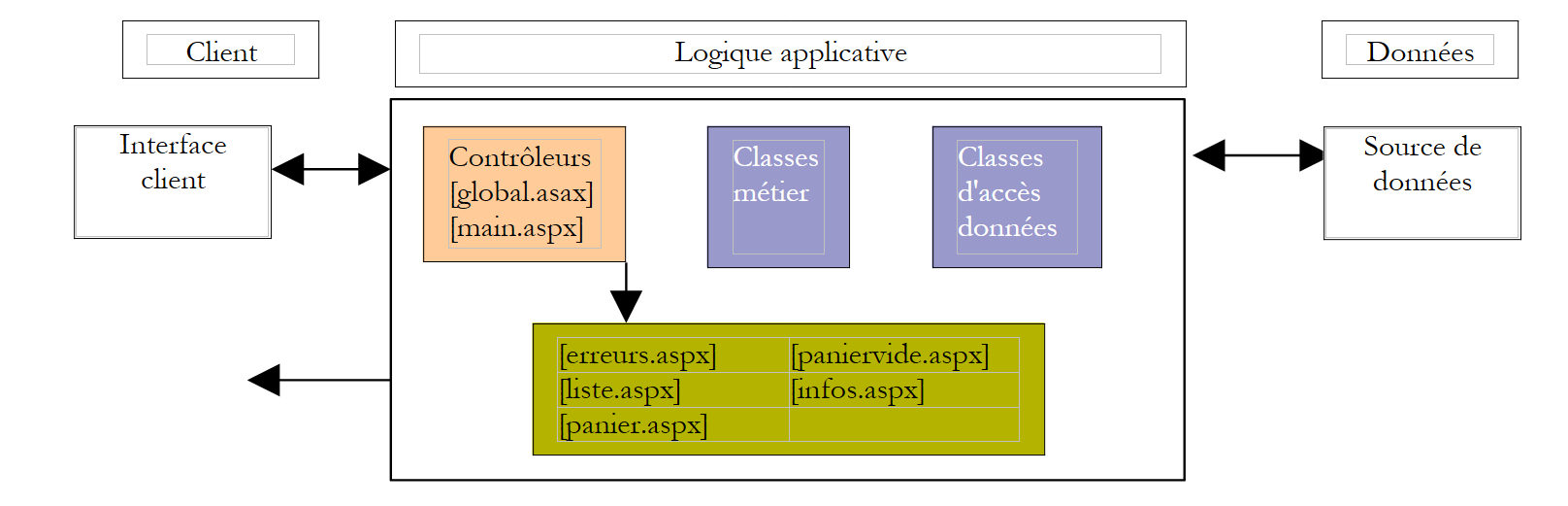 |
the business classes [domain], the data access classes [dao], and the data source | |
the pages ASPX | |
All requests from clients and HTTP pass through the following two controllers: global.asax: handles events related to the initial launch of the application main.aspx: processes each client's request individually |
1.5.1. The views
The views correspond to those presented at the beginning of this document:
liste.aspx | The views are grouped in the [vues] folder of the application 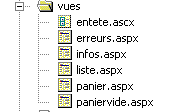 | |
infos.aspx | ||
panier.aspx | ||
paniervide.aspx | ||
erreurs.aspx |
1.5.2. The controllers
As mentioned, the controller will consist of two components:
- [global.asax,global.asax.vb]: used primarily to initialize the application and set up the context for all data to be shared between the various clients
- [main.aspx, main.aspx.vb]: the actual controller, which processes the HTTP requests from the clients.
The various requests from the clients will be sent to the [main.aspx] controller and will contain a parameter called [action] specifying the action requested by the client:
request | meaning | controller action | possible responses |
the client wants the list of items | - requests the list of items from the business | - [LISTE] - [ERREURS] | |
The customer requests information about one of the items displayed in the view [LISTE] | - requests the item from the business layer | - [INFOS] - [ERREURS] | |
the customer purchases an item | - requests the item from the business layer and adds it to the customer's cart | - [INFOS] if quantity error - [LISTE] if no error | |
The customer wants to remove an purchase from their cart | - retrieve the cart from the session and modifies it | - [PANIER] - [PANIERVIDE] - [ERREURS] | |
The customer wants to view their shopping cart | - retrieves the shopping cart from the session | - [PANIER] - [PANIERVIDE] - [ERREURS] | |
The customer has finished shopping and proceeds to the payment phase | - updates the database with the stock levels for the purchased items - empties the customer's cart of items whose purchase has been confirmed | - [LISTE] - [ERREURS] |
1.5.3. Application Configuration
We will configure the application to make it as flexible as possible with regard to changes such as:
- changes to the URL classes of the various views
- changes to the classes implementing the [IArticlesDao] and [IArticlesDomain] interfaces
- changes to the SGBD, the database, and the product table
1.5.3.1. Changes to URL
The names of the URL views will be placed in the [web.config] application configuration file along with a few other parameters:
<?xml version="1.0" encoding="utf-8" ?>
<configuration>
..
    <appSettings>
        <add key="urlMain" value="/webarticles/main.aspx"/>
        <add key="urlInfos" value="vues/infos.aspx"/>
        <add key="urlErreurs" value="vues/erreurs.aspx"/>
        <add key="urlListe" value="vues/liste.aspx"/>
        <add key="urlPanier" value="vues/panier.aspx"/>
        <add key="urlPanierVide" value="vues/paniervide.aspx"/>
    </appSettings>
</configuration>
1.5.3.2. Changing the classes that implement the interfaces
In the spirit of three-tier architectures, the layers must be isolated from one another. This isolation is achieved as follows:
- the layers communicate with each other via interfaces rather than concrete classes
- the code of one layer never instantiates the class of another layer itself in order to use it. It simply requests an instance of the interface implementation from an external tool—in this case, Spring—for the layer it wishes to use. To do this, we know that it does not need to know the name of the implementation class, but only the name of the Spring singleton for which it wants a reference.
In our application, Spring will be configured in the [web.config] file of the web application as follows:
<?xml version="1.0" encoding="iso-8859-1" ?>
<configuration>
    <configSections>
        <sectionGroup name="spring">
            <section name="context" type="Spring.Context.Support.ContextHandler, Spring.Core" />
            <section name="objects" type="Spring.Context.Support.DefaultSectionHandler, Spring.Core" />
        </sectionGroup>
    </configSections>
    <spring>
        <context type="Spring.Context.Support.XmlApplicationContext, Spring.Core">
            <resource uri="config://spring/objects" />
        </context>
        <objects>
    <object id="articlesDao" type="istia.st.articles.dao.ArticlesDaoArrayList, webarticles-dao" />
    <object id="articlesDomain" type="istia.st.articles.domain.AchatsArticles, webarticles-domain">
        <constructor-arg index="0">
            <ref object="articlesDao" />
        </constructor-arg>
    </object>
        </objects>
    </spring>
        <appSettings>
        <add key="urlMain" value="/webarticles/main.aspx"/>
        <add key="urlInfos" value="vues/infos.aspx"/>
        <add key="urlErreurs" value="vues/erreurs.aspx"/>
        <add key="urlListe" value="vues/liste.aspx"/>
        <add key="urlPanier" value="vues/panier.aspx"/>
        <add key="urlPanierVide" value="vues/paniervide.aspx"/>
    </appSettings>
</configuration>
To access the [métier] layer, a class in the [web] layer can request the [articlesDomain] singleton. Spring will then instantiate an object of type [istia.st.articles.domain.AchatsArticles]. For this instantiation, it needs an object of type [articlesDao], that is, an object of type [istia.st.articles.dao.ArticlesDaoArrayList]. Spring will then instantiate such an object. At the end of the operation, the [web] layer that requested the [articlesDomain] singleton has the entire chain connecting it to the data source:
 |
1.5.3.3. Changes related to SGBD or the database
This point will be ignored here since we are in a test application without SGBD. We will address the implementation of a [dao] layer based on a SGBD in a later section.
1.5.4. The <asp:> tag library
Consider the [ERREURS] view, which displays a list of errors:
The [ERREURS] view is responsible for displaying a list of errors that the [main.aspx] controller has placed in the request context under the name [context.Items("erreurs")]. There are several ways to write such a page. Here, we are only interested in the error display portion.
Recall that a ASPX page has a presentation section HTML and a code section .NET that prepares the data the presentation section must display. These two parts can be in the same file [aspx] (solution WebMatrix) or in two files: [aspx] for the presentation, [aspx.vb] for the code. The latter solution is the one used by Visual Studio. To complicate matters, the presentation part HTML may also contain .NET code, which tends to blur the distinction between [contrôleur] and [présentation] from the user’s perspective. This approach is generally strongly discouraged. Removing all code from the [présentation] section required the creation of tag libraries. These "hide" the code under the guise of tags analogous to HTML tags. We present two possible solutions for the [ERREURS] page.
Our first solution uses .NET code in the [présentation] section of the page. The ASPX page retrieves the list of errors present in the request in its [erreurs.aspx.vb] controller section:
        Protected erreurs As ArrayList

        Private Sub Page_Load(ByVal sender As System.Object, ByVal e As System.EventArgs) Handles MyBase.Load
...
             ' error recovery
            erreurs = CType(context.Items("erreurs"), ArrayList)
        End Sub
then displays them in section [présentation, erreurs.aspx]:
                <h2>Les erreurs suivantes se sont produites :</h2>
                <ul>
                <%
                    for i as integer=0 to erreurs.count-1
                        response.write("<li>" & erreurs(i).ToString & "</li>")
                    next
                %>
                </ul>
The second solution uses the <asp:repeater> tag from the <asp:> tag library in ASP.NET. If you build a ASPX page graphically, this tag is available as a server component that you drop onto the design form. If you build the ASPX code manually, you can refer to it as a tag library.
With the <asp:> tag library, the code ASPX from the previous view [ERREURS] becomes the following:
        <asp:Repeater id="rptErreurs" runat="server">
            <HeaderTemplate>
                <h3>Les erreurs suivantes se sont produites :
                </h3>
                <ul>
            </HeaderTemplate>
            <ItemTemplate>
                <li>
                    <%# Container.DataItem %>
                </li>
            </ItemTemplate>
            <FooterTemplate>
                </ul>
            </FooterTemplate>
        </asp:Repeater>
The
tag is used to repeat a HTML template across the various elements of a data source. Its various elements are as follows:
the HTML template to display before the data source elements are displayed | |
the HTML template to be repeated for each element of the data source. The expression [<%# Container.DataItem %>] is used to display the value of the current element of the data source | |
the template HTML to display after the data source elements have been displayed |
The data source is linked to the tag, typically in the [contrôleur] section of the page:
        Protected WithEvents rptErreurs As System.Web.UI.WebControls.Repeater

        Private Sub Page_Load(ByVal sender As System.Object, ByVal e As System.EventArgs) Handles MyBase.Load
..
             ' link errors to rptErreurs
            With rptErreurs
                .DataSource = context.Items("erreurs")
                .DataBind()
            End With
        End Sub
This binding can also be done during page design if the data source is already known, such as an existing database.
In our views, we will use another tag: <asp:datagrid>, which allows us to display a data source in the form of a table.
1.5.5. Structure of the Visual Studio solution for the [webarticles] application
A web application is a puzzle with many pieces. Giving it a MVC architecture generally increases the number of these pieces. The structure of the [webarticles] application under [Visual Studio] is as follows:
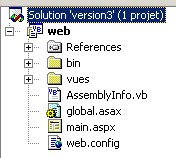 | 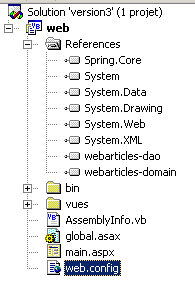 | 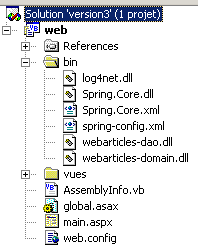 |
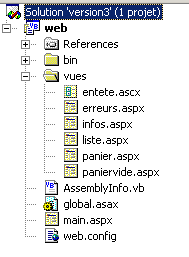 |
Comments:
- The [web] project is of type [bibliothèque de classes] and not of type [Application web ASP.NET], as one might logically expect. The [Application web ASP.NET] type requires the presence of the IIS web server on the development machine or on a remote machine. The IIS server does not come standard on Windows XP Home Edition machines. However, many PC machines are sold with this version. To allow readers with Windows XP to implement the application under consideration, we will use the Cassini Web Server (see appendix), available for free from Microsoft, and we will replace the [Application web ASP.NET] project with a [bibliothèque de classes] project. This entails a few drawbacks, which are explained in the appendices.
- The DLL files used by the application are as follows:
contains the classes of the data access layer | |
contains the classes of the business layer | |
contains the Spring classes that allow us to integrate the web, domain, and dao layers | |
logging classes—used by Spring |
These DLL files are placed in the [bin] folder and added to the project references.
1.5.6. The ASPX views
As previously recommended, we will use the <asp:> tag library in our ASPX views.
1.5.6.1. The [entete.ascx] user component
To ensure consistency across the different views, they will share the same header, which displays the application name along with the menu:
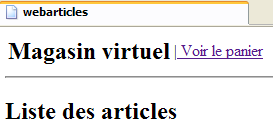 | 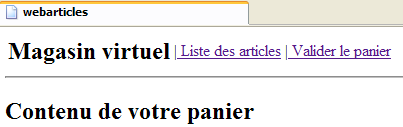 |
The menu is dynamic and set by the controller. The controller includes in the request sent to the ASPX page an "actions" key attribute with an associated value of an array of Hashtable() elements. Each element of this array is a dictionary intended to generate a option for the header menu. Each dictionary has two keys:
- href: the URL associated with the menu's option
- link: the menu text
We will turn the header into a user control. A user control encapsulates a portion of a page (layout and associated code) into a component that can then be reused in other pages. Here, we want to reuse the [entete] component in the other views of the application. The presentation code will be in [entete.ascx] and the associated control code in [entete.ascx.vb]. The presentation code will use an <asp:repeater> component to display the menu options table:
 |
No. | type | name | role |
1 | repeater | rptMenu data source: an array of dictionaries with two keys: href, link | display menu options |
The page presentation code will be as follows:
Comments:
- The [repeater] component is defined in lines 6–14
- Each element in the data source associated with the repeater is a dictionary with two keys: href (line 9) and link (line 10)
The associated control code will be as follows:
Comments:
- The component of type [EnteteWebArticles] has a public, write-only property named [actions] - line 7
- This property allows the <asp:repeater> component named [rptMenu] (line 10) to be associated with the array of options calculated by the application controller (lines 11–12).
The other views in the application will use the header defined by [entete.ascx]. The [erreurs.aspx] page, for example, will include the header using the following code:
Comments:
- Line 1 specifies that the <WA:entete> tag must be associated with the component defined by the [entete.ascx] file. The [TagPrefix] and [TagName] attributes are optional.
- Once this is done, the component is inserted into the page’s presentation code using line 9. Upon execution, this tag will include the code for page [entete.ascx] within the code of the page ASPX that contains it. The control code [erreurs.aspx.vb] will handle initializing this component. It can do so as follows:
Comments:
- Line 6 creates an object of type [EnteteWebArticles], which is the type of the component being created
- Line 11 initializes the [actions] property of this object
1.5.6.2. The [liste.aspx] view
1.5.6.2.1. Introduction
This view displays the list of items available for sale:
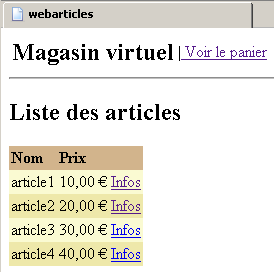 | 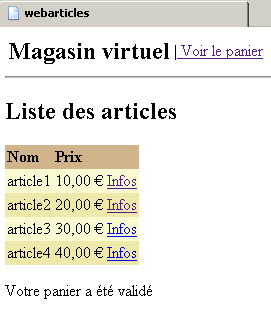 |
It is displayed following a request /main?action=list or /main?action=cartvalidation. The elements of the controller request are as follows:
Hashtable() object - the array of menu options | |
ArrayList objects of type [Article] | |
object String - message to display at the bottom of the page |
Each link [Infos] in the table HTML of articles has a URL of the form [?action=infos&id=ID] where ID is the field id of the displayed item.
1.5.6.2.2. Page components
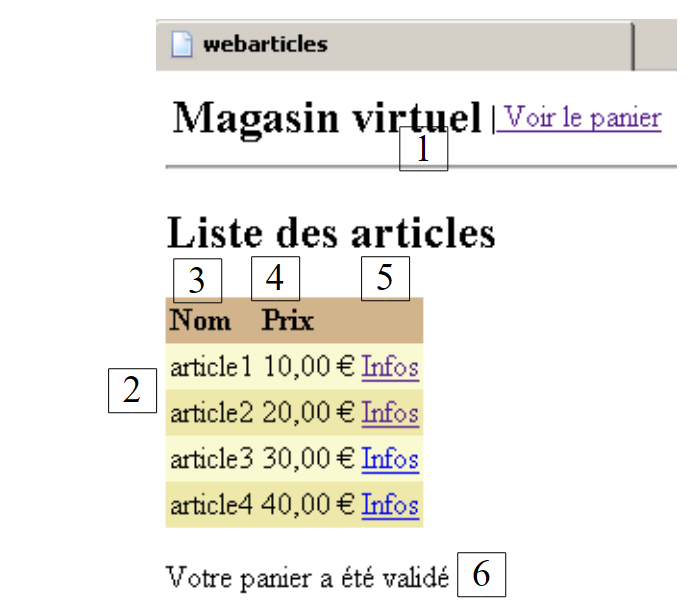 |
No. | type | name | role |
user component | header | display header | |
DataGrid | DataGridArticles 3 - related column: header: Name, field: name 4 - related column: header: Price, field: price 5 - hypertext column: text: Info, field Url: id, format URL: /webarticles/main.aspx?action=info&id={0} | display items for sale | |
label | lblMessage | display a message |
Here’s a reminder of how to set these properties:
- In Visual Studio, select [DataGrid] to access its properties sheet:
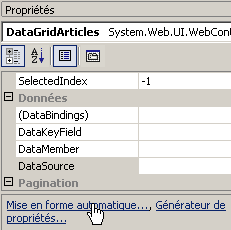
- Use the link [Mise en forme automatique] above to manage the layout of the displayed table
- and the [Générateur de propriétés] link to manage its content
1.5.6.2.3. [liste.aspx] presentation code
Comments:
- Line 9 defines the page header
- Lines 12–24 define the characteristics of [DataGrid]
- Line 26 defines the label [lblMessage]
1.5.6.2.4. Controller code [liste.aspx.vb]
Comments:
- The page components appear on lines 13–15. Note that we needed to create a [EnteteWebArticles] object using a [new] operator, whereas this was not necessary with the other components. Without this explicit creation, we encountered a runtime error indicating that the [entete] object did not reference anything. This issue warrants further investigation. It has not been investigated.
- The table of header menu options is taken from the context to initialize the [entete] component of the page—line 20
- The list of items is taken from the context—line 22
- to initialize the [DataGridArticles] component—lines 24–27
- The component [lblMessage] is initialized with a message placed in the context - line 29
1.5.6.3. The view [infos.aspx]
1.5.6.3.1. Introduction
This view displays information about an item and also allows it to be purchased:
It is displayed following a request /main?action=infos&id=ID or a request /main?action=purchase&id=ID when the purchased quantity is incorrect. The elements of the controller request are as follows:
object Hashtable() - the array of menu options | |
object of type [Article] - item to display | |
object String - message to display in case of an error regarding the quantity | |
object String - value to display in the input field [Qte] |
The fields [msg] and [qte] are used in case of an input error regarding the quantity:
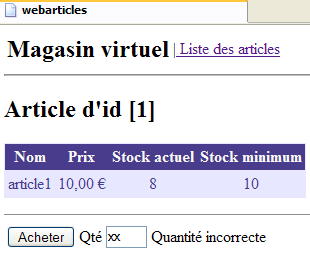
This page contains a form that is submitted via the [Acheter] button. The target of URL for POST is [?action=achat&id=ID], where ID is the id for the purchased item.
1.5.6.3.2. Page components
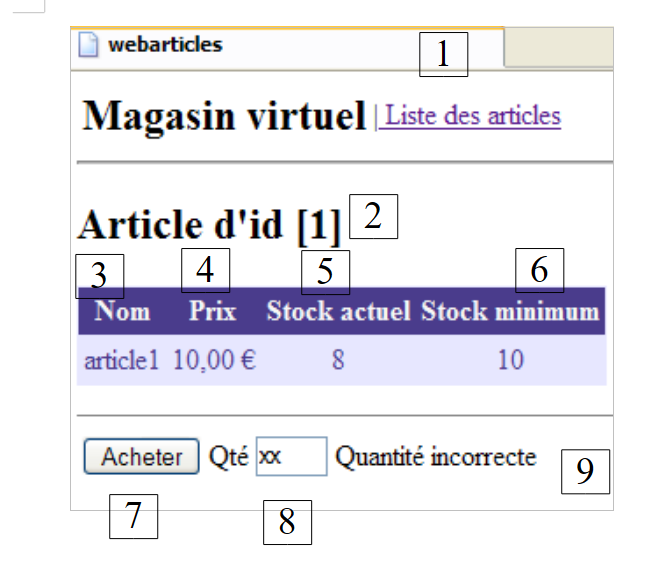 |
No. | type | name | role |
user component | header | display header | |
literal | litID | display item number | |
DataGrid | DataGridArticle 3 - related column: header: Name, field: name 4 - related column: header: Price, field: price 5 - related column: header: Current Stock, field: stockActuel 6 - related column: header: Minimum Stock, field: stockMinimum | display an item | |
HTML Submit | Submit the form | ||
HTML Input runat=server | txtQte | Enter the quantity purchased | |
label | lblMsgQte | Possible error message |
1.5.6.3.3. The presentation code [infos.aspx]
Comments:
- The header is included in the page - line 9
- The literal [litId] is defined on line 10
- DataGrid and [DataGridArticles] are defined on lines 12–34
- The form is defined on lines 36–46. It is of type POST.
- The target for POST is provided by a variable [strAction]—line 36. This variable must be defined by the controller.
- The input field for the purchased quantity is defined on line 41. It is a HTML server component (runat=server). On the code side, it is accessed via an object.
- Line 42 defines the label [lblMsgQte], which will contain any error messages regarding the entered quantity
1.5.6.3.4. The control code [infos.aspx.vb]
Comments:
- The page components are defined in lines 10–14
- The class defines a public property [strAction] used to set the target of the form's POST - lines 17-25
- The article to be displayed is retrieved from the application context—line 30
- The table of header menu options is retrieved from the context to initialize the page’s [entete] component—line 32
- lines 33-39, the [DataGridArticle] component is linked to a [ArrayList] data source containing only the item retrieved on line 30
- The [lblMsgQte, txtQte] components are initialized with information taken from the context—lines 42–45
- The [straction] property is also initialized with information taken from the context—line 47. This variable is used to generate the [action] attribute of the HTML form present on the page:
1.5.6.4. The [panier.aspx] view
1.5.6.4.1. Introduction
This view displays the contents of the shopping cart:
It is displayed following a request to /main?action=cart or /main?action=checkout&id=ID. The controller request parameters are as follows:
Hashtable() object - the array of menu options | |
object of type [Panier] - the shopping cart to display |
Each link [Retirer] in the HTML array of shopping cart items has a URL of the form [?action=retirerachat&id=ID], where ID is the [id] of the item to be removed from the cart.
1.5.6.4.2. The components of the page
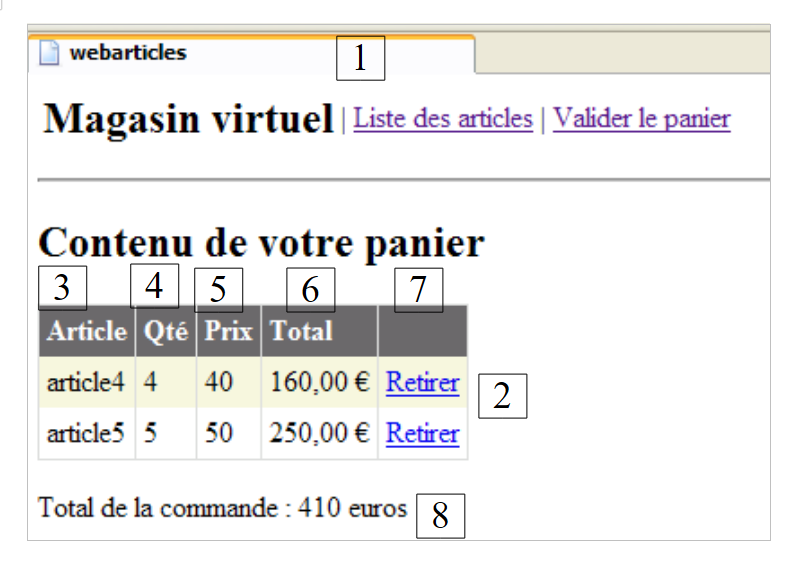 |
No. | type | name | role |
user component | header | display header | |
DataGrid | DataGridAchats 3- related column - header: Item, field: name 4 - related column - header: Qty, field: qty 5 - related column - header: Price, field: price 6 - related column - header: Total, field: total, formatting {0:C} 7 - hypertext column - Text: Remove, p Url: id, format Url: /webarticles/main.aspx?action=retirerachat&id={0} | view the list of purchased items | |
label | lblTotal | View the amount due |
1.5.6.4.3. The presentation code [panier.aspx]
Comments
- Line 9 includes the header
- Lines 12–27 define the [DataGridAchats] component
- line 29, component [lblTotal] is defined
1.5.6.4.4. Control code [panier.aspx.vb]
Comments:
- The page components are declared on lines 11–13
- The initialization of the [entete] component is identical to that found in the pages already studied—line 17
- The shopping cart to be displayed is retrieved from the session—line 19
- Displaying this shopping cart using the [DataGridAchats] component poses problems. The difficulty stems from the component’s initialization. Let’s review its columns:
- column [Article] associated with field [nom] in the data source
- column [Qté] associated with field [qte] in the data source
- column [Prix] associated with field [prix] in the data source
- column [Total] associated with field [total] in the data source
The data source we have is the shopping cart and its shopping list. The latter will be the data source for [DataGrid]. Only the [Achat] objects that will populate the rows of [DataGrid] do not have the [nom, qte, prix, total] properties expected by [DataGrid]. Therefore, we create here, specifically for [DataGrid], a data source whose elements have the characteristics expected by [DataGrid]. These elements will be of type [LigneAchat], a class created for this purpose and derived from the [Achat] class—lines 36–66
- Once the [LigneAchat] class is defined, the data source for [DataGridAchats] is constructed from the shopping cart found in the session - lines 20-30
- the purchase amount is displayed using the [totalPanier] property of the [Panier] class - line 32
1.5.6.5. The view [paniervide.aspx]
1.5.6.5.1. Introduction
This view displays information indicating that the shopping cart is empty:
It is displayed following a request /main?action=cart or /main?action=removepurchase&id=ID. The elements of the controller request are as follows:
Hashtable() object - the menu options array |
1.5.6.5.2. Page components
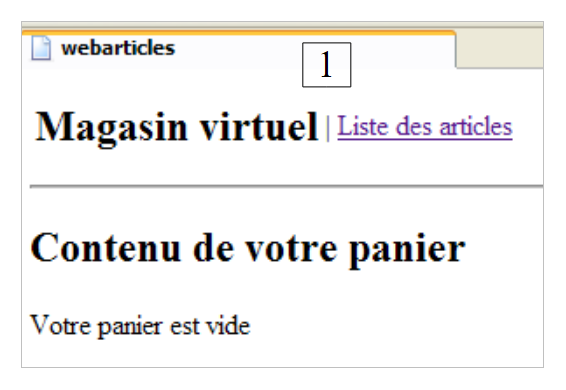 |
No. | type | name | role |
user component | header | display header |
1.5.6.5.3. The presentation code [paniervide.aspx]
Comments:
- The header is included on line 9
1.5.6.5.4. The control code is [paniervide.aspx.vb]
Comments:
- We simply initialize the page's only dynamic component—line 10
1.5.6.6. The view [erreurs.aspx]
1.5.6.6.1. Introduction
This view is displayed in the event of errors:
It is displayed following any request that results in an error, except for the purchase action with an incorrect quantity, which is handled by the [INFOS] view. The elements of the controller request are as follows:
Hashtable() object - the menu options array | |
ArrayList of [String] objects representing the error messages to be displayed |
1.5.6.6.2. Page components
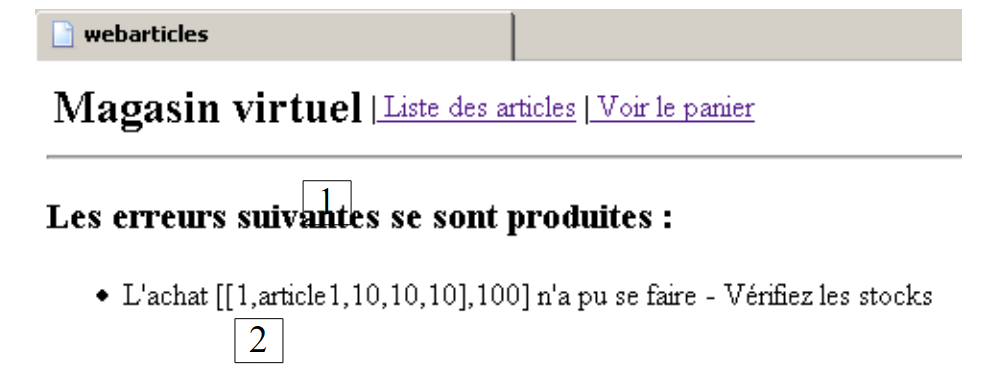 |
No. | type | name | role |
user component | header | display header | |
repeater | rptErreurs | display the list of errors |
1.5.6.6.3. The presentation code [erreurs.aspx]
Comments:
- The header is defined on line 9
- The [rptErreurs] component is defined on lines 13–19. Its content comes from a data source of type [ArrayList] containing [String] objects.
1.5.6.6.4. The control code [erreurs.aspx.vb]
Comments:
- The [entete] component is initialized as usual, lines 9 and 14
- The [rptErreurs] component is initialized with the [ArrayList] error list found in the context—lines 16–19
1.5.7. The controllers global.asax, main.aspx
We still need to write the core of our web application, the controller. Its role is to:
- retrieve the client’s request,
- process the action requested by the client using business classes,
- send the appropriate view in response.
1.5.7.1. The [global.asax.vb] controller
When the application receives its very first request, the procedure [Application_Start] in the file [global.asax.vb] is executed. This will be the only time. The purpose of the [Application_Start] procedure is to initialize the objects required by the web application, which will be shared in read-only mode by all clients threads. These shared objects can be placed in two locations:
- the controller’s private fields
- the application's execution context (Application)
The [Application_Start] method of the [global.asax.vb] application will perform the following actions:
- check the file [web.config] for the parameters necessary for the application to function properly. These were described in section 1.5.3.
- will place a list of any errors in the application context in the form of a [ArrayList erreurs] object. This list will be empty if there are no errors but will exist nonetheless.
- If errors occurred, the [Application_Start] method stops there. Otherwise, it requests a reference to a singleton of type [IArticlesDomain], which will be the business object that the controller uses for its needs. As explained in 1.5.3.2, the controller will request this singleton from the Spring framework. This instantiation operation may result in various errors. If so, these errors will again be stored in the [erreurs] object within the application context.
The [global.asax.vb] controller has a [Session_Start] procedure that runs every time a new customer arrives. In this procedure, an empty shopping cart will be created for the customer. This shopping cart will be maintained throughout this particular customer’s requests. The code could be as follows:
Comments:
- The parameters expected in [web.config] are defined in an array - line 18
- They are looked up in [web.config]. If they are present, they are stored in the application context; otherwise, an error is logged in the [erreurs] error list—lines 21–33
- if there are no errors, Spring is asked for a reference to the singleton [articlesDomain], which manages access to the application’s [domain] layer—lines 35–47. Any errors are logged in [erreurs].
- Errors are logged in the application context—line 49
- The procedure exits if there were any errors—line 51
- An array of three dictionaries is created. Each has two keys: href and link. This array represents the three possible menu options—lines 52–71
- This array is stored in the application context - line 73
- For each new customer, the [Session_Start] procedure is executed. An empty shopping cart is created in the customer’s session—lines 78–81
1.5.7.2. The [main.aspx.vb] controller
The controller [main.aspx.vb] processes all requests from clients. This is because they all follow the format [/webarticles/main.aspx?action=XX]. A request is processed as follows:
- The [erreurs] object in the application context will be checked. If it is not empty, this means that errors occurred during application initialization and the application cannot run. In response, the [ERREURS] view will be sent.
- The [action] parameter of the request will be retrieved and checked. If it does not correspond to a known action, the [ERREURS] view is sent with an appropriate error message.
- If the [action] parameter is valid, the client’s request is passed to an action-specific procedure for processing:
method | request | processing | possible responses |
GET /main?action=list | - request the list of items from the business class - display it | [LISTE] or [ERREURS] | |
GET /main?action=infos&id=ID | - request the article from id=ID to the business unit - display it | [INFOS] or [ERREURS] | |
POST /main?action=purchase&id=ID - The quantity purchased is included in the posted parameters | - Request the item from id=ID the business class - Add it to the shopping cart in the customer session | [LISTE] or [INFOS] or [ERREURS] | |
GET /main?action=removepurchase&id=ID | - Remove the item from id=ID from the shopping cart's purchase list the customer session | [PANIER] | |
GET /main?action=cart | - display the client session | [PANIER] or [PANIERVIDE] | |
GET /main?action=cartvalidation | - Decrement the stock levels of all items in the customer's customer's session | [LISTE] or [ERREURS] |
The skeleton of the [main.aspx.vb] controller could be as follows:
Comments:
- The class has two private fields that will be shared among the methods—lines 15–16:
- articlesDomain: the singleton for accessing the [domain] layer
- options: the array of dictionaries containing menu options
- the procedure [Page_Load]:
- will initialize the class's two private fields
- retrieve the [action] parameter from the request and execute the method that handles this action.
1.5.7.3. The [Page_Load] method
This event is the first to occur on the page. The code is as follows:
Comments:
- Each time the page loads, we ensure that the application initialization performed by [global.asax] was successful.
- To do this, we retrieve the list of errors placed there by [global.asax] from the application context - line 4
- If this list is not empty, we display the view [ERREURS]—lines 6–10
- We retrieve the singleton [articlesDomain] placed by [global.asax] in the application context and store it in the private field [articlesDomain] so that it is available to the class’s various methods—line 12
- We perform a similar operation with the menu options array - line 14
- We retrieve the parameter [action] from the request - line 16
- We execute the method corresponding to the requested action. An unanticipated action is treated as action [liste] - lines 16–36
1.5.7.4. Processing action [liste]
This involves displaying the list of items:
The code is as follows:
Comments:
- Any errors are logged in a [ArrayList] - line 4
- The list of items is requested from the singleton [articlesDomain] - lines 5-12
- If there were errors, we send the view [ERREURS] - lines 13-19
- otherwise, the view [LISTE] is sent - lines 20-24
1.5.7.5. Processing of action [infos]
The customer requested information about a specific item:
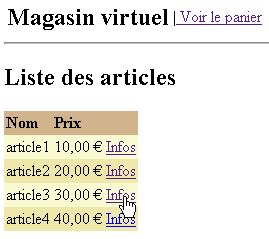
The code is as follows:
Comments:
- Any errors are logged in a [ArrayList] file - line 4
- The ID of the requested item is retrieved from the request - line 6
- This ID is validated. It must exist and must be an integer. If not, the [ERREURS] view is returned with the appropriate error message - lines 7-27
- Once the ID has been verified, the item is requested from the singleton [articlesDomain]. If an exception occurs, the view [ERREURS] is returned - lines 29-39
- If the article was not found, the view [ERREURS] is returned - lines 41-48
- if the item was found, it is placed in the user's session and then displayed in view [INFOS] - lines 50-56
1.5.7.6. Processing of action [achat]
The customer purchased the item displayed in view [INFOS].
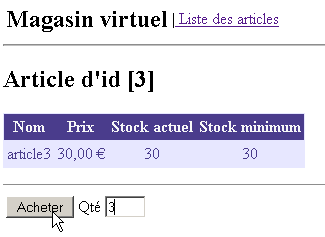
The code is as follows:
Comments:
- The item placed in the session is retrieved - line 5
- If it is not there (the session may have expired), the view [LISTE] is displayed - lines 7-10
- The quantity purchased is retrieved from the query - line 12
- Its validity is checked - lines 13-29
- if invalid, depending on the case, the view [LISTE] is sent - line 16 or the view [INFOS] - lines 24-28
- if everything is normal, the purchase is added to the cart - lines 31-32
- then view [LISTE] is sent - line 34
1.5.7.7. Processing action [panier]
The customer has made several purchases and requests to view the shopping cart:
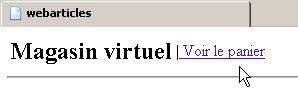
The code is as follows:
Comments:
- We retrieve the cart from the session - line 4. We do not check here to ensure that we actually retrieve something. We should do so because the session may have expired.
- If the shopping cart is empty, we send the view [PANIERVIDE] - lines 6-10
- otherwise, we send the view [PANIER] - lines 11-14
1.5.7.8. Processing the [retirerachat] action
The customer wants to remove a purchase from their shopping cart:
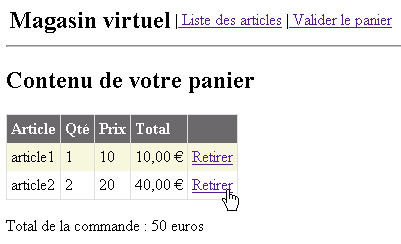
The code is as follows:
Comments:
- Retrieve the shopping cart from the session - line 4. We do not check here to ensure that something is actually retrieved. This should be done because the session may have expired.
- Retrieve the ID [id] of the item to be removed from the query - line 8.
- The corresponding purchase is removed from the cart - line 10
- The validity of the ID for the purchased item has not been checked here. If the ID is of an invalid type, an exception will occur and be handled in lines 11–13. If it is valid but does not exist, the method [panier.enlever]—line 10—does nothing.
- The new shopping cart is displayed - line 16
1.5.7.9. Processing the [validerpanier] action
The customer wants to confirm their shopping cart:
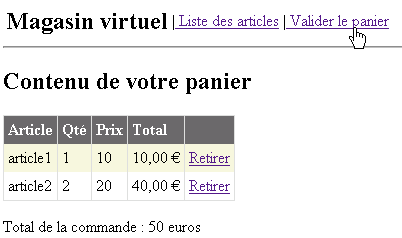
The code is as follows:
Comments:
- We retrieve the cart from the session - line 6. We do not check here to ensure that we actually retrieve something. We should do so because the session may have expired.
- If the session has expired, we will have a pointer [nothing] for the shopping cart, and the method [acheter]—line 9—will throw an exception, and the view [ERREURS] will be sent. However, the error message will be unclear to the user.
- Lines 8–16: We attempt to validate the shopping cart retrieved from the session. Some purchases may not be validated if the requested quantity exceeds the stock of the requested item. These cases are stored by the [acheter] method in an error list, which is retrieved on line 11.
- If there are errors, the view [ERREURS] is sent—lines 18–23
- otherwise, the [LISTE] view is sent—lines 25–26
1.6. Conclusion
Here we have developed an application based on a MVC model. As of April 2005, there do not appear to be any professional MVC development frameworks in ASP.NET, as there are in Java (Struts, Spring, ...). The [Spring.net] project should offer one soon. Until then, the method described above allows for viable MVC development for medium-sized applications.