9. Case Study: The Tax Calculation Server in NestJS
9.1. Recap of the Requirement
The server to be ported is an income tax calculation server (PHP) (see Introduction to the PHP7 Language Through Examples), architected in layers (Config / Entities / Model-DAO-Business / Controllers / Responses / Views), with a front-end controller (main.php) that routes incoming requests—all of which take the form URL (main.php?action=...)—to the appropriate controller based on the action. The goal of the port was to preserve this MVC architecture exactly as-is in NestJS, action by action, status code by status code, so that it would remain compatible with the HTML/TypeScript client already written for the PHP server.
9.2. The MVC architecture is carried over
The mapping between the two servers is direct:
- Config/config.json ↔ ConfigService;
- Entities/*.php ↔ entities/*.entity.ts (TaxAdminData, Simulation);
- Model/ServerDao*.php ↔ ServerDaoService (layer [DAO], Chapter 5);
- Model/ServerBusiness.php ↔ ServerBusinessService (layer [business], line-by-line scope);
- Controllers/*Controller.php (one per action) ↔ one action controller per class TypeScript, dynamically selected by a register (ActionsRegistryService);
- Responses/*Response.php ↔ ResponseSenderService (jSON, XML) and HtmlViewRendererService (HTML);
- Views/*.php ↔ EJS templates (views/*.ejs), with the same Bootstrap layout.
9.3. Project File Structure
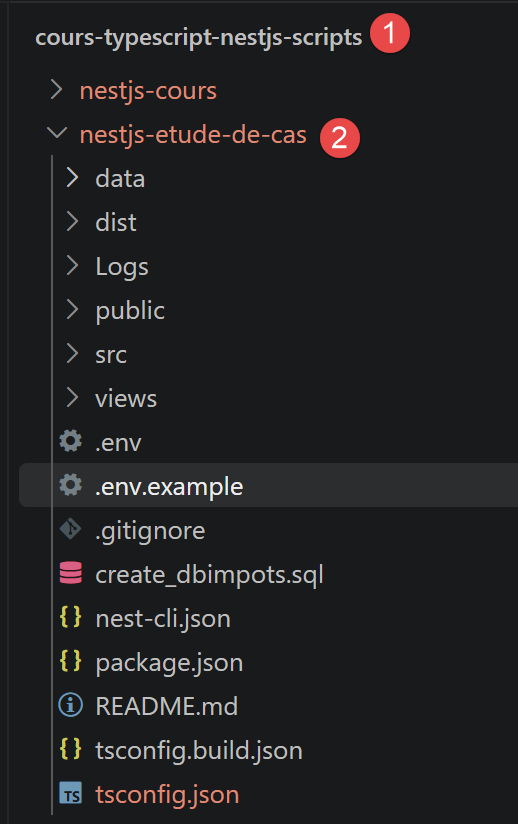
Before going into detail about each layer, here is the complete directory structure of the nestjs-case-study project, as it appears after running npm install (the dist/ folder, generated by npm run build, and the node\_modules/ directory are not shown):
The role of each element:
- .env / .env.example — environment variables (port, session secret, MySQL and TAX_DATA_SOURCE parameters, etc.) read by ConfigService; .env is not versioned (.gitignore); .env.example serves as a template to copy (cp .env.example .env);
- .gitignore — excludes node_modules/, dist/, .env, and the repository logs;
- README.md — project documentation (installation, mapping between PHP and NestJS, annotated directory structure): this chapter summarizes and expands on that content;
- create_dbtaxes.sql — script for creating the MySQL dbtaxes-2019 database (tables tbbrackets, tbconstants..., used only when TAX_DATA_SOURCE=mysql);
- nest-cli.json, tsconfig.json, tsconfig.build.json — configuration of CLI, NestJS, and the TypeScript compiler, already discussed in previous chapters;
- package.json — dependencies (ejs, express-session, mysql2, js2xmlparser, dotenv...) and npm scripts (start, start:dev, build);
- data/tax-admin-data.json — backup tax dataset, used when TAX_DATA_SOURCE=json: no need to install MySQL to test the server;
- Logs/ — application log directory (logs.txt), written by LoggerService; created automatically at startup if it does not yet exist;
- public/Resources/logo.jpg — static image, served as-is by app.useStaticAssets(...) in main.ts, used by the banner in HTML views;
- views/ (at the project root) — the EJS templates and their partials, detailed further below in “Building HTML Pages”;
- src/main.ts — entry point: starts the NestJS server (see below);
- src/app.module.ts — root module: declares MainController as the sole controller and all of the application’s providers;
- src/main.controller.ts — the front-end controller, already described above;
- src/config/ — the application configuration (ConfigService), detailed further below;
- src/entities/ — the data classes (Simulation, TaxAdminData, TaxException), detailed further below;
- src/model/ — the [DAO] and [business] layers;
- src/actions/ — one controller per action, the common interface ActionController, and the registry ActionsRegistryService;
- src/responses/ — response generation (jSON/XML) and CORS handling (ResponseSenderService);
- src/views/ — Note: Do not confuse this with the
views/directory in the root directory. This folder contains only TypeScript, the construction of display templates (view-models.ts), and the selection/rendering of the view (EJS) (html-view-renderer.service.ts); - src/session/ — TypeScript typing for the Express session (session.types.ts);
- src/utilities/ — logging (LoggerService);
- src/filters/ — reserved directory, currently empty: not yet used in this version of the project.
Two files deserve further mention: src/main.ts and src/app.module.ts, both specific to this project (beyond the framework already covered in previous chapters). Excerpt from src/main.ts:
Let’s comment on this code:
- line 4: app.useStaticAssets(join(process.cwd(), 'public')); — serves the files in the public/ folder as-is (here, public/Resources/logo.jpg) via a static route, without going through a NestJS controller;
- Line 6: app.use(session({...})); — installs the express-session middleware directly on the NestJS application: app.use(...) works here exactly as it does on a regular Express application, with NestJS built on top of it—this is what gives meaning to request.session in MainController and in each action controller;
- line 13: const port = Number(process.env.PORT ?? 3000); — the listening port, like the rest of the configurable settings, comes from an environment variable (in the .env file), with 3000 as the default value.
src/app.module.ts is the root module (already encountered in previous chapters): it declares MainController as the sole controller and lists all of the application’s providers in its providers array—the services (ConfigService, LoggerService, ServerDaoService, ServerBusinessService, ResponseSenderService, HtmlViewRendererService, ActionsRegistryService) and the eight action controllers, all of which can be injected into one another using this same dependency injection mechanism.
9.4. The front-end controller
A single controller (NestJS, MainController) receives all requests to /main.php?action=... (@All('main.php')) : it retrieves the action parameter, checks the preconditions common to all actions (known action, session initialized, user authenticated), and then delegates to the controller for the relevant action.
Excerpt from src/main.controller.ts:
Let’s comment on this code:
- line 1: [@Controller()] — this decorator marks the class as a controller NestJS -- used here without arguments, it does not set any common prefix: it is the route specified below, on the method itself, that will determine the exact prefix;
- line 3: [constructor(...)] — constructor injection of three @Injectable() providers: the configuration service, the response-sending service, and the action registry -- NestJS instantiates and provides them automatically, without having to write
new ConfigService()anywhere; - line 9: [@All('main.php')] —
@Allis a route decorator that associates the following method with all HTTP methods (GET, POST, PUT, DELETE...) to the given URL — here /main.php (this name, inherited from the PHP server, refers only to a URL path in NestJS, not to an actual PHP file that is executed); this is what allows this same controller to handle both read actions (GET, e.g., init-session) and those that post data (POST, e.g., calculate-tax), with a single declared route; - line 10: [@Req() request: Request, @Res() response: Response] — two parameter decorators we’ve already encountered: @Req() injects the complete request object (HTTP method, headers, query, body, session...), and @Res() injects the Express response object, providing full control over what is returned—necessary here because this controller must, depending on the situation, choose the status code HTTP and the response format itself (jSON, XML, or HTML), which a simple
returnstatement would not allow for with such precision; - line 11: [const action = String(request.query.action ?? '').toLowerCase();] — the
actionparameter is read manually from request.query — since we chose@Req()rather than the@Query('action')decorator seen in the previous chapter, the code must retrieve the value from the request object itself; - Line 21: [const controller = this.actionsRegistry.get(action);] — once the preconditions have been verified, MainController does not process the action itself: it uses the action’s name to locate the corresponding action controller (see the next section) and delegates the work to it.
9.5. An action controller
Each action has its own controller, which implements a common interface ActionController—the TypeScript counterpart to the PHP InterfaceController interface. Here is a simplified version of the controller for the [calculate-tax] action:
Excerpt from src/actions/calculate-tax.controller.ts:
Let’s break down this code:
- line 1: [@Injectable()] — first important point to note here: CalculateTaxController is a regular provider (@Injectable()), not a controller NestJS — it has neither @Controller() nor any routes (@Get, @Post...); only MainController (seen above) is recognized by the HTTP router in NestJS;
- Line 2: [export class CalculateTaxController implements ActionController] — this class implements the project-specific interface ActionController (defined in action-controller.interface.ts), which requires only one method: execute(...) -- this is a project convention, not a NestJS mechanism;
- line 3: [constructor(...)] — constructor injection of two services: DAO ([DAO] layer, access to tax data) and business logic ([business] layer, pure calculation);
- line 8: [async execute(config, request, session): Promise<ActionResult>] — the method called by MainController.handle() (controller.execute(...), see above) -- its parameters are not NestJS decorators (@Body(), @Session()...) since this method is never called directly by the router HTTP: MainController already manually passes it the request and session that it itself received via @Req();
- line 12: [const taxAdminData = await this.dao.getTaxAdminData();] — retrieves the tax data (brackets, thresholds) needed for the calculation, via the [DAO] layer presented in the previous chapter;
- line 19: [return { statusCode: 200, status: 300, content: { response: result }, headers: {} };] — second important point: what
execute()returns is not sent as-is to the browser—it is the project-specific structureActionResult(statusCode, status, content, headers), which is parsed by MainController, then passed to ResponseSenderService, which constructs the HTTP response that is actually sent (jSON, XML, or HTML depending on the session type—see below).
This action is triggered by a POST request to http://localhost:3000/main.php?action=calculate-tax, with the three parameters "married," "children," and "salary" included in the request body (and not in the URL) — this is, in fact, the first thing that execute() checks, even before reading these parameters.
9.6. The Other Action Controllers
Each action has its own controller, all of which implement the same interface (the TypeScript counterpart to the PHP InterfaceController interface)—excerpt from src/actions/action-controller.interface.ts:
and all identified by their action names via a registry, which is itself injected by the constructor into MainController — excerpt from src/actions/actions-registry.service.ts:
Let’s break down this code:
- NestJS instantiates each of the eight action controllers (using @Injectable()) and passes them all, already constructed, to the constructor of ActionsRegistryService—which simply stores them in an associative array indexed by action name;
- this table (this.registry) serves exactly the same purpose as the table [actions] in Config/config.json on the PHP side, but without ever instantiating anything manually: has(action) and get(action) are the only two methods used by MainController.
The [calculate-tax] action has already been described in detail above. Here is what distinguishes each of the other seven action controllers:
- init-session.controller.ts — initializes the session response type (session.type = json, html, or xml); must be the very first action called (it is the only one exempted, by MainController, from the “no current session” check); requires the GET method and exactly two request parameters (action, type);
- authenticate-user.controller.ts — verifies the posted login/password pair against the list in config.users; constructs its status code by adding error bits (status += 2 if username is missing, status += 4 if password is missing) — same numerical logic as the original PHP validator;
- list-simulations.controller.ts — the simplest of all: returns session.simulations ?? [], without any calculations;
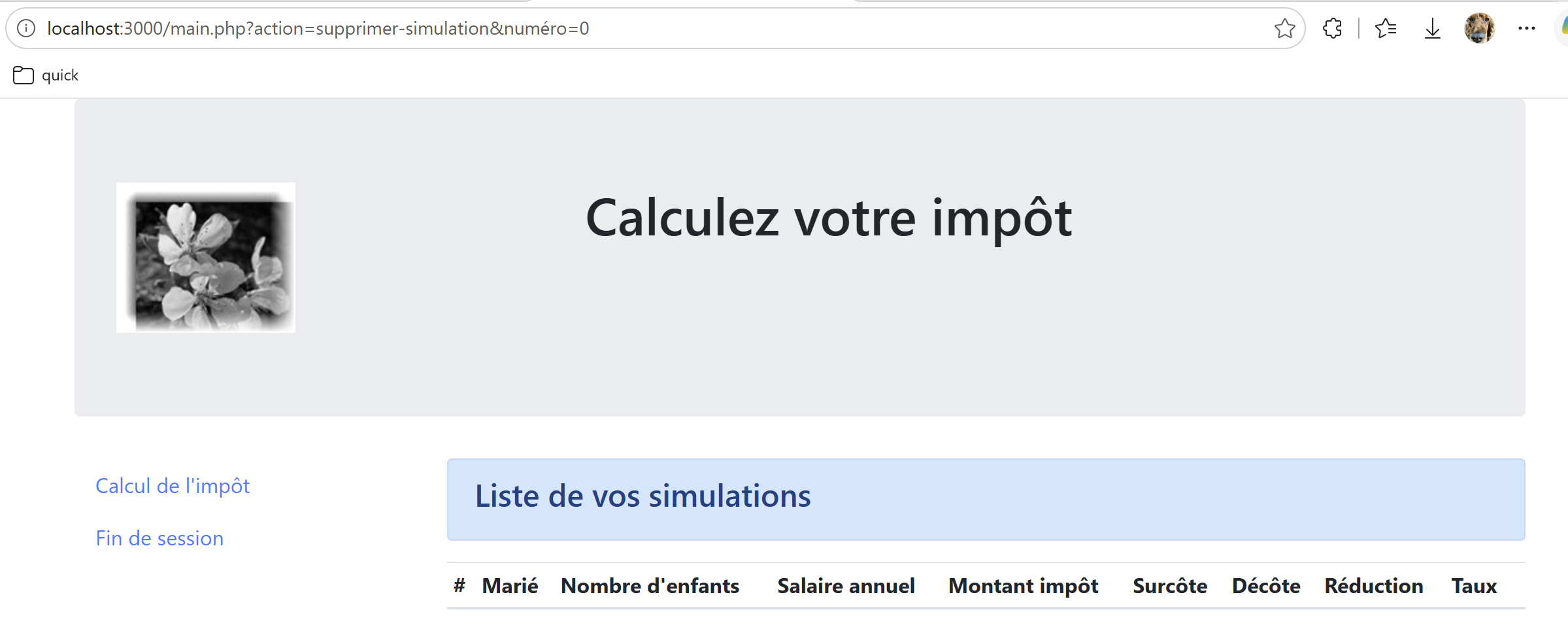
- delete-simulation.controller.ts — performs a series of checks (method/number of parameters, presence of the “number” parameter, numeric syntax, index within the array bounds), accumulating the status code bit by bit at each successful step, then calls simulations.splice(number, 1) and re-saves the array to the session;
- display-tax-calculation.controller.ts — even shorter than list-simulations: does absolutely nothing other than return status code 800, so that the client simply switches to a different view (back to the calculation form) without any server-side processing;
- admin-data.controller.ts — delegates directly to ServerDaoService.getTaxAdminData() and intercepts TaxException to return error status 1041; Along with
calculate-tax, it is one of only two action controllers that inject the[DAO]layer into its constructor;
The case of src/actions/end-session.controller.ts warrants closer examination due to a classic Express-Session pitfall:
Let’s comment on this code:
- line 9: const type = session.type; — we store the response type (json/html/xml) before destroying the session, since we’ll need to restore it in the new one;
- line 10: await new Promise<void>((resolve) => session.regenerate(() => resolve())); — a tricky part of this controller: session.regenerate(callback), provided by express-session, is a callback method, not a Promise; so we wrap it in a Promise to be able to await it like the rest of the code;
regenerate()clears the current session and assigns it a brand-new identifier (the equivalent of Symfony’s session destruction); - line 11: request.session.type = type; — second tricky point: after
regenerate(),request.sessionpoints to a brand-new session instance; the old session reference, captured in theexecute()parameters before the call, is now orphaned—which is why the type is reassigned torequest.sessionrather thansession; otherwise, it would be silently lost.
9.7. The [DAO] layer
ServerDaoService (§5.1) provides tax data (brackets, thresholds) to the business layer, either from a jSON file (useful for testing without a database) or from MySQL with mysql2, depending on a configuration parameter.
Excerpt from src/model/server-dao.interface.ts—a minimal contract, a single method that every implementation of the [DAO] layer must provide:
Excerpt from src/model/server-dao.service.ts, the only implementation of this contract in this project:
Let’s comment on this code:
- async getTaxAdminData(): Promise<TaxAdminData> { if (taxDataSource === 'mysql') ... } — the decision-making process fits into a single line: depending on config.taxDataSource (read from the environment variable TAX_DATA_SOURCE), data is fetched from either the jSON file or MySQL, but the contract exposed to the rest of the application (IServerDao) remains unchanged — CalculateTaxController and AdminDataController have no idea which source is actually being used;
- getTaxAdminDataFromJson() — reads and parses data/tax-admin-data.json synchronously (fs.readFileSync); any error (missing file, invalid jSON) is intercepted and logged as a TaxException, with an explicit message—never a raw Node exception, which would not be properly propagated back to the client;
- getTaxAdminDataFromMysql() — opens a MySQL connection on every call using mysql2/promise (no connection pool is reused: consistent with the absence of a Redis cache noted in README, each query re-checks everything); executes the two SQL queries (brackets, then constants), reconstructs a TaxAdminData from the retrieved rows, and systematically closes the connection in a
finallyblock, regardless of whether the read was successful or not; - both private methods return the same type (Promise<TaxAdminData>), which allows getTaxAdminData() to remain a simple facade, without any business logic of its own.
9.8. The [business] layer
ServerBusinessService is unaware of HTTP, sessions, or the database: it is a line-by-line port of the tax calculation from the PHP server, pure and testable independently of the rest.
Excerpt from src/model/server-business.service.ts:
- line 1: [@Injectable()] — once again, this same decorator, for the same reason as elsewhere in this chapter: without it, NestJS would not be able to instantiate ServerBusinessService or inject it into CalculateTaxController above;
- line 2: [export class ServerBusinessService {] — from here on, apart from this first decorator, the code is no longer specific to NestJS: calculateTax(...) and getTaxableIncome(...) are standard TypeScript code—a line-by-line port of the PHP algorithm, without HTTP or a database.
9.9. The application configuration
src/config/config.service.ts combines, into a single NestJS service, what was previously split between Config/config.json and Config/database.json on the PHP side — with the expected difference that sensitive configuration (passwords, session secrets) now comes from environment variables (.env file), rather than from a versioned jSON file:
Let’s comment on this code:
- actions: { ... } — this table is kept solely for documentation purposes (it accurately describes the original architecture): the actual routing of actions does not rely on it; instead, it is handled through dependency injection in ActionsRegistryService;
- taxDataSource: (process.env.TAX_DATA_SOURCE as ...) ?? 'json' — read from the environment variable TAX_DATA_SOURCE, this field selects the source of the tax data used by ServerDaoService (see above);
- views: { ... } — associates each EJS template name with the list of response statuses that should display it (for example, view-tax-calculation for statuses 200, 300, 341, 350, 800); HtmlViewRendererService (see “Building HTML Pages”) uses this table to select the view to render;
- errorsView: 'view-errors' — the fallback view, displayed whenever no view entries match the current status;
- final line: if (!fs.existsSync(logsDir)) { fs.mkdirSync(logsDir, { recursive: true }); } — Upon creation, the service itself creates the Logs/ folder if it does not yet exist, so that LoggerService can always write to it without ever having to worry about it.
9.10. Entities, the session, and logs
src/entities/ contains three data classes, ported from Entities/*.php. Excerpt from simulation.entity.ts—a calculation simulation, stored in session.simulations:
Excerpt from tax-admin-data.entity.ts—the tax brackets and calculation constants read by the [DAO] layer:
and tax-exception.ts — a typed application exception, raised by the [DAO] layer in the event of an inaccessible data source (unreadable jSON file, failed MySQL connection...), and intercepted by the action handlers that require it (calculate-tax, get-admindata):
src/session/session.types.ts is not a service: it is a type declaration that extends the express-session module, so that TypeScript can access the application-specific content (session type, authenticated user, saved simulations):
Finally, src/utilities/logger.service.ts logs everything the server does (new request, requested action, selected controller, returned response, etc.) in Logs/logs.txt:
9.11. The responses jSON, XML, and HTML
ResponseSenderService constructs the response jSON or XML (using the js2xmlparser library), replicates the handling of CORS by the original server PHP (Access-Control-Allow-* headers only for the localhost origin), and handles the special case of the OPTIONS method (CORS preflight).
Excerpt from src/responses/response-sender.service.ts, which actually constructs this response:
Let’s comment on this code:
- switch (type) { ... } — the three response formats are constructed here, and only here: JSON by JSON.stringify, XML by the js2xmlparser library (which transforms the
contentobject into a XML document, with the <root> element as the root), and HTML by delegating entirely to HtmlViewRendererService.render(...), detailed further below; - this.logger.write(
response=${JSON.stringify(content)}); — in HTML mode as well, it is the application content of the response (content) that is logged, never the entire HTML page produced—as HtmlResponse.php did; - in sendResponse(...), the check origin.startsWith('http://localhost') || origin.startsWith('https://localhost') exactly replicates the policy CORS of the original server PHP (ParentResponse::sendResponse): only localhost origins receive Access-Control-Allow-* headers; never an arbitrary domain;
- if (method === 'options') { content = ''; statusCode = 200; } — special case of the CORS preflight: for a OPTIONS request, only the headers matter; the response body is cleared and the status code is forced to 200, regardless of the requested processing.
For the type=html mode, HtmlViewRendererService replicates the view selection logic of the PHP server: each response status corresponds to a view, selected from a configuration table, with a fallback to a generic error page if no view matches. Each view is a EJS template (views/*.ejs), a direct translation of the original PHP files, powered by a “display template” generated by a dedicated function—the same principle as the getModelForThisView(...) / PHP view pair, with the added benefit of automatic escaping of displayed values.
9.12. Building HTML Pages
Let’s take a closer look at the type=html mode, whose mechanism is broken down into three distinct files: the selection and rendering of the view (src/views/html-view-renderer.service.ts), the construction of the “display template” specific to each view (src/views/view-models.ts), and the templates themselves (views/*.ejs and views/partials/*.ejs, in the project root—not to be confused with the src/views/ folder, which contains only TypeScript).
Excerpt from src/views/html-view-renderer.service.ts:
Let's comment on this code:
- const viewName = Object.keys(views).find((view) => views[view].includes(status)) ?? errorsView; — the key line of the entire mechanism: we search the config.views table (see above) for the name of the view whose list of statuses contains the current response status; if none match—including, as README points out, a success status without a dedicated view such as get-admindata/1000—we fall back to errorsView (view-errors), which follows exactly the same logic as HtmlResponse::send() on the PHP side;
- const logo = buildLogoPath(request); — the logo path is recalculated for each request based on the requested URL (see view-models.ts below), to ensure it remains correct even if the application is deployed in a subdirectory;
- switch (viewName) { case 'view-authentication': model = buildAuthenticationModel(...); ... } — once the view is selected, the corresponding template-building function is called (detailed below); it is this model, and this model alone, that the EJS template will display;
- return ejs.renderFile(templateFile, { model, logo }, { views: [viewsDir, path.join(viewsDir, 'partials')] }); — the actual call to EJS: ejs.renderFile(...) reads the corresponding .ejs file, executes it with the
modelandlogovariables in its context, and returns the resulting HTML as a string — theviewsoption tells EJS the two directories where to look for a template included by name (the views folder and itspartials/subfolder).
src/views/view-models.ts defines a function for constructing a template by view—the TypeScript equivalent of the function getModelForThisView(...) present in each of the original PHP views (Views/view-*.php). Here is an excerpt from the simplest of the four, buildAuthenticationModel:
and the most complex one, buildTaxCalculationModel, which must handle three distinct cases:
Let’s comment on this code:
- status codes 200 and 800 (empty form, arrival at the view, or return from
display-tax-calculation) — all fields in the model are reset to empty, as if the form had never been filled out; - status 300 (successful calculation) — const response = content.response as Record<string, unknown>; retrieves the result returned by CalculateTaxController (tax, discount, reduction, surcharge, rate) and constructs the five sentences displayed in the success banner; the form is repopulated with the posted values (request.body), so that the user can review their input alongside the result;
- statuses 341 and 350 (database—or Redis—down) — same re-display of the posted form, but with model.error = true and the error message returned by the [DAO] layer placed in model.errors;
- optionsMenu: { ... } — the side menu (part of menu.ejs, see below) is state-independent: it is always present, with the same two options, regardless of the calculation result.
The remaining two functions follow the same principle:
- buildSimulationsListModel(content) — the shortest of the four: simulations: (content.response as SimulationRow[]) ?? [], supplemented by the same side menu as buildTaxCalculationModel (this time with “Tax calculation” and “End of session”);
- buildErrorsModel(content) — builds the list of messages displayed by the generic "view-errors" view; handles a very specific case inherited from the original PHP: else if (response !== null && typeof response === 'object') { errors = [JSON.stringify(response)]; }, in the event that a successful status without a dedicated view (such as get-admindata/1000) nevertheless falls back to this error view—the original PHP would then display the object via its __toString() method; JSON.stringify is the TypeScript equivalent;
- buildLogoPath(request) — const root = pathname.replace(/\/[^/]*$/, ''); return
${root}/Resources/logo.jpg; : reconstructs the logo path from the current URL directory (without the script name), so that the banner remains correct even if the application is deployed in a subdirectory — directly ported from Views/v-banner.php.
The four views/*.ejs templates are direct translations of the original PHP files (Views/view-*.php), with the same Bootstrap 4.1.3 layout. The most complete excerpt, view-tax-calculation.ejs:
Let’s comment on this template:
- line 1: <%# ... %> — a EJS comment, never sent to the browser;
- <%- include('partials/banner', { logo: logo }) %> — includes a partial template, with the variables we want to explicitly pass to it (here,
logo); note: <%- %> displays the result without escaping it — used here solely to insert HTML already constructed by include(...), never for user-entered data; - <% if (model.success) { %> ... <% } %> — EJS control block (<% %>, without a hyphen): JavaScript executed during rendering, which itself produces no output; here, the “result” section appears in the final HTML only if model.success is true;
- <%= model.tax %> — escaped display (<%= %>, with the equal sign): this is the form used for any data that may contain user input (calculation results, re-displayed login, error messages) — EJS automatically escapes special characters, unlike the <?= ?> in the original PHP, which did not.
The other three views and the five partials (views/partials/) follow the same principles:
- view-authentication.ejs — the login form; includes partials/banner and partials/authentication-form, then displays the list model.errors if model.error;
- view-simulations-list.ejs — includes partials/banner, partials/menu, and partials/simulations-list-table;
- view-errors.ejs — the fallback view: partials/banner, partials/menu, followed by a simple loop <% model.errors.forEach(function(error) { %><li><%= error %></li><% }) %>;
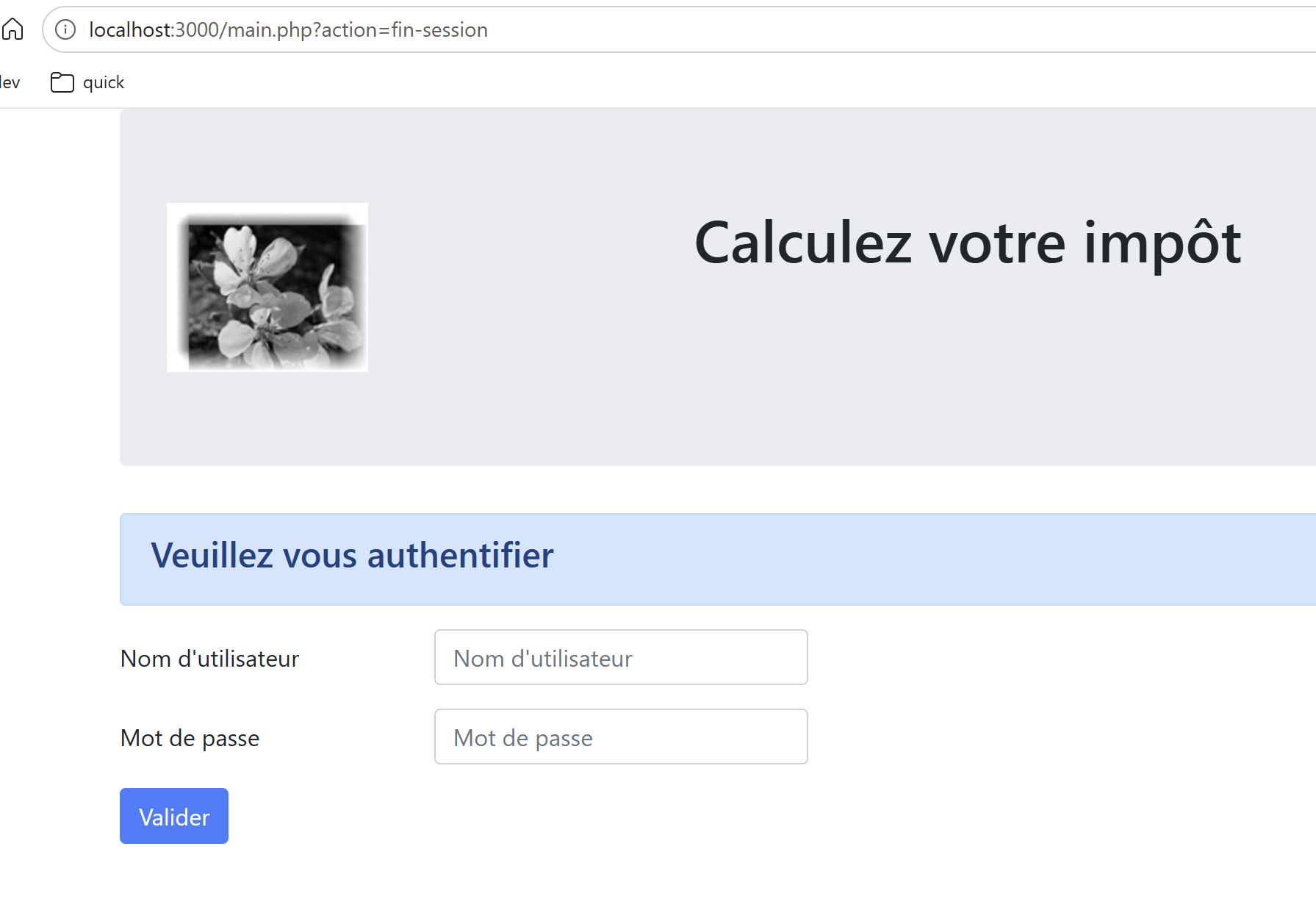
- partials/banner.ejs — the logo and the “Calculate your tax” title, common to all views except the authentication view, which also includes them;
- partials/menu.ejs — <% Object.keys(model.optionsMenu).forEach(function(text) { %><a href="<%= model.optionsMenu[text] %>"><%= text %></a><% }) %>: the side menu, which is entirely controlled by the optionsMenu table created in view-models.ts—so adding a menu option only requires changing the model, never this template;
- partials/authentication-form.ejs — the Bootstrap login form, with value="<%= model.login %>" to redisplay the last login entered in case of failure;
- partials/tax-calculation-form.ejs — the calculation form; note <%- model.checkedYes ? 'checked="checked"' : '' %>: a deliberate and safe use of <%- %>, since the inserted string (checked="checked" or empty) is set on the server side and is never constructed from user input;
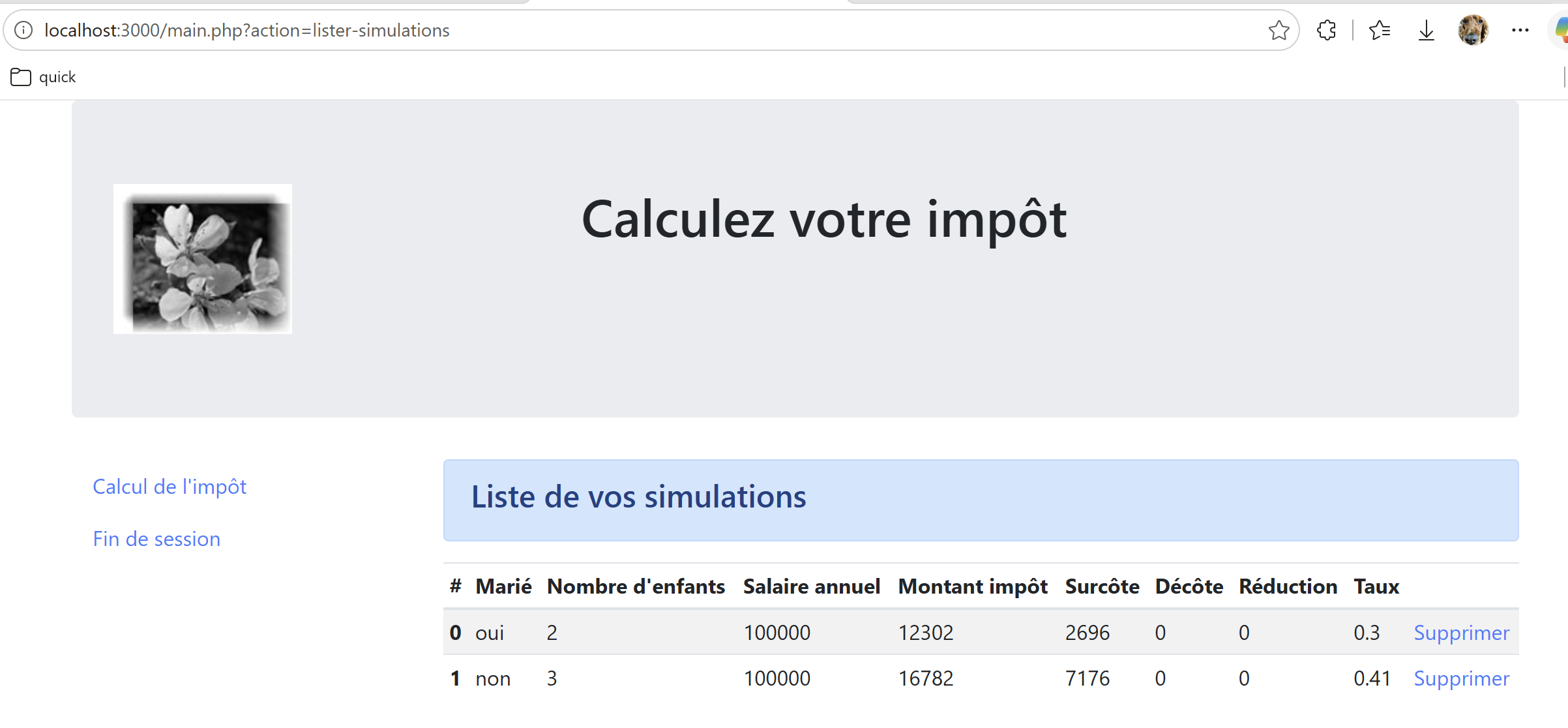
- partials/simulations-list-table.ejs — the simulation table, one row per item in model.simulations, with a “Delete” link to main.php?action=delete-simulation&number=... for each row.
9.13. Execution
At the root of the [nestjs-case-study] folder:
The server then listens on http://localhost:3000. The jSON mode, used by the TypeScript client, is tested with:
and the HTML mode, directly in the browser, with:
In both cases, the same action parameter determines the processing performed (in this case, init-session, which must be the very first action called since it initializes the session), and the type parameter determines the response format—other actions are tested in the same way, simply by changing the value of action (for example, &action=calculate-tax, to POST, with the parameters “married,” “children,” and “salary” submitted).
Open a browser and request the URL [http://localhost:3000/main.php?action=init-session&type=html]
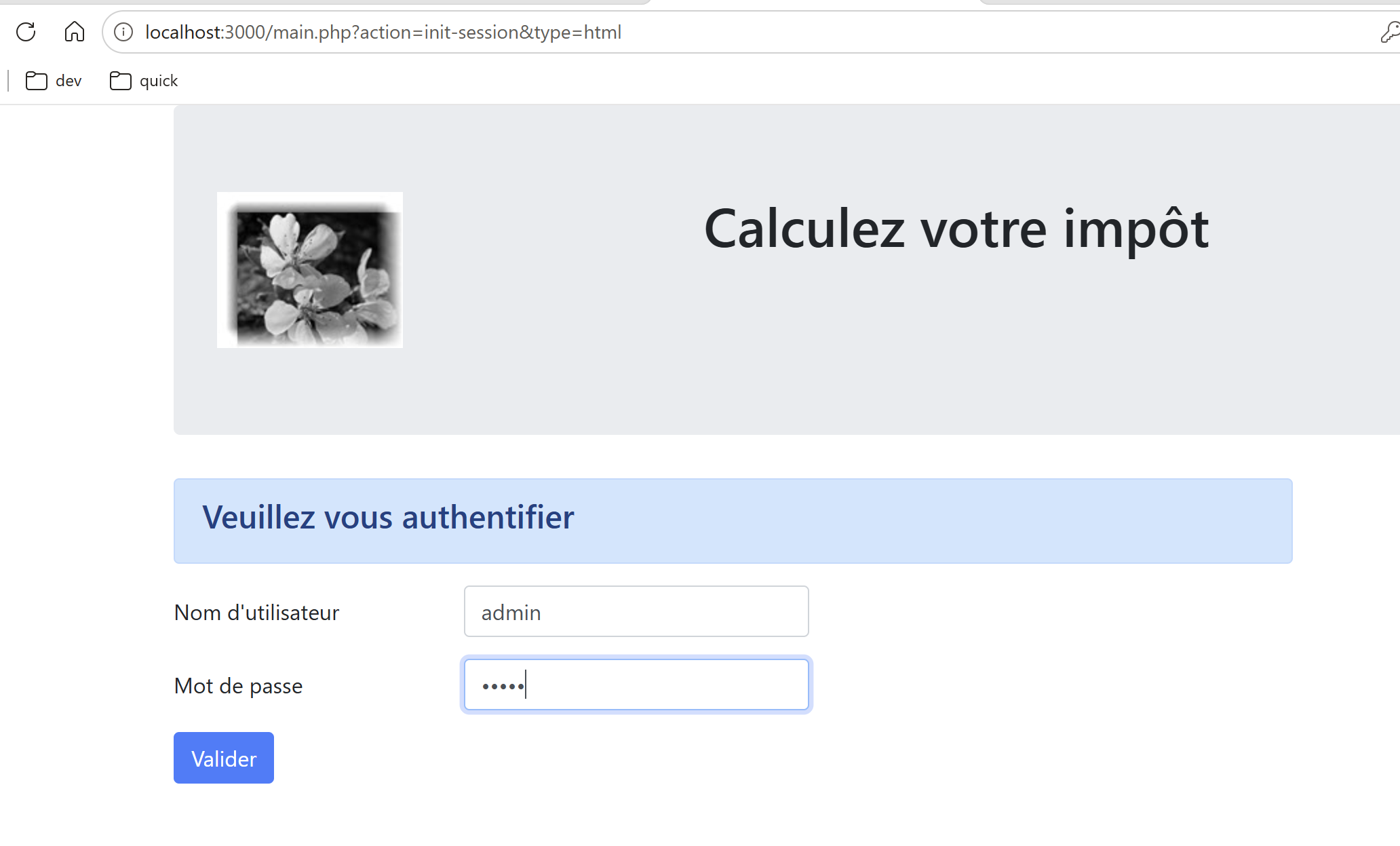
The login credentials are admin / admin. Submit the form.
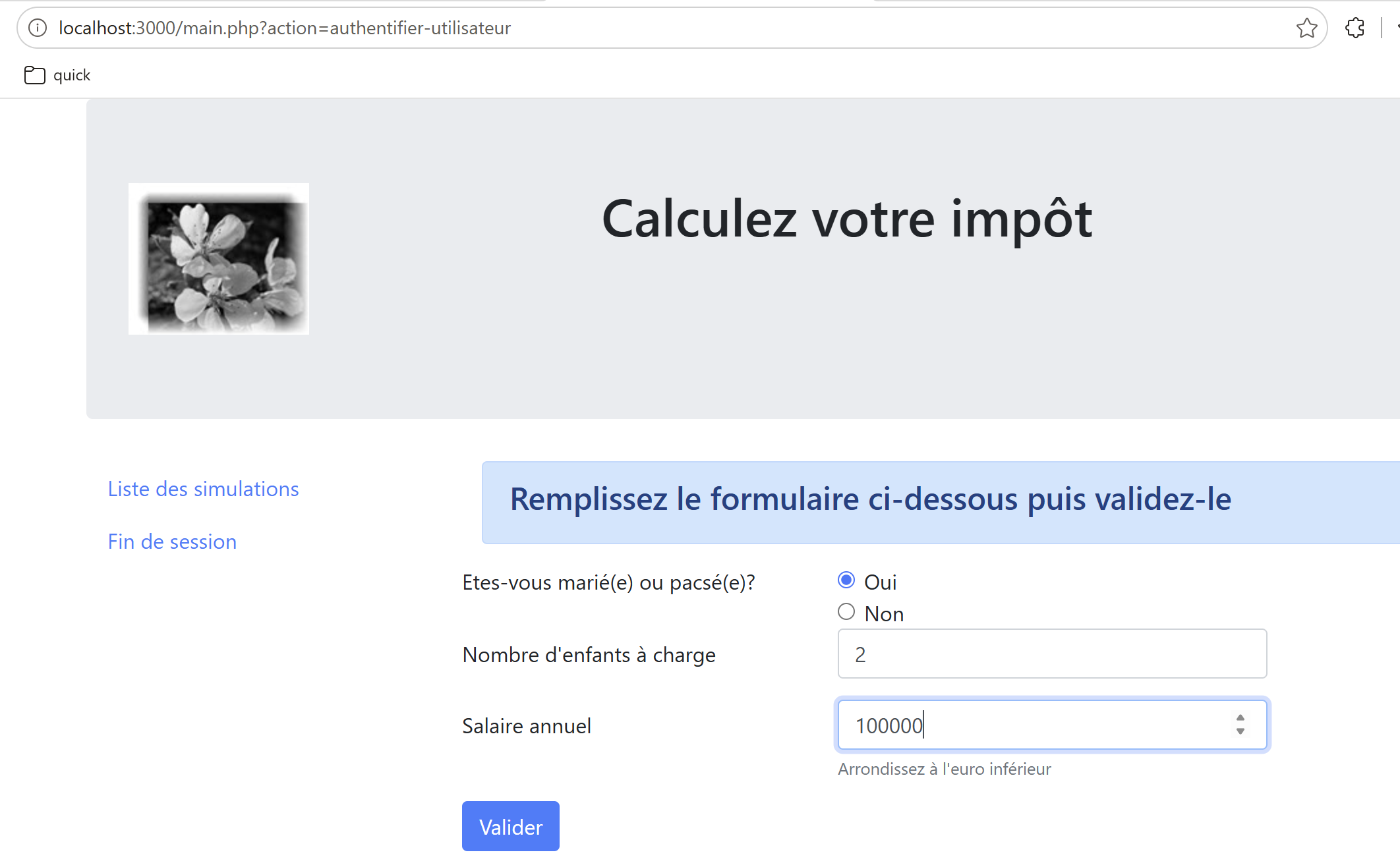
Fill out the form and then submit it:
Run several simulations, then request the [List of simulations]:
Delete both simulations:
End the session: