5. Spring IoC in Practice
We will now use examples to put into practice what we have seen previously.
5.1. Example 1
The [Personne.vb] class is as follows:
Namespace istia.st.springioc.demos
    Public Class Personne

         ' private fields
        Private _nom As String
        Private _age As Integer

         ' default builder
        Public Sub New()
        End Sub

         ' properties associated with private fields
        Public Property nom() As String
            Get
                Return _nom
            End Get
            Set(ByVal Value As String)
                _nom = Value
            End Set
        End Property

        Public Property age() As Integer
            Get
                Return _age
            End Get
            Set(ByVal Value As Integer)
                _age = Value
            End Set
        End Property

         ' identity chain
        Public Overrides Function tostring() As String
            Return String.Format("[{0},{1}]", nom, age)
        End Function

         ' init method
        Public Sub init()
            Console.WriteLine("init personne {0}", Me.ToString)
        End Sub

         ' close method
        Public Sub close()
            Console.WriteLine("destroy personne {0}", Me.ToString)
        End Sub

    End Class
End Namespace
The class contains:
- two private fields, name and age, accessible via properties
- a method toString to retrieve the value of the [Personne] object as a string
- an init method that will be called by Spring when the object is created, a close method that will be called when the object is destroyed
To create objects of type [Personne], we will use the following Spring [spring-config-1.xml] file:
<?xml version="1.0" encoding="iso-8859-1" ?>
<!DOCTYPE objects PUBLIC "-//SPRING//DTD OBJECT//EN"
"http://www.springframework.net/dtd/spring-objects.dtd">

<objects>
    <object id="personne1" type="istia.st.springioc.demos.Personne, demo1" init-method="init"
        destroy-method="close">
        <property name="nom">
            <value>Simon</value>
        </property>
        <property name="age">
            <value>40</value>
        </property>
    </object>
    <object id="personne2" type="istia.st.springioc.demos.Personne, demo1" init-method="init"
        destroy-method="close">
        <property name="nom">
            <value>Brigitte</value>
        </property>
        <property name="age">
            <value>20</value>
        </property>
    </object>
</objects>
This file
- defines two objects with respective keys "person1" and "person2" of type [Personne]
- it initializes the [nom, age] properties of each person
- It defines the methods to be called during the initial construction of the [init-method] object and during the destruction of the [destroy-method] object
For our tests, we will use test classes NUnit. The first will be as follows:
Imports System
Imports Spring.Objects.Factory.Xml
Imports System.IO
Imports NUnit.Framework
Imports istia.st.springioc.demos

Namespace istia.st.springioc.tests

    <TestFixture()> _
    Public Class NunitTestSpringIocDemo1
         ' the test object
        Private factory As XmlObjectFactory

        <SetUp()> _
        Public Sub init()
             ' create a factory instance
            factory = New XmlObjectFactory(New FileStream("spring-config-1.xml", FileMode.Open))
             ' log
            Console.WriteLine("setup test")
        End Sub

        <Test()> _
        Public Sub demo()
             ' retrieve [Personne] objects from the Spring file using their keys
            Dim personne1 As Personne = CType(factory.GetObject("personne1"), Personne)
            Console.WriteLine("personne1=" + personne1.ToString())
            Dim personne2 As Personne = CType(factory.GetObject("personne2"), Personne)
            Console.WriteLine("personne2=" + personne2.ToString())
            personne2 = CType(factory.GetObject("personne2"), Personne)
            Console.WriteLine("personne2=" + personne2.ToString())
        End Sub

        <TearDown()> _
        Public Sub destroy()
             ' we destroy the singletons
            factory.Dispose()
             ' release the factory resource
            factory = Nothing
             ' follow-up
            Console.WriteLine("teardown test")
        End Sub

    End Class
End Namespace
Comments:
- To obtain the objects defined in the [spring-config-1.xml] file, we use an object of type [XmlObjectFactory]. There are other "factory" types that allow access to the singletons in the configuration file. The [XmlObjectFactory] object is obtained in the [SetUp] attribute method of the test class and stored in a private variable. Note that the method with the <Setup()> attribute is executed before each test.
- The file [spring-config-1.xml] will be placed in the [bin] folder of the application
- Spring can use configuration files in various formats. The [XmlObjectFactory] object allows you to parse a configuration file in the XML format.
- Processing a Spring file yields an object of type [XmlObjectFactory], in this case the factory object. With this object, a singleton identified by the key C is obtained via factory.getObject(C).
- The method [demo] retrieves and displays the values of the singletons with keys "person1" and "person2".
The structure of the Visual Studio project is as follows:
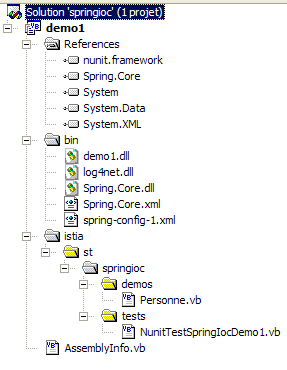
Comments:
- The project VS is named [demo1]
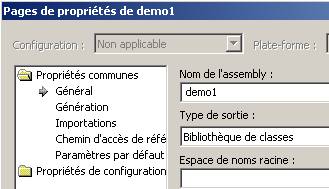
- The [istia] folder contains the source code. The compiled code will go into the [bin] folder within the DLL and [demo1.dll] folders:
- The file [spring-config-1.xml] is in the [bin] folder of the project.
- The [bin] folder contains the files required by the application:
- Spring.Core.dll, Spring.Core.xml for Spring classes
- log4net.dll for Spring logs
- demo1.dll, which is the DLL generated by the project
The DLL and [demo1.dll] files generated by the project are loaded into the graphical testing tool [Nunit-Gui 2.2]. This tool automatically displays the NUnit classes present in the DLL file:
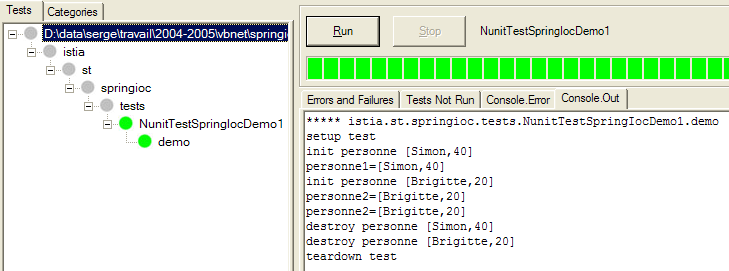
Executing the [demo] method of the NUnit test yields the results shown above and listed below:
Comments:
- line 2: the test starts with the execution of the <Setup()> attribute method
- line 3: the operation
forced the creation of the bean [personne1]. Because in the definition of the singleton [personne1] we had written [init-method="init"], the method [init] of the created object [Personne] was executed. The corresponding message is displayed.
- line 4: the operation
displayed the value of the created [Personne] object.
- lines 5-6: the same phenomenon occurs for the key bean [personne2].
- line 7: the last operation
personne2 = CType(factory.GetObject("personne2"), Personne)
Console.WriteLine("personne2=" + personne2.ToString())
resulted in only one line of output:
It therefore did not cause the creation of a new object of type [Personne]. If that had been the case, the output of the [init] method would have been displayed, which is not the case here. This is the principle of the singleton. By default, Spring creates only a single instance of the beans in its configuration file. It is an object reference service. If asked for the reference to an object that has not yet been created, it creates it and returns a reference. If the object has already been created, Spring simply returns a reference to it.
- Lines 8–10: The attribute method <TearDown()> is executed (line 10). Inside it, the operation
causes the destruction of the singletons created by Spring. This causes each of them to execute their [close] method because we had written, in the configuration file, for each of them: "destroy-method=close". This is what the displays indicate:
Now that we have covered the basics of Spring configuration, we will be able to move through our explanations a bit more quickly.
5.2. Example 2
Consider the following new class [Voiture]:
Imports istia.st.springioc.demos
Namespace istia.st.springioc.demos
Public Class Voiture
' private fields
Private _marque As String
Private _type As String
Private _propriétaire As Personne
' public property
Public Property marque() As String
Get
Return _marque
End Get
Set(ByVal Value As String)
_marque = Value
End Set
End Property
Public Property type() As String
Get
Return _type
End Get
Set(ByVal Value As String)
_type = Value
End Set
End Property
Public Property propriétaire() As Personne
Get
Return _propriétaire
End Get
Set(ByVal Value As Personne)
_propriétaire = Value
End Set
End Property
' default builder
Public Sub New()
End Sub
' three-parameter constructor
Public Sub New(ByVal marque As String, ByVal type As String, ByVal propriétaire As Personne)
' on initialise les champs privés via leurs propriétés associées
With Me
.marque = marque
.type = type
.propriétaire = propriétaire
End With
End Sub
' car object identity string
Public Overrides Function tostring() As String
Return String.Format("[{0},{1},{2}]", marque, type, propriétaire.ToString)
End Function
' init-destroy methods
Public Sub init()
Console.WriteLine("init voiture {0}", Me.ToString)
End Sub
Public Sub destroy()
Console.WriteLine("destroy voiture {0}", Me.ToString)
End Sub
End Class
End Namespace
The class presents:
- three private fields: _type, _marque, and _propriétaire. These fields can be initialized and read via public properties. They can also be initialized using the Car(String, String, Person) constructor. The class also has a no-argument constructor that allows you to first create an uninitialized [Voiture] object and then initialize it via its public properties.
- a method toString to retrieve the value of the [Voiture] object as a string
- an init method that will be called by Spring immediately after the object is created, a destroy method that will be called when the object is destroyed
To create objects of type [Voiture], we will use the following Spring [spring-config-2.xml] file:
<?xml version="1.0" encoding="iso-8859-1" ?>
<!DOCTYPE objects PUBLIC "-//SPRING//DTD OBJECT//EN"
"http://www.springframework.net/dtd/spring-objects.dtd">
<objects>
<!-- people -->
<object id="personne1" type="istia.st.springioc.demos.Personne, demo1" init-method="init"
destroy-method="close">
<property name="nom">
<value>Simon</value>
</property>
<property name="age">
<value>40</value>
</property>
</object>
<object id="personne2" type="istia.st.springioc.demos.Personne, demo1" init-method="init"
destroy-method="close">
<property name="nom">
<value>Brigitte</value>
</property>
<property name="age">
<value>20</value>
</property>
</object>
<!-- a car -->
<object id="voiture1" type="istia.st.springioc.demos.Voiture, demo1" init-method="init"
destroy-method="destroy">
<constructor-arg index="0">
<value>Peugeot</value>
</constructor-arg>
<constructor-arg index="1">
<value>307</value>
</constructor-arg>
<constructor-arg index="2">
<ref object="personne2"/>
</constructor-arg>
</object>
</objects>
This file adds an object with the key "car1" of type [Voiture] to the previous definitions. To initialize this object, we could have written:
<object id="voiture1" type="istia.st.springioc.demos.Voiture, demo1" init-method="init"
destroy-method="destroy">
<constructor-arg index="0">
<value>Peugeot</value>
</constructor-arg>
<constructor-arg index="1">
<value>307</value>
</constructor-arg>
<constructor-arg index="2">
<ref object="personne2"/>
</constructor-arg>
</object>
Rather than choosing the method already presented, we have chosen here to use the class’s Car(String, String, Person) constructor. Furthermore, the singleton [voiture1] defines the method to be called during the initial construction of the [init-method] object and the method to be called during the destruction of the [destroy-method] object.
For our tests, we will use the following test class NUnit [NunitTestSpringIocDemo2]:
Imports System
Imports Spring.Objects.Factory.Xml
Imports System.IO
Imports NUnit.Framework
Imports istia.st.springioc.demos
Namespace istia.st.springioc.tests
<TestFixture()> _
Public Class NunitTestSpringIocDemo2
' the singletons factory
Private factory As XmlObjectFactory
<SetUp()> _
Public Sub init()
' create a factory instance
factory = New XmlObjectFactory(New FileStream("spring-config-2.xml", FileMode.Open))
' log
Console.WriteLine("setup test")
End Sub
<TearDown()> _
Public Sub destroy()
             ' we destroy the singletons
            factory.Dispose()
' we free the factory
factory = Nothing
' follow-up
Console.WriteLine("teardown test")
End Sub
<Test()> _
Public Sub demo2()
' retrieve singleton [voiture1]
Dim voiture1 As Voiture = CType(factory.GetObject("voiture1"), Voiture)
Console.WriteLine("Voiture1=[{0}]", voiture1)
End Sub
End Class
End Namespace
Comments:
- The <Setup()> and <TearDown()> attribute methods remain unchanged.
- The [demo2] method retrieves a reference to the [voiture1] singleton and displays it.
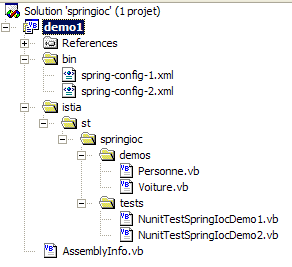
The structure of the Visual Studio project remains the same as before. Only two new classes have been added, along with a Spring configuration file:
Running the NUnit test yields the following results:
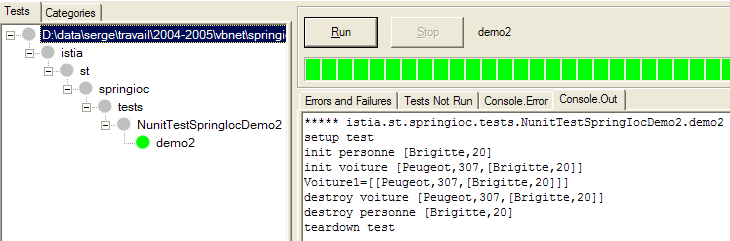
Let's comment on the screen outputs:
Comments:
- line 2: attribute method [Setup] executed before each test, here [demo]
- line 3: Spring begins creating the singleton [voiture1]. This singleton has a dependency on the singleton [personne2], which does not exist. The latter is therefore created and its method [init] executed.
- Line 4: The singleton [voiture1] can now be created. Its method [init] is then executed.
- Line 5: The method [demo2] displays the value of the singleton [voiture1]
- Lines 6–8: The test’s [TearDown] method is executed. The singletons are destroyed, which triggers the execution of their [destroy] methods
5.3. Example 3
We introduce the following new class [GroupePersonnes]:
Imports istia.st.springioc.demos

Namespace istia.st.springioc.demos

    Public Class GroupePersonnes
         ' private fields
        Private _membres() As Personne
        Private _groupesDeTravail As Hashtable

         ' public property
        Public Property membres() As Personne()
            Get
                Return _membres
            End Get
            Set(ByVal Value() As Personne)
                _membres = Value
            End Set
        End Property

        Public Property groupesDeTravail() As Hashtable
            Get
                Return _groupesDeTravail
            End Get
            Set(ByVal Value As Hashtable)
                _groupesDeTravail = Value
            End Set
        End Property

         ' default builder
        Public Sub New()

        End Sub

         ' object identity string GroupeDePersonnes
        Public Overrides Function tostring() As String
             ' browse the list of group members
            Dim identité As String = "[membres=("
            Dim i As Integer
            For i = 0 To membres.Length - 2
                identité += membres(i).ToString + ","
            Next
            identité += membres(i).ToString + "), groupes de travail=("
             ' browse the workgroup dictionary
            Dim clés As IEnumerator = groupesDeTravail.Keys.GetEnumerator
            Dim clé As Object
            While clés.MoveNext
                clé = clés.Current
                identité += String.Format("[{0},{1}] ", clé, groupesDeTravail(clé))
            End While
             ' we return the result
            Return identité + "]"
        End Function

         ' init-destroy methods
        Public Sub init()
            Console.WriteLine("init GroupeDePersonnes {0}", Me.ToString)
        End Sub

        Public Sub destroy()
            Console.WriteLine("destroy GroupeDePersonnes {0}", Me.ToString)
        End Sub

    End Class
End Namespace
Its two private members are:
_membres: an array of people who are members of the group
_groupesDeTravail: a dictionary mapping a person to a workgroup
These private members are made accessible via public properties. The goal here is to demonstrate how Spring allows you to initialize complex objects, such as those with array or dictionary fields.
The Spring configuration file [spring-config-3.xml] will be as follows:
<?xml version="1.0" encoding="iso-8859-1" ?>
<!DOCTYPE objects PUBLIC "-//SPRING//DTD OBJECT//EN"
"http://www.springframework.net/dtd/spring-objects.dtd">
<objects>
     <!-- people -->
    <object id="personne1" type="istia.st.springioc.demos.Personne, demo1" init-method="init"
        destroy-method="close">
        <property name="nom">
            <value>Simon</value>
        </property>
        <property name="age">
            <value>40</value>
        </property>
    </object>
    <object id="personne2" type="istia.st.springioc.demos.Personne, demo1" init-method="init"
        destroy-method="close">
        <property name="nom">
            <value>Brigitte</value>
        </property>
        <property name="age">
            <value>20</value>
        </property>
    </object>
     <!-- a car -->
    <object id="voiture1" type="istia.st.springioc.demos.Voiture, demo1" init-method="init"
        destroy-method="destroy">
        <constructor-arg index="0">
            <value>Peugeot</value>
        </constructor-arg>
        <constructor-arg index="1">
            <value>307</value>
        </constructor-arg>
        <constructor-arg index="2">
            <ref object="personne2" />
        </constructor-arg>
    </object>
     <!-- a group of people -->
    <object id="groupe1" type="istia.st.springioc.demos.GroupePersonnes" init-method="init"
        destroy-method="destroy">
        <property name="membres">
            <list>
                <ref object="personne1" />
                <ref object="personne2" />
            </list>
        </property>
        <property name="groupesDeTravail">
            <dictionary>
                <entry key="Brigitte">
                    <value>Marketing</value>
                </entry>
                <entry key="Simon">
                    <value>Ressources humaines</value>
                </entry>
            </dictionary>
        </property>
    </object>
</objects>
- The <list> tag allows you to initialize a field of type array or type IList with different values.
- The <dictionary> tag allows you to do the same with a field that implements the IDictionary interface
For our tests, we will use the following test class NUnit [NunitTestSpringIocDemo3]:
Imports System
Imports Spring.Objects.Factory.Xml
Imports System.IO
Imports NUnit.Framework
Imports istia.st.springioc.demos

Namespace istia.st.springioc.tests

    <TestFixture()> _
    Public Class NunitTestSpringIocDemo3
         ' the test object
        Private factory As XmlObjectFactory

        <SetUp()> _
        Public Sub init()
             ' create a factory instance
            factory = New XmlObjectFactory(New FileStream("spring-config-3.xml", FileMode.Open))
             ' log
            Console.WriteLine("setup test")
        End Sub

        <TearDown()> _
        Public Sub destroy()
             ' we destroy the singletons
            factory.Dispose()
             ' follow-up
            Console.WriteLine("teardown test")
        End Sub

        <Test()> _
    Public Sub demo3()
             ' retrieve singleton [groupe1]
            Dim groupe1 As GroupePersonnes = CType(factory.GetObject("groupe1"), GroupePersonnes)
            Console.WriteLine("groupe1={0}", groupe1)
        End Sub

    End Class
End Namespace
The [demo3] method retrieves the [groupe1] singleton and displays it.
The structure of the Visual Studio project remains the same as before, except that it has two additional classes and a configuration file.
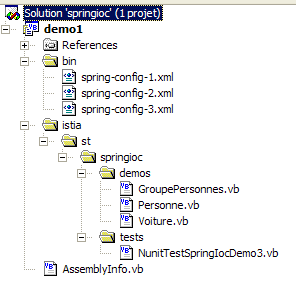
Executing the [demo3] method of the NUnit test yields the following results:
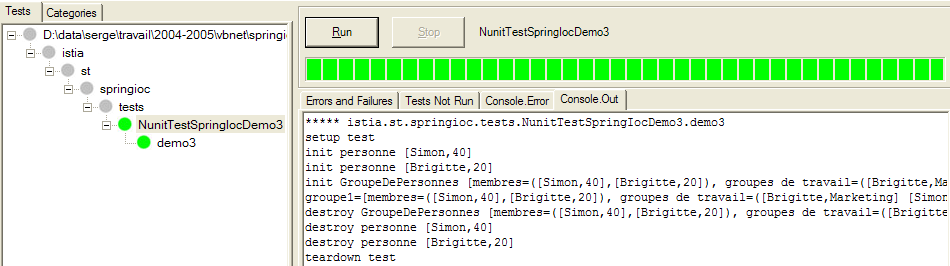
Comments:
- line 2: attribute method [Setup] executed before each test, here [demo]
- lines 3-4: Spring begins creating the singleton [groupe1]. This singleton depends on the singletons [personne1, personne2], which do not yet exist. These singletons are created and their methods [init] are executed.
- Line 5: The singleton [groupe1] can now be created. Its method [init] is then executed.
- Line 6: The method [demo3] displays the value of the singleton [groupe1]
- Lines 7–10: The test’s [TearDown] method is executed. The singletons are destroyed, which triggers the execution of their [destroy] methods