7. Using SGBD and MySql
We will write PHP scripts using a MySQL database:
 |
SGBD MySQL is included in the WampServer package (see section 2.1.1). We show how to create a database and a user MySQL.
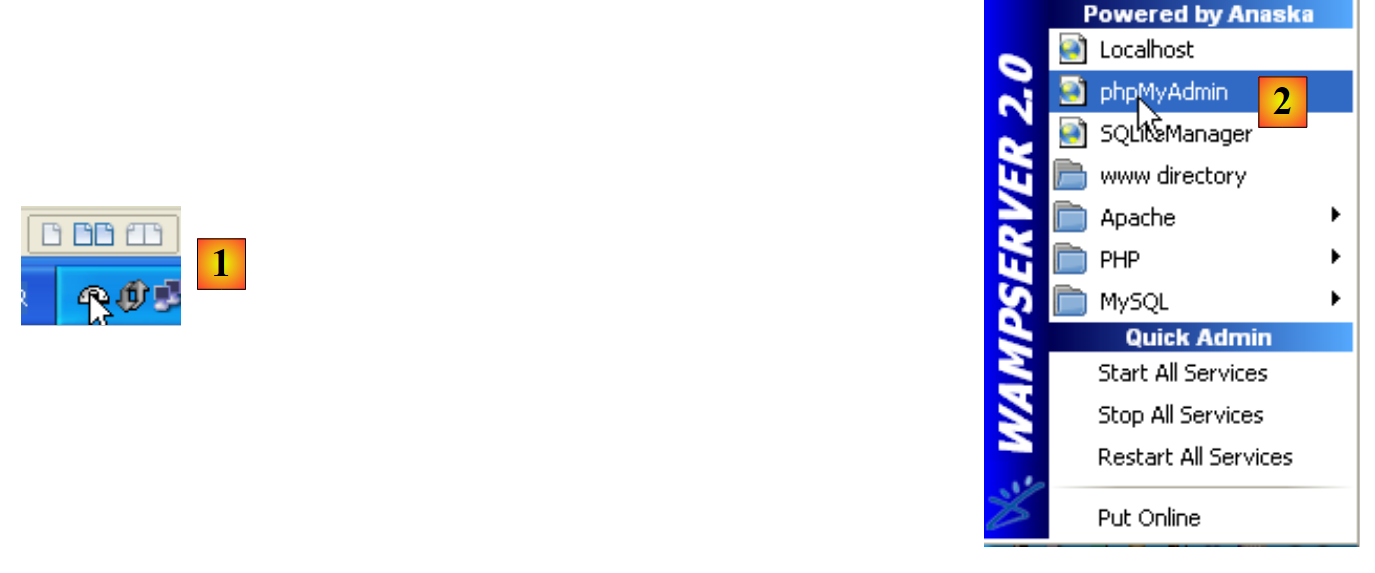 |
- Once launched, WampServer can be managed via a [1] icon located at the bottom right of the taskbar.
- In [2], launch the MySQL administration tool
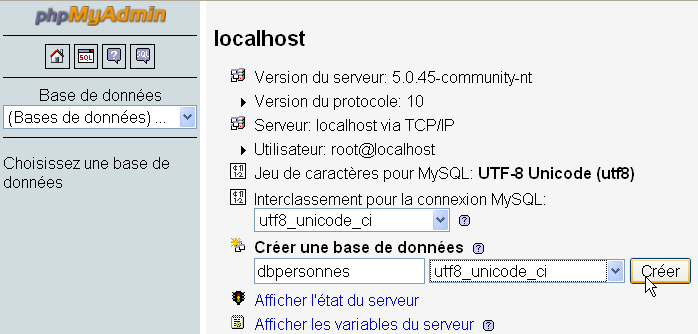
Create a database named [dbpersonnes]:
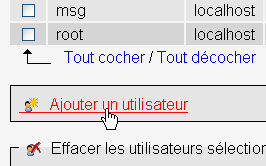
Create a user [admpersonnes] with the password [nobody]:
 |  |
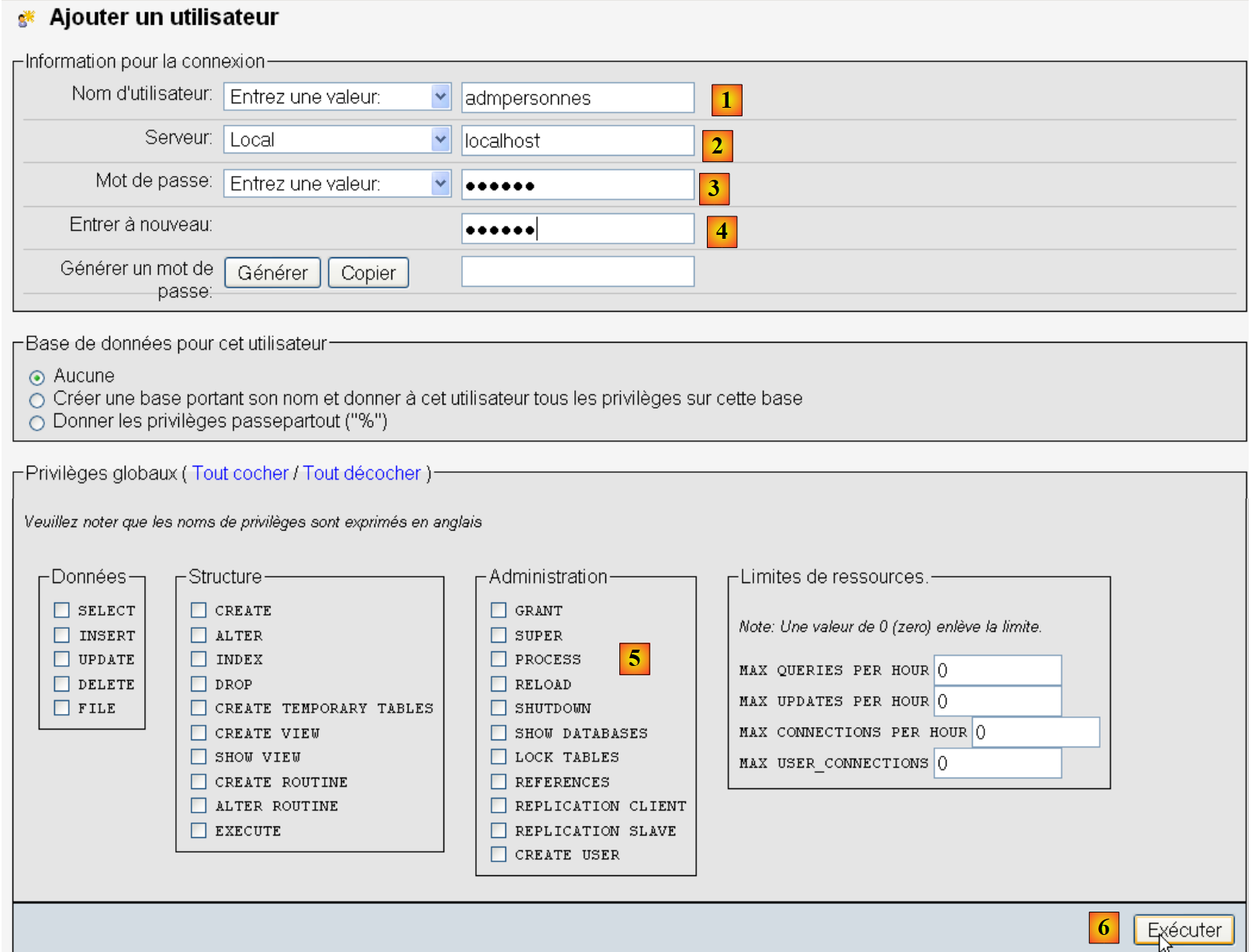 |
- In [1], the user name
- in [2], the machine of SGBD on which we grant them permissions
- in [3], their password
- in [4], same as above
- in [5], no rights are granted to this user
- in [6], we create it
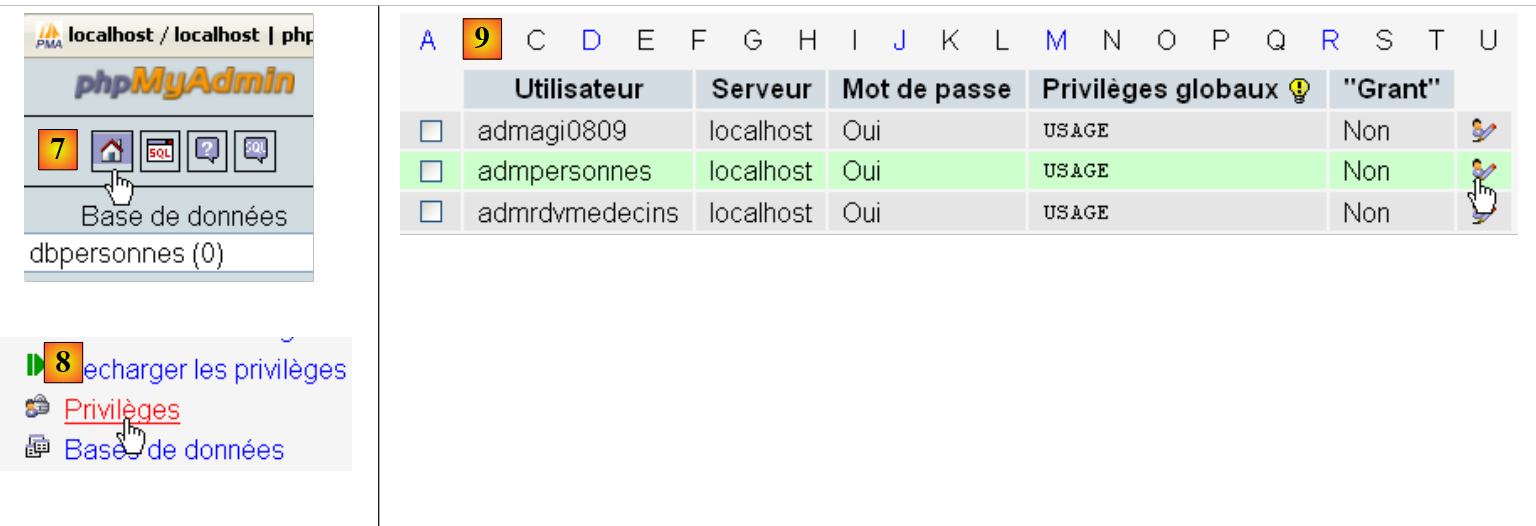 |
- in [7], we return to the home page of phpMyAdmin
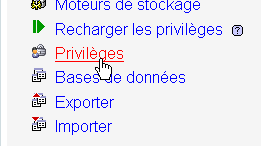
- in [8], we use the link [Privileges] on this page to go modify those of user [admpersonnes] [9].
 |

- In [10], specify that you want to grant user [admpersonnes] permissions on the database [dbpersonnes]
- In [11], the selection is validated
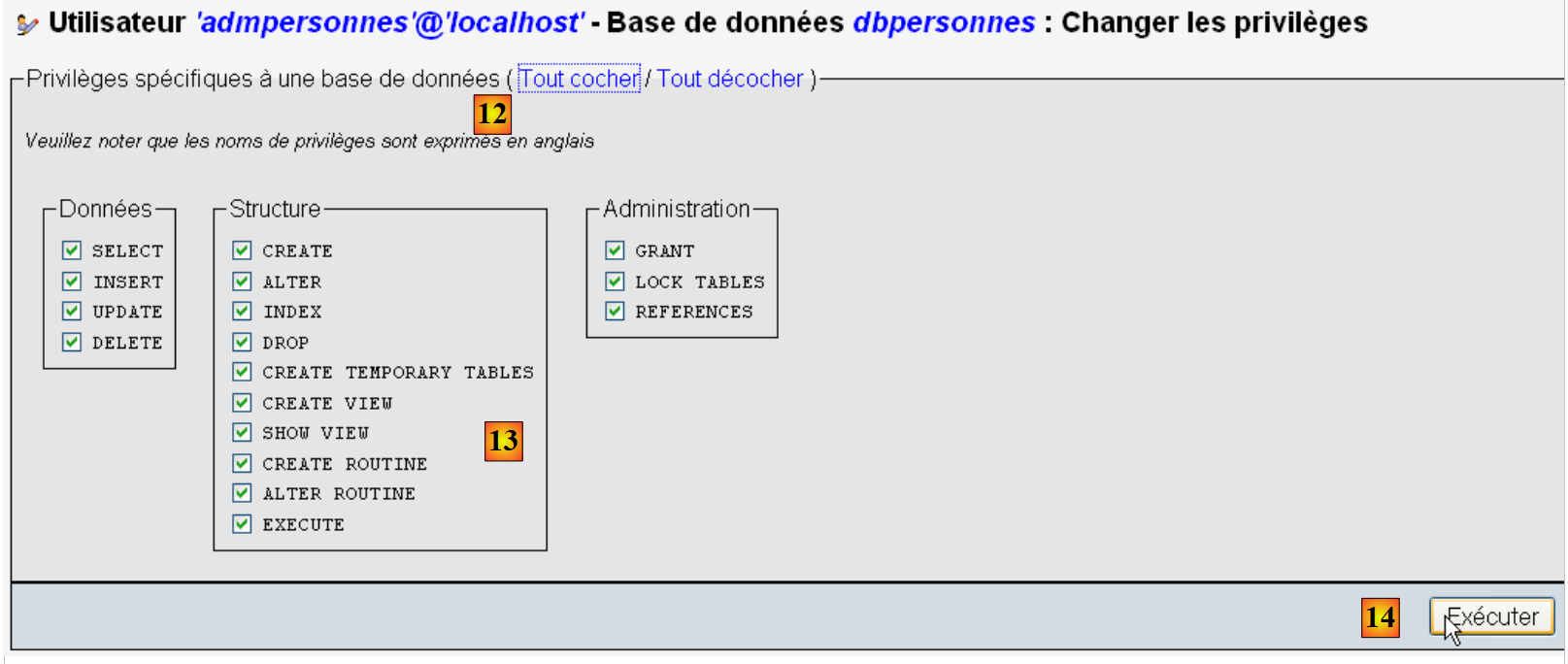 |
- using the link [12]. In [Tout cocher], the user [admpersonnes] is granted full access to the database [dbpersonnes]. In [13]
- We save as [14]
Now we have:
- a database MySQL [dbpersonnes]
- a user [admpersonnes / nobody] who has full access to this database
We will write scripts PHP to utilize the database. PHP provides various libraries for managing databases. We will use the library PDO (PHP Data Objects) that acts as an interface between the PHP code and the SGBD:
 |
The PDO library allows the PHP script to abstract away the exact nature of the SGBD being used. Thus, as shown above, the SGBD MySQL can be replaced by the SGBD Postgres with minimal impact on the PHP script code. This library is not available by default. You can check its availability at as follows:
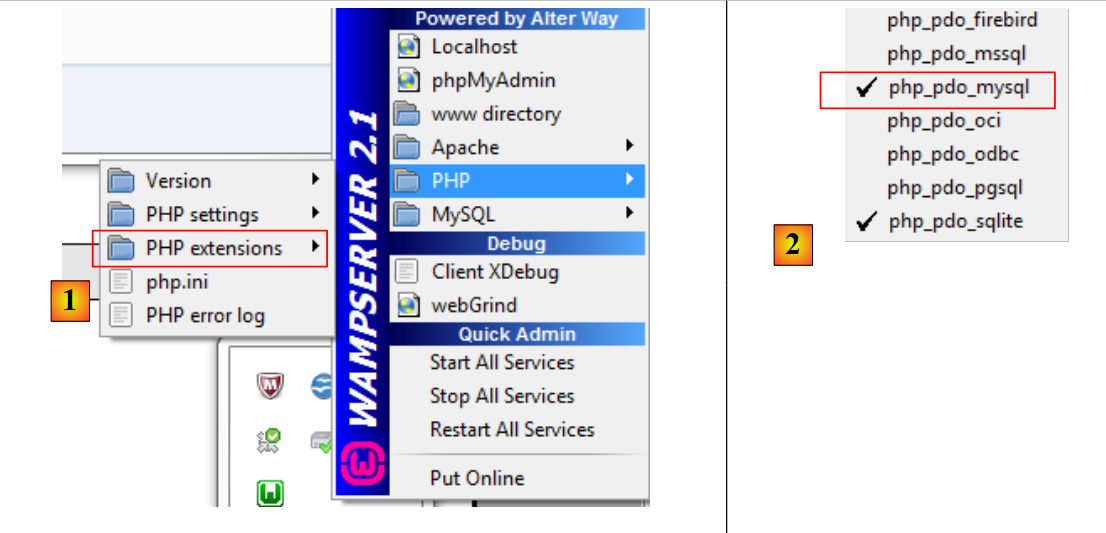 |
- 1: From the WampServer administration icon, select option [PHP / PHP extensions]
- 2: You will see the various available PDO extensions and those that are active: [PHP_pdo_mysql] for SGBD MySQL, [PHP_pdo_sqlite] for SGBD SQL Lite. To activate an extension, simply click on it. The PHP interpreter is then restarted with the new extension enabled.
7.1. Connecting to a MySQL database – 1 (mysql_01)
Connecting to a SGBD database is done by constructing a PDO object. The constructor accepts various parameters:
The parameters have the following meanings:
$dsn | (Data Source Name) is a string specifying the nature of the SGBD and its location on the internet. The string "mysql:host=localhost" indicates that this is a SGBD or MySQL running on the local server. This string may include other parameters, such as the SGBD listening port and the name of the database to you want to connect to: "mysql:host=localhost:port=3306:dbname=dbpersonnes". |
$user | username of the user logging in |
$passwd | their password |
$driver_options | an array of options for the SGBD driver |
Only the first parameter is required. The object constructed in this way will then serve as the basis for all operations performed on the database to which you have connected. If the PDO object could not be constructed, a PDOException exception is thrown.
Here is an example of a connection:
<?php

// connection to a MySql database
// user identity is (admpersonnes,nobody)
$ID = "admpersonnes";
$PWD = "nobody";
$HOTE = "localhost";

try {
  // connection
  $dbh = new PDO("mysql:host=$HOTE", $ID, $PWD);
  print "Connexion réussie\n";
  // closure
  $dbh = null;
} catch (PDOException $e) {
  print "Erreur : " . $e->getMessage() . "\n";
  exit();
}
Results:
Comments
- Line 11: The connection to a SGBD is established by creating a PDO object. The constructor is used here with the following parameters:
- a string specifying the nature of the SGBD and its location on the internet. The string "mysql:host=localhost" indicates that we are dealing with a SGBD MySQL running on the local server. The port has not been specified. Port 3306 is then used by default. The database name is not specified either. A connection will then be established to the SGBD MySQL, with the selection of a specific database to be made later.
- a user ID
- its password
- line 14: the connection is closed by destroying the PDO object created initially.
- Line 15: The connection to a SGBD may fail. In this case, a PDOException exception is thrown.
7.2. Creating table MySQL (mysql_02)
<?php

// connection to the MySql database
// user identity
$ID = "admpersonnes";
$PWD = "nobody";
// base identity
$DSN = "mysql:host=localhost;dbname=dbpersonnes";

// connection
list($erreur, $connexion) = connecte($DSN, $ID, $PWD);
if ($erreur) {
  print "Erreur lors de la connexion à la base [$DSN] sous l'identité ($ID,$PWD) : $erreur\n";
  exit;
}

// delete the people table if it exists
$requête = "drop table personnes";
$erreur = exécuteRequête($connexion, $requête);
//was there a mistake?
if ($erreur)
  print "$requête : Erreur ($erreur)\n";
else
  print "$requête: Exécution réussie\n";
// create people table
$requête = "create table personnes (prenom varchar(30) NOT NULL, nom varchar(30) NOT NULL, age integer NOT NULL, primary key(nom,prenom))";
$erreur = exécuteRequête($connexion, $requête);
//was there a mistake?
if ($erreur)
  print "$requête : Erreur ($erreur)\n";
else
  print "$requête: Exécution réussie\n";
// disconnect and exit
déconnecte($connexion);
exit;

// ---------------------------------------------------------------------------------
function connecte($dsn, $login, $pwd) {
  // connects ($login,$pwd) to base $dsn
  // returns the id of the connection and an error code
  try {
    // connection
    $dbh = new PDO($dsn, $login, $pwd);
    // error-free return
    return array("", $dbh);
  } catch (PDOException $e) {
    // return with error
    return array($e->getMessage(), null);
  }
}

// ---------------------------------------------------------------------------------
function déconnecte($connexion) {
  // closes the connection identified by $connexion
  $connexion = null;
}

// ---------------------------------------------------------------------------------
function exécuteRequête($connexion, $sql) {
  // executes the $sql request on the $connexion connection
  try {
    $connexion->exec($sql);
    // error-free return
    return "";
  } catch (PDOException $e) {
    // return with error
    return $e->getMessage();
  }
}
Results:
drop table personnes: Exécution réussie
create table personnes (prenom varchar(30) NOT NULL, nom varchar(30) NOT NULL, age integer NOT NULL, primary key(nom,prenom)): Exécution réussie
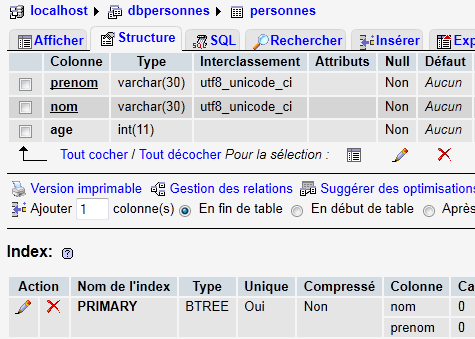
In PHPMyAdmin, the table is present:
 |
Comments
- Lines 38-50: The connect function creates a connection to SGBD. It returns an array ($erreur, $connexion) where $connexion is the connection created or null if it could not be created. In the latter case, $erreur is an error message.
- lines 53–56: the disconnect function closes a connection
- line 59: the function exécuteRequête allows a SQL command to be executed on a connection. The connection is a PDO object. The method used to execute a SQL command on a PDO object is the exec method (line 63). Executing the query may trigger a PDOException. Therefore, this is also handled. The function returns an error message if an error occurs, or an empty string otherwise.
7.3. Filling the persons table (mysql_03)
The following script executes SQL commands found in the following text file [creation.txt]:
drop table personnes
create table personnes (prenom varchar(30) not null, nom varchar(30) not null, age integer not null, primary key (nom,prenom))
insert into personnes values('Paul','Langevin',48)
insert into personnes values ('Sylvie','Lefur',70)
insert into personnes values ('Pierre','Nicazou',35)
insert into personnes values ('Geraldine','Colou',26)
insert into personnes values ('Paulette','Girond',56)
<?php

// connection to the MySql database
// user identity
$ID = "admpersonnes";
$PWD = "nobody";
// base identity
$DSN = "mysql:host=localhost;dbname=dbpersonnes";
// identity of the SQL command text file to be executed
$TEXTE = "creation.txt";

// connection
list($erreur, $connexion) = connecte($DSN, $ID, $PWD);
if ($erreur) {
  print "Erreur lors de la connexion à la base [$DSN] sous l'identité ($ID,$PWD) : $erreur\n";
  exit;
}

// table creation and filling
$erreurs = exécuterCommandes($connexion, $TEXTE, 1, 0);
//display number of errors
print "il y a eu $erreurs[0] erreurs\n";
for ($i = 1; $i < count($erreurs); $i++)
  print "$erreurs[$i]\n";

// disconnect and exit
déconnecte($connexion);
exit;

// ---------------------------------------------------------------------------------
function connecte($dsn, $login, $pwd) {
...
}

// ---------------------------------------------------------------------------------
function déconnecte($connexion) {
 ...
}

// ---------------------------------------------------------------------------------
function exécuteRequête($connexion, $sql) {
  // executes the $sql request on the $connexion connection
  // returns 1 error msg if error, empty string otherwise
  ...
}

// ---------------------------------------------------------------------------------
function exécuterCommandes($connexion, $SQL, $suivi=0, $arrêt=1) {
  // uses the $connexion connection
  // executes the SQL commands contained in the $SQL text file
  // this is a file of SQL commands to be executed one per line
  // if $suivi=1 then each execution of a SQL order is displayed as a success or failure
  // if $arrêt=1, the function stops on the 1st error encountered, otherwise it executes all sql commands
  // the function returns an array (nb of errors, error1, error2, ...)

  // check for the presence of the $SQL file
  if (! file_exists($SQL))
    return array(1, "Le fichier $SQL n'existe pas");

  // execution of SQL queries contained in $SQL
  // we put them in a table
  $requêtes = file($SQL);
  // we run them - initially no errors
  $erreurs = array(0);
  for ($i = 0; $i < count($requêtes); $i++) {
    //do we have an empty query
    if (preg_match("/^\s*$/", $requêtes[$i]))
      continue;
    // execute query $i
    $erreur = exécuteRequête($connexion, $requêtes[$i]);
    //was there a mistake?
    if ($erreur) {
      // one more mistake
      $erreurs[0]++;
      // error msg
      $msg = "$requêtes[$i] : Erreur ($erreur)\n";
      $erreurs[] = $msg;
      // screen tracking or not?
      if ($suivi)
        print "$msg\n";
      // shall we stop?
      if ($arrêt)
        return $erreurs;
    } else
    if ($suivi)
      print "$requêtes[$i] : Exécution réussie\n";
  }//for
  // return
  return $erreurs;
}
Screen results:
drop table personnes : Exécution réussie
create table personnes (prenom varchar(30) not null, nom varchar(30) not null, age integer not null, primary key (nom,prenom)) : Exécution réussie
insert into personnes values('Paul','Langevin',48): Successful execution
insert into personnes values ('Sylvie','Lefur',70): Successful execution
insert into personnes values ('Pierre','Nicazou',35): Successful execution
insert into personnes values ('Geraldine','Colou',26): Successful execution
insert into personnes values ('Paulette','Girond',56): Successful execution
il y a eu 0 erreurs
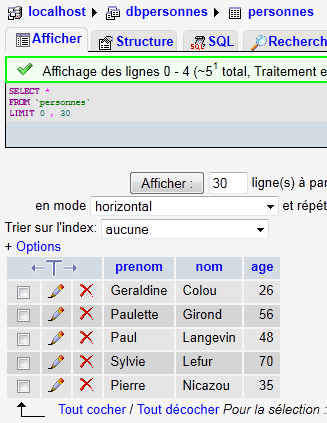
The insertions made are visible with PhpMyAdmin:
 |
Comments
The new feature is the exécuterCommandes function in lines 48–90. This function executes the SQL commands found in the text file named $SQL on the $connexion connection. It returns an array of errors ($nbErreurs, $msg1, $msg2, …) where $nbErreurs is the number of errors, and $msgi is error message #i. If there are no errors, the returned array is the array array(0).
7.4. Execution of arbitrary SQL queries (mysql_04)
The following script shows the execution of the commands in the following text file:
select * from personnes
select nom,prenom from personnes order by nom asc, prenom desc
select * from personnes where age between 20 and 40 order by age desc, nom asc, prenom asc
insert into personnes values('Josette','Bruneau',46)
update personnes set age=47 where nom='Bruneau
select * from personnes where nom='Bruneau
delete from personnes where nom='Bruneau
select * from personnes where nom='Bruneau
xselect * from personnes where nom='Bruneau
Among these SQL commands, there is the SELECT command, which returns results from the database; the INSERT, UPDATE, and DELETE commands, which modify the database without returning results; and finally, invalid commands such as the last one (xselect).
<?php

// connection to the MySql database
// user identity
$ID = "admpersonnes";
$PWD = "nobody";
// base identity
$DSN = "mysql:host=localhost;dbname=dbpersonnes";
// identity of the SQL command text file to be executed
$TEXTE = "sql.txt";

// connection
list($erreur, $connexion) = connecte($DSN, $ID, $PWD);
if ($erreur) {
  print "Erreur lors de la connexion à la base [$DSN] sous l'identité ($ID,$PWD) : $erreur\n";
  exit;
}

// order execution SQL
$erreurs = exécuterCommandes($connexion, $TEXTE, 1, 0);
//display number of errors
print "il y a eu $erreurs[0] erreur(s)\n";
for ($i = 1; $i < count($erreurs); $i++)
  print "$erreurs[$i]\n";

// disconnect and exit
déconnecte($connexion);
exit;

// ---------------------------------------------------------------------------------
function connecte($dsn, $login, $pwd) {
  // connects ($login,$pwd) to base $dsn
  // returns the id of the connection and an error msg
  ...
}

// ---------------------------------------------------------------------------------
function déconnecte($connexion) {
  ...
}

// ---------------------------------------------------------------------------------
function exécuteRequête($connexion, $sql) {
  // executes the $sql request on the $connexion connection
  // returns an array of 2 elements ($erreur,$résultat)

  // determine whether it's a select or not
  $commande = "";
  if (preg_match("/^\s*(\S+)/", $sql, $champs)) {
    $commande = $champs[0];
  }
  // order processing
  try {
    if (strtolower($commande) == "select") {
      $res = $connexion->query($sql);
    } else {
      $res = $connexion->exec($sql);
      if($res===FALSE){
        $info=$connexion->errorInfo();
        return array($info[2],null);
      }
    }
    // error-free return
    return array("", $res);
  } catch (PDOException $e) {
    // return with error
    return array($e->getMessage(), null);
  }
}

// ---------------------------------------------------------------------------------
function exécuterCommandes($connexion, $SQL, $suivi=0, $arrêt=1) {
  // uses the $connexion connection
  // executes the SQL commands contained in the $SQL text file
  // this is a file of SQL commands to be executed one per line
  // if $suivi=1 then each execution of a SQL order is displayed as a success or failure
  // if $arrêt=1, the function stops on the 1st error encountered, otherwise it executes all sql commands
  // the function returns an array (nb of errors, error1, error2, ...)
  // check for the presence of the $SQL file
  if (!file_exists($SQL))
    return array(1, "Le fichier $SQL n'existe pas");

  // execution of SQL queries contained in $TEXTE
  // we put them in a table
  $requêtes = file($SQL);
  // we run them - initially no errors
  $erreurs = array(0);
  for ($i = 0; $i < count($requêtes); $i++) {
    //do we have an empty query
    if (preg_match("/^\s*$/", $requêtes[$i]))
      continue;
    // execute query $i
    list($erreur, $res) = exécuteRequête($connexion, $requêtes[$i]);
    //was there a mistake?
    if ($erreur) {
      // one more mistake
      $erreurs[0]++;
      // error msg
      $msg = "$requêtes[$i] : Erreur ($erreur)\n";
      $erreurs[] = $msg;
      // screen tracking or not?
      if ($suivi)
        print "$msg\n";
      // shall we stop?
      if ($arrêt)
        return $erreurs;
    } else
    if ($suivi) {
      print "$requêtes[$i] : Exécution réussie\n";
      // information on the result of the query
      afficherInfos($res);
    }
  }//for
  // return
  return $erreurs;
}

// ---------------------------------------------------------------------------------
function afficherInfos($résultat) {
  // displays the $résultat result of a sql query
  // was it a select?
  if ($résultat instanceof PDOStatement) {
    // displays field names
    $titre = "";
    $nbColonnes = $résultat->columnCount();
    for ($i = 0; $i < $nbColonnes; $i++) {
      $infos = $résultat->getColumnMeta($i);
      $titre.=$infos['name'] . ",";
    }
    // remove the last character ,
    $titre = substr($titre, 0, strlen($titre) - 1);
    // displays the list of fields
    print "$titre\n";
    // dividing line
    $séparateurs = "";
    for ($i = 0; $i < strlen($titre); $i++) {
      $séparateurs.="-";
    }
    print "$séparateurs\n";
    // data
    foreach ($résultat as $ligne) {
      $data = "";
      for ($i = 0; $i < $nbColonnes; $i++) {
        $data.=$ligne[$i] . ",";
      }

      // remove the last character ,
      $data = substr($data, 0, strlen($data) - 1);
      // we display
      print "$data\n";
    }
  } else {
    // it wasn't a select
    print " $résultat lignes(s) a (ont) été modifiée(s)\n";
  }
}
Screen results:
select * from personnes
 : Exécution réussie
prenom,nom,age
--------------
Geraldine,Colou,26
Paulette,Girond,56
Paul,Langevin,48
Sylvie,Lefur,70
Pierre,Nicazou,35
select nom,prenom from personnes order by nom asc, prenom desc : Exécution réussie
nom,prenom
----------
Colou,Geraldine
Girond,Paulette
Langevin,Paul
Lefur,Sylvie
Nicazou,Pierre
select * from personnes where age between 20 and 40 order by age desc, nom asc, prenom asc : Exécution réussie
prenom,nom,age
--------------
Pierre,Nicazou,35
Geraldine,Colou,26
insert into personnes values('Josette','Bruneau',46): Successful execution
 1 lignes(s) a (ont) été modifiée(s)
update personnes set age=47 where nom='Bruneau': Successful execution
 1 lignes(s) a (ont) été modifiée(s)
select * from personnes where nom='Bruneau': Successful execution
prenom,nom,age
--------------
Josette,Bruneau,47
delete from personnes where nom='Bruneau': Successful execution
 1 lignes(s) a (ont) été modifiée(s)
select * from personnes where nom='Bruneau': Successful execution
prenom,nom,age
--------------
xselect * from personnes where nom='Bruneau' : Erreur (You have an error in your SQL syntax; check the manual that corresponds to your MySQL server version for the right syntax to use near 'xselect * from personnes where nom='Bruneau'' at line 1)

il y a eu 1 erreur(s)
xselect * from personnes where nom='Bruneau' : Erreur (You have an error in your SQL syntax; check the manual that corresponds to your MySQL server version for the right syntax to use near 'xselect * from personnes where nom='Bruneau'' at line 1)
Comments
Each command in the text file [sql.txt] is executed by the function exécuteRequête on line 43.
- Line 43: The two parameters of the function are the connection ($connexion) on which the SQL commands are to be executed and the sql command ($sql) to be executed. The function returns an array of two values ($erreur,$résultat) where
- $erreur is an error message that may be empty if no error occurred
- $résultat: the result returned by executing the command SQL. This result varies depending on whether the command is a SELECT statement or an INSERT, UPDATE, or DELETE statement.
- Lines 48–51: We retrieve the first element of the SQL command to determine whether it is a SELECT command or an INSERT, UPDATE, or DELETE command.
- Line 55: In the case of a SELECT statement, it is executed using the method [PDO]->query("SELECT statement"). The returned result is an object of type PDOStatement.
- Line 57: In the case of an insert, update, or delete statement, it is executed using the method [PDO]->exec("SQL statement"). The returned result is the number of rows modified by the SQL command. Thus, if a SQL delete command deletes two rows, the returned result is the integer 2. If an error occurs during execution, the returned result is the Boolean value false. In this case, the method [PDO]->errorinfo() provides information about the error in the form of an array of values. The element at index 2 of this array is the error message.
- lines 58–60: handling of any error from the operation [PDO]->exec("order SQL").
- lines 65–68: handling of a possible exception
- Line 72: The function exécuterCommandes executes the commands SQL stored in the text file $SQL on the connection $connexion. This is code we have already encountered, with one minor difference: line 111.
- Line 111: The function exécuteRequête returned an array ($erreur,$résultat) or $résultat is the result of executing a command SQL. This result differs depending on whether the command SQL was a SELECT statement or an INSERT, UPDATE, or DELETE statement. The function afficherInfos displays information about this result.
- Line 122: If the command SQL was a SELECT command, the result is of type PDOStatement. This type represents a table consisting of rows and columns.
- line 125: the method [PDOStatement]->getColumnCount() returns the number of columns in the table resulting from the SELECT
- line 127: the method [PDOStatement]->getMeta(i) returns a dictionary of information about column number i of the select result table. In this dictionary, the value associated with the key 'name' is the column name.
- Lines 127–129: The column names of the SELECT result table are concatenated into a string.
- lines 141–145: An object of type PDOStatement can be iterated over using a foreach loop. At each iteration, the element obtained is a row from the SELECT result table in the form of an array of values representing the values of the row’s various columns. All these values are displayed using a for loop.
- Line 154: The result of executing an insert, update, or delete statement is the number of rows modified by the statement.