10. Servers in PHP
Since PHP programs can be executed by a WEB server, such a program becomes a server program capable of serving multiple clients instances. From the client’s perspective, calling a WEB service is equivalent to requesting the URL of that service. The client can be written in any language, including PHP. In the latter case, we use the network functions we just discussed. We also need to know how to "communicate" with a WEB service, that is, understand the http communication protocol between a web server and its clients clients. That is the purpose of the following programs.
The web client described in Section 9.2 allowed us to discover part of the HTTP protocol.

In its simplest form, client/server exchanges are as follows:
- the client opens a connection to port 80 of the web server
- it makes a request for a document
- the web server sends the requested document and closes the connection
- the client then closes the connection
The client can be of various types: a text file in HTML format, an image, a video, etc. It can be an existing document (static document) or a document generated on the fly by a script (dynamic document). In the latter case, this is referred to as web programming. The script for dynamically generating documents can be written in various languages: PHP, Python, Perl, Java, Ruby, C#, VB.net, etc.
Here we use PHP to dynamically generate text documents.
 |
- In [1], the client establishes a connection with the server, requests a PHP script, and may or may not send parameters to that script
- In [2], the web server executes the script PHP via the interpreter PHP. This script generates a document that is sent to the client [3]
- The server closes the connection. The client does the same.
The web server can process multiple clients requests at once. With the WampServer software package, the web server is an Apache server, an open-source server from the Apache Foundation (http://www.apache.org/). In the following applications, WampServer must be launched. This activates three software components: the Apache web server, SGBD, and the MySQL interpreter.
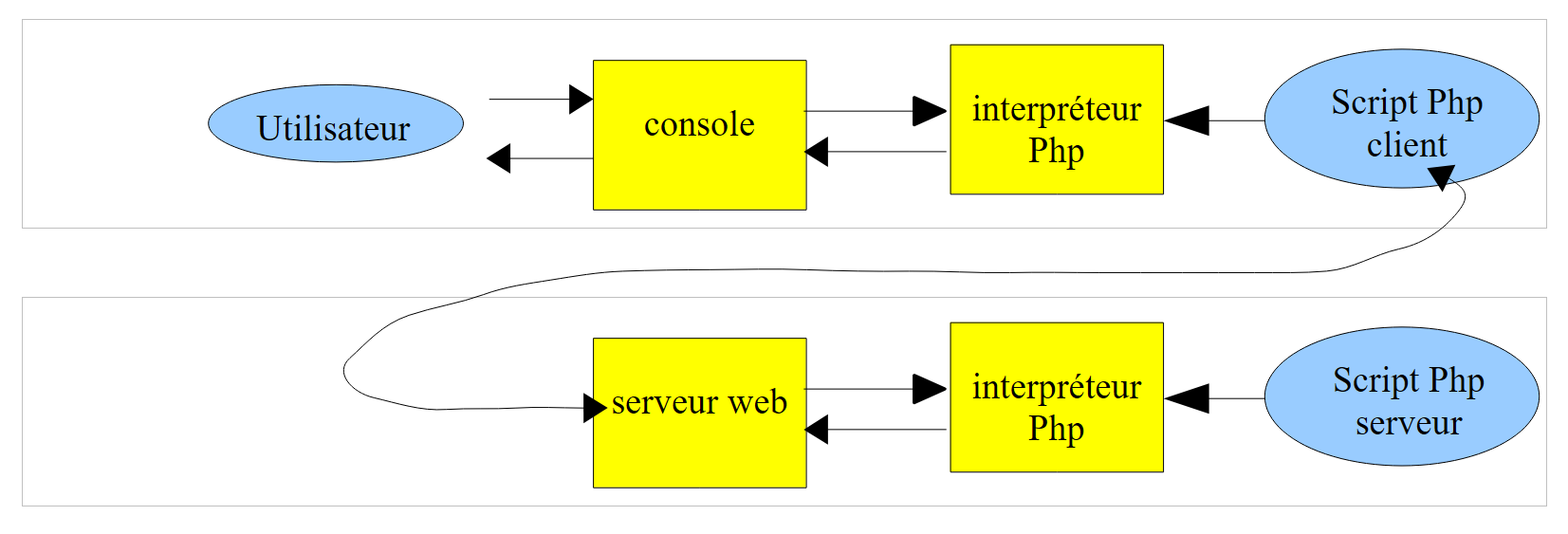
Scripts executed by the web server will be written using the Netbeans tool. So far, we have written PHP scripts executed in a console environment:
 |
The user uses the console to request the execution of a PHP script and receive the results.
In the client/server applications that follow,
- the client script is executed in a console context
- the server script is executed in a web context
 |
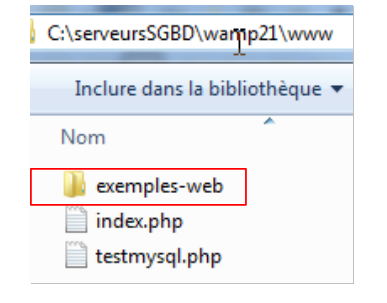
The server script PHP cannot be located just anywhere in the file system. This is because the web server searches for the static and dynamic documents requested of it in locations specified by configuration. The default configuration of WampServer causes documents to be searched for in the <WampServer>/www folder, where <WampServer> is the installation folder of WampServer. Thus, if a web client requests document D using the URL [http://localhost/D] path, the web server will serve document D from the [<WampServer>/www/D] path.
In the following examples, we will place the server scripts in the [www/exemples-web] folder. If a server script is named S.php, it will be requested from the web server using the URL [http://localhost/exemples-web/S.php]. The document [<WampServer>/www/exemples-web/S.php] will then be served to it.
 |
To create a server script with Netbeans in , we will proceed as follows:
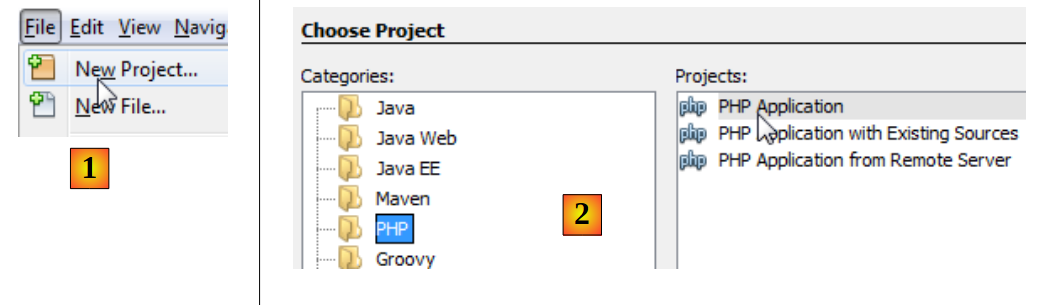 |
- In [1], we create a new project
- In [2], we select the category [PHP] and the project [PHP Application]
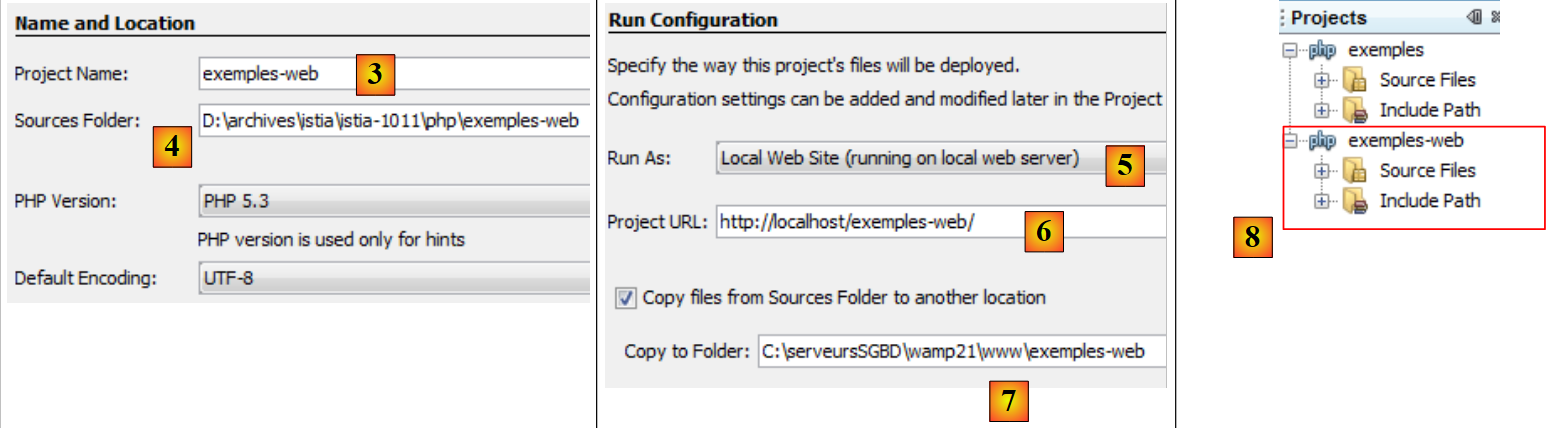 |
- In [3], we name the project
- In [4], we choose a folder for the project
- In [5], we specify that the script must be executed by a local web server (the script’s URL will be in the form http://localhost/...). The local web server will be the Apache web server for WampServer.
- In [6], we specify the project’s URL. Here, we decide that a script S.php from the project will be requested with the URL and [http://localhost/exemples-web/S.php]. Based on what has been said, this means that the path of the S.php script in the file system will be [<WampServer>/www/exemples-web/S.php]. This is what is indicated in [7]. Here, we are asking that any S.php script from the project be copied into the Apache web server directory structure.
- In [8], the new project.
Let’s write a test script:
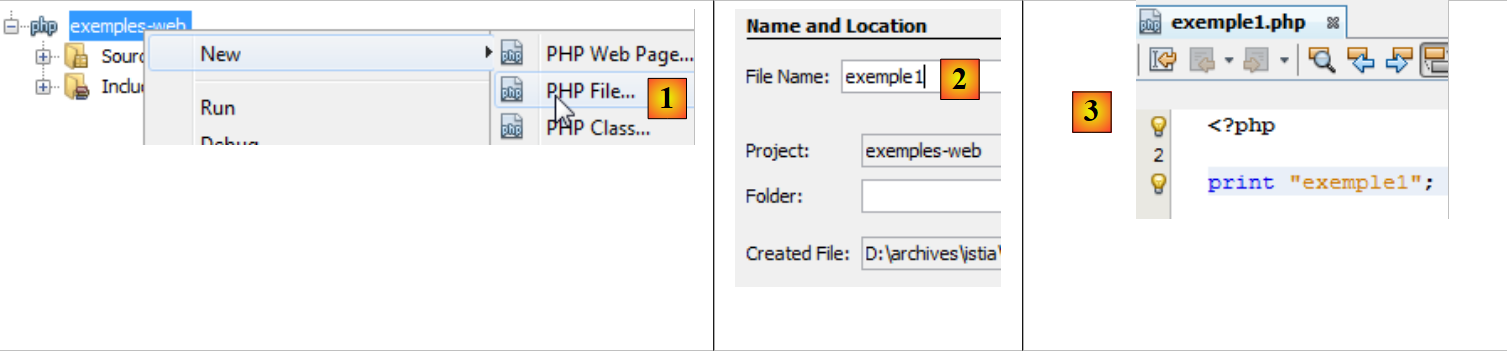 |
- in [1], we create a first script PHP
- In [2], we name it
- In [3], after creating it, we give it the following content
Next, WampServer must be launched.
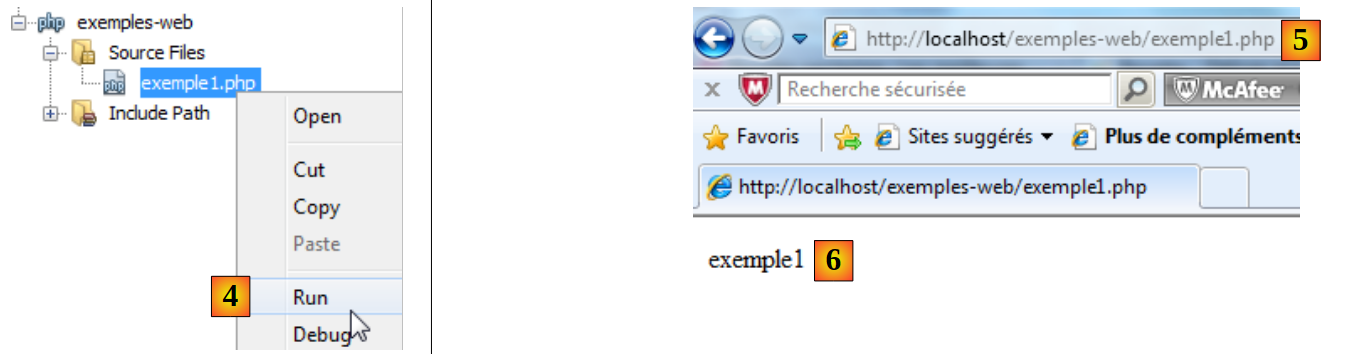 |
- In [4], we run the web script [exemple1.php]. Netbeans will then launch the machine’s default browser and instruct it to display URL [http://localhost/exemples-web/exemple1.php] [5]
- In [6], the browser displays what the server script sent to the client.
Later, we will encounter two types of web browsers:
- a browser as described above. We noted that the web server sent a response in the form: headers HTTP, blank line, text. The browser displays only the text.
- a script that will display the entire response: headers, blank line, text.
In the following,
- server-side scripts will be written as [exemple1.php] above
- client scripts will be written like the console scripts we have written so far.
10.1. Client/server date/time application
10.1.1. The server (web_01)
<?php
// time: number of milliseconds since 01/01/1970
// date-time display format
// d: 2-digit day
// m: 2-digit month
// y: 2-digit year
// H: hour 0.23
// i : minutes
// s: seconds
print date("d/m/y H:i:s",time());
Basically, the PHP script above displays the current time on the screen. However, when executed by a web server, stream #1—which is usually associated with the screen—is redirected to the connection linking the server to its client. Therefore, in a web context, the script above sends the current time as text to the client.
Let’s run this script within Netbeans:
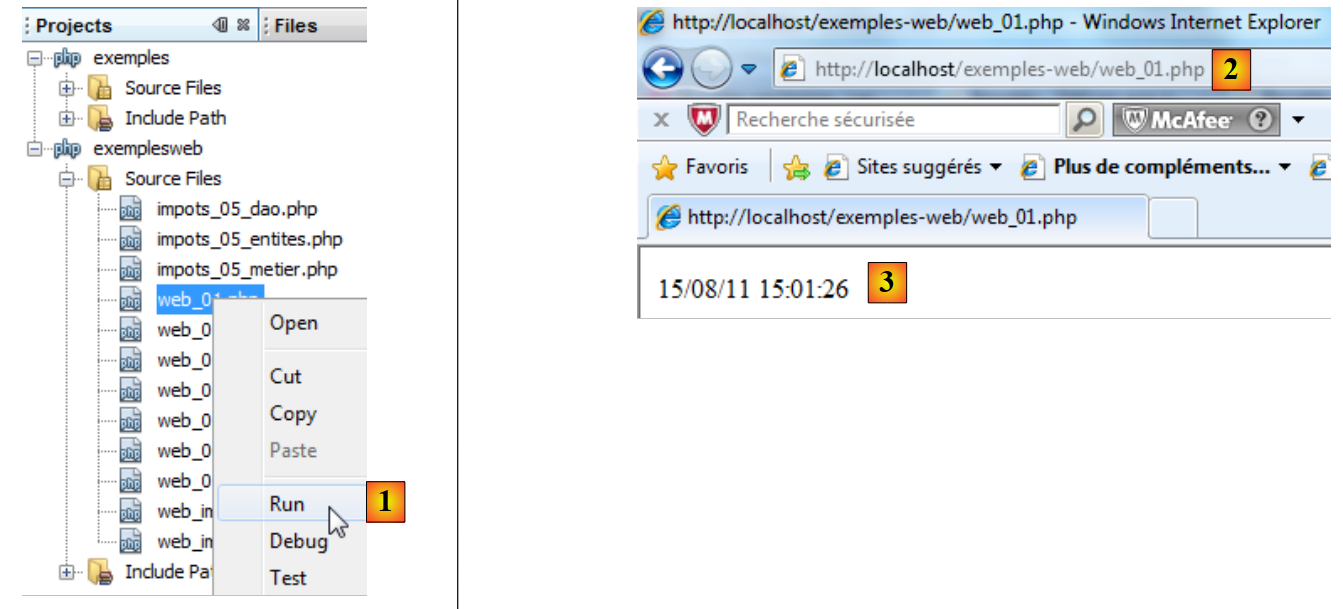 |
- In [1], the script is executed. A web browser is then launched.
- In [2], the URL requested by the web browser
- In [3], the text sent by the server script
The client browser uses the HTTP protocol to communicate with the web server. We have already described the format of this protocol.
The client sends lines of text that can be broken down into three parts: headers, an empty line, and the document. The document sent to the web server is usually empty or consists of a set of parameters in the form parami=vali, where vali is a value entered by the user in a form.
The server’s response has the same format: headers HTTP, blank line, document, where the document is this time the document requested by the client browser. If the client has sent parameters, the document delivered generally depends on those parameters.
With the Firefox browser, it is possible to view the actual exchanges between the client and the web server. There is a Firefox plugin called Firebug that allows you to trace these exchanges. Firebug is available at URL [https://addons.mozilla.org/fr/firefox/addon/firebug/]. If you use the Firefox browser to visit this Url, you can then download the Firebug plugin. We assume below that the Firebug plugin has been downloaded and installed. It is available via a option in the Firefox menu:
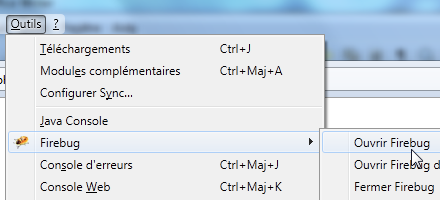 |
A Firebug window opens within the Firefox browser window. This window itself has a menu:
 |
To view the client/server exchanges during a HTTP request, we make the URL [http://localhost/exemples-web/web_01.php] request using the Firefox browser. The Firebug window then fills with information:
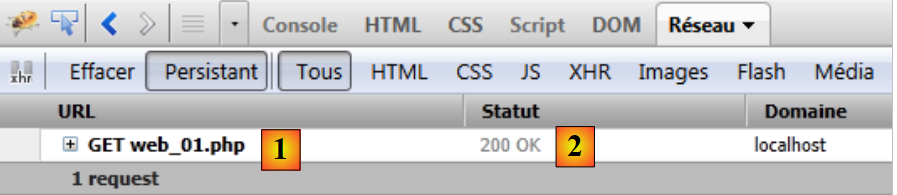 |
Above is a summary of the client/server exchanges:
- [1]: the client sent the request HTTP: GET /exemples-web/web_01.php HTTP/1.1 to request the document [web01.php]
- [2]: the server sent the response: HTTP/1.1 200 OK indicating that it found the requested document.
Firebug allows you to view the complete exchange. Simply "expand" the URL:
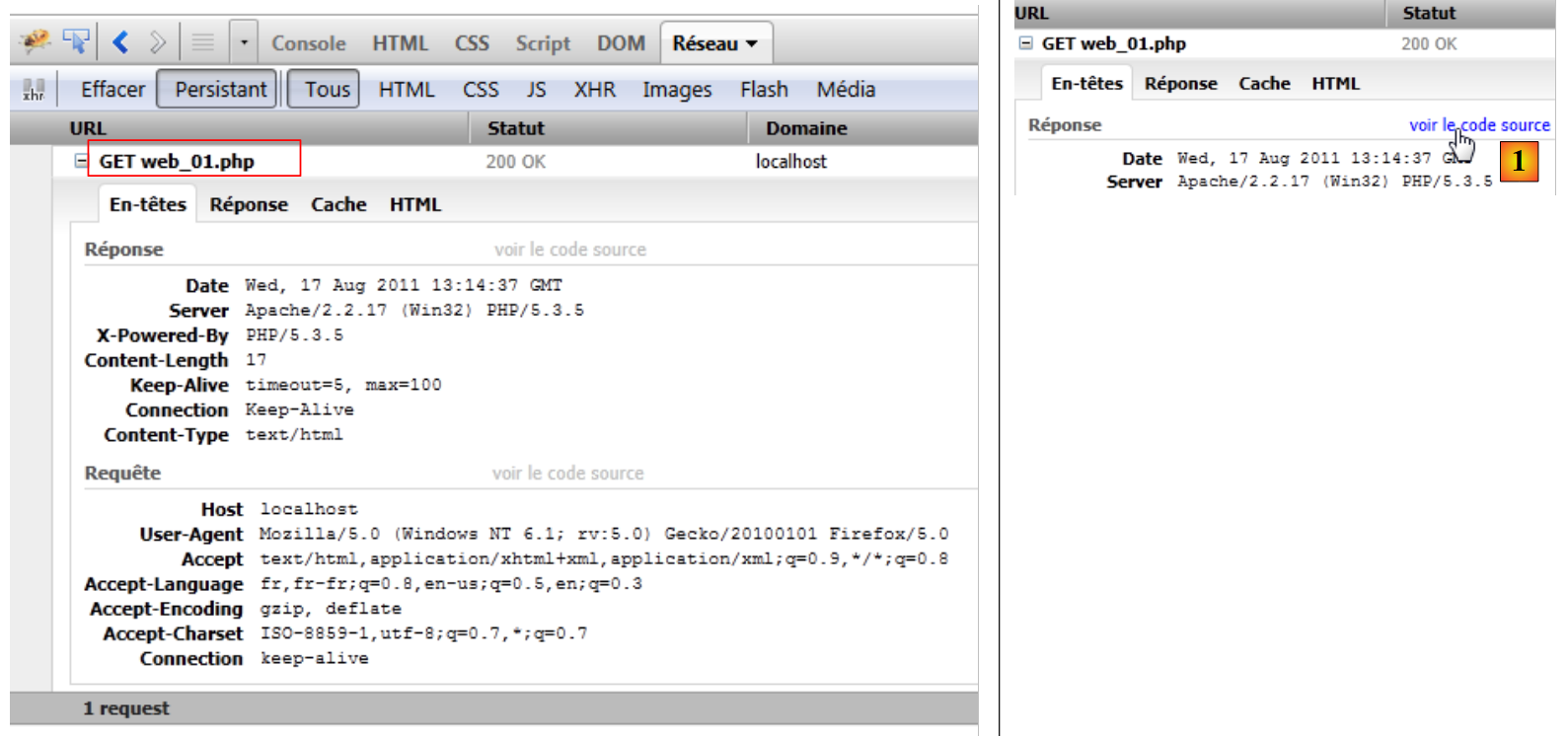 |
Above, we see the Http headers exchanged between the client (Request) and the server (Response). It is possible to obtain the source code of the exchanges, c.a.d, and the actual text lines exchanged, [1]. We then obtain the following source code:
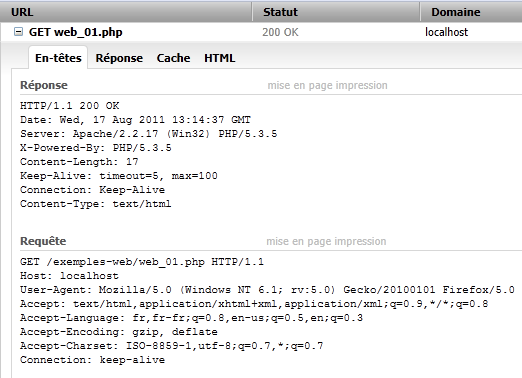 |
To write a client-side script for the web server, we simply need to replicate the browser’s behavior. After establishing a connection with the server, the client-side script could send the 8 lines of the request above. In fact, not everything is essential, and we will only send the following three lines:
- Line 1: specifies the requested document and the HTTP protocol used
- Line 2: provides the hostname of the client script
- line 3: indicates that after the exchange, the client will close the connection to the server
Let’s now look at the server’s response. We know it was generated by the PHP [web_01.php] script. Above, we see the HTTP headers of the response. The code of the [web01.php] script shows that it did not generate them. Let’s recall the server script’s configuration:
 |
It is the web server that generated the HTTP headers of the response. The server script can generate them itself. We will see an example of this a little later.
We mentioned that the web server’s response had the following format: HTTP headers, blank line, document. If the document is a text document, you can view it in the [Réponse] tab of Firebug:
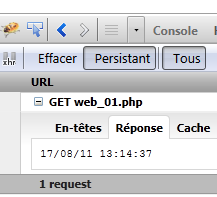 |
This response was generated by the [web_01.php] script.
10.1.2. A client (client1_web_01)
We will now write a client script for the previous service. We know that the client must:
- open a connection with the web server
- send the text: headers HTTP, empty line
- Read the server's entire response until the server closes its connection with the client
- Close the connection with the server
The client script runs in a console environment of Netbeans:
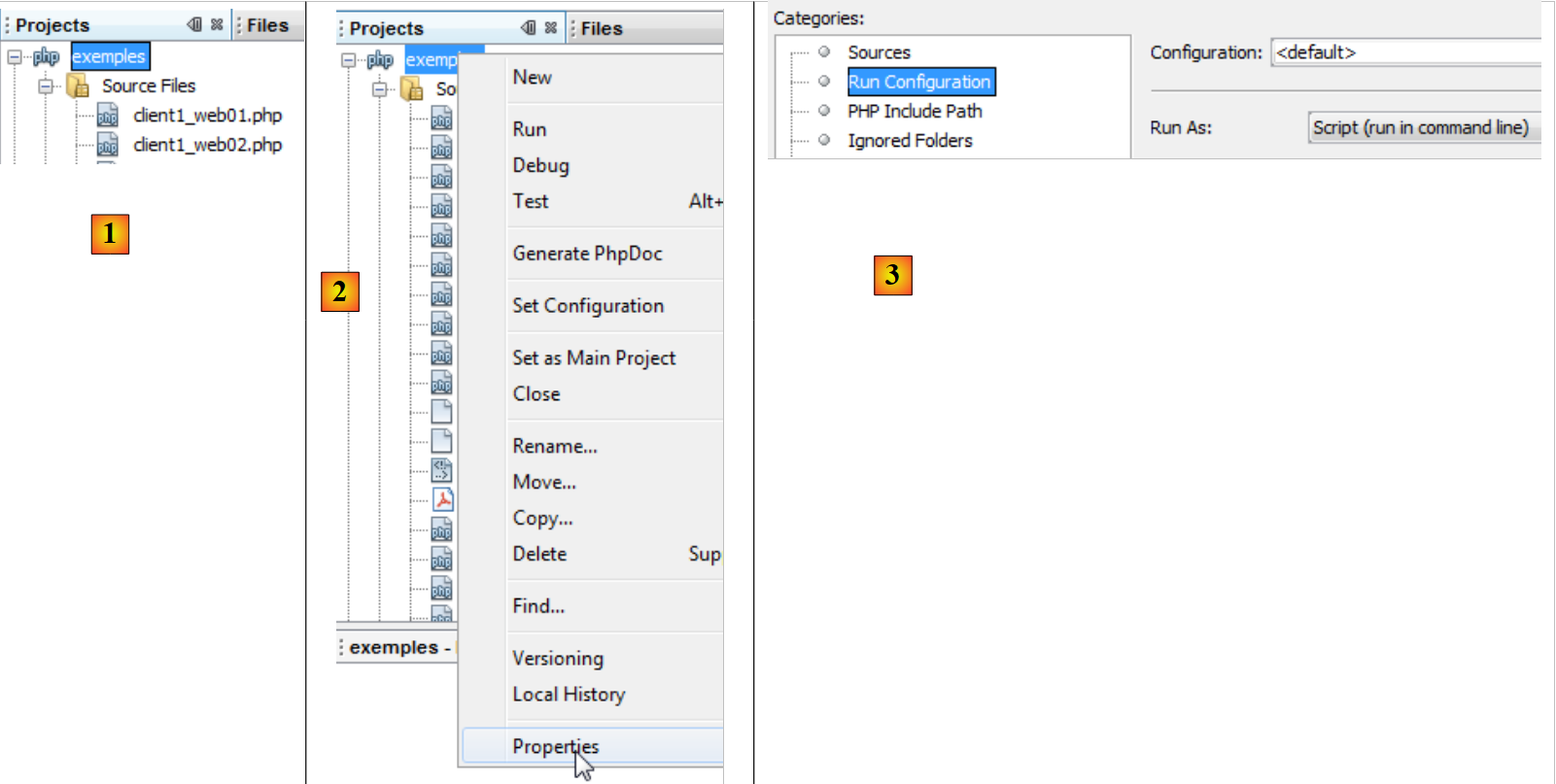 |
- in [1], the client script [client1_web_01.php] is included in the project Netbeans [exemples]
- In [2], the properties of the Netbeans and [exemples] projects
- in [3], the project Netbeans [exemples] runs in "command line" mode, which we have also referred to as "console" mode.
The client script code is as follows:
<?php

// data
$HOTE = "localhost";
$PORT = 80;
$urlServeur = "/exemples-web/web_01.php";
// open a connection on port 80 of $HOTE
$connexion = fsockopen($HOTE, $PORT);
// mistake?
if (!$connexion) {
  print "Erreur : $erreur\n";
  exit;
}
// protocol HTTP headers must end with an empty line
// GET
fputs($connexion, "GET $urlServeur HTTP/1.1\n");
// Host
fputs($connexion, "Host: localhost\n");
// Connection
fputs($connexion,"Connection: close\n");
// blank line
fputs($connexion,"\n");
// the server will now respond on channel $connexion. It will send all
// then close the channel. The client therefore reads everything that arrives from $connexion
// until the channel closes
while ($ligne = fgets($connexion, 1000)) {
  print "$ligne";
}//while
// the customer in turn closes the connection
fclose($connexion);
// end
exit;
Comments
- line 8: opening a connection to the server
- Line 16: Order HTTP GET
- Line 18: Order HTTP Host
- line 20: command HTTP Connection
- line 22: empty line
- lines 26–28: read all text lines sent by the server until it closes the connection.
- line 30: the client closes the connection
Results
Executing the client script produces the following results:
Comments
- lines 1-7: the HTTP response from the web server.
- Line 8: the empty line that signals the end of the headers HTTP
- Lines 9 and beyond: the document. Here, it is a simple text representing the current date and time. This is the text written by the script PHP to output #1.
- Line 1: The server responds that it has found the requested document.
- line 2: current date and time on the server
- line 3: web server identity
- line 4: indicates that the document that follows is a document generated by a PHP script
- Line 5: Number of characters in the document
- line 6: the server indicates that after sending the document, it will close the connection
- line 7: indicates that the document sent by the server is text in HTML format. This is incorrect here. The document is plain text with no specific format. When the document is not text in HTML format, the PHP script is responsible for indicating this. We did not do so here.
10.1.3. A second client (client2_web_01)
The previous client displayed everything the web server sent it. In practice, we generally ignore the HTTP headers in the response and process the document body. Here, we aim to retrieve the date and time sent by the server script PHP. We will retrieve this information using a regular expression.
<?php

// retrieve information sent by a web server
// data
$HOTE = "localhost";
$PORT = 80;
$urlServeur = "/exemples-web/web_01.php";
// open a connection on port 80 of $HOTE
$connexion = fsockopen($HOTE, $PORT);
// mistake?
if (!$connexion) {
  print "Erreur : $erreur\n";
  exit;
}
// protocol HTTP headers must end with an empty line
// GET
fputs($connexion, "GET $urlServeur HTTP/1.1\n");
// Host
fputs($connexion, "Host: localhost\n");
// Connection
fputs($connexion,"Connection: close\n");
// blank line
fputs($connexion,"\n");
// the server will now respond on channel $connexion. It will send all
// then close the channel. The client therefore reads everything that arrives from $connexion
// until it finds the line it's looking for in the form dd/mm/aa hh:mm:ss
while ($ligne = fgets($connexion, 1000)) {
  print "$ligne";
  if (preg_match("/(\d\d)\/(\d\d)\/(\d\d) (\d\d):(\d\d):(\d\d)/", $ligne, $champs)) {
     // we retrieve the # fields
    array_shift($champs); // removes the 1st element from the array fields
     // the 6 fields are retrieved in 6 variables
    list($j, $m, $a, $h, $i, $s) = $champs;
     // result display
    print "\ndateheure=[$j,$m,$a,$h,$i,$s]\n";
  }//if
}//while
// the customer in turn closes the connection
fclose($connexion);
// end
exit;
Results
10.2. Server retrieval of parameters sent by the client
In the HTTP protocol, a client has two methods for passing parameters to the web server:
- it requests the URL service in the form
GET url?param1=val1¶m2=val2¶m3=val3… HTTP/1.0
where the valid values must first be encoded so that certain reserved characters are replaced by their hexadecimal values.
- It requests the URL from the service in the form
POST url HTTP/1.0
then, among the headers sent to the server, includes the following header:
The rest of the headers sent by the client end with a blank line. It can then send its data in the form
where the values vali must, as with the GET method, be encoded beforehand. The number of characters sent to the server must be N, where N is the value declared in the header
The script PHP, which retrieves the previous parameters sent by the client, obtains their values from the array:
- $_GET["parami"] for a command GET
- $_POST["parami"] for a command POST
10.2.1. The client GET (client1_web_02)
The script PHP below sends three parameters [nom, prenom, age] to the server.
<?php

// client: sends firstname,lastname,age to the server using the GET method
// data
$HOTE = "localhost";
$PORT = 80;
$URL = "/exemples-web/web_02.php";
list($prenom, $nom, $age) = array("jean-paul", "de la hûche", 45);
// web server connection
$connexion = fsockopen($HOTE, $PORT);
// return if error
if (!$connexion) {
  print "Echec de la connexion au site ($HOTE,$PORT) : $erreur";
  exit;
}//if
// information sent to server PHP
// information is encoded
$infos = "prenom=" . urlencode(utf8_decode($prenom)) . "&nom=" . urlencode(utf8_decode($nom)) . "&age=" . urlencode("$age");
// console monitoring
print "infos envoyées au serveur (GET)=$infos\n";
print "URL demandée=[$URL?$infos]\n\n";
// protocol HTTP headers must end with an empty line
// GET
fputs($connexion, "GET $URL?$infos HTTP/1.1\n");
// Host
fputs($connexion, "Host: localhost\n");
// Connection
fputs($connexion,"Connection: close\n");
// blank line
fputs($connexion,"\n");
// the server will now respond on channel $connexion. It will send all
// then close the channel. The client reads everything from $connexion until the channel is closed
while ($ligne = fgets($connexion, 1000))
  print "$ligne";
// the customer in turn closes the connection
fclose($connexion);
Comments
- line 7: Url from the server script
- line 8: the values of the 3 parameters
- line 10: opening a connection to the web server
- line 18: encoding of the 3 parameters. We are in a script written in Netbeans with UTF-8 character encoding. Therefore, the 3 parameter values in line 8 are encoded in UTF-8. The utf8_decode function converts their encoding to ISO-8859-1. Once this is done, they can be encoded for URL. All non-alphabetic characters are replaced by %xx, where xx is the hexadecimal value of the character. Spaces are replaced by the + sign.
- Line 24: The requested URL is $URL?$infos, where $infos is in the form lastname=val1&firstname=val2&age=val3.
10.2.2. The server (web_02)
The server simply displays what it receives.
<?php

// error management
ini_set("display_errors", "off");

// server retrieves information sent by the client
// here firstname=P&lastname=N&age=A
// this information is automatically available in the
// $_GET['prenom'], $_GET['nom'], $_GET['age']
// we send them back to the customer

// uTF-8 header
header("Content-Type: text/plain; charset=utf-8");

// parameters sent to server
$prenom = isset($_GET['prenom']) ? $_GET['prenom'] : "";
$nom = isset($_GET['nom']) ? $_GET['nom'] : "";
$age = isset($_GET['age']) ? $_GET['age'] : "";

// customer response
$réponse = "informations reçues du client [" .
        utf8_encode(htmlspecialchars($prenom, ENT_QUOTES)) .
        "," . utf8_encode(htmlspecialchars($nom, ENT_QUOTES)) .
        "," . utf8_encode(htmlspecialchars($age, ENT_QUOTES)) . "]\n";
print $réponse;
Comments
- line 13: sets the "Content-Type" header to HTTP. By default, the web server sends the header
which indicates that the response is text in the format HTML. In this case, the response will be unformatted text with characters encoded in UTF-8:
The HTTP headers must be sent before the server's response. Therefore, as shown above, the call to the header function will come before any print statements.
- Lines 16–18: We retrieve the three parameters from the $_GET array.
- line 21: we construct the string that will be sent in response to the client. Certain characters have special meanings in HTML and must be replaced by HTML entities to be displayed. htmlspecialchars($string) replaces all these characters with their equivalents in the $string string. For example, the $ character becomes &. Then, since we specified in line 13 that the response would be UTF-8 text, we encode the retrieved values in UTF-8.
- Line 25: The response is sent to the client
Test 1
Let’s run the script [web_02] from Netbeans. A browser is then launched to display URL [http://localhost/exemples-web/web_02.php]:
 |
- In [1], the browser displays URL [http://localhost/exemples-web/web_02.php]. Because we did not append parameters to this Url, the server responded with empty parameters. Remember that the server’s response is the one written with the print statement.
- In [2], we append parameters to URL. This time, the server script returns them correctly.
Note that Netbeans is not required to execute a server script. Simply typing the URL of the server script into a browser is sufficient for the script to run.
Test 2
We run the client [client1_web_02.php] in Netbeans. We receive the following response:
- Line 1: Encoding of the 3 parameters. We can see that the character û has become %FB.
- line 12: the server's response
10.2.3. The client POST (client2_web_03)
A client Http sends the following text sequence to the web server: headers HTTP, empty line, document. In the previous client, this sequence was as follows:
There was no document. There is another way to transmit parameters, known as the POST method. In this case, the text sequence sent to the web server is as follows:
This time, the parameters that were included in the headers for the GET client are part of the document sent after the headers in the POST client.
The script for client POST is as follows:
<?php

// client: sends firstname,lastname,age to the server using the POST method
// data
$HOTE = "localhost";
$PORT = 80;
$URL = "/exemples-web/web_03.php";
list($prenom, $nom, $age) = array("jean-paul", "de la hûche", 45);
// web server connection
$connexion = fsockopen($HOTE, $PORT);
// return if error
if (!$connexion) {
  print "Echec de la connexion au site ($HOTE,$PORT) : $erreur";
  exit;
}//if
// information sent to server PHP
// information is encoded
$infos = "prenom=" . urlencode(utf8_decode($prenom)) . "&nom=" . urlencode(utf8_decode($nom)) . "&age=" . urlencode("$age");
print "client : infos envoyées au serveur (POST) : $infos\n";
// connect to the URL $URL by posting (POST) parameters to it
// protocol HTTP headers must end with an empty line
// POST
fputs($connexion, "POST $URL HTTP/1.1\n");
// Host
fputs($connexion, "Host: localhost\n");
// Connection
fputs($connexion,"Connection: close\n");
// Content-type
fputs($connexion, "Content-type: application/x-www-form-urlencoded\n");
// Content-length
// send the size (number of characters) of the information to be sent
fputs($connexion, "Content-length: " . strlen($infos) . "\n");
// send an empty line
fputs($connexion, "\n");
// we send the news
fputs($connexion, $infos);
// the server will now respond on channel $connexion. It will send all
// then close the channel. The client reads everything that arrives from $connexion
// until the channel closes
while ($ligne = fgets($connexion, 1000))
  print "$ligne";
// the customer in turn closes the connection
fclose($connexion);
Comments
- line 7: the URL of the web service to which the client POST will connect. This web service will be described shortly.
- line 8: the parameters to be sent to the web service
- line 10: connection to the web server
- line 18: encoding of the parameters to be sent to the web service
- line 23: command Http POST
- line 25: command Http Host
- line 27: command Http Connection
- line 29: command Http Content-type. We have already encountered this header HTTP. It is present every time a document is sent. A web server that sends a document Html uses the header HTTP
If it sends unformatted text, it uses the header HTTP
Our client POST sends a document that is text in the form param1=val1¶m2=val2&.... This type of document has the type application/x-www-form-urlencoded. We won’t explain why, as that would require us to explain what a web form is.
- Line 32: Content-length header. We have already encountered this header HTTP. It is present every time a document is sent. It indicates the number of bytes in the document.
- Line 34: The empty line indicating the end of the headers HTTP
- Line 36: Sending the parameters
- Lines 40–41: Reading the complete server response
- line 43: closing the connection
10.2.4. The server (web_03)
The [web_03] web service does the same thing as the [web_02] web service. It reads the parameters sent by the POST client and sends them back to the client. Its code is as follows:
<?php

// error management
ini_set("display_errors", "off");
// uTF-8 header
header("Content-Type: text/plain; charset=utf-8");

// server retrieves information sent by the client
// here firstname=P&lastname=N&age=A
// this information is automatically available in the
// $_POST['prenom'], $_POST['nom'], $_POST['age']
// we send them back to the customer
// parameters sent to server
$prenom = isset($_POST['prenom']) ? $_POST['prenom'] : "";
$nom = isset($_POST['nom']) ? $_POST['nom'] : "";
$age = isset($_POST['age']) ? $_POST['age'] : "";
// customer response
$réponse = "informations reçues du client [" .
        utf8_encode(htmlspecialchars($prenom, ENT_QUOTES)) .
        "," . utf8_encode(htmlspecialchars($nom, ENT_QUOTES)) .
        "," . utf8_encode(htmlspecialchars($age, ENT_QUOTES)) . "]\n";
print $réponse;
Comments
- lines 14-16: the parameters sent by a client POST become available in the array $_POST for the web service that receives them.
- Line 6: HTTP Content-Type header. It may be surprising not to find the HTTP Content-Length header in the HTTP headers, which indicates the size of the document sent back to the client. We have seen that the web server sends HTTP headers by default. The Content-Length header is one of them.
Results
Once the server script is written in NetBeans, it becomes immediately available via the Apache server at WampServer. Recall that this is achieved through configuration (see paragraph 10). We launch the client, which queries the server, and then receive the following response:
- lines 2-10: the server's response
- lines 2-8: the headers Http
- line 10: the document
- line 6: the HTTP Content-Length header. Since this header was not generated by the server script, it was generated by the web server.
- line 8: the only header generated by the server script
10.3. Retrieving environment variables from the WEB server
A server script runs in a web environment that it can recognize. This environment is stored in the dictionary $_SERVER. First, we write a server application that sends the contents of this dictionary to its clients.
10.3.1. The server (web_04)
<?php

// error management
ini_set("display_errors", "off");
// uTF-8 header
header("Content-Type: text/plain; charset=utf-8");

// returns to the client the list of variables available in the server environment
foreach ($_SERVER as $clé => $valeur) {
  print "[$clé,$valeur]\n";
}
- The (key, value) pairs from the $_SERVER dictionary are sent to clients.
The result obtained when the client is a web browser is as follows:
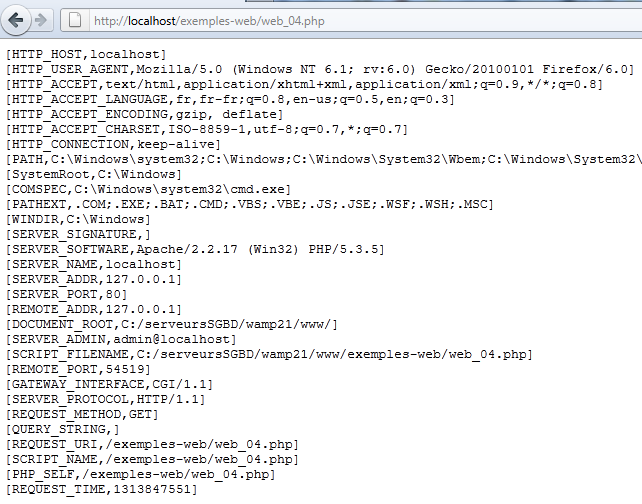
Here is the meaning of some of the variables (for Windows. On Linux, they would be different):
CMDE represents the HTTP header sent by the client. We have access to all these headers. | |
The path to the executables on the machine where the server script is running | |
the path to the DOS command interpreter | |
the extensions of executable files | |
the Windows installation folder | |
the web server signature. Nothing here. | |
the type of web server | |
The Internet name of the web server machine | |
the web server's listening port | |
the IP address of the web server | |
the client's address. In this case, the client was on the same machine as the server. | |
the client's communication port | |
the root of the directory tree of documents served by the web server | |
the email address of the web server administrator | |
the full path of the server script | |
the version of the HTTP protocol used by the web server | |
the Http command used by the client. There are four of them: GET, POST, PUT, DELETE | |
the parameters sent with a request GET /url?parameters | |
the URL requested by the client. If the browser requests the URL http://machine[:port]/uri, we will have REQUEST_URI=uri | |
$_SERVER['SCRIPT_FILENAME']=$_SERVER['DOCUMENT_ROOT'].$_SERVER['SCRIPT_NAME'] |
10.3.2. The client (client1_web_04)
The client simply displays everything the server sends it.
<?php

// data
$HOTE = "localhost";
$PORT = 80;
$urlServeur = "/exemples-web/web_04.php";
// open a connection on port 80 of $HOTE
$connexion = fsockopen($HOTE, $PORT);
// mistake?
if (!$connexion) {
  print "Erreur : $erreur\n";
  exit;
}

// connect to the Web server on a URL
// protocol HTTP headers must end with an empty line
// GET
fputs($connexion, "GET $urlServeur HTTP/1.1\n");
// Host
fputs($connexion, "Host: localhost\n");
// Connection
fputs($connexion,"Connection: close\n");
// empty line
fputs($connexion,"\n");
// the server will now respond on channel $connexion. It will send all
// then close the channel. The client therefore reads everything that arrives from $connexion
// until the channel closes
while ($ligne = fgets($connexion, 1000)) {
  print "$ligne";
}//while
// the customer in turn closes the connection
fclose($connexion);
// end
exit;
Results
10.4. Session Management WEB
In the previous client/server examples, the process was as follows:
- the client opens a connection to port 80 on the web server
- it sends the text sequence: headers Http, blank line, [document]
- in response, the server sends a sequence of the same type
- the server closes the connection to the client
- the client closes the connection to the server
If the same client makes a new request to the web server shortly thereafter, a new connection is established between the client and the server. The server cannot tell whether the connecting client has visited before or if this is a first-time request. Between connections, the server “forgets” its client. For this reason, the HTTP protocol is said to be a stateless protocol. However, it is useful for the server to remember its clients. For example, if an application is secure, the client will send the server a username and password to authenticate itself. If the server “forgets” its client between connections, the client would have to authenticate itself with every new connection, which is not feasible.
To track a client, the server proceeds as follows: when a client makes an initial request, the server includes an identifier in its response that the client must then send back with every new request. Thanks to this identifier, which is unique to each client, the server can recognize a client. It can then manage a cache for that client in the form of a file uniquely associated with the client’s identifier.
Technically, this is how it works:
- In the response to a new client, the server includes the header HTTP Set-Cookie: MotClé=Identifier. It does this only on the first request.
- In subsequent requests, the client will send back its identifier via the header HTTP Cookie: MotClé=Identifier so that the server can recognize it.
One might wonder how the server knows it is dealing with a new client rather than a returning one. It is the presence of the HTTP Cookie header in the client’s Http headers that tells it. For a new client, this header is absent.
The set of connections from a given client is called a session.
10.4.1. The configuration file
For session management to work correctly with PHP, you must verify that it is properly configured. On Windows, its configuration file is PHP.ini. Depending on the execution context (console, web), the [PHP.ini] configuration file must be located in different folders. To determine these, use the following script:
Line 4: The phpinfo function provides information about the PHP interpreter executing the script. In particular, it provides the path to the [PHP.ini] configuration file being used.
In a console environment, you get a result similar to the following:
Line 2: The main configuration file is c:\windows\PHP.ini
line 3: a secondary configuration file is C:\serveursSGBD\wamp21\bin\PHP\php5.3.5\PHP.ini. It allows you to modify certain configuration options in the main configuration file.
In a web environment, the following result is obtained:
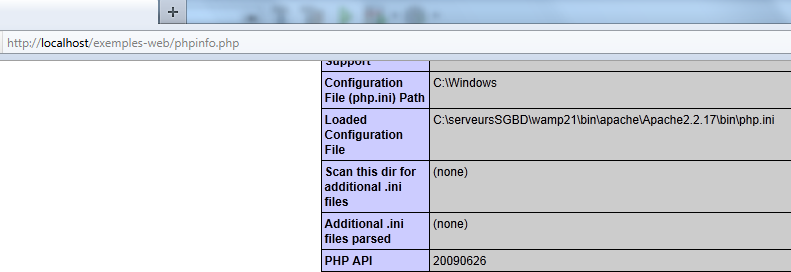
The secondary configuration file here is not the same as in the console environment. It is the latter that we will examine. In this file, there is a session section:
- Line 1: Client session data is saved to a file
- line 3: the directory where session data is saved. If this directory does not exist, no error is reported and session management does not work.
- Lines 4-5: indicate that the session ID is managed by the Http Set-Cookie and Cookie headers
- Line 6: The Set-Cookie header will be in the following format: Set-Cookie: PHPSESSID=identifiant_de_session
- Line 7: A client session is not started automatically. The server script must explicitly request it using the session_start() statement.
10.4.2. Server 1 (web_05)
Session ID management is transparent to a web service. This identifier is managed by the web server. A web service accesses the client session via the session_start() instruction. From that point on, the web service can read/write data to the client session via the $_SESSION dictionary. The following code demonstrates session management of three counters.
<?php

// error management
ini_set("display_errors", "off");
// uTF-8 header
header("Content-Type: text/plain; charset=utf-8");

// log in
session_start();
// we set 3 variables in session
if (!isset($_SESSION['N1'])) {
  $_SESSION['N1'] = 0;
}
if (!isset($_SESSION['N2'])) {
  $_SESSION['N2'] = 10;
}
if (!isset($_SESSION['N3'])) {
  $_SESSION['N3'] = 100;
}
// incrementing the 3 variables
$_SESSION['N1']++;
$_SESSION['N2']++;
$_SESSION['N3']++;
// sending information to the customer
print "N1=".$_SESSION['N1']."\n";
print "N2=".$_SESSION['N2']."\n";
print "N3=".$_SESSION['N3']."\n";
// end of session
session_close();
- line 9: start of a client session
- lines 11-13: the array $_SESSION is a key-value dictionary. The data stored in this dictionary persists across requests from the same client. It serves as the client’s memory on the server.
- lines 11-19: if the three counters N1, N2, N3 are not in the session, they are added to it.
- Lines 21–23: They are incremented by one.
- lines 25–27: their values are sent to the client
In the client/server relationship, the management of the client session on the server depends on both parties, the client and the server:
- the server is responsible for sending an identifier to the client upon its first request
- the client is responsible for sending this identifier back with each new request. If it does not, the server will assume it is a new client and generate a new identifier for a new session.
Results
We use a web browser as the client. By default (actually, by configuration), the browser does indeed send back to the server the session identifiers that the server sends to it. As requests are made, the browser will receive the three counters sent by the server and will see their values increment.
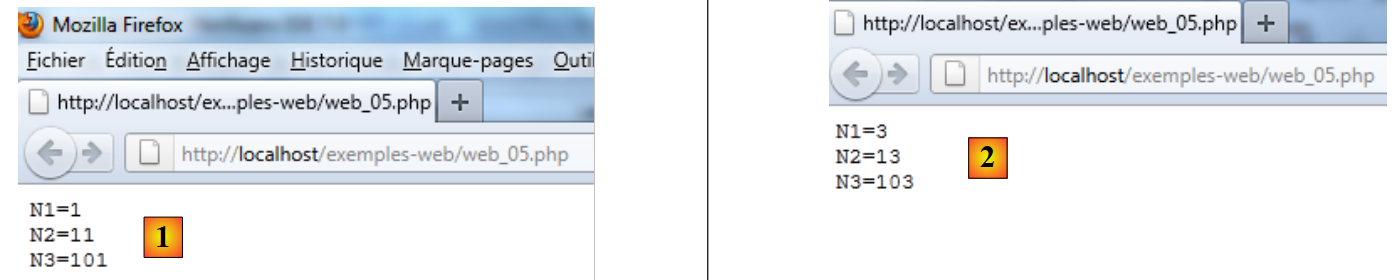 |
- In [1], the first request to the web service [web_05]
- In [2], the third request shows that the counters have indeed been incremented. The counter values are indeed being stored as requests are made.
Let’s use Firebug to view the Http headers exchanged between the server and the client. We close Firefox to end the current session with the server, reopen it, and enable Firebug. We request the service |web_05]:
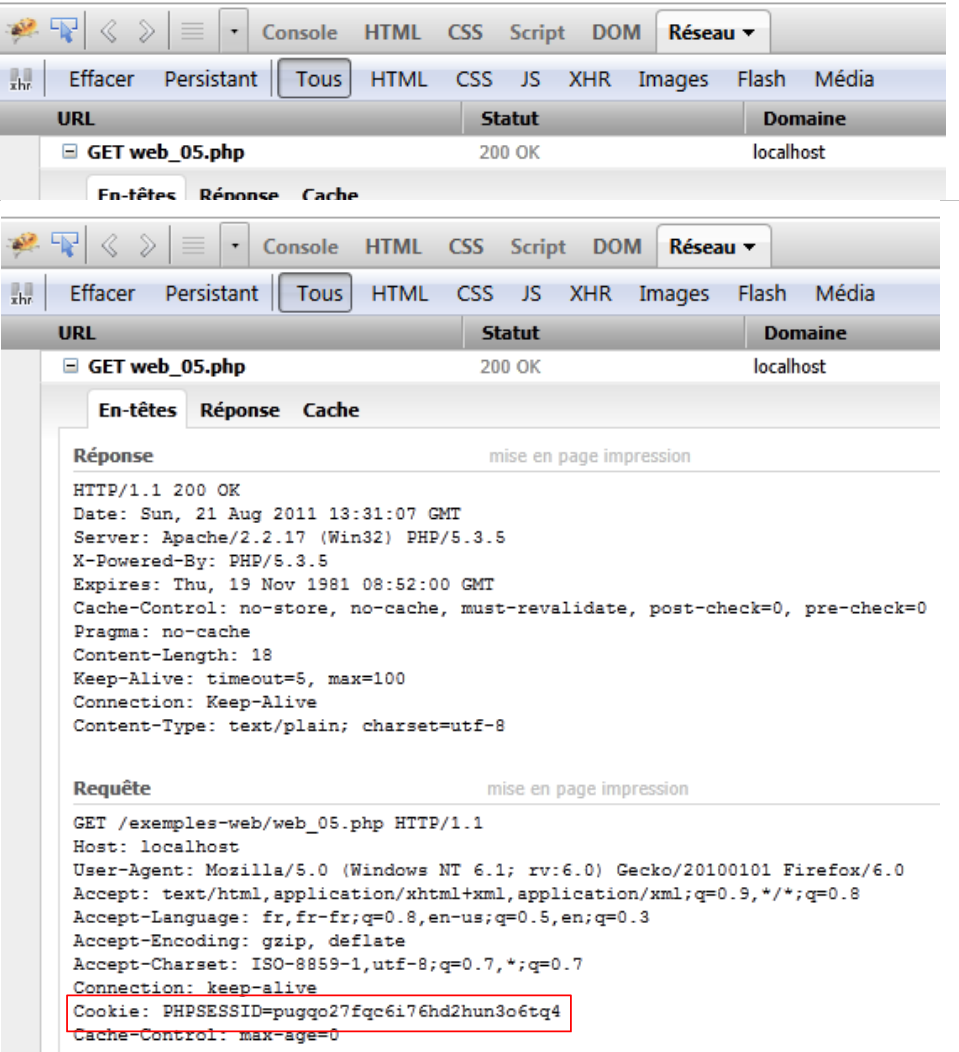 |
Above, we see the session ID sent by the server in its response to the client’s first request. It uses the HTTP Set-Cookie header.
Let’s make a new request by refreshing (F5) the page in the web browser:
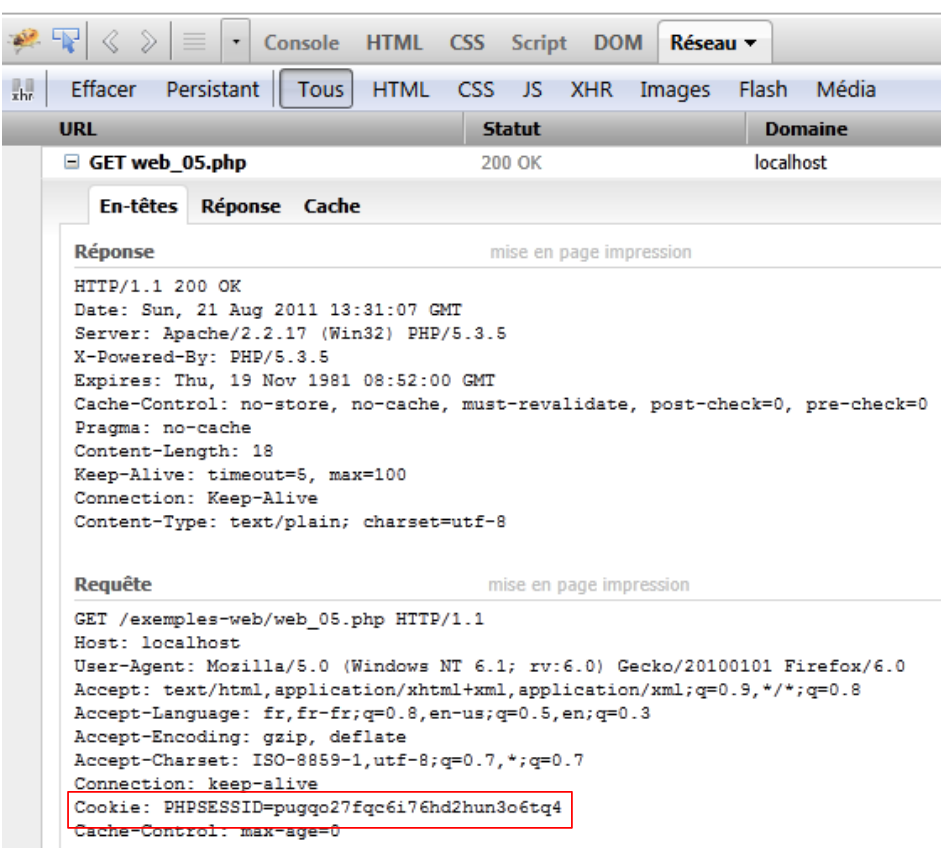 |
Here, we can observe two things:
- The web browser sends the session ID back with the HTTP Cookie header.
- In its response, the web service no longer includes this identifier. It is now the client’s responsibility to send it with each of its requests.
10.4.3. Client 1 (client1_web_05)
We are now writing a client-side script based on the previous server-side script. In its session management, it must behave like the web browser:
- In the server’s response to its first request, it must find the session identifier that the server sends it. It knows it will find it in the HTTP Set-Cookie header.
- it must, with each subsequent request, send the identifier it received back to the server. It will do so using the HTTP Cookie header.
The client code is as follows:
<?php

// data
$HOTE = "localhost";
$PORT = 80;
$urlServeur = "/exemples-web/web_05.php";
// tests
$cookie = "";
for ($i = 0; $i < 5; $i++) {
  list($erreur, $cookie, $N1, $N2, $N3) = connecte($HOTE, $PORT, $urlServeur, $cookie);
  print "----------------------------\n";
  print "client(erreur,cookie,N1,N2,N3)=[$erreur,$cookie,$N1,$N2,$N3]\n";
  print "----------------------------\n";
}
// end
exit;

function connecte($HOTE, $PORT, $urlServeur, $cookie) {
  // connects client to ($HOTE,$PORT,$urlServeur)
  // sends the $cookie cookie if it is non-empty
  // displays all lines received in response
  // open a connection on port 80 of $HOTE
  $connexion = fsockopen($HOTE, $PORT);
  // mistake?
  if (!$connexion)
    return array("erreur lors de la connexion au serveur ($HOTE, $PORT)");
  // connect to $urlserveur
  // protocol HTTP headers must end with an empty line
  // GET
  fputs($connexion, "GET $urlServeur HTTP/1.1\n");
  // Host
  fputs($connexion, "Host: localhost\n");
  // Connection
  fputs($connexion, "Connection: close\n");
  // send cookie if non-empty
  if ($cookie) {
    fputs($connexion, "Cookie: $cookie\n");
  }//if
  // send empty line
  fputs($connexion, "\n");
  // the web server response is displayed
  // and take care to retrieve any cookies and Ni
  $N = "";
  while ($ligne = fgets($connexion, 1000)) {
    print "$ligne";
    // cookie - only on 1st response
    if (!$cookie) {
      if (preg_match("/^Set-Cookie: (.*?)\s*$/", $ligne, $champs)) {
        $cookie = $champs[1];
      }
    }
    // n1 value
    if (preg_match("/^N1=(.*?)\s*$/", $ligne, $champs))
      $N1 = $champs[1];
    // n2 value
    if (preg_match("/^N2=(.*?)\s*$/", $ligne, $champs))
      $N2 = $champs[1];
    // n3 value
    if (preg_match("/^N3=(.*?)\s*$/", $ligne, $champs))
      $N3 = $champs[1];
  }//while
  // close the connection
  fclose($connexion);
  // return
  return array("", $cookie, $N1, $N2, $N3);
}
Comments
- lines 3-16: the main program
- lines 18-67: the connect function
- lines 9-14: the client calls the server 5 times and displays the successive values of counters N1, N2, and N3. If the session is managed correctly, these counters should be incremented by 1 with each new request.
- line 10: the connect function uses the parameters $HOTE, $PORT, $urlServeur to connect the client to the web service. The parameter $cookie represents the session ID. On the first call, this is an empty string. On subsequent calls, it is the session ID sent by the server in response to the client’s first call. The `connecte` function returns, as results, the values of the three counters `$N1`, $N2, and $N3, the session ID $cookie, and any errors $erreur.
- Line 18: The function connects to a standard Http client. We will only comment on the new features.
- Lines 30–40: Sending the headers Http.
- Lines 36–38: If the session ID is known, it is sent to the server
- lines 44–66: processing of all text lines sent by the server
- lines 47-51: if the session ID has not yet been retrieved, it is retrieved from the HTTP Set-Cookie header using a regular expression.
- lines 53-54: the N1 counter is also obtained using a regular expression
- lines 56–57, 59–60: same for counters N2 and N3
- Line 63: Close the connection to the server.
- Line 65: Returns the results as an array.
Results
Executing the client script causes the following to be displayed in the Netbeans console:
- Line 5: In its first response, the server sends the session ID. In subsequent responses, it no longer sends it.
- It is clear that the web server retains the values of (N1, N2, N3) across the client’s requests. This is known as session tracking.
The following two examples show that you can also save the values of an array or an object.
10.4.4. Server 2 (web_06)
The following server script demonstrates that you can store an array or a dictionary in a session.
<?php

// error management
ini_set("display_errors", "off");
// uTF-8 header
header("Content-Type: text/plain; charset=utf-8");

// log in
session_start();
// save a table and a dictionary
// on initialise ou modifie le tableau
if (isset($_SESSION['tableau'])) {
  for ($i = 0; $i < count($_SESSION['tableau']); $i++) {
    $_SESSION['tableau'][$i]++;
  }
} else {
  for ($i = 0; $i < 10; $i++) {
    $_SESSION['tableau'][$i] = $i * 10;
  }
}
// on initialise ou modifie le dictionnaire
if (isset($_SESSION['dico'])) {
  foreach (array_keys($_SESSION['dico']) as $clé) {
    $_SESSION['dico'][$clé]++;
  }
} else {
  $_SESSION['dico'] = array("zéro" => 0, "dix" => 10, "vingt" => 20);
}
// sending information to the customer
print "tableau=" . join(",", $_SESSION['tableau']) . "\n";
print "dico=";
foreach ($_SESSION['dico'] as $clé => $valeur) {
  print "($clé,$valeur) ";
}
print "\n";
Comments
- lines 17-19: an array is initially added to the session if it isn't already there
- lines 12-15: if it is already there, its elements are incremented by 1
- line 27: a dictionary with numeric values is added to the session if it is not already there
- lines 22-25: if it is already in the session, its numerical values are incremented by 1
- lines 30-35: the array and dictionary are sent to the client
10.4.5. Client 2 (client1_web_06)
<?php

// data
$HOTE = "localhost";
$PORT = 80;
$urlServeur = "/exemples-web/web_06.php";
// tests
$cookie = "";
for ($i = 0; $i < 5; $i++) {
  connecte($HOTE, $PORT, $urlServeur, $cookie);
}
// end
exit;

function connecte($HOTE, $PORT, $urlServeur, &$cookie) {
  // connects client to ($HOTE,$PORT,$urlServeur)
  // sends the $cookie cookie if it is non-empty
  // displays all lines received in response
  // the cookie is passed by reference to be shared between
  // the called program and the calling program
  // open a connection on the $PORT port of $HOTE
  $connexion = fsockopen($HOTE, $PORT);
  // mistake?
  if (!$connexion)
    return array("erreur lors de la connexion au serveur ($HOTE, $PORT)");
  // protocol HTTP headers must end with an empty line
  // GET
  fputs($connexion, "GET $urlServeur HTTP/1.1\n");
  // Host
  fputs($connexion, "Host: localhost\n");
  // Connection
  fputs($connexion, "Connection: close\n");
  // send cookie if non-empty
  if ($cookie) {
    fputs($connexion, "Cookie: $cookie\n");
  }
  // send empty line
  fputs($connexion, "\n");
  // the web server response is displayed
  // and we take care to recover any cookie
  while ($ligne = fgets($connexion, 1000)) {
    print "$ligne";
    // cookie - only on 1st response
    if (!$cookie) {
      if (preg_match("/^Set-Cookie: (.*?)\s*$/", $ligne, $champs)) {
        $cookie = $champs[1];
      }
    }
  }
  // close the connection
  fclose($connexion);
  // return
  return "";
}
The client code is similar to the client code already commented out.
Results
10.4.6. Server 3 (web_07)
The following server script demonstrates that an object can be placed in a session.
<?php

// error management
ini_set("display_errors", "off");
// uTF-8 header
header("Content-Type: text/plain; charset=utf-8");

// log in
session_start();
// on initialise ou modifie un objet Personne
if (isset($_SESSION['personne'])) {
  $personne = $_SESSION['personne'];
  // increment age
  $personne->setAge($personne->getAge() + 1);
} else {
  // we define the person
  $_SESSION['personne'] = new Personne("paul", "langévin", 10);
}
// customer display
print "personne=".$_SESSION['personne']."\n";
// end
exit;

// ----------------------------------------------------------------
class Personne {

// class attributes
  private $prénom;
  private $nom;
  private $âge;

// getters and setters
  public function getPrénom() {
    return $this->prénom;
  }

  public function getNom() {
    return $this->nom;
  }

  public function getAge() {
    return $this->âge;
  }

  public function setPrénom($prénom) {
    $this->prénom = $prénom;
  }

  public function setNom($nom) {
    $this->nom = $nom;
  }

  public function setAge($age) {
    $this->âge = $age;
  }

// manufacturer
  function __construct($prénom, $nom, $âge) {
    // we go through sets
    $this->setPrénom($prénom);
    $this->setNom($nom);
    $this->setAge($âge);
  }

// method toString
  function __toString() {
    return "[$this->prénom,$this->nom,$this->âge]";
  }

}
Comments
- Line 17: We add a Person object to the session if it isn't already there.
- Lines 11–15: If it is already there, we increment its age by 1
- Line 20: Send the Person object to the client.
10.4.7. Client 3 (client1_web_07)
<?php

// data
$HOTE = "localhost";
$PORT = 80;
$urlServeur = "/exemples-web/web_07.php";
// tests
$cookie = "";
for ($i = 0; $i < 5; $i++) {
  connecte($HOTE, $PORT, $urlServeur, $cookie);
}//if
// end
exit;

function connecte($HOTE, $PORT, $urlServeur, &$cookie) {
...
}
Comments
- line 15: the connect function is identical to the one in the previous client script
Results