2. The Basics of the Java Language
2.1. Introduction
We will first treat Java as a traditional programming language. We will cover objects later.
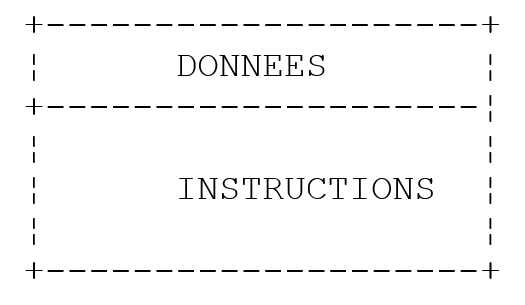
In a program, there are two types of things
- data
- the instructions that manipulate them
We generally strive to separate data from instructions:
2.2. Java Data
Java uses the following data types:
- integers
- floating-point numbers
- characters and strings
- Booleans
- objects
2.2.1. Predefined data types
Type | Encoding | Domain |
char | 2 bytes | Unicode character |
int | 4 bytes | [-231, 231-1] |
long | 8 bytes | [-263, 263 -1] |
byte | 1 byte | [-27 , 27 -1] |
short | 2 bytes | [-215, 215-1] |
float | 4 bytes | [3.4 10-38, 3.4 10+38] absolute value |
double | 8 bytes | [1.7 10-308 , 1.7 10+308] as absolute value |
boolean | 1 bit | true, false |
String | object reference | string |
Date | object reference | date |
Character | object reference | char |
Integer | object reference | int |
Long | object reference | long |
Byte | object reference | byte |
Float | object reference | float |
Double | object reference | double |
Boolean | object reference | boolean |
2.2.2. Literal data notation
integer | 145, -7, 0xFF (hexadecimal) |
double | 134.789, -45E-18 (-45 × 10⁻¹⁸) |
float | 134.789F, -45E-18F (-45 × 10⁻¹⁸) |
character | 'A', 'b |
string | "today" |
boolean | true, false |
date | new Date(13,10,1954) (day, month, year) |
2.2.3. Data declaration
2.2.3.1. Role of declarations
A program manipulates data characterized by a name and a type. This data is stored in memory. When the program is compiled, the compiler assigns each piece of data a memory location characterized by an address and a size. It does this using the declarations made by the programmer.
Furthermore, these declarations allow the compiler to detect programming errors. Thus, the operation
x=x*2;
will be declared incorrect if x is a string, for example.
2.2.3.2. Declaration of Constants
The syntax for declaring a constant is as follows:
final type name=value; //defines constant name=value
ex: final float PI=3.141592F;
Note
Why declare constants?
- The program will be easier to read if the constant is given a meaningful name:
ex: final float taux_tva=0.186F;
- Modifying the program will be easier if the "constant" needs to be changed. Thus, in the previous case, if the VAT rate changes to 33%, the only modification needed will be to change the statement defining its value:
final float taux_tva=0.33F;
If we had used 0.186 explicitly in the program, we would have had to change many lines of code.
2.2.3.3. Variable Declaration
A variable is identified by a name and refers to a data type. A Java variable name consists of n characters, the first of which must be a letter, and the rest can be letters or digits. Java distinguishes between uppercase and lowercase letters. Thus, the variables FIN and fin are different.
Variables can be initialized when they are declared. The syntax for declaring one or more variables is:
where identificateur_de_type is a predefined type or an object type defined by the programmer.
2.2.4. Conversions between numbers and character strings
number -> string | "" + number |
string -> int | Integer.parseInt(string) |
string -> long | Long.parseLong(string) |
string -> double | Double.valueOf(string).doubleValue() |
string -> float | Float.valueOf(string).floatValue() |
Here is a program demonstrating the main techniques for converting between numbers and strings. Converting a string to a number may fail if the string does not represent a valid number. This generates a fatal error called an exception in Java. This error can be handled by the following try/catch block:
try{
    appel de la fonction susceptible de générer l'exception
} catch (Exception e){
    traiter l'exception e
}
instruction suivante
If the function does not throw an exception, we proceed to the next statement; otherwise, we enter the body of the catch clause and then proceed to the next statement. We will return to exception handling later.
import java.io.*;

public class conv1{

  public static void main(String arg[]){
    String S;
    final int i=10;
    final long l=100000;
    final float f=(float)45.78;
    double d=-14.98;

    // number --> string
    S=""+i;
    affiche(S);
    S=""+l;
    affiche(S);
    S=""+f;
    affiche(S);
    S=""+d;
    affiche(S);

    //boolean --> string
    final boolean b=false;
    S=""+new Boolean(b);
    affiche(S);

    // string --> int
    int i1;
    i1=Integer.parseInt("10");
    affiche(""+i1);
    try{
      i1=Integer.parseInt("10.67");
      affiche(""+i1);
    } catch (Exception e){
      affiche("Erreur "+e);
    }

    // string --> long
    long l1;
    l1=Long.parseLong("100");
    affiche(""+l1);
    try{
      l1=Long.parseLong("10.675");
      affiche(""+l1);
    } catch (Exception e){
      affiche("Erreur "+e);
    }

    // chain --> double
    double d1;
    d1=Double.valueOf("100.87").doubleValue();
    affiche(""+d1);
    try{
      d1=Double.valueOf("abcd").doubleValue();
      affiche(""+d1);
    } catch (Exception e){
      affiche("Erreur "+e);
    }

    // string --> float
    float f1;
    f1=Float.valueOf("100.87").floatValue();
    affiche(""+f1);
    try{
      d1=Float.valueOf("abcd").floatValue();
      affiche(""+f1);
    } catch (Exception e){
      affiche("Erreur "+e);
    }

}// fine hand

  public static void affiche(String S){
    System.out.println("S="+S);
  }
}// end of class
The results are as follows:
S=10
S=100000
S=45.78
S=-14.98
S=false
S=10
S=Erreur java.lang.NumberFormatException: 10.67
S=100
S=Erreur java.lang.NumberFormatException: 10.675
S=100.87
S=Erreur java.lang.NumberFormatException: abcd
S=100.87
S=Erreur java.lang.NumberFormatException: abcd
2.2.5. Data Arrays
A Java array is an object that allows data of the same type to be grouped under a single identifier. It is declared as follows:
Type Array[] = new Type[n] or Type[] Array = new Type[n]
Both syntaxes are valid. n is the number of data elements the array can contain. The syntax Array[i] refers to the data element at index i, where i belongs to the range [0,n-1]. Any reference to the data Array[i] where i does not belong to the interval [0,n-1] will cause an exception.
A two-dimensional array can be declared as follows:
Type Tableau[][] = new Type[n][p] or Type[][] Tableau = new Type[n][p]
The syntax Table[i] refers to data entry number i in Table[0,n-1], where i belongs to the range [0,n-1]. Table[i] is itself a table: Table[i][j] refers to data item #j in Table[i], where j belongs to the range [0,p-1]. Any reference to data in Table[i] with incorrect indices generates a fatal error.
Here is an example:
public class test1{

  public static void main(String arg[]){
    float[][] taux=new float[2][2];
    taux[1][0]=0.24F;
    taux[1][1]=0.33F;
    System.out.println(taux[1].length);
    System.out.println(taux[1][1]);
  }
}
and the results of the execution:
An array is an object with a length attribute: this is the size of the array.
2.3. Basic Java statements
We distinguish
- between basic instructions executed by the computer
- instructions that control the flow of the program.
Basic instructions become clear when considering the structure of a microcomputer and its peripherals.
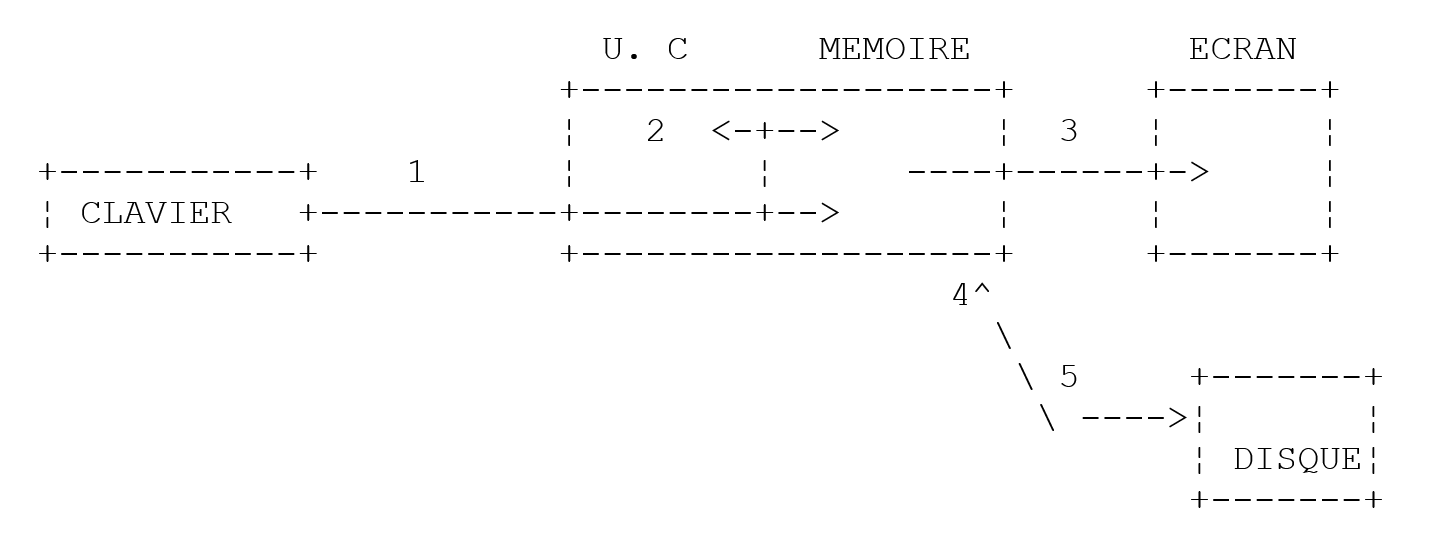
-
Reading information from the keyboard
-
processing information
-
Writing information to the screen
-
Reading information from a disk file
-
Writing information to a disk file
2.3.1. Writing to the screen
The syntax for the screen write statement is as follows:
System.out.println(expression) or System.err.println(expression)
where expression is any data type that can be converted to a string for display on the screen. In the previous example, we saw two print statements:
System.out writes to a text file, which by default is the screen. The same applies to System.err. These files are assigned numbers (or descriptors) 1 and 2, respectively. The keyboard input stream (System.in) is also treated as a text file, with descriptor 0. Both DOS and Unix support command piping:
Everything that command1 writes to System.out is piped (redirected) to the input of command2 via System.in. In other words, command2 reads from System.in the data produced by command2 via System.out, which is therefore no longer displayed on the screen. This system is widely used in Unix. In this piping setup, the System.err stream is not redirected: it writes to the screen. This is why it is used to write error messages (hence its name err): we can be sure that when commands are piped, error messages will continue to appear on the screen. We will therefore get into the habit of writing error messages to the screen using the System.err stream rather than the System.out stream.
2.3.2. Reading data entered via the keyboard
The data stream from the keyboard is represented by the object System.in of type InputStream. This type of object allows data to be read character by character. It is up to the programmer to then find the information of interest within this character stream. The InputStream type does not allow reading a line of text in a single operation. The BufferedReader type allows this using the readLine method.
To read lines of text typed on the keyboard, we create another input stream of type BufferedReader from the System.in input stream of type InputStream:
We will not explain the details of this statement here, as it involves the concept of object construction. We will use it as is.
Creating a stream can fail: a fatal error, called an exception in Java, is then generated. Whenever a method is likely to generate an exception, the Java compiler requires that it be handled by the programmer. Therefore, to create the previous input stream, you must actually write:
BufferedReader IN=null;
try{
IN=new BufferedReader(new InputStreamReader(System.in));
} catch (Exception e){
        System.err.println("Erreur " +e);
        System.exit(1);
}
Again, we will not attempt to explain exception handling here. Once the previous IN stream has been constructed, we can read a line of text using the statement:
The line typed on the keyboard is stored in the variable *line* and can then be used by the program.
2.3.3. Example of Input/Output
Here is a program illustrating keyboard/screen input-output operations:
import java.io.*;        // required to use I/O streams

public class io1{


  public static void main (String[] arg){

    // write to System.out stream
    Object obj=new Object();
    System.out.println(""+obj);
    System.out.println(obj.getClass().getName());

    // write to System.err stream
    int i=10;
    System.err.println("i="+i);

    // read a line entered on the keyboard
    String ligne;
    BufferedReader IN=null;
    try{
      IN=new BufferedReader(new InputStreamReader(System.in));
    } catch (Exception e){
      affiche(e);
      System.exit(1);
    }
    System.out.print("Tapez une ligne : ");
    try{
      ligne=IN.readLine();
      System.out.println("ligne="+ligne);
    } catch (Exception e){
      affiche(e);
      System.exit(2);
    }
  }//fine hand

  public static void affiche(Exception e){
    System.err.println("Erreur : "+e);
  }

}//end of class
and the results of the execution:
C:\Serge\java\bases\iostream>java io1
java.lang.Object@1ee78b
java.lang.Object
i=10
Tapez une ligne : je suis là
ligne=je suis là
The instructions
are intended to show that any object can be displayed. We will not attempt here to explain the meaning of what is displayed. We also have the display of an object’s value in the block:
try{
      IN=new BufferedReader(new InputStreamReader(System.in));
    } catch (Exception e){
      affiche(e);
      System.exit(1);
    }
The variable e is an Exception object that is displayed here using the display(e) call. We encountered this display of an exception’s value in the conversion program seen earlier, though we did not discuss it at the time.
2.3.4. Assigning the value of an expression to a variable
Here we are interested in the operation variable=expression;
The expression can be of the following types: arithmetic, relational, Boolean, or string
2.3.4.1. Interpretation of the assignment operation
The operation variable = expression; is itself an expression whose evaluation proceeds as follows:
- The right-hand side of the assignment is evaluated: the result is a value V.
- The value V is assigned to the variable
- The value V is also the value of the assignment, now viewed as an expression.
This is why the operation V1=V2=expression is valid. Due to precedence, the rightmost = operator is evaluated. We therefore have V1=(V2=expression). The expression V2=expression is evaluated and has the value V. The evaluation of this expression caused V to be assigned to V2. The next = operator is then evaluated in the form V1=V. The value of this expression is again V. Its evaluation causes V to be assigned to V1. Thus, the operation V1=V2=expression is an expression whose evaluation
1: causes the value of expression to be assigned to the variables V1 and V2
2: returns the value of expression as the result.
We can generalize this to an expression of the form: V1=V2=....=Vn=expression
2.3.4.2. Arithmetic expression
The operators for arithmetic expressions are as follows:
+: addition
- : subtraction
*: multiplication
/ : division: the result is the exact quotient if at least one of the operands is a real number. If both operands are integers, the result is the integer quotient. Thus, 5/2 -> 2 and 5.0/2 -> 2.5.
%: division: the result is the remainder regardless of the type of the operands, with the quotient being an integer. This is therefore the modulo operation.
There are various mathematical functions:
double sqrt(double x) | square root |
double cos(double x) | Cosine |
double sin(double x) | Sine |
double tan(double x) | Tangent |
double pow(double x, double y) | x to the power of y (x > 0) |
double exp(double x) | Exponential |
double log(double x) | Natural logarithm |
double abs(double x) | absolute value |
etc...
All these functions are defined in a Java class called Math. When using them, you must prefix them with the name of the class where they are defined. Thus, you would write:
The definition of the Math class is as follows:
public  final  class  java.lang.Math
    extends  java.lang.Object  (I-§1.12)
{
        // Fields
    public final static double E;    §1.10.1
    public final static double PI;    §1.10.2

        // Methods
    public static double abs(double  a);    §1.10.3
    public static float abs(float  a);    §1.10.4
    public static int abs(int  a);    §1.10.5
    public static long abs(long  a);    §1.10.6
    public static double acos(double  a);    §1.10.7
    public static double asin(double  a);    §1.10.8
    public static double atan(double  a);    §1.10.9
    public static double atan2(double  a, double  b);    §1.10.10
    public static double ceil(double  a);    §1.10.11
    public static double cos(double  a);    §1.10.12
    public static double exp(double  a);    §1.10.13
    public static double floor(double  a);    §1.10.14
    public static double                        §1.10.15
        IEEEremainder(double  f1, double  f2);
    public static double log(double  a);    §1.10.16
    public static double max(double  a, double  b);    §1.10.17
    public static float max(float  a, float  b);    §1.10.18
    public static int max(int  a, int  b);    §1.10.19
    public static long max(long  a, long  b);    §1.10.20
    public static double min(double  a, double  b);     §1.10.21
    public static float min(float  a, float  b);    §1.10.22
    public static int min(int  a, int  b);    §1.10.23
    public static long min(long  a, long  b);    §1.10.24
    public static double pow(double  a, double  b);    §1.10.25
    public static double random();    §1.10.26
    public static double rint(double  a);    §1.10.27
    public static long round(double  a);    §1.10.28
    public static int round(float  a);    §1.10.29
    public static double sin(double  a);    §1.10.30
    public static double sqrt(double  a);    §1.10.31
    public static double tan(double  a);    §1.10.32
}
2.3.4.3. Operators in the evaluation of arithmetic expressions
The precedence of operators when evaluating an arithmetic expression is as follows (from highest to lowest):
[fonctions], [ ( )], [ *, /, %], [+, -]
Operators within the same block [ ] have the same precedence.
2.3.4.4. Relational operators
The operators are as follows: <, <=, ==, !=, >, >=
Order of precedence
>, >=, <, <=
==, !=
The result of a relational expression is the Boolean value false if the expression is false; otherwise, it is true.
Example:
Comparison of two characters
Let there be two characters C1 and C2. They can be compared using the operators
<, <=, ==, !=, >, >=
. It is their codes ASCII—which are numbers—that are compared. Recall that according to the order ASCII, the following relations hold:
space < .. < '0' < '1' < .. < '9' < .. < 'A' < 'B' < .. < 'Z' < .. < 'a' < 'b' < .. < 'z'
Comparison of two character strings
They are compared character by character. The first inequality encountered between two characters implies an inequality of the same direction on the strings.
Examples:
Consider comparing the strings "Cat" and "Dog"
This last inequality allows us to conclude that "Cat" < "Dog".
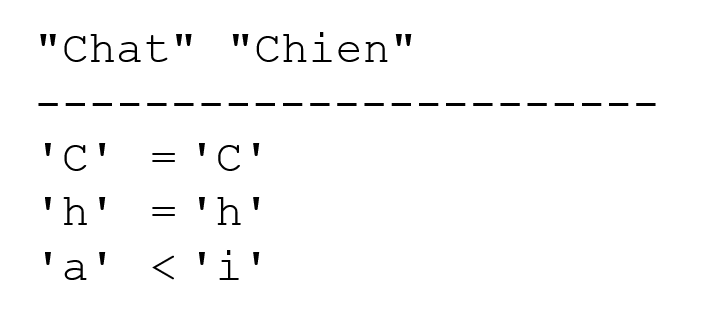
Consider comparing the strings "Cat" and "Kitten". They are equal throughout until the string "Cat" is exhausted. In this case, the exhausted string is declared the "smaller" one. We therefore have the relation
"Cat" < "Kitten".
Functions for comparing two strings
We cannot use the relational operators <, <=, ==, !=, >, >= here. We must use methods from the String class:
String chaine1, chaine2;
chaine1=…;
chaine2=…;
int i=chaine1.compareTo(chaine2);
boolean egal=chaine1.equals(chaine2)
In the code above, the variable i will have the value:
0: if the two strings are equal
1: if string 1 > string 2
-1: if string 1 < string 2
The variable equal will have the value true if the two strings are equal.
2.3.4.5. Boolean expressions
operators are & (and), || (or), and ! (not). The result of a Boolean expression is a Boolean.
Order of precedence ! , &&, ||
example:
Relational operators have precedence over the && and || operators.
2.3.4.6. Bitwise operations
The operators
Let i and j be two integers.
i<<n | shifts i n bits to the left. The incoming bits are zeros. |
i>>n | shift i n bits to the right. If i is a signed integer (signed char, int, long), the sign bit is preserved. |
i & j | performs a bitwise logical OR of i and j. |
i | j | performs a bitwise logical OR of i and j. |
~i | complements i to 1 |
i^j | performs the OU EXCLUSIF operation on i and j |
Let
operation | value |
i<<4 | 0x23F0 |
i>>4 | 0x0123 the sign bit is preserved. |
k>>4 | 0xFF12 the sign bit is preserved. |
i&j | 0x1023 |
i|j | 0xF33F |
~i | 0xEDC0 |
2.3.4.7. Combination of operators
a=a+b can be written as a+=b
a=a-b can be written as a-=b
The same applies to the operators /, %, *, <<, >>, &, |, ^
Thus, *a=a+2; can be written as *a+=2;
2.3.4.8. Increment and decrement operators
The notation variable++ means variable=variable+1 or variable+=1
The notation variable-- means variable=variable-1 or variable-=1.
2.3.4.9. The ? operator
The expression expr_cond ? expr1:expr2 is evaluated as follows:
1: The expression expr_cond is evaluated. This is a conditional expression with a value of true or false
2: If it is true, the value of the expression is that of expr1. expr2 is not evaluated.
3: If it is false, the opposite occurs: the value of the expression is that of expr2. expr1 is not evaluated.
Example
i=(j>4 ? j+1:j-1);
will assign to the variable i:
j+1 if j>4, j-1 otherwise
This is the same as writing if(j>4) i=j+1; else i=j-1; but it is more concise.
2.3.4.10. General operator precedence
() [] function | gd |
! ~ ++ -- | dg |
new (type) cast operators | dg |
* / % | gd |
+ - | gd |
<< >> | gd |
< <= > >= instanceof | gd |
== != | gd |
& | gd |
^ | gd |
| | gd |
&& | gd |
|| | gd |
? : | dg |
= += -= etc. . | dg |
gd: indicates that, for operators of equal precedence, left-to-right precedence is observed. This means that when an expression contains operators of the same precedence, the operator furthest to the left in the expression is evaluated first. dg indicates right-to-left precedence.
2.3.4.11. Type Casting
It is possible, within an expression, to temporarily change the representation of a value. This is called type casting. The syntax for changing the type of a value in an expression is (type) value. The value then takes on the specified type. This results in a change in the value’s representation.
Example:
Here, it is necessary to cast i or j to a floating-point type; otherwise, the division will return an integer quotient rather than a floating-point value.
i is a value exactly encoded in 2 bytes
(float) i is the same value encoded as an approximate floating-point number over 4 bytes
There is therefore a transcoding of the value of i. This transcoding occurs only for the duration of a calculation; the variable i always retains its type int.
2.4. Program flow control statements
2.4.1. Stop
The exit method defined in the System class allows you to stop the execution of a program.
action: stops the current process and returns the status value to the parent process
exit terminates the current process and returns control to the calling process. The value of status can be used by the calling process. Under DOS, this status variable is returned to DOS in the system variable ERRORLEVEL, whose value can be checked in a batch file. On Unix, the $? variable retrieves the status value if the shell is the Bourne Shell (/bin/sh).
Example:
to terminate the program with a status value of 0.
2.4.2. Simple conditional structure
syntaxe : if (condition) {actions_condition_vraie;} else {actions_condition_fausse;}
notes:
- The condition is enclosed in parentheses.
- Each action is terminated by a semicolon.
- Curly braces are not followed by a semicolon.
- Curly braces are only required if there is more than one action.
- The else clause may be omitted.
- There is no "then".
The algorithmic equivalent of this structure is the if-then-else structure:
example
if (x>0) { nx=nx+1;sx=sx+x;} else dx=dx-x;
You can nest decision structures:
The following problem sometimes arises:
public static void main(void){
      int n=5;

   if(n>1)
     if(n>6)
             System.out.println(">6");
     else System.out.println("<=6");
}
In the previous example, which if statement does the else refer to? The rule is that an else always refers to the nearest if statement: if(n>6) in this example. Let’s consider another example:
public static void main(void)
{  int n=0;

   if(n>1)
     if(n>6)   System.out.println(">6");
     else;            // else from if(n>6): nothing to do
   else System.out.println("<=1");    // else du if(n>1)
}
Here we wanted to put an else in the if(n>1) statement and no else in the if(n>6) statement. Because of the previous note, we are forced to put an else in the if(n>6) statement, in which there are no instructions.
2.4.3. Case structure
The syntax is as follows:
switch(expression) {
    case v1:
            actions1;
            break;
    case v2:
            actions2;
            break;
         . .. .. .. .. ..
    default:     actions_sinon;
}
notes
- The value of the control expression can only be an integer or a character.
- The control expression is enclosed in parentheses.
- The default clause may be omitted.
- The values vi are possible values of the expression. If the expression evaluates to vi, the actions following the case vi clause are executed.
- The break statement exits the case structure. If it is missing at the end of the instruction block corresponding to value vi, execution then continues with the instructions corresponding to value vi+1.
example
In algorithms
selon la valeur de choix
cas 0
          arrêt
      cas 1
    exécuter module M1
  cas 2
    exécuter module M2
  sinon
    erreur<--real
findescas
In Java
    int choix, erreur;
    switch(choix){
        case 0: System.exit(0);
      case 1: M1();break;
      case 2: M2();break;
      default: erreur=1;
     }
2.4.4. Loop structure
2.4.4.1. Known number of repetitions
Syntax
    for (i=id;i<=if;i=i+ip){
       actions;
      }
Notes
- The 3 arguments of the for loop are enclosed in parentheses.
- The three arguments of the for loop are separated by semicolons.
- Each action in the for loop is terminated by a semicolon.
- The curly brace is only necessary if there is more than one action.
- The curly brace is not followed by a semicolon.
The algorithmic equivalent is the for loop:
which can be translated into a while structure:
2.4.4.2. Unknown number of repetitions
There are many structures in Java for this case.
While loop
    while(condition){
          actions;
        }
The loop continues as long as the condition is true. The loop may never be executed.
Notes:
- The condition is enclosed in parentheses.
- Each action is terminated by a semicolon.
- Curly braces are only necessary if there is more than one action.
- The curly brace is not followed by a semicolon.
The corresponding algorithmic structure is the while structure:
Do-while loop
The syntax is as follows:
    do{
       instructions;
    }while(condition);
The loop continues until the condition becomes false or as long as the condition is true. Here, the loop is executed at least once.
notes
- The condition is enclosed in parentheses.
- Each action is terminated by a semicolon.
- The curly brace is only necessary if there is more than one action.
- The curly brace is not followed by a semicolon.
The corresponding algorithmic structure is the "repeat ... until" structure:
Structure for general (for)
The syntax is as follows:
for(instructions_départ;condition;instructions_fin_boucle){
    instructions;
}
The loop continues as long as the condition is true (evaluated before each iteration). Instructions_départ are executed before entering the loop for the first time. Instructions_fin_boucle are executed after each iteration.
notes
- The 3 arguments of the for loop are enclosed in parentheses.
- The three arguments of the for loop are separated by semicolons.
- Each action in the for loop is terminated by a semicolon.
- The curly brace is only necessary if there is more than one action.
- The curly brace is not followed by a semicolon.
- The various statements in instructions_depart and instructions_fin_boucle are separated by commas.
The corresponding algorithmic structure is as follows:
Examples
The following programs all calculate the sum of the first n integers.
1  for(i=1, somme=0;i<=n;i=i+1)
        somme=somme+a[i];

2     for (i=1, somme=0;i<=n;somme=somme+a[i], i=i+1);

3    i=1;somme=0;
    while(i<=n)
       { somme+=i; i++; }

4    i=1; somme=0;
    do somme+=i++;
         while (i<=n);
Loop control statements
break | exits the for, while, or do...while loop. |
continue | moves to the next iteration of for, while, and do...while loops |
2.5. The Structure of a Java Program
A Java program that does not use user-defined classes or functions other than the main function may have the following structure:
public class test1{
    public static void main(String arg[]){
        … code du programme
    }// hand
}// class
The main function, also known as a method, is the first to be executed when running a Java program. It must have the following signature:
public static void main(String arg[]){
or
public static void main(String[] arg){
The name of the arg argument can be anything. It is an array of strings representing the command-line arguments. We will return to this later.
If you use functions that may throw exceptions you do not wish to handle explicitly, you can wrap the program code in a try/catch block:
public class test1{
    public static void main(String arg[]){
        try{
        … code du programme
        } catch (Exception e){
            // error handling
        }// try
    }// hand
}// class
At the beginning of the source code and before the class definition, it is common to find class import statements. For example:
import java.io.*;
public class test1{
    public static void main(String arg[]){
        … code du programme
    }// hand
}// class
Let’s take an example. Consider the following write statement:
which prints "java" to the screen. There is a lot going on in this simple statement:
- System is a class whose full name is java.lang.System
- out is a property of this class of type java.io.PrintStream, another class
- println is a method of the java.io.PrintStream class.
We won’t unnecessarily complicate this explanation, which comes too early since it requires an understanding of the concept of a class that hasn’t been covered yet. A class can be thought of as a resource. Here, the compiler will need access to the two classes java.lang.System and java.io.PrintStream. The hundreds of Java classes are organized into archives also known as packages. The import statements placed at the beginning of the program are used to tell the compiler which external classes the program needs (those used but not defined in the source file to be compiled). Thus, in our example, our program needs the classes java.lang.System and java.io.PrintStream. We specify this with the import statement. We could write at the beginning of the program:
Since a Java program commonly uses dozens of external classes, it would be tedious to write all the necessary import statements. Classes have been grouped into packages, and we can import the entire package. Thus, to import the packages java.lang and java.io, we write:
The java.lang package contains all the Java base classes and is automatically imported by the compiler. So ultimately, we will only write:
2.6. Exception Handling
Many Java functions are capable of generating exceptions, i.e., errors. We have already encountered such a function, the readLine function:
String ligne=null;
try{
      ligne=IN.readLine();
      System.out.println("ligne="+ligne);
    } catch (Exception e){
      affiche(e);
      System.exit(2);
}// try
When a function is likely to throw an exception, the Java compiler requires the programmer to handle it in order to produce more error-tolerant programs: you should always avoid an application "crashing" unexpectedly. Here, the function readLine throws an exception if there is nothing to read—for example, because the input stream has been closed. Exception handling follows this pattern:
try{
    appel de la fonction susceptible de générer l'exception
} catch (Exception e){
    traiter l'exception e
}
instruction suivante
If the function does not throw an exception, execution proceeds to the next statement; otherwise, it proceeds to the body of the catch clause and then to the next statement. Note the following points:
- e is an object derived from the Exception type. You can be more specific by using types such as IOException, SecurityException, ArithmeticException, etc.: there are about twenty types of exceptions. By writing catch (Exception e), we indicate that we want to handle all types of exceptions. If the code in the try block is likely to generate multiple types of exceptions, we may want to be more specific by handling the exception with multiple catch blocks:
try{
    appel de la fonction susceptible de générer l'exception
} catch (IOException e){
    traiter l'exception e
}
} catch (ArrayIndexOutOfBoundsException e){
    traiter l'exception e
}
} catch (RunTimeException e){
    traiter l'exception e
}
instruction suivante
- You can add a finally clause to try/catch blocks:
try{
    appel de la fonction susceptible de générer l'exception
} catch (Exception e){
    traiter l'exception e
}
finally{
    code exécuté après try ou catch
}
instruction suivante
Here, whether an exception occurs or not, the code in the finally clause will always be executed.
- The Exception class has a method getMessage() that returns a message detailing the error that occurred. So if we want to display this message, we write:
catch (Exception ex){
    System.err.println("L'erreur suivante s'est produite : "+ex.getMessage());
    ...
}//catch
- The Exception class has a method toString() that returns a string indicating the exception type as well as the value of the Message property. You can therefore write:
catch (Exception ex){
    System.err.println ("L'erreur suivante s'est produite : "+ex.toString());
    ...
}//catch
We can also write:
Here we have an operation string + Exception, which will be automatically converted to string + Exception.toString() by the compiler in order to concatenate two strings.
The following example shows an exception generated by using a non-existent array element:
// tables

// imports
import java.io.*;

public class tab1{
  public static void main(String[] args){
    // declaring & initializing an array
    int[] tab=new int[] {0,1,2,3};
    int i;
     // table display with for
    for (i=0; i<tab.length; i++)
      System.out.println("tab[" + i + "]=" + tab[i]);
    // generating an exception
      try{
      tab[100]=6;
    }catch (Exception e){
      System.err.println("L'erreur suivante s'est produite : " + e);
    }//try-catch
  }//hand
}//class
Running the program produces the following results:
tab[0]=0
tab[1]=1
tab[2]=2
tab[3]=3
L'the following error has occurred: java.lang.ArrayIndexOutOfBoundsException
Here is another example where we handle the exception caused by assigning a string to a number when the string does not represent a number:
// imports
import java.io.*;

public class console1{
  public static void main(String[] args){
      // creation of an input stream
    BufferedReader IN=null;
    try{
        IN=new BufferedReader(new InputStreamReader(System.in));
    }catch(Exception ex){}
     // We ask for the name
    System.out.print("Nom : ");
     // reading response
    String nom=null;
    try{
        nom=IN.readLine();
    }catch(Exception ex){}
     // age requested
    int age=0;
    boolean ageOK=false;
    while ( ! ageOK){
       // question
      System.out.print("âge : ");
       // read-verify answer
      try{
        age=Integer.parseInt(IN.readLine());
        ageOK=true;
      }catch(Exception ex) {
        System.err.println("Age incorrect, recommencez...");
      }//try-catch
    }//while
     // final display
    System.out.println("Vous vous appelez " + nom + " et vous avez " + age + " ans");
  }//Main
}//class
Some execution results:
E:\data\serge\MSNET\c#\bases\1>console1
Nom : dupont
âge : xx
Age incorrect, recommencez...
âge : 12
Vous vous appelez dupont et vous avez 12 ans
2.7. Compiling and Running a Java Program
Compile and then run the following program:
// importing classes
import java.io.*;

// test class
public class coucou{
    // hand function
  public static void main(String args[]){
      // screen display
    System.out.println("coucou");
  }//hand
}//class
The source file containing the previous "hello" class must be named coucou.java:
Compiling and running a Java program is done in a DOS window. The executables javac.exe (compiler) and java.exe (interpreter) are located in the bin directory of the JDK installation directory:
E:\data\serge\JAVA\classes\paquetages\personne>dir "e:\program files\jdk14\bin\java?.exe"
07/02/2002 12:52 24 649 java.exe
07/02/2002 12:52 28 766 javac.exe
The javac.exe compiler will analyze the .java source file and produce a compiled .class file. This file is not immediately executable by the processor. It requires a Java interpreter (java.exe) known as a virtual machine or JVM (Java Virtual Machine). From the intermediate code present in the .class file, the virtual machine will generate instructions specific to the processor of the machine on which it is running. There are Java virtual machines for various types of operating systems (Windows, Unix, Mac, OS, etc.). A .class file can be executed by any of these virtual machines and therefore on any operating system. This cross-system portability is one of Java’s major strengths.
Let’s compile the previous program:
E:\data\serge\JAVA\ESSAIS\intro1>"e:\program files\jdk14\bin\javac" coucou.java
E:\data\serge\JAVA\ESSAIS\intro1>dir
10/06/2002  08:42                  228 coucou.java
10/06/2002 08:48 403 coucou.class
Let's run the generated .class file:
Note that in the execution command above, we did not specify the .class suffix for the coucou.class file to be executed. It is implied. If the bin directory of JDK is located in PATH on the machine DOS, you do not need to specify the full path for the javac.exe and java.exe executables. You can simply write
2.8. Main program arguments
The main function main accepts as parameters an array of strings: *String[]*. This array contains the command-line arguments used to launch the application. Thus, if we launch the program P with the command:
and if the main function is declared as follows:
we will have arg[0]="arg0", arg[1]="arg1" … Here is an example:
import java.io.*;

public class param1{
  public static void main(String[] arg){
    int i;
    System.out.println("Nombre d'arguments="+arg.length);
    for (i=0;i<arg.length;i++)
      System.out.println("arg["+i+"]="+arg[i]);
  }
}
The results are as follows:
2.9. Passing Parameters to a Function
The previous examples showed only Java programs with a single function, the main function. The following example demonstrates how to use functions and how information is exchanged between them. Function parameters are always passed by value: that is, the value of the actual parameter is copied into the corresponding formal parameter.
import java.io.*;

public class param2{
  public static void main(String[] arg){
    String S="papa";
    changeString(S);
    System.out.println("Paramètre effectif S="+S);
    int age=20;
    changeInt(age);
    System.out.println("Paramètre effectif age="+age);
  }
  private static void changeString(String S){
    S="maman";
    System.out.println("Paramètre formel S="+S);
  }
  private static void changeInt(int a){
    a=30;
    System.out.println("Paramètre formel a="+a);
  }
}
The results obtained are as follows:
The values of the actual parameters "dad" and 20 were copied into the formal parameters S and a. These were then modified. The actual parameters remained unchanged. Note here the type of the actual parameters:
- S is an object reference c.a.d. The address of an object in memory
- age is an integer
2.10. The Tax Example
We will conclude this chapter with an example that we will revisit several times in this document. We propose to write a program to calculate a taxpayer’s tax. We consider the simplified case of a taxpayer who has only a single salary to report:
- we calculate the number of shares for the employee nbParts=nbEnfants/2 +1 if they are unmarried, nbEnfants/2+2 if they are married, where nbEnfants is the number of their children.
- if he has at least three children, he has an additional half-share
- his taxable income is calculated as R=0.72*S, where S is his annual salary
- we calculate his family coefficient QF = R / nbParts
- We calculate his tax I. Consider the following table:
12,620.0 | 0 | 0 |
13,190 | 0.05 | 631 |
15,640 | 0.1 | 1,290.5 |
24,740 | 0.15 | 2,072.5 |
31,810 | 0.2 | 3,309.5 |
39,970 | 0.25 | 4900 |
48,360 | 0.3 | 6898.5 |
55,790 | 0.35 | 9,316.5 |
92,970 | 0.4 | 12,106 |
127,860 | 0.45 | 16,754.5 |
151,250 | 0.50 | 23,147.5 |
172,040 | 0.55 | 30,710 |
195,000 | 0.60 | 39312 |
0 | 0.65 | 49062 |
Each row has 3 fields. To calculate tax I, we look for the first row where QF <= field1. For example, if QF = 23000, we will find the row
Tax I is then equal to 0.15*R - 2072.5*nbParts. If QF is such that the relationship QF<=field1 is never satisfied, then the coefficients of the last line are used. Here:
which gives the tax I=0.65*R - 49062*nbParts.
The corresponding Java program is as follows:
import java.io.*;

public class impots{

    // ------------ hand
    public static void main(String arg[]){

        // data

        // tax bracket limits
        double Limites[]={12620, 13190, 15640, 24740, 31810, 39970, 48360,55790, 92970, 127860, 151250, 172040, 195000, 0};
        // coefficient applied to the number of shares
        double Coeffn[]={0, 631, 1290.5, 2072.5, 3309.5, 4900, 6898.5, 9316.5,12106, 16754.5, 23147.5, 30710, 39312, 49062};

        // the program

        // keyboard input stream creation
        BufferedReader IN=null;
        try{
            IN=new BufferedReader(new InputStreamReader(System.in));
        }
        catch(Exception e){
            erreur("Création du flux d'entrée", e, 1);
        }

            // marital status is restored
        boolean OK=false;
        String reponse=null;
        while(! OK){
            try{
                System.out.print("Etes-vous marié(e) (O/N) ? ");
                reponse=IN.readLine();
                reponse=reponse.trim().toLowerCase();
                if (! reponse.equals("o") && !reponse.equals("n"))
                    System.out.println("Réponse incorrecte. Recommencez");
                else OK=true;
            } catch(Exception e){
                erreur("Lecture état marital",e,2);
            }
        }
        boolean Marie = reponse.equals("o");

            // number of children
        OK=false;
        int NbEnfants=0;
        while(! OK){
            try{
                System.out.print("Nombre d'enfants : ");
                reponse=IN.readLine();
                try{
                    NbEnfants=Integer.parseInt(reponse);
                    if(NbEnfants>=0) OK=true;
                        else System.err.println("Réponse incorrecte. Recommencez");
                } catch(Exception e){
                    System.err.println("Réponse incorrecte. Recommencez");
                }// try
            } catch(Exception e){
                erreur("Lecture état marital",e,2);
            }// try
        }// while

        // salary
        OK=false;
        long Salaire=0;
        while(! OK){
            try{
                System.out.print("Salaire annuel : ");
                reponse=IN.readLine();
                try{
                    Salaire=Long.parseLong(reponse);
                    if(Salaire>=0)  OK=true;
                        else System.err.println("Réponse incorrecte. Recommencez");
                } catch(Exception e){
                    System.err.println("Réponse incorrecte. Recommencez");
                }// try
            } catch(Exception e){
                erreur("Lecture Salaire",e,4);
            }// try
        }// while

            // calculating the number of shares
        double NbParts;
        if(Marie) NbParts=(double)NbEnfants/2+2;
            else NbParts=(double)NbEnfants/2+1;
        if (NbEnfants>=3) NbParts+=0.5;

            // taxable income
        double Revenu;
        Revenu=0.72*Salaire;

            // family quotient
        double QF;
        QF=Revenu/NbParts;

            // search for tax bracket corresponding to QF
        int i;
        int NbTranches=Limites.length;
        Limites[NbTranches-1]=QF;
        i=0;
        while(QF>Limites[i]) i++;
            // tax
        long impots=(long)(i*0.05*Revenu-Coeffn[i]*NbParts);

        // the result is displayed
        System.out.println("Impôt à payer : " + impots);
    }// hand

    // ------------ error
    private static void erreur(String msg, Exception e, int exitCode){
        System.err.println(msg+"("+e+")");
        System.exit(exitCode);
    }// error

}// class
The results obtained are as follows:
C:\Serge\java\impots\1>java impots

Etes-vous marié(e) (O/N) ? o
Nombre d'children: 3
Salaire annuel : 200000
Impôt à payer : 16400

C:\Serge\java\impots\1>java impots

Etes-vous marié(e) (O/N) ? n
Nombre d'children: 2
Salaire annuel : 200000
Impôt à payer : 33388

C:\Serge\java\impots\1>java impots

Etes-vous marié(e) (O/N) ? w
Réponse incorrecte. Recommencez
Etes-vous marié(e) (O/N) ? q
Réponse incorrecte. Recommencez
Etes-vous marié(e) (O/N) ? o
Nombre d'children: q
Réponse incorrecte. Recommencez
Nombre d'children: 2
Salaire annuel : q
Réponse incorrecte. Recommencez
Salaire annuel : 1
Impôt à payer : 0