5. Chapter 4 - The Flutter client for the RdvMedecins application
5.1. Architecture Overview
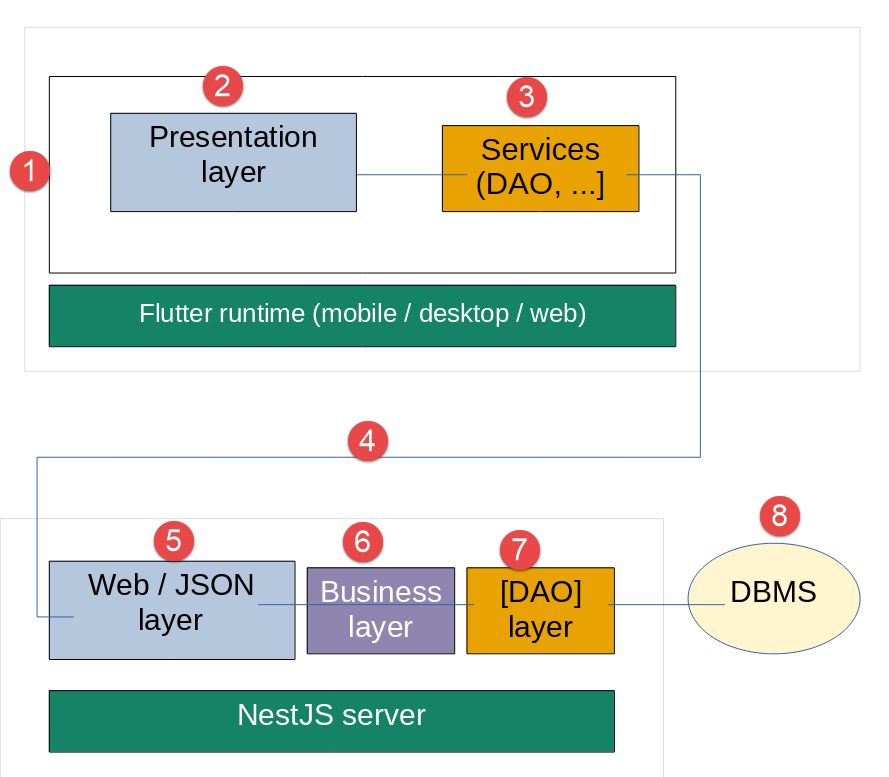
This client communicates with the course’s [rdvmedecins-nestjs-server] server—which remains strictly unchanged—via the same HTTP routes already documented (POST [/login], GET [/getAllDoctors], GET [/getAllClients], GET [/getDoctorScheduleOfDay/:doctorId/:day], POST [/addAppointment], POST [/deleteAppointment]), with the same JSON envelope [{ status, data }] and the same token-based authentication [JWT] (header [Authorization: Bearer <token>]). For this variant, the overall architecture gains a third component: depending on the chosen compilation target (see Chapter 5), it is no longer just a browser that executes the client, but potentially a mobile or desktop operating system that directly executes the compiled [Dart] code—the server [NestJS], meanwhile, still only processes the same HTTP requests, regardless of the target.
5.2. Project directory structure
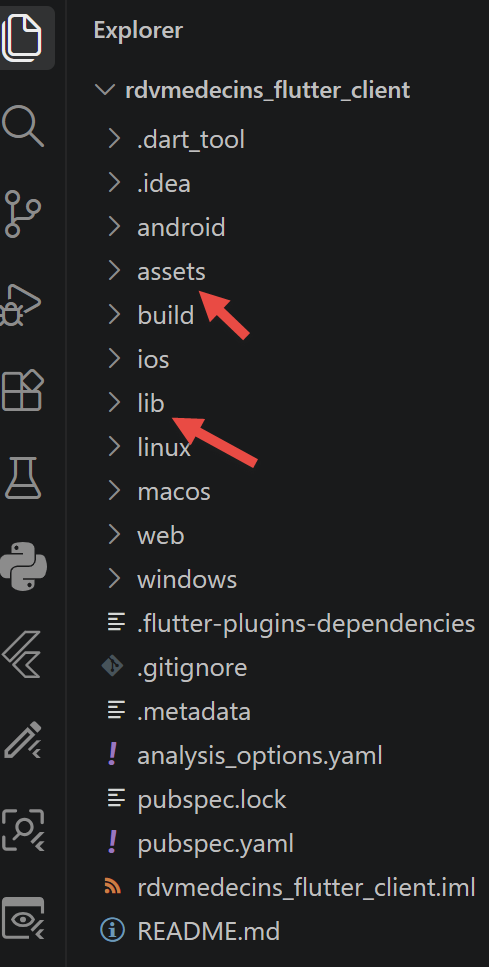
| rdvmedecins_flutter_client/
├── pubspec.yaml project configuration (dependencies, assets)
├── assets/
│ └── i18n/ translation dictionaries (fr.json, en.json)
└── lib/
├── main.dart entry point (builds the services, provides them, starts the app)
├── app.dart root widget (conductor + authentication guard)
├── core/
│ ├── models/ data classes (mirror of the JSON exchanged with the server)
│ ├── services/ SettingsService, AuthService, AppointmentService
│ ├── http/ AuthHttpClient (JWT token + logout on 401)
│ └── i18n/ TranslationsService (French/English)
└── features/ one widget per feature, including the login screen
|
This directory structure mirrors, folder by folder, that of the [Vue.js] client from this course ([core/models], [core/composables] -> [core/services], [core/interceptors] -> [core/http], [features/] unchanged)—a deliberate choice: the organization of an application is, in most cases, not specific to any particular UI framework.
5.3. Project configuration files
5.3.1. pubspec.yaml
| name: rdvmedecins_flutter_client
description: >
Flutter client (mobile, desktop and web from one and the same source code)
for the RdvMedecins application - NestJS / Flutter port of this course.
publish_to: 'none'
version: 1.0.0+1
environment:
sdk: '>=3.4.0 <4.0.0'
flutter: '>=3.24.0'
dependencies:
flutter:
sdk: flutter
# http: the official "low-level" HTTP client of the Dart ecosystem - the
# strict equivalent of the fetch() used on the Vue.js side (auth.interceptor.ts,
# appointment.service.ts). Flutter has no fetch() built into the language: this
# library takes its place.
http: ^1.2.2
# provider: the most widespread way of exposing a SHARED state to a whole
# Flutter widget tree - the exact role played by provide()/inject()
# on the Vue.js side (settings.composable.ts, auth.composable.ts,
# language.composable.ts). See the chapter "Introduction to Flutter" for
# the detailed correspondence.
provider: ^6.1.2
# shared_preferences: a persistent key/value storage, available in the
# SAME way on mobile, desktop AND web - the cross-platform equivalent of
# localStorage (which, for its part, only exists in a browser).
shared_preferences: ^2.3.2
# intl: date formatting (yyyy-MM-dd, see DoctorDayPicker) - the same
# role as Date.toISOString().slice(0, 10) on the Vue.js/TypeScript side, but
# explicit rather than a mere string slicing.
intl: ^0.19.0
dev_dependencies:
flutter_test:
sdk: flutter
flutter_lints: ^4.0.0
flutter:
uses-material-design: true
# the translation dictionaries - the equivalent of public/i18n/*.json on the
# Vue.js side, but EMBEDDED in the application package rather than served
# by a web server (see Chapter "Porting the application" for the reason
# for this difference, which precisely concerns the 3 target environments).
assets:
- assets/i18n/
|
Let’s comment on this code:
- lines 9–10: [sdk: '>=3.4.0 <4.0.0'] / [flutter: '>=3.24.0'] — equivalent to the [engines] field of a [package.json] [Node.js]: the range of [Dart] and SDK [Flutter] language versions required for this project.
- Lines 16–20, 22–27, 29–32, 34–37: the four dependencies of this client, each annotated in place with its [Vue.js] equivalent—see also the “Tools Used” section of the introduction.
- line 42: [flutter_lints: ^4.0.0]—the [Dart] counterpart to [ESLint]: a set of style/quality rules verified by [flutter analyze], which was absent from previous web clients in this course but was automatically generated by [flutter create].
- Lines 51–52: [assets: - assets/i18n/] — EXPLICITLY declares that all content in [assets/i18n/] must be embedded in the application package; without this declaration, [rootBundle.loadString(...)] (see [core/i18n/translations_service.dart] below) would fail at runtime—a file that exists on disk at the time of [flutter build] is not automatically included in the final package, unlike [public/] in the case of [Vite]/[Vue.js], which is served as-is without prior declaration.
5.4. Starting the application
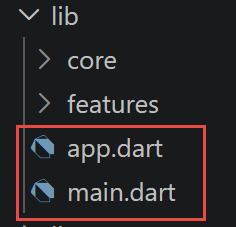
5.4.1. lib/main.dart
Porting [src/main.ts] (client [Vue.js]): builds this client's services, makes them available to the entire widget tree via [provider], and then starts the application.
| // =========================================================================
// main.dart
// -------------------------------------------------------------------------
// Entry point of the Flutter client. Equivalent of src/main.ts on the Vue.js
// client side of this course: this file explicitly starts the application
// (runApp(...) here; createApp(...).mount(...) on the Vue.js side) AND
// configures it.
//
// Vue.js configures its application with app.provide(key, value), called
// directly on the application instance - Flutter/provider uses
// a widget, MultiProvider, placed at the root of the tree (see runApp(...)
// below): each ChangeNotifierProvider/Provider it contains makes
// an instance available to the WHOLE subtree it wraps, exactly
// as app.provide(...) did for all descendant components -
// the same idea, expressed as a WIDGET rather than as an imperative
// method call, because EVERYTHING, in Flutter, is a widget (including
// the configuration of a shared state).
//
// The ORDER of the constructions still matters, for the same reasons as
// on the Vue.js side: AuthService(settings) needs settings to already exist
// (to read apiBaseUrl); AppointmentService needs authHttp AND settings.
//
// IMPORTANT DIFFERENCE with Vue.js: createAuthStore(settings) and
// createLanguageStore() on the Vue.js side read localStorage SYNCHRONOUSLY
// during their construction, even before the first render. Their
// Flutter equivalents (AuthService.init(), TranslationsService.init())
// are ASYNCHRONOUS (see their respective files): main() itself must
// therefore become an async function, and WAIT (await) for these two
// initializations BEFORE calling runApp(...) - otherwise the first screen
// displayed would ignore a possibly already stored session or language, for
// the time it takes shared_preferences to answer.
//
// Like the Angular, React and Vue.js clients of this course (a single page,
// no routing table), this Flutter client uses ONLY the minimal
// navigation provided by MaterialApp (essential to showDialog(), see
// features/booking_dialog/booking_dialog.dart): AppRoot (see app.dart)
// displays either the login screen, or the rest of the application, depending on
// AuthService.isLoggedIn - a simple Dart if/else is enough, a routing
// package (go_router or another) would have brought nothing for an application
// with a single screen.
// =========================================================================
import 'package:flutter/material.dart';
import 'package:provider/provider.dart';
import 'app.dart';
import 'core/http/auth_http_client.dart';
import 'core/i18n/translations_service.dart';
import 'core/services/auth_service.dart';
import 'core/services/appointment_service.dart';
import 'core/services/settings_service.dart';
Future<void> main() async {
// WidgetsFlutterBinding.ensureInitialized(): essential as soon as one
// calls a Flutter API BEFORE runApp(...) (here, shared_preferences and
// rootBundle.loadString(...) in TranslationsService.init()) - without
// this line, these calls would fail at startup. Vue.js has nothing
// comparable: the browser is always "ready" even before
// src/main.ts runs.
WidgetsFlutterBinding.ensureInitialized();
// 1. SettingsService first: AuthService and AppointmentService need it
// (apiBaseUrl).
final settings = SettingsService();
// 2. AuthService: receives settings directly in its constructor, like
// createAuthStore(settingsStore) on the Vue.js side - then init() restores a
// possibly stored session (see the header comment
// above about the asynchronous nature of this step).
final auth = AuthService(settings);
await auth.init();
// 3. the authenticated HTTP layer, then the business service - both
// built HERE, only once, rather than inside a widget
// (where they would be rebuilt at every render): exactly the same
// principle as createSettingsStore()/createAuthStore(...), called only
// once before app.mount(...) on the Vue.js side.
final authHttp = AuthHttpClient(auth);
final api = AppointmentService(authHttp, settings);
// 4. TranslationsService: loads the startup dictionary (the
// stored language, or the device's language by default) - NO ordering
// dependency on the previous steps (unlike
// createLanguageStore() on the Vue.js side, which had to wait for
// app.use(i18n): this file reimplements everything itself, see
// core/i18n/translations_service.dart, so there is no third-party
// plugin to install before being able to use it).
final translations = TranslationsService();
await translations.init();
runApp(
// MultiProvider: groups several providers into a single widget,
// rather than nesting them by hand (Provider(...) > Provider(...)
// > Provider(...) > ...) - a readability comparable to the sequence
// of calls "app.provide(SettingsKey, ...); app.provide(AuthKey, ...);
// app.provide(LanguageKey, ...);" on the Vue.js side, despite the difference
// in form (a list of widgets rather than a sequence of statements).
MultiProvider(
providers: [
// .value(...) rather than Provider(create: ...): these instances
// already exist (built above) - .value(...) simply makes them
// available to the widget tree, without building
// new ones. ChangeNotifierProvider, specifically, also subscribes
// to notifyListeners() and automatically redraws any
// widget that did context.watch<...>() on this provider (see
// lib/app.dart) - the role played by the "reactive" nature of a
// reactive(...) on the Vue.js side.
ChangeNotifierProvider.value(value: settings),
ChangeNotifierProvider.value(value: auth),
ChangeNotifierProvider.value(value: translations),
// AppointmentService is NOT a ChangeNotifier (nothing, in this service,
// varies over time once built): a simple Provider
// is enough, it only makes this instance available, without
// any notion of notification.
Provider.value(value: api),
],
child: const RdvMedecinsApp(),
),
);
}
|
Let’s comment on this code:
- line 60: [WidgetsFlutterBinding.ensureInitialized();] — required whenever you call a [Flutter] API BEFORE [runApp(...)] (here, [shared_preferences] and [rootBundle.loadString(...)])—without this line, these calls would fail at startup; [Vue.js] has nothing of the sort to anticipate, since the browser is always “ready” even before [src/main.ts] is executed.
- Lines 70–71: [final auth = AuthService(settings); await auth.init();] — MAJOR DIFFERENCE with [createAuthStore(settingsStore)] on the side of [Vue.js], which reads [localStorage] SYNCHRONOUSLY as soon as it is built: [AuthService.init()] is explicitly [async], and [main()] itself must therefore be the same in order to be able to AWAIT before [runApp(...)] — otherwise, the first screen displayed would ignore a session already stored in memory while waiting for [shared_preferences] to respond.
- Line 89: [await translations.init();] — same note as above regarding the stored language; unlike [createLanguageStore()] relative to [Vue.js], which had to wait for [app.use(i18n)], this step has no sequential dependency on the previous ones: [TranslationsService] reimplements everything on its own, without requiring any third-party plugins to be installed beforehand.
- Lines 98–116: [MultiProvider(providers: [...], child: const RdvMedecinsApp())] — the equivalent, in the form of a WIDGET rather than imperative calls, of the sequence [app.provide(SettingsKey, ...); app.provide(AuthKey, ...); app.provide(LanguageKey, ...);] on the [Vue.js] side: Each [ChangeNotifierProvider.value(...)] makes a pre-built instance available to the entire subtree.
5.4.2. lib/app.dart
Porting [src/app/App.vue]: the ROOT widget of the application (constructed by [lib/main.dart])—the “conductor” that holds the business state and responds to actions from the [lib/features/] widgets, and the authentication “guard.”
| // =========================================================================
// app.dart
// -------------------------------------------------------------------------
// Port of src/app/App.vue (Vue.js client of this course): the ROOT
// widget of the application (built by lib/main.dart). As in the
// three other variants of this course, it is the one playing the role of
// "conductor": it holds the application state (doctors, clients,
// displayed schedule, last doctor/day searched...) and reacts to the actions
// of the "business" widgets of lib/features/ to call the NestJS server at the
// right moment, through AppointmentService.
//
// Since authentication was added, this widget also plays the role of
// "guard": as long as AuthService.isLoggedIn is false, it only displays
// LoginPage (see lib/features/login/); all the server routes being
// protected by JwtAuthGuard, it would anyway be useless (and a source
// of 401 errors) to load doctors/clients/schedule before being logged in.
//
// Two classes, as in the other "stateful" files of this client:
// RdvMedecinsApp (the MaterialApp - the ABSOLUTE root, see lib/main.dart) and
// AppRoot/_AppRootState (the real equivalent of App.vue, with all its state).
// =========================================================================
import 'package:flutter/material.dart';
import 'package:provider/provider.dart';
import 'core/i18n/translations_service.dart';
import 'core/models/appointment_models.dart';
import 'core/services/auth_service.dart';
import 'core/services/appointment_service.dart';
import 'core/services/settings_service.dart';
import 'features/schedule/schedule_view.dart';
import 'features/booking_dialog/booking_dialog.dart';
import 'features/doctor_day_picker/doctor_day_picker.dart';
import 'features/login/login_page.dart';
// -------------------------------------------------------------------------
// RdvMedecinsApp: the Flutter root in the strict sense - MaterialApp provides
// the theme, the navigation (Navigator, used by showDialog(), see
// features/booking_dialog/booking_dialog.dart) and the system translations
// (scrolling, dialog boxes...). It is the equivalent, very
// roughly, of what index.html + the app.mount('#app') mounting
// did together on the Vue.js side (src/main.ts) - except that here, this
// "shell" is itself part of the Dart code of the application, rather
// than of a separate HTML file.
// -------------------------------------------------------------------------
class RdvMedecinsApp extends StatelessWidget {
const RdvMedecinsApp({super.key});
@override
Widget build(BuildContext context) {
return MaterialApp(
debugShowCheckedModeBanner: false,
// explicit appBarTheme: the default Material 3 theme gives
// AppBar a light background (colorScheme.surface) - to get back the
// blue bar with white text of "navbar navbar-dark bg-primary" on the
// Vue.js side (see App.vue), background and text are set explicitly here,
// rather than hard-coding a text color on each individual
// Text() of AppRoot below (see auth.name, further down) - a
// single source of truth for the look of the bar.
theme: ThemeData(
colorSchemeSeed: Colors.blue,
useMaterial3: true,
appBarTheme: const AppBarTheme(
backgroundColor: Colors.blue,
foregroundColor: Colors.white,
),
),
home: const AppRoot(),
);
}
}
class AppRoot extends StatefulWidget {
const AppRoot({super.key});
@override
State<AppRoot> createState() => _AppRootState();
}
class _AppRootState extends State<AppRoot> {
// --- application state -------------------------------------------------
// the direct equivalent of the ref(...) of App.vue, as simple
// mutable fields of _AppRootState: setState(...) (see the methods
// below) stands in for the automatic reactivity of Vue.js.
List<Doctor> _doctors = [];
List<Client> _clients = [];
DoctorDaySchedule? _schedule;
String? _error;
// the last search (doctor + day) is remembered to be able to
// refresh the schedule after a booking or a cancellation - same
// role as lastDoctorId/lastDay on the Vue.js side.
int? _lastDoctorId;
String? _lastDay;
// reference kept permanently to AuthService, to be able to
// unsubscribe cleanly in dispose() (see below) - see the
// comment of initState() below for the reason for this choice.
late final AuthService _auth;
@override
void initState() {
super.initState();
// context.read<AuthService>(): when initState() runs, the
// widget is already properly inserted in the tree (unlike the
// constructor, where context cannot yet be used for
// dependency injection) - but context.watch(...) is NOT used
// here: a StatefulWidget must subscribe to a provider only once,
// explicitly, never inside initState() with watch()
// (which assumes a build context). So the reference is kept in
// a field (_auth) and we subscribe ourselves with addListener(...).
_auth = context.read<AuthService>();
_auth.addListener(_onAuthChange);
// equivalent of "watch(() => auth.isLoggedIn, ..., { immediate: true })"
// on the Vue.js side: { immediate: true } triggers the callback
// IMMEDIATELY, without waiting for a first change - useful if a session
// was already stored (see AuthService.init(), awaited by
// lib/main.dart before runApp(...)). Vue.js offers this option
// directly; Flutter has no equivalent mechanism built into
// addListener(...), so the same effect is reproduced BY HAND: an
// explicit call right after subscribing, in addition to the subscription
// itself.
if (_auth.isLoggedIn) {
_loadInitialLists();
}
}
@override
void dispose() {
// unsubscribing is ESSENTIAL here: without it, _onAuthChange
// would keep being called after this widget is destroyed (for
// example during a hot reload or a route change), and
// would cause an exception at the first setState(...) on an
// unmounted widget. Vue.js has nothing comparable to plan for: watch(...) is
// automatically "cleaned up" when the component that created it is destroyed.
_auth.removeListener(_onAuthChange);
super.dispose();
}
void _onAuthChange() {
if (_auth.isLoggedIn) {
_loadInitialLists();
}
}
// -----------------------------------------------------------------------
// when we become logged in (successful login, or session
// restored from shared_preferences), the lists of doctors and clients
// are loaded once and for all.
// -----------------------------------------------------------------------
void _loadInitialLists() {
final api = context.read<AppointmentService>();
api.getAllDoctors().then((result) {
if (mounted) setState(() => _doctors = result);
}).catchError((Object err) {
if (mounted) setState(() => _error = err.toString());
});
api.getAllClients().then((result) {
if (mounted) setState(() => _clients = result);
}).catchError((Object err) {
if (mounted) setState(() => _error = err.toString());
});
}
// -----------------------------------------------------------------------
// reacts to the "Log out" button: clears the session AND the displayed business
// state - without this, a new user logging in afterwards
// would briefly see the schedule of the previous one.
// -----------------------------------------------------------------------
Future<void> _onLogout() async {
await _auth.logOut();
setState(() {
_doctors = [];
_clients = [];
_schedule = null;
_error = null;
_lastDoctorId = null;
_lastDay = null;
});
}
// -----------------------------------------------------------------------
// reacts to the call of onSearch(...) by the DoctorDayPicker widget
// -----------------------------------------------------------------------
void _onSearchSchedule(int doctorId, String day) {
setState(() {
_error = null;
_lastDoctorId = doctorId;
_lastDay = day;
});
_loadSchedule();
}
// -----------------------------------------------------------------------
// reacts to the call of onBook(...) by the ScheduleView widget: HERE, unlike
// Vue.js (which merely opened the window while
// remembering slotBeingBooked), the dialog box is opened DIRECTLY
// with showDialog (through openBookingDialog(...)) and its result is
// AWAITED - see the header of booking_dialog.dart for the details of
// this structural difference.
// -----------------------------------------------------------------------
Future<void> _onBookingRequest(SlotJson slot) async {
final lastDay = _lastDay;
if (lastDay == null) {
return;
}
final clientId = await openBookingDialog(context: context, slot: slot, clients: _clients);
if (clientId == null) {
return; // the user closed the dialog box without choosing a patient
}
try {
await context.read<AppointmentService>().addAppointment(lastDay, clientId, slot.id);
_loadSchedule(); // the schedule is refreshed: the slot now appears booked
} catch (err) {
if (mounted) setState(() => _error = err.toString());
}
}
// -----------------------------------------------------------------------
// reacts to the call of onCancel(...) by the ScheduleView widget
// -----------------------------------------------------------------------
Future<void> _onCancelAppointment(AppointmentJson appointment) async {
try {
await context.read<AppointmentService>().deleteAppointment(appointment.id);
_loadSchedule(); // the schedule is refreshed: the slot becomes free again
} catch (err) {
if (mounted) setState(() => _error = err.toString());
}
}
void _loadSchedule() {
final doctorId = _lastDoctorId;
final day = _lastDay;
if (doctorId == null || day == null) {
return;
}
context.read<AppointmentService>().getDoctorScheduleOfDay(doctorId, day).then((result) {
if (mounted) setState(() => _schedule = result);
}).catchError((Object err) {
if (mounted) setState(() => _error = err.toString());
});
}
@override
Widget build(BuildContext context) {
// context.watch<...>() on the THREE providers the display depends on
// directly: each call subscribes this widget to the future changes of
// that provider - if one of them notifies (notifyListeners()), build(...)
// is called again automatically. This is the mechanism that
// replaces, here, the automatic reactivity of Vue.js mentioned in
// core/services/settings_service.dart.
final t = context.watch<TranslationsService>().t;
final language = context.watch<TranslationsService>();
final auth = context.watch<AuthService>();
final settings = context.watch<SettingsService>();
// narrow screen (phone in portrait mode): the title bar is lightened
// (see actions: below), for lack of room to display everything that
// fits easily on a wide screen.
final narrow = MediaQuery.sizeOf(context).width < 600;
return Scaffold(
appBar: AppBar(
title: Text(t('APP.TITLE')),
actions: [
// FR/EN selector: ALWAYS visible (including on the login
// screen) - the counterpart of the <div class="btn-group"> always
// displayed in App.vue.
SegmentedButton<String>(
segments: const [
ButtonSegment(value: 'fr', label: Text('FR')),
ButtonSegment(value: 'en', label: Text('EN')),
],
selected: {language.currentLanguage},
onSelectionChanged: (choice) => language.changeLanguage(choice.first),
showSelectedIcon: false,
),
const SizedBox(width: 12),
// the role badge + name + logout button, for their part, are
// only displayed once logged in (auth.isLoggedIn) - same
// condition as the <template v-if="auth.isLoggedIn"> of App.vue.
if (auth.isLoggedIn) ...[
Chip(label: Text(auth.role?.asString() ?? '')),
const SizedBox(width: 8),
// no hard-coded color style here: this Text() inherits the
// white foregroundColor set on appBarTheme (see RdvMedecinsApp
// above), exactly as "navbar-dark" on the Bootstrap side
// colored all its content in white by default.
// on a narrow screen, the name is hidden: the role badge and the logout
// button are enough, and the title bar fits within the width.
if (!narrow) Text(auth.name ?? ''),
IconButton(
tooltip: t('APP.LOGOUT'),
icon: const Icon(Icons.logout),
onPressed: _onLogout,
),
],
const SizedBox(width: 8),
],
),
body: SafeArea(
child: SingleChildScrollView(
padding: const EdgeInsets.all(16),
child: Column(
crossAxisAlignment: CrossAxisAlignment.start,
children: [
// server URL: useful both before and after logging in
// - extracted into a small dedicated private widget, _ServerUrlField
// (see below), for the reasons explained next to its
// definition.
ConstrainedBox(
constraints: const BoxConstraints(maxWidth: 320),
child: _ServerUrlField(settings: settings, label: t('APP.SERVER_URL_LABEL')),
),
const SizedBox(height: 16),
if (_error != null) ...[
Container(
width: double.infinity,
padding: const EdgeInsets.all(12),
decoration: BoxDecoration(
color: Theme.of(context).colorScheme.errorContainer,
borderRadius: BorderRadius.circular(4),
),
child: Text(
_error!,
style: TextStyle(color: Theme.of(context).colorScheme.onErrorContainer),
),
),
const SizedBox(height: 16),
],
// not logged in: nothing but the login screen -
// the exact equivalent of "<Login v-if="!auth.isLoggedIn" />"
// on the Vue.js side.
if (!auth.isLoggedIn)
const LoginPage()
else ...[
// widget 1: choice of the doctor and the day
DoctorDayPicker(doctors: _doctors, onSearch: _onSearchSchedule),
const SizedBox(height: 16),
// widget 2: display of the schedule - canEdit hides
// "Book"/"Cancel" for a USER role
ScheduleView(
schedule: _schedule,
canEdit: auth.isAdmin,
onBook: _onBookingRequest,
onCancel: _onCancelAppointment,
),
],
],
),
),
),
);
}
}
// -------------------------------------------------------------------------
// _ServerUrlField: a small PRIVATE StatefulWidget dedicated to the "Server
// URL" field. On the Vue.js side, this field fits on a single line, directly
// in the <template> of App.vue (<input v-model="settings.apiBaseUrl">):
// v-model itself handles, behind the scenes, the synchronization between the
// displayed field and settings.apiBaseUrl. Flutter has no two-way binding
// built into TextField (see already lib/features/login/login_page.dart): it
// takes a TextEditingController, and therefore an owner able to create it
// and release it (initState/dispose) - an EDITABLE TEXT bound to a
// provider can NOT be a simple StatelessWidget in Flutter, unlike
// an equivalent Vue.js field, which needs no separate
// "component" to exist.
// -------------------------------------------------------------------------
class _ServerUrlField extends StatefulWidget {
final SettingsService settings;
final String label;
const _ServerUrlField({required this.settings, required this.label});
@override
State<_ServerUrlField> createState() => _ServerUrlFieldState();
}
class _ServerUrlFieldState extends State<_ServerUrlField> {
late final TextEditingController _controller;
@override
void initState() {
super.initState();
_controller = TextEditingController(text: widget.settings.apiBaseUrl);
}
@override
void dispose() {
_controller.dispose();
super.dispose();
}
@override
Widget build(BuildContext context) {
return TextField(
controller: _controller,
decoration: InputDecoration(labelText: widget.label, isDense: true),
// onChanged rather than onSubmitted: each keystroke is passed on
// immediately to SettingsService, exactly as
// v-model does on the Vue.js side for each typed character (not only on
// form submission).
onChanged: widget.settings.setApiBaseUrl,
);
}
}
|
Let’s comment on this code:
- lines 46–71: [class RdvMedecinsApp extends StatelessWidget] — the root [Flutter] in the strict sense: [MaterialApp] provides the theme and navigation (essential for [showDialog(...)], see [booking_dialog.dart] below) — roughly equivalent to what [index.html] + [app.mount('#app')] did together on the [Vue.js] side.
- lines 60–66: [appBarTheme: const AppBarTheme(backgroundColor: Colors.blue, foregroundColor: Colors.white)] — replicates the appearance of ["navbar navbar-dark bg-primary"] ([Bootstrap], see [App.vue]): A default [Material 3] theme would give [AppBar] a light background, so it must be explicitly set to restore the familiar blue banner with white text.
- lines 96–127: [initState()] — reproduces, BY HAND, the equivalent of [watch(() => auth.isLoggedIn, ..., { immediate: true })] on the [Vue.js] side (see [App.vue]): [Flutter] does not have the [immediate] option embedded in [addListener(...)], so you must subscribe THEN explicitly check the current status once—two steps where [Vue.js] requires only one.
- Lines 129–139: [dispose() { _auth.removeListener(_onAuthChange); }] — INDISPENSABLE: Without this unsubscription, [_onAuthChange] would continue to be called after the widget is destroyed and would cause an exception on the first call to [setState(...)] on a dismantled widget. [Vue.js] has nothing comparable to anticipate, as [watch(...)] is automatically “cleaned up” when the component that created it is destroyed.
- Lines 203–218: [_onBookingRequest(...)] — HERE is the most visible structural difference in this entire client: rather than opening a “window” by storing a Boolean state (see [slotBeingBooked] on the [Vue.js] side), this widget directly [await]s the result of [openBookingDialog(...)]—see the full comment in [booking_dialog.dart], later in this chapter.
- Lines 253–256: four [context.watch<...>()] at the beginning of [build(...)]—this widget automatically redraws as soon as any one of these four services (ANY one of them) notifies a change ([notifyListeners()]), exactly the role played by the automatic responsiveness of [Vue.js] for [auth], [settings], and [language] in [App.vue].
- Lines 260 and 291: [MediaQuery.sizeOf(context).width < 600] — the screen (or window) width is used to make the title bar lighter on a phone in portrait mode: the user’s name is hidden ([if (!narrow) Text(...)], a simple [if] Dart in the middle of a list of widgets), while the role badge and the logout button remain visible. On line 276, [showSelectedIcon: false] removes the checkmark that [SegmentedButton] adds to the selected option, which unnecessarily widened the [FR]/[EN] selector. Without these two adjustments, the [actions:] elements of the [AppBar] exceed the width of a phone in portrait orientation.
- Lines 359–409: [class _ServerUrlField] — a small PRIVATE [StatefulWidget] dedicated to the “server URL” field. As for [Vue.js], this field fit on a single line ([<input v-model="settings.apiBaseUrl">]): [Flutter] does not have a bidirectional link integrated with [TextField], so a [TextEditingController] is required, along with an owner capable of creating or releasing it—an editable text linked to a provider cannot simply be a [StatelessWidget] in [Flutter].
5.5. The core/models layer
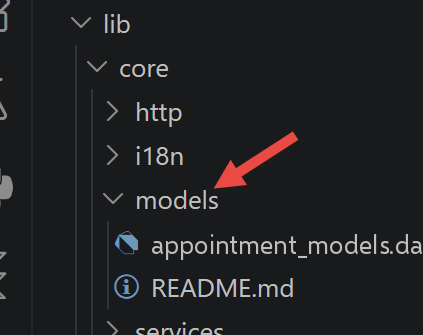
5.5.1. lib/core/models/appointment_models.dart
Port of [core/models/appointment.models.ts], itself copied verbatim from the clients [Angular] and [React]: the classes that describe the format of the JSON data exchanged with the server, with no dependencies on [Flutter]—the “pure” [Dart].
| // =========================================================================
// core/models/appointment_models.dart
// -------------------------------------------------------------------------
// Port of core/models/appointment.models.ts (Vue.js client of this course), itself
// copied as is from the Angular and React clients: the Dart classes that
// describe the shape of the JSON data received from the NestJS server. Like their
// TypeScript counterparts, these classes depend on no UI framework
// (no Flutter import here) - this is "pure" Dart, just as
// appointment.models.ts was "pure" TypeScript.
//
// STRUCTURAL DIFFERENCE with TypeScript: a TypeScript "interface" is
// a mere description of a SHAPE, checked only at compile time -
// at runtime, a decoded JSON object (JSON.parse) is used AS IS,
// without conversion, and TypeScript "trusts" the developer (see the
// "as ServerResponse<T>" of appointment.service.ts). Dart has no such notion of implicit
// structural typing: jsonDecode(...) always returns dynamic
// types (Map<String, dynamic>, List<dynamic>...), which must be
// explicitly converted into instances of Dart classes through a
// fromJson(...) constructor - present on EACH of the classes below. It is more
// verbose to write once, but the conversion is checked at runtime
// (a missing key or one of the wrong type immediately throws an explicit
// exception), where a wrong TypeScript typing can go unnoticed.
// =========================================================================
// -------------------------------------------------------------------------
// envelope common to all the server responses (see ServerResponse<T> on the
// NestJS side, and the ServerResponse<T> interface of the Vue.js client).
//
// Dart also generalizes with angle brackets (<T>), exactly like
// TypeScript - the big difference is that here, a mere "as T" is not
// enough to convert the [data] field: the function that knows how to
// build a T from raw JSON must be provided (the [parseData]
// parameter below), because Dart does not know T at runtime
// (type erasure prevents writing "T.fromJson(...)"
// directly).
// -------------------------------------------------------------------------
class ServerResponse<T> {
final int status; // 0 = success, anything else = failure (see ResponseStatus on the server side)
final T? data;
ServerResponse({required this.status, required this.data});
factory ServerResponse.fromJson(
Map<String, dynamic> json,
T Function(dynamic rawData) parseData,
) {
final rawData = json['data'];
return ServerResponse<T>(
status: json['status'] as int,
data: rawData == null ? null : parseData(rawData),
);
}
}
class Doctor {
final int id;
final String title;
final String lastName;
final String firstName;
Doctor({required this.id, required this.title, required this.lastName, required this.firstName});
factory Doctor.fromJson(Map<String, dynamic> json) => Doctor(
id: json['id'] as int,
title: json['title'] as String,
lastName: json['lastName'] as String,
firstName: json['firstName'] as String,
);
}
// [Client] here means a PATIENT of the medical practice (vocabulary of the
// business domain, inherited from the original document) - not to be confused with
// "HTTP client", nor with this Flutter client itself!
class Client {
final int id;
final String title;
final String lastName;
final String firstName;
Client({required this.id, required this.title, required this.lastName, required this.firstName});
factory Client.fromJson(Map<String, dynamic> json) => Client(
id: json['id'] as int,
title: json['title'] as String,
lastName: json['lastName'] as String,
firstName: json['firstName'] as String,
);
}
// "light" form of a time slot, as returned by the server
// (see getMapForSlot on the NestJS side): only the fields useful for display.
class SlotJson {
final int id;
final int startHour;
final int startMinute;
final int endHour;
final int endMinute;
SlotJson({
required this.id,
required this.startHour,
required this.startMinute,
required this.endHour,
required this.endMinute,
});
factory SlotJson.fromJson(Map<String, dynamic> json) => SlotJson(
id: json['id'] as int,
startHour: json['startHour'] as int,
startMinute: json['startMinute'] as int,
endHour: json['endHour'] as int,
endMinute: json['endMinute'] as int,
);
}
// "light" form of an appointment (see getMapForAppointment on the NestJS side)
class AppointmentJson {
final int id;
final String day; // format "yyyy-MM-dd"
final Client? client;
final SlotJson? slot;
AppointmentJson({required this.id, required this.day, required this.client, required this.slot});
factory AppointmentJson.fromJson(Map<String, dynamic> json) => AppointmentJson(
id: json['id'] as int,
day: json['day'] as String,
client: json['client'] == null ? null : Client.fromJson(json['client'] as Map<String, dynamic>),
slot: json['slot'] == null ? null : SlotJson.fromJson(json['slot'] as Map<String, dynamic>),
);
}
// a slot of a doctor's schedule, free (appointment == null) or booked
class DoctorDaySlot {
final SlotJson slot;
final AppointmentJson? appointment;
DoctorDaySlot({required this.slot, required this.appointment});
factory DoctorDaySlot.fromJson(Map<String, dynamic> json) => DoctorDaySlot(
slot: SlotJson.fromJson(json['slot'] as Map<String, dynamic>),
appointment: json['appointment'] == null ? null : AppointmentJson.fromJson(json['appointment'] as Map<String, dynamic>),
);
}
// the full schedule of a doctor for a given day (see GET /getDoctorScheduleOfDay/:doctorId/:day)
class DoctorDaySchedule {
final Doctor doctor;
final String day;
final List<DoctorDaySlot> slots;
DoctorDaySchedule({required this.doctor, required this.day, required this.slots});
factory DoctorDaySchedule.fromJson(Map<String, dynamic> json) => DoctorDaySchedule(
doctor: Doctor.fromJson(json['doctor'] as Map<String, dynamic>),
day: json['day'] as String,
slots: (json['slots'] as List<dynamic>)
.map((e) => DoctorDaySlot.fromJson(e as Map<String, dynamic>))
.toList(),
);
}
// -------------------------------------------------------------------------
// authentication (see server: src/auth/, in particular login-result.model.ts)
// -------------------------------------------------------------------------
// the only two roles handled by the application - exact copy of the
// [Role] type of the server (src/entities/user.entity.ts). Where TypeScript makes
// do with a union of strings ('ADMIN' | 'USER'), Dart has a
// real notion of enumeration (enum): safer (impossible to create by
// mistake a Role other than these two values), at the cost of a small explicit
// round trip with the JSON string ("ADMIN"/"USER") through
// fromString(...)/asString() below - a TypeScript "type Role =
// 'ADMIN' | 'USER'" needs no conversion at all, a JSON string IS
// already, for it, a valid value of the type.
enum Role {
admin,
user;
static Role fromString(String value) {
switch (value) {
case 'ADMIN':
return Role.admin;
case 'USER':
return Role.user;
default:
throw ArgumentError('Unknown role: $value');
}
}
String asString() => this == Role.admin ? 'ADMIN' : 'USER';
}
// shape of the data returned by POST /login (in the usual ServerResponse<T> envelope)
class LoginResult {
final String accessToken;
final String login;
final String name;
final Role role;
LoginResult({required this.accessToken, required this.login, required this.name, required this.role});
factory LoginResult.fromJson(Map<String, dynamic> json) => LoginResult(
accessToken: json['accessToken'] as String,
login: json['login'] as String,
name: json['name'] as String,
role: Role.fromString(json['role'] as String),
);
}
|
Let’s comment on this code:
- Lines 11–22: The header comment details the key structural difference in this file—a [interface] [TypeScript] is only checked at COMPILE time; [Dart] KEEPS its types at runtime, hence an explicit [fromJson(...)] constructor on each class (absent from [appointment.models.ts]).
- Lines 37–53: [class ServerResponse<T>] and its factory [fromJson(json, parseData)]—receives a FUNCTION ([parseData]) rather than relying on a simple [as ServerResponse<T>] as the [TypeScript] side (see [appointment.service.ts]): [Dart] does not know [T] at runtime (type erasure), so it cannot write [T.fromJson(...)] itself.
- Lines 71–73: The comment notes that [Client] refers to a PATIENT from the medical practice (business domain vocabulary)—not to be confused with “HTTP client,” nor with this [Flutter] client itself, an ambiguity already noted in the three previous web variants.
- lines 176–192: [enum Role { admin, user; ... }] — replaces the [TypeScript] string union [type Role = 'ADMIN' | 'USER'] with a REAL [Dart] enumeration, with an explicit round trip to the JSON string ([fromString]/[asString])—which is safer (it is impossible to generate an invalid [Role]), at the cost of a conversion that a string union does not need to perform.
5.6. The core/services layer
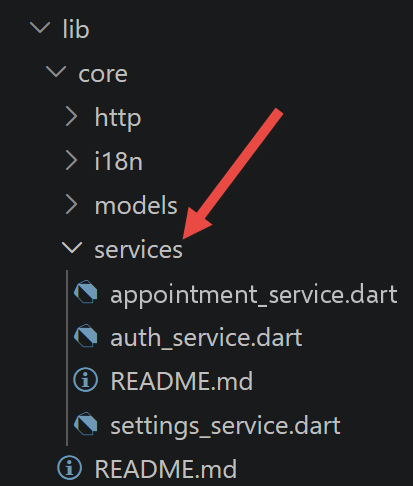
5.6.1. lib/core/services/settings_service.dart
Porting of [core/composables/settings.composable.ts]: keeps the URL of the [NestJS] server in memory.
| // =========================================================================
// core/services/settings_service.dart
// -------------------------------------------------------------------------
// Port of core/composables/settings.composable.ts (Vue.js client of this
// course): a tiny "store" that keeps in memory the URL of the NestJS
// server.
//
// Vue.js exposes this shared state through the [provide]/[inject] pair: a
// [reactive(...)] object made only once, then read/modified in place
// by any descendant component. Flutter has neither [reactive], nor
// [provide]/[inject]: the standard equivalent of the ecosystem (and the one
// used in this course) is a ChangeNotifier - an ordinary Dart class
// which, in addition to its fields, knows how to NOTIFY its listeners
// each time a change must cause a new display, through
// the explicit call notifyListeners().
//
// The essential difference with Vue.js: [reactive(...)] wraps the object
// in a JavaScript proxy that AUTOMATICALLY detects each property
// write (store.apiBaseUrl = ... redraws by itself the components that
// read apiBaseUrl). A Dart ChangeNotifier, for its part, detects NOTHING on
// its own: it is up to the developer to call notifyListeners() after each
// modification - a little more discipline by hand, in exchange for a
// much simpler mechanism (no proxy, no "magic") to
// understand and to debug.
//
// It is the [provider] package (see pubspec.yaml and lib/main.dart) that then
// plays, around this ChangeNotifier, the role of app.provide(...) on the
// Vue.js side: it makes this single instance available to the whole widget
// subtree, through context.watch<SettingsService>() (to "read and
// resubscribe to changes", see lib/app.dart) or context.read<...>()
// (to "read once, without resubscribing").
// =========================================================================
import 'package:flutter/foundation.dart';
class SettingsService extends ChangeNotifier {
String _apiBaseUrl = 'http://localhost:8080';
String get apiBaseUrl => _apiBaseUrl;
// equivalent of "setApiBaseUrl(url: string)" on the Vue.js side - unlike
// store.apiBaseUrl = url (a mere assignment, sufficient thanks to the
// reactive proxy), the listeners must be explicitly notified here after
// changing the private field.
void setApiBaseUrl(String url) {
if (url == _apiBaseUrl) {
return; // avoids a useless redraw if the value has not really changed
}
_apiBaseUrl = url;
notifyListeners();
}
}
|
Let’s comment on this code:
- lines 36–39: [class SettingsService extends ChangeNotifier] with a PRIVATE field ([_apiBaseUrl]) and a public accessor ([get apiBaseUrl]) — a [ChangeNotifier] is an ORDINARY [Dart] class, with no proxy such as [reactive(...)] on the [Vue.js] side: nothing automatically detects a property read or write.
- Lines 45–51: [setApiBaseUrl(url)] explicitly calls [notifyListeners()] AFTER updating the field — the manual step that [store.apiBaseUrl = url] did not need to perform on the [Vue.js] side, since the reactive proxy handles it on its own.
5.6.2. lib/core/services/auth_service.dart
Porting of [core/composables/auth.composable.ts]: manages the connection (POST [/login]), maintains the token [JWT], and ensures it survives a restart via [shared_preferences].
| // =========================================================================
// core/services/auth_service.dart
// -------------------------------------------------------------------------
// Port of core/composables/auth.composable.ts (Vue.js client of this
// course): handles the user's login, calls POST /login, keeps
// the JWT token received (and the identity/role that come with it), and makes it
// survive a restart of the application thanks to shared_preferences -
// the cross-platform equivalent of localStorage (see below).
//
// As on the Vue.js side, this is the only other place in the application, along with
// core/services/appointment_service.dart, that talks HTTP to the server - an
// assumed exception to the rule "a single place that talks HTTP", which
// reflects, on the client side, the separation already made on the server side between
// RdvMedecinsController (business) and AuthController (authentication).
//
// IMPORTANT DIFFERENCE with Vue.js: readStoredSession() (on the Vue.js side)
// is SYNCHRONOUS - localStorage.getItem(...) returns its value
// immediately, even before the first render of the application. shared_
// preferences, for its part, is ALWAYS asynchronous (SharedPreferences.getInstance()
// returns a Future), even on the platforms where the underlying storage
// is actually a local file almost instantly read: the Dart API does not
// distinguish these cases, for consistency across ALL platforms (on
// the web, this same call relies on window.localStorage, but the Dart API
// stays asynchronous to remain identical to the other targets). Concrete
// consequence: one can no longer, as on the Vue.js side, read the already
// stored session BEFORE the widget tree is mounted - an [init()]
// explicitly asynchronous is needed, called (and AWAITED with await) from
// lib/main.dart before runApp(...), to prevent the login screen from
// "flickering" for a fraction of a second before the session is restored.
// =========================================================================
import 'dart:convert';
import 'package:flutter/foundation.dart';
import 'package:http/http.dart' as http;
import 'package:shared_preferences/shared_preferences.dart';
import '../models/appointment_models.dart';
import 'settings_service.dart';
const String _storageKey = 'rdvmedecins.session';
class AuthService extends ChangeNotifier {
// received in the constructor rather than obtained by Flutter injection: at this
// stage (see lib/main.dart), no widget exists yet, so nothing
// like context.read<SettingsService>() would be possible - exactly
// the same reason as the one documented in createAuthStore(settings) on the
// Vue.js side (src/main.ts), which also receives settingsStore as a function
// parameter rather than through inject().
final SettingsService settings;
AuthService(this.settings);
bool isLoggedIn = false;
String? login;
String? name;
Role? role;
String? accessToken;
bool get isAdmin => role == Role.admin;
// -----------------------------------------------------------------------
// to be called ONLY ONCE, in lib/main.dart, BEFORE runApp(...): rereads
// a session possibly already stored during a previous launch of
// the application - equivalent of readStoredSession() on the Vue.js side, but
// explicitly asynchronous (see the header of this file) rather than called
// inside the store's constructor itself.
// -----------------------------------------------------------------------
Future<void> init() async {
try {
final prefs = await SharedPreferences.getInstance();
final raw = prefs.getString(_storageKey);
if (raw == null) {
return; // no stored session: we stay "not logged in", default values above
}
final session = jsonDecode(raw) as Map<String, dynamic>;
_applyLocalSession(
accessToken: session['accessToken'] as String,
login: session['login'] as String,
name: session['name'] as String,
role: Role.fromString(session['role'] as String),
);
} catch (_) {
// shared_preferences may be unavailable, or contain a corrupted
// value - in that case, as on the Vue.js side (try/catch of
// readStoredSession()), we simply consider that there is no
// session, rather than crashing the startup of the application.
}
// no notifyListeners() here: init() is awaited before
// runApp(...) in lib/main.dart, so no widget is listening to this
// ChangeNotifier yet when this method runs - notifying
// would be useless (and would even throw an exception, a Flutter ChangeNotifier
// forbidding notifyListeners() before having at least one
// listener in some debug configurations).
}
// -----------------------------------------------------------------------
// equivalent of: POST /login JSON body { login, password }
// -----------------------------------------------------------------------
Future<LoginResult> logIn(String login, String password) async {
final httpResponse = await http.post(
Uri.parse('${settings.apiBaseUrl}/login'),
headers: {'Content-Type': 'application/json'},
body: jsonEncode({'login': login, 'password': password}),
);
final envelope = ServerResponse<LoginResult>.fromJson(
jsonDecode(httpResponse.body) as Map<String, dynamic>,
(data) => LoginResult.fromJson(data as Map<String, dynamic>),
);
if (envelope.status != 0 || envelope.data == null) {
throw Exception('Login failed');
}
final result = envelope.data!;
await _applySessionAndPersist(result);
return result;
}
// -----------------------------------------------------------------------
// logout: purely local (no server call - a JWT token is not
// "revoked" on the server side in this port, it expires by itself after
// JWT_EXPIRES_IN, see server .env). Called both by a click on
// "Log out" (see lib/app.dart) and by core/http/auth_http_client.dart
// when a protected request receives a 401.
// -----------------------------------------------------------------------
Future<void> logOut() async {
login = null;
name = null;
role = null;
accessToken = null;
isLoggedIn = false;
notifyListeners();
try {
final prefs = await SharedPreferences.getInstance();
await prefs.remove(_storageKey);
} catch (_) {
// here again, a failure to clear the storage must not prevent the
// logout on the application side, already effective above.
}
}
// updates the reactive fields WITHOUT touching the storage - used by
// init() (which has just READ the storage, no need to rewrite it).
void _applyLocalSession({
required String accessToken,
required String login,
required String name,
required Role role,
}) {
this.accessToken = accessToken;
this.login = login;
this.name = name;
this.role = role;
isLoggedIn = true;
}
// updates the reactive fields AND persists the session - used by
// logIn() above. Groups what applySession(...) did
// in a single block on the Vue.js side (reactive state + localStorage written
// together); here, the two operations are separated because the writing
// is asynchronous (await prefs.setString(...)) whereas the update
// of the fields must happen IMMEDIATELY and synchronously
// (notifyListeners() must follow the assignment of the fields without waiting for
// disk I/O) - reversing the order would needlessly delay the refresh
// of the interface.
Future<void> _applySessionAndPersist(LoginResult result) async {
_applyLocalSession(
accessToken: result.accessToken,
login: result.login,
name: result.name,
role: result.role,
);
notifyListeners();
try {
final prefs = await SharedPreferences.getInstance();
await prefs.setString(
_storageKey,
jsonEncode({
'accessToken': result.accessToken,
'login': result.login,
'name': result.name,
'role': result.role.asString(),
}),
);
} catch (_) {
// the session remains valid IN MEMORY for this run of
// the application even if persisting fails (quota exceeded,
// read-only storage...) - only a future restart of
// the application would suffer from it (the user would have to log in again).
}
}
}
|
Let’s comment on this code:
- lines 16–29: The header comment details the most significant difference in this file—[readStoredSession()] on the [Vue.js] side is SYNCHRONOUS; [shared_preferences] is ALWAYS asynchronous, regardless of the platform, hence an explicit [async] [init()], which is awaited by [lib/main.dart] BEFORE [runApp(...)].
- lines 69–95: [Future<void> init() async { ... }] — reads any cached session, protected by a [try/catch] — same precaution as for [try/catch] from [readStoredSession()] on the [Vue.js] side (storage unavailable or value corrupted).
- lines 100–116: [logIn(login, password)] — calls POST [/login] with the package [http] (the equivalent of [fetch]), throws a standard [Dart] exception ([throw Exception(...)]) in case of failure—which is later intercepted by a [try/catch] [Dart], just as the [throw new Error(...)] from [auth.composable.ts] was intercepted by a [.catch(...)] [JavaScript].
- lines 165–190: [_applySessionAndPersist(...)] — updates the fields AND calls [notifyListeners()] BEFORE writing to [shared_preferences]: The order is deliberate—the interface must refresh IMMEDIATELY without waiting for an asynchronous disk write, whereas [applySession(...)] on the [Vue.js] side performed both operations in a single synchronous instruction.
5.6.3. lib/core/services/appointment_service.dart
Port of [core/services/appointment.service.ts]: the five business logic calls to the server, built on top of [core/http/auth_http_client.dart] (below) rather than directly on the [http] package.
| // =========================================================================
// core/services/appointment_service.dart
// -------------------------------------------------------------------------
// Port of core/services/appointment.service.ts (Vue.js client of this course): the
// [Services] layer of the Flutter client - the ONLY place in the application
// (along with core/services/auth_service.dart for the login itself) that
// talks HTTP with the NestJS server.
//
// Vue.js exposes this service as a COMPOSABLE (useAppointmentService()), itself
// built on two other composables (useAuthFetch(), useSettings()).
// Flutter/Dart having neither composables nor dependency injection built
// into the language, this file becomes an ordinary CLASS again, built only
// once in lib/main.dart with its two dependencies passed to the
// constructor - exactly the same principle as core/http/auth_http_client.dart,
// and the most direct way of porting "a set of functions that
// depend on something else" when the target language offers no composable.
// =========================================================================
import 'dart:convert';
import 'package:http/http.dart' as http;
import '../http/auth_http_client.dart';
import '../models/appointment_models.dart';
import 'settings_service.dart';
class AppointmentService {
final AuthHttpClient authHttp;
final SettingsService settings;
AppointmentService(this.authHttp, this.settings);
// -----------------------------------------------------------------------
// common private function: all the server responses have the shape
// { status, data } (see core/models/appointment_models.dart). The rule
// "if status != 0, it is an error" is centralized HERE, only once, rather
// than repeated in each of the methods below - exactly the
// role of extract<T>(...) on the Vue.js side.
//
// [parseData] is the same kind of parameter as the one already met
// in ServerResponse.fromJson(...) (see appointment_models.dart): the function that knows how to
// rebuild a T from the raw JSON of the [data] field, since Dart
// cannot do it on its own (no generic "T.fromJson(...)").
// -----------------------------------------------------------------------
T _extract<T>(http.Response httpResponse, T Function(dynamic rawData) parseData) {
final envelope = ServerResponse<T>.fromJson(
jsonDecode(httpResponse.body) as Map<String, dynamic>,
parseData,
);
if (envelope.status != 0) {
// the server's "business" error is turned into a classic Dart
// exception, which the calling widgets can catch with a
// simple try/catch (see lib/app.dart) - exactly like the
// "throw new Error(...)" of appointment.service.ts, caught by the
// .catch(...) of src/app/App.vue.
throw Exception('The server responded with error status ${envelope.status}');
}
return envelope.data as T;
}
// -----------------------------------------------------------------------
// equivalent of: GET /getAllDoctors
// -----------------------------------------------------------------------
Future<List<Doctor>> getAllDoctors() async {
final httpResponse = await authHttp.get(Uri.parse('${settings.apiBaseUrl}/getAllDoctors'));
return _extract<List<Doctor>>(
httpResponse,
(data) => (data as List<dynamic>).map((e) => Doctor.fromJson(e as Map<String, dynamic>)).toList(),
);
}
// -----------------------------------------------------------------------
// equivalent of: GET /getAllClients
// -----------------------------------------------------------------------
Future<List<Client>> getAllClients() async {
final httpResponse = await authHttp.get(Uri.parse('${settings.apiBaseUrl}/getAllClients'));
return _extract<List<Client>>(
httpResponse,
(data) => (data as List<dynamic>).map((e) => Client.fromJson(e as Map<String, dynamic>)).toList(),
);
}
// -----------------------------------------------------------------------
// equivalent of: GET /getDoctorScheduleOfDay/{doctorId}/{day}
// -----------------------------------------------------------------------
Future<DoctorDaySchedule> getDoctorScheduleOfDay(int doctorId, String day) async {
final httpResponse = await authHttp.get(
Uri.parse('${settings.apiBaseUrl}/getDoctorScheduleOfDay/$doctorId/$day'),
);
return _extract<DoctorDaySchedule>(
httpResponse,
(data) => DoctorDaySchedule.fromJson(data as Map<String, dynamic>),
);
}
// -----------------------------------------------------------------------
// equivalent of: POST /addAppointment JSON body { day, clientId, slotId }
// -----------------------------------------------------------------------
Future<AppointmentJson> addAppointment(String day, int clientId, int slotId) async {
final httpResponse = await authHttp.post(
Uri.parse('${settings.apiBaseUrl}/addAppointment'),
body: jsonEncode({'day': day, 'clientId': clientId, 'slotId': slotId}),
);
return _extract<AppointmentJson>(httpResponse, (data) => AppointmentJson.fromJson(data as Map<String, dynamic>));
}
// -----------------------------------------------------------------------
// equivalent of: POST /deleteAppointment JSON body { appointmentId }
// -----------------------------------------------------------------------
Future<void> deleteAppointment(int appointmentId) async {
final httpResponse = await authHttp.post(
Uri.parse('${settings.apiBaseUrl}/deleteAppointment'),
body: jsonEncode({'appointmentId': appointmentId}),
);
_extract<Object?>(httpResponse, (data) => data);
}
}
|
Let’s comment on this code:
- lines 27–31: [class AppointmentService { final AuthHttpClient authHttp; final SettingsService settings; AppointmentService(this.authHttp, this.settings); }] — reverts to an ORDINARY CLASS, constructed once in [lib/main.dart] with its dependencies passed to the constructor, whereas [Vue.js] used a COMPOSABLE, [useAppointmentService()], which were themselves built from two other composables.
- Lines 45–59: [T _extract<T>(httpResponse, parseData)]—centralizes, just once, the rule “if [status != 0], it’s an error,” exactly the role of [extract<T>(...)] on the [Vue.js] side—the parameter [parseData] is the same type of function already encountered in [ServerResponse.fromJson(...)].
- Lines 99–105: [addAppointment(day, clientId, slotId)] — [jsonEncode({...})] constructs the body JSON of the request POST, the equivalent [Dart] of [JSON.stringify({...})] on the [Vue.js] side.
- Lines 110–116: [Future<void> deleteAppointment(int appointmentId) async { ... }] — calls [_extract<Object?>(...)] without using its result: The server returns [ServerResponse.ok(null)] for this route, so there is nothing more specific to specify—the same choice as [extract<null>(httpResponse)] on the [Vue.js] side.
5.7. The core/http layer
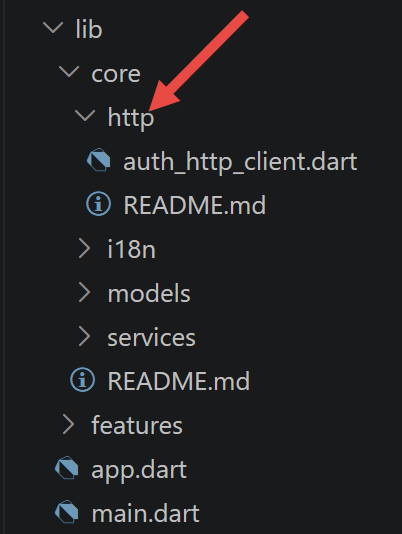
5.7.1. lib/core/http/auth_http_client.dart
Port of [core/interceptors/auth.interceptor.ts]: adds the token [JWT] to every protected request, logs the user out on a 401 response.
| // =========================================================================
// core/http/auth_http_client.dart
// -------------------------------------------------------------------------
// Port of core/interceptors/auth.interceptor.ts (Vue.js client of this
// course). This file does two things, exactly like its
// Vue.js counterpart (itself a port of the Angular and React clients):
// 1. adds the "Authorization: Bearer <token>" header to each request, if
// the user is logged in (see AuthService.accessToken);
// 2. if the server answers 401 (token missing, invalid or expired),
// cleanly logs the user out on the client side.
//
// [fetch] (used on the Vue.js and React side) and Angular's [HttpClient] have
// no DIRECT equivalent in Dart: the [http] package (see pubspec.yaml)
// provides free functions (http.get(...), http.post(...)) rather
// than an object to intercept globally. The port nevertheless remains faithful
// in SPIRIT to useAuthFetch(): rather than a composable function returning
// an "enhanced fetch", a REAL CLASS is written here, [AuthHttpClient],
// whose get(...)/post(...) methods play exactly the same role -
// any code that wants to talk to the server (here, only
// core/services/appointment_service.dart) calls THESE methods rather than the
// http package directly.
//
// Writing a class rather than a composable function is a natural
// choice in Dart/Flutter: unlike a Vue.js <script setup> (which
// runs only once per component instance, see the comment of
// auth.interceptor.ts), a ChangeNotifier or a Dart service class
// has no "body executed at each render" to be wary of -
// so no equivalent of useCallback() is needed here either,
// but for a different reason: there is simply no
// function "recreated at each render" in the first place, the class being
// built only once by lib/main.dart (see below).
// =========================================================================
import 'dart:async' show unawaited;
import 'package:http/http.dart' as http;
import '../services/auth_service.dart';
class AuthHttpClient {
final AuthService auth;
final http.Client _client = http.Client();
AuthHttpClient(this.auth);
Future<http.Response> get(Uri url) => _send(() => _client.get(url, headers: _headers()));
Future<http.Response> post(Uri url, {required Object body}) => _send(
() => _client.post(
url,
headers: {..._headers(), 'Content-Type': 'application/json'},
body: body,
),
);
// builds the headers common to every protected request - the equivalent
// of the "new Headers(options.headers); if (auth.accessToken) {...}" on the
// Vue.js side, but as a simple Map<String, String> (the type
// expected by the http package, simpler here than a Headers class).
Map<String, String> _headers() {
final accessToken = auth.accessToken;
return accessToken == null ? {} : {'Authorization': 'Bearer $accessToken'};
}
// factors out what get(...) and post(...) have in common: run the HTTP
// call then, if the response is 401, log the user out - the
// [call] function received as parameter plays the role of the "...options"
// passed by fetch(path, { ...options, headers }) on the
// Vue.js side: at this point we do not know yet whether it is a GET
// or a POST, only that it must be run and its response examined.
Future<http.Response> _send(Future<http.Response> Function() call) async {
final response = await call();
// a 401 during a session means that the token is no longer valid
// (expired, or server restarted): the client is cleanly logged out
// rather than leaving the application in an inconsistent state (logged in
// in appearance, but with no request succeeding anymore). There is
// no "await" on logOut(): the HTTP response (even an error one)
// must be returned to the caller without waiting for the end of the clearing of
// the local storage, which completes on its side in the background.
if (response.statusCode == 401) {
unawaited(auth.logOut());
}
return response;
}
}
|
Let's comment on this code:
- Lines 12–31: The header comment explains the choice of a CLASS ([AuthHttpClient]) over a composable—[fetch] ([Vue.js]/[React]) and [HttpClient] ([Angular]) have no direct equivalent in [Dart]; the [http] package provides standalone functions rather than a single object to be intercepted globally.
- lines 46–54: [get(...)]/[post(...)]—the only two methods that [appointment_service.dart] calls; it never calls the [http] package directly.
- Lines 60–63: [_headers()] — constructs [{'Authorization': 'Bearer $accessToken'}] if the user is logged in; this is the equivalent of [new Headers(options.headers); if (auth.accessToken) {...}] on the [Vue.js] side, but in the form of a simple [Map<String, String>].
- Lines 71–84: [_send(call)] — factors out what [get(...)] and [post(...)] have in common; [unawaited(auth.logOut())] EXPLICITLY documents that we choose not to wait for [Future] — the response HTTP (even if it contains an error) must be returned to the caller without waiting for the local storage purge to complete.
5.8. The core/i18n layer
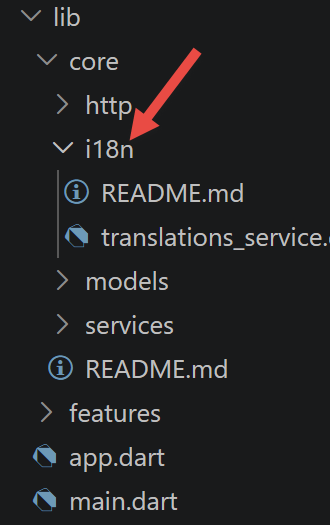
5.8.1. lib/core/i18n/translations_service.dart
MERGED port of [src/i18n.ts] AND of [core/composables/language.composable.ts]: the French/English interface switching, reimplemented without a third-party library (see the header comment in the file for the reason behind this choice).
| // =========================================================================
// core/i18n/translations_service.dart
// -------------------------------------------------------------------------
// MERGED port of src/i18n.ts (vue-i18n configuration) AND of
// core/composables/language.composable.ts (Vue.js client of this course).
// Vue.js separates the two because vue-i18n, a third-party library already
// rich in features (pluralization, date/number formats...),
// does all the actual translation work; language.composable.ts
// merely adds to it the storage of the language choice in
// localStorage. Flutter has no direct equivalent of vue-i18n/react-
// i18next/@ngx-translate/core installed by default: rather than adding
// an extra dependency, this file reimplements in a few
// lines exactly the subset used by this course - a
// dictionary with dotted keys ("LOGIN.TITLE") and a t(key) function.
//
// IMPORTANT PLATFORM DIFFERENCE (see also Chapter "Porting
// the application to mobile, desktop and web"): src/i18n.ts fetches
// each dictionary with a fetch("/i18n/{language}.json") - a relative
// URL, which assumes a WEB SERVER serving the client's files
// (Vite in development, a static server once built). A
// mobile or desktop Flutter application has NO WEB SERVER serving it
// : the code AND its static resources (here, the JSON files) are
// EMBEDDED together in a single package installed on the device (.apk,
// .app, .exe...). This is why this file uses rootBundle.loadString(...)
// - the Flutter API that reads a file declared in the [assets] section of
// pubspec.yaml directly from this package - rather than a network call.
// On the web target, rootBundle relies behind the scenes on a real HTTP
// request to the files published next to the application, but this detail
// remains invisible here: the SAME Dart code works, without any platform
// condition, on the 3 environments - exactly the central argument of
// this chapter.
// =========================================================================
import 'dart:convert';
import 'package:flutter/foundation.dart';
import 'package:flutter/services.dart' show rootBundle, ServicesBinding;
import 'package:shared_preferences/shared_preferences.dart';
const String _storageKey = 'rdvmedecins.language';
final String _defaultLanguage = ServicesBinding.instance.platformDispatcher.locale.languageCode == 'fr' ? 'fr' : 'en';
class TranslationsService extends ChangeNotifier {
String currentLanguage = _defaultLanguage;
// dictionaries already loaded (avoids rereading an asset file already seen
// during the session) - same optimization as loadedDictionaries on the
// Vue.js side (src/i18n.ts), but here the decoded dictionary itself is kept
// rather than a simple Set of languages already seen: Vue.js could make do
// with a Set because vue-i18n ITSELF keeps the loaded dictionaries
// in memory (setLocaleMessage); having no equivalent
// library here, this cache role must be held directly by this
// file.
final Map<String, Map<String, dynamic>> _dictionaries = {};
// -----------------------------------------------------------------------
// to be called ONLY ONCE, in lib/main.dart, BEFORE runApp(...):
// restores the language stored during a previous launch (if there is
// one) and loads its dictionary - equivalent of the final block of
// createLanguageStore() on the Vue.js side (the reading of savedLanguage in
// localStorage), but made explicitly asynchronous for the same
// reasons already documented in core/services/auth_service.dart
// (shared_preferences is ALWAYS asynchronous, unlike
// localStorage).
// -----------------------------------------------------------------------
Future<void> init() async {
String startLanguage = _defaultLanguage;
try {
final prefs = await SharedPreferences.getInstance();
startLanguage = prefs.getString(_storageKey) ?? _defaultLanguage;
} catch (_) {
// no readable preference: start in the default language (English, or
// French on a French device), as on the Vue.js side.
}
await _loadDictionary(startLanguage);
currentLanguage = startLanguage;
// no notifyListeners() here, for the same reason as in
// AuthService.init(): this method is awaited before
// runApp(...), so no widget is listening to this ChangeNotifier yet.
}
// -----------------------------------------------------------------------
// equivalent of: changeLanguage(language) on the Vue.js side (triggered by the
// FR/EN buttons of lib/app.dart, see later in this chapter).
// -----------------------------------------------------------------------
Future<void> changeLanguage(String language) async {
if (language == currentLanguage) {
return;
}
await _loadDictionary(language);
currentLanguage = language;
notifyListeners(); // here, on the other hand, the application is already running: we do notify
try {
final prefs = await SharedPreferences.getInstance();
await prefs.setString(_storageKey, language);
} catch (_) {
// the language change remains effective for this run even if
// storing it fails - only a future restart would suffer from it.
}
}
// -----------------------------------------------------------------------
// equivalent of: loadDictionary(language) on the Vue.js side - same
// caching principle (loadedDictionaries), but reading an embedded
// asset rather than a network fetch() (see the header of this file).
// -----------------------------------------------------------------------
Future<void> _loadDictionary(String language) async {
if (_dictionaries.containsKey(language)) {
return; // already loaded during a previous language change
}
final content = await rootBundle.loadString('assets/i18n/$language.json');
_dictionaries[language] = jsonDecode(content) as Map<String, dynamic>;
}
// -----------------------------------------------------------------------
// the translation function itself - called t('LOGIN.TITLE') from
// the widgets (see lib/features/...), exactly like t('LOGIN.TITLE')
// on the Vue.js side (useI18n().t). The key is "dotted" (a dot separates
// each level): so we go down into the nested JSON dictionary one
// segment at a time, rather than flattening the dictionary once and
// for all as vue-i18n does internally - a choice that remains
// largely sufficient for the size of these two dictionaries.
// -----------------------------------------------------------------------
String t(String key) {
final dictionary = _dictionaries[currentLanguage];
if (dictionary == null) {
return key; // dictionary not loaded yet: the key itself is displayed, as a last resort
}
dynamic currentValue = dictionary;
for (final segment in key.split('.')) {
if (currentValue is Map<String, dynamic> && currentValue.containsKey(segment)) {
currentValue = currentValue[segment];
} else {
return key; // key not found: same fallback as above
}
}
return currentValue is String ? currentValue : key;
}
}
|
Let’s comment on this code:
- Lines 16–31: The header comment details the most important PLATFORM DIFFERENCE of this entire client — [src/i18n.ts] retrieves each dictionary via [fetch("/i18n/{language}.json")], a URL that relies on a WEB SERVER; a mobile or desktop application does not have one, hence [rootBundle.loadString(...)] rather than a network call—the same code works, regardless of platform, on all three environments (see Chapter 5).
- lines 66–80: [init()] — restores the saved language (or the default language: English, or French on a French device) and loads its dictionary; Like [AuthService.init()], there is no [notifyListeners()] here (no widget is listening to this [ChangeNotifier] at this stage).
- lines 107–113: [_loadDictionary(language)] — the same caching principle as [loadedDictionaries] on the [Vue.js] side, but it directly stores the decoded dictionary rather than a simple [Set] of previously seen languages: [vue-i18n] kept the dictionaries in memory ([setLocaleMessage]); here, this caching role must be handled directly by this file.
- Lines 124–138: [String t(String key) { ... }] — traverses the nested dictionary JSON one segment at a time ([key.split('.')]), rather than flattening the dictionary once and for all as [vue-i18n] does internally—a choice that is more than sufficient for the size of these two dictionaries.
5.8.2. assets/i18n/fr.json and assets/i18n/en.json
Taken as-is from [public/i18n/fr.json]/[en.json] (client [Vue.js]), with just one change: the key [APP.TITLE] now refers to “[Flutter]” instead of “[Vue.js].” Both files must remain structurally identical (same keys, in both languages)—this ensures that a key exists in both dictionaries.
5.9. The features layer
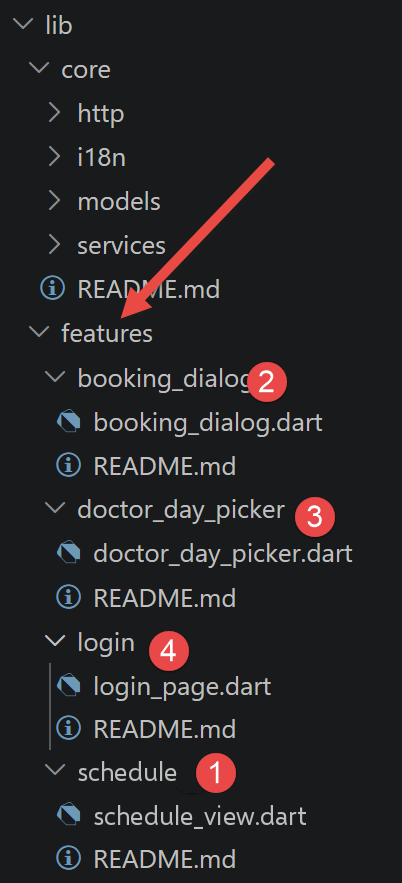
One widget per feature: the login screen, selecting a doctor and a day, viewing the calendar, and the appointment booking dialog box.
5.9.1. lib/features/login/login_page.dart
Porting [src/app/features/login/Login.vue]: the login screen.
| // =========================================================================
// features/login/login_page.dart
// -------------------------------------------------------------------------
// Port of src/app/features/login/Login.vue (Vue.js client of this course):
// the login screen. Like its Vue.js counterpart, this widget knows
// nothing about the schedule or the appointments: it merely collects a
// (login, password) pair, passes it to AuthService.logIn(...),
// and displays a possible error.
//
// STRUCTURAL DIFFERENCE with Vue.js: Login.vue declares its local state
// (login, password, submitting, error) with simple ref(...) - Vue.js
// then automatically "redraws" the <template> when one of these refs
// changes, WITHOUT any notion of "widget with or without state". Flutter distinguishes
// explicitly two kinds of widgets: StatelessWidget (nothing ever changes
// after construction) and StatefulWidget (owns a mutable state,
// and knows how to redraw itself through setState(...)). This component needs to
// remember what the user types AND to know how to redraw itself when
// submitting/error change: so it is a StatefulWidget - the
// LoginPage class below ONLY declares createState(), all the state and
// all the logic live in _LoginPageState, the associated "twin"
// class.
// =========================================================================
import 'package:flutter/material.dart';
import 'package:provider/provider.dart';
import '../../core/i18n/translations_service.dart';
import '../../core/services/auth_service.dart';
class LoginPage extends StatelessWidget {
const LoginPage({super.key});
@override
Widget build(BuildContext context) {
return const _LoginForm();
}
}
class _LoginForm extends StatefulWidget {
const _LoginForm();
@override
State<_LoginForm> createState() => _LoginFormState();
}
class _LoginFormState extends State<_LoginForm> {
// TextEditingController: unlike v-model="login" on the Vue.js side
// (which directly binds a field to a ref, both ways, in a
// single attribute), Flutter has no two-way binding built into
// the TextField widget - one must explicitly own a controller,
// read it (controller.text) and RELEASE it (dispose()) once the widget is
// destroyed, see dispose() below. It is more verbose to write once,
// but makes explicit a lifecycle (creation -> reading -> release
// of resources) that Vue.js manages itself behind the scenes for a ref.
final TextEditingController _loginController = TextEditingController();
final TextEditingController _passwordController = TextEditingController();
bool _submitting = false;
String? _error;
@override
void dispose() {
// releases the resources associated with the controllers - forgetting this
// would cause a memory leak each time this screen was
// recreated. Vue.js, whose ref() are simple JavaScript objects
// collected by the garbage collector like any other object,
// has no such step to plan for.
_loginController.dispose();
_passwordController.dispose();
super.dispose();
}
Future<void> _onSubmit() async {
final login = _loginController.text.trim();
final password = _passwordController.text;
if (login.isEmpty || password.isEmpty) {
return;
}
setState(() {
_error = null;
_submitting = true;
});
try {
// context.read<AuthService>(): a "one-time" read, WITHOUT resubscribing
// to future changes (unlike context.watch<...>(), see
// lib/app.dart) - exactly suited to a one-off call triggered by
// a user action, rather than to a display that must
// stay up to date. It is the Flutter/provider equivalent of
// "const auth = useAuth();" on the Vue.js side, where auth.logIn(...) is
// simply called without any particular distinction (Vue.js does not have
// this one-time-read / resubscription distinction: useAuth() always returns
// the same reactive object, whatever use is made of it).
await context.read<AuthService>().logIn(login, password);
if (!mounted) return; // the widget may have been destroyed while waiting for the server
setState(() => _submitting = false);
} catch (_) {
if (!mounted) return;
setState(() {
_submitting = false;
_error = 'LOGIN.ERROR';
});
}
}
@override
Widget build(BuildContext context) {
// context.watch<TranslationsService>(): unlike
// context.read<AuthService>() used in _onSubmit() above, we
// want HERE this widget to redraw itself automatically if the language
// changes (FR/EN buttons of lib/app.dart) - watch() subscribes to
// future changes, where read() merely does a one-off read.
final t = context.watch<TranslationsService>().t;
return Center(
child: ConstrainedBox(
constraints: const BoxConstraints(maxWidth: 420),
child: Card(
child: Padding(
padding: const EdgeInsets.all(24),
// Form groups the fields and allows submitting by pressing
// "Enter" from any of them (onFieldSubmitted
// below) - the equivalent of the <form @submit.prevent="onSubmit">
// of Login.vue: Enter in a field AND a click on the button
// both trigger the same onSubmit().
child: Column(
mainAxisSize: MainAxisSize.min,
crossAxisAlignment: CrossAxisAlignment.stretch,
children: [
Text(t('LOGIN.TITLE'), style: Theme.of(context).textTheme.titleLarge),
const SizedBox(height: 16),
if (_error != null) ...[
Container(
padding: const EdgeInsets.all(8),
decoration: BoxDecoration(
color: Theme.of(context).colorScheme.errorContainer,
borderRadius: BorderRadius.circular(4),
),
child: Text(
t(_error!),
style: TextStyle(color: Theme.of(context).colorScheme.onErrorContainer),
),
),
const SizedBox(height: 16),
],
TextField(
controller: _loginController,
decoration: InputDecoration(labelText: t('LOGIN.LOGIN_LABEL')),
textInputAction: TextInputAction.next,
),
const SizedBox(height: 12),
TextField(
controller: _passwordController,
decoration: InputDecoration(labelText: t('LOGIN.PASSWORD_LABEL')),
obscureText: true,
textInputAction: TextInputAction.done,
// onSubmitted: triggered by the "Enter" key (or its
// mobile virtual keyboard equivalent) - the counterpart of
// @submit.prevent placed on the <form> tag on the Vue.js side,
// here placed directly on the LAST field of the form.
onSubmitted: (_) => _onSubmit(),
),
const SizedBox(height: 20),
FilledButton(
onPressed: _submitting ? null : _onSubmit,
child: Text(_submitting ? t('LOGIN.SUBMITTING') : t('LOGIN.SUBMIT')),
),
const SizedBox(height: 16),
Text(
'${t('LOGIN.DEMO_ACCOUNTS_PREFIX')} admin / admin ${t('LOGIN.DEMO_ACCOUNTS_ADMIN')} '
'${t('LOGIN.DEMO_ACCOUNTS_OR')} user / user ${t('LOGIN.DEMO_ACCOUNTS_USER')}.',
style: Theme.of(context).textTheme.bodySmall,
),
],
),
),
),
),
);
}
}
|
Let’s comment on this code:
- lines 39–44: [LoginPage] (a simple [StatelessWidget] front-end) delegates EVERYTHING to [_LoginForm]/[_LoginFormState] — the header comment explains why this screen, which must store what the user types AND redraw itself when [_submitting]/[_error] change, CANNOT simply be [StatelessWidget], unlike [Login.vue], where [ref(...)] makes no such distinction.
- lines 55–56: [final TextEditingController _loginController = TextEditingController();] — replaces [v-model="login"]: no built-in bidirectional link in [TextField]; a controller must be explicitly specified.
- lines 61–71: [dispose() { _loginController.dispose(); _passwordController.dispose(); ... }] — releases both controllers; an omission here would cause a memory leak every time this screen is recreated, a step that [Vue.js] does not need to account for (its [ref()] objects are simply collected by the garbage collector).
- lines 93–102: [await context.read<AuthService>().logIn(login, password);] within a [try/catch] — [context.read<...>()] (one-time read, WITHOUT resubscription) rather than [context.watch<...>()] (see [lib/app.dart]), which is well-suited for a one-time call triggered by a user action.
- Line 160: [onSubmitted: (_) => _onSubmit(),] placed on the LAST field (password) — the counterpart to [@submit.prevent="onSubmit"], which is set on the [<form>] tag on the [Vue.js] side: Pressing Enter in the field AND clicking the button both trigger the same [_onSubmit()].
5.9.2. lib/features/doctor_day_picker/doctor_day_picker.dart
Porting of [src/app/features/doctor-day-picker/DoctorDayPicker.vue]: Select a doctor and a date, then request to view their schedule.
| // =========================================================================
// features/doctor_day_picker/doctor_day_picker.dart
// -------------------------------------------------------------------------
// Port of src/app/features/doctor-day-picker/DoctorDayPicker.vue (Vue.js
// client of this course): the widget used to choose a doctor and a
// day, then to ask to see their schedule.
//
// A Vue.js [defineProps]/[defineEmits] (props as inputs, events as
// outputs) becomes here, very directly, a Dart CONSTRUCTOR: the props
// are the named parameters of the constructor (doctors, onSearch), and
// "emitting an event" simply becomes CALLING the function received as
// parameter - exactly the choice already made by the React client of this
// course (a function prop, onSearch), rather than the explicit
// [defineEmits] declaration specific to Vue.js. Flutter, like React, makes
// NO syntactic distinction between "normal prop" and "prop used to
// notify the parent": it is a function like any other, passed by the
// parent (see lib/app.dart) when building this widget.
// =========================================================================
import 'package:flutter/material.dart';
import 'package:intl/intl.dart';
import 'package:provider/provider.dart';
import '../../core/i18n/translations_service.dart';
import '../../core/models/appointment_models.dart';
// "yyyy-MM-dd" format - the same date format as on the Vue.js side
// (new Date().toISOString().slice(0, 10)), but built here explicitly
// through the intl package rather than by string slicing: Dart's DateTime
// has no built-in toISOString() method.
final DateFormat _dayFormat = DateFormat('yyyy-MM-dd');
class DoctorDayPicker extends StatefulWidget {
final List<Doctor> doctors;
// onSearch(doctorId, day): the direct equivalent of
// "search: [criteria: { doctorId: number; day: string }]" on the
// Vue.js side - here, two positional parameters rather than a single object
// {doctorId, day}, a choice as valid as the other in Dart.
final void Function(int doctorId, String day) onSearch;
const DoctorDayPicker({super.key, required this.doctors, required this.onSearch});
@override
State<DoctorDayPicker> createState() => _DoctorDayPickerState();
}
class _DoctorDayPickerState extends State<DoctorDayPicker> {
// state purely local to this widget (what is selected in the menus,
// as long as the user has not clicked the button) - the direct
// equivalent of selectedDoctorId/selectedDay on the Vue.js side, as
// simple fields of _DoctorDayPickerState rather than ref(...): a
// Flutter StatefulWidget needs no particular "wrapping" for
// a local field, setState(...) (see _onDoctorChoice below) is enough to
// signal that a redraw is needed.
int? _selectedDoctorId;
DateTime _selectedDay = DateTime.now();
Future<void> _pickDay() async {
// Flutter has no direct equivalent of <input type="date"> (a date
// input widget NATIVE TO THE BROWSER, which Vue.js could
// benefit from on the web): on the 3 environments targeted by this client
// (mobile, desktop, web), it is Flutter ITSELF that draws the
// date picker (showDatePicker(...) below) - a Material
// widget, identical in appearance on the 3 targets. It is a
// very concrete illustration of the promise "a single code base for 3
// environments": where Vue.js relied on a building block of the
// browser (absent on mobile and desktop), Flutter provides its
// own building block, available EVERYWHERE.
final picked = await showDatePicker(
context: context,
initialDate: _selectedDay,
firstDate: DateTime(2020),
lastDate: DateTime(2100),
);
if (picked != null) {
setState(() => _selectedDay = picked);
}
}
void _onSearchClick() {
final doctorId = _selectedDoctorId;
if (doctorId == null) {
return; // the button is disabled anyway in this case (see build() below)
}
// widget.onSearch(...): the function received from the parent is called -
// exactly the equivalent of emit('search', ...) on the Vue.js side, or of
// the call of the onSearch(...) prop on the React side. The "widget."
// prefix is needed here because _DoctorDayPickerState is a class
// SEPARATE from DoctorDayPicker (see the header of lib/features/login/login_page.dart
// for the reason for this State/Widget separation specific to Flutter):
// this is how, from the state, one accesses the parameters of the widget that
// owns it.
widget.onSearch(doctorId, _dayFormat.format(_selectedDay));
}
@override
Widget build(BuildContext context) {
final t = context.watch<TranslationsService>().t;
// The three fields are built ONLY ONCE here, then laid out by
// the LayoutBuilder further down: side by side (Row) on a wide screen,
// stacked (Column) on a narrow screen. A phone in portrait mode is only
// about 360 pixels wide: three fields in a row would each have
// only about a hundred pixels there and would overflow.
//
// DropdownButtonFormField<int>: the Flutter equivalent of an
// HTML <select> - unlike v-model="selectedDoctorId"
// on the Vue.js side (a single two-way binding), Flutter
// explicitly separates "displayed value" (value:) and "reaction
// to a change" (onChanged:), in the manner of React
// (:value + @change) already compared in the original .vue
// file.
final doctorField = DropdownButtonFormField<int>(
// isExpanded: the label takes the whole available width (and is
// cleanly truncated if it is too long) instead of overflowing.
isExpanded: true,
decoration: InputDecoration(labelText: t('DOCTOR_DAY_PICKER.DOCTOR_LABEL')),
value: _selectedDoctorId,
hint: Text(t('DOCTOR_DAY_PICKER.CHOOSE_DOCTOR')),
// .map(...).toList(): the Flutter equivalent of
// v-for="doctor in doctors" :key="doctor.id" - here,
// the "stable" identifier (:key on the Vue.js side) is simply
// the [value:] of each DropdownMenuItem (doctor.id), which
// Flutter itself uses to know which one is
// currently selected.
items: widget.doctors
.map(
(doctor) => DropdownMenuItem(
value: doctor.id,
child: Text('${doctor.title} ${doctor.firstName} ${doctor.lastName}'),
),
)
.toList(),
onChanged: (id) => setState(() => _selectedDoctorId = id),
);
// InkWell: makes the whole area "clickable" - a tap
// anywhere on it opens the date picker
// (_pickDay above). It is a rebuilding, by
// hand, of what the browser offered "for free" with
// <input type="date" v-model="selectedDay"> on the Vue.js side.
// InputDecorator (rather than a "disguised" TextField) displays
// the date without owning a TextEditingController - there is
// NOTHING to type on the keyboard here, only a value to
// display and a tap to intercept: no need for the
// create/dispose lifecycle already met in
// lib/features/login/login_page.dart for a really editable field.
final dayField = InkWell(
onTap: _pickDay,
child: InputDecorator(
decoration: InputDecoration(labelText: t('DOCTOR_DAY_PICKER.DAY_LABEL')),
child: Text(_dayFormat.format(_selectedDay)),
),
);
final scheduleButton = FilledButton(
onPressed: _selectedDoctorId == null ? null : _onSearchClick,
child: Text(t('DOCTOR_DAY_PICKER.VIEW_SCHEDULE')),
);
return Card(
child: Padding(
padding: const EdgeInsets.all(16),
// LayoutBuilder: calls its builder with the width ACTUALLY
// available at this place of the tree (constraints.maxWidth), and
// calls it again if it changes (screen rotation, resizing
// of the window) - so the layout adapts by itself.
child: LayoutBuilder(
builder: (context, constraints) {
if (constraints.maxWidth < 600) {
return Column(
crossAxisAlignment: CrossAxisAlignment.stretch,
children: [
doctorField,
const SizedBox(height: 12),
dayField,
const SizedBox(height: 12),
scheduleButton,
],
);
}
return Row(
crossAxisAlignment: CrossAxisAlignment.end,
children: [
Expanded(flex: 5, child: doctorField),
const SizedBox(width: 12),
Expanded(flex: 4, child: dayField),
const SizedBox(width: 12),
Expanded(flex: 3, child: scheduleButton),
],
);
},
),
),
);
}
}
|
Let’s comment on this code:
- lines 59–79: [_pickDay()] calls [showDatePicker(...)]—a very concrete illustration of the promise “a single code for three environments”: whereas [Vue.js] relied on [<input type="date">], a NATIVE building block of the BROWSER (missing on mobile and desktop), [Flutter] renders ITSELF a selector that is a [Material] widget that is strictly identical across all three targets.
- Lines 114–136: [DropdownButtonFormField<int>(value: _selectedDoctorId, ..., onChanged: (id) => setState(() => _selectedDoctorId = id))] — replaces [v-model="selectedDoctorId"] with an explicit pair [value:]/[onChanged:], similar to the pair [:value]/[@change] already encountered in connection with [React] in this course.
- lines 149–155: [InkWell(onTap: _pickDay, child: InputDecorator(...))] — manually reconstructed from what the browser provided “for free” with [<input type="date">]; [InputDecorator] (rather than a “disguised” [TextField]) displays the date WITHOUT a [TextEditingController].
- Lines 169–194: [LayoutBuilder(builder: (context, constraints) { ... })] — the response from [Flutter] to a screen of unknown width: [builder] receives the width actually available at that location ([constraints.maxWidth]) and is called again if it changes (screen rotation, window resizing). Below 600 pixels—a phone in portrait mode is only about 360 pixels wide—the three fields are STACKED within a [Column]; above that, they remain side by side within a [Row]. The three fields are constructed once, earlier on, in the variables [doctorField], [dayField], and [scheduleButton]: only their layout changes. With just the [Row] from the first version, each field would have had only about a hundred pixels on a phone in portrait mode, and the content would have overflowed (the yellow and black banner “RIGHT OVERFLOWED BY … PIXELS” in debug mode); [isExpanded: true] in the drop-down list prevents the same overflow for a long doctor’s name.
5.9.3. lib/features/schedule/schedule_view.dart
Port of [src/app/features/schedule/Schedule.vue]: a doctor’s schedule for a given day—available slots (“Book” button) or booked slots (patient + “Cancel” button).
| // =========================================================================
// features/schedule/schedule_view.dart
// -------------------------------------------------------------------------
// Port of src/app/features/schedule/Schedule.vue (Vue.js client of this
// course): displays the schedule of a doctor for a given day - the list of
// their time slots, each one being free ("Book" button) or booked
// (patient's name + "Cancel" button).
//
// Since authentication was added, this widget also receives
// canEdit: when false (USER role), the "Book"/"Cancel" buttons
// disappear - the schedule can still be viewed, but read-only (the
// server would anyway refuse these actions to a USER, 403 Forbidden,
// see RolesGuard on the server side).
//
// [v-if]/[v-else] and [v-for] (Vue.js) become ORDINARY Dart expressions
// here: Flutter, like React before it (see the comment of
// Schedule.vue), knows NO "template language" separate from the
// programming language - const/if/for and the ?./?? operators of normal Dart
// are enough to express conditions and lists, directly in the
// build(...) method below.
// =========================================================================
import 'package:flutter/material.dart';
import 'package:provider/provider.dart';
import '../../core/i18n/translations_service.dart';
import '../../core/models/appointment_models.dart';
class ScheduleView extends StatelessWidget {
final DoctorDaySchedule? schedule;
final bool canEdit;
final void Function(SlotJson slot) onBook;
final void Function(AppointmentJson appointment) onCancel;
const ScheduleView({
super.key,
required this.schedule,
required this.canEdit,
required this.onBook,
required this.onCancel,
});
// small formatting utility function, "8:05" rather than "8:5" -
// identical in spirit to formatTime(...) on the Vue.js side.
static String _formatTime(int h, int m) => '$h:${m.toString().padLeft(2, '0')}';
void _onSlotClick(DoctorDaySlot daySlot) {
if (!canEdit) {
return; // the button is not displayed anyway in this case (see build() below)
}
final appointment = daySlot.appointment;
if (appointment == null) {
onBook(daySlot.slot); // free slot: offer to book it
} else {
onCancel(appointment); // slot already booked: offer to cancel the existing appointment
}
}
@override
Widget build(BuildContext context) {
final t = context.watch<TranslationsService>().t;
final schedule = this.schedule;
if (schedule == null) {
return Padding(
padding: const EdgeInsets.symmetric(vertical: 24),
child: Text(
t('SCHEDULE.EMPTY_STATE'),
style: TextStyle(color: Theme.of(context).colorScheme.outline),
),
);
}
return Card(
child: Padding(
padding: const EdgeInsets.all(16),
child: Column(
crossAxisAlignment: CrossAxisAlignment.start,
children: [
Text(
'${t('SCHEDULE.TITLE_PREFIX')} ${schedule.day} - ${schedule.doctor.title} '
'${schedule.doctor.firstName} ${schedule.doctor.lastName}',
style: Theme.of(context).textTheme.titleMedium,
),
const SizedBox(height: 12),
// DataTable: the Flutter Material equivalent of the HTML <table> of
// Schedule.vue - unlike HTML, its rows must be
// built explicitly in Dart through .map(...).toList()
// (the equivalent, here again, of v-for="daySlot in
// schedule.slots" :key="daySlot.slot.id" - the DataRow
// needs no explicit "key" as in Vue.js/React: the
// list is entirely rebuilt at each render, Flutter not
// trying here to reuse existing rows).
SingleChildScrollView(
scrollDirection: Axis.horizontal,
child: DataTable(
columns: [
DataColumn(label: Text(t('SCHEDULE.COLUMN_SLOT'))),
DataColumn(label: Text(t('SCHEDULE.COLUMN_STATUS'))),
const DataColumn(label: Text('')),
],
rows: schedule.slots.map((daySlot) {
final appointment = daySlot.appointment;
final slot = daySlot.slot;
return DataRow(
// slightly tinted background for a free slot - the
// counterpart of the "free-slot" CSS class on the Vue.js side.
color: appointment == null
? WidgetStateProperty.all(Theme.of(context).colorScheme.surfaceContainerLow)
: null,
cells: [
DataCell(Text(
'${_formatTime(slot.startHour, slot.startMinute)} - '
'${_formatTime(slot.endHour, slot.endMinute)}',
)),
DataCell(
appointment == null
? Chip(
label: Text(t('SCHEDULE.FREE')),
backgroundColor: Colors.green.shade100,
)
: Chip(
label: Text('${appointment.client?.title ?? ''} ${appointment.client?.firstName ?? ''} ${appointment.client?.lastName ?? ''}'),
),
),
DataCell(
// canEdit: false for a USER role (read-only)
canEdit
? OutlinedButton(
onPressed: () => _onSlotClick(daySlot),
child: Text(appointment == null ? t('SCHEDULE.BOOK') : t('SCHEDULE.CANCEL_APPOINTMENT')),
)
: const SizedBox.shrink(),
),
],
);
}).toList(),
),
),
],
),
),
);
}
}
|
Let’s comment on this code:
- lines 43–57: [_formatTime(h, m)] and [_onSlotClick(daySlot)] — the latter distinguishes between an available slot ([onBook(...)]) and a booked slot ([onCancel(...)]) depending on whether [daySlot.appointment] is [null] or not, exactly the same logic as on the [Vue.js] side, but expressed purely in [Dart] rather than in [<template>].
- Lines 96–137: [DataTable(columns: [...], rows: schedule.slots.map((daySlot) { ... }).toList())] — the [Material] equivalent of [<table>] [HTML] from [Schedule.vue]: its lines must be explicitly constructed via [.map(...).toList()].
- Lines 108–110: [color: appointment == null ? WidgetStateProperty.all(Theme.of(context).colorScheme.surfaceContainerLow) : null,] — the counterpart to the ["free-slot"] [CSS] class on the [Vue.js] side: a background color applied conditionally to the entire line, here via a function rather than a named [CSS] class.
5.9.4. lib/features/booking_dialog/booking_dialog.dart
Porting of [src/app/features/booking-dialog/BookingDialog.vue]: a patient’s selection to reserve an available time slot—the file where the structural difference from [Vue.js] is most pronounced in this entire client.
| // =========================================================================
// features/booking_dialog/booking_dialog.dart
// -------------------------------------------------------------------------
// Port of src/app/features/booking-dialog/BookingDialog.vue (Vue.js
// client of this course): the (modal) window used to choose a
// patient to book a free slot.
//
// IMPORTANT STRUCTURAL DIFFERENCE with Vue.js (and with the three other
// widgets of lib/features/): BookingDialog.vue is a component ALWAYS
// PRESENT in the tree, whose [open] prop (a boolean held by
// App.vue) merely drives the display (v-if="open") - EXACTLY the same
// choice as the Angular and React clients of this course, motivated by the concern
// of preventing Vue.js and Bootstrap's JavaScript from fighting over the
// same piece of information ("is the modal open?").
//
// Flutter does not have this problem: a dialog box IS NOT a widget
// that is conditionally shown or hidden in the tree, but a REAL
// PAGE, pushed onto the navigation stack (the Navigator) when it is
// opened, with showDialog(...) - and automatically popped when it is
// closed. So there is here NEITHER an "open: bool" state to hold in the
// parent widget (see lib/app.dart, which has no field equivalent to
// slotBeingBooked on the Vue.js side), NOR "confirm"/"close" events to
// emit: showDialog(...) returns a Future that completes with the
// value passed to Navigator.pop(...) - null if the user closed
// without choosing, the id of the chosen patient otherwise. It is the
// CALLING widget (lib/app.dart) that awaits this Future to know what
// to do next - a complete reversal of the direction of communication
// compared with the two Vue.js events.
// =========================================================================
import 'package:flutter/material.dart';
import 'package:provider/provider.dart';
import '../../core/i18n/translations_service.dart';
import '../../core/models/appointment_models.dart';
// -----------------------------------------------------------------------
// helper function: opens the dialog box and returns the id of the
// chosen patient (or null if the user cancelled/closed without choosing).
// It is THIS function that lib/app.dart calls - never directly the
// constructor of _BookingDialogContent below.
// -----------------------------------------------------------------------
Future<int?> openBookingDialog({
required BuildContext context,
required SlotJson slot,
required List<Client> clients,
}) {
return showDialog<int>(
context: context,
builder: (_) => _BookingDialogContent(slot: slot, clients: clients),
);
}
class _BookingDialogContent extends StatefulWidget {
final SlotJson slot;
final List<Client> clients;
const _BookingDialogContent({required this.slot, required this.clients});
@override
State<_BookingDialogContent> createState() => _BookingDialogContentState();
}
class _BookingDialogContentState extends State<_BookingDialogContent> {
int? _selectedClientId;
void _onConfirmClick() {
final clientId = _selectedClientId;
if (clientId == null) {
return;
}
// Navigator.pop(context, clientId): closes the dialog box AND
// passes clientId as the result of the Future returned by
// openBookingDialog(...) - the equivalent, in a single call, of
// emit('confirm', { clientId }) FOLLOWED by the closing (implicit,
// driven by the parent through [open]) on the Vue.js side.
Navigator.pop(context, clientId);
}
void _onCloseClick() {
// Navigator.pop(context) without a second argument: the Future returned by
// openBookingDialog(...) completes with null - the equivalent of
// emit('close') on the Vue.js side.
Navigator.pop(context);
}
@override
Widget build(BuildContext context) {
final t = context.watch<TranslationsService>().t;
final slot = widget.slot;
// AlertDialog: the Material widget dedicated to dialog boxes -
// already provides, on its own, the darkened background (the equivalent of the
// .modal-backdrop placed "by hand" on the Vue.js side) and the
// standard closing behavior (tap outside the box, Escape key
// on desktop/web) - a behavior that the Vue.js client had to
// recreate itself, Bootstrap handling only part of it automatically.
return AlertDialog(
title: Text(t('BOOKING_DIALOG.TITLE')),
content: Column(
mainAxisSize: MainAxisSize.min,
crossAxisAlignment: CrossAxisAlignment.start,
children: [
Text(
'${t('BOOKING_DIALOG.SLOT_FROM')} ${slot.startHour}:${slot.startMinute.toString().padLeft(2, '0')} '
'${t('BOOKING_DIALOG.SLOT_TO')} ${slot.endHour}:${slot.endMinute.toString().padLeft(2, '0')}',
),
const SizedBox(height: 16),
DropdownButtonFormField<int>(
decoration: InputDecoration(labelText: t('BOOKING_DIALOG.PATIENT_LABEL')),
value: _selectedClientId,
hint: Text(t('BOOKING_DIALOG.CHOOSE_PATIENT')),
items: widget.clients
.map(
(client) => DropdownMenuItem(
value: client.id,
child: Text('${client.title} ${client.firstName} ${client.lastName}'),
),
)
.toList(),
onChanged: (id) => setState(() => _selectedClientId = id),
),
],
),
actions: [
TextButton(onPressed: _onCloseClick, child: Text(t('BOOKING_DIALOG.CANCEL'))),
FilledButton(
onPressed: _selectedClientId == null ? null : _onConfirmClick,
child: Text(t('BOOKING_DIALOG.CONFIRM')),
),
],
);
}
}
|
Let’s comment on this code:
- lines 16–28: The header comment summarizes the most significant structural difference in this file—[BookingDialog.vue] is a component ALWAYS PRESENT in the tree, whose display alone is controlled by a Boolean property ([open], held by [App.vue]); a dialog box [Flutter], on the other hand, is NEVER present until it is explicitly opened with [showDialog(...)]—a true page stacked on the navigation stack, automatically unstacked when closed.
- Lines 43–52: [Future<int?> openBookingDialog({...}) { return showDialog<int>(context: context, builder: (_) => _BookingDialogContent(...)); }]—the function called by [lib/app.dart]; its return type ([Future<int?>]) already indicates that IT will eventually return either the ID of the selected patient or [null].
- Lines 67–77: [Navigator.pop(context, clientId);] — closes the dialog box AND returns [clientId] as the result of [Future], which was returned by [openBookingDialog(...)] - the equivalent, in a single call, of what [emit('confirm', { clientId })] FOLLOWED by a parent-driven closure did TOGETHER on the [Vue.js] side.
- Lines 80–84: [Navigator.pop(context);] without a second argument—[Future] then ends with [null], which is equivalent to [emit('close')] on the [Vue.js] side. It is [lib/app.dart] ([_onBookingRequest(...)]) that [await]s the [Future] and decides what to do depending on whether the result is [null] or not — a complete reversal of the communication direction compared to the two Vue.js events.
5.10. Step-by-Step Guide to Using the Flutter Web App
5.10.1. 1. Login screen
Upon first load, no session is stored in [shared_preferences]: [AuthService.isLoggedIn] is equal to [false], and [AppRoot] displays [LoginPage]. An attempt with an invalid username/password combination displays the error message stored by [_LoginFormState] (key [LOGIN.ERROR]). The FR/EN selector, which remains visible, also translates this screen.
| PS C:\Data\st-2026\dev\flutter-nestjs-sept-2026\rdvmedecins_flutter_client> flutter devices
Found 4 connected devices:
sdk gphone16k x86 64 (mobile) • emulator-5554 • android-x64 • Android 17 (API 37) (emulator)
Windows (desktop) • windows • windows-x64 • Microsoft Windows [version
10.0.26200.9457]
Chrome (web) • chrome • web-javascript • Google Chrome 153.0.8010.48
Edge (web) • edge • web-javascript • Microsoft Edge 153.0.4234.48
Run "flutter emulators" to list and start any available device emulators.
If you expected another device to be detected, please run "flutter doctor" to diagnose potential issues. You
may also try increasing the time to wait for connected devices with the "--device-timeout" flag. Visit
https://flutter.dev/setup/ for troubleshooting tips.
PS C:\Data\st-2026\dev\flutter-nestjs-sept-2026\rdvmedecins_flutter_client> flutter run -d edge
|
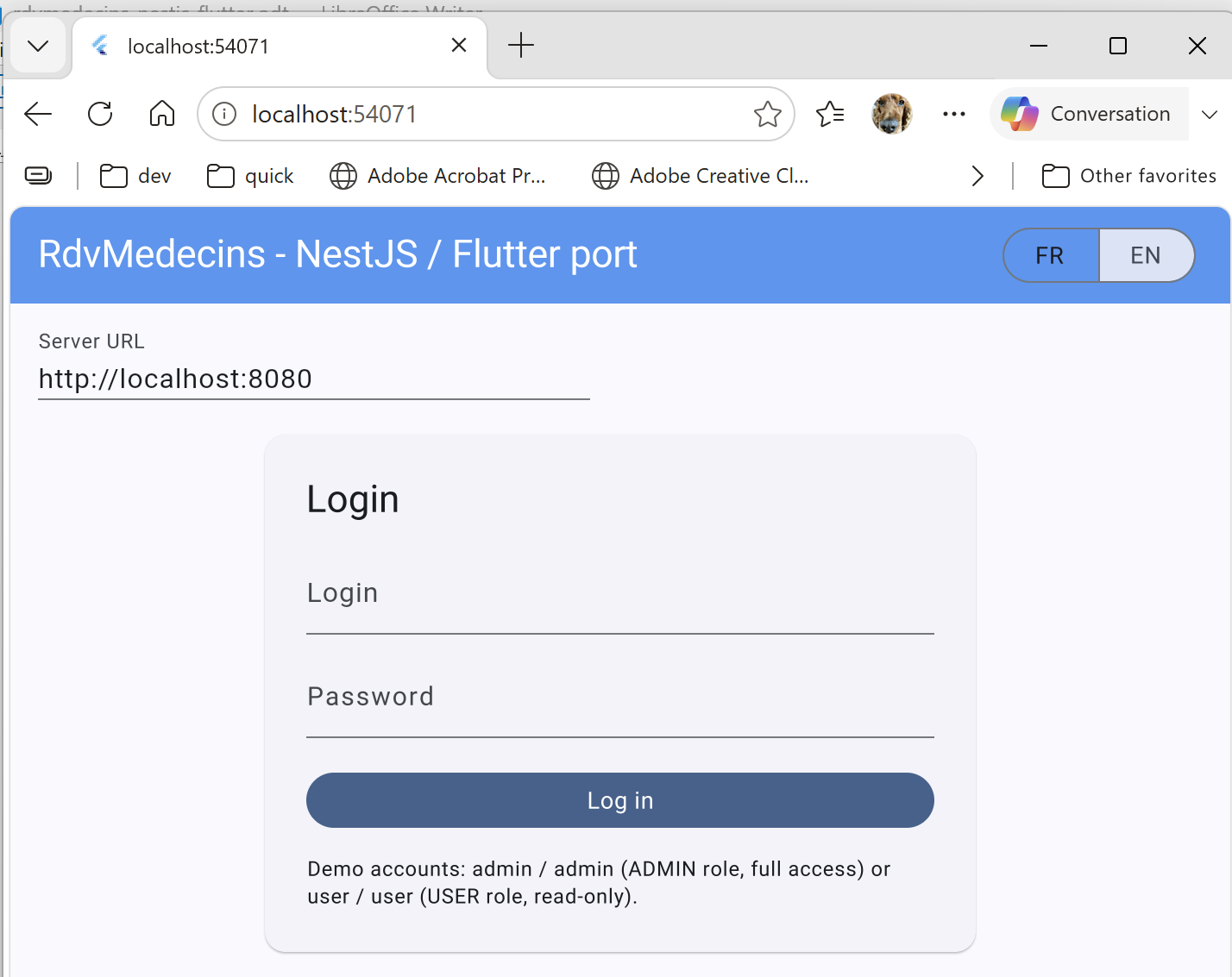
5.10.2. 2. Log in as an administrator (role ADMIN, full access)
Once logged in with [admin]/[admin], [AppRoot] stops displaying [LoginPage] and loads doctors/clients ([_loadInitialLists()]). After selecting a doctor and a date in [DoctorDayPicker], the calendar is displayed with the “Book”/“Cancel” buttons visible ([canEdit] is equivalent to [true] for this role). Clicking “Book” opens the patient selection dialog box ([openBookingDialog(...)]); after confirmation ([AppointmentService.addAppointment(...)]), the calendar reloads and the time slot appears booked. Clicking “Cancel” (on a booked time slot) directly calls [AppointmentService.deleteAppointment(...)] and makes the time slot available again.
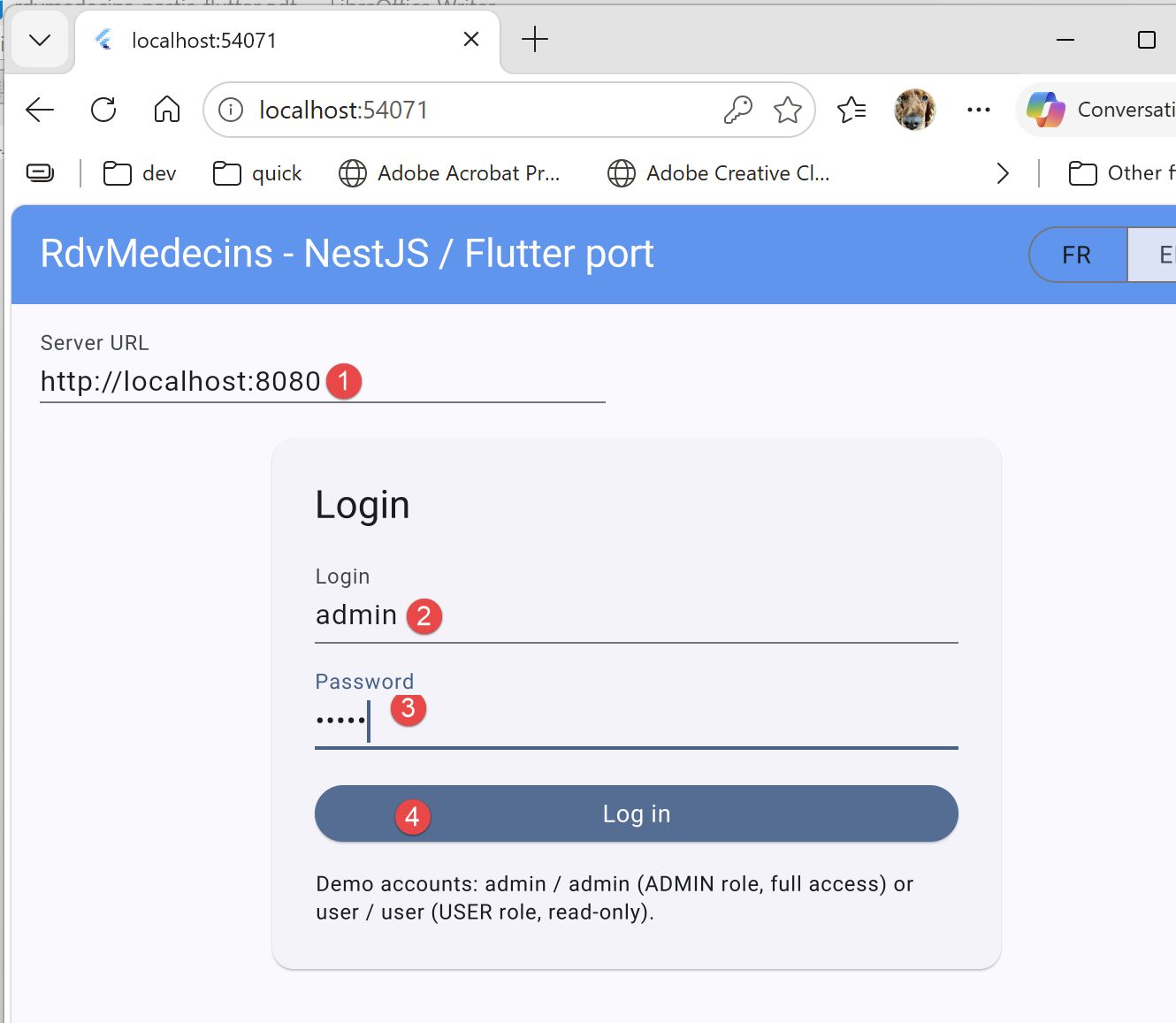
- in [1], the URL from the NestJS server (must be launched);
- to [2-3], the administrator’s credentials: admin / admin;
- in [4]: log in to the server;
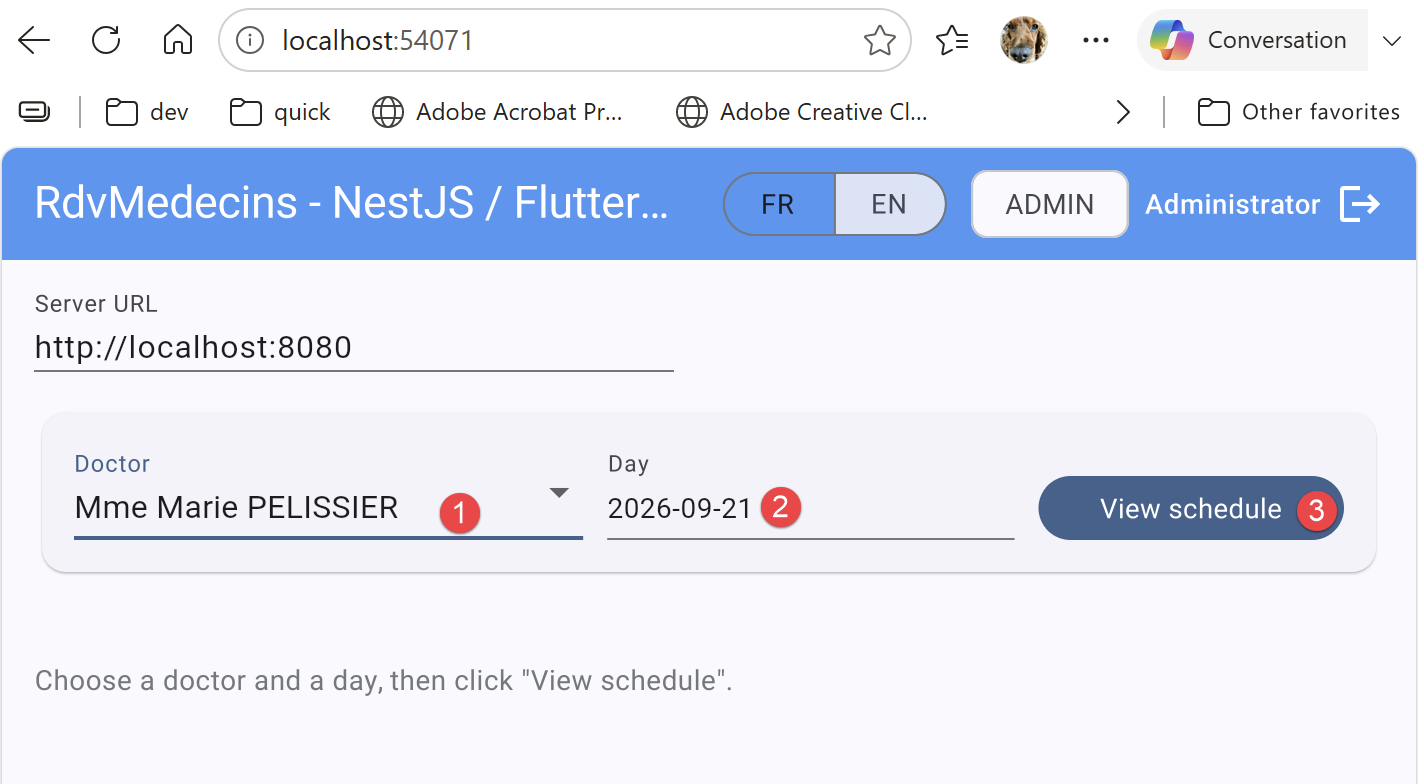
- In [1], select a doctor;
- in [2], select a day;
- In [3], view the selected doctor’s schedule for the chosen day;
- In [1], you make a reservation;
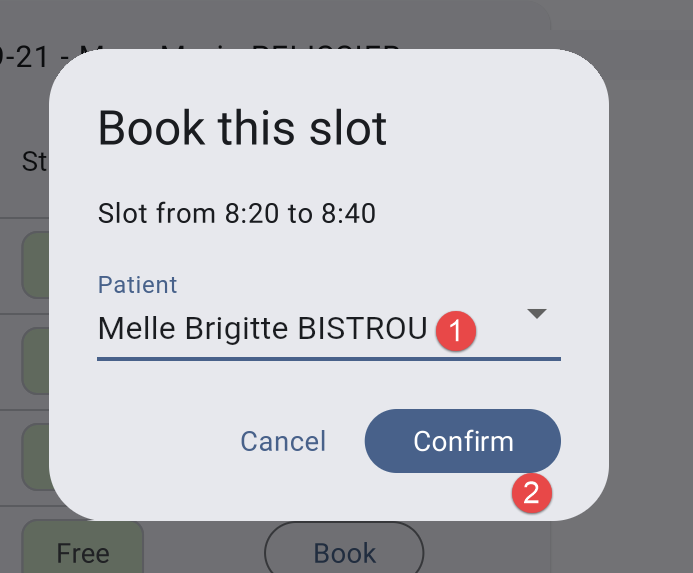
- In [1-2], select a patient and confirm;
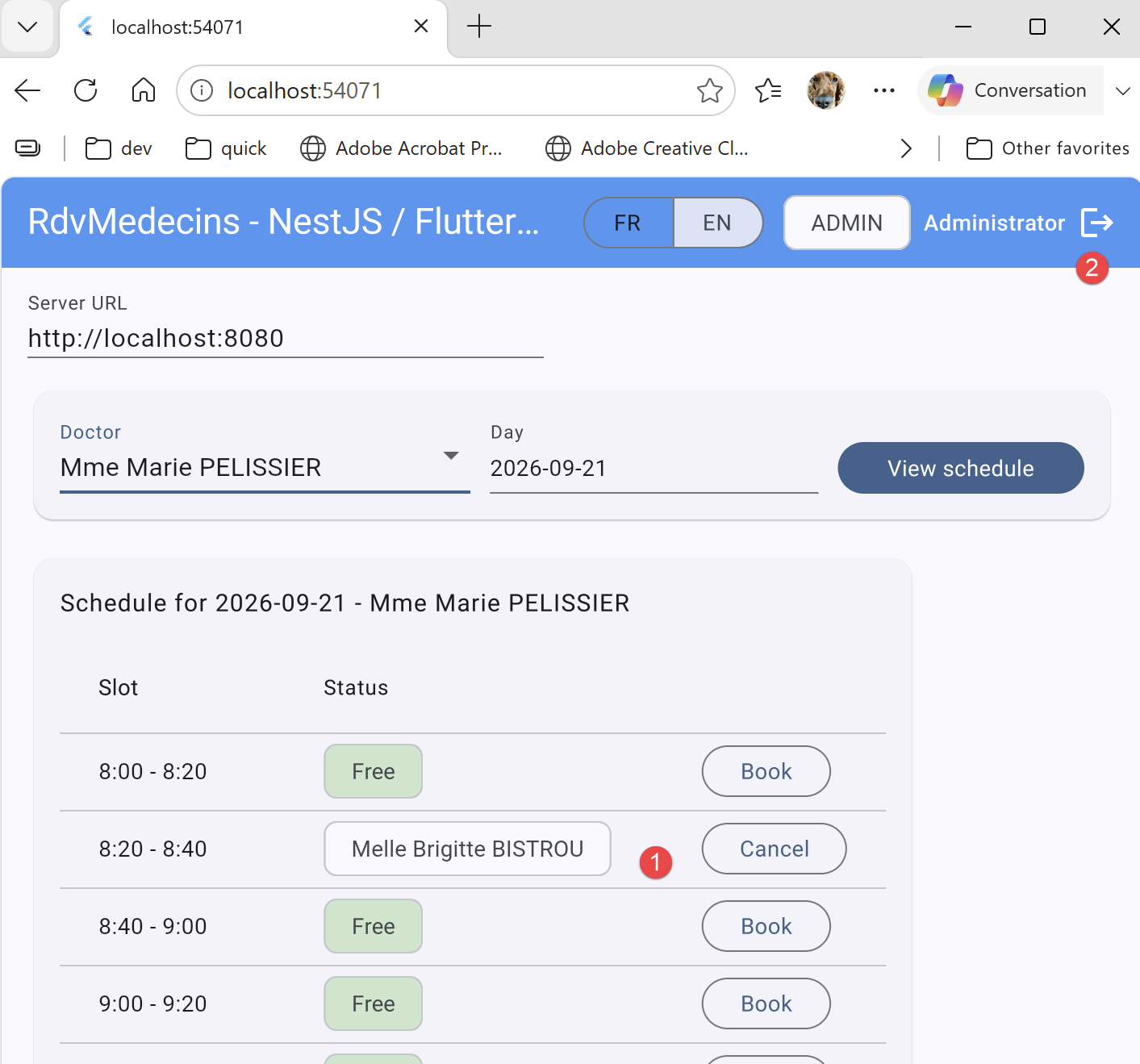
- In [1], the appointment slot is reserved;
- In [2], log out. This takes you back to the login screen;
5.10.3. 3. Log in as a user (role USER, read-only)
After logging out, logging in with [user]/[user] displays a “USER” badge. The calendar remains viewable, but no “Book”/“Cancel” buttons appear ([canEdit] is equivalent to [false])—the server would deny these two actions to this role anyway (403 Forbidden, see Chapter 2).
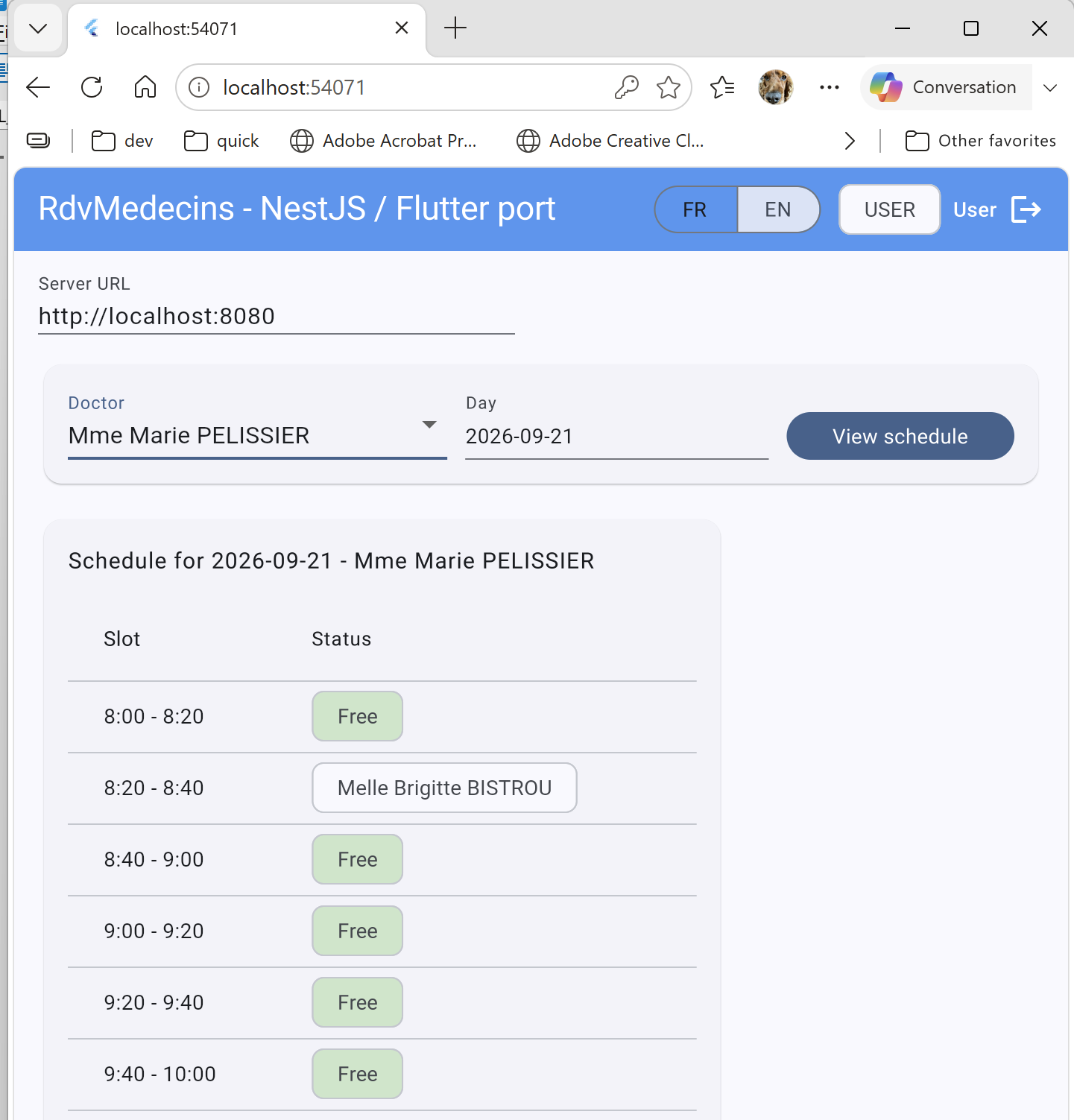
It is not possible to add or delete an appointment.
5.11. What remains out of scope or postponed
- Like the [Angular], [React], and [Vue.js] clients in this course, there is no specific demo/debug mode (no “offline mode” toggle).
- No artificial network delays are introduced on the client side for educational purposes—the observed response times are the actual response times from the [NestJS] server.
- No routers: like the four previous variants, the application fits on a single screen (excluding the reservation dialog box).
- The native projects generated by [flutter create] ([android/], [ios/], [macos/], [windows/], [linux/], [web/]) are not included with this document (see Chapter 1)—they are regenerated locally and are identical for any [Flutter] source project.