5. تطبيق حساب الضرائب
5.1. مقدمة
نعود هنا إلى تطبيق IMPOTS، الذي يستخدمه المؤلف نفسه مرارًا وتكرارًا في نشرة Java. دعونا نستعرض المشكلة. الهدف هو كتابة تطبيق يحسب الالتزام الضريبي للمكلف. سننظر في الحالة المبسطة للمكلف الذي لديه راتب واحد فقط للإبلاغ عنه:
- نحسب عدد شرائح الضريبة للموظف على النحو التالي: nbParts = nbEnfants / 2 + 1 إذا كان غير متزوج، و nbEnfants / 2 + 2 إذا كان متزوجًا، حيث nbEnfants هو عدد الأطفال.
- إذا كان لديه ثلاثة أطفال على الأقل، يحصل على نصف حصة إضافية
- نحسب دخله الخاضع للضريبة R = 0.72 * S، حيث S هو راتبه السنوي
- نحسب معامل الأسرة QF = R / nbParts
- نحسب ضريبته I. انظر الجدول التالي:
12620.0 | 0 | 0 |
13,190 | 0.05 | 631 |
15,640 | 0.1 | 1,290.5 |
24,740 | 0.15 | 2,072.5 |
31,810 | 0.2 | 3,309.5 |
39,970 | 0.25 | 4,900 |
48,360 | 0.3 | 6,898.5 |
55,790 | 0.35 | 9,316.5 |
92,970 | 0.4 | 12,106 |
127,860 | 0.45 | 16,754.5 |
151,250 | 0.50 | 23,147.5 |
172,040 | 0.55 | 30,710 |
195,000 | 0.60 | 39312 |
0 | 0.65 | 49062 |
يحتوي كل صف على 3 حقول. لحساب الضريبة I، ابحث عن أول صف حيث QF <= الحقل 1. على سبيل المثال، إذا كان QF = 23,000، فسيكون الصف الذي تم العثور عليه هو
الضريبة I تساوي إذن 0.15*R - 2072.5*nbParts. إذا كان QF بحيث لا تتحقق الشرط QF<=field1 أبدًا، يتم استخدام المعاملات من الصف الأخير. هنا:
مما يعطي الضريبة I = 0.65*R - 49062*nbParts.
يتم تخزين البيانات التي تحدد شرائح الضريبة المختلفة في قاعدة بيانات ODBC-MySQL. MySQL هو نظام إدارة قواعد البيانات (DBMS) مفتوح المصدر يمكن استخدامه على منصات مختلفة، بما في ذلك Windows وLinux. باستخدام نظام إدارة قواعد البيانات هذا، تم إنشاء قاعدة بيانات باسم dbimpots، تحتوي على جدول واحد يسمى impots. يتم التحكم في الوصول إلى قاعدة البيانات بواسطة اسم مستخدم/كلمة مرور، وفي هذه الحالة admimpots/mdpimpots. توضح لقطة الشاشة التالية كيفية استخدام قاعدة بيانات dbimpots مع MySQL:
C:\Program Files\EasyPHP\mysql\bin>mysql -u admimpots -p
Enter password: *********
Welcome to the MySQL monitor.  Commands end with ; or \g.
Your MySQL connection id is 18 to server version: 3.23.49-max-nt

Type 'help;' or '\h' for help. Type '\c' to clear the buffer.

mysql> use dbimpots;
Database changed

mysql> show tables;
+--------------------+
| Tables_in_dbimpots |
+--------------------+
| impots             |
+--------------------+
1 row in set (0.00 sec)

mysql> describe impots;
+---------+--------+------+-----+---------+-------+
| Field   | Type   | Null | Key | Default | Extra |
+---------+--------+------+-----+---------+-------+
| limites | double | YES  |     | NULL    |       |
| coeffR  | double | YES  |     | NULL    |       |
| coeffN  | double | YES  |     | NULL    |       |
+---------+--------+------+-----+---------+-------+
3 rows in set (0.02 sec)

mysql> select * from impots;
+---------+--------+---------+
| limites | coeffR | coeffN  |
+---------+--------+---------+
|   12620 |      0 |       0 |
|   13190 |   0.05 |     631 |
|   15640 |    0.1 |  1290.5 |
|   24740 |   0.15 |  2072.5 |
|   31810 |    0.2 |  3309.5 |
|   39970 |   0.25 |    4900 |
|   48360 |    0.3 |    6898 |
|   55790 |   0.35 |  9316.5 |
|   92970 |    0.4 |   12106 |
|  127860 |   0.45 |   16754 |
|  151250 |    0.5 | 23147.5 |
|  172040 |   0.55 |   30710 |
|  195000 |    0.6 |   39312 |
|       0 |   0.65 |   49062 |
+---------+--------+---------+
14 rows in set (0.00 sec)

mysql>quit
يتم تحويل قاعدة بيانات dbimpots إلى مصدر بيانات ODBC على النحو التالي:
- قم بتشغيل "مدير مصدر بيانات ODBC" 32 بت
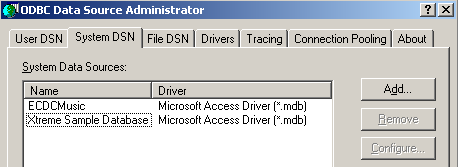
- استخدم الزر [إضافة] لإضافة مصدر بيانات ODBC جديد
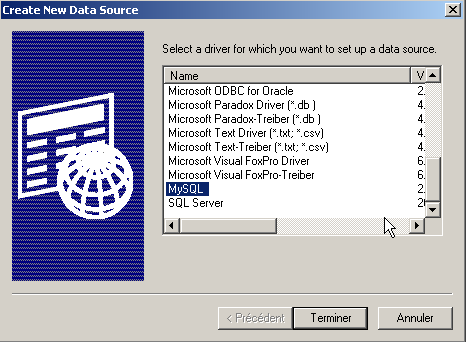
- حدد برنامج تشغيل MySQL وانقر على [إنهاء]
54321
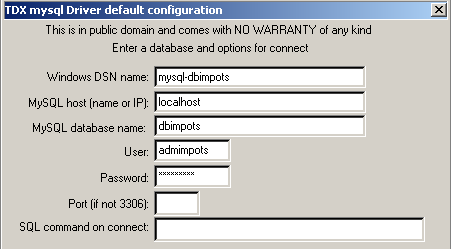
- يطلب برنامج تشغيل MySQL قدرًا معينًا من المعلومات:
1 | اسم DSN الذي سيتم إعطاؤه لمصدر بيانات ODBC — يمكن أن يكون أي شيء |
2 | الجهاز الذي يعمل عليه نظام إدارة قواعد البيانات MySQL — هنا، localhost. تجدر الإشارة إلى أن قاعدة البيانات قد تكون قاعدة بيانات بعيدة. ولن تدرك التطبيقات المحلية التي تستخدم مصدر بيانات ODBC ذلك. وينطبق هذا بشكل خاص على تطبيق Java الخاص بنا. |
3 | قاعدة بيانات MySQL المراد استخدامها. MySQL هو نظام إدارة قواعد البيانات (DBMS) الذي يدير قواعد البيانات العلائقية، وهي مجموعات من الجداول المرتبطة ببعضها البعض من خلال علاقات. هنا، نحدد اسم قاعدة البيانات التي يتم إدارتها. |
4 | اسم المستخدم الذي لديه حقوق الوصول إلى قاعدة البيانات هذه |
5 | كلمة المرور الخاصة به |
تم تعريف فئتين لحساب الضريبة: impots و impotsJDBC. يتم إنشاء مثيل لفئة impots باستخدام بيانات شرائح الضريبة التي يتم تمريرها كمعلمات في المصفوفات:
// creation of an impots class

public class impots{

  // data required for tax calculation
   // come from an external source

  protected double[] limites=null;
  protected double[] coeffR=null;
  protected double[] coeffN=null;

   // empty builder
  protected impots(){}

   // manufacturer
  public impots(double[] LIMITES, double[] COEFFR, double[] COEFFN) throws Exception{
     // check that the 3 arrays have the same size
    boolean OK=LIMITES.length==COEFFR.length && LIMITES.length==COEFFN.length;
    if (! OK) throw new Exception ("Les 3 tableaux fournis n'ont pas la même taille("+
      LIMITES.length+","+COEFFR.length+","+COEFFN.length+")");
    // it's good
    this.limites=LIMITES;
    this.coeffR=COEFFR;
    this.coeffN=COEFFN;
  }//manufacturer

   // tAX CALCULATION
  public long calculer(boolean marié, int nbEnfants, int salaire){
     // calculating the number of shares
    double nbParts;
    if (marié) nbParts=(double)nbEnfants/2+2;
    else nbParts=(double)nbEnfants/2+1;
    if (nbEnfants>=3) nbParts+=0.5;
         // calculation of taxable income & family quota
        double revenu=0.72*salaire;
        double QF=revenu/nbParts;
         // tAX CALCULATION
        limites[limites.length-1]=QF+1;
        int i=0;
        while(QF>limites[i]) i++;
        // return result
        return (long)(revenu*coeffR[i]-nbParts*coeffN[i]);
    }//calculate
}//class
تستمد فئة impotsJDBC من فئة impots السابقة. يتم إنشاء مثيل لفئة impotsJDBC باستخدام بيانات الشرائح الضريبية المخزنة في قاعدة البيانات. يتم تمرير المعلومات اللازمة للوصول إلى قاعدة البيانات هذه كمعلمات إلى المنشئ:
// imported packages
import java.sql.*;
import java.util.*;

public class impotsJDBC extends impots{
  // addition of a constructor for building
   // limit tables, coeffr, coeffn from table
   // database taxes
  public impotsJDBC(String dsnIMPOTS, String userIMPOTS, String mdpIMPOTS)
      throws SQLException,ClassNotFoundException{

    // dsnIMPOTS: DSN database name
     // userIMPOTS, mdpIMPOTS: database login/password

     // data tables
    ArrayList aLimites=new ArrayList();
    ArrayList aCoeffR=new ArrayList();
    ArrayList aCoeffN=new ArrayList();

    // connection to base
    Class.forName("sun.jdbc.odbc.JdbcOdbcDriver");
    Connection connect=DriverManager.getConnection("jdbc:odbc:"+dsnIMPOTS,userIMPOTS,mdpIMPOTS);
    // creation of a Statement object
    Statement S=connect.createStatement();
    // select request
    String select="select limites, coeffr, coeffn from impots";
    // query execution
    ResultSet RS=S.executeQuery(select);
    while(RS.next()){
      // running line operation
      aLimites.add(RS.getString("limites"));
      aCoeffR.add(RS.getString("coeffr"));
      aCoeffN.add(RS.getString("coeffn"));
    }// next line
     // closing resources
    RS.close();
    S.close();
    connect.close();
     // data transfer to bounded arrays
    int n=aLimites.size();
    limites=new double[n];
    coeffR=new double[n];
    coeffN=new double[n];
    for(int i=0;i<n;i++){
      limites[i]=Double.parseDouble((String)aLimites.get(i));
      coeffR[i]=Double.parseDouble((String)aCoeffR.get(i));
      coeffN[i]=Double.parseDouble((String)aCoeffN.get(i));
    }//for
  }//manufacturer
}//class
بمجرد إنشاء مثيل لفئة impotsJDBC، يمكن استدعاء طريقة calculate الخاصة بها بشكل متكرر لحساب الضريبة:
يمكن الحصول على البيانات الثلاثة المطلوبة بعدة طرق. وتتمثل ميزة فئة impotsJDBC في أننا لا نحتاج سوى إلى الاهتمام بالحصول على هذه البيانات. وبمجرد الحصول على المعلومات الثلاثة (الحالة الاجتماعية، وعدد الأبناء، والراتب السنوي)، فإن استدعاء طريقة calculer الخاصة بفئة impotsJDBC يعطينا مبلغ الضريبة المستحقة.
5.2. الإصدار 1
نحن في سياق تطبيق ويب يقدم واجهة HTML للمستخدم من أجل الحصول على المعلمات الثلاثة اللازمة لحساب الضريبة:
- الحالة الاجتماعية (متزوج أم لا)
- عدد الأبناء
- الدخل السنوي
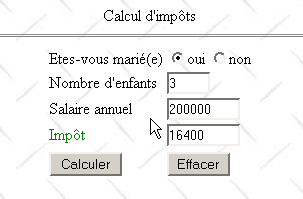
يتم عرض النموذج من خلال صفحة JSP التالية:
<%@ page import="java.util.*" %>

<%
    // on récupère les attributs passés par la servlet principale
  String chkoui=(String)request.getAttribute("chkoui");
  String chknon=(String)request.getAttribute("chknon");
  String txtEnfants=(String)request.getAttribute("txtEnfants");
  String txtSalaire=(String)request.getAttribute("txtSalaire");
  String txtImpots=(String)request.getAttribute("txtImpots");
  ArrayList erreurs=(ArrayList)request.getAttribute("erreurs");
%>

<html>

    <head>
      <title>impots</title>
    <script language="JavaScript" type="text/javascript">
        function effacer(){
          // raz du formulaire
        with(document.frmImpots){
            optMarie[0].checked=false;
          optMarie[1].checked=true;
          txtEnfants.value="";
          txtSalaire.value="";
          txtImpots.value="";
        }//with
      }//effacer
        </script>
  </head>

  <body background="/impots/images/standard.jpg">
      <center>
        Calcul d'impôts
        <hr>
      <form name="frmImpots" action="/impots/main" method="POST">
          <table>
            <tr>
              <td>Etes-vous marié(e)</td>
            <td>
                    <input type="radio" name="optMarie" value="oui" <%= chkoui %>>oui
              <input type="radio" name="optMarie" value="non" <%= chknon %>>non
            </td>
          </tr>
          <tr>
              <td>Nombre d'enfants</td>
            <td><input type="text" size="5" name="txtEnfants" value="<%= txtEnfants %>"></td>
          </tr>
          <tr>
              <td>Salaire annuel</td>
            <td><input type="text" size="10" name="txtSalaire" value="<%= txtSalaire %>"></td>
          </tr>
          <tr>
              <td><font color="green">Impôt</font></td>
            <td><input type="text" size="10" name="txtImpots" value="<%= txtImpots %>" readonly></td>
          </tr>
          <tr></tr>
          <tr>
              <td><input type="submit" value="Calculer"></td>
            <td><input type="button" value="Effacer" onclick="effacer()"></td>
          </tr>
        </table>
      </form>
    </center>
    <%
        // y-a-t-il des erreurs
      if(erreurs!=null){
          // affichage des erreurs
        out.println("<hr>");
        out.println("<font color=\"red\">");
        out.println("Les erreurs suivantes se sont produites<br>");
        out.println("<ul>");
        for(int i=0;i<erreurs.size();i++){
            out.println("<li>"+(String)erreurs.get(i));
        }
        out.println("</ul>");
        out.println("</font>");
      }
   %>
 </body>
</html>
تعرض صفحة JSP ببساطة المعلومات التي تم تمريرها إليها من قبل السيرفلت الرئيسي للتطبيق:
     // retrieve attributes passed by the main servlet
  String chkoui=(String)request.getAttribute("chkoui");
  String chknon=(String)request.getAttribute("chknon");
  String txtEnfants=(String)request.getAttribute("txtEnfants");
  String txtSalaire=(String)request.getAttribute("txtSalaire");
  String txtImpots=(String)request.getAttribute("txtImpots");
  ArrayList erreurs=(ArrayList)request.getAttribute("erreurs");
يمكن أن تحتوي سمات "checked" و"unchecked" الخاصة بأزرار الاختيار على القيمتين "checked" أو "unchecked" للإشارة إلى ما إذا كان زر الاختيار المقابل محددًا أم لا | |
عدد أطفال دافع الضرائب | |
راتبهم السنوي | |
مبلغ الضريبة المستحقة | |
قائمة بالأخطاء، إن وجدت، إذا كانت errors!=null |
تحتوي الصفحة المرسلة إلى العميل على نص برمجي JavaScript يتضمن دالة "Clear" مرتبطة بزر "Clear"، والغرض منها هو إعادة تعيين النموذج إلى حالته الأولية: أزرار غير محددة، وحقول إدخال فارغة. لاحظ أنه لا يمكن تحقيق هذه النتيجة باستخدام زر "إعادة تعيين" HTML. في الواقع، عند استخدام هذا النوع من الأزرار، يعيد المتصفح تعيين النموذج إلى الحالة التي استلمه بها. ومع ذلك، في تطبيقنا، يستلم المتصفح نماذج قد لا تكون فارغة.
يُسمى السيرفلت الرئيسي للتطبيق main.java، ورمزه كما يلي:
import java.io.*;
import javax.servlet.*;
import javax.servlet.http.*;
import java.util.regex.*;
import java.util.*;

public class main extends HttpServlet{

    // instance variables
    String msgErreur=null;
    String urlAffichageImpots=null;
    String urlErreur=null;
    String DSNimpots=null;
    String admimpots=null;
    String mdpimpots=null;
    impotsJDBC impots=null;

    //-------- GET
    public void doGet(HttpServletRequest request, HttpServletResponse response)
    throws IOException, ServletException{

        // was the initialization successful?
        if(msgErreur!=null){
             // we hand over to the error page
            request.setAttribute("msgErreur",msgErreur);
            getServletContext().getRequestDispatcher(urlErreur).forward(request,response);
        }

         // query attributes
        String chkoui=null;
        String chknon=null;
        String txtImpots=null;

        // retrieve query parameters
        String optMarie=request.getParameter("optMarie");              // marital status
        String txtEnfants=request.getParameter("txtEnfants");       // no. of children
        if(txtEnfants==null) txtEnfants="";
        String txtSalaire=request.getParameter("txtSalaire");       // annual salary
        if(txtSalaire==null) txtSalaire="";

         // do we have all the expected parameters
        if(optMarie==null || txtEnfants==null || txtSalaire==null){
             // missing parameters
            request.setAttribute("chkoui","");
            request.setAttribute("chknon","checked");
            request.setAttribute("txtEnfants","");
            request.setAttribute("txtSalaire","");
            request.setAttribute("txtImpots","");
             // we hand over to the tax display url
            getServletContext().getRequestDispatcher(urlAffichageImpots).forward(request,response);
        }

         // we have all the parameters - we check them
        ArrayList erreurs=new ArrayList();
         // marital status
        if( ! optMarie.equals("oui") && ! optMarie.equals("non")){
             // error
            erreurs.add("Etat marital incorrect");
            optMarie="non";
        }
         // number of children
        txtEnfants=txtEnfants.trim();
        if(! Pattern.matches("^\\d+$",txtEnfants)){
            // error
            erreurs.add("Nombre d'enfants incorrect");
        }
         // salary
        txtSalaire=txtSalaire.trim();
        if(! Pattern.matches("^\\d+$",txtSalaire)){
            // error
            erreurs.add("Salaire incorrect");
        }

         // if there are errors, they are passed as query attributes
        if(erreurs.size()!=0){
            request.setAttribute("erreurs",erreurs);
            txtImpots="";
        }else{
             // you can calculate the tax payable
            try{
                int nbEnfants=Integer.parseInt(txtEnfants);
                int salaire=Integer.parseInt(txtSalaire);
                txtImpots=""+impots.calculer(optMarie.equals("oui"),nbEnfants,salaire);
            }catch(Exception ex){}
        }

         // other query attributes
        if(optMarie.equals("oui")){
            request.setAttribute("chkoui","checked");
            request.setAttribute("chknon","");
        }else{
            request.setAttribute("chknon","checked");
            request.setAttribute("chkoui","");
        }
        request.setAttribute("txtEnfants",txtEnfants);
        request.setAttribute("txtSalaire",txtSalaire);
        request.setAttribute("txtImpots",txtImpots);

         // we hand over to the tax display url
        getServletContext().getRequestDispatcher(urlAffichageImpots).forward(request,response);
    }

     //-------- POST
    public void doPost(HttpServletRequest request, HttpServletResponse response)
    throws IOException, ServletException{
        doGet(request,response);
    }

     //-------- INIT
    public void init(){
         // retrieve initialization parameters
        ServletConfig config=getServletConfig();
        urlAffichageImpots=config.getInitParameter("urlAffichageImpots");
        urlErreur=config.getInitParameter("urlErreur");
        DSNimpots=config.getInitParameter("DSNimpots");
        admimpots=config.getInitParameter("admimpots");
        mdpimpots=config.getInitParameter("mdpimpots");

         // parameters ok?
        if(urlAffichageImpots==null || DSNimpots==null || admimpots==null || mdpimpots==null){
            msgErreur="Configuration incorrecte";
            return;
        }

         // create an instance of impotsJDBC
        try{
            impots=new impotsJDBC(DSNimpots,admimpots,mdpimpots);
        }catch(Exception ex){
            msgErreur=ex.getMessage();
        }
    }
}
- تقوم طريقة init الخاصة بالـ servlet بأمرين:
- تسترد معلمات التهيئة الخاصة بها. تسمح هذه المعلمات لها بالاتصال بقاعدة بيانات ODBC التي تحتوي على البيانات الخاصة بشرائح الضرائب المختلفة (DSNimpots، admimpots، mdpimpots) وعناوين URL للصفحات المرتبطة بالتطبيق: urlAffichageImpots للنموذج، urlErreur لصفحة الخطأ.
- تقوم بإنشاء مثيل لفئة impotsJDBC
في كلتا الحالتين، يتم التعامل مع الأخطاء المحتملة، ويتم تخزين رسالة الخطأ في المتغير msgErreur.
- تقوم طريقة doGET
- تتحقق أولاً من أن السيرفلت قد تم تهيئته بشكل صحيح. إذا لم يكن الأمر كذلك، يتم عرض صفحة الخطأ
- يسترد المعلمات المتوقعة من نموذج الضرائب: optMarie، txtEnfants، txtSalaire. إذا كان أي منها مفقودًا (==null)، يتم إرسال نموذج ضرائب فارغ. قد يظن المرء أن التحقق من صحة المعلمة optMarie غير ضروري. فهذه المعلمة تمثل قيمة زر اختيار، ولا يمكن أن تأخذ هنا سوى إحدى القيمتين "نعم" أو "لا". ومع ذلك، فإن هذا يتجاهل حقيقة أنه لا يوجد ما يمنع البرنامج من الاستعلام مباشرة عن السيرفلت عن طريق إرسال المعلمات التي يريدها إليه. لا يمكنك أبدًا التأكد من أنك متصل فعليًا بمتصفح. قد يؤدي تجاهل هذه النقطة إلى ثغرات أمنية في التطبيق، وفي الواقع، من الشائع العثور على مثل هذه المشكلات حتى في التطبيقات التجارية.
- يتم التحقق من صحة كل من المعلمات الثلاثة المستردة. تتم إضافة أي أخطاء يتم العثور عليها إلى قائمة الأخطاء (ArrayList errors). إذا لم تكن هناك أخطاء، يتم حساب مبلغ الضريبة؛ وإلا، لا يتم حسابه.
- يتم تعيين المعلومات اللازمة لعرض الصفحة كسمات طلب، ثم يتم عرض نموذج الضريبة
صفحة JSP الخاصة بالأخطاء هي كما يلي:
<%
    // jspService
  // une erreur s'est produite
  String msgErreur= (String)request.getAttribute("msgErreur");
  if(msgErreur==null) msgErreur="Erreur non identifiée";
%>
<!-- top of page HTML -->
<html>
  <head>
      <title>impots</title>
  </head>
  <body>
      <h3>calcul d'impots</h3>
      <hr>
    Application indisponible(<%= msgErreur %>)
  </body>
</html>
يُسمى التطبيق الويب impots ويتم تكوينه في ملف server.xml الخاص بـ Tomcat على النحو التالي:
يحتوي دليل التطبيق على الدلائل والملفات التالية:
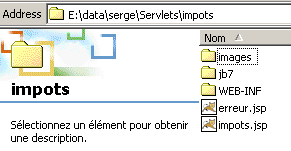
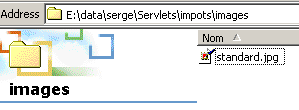
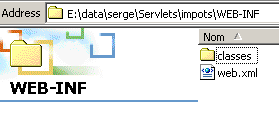
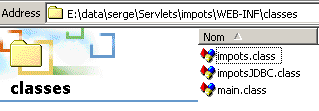
فيما يلي ملف التكوين web.xml لتطبيق impots:
<?xml version="1.0" encoding="ISO-8859-1"?>

<!DOCTYPE web-app
    PUBLIC "-//Sun Microsystems, Inc.//DTD Web Application 2.3//EN"
    "http://java.sun.com/dtd/web-app_2_3.dtd">

<web-app>
    <servlet>
      <servlet-name>main</servlet-name>
    <servlet-class>main</servlet-class>
    <init-param>
          <param-name>urlAffichageImpots</param-name>
        <param-value>/impots.jsp</param-value>
    </init-param>
    <init-param>
          <param-name>DSNimpots</param-name>
        <param-value>mysql-dbimpots</param-value>
    </init-param>
    <init-param>
          <param-name>admimpots</param-name>
        <param-value>admimpots</param-value>
    </init-param>
    <init-param>
          <param-name>mdpimpots</param-name>
        <param-value>mdpimpots</param-value>
    </init-param>
    <init-param>
          <param-name>urlErreur</param-name>
        <param-value>/erreur.jsp</param-value>
    </init-param>
  </servlet>
  <servlet-mapping>
      <servlet-name>main</servlet-name>
    <url-pattern>/main</url-pattern>
  </servlet-mapping>
</web-app>
يُسمى السيرفلت الرئيسي main وله الاسم المستعار /main. وبالتالي، يمكن الوصول إليه عبر عنوان URL http://localhost:8080/impots/main.
فيما يلي بعض أمثلة التطبيقات:
للتشغيل بشكل صحيح، يجب أن يكون لدى السيرفلت حق الوصول إلى قاعدة بيانات mysql-dbimpots. فيما يلي الصفحة التي يتم عرضها إذا كان خادم MySQL، على سبيل المثال، غير قيد التشغيل وبالتالي لا يمكن الوصول إلى قاعدة بيانات mysql-dbimpots:
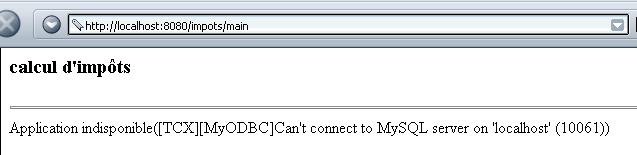
الصفحة التي تظهر في حالة الإدخال غير الصحيح هي كما يلي:
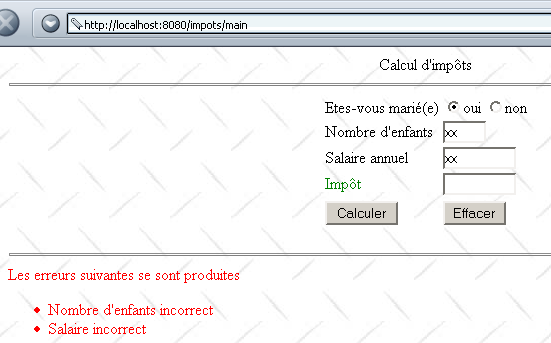
إذا كانت البيانات صحيحة، يتم حساب الضريبة:
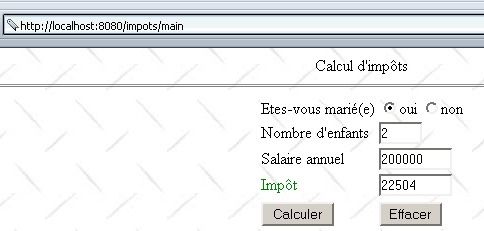
5.3. الإصدار 2
في المثال السابق، يقوم الخادم بالتحقق من صحة المعلمات txtEnfants وtxtSalaire في النموذج. هنا، نقترح التحقق من صحتها باستخدام برنامج نصي JavaScript مضمن في صفحة النموذج. ثم يقوم المتصفح بالتحقق من صحة المعلمات. ولا يتم الاتصال بالخادم إلا إذا كانت المعلمات صحيحة. وهذا يوفر "عرض النطاق الترددي". تصبح صفحة العرض JSP كما يلي:
<%@ page import="java.util.*" %>
............

<html>

    <head>
      <title>impots</title>
    <script language="JavaScript" type="text/javascript">
        function effacer(){
.......
      }//effacer

      function calculer(){
          // vérification des paramètres avant de les envoyer au serveur
        with(document.frmImpots){
          //nbre d'enfants
          champs=/^\s*(\d+)\s*$/.exec(txtEnfants.value);
          if(champs==null){
            // le modéle n'est pas vérifié
            alert("Le nombre d'enfants n'a pas été donné ou est incorrect");
            nbEnfants.focus();
            return;
          }//if
          //salaire
          champs=/^\s*(\d+)\s*$/.exec(txtSalaire.value);
          if(champs==null){
            // le modéle n'est pas vérifié
            alert("Le salaire n'a pas été donné ou est incorrect");
            salaire.focus();
            return;
          }//if
          // c'est bon - on envoie le formulaire au serveur
          submit();
        }//with
      }//calculer
        </script>
  </head>

  <body background="/impots/images/standard.jpg">
........
              <td><input type="button" value="Calculer" onclick="calculer()"></td>
          <td><input type="button" value="Effacer" onclick="effacer()"></td>
.....
 </body>
</html>
لاحظ التغييرات التالية:
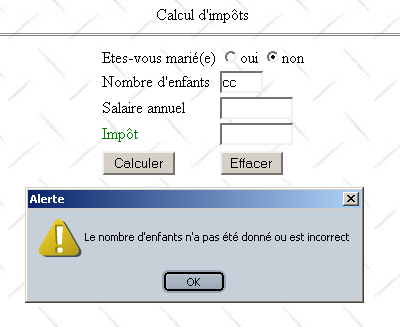
- لم يعد زر "Calculate" زر إرسال، بل أصبح زرًا عاديًا مرتبطًا بوظيفة تسمى "calculate". ستقوم هذه الوظيفة بالتحقق من صحة الحقول "txtEnfants" و"txtSalaire". إذا كانت صحيحة، فسيتم إرسال بيانات النموذج إلى الخادم؛ وإلا، فسيتم عرض رسالة خطأ.
فيما يلي مثال على ما يتم عرضه في حالة حدوث خطأ:
5.4. الإصدار 3
نقوم بإجراء تعديل طفيف على التطبيق لإدخال مفهوم الجلسة. نعتبر الآن التطبيق أداة محاكاة لحساب الضرائب. يمكن للمستخدم بعد ذلك محاكاة "سيناريوهات" مختلفة للمكلفين بالضرائب ومعرفة الالتزام الضريبي لكل منها. توفر صفحة الويب أدناه مثالاً على ما يمكن تحقيقه:
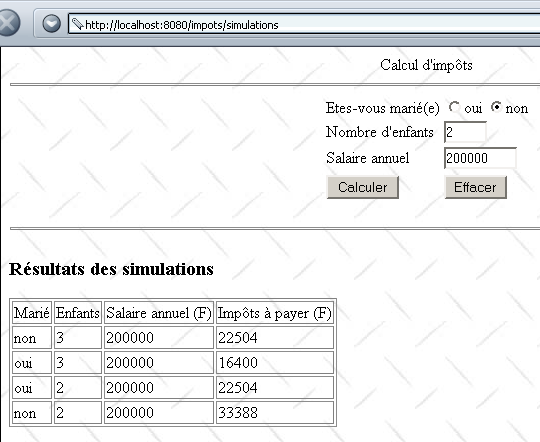
تم تعديل السيرفلت الرئيسي وأصبح يُسمى الآن simulations. تم تكوينه على النحو التالي داخل تطبيق impots:
<?xml version="1.0" encoding="ISO-8859-1"?>

<!DOCTYPE web-app
    PUBLIC "-//Sun Microsystems, Inc.//DTD Web Application 2.3//EN"
    "http://java.sun.com/dtd/web-app_2_3.dtd">

<web-app>
    ....
</servlet>
    <servlet>
      <servlet-name>simulations</servlet-name>
    <servlet-class>simulations</servlet-class>
    <init-param>
          <param-name>urlSimulationImpots</param-name>
        <param-value>/simulationsImpots.jsp</param-value>
    </init-param>
    <init-param>
          <param-name>DSNimpots</param-name>
        <param-value>mysql-dbimpots</param-value>
    </init-param>
    <init-param>
          <param-name>admimpots</param-name>
        <param-value>admimpots</param-value>
    </init-param>
    <init-param>
          <param-name>mdpimpots</param-name>
        <param-value>mdpimpots</param-value>
    </init-param>
    <init-param>
          <param-name>urlErreur</param-name>
        <param-value>/erreur.jsp</param-value>
    </init-param>
  </servlet>
......
  <servlet-mapping>
      <servlet-name>simulations</servlet-name>
    <url-pattern>/simulations</url-pattern>
  </servlet-mapping>
</web-app>
يُسمى السيرفلت الرئيسي simulations ويستند إلى ملف simulations.class. وله الاسم المستعار /simulations، مما يجعله قابلاً للوصول عبر عنوان URL http://localhost:8080/impots/simulations. وله نفس معلمات التهيئة التي تمت مناقشتها سابقًا فيما يتعلق بالسيرفلت الرئيسي فيما يخص الوصول إلى قاعدة البيانات. تظهر معلمة جديدة، **urlSimulationsImpots،** وهي عنوان URL لصفحة JSP الخاصة بالمحاكاة (التي تم عرضها أعلاه).
يشبه سيرفلت simulations.java سيرفلت main.java. ويختلف عنه في النقاط الرئيسية التالية:
- يحسب السيرفلت الرئيسي قيمة لـ `txtImpots` استنادًا إلى المعلمات `optmarie` و`txtEnfants` و`txtSalaire`، ويمرر هذه القيمة إلى صفحة JSP للعرض
- يحسب سيرفلت simulations قيمة txtImpots بنفس الطريقة ويخزن المعلمات (optMarie وtxtEnfants وtxtsalaire وtxtImpots) في قائمة تسمى simulations. يتم تمرير هذه القائمة كمعلمة إلى صفحة JSP للعرض. لضمان احتواء هذه القائمة على جميع عمليات المحاكاة التي أجراها المستخدم، يتم تخزينها كسمة للجلسة الحالية.
فيما يلي خدمة simulations (تم تضمين الأسطر من الكود التي تختلف عن تلك الموجودة في التطبيق السابق فقط):
import java.io.*;
.......

public class simulations extends HttpServlet{

    // instance variables
    String msgErreur=null;
    String urlSimulationImpots=null;
    String urlErreur=null;
...........

    //-------- GET
    public void doGet(HttpServletRequest request, HttpServletResponse response)
    throws IOException, ServletException{

...........

         // retrieve previous simulations from the session
        HttpSession session=request.getSession();
        ArrayList simulations=(ArrayList)session.getAttribute("simulations");
        if(simulations==null) simulations=new ArrayList();
        // put the simulations in the current query
        request.setAttribute("simulations",simulations);

         // other query attributes
...........

         // do we have all the expected parameters
        if(optMarie==null || txtEnfants==null || txtSalaire==null){
........
             // we hand over to the url for displaying tax calculation simulations
            getServletContext().getRequestDispatcher(urlSimulationImpots).forward(request,response);
        }

         // we have all the parameters - we check them
...........

         // if there are errors, they are passed as query attributes
        if(erreurs.size()!=0){
            request.setAttribute("erreurs",erreurs);
        }else{
            try{
                 // you can calculate the tax payable
                int nbEnfants=Integer.parseInt(txtEnfants);
                int salaire=Integer.parseInt(txtSalaire);
                txtImpots=""+impots.calculer(optMarie.equals("oui"),nbEnfants,salaire);
                 // the current result is added to the previous simulations
                String[] simulation={optMarie.equals("oui") ? "oui" : "non",txtEnfants, txtSalaire, txtImpots};
                simulations.add(simulation);
                 // the new simulations value is added to the session
                session.setAttribute("simulations",simulations);
            }catch(Exception ex){}
        }

         // other query attributes
..........

         // we hand over to the simulations display url
        getServletContext().getRequestDispatcher(urlSimulationImpots).forward(request,response);
    }

     //-------- POST
    public void doPost(HttpServletRequest request, HttpServletResponse response)
    throws IOException, ServletException{
        doGet(request,response);
    }

     //-------- INIT
    public void init(){
         // retrieve initialization parameters
        ServletConfig config=getServletConfig();
        urlSimulationImpots=config.getInitParameter("urlSimulationImpots");
        urlErreur=config.getInitParameter("urlErreur");
        DSNimpots=config.getInitParameter("DSNimpots");
        admimpots=config.getInitParameter("admimpots");
        mdpimpots=config.getInitParameter("mdpimpots");

         // parameters ok?
.........................
    }
}
تبدو صفحة JSP للعرض simulationsImpots.jsp الآن كما يلي (تم الاحتفاظ فقط بالكود الذي يختلف عن صفحة JSP للعرض في التطبيق السابق).
<%@ page import="java.util.*" %>

<%
    // on récupère les attributs passés par la servlet principale
...........
  ArrayList simulations=(ArrayList)request.getAttribute("simulations");
%>

<html>

    <head>
      <title>impots</title>
    <script language="JavaScript" type="text/javascript">
........
        </script>
  </head>

  <body background="/impots/images/standard.jpg">
      <center>
        Calcul d'impôts
        <hr>
      <form name="frmImpots" action="/impots/simulations" method="POST">
.......................
           </form>
</center>
    <hr>
    <%
        // y-a-t-il des erreurs ?
      if(erreurs!=null){
..................
      }else if(simulations.size()!=0){
          // résultats des simulations
        out.println("<h3>Résultats des simulations<h3>");
        out.println("<table \"border=\"1\">");
        out.println("<tr><td>Marié</td><td>Enfants</td><td>Salaire annuel (F)</td><td>Impôts à payer (F)</td></tr>");
        for(int i=0;i<simulations.size();i++){
            String[] simulation=(String[])simulations.get(i);
            out.println("<tr><td>"+simulation[0]+"</td><td>"+simulation[1]+"</td><td>"+simulation[2]+"</td><td>"+simulation[3]+"</td></tr>");
        }
        out.println("</table>");
      }
   %>
 </body>
</html>
5.5. الإصدار 4
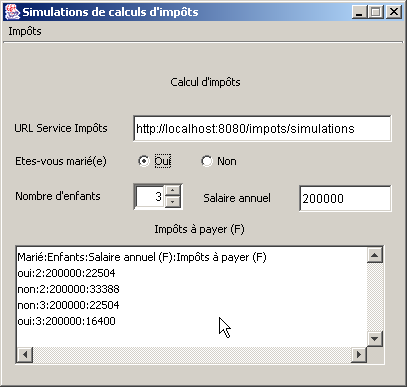
سنقوم الآن بإنشاء تطبيق مستقل سيكون بمثابة عميل ويب لتطبيق /impots/simulations السابق. سيكون لهذا التطبيق واجهة رسومية كما يلي:
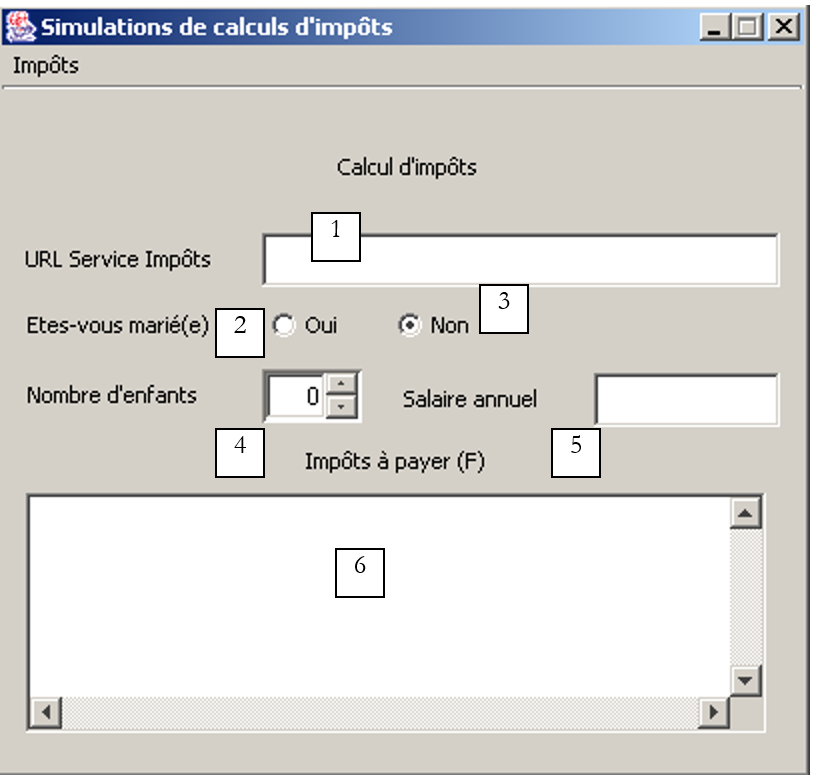 |
رقم | النوع | الاسم | الدور |
1 | JTextField | txtTaxServiceUrl | عنوان URL لخدمة محاكاة حساب الضرائب |
2 | JRadioButton | rdYes | تم تحديد ما إذا كان متزوجًا |
3 | JRadioButton | rdNo | تم تحديد "غير متزوج" |
4 | JSpinner | spinChildren | عدد أطفال دافع الضرائب (الحد الأدنى = 0، الحد الأقصى = 20، الزيادة = 1) |
5 | JTextField | txtSalary | الراتب السنوي للمكلف بالضريبة بالفرنك السويسري |
6 | JList في JScrollPane | lstSimulations | قائمة المحاكاة |
تتكون قائمة الضرائب من الخيارات التالية:
الرئيسية الرئيسية | خيار ثانوي | الاسم | الدور |
الضرائب | |||
احسب | mnuCalculate | يحسب الضريبة المستحقة عندما تكون جميع البيانات المطلوبة للحساب موجودة وصحيحة | |
مسح | mnuClear | إعادة تعيين النموذج إلى حالته الأولية | |
خروج | mnuExit | يغلق التطبيق |
قواعد التشغيل
- يظل خيار القائمة "حساب" معطلاً إذا كان الحقل 1 أو 5 فارغًا
- تم الكشف عن عنوان URL غير صحيح من الناحية النحوية في الحقل 1
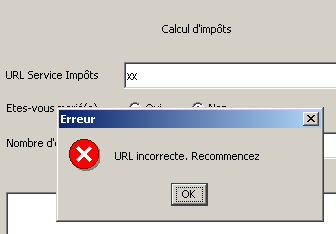
- تم الكشف عن راتب غير صحيح
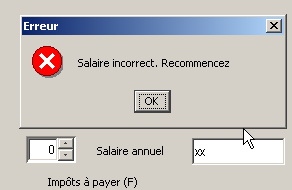
- تم الإبلاغ عن أي خطأ في اتصال الخادم (في المثال 1 أدناه، المنفذ غير صحيح؛ وفي المثال 2، عنوان URL المطلوب غير موجود؛ وفي المثال 3، قاعدة بيانات MySQL لم تكن قيد التشغيل)
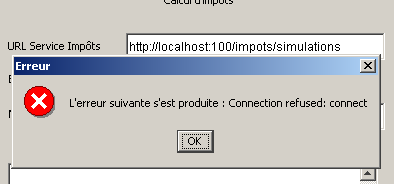
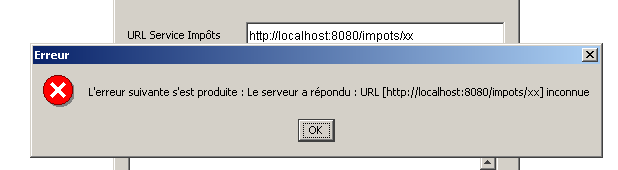
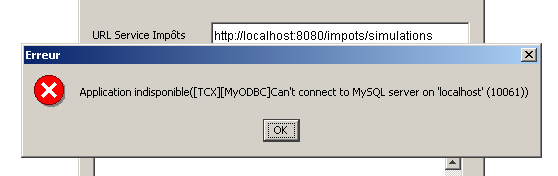
- إذا كان كل شيء صحيحًا، فسيتم عرض المحاكاة
عند كتابة عميل ويب مبرمج، من الضروري معرفة ما يرسله الخادم بالضبط استجابةً للطلبات المختلفة المحتملة من العميل. يرسل الخادم مجموعة من أسطر HTML تحتوي على معلومات مفيدة وعناصر أخرى موجودة فقط من أجل تخطيط HTML. يمكن أن تساعدنا التعبيرات العادية في Java في العثور على المعلومات المفيدة ضمن تدفق الأسطر التي يرسلها الخادم. للقيام بذلك، نحتاج إلى معرفة التنسيق الدقيق لاستجابات الخادم المختلفة. هنا سنستخدم عميل الويب الذي صادفناه سابقًا، والذي يسمح لنا بعرض استجابة الخادم لطلب URL على الشاشة. سيكون عنوان URL المطلوب هو عنوان خدمة محاكاة حساب الضرائب الخاصة بنا، http://localhost:8080/impots/simulations، والتي يمكننا تمرير المعلمات إليها في النموذج http://localhost:8080/impots/simulations?param1=vam1¶m2=val2&...
دعونا نطلب عنوان URL بينما قاعدة بيانات MySQL المستخدمة لإنشاء كائن من نوع الضريبة غير قيد التشغيل:
Dos>java clientweb http://localhost:8080/impots/simulations GET

HTTP/1.1 200 OK
Content-Type: text/html;charset=ISO-8859-1
Date: Fri, 16 Aug 2002 16:31:04 GMT
Connection: close
Server: Apache Tomcat/4.0.3 (HTTP/1.1 Connector)
Set-Cookie: JSESSIONID=9DEC8B27966A1FBE3D4968A7B9DF3331;Path=/impots


<!-- dÚbut from page HTML -->
<html>
  <head>
        <title>impots</title>
  </head>
  <body>
        <h3>calcul d'impôts</h3>
        <hr>
    Application indisponible([TCX][MyODBC]Can't connect to MySQL server on 'localhost' (10061))
  </body>
</html>
لاسترداد الخطأ، يجب على عميل الويب البحث في استجابة خادم الويب عن السطر الذي يحتوي على النص "التطبيق غير متاح". الآن دعونا نبدأ قاعدة بيانات MySQL ونطلب نفس عنوان URL، ونمرر إليه القيم التي يتوقعها (يقبلها بشكل جيد سواء كطلب GET أو POST — انظر كود Java الخاص بالخادم):
Dos>java clientweb "http://localhost:8080/impots/simulations?ptMarie=oui&txtEnfants=2&txtSalaire=200000" GET

HTTP/1.1 200 OK
Content-Type: text/html;charset=ISO-8859-1
Date: Fri, 16 Aug 2002 16:42:36 GMT
Connection: close
Server: Apache Tomcat/4.0.3 (HTTP/1.1 Connector)
Set-Cookie: JSESSIONID=C2A707600E98A37A343611D80DD5C8A2;Path=/impots


<html>

        <head>
        <title>impots</title>
    <script language="JavaScript" type="text/javascript">
        function effacer(){
...................................................
      }//effacer

      function calculer(){
...................................................
      }//calculer
                </script>
  </head>

  <body background="/impots/images/standard.jpg">
        <center>
        Calcul d'imp¶ts
        <hr>
      <form name="frmImpots" action="/impots/simulations" method="POST">
...................................................
      </form>
    </center>
    <hr>
    <h3>Résultats des simulations<h3>
<table "border="1">
<tr><td>Marié</td><td>Enfants</td><td>Salaire annuel (F)</td><td>Impôts à payer (F)</td></tr>
<tr><td>oui</td><td>2</td><td>200000</td><td>22504</td></tr>
</table>

 </body>
</html>
إليك مستند HTML الكامل الذي أرسله الخادم. توجد نتائج المحاكاة المختلفة في الجدول الوحيد الموجود في هذا المستند. قد يكون التعبير العادي الذي يسمح لنا باستخراج المعلومات ذات الصلة من المستند هو التالي:
حيث تمثل التعبيرات الأربعة الموجودة بين الأقواس المعلومات الأربع المراد استخراجها.
لدينا الآن الإرشادات الخاصة بما يجب فعله عندما يطلب المستخدم حساب الضريبة من الواجهة الرسومية السابقة:
- التحقق من صحة جميع البيانات في الواجهة والإبلاغ عن أي أخطاء.
- الاتصال بعنوان URL المحدد في الحقل 1. للقيام بذلك، سنتبع نموذج عميل الويب العام الذي تم عرضه ودراسته بالفعل
- في دفق استجابة الخادم، واستخدام التعبيرات العادية للقيام بأحد الأمرين التاليين:
- العثور على رسالة الخطأ، إن وجدت
- العثور على نتائج المحاكاة في حالة عدم وجود أخطاء
فيما يلي الكود المتعلق بقائمة "حساب":
  void mnuCalculer_actionPerformed(ActionEvent e) {
    // tAX CALCULATION
         // verification URL service
        URL urlImpots=null;
        try{
            urlImpots=new URL(txtURLServiceImpots.getText().trim());
            String query=urlImpots.getQuery();
            if(query!=null) throw new Exception();
        }catch (Exception ex){
             // error msg
            JOptionPane.showMessageDialog(this,"URL incorrecte. Recommencez","Erreur",JOptionPane.ERROR_MESSAGE);
             // focus on wrong field
            txtURLServiceImpots.requestFocus();
             // back to interface
            return;
        }
     // salary verification
    int salaire=0;
    try{
      salaire=Integer.parseInt(txtSalaire.getText().trim());
      if(salaire<0) throw new Exception();
    }catch (Exception ex){
       // error msg
            JOptionPane.showMessageDialog(this,"Salaire incorrect. Recommencez","Erreur",JOptionPane.ERROR_MESSAGE);
       // focus on wrong field
      txtSalaire.requestFocus();
       // back to interface
      return;
    }
     // no. of children
    Integer nbEnfants=(Integer)spinEnfants.getValue();

    try{
             // tax calculation
            calculerImpots(urlImpots,rdOui.isSelected(),nbEnfants.intValue(),salaire);
    }catch (Exception ex){
             // error is displayed
            JOptionPane.showMessageDialog(this,"L'erreur suivante s'est produite : " + ex.getMessage(),"Erreur",JOptionPane.ERROR_MESSAGE);
        }
  }//mnuCalculer


    public void calculerImpots(URL urlImpots,boolean marié, int nbEnfants, int salaire)
          throws Exception{
         // tAX CALCULATION
         // urlImpots : URL of the tax department
         // married: true if married, false otherwise
         // nbEnfants : number of children
         // salary: annual salary

         // remove from urlImpots the info needed to connect to the tax server
        String path=urlImpots.getPath();
        if(path.equals("")) path="/";
        String query="?"+"optMarie="+(marié ? "oui":"non")+"&txtEnfants="+nbEnfants+"&txtSalaire="+salaire;
        String host=urlImpots.getHost();
        int port=urlImpots.getPort();
        if(port==-1) port=urlImpots.getDefaultPort();

         // local data
        Socket  client=null;                        // the customer
        BufferedReader IN=null;                    // the customer's reading flow
        PrintWriter OUT=null;                        // the customer's writing flow
        String réponse=null;                        // server response
         // the model searched in HTTP headers
        Pattern modèleCookie=Pattern.compile("^Set-Cookie: JSESSIONID=(.*?);");
        // the model for a correct answer
        Pattern réponseOK=Pattern.compile("^.*? 200 OK");
         // the result of the model comparison
        Matcher résultat=null;

        try{
             // connect to the server
            client=new Socket(host,port);

            // create customer input/output flows TCP
            IN=new BufferedReader(new InputStreamReader(client.getInputStream()));
            OUT=new PrintWriter(client.getOutputStream(),true);

            // request URL - send HTTP headers
            OUT.println("GET " + path + query + " HTTP/1.1");
            OUT.println("Host: " + host + ":" + port);
            if(! JSESSIONID.equals("")){
                OUT.println("Cookie: JSESSIONID="+JSESSIONID);
            }
            OUT.println("Connection: close");
            OUT.println("");

             // read the 1st line of the answer
            réponse=IN.readLine();
             // compare the HTTP line with the model of the correct answer
            résultat=réponseOK.matcher(réponse);
            if(! résultat.find()){
                // we have a URL problem
                throw new Exception("Le serveur a répondu : URL ["+ txtURLServiceImpots.getText().trim() + "] inconnue");
            }//if(result)

             // we read the response through to the end of the headers, looking for any cookies
            while((réponse=IN.readLine())!=null){
                 // empty line?
                if(réponse.equals("")) break;
                // line HTTP not empty
                 // if you don't have the session token, look for it
                if (JSESSIONID.equals("")){
                    // compare the HTTP line with the cookie template
                    résultat=modèleCookie.matcher(réponse);
                    if(résultat.find()){
                        // we found the token cookie
                        JSESSIONID=résultat.group(1);
                    }//if(result)
                }//if(JSESSIONID)
            }//while

             // that's it for HTTP headers - move on to HTML code
             // to retrieve simulations
            ArrayList listeSimulations=getSimulations(IN,OUT,simulations);
            simulations.clear();
            for (int i=0;i<listeSimulations.size();i++){
                simulations.addElement(listeSimulations.get(i));
            }

            // it's over
            client.close();
        }catch (Exception ex){
            throw new Exception(ex.getMessage());
        }
    }//calculerImpots

    private ArrayList getSimulations(BufferedReader IN, PrintWriter OUT, DefaultListModel simulations) throws Exception{

        // the model of a line in the simulation table
        Pattern ptnSimulation=Pattern.compile("<tr>\\s*<td>(.*?)</td>\\s*<td>(.*?)</td>\\s*<td>(.*?)</td>\\s*<td>(.*?)</td>\\s*</tr>");
        // the template for a line in the error list
        Pattern ptnErreur=Pattern.compile("(Application indisponible.*?)\\s*$");
         // the result of the model comparison
        Matcher résultat=null;
         // simulations
        ArrayList listeSimulations=new ArrayList();

         // read all the lines to the end
        String ligne=null;
        boolean simulationRéussie=false;
        while((ligne=IN.readLine())!=null){
             // follow-up
             // the line is compared with the error model if the simulation part has not yet been encountered
            if(! simulationRéussie){
                résultat=ptnErreur.matcher(ligne);
                if(résultat.find()){
                    // error msg
                    JOptionPane.showMessageDialog(this,résultat.group(1),"Erreur",JOptionPane.ERROR_MESSAGE);
                    // it's over
                    return listeSimulations;
                }//if
            }//if
             // the line is compared with the simulation model
            résultat=ptnSimulation.matcher(ligne);
            if(résultat.find()){
                // we found a row in the
                listeSimulations.add(résultat.group(1)+":"+résultat.group(2)+":"+résultat.group(3)+
                                                ":"+résultat.group(4));
                 // the simulation was a success
                simulationRéussie=true;
            }//if
        }//while
        // end
        return listeSimulations;
    }
دعونا نشرح هذا الكود قليلاً:
- تتحقق الإجراء mnuCalculer_actionPerformed من صحة بيانات الواجهة. إذا لم تكن صحيحة، يتم عرض رسالة خطأ ويتم إنهاء الإجراء. إذا كانت صحيحة، يتم تنفيذ الإجراء calculerImpots.
- يبدأ الإجراء calculerImpots بإنشاء عنوان URL الذي يحتاجه لطلب
        // on retire d'urlImpots les infos nécessaire à la connexion au serveur d'impôts
        String path=urlImpots.getPath();
        if(path.equals("")) path="/";
        String query="?"+"optMarie="+(marié ? "oui":"non")+"&txtEnfants="+nbEnfants+"&txtSalaire="+salaire;
        String host=urlImpots.getHost();
        int port=urlImpots.getPort();
        if(port==-1) port=urlImpots.getDefaultPort();
........................
- ثم يتصل بهذا الرابط عن طريق إرسال رؤوس HTTP المناسبة:
             // connect to the server
            client=new Socket(host,port);

            // create customer input/output flows TCP
            IN=new BufferedReader(new InputStreamReader(client.getInputStream()));
            OUT=new PrintWriter(client.getOutputStream(),true);

            // request URL - send HTTP headers
            OUT.println("GET " + path + query + " HTTP/1.1");
            OUT.println("Host: " + host + ":" + port);
            if(! JSESSIONID.equals("")){
                OUT.println("Cookie: JSESSIONID="+JSESSIONID);
            }
            OUT.println("Connection: close");
            OUT.println("");
- بمجرد إرسال الطلب، ينتظر عميل الويب الخاص بنا الرد. يتلقى أولاً رؤوس HTTP من رد الخادم. يقوم بتحليل هذه الرؤوس للعثور على رمز الجلسة. في الواقع، يجب عليه إرسال هذا الرمز إلى الخادم حتى يتمكن الخادم من تتبع المحاكاة المختلفة التي تم إجراؤها. لاحظ هنا أنه كان من الأسهل على العميل تخزين المحاكاة المختلفة التي أجراها المستخدم بنفسه. ومع ذلك، فإننا نتمسك بفكرة إعادة الرمز لتقديم مثال جديد لإدارة الجلسة. يتم التعامل مع السطر الأول من الرد بشكل منفصل. يجب أن يكون في صيغة HTTP/version 200 OK للإشارة إلى أن عنوان URL المطلوب موجود بالفعل. إذا لم يكن في هذه الصيغة، فإننا نستنتج أن المستخدم طلب عنوان URL غير صحيح ونبلغه بذلك.
         // the model searched in HTTP headers
        Pattern modèleCookie=Pattern.compile("^Set-Cookie: JSESSIONID=(.*?);");
        // the model of a correct answer
        Pattern réponseOK=Pattern.compile("^.*? 200 OK");
..........

             // read the 1st line of the answer
            réponse=IN.readLine();
             // compare the HTTP line with the model of the correct answer
            résultat=réponseOK.matcher(réponse);
            if(! résultat.find()){
                // we have a URL problem
                throw new Exception("Le serveur a répondu : URL ["+ txtURLServiceImpots.getText().trim() + "] inconnue");
            }//if(result)

             // we read the response through to the end of the headers, looking for any cookies
            while((réponse=IN.readLine())!=null){
                 // empty line?
                if(réponse.equals("")) break;
                // line HTTP not empty
                 // if you don't have the session token, look for it
                if (JSESSIONID.equals("")){
                    // compare the HTTP line with the cookie template
                    résultat=modèleCookie.matcher(réponse);
                    if(résultat.find()){
                        // we found the token cookie
                        JSESSIONID=résultat.group(1);
                    }//if(result)
                }//if(JSESSIONID)
            }//while
- بمجرد معالجة رؤوس HTTP، ننتقل إلى الجزء HTML من الاستجابة
             // that's it for HTTP headers - move on to HTML code
             // to retrieve simulations
            ArrayList listeSimulations=getSimulations(IN,OUT,simulations);
            simulations.clear();
            for (int i=0;i<listeSimulations.size();i++){
                simulations.addElement(listeSimulations.get(i));
            }
- تُرجع الإجراء getSimulations قائمة المحاكاة إن وجدت؛ وستكون هذه القائمة فارغة إذا أرجع الخادم رسالة خطأ. في هذه الحالة، تُعرض رسالة الخطأ في مربع رسالة. وإذا لم تكن القائمة فارغة، تُعرض في القائمة المنسدلة لواجهة المستخدم الرسومية.
- يقارن الإجراء getSimulations كل سطر من استجابة HTML بالتعبير العادي الذي يمثل رسالة الخطأ (التطبيق غير متاح...) وبالتعبير العادي الذي يمثل محاكاة. إذا تم العثور على رسالة الخطأ، يتم عرضها وينتهي الإجراء. إذا تم العثور على نتيجة محاكاة، يتم إضافتها إلى قائمة المحاكاة. في نهاية الإجراء، يتم إرجاع هذه القائمة كنتيجة.
    private ArrayList getSimulations(BufferedReader IN, PrintWriter OUT, DefaultListModel simulations) throws Exception{

        // the model of a line in the simulation table
        Pattern ptnSimulation=Pattern.compile("<tr>\\s*<td>(.*?)</td>\\s*<td>(.*?)</td>\\s*<td>(.*?)</td>\\s*<td>(.*?)</td>\\s*</tr>");
        // the template for a line in the error list
        Pattern ptnErreur=Pattern.compile("(Application indisponible.*?)\\s*$");
5.6. الإصدار 5
هنا، نقوم بتحويل التطبيق الرسومي المستقل السابق إلى تطبيق Java صغير. تختلف الواجهة الرسومية قليلاً. في التطبيق المستقل، كان المستخدم يزود بنفسه عنوان URL لخدمة محاكاة حساب الضرائب، ثم يتصل التطبيق بهذا العنوان. هنا، يكون التطبيق العميل هو متصفح، ويطلب المستخدم عنوان URL لوثيقة HTML التي تحتوي على التطبيق الصغير. من المهم تذكر أن تطبيق Java الصغير لا يمكنه إنشاء اتصال شبكة إلا مع الخادم الذي تم تنزيله منه. وبالتالي، سيكون عنوان URL لخدمة المحاكاة على نفس الخادم الذي يوجد عليه مستند HTML الذي يحتوي على التطبيق الصغير. في مثالنا، سيكون هذا معلمة تهيئة للتطبيق الصغير موضوعة في حقل txtUrlServiceImpots، والتي لن يكون بإمكان المستخدم تعديلها. وينتج عن ذلك العميل التالي:
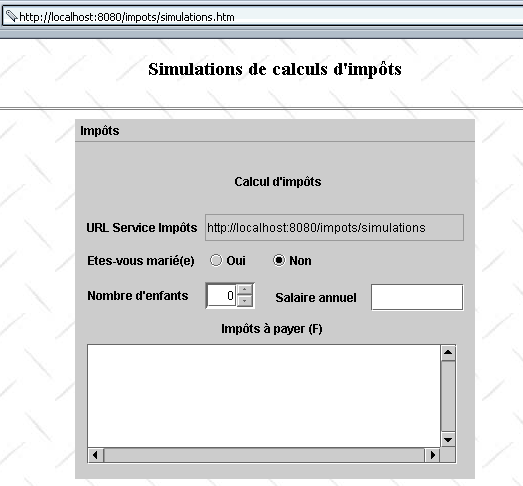
يُسمى مستند HTML الذي يحتوي على التطبيق الصغير simulations.htm وهو كما يلي:
<html>
    <head>
      <title>Simulations de calculs d'impôts</title>
  </head>
  <body background="/impots/images/standard.jpg">
      <center>
          <h3>Simulations de calculs d'impôts</h3>
        <hr>
        <applet code="appletImpots.class" width="400" height="360">
            <param name="urlServiceImpots" value="simulations">
            </applet>
    </center>
  </body>
</html>
يحتوي التطبيق الصغير على معلمة تسمى *urlServiceImpots، وهي عنوان URL لخدمة محاكاة حساب الضرائب. هذا العنوان URL نسبي بالنسبة لعنوان URL لمستند HTML simulations.htm. وبالتالي، إذا استرد المتصفح هذا المستند عبر عنوان URL http://localhost:8080/impots/simulations.htm، فسيكون عنوان URL لخدمة المحاكاة هو http://localhost:8080/impots/simulations. وإذا كان عنوان URL هذا هو http://stahe:8080/impots/simulations.htm، فسيكون عنوان URL لخدمة المحاكاة هو http://stahe:8080/impots/simulations*.
تدمج التطبيق الصغير appletImpots.java بالكامل الكود من التطبيق الرسومي المستقل السابق مع الالتزام بقواعد تحويل التطبيق الرسومي إلى تطبيق صغير.
public class appletImpots extends JApplet {
  // window components
  JPanel contentPane;
  JMenuBar jMenuBar1 = new JMenuBar();
  JMenu jMenu1 = new JMenu();
  JMenuItem mnuCalculer = new JMenuItem();
.............


   //Building the frame
  public void init() {
    try {
      jbInit();
    }
    catch(Exception e) {
      e.printStackTrace();
    }
     // other initializations
    moreInit();
  }

   // form initialization
  private void moreInit(){
         // retrieve the urlServiceImpots parameter
        String urlServiceImpots=getParameter("urlServiceImpots");
        if(urlServiceImpots==null){
            // missing parameter
            JOptionPane.showMessageDialog(this,"Le paramètre urlServiceImpots de l'applet n'a pas été défini","Erreur",JOptionPane.ERROR_MESSAGE);
             // end
            return;
        }
         // put the URL in its field
        String codeBase=""+getCodeBase();
        if(codeBase.endsWith("/"))
           txtURLServiceImpots.setText(codeBase+urlServiceImpots);
      else txtURLServiceImpots.setText(codeBase+"/"+urlServiceImpots);
    // calculate menu disabled
    mnuCalculer.setEnabled(false);
     // spinner Children - between 0 and 20 children
    spinEnfants=new JSpinner(new SpinnerNumberModel(0,0,20,1));
    spinEnfants.setBounds(new Rectangle(130,140,50,27));
    contentPane.add(spinEnfants);
  }//moreInit

   //Initialize component
  private void jbInit() throws Exception  {
    contentPane = (JPanel) this.getContentPane();
    contentPane.setLayout(null);
...............
  }
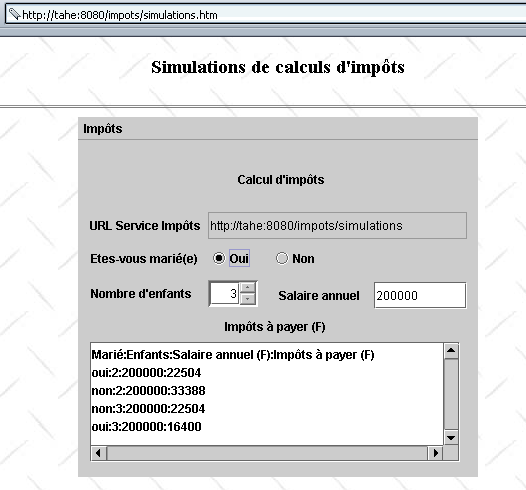
عندما يقوم المتصفح بتحميل تطبيق صغير، فإنه يقوم أولاً بتنفيذ طريقة init الخاصة به. في هذه الطريقة، قمنا باسترداد قيمة المعلمة urlServiceImpots الخاصة بالتطبيق الصغير، وحسبنا عنوان URL الكامل لخدمة المحاكاة، ووضعنا هذه القيمة في حقل txtURLServiceImpots كما لو أن المستخدم قد قام بكتابتها. بمجرد الانتهاء من ذلك، لم يعد هناك أي فرق بين التطبيقين. على وجه الخصوص، فإن الكود المرتبط بقائمة Calculate متطابق. فيما يلي مثال على التنفيذ:
5.7. الخلاصة
لقد عرضنا إصدارات مختلفة من تطبيق حساب الضرائب الخاص بنا الذي يعمل بنظام العميل-الخادم:
- الإصدار 1: يتم توفير الخدمة من خلال مجموعة من السيرفلتات وصفحات JSP؛ والعميل هو متصفح. ويقوم بإجراء محاكاة واحدة ولا يحتفظ بأي سجل للمحاكاة السابقة.
- الإصدار 2: نضيف بعض الوظائف من جانب المتصفح عن طريق تضمين نصوص JavaScript في مستند HTML الذي يتم تحميله بواسطة المتصفح. ويقوم هذا الإصدار بالتحقق من صحة معلمات النموذج.
- الإصدار 3: نُمكّن الخدمة من تذكر المحاكاة المختلفة التي أجراها العميل من خلال إدارة جلسة العمل. يتم تعديل واجهة HTML وفقًا لذلك لعرض هذه المحاكاة.
- الإصدار 4: أصبح العميل الآن تطبيقًا رسوميًا مستقلًا. وهذا يسمح لنا بإعادة النظر في تطوير عملاء الويب المبرمجين.
- الإصدار 5: يصبح العميل تطبيق Java صغير. لدينا الآن تطبيق خادم-عميل مبرمج بالكامل بلغة Java، سواء على جانب الخادم أو جانب العميل.
في هذه المرحلة، يمكن إبداء بعض الملاحظات:
- تدعم الإصدارات من 1 إلى 3 المتصفحات التي لا تمتلك أي قدرات سوى القدرة على تنفيذ نصوص JavaScript. لاحظ أن المستخدم لديه دائمًا خيار تعطيل تنفيذ هذه النصوص. عندئذٍ سيعمل التطبيق بشكل جزئي فقط في الإصدار 1 (لن يعمل خيار "مسح") ولن يعمل على الإطلاق في الإصدارين 2 و3 (لن يعمل خيارا "مسح" و"حساب"). قد يكون من المفيد تطوير إصدار من الخدمة لا يستخدم نصوص JavaScript.
- يتطلب الإصدار 4 أن يكون لدى جهاز الكمبيوتر العميل آلة افتراضية Java 2.
- يتطلب الإصدار 5 أن يكون لدى جهاز العميل متصفح مزود بجهاز افتراضي Java 2.
عند كتابة خدمة ويب، يجب أن تراعي أنواع العملاء الذين تستهدفهم. إذا كنت ترغب في الوصول إلى أكبر عدد ممكن من العملاء، فيجب عليك كتابة تطبيق يرسل لغة HTML فقط إلى المتصفحات (بدون JavaScript أو تطبيقات صغيرة). أما إذا كنت تعمل ضمن شبكة داخلية (إنترانت) وتتمتع بالسيطرة على تكوين محطات العمل، فيمكنك عندئذٍ أن تكون أكثر صرامة فيما يتعلق بجانب العميل، وقد تكون النسخة 5 السابقة مقبولة في هذه الحالة.
الإصداران 4 و 5 هما عملاء ويب يستردان المعلومات التي يحتاجانها من دفق HTML الذي يرسله الخادم. في كثير من الأحيان، لا نملك أي سيطرة على هذا الدفق. وهذا هو الحال عندما نكون قد كتبنا عميلاً لخدمة ويب موجودة على الشبكة يديرها شخص آخر. لنأخذ مثالاً. لنفترض أن خدمة محاكاة حساب الضرائب الخاصة بنا قد كتبتها الشركة X. حاليًا، ترسل الخدمة المحاكاة في جدول HTML، ويستخدم عميلنا هذه المعلومة لاستردادها. وبالتالي، يقارن كل سطر من استجابة الخادم بالتعبير العادي:
         // the model of a line in the simulation table
        Pattern ptnSimulation=Pattern.compile("<tr>\\s*<td>(.*?)</td>\\s*<td>(.*?)</td>\\s*<td>(.*?)</td>\\s*<td>(.*?)</td>\\s*</tr>");
الآن، لنفترض أن مطور التطبيق يغير المظهر المرئي للاستجابة عن طريق وضع عمليات المحاكاة ليس في جدول بل في قائمة بالصيغة التالية:
في هذه الحالة، سيتعين إعادة كتابة عميل الويب الخاص بنا. وهذا هو التهديد المستمر الذي يواجه عملاء الويب للتطبيقات التي لا نتحكم فيها بأنفسنا. يمكن أن يوفر XML حلاً لهذه المشكلة:
- بدلاً من إنشاء HTML، ستقوم خدمة المحاكاة بإنشاء XML. في مثالنا، يمكن أن يكون هذا
<simulations>
    <entetes marie="marié" enfants="enfants" salaire="salaire" impot="impôt"/>
  <simulation marie="oui" enfants="2" salaire="200000" impot="22504" />
  <simulation marie="non" enfants="2" salaire="200000" impot="33388" />
</simulations>
- يمكن ربط ورقة أنماط بهذا الرد، لتوجيه المتصفحات بشأن العرض المرئي لهذا الرد XML
- ستتجاهل برامج الويب هذه ورقة الأنماط وتسترد المعلومات مباشرة من تدفق XML للاستجابة
إذا رغب مصمم الخدمة في تعديل العرض المرئي للنتائج المقدمة، فسيقوم بتعديل ورقة الأنماط بدلاً من XML. وبفضل ورقة الأنماط، ستعرض المتصفحات التنسيق المرئي الجديد، ولن تكون هناك حاجة لتعديل عملاء الويب البرمجيين. وبالتالي، يمكن كتابة إصدارات جديدة من خدمة المحاكاة الخاصة بنا:
- الإصدار 6: توفر الخدمة استجابة XML مصحوبة بورقة أنماط مخصصة للمتصفحات
- الإصدار 7: العميل هو تطبيق رسومي مستقل يعالج استجابة XML للخادم
- الإصدار 8: العميل هو تطبيق Java صغير يعالج استجابة XML من الخادم